Iliad deve ritirare i comunicati commerciali sulle offerte mobili TOP 170 Plus e TOP 250 Plus: lo ha deciso il Giurì della Pubblicità accogliendo la segnalazione di WindTre. Le pubblicità oggetto di esposto non risultano conformi al Codice di Autodisciplina, e in particolare agli articoli 2 (Comunicazione commerciale ingannevole), 15 (Comparazione) e 20 (Vendite speciali). La pronuncia 15/2026 del 23 giugno 20206 è stata pubblicata oggi sul sito IAP - Istituto dell'Autodisciplina Pubblicitaria.
Per iliad si tratta della seconda segnalazione in poche settimane: era andata bene nel "caso Megan Gale" con il Giurì che ha respinto il ricorso di Fastweb, finisce diversamente ora con l'ordine di interrompere ogni comunicazione commerciale diffusa tramite SMS, TV e radio relativa alle offerte sopra citate.
COSA É STATO CONTESTATO
WindTre ha contestato il messaggio winback che iliad ha inviato ad alcuni suoi ex clienti in cui si promuove TOP 170 Plus. Qui viene citata anche Megan Gale:
Voyager aux États-Unis, au Canada ou au Mexique pendant l’été implique souvent le même besoin : rester connecté sans se compliquer la vie. Entre la recherche d’itinéraires, les réservations de dernière minute, les messages aux proches et l’usage constant des applications de navigation, la...
À l’occasion du MWC Shanghai 2026, Orange met en avant une vision de la 5G pensée pour accompagner la montée en puissance des usages mobiles intensifs. Streaming en haute définition, jeux en ligne, visioconférences professionnelles ou partage de connexion permanent : les réseaux sont aujourd’hui...
Ultima chiamata per i clienti Kena che avrebbero dovuto effettuare il cambio SIM (gratuito) in uno dei negozi dell’operatore e non lo hanno ancora fatto. I clienti a “rischio” non dovrebbero esser molti, in questa fase. Da mesi infatti l’operatore del gruppo TIM ha avviato il passaggio dei clienti ancora legati alla piattaforma gestionale ex Noverca alla nuova di TIM.
Nella maggior parte dei casi non si è resa necessaria alcuna azione da parte dei clienti, il passaggio è stato indolore e visibile. In altri, invece, per questioni tecniche, non si è potuto procedere se non con la sostituzione della SIM, azione che richiede che il cliente si rechi in un punto vendita Kena per la sostituzione materiale della “scheda”. In questo bacino di utenti obbligati ad agire rientra prevalentemente chi ha usato la SIM in sistemi di allarme, dispositivi di IoT, dispositivi in genere differenti da smartphone e tablet. Il cambio è gratuito.
Kena, così, ha inviato l’ennesimo SMS ai clienti interessati spiegando che il tempo stringe, e che in mancanza di sostituzione SIM dovrà procedere alla disattivazione della linea. Il termine ultimo è il 15 luglio. Ecco il messaggio che l’operatore ha inviato agli interessati:
Few things are as delightfully divisive as Android’s dark mode.
Some phones now ship with Android’s darker-style interface activated by default. Most reasonably recent devices offer it as a swift ‘n’ simple toggle. And most people, in my experience, have amusingly strong preferences about which approach they prefer — the standard Android “light” mode, in which screens tend to be bright and with shades of white as a foundation, and the dark mode (a.k.a. “dark theme”), where black and dark gray dominate and everything is much more muted and muddy.
It really is a night and day difference, so to speak — but no matter where you fall on the light vs. dark preference spectrum, it’s well worth your while to noddle over two pertinent points:
Android’s dark mode doesn’t have to be an all-or-nothing decision. With the right setup, you can use it as a dynamically activated sometimes switch that enables itself automatically based on different variables and gives you a darker, less glary motif when conditions call for it while leaving you with the lighter, brighter look the rest of the time.
Regardless of how often you’re using dark mode, a few easy adjustments will make it meaningfully more complete and effective as an end-to-end interface style for whatever you’re doing on your device.
It occurred to me recently that we’ve gone over several smart Android dark mode enhancements over the past weeks and months — and that, put together into a single power-pack bundle, these small-seeming items can add up to create a pretty dramatic difference in your Android-using experience, whether you’re a full-fledged dark mode convert or a more light-preferring vampire skeptic.
Here, specifically, are five easy ways to make Android’s dark mode meaningfully better for you.
Up first is a feature that arose as part of our Android 17 discussion and sparked the entire idea for this collection — and that’s the one-tap switch in the latest Android version that forces every app on your phone to follow your dark mode preference, whether the program technically supports such a setting or not.
In Android 17, finding and flipping that switch will make every app turn dark whenever the system-wide dark mode is active. It eliminates the irksome exceptions that’ve traditionally stayed stubbornly light (due to developer laziness) even when your dark theme is on.
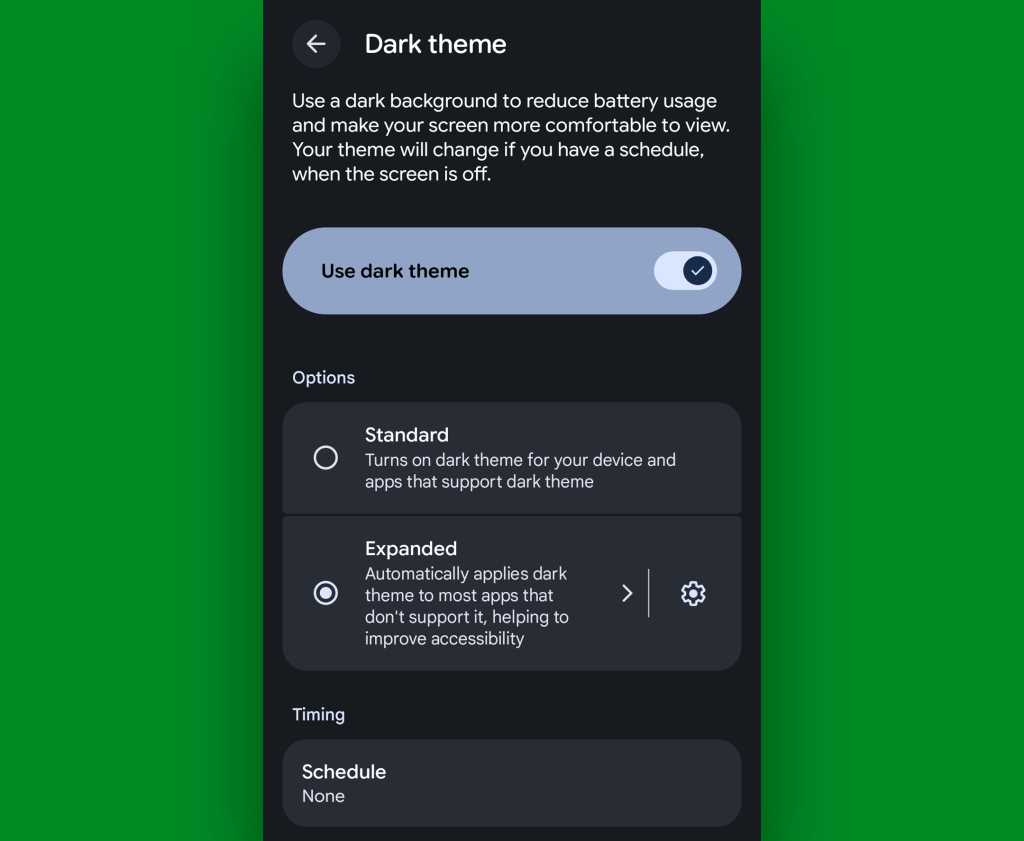
If you’ve got Android 17 on your phone already, it couldn’t be much easier to make it happen. Just look in the Display section of your system settings, tap the words “Dark theme,” then change the setting that shows up next from “Standard” to “Expanded.”
Android’s new “Expanded” option lets you force apps into dark mode compliance, even if they aren’t designed to do it on their own.
JR Raphael, Foundry
No Android 17? No problem: On devices with reasonably recent pre-Android-17 system software, you can actually find a switch buried deep in some developer settings that’ll let you enable the exact same option without any waiting.
That first trick fixes the issue of certain apps not following your dark mode preference — but what about the web? Most of us spend a fair amount of time in our browsers these days, and most websites won’t follow a dark mode setting and adjust their interfaces accordingly.
They absotively can, though. With the flip of a single switch buried within your browser’s bowels, you can force every website into a darkened motif whenever your system-level dark mode is up and running.
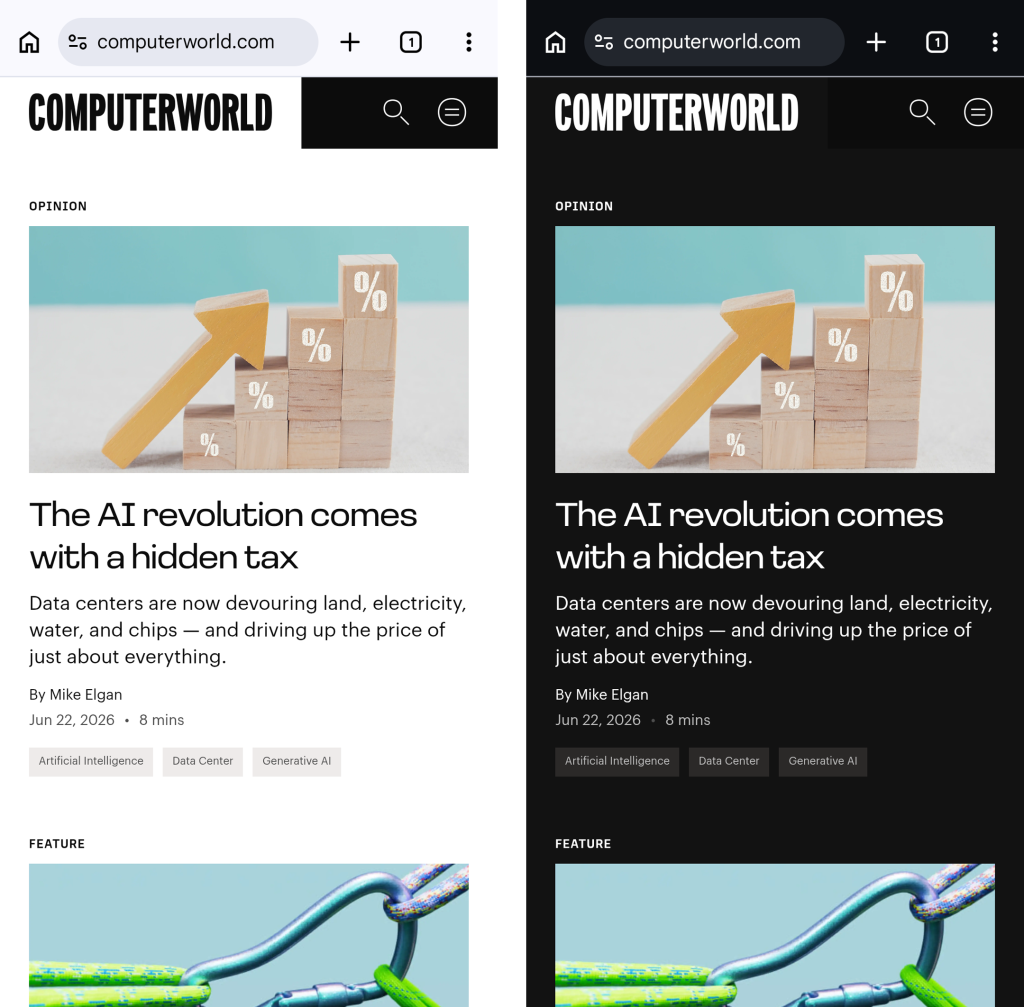
See?
Viewing a website in Chrome normally, at left, and with dark-mode-associated web darkening, at right.
JR Raphael, Foundry
Here’s the secret:
Open up Chrome on whatever Android device you’re using. (And note that this will also work with any Chromium-based Chrome alternative, like Brave, Edge, or Vivaldi.)
Type chrome:flags into the address bar.
Type darken into the search box at the top of the screen that comes up next.
See the line labeled “Darken websites checkbox in themes setting”? Tap the “Default” box beneath it, and change its setting to “Enabled.”
Tap the blue “Relaunch” button at the bottom of the screen.
Now, when Chrome comes back a second or so later…
Tap the three-dot menu icon in its upper-right corner.
Tap “Settings” in the next menu.
Scroll down until you see “Appearance.” Tap it, then tap “Theme.”
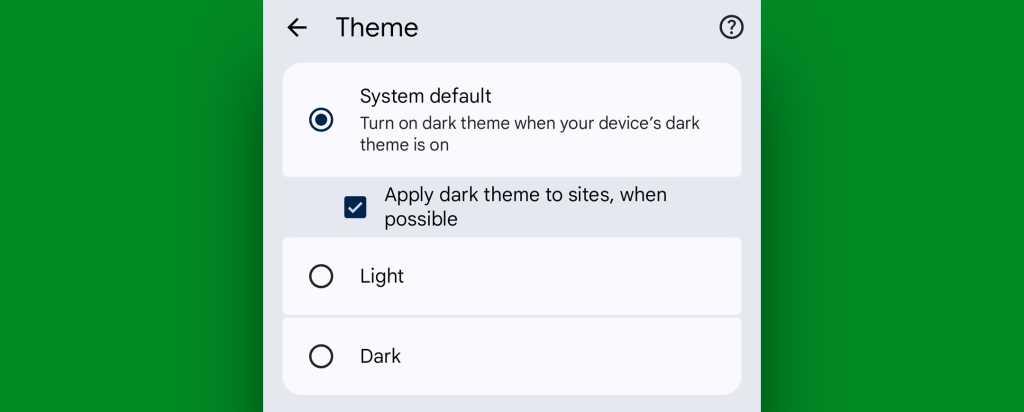
Make sure the newly added box for “Apply dark theme to sites, when possible” — which we just magically made appear via our last little modification — is checked and active.
Chrome’s web-darkening option appears only after you’ve enabled an out-of-the-way flag.
JR Raphael, Foundry
And that’s it: From that moment onward, whenever your Android device is switched into its dark mode, any website you’re viewing within Chrome will automatically follow suit. Nothing more to it, and no further thought or action ever required on your part.
Not bad, eh?!
Android dark mode power-up #3: A dark mode schedule
Even as someone who isn’t into dark mode as a 24/7 sort of thing, I can definitely appreciate the presence of a dimmer, less glary look on my device in certain specific scenarios.
It’s incredibly easy to overlook or forget, but Google’s actually got a way to handle that for you. In fact, it’s been built into Android itself since 2020’s Android 11 release.
Just look in the Display section of your system settings and tap the line for either “Dark theme” or “Dark mode settings.” If you see a toggle alongside that line, make sure you’re tapping the actual words next to it — not the toggle itself.
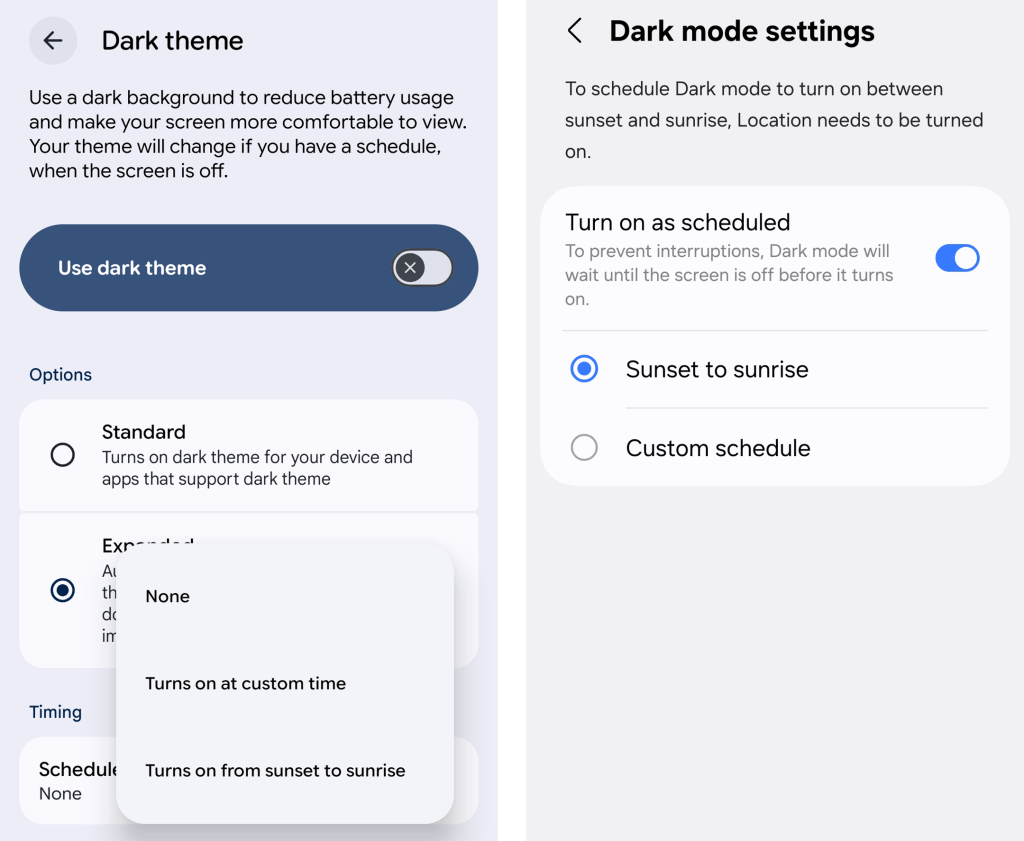
Then look for the option to create a schedule.
An Android dark mode schedule, as seen in Google’s standard Android interface (at left) and in Samsung’s Android style (right).
JR Raphael, Foundry
You can create a time-based rule for when your device’s dark mode turns on and back off again, or — more intelligent yet — you can set it to automatically activate at sunset, wherever you are at any given moment, and then turn itself back off and switch you back over to light mode at sunrise.
Android dark mode power-up #4: Contextual dark mode
A dark mode schedule is pretty forkin’ sensible. But the reality is that even with a time-based setup or a sunset-driven activation approach, you’ll still be using your phone in bright rooms with dark mode active and vice-versa.
And if you want Android’s dark theme present only when you’re actually in a dark room — as makes the most sense in my mind — there’s an even more intelligent option.
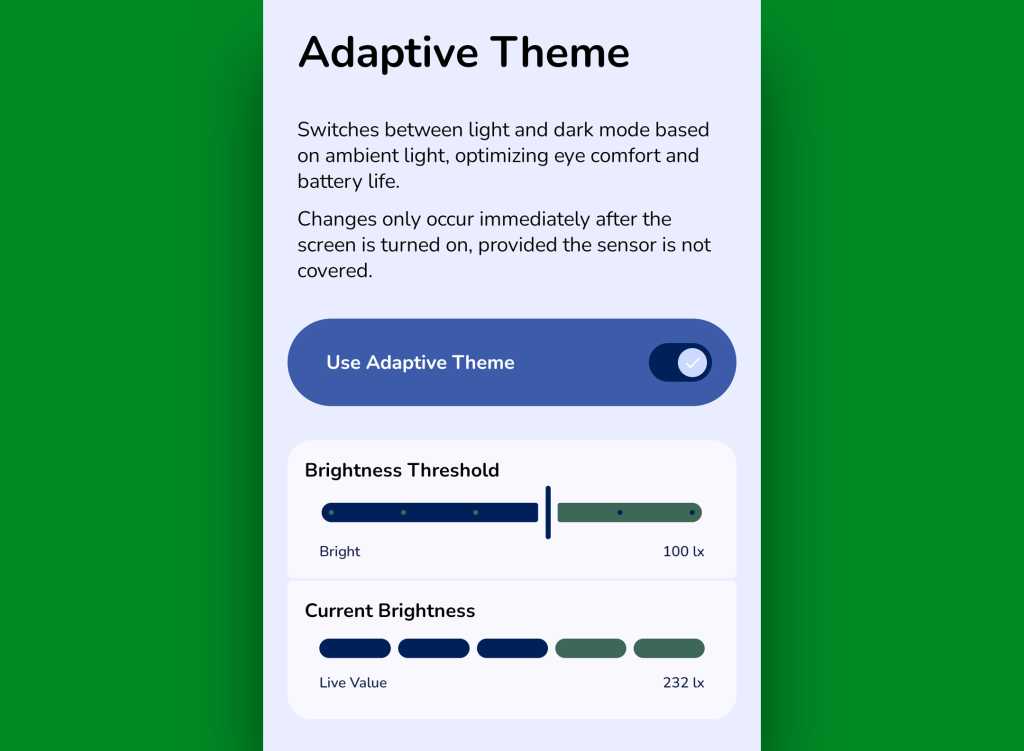
It comes our way via a handy little free app called Adaptive Theme. That app does one thing and only thing only: It automatically adjusts your device’s dark mode setting based on the actual ambient light around you, using your phone’s sensors rather than an arbitrary time or a not-always-relevant sunset status as a guide. It makes so much sense, you’ll find yourself wondering why your phone didn’t just work that way from the get-go.
The app does unavoidably have a slightly complex one-time setup, which I outline step-by-step here. It’s perfectly safe to do, though, and it shouldn’t take you more than a couple minutes to pull off.
And once you’ve done that, your Android dark mode will just work for you — flipping on when the lighting around you is dim (to your exact specifications) and flipping back off when you’re in brighter surroundings.
Adaptive Theme lets you take total control of how and when Android’s dark mode activates based on your environment.
JR Raphael, Foundry
Yes, please — and thank you. Last but not least…
Android dark mode power-up #5: The wallpaper wizard
Superficial as it may seem, the one piece of the puzzle we haven’t yet addressed — that isn’t ordinarily affected by Android’s dark mode setting — is your home screen wallpaper.
By default, whatever wallpaper you set at the system level stays the same even as your interface moves between its dark and light states — and when you’re anglin’ for a dimmer, less glary look in dark environments, that can be pretty darn jarring.
An app called, rather aptly, Dark/Light Wallpaper Scheduler is the answer you never knew you needed. It’s pretty self-explanatory — you tell it which wallpaper you want when your phone is in dark mode and light mode, then it automatically switches ’em out for you based on that status — but I wrote about it in detail here, if you’re interested in reading more about how exactly it works and how you can make the most of it.
And with that, my fellow Android-appreciating animal, your dark mode power-pack is complete. Now, would someone please turn off the lights? I don’t know about you, but all this talk of darkness has me hankering for a nap.
Wake up to even more useful Android wisdom every Friday with my free Android Intelligence newsletter — one practical new trick to try each week, straight from me to ye.
LIVE FROM MWC SHANGHAI 2026: AI naturally dominated the opening keynote session of this year’s event, with China Mobile and Filipino operator Globe Telecom offering insight into consumer benefits of the tech and how it is driving growth at both companies.
Carl Cruz, CEO and president of Globe Telecom (pictured), outlined how his business is arguably one of the most advanced operators globally in terms of implementing AI for its own employee work practices as well as customer use cases.
It is a journey which started in 2024 when Globe Telecom established a group to lead its adoption of AI technology and created the position of chief AI officer (CAIO). The role was taken up by Anton Bonifacio and since widened to become Chief Intelligence and Trust Officer (CITO), leading the integrated structure of key technology and enabling groups across AI, data, cybersecurity and digital policy.
“Our goal was simple,” declared Cruz. “Democratise technology so innovation could come from anywhere. We see AI not as a threat but as a tool for power and growth.”
To that end, Cruz said Globe Telecom had witnessed more than 80 citizen-developed use cases across the business using a hub and spoke operating model. He cited other statistics claiming AI is now embedded in 90% of Globe’s business practices, with more than 260 relevant projects running across all business units.
Cruz put the AI focus on four main areas: hyper personalisation; customer experience; autonomous networks; and the creation of new products and services.
He gave the example of how Globe Telecom used AI to build a new billing agent: “It used to take days, even weeks, to reconcile billing. Today it takes seconds and minutes.”
“It’s about deepening customer relevance, unlocking new value and creating new growth engines for Globe.”
Cruz also talked up Globe Telecom’s AI Fiesta initiative, an affordable aggregator platform which bundles leading global AI models including ChatGPT, Claude, Gemini Pro, Perplexity, DeepSeek and Grok under a single, budget-friendly subscription. It is designed to democratise AI access for students, creators and small business owners.
And the operator has launched Globe Cloud, a personal cloud storage and file-backup service. Running Synchronoss technology, the app allows users to free up device space, sync media across devices, and use AI tools for editing and transforming images.
“AI at Globe is not an end to itself, it is a means to serve customers better, unlock new opportunities and growth,” Cruz said. “It’s not about using AI everywhere, it’s about using AI where it matters most; most importantly the communities we serve”.
“We are only scratching the surface of what’s possible.”
China Mobile: AI for All The world’s largest operator China Mobile opened the keynote with a presentation tagged Mobile AI – AI for All.
Chair Zhongyue Chen highlighted how AI is enabling a hearing-impaired man to carry out everyday tasks.
“AI should not only be serving the elite or remain the domain of the masses,” Chen said.
The company claimed it is open to partnerships to further boost its AI offering. “We are not building a closed garden service for ourselves.”
And its AI for All mantra encompasses a variety of sectors, with Chen highlighting a focus on consumer services, showcasing how the technology is being used to supercharge the TV viewing experience in China of the FIFA World Cup; industries, for example in steel manufacturing where AI is helping reduce exposure to dangerously high temperatures; and infrastructure, where AI is measuring the power of individual models and also the capacity of platforms.
Le Prime Day ne fait pas seulement fondre les prix, il tente aussi de faire redescendre la température. Alors que la chaleur s'invite dans de nombreux foyers, Rakuten applique une remise sur le climatiseur mobile BEKO BP209H grâce au code promo FROID30.
La vague de chaleur s'installe et le retour des soldes est imminent, mais certaines bonnes affaires n'attendent pas. Ce climatiseur mobile Costway aide à maintenir une température agréable pendant les journées les plus étouffantes et peut également prendre le relais lorsque les températures...

 Login
Login