The problem with software development today may no longer be writing code. With AI coding assistants generating code faster than ever, the bigger challenge is reviewing, testing, and safely releasing it.
AWS is betting that software teams need help with that part of the process, adding release management features to its DevOps Agent.
The new features, currently in preview, automatically assess code changes against organizational standards, identify potential release risks, and generate tests tailored to individual changes before they reach production.
The release readiness feature, in particular, runs the code in an AWS-managed isolated environment, executing lightweight user journey tests to verify the software builds, runs, and passes basic functional checks before the change enters the pipeline, the company wrote in a blog post.
The findings of these tests can be viewed through the DevOps Agent console, as comments on pull requests in GitHub or GitLab, or can be invoked directly through IDEs via Kiro or the Claude Code plugin, it added.
Targeting AI-era software delivery bottlenecks
Running code in isolated environments and delivering the results directly through developer tools helps address two longstanding challenges in software delivery, said Pareekh Jain, principal analyst at Pareekh Consulting.
It enables teams to validate how code changes behave before deployment, catching issues that static analysis may overlook, while reducing context switching by embedding findings into existing workflows, in turn accelerating fixes, Jain said.
The analyst pointed out that the release readiness capability addresses a key bottleneck in AI-driven software development: “While AI coding agents can generate code quickly, reviews, compliance checks, dependency validation, and release approvals still slow deployment.”
“By automatically checking code changes against internal standards, security policies, and dependency impacts, AWS helps developers, DevOps teams, and SREs identify issues earlier, reduce manual review effort, and improve release confidence,” Jain added.
These gains in productivity for developers could also translate into tangible business benefits for CIOs, according to Jain.
“Release readiness as a feature could help enterprises capture more value from AI-generated code while reducing operational overhead by eliminating the need for additional QA and DevOps resources. This means that they can accelerate software delivery without sacrificing reliability,” the analyst noted.
Autonomous testing before merging code
While release readiness reviews focus on assessing whether a code change is safe to move through the delivery pipeline, AWS is also adding a separate feature aimed at validating how those changes behave in production-like environments.
Named autonomous release testing, the new capability generates and runs change-specific test plans for web and API-based applications in customer-provisioned, production-like environments before the change actually merges, the company wrote in the blog post.
For Jain, autonomous release testing is “even more” important for developers and SREs as it “automates one of the most time-consuming parts of software delivery.”
“Developers spend less time creating and maintaining tests, while SREs benefit from fewer rollbacks and improved system reliability,” Jain said.
These benefits stem from the feature’s ability to automatically generate tests tailored to individual code changes, covering functional correctness, behavioral regressions, and integration scenarios that might otherwise require significant manual effort, Jain added.
However, AWS is not alone in trying to bring AI deeper into the software delivery lifecycle.
Microsoft-owned GitHub has been expanding Copilot’s code review capabilities, allowing the service to automatically review pull requests, suggest fixes, and provide feedback directly within developer workflows.
Google, meanwhile, has been steadily broadening the scope of Gemini Code Assist beyond code generation to support software development tasks such as code review and developer assistance.
AWS’s differentiation, though, according to Jain, lies in tying those capabilities to release management and operational workflows that span development and production environments.
Availability and pricing
For development teams interested in evaluating DevOps Agent’s new capabilities, AWS said both features are available in preview at no additional cost in the US East (N. Virginia) region.
AWS DevOps Agent, billed per agent-second, is included in the AWS Free Tier for new customers.
Additionally, new AWS DevOps Agent customers receive a 2-month free trial starting with their first operational task after general availability.
Each trial month includes up to 10 agent spaces, 20 hours of investigations (incident response), 15 hours of evaluations (incident prevention), and 20 hours of on-demand SRE tasks (chat), the company said.
Once those limits are exhausted, customers are charged based on consumption, with investigations, evaluations, and on-demand SRE tasks each priced at $0.0083 per agent-second, AWS added.
A prerequisite for using the new release management features includes connecting at least one GitHub or GitLab repository to an AWS DevOps Agent Space.
Z.ai has released GLM-5.2, an MIT-licensed open-source AI model designed for long-running software engineering tasks, as the Chinese company seeks to challenge proprietary coding models on cost and performance.
The company said GLM-5.2 ranked just behind Anthropic’s Claude Opus 4.8 on FrontierSWE, a long-horizon coding benchmark, trailing it by 1%. Z.ai said the model also edged out OpenAI’s GPT-5.5 by 1%.
Z.ai said GLM-5.2 supports a one million-token context window with up to 131,072 output tokens, positioning it for agentic coding workflows that require reasoning across large codebases.
The company is also making an efficiency argument. It said GLM-5.2 uses a technique called IndexShare, which reduces per-token compute by 2.9 times at a one million-token context length. It also said changes to the model’s multi-token prediction layer increased the acceptance length for speculative decoding by up to 20%.
The changes are aimed at a practical problem for developers: long-context coding agents can be expensive to run when they are asked to work across large repositories.
Enterprise appeal
GLM-5.2’s clearest appeal is that it pairs stronger coding capabilities with the cost advantages of an open-source model. But capability alone will not be enough to make it a credible alternative.
“Western enterprises will want independent benchmark validation, successful deployments at global enterprises, strong security and governance controls, and long-term support commitments,” said Pareekh Jain, CEO of Pareekh Consulting.
Jain said the fastest route to enterprise credibility would be hosting by a major cloud provider like AWS. That would allow customers to use the model under standard enterprise terms, with service-level commitments and compliance certifications.
Tulika Sheel, senior VP at Kadence International, said GLM-5.2 would also need to prove it can operate as a stable enterprise product.
“Demonstrated success in real-world deployments and transparent governance will be just as important as benchmark scores,” Sheel said.
The performance and cost claims will also need to hold up against established models.
“Enterprise leaders generally consider two major factors when evaluating new models,” said Lian Jye Su, chief analyst at Omdia. “First, they look at overall performance against competitors, where GLM-5.2 performs well in long-horizon agentic coding and software engineering. Second, they look at the cost of adoption. As an open-source model, GLM-5.2 has clear cost advantages.”
Su said the model could appeal to engineering teams under pressure to control AI costs. It may also attract open-source advocates and companies with significant operations in Asia-Pacific.
But the claims still need wider validation, particularly around hallucination control and coherence during extended tasks. These are critical issues for enterprises considering AI coding agents, which may need to work across large codebases and multi-step software engineering workflows.
Jain said the one million-token context window could be useful for large codebase analysis. It could also help with legacy modernization projects and complex engineering documentation.
He said long-context capability may also help with audit logs or legal contracts, where splitting material into smaller chunks can create errors across document boundaries. But for everyday coding tasks, effective retrieval systems may matter more than very large context windows, making some of the benefits more limited in practice.
Governance risks
The governance question depends largely on where the model runs.
Sheel said enterprises should evaluate GLM-5.2 as they would any strategic technology partner, rather than as a standalone model. That means looking at where data is stored and whether the model can be used in environments customers control.
That deployment choice is central to the risk calculation, according to Jain. Because GLM-5.2 is available under an MIT license, companies can download the weights and run them on their own infrastructure, reducing the need to send sensitive data to Z.ai.
“The risk flips completely if you use Z.ai’s hosted API instead,” Jain said.
He said Chinese national security rules could require domestic companies to cooperate with government requests, making hosted use difficult for regulated industries or workloads involving sensitive data.
Su said the issue is not limited to Chinese vendors. Recent restrictions affecting access to some Anthropic models have also highlighted the risk that enterprises may have limited control over the availability of AI services from foreign providers.
“Selecting solutions from American and Chinese AI vendors does expose non-US Western enterprises to additional risk of having zero control over the availability and uptime of these models,” Su said.
Most generative AI tools know less about R than languages like JavaScript and Python, thanks to how much training data is available for each. However, with a little extra setup, you can give a large language model (LLM) the knowledge it needs to improve its R skills.
Here are 10 ways to help generative AI write R code like a pro.
Use a coding agent
AI coding agents have more power, flexibility, and coding-focused tools than general-purpose chatbots.
Anthropic’s Claude Code and OpenAI’s Codex agents have versions that run in a terminal, IDE extensions, desktop and mobile apps, and other integrations.
R users may also be interested in Posit’s Posit Assistant, which is designed for data analysis in both R and Python. It needs less setup for R than general-purpose coding agents, and it has more built-in knowledge about data science, R package development, and Shiny apps. Plus, it can read objects in your R and Python environments by default, which can be useful in some situations (although perhaps not if you’re working with sensitive data). There are versions of Posit Assistant for RStudio, the Positron IDE, and the terminal. Setup info is here.
Note: Posit Assistant is not the same as the older Positron Assistant that was demo’d at last year’s posit::conf(). The older assistant will eventually be superceded by Posit Assistant. Posit Assistant comes pre-installed with RStudio but not pre-activated, so you don’t need to use it unless you want to.
Google’s original entry in this space, Gemini CLI, is being retired in favor of a new “Antigravity CLI” starting June 18.
There are other IDE platforms with built-in agents, including Cursor and Windsurf, and terminal + subscription coding agents such as Warp, which was open-sourced in April. However, I won’t be covering those here.
You may be limited at work by what your employer allows you to use, but you can still experiment on your own with public data — and then lobby for a new agent if a different one better meets your needs. Whatever you choose, though, moving to one of these from a web-based chatbot should produce better code.
“The shift from chatbot to agent is the most important change in how people use AI since ChatGPT launched,” says Ethan Mollick, co-director of the Wharton School’s Generative AI Labs at the University of Pennsylvania.
Set up CLAUDE.md, AGENTS.md, or GEMINI.md knowledge files
All the major coding agents look for knowledge files to load each time you start a session, and you can easily edit those files. The files can include things like your proficiency in various languages and how you like to document projects. For example, I tell my LLMs that I’d like a README.md in every project with info on how to use the project and technical info on how the project was coded.
Most coding tools let you have both an overarching main file that’s loaded into every session, and an additional file per project.
If you’re adding Claude or Codex to an existing code base, the /init slash command will create one of those .md project files after scanning and analyzing the code. You can also ask an LLM to interview you to create or add to one of those files.
Claude Code looks for a user-level main CLAUDE.md file at ~/.claude/CLAUDE.md and then a project-level file at ./CLAUDE.md or ./.claude/CLAUDE.md. The /memory slash command shows where those files are located. Codex uses AGENTS.md files. Antigravity docs say it looks for a main GEMINI.md file plus GEMINI.md and/or AGENTS.md files in your working directory.
Positron Assistant is set up to read AGENT.md, AGENTS.md, POSITRON.md, CLAUDE.md, GEMINI.md, and LLMS.txt in a workspace root directory, according to the docs. See the Positron docs for more on custom instructions.
Use agent skills
Agent skills can turn an LLM with questionable R knowledge into an expert that understand how you want it to write code. You can develop your own skills, work with your LLM to create skills, or download skills written by others. Claude even has a skill to help you build skills. This is one of the best ways to stop having to repeat the same instructions over and over. Instead, the LLM will “remember” what’s in your skills files by loading them when they’re needed.
What’s the difference between the knowledge .md files mentioned above and a skill? I like to think of CLAUDE.md or AGENTS.md files as important background info that’s always available, while skills are more specific instructions that are useful at certain times. Or, as Claude Opus 4.7 put it: “Skills are for triggered workflows (‘when user asks X, do Y’). A standing rule that applies to every project isn’t trigger-based; it’s a directive I should always follow.” Standing rules should go in CLAUDE.md.
“Create a skill when you keep pasting the same instructions, checklist, or multi-step procedure into chat, or when a section of CLAUDE.md has grown into a procedure rather than a fact,” according to Anthropic’s Claude Code docs. “Unlike CLAUDE.md content, a skill’s body loads only when it’s used, so long reference material costs almost nothing until you need it.” Only skill descriptions are loaded at the start of each session, so the LLM knows what skills are available.
Anthropic originally created skills for Claude in October 2025 and then published the concept as an open standard a couple of months later. Most coding agents now use them.
Anthropic has an easy-to-folllow guide to creating custom skills here if you want to try your hand at building your own.
Posit Assistant comes with several R-related skills built in and allows users to add more. You’ll find them here.
If you’re not using Posit Assistant, you can add Posit-developed skills to another coding agent. Posit published a GitHub repository with skills for creating R packages, Shiny apps, and Quarto documents; for creating and resolving GitHub pull requests; for open-source R and Python package releases; for code reviews (R, Python, JavaScript/TypeScript, SQL); and for creating architectural documentation for a codebase. Browse them all here.
Read and edit the skills you download
Skills are just a folder with one or more markdown text files that have a structured YAML header. That folder can include optional resources and scripts, too. Skill instruction files are easy to read and edit, so you can make sure they do what you want. Tweak them as desired.
For example, Claude helped me write my own customized R skill. Claude leans toward tidyverse packages, but there are other packages I like a lot, too, such data.table. I made sure the R skill knows my package preferences, and under what circumstances I prefer each.
If one of your preferred procedures changes, remember to update the associated skills. Or, ask an LLM to update it for you. Keeping skills up to date will make your coding agent more useful.
Keep your CLAUDE.md or AGENTS.md files updated, too. Maybe you started off with a CLAUDE.md file that said you’re an experienced Python programmer who is just learning R. Three months from now, you might want to update your R skill level. Or, perhaps you told an AGENTS.md file that you like thoroughly documented code, but now you’d prefer a lighter touch. You may want to have your coding agent go over those files with you from time to time and ask you about the main points and whether they need updating.
Use the btw R package and its MCP server
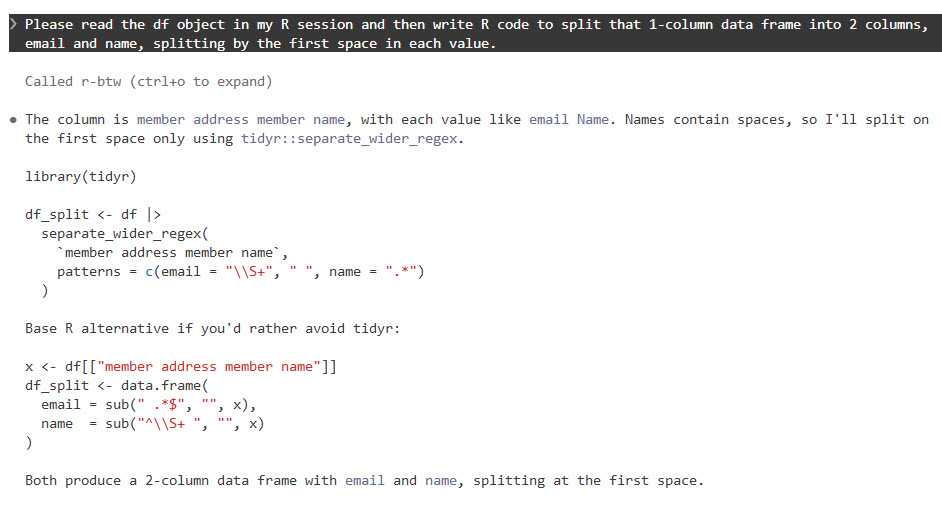
It’s frustrating when an LLM writes code based on an ancient R package version in its training data, or when it doesn’t know about a relatively recent package at all. btw solves this problem by letting your coding agent access info about all the R packages installed on your system. That means it can write code based on your specific R environment. Plus, btw lets an LLM access variables in your current R environment via a Model Context Protocol (MCP) server.
MCP servers are a standardized way for LLMs to access external data — in this case, your running R session (external doesn’t have to mean cloud). Like skills, MCP was created by Anthropic as an open standard and has since been adopted by most major AI platforms. The btw R package includes an MCP server, which you can install for Claude Code by running the following code in a terminal window (not R console).
claude mcp add -s "user" r-btw -- Rscript -e "btw::btw_mcp_server()"
btw comes with a lot of tools. It’s not a great idea to overload your LLM with tools it may never use. If you just want to register btw tools for accessing your R session and looking up package documentation, you can run a command like this instead:
To connect Claude Code to your open R session, you also need to run btw::btw_mcp_session()in every new R session. (I sometimes forget this part until I’m puzzled why Claude can’t read my R variables or even see what packages I have installed.)
You can see a demo of btw in this Posit video that compares Claude Code and Posit Assistant.
The btw R package lets Claude Code and other agents read objects in your R session.
Foundry
You don’t need to do this setup for Posit Assistant, since tools for accessing your R session and variables are built in.
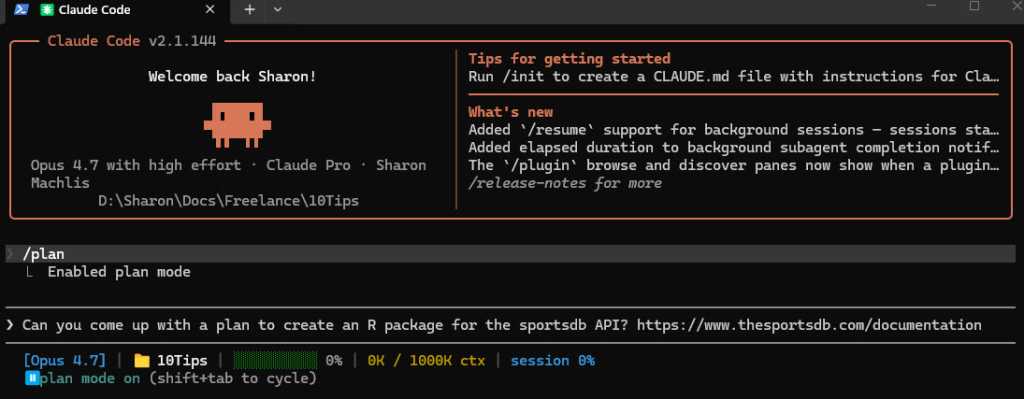
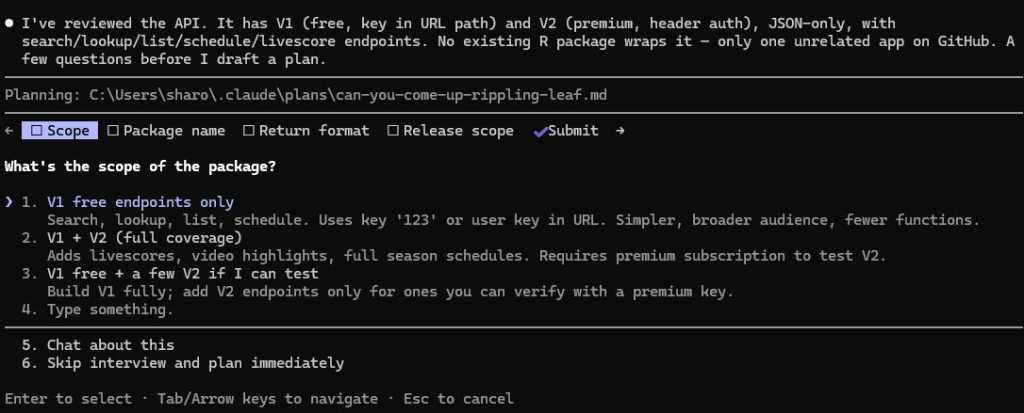
Use plan mode for your projects
I cannot stress this enough. Just as humans benefit from having a plan before starting to implement a project, LLMs benefit from working through a plan before beginning to generate code. Plus, it can be useful at times to “brainstorm” with an LLM about structures and features, ask it for alternatives, or even have another LLM review a plan before implementing it.
Anthropic advises starting with plan mode. “Letting Claude jump straight to coding can produce code that solves the wrong problem. Use plan mode to separate exploration from execution,” they wrote in a best practices doc.
Claude, Codex, Gemini, and Posit Assistant all have a plan mode in their CLI versions that can be activated with the /plan slash command.
Foundry
When in plan mode activated with /plan, Claude will often ask questions before coming up with its plan.
Foundry
Make sure your coding agent learns from its mistakes
This is one of the best tips I read first from Joe Amditis, associate director of operations at the Center for Cooperative Media at Montclair State University: If your coding agent makes a mistake and you work together to fix it, make sure to save that memory so it doesn’t make the same error again.
Your agent may have an auto memory system that’s supposed to do some of this (I’ve used Claude Code’s), but you can instruct any coding agent to keep a separate lessons learned file for each project, too, or ask it what’s the best way to ensure it doesn’t make the same error again. This isn’t a guarantee, any more than you can be assured an LLM will follow all the rules in a CLAUDE.md or AGENTS.md file or all the steps in a skill. But it has definitely cut down on my agents making the same errors over and over.
Have your agent write tests and do code reviews
Tests and code reviews done by a coding agent aren’t a substitute for a human checking that software works. Review an LLM’s results yourself any time a task is important! However, agent-generated tests are still a good way to head off some problems and cut down the time you spend as your LLM’s debugging partner. If you don’t know where to start to help your agent know how to test and review code, see Posit’s testing-r-packages and critical-code-reviewer skills. Your agent may also have built-in code review skills, such as Claude Code’s /code-review slash command.
Code review skills are available from many sources. For example, Sentry has a code review skill in its repository. Aimed specifically at its project’s needs, it can be a useful sample for similar skills. And superpowers is a popular set of general-purpose programming skills that’s billed as “a complete software development methodology for your coding agents, built on top of a set of composable skills and some initial instructions that make sure your agent uses them.” I don’t use superpowers, but a lot of other people clearly do given its more than 227,000 GitHub stars and 20,000 forks.
Another tip: Several experts suggest using a different LLM — maybe even from a different provider — to conduct a code review, since each model has its own strengths and weaknesses.
Don’t forget general prompting good habits
Whatever programming language you’re using, being clear will improve your outputs. Keep your requests targeted, and don’t expect the LLM to read your mind.
“Codex handles complex work better when you break it into smaller, focused steps,” OpenAI says in its developer docs. “Smaller tasks are easier for Codex to test and for you to review. If you’re not sure how to split a task up, ask Codex to propose a plan.”
“Take time to make your prompts as relevant as possible, just as you would when helping a new teammate scope a task,” Google advises in its Five Best Practices for Using AI Coding Assistants. “Consider what details you need to share for a person to succeed, and provide all those details to your AI tool.”
And, don’t load up your context window to the LLM’s published limit. Performance often degrades as you get close to the maximum token limit.
Take advantage of open LLMs, particularly if you have budget and token limits
Open-weight models — especially ones small enough to run on a desktop computer — may never rival frontier LLMs like Claude, GPT, or Gemini. But for a lot of R coding, they don’t need to.
To see how well an LLM can write R code, it should have the same kind of harness that Claude Code, Codex, or Posit Assistant gives larger LLMs. “The harness is the product,” argues Mallory Mejias at Sidecar, an AI education company. “The model is the engine inside it — important, but increasingly interchangeable.” I wouldn’t go that far, since I still find the LLM to be a critical piece of this equation, and models differ. But the same LLM will perform differently depending on the tools and context it has.
Posit recently added Google’s open-source Gemma 4 26B to Assistant’s existing options of larger, closed-source LLMs. “Up until this point, models of this size — small enough to run comfortably on high-end consumer laptops — were on our radar but not yet capable enough to drive an agent harness like Posit Assistant,” Posit senior software engineer Simon Couch wrote on the Posit blog. “This has changed in the last few months with releases like Gemma 4.” However, to use it in Posit Assistant in RStudio, you still need to run it through a Posit AI subscription, not locally. It uses 1/10 the budget that the same session with Claude Sonnet would consume.
Several projects can use Claude Code to run local LLMs. Ollama, open-source software for running LLMs locally, does this with the terminal command ollama launch claude --model , such as:
ollama launch claude --model gemma4:26b
The makers of Unsloth, an open-source framework for running and training models, say running local LLMs inside Claude Code can be very slow due to a cache invalidation issue. They say this can be fixed by adding "CLAUDE_CODE_ATTRIBUTION_HEADER" : "0" to ~/.claude/settings.json under “env”.
Unsloth can also use Claude Code to run local models, but it’s somewhat more involved to install and set up than Ollama. See this Unsloth tutorial.
Open-source coding agent Open Code runs LLMs from OpenAI, Anthropic, Google, Kimi, Alibaba’s Qwen, and others. I haven’t warmed up to it yet compared with commercially backed CLI tools I’ve tried, but it has 174,000 GitHub stars so clearly a lot of fans.
AI consultant Thomas Wiegold, who switched from Claude to Open Code, said “OpenCode covers everything I need for my daily workflow. It’s fast, the provider flexibility is genuinely useful rather than theoretical, and the TUI is better for extended sessions…. That said, I’m not going to pretend it’s all smooth sailing.” He noted some stability issues and a remote code execution vulnerability earlier this year.
Large language models remain imperfect and unpredictable tools, but they’re improving rapidly — as are the harnesses around them. Even frontier LLMs in commercial coding agents can ignore instructions at times and otherwise behave in unpleasantly surprising ways. However, you’ll vastly improve your chances of generating quality code if you use coding agents, take time to set them up with quality instructions, and remember good prompting techniques. Good luck!
—
Coding agent info
Claude Code – Anthropic’s coding agent is available in the terminal and as an IDE extension, a desktop app, mobile apps, Slack app, and a cloud version that can work directly in your repos on GitHub. Arguably the first breakthrough coding agent, it now includes an elegant remote-control option where you can start a session on your desktop and then continue it on a phone or tablet. While designed for Claude LLMs, you can use it to run local LLMs via tools like Ollama or Unsloth Studio. When using Claude models, it tends to offer less usage than other vendors’ options. Anthropic has posted the terminal version’s code on GitHub, with usage governed by Anthropic’s commercial terms of service. You can use Claude Code via API pay per use or as part of a Claude subscription.
Codex – OpenAI’s answer to Claude Code is available via terminal, app, IDE extension, or cloud, with integrations for GitHub, Slack, and Linear. The CLI tool is open source under an Apache license, available on GitHub, and works via API pay per use or as part of a ChatGPT subscription.
Posit Assistant – The Posit (formerly RStudio) coding agent is designed for data work in R and Python, although Posit senior software engineer Simon Couch told me it would do fine for programming work for other uses and in other languages. It is available for the RStudio IDE (via a Posit AI subscription in RStudio), Positron IDE, and as a stand-alone CLI terminal app, although the CLI tool currently doesn’t feel as full-featured as the IDE integrations (that may change). As of this writing, you can also use API keys from Anthropic, OpenAI, and Snowflake Cortex and a GitHub Copilot account in Positron. Posit Assistant is being updated quite frequenty, Couch told me. If you tested it a month or two ago, it has more capabilities now.
Antigravity CLI – Google’s terminal-based tool will be replacing the Gemini CLI for unpaid and Google One users this month. There’s also an Antigravity IDE, SDK, and platform for orchestrating multiple agents. One advantage of Antigravity: Google offers a free plan with access to Gemini 3.5 Flash, Gemini 3.1 Pro, Gemini 3 Flash, Claude Sonnet 4.6, Claude Opus 4.6, and gpt-oss-120b, and what it describes as “generous” but undefined weekly rate limits based on “the degree we have capacity.”
Frontend reliability is often discussed in terms of outages. Teams prepare for failed API calls, downtime and visible crashes because those failures are easy to recognize and measure. However, in many modern applications, the bigger challenge is not complete failure but latency. Systems rarely go fully offline. Instead, they become slow enough that users lose confidence in the interface long before anything technically breaks.
Most frontend engineers have experienced this in production. A page eventually loads, but only after several seconds of waiting. A save action succeeds in the backend, yet the interface remains unchanged long enough that the user clicks the button again. A dashboard renders immediately, but the critical data appears so late that the application feels unstable. In practice, users rarely distinguish between “slow” and “broken.” If an interaction feels uncertain or delayed, trust drops quickly.
As frontend systems become increasingly dependent on distributed cloud infrastructure, latency becomes a normal operating condition rather than an occasional exception. APIs may depend on multiple downstream services, serverless systems may introduce startup delays and state updates may propagate asynchronously across regions or caches. Frontend reliability therefore can no longer be defined only by uptime. It also depends on how clearly the interface behaves while waiting on slow cloud dependencies.
In many production systems, the application remains technically available while still feeling unreliable to users. An API request that takes ten seconds may still return successfully. A delayed state update may eventually synchronize correctly. A dashboard may fully render after several refresh cycles. From a monitoring perspective, these systems appear healthy. From a user perspective, however, the experience feels inconsistent and unpredictable.
What makes this difficult is that many frontend applications are still designed around ideal conditions. Interfaces often assume fast responses, immediate consistency and stable network behavior. Cloud environments rarely behave with that level of predictability. Distributed systems naturally introduce latency, asynchronous updates and intermittent delays, even when everything is technically functioning correctly.
This changes how frontend engineers need to think about resilience. Modern interfaces are no longer designed only for success and failure. They also need to handle slow success, delayed feedback and partial availability in ways that remain understandable to users.
Slow APIs and the user experience problem
One of the most common latency issues frontend teams encounter is the slow API response. Technically, the request succeeds, but the delay changes how users interpret the application. A user waiting several seconds for a response rarely thinks about infrastructure behavior or distributed systems. They assume the interface is frozen, unresponsive or broken.
This becomes especially noticeable in cloud-connected systems where response times vary depending on caching layers, regional routing, serverless initialization or downstream dependencies. Frontend applications designed around consistently fast responses often struggle in these conditions because they treat latency as exceptional instead of expected.
Many applications still rely on generic loading spinners that provide little context beyond “something is happening.” While spinners technically indicate activity, they also communicate uncertainty. Users do not know whether the system is progressing, stalled or close to failure. As waiting time increases, frustration grows quickly.
More effective interfaces treat loading as part of the user experience rather than a temporary placeholder. Skeleton screens, layout-preserving placeholders and contextual loading feedback provide users with a clearer understanding of what is happening. Even relatively small decisions can make a noticeable difference. For example, users generally tolerate a dashboard chart loading later far more than they tolerate waiting several seconds before the navigation menu appears. Similarly, an e-commerce page that progressively loads recommendations often feels faster than one that blocks the entire interface until every service responds.
These patterns do not reduce actual latency, but they significantly improve perceived responsiveness. When users understand that the system is actively processing their request, they are far more tolerant of delays.
Delayed state updates and perceived instability
Another common issue in cloud-based systems is delayed state synchronization. A user submits an action successfully, but the interface does not immediately reflect the result. Even if the backend processes the request correctly, the delay creates uncertainty around whether the action worked at all.
This behavior is increasingly common in distributed architectures where writes may propagate asynchronously across services, regions or caches. Frontend applications that assume immediate consistency often expose these delays directly to users, leading to repeated clicks, duplicate submissions and confusion around application state.
In many cases, the real problem is not the delay itself but the absence of clear feedback. Users are generally willing to wait if the interface acknowledges that progress is occurring. Without feedback, even short delays begin to feel unreliable.
Frontend systems can reduce this uncertainty by designing around transitional states more intentionally. Pending confirmations, temporary UI updates and clearer progress indicators help maintain confidence while backend systems synchronize. Users care less about exact infrastructure timing than about whether the interface feels responsive and understandable throughout the interaction.
Progressive rendering and partial availability
Traditional frontend rendering strategies often wait for all required data before displaying meaningful content. While this simplifies state management, it also magnifies perceived latency by forcing users to stare at incomplete or empty screens.
Modern cloud systems rarely deliver all information simultaneously. Some requests complete quickly while others depend on slower downstream services. Treating the entire interface as blocked until every dependency responds unnecessarily increases the feeling of slowness.
Progressive rendering offers a more resilient alternative. Instead of waiting for the entire page, the application renders available content immediately while secondary information loads incrementally. A profile page may display account details before loading recommendations. A dashboard may render navigation and layout structure first while analytics populate later. This creates a sense of continuous progress rather than complete inactivity.
What makes this approach effective is that users tolerate delayed secondary content far better than delayed primary interaction. Even when total loading time remains unchanged, the interface feels significantly more stable because progress is visible.
Progressive rendering also changes how frontend teams think about dependency importance. Not every cloud service needs to block the entire user experience. Separating critical interaction paths from secondary content creates systems that remain usable even under imperfect network conditions.
Designing recovery, not just error messages
Latency-related problems are often made worse by weak recovery patterns. Many applications either wait indefinitely or fail abruptly with vague messaging such as “Something went wrong.” Neither approach creates confidence for users who are already uncertain about system behavior.
Frontend resilience improves significantly when interfaces guide users through delays and recovery intentionally. Instead of displaying generic failures immediately, applications can acknowledge that an operation is taking longer than expected while still preserving user progress. Retry actions, recoverable workflows and state preservation help users continue without restarting tasks entirely.
This becomes especially important in forms and transactional flows. Losing user input because of a temporary timeout often damages trust more than the delay itself. In practice, people are usually willing to retry an action. They are far less willing to repeat work they already completed once.
These recovery patterns are not simply UX enhancements. They are architectural decisions that recognize cloud latency as a normal operating condition rather than an edge case.
Designing for latency is designing for reality
As frontend systems become more dependent on distributed cloud infrastructure, latency becomes unavoidable. The most reliable interfaces are not necessarily the ones with the fastest response times. They are the ones that communicate clearly, preserve user confidence and remain usable during delays.
Frontend teams spend enormous effort optimizing rendering performance while often underestimating the impact of latency behavior on user trust. In many applications, the difference between a reliable experience and a frustrating one is not milliseconds of rendering speed but how clearly the interface handles waiting.
Frontend engineers do not need to become cloud infrastructure specialists to design for these realities. However, understanding that cloud latency is a normal part of modern application behavior fundamentally changes how interfaces should be built. Designing for latency is ultimately not about preparing for rare outages. It is about designing for the way modern systems behave every day.
This article is published as part of the Foundry Expert Contributor Network. Want to join?
I was blessed with a terrific high school English teacher. Ms. Jewel was funny, kind, interesting, and tough on us. I can still spell “ecstasy” on the first try because of her. One of the more memorable lessons she taught was a “Hemingway and Fitzgerald” module.
I loved the short stories of both, but Hemingway’s work always stuck out for me. It’s cliché to say that Hemingway was terse, but we only say it because it is true. He could pack more into a page than most writers. He didn’t waste a syllable.
Software developers are soon going to have to take a lesson from Hemingway.
It’s not hard to be concise in code. You have to be, by design. The compiler won’t put up with any throat-clearing and jibber-jabber. You can’t meander. You have to use a very strict set of words and symbols, and you have to use them in a defined way.
Let me explain. Claude Code, Codex, Copilot, and the rest all love to be “spoken” to in Markdown. We used to define our code with unit tests and specifications written for humans. Now, it’s all about the spec. And the spec needs to be both complete and concise.
It needs to be complete in the sense that if you leave something out or forget to define something, the agent will very likely fill in the gaps for you. Forget a feature or requirement, and the agent will go off confidently and almost certainly in the wrong direction.
At the same time, you need to be concise. Because if you are too effusive, you may give the agent ideas that you don’t want it to have. If you write like Fitzgerald — lush and expansive — the agent will be off and running in a direction you can’t be sure about.
Our compilers will stop cold if we aren’t precise and concise. Our agents? They will proceed with confidence, diligently producing a result that looks great but isn’t what we want.
So we need to learn to write like Hemingway and pack as much meaning into as few words as possible. Or, as Paul Graham said:
Foundry
Let’s be clear
For years, we’ve been writing semi-vague Jira tickets and expecting our fellow humans to fill in the gaps and “get the gist” of what we were trying to do. We don’t have that luxury anymore. Developers who aren’t able to move on from “Jira-speak” to “Agent-speak” are going to struggle. If we don’t follow Graham’s advice in writing those specs, who knows what we’ll get.
Maybe someday agents will know the ins and outs of our business well enough to “know what we mean,” but they can’t today. The time we used to spend coding now needs to be spent perfecting our new craft of writing precise specifications for our agents to execute.
Every listicle ever written on “How to be a Great Developer” says you need to be a great communicator — but that was communication with other humans.
Ms. Jewel always taught us that our writing is only as clear as our thinking. Our compilers forced us to write clearly. Our coding agents won’t do that. I’m sure there are many developers out there now who wish they had listened more closely to their high school English teacher.

 Login
Login