Apple released watchOS 27 on September 14, bringing a new Audio Intelligence feature set to its latest Apple Watch models, but as a result, owners of previous models are set to lose out doubly in the process.
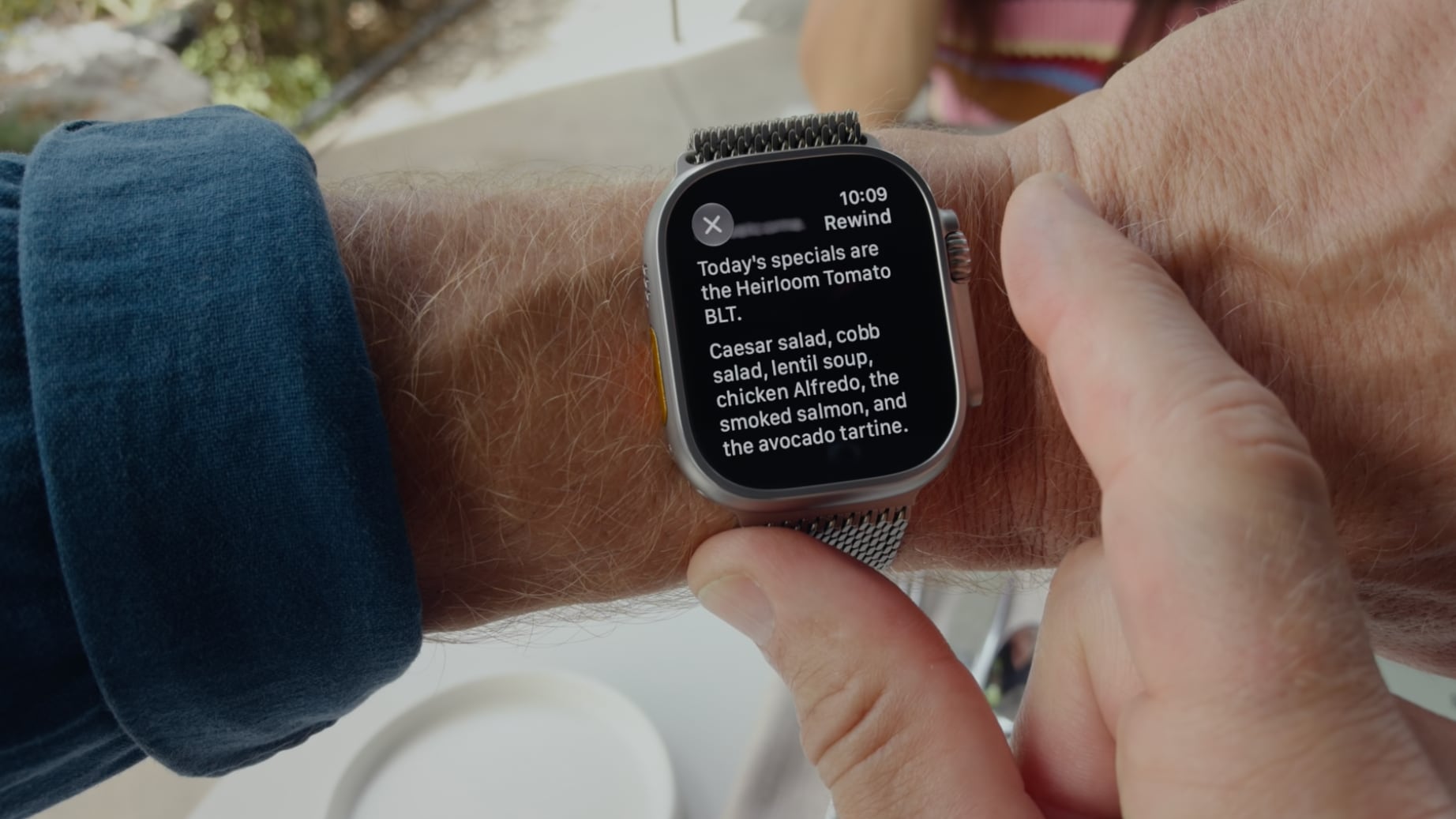
Apple Watch Series 12 and Ultra 4 models later this year will get Live Rewind, a feature that provides a transcript of any spoken audio that was picked up by the device in the last 15 seconds. To activate the feature, users need to double-click the Digital Crown.
Unforunately, this double-click action is the same one that in watchOS 26 switches between the current app and the previously used app – or indeed the watch face and the last used app.
It's a neat way of multitasking on your Apple Watch without tapping the display.
Needless to say, this feature will no longer work for anyone upgrading to Apple Watch Series 12 and Ultra 4 models when the devices are released on September 18. Apple has reserved the double-click action for when its new Live Rewind feature is activated later this year.
However, what's arguably more frustrating is that owners of older Apple Watch models who update to watchOS 27 will also lose the ability to jump between apps using the Digital Crown double-click.
After updating to watchOS 27, the Digital Crown double-click no longer works to switch between apps. All it does is bring up the new dynamic app grid, which is the same behavior that a single click offers. This is despite the fact that the new Live Rewind feature is hardware-bound to the Apple Watch Series 12 and Ultra 4. Owners of previous models are simply out of luck in both senses, losing a useful function while also missing out on the new feature that usurps it.
It also throws up another problem for new Series 12 and Ultra 4 owners: What if people don't want to go near the Live Rewind feature and its privacy implications? Apple could have made the double-click action work to switch between apps as it does in watchOS 26, while also providing an option to assign the action to Live Rewind if that's preferred.
Apple currently doesn't provide options to resolve the situation for either group of users, so all we can do is provide feedback to Apple and hope the company hears enough demand for it to change course in watchOS 27.1 or a later update.
Pre-orders for the Apple Watch Series 12 and Ultra 4 are available now ahead of a Friday, September 18 launch.
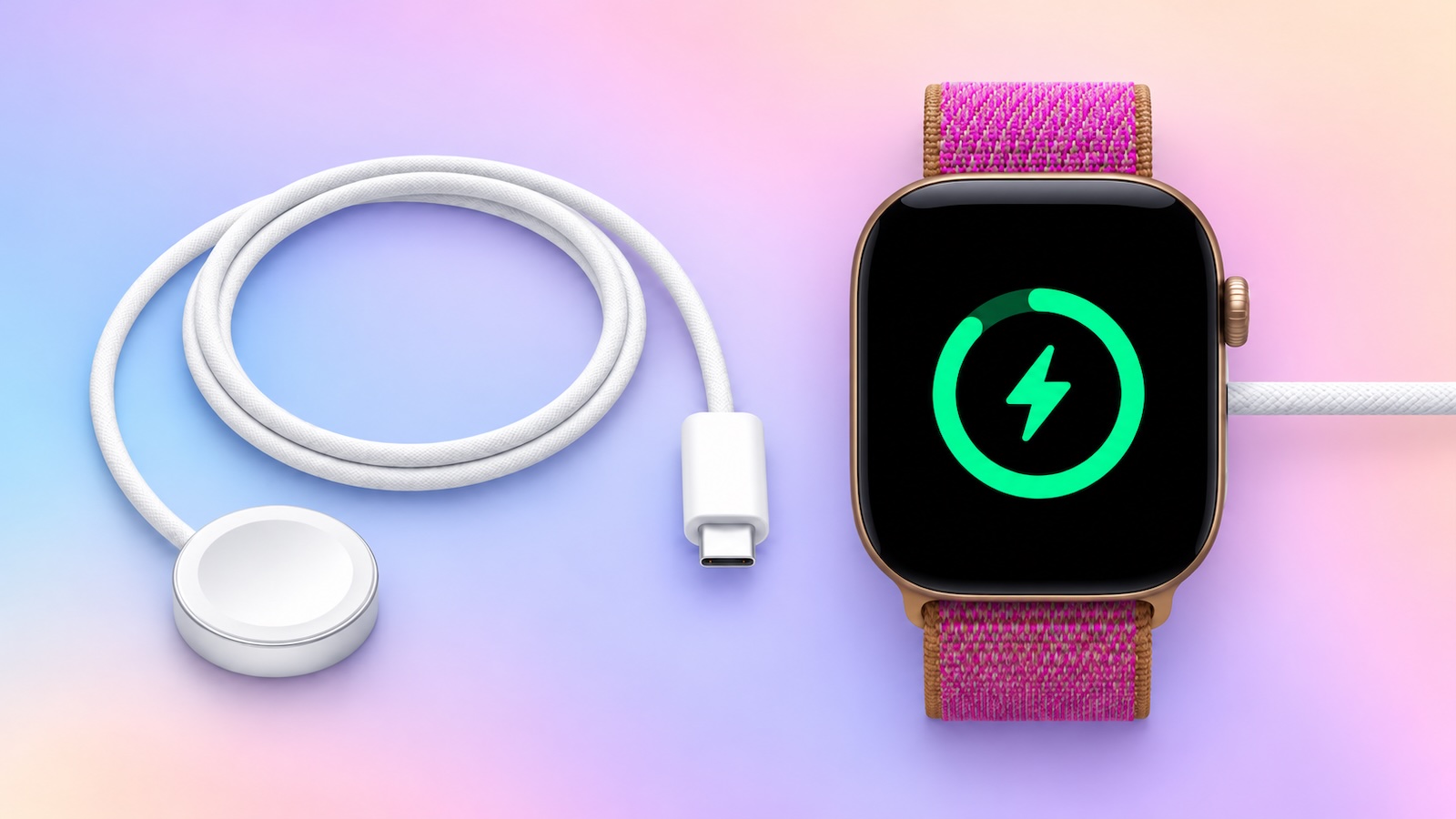
The new Apple Watch Series 12 and Apple Watch Ultra 4 have hardware changes that allow for faster charging, but you will need to use the new version of the Apple Watch Magnetic Fast Charger included in the box in order to achieve this boost. If you need extra ones for your own charging stands or travel or so forth, Apple released the new version of the charger on its online store last week, with U.S. pricing set at $29.
We have confirmed that the new version of the Apple Watch charging puck — model A3277 — can deliver up to 10W of power to enable the faster charging speeds. The previous version of the charger is limited to 5W. Accordingly, you will also need to use a USB-C Power Delivery charger that is rated 10W or higher for the fastest charging.
With just 15 minutes of charging, Apple said the new charger can add 12 hours of battery life to the Series 12 and 18 hours of battery life to the Ultra 4.
The previous Apple Watch Series 11 and Apple Watch Ultra 3 can get 8 hours and 12 hours of battery life respectively with a 15-minute charge, according to Apple. Using the new charging puck will not speed up these times, as the Series 12 and Ultra 4 have hardware changes, so you need both a new watch and the new charger for the fastest charging.
Mit der Vorstellung der Apple Watch Series 12 und Ultra 4 hat Apple ein neues Health-Sensing-System vorgestellt. Die neuen energieschonenden LED-Sensoren messen die Herzfrequenz alle fünf Sekunden. Auch die Herzfrequenzvariabilität wird deutlich öfter als bislang gemessen. Apple spricht von 24-mal öfter als auf den Vorgängern wie der Apple Watch Series 11. Doch wie oft und wie genau misst die Apple Watch bislang die wichtigen gesundheitlichen Parameter? Die Antworten auf diese Fragen versteckt Apple in Support-Dokumenten. Für manche Messungen gibt es gar keine offiziellen Angaben – wir haben dafür die Health-App etwas aufgebohrt.
Wie oft misst die Apple Watch (Series 11) meine Pulsdaten?
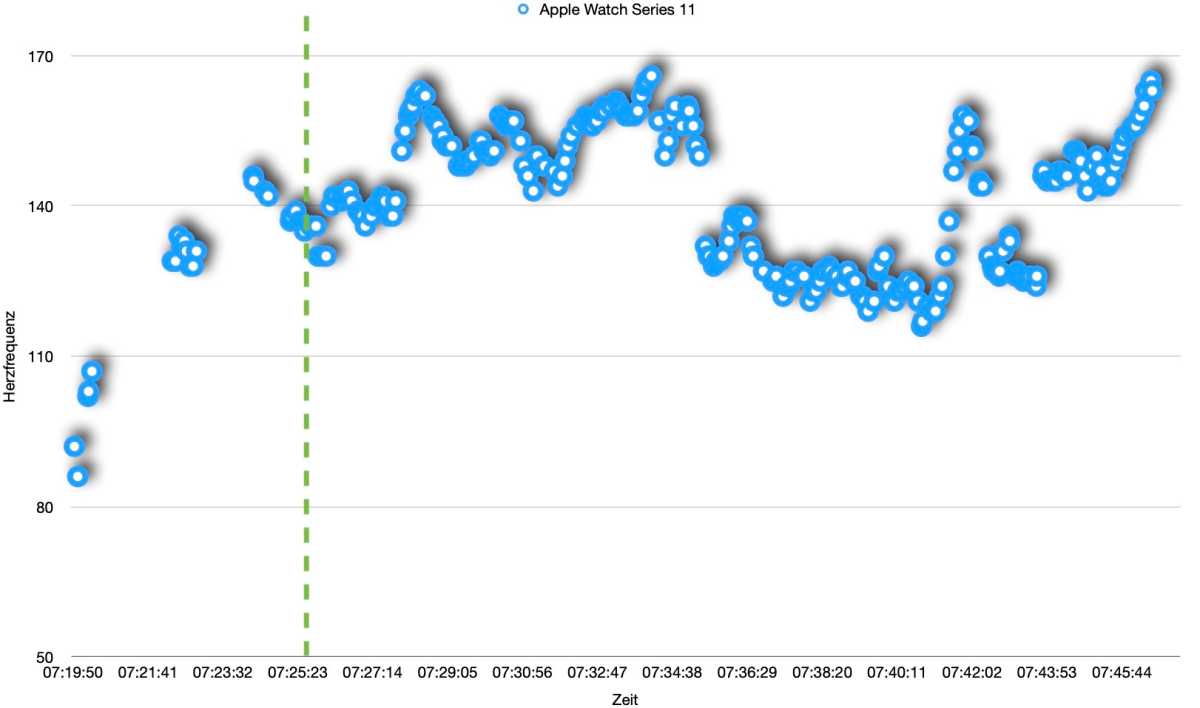
Die Antwort auf diese Frage hängt von der Situation und von den Einstellungen Ihrer Apple Watch ab. In einem Trainingsmodus misst die Apple Watch die Herzfrequenz alle fünf Sekunden. Auch die ersten drei Minuten nach dem Training misst die Watch den Puls in dieser hohen Frequenz. Es gibt jedoch noch eine spezielle Einstellung für lange Trainings, wobei der Nutzer oder die Nutzerin bei Bedarf den Stromsparmodus aktivieren kann. Hier behauptet Apple, die Messungen würden seltener durchgeführt. Ich habe mit dem Referenzgerät in Form des Brustgurtes Polar H10 ein HIIT-Training aufgezeichnet. Das gleiche Training startete ich auch auf der Apple Watch Series 11.
Herzfrequenzmessung der Apple Watch Series 11 beim Training
Halyna Kubiv
Die Apple Watch misst tatsächlich die Herzfrequenz alle fünf Sekunden, wenn der Inhaber oder die Inhaberin trainiert. Messungen im Stromsparmodus im Training geschehen ebenfalls alle fünf Sekunden. Allerdings pausiert hier das System die Messung für mehrere Minuten. Das heißt, der Puls wird in kurzen Zeitabschnitten alle 5 Sekunden gemessen, dann macht die Apple Watch Pause. Dies sieht man auf dem Diagramm der gemessenen Herzfrequenzen des Trainings bis zu der grünen Linie: Bis dahin lief die Apple Watch im Stromsparmodus, danach habe ich ihn abgeschaltet.
Apropos Stromsparmodus. Wenn der Modus die ganze Zeit aktiviert ist, finden keine Hintergrundmessungen statt, weder der Herzfrequenzen, noch der Herzfrequenzvariabilität. Bei den Vitalzeichen nach einer aufgezeichneten Nacht fehlt zudem noch die Sauerstoffsättigung in der Nacht.
Die Apple Watch kann auch den Puls jede Sekunde messen, wie die Brustgurte beim Training. Diese Messungen passieren jedoch nur sporadisch: bei der nutzerinitiierten EKG‑Messung und bei der HRV-Messung im Hintergrund. Wenn Sie die EKG-App starten und den Finger auf die digitale Krone auflegen, zeigen die Animation auf der Watch und das anschließend generierte PDF die Pulswerte für jede Sekunde. Auch bei der HRV-Messung registriert die Apple Watch im Laufe einer Minute jede Herzfrequenz und berechnet danach nach einer speziellen Formel den Zeitabstand nach den einzelnen Herzschlägen.
Im Hintergrund und vor allem in der Nacht im Schlaf misst die Apple Watch die Herzfrequenz alle fünf Minuten. Allerdings sind die Messungen nicht so regelmäßig wie beim Sport. Die Abstände können im Ruhezustand stärker schwanken.
Ich habe aus der Health-App Messungen einer Beispiel-Nacht exportiert und ausgewertet. In dem Diagramm oben ist aus Gründen der Übersichtlichkeit lediglich eine Stunde dargestellt. In sechseinhalb Stunden Schlaf hat die Apple Watch 83 Messungen erstellt. Der durchschnittliche Abstand zwischen den Messungen beläuft sich hier auf 4 Minuten 39 Sekunden, wobei auch Pausen von 16 Minuten, oder auch 40 Sekunden möglich sind.
Wie genau misst die Apple Watch die Herzfrequenzdaten?
Apple hat bei der Vorstellung der Apple Watch Series 12 behauptet, die neue Smartwatch sei der genaueste Fitness-Tracker im Bereich Herzfrequenz auf dem Markt. Während wir die Aussage nur bei einem Test überprüfen können, lässt sich anhand älterer Modelle feststellen, dass die Apple Watch auch davor recht genau war, was die Pulsmessung angeht.
Bereits beim Test der Apple Watch Ultra 3 haben wir festgestellt, dass die Ultra in ihren Messungen nur sehr wenig von den Werten des Brustgurtes abweicht. Ich habe das gleiche HIIT-Training von oben mit der Apple Watch Series 11 ausgewertet. Aus dem Verlauf der beiden Kurven ergibt sich das folgende Bild. Im Schnitt misst die Apple Watch den Puls beim Sport recht genau.
Der Korrelationsquotient zwischen den beiden Messungen des Polar H10 und der Apple Watch Series 11 beträgt 0,95. Das heißt, die Apple Watch misst recht nah dran an einem Brustgurt. Im Schnitt unterscheiden sich die beiden Werte um lediglich einen Schlag. Allerdings gibt es Ausreißer: Je höher der Herzschlag, desto ungenauer wird die Messung. Das sieht man auf der Linie bei dem Puls mit 160 Schlägen pro Minute und mehr. Auch beim Stromsparmodus ist die Messung eher ungenau, da die Apple Watch die Ausschläge bei der Herzfrequenz durch den sporadischen Modus ganz verpassen kann.
Fazit
Die Neuerungen, die Apple für die Apple Watch Series 12 und Ultra 4 angekündigt hat, sind spannend, weil sie die gesamten Algorithmen der Herzfrequenzmessung gewissermaßen auf den Kopf stellen. Apple hat jedoch nicht erklärt, wie oft die neue Watch den Puls im Sport messen wird – bleibt sie bei fünf Sekunden wie bislang oder wird sie jede Sekunde den Puls messen? Auch ist bislang unbekannt, wie oft und ob überhaupt die Herzfrequenz beim Stromsparmodus gemessen wird. Das werden wir in unseren Tests herausfinden.
Gravamos um novo vídeo detalhando o que mudou e, principalmente, testando os novos recursos baseados em inteligência artificial que a marca incorporou ao relógio, entre eles:
Mostradores gerados por IA, permitindo criar watchfaces personalizadas diretamente a partir de comandos;
Assistente de IA integrado, para tirar dúvidas e receber respostas sem precisar do smartphone por perto;
Tradução por IA, com suporte a conversas em outros idiomas direto do pulso;
e outras funções inteligentes que prometem deixar a experiência de uso mais completa.
No vídeo, mostramos como cada um desses recursos funciona na prática, se realmente agrega valor ao dia a dia e como o Solar Ultra se compara à versão original que já havíamos testado.
Vale a pena conferir para quem já tinha curiosidade sobre o modelo anterior ou está em dúvida entre um smartwatch bem mais em conta e um Apple Watch.
NOTA DE TRANSPARÊNCIA: Este é um artigo fruto de um acordo comercial com um anunciante, que não influenciou a nossa opinião. O MacMagazine recebe uma pequena comissão sobre vendas concluídas por meio de links deste post, mas você, como consumidor, não paga nada mais pelos produtos comprando pelos nossos links de afiliado.
Apple Watch owners hoping to upgrade to watchOS 27 could be in for disappointment.
Apple released watchOS 27 on September 14, bringing Siri AI, a new tap gesture for selecting widgets in the Smart Stack, a dynamic app grid and design refinements throughout the system. But a significant number of Apple Watches that could run watchOS 26 have been left behind.
watchOS 27 drops support for the Apple Watch SE 2, Series 6, Series 7, Series 8 and the original Apple Watch Ultra. That means the oldest supported models are now the Apple Watch Series 9 and Ultra 2, both released in 2023.
The limited support perhaps shouldn’t come as a complete surprise. During the WWDC keynote in June, Craig Federighi barely mentioned watchOS, with the first significant Apple Watch announcement arriving nearly an hour into the presentation.
According to Apple, watchOS 27 is compatible with the following models:
Apple Watch SE 3
Apple Watch Series 9
Apple Watch Series 10
Apple Watch Series 11
Apple Watch Series 12
Apple Watch Ultra 2
Apple Watch Ultra 3
Apple Watch Ultra 4
Initially, the Apple Watch Series 9 was absent from the compatibility list on Apple’s website, but we were later able to confirm that it is supported by watchOS 27.
The new cutoff leaves behind several watches that were supported by watchOS 26, including:
Apple Watch SE (2nd generation)
Apple Watch Series 6
Apple Watch Series 7
Apple Watch Series 8
Apple Watch Ultra
It’s not clear why Apple has made such a sharp cut, but the dividing line broadly corresponds with the S9 generation, introduced with the Apple Watch Series 9 and Apple Watch Ultra 2. The S9 brought a new 4-core Neural Engine capable of processing machine-learning tasks up to twice as fast as the S8, giving Apple considerably more headroom for features such as Siri AI.
The Apple Watch SE 3 is the exception to that simple S9 cutoff, however, so processor requirements may not be the whole story.
Either way, plenty of Apple Watch owners will be disappointed to find that relatively recent devices can’t install Apple’s latest software. And, naturally, Apple will be happy to sell them a new Apple Watch Series 12.
watchOS 27 ist zweifelsohne spannend, obwohl das System sowohl auf der WWDC 2026 im Juni als auch auf der Apple-Keynote nur wenig Bühnenzeit hatte. Viele Neuerungen verstecken sich in den Pressemitteilungen von Apple oder in den Versionshinweisen der finalen Version.
1. Neue Herz-Komplikation mit Echtzeitdaten
Die herkömmliche Herz-Komplikation auf der Apple Watch hat ihren Namen nicht verdient. In der kleinsten Ausführung für eine Ecke des Zifferblatts stellt die Komplikation lediglich das Icon der Herz-App dar. Erst ein Tipp darauf öffnet die App und zeigt den zuletzt gemessenen Puls. Erst, wenn Sie die Komplikation in der Mitte eines Zifferblatts wie „Infograph“ oder „Modular“ platzieren, zeigt die Apple Watch die zuletzt gemessene Herzfrequenz an.
Mit der Apple Watch Series 12 und dem neuen Health Sensing System hat Apple auch die Komplikation überarbeitet. Mit der aktualisierten Herz-App zeigt die Komplikation auch Echtzeitdaten an. Die neue Watch misst die Herzfrequenz alle fünf Sekunden, wie beim Sport.
2. Siri-Modular-Zifferblatt
Das neue Siri-Modular-Zifferblatt hat Apple exklusiv für die Apple Watch Series 12 vorgestellt. Doch das Zifferblatt konnten wir auch auf unserer Apple Watch Series 11 herunterladen und einrichten.
3. Smart Stack und neue Geste
Die Einhandgesten auf der Apple Watch sind nichts Neues. Doch erst die Kombination aller drei Gesten, Handgelenkdrehung, Doppel- und Einfachtipp mit dem Zeigefinger und dem Daumen, macht die Bedienung der Apple Watch mit einer Hand relativ einfach und intuitiv. Die Doppeltippgeste öffnet den Smart Stack, der Einfachtipp das jeweilige Widget und die Handgelenkdrehung schließt die App wieder. Der Smart Stack wurde erweitert und zeigt nun Vorschläge aus mehr Apps.
4. Akku-Warnungen
Mit watchOS 27 kommen neue Akkuwarnungen, die Nutzerinnen und Nutzern vorschlagen, einzelne Funktionen zu deaktivieren, um die Akkulaufzeit der Apple Watch zu verlängern. Dazu können die Erinnerungen an den Workout-Start oder die Siri-Aktivierung gehören.
5. Shazam offline
Ähnlich wie auf dem iPhone kann Shazam über den Smart Stack oder in der dedizierten App einen Song offline verarbeiten und einen Treffer anzeigen, sobald sich die Apple Watch wieder mit dem Internet verbindet.
6. Viele kleine Neuerungen
Außerdem bringt watchOS 27 weitere kleinere Neuerungen, manche davon tauchen nicht auf der Oberfläche auf:
Wie das iPhone und das iPad erhält die Apple Watch eine bessere Verbindung zu den verfügbaren Netzwerken.
In watchOS kann man einen Gästeschlüssel anlegen und nutzen.
Die „Wo ist?“-App unter watchOS wird etwas konsolidiert. Alle drei Bereiche wie „Personen“, „Geräte“ und „Objekte“ erscheinen nun in einer App.
Für watchOS angepasste App-Erweiterungen starten auf der Apple Watch schneller.
Eine neue Tap-Geste.
Schnelleres Abspielen von Medien wie Musik und Podcasts auf der Apple Watch.
Eine neue App-Ansicht neben Listen und Wabe. Dabei werden relevante Apps dynamisch je nach Situation vorgeschlagen.
Überarbeitete Einstellungen in der Watch-App auf dem iPhone. Es ist noch unklar, ob Apple die Einstellungen-App auch auf der Watch direkt geändert hat.
Tickets und Ticket-Abos können im Smart Stack auf der Apple Watch abgelegt werden.
Die Schrittanzahl wird ab watchOS 27 genauer gezält.
Eine effizientere Erkennung von Wasser durch die Apple Watch.
Apple Wallet zeigt den Kontostand der verknüpften Karte auf der Apple Watch an.
Längere Akkulaufzeiten bei kompatiblen Apple Watches.
Daten werden schneller mit der Health-App synchronisiert.
Schnelleres Starten von Trainings in der Training-App.
In der Training-App gibt es eine neue Auswertung: die Trainings-Intensität nach Herzfrequenz-Zonen. Diese Metriken zeigen, wie anstrengend das Training war, und können für die anschließende Berechnung der Erholungszeit hilfreich sein.
Wie man sieht, ist watchOS 27 eher ein Wartungsupdate, das keine großen Neuerungen bringt, sondern viele kleine im Hintergrund. Nutzerinnen und Nutzer wird wohl das verbesserte Batterie-Management freuen. Jede weitere Stunde an Akkulaufzeit ist ein Gewinn.
In den vergangenen Jahren hat Apple neueren Modellen der Apple Watch zwei Gesten spendiert, mit denen Sie die Smartwatch auch einhändig rudimentär bedienen können: Daumen und Zeigefinger zweimal zusammentippen, um Mitteilungen zu bestätigen, und das Handgelenk von sich wegdrehen, um Mitteilungen auszublenden. In watchOS 27 kommt eine neue Geste hinzu: die Fingerspitzen einmal zusammentippen.
Diese neue Geste steht in direktem Zusammenhang mit der Doppeltipp-Geste: Neben Mitteilungen bestätigen, etwa um ein erkanntes Training zu starten, öffnet diese auch den Smart-Stapel und wechselt danach durch die Widgets. Mit der neuen Einfachtipp-Geste können Sie die Widgets nun auch öffnen, heißt es auf der Seite zu watchOS 27.
Die neue Tipp Geste. Tippe Zeigefinger und Daumen zusammen, um ein Widget im Smart Stapel auszuwählen. So siehst du blitzschnell, was für dich wichtig ist – ohne deine andere Hand zu benutzen.
Da der Smart-Stapel Widgets enthält, die aktuell relevant für Sie sein könnten, können Sie auf einer Apple Watch mit watchOS 27 grundlegende Funktionen Ihrer Apple Watch komplett einhändig bedienen.
Auch der Smart-Stapel selbst wird in watchOS 27 nützlicher, indem dort noch mehr kontextbasierte Widgets angezeigt werden. So können Sie dort daran erinnert werden, einem Kontakt zum Geburtstag zu gratulieren, den Wecker vor einem Feiertag auszuschalten oder sehen, wo Sie Ihr Auto geparkt haben.
Neue Vorschläge für den Smart Stapel. Dein Smart Stapel zeigt mehr Widgets, die für dich wichtig sind. Gratuliere deinen Freund:innen zum Geburtstag, lass dir den Standort deines geparkten Autos anzeigen und ändere deinen Wecker für bestimmte Feiertage.
watchOS 27 ist in finaler Fassung am 14. September erschienen, zusammen mit den anderen Betriebssystemen, darunter iOS 27 und macOS 27. Dieses Jahr fallen jedoch besonders viele Apple Watches von der Kompatibilitätsliste: Nur die Apple Watch 9 und neuere Modelle erhalten watchOS 27.
I haven’t been this excited about an Apple Watch in a long time. Last week, Apple introduced the Apple Watch Series 12 and Apple Watch Ultra 4, which will be available at the end of the week. The new Watches feature the S11 chip, which enables a bunch of new features, some of which won’t debut until later this year. At the same time, Apple is dropping support for more Watches than usual.
What we’re witnessing is a reboot of the Apple Watch and watchOS forced by advances in AI. The Apple Watch and its OS found their niche years ago, freeing us from pulling out our iPhones for notifications, tracking our health and fitness, and enabling the occasional Siri request. It was a good and comfortable spot for what by all accounts has been one of the most successful wearables to date, but watchOS also felt stuck in a rut.
Every year we got a few new workout types, a new watch face, and a few other features, but the OS didn’t advance much. What’s different this year is that watchOS 27 is breaking with slower hardware and looking forward to the substantially more powerful S11 chip, which will allow the Apple Watch to expand into all-new areas.
What this transition also means is that there is not just one set of features to track in watchOS 27 this year but three:
those that arrive today for anyone with a compatible Apple Watch,
those that arrive at the end of the week that are exclusive to the new Apple Watch Series 12 and Ultra 4, and
those that are coming later this year.
That makes this more than just a review. It’s also a preview of things to come and a roadmap for where the Apple Watch is heading.
There’s more than usual to cover this year, so let’s dive in and check it out.
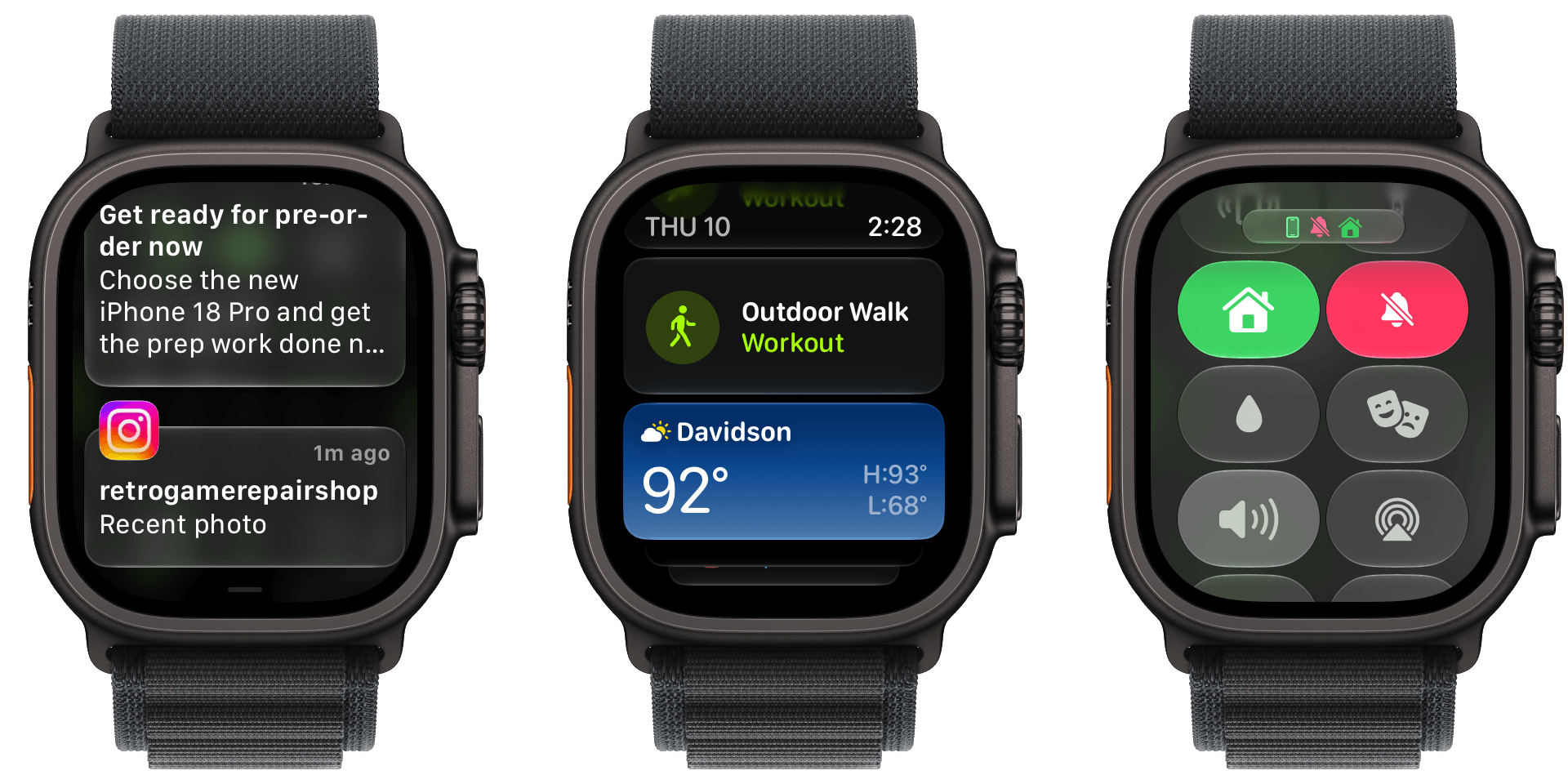
Notifications, Smart Stack suggestions, and Control Center are all easier to read in watchOS 27.
I like Liquid Glass on all of Apple’s devices and didn’t have any issues with its first iteration in watchOS 26. However, with the latest update, my Apple Watch Ultra 3’s UI is ever so slightly more readable. Smart Stack suggestions and notifications don’t bleed through each other as much, and app icons are sharper.
On a small screen like an Apple Watch, you may never notice the difference, but there’s a sharpness throughout the UI that’s reminiscent of the sharpness you see in app icons on iOS, iPadOS, and macOS. Edges are more defined and colors are diffused less, making everything a little crisper. It’s a subtle change, but a good one.
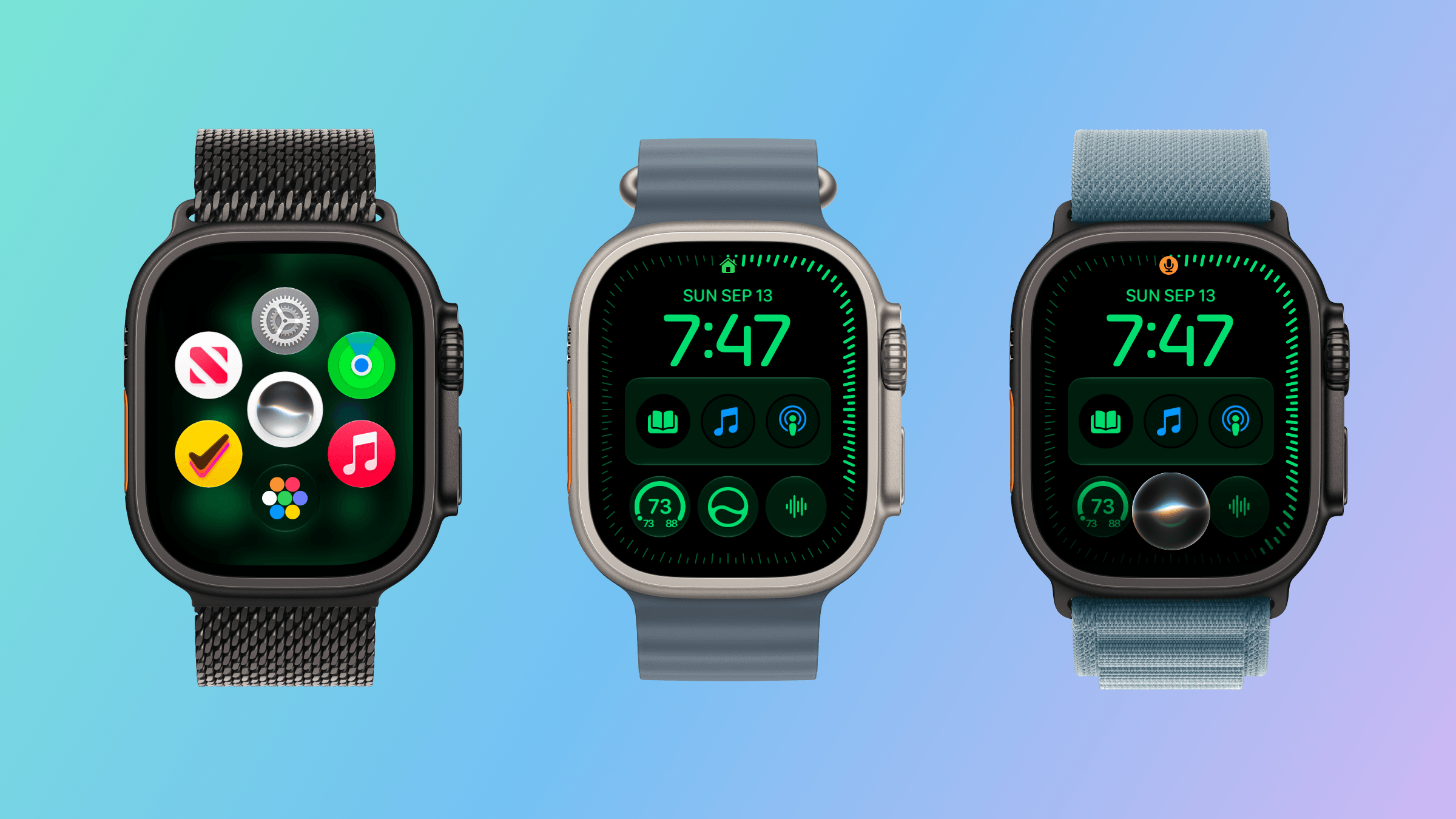
The watchOS 27 change most users will notice first is the change to the way you navigate through the OS’s UI. The App Switcher is gone, replaced by the simpler Dynamic App Grid. And although I expect the App Switcher will be missed by some, I don’t miss it at all. Sure, it was a little hard to break the Digital Crown double-press habit at first, but as someone who returns to the same handful of apps repeatedly, I find the new design makes more sense.
Before watchOS 27, the App Switcher was invoked with a double press of the Digital Crown. That revealed a Rolodex-style view of your recent apps that you could move among by turning the Digital Crown. The UI served as a shortcut between frequently used apps that avoided returning to the app grid or list views on your Watch, which can be crowded if you have a lot of apps installed.
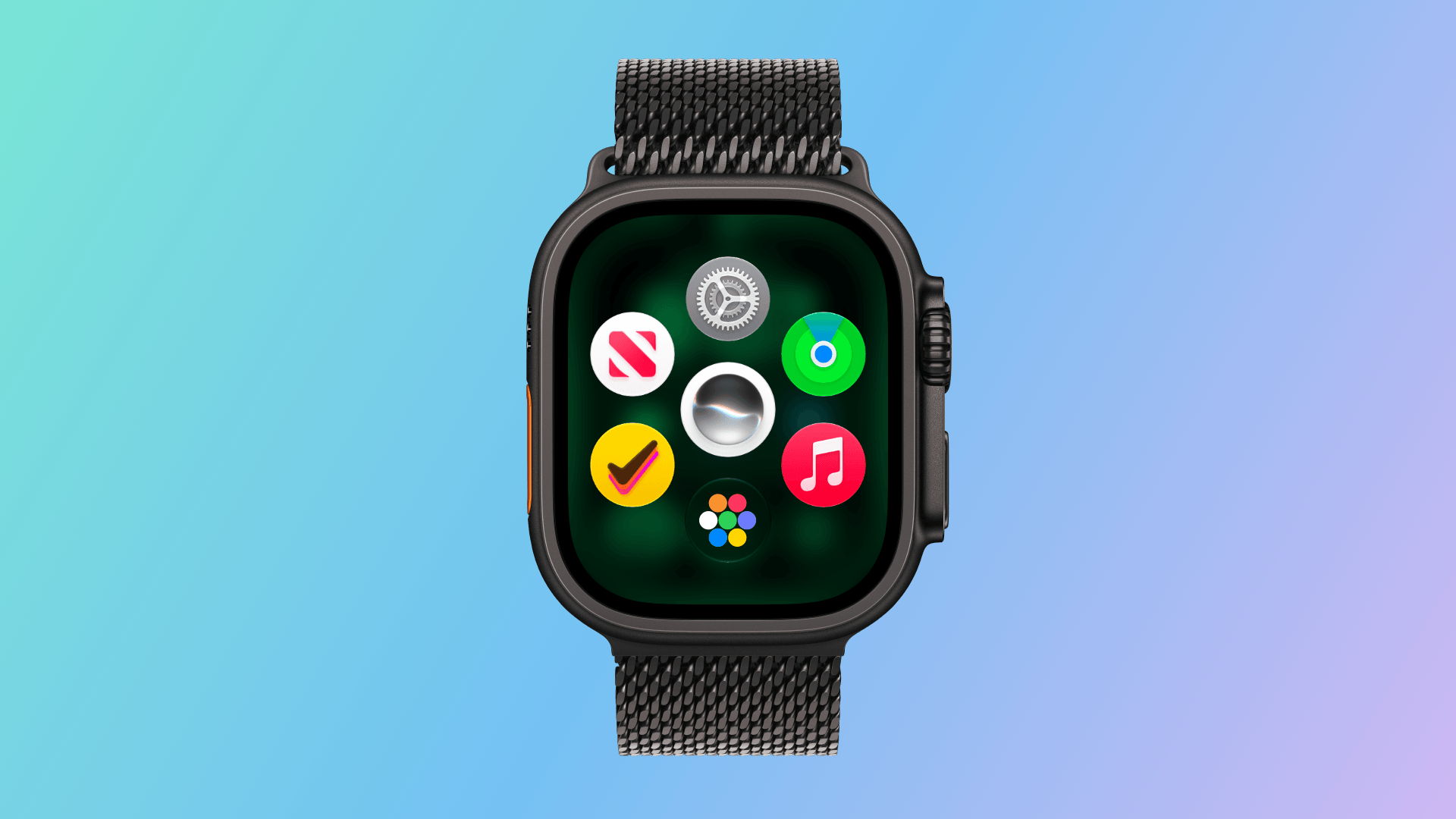
The new Dynamic App Grid.
Now, whether you single- or double-press the Digital Crown, the new Dynamic App Grid appears. At its center is the new Siri app. Below that is the icon to take you to the app list or grid view depending on how your Watch is set up. Apple says that the remaining five icons that circle the Siri icon are placed based on recency and frequency of use.
I’ve been using watchOS 27 all summer, and my recently used apps have barely changed. Currently, those apps include Settings, Alarms, News, Maps, and Moshi, an app I use for monitoring AI agent projects.
I don’t think I’m alone in being a creature of habit when it comes to the Apple Watch apps I use. Having those five apps just one Digital Crown press away is far easier than pressing twice, scrolling to find what I want, and then tapping into an app. Between the Dynamic App Grid and the expanded Smart Stack, there are plenty of ways to get to the apps you use the most, which I love. What the Dynamic App Grid gives up in predictability is more than made up for by the simpler gesture and UI.
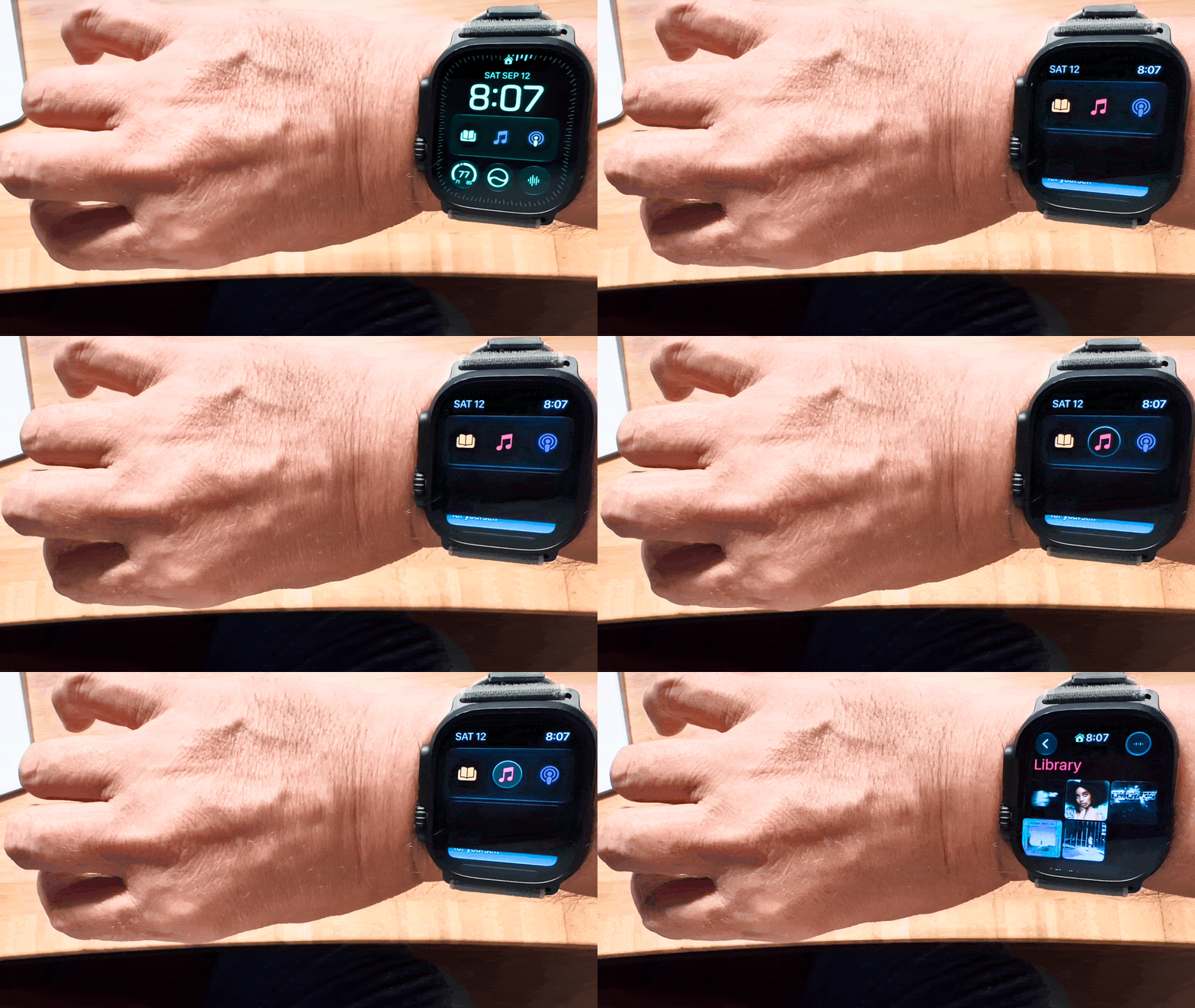
watchOS 27 adds a new single tap gesture for selection, which allows you to do a lot more simply with gestures. For example, a double tap gesture with your thumb and index finger opens the Smart Stack to the first card. Double tap again to move to the next card or, if a card has multiple items that can be selected, to the next item on the card. Once what you want is selected, a single tap will open it. The existing wrist flick gesture is then used to return to the watch face.
Using the single-tap gesture.
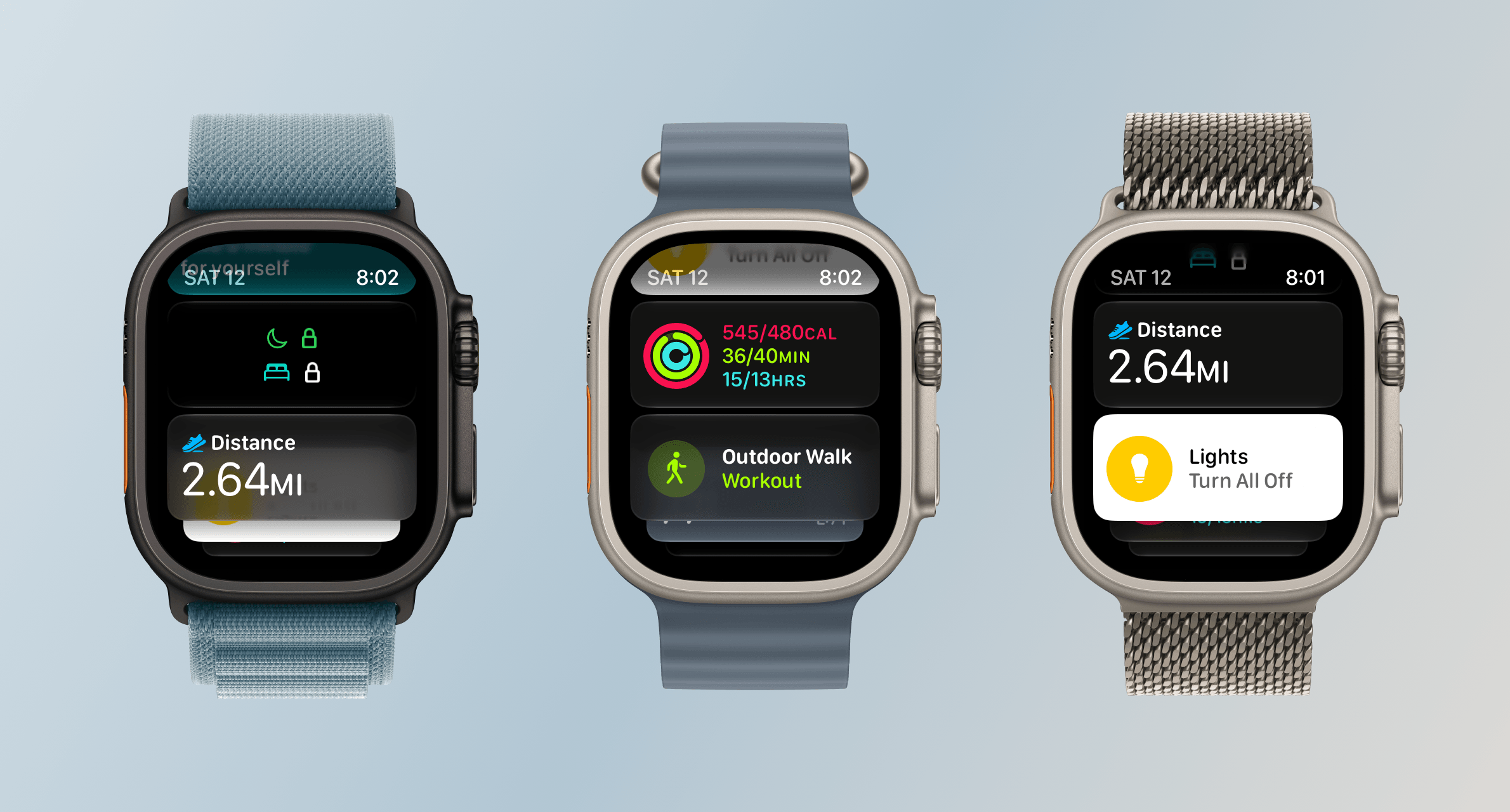
The Smart Stack is now stacked with more types of cards, too. Apple has added cards for birthdays stored in Contacts, your car’s parking location, a prompt to change an alarm before a holiday, a shortcut to resume a Siri conversation, transit card balances, pinned Messages conversations, Theater Mode, and more. It’s a nice expansion that has made my Smart Stack feel more useful all summer because there’s always something relevant to me there.
There’s a lot more to see in the Smart Stack now.
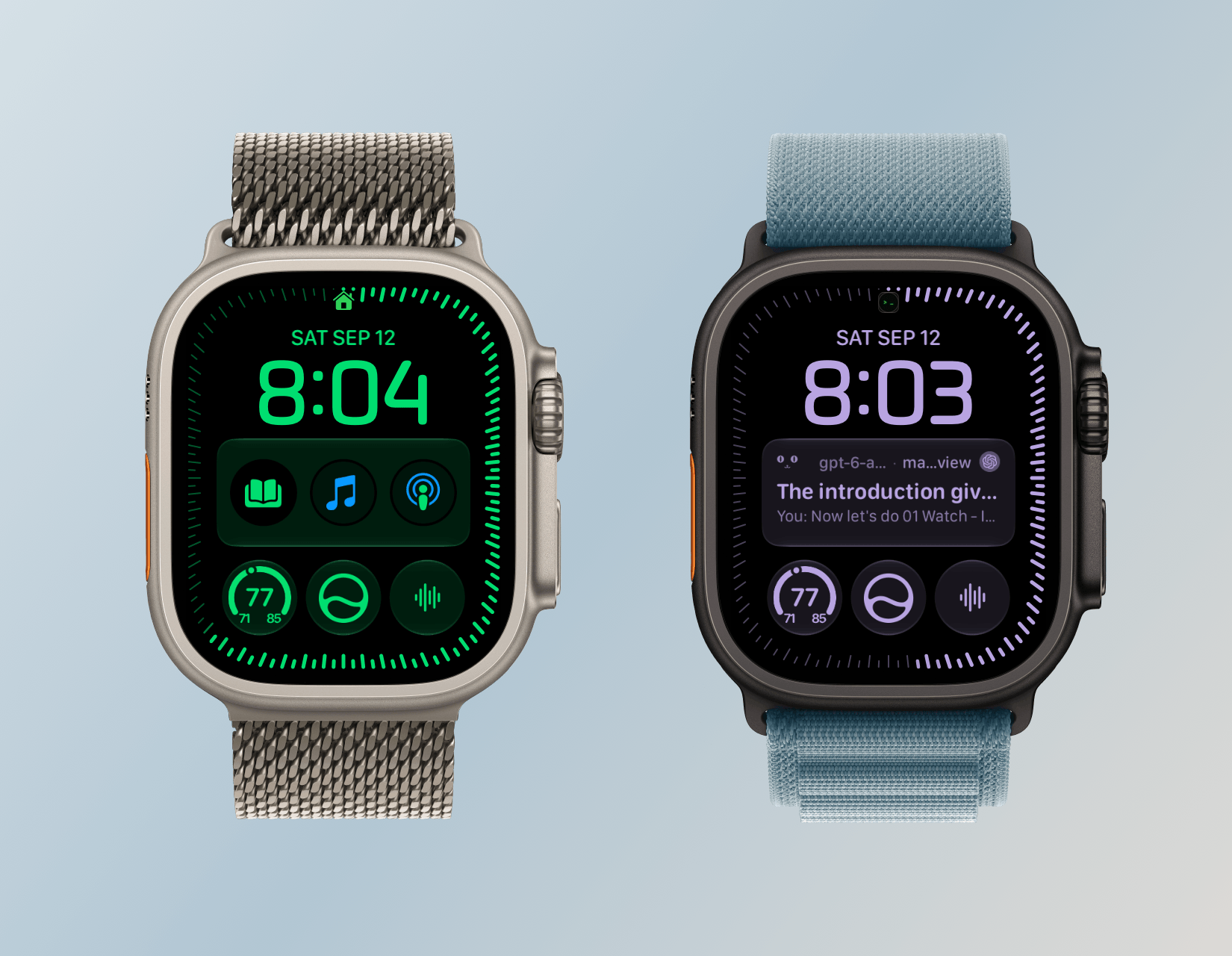
The other change announced just last week is the addition of the Siri Modular face, which I immediately installed on my Apple Watch Ultra 3. The watch face displays the top Smart Stack item in a large complication in the middle of your Watch. It’s a nice touch, but because you can’t dismiss the media playback card without turning off Live Activities, that one has wound up on my watch face more frequently than I’d like. Still, when an app like Moshi reports that an AI agent’s task has been completed, it’s nice to be able to see a snippet of the message directly on my watch face. It also strikes me as a great way to keep track of tasks with a deadline from task manager apps like this review’s sponsor, Finalist.
The Siri Modular watch face.
So, on balance, I like what Apple has done with watchOS 27’s navigation. The Dynamic App Grid takes a little getting used to, but I appreciate its simplicity. The Smart Stack, single tap gesture, and new Siri Modular watch face combine to make the Smart Stack more useful than ever too. Watch interactions are meant to be short, and watchOS 27 nails that goal.
Siri AI and the Apple Watch as Helper
You can get to Siri from the Dynamic App Grid, a complication, or by long-pressing the Digital Crown.
Siri AI is a big part of watchOS 27 just like it is on every Apple platform (except tvOS) this year. As on those other platforms, Siri has a dedicated app on the Watch. The main difference is in how you interact with Siri. On macOS, iOS, and iPadOS, you can speak or type queries in the Siri app. On watchOS 27, the app accepts spoken queries only. That struck me as a little strange at first given that Apple offers multiple ways to input text on watchOS, but the reality is chatbot queries are typically longer than a dashed-off text message, so in practice, the lack of text input is fine.
Siri AI requires an Apple Watch Series 9 or later, Ultra 2 or later, or SE 3, along with a nearby iPhone that supports Apple Intelligence: an iPhone 15 Pro, 15 Pro Max, or any iPhone 16 or later model. It’s being released as a beta, initially in English only, and won’t be available in the EU for the time being. Apple also says it will introduce usage limits for Siri AI in the future. Those limits will vary depending on factors such as request complexity and system demand. Increased access will be available for a fee. To make a Siri request, you can tap an installed complication, long-press the Digital Crown, or say “Siri” or “Hey Siri.” Once you start a chat with Siri, it retains the context, allowing you to ask follow-up questions without restating everything.
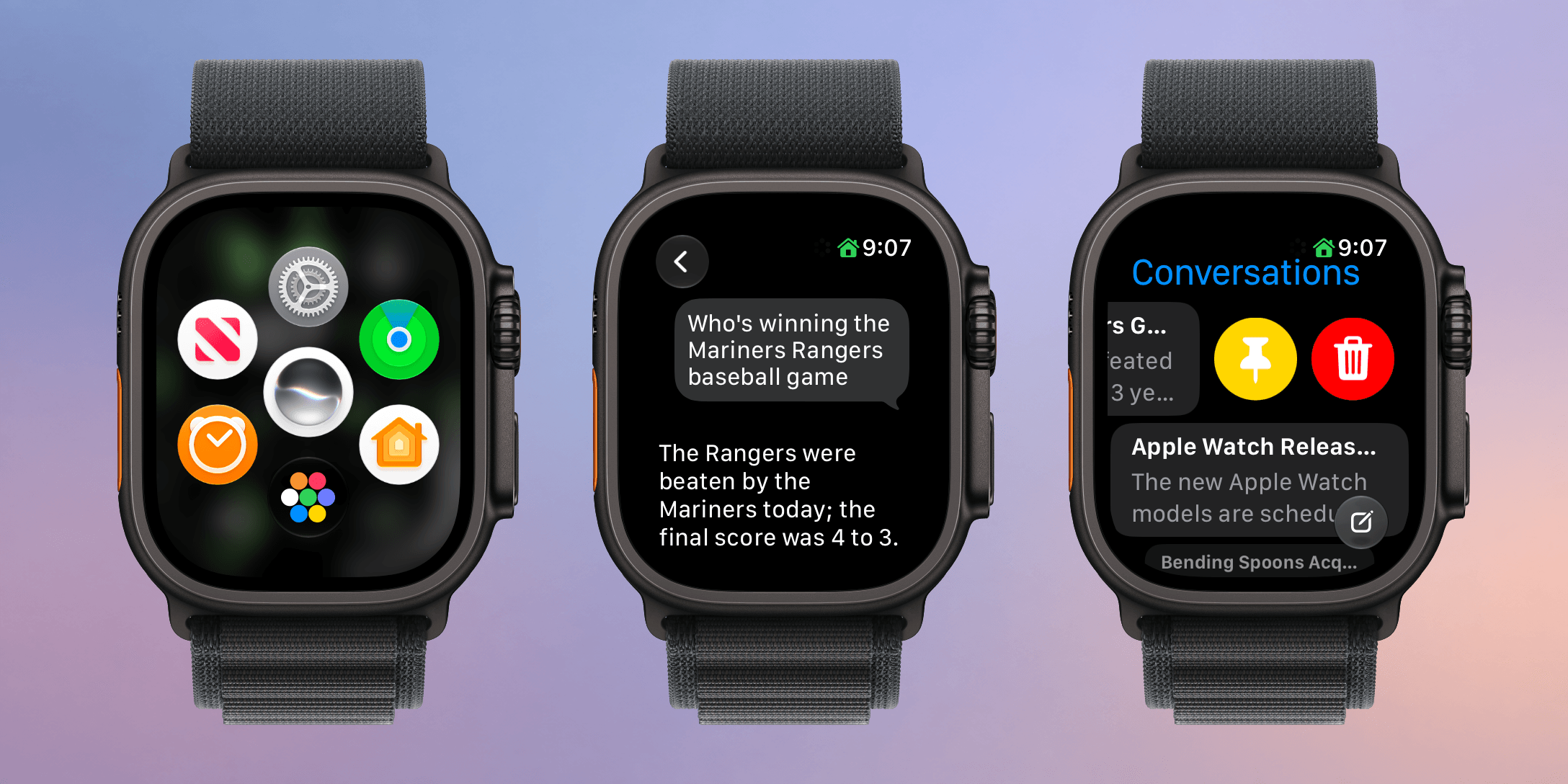
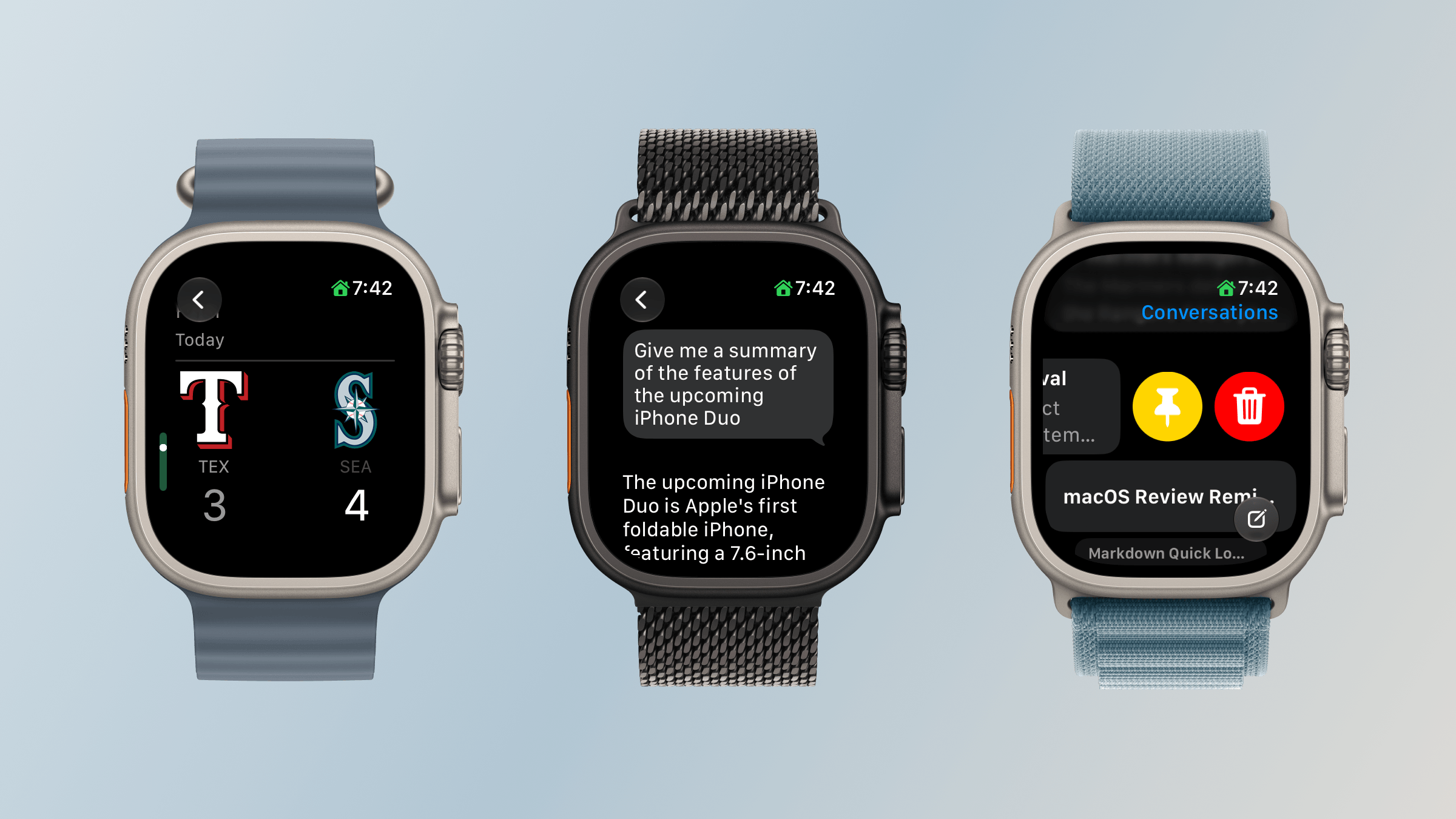
Reviewing and managing conversations in the Siri app.
Alternatively, you can open the app where you can see your past chats. The app’s button to start a conversation accepts spoken input only. Type to Siri remains available through Accessibility settings, but it’s a separate way to invoke Siri rather than a text-entry option within the app.
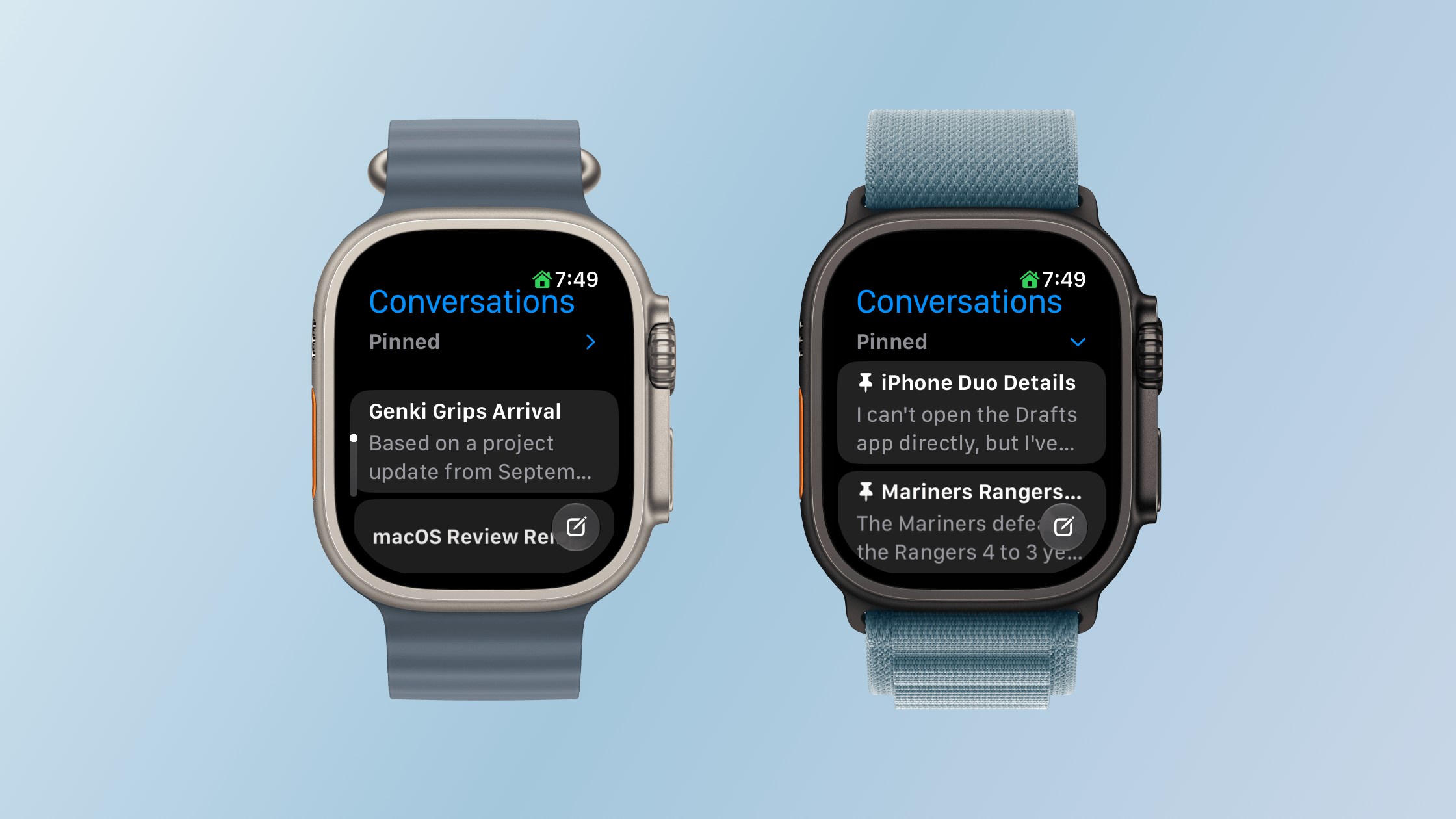
Your query list includes any requests you’ve made on your Apple Watch or any other Apple device, all synced via iCloud. In my experience, sync is fast over a good network connection with chats appearing on my Mac seconds after a response is delivered to my Watch. From the Siri Apple Watch app, you can also swipe left on an entry to delete or pin it, or tap the entry to read it.
Pinned conversations can be collapsed and expanded in the Siri Watch app.
Siri AI on the Apple Watch also offers the same personal-context capabilities that let it find information in your email, photos, tasks, and notes and use it to take action in apps. I explored those capabilities and their shortcomings in my macOS Golden Gate review. My experience on the Watch hasn’t been meaningfully different, apart from occasional minor latency, so that review is the best place to dig into my testing.
What changes here is the convenience of having those capabilities on your wrist within easy reach. The nearby iPhone supplies the connection to Apple Intelligence, but the Watch is both the immediate interface and, for many requests, the place where the resulting action occurs.
It’s also worth stepping back to think about what Siri could do before. I rarely used Siri for more than setting timers and alarms, checking the weather, and controlling my lights. However, now, I can tell Siri to remind me to take out the trash tomorrow morning and add a calendar event for a dinner reservation in one breath. That’s not wildly complex stuff, but it’s very convenient, especially when your iPhone is in your pocket or across the room and you think of something you need to do. Siri also has the same broad world knowledge that it does on other Apple devices, allowing you to check recent sports scores, check the news, and answer questions about the world around you.
Not every technology advance needs to be a monumental leap forward. Sometimes the simplest, most convenient small thing has the greatest impact. Siri on the Apple Watch has that potential, although with time, I’d like to see it become independent of the iPhone.
Workouts and Fitness
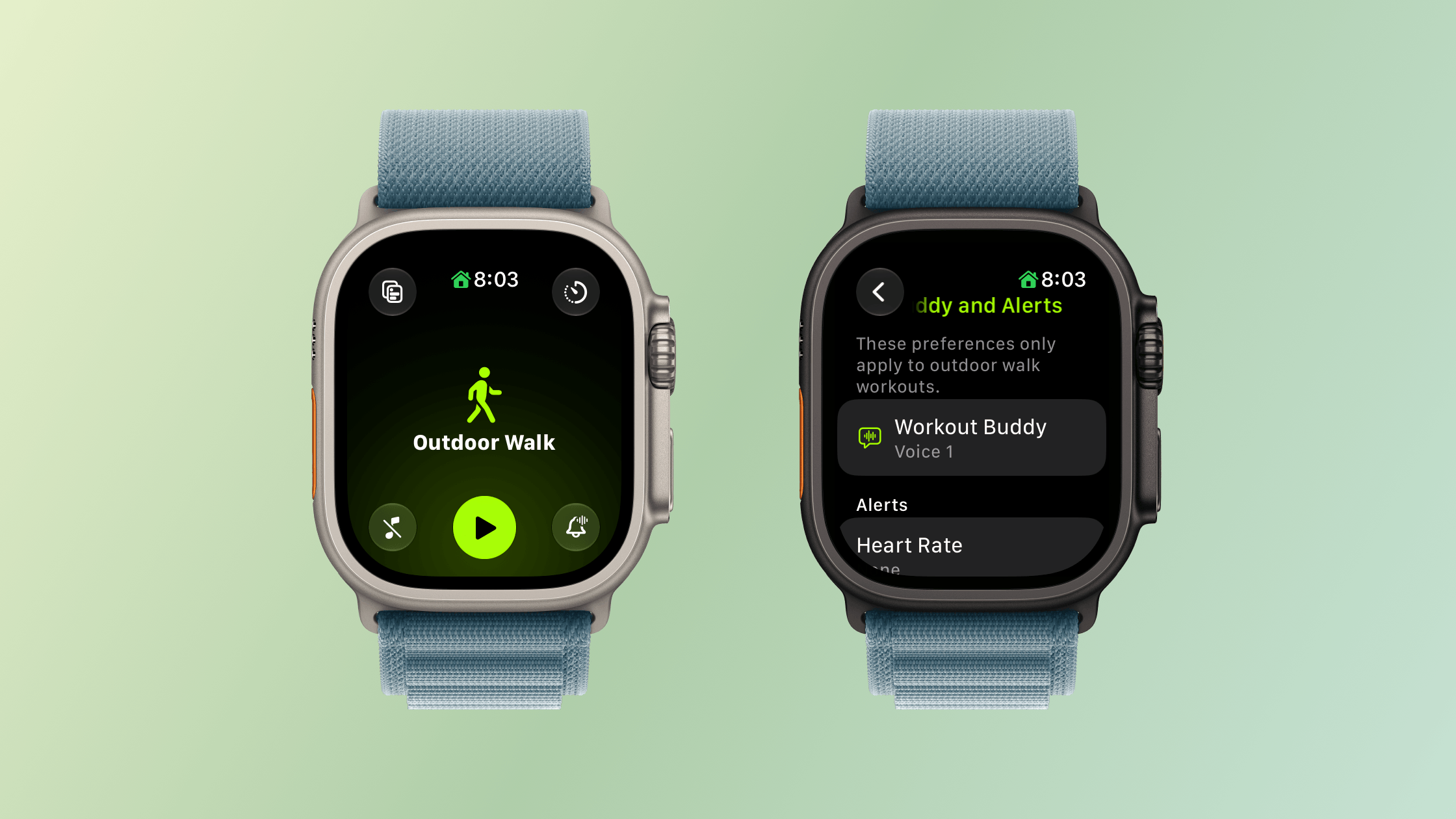
You can leave your iPhone at home and still use Workout Buddy.
I’m happy to be the one who gets to tell you that Workout Buddy has been freed from the requirement that you carry your iPhone with you. Users tend to love or hate Workout Buddy. Personally, I love it. Sure, its incredibly chipper voice can grate if you’re heading out for a long walk and aren’t feeling it, but that’s sort of the point. Once enabled, Workout Buddy is there to encourage you with no judgment. It’ll tell you you’re below your average targets with the same cheerfulness as when you’re crushing it.
When Workout Buddy debuted, my disappointment wasn’t with its voice, personality, or the information it offers. My issue was that the time I need a pep talk when exercising is when I’m out on a long run by myself suffering in the summer heat. The problem is that until watchOS 27, Workout Buddy was only available if you had your iPhone with you. That was fine when I went on a long walk, and I’m sure many cyclists were fine, but one of the reasons I got an Apple Watch was to never lug an iPhone with me while I ran, especially an iPhone like my iPhone 17 Pro Max.
With watchOS 27, I’m pleased to report that Workout Buddy works as well over a Wi-Fi or cellular connection as it does tethered to your iPhone and is compatible with walking, running, cycling, hiking, elliptical, stair stepper, HIIT, and functional and traditional strength training. Workout Buddy speaks Mexican Spanish now, too. In fact, it’s an Apple Intelligence feature that works without your iPhone nearby, which gives me hope for more iPhone-independent Apple Intelligence features in future releases.
Workout Buddy also offers more insights about your workout by comparing pace, distance, and workout duration to your recent fitness history. Today, just before I wrote this section, I went for a walk to get some fresh air and was cheerfully told how little I’ve exercised during this crazy iPhone event and OS review writing week. What I appreciate most, though, is that overall, Workout Buddy isn’t significantly more chatty. I don’t want it to turn into a podcast; I just want brief, periodic updates, which it delivers well.
The Workout app’s scrolling has been improved too. I know a lot of people who felt it was too easy to scroll past their intended workout type. That’s generally not a problem for me since I only use a few workout types, but even then, I sometimes overshot my mark. With watchOS 27, there’s a little less momentum built into the scrolling. Even if I swipe as fast as I can muster, I can only manage to move five workouts. A normal, calm swipe advances me just one workout.
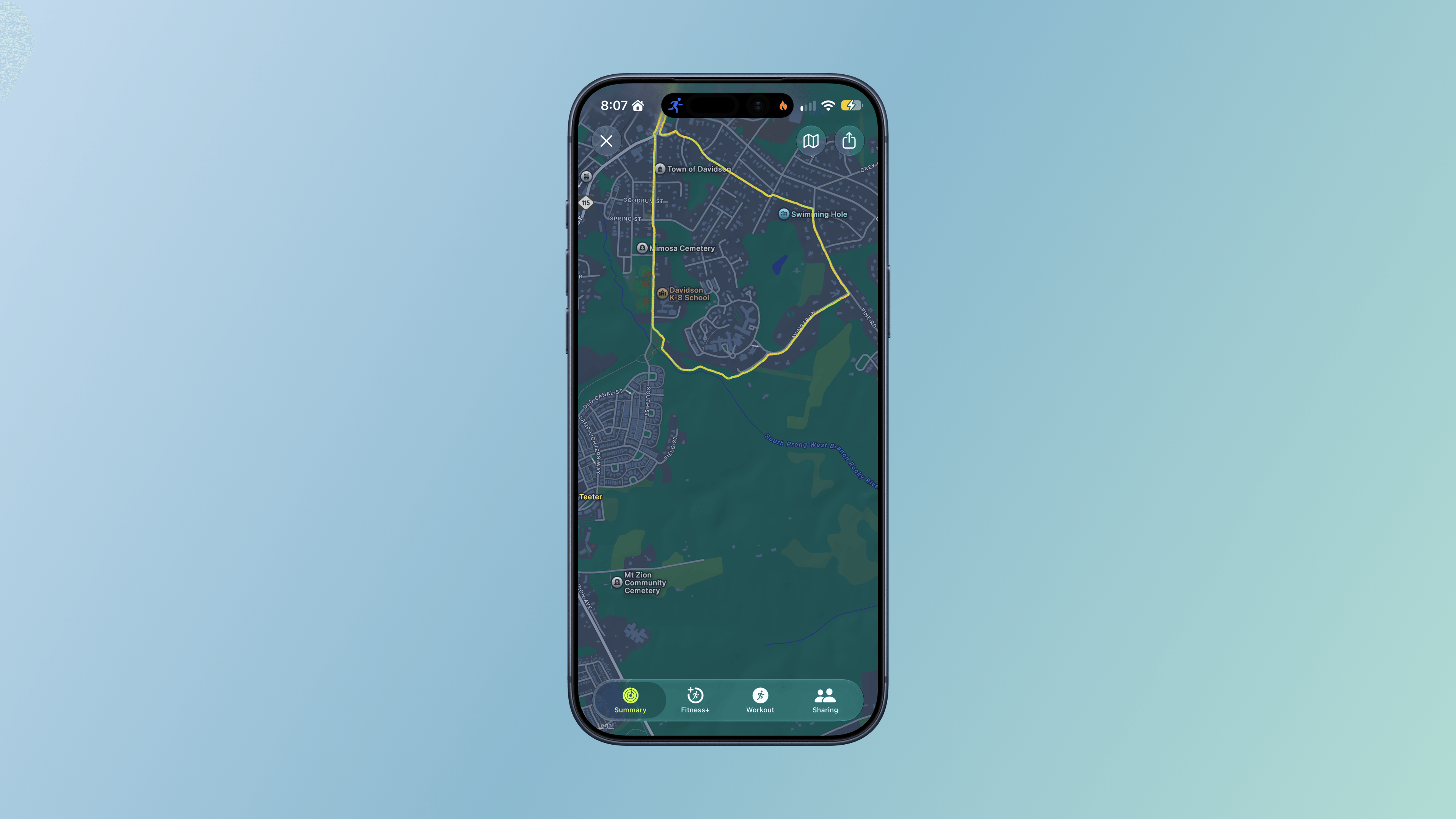
A post-workout route in Fitness.
Additional Workout and Fitness improvements include:
more precise post-workout route maps, which, based on my walks and runs, have been very accurate whether I’m among buildings, under trees, or out in the open,
more accurate measurement of treadmill distances, which I haven’t tried personally, and
step counts in the Fitness app that now synchronize with those recorded in Health.
There may not be many changes to the workout and fitness features of the Apple Watch in watchOS 27, but I’m nonetheless pleased that I’ve been able to turn on Workout Buddy for my morning runs to help motivate and inform me about my progress.
Apps, Services, and Everyday Improvements
Find My
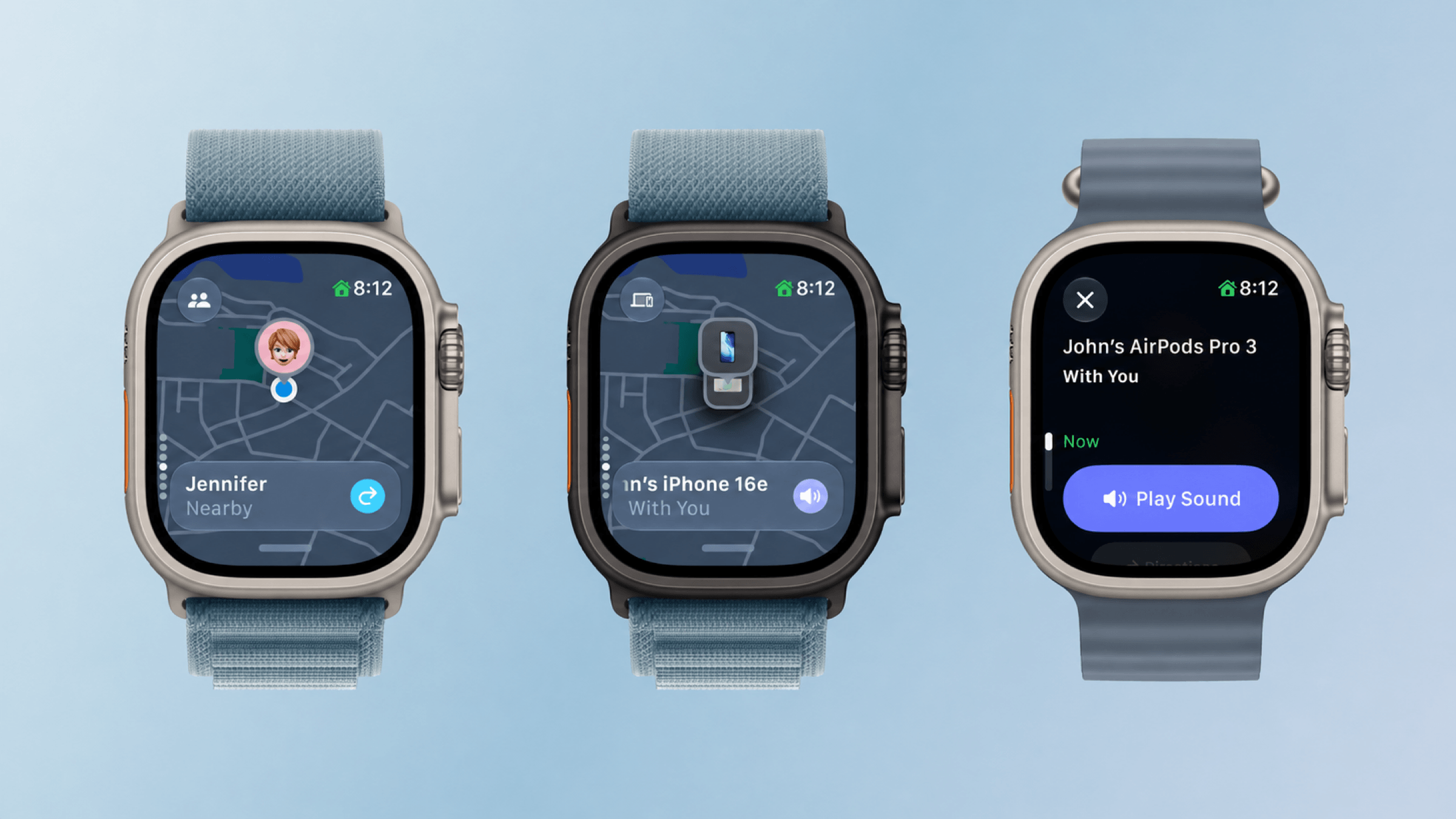
Find My is now one app.
It never made sense to me that different aspects of the iPhone’s Find My were spread across separate apps on the Apple Watch. I suppose the idea was that splitting the app up made it more atomic and widget-like for the Apple Watch’s small screen, but in practice, I think most people use Find My from an iPhone more than they do an Apple Watch, so the split on the Apple Watch was confusing.
The new Find My app is map-based, just like it is on other platforms. The app defaults to a devices view, and if you have multiple devices with Find My enabled in one location, you can scroll among them using the Digital Crown. Tap the button in the top left corner and you can switch from devices to people or items.
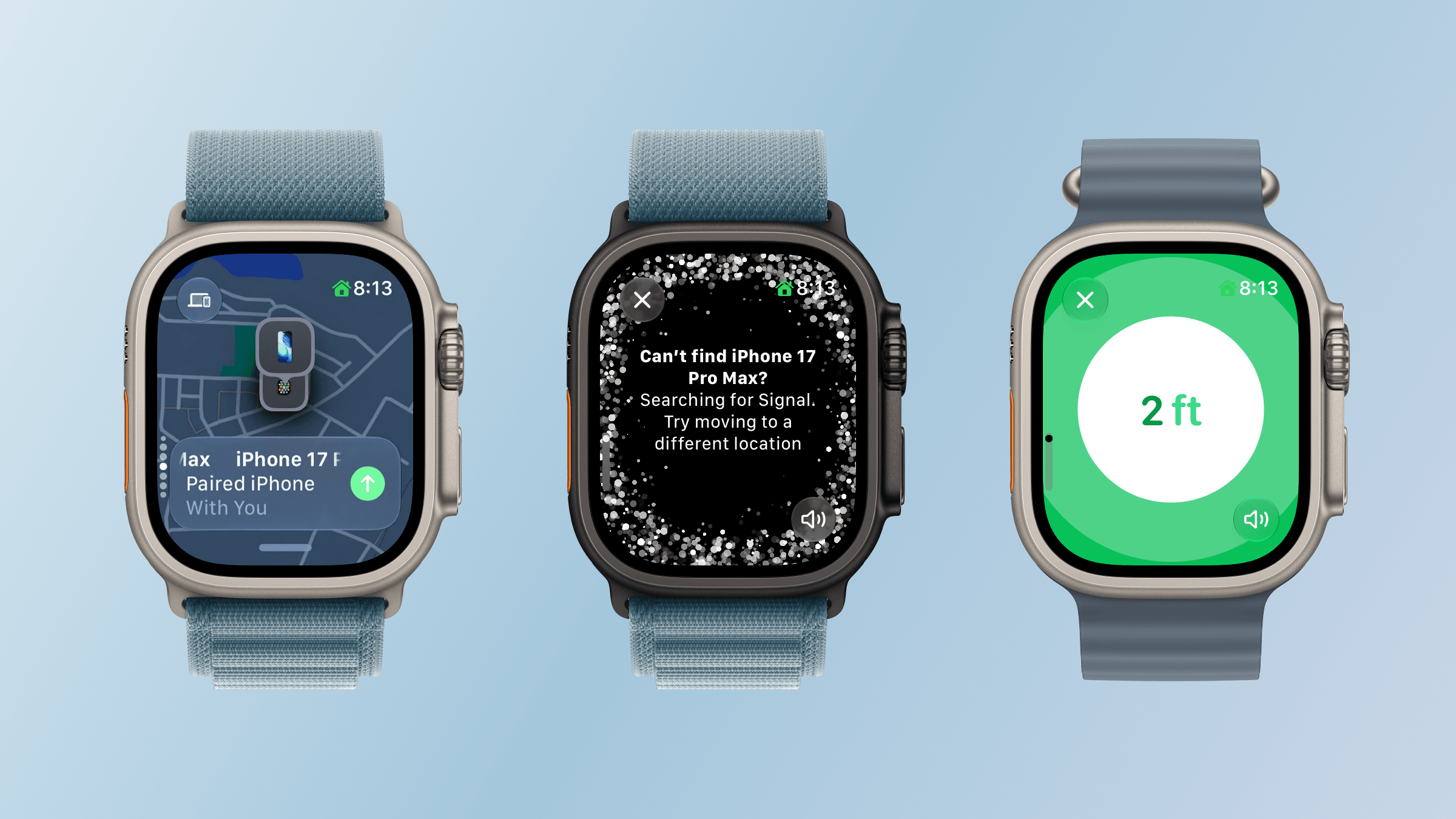
Precision locating my iPhone.
What I love about the new Find My is how true it is to the iPhone app. You’re able to use it to get directions, contact someone, play a sound on a device or item, enable Notify When Found or Notify When Left Behind, set arrival and departure alerts for people, mark devices and items as lost, and use Precision Finding with the iPhone and second-generation AirTag. Precision Finding requires a Series 9 or later or Ultra 2 or later, and locating an iPhone requires a compatible model with Ultra Wideband. Find My is no companion Watch app. It’s the real deal.
Wallet
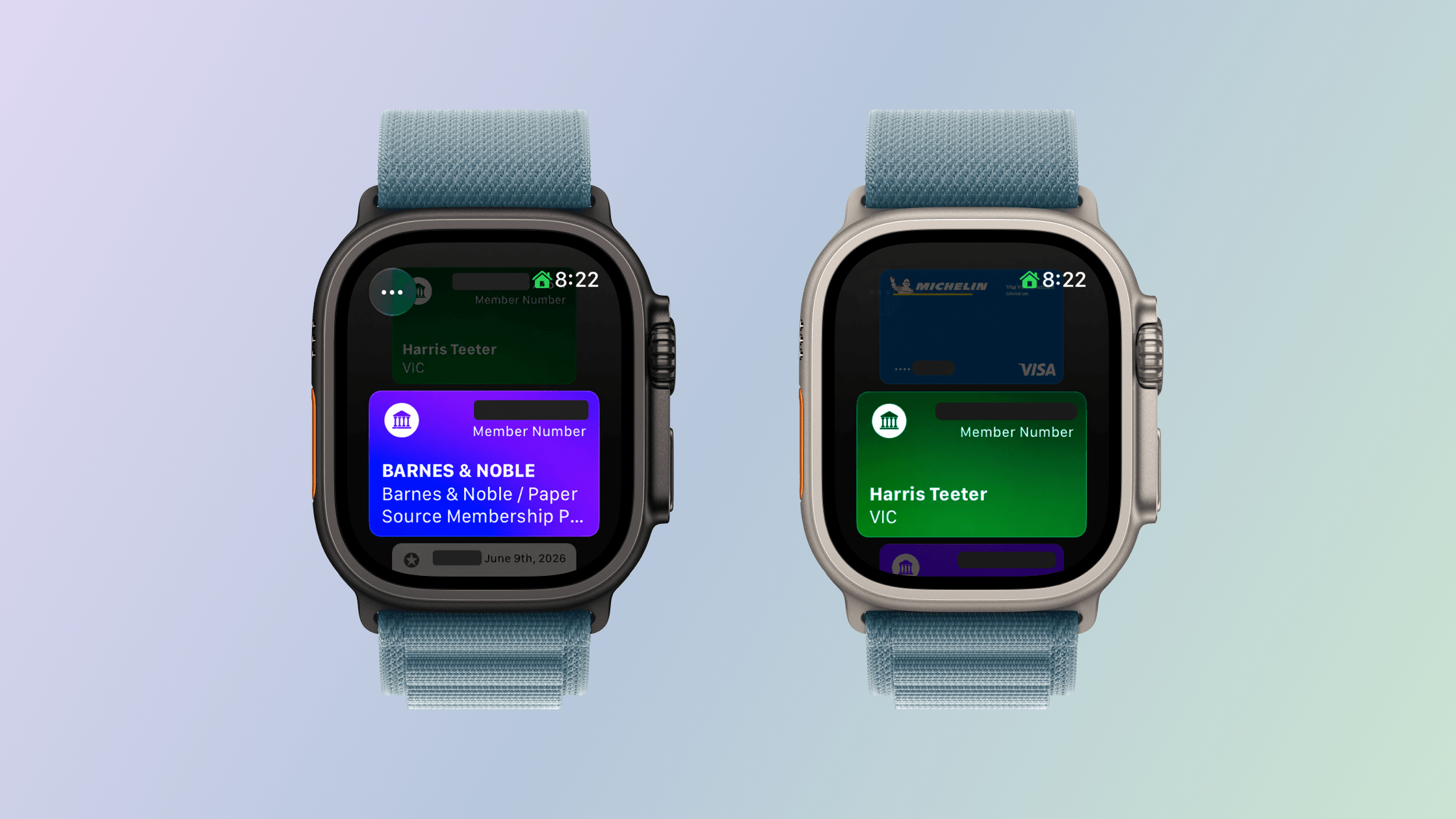
Homemade Wallet passes on the Apple Watch using “Create a Pass.”
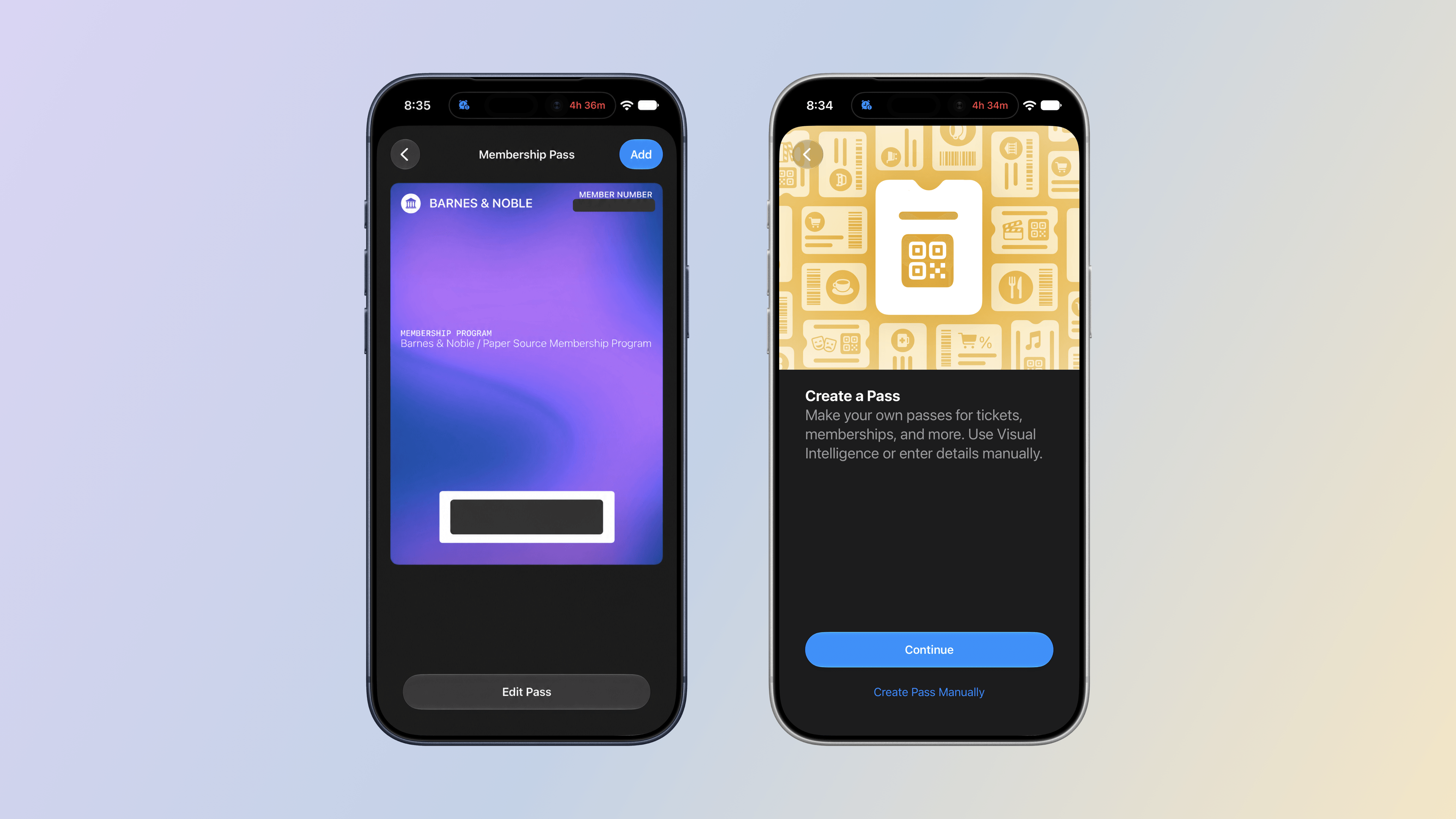
iOS 27 adds the ability to create passes in the Wallet app. The new feature makes it easy to add library, loyalty, and gym cards that use a barcode or QR code to Wallet even when a service doesn’t offer a Wallet pass. With “Create a Pass,” you no longer need to carry physical cards.
Making a Wallet pass on the iPhone.
Setting up a pass is easy. From the Wallet app on your iPhone, tap the plus button and choose “Create a Pass.” The next screen explains that you can set up a pass automatically by photographing it or manually by typing in the information yourself. I’ve used the automatic approach with our local supermarket’s loyalty card and one my wife has for Barnes & Noble. Wallet picked up the relevant information from both cards right away. I haven’t tried the Barnes & Noble card, but the card for our supermarket worked perfectly the last time I bought groceries.
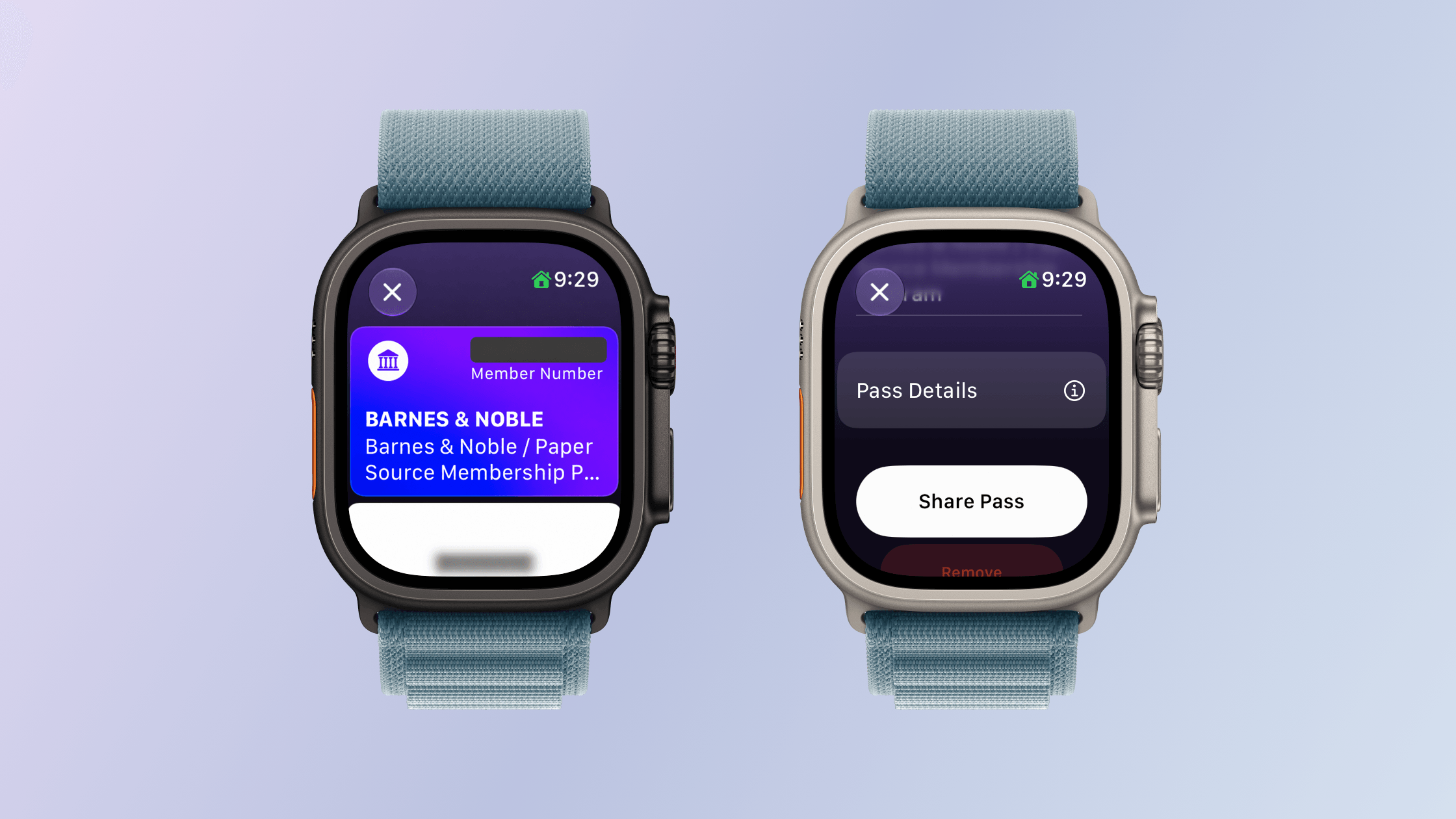
Viewing a Wallet pass and its sharing options on Apple Watch.
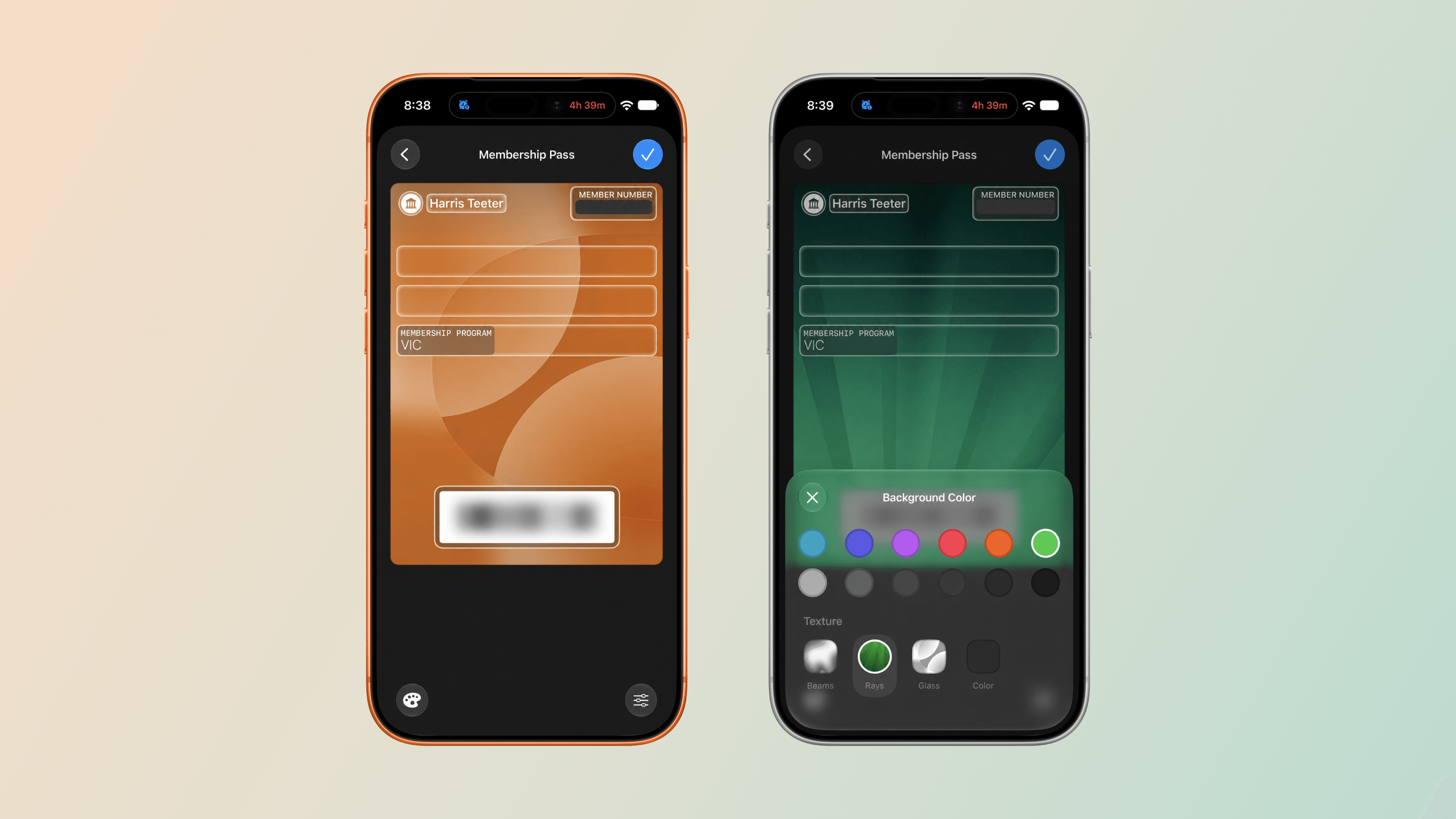
The functionality extends to watchOS 27, too. Although you can’t make passes with the Apple Watch’s Wallet app, they appear there the same way cards from other apps are collected there. Tap on a pass in the Wallet app and it expands to show the membership number and name, followed by a barcode, more pass details, and buttons to share the pass with someone or remove it from Wallet. There are third-party apps that do something similar, but for the limited number of cards I have that aren’t already tied to an app or Wallet pass from that app, the new pass generation feature and its integration with watchOS 27 are exactly what I need. On the iPhone, you can also edit a pass’s details and customize its appearance, making your passes easier to tell apart.
Customizing a Wallet pass’s background color and texture.
Other Apps and Features
Phone:
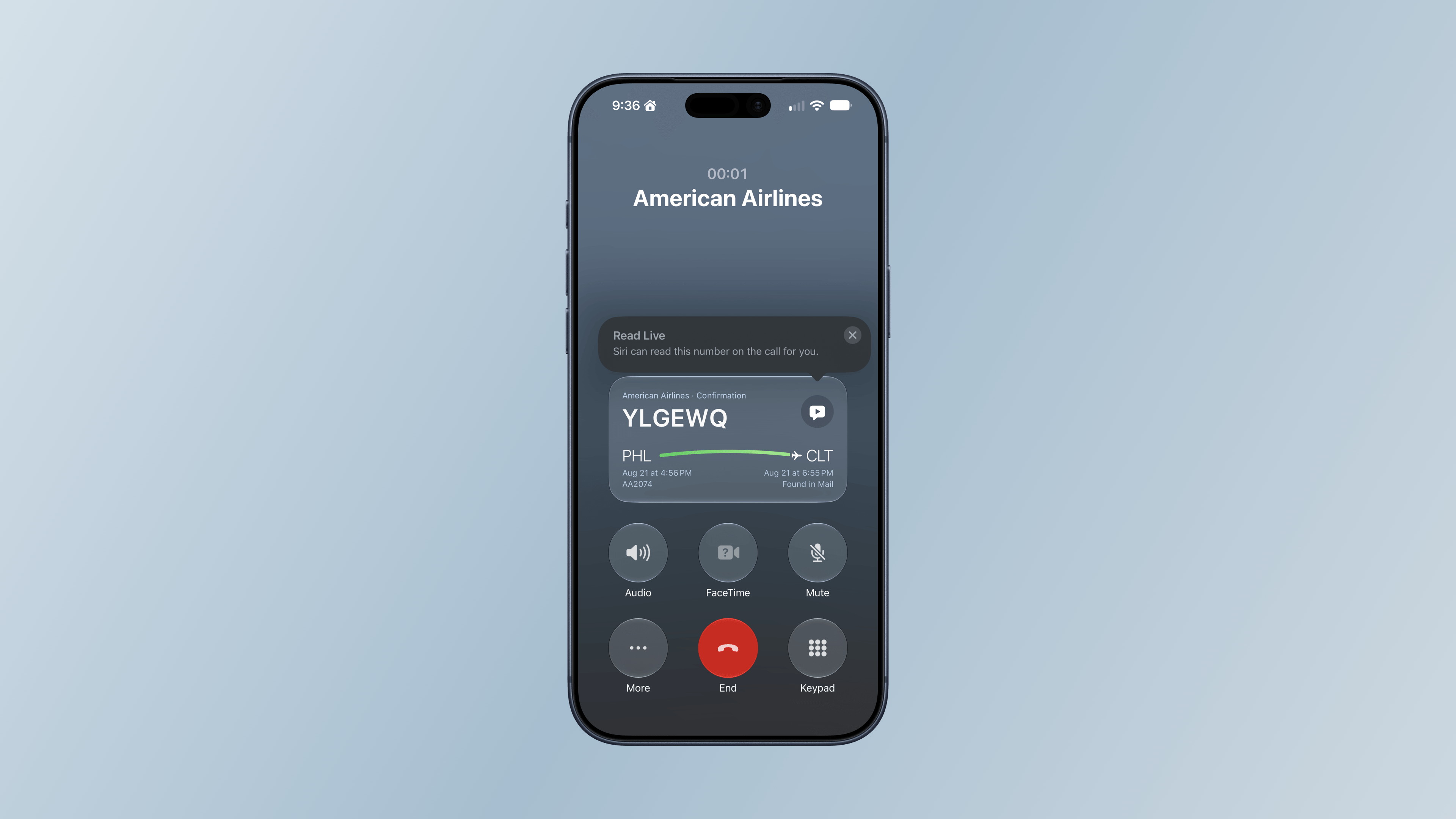
It’s not a Watch call, but I did see Call Context once on my iPhone this summer.
Call Context is a Phone feature that’s available on both the iPhone and Apple Watch that can surface relevant information from Mail during a call, such as flight details when you call an airline. I haven’t had many opportunities to try this over the summer, but it did pull up a flight for me on my iPhone when I called American Airlines about a flight. I called back later from my Apple Watch Ultra 3, but that time, the flight details didn’t appear.
Shazam:
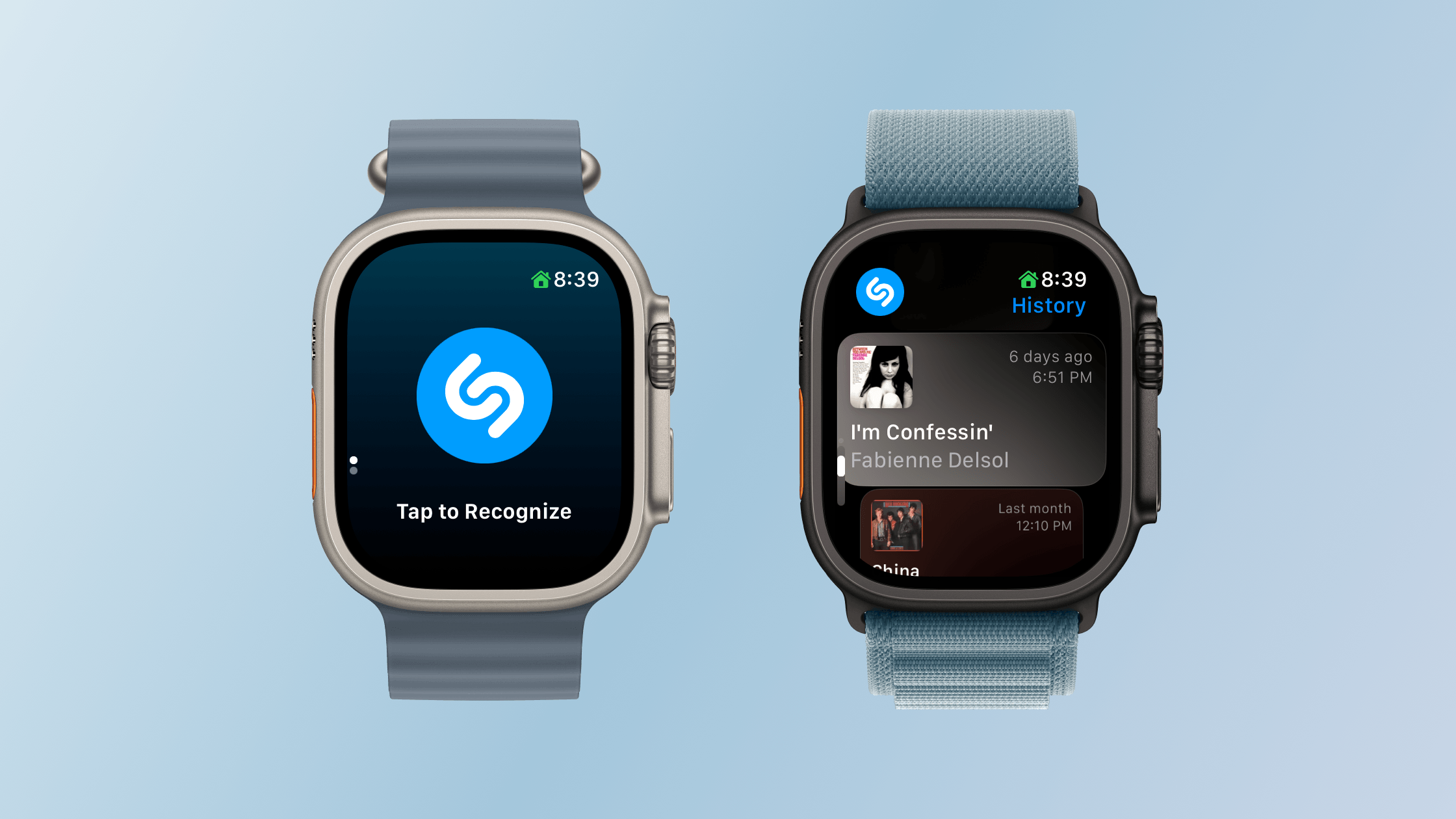
Starting song recognition and browsing Shazam history.
With watchOS 27, Shazam can listen to music even if your Apple Watch isn’t connected to the Internet and send its acoustic signature to the cloud for analysis and matching when your connectivity resumes. This is not on-device song recognition, but it does mean you can still track a song in the moment and get the results later, which I like.
Unused Feature Notifications:
watchOS 27 proactively sends notifications that it will turn off unused features, such as gestures, Start Workout reminders, and Raise to Speak, to preserve your Watch’s battery life. If you get one of these notifications, you can decline it or turn the feature back on later in Settings. I haven’t seen any of these notifications during my summer testing.
Cycle Tracking:
watchOS 27’s Cycle Tracking expands support to perimenopause and menopause, including symptom logging and educational resources. For anyone 40 and older, changes in logged cycle patterns may prompt a notification suggesting a consultation with their doctor. Apple makes it clear that the notifications the Apple Watch provides aren’t meant to be a diagnosis, but a way of recognizing a pattern that the user may want to raise with their doctor.
Screen Time:
Apple has also redesigned Screen Time controls to help families manage a child’s Apple Watch use, including contact restrictions, app schedules, and app access. I don’t manage any of my grown kids’ devices, so I haven’t tested these updates.
Performance
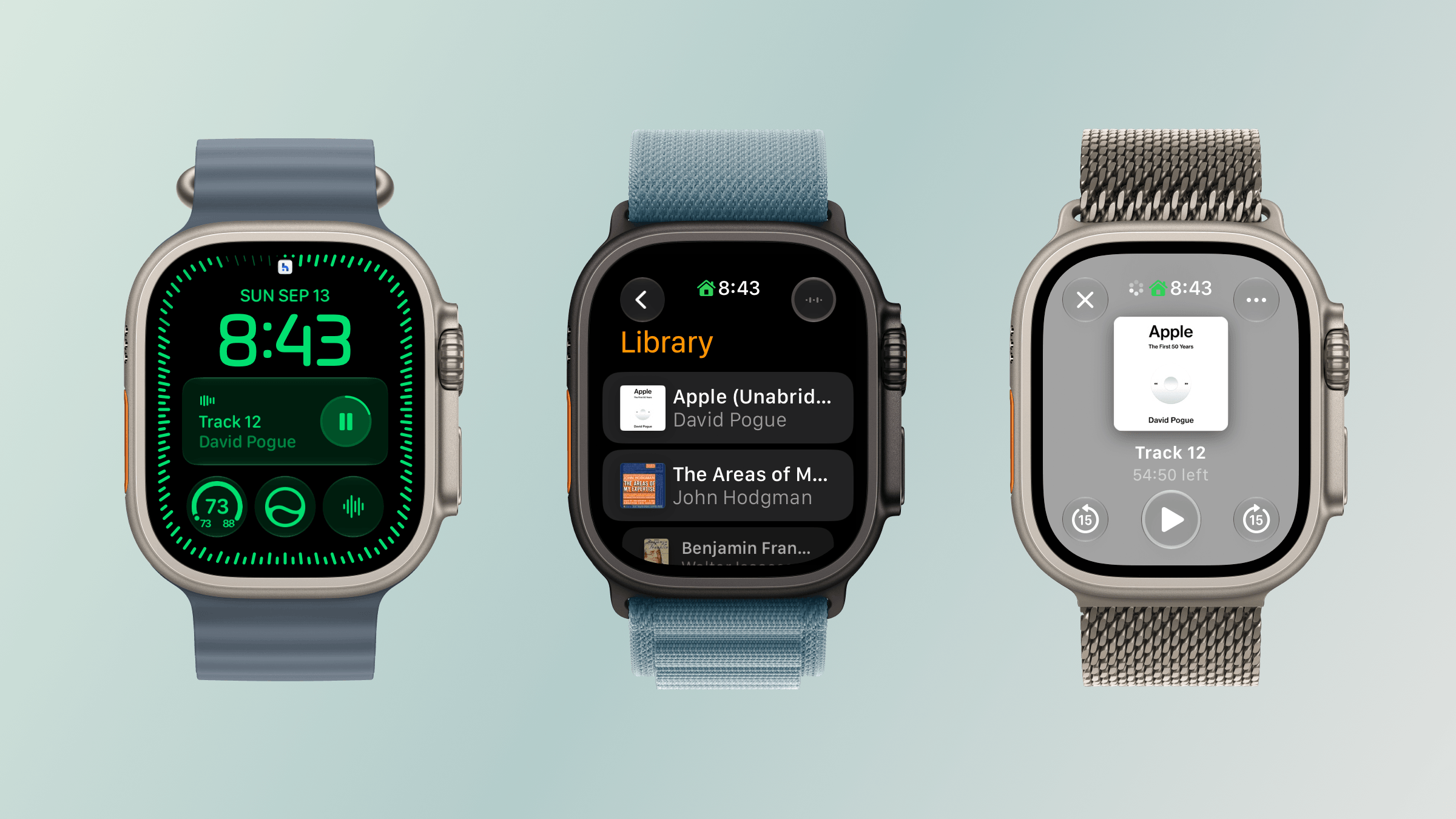
Audiobook playback from the Siri Modular face and Books app.
My experience with watchOS 27 has been a lot like my experience with macOS Golden Gate. The performance enhancements touted by Apple at WWDC are real, but soon become the new normal. I also have just my one Apple Watch to go by, so I’ll share my anecdotal experience with the betas.
My Apple Watch Ultra 3 already had one of the fastest chips available in an Apple Watch, but the performance of watchOS 27 was still noticeably faster from the very first time I installed developer beta 1. That experience is as true today as it was then, but I’m more used to it now. Apps launch faster and more smoothly, and transitions between in-app views are better too. The changes are relatively subtle, but nonetheless noticeable, which I appreciate.
The biggest difference of all, though, has been my experience with Apple Music, Podcasts, and Books. All three apps load content and start playing it faster than before. I’ve also had less trouble connecting both my Powerbeats Fit earbuds that I use for exercising and my AirPods Pro 3. That’s ended a whole connection and playback dance I used to do every time I got ready to go for a jog, which has been wonderful to leave behind.
What I didn’t notice was better battery life. That’s not to say it isn’t better, but with the frequency of beta updates over the summer and my habit of periodically charging my Watch at my desk, battery life seemed about the same as watchOS 26.
Odds and Ends
In addition to what I’ve already covered, it’s worth noting the following changes:
Apple says water detection is more efficient, though in what way is unclear.
GymKit has been extended to the iPhone with AirPods Pro 3, which allows heart rate data collected by the earbuds to be synced through your iPhone to GymKit-enabled equipment, although I haven’t tried this because I don’t belong to a gym.
watchOS 27 requires an Apple Watch Series 9 or later, Ultra 2 or later, or SE 3, paired with an iPhone 11 or later or iPhone SE 2 or later running iOS 27. That’s the requirement for the OS itself, but Siri AI also requires an Apple Intelligence–capable iPhone. The update drops support for Series 6–8, the original Ultra, and SE 2, too, although Apple’s Cait Dooley told TechRadar in June that those older models can remain paired with an iPhone and will continue to receive security updates.
Coming Soon to an Apple Watch Near You
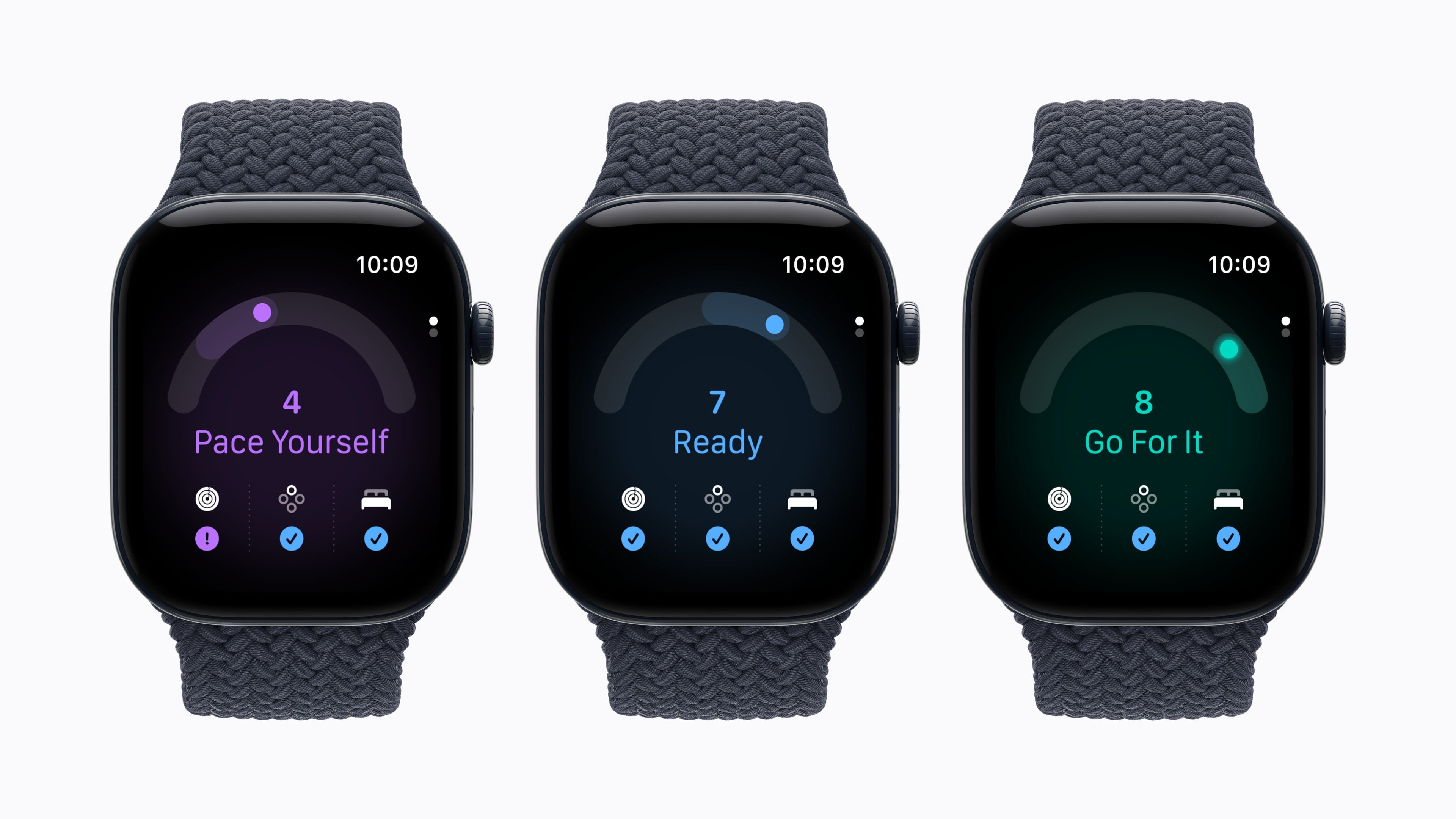
Apple’s upcoming Readiness app. Source: Apple.
I wouldn’t normally touch on unreleased features in an OS release, but so many things were announced during last week’s Surprise and Shine event that I wanted to give readers a quick recap of what’s still to come in watchOS 27, even though I haven’t tried any of these features yet.
When the new Apple Watch Series 12 and Ultra 4 arrive on doorsteps and in Apple Stores on Friday, their owners will be able to enjoy the following additional features:
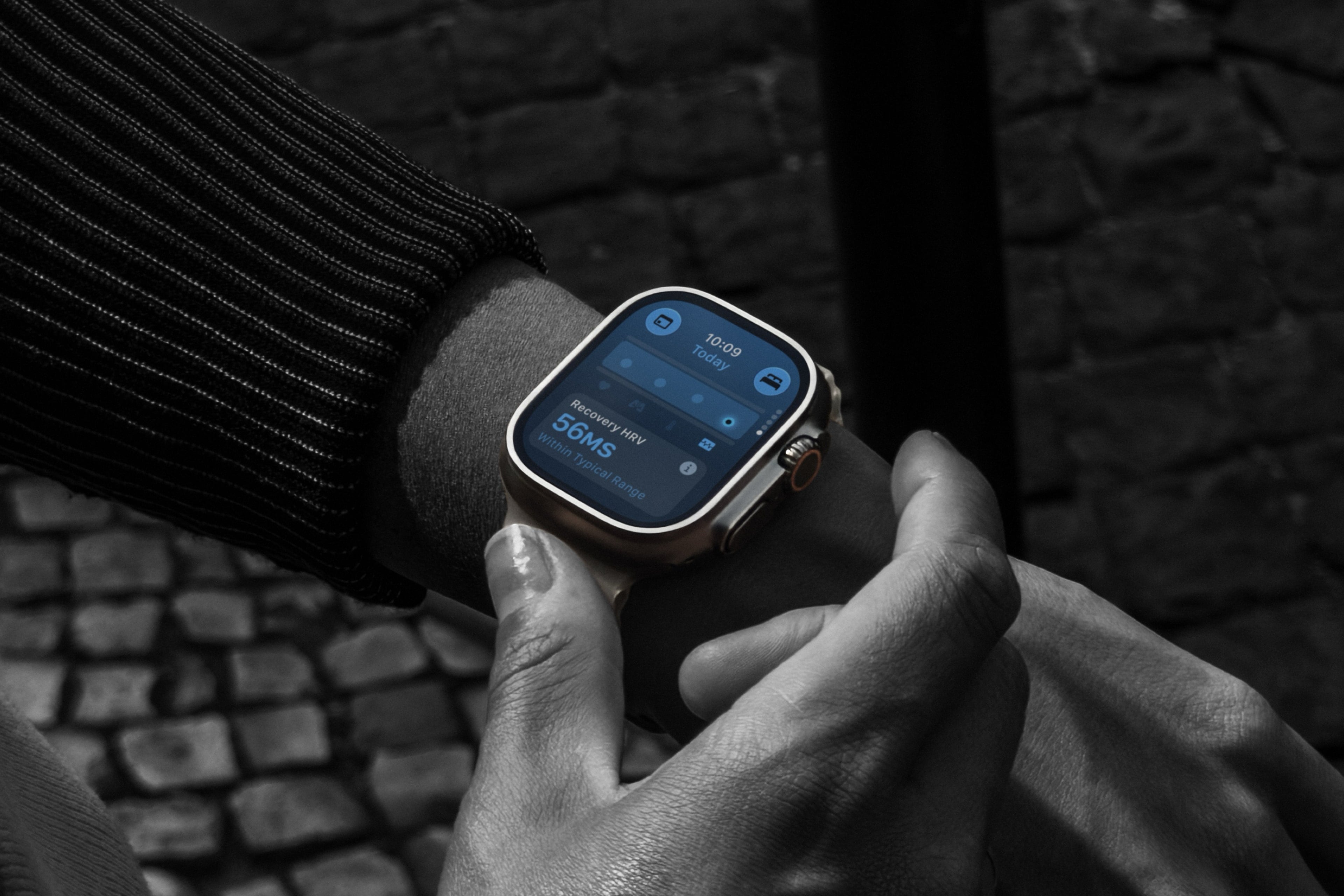
Apple’s New Health Sensing System: Both new Watches have redesigned optical and electrical heart sensors, which will allow them to take heart rate measurements every five seconds and HRV readings as often as every five minutes, which is up to a 24-fold increase in HRV measurement frequency compared with previous Watches. Apple says the new sensors will provide more accurate and meaningful measurements.
Heart Rate and Vitals: On the Series 12 and Ultra 4 Watches, the additional heart rate measurements also enable an HRV section with recovery and overall HRV readings. Vitals also gains access to recovery HRV in its overnight measurements and adds a daytime view.
Readiness:Readiness is a new app that uses your sleep, vitals, and recent activities to compute a score from 0–10, which the app translates into Recover, Pace Yourself, Ready, or Go For It recommendations.
Sound Recognition: The new Watches can analyze sounds like a baby crying, alarms, sirens, and doorbells even if your iPhone isn’t nearby. When a sound is recognized, users will be alerted on their Apple Watch.
Automatic Music Recognition with Shazam: With Music Detection enabled on the new Watches, Shazam will identify background music when you open the Smart Stack, without requiring you to tap the widget.
Siri Recaps. Source: Apple.
In addition, later this year, Apple is adding two new features to the new Watches, which you can read about in greater depth in my preview story from last week:
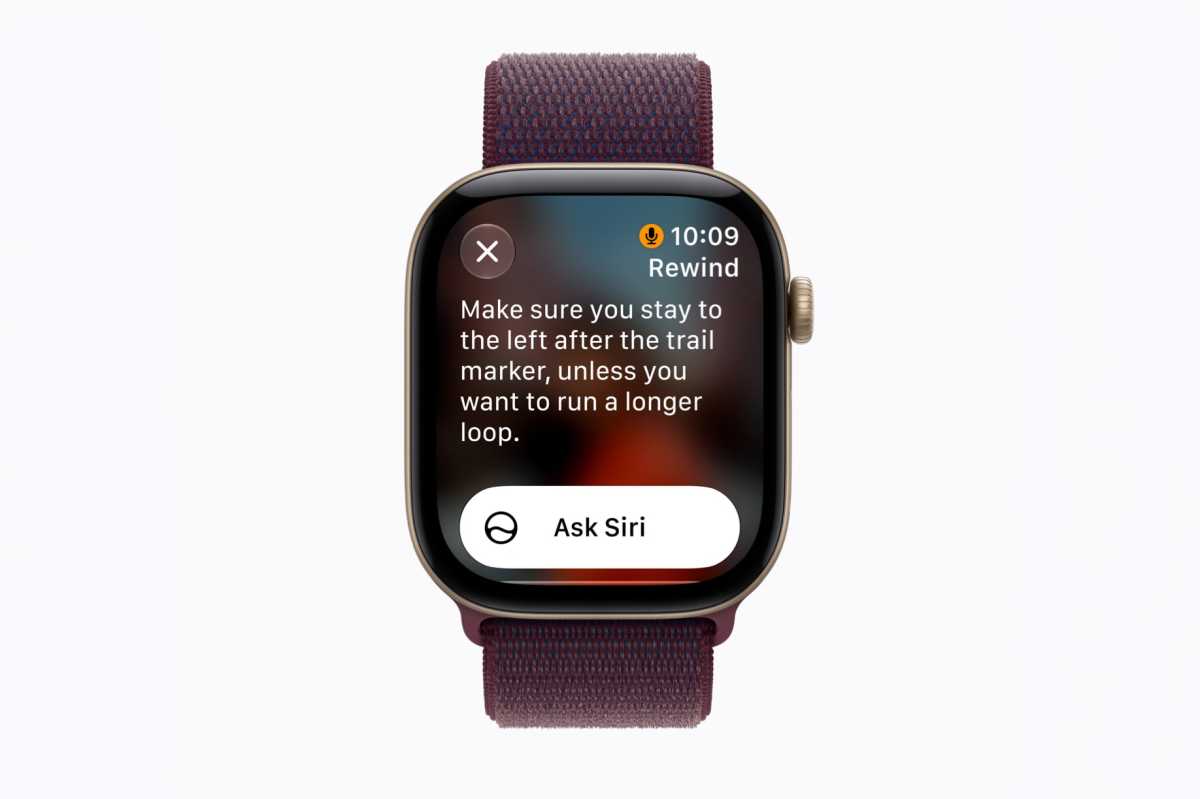
Live Rewind: Live Rewind, which plays a sound and animation to alert people that it’s been activated, transcribes the last 15 seconds of speech to help with hearing.
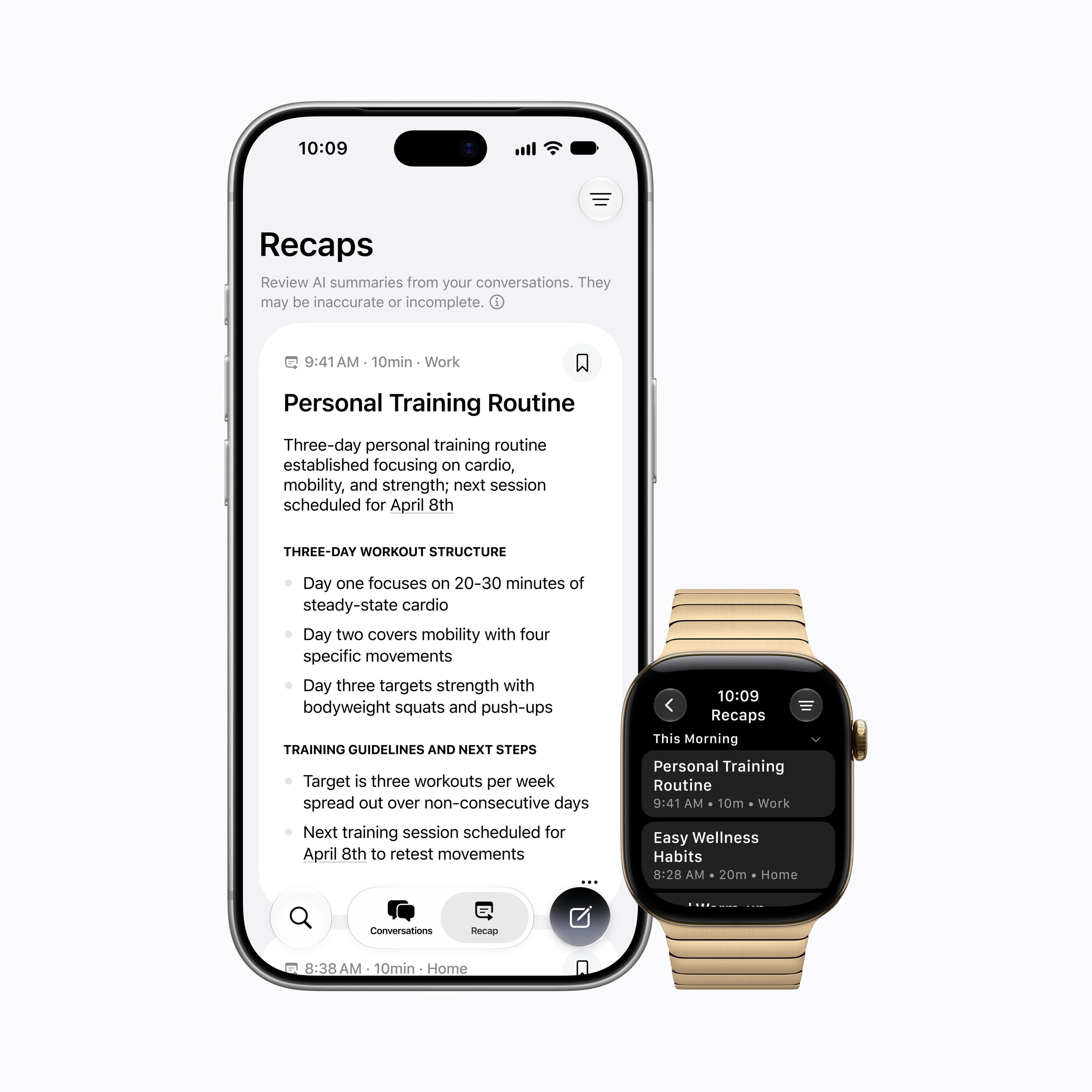
Siri Recap: A summarization feature that will pull key points from conversations and will support only English at first.
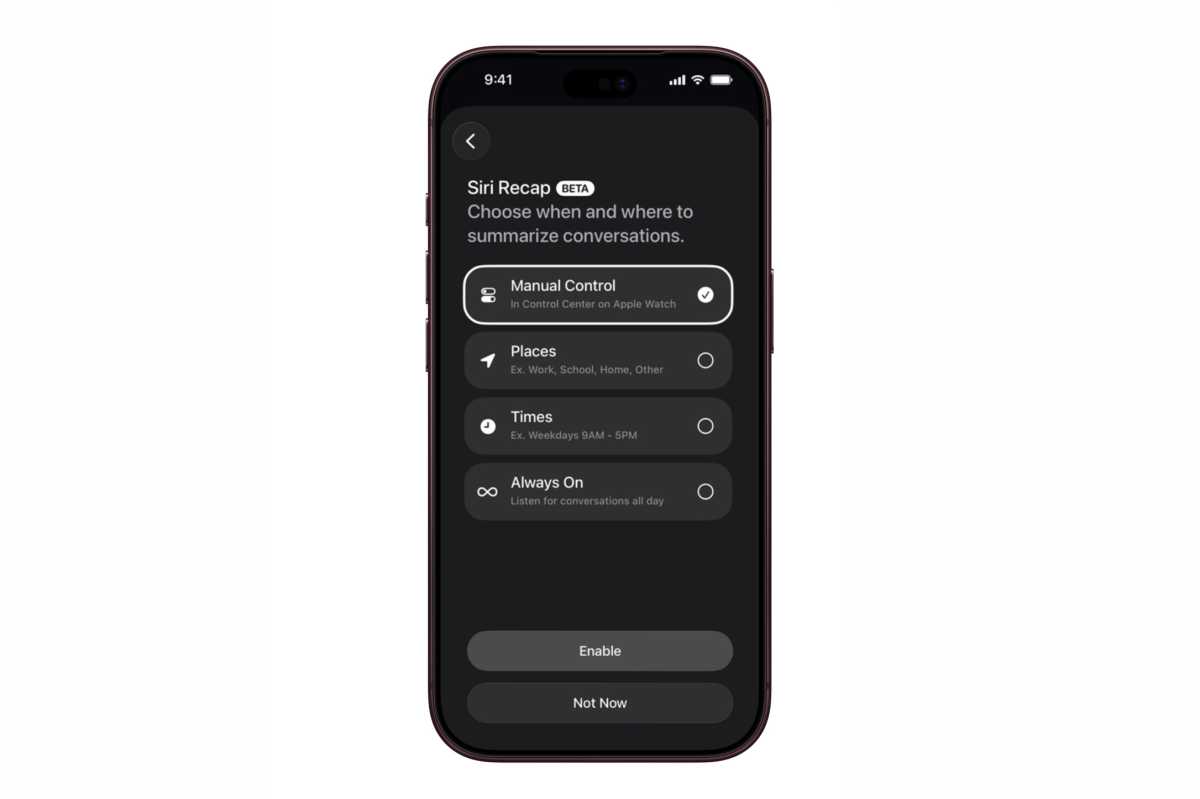
Both features are set to debut as betas later this year and require a Series 12 or Ultra 4 Watch paired with a supported iPhone 16 or later, excluding the iPhone 16e, with Apple Intelligence and Siri AI enabled. Both features are opt-in, and Siri Recap can be enabled manually or scheduled by time and location. Unsaved recaps disappear after seven days. Apple says audio is protected by handling processing in a Secure Exclave, but the resulting text can still be saved and shared, and it’s possible for Siri summaries to miss or misunderstand details. Those are things I’ll be looking at carefully when I can try the features for myself.
Finally, later this year, Apple will debut a redesign of the Health app on the iPhone that also incorporates a Health Age feature, movement evaluations, and lab work purchases and scheduling in the U.S.
Shaking off the Cobwebs
New hardware enabling new software experiences.
It’s funny to write a watchOS review hot on the heels of finishing my macOS Golden Gate review. In some ways, the two couldn’t be more different. My Apple Watch Ultra 3’s screen is about two inches diagonally and is designed to be interacted with in small, fleeting doses. Meanwhile, I’m writing this on my Mac Studio, using a 32-inch OLED display and an OS that’s as hands-on as they get.
Yet at the same time, there’s a similar transition going on with Apple Watch hardware and its OS that reflects a similar thing I see in macOS. Apple silicon lit a fire under macOS, opening up new ways to use Apple’s computers. That’s only accelerated with AI.
watchOS is in a similar place. The Apple Watch is already one of the most popular smartwatches on the planet, giving Apple Intelligence a place on a lot of wrists. Apple is raising the minimum hardware requirements for watchOS while introducing another set of capabilities exclusive to its newest Watches. We’re witnessing a shift from small, incremental watchOS changes to a new category of features. Starting with Live Rewind and Siri Recap, those additions have the potential to define the device’s future.
Today, the watchOS features that are currently available are more modest, typical features. I love the expansion of the Smart Stack, the new Siri app is incredibly useful as an extension of the app on other platforms, and it’s great to have Workout Buddy along for my runs without my iPhone.
In any year, I’d be happy with those and the other updates to watchOS, but this year, they feel like the first course of what I expect will be a great year for watchOS. AI has shaken the cobwebs off of watchOS, and I can’t wait to see what’s next.
Apple Watch Ultra 4, the ultimate sports and adventure watch, now includes new, advanced health and fitness features, and longer battery life.
Apple’s newest Apple Watch features are designed to remember conversations so users don’t have to. Legal experts say they may also test wiretap statutes that were written long before a wristwatch could quietly turn speech into text.
The tools arrived with the Apple Watch Series 12 and Ultra 4. Siri Recap produces summaries of conversations a wearer had during the day. Live Rewind, triggered by a double-press of the Digital Crown, shows a transcript of the previous 15 seconds. Apple markets both as memory aids, not as recording devices.
That distinction is the heart of the dispute. According to reporting by Bloomberg News’ Natalie Lung, attorneys in all-party-consent states — including California, Massachusetts, Pennsylvania, and Washington — are not convinced that on-device processing and the absence of a saved audio file will keep users clear of eavesdropping and wiretap laws. Those statutes generally require everyone in a private conversation to agree before it is intercepted.
Apple has built in several safeguards. Live Rewind plays an audible alert, shows a full-screen animation and microphone indicator, and processes audio on secure hardware that Apple says is inaccessible to the operating system, apps, the user or the company. The company says no audio recording is created or stored. Transcripts vanish about 30 seconds after the display dims unless saved in the Siri app. Recap summaries are deleted after seven days unless a user keeps them. Users can turn the features off or restrict them by time or place. Apple also says summaries do not attach comments to named people and may omit financial details, personal identifiers and authentication data.
Experts quoted in Lung’s reporting still see legal risk. Subodh Chandra of Chandra Law Firm said the feature set “raises serious concerns under California law and the laws of other states that require all-party consent.” Boston criminal defense attorney Joe Simons called it a likely “case of first impression” in Massachusetts. Pennsylvania defense lawyer Phil Lauer said the technology is “very close to being legal” because a person is not sitting on the other end of the feed — but that courts could still treat the watch’s capture and interpretation of speech as unlawful interception. Seattle attorney Mark Blair argued that fleeting processing may not matter: if consent is missing, the wearer could face criminal exposure even after the text disappears.
Colin Zick of Foley Hoag advised users to treat the tools as they would a wiretap and ask permission first. Adam Schwartz of the Electronic Frontier Foundation said bystanders have little practical way to consent or refuse, and called always-on monitoring of conversations “an unacceptable burden on our conversational privacy.” Former Apple employee Todd Dailey wrote that lawyers “will have some long nights ahead,” arguing Recap-style capability existed before but is now harder to detect.
Apple rejected the idea that the features record conversations. It noted that people already take notes with phones and wearables, said the 15-second Live Rewind window encourages responsible use near a speaker, and pointed out there is no audio file to share or produce. Company guidance still tells users to “consider” people around them when conversations might be private or sensitive. Unlike Live Rewind, Siri Recap has no continuous on-wrist indicator while it listens through the day.
The debate sits in a broader push toward ambient AI — smart glasses, always-available assistants, gadgets that sit in the room rather than wait for a button press. Dedicated recorders from companies such as Plaud and Pocket typically start only when activated. Apple’s watches, by design, must be listening first if they are going to rewind or recap later. Whether courts treat that as note-taking or interception is unsettled. Until it is, the legal risk may fall less on Cupertino than on the person wearing the watch.
MacDailyNews Take: Surely Apple’s legal team has vetted these features before release, but we’ll see what happens with the perpetually aggrieved their overly litigious ambulance chasers.
Please help support MacDailyNews — and enjoy subscriber-only articles, comments, chat, and more — by subscribing to our Substack: macdailynews.substack.com. Thank you!
With the Apple Watch Series 12 and Ultra 4, Apple is introducing some neat new audio-based AI features that seem genuinely useful and exciting.
The new S11 processor includes hardware that makes it possible to continually listen and (lightly) process audio without ruining battery life, and Apple is using that to provide four new AI-powered features. It calls these features “Audio Intelligence” because Apple can’t help but brand everything.
Full-time Shazam: The watch can detect music playing and automatically identify it using Shazam, displaying it on widget in the Smart Stack. Apple Watches already do this on demand, but the new thing here is that it does it continuously in the background like Pixel phones.
Sound recognition: The same feature you can get on HomePods and iPhone now comes to Apple Watch. You can get notified visually when your watch hears sounds such as doorbells, fire alarms, sirens, etc. You used to need your iPhone nearby to use this feature, but the Series 12 and Ultra 4 can do it independently.
Live Rewind: Double-tap the digital crown to see a text readout of the last 15 seconds of what was said around you. You can then ask Siri about it or save it to the Siri app.
Siri Recap: Get a high-level summary of an entire conversation in the Siri app, so you don’t forget specifics or need to take notes.
The first two of those features don’t really bother anyone. Those are existing features, and the only new thing is that the Apple Watch can do them in the background without iPhone intervention. The last two will be available later this year as a beta, and those are the ones that have people freaking out. Are people’s Apple Watches going to be recording you all the time?
Apple has issued a Audio Intelligence Security Overview white paper to help users understand how all this works and how it protects everyone’s privacy. It’s worth a read, but here are the highlights.
How Live Rewind works
On the Apple Watch Series 12 and Ultra 4, audio from the microphone is continuously flowing into a little buffer in the Secure Enclave. This actually happens on lots of Apple products; it’s how they know if you’ve said “Hey Siri” or not. This is a rolling buffer, where new data continuously replaces old data.
The Secure Enclave is a completely separate hardware block that is not accessible to the rest of the operating system, or any apps, or even Apple. It’s where your Face ID and Touch ID data is stored, for example.
Live Rewind will show you what you missed—privately.
Apple
When you double-press the Digital Crown, the last 15 seconds of that buffer is sent via an encrypted secure transfer to your iPhone, where an AI model transcribes it. This happens in the iPhone’s Secure Enclave, so the audio cannot be accessed by the rest of iOS, or any app, or the user, or even Apple. This is just a straight voice-to-text transcription; it doesn’t identify or label people who are speaking. The audio is then immediately discarded.
The text of the translation is then sent back to Apple Watch where it appears on the display. It is not saved unless you ask Siri about it or save it to the Siri app to revisit later. The Siri app’s data is end-to-end encrypted and synced between devices, and users can control whether conversations are automatically deleted after 30 days, 1 year, or saved forever. Apple cannot decrypt this data, even with a court order—only the user has the key.
And one more thing, an audible chime plays from the speaker on your Apple Watch when you implement Live Rewind, even if your Apple Watch is on silent or you have headphones connected.
So that’s how Live Rewind protects your privacy and those around you. Raw audio data can’t ever be accessed by the user, the system, Apple, or any apps. It’s just straight translated to text, which is then optionally saved in the end-to-end encrypted Siri app.
How Siri Recap works
Siri Recap works in a similar way, but there’s more going on. You’ll be able to leave it on all the time, only when you trigger it manually, or specify certain places or times when it can’t operate.
First, a tiny little lightweight model simply detects if a conversation is happening at all.
If it is, that encrypted and secure audio buffer is sent to the iPhone (via an encrypted data transfer) for processing. It is transcribed to condensed text, and the raw audio is then immediately discarded. It is never accessible to the OS, apps, the user, or Apple.
This transcribed text passes through a safety filter than will remove potentially harmful terms. Then it is encrypted and sent to Apple’s Private Cloud Compute servers to be summarized, along with relevent contextual data that can make the summary better (such as what music you might be listening to, a relevant calendar entry, or high-level place information like what city you’re in).
Apple
Private Cloud Compute generates a title and summary with key points. It removes any specific identifiable or sensitive info such as place names or financial data, while leaving generic places names like “park” or “grocery store.” That summary is then sent back to your devices, encrypted, where it is stored in the Siri app in a new Recaps tab. All data on Apple’s Private Cloud Compute servers is always discarded immediately after processing; Apple never saves any of it.
The summaries in the Recaps tab are deleted automatically after seven days unless you choose to save it.
Like Live Rewind, Siri Recap does not create a recording, does not identify speakers, and does not even create a verbatim transcript. No audio is ever accessible at any step of the process by the user, any app, or Apple.
Finally, Live Rewind and Siri Recap are not available for users under the age of 13. For users under 18 on a Child Account, access to Live Rewind and Siri Recap must be turned on by a parent or guardian.
Auf der Keynote am Mittwoch hat Apple zum ersten Mal den genauen Prozessor genannt, auf dem der S11-Chip basiert. Damit konnte man auch ganz gut angeben, denn die Apple Watch Series 12 und Ultra 4 haben eine Architektur erhalten, die Apple vom A20 Pro abgeleitet hat. So gesehen könnte die Apple Watch Series 12 in manchen Aspekten sogar schneller sein als das iPhone 17 Pro Max.
Wie viel RAM haben Series 12 und Ultra 4?
Die Größe des Arbeitsspeichers bleibt bei der Apple Watch ein Geheimnis hinter sieben Siegeln. Nur auf Umwegen kann man herausfinden, über wie viel RAM eine aktuelle Apple Watch verfügt. Für unsere Vergleichstabellen überprüfen wir die Analytics-Logs der Watch, die das iPhone speichert. Registrierte Entwickler können diese Informationen auch in Xcode einsehen. Laut einer neuen Version von Xcode haben die Apple Watch Series 12 und Ultra 4 jeweils 4 GB RAM. Die Series 11, Ultra 3 und SE 3 kommen alle nur auf 2 GB Arbeitsspeicher.
Analytics-Logs der redaktionellen Apple Watch SE 3 mit 2 GB RAM.
Halyna Kubiv
Warum braucht die Watch mehr RAM?
Wenn man die Tatsache in Betracht zieht, dass Apple der neuesten Generation seiner Watches einen aktuellen Prozessor spendiert hat, ist die Verdoppelung des Arbeitsspeichers kein Wunder. Apple bereitet seine Smartwatches auf Apple Intelligence und Siri AI vor, und dafür sind nun mal ausreichend RAM und ein schneller Prozessor notwendig. Bereits nach der Ankündigung der ersten Version von Apple Intelligence hat Apple seine Macs nach und nach mit mindestens 16 GB RAM ausgestattet. Noch kurz davor hat der Hersteller behauptet, 8 GB RAM in einem Mac seien für die meisten ausreichend.
Die Kombination aus einem neuen Prozessor, deutlich mehr RAM und möglicherweise einer etwas größeren Batterie macht die Apple Watch Series 12 und Ultra 4 zukunftssicher für kommende KI-Neuerungen. Das gleiche Muster konnte man bei den Apple Watches Series 9 bis Series 11 beobachten: Die vorgestellten Neuerungen der vergangenen Jahre, wie die Handdrehungsgeste oder Warnungen vor zu hohem Blutdruck, kamen nicht nur für die neueste Generation, sondern auch für die Vorgänger mit der notwendigen Hardware. So werden die Series 12 und Ultra 4 voraussichtlich die Software-Neuerungen der kommenden zwei Jahre erhalten.
Als Apple damals die Apple Watch Series 10 auf den Markt brachte, war die Aufregung um das „verfeinerte Design“, das „fast 10 Prozent dünner als die Apple Watch Series 7, Series 8 und Series 9“ war, groß. Zudem verfügte das Modell über ein größeres Display, wodurch das gesamte Gerät am Handgelenk eleganter und schlanker wirkte.
Auf dem Papier ist das natürlich kein großer Unterschied, aber es fühlt sich wie ein Rückschritt an. Wie Sie auf dem Bild oben sehen können, sind die Einfassungen der Series 12 (links) deutlich stärker ausgeprägt als bei der Series 11 (Mitte) und der Series 9 (rechts).
Normalerweise wäre eine Änderung von einem Jahr zum nächsten für die meisten Menschen uninteressant. Doch die neuen Uhren verfügen über eine Reihe cooler Funktionen, die ausschließlich den neueren Modellen vorbehalten sind (in Europa aber teilweise nicht verfügbar sind) und die Nutzer der Serien 10 oder 11 zum Umstieg verleiten könnten. Dabei erhalten sie eine Uhr, die älter aussieht als die, die sie gerade noch am Handgelenk hatten.
Es gibt keinen offensichtlichen Grund, warum die neuen Uhren größere Gehäuse haben sollten. Abgesehen von einem neuen Herzfrequenzsensor sind die technischen Daten und die äußeren Merkmale identisch, und der neue Chip dürfte effizienter sein als der des Vorgängermodells.
Seit Jahren kursieren Gerüchte, dass Apple an einer umfassenden Überarbeitung der Apple Watch arbeitet, wobei die jüngsten Gerüchte besagen, dass diese endlich nächstes Jahr erscheinen soll. Hoffen wir es, denn das aktuelle Design geht in die falsche Richtung.
Apple says Live Rewind on Apple Watch cannot be used secretly because activation requires a deliberate double press of the Digital Crown, plays a chime, and shows a full-screen animation with a microphone indicator. The chime plays even when the watch is muted or headphones are connected. After activation, Live Rewind shows only a text […]
Apple says Siri Recap can listen for conversations on Apple Watch, process the audio, and create a short high-level summary without keeping an audio recording for replay. The feature is opt-in, and users can control it by time, location, or a manual switch. Apple’s Audio Intelligence support document says raw audio is not recorded or […]
Apple’s Apple Watch Ultra 4 technical specifications list precision dual-frequency GPS with GPS, Galileo, QZSS, and BeiDou, but GLONASS is missing. The older Apple Watch Ultra specification page lists GLONASS alongside those systems. That makes the omission a real change in Apple’s published wording, although Apple does not explain whether it reflects hardware, software, regional […]
Apple Watch Series 12 starts at $399, which is what Series 7 cost in 2021 and what every Series watch in between has cost at launch. Apple Watch Ultra 4 starts at $799, the same as the first Ultra in 2022, and Apple Watch SE 3 is $249, the same as the SE it replaced. […]
Apple rated the Apple Watch at up to 18 hours of normal use for four straight generations, from Series 7 in 2021 to Series 10 in 2024. Series 11 moved that to 24 hours last year, Series 12 keeps it, and Apple Watch Ultra 4 is now rated at up to 50 hours. The more […]
Both new Apple Watches swim. Apple rates Series 12 at 50 meters with a depth gauge that stops at 6 meters, and Ultra 4 at 100 meters with recreational scuba certification to 40 meters, and that single difference is what separates a $399 watch from a $799 one in the water. Everything else in the […]
If you are wearing an Apple Watch Series 6 or older, watchOS 27 will not install on it on Monday, September 14. Apple’s replacement lineup is three watches: SE 3 from $249, Series 12 from $399 and Ultra 4 from $799. Apple’s watchOS 27 compatibility footnote lists SE 3, Series 9, Series 10, Series 11, […]

 Login
Login