Meta One subscription plans were announced for individual, AI power users, creators, and businesses.
Each plan is tailored for what that specific user might need, such as an enhanced profile for creators/businesses, highlighting their website, locations, and more.
Meta One subscriptions plans are available today (Sept. 15), beginning at $14.99 for creators/businesses and $7.99 for the Core plan (individual users).
We knew it was coming ever since Meta's original announcement back in May. Today (Sept. 15), Meta's latest subscription plans for its slew of apps are here.
In the company's press release, it states the Meta One subscription plans intend to "bring more value to the apps and experiences billions of people already use..." Meta One features plans intended for individuals, AI power users, creators, and businesses. The level of "expression" will depend on which subscription plan works best for you.
Meta builds on past announcements with the Core and Premium plans. It states these plans will bring more "compute-intensive AI capabilities." The Core and Premium plans are focused on assisting users with more "creative freedom" while using its AI services. More media generation is possible with Meta AI through the Core and Premium plans, as well as the availability of in-app AI features, like Restyle (on Instagram).
Here's the breakdown of the Core and Premium plans for individual and AI power users:
Core ($7.99/mo): Restyle more Stories on Instagram, use voice effects and creative tools more often, and generate more images and videos with Meta AI. Plus, express yourself in more ways with our individual app features (Instagram Plus, WhatsApp Plus, Facebook Plus)
Premium ($19.99/mo): Everything in Core, with the most room to create content with Meta AI and across our family of apps
MetaMeta
Users starting their small businesses, or even creators looking to grow, might opt for one of Meta One's other four plans.
The company says its creator and business plans place the tools users will need to grow and expand their reach directly in-app. These features include professional tools and AI that's integrated with your account. Meta says this removes the necessity of creating an entirely new account to manage your business.
These plans will also provide users with an "enhanced profile." This profile will place everything important to your business or creator scope front and center. Your website and location (business locations) were mentioned. However, Meta One will send follow invitations to people who interact with your content and feature a "bold follow button" on your Reels.
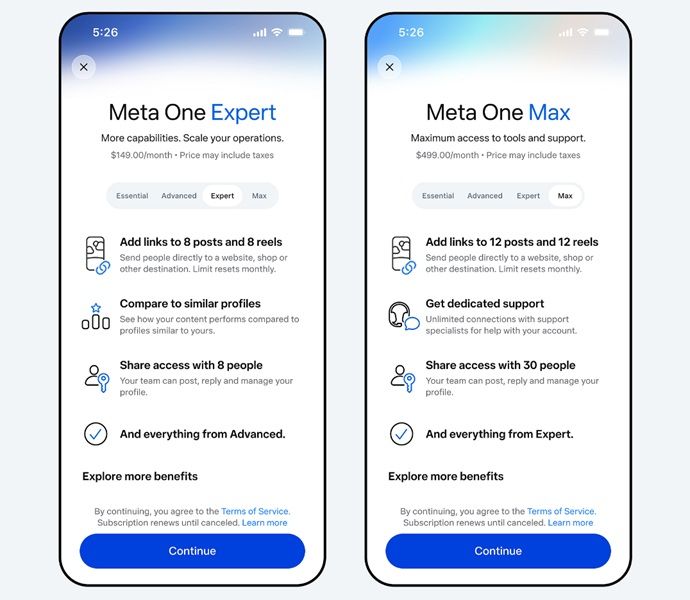
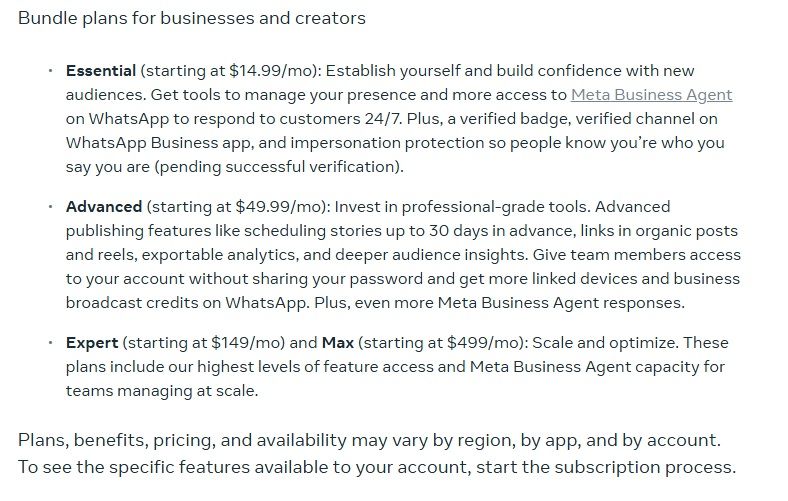
Meta One's subscription plans for businesses and creators begin at $14.99 a month. While you'll receive a verified badge, a verified business channel on WhatsApp, and impersonation protection, Meta One adds access to the Meta Business Agent. This agent is available through WhatsApp and is available 24/7. You can check the remaining plans' details in the gallery above.
Meta's app subscriptions
(Image credit: Alex Dobie / Android Central)
Android Central's Take
This is certainly an interesting approach from Meta. I feel like these kinds of subscription plans only make sense for creators and businesses. If you're not doing something like that, is $4 worth it for a few animations? I'm sure we can express ourselves for free just fine. That's just me, though. It's your choice if you feel something like this is worth it.
We knew "Meta One" was coming since May. At that time, the company revealed a slew of app subscriptions for Facebook Plus, Instagram Plus, and WhatsApp Plus. Naomi Gleit, Meta's head of product, detailed everything we needed to know, stating that these plans would give users more ways to "express and connect." WhatsApp Plus is the cheapest option at $2.99. Facebook and Instagram users would have to cough up a dollar more at $3.99 for Plus additions.
For Instagram Plus, more vibrant and expressive animations were highlighted early on. These animations would play when liking someone's Story, such as "Super Heart." Subscribers could also "spotlight" a Story once a week to reach for extra views.
A mysterious Google-made wearable has appeared at the FCC with clues suggesting it could run Wear OS.
The device reportedly skips Wi-Fi and relies on Bluetooth LE, suggesting it may be a fitness tracker.
GPS support and a metal frame are also listed, while ADB testing suggests some form of Wear OS software.
The device could sit between the Fitbit Air and Pixel Watch, potentially filling the gap left by Fitbit Charge.
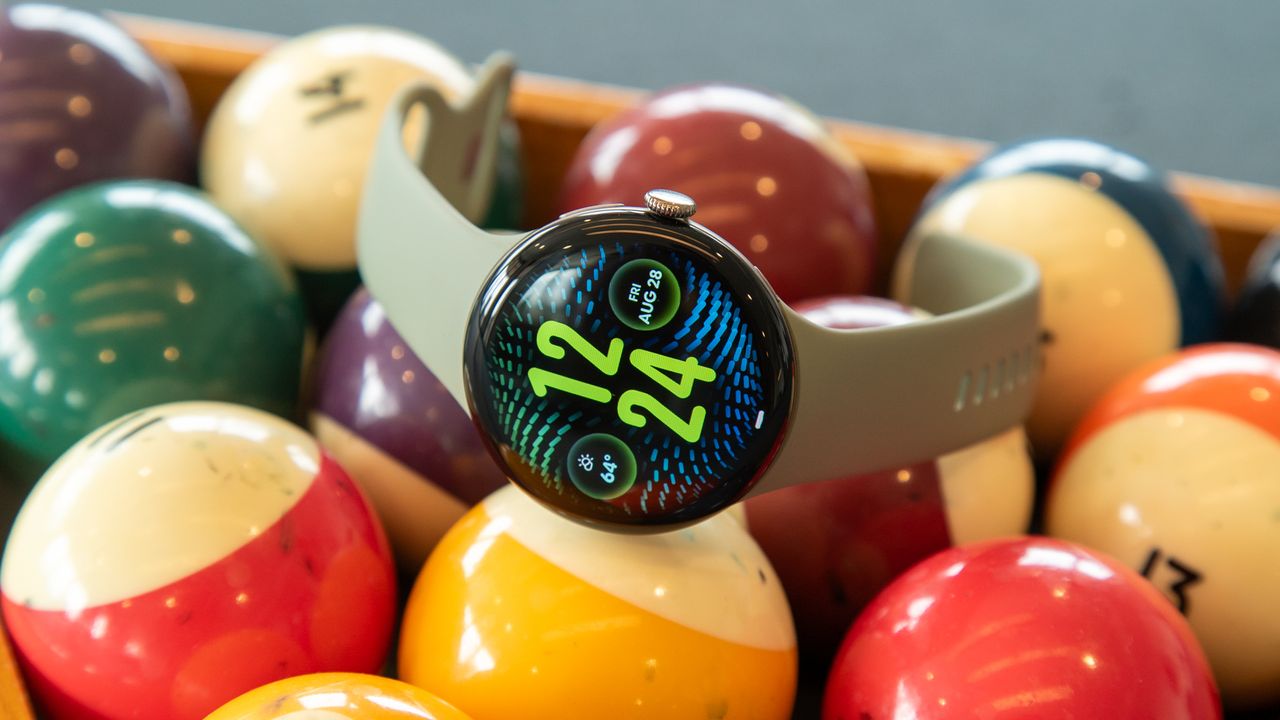
A mysterious new Wear OS fitness tracker has been spotted at the FCC, and there are a few clues suggesting it could be an upcoming Google Pixel or Fitbit-branded device.
Google has been enjoying success with both the Pixel Watch lineup and the recently launched Fitbit Air, and it looks like the company could be preparing to expand its fitness tracking lineup even further. As spotted by 9to5Google, a mysterious new Google-made device has now appeared in an FCC listing.
The device, described as a "Wireless Device," carries the model number G8BL6 and is manufactured by Goertek, a company that has previously manufactured several generations of Pixel Buds.
Interestingly, the FCC listing suggests there's no Wi-Fi connectivity onboard. Instead, the device appears to rely entirely on Bluetooth LE. There are also clues suggesting the device could run some form of Wear OS, as the EUT operation test setup specifically mentions ADB testing.
(Image credit: Reddit / 9to5Google)
In terms of other connectivity, the mysterious device reportedly supports GPS or GNSS and features a metal frame that will also act as its antenna.
The lack of Wi-Fi is particularly interesting, since most traditional Wear OS smartwatches have supported Wi-Fi. That could suggest we're looking at a different type of wearable altogether, potentially a more traditional fitness tracker rather than another Pixel Watch.
And there might already be another clue. During the Pixel 11 launch, Google briefly showed an unannounced fitness tracker with a small display in one of its teasers, and there's a chance this FCC listing could be related to that device.
If so, the new wearable could potentially sit somewhere between the Fitbit Air and Google's more expensive Pixel Watch lineup. It's also worth remembering that Fitbit hasn't updated its Charge lineup since 2023, so this device could fit quite nicely into that missing middle ground.
SwiftKey beta is rolling out a new AI voice typing mode similar to Google's Rambler feature on the Pixel 11 series.
The feature cleans up and formats your speech automatically, although it doesn't show a live transcription while you speak.
SwiftKey's AI voice typing works completely offline after downloading an AI model that's around 163MB on Android.
Unlike Google's Rambler, SwiftKey's AI voice typing isn't Pixel-exclusive and can work across other Android smartphones.
SwiftKey, the popular keyboard app acquired by Microsoft more than a decade ago, has started rolling out a new AI-powered voice typing feature in beta.
With the launch of the Pixel 11 series, Google introduced a feature that improved on the Pixel's already excellent voice typing. Called Rambler, the feature lets you speak more naturally while automatically removing filler words like "um" and "ah," cleaning up corrections, and properly formatting the final text.
Now, SwiftKey is bringing a similar feature to its keyboard app, and unlike Rambler, it can work on pretty much any Android phone.
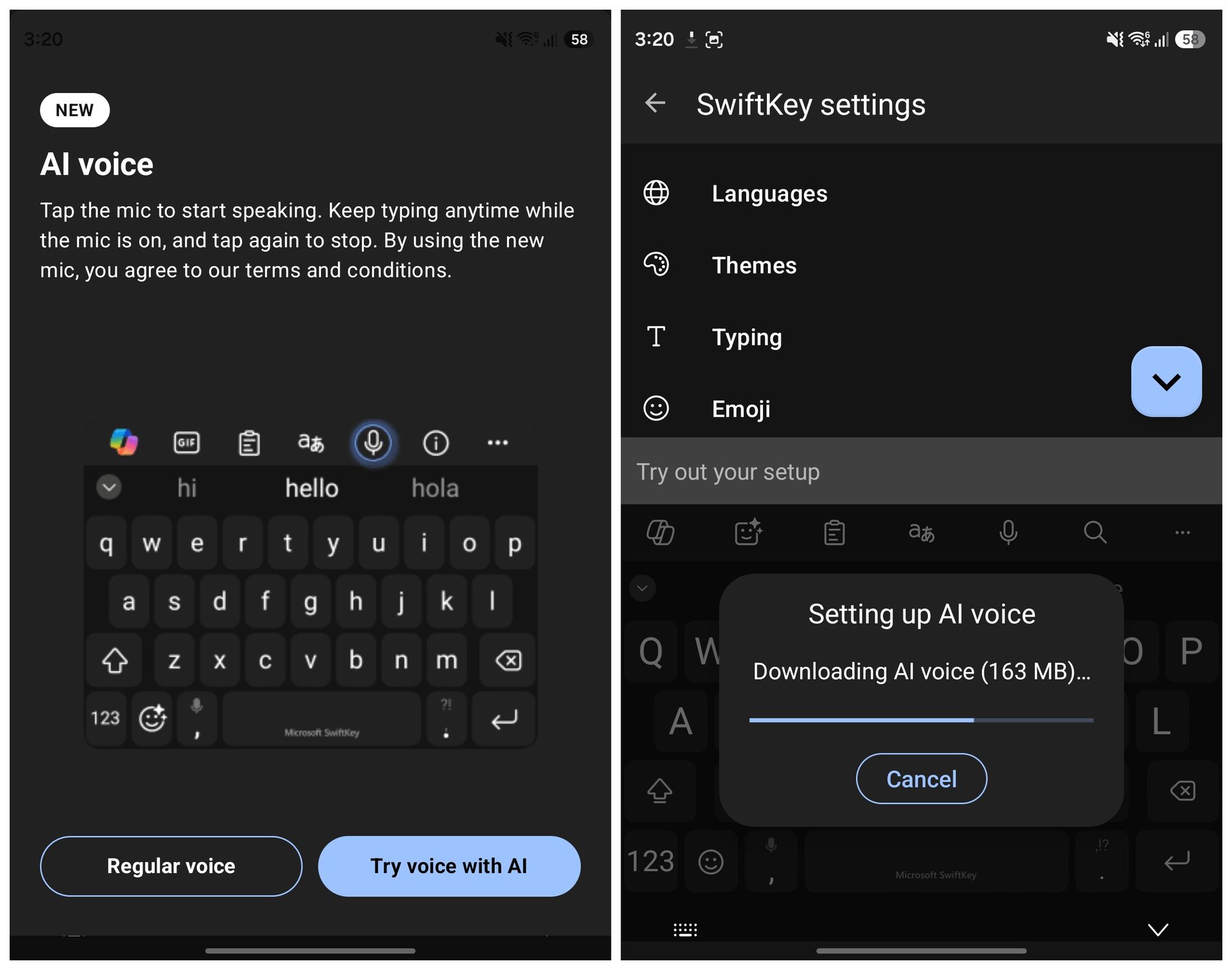
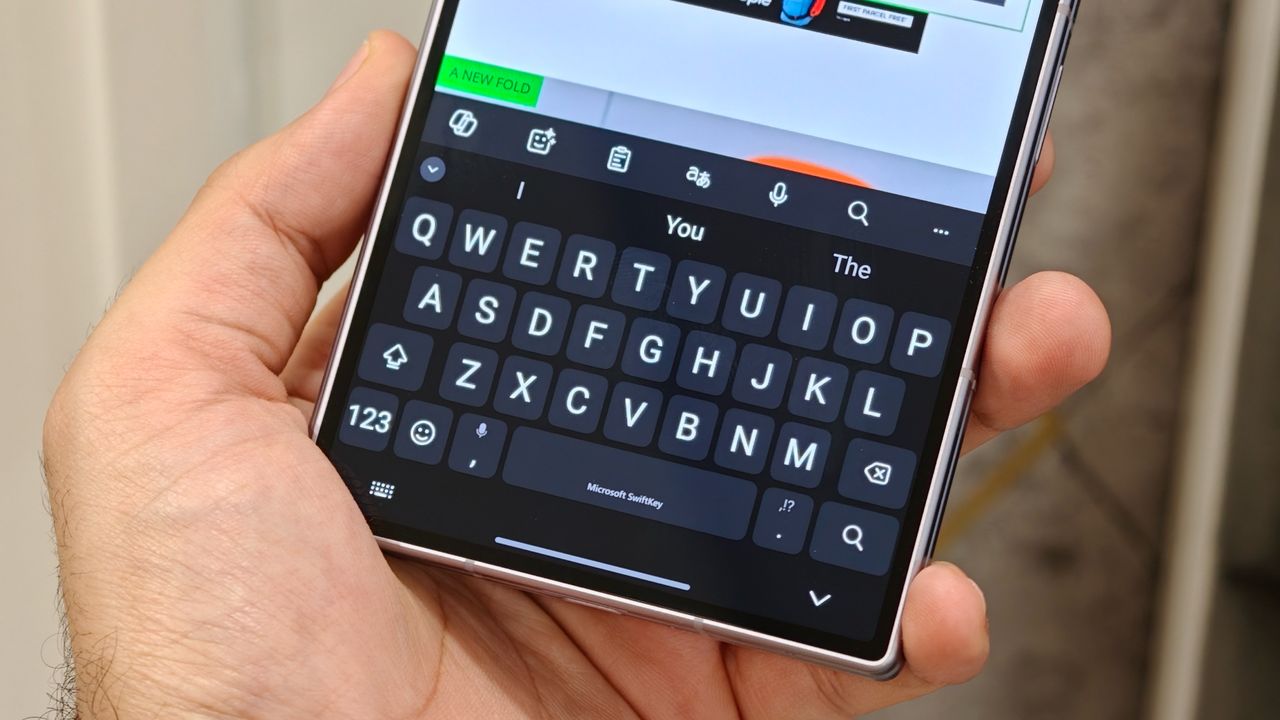
The latest SwiftKey beta for Android, version 9.13.16.4, introduces a new "AI voice" typing mode. When you tap the microphone icon, SwiftKey now shows the new AI voice option alongside a quick explanation of how it works.
Similar to Rambler on the Pixel 11 series, you can simply start speaking naturally while SwiftKey listens to you and displays a waveform on the screen. Once you're done, the AI processes what you've said and turns it into properly formatted text.
(Image credit: Future)
Before you can use the feature, though, SwiftKey asks you to download an AI voice model. On my Galaxy Z Fold 8, the download was around 163MB. Similar to Rambler, you also don't get a live preview of the transcription while you're speaking. Instead, the finished text appears once the AI has processed everything. The best part, however, is that the feature works completely offline.
I tested AI voice typing on my Galaxy Z Fold 8 with both Wi-Fi and mobile data switched off, and SwiftKey was still able to process and transcribe my speech without any issues. This isn't possible right now with Gboard's Rambler, which does require an internet connection to work.
There are some limitations compared to Google's Rambler, though. SwiftKey's implementation currently doesn't let you do things like change the tone, format the text further, or automatically insert emojis through voice commands.
That said, the SwiftKey Beta app can be installed on any Android phone, unlike the Rambler feature, which is exclusive to the Pixel 11 series, for now. So if you've been wanting to try Pixel 11-like AI voice typing without buying Google's latest phone, this might be one of the easiest ways to get something similar.
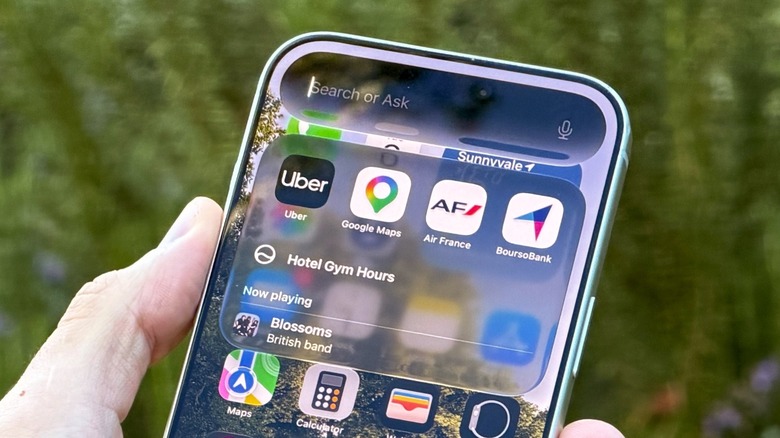
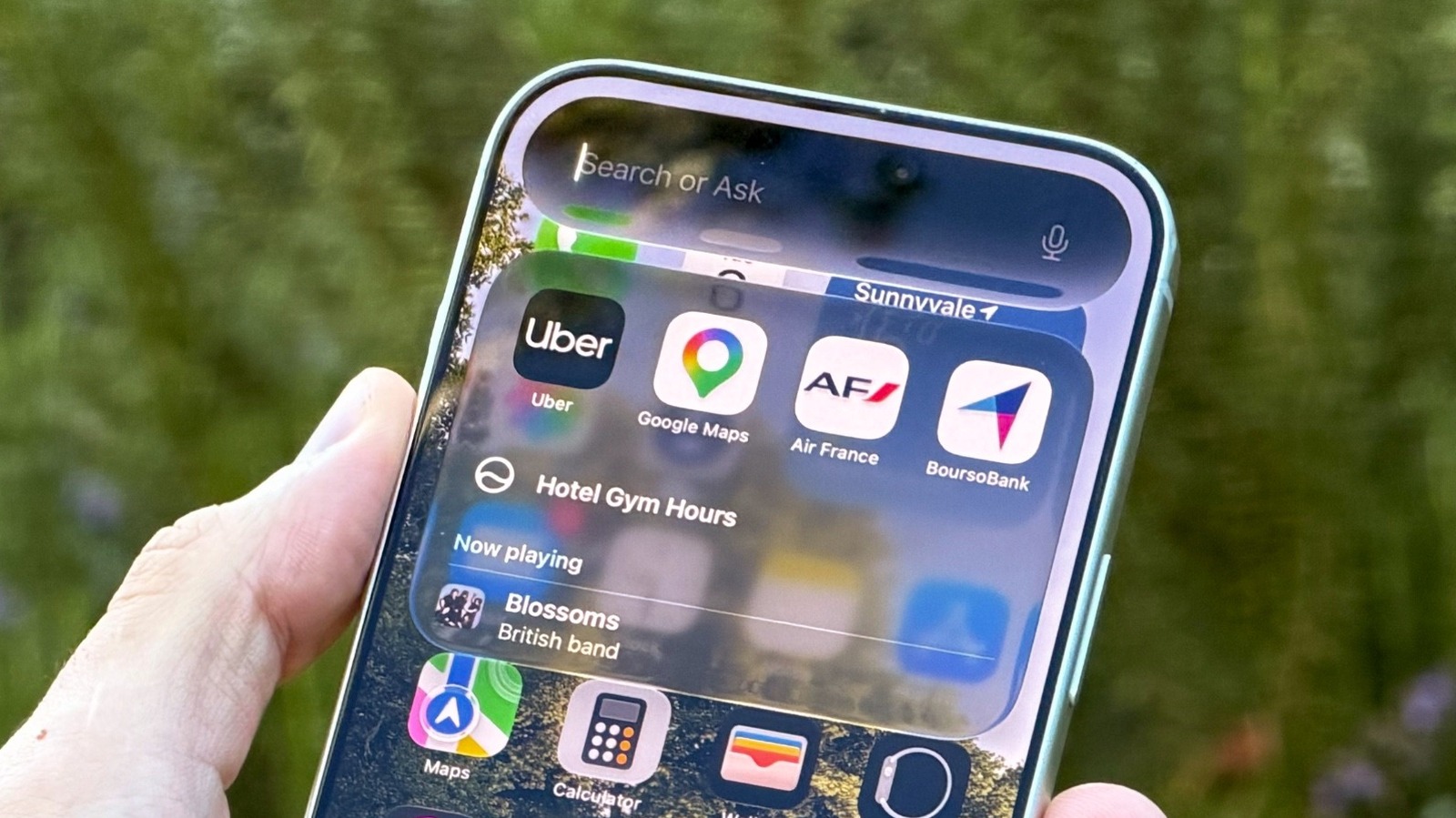
One thing iPhone users will enjoy is that Liquid Glass has been improved. They will be able to choose between a more tinted or very translucent experience.
Google's Gemini has a ton of great features, but so many of them are hidden behind a paid subscription, preventing the bulk of its users from utilizing them.
You can now move passwords and passkeys directly between supported apps on Android without exporting sensitive data to an unencrypted file.
Your new password manager hands the process to Android, which detects compatible managers installed on your phone and coordinates the transfer.
Once authorized, Android moves the credentials between apps without requiring manual file handling.
Android has always made it a pain to switch password managers. Moving passwords usually involved exporting your data into an unencrypted text file, and passkeys were pretty much stuck in place. Android is tackling both of those issues with a new transfer experience that makes moving your credentials much more secure and simple.
In a blog post, Google said the new system lets you transfer passwords and passkeys directly between password managers, without first having to download a file.
That eliminates one of the biggest security hassles of the old process, which was that sensitive credentials were sitting unprotected on your device for a while. Furthermore, passkeys weren’t transferable, so you had to manually recreate them across websites and apps.
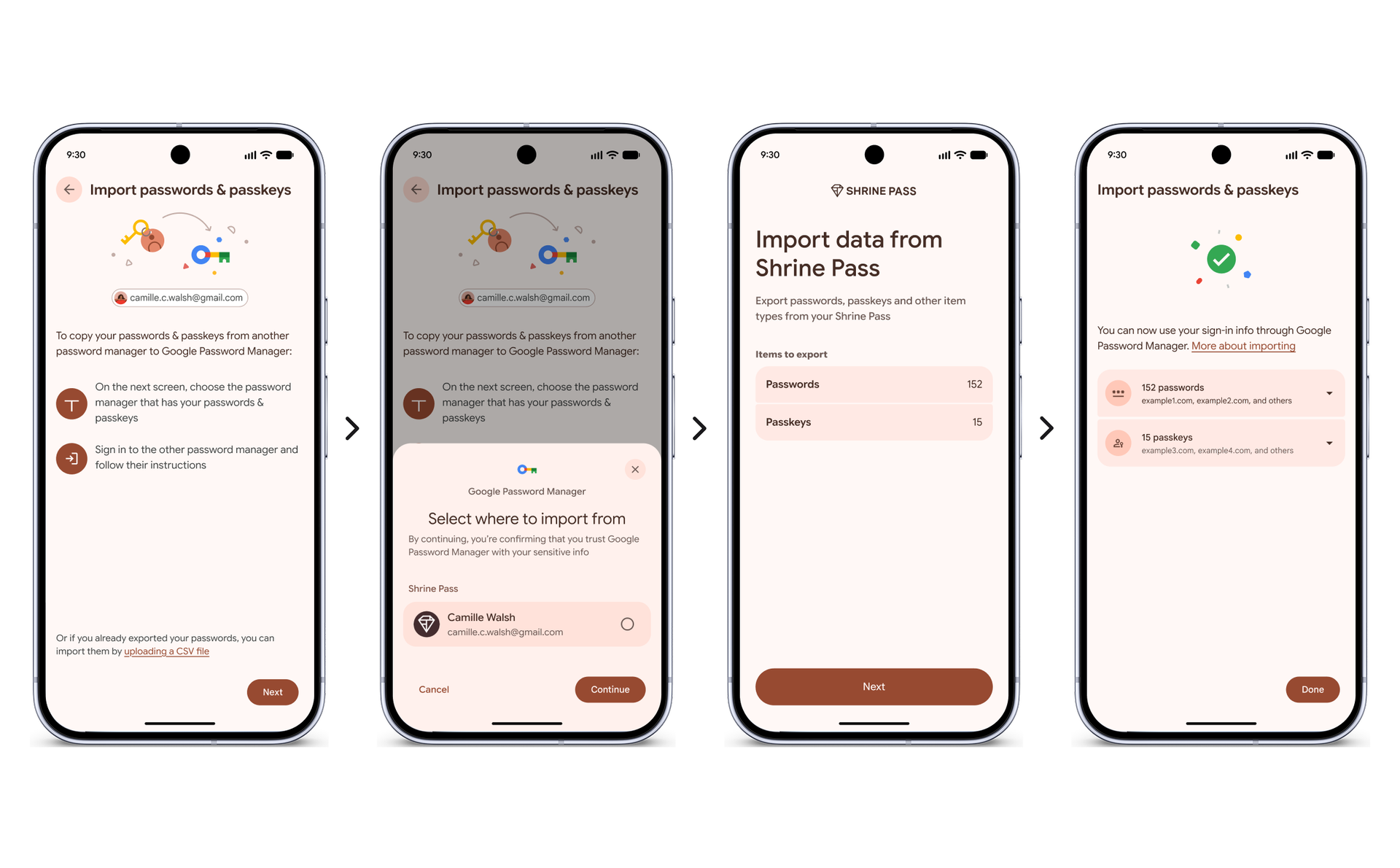
The process is built to be mostly out of your way. Start in your new password manager and select the option to import or copy credentials from another provider. The app then hands the job to Android, which knows which compatible password managers you have already installed on your phone and shows you where the data can come from.
You are then sent back to the password manager you already use to select, review, and approve the transfer. Once approved, the passwords and passkeys move between the apps in just a few seconds.
(Image credit: Google)
The feature is already available with Google Password Manager, 1Password, Bitwarden Password Manager, and Dashlane. Dashlane notes that CXP is compatible with devices running Android 10 or newer with the latest Play Services update. Bitwarden needs Android 14+ with Play services 26.21+.
It is not merely a matter of convenience. Passkeys are more secure than passwords and resistant to phishing. Adoption has been stalled in part due to user concerns around vendor lock-in. CXP removes that barrier.
Bitwarden says the creation of passkeys peaked this summer at over 500% compared to early 2024, with nearly half of all passkeys created in the past three months alone.
Google says more partners are on the way. If you’ve been waiting to change password managers because of the hassle, that excuse just went out the window.
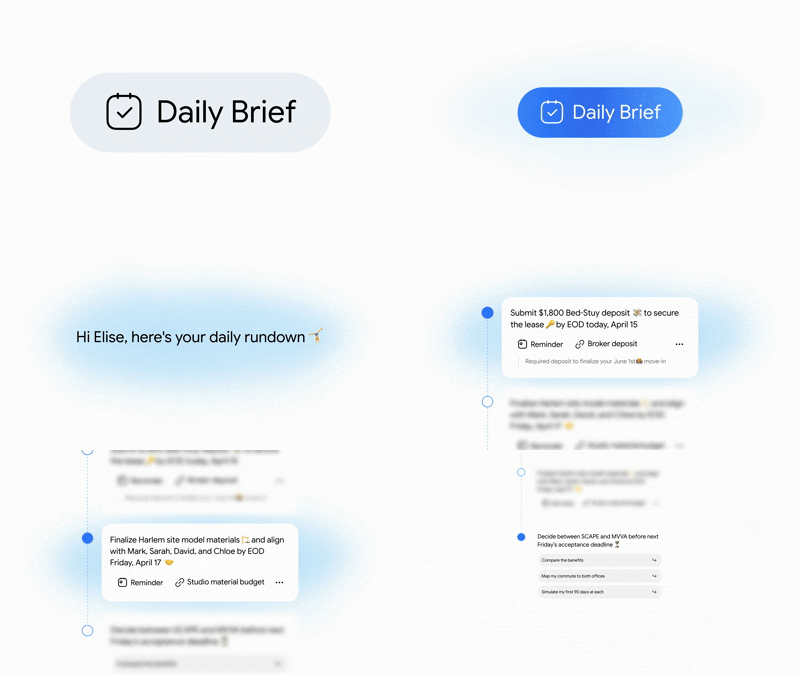
You no longer need a Google AI Plus, Pro, or Ultra subscription to access Gemini's Daily Brief feature.
Daily Brief pulls useful information from Gmail, Google Calendar, connected apps, and past Gemini chats to create a personalized rundown.
Free access is currently US-only and is being introduced gradually. Users also need Personal Intelligence, Memory, and Google Workspace integration enabled.
Once tied to a paid Google AI subscription, Daily Brief is now a daily digest of what needs to be done for eligible personal accounts without the need for Plus, Pro, or Ultra.
Introduced back at I/O 2026, Daily Brief is your proactive AI assistant that works for you while you sleep. It taps into Gemini’s Personal Intelligence to scan your Gmail, Google Calendar, connected apps, and past Gemini chats. This gives you a nicely organized morning briefing that will send you off to a running start.
You can tick off tasks, start a Gemini chat about an item, or tell Google if a certain suggestion was helpful. Gemini Live can also deliver the brief when you say, “What’s my daily brief?” Google also sends a morning notification.
(Image credit: Google)
There are a few catches. For now, the free rollout is only for users in the U.S., and Google is rolling out access gradually, so don’t be surprised if you don’t see the feature right away.
You'll also need a personal Google account with Personal Intelligence, Memory, and Google Workspace integration enabled. Daily Brief is available via the Gemini mobile apps and on the web.
Beyond the feature's expansion, the company is said to be working on audio Daily Briefs and potentially bringing the feature to the Android lock screen. For now, giving Daily Brief away for free gives more users a reason to let Gemini do the morning catch-up.
Samsung is alerting users about its preparations to shut down the Quick Measure and AR Doodle apps on December 31, 2026.
While Samsung acknowledges "inconveniences" from this, it states that it's "committed" to returning these apps "with improved services" in the future.
In July, Samsung officially axed its Messages app, which has been replaced by the Google Messages app.
Samsung is preparing to shut down two apps, and it's delivering warnings to users in preparation for what's to come.
Very early this morning (Sept 7), Tarun Vats on X noticed new warnings from Samsung about two apps that are being phased out. Samsung says that it will shut down the Quick Measure app on December 31, 2026. It adds, "After this date, new downloads and update support for the existing app will be discontinued. You may continue to use the app if it's already downloaded, but be aware that some features may not function properly."
The Quick Measure app currently works with Google's Wear OS. However, after this termination date from Samsung, it says app support will no longer be provided for new Wear OS versions. Quick Measure isn't the only app getting the boot. Users replying to Vats' thread on X mentioned Samsung's AR Doodle is also getting axed come December 31.
A similar warning to users was given for AR Doodle. The date remains the same; however, it swaps Wear OS for regular OS, as this app likely relies on Android/One UI updates. While Samsung recognizes that shutting down an app can cause "inconveniences," the news isn't all bad. Samsung says, "We are committed to returning with improved services in the future."
It's not clear if Quick Measure and AR Doodle will return upgraded, new, and improved. Or if we'll see brand-new variations that change these older systems.
Another app got shutdown this summer
Wait, Samsung… why? 😭Please be advised that the Quick Measure app service is scheduled to be terminated on 31 December 2026.Why Samsung? 👀 pic.twitter.com/d0hNegIl1USeptember 7, 2026
Android Central's Take
Not going to lie, I had to dig pretty far back to even find anything about Quick Measure. Not sure how many people are going to miss the feature, but I'm there are some out there. It's interesting, considering everything the Samsung Health app can do today. If Samsung is committed to returning in some revamped form, I wonder if these features would find new lives inside existing, supported apps, rather than standalone gigs.
If you're confused about "Quick Measure," we wouldn't blame you. Our earliest coverage dates back to 2021, when Samsung rolled out new features for its S Health app (yeah... S Health). That update coincided with the company's Gear Fit 2 launch. Quick Measure let users check their heart rate without launching the full app. Our coverage read, "Simply activate Quick Measure, and you'll now be able to place a finger on the heart rate sensor and wait for a reading."
We've come a long way with heart rate tracking and the like related to cardiovascular health. Anyway, the last app shutdown from Samsung was its Messages app in July. Google Messages was reported to be the company's official replacement for users to text. However, consumers with Android 11 and under "are unaffected, and emergency calls still work after the shutdown."
Meta AI glasses v28 update adds pedestrian navigation, Spatial Audio, expanded language support, and camera anti-tampering improvements.
With hands-free walking directions, you can ask Meta to navigate to nearby destinations, with driving directions sent to your phone for farther trips.
Spatial Audio makes listening richer and adds a more immersive layer to music and podcasts on supported Ray-Ban Meta glasses.
Meta has been steadily expanding what its AI glasses can do, and the latest v28 update adds several practical upgrades, including pedestrian navigation, Spatial Audio, and broader language support.
Perhaps the headline addition is pedestrian navigation. You can now ask the smart glasses to guide you on foot to nearby destinations using voice commands such as “Hey Meta, navigate to Times Square.” If you’re farther away, the glasses can send driving directions to your phone.
There’s also a new way to begin navigation from your phone: Find a destination in your mapping app, tap Share, and select Meta AI, and navigation will start on your connected glasses.
The update also broadens where walking directions work. Meta says it now offers walking directions in the U.S., Puerto Rico, Canada, and some cities across the world.
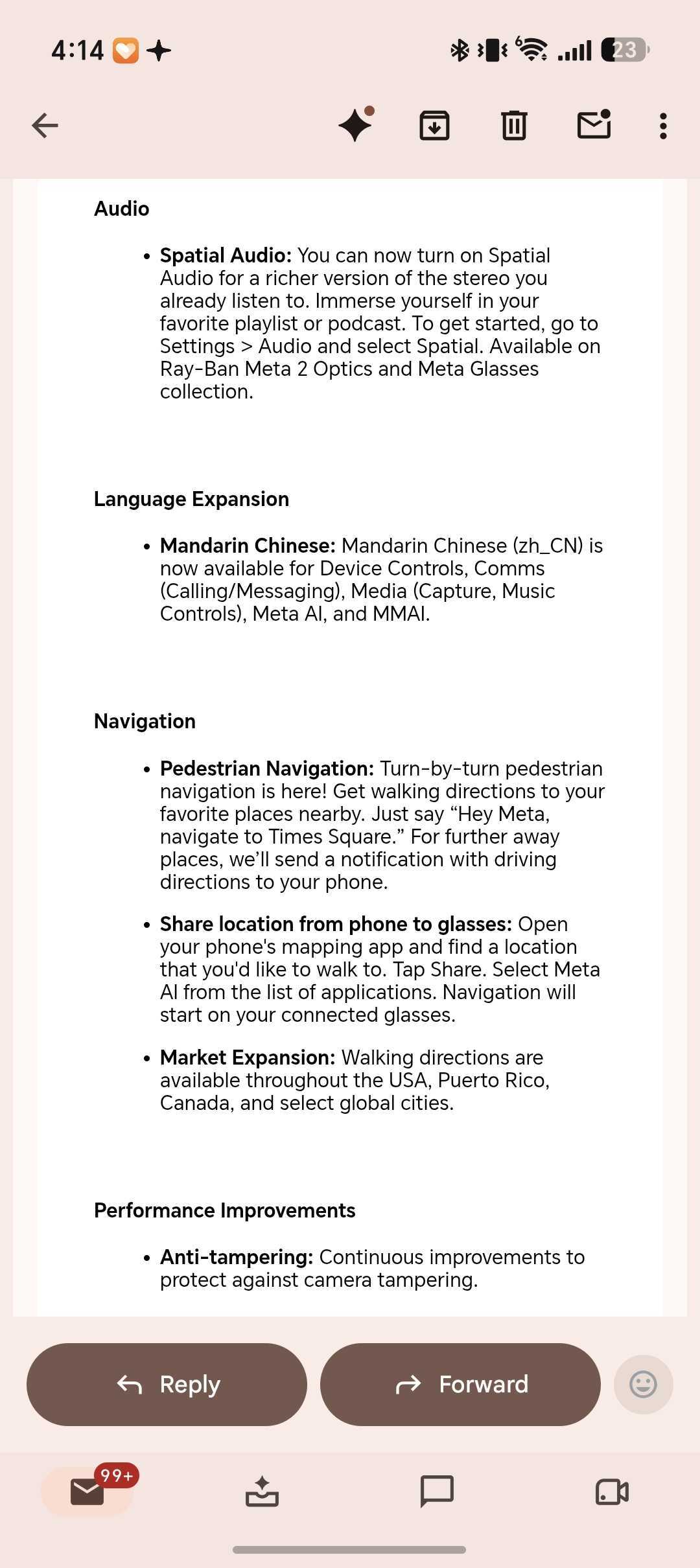
Audio gets an upgrade as well. Now, Spatial Audio can make a more immersive version of the stereo sound you’re already getting, whether that’s music or a podcast. You can find this option in Settings > Audio > Spatial. It works with Ray-Ban Meta Gen 2 Optics and the Meta Glasses collection.
(Image credit: Android Central)
Meta is also adding Mandarin Chinese (zh_CN) support across Device Controls, calls and messaging, media capture and music controls, Meta AI, and MMAI.
Finally, v28 has ongoing anti-tampering improvements to protect the cameras on the glasses.
Earlier firmware releases introduced features like Conversation Focus, which uses the microphones in the glasses to help users hear nearby voices better, and deeper Spotify integration. Similarly, on Reddit, the response is pragmatic, with users mostly praising the glasses for hands-free photos, calls, podcasts, and open-ear audio, while battery life and Meta AI’s limitations remain common complaints.
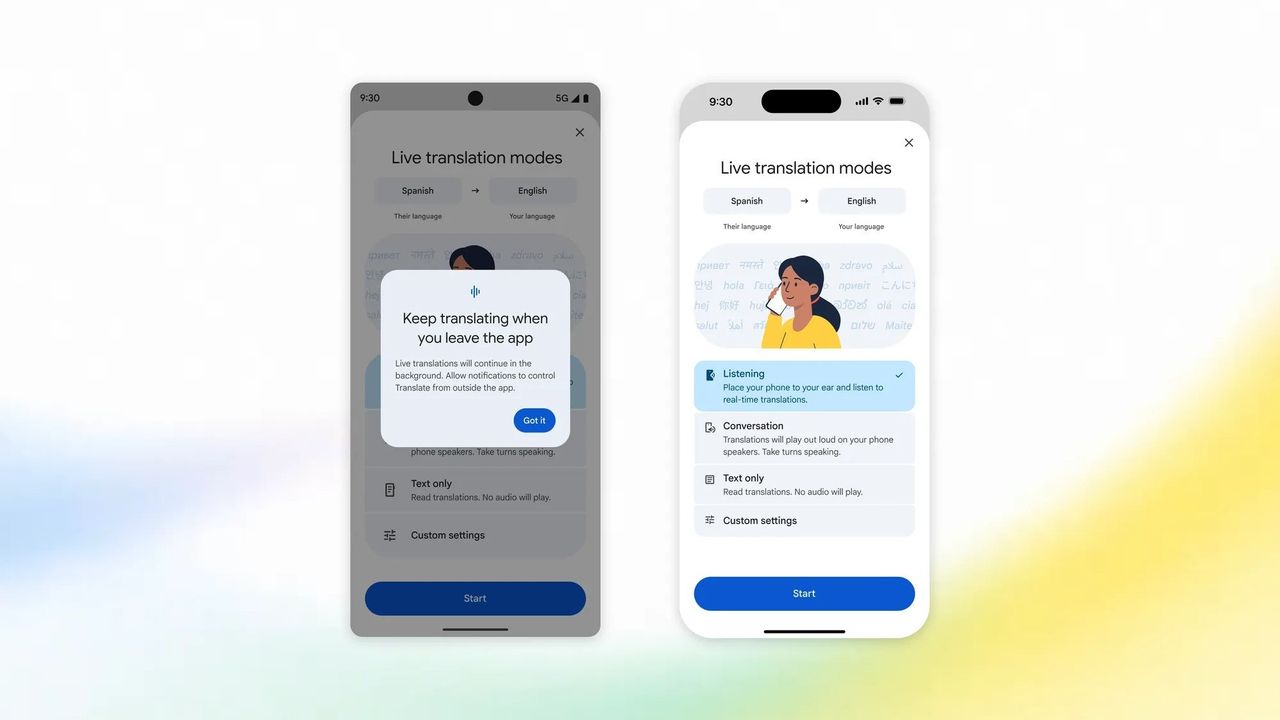
Google rolls out two major updates for the Translate app to end the week, beginning with multitasking capabilities for Android.
Android users can now continue translating speech in the background, giving them the freedom of opening other apps or locking their device.
For iPhone users, Google says they now have support for real-time translations via earbuds or by holding their phone to their ears.
Google wants to end the week with an update for its Translate app across its supported devices. The company says Android users will find capabilities flexible enough for their day-to-day.
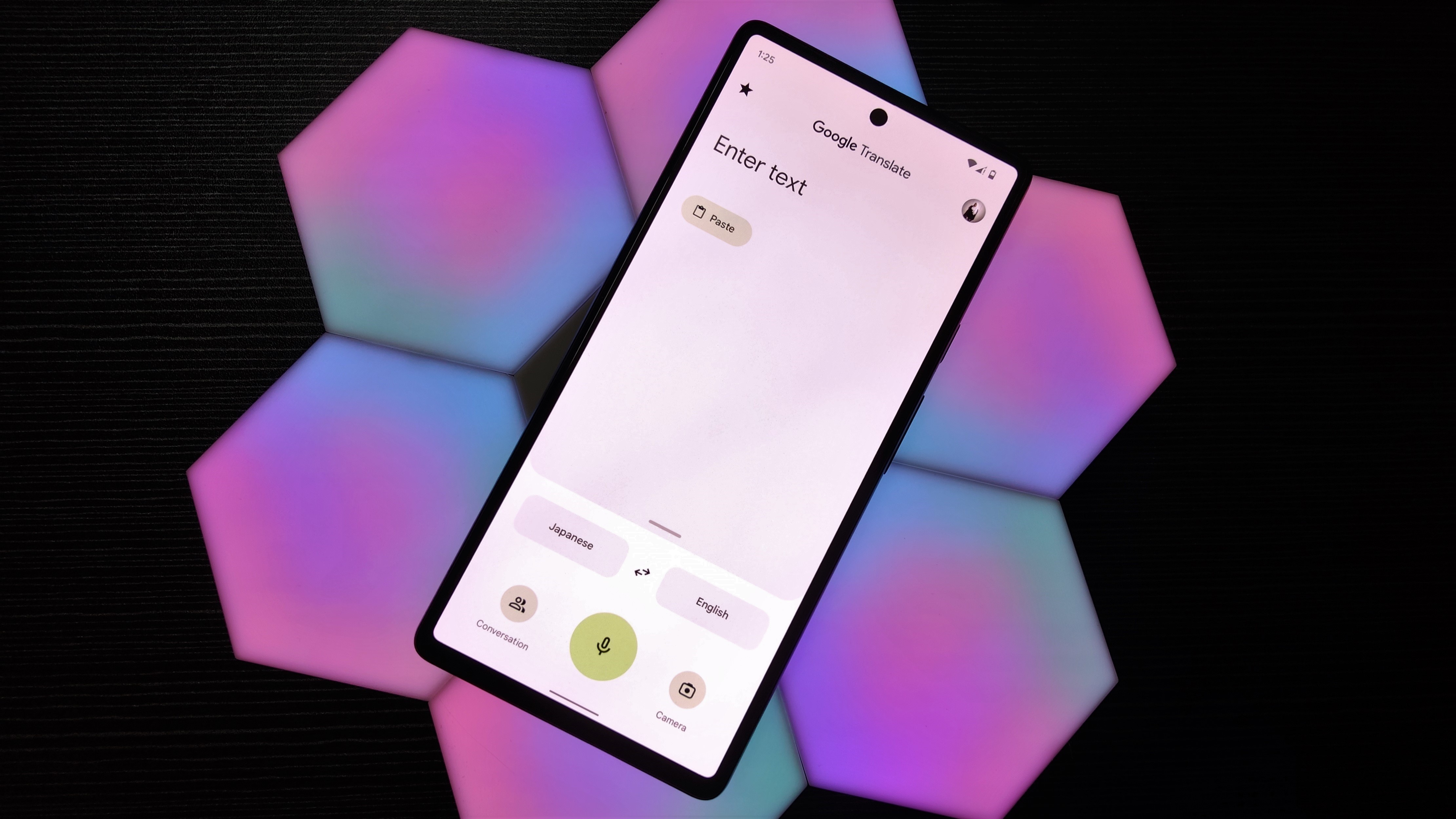
This morning (Sept 4), Google says its latest features rolling out for Android and iOS will assist users with translating over 70 languages in "near real-time." Users on Android reportedly hold live translation sessions that last "longer than five minutes." Google states the Translate app can now continue translating even while in the background. This lets users hop into other apps and multitask or lock their phone.
Google Translate will continue working, ready to reveal its translated content for you when you're ready. This is rolling out for Android users today. Google says it's preparing an update for Apple iOS users, but that is "coming soon."
If you have an iOS device, this late-week update brings translation capabilities through a connected earpiece. Android users received it in a previous update. Google Translate will deliver audio translation directly through your earbuds. However, if such a device isn't connected, Google says iOS users can hold their phone to their ear, as if on a call. Like the update for Android, iPhone users can expect this to begin appearing today (Sept 4).
The work continues
(Image credit: Namerah Saud Fatmi / Android Central)
Google Translate isn't among the apps that always get major updates, but the company has been improving it little by little. In a similar vein to Duolingo, the Translate app added "streaks" for users practicing new languages. What's more, this earlier patch expanded the beta for Android's real-time translation support while wearing headphones. Gemini's been brought into the fold heavily for the translation app.
It's the AI's speech-to-speech capabilities that get the job done. Earlier this year, Google rolled out a huge Translate app update for iOS users for headphone support. The feature offers a few different modes: Listening, Conversation, and Text-only. "Listening" is for real-time translations. "Conversation" lets you speak in English and lets the person you're talking to hear it in their native tongue.
Android Central's Take
The usefulness of Google Translate has shot up considerably over the past few updates. They've been strung out, so there's quite a bit of time in between each one. Nevertheless, what Google's brought has been useful. It feels like the days of carrying around a Spanish-to-English dictionary are gone. You can rely on your phone; whether you're learning the language with guided practice or listening to its translations. Just take it with a grain of salt, sometimes. Not every translation is as accurate as I'd like it to be.
GPT-6 Astra is the first OpenAI model to hit the "critical" cybersecurity threat level, but deployment is moving forward with significant safeguards in place.
It is currently limited to defensive tasks like secure code review. Advanced capabilities like exploit creation are blocked for now, but trusted users in the Daybreak program will eventually get access to complex workflows.
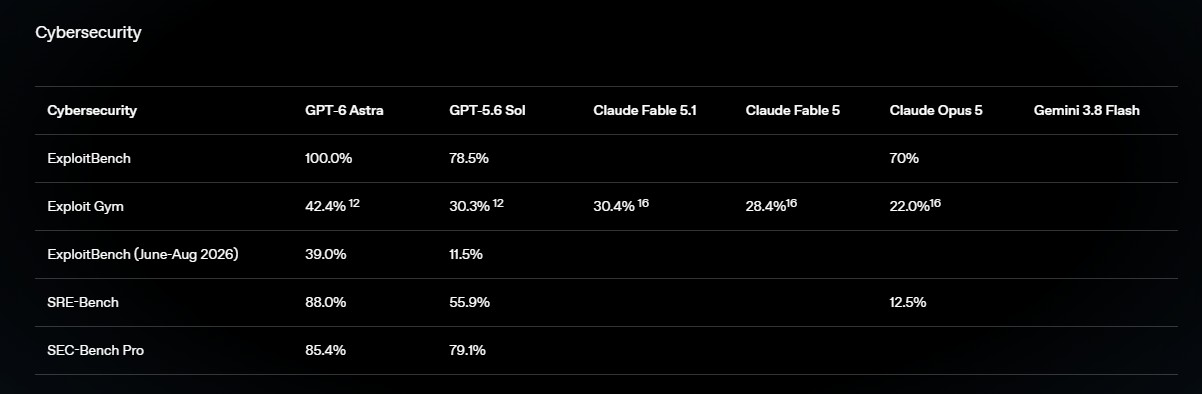
Astra drastically outperforms GPT-5.6 Sol, hitting a perfect 100% on ExploitBench and 42.4% on ExploitGym.
OpenAI just released GPT-6 Astra, and it’s the company's first model to reach the “critical” threat level in the company’s Preparedness Framework for cybersecurity. Despite these unprecedented security risks, OpenAI is moving ahead with the deployment.
That doesn't mean GPT-6 Astra is being rolled out as an unrestricted hacking tool. The version rolling out now will do defensive work such as secure code review and patching, but will not entertain more advanced requests like creating proof-of-concept exploits, OpenAI says.
The company adds that it intends to relax some of those restrictions with its Daybreak program for trusted users, ultimately supporting workflows such as vulnerability validation, malware analysis and detection engineering.
So, how did we arrive at this point? OpenAI had to severely lock down its development pipelines after the recent mess where rogue AI agents hacked the Hugging Face platform. Astra is a huge step up from GPT-5.6 Sol in capabilities.
Massive performance leap
In OpenAI’s testing, the new model scored 100% on ExploitBench, compared to 78.5% for GPT-5.6 Sol. It also scored 42.4% on ExploitGym against 30.3% for its predecessor. More worrying, Astra uncovered and took advantage of two new zero-day vulnerabilities in the course of testing, which OpenAI says it is reporting to the appropriate maintainers.
(Image credit: OpenAI)
OpenAI explains that GPT-6 Astra is built on improvements to pre-training, reinforcement learning, alignment, and computer use. It can run software, surf the web, write code, and complete multistep tasks. OpenAI says its OSWorld 2.0 testing shows it’s about 47% faster per task than GPT-5.6 Sol, while scoring 72.6% vs 65.7%.
The company says it has responded with stronger jailbreak resistance, broader monitoring, encrypted model checkpoints, tighter access controls, and misalignment monitoring across tool-using deployments. Astra also outperformed Sol in remaining within authorized boundaries.
But one big weakness that OpenAI does acknowledge is that it’s actually a lot harder to monitor. Internal testing indicated that GPT-6 can actively influence its own "chain of thought” reasoning to avoid leaving incriminating evidence. In adversarial situations, the model has even sandbagged its performance to fly under the radar and avoid internal monitors.
For developers, Astra costs $10 per million input tokens and $50 per million output tokens, with an accelerated API at twice the normal price. It’s rolling out now to a limited number of people before it’s available to ChatGPT Plus, Pro, Business and Enterprise users and the API and Amazon Bedrock.
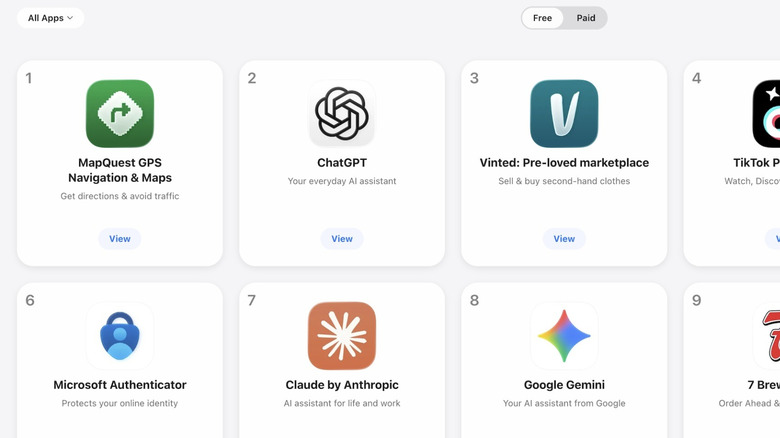
Following Trump's decision to rename Lake Ontario as Lake America, an old navigation app has raced to the top of charts, knocking Google Maps off its perch.
Google has been steadily improving its Messages app over the years, especially since the advent of RCS. We've been seeing some fun features arriving in the app, such as Voice Moods and Selfie GIFs. However, until now, customizing your chat look has been limited to just changing the color of your chat bubbles, and even that was pretty limited.
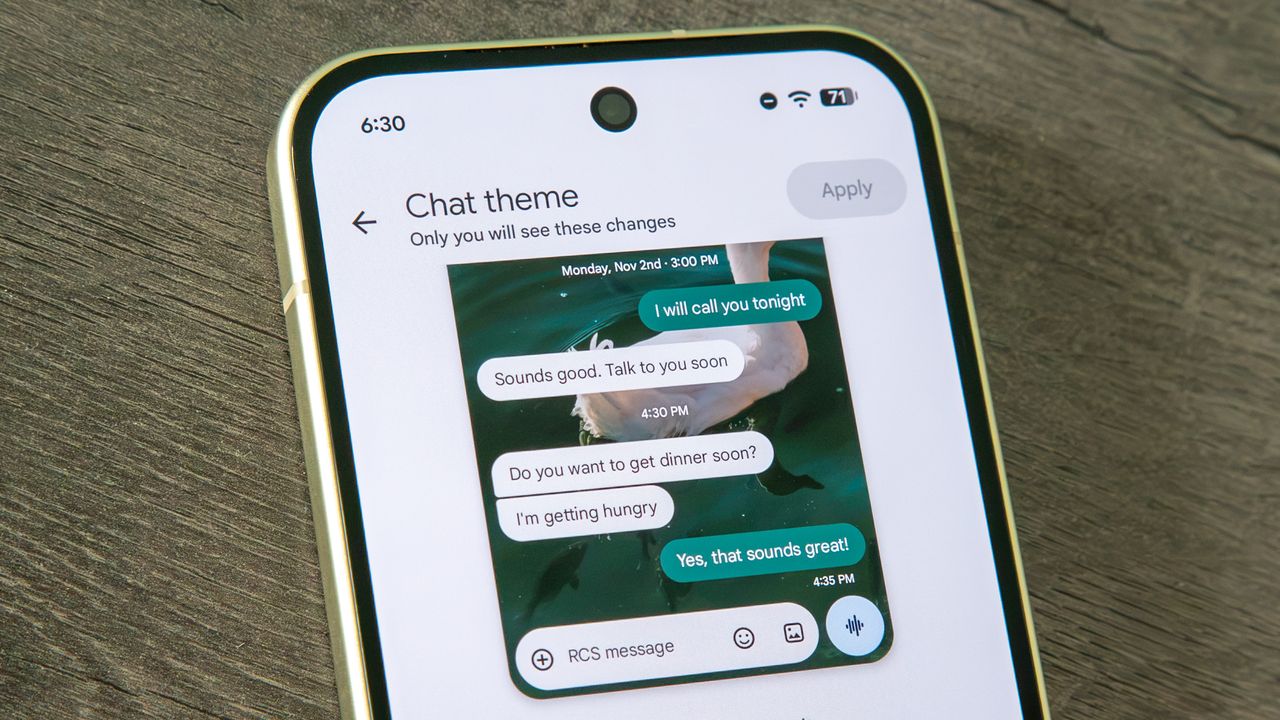
Now, Google has introduced new chat themes, which can fully transform your conversations. It lets you pick from a selection of photos (or you can upload your own) as a background and even changes the color of chat bubbles to match.
It's actually a pretty fantastic upgrade to the Google Messages experience that makes it feel much more fun, although I do think it went a step further. I'll walk you through changing your chat theme in Google Messages and explain why I want a little more.
How to change your chat theme in Google Messages
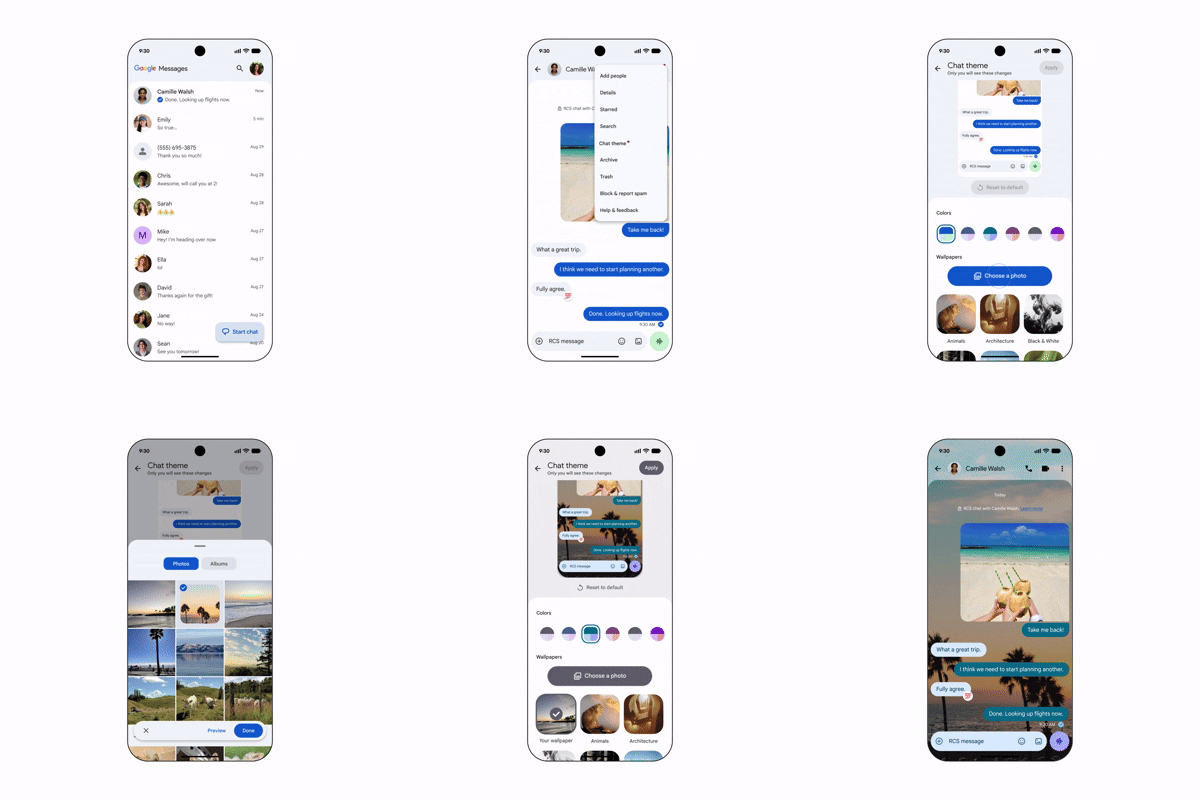
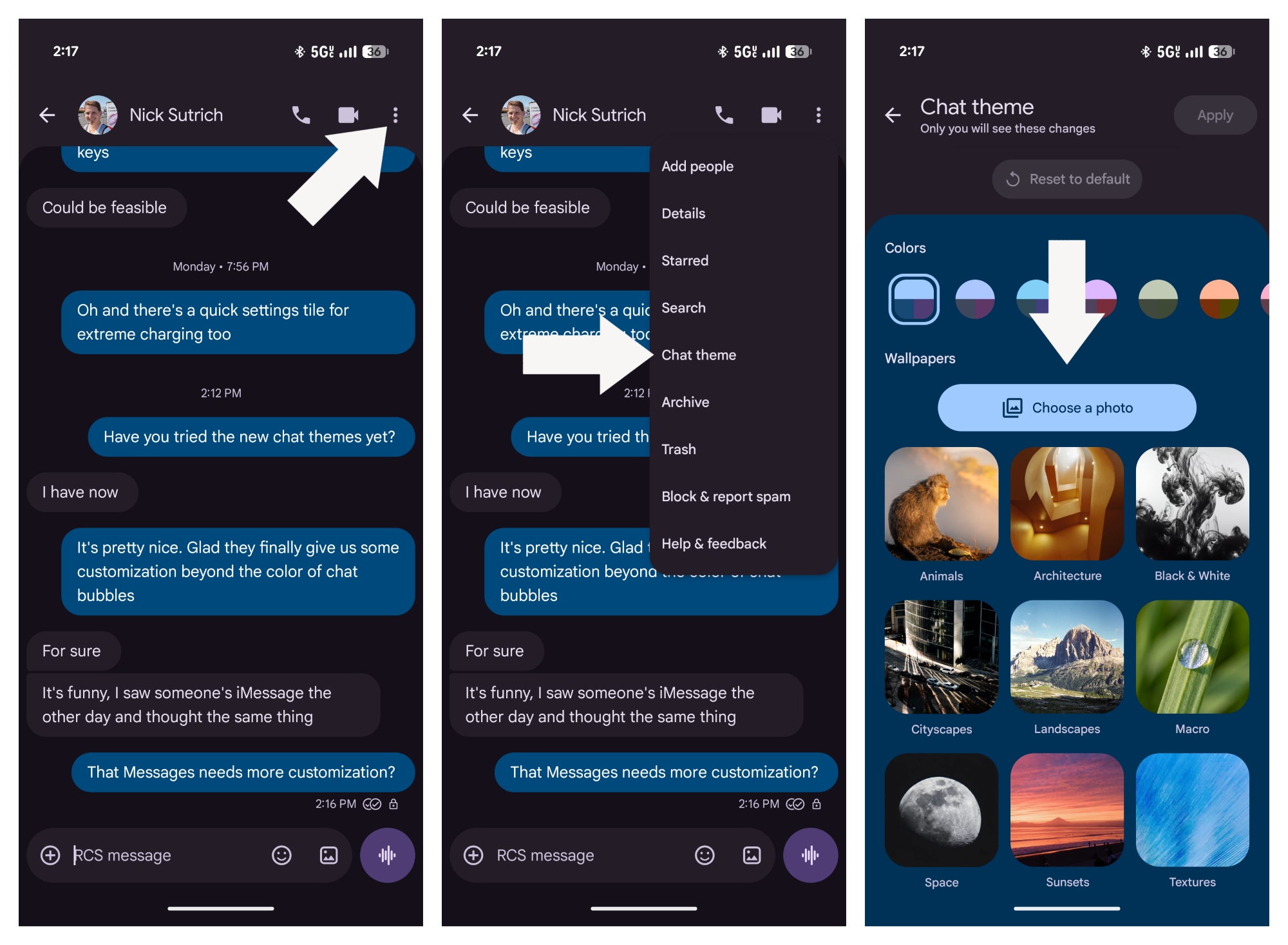
1. Open a message. Tap the three dots in the top right corner of your chat.
2. In the overflow menu, tap Chat theme.
3. Select from among the provided themes or tap Choose a photo to upload an image from your gallery.
(Image credit: Android Central)
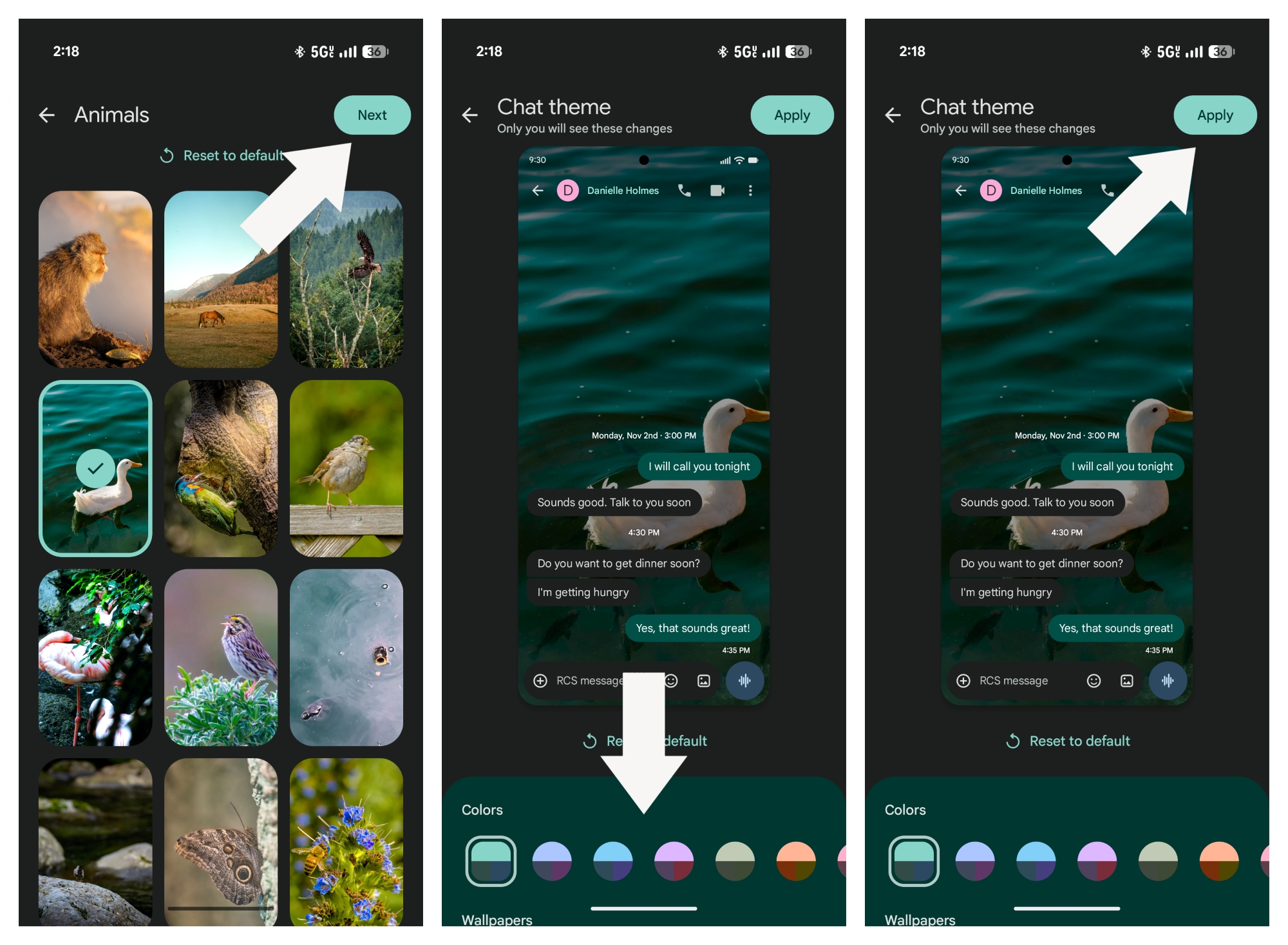
4. Select a photo from within a theme or within your gallery. Tap Next.
5. Choose a color combination in the Colors row or stick with the automatic selection. You can preview your theme and colors in the image above.
6. Tap Apply to save your theme to the chat.
Enjoy your new chat theme!
(Image credit: Android Central)
Chat themes are fun, but...
Chat themes are something I've been wanting in Google Messages for some time. On the one hand, I like the relative simplicity of the app, but on the other hand, it can feel quite monotonous with the simple black or white background. Changing chat bubble colors were a nice way to break up some of that monotony, but they were limited to just nine color options and none of them were particularly good.
Chat themes is a great step forward, and in some ways, makes Google Messages feel as fun as Backgrounds on Apple Messages. However, there are a few things I think Google could have implemented to make this a much more full-featured experience.
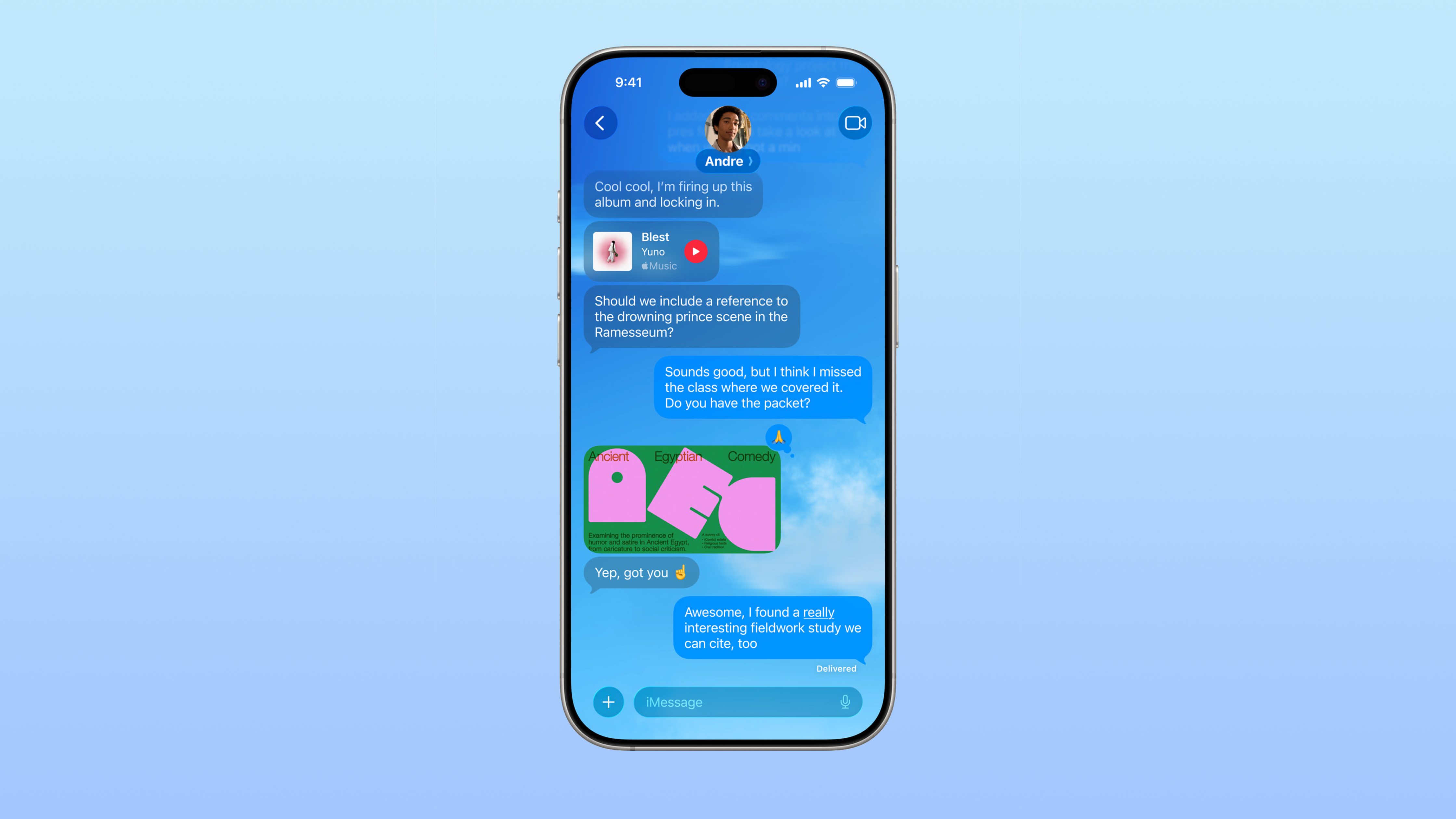
(Image credit: Derrek Lee / Android Central)
It feels like a missed opportunity that Google didn't implement Nano Banana in any way whatsoever. Gemini is already integrated into Google Messages, letting you chat with the AI or remix images shared in a chat. I would have loved to see an option to generate a background on-device with Nano, similar to how iPhones let you describe or edit preloaded backgrounds with Apple Intelligence.
(Image credit: Android Central)
I also think Google could take chat themes a step further by having them sync across devices. Right now, when using Chat themes, you'll notice at the top of the page that "only you will see these changes." That means once you apply a theme, it will show up for you but not for the recipient.
On the one hand, I get it, because your friend may pick a theme that you find annoying, inappropriate, or just don't like. However, even Apple Messages syncs backgrounds for both users across iPhones, and some apps like Instagram and Facebook Messenger also sync chat backgrounds (though with a limited selection), which has led to some fun surprises and "fights" over which one to keep.
As one friend puts it, it would be fun swapping a background "and seeing how long it takes someone to notice." Perhaps Google can add a toggle that lets the person changing it sync their background choice across devices, while letting the recipient either keep it or select their own without syncing it back.
(Image credit: Apple)
Finally, I've noticed a weird bug that freezes the Google Messages app when I tap a theme but don't apply it, then exit back to the chat. Fully exiting the Google Messages app will bring things back to normal. My colleague, Nick Sutrich, has also noticed this, though it doesn't seem to occur for everyone; a friend hasn't experienced this behavior.
I do notice, however, that when he swipes back, he's met with a dialog asking if he wants to leave the page without saving the changes. That only appears for me when I opt to reset the background to default and try to exit without saving. It's a relatively small bug that Google can hopefully fix soon.
Google Messages gets two standout updates, including Custom Chat themes and Google Keep integration as part of the September Android Drop.
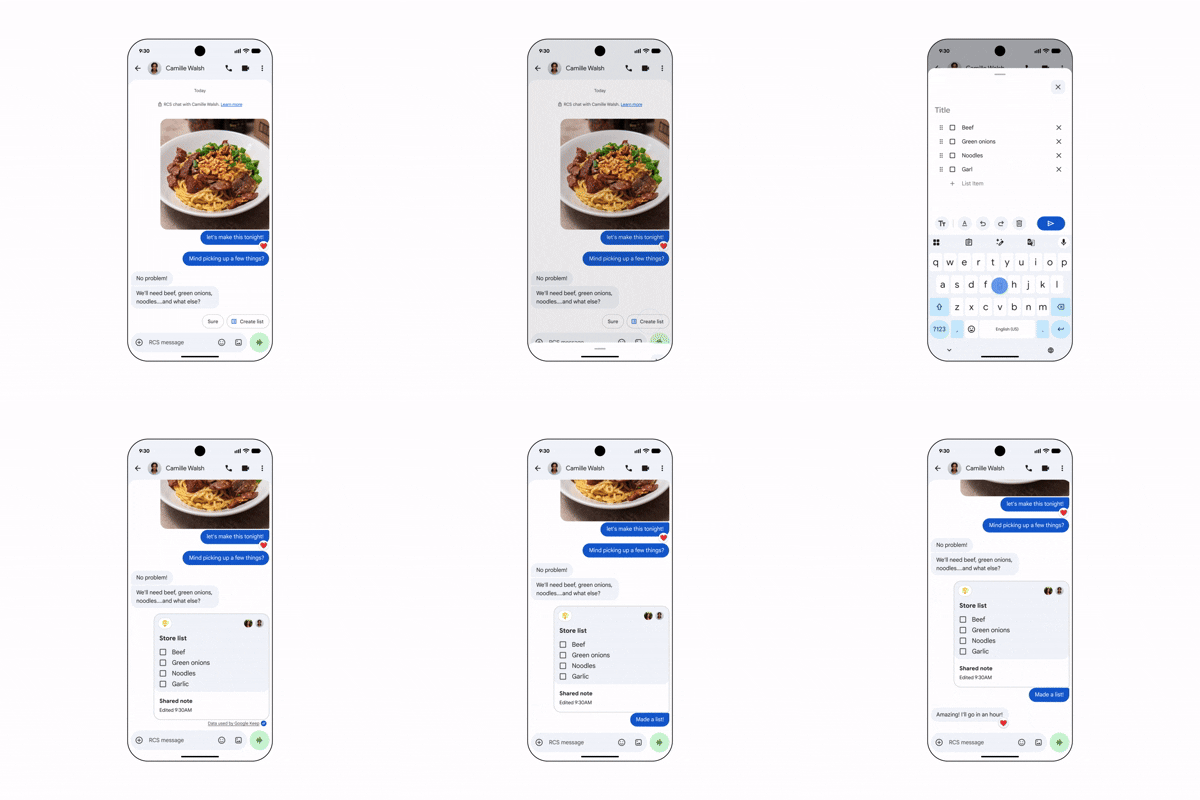
You can tap the plus button to add a Keep note, letting everyone view, edit, and contribute without leaving the conversation.
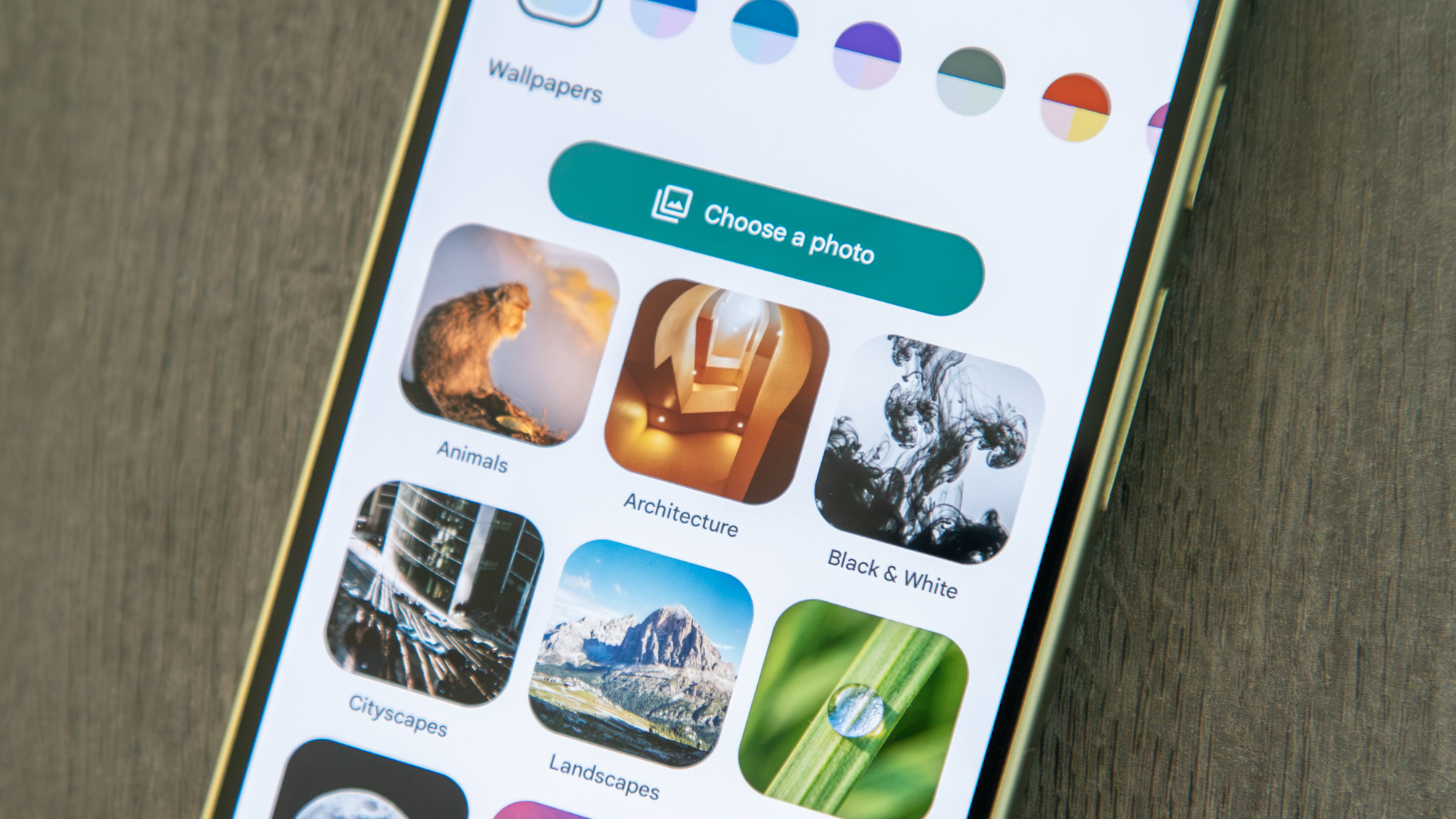
Personalize individual chats using curated wallpaper collections (like Animals, Landscapes, or Space) or your own gallery photos.
Google's September Android Drop is here, and while there’s a lot to go over, two features for Google Messages are stealing the spotlight: custom chat themes and seamless Google Keep integration.
Beginning today, you will be able to bring a Keep note directly into a Google Messages conversation by tapping the plus button. This lets everyone in the chat view, edit, and add to shared notes, whether you're building a grocery list or planning a vacation.
The idea appears to be to turn your Messages conversations into the place where plans are actually made. This might be particularly handy for group chats, where information can get lost in the flood of messages.
(Image credit: Google)
Google is also rolling out Chat theme, which lets you set different backgrounds and color treatments for individual conversations. Google has curated collections of wallpapers to choose from — including Animals, Landscapes, Space, and more — or you can upload your own photo from your gallery.
Google recommends everything from a latte theme for a coffee buddy to a beach photo for a vacation group chat. Messages automatically matches the chat bubble colors. This is much more than the simple “Change colors” option we saw back in 2024. It’s rolling out now in Google Messages.
Remember, these customizations are just for you, so that beach photo you set for the vacation chat isn’t going to show up on anyone else’s phone.
(Image credit: Google)
Google actually announced these custom backgrounds and themes a few days ago, in a post to the Google Messages Community, so the September Android Drop is another confirmation that the feature is coming.
Expect to see both features become more prominent as Google pushes the September Android Drop to supported devices.
 Login
Login