On the Road to Macstock, Jill McKinley previews her third year’s presentation, focused on making Apple devices support daily habits through Focus modes, shortcuts, customized screens, and intentional setup. She explains how iPhone, iPad, Mac, and Apple Watch can work together to reduce distractions, surface useful tools, and help users shape technology around real life instead of default settings.
Apple Podcasts runs within CarPlay, Apple’s in-car software platform for accessing compatible iPhone apps through a vehicle’s display and controls. CarPlay provides the driving environment, while Podcasts supplies the programs, episodes, library and playback features available inside it.
That combination suits a part of the day that often feels wasted. A commute may be too fragmented for reading or watching something, but it can provide enough uninterrupted time for a news briefing, interview, documentary series or comedy show.
Podcasts also give each journey a different character. The morning drive can offer information before work, while the return trip can provide lighter entertainment or continue a longer story. Drivers are free to choose whether the time should be useful, relaxing or simply less repetitive.
Apple Podcasts Fits Naturally Inside CarPlay
Apple Podcasts appears alongside other compatible audio apps when an iPhone connects to CarPlay. The vehicle display offers access to available episodes and essential controls without reproducing the complete iPhone interface on the dashboard.
The distinction is simple: Apple Podcasts does not create or power CarPlay. It is an audio app designed to operate within the wider CarPlay experience, which also handles navigation, calls, messages and other supported services.
CarPlay reduces podcast playback to the functions most appropriate in a vehicle. Drivers can use the Now Playing screen, CarPlay Dashboard, steering-wheel controls or buttons provided by the vehicle. Available commands can include playing, pausing, jumping back 15 seconds, moving forward 30 seconds and changing playback speed.
Siri provides another way to manage audio while keeping attention on the road. A driver can request a followed show, pause the current episode or continue listening without searching through the display. Support varies according to the vehicle and its controls, but the app remains connected to the iPhone rather than operating as a separate system installed by the automaker.
The interface is especially suitable for spoken audio. Songs can often continue without intervention, while a podcast listener may want to replay an explanation, skip part of an episode or resume a program interrupted earlier. CarPlay keeps those common controls accessible without placing the full Podcasts app in front of the driver.
Image Credit: Apple Inc.
The Commute Becomes a Listening Window
A regular route creates a predictable amount of listening time. Someone with a 15-minute drive may prefer concise news, business updates or language lessons. A 40-minute journey provides room for detailed interviews, investigative reporting or serialized fiction.
Apple Podcasts includes programs covering education, technology, culture, history, sports, health and entertainment. The variety allows listeners to build different routines around the same drive rather than depending on one radio schedule or repeatedly hearing familiar music.
A morning episode can provide context for events likely to shape the working day. On the way home, comedy and conversational programs can create distance from work before the listener reaches the front door. Neither choice requires treating every available minute as a productivity exercise.
The format can also make traffic less frustrating. A delayed journey remains inconvenient, but an episode gives the driver something continuous to follow as the arrival time changes. Spoken stories can hold attention without asking the driver to look away from navigation or the road.
Apple Podcasts keeps longer programs useful even when they do not fit into one trip. Listening progress can synchronize across compatible devices using the same Apple Account, allowing an episode started at home to continue in the car or resume later on another device.
Preparation Makes CarPlay Listening Better
The safest podcast decision is usually the one made before the car starts moving. Apple Podcasts allows listeners to follow shows, download episodes and arrange a queue on the iPhone in advance. CarPlay can then concentrate on playback instead of discovery.
A prepared queue is useful when several episodes are planned for one journey. The next selection can begin automatically after the current program ends, removing the temptation to search through categories while driving. Listeners can combine a short briefing with a longer interview or place lighter material after a demanding program.
Downloads make the experience more reliable. Saved episodes can continue playing through areas with weak cellular coverage, including rural roads, tunnels and underground parking structures. Downloading through Wi-Fi can also prevent a long daily routine from consuming unnecessary mobile data.
Automatic downloads can keep recent episodes from followed shows ready for the next drive. Storage still requires attention, especially when subscriptions publish frequently, but played downloads can be removed automatically according to the selected Podcasts settings.
Playback speed provides another form of control. Faster playback can help a listener finish a familiar news format within a shorter trip, while normal or slower speeds may suit technical discussions, unfamiliar accents or narrative programs where delivery forms part of the experience.
Listening Continues After the Car Stops
CarPlay does not create a separate podcast library inside the vehicle. It extends the listening activity already connected to the iPhone, preserving followed shows, saved programs and playback position when the drive ends.
That continuity prevents commute listening from becoming isolated. A listener can discover and prepare episodes on an iPhone, hear part of one through CarPlay and continue later on a Mac or another compatible device. Downloads remain stored on the device that received them, while supported library information and progress can synchronize through the Apple Account.
Commute length can eventually shape a personal programming schedule. A 12-minute daily news show may fit the morning route almost exactly, while a 45-minute interview can cover both directions with the remaining section ready for the following day. The queue can change with the calendar, leaving shorter episodes for busy mornings and deeper programs for the roads that provide enough time to hear them properly.
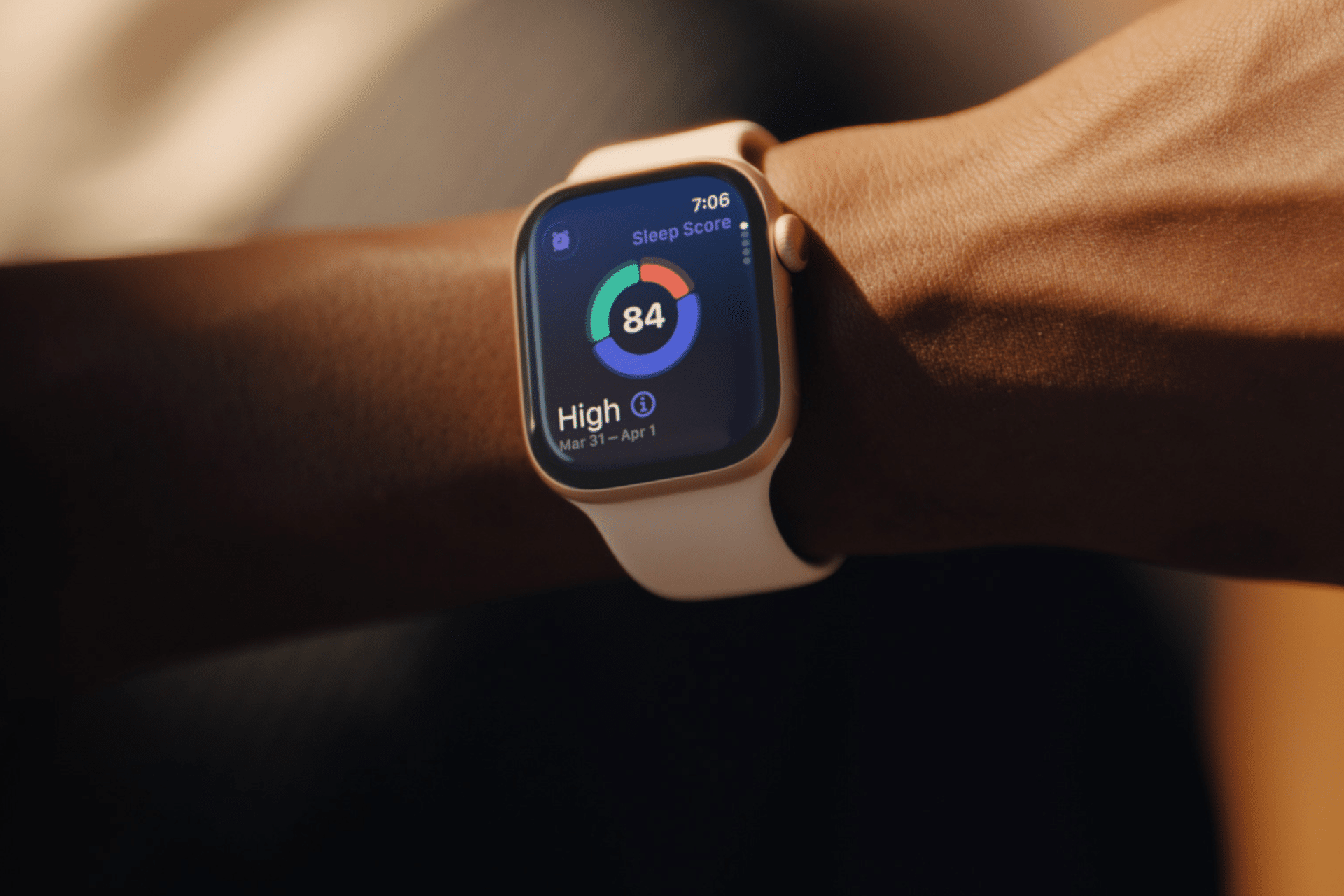
Sleep tracking on Apple Watch can make an invisible part of daily health easier to understand. Each morning, the watch may show sleep duration, stages, interruptions, overnight vitals and a score intended to summarize the night.
That information can be useful. It can also create a new habit of judging the entire day before getting out of bed.
One low score may make a person feel tired before noticing how they actually feel. A few minutes less deep sleep can become a source of concern. Going to bed can even start to feel like a test that must be passed rather than a normal biological process.
Apple Watch sleep data works better as a long-term observation tool than as a nightly verdict. The goal is not to collect perfect scores. It is to notice repeatable patterns and make small changes when those patterns match real-life problems.
What Apple Watch Measures During Sleep
Apple Watch estimates sleep using movement and signals collected while it is worn overnight. Depending on the model and available features, the Health and Sleep apps can show total sleep time, awake periods and estimates for core, deep and REM sleep.
The watch may also collect sleeping heart rate, respiratory rate, wrist temperature and other overnight metrics. The Vitals app compares several of these measurements with the user’s established typical range.
A sleep score compresses parts of the night into one number or category. Apple’s score considers factors including sleep duration, consistency and time spent awake. That makes it convenient, but convenience should not be confused with a complete medical interpretation.
The watch cannot know whether a stressful conversation kept someone awake, whether a child interrupted the night or whether the wearer woke feeling unexpectedly refreshed after fewer hours. It estimates physiological and behavioral signals. The person still supplies the context.
Sleep Tracking Apple Watch Data Works Best as a Trend
One night can be distorted by almost anything: travel, alcohol, illness, noise, a late meal, room temperature or a loose watch band. Even the position of the arm can affect sensor collection.
A weekly or monthly view is more useful because it reduces the influence of isolated nights. Patterns begin to emerge around bedtime consistency, total duration and changes in overnight vitals.
To review longer sleep trends on iPhone:
Health > Search > Sleep > select the weekly, monthly or six-month view
Look first at sleep duration and timing. These measurements are generally easier to interpret than small changes in individual sleep stages.
A person who repeatedly sleeps less on work nights may have a scheduling issue. Someone whose sleep becomes more fragmented after late caffeine may have found a useful connection. A consistently irregular bedtime may explain more than whether deep sleep moved by 12 minutes on Tuesday.
The data becomes valuable when it supports an observation that can lead to a realistic adjustment.
Image Credit: Apple Inc.
Do Not Treat Sleep Stages as Exact Measurements
Core, deep and REM sleep are presented as distinct colored sections, which can make them appear more precise than they are. Apple Watch estimates these stages from signals available at the wrist. A clinical sleep study uses additional equipment and is designed for medical evaluation.
That does not make the stage information worthless. It means small nightly differences should not be overinterpreted.
A person does not need to increase deep sleep manually or achieve a perfect proportion of REM sleep. Sleep architecture changes naturally across age, stress levels, exercise, illness and different parts of the night.
Use stage data to notice substantial or persistent changes, not to compete with yesterday’s chart. Spending 15 minutes less in one estimated stage is not automatically a health problem.
Start With How You Feel
Before opening the Sleep app, notice how the morning feels.
Was waking difficult? Is concentration normal? Is there unusual daytime sleepiness? Does the body feel recovered after exercise? Was the night interrupted for an obvious reason?
This brief self-check prevents the score from defining the experience. Someone may feel fine after a lower-rated night, while another person may feel exhausted despite receiving a favorable score.
The most useful interpretation combines both sources: subjective experience and device data. When they repeatedly agree, the pattern deserves attention. When they conflict for one night, there may be no reason to react.
Use Vitals as Context, Not a Diagnosis
The Vitals app can show whether overnight measurements such as heart rate, respiratory rate, wrist temperature and sleep duration fall within a typical range. It becomes more useful after the watch has collected enough nights to establish a personal baseline.
An outlier may reflect alcohol, medication, elevation, intense training or the beginning of an illness. It may also be an ordinary variation or imperfect reading.
Several unusual metrics appearing together may provide more context than one isolated number. Even then, Apple Watch data should not be used to diagnose a condition independently.
Persistent symptoms, breathing concerns, extreme daytime sleepiness or major changes in sleep should be discussed with a qualified healthcare professional. Bring the trend data if it helps describe what has been happening, but do not let the watch replace an evaluation.
Build a Routine Around Behavior, Not Scores
The healthiest use of sleep tracking is to connect the data with actions a person can actually control.
A consistent bedtime may improve the pattern. Charging the watch before the evening makes tracking more reliable. Reducing late caffeine, adjusting the bedroom temperature or moving an intense workout earlier may also produce noticeable changes.
To set a sleep schedule:
Health > Search > Sleep > Full Schedule & Options > Add Schedule
A schedule can provide Wind Down reminders and help keep bedtime more regular. It should remain a helpful structure rather than a rigid obligation. Life will occasionally interrupt it.
Choose one adjustment and observe it for a week or two. Changing five habits after one poor night makes it difficult to identify what helped.
Image Credit: Apple Inc.
When Sleep Tracking Creates More Stress
Some people become preoccupied with improving sleep data, repeatedly checking results or worrying that a low score guarantees a bad day. The anxiety can itself make falling asleep more difficult.
That is a sign to reduce exposure to the numbers.
Sleep tracking can be turned off temporarily, or the data can be reviewed only once per week. Another option is to avoid checking the score in the morning and examine trends at a neutral time later.
To change sleep tracking settings:
Watch app on iPhone > My Watch > Sleep
A break does not erase the knowledge already gained. A person who has learned that regular timing and less late caffeine improve sleep may no longer need a daily chart to confirm it.
The device should support rest, not supervise it.
A Better Way to Read the Morning Report
A practical morning review can remain simple. Check whether the watch recorded the full night. Notice total duration. Consider whether the bedtime was typical. Look for any major change in overnight vitals, then move on.
There is rarely a need to analyze every stage, compare several apps or search for explanations after one ordinary variation.
Sleep tracking on Apple Watch is most useful when it reveals something that was difficult to see without data: a repeated shortfall in duration, an inconsistent schedule or a pattern linked to habits and recovery.
The score can summarize one night, but it cannot grade the person who slept through it. A healthier measure is whether the information helps create calmer nights, better days and fewer reasons to think about the watch after waking.

 Login
Login