Lo si sospettava già nelle scorse settimane, e ora arriva la conferma: i nuovi pieghevoli di Samsung hanno venduto decisamente bene. Tramite un breve comunicato sul proprio sito ufficiale (pubblicato, guarda caso, a distanza di appena qualche ora dalla presentazione di iPhone Duo...), la società ha detto che in Europa Galaxy Z Fold8 e Galaxy Z Fold8 Ultra hanno registrato vendite complessive superiori del 50% rispetto a Galaxy Z Fold7.
Chiaramente è facile argomentare che il confronto è un po’ impari, visto che Z Fold7 era “da solo” mentre quest’anno i pieghevoli a libro sono due, ma in generale il punto è: l’interesse nei confronti dei pieghevoli sta crescendo molto anche dalle nostre parti. Tra l’altro, Samsung osserva che i Galaxy Z stanno diventando uno strumento per acquisire nuovi utenti: nel caso di Galaxy Z Flip8, il 20% degli acquirenti arriva da dispositivi di altri produttori, e per buona parte di essi è stata la prima esperienza con uno smartphone pieghevole.
Il pieghevole a conchiglia sta diventando sempre di più anche una “rampa di lancio” per gli utenti, che una volta provato sono incuriositi dal form factor a libro. Gli utenti che hanno fatto questo passaggio con la generazione attuale (quindi Flip7 -> Fold8) sono più o meno triplicati rispetto all’anno scorso (Flip6 - Fold7). È tuttavia interessante osservare come la società non si addentri nel dettaglio di quale dei due pieghevoli a libro abbia venduto di più o sia risultato più interessante: in molti sospettano che la star della nuova generazione sia stato proprio il modello con form factor inedito, al debutto assoluto e con le stesse proporzioni di iPhone Duo.
Samsung lavora sui pieghevoli a libro da sette anni, ma il debutto di iPhone Duo mostra come Apple abbia scelto di affrontare fin dalla prima generazione alcune limitazioni ancora presenti su Galaxy Z Fold8. Occhio, meglio esser chiari: non significa che il pieghevole Apple sia automaticamente migliore, ma osservare le differenze nell’approccio è interessante e per certi versi doveroso, considerando che nessuno dei due costa poco.
Un esempio apparentemente secondario riguarda gli altoparlanti. Galaxy Z Fold8 ne utilizza due, entrambi collocati nella metà che ospita il display esterno. Quando si guarda un video in orizzontale sullo schermo esterno la disposizione è efficace, ma una volta aperto lo smartphone entrambi finiscono sullo stesso lato. L’audio resta chiaramente stereo, ma la separazione tra canale destro e sinistro viene inevitabilmente compromessa quando il grande display interno è aperto.
Apple ha scelto un layout differente. Su iPhone Duo i due speaker sono posizionati su metà opposte e in diagonale, non sono cioè allineati: uno è nella parte superiore del lato con lo schermo esterno e l’altro nella parte inferiore di quella che ospita le fotocamere. Quando il dispositivo viene aperto in orizzontale, il suono arriva quindi da angoli opposti, con una maggiore separazione rispetto al Samsung dei canali destro e sinistro. La sola disposizione degli altoparlanti non permette naturalmente di stabilire quale dei due telefoni abbia nel complesso una qualità audio migliore, ma sulla carta dovrebbe favorire una separazione stereo più convincente durante film e giochi.
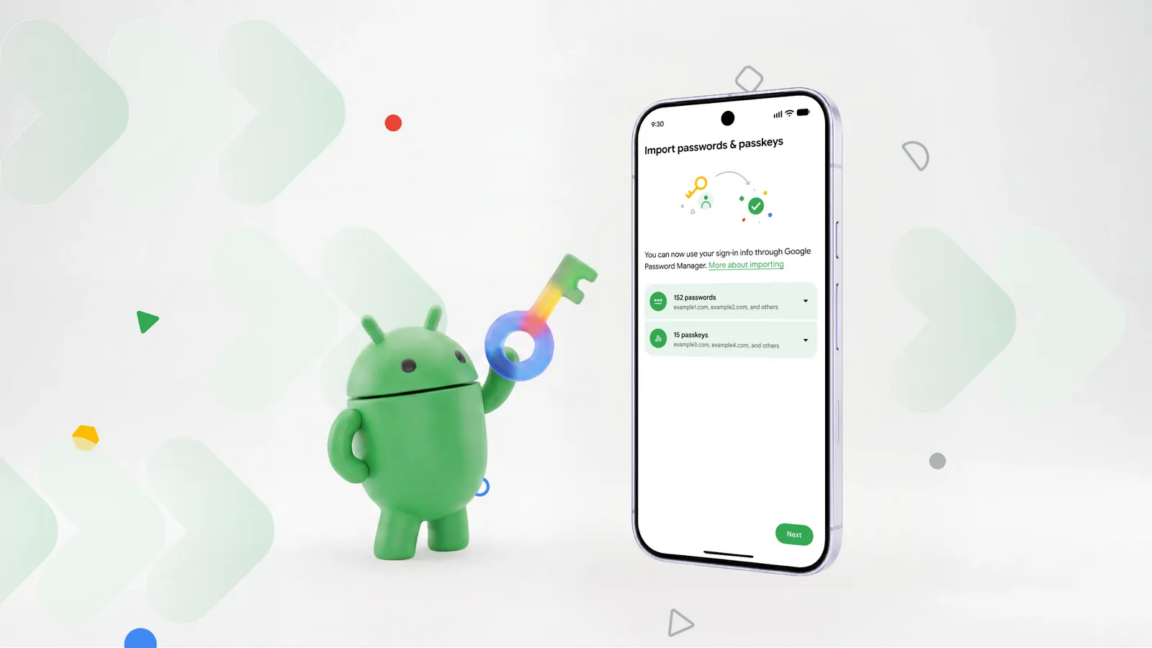
Nelle scorse ore Google ha annunciato una novità piuttosto importante in Android che permetterà di passare più agevolmente da un password manager all’altro, trasferendo il database di credenziali (sia password sia passkey) direttamente, senza bisogno di esportarlo e importarlo manualmente, con tutti i rischi derivati dalla generazione di file contenenti dati così sensibili (spesso nemmeno crittografati).
Fino a oggi, cambiare password manager significava spesso esportare l’intero archivio delle credenziali in un file locale, salvarlo sul dispositivo e successivamente importarlo nel nuovo servizio. In molti casi questi file possono essere archiviati senza crittografia; e poi bisogna ricordarsi di eliminare il file una volta completata la procedura, per evitare che rimanga accessibile sul dispositivo. Con il nuovo sistema, invece, l’utente deve semplicemente avviare la procedura di importazione dal nuovo password manager scelto. A quel punto Android rileva automaticamente i gestori di password compatibili installati sullo smartphone e consente di selezionare quello da cui trasferire i dati.
Il sistema si occupa di gestire il collegamento tra i due servizi, richiedendo l’autorizzazione necessaria per il trasferimento. Dopo la conferma dell’utente, password e passkey verranno spostate senza la creazione di file intermedi e senza ulteriori passaggi manuali. Certo, non è un’operazione che si fa una volta a settimana, ma vista la criticità dei dati salvati fa comodo avere una procedura ad hoc che minimizzi i pericoli per l’utente.
Da tempo è possibile creare gli eventi nelle chat individuali di WhatsApp, grazie a una funzionalità lanciata lo scorso anno. Prima era consentito farlo solo all'interno dei gruppi e nelle community. È un aspetto su cui il team di Meta è tornato a lavorare, con l'obiettivo di introdurre un vero e proprio hub dedicato alla gestione degli appuntamenti.
UN HUB PER GLI EVENTI TRA LE IMPOSTAZIONI DI WHATSAPP
La novità in fase di test è stata scovata dalla solita redazione del sito WABetaInfo, analizzando la versione beta 2.26.36.5 appena distribuita su Google Play per i dispositivi Android. Si tratta a tutti gli effetti di una sezione inedita, inclusa direttamente nella pagina delle impostazioni. La voce Eventi trova posto tra Aspetto e Notifiche, come testimonia lo screenshot qui sotto. Una volta aperta, mostra cosa si può fare. Lì trovano posto tutti quelli già creati e quelli ai quali si è stati invitati.
Per pianificare un evento si devono specificare il nome, una descrizione (opzionale), data e ora di inizio e di conclusione, una location ed eventualmente inserire un promemoria e il collegamento a una call. C'è inoltre il campo per aggiungere un'immagine personalizzata. Una volta terminato, si ottiene un link condivisibile che è possibile inviare anche a chi non ha un account WhatsApp, in modo del tutto simile a quanto avverrà con chiamate e videochiamate. L'ultima opzione è quella che consente agli ospiti di portare con loro un'altra persona.
Entre monitor de humor, testes de bem-estar e uma companheira de IA sempre disponível para conversar, a Liven quer ser o seu companheiro digital de autodescoberta.
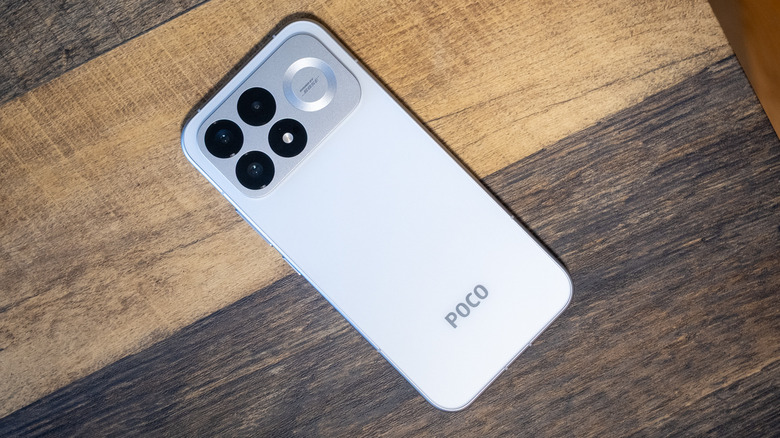
While smartphones from other major brands continue to creep up in price year after year, the value proposition of the Poco F9 Pro is even more impressive.
As longer, more complex passwords have become a necessity, remembering all those strings of numbers, letters, and special characters has become nearly impossible. Password managers can solve that problem, but what happens when you want to move to a different login organizer? Sure, you could manually type all your logins into a new app, but now Android can do that for you without the tedium.
Google designed the new login transfer process to happen entirely on your phone, so you need the corresponding apps installed with your credentials synced. To start the move, you'll have to find the import option in the app you want to use. The location of that feature will vary, but in Google Password Manager (built into Android), it's near the top under the settings tab.
The import option in Google Password Manager will plug in to the new migration system, while export still just creates an unencrypted CSV with your passwords that can be dumped into any app. It will be similar in other apps, so make sure to start the process in the app you want to use. Currently, this works in Google's app, 1Password, Bitwarden, and Dashlane.
As longer, more complex passwords have become a necessity, remembering all those strings of numbers, letters, and special characters has become nearly impossible. Password managers can solve that problem, but what happens when you want to move to a different login organizer? Sure, you could manually type all your logins into a new app, but now Android can do that for you without the tedium.
Google designed the new login transfer process to happen entirely on your phone, so you need the corresponding apps installed with your credentials synced. To start the move, you'll have to find the import option in the app you want to use. The location of that feature will vary, but in Google Password Manager (built into Android), it's near the top under the settings tab.
The import option in Google Password Manager will plug in to the new migration system, while export still just creates an unencrypted CSV with your passwords that can be dumped into any app. It will be similar in other apps, so make sure to start the process in the app you want to use. Currently, this works in Google's app, 1Password, Bitwarden, and Dashlane.
It's not much of an upgrade, but the Pixel 11 continues Google's tradition of offering phones with clean software and impressive cameras at a reasonable price.
Qualcomm is taking an unusual approach to the launch of its next-generation premium Snapdragon mobile platform this year. Instead of holding everything for its annual Snapdragon Summit in Maui happening later this month, the company has been methodically disclosing the architecture that will power the next wave of flagship Android phones over the past couple of weeks.
First, the company disclosed its new Oryon CPU architecture, followed by a major overhaul of its Adreno GPU. Today, Qualcomm is detailing the next-generation Hexagon NPU that will serve as the platform’s primary AI engine.
Taken together, the disclosures give us a pretty good picture of where Qualcomm is going before we even know the chip’s official name.
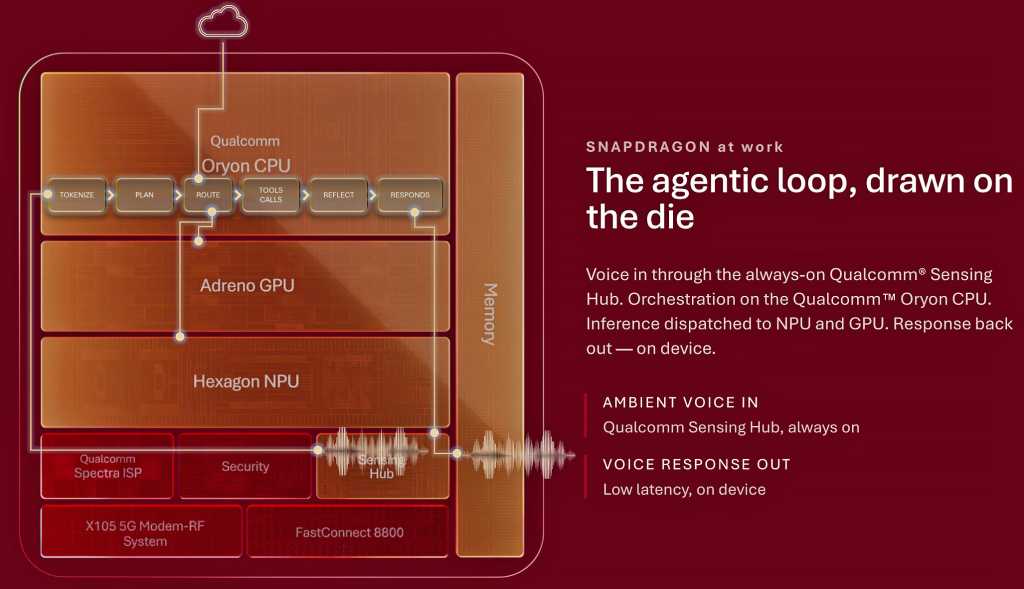
There is obviously a strong performance story here, anchored by a 5GHz CPU, but the more interesting theme running through the architecture is memory locality and specialized AI acceleration. Qualcomm is trying to keep more data close to the compute resources that need it, while distributing AI workloads across the CPU, GPU and NPU.
These architectural changes are important as the company continues to drive on-device AI beyond relatively simple generative features toward more persistent, agentic workloads.
Oryon hits 5GHz, bolstered by FlexCache
Qualcomm disclosed in August that its next Oryon CPU will be the first mobile CPU to reach 5GHz. The eight-core design includes two 5GHz Prime cores and six Performance cores, with Qualcomm attributing the frequency gains to its fully custom Oryon microarchitecture, an in-house Arm-based CPU design that gives the company full control over the cores, cache and memory hierarchy, branch prediction and CPU subsystem.
The 5GHz headline is certainly going to get attention. However, Qualcomm’s new FlexCache architecture may ultimately have a larger impact on sustained performance. FlexCache allows Oryon’s Prime and Performance cores to tap into the same shared cache pool, with capacity dynamically allocated based on the workload. So rather than a demanding core being limited to a fixed slice of cache, it can draw on more of the available pool when needed. This keeps larger working data sets close to the CPU cores and reduces high-latency trips out to system memory.
This approach should benefit everything from gaming and multitasking to content creation, but it also aligns well with agentic AI workloads, where tasks may move through several stages of processing and across different CPU cores. The basic goal is straightforward: keep the CPU fed and avoid expensive trips to external memory.
Qualcomm’s next-gen Adreno GPU adds dedicated AI engines
Qualcomm’s next disclosure focused on graphics, where the company is making one of the more significant changes to its Adreno GPU engine in recent years. The new GPU adds dedicated Adreno Matrix Cores for running AI models directly inside the graphics pipeline. They’re paired with 18MB of Adreno High-Performance Memory, or HPM, which provides low-latency local storage for tile-based rendering, frame buffers and GPU compute.
Qualcomm claims HPM provides a 12% power improvement compared to its previous-gen Snapdragon 8 Elite Gen 5.
The more visible feature for users, however, may be Adreno Neural Fusion, which combines AI super resolution, neural processing and frame generation in a unified graphics pipeline. There are obvious parallels here to what NVIDIA, AMD and others are doing with neural rendering on the PC, though Qualcomm’s next-gen Snapdragon SoC has to operate within a much tighter mobile power envelope.
Qualcomm claims enabling Neural Fusion reduces power consumption by up to 40% in its internal testing using the company’s Dragon Alley graphics demo. That’s an impressive number, though as always, we’ll want to see how the technology behaves across actual shipping games and devices before drawing any definitive conclusions.
Qualcomm has also helped integrate Neural Fusion technology into Unity and Unreal Engine, which may ultimately be just as important as the underlying hardware. Developer adoption determines whether features like this become meaningful platform advantages or just another tick box on a spec sheet.
Qualcomm’s Hexagon NPU is being reworked for agentic AI
Qualcomm
The most recent disclosure centers on Qualcomm’s Hexagon NPU, where the broader architecture starts to come together. The company’s next-generation Hexagon introduces a new Element Accelerator designed for transformer workloads, alongside its existing vector and scalar processing resources. Qualcomm says the new block is optimized for fast action loops, key-value (KV) cache acceleration and context lengths of up to 32K.
Hexagon is also getting 50% more shared memory, and again, that memory complement is important. Model state, context and KV-cache data can generate substantial memory traffic, particularly with larger language models. Keeping more of that data close to the NPU can reduce latency and power consumption. Qualcomm says the architecture is designed for long-context reasoning, multimodal models, concurrent agents and low-latency action loops.
For INT4 quantized models, the company claims up to a 50% improvement in pre-fill performance versus its previous-generation Snapdragon 8 Elite Gen 5. Qualcomm is also targeting Mixture-of-Experts, or MoE, models as large as 30 billion parameters. In its example, the company points to a 30B model that activates only about 3 billion parameters during a given token-generation step. That selective approach is a natural fit for the tight power and memory constraints of a handset.
Qualcomm isn’t suggesting that a smartphone will simply run a 30B dense model entirely from DRAM, however. By activating only the experts needed for a particular task, MoE architectures can dramatically reduce active compute and memory bandwidth requirements, potentially making much larger classes of AI models practical on mobile hardware.
Qualcomm’s next-gen Snapdragon mobile impact
There is a larger competitive story here as well. For years, flagship smartphone competition largely came down to CPU, GPU, modem performance and power efficiency. AI is now another major area of differentiation, and Qualcomm is clearly designing its next-gen Snapdragon mobile platform around this need.
Apple has the advantage of controlling its silicon, operating system and software stack end-to-end. MediaTek continues to push aggressively into premium Android devices as well. Qualcomm’s response is to make its custom Oryon CPU, Adreno GPU and Hexagon NPU work more like a fully integrated compute platform, tuned for modern AI and agentic workloads.
This is a solid advantage for Android handset OEMs because many don’t have the resources to engineer this level of silicon integration themselves. Qualcomm can effectively provide its Android OEM partners, including Samsung, Xiaomi, Honor and others, with a common hardware foundation for on-device AI, advanced graphics and agentic computing. It also gives Qualcomm another way to defend its premium Snapdragon position.
The company’s custom Oryon architecture now spans smartphones and Windows PCs, and soon servers, while AI acceleration is distributed across its CPU, GPU and NPU. For business users, that could mean more AI processing happens locally, reducing cloud and network dependence, improving response times and keeping more potentially sensitive data on-device. And for IT organizations, Qualcomm now has an opportunity to provide a more consistent AI compute foundation across Windows PCs with Snapdragon X and premium Android handsets.
There is still plenty we don’t know, however. Qualcomm hasn’t disclosed the complete SoC specifications, final performance or power characteristics, or which devices will ship with it initially. Many of these AI experiences will also depend heavily on Android, app developers and the models themselves.
The new 5GHz mobile CPU may generate the biggest headline at Snapdragon Summit, but the more important developments may be what sit around it: more local memory, specialized AI acceleration and tighter integration between the CPU, GPU and NPU.
If Qualcomm can translate this architecture into better sustained performance, enhanced power efficiency and useful on-device AI experiences, it could strengthen its position in premium Android phones while putting more competitive pressure on Apple. For business users, the payoff could be more capable local AI without sacrificing the performance and battery life expected of a flagship device.
That is the part I’ll be watching most closely when the complete silicon picture is unveiled at Snapdragon Summit later this month. And I may even get some hands-on time with it in some benchmarks, as we have in years past, so we shall see.
The Google Pixel 11 line is Google's current flagship smartphone, but is it worth shelling out $200 more for the Pixel 11 Pro? Here's what you need to know.
Solid battery life, snappy performance and quality software make for a great smaller phone with a killer camera
Google’s latest Pro phone is out to prove it has the best camera on a smartphone while embracing customisation, allowing you to change the look and feel of your photos far beyond simple filters even if that means making them technically worse.
The Pixel 11 Pro packs the best of Google’s hardware and software into a still-pocketable and easy to handle frame, instantly making it a contender for best smaller phone of the year.
Le Google Pixel 9a profite de la rentrée et des French Days pour alléger son prix chez Cdiscount : le smartphone 5G de 256 Go tombe à 404 € avec le code COCORICO15. Une bonne occasion de passer au Pixel sans faire surchauffer la carte bancaire.
That being said, generative AI can be incredibly useful. The key is simply to frame it as a purpose-specific tool for the right type of limited task as opposed to treating it as the end-all answer for everything, as most tech players seem overly eager to do these days.
Today, I’ve got a new Gemini Android advantage for you to explore — another one that I’ve never seen advertised anywhere but that works brilliantly well and solves a long-standing limitation of our modern mobile gizmos.
It’ll take you all of a minute to master and cost you precisely $0 to pull off. Ready?
This Gemini-provided power-up very much follows the path of thinking about AI as a limited, purpose-specific tool for a narrow task — the exact sort of area where AI excels.
I won’t keep you waiting: Gemini, as I discovered whilst poking around within it recently, is really good at generating unique, custom ringtones and notification sounds based on your personal preferences and specifications.
It almost seems obvious, once you think about it. But I sure hadn’t thought about it up until now — and I suspect most other folks haven’t, either.
The advantage here goes beyond just superficial silliness, too: By creating your own custom ringtones and notification noises, you can know exactly what event your phone is alerting you to within a split second of hearing the associated sound — without having to rely on the same limited and often underwhelming pool of default options that everyone else uses (or, worse yet, having to lean on shady, ad-ridden “ringtone apps” to find mediocre alternatives). That means you’ll know within a heartbeat when your boss or an especially important client is calling or if an incoming call is a random unknown number.
On the notification front, you can create a specific, memorable sound to accompany a new message in an important work-related Slack channel and a different distinctive sound for a high-priority email. They’ll all be sounds that you make and identity with and that no one else in the world uses. That’s pretty powerful.
And creating these custom sounds couldn’t be much easier, either, once you realize it’s possible:
First, just fire up Gemini on your phone (or on any device you’re using) and tell it what you want. So, for instance…
Create a soft, subtle ringtone that’s reminiscent of an old office phone sound.
Create a ringtone that sounds like an 8-bit version of The Final Countdown.
Create a one-second high-pitched notification sound that brings to mind the Super Mario Bros theme song.
Create a short notification sound that mimics the Back to the Future time circuits noise.
Create a notification sound that sounds like a robot saying “ALERT, ALERT!”
The only limit is your imagination. And if you’re not feeling especially imaginative, you can even ask Gemini to give you a list of ideas for distinctive, memorable ringtones or notification sounds based on geeky nostalgia, 80s pop-metal, or whatever it is that tickles your fancy.
Once you’ve sent a request, Gemini will — somewhat confusingly — spit back a big honkin’ block of HTML code. This is because, for reasons unknown, the system can’t or won’t just provide a sound file directly. Go figure.
Ask, and ye shall receive: Gemini’s ringtone-creating prowess in action.
JR Raphael, Foundry
But from there, it’s just one more quick step to get the file you need: Click or tap the copy icon in the upper-right corner of that code block — the icon that looks kinda like two stacked, rounded rectangles — to copy the entire chunk of code onto your system clipboard.
Then open up your browser and go to the website JSFiddle.net. It’s a well-known, long-standing tool for running code like HTML right in your browser and seeing the result, and it works entirely in the browser and without any downloads or special permissions required.
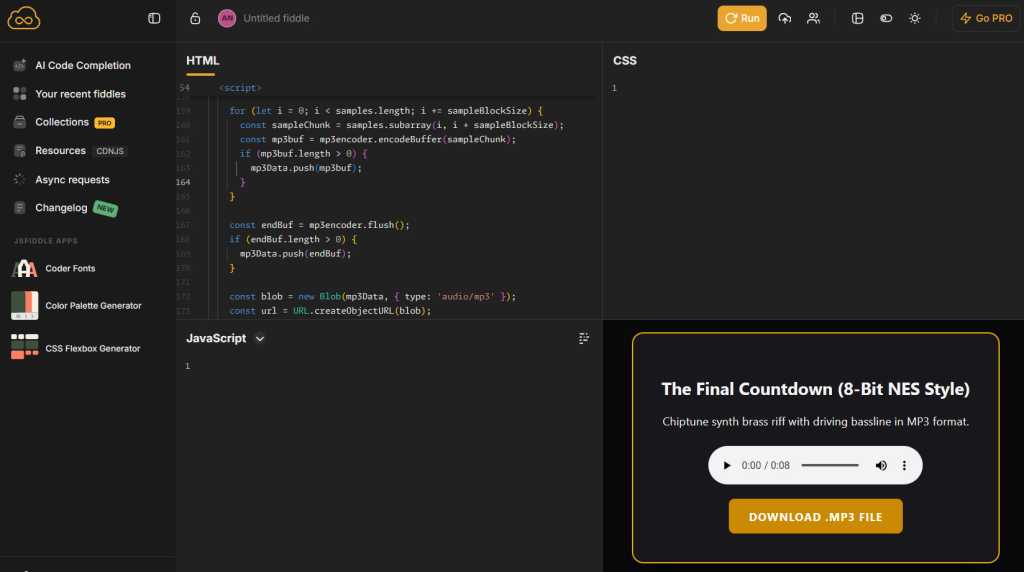
Tap or click into the “HTML” field, then paste in the code from your clipboard (by long-pressing any open space, on Android, and selecting “Paste” from the menu that appears). Click or tap the “Run” button, and — ta-da: You’ll see a player to listen to your custom Gemini-generated sound and a button to download it.
The JSFiddle website makes it easy to take Gemini’s output and both play and download a sound file from right within your web browser.
JR Raphael, Foundry
Provided you like what you hear, hit the button to download the file, then head into the Sound section of your Android system settings to save it and make it available for applying as any kind of alert or ringtone. The exact steps for doing that will vary from one type of Android device to another, but on a Pixel or another phone that follows Google’s core Android interface, you’ll tap on either “Ringtone” or “Notification,” then tap “My Sounds” and tap the plus icon to import your own custom file from your phone’s local storage.
On a Samsung device, you’ll start the same way but look for the plus icon within the “Ringtone” section of the settings, then tap the “Folders” tab to find your locally downloaded files. Samsung doesn’t make it easy to add in your own custom notification sounds, annoyingly, so what you’ll have to do is open up the Google Files app, find the file you downloaded in your “Downloads” folder, then tap the three-dot icon alongside it to copy it to the folder called “Notifications.” Once the file is in that folder, it should show up as a notification noise option within the Samsung Android settings.
With Gemini as your personal composer, you’ll never be stuck with generic overused sounds again — and you’ll always know exactly what’s happening from the first note of whatever noise you hear.
O seu smartphone estar a acusar falta de espaço não significa que tenha de comprar um telemóvel novo. Veja como libertar espaço no armazenamento do seu equipamento em poucos minutos, com dicas simples para Android.
Longer battery life, faster chip, actually useful AI tools and better cameras keep quality Android ahead of competition
Google’s Pixel 11 continues to set the standard for what you should expect from the base model of a flagship phone with class-leading cameras, long software support and almost all the bells and whistles of its most expensive phones.
The regular Pixel 11 costs £879 (€999/$899/A$1,499) making it £80 or equivalent more expensive than last year’s model as the cost of RAMageddon continues to bite. It’s not cheap by any stretch of the imagination, but it comes with 256GB of storage and is £200 less than the Pixel 11 Pro, matching rival Samsung’s Galaxy S26.
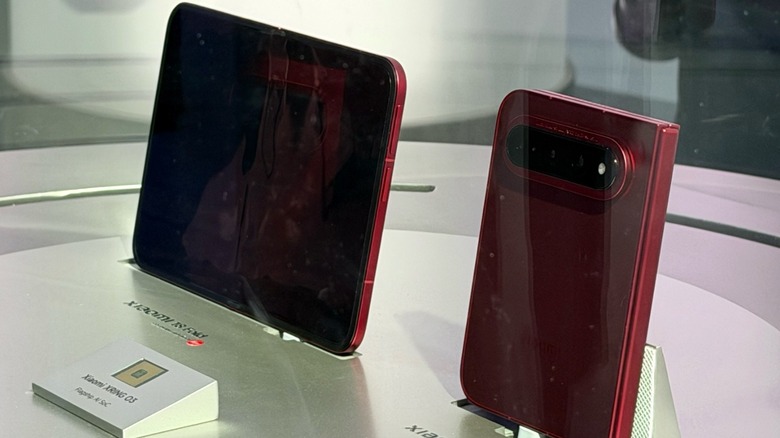
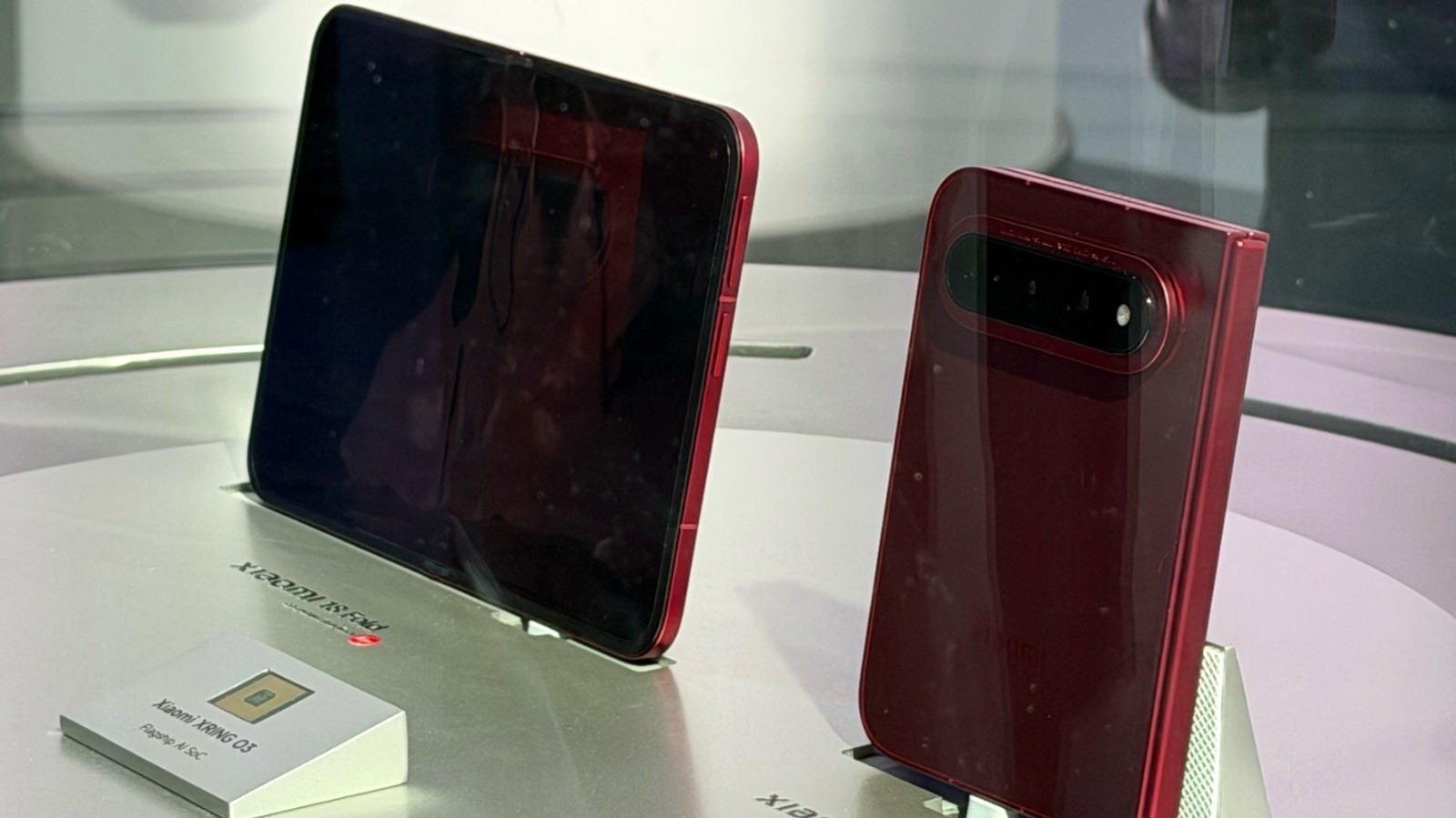
Xiaomi brought more than 380 devices and concepts to IFA 2026, but the mysterious foldable phone it refused to discuss might have been the star of the show.
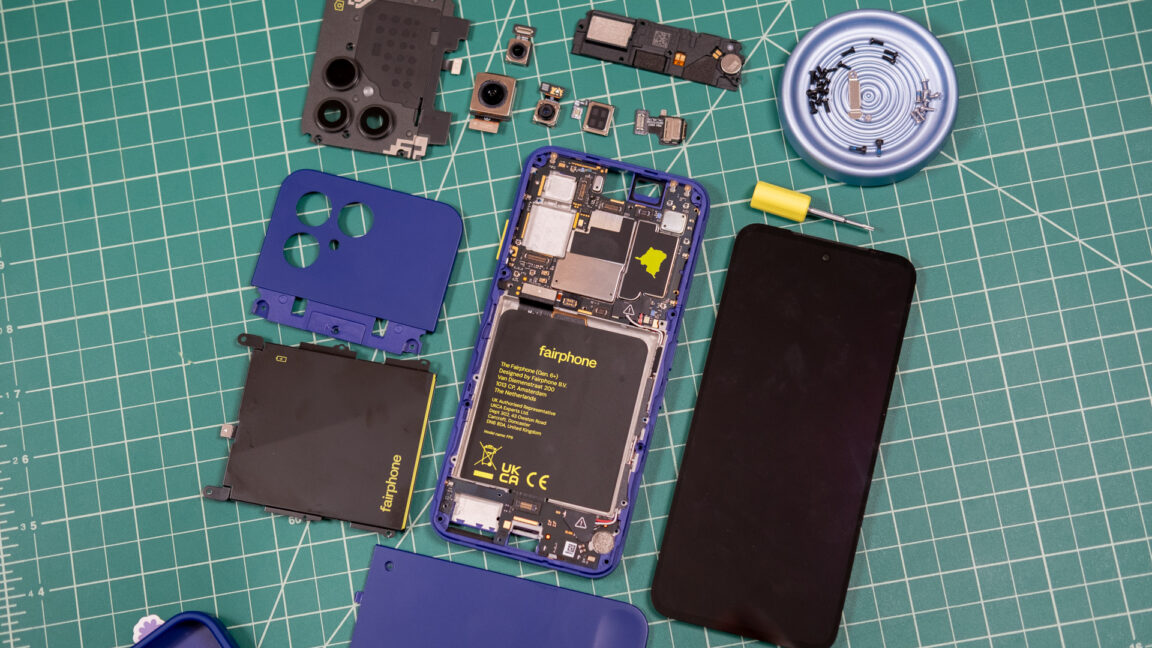
Smartphone longevity didn't used to matter. In the past, before you could wear out or break a phone, there was always some shiny new thing to buy. Today, we expect our smartphones to go the distance, but they've also become less repairable and, in many cases, more fragile. Fairphone, a Dutch smartphone maker that has just entered the US market, thinks about phones differently.
The new $650 Fairphone Gen 6+ is designed both for longevity and easy repairability. There are trade-offs to this approach if you're used to the standard glass and aluminum sandwiches filled with glue, gaskets, and teeny-tiny screws. But the drawbacks could be worth it for the right buyer. Fairphone CTO Chandler Hatton told Ars that Fairphone's goal is to provide a compelling mobile experience while also enabling the user to "fully own" their device. At the end of the day, this is what a lot of people say they want in a smartphone.
Take it apart, put it back together
These days, Google, Samsung, and Apple support phones with software updates for the better part of a decade, but will the hardware last that long? And what happens when it needs a repair? You may be out of luck or out a lot of money, but Fairphone prioritizes the self-repair experience.
The settlement between Google and Epic that aimed to put to rest the companies’ long-running antitrust battle is being withdrawn, and that means third-party app stores are coming to the Play Store.
[…]
While Apple suffered little penalty in its Epic case, Google was tripped up by its anti-competitive management of the supposedly open Android ecosystem. Google used its market position to discourage device makers from promoting or pre-loading non-Google app stores and attempted to hide that conduct. The remedies set by Judge James Donato included lower fees, mirroring Google Play apps in other stores, and most vitally, placement of alternative app stores in Google Play.
[…]
Google and Epic were set to return to court on July 16 to argue in favor of the settlement. However, the writing may have been on the wall. In a recent expert analysis provided to the court, MIT economics professor Nancy Rose noted that the settlement was “unlikely to enable Google Play’s potential competitors to overcome their long-standing network-effect disadvantage in a timely manner.”
[…]
Under the terms of Judge Donato’s original injunction, these stores will have access to the full catalog of Google Play apps by default. […] Google will also require approved stores to block malware, respect intellectual property, and include mechanisms to update and uninstall apps.

 Login
Login
 : Galaxy Z Fold 8 Ultra a 1,449 euro, Galaxy Z Fold 8 a 1,299 euro e Galaxy Z Flip 8 a 699 euro.
 : Galaxy Z Fold 8 Ultra a 1,362 euro, Galaxy Z Fold 8 a 1,329 euro e Galaxy Z Flip 8 a 721 euro.
 a 1,299 euro
 a 1,329 euro