❌

Reading view

Como acelerar o processo de indexação do Spotlight [iPhone, iPad e Mac]

Os corajosos que instalaram as versões beta do iOS 27, do iPadOS 27 e do macOS Golden Gate 27 certamente devem ter notado um aviso no topo do aplicativo Ajustes (Settings) sobre uma indexação do Spotlight em andamento.

Isso ocorre porque o Spotlight indexa o conteúdo do seu dispositivo para que seja possível pesquisar tudo o que está nele.

No caso de uma atualização de software (como as betas), o índice do Spotlight é atualizado quando você instala novos aplicativos ou recebe novos emails e mensagens de texto, por exemplo.

Usando truques simples — nem sempre bem-vindos, é verdade —, é possível acelerar o processo de indexação (que pode levar horas ou dias, dependendo da quantidade de conteúdos). Veja como! 😉

  1. Deixe o seu dispositivo sem uso, ou seja, de forma que você fique um tempo sem mexê-lo;
  2. Conecte o iPhone, iPad ou Mac à energia;
  3. Conecte o aparelho à internet usando uma rede Wi-Fi ou Ethernet, caso os emails ou outros dados precisem ser baixados para a indexação.

A Apple afirma que é possível que sejam vistos, durante esse processo de indexação, alertas como:

  • Um indicador de progresso na parte superior da janela do Spotlight ou da Siri no Mac, que é aberto quando você pressiona a combinação ⌘ command barra de espaço;
  • Uma notificação abaixo do seu nome nos Ajustes do iPhone ou iPad;
  • Um alerta do Mail de que a indexação está incompleta.

Como está o progresso aí para você?

  •  

iOS 27 e o iPhone Duo: Como a Apple redesenhou o sistema operativo para o seu primeiro dobrável

Controlos deslocados para a lateral, duas páginas de ecrã principal, um novo modo standby e suporte inédito ao Apple Pencil. Saiba tudo o que a Apple mudou no iOS 27, a pensar na interface do ecrã dobrável do iPhone Duo.

The post iOS 27 e o iPhone Duo: Como a Apple redesenhou o sistema operativo para o seu primeiro dobrável appeared first on Tek Notícias.

  •  

iOS 27 May Get Mac’s Edge Light Feature: Here is How It Would Work

Apple’s Mac Edge Light feature could expand to the iPhone, according to an unconfirmed code finding shared by researcher pdfu on X. The post points to iOS 27 release-candidate code and a device subtype that appears to reference iPhone Duo. This is not an Apple announcement, and it does not prove that Edge Light will […]

The post iOS 27 May Get Mac’s Edge Light Feature: Here is How It Would Work appeared first on The Mac Observer.

  •  

T-Mobile’s $5 iPhone Handoff Fee: What iOS 27 Users Need to Know

T-Mobile says iPhone Handoff will cost $5 per month, giving compatible customers a way to use one T-Mobile number across two iPhones. The feature arrives with iOS 27 and is aimed at people who regularly switch between a primary and secondary phone. Apple’s iPhone Handoff support guide says two phones need iOS 27 or later, […]

The post T-Mobile’s $5 iPhone Handoff Fee: What iOS 27 Users Need to Know appeared first on The Mac Observer.

  •  

The Cheapest Way Into Apple Intelligence in 2026: Free on 15 iPhones, $699 If Yours Is Not One

If your iPhone is one of the 15 models on Apple’s Apple Intelligence device list, the cheapest way in costs nothing: iOS 27 arrives free on Monday, September 14. If it is not, the least expensive route Apple sells is the $699 iPhone 17e, and the same model was listed at $599 before September 9. […]

The post The Cheapest Way Into Apple Intelligence in 2026: Free on 15 iPhones, $699 If Yours Is Not One appeared first on The Mac Observer.

  •  

iPhone 18 Pro’s 20 Second-Wave Countries: Apple Published the Date, Not the List

Apple’s press release says iPhone 18 Pro and iPhone 18 Pro Max “will be available in 20 other countries and regions beginning Friday, September 25”. It has not named a single one of them, and it has not said when those markets can pre-order. That is the whole of the second-wave story as Apple has […]

The post iPhone 18 Pro’s 20 Second-Wave Countries: Apple Published the Date, Not the List appeared first on The Mac Observer.

  •  

iOS 27 Battery and Storage: The Numbers Apple Did Not Publish Before Monday

Apple has published three performance claims for iOS 27, each with the device it was tested on. It has published nothing about what the update does to battery life, nothing about how large the download is, and nothing about how much free space it needs. Those are the three things people actually search for on […]

The post iOS 27 Battery and Storage: The Numbers Apple Did Not Publish Before Monday appeared first on The Mac Observer.

  •  

Will iOS 27 Break Your CarPlay, Bluetooth or Apps? What Apple Has Actually Changed

Apple has published no known-issues list for iOS 27, no security notes for it and no accessory compatibility page, so nothing on the record predicts a dead CarPlay connection or a lost Bluetooth pairing on Monday. What Apple has published is a short list of changes that touch exactly those areas, plus one deadline that […]

The post Will iOS 27 Break Your CarPlay, Bluetooth or Apps? What Apple Has Actually Changed appeared first on The Mac Observer.

  •  

Will iOS 27 Slow Down Your Older iPhone? Apple Tested Its Speed Claim on an iPhone 11 Pro Max

Apple has published nothing that says an iPhone runs slower after a major update, and there is no iOS 27 known-issues document to check against. The one published measurement that speaks directly to older hardware was taken on an iPhone 11 Pro Max, the oldest generation iOS 27 supports, and it points the other way: […]

The post Will iOS 27 Slow Down Your Older iPhone? Apple Tested Its Speed Claim on an iPhone 11 Pro Max appeared first on The Mac Observer.

  •  

Will Siri AI Speak Hindi? What Apple Has Published for India

Apple has published no timeline for Siri AI in Hindi, and no timeline for Apple Intelligence in Hindi either. Hindi is not among the 16 languages Apple lists, and the one dated expansion Apple has announced covers French, Japanese, Korean, Portuguese and Spanish in October. That is the honest answer to a question a very […]

The post Will Siri AI Speak Hindi? What Apple Has Published for India appeared first on The Mac Observer.

  •  

How to Turn Off Liquid Glass in iOS 27: Apple Publishes a Slider, Not a Switch

There is no off switch for Liquid Glass in iOS 27. The only control Apple has published is a slider in Settings that moves the effect anywhere from ultra-clear to fully tinted, and nothing in Apple’s description of the update removes the design. The reason this search keeps coming back is that Liquid Glass is […]

The post How to Turn Off Liquid Glass in iOS 27: Apple Publishes a Slider, Not a Switch appeared first on The Mac Observer.

  •  

iOS 27 on Monday or Wait for 27.1? Apple Has Published No Point Release Date

If you are planning to skip Monday and wait for iOS 27.1, understand what you are waiting for: Apple has not published an iOS 27.1, has not dated one, and has not published a single word about how iOS 27 itself will roll out beyond the date. iOS 27 arrives Monday, September 14 as a […]

The post iOS 27 on Monday or Wait for 27.1? Apple Has Published No Point Release Date appeared first on The Mac Observer.

  •  

iOS 27 on an iPhone 15 Pro: The Apple Intelligence You Get and the Tier You Do Not

The iPhone 15 Pro and iPhone 15 Pro Max are the oldest iPhones on Apple’s Apple Intelligence list, so on Monday, September 14 they get the full iOS 27 feature set as most people understand it: Siri AI in beta, Image Playground, the new Photos editing tools and Call Context. What they do not get […]

The post iOS 27 on an iPhone 15 Pro: The Apple Intelligence You Get and the Tier You Do Not appeared first on The Mac Observer.

  •  

iOS 27 Hardware Gates: Every Feature That Needs a Device You May Not Own

Apple Intelligence is the iOS 27 gate everybody knows about, and it is not the only one. Once you read the footnotes on Apple’s pages, iOS 27 splits the iPhone line into three tiers, then adds separate requirements for a home hub, particular AirPods, an Apple Watch Series 12 and, in one case, a specific […]

The post iOS 27 Hardware Gates: Every Feature That Needs a Device You May Not Own appeared first on The Mac Observer.

  •  

iOS 27 on an iPhone 11: What Apple’s Oldest Supported iPhone Actually Gets

iOS 27 arrives on Monday, September 14 as a free update, and Apple’s compatibility list still runs all the way back to the iPhone 11 and the iPhone SE second generation. An iPhone 11 gets the new Liquid Glass look, Apple’s speed work, the rebuilt search and the new parental controls. It gets none of […]

The post iOS 27 on an iPhone 11: What Apple’s Oldest Supported iPhone Actually Gets appeared first on The Mac Observer.

  •  

How to Prepare for iOS 27 on iPhone & iPadOS 27 on iPad

iOS 27 for iPhone and iPadOS 27 for iPad will be released on Monday, September 14. That’s pretty soon, and while you don’t have to update right away on the release day, you still might be interested in preparing your devices for installing the next major system software update for iOS and iPadOS. Since iOS ... Read More

The post How to Prepare for iOS 27 on iPhone & iPadOS 27 on iPad appeared first on OS X Daily.

  •  

T-Mobile to Charge $5 a Month for iOS 27 iPhone Handoff

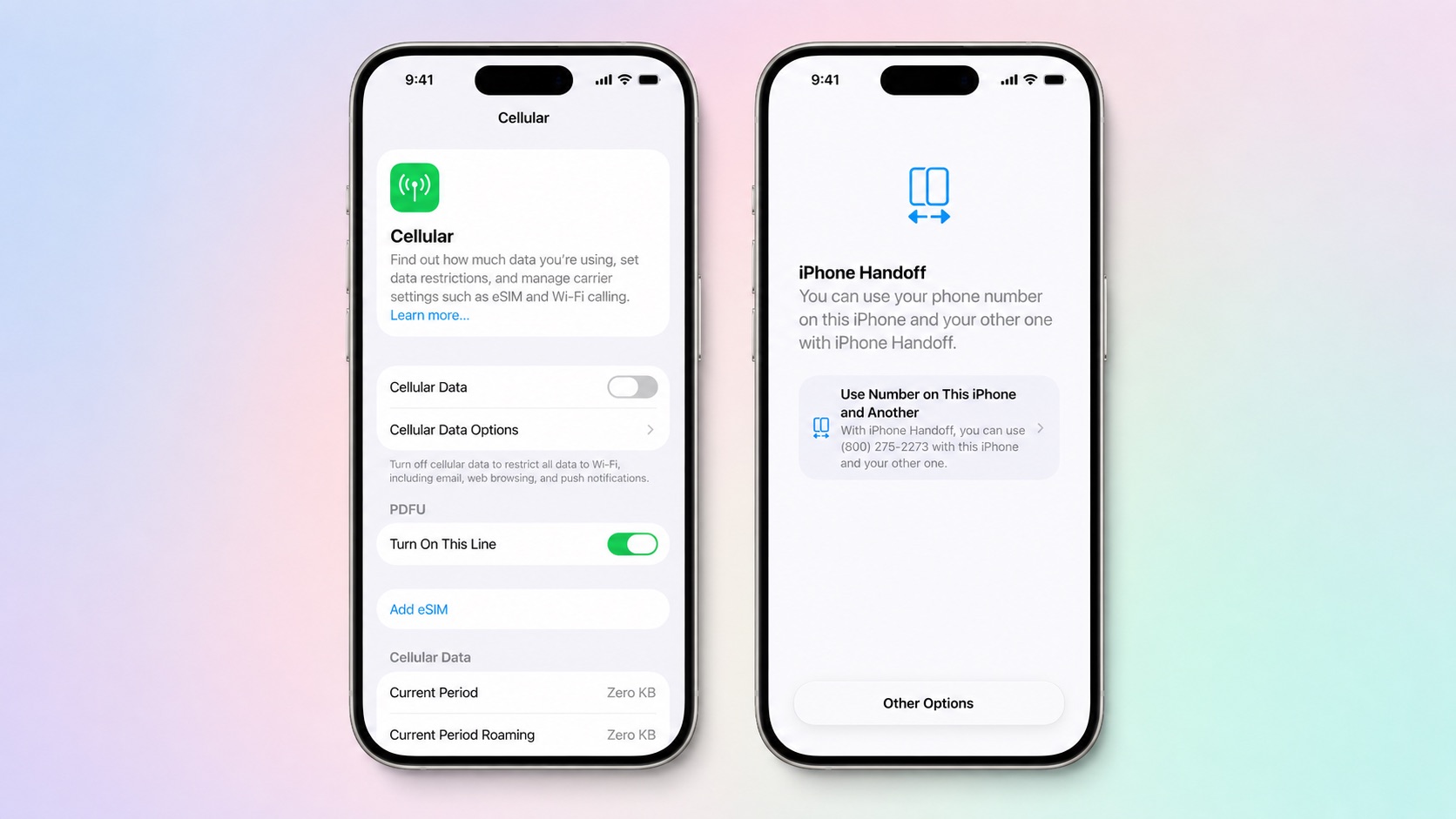
T-Mobile will charge customers $5 per month to use iPhone Handoff, an e-SIM feature that allows the same phone number to be used on two separate iPhones.


iPhone Handoff requires carrier support, and at launch, only T-Mobile users in the U.S. and Deutsche Telekom users in Germany will be able to use it.

T-Mobile says customers can use their number across two compatible iPhone models and elect which phone is active at any given time. Features like calls, texts, data, mobile hotspot, Scam Shield, and T-Satellite will work on both devices with an eligible plan.

Apple is adding support for iPhone Handoff in iOS 27. It requires two iPhones running ‌iOS 27‌ or later that are connected to Wi-Fi and signed into the same Apple Account with FaceTime, iMessage, and Messages in iCloud turned on. It can be turned on when activating a new iPhone or in the Settings app.

When iPhone Handoff is enabled, one iPhone serves as a main iPhone and the other iPhone is the secondary device that shares the same number. Moving between the main iPhone and secondary iPhone happens automatically when you unlock one of the devices.

A phone number can only be active on one iPhone at a time when using iPhone Handoff. Payment cards in the Wallet app and car keys can work across both iPhones, but Apple warns some Wallet items like transit passes, IDs, or corporate badges might only work on one iPhone at a time. iPhone Handoff also does not transfer an Apple Watch from one iPhone to another.

iPhone Handoff works with Dual SIM as long as both eSIMs are from carriers that support iPhone Handoff. Both eSIMs will switch simultaneously when you unlock your iPhone. Each eSIM has to be set up separately.

Once set up, iPhone Handoff remains activated until you contact your carrier to turn it off. More information can be found in Apple's support document for the feature.

‌iOS 27‌ is set to launch on Monday, September 14, and the new iPhone 18 Pro models will launch on Friday, September 18.
Related Roundups: iOS 27, iPadOS 27
Related Forum: iOS 27

This article, "T-Mobile to Charge $5 a Month for iOS 27 iPhone Handoff" first appeared on MacRumors.com

Discuss this article in our forums

  •  

Mac's Edge Light Feature Rumored to Expand to iPhone

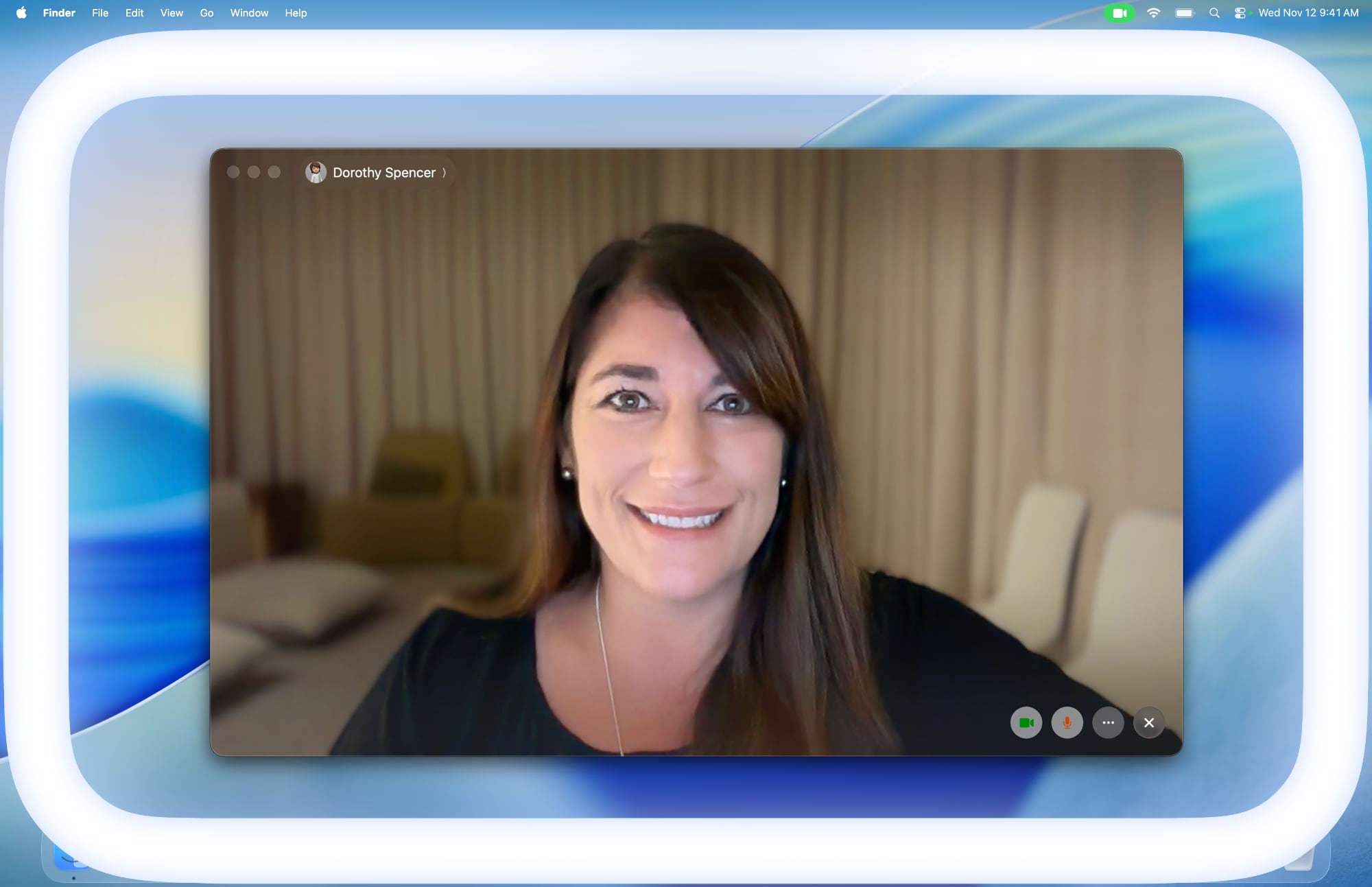
macOS 26.2 added an Edge Light feature to Macs with the M1 chip or newer, and it has now been rumored that this feature will expand to the iPhone.


According to pdfu, who has been digging through code in Apple's software updates in recent weeks, the iOS 27 Release Candidate contains evidence of the Edge Light feature coming to the iPhone Duo at a minimum. However, it appears that the feature is still in development, as they said the color temperature setting is not fully implemented.

On the Mac, Edge Light illuminates the borders of the screen to evenly illuminate your face in low-light conditions. The feature is essentially a virtual ring light, and there are settings to adjust the width of the white line around the screen and a color temperature slider to make the light it produces appear more or less warm.

Edge Light is coming to iPhone.

iOS 27 RC gates the feature behind a device subtype that points to iPhone Duo. The color temperature setting isn't fully implemented. pic.twitter.com/dc4pQmikJc

— pdfu (@itspdfu) September 10, 2026

Based on a video of the feature in action on a simulated iPhone, it appears that the feature will work in a similar manner and have the same brightness and color temperature settings on the iPhone. It is unclear if Edge Light will be available on the iPhone Duo when the device launches on October 23, or if it will expand to other iPhone models.

Some of pdfu's other Apple-related code findings have already proven to be right, so the user has an accurate track record so far.
Related Roundups: iOS 27, iPadOS 27, iPhone Duo
Tag: pdfu
Related Forums: iOS 27, iPhone

This article, "Mac's Edge Light Feature Rumored to Expand to iPhone" first appeared on MacRumors.com

Discuss this article in our forums

  •  

‘I see no crease whatsoever’ – WSJ’s Joanna Stern hands-on with Apple’s iPhone Duo

iPhone Duo features a 7.6-inch inner display that provides a large canvas for viewing content, gaming, and multitasking. Closed, it’s similar in size to a passport with a beautiful 5.4-inch outer display.

The Wall Street Journal‘s Joanna Stern got her hands on Apple’s long-rumored iPhone Duo foldable smartphone at Apple Park and walked away impressed and loaded with kitchen-scale comparisons.

The iPhone Duo, which ships in October starting at $1,999, is Apple’s biggest hardware change to the iPhone in years. Closed, Stern says it is a little smaller than a Pop-Tart, about the size of a passport or kitchen sponge, and similar in footprint to Samsung’s Galaxy Z Fold 8 — though she found the Apple device a bit beefier and sturdier. Unfolded, the inner display measures 7.6 inches, roughly an iPad mini that fits in a pocket. The cover screen is 5.4 inches.

Apple spent heavily on the inner screen. Stern reported no visible crease even when the device was bent or fully folded, unlike the obvious crease on the Z Fold 8. The inner display is matte rather than glossy, which she called her favorite feature. The hinge produces a satisfying click when closed. One-handed use in tablet mode is possible but awkward for those with smaller hands.

Hardware trade-offs are clear. There is no Face ID; the power button doubles as a fingerprint sensor. The rear cameras are limited to wide and ultrawide — no telephoto, which Stern called the biggest hardware disappointment. A camera hidden behind the inner display is designed for selfies and FaceTime.

Software is the main reason to buy one. Split-screen multitasking works like a simplified iPad: Safari and Messages can run side by side. Apple redesigned several first-party apps with two-pane layouts. The interface also changes with the fold angle, turning the device into a small laptop-style stand. Video watching benefits from the larger canvas.

Apple claims all-day battery life: up to 31 hours of video on the inner display and 44 hours on the outer. Naturally, Stern said real-world battery testing is still needed, but Apple’s battery claims are historically lower than actual use.

After years of skipping foldables and planning to buy the iPhone 18 Pro as usual, Stern said she is now considering the Duo.
‎
MacDailyNews Take: The initial hands-on reviews for iPhone Duo are uniformly strong to outright gushing!


‎
Please help support MacDailyNews — and enjoy subscriber-only articles, comments, chat, and more — by subscribing to our Substack: macdailynews.substack.com. Thank you!

Support MacDailyNews at no extra cost to you by using this link to shop at Amazon.

The post ‘I see no crease whatsoever’ – WSJ’s Joanna Stern hands-on with Apple’s iPhone Duo appeared first on MacDailyNews.

  •  

iOS 27 Apple Health App Redesign: Every New Feature Coming in 2026

Apple is planning a major redesign of the Health app on iPhone and iPad, with a long list of new features set to be added. Apple announced the Health app changes at yesterday's iPhone event.

The Health app is getting an update because Apple overhauled the sensors in the Apple Watch Series 12 and Apple Watch Ultra 4. There's a Health Sensing System with three main improvements: increased electrode surface area for better skin contact during ECG readings, redesigned photodiodes arranged in a ring to capture light more efficiently for optical sensing, and power-efficient green LEDs for capturing continuous heart rate data.

The new watches take heart rate readings every five seconds throughout the day, and more frequently measure heart rate variability (HRV). All of the data collected is sent to the Health app on iPhone. Apple says in a head-to-head study against other wearables using an ECG chest strap as reference, the new Apple Watch had the most accurate heart rate sensing.

Apple Intelligence Guidance


The Health app will turn the data and metrics that it collects into personalized guidance thanks to Apple Intelligence integration. There are several new sections coming to the Health app.
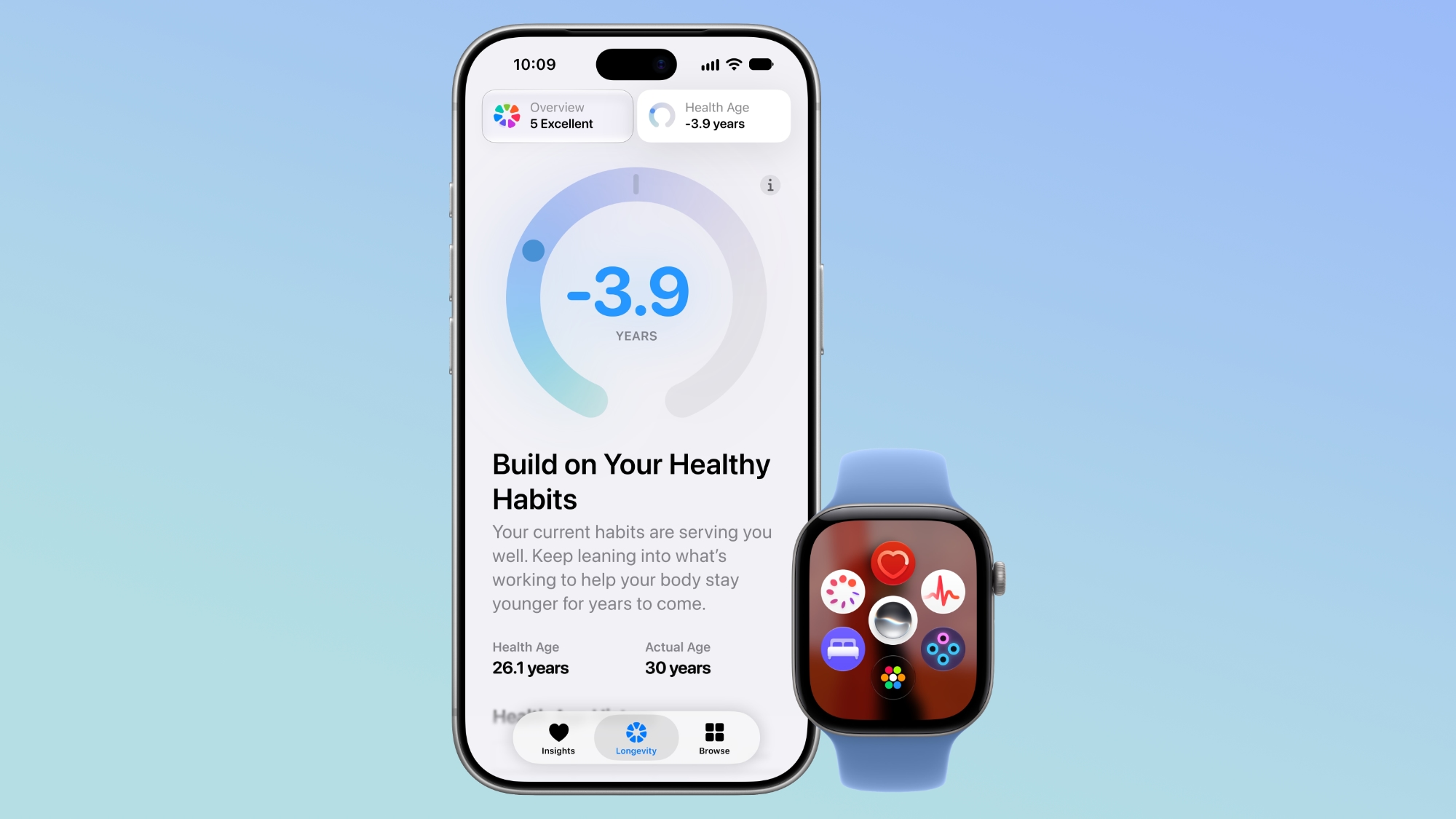


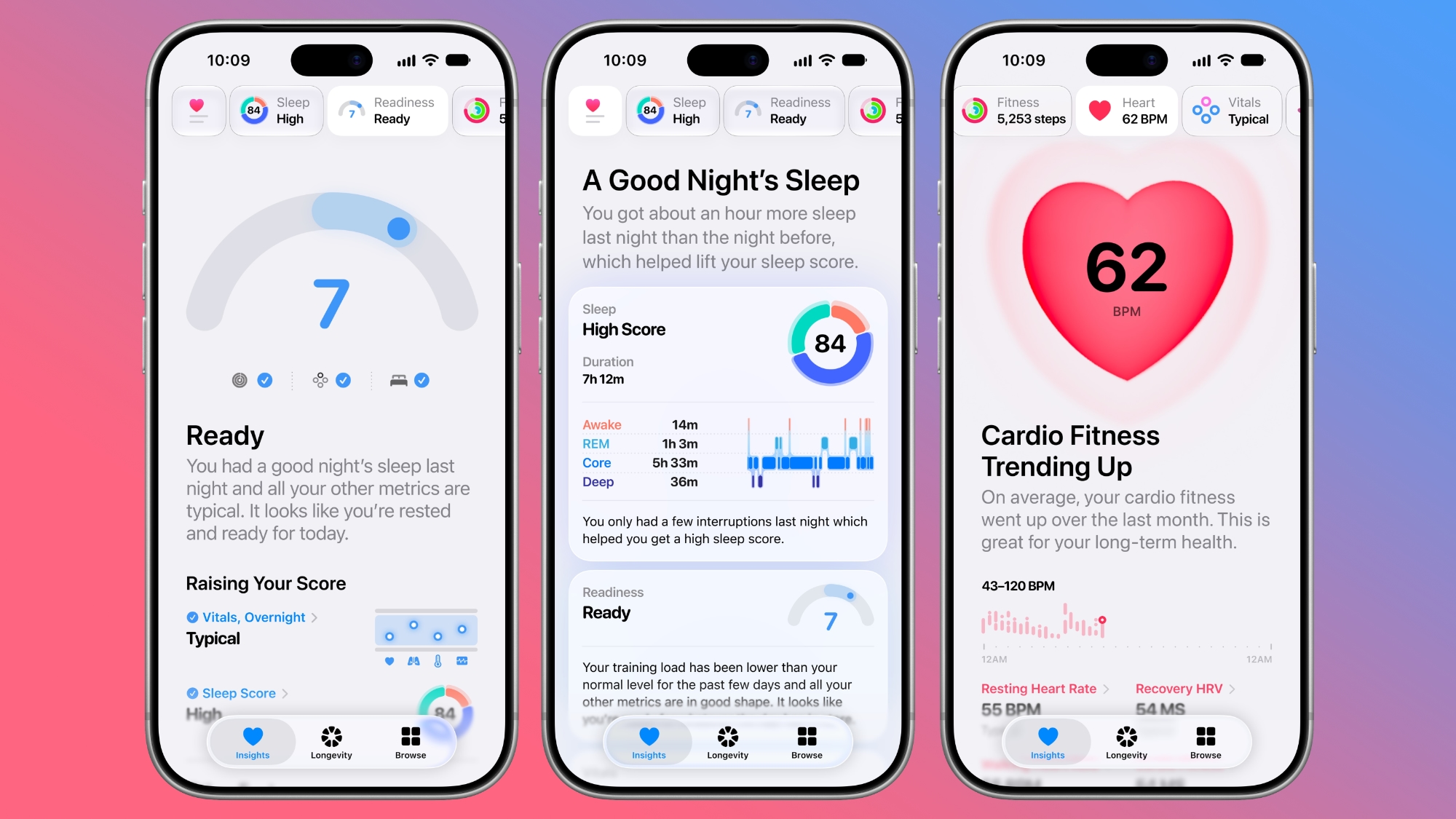
  • Insights - The Insights tab offers an Apple Intelligence-generated summary of timely information like your latest sleep metrics or a new peak in VO2 max. There are options to get custom advice on readiness, fitness, heart health, and more in the For You section.

  • Personal Guidance - Personal guidance is part of the Insights tab. It knows what's important to you, and will make relevant suggestions. Apple says if you're working on your cardio, you might see a suggestion to incorporate intervals into your morning run. Recommendations adapt to each user and their data.

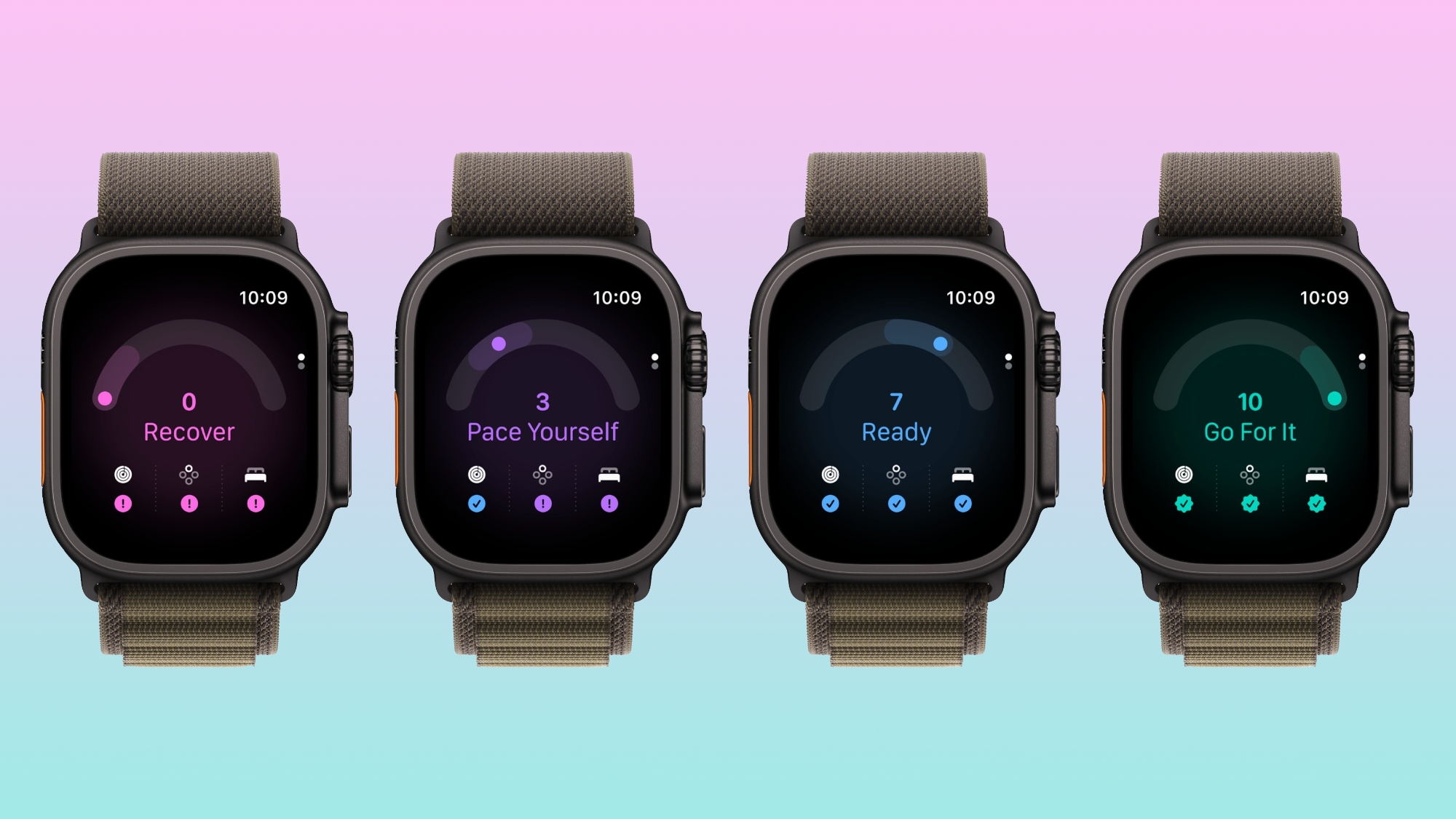
  • Readiness - The new Apple Watch models calculate a readiness score that takes into account recent activity, vitals, and sleep score. It gives a 0–10 score with recommendations on activity level. Readouts include Recover, Pace Yourself, Ready, or Go For It. Info is shown on the watch, in the Fitness app, and in the Health app's Insights tab.

  • Fitness - Insights incorporates your daily activity and it updates throughout the day.

  • Vitals - The Vitals option in the Health app has new overnight views and daytime views. HRV is incorporated as a metric, offering a better look at your ability to recover from stress. It measures overall HRV and recovery HRV.

  • Longevity - There is a new Longevity tab in the Health app. It uses metrics from your iPhone and Apple Watch to assess overall health across heart health, sleep, mental wellbeing, movement health, metabolic health, hearing, and nutrition. The section shows you how well you're doing in each category, and how each metric is classified against the latest clinical guidance.

  • Health Age - Health Age is part of the Longevity tab. It uses metrics like VO2 max, resting heart rate, HRV, sleep, and biomarkers from blood work to determine how your health metrics compare to your actual age. It will help you figure out what habits make the biggest impact on your health, and how you can improve.


Lab Results


Health Age and Longevity can be more useful with lab results. Users can upload lab results manually or sync medical records.

Apple has also partnered with Quest to offer U.S. users an option to buy a full bloodwork panel that covers more than 50 biomarkers. The test is priced at $119, and users will be able to buy it right in the Health app. It'll require a visit to a Quest lab location, and results are combined with data from the Apple Watch and analyzed on iPhone. Apple says users will get videos from clinical experts related to their results.

According to Quest, the panel delivers preventive health insights and includes biomarkers for assessing cardiometabolic health and organ function. It also includes biometric readings that measure blood pressure, height, weight, and waist and hip circumferences. Since the test isn't available in the Health app yet, a full list of what's included isn't known.

Apple competitor Oura offers a similar testing option through Quest. The $99 test checks more than 50 biomarkers, and Oura runs discounts.

Quest has approximately 2,000 locations across the U.S. Results appear in the Health app shortly after testing.

Movement Evaluations


Apple is adding new at-home health assessments you can complete, such as a VO2 max test. The test uses the iPhone camera to track your movements as you follow moves and instructions from a trainer. The tests offer real-time audio and visual feedback.

There are in-depth physical assessments for measuring flexibility, strength, balance, and movement mechanics in addition to VO2 max.

Apple says the tests are useful to see how well your body is moving or to track your progress recovering from an injury. Tests run on device with no video recorded or stored, and users get an exercise plan after completing a test.

Cycle Tracking


Apple is adding perimenopause and menopause support to Cycle Tracking in the Health app.

Device Requirements


Apple Watch users with an Apple Intelligence-capable iPhone will get the updated Health app when it launches, but readiness, more frequent heart rate readings, and more frequent HRV readings require a Series 12 or Ultra 4.

Launch Date


Apple says the new Health app is coming in late 2026, but the company did not give a specific launch date. It will be available in U.S. English at launch, with more languages to follow.
Related Roundups: iOS 27, iPadOS 27
Related Forum: iOS 27

This article, "iOS 27 Apple Health App Redesign: Every New Feature Coming in 2026" first appeared on MacRumors.com

Discuss this article in our forums

  •  
❌