The next big push for Apple Immersive Video on Vision Pro has been revealed: live baseball games. Starting August 28 and running through the rest of the regular MLB season, the company will stream one real-time immersive matchup per week exclusively on Vision Pro as part of its Friday Night Baseball lineup on Apple TV.
Immersive games will feature an in-stadium experience with Spatial Audio captured by ambisonic microphones, special graphics like team lineups and stats floating in view, and a dedicated commentary team made up of play-by-play commentator Paul Severino, analyst Xavier Scruggs, and sideline reporter Michelle Margaux. If you’ve seen any of the immersive Lakers basketball games broadcast this year, you have an idea of how these elements come together with Immersive Video to create a rich, lifelike experience.
Friday, September 4
Los Angeles Angels at Pittsburgh Pirates
6:30 p.m. ET
Friday, September 11
San Diego Padres at San Francisco Giants
10 p.m. ET
Friday, September 18
San Francisco Giants at Los Angeles Dodgers
10 p.m. ET
Live immersive games will be available to Apple TV subscribers via the TV app on Vision Pro in Australia, Canada, Germany, Hong Kong, Japan, South Korea, Taiwan, the UK, and the U.S. Full game replays and highlights will be made available after the games are over as well.
Streaming Friday Night Baseball in Apple Immersive Video seems like a natural move for Apple to make. The company has been airing baseball games on Friday nights for four years now and has worked to integrate more of its technology into the broadcasts. Plus, MLB has already won many baseball fans over with a fantastic enhanced viewing experience for baseball games in its own visionOS app. Just as Apple is beefing up its sports offerings in the Apple TV service with MLS and F1, so it’s rounding out its sports strategy on the Vision Pro with a regular output of live baseball.
To me, there’s nothing that quite matches the energy and sense of camaraderie you feel when you walk into a baseball stadium. Apple Immersive Video is a powerful medium for recreating in-person experiences, so I’m very keen to watch one of these live games for myself. If Apple’s immersive baseball games can offer a taste of what it’s like to actually be in the stadium – and based on what we’ve seen from the format before, I think it’s likely – this will quite a compelling way to watch some baseball.
NPC XL is a weekly members-only version of NPC with extra content, available exclusively through our new Patreon for $5/month. Each week on NPC XL, Federico, Brendon, and John record a special segment or deep dive about a particular topic that is released alongside the “regular” NPC episodes. You can subscribe here.
Comfort Zone, Episode 112, ‘Dollar Dollar Bills Y’all’ Show Notes
For even more from the Comfort Zone crew, you can subscribe to Cozy Zone. Cozy Zone is a weekly bonus episode of Comfort Zone where Matt, Niléane, and Chris invite listeners to join them in the Cozy Zone where they’ll cover extra topics, invent wilder challenges and games, and share all their great (and not so great) takes on tech. You can subscribe to Cozy Zone for $5 per month here or $50 per year here.
MacStories launched its first podcast in 2017 with AppStories. Since then, the lineup has expanded to include a family of weekly shows that also includes MacStories Unwind, Magic Rays of Light, Comfort Zone, NPC: Next Portable Console, and First, Last, Everything that collectively, cover a broad range of the modern media world from Apple’s streaming service and videogame hardware to apps for a growing audience that appreciates our thoughtful, in-depth approach to media.
If you’re interested in advertising on our shows, you can learn more here or by contacting our Managing Editor, John Voorhees.
This week, John and Federico discuss the changing face of the AI-fueled App Store and questionable changes made to TestFlight before going into the nerdiest details of Open Minis, an iOS app that brings desktop-class agents onto the iPhone and iPad.
Then on AppStories+, Federico and John explore Cmux, a Mac terminal app with an iPhone and iPad beta that makes it easier than ever to sync coding projects across devices.
This week, the refreshingly complete announcement by Anbernic of the RG SP, Ticci buys a handheld, and people are tired of months-long hardware reveals.
We have a guest! D. Griffin Jones is here to show the gang technology they could only dream of: the MessagePad. After that, we look at the brand new Pastebot 3 and the surprisingly useful Clop, and we close it out by trying to sell Niléane on a 3D printer.
This week’s Cozy Zone is all about the games we’ve been enjoying lately.
This week, John realizes that too much Wi-Fi is never enough, Federico wonders what he’s going to do with a Linux PC, and John recommends Apple TV’s Lucky.
AppStories, Episode 495, ‘Open Minis Turns iOS into an Agent Playground’ Show Notes
This episode is sponsored by:
Inoreader – Build Your Own Newsfeed and Cut Through the Noise
Claude – For problems worth solving — get started with Claude today.
Scribe – AI-powered workflow documentation. Get your first month free.
NPC XL is a weekly members-only version of NPC with extra content, available exclusively through our new Patreon for $5/month. Each week on NPC XL, Federico, Brendon, and John record a special segment or deep dive about a particular topic that is released alongside the “regular” NPC episodes. You can subscribe here.
Comfort Zone, Episode 111, ‘I’m the Guest, I Have No Consequences’ Show Notes
For even more from the Comfort Zone crew, you can subscribe to Cozy Zone. Cozy Zone is a weekly bonus episode of Comfort Zone where Matt, Niléane, and Chris invite listeners to join them in the Cozy Zone where they’ll cover extra topics, invent wilder challenges and games, and share all their great (and not so great) takes on tech. You can subscribe to Cozy Zone for $5 per month here or $50 per year here.
MacStories Unwind, ‘Flooding the Wi-Fi Zone’ Show Notes
MacStories launched its first podcast in 2017 with AppStories. Since then, the lineup has expanded to include a family of weekly shows that also includes MacStories Unwind, Magic Rays of Light, Comfort Zone, NPC: Next Portable Console, and First, Last, Everything that collectively, cover a broad range of the modern media world from Apple’s streaming service and videogame hardware to apps for a growing audience that appreciates our thoughtful, in-depth approach to media.
If you’re interested in advertising on our shows, you can learn more here or by contacting our Managing Editor, John Voorhees.
This week, AYANEO is chasing the classics again, teasing a Game Boy Advance clone, while Magmi is getting vertical – plus, a Mechanism desk stand for your handheld, 8BitDo’s FlipPad, and the GPD Win Max 3 blurs the lines between laptop and console.
On NPC XL, Brendon and John try Armada and report to listeners about whether it’s ready for prime time.
Niléane brings her newest fan (literally), Chris just assumed his co-hosts have installed the betas (they have), and they all tell each other how their respective apps could start earning millions.
This week’s Cozy Zone is a complete, and authoritative, tier listing of every Men’s World Cup logo ever.
NPC XL is a weekly members-only version of NPC with extra content, available exclusively through our new Patreon for $5/month. Each week on NPC XL, Federico, Brendon, and John record a special segment or deep dive about a particular topic that is released alongside the “regular” NPC episodes. You can subscribe here.
Comfort Zone, Episode 110, ‘Only One Person Being Strangled’ Show Notes
For even more from the Comfort Zone crew, you can subscribe to Cozy Zone. Cozy Zone is a weekly bonus episode of Comfort Zone where Matt, Niléane, and Chris invite listeners to join them in the Cozy Zone where they’ll cover extra topics, invent wilder challenges and games, and share all their great (and not so great) takes on tech. You can subscribe to Cozy Zone for $5 per month here or $50 per year here.
MacStories Unwind, ‘A Long Journey Home’ Show Notes
MacStories launched its first podcast in 2017 with AppStories. Since then, the lineup has expanded to include a family of weekly shows that also includes MacStories Unwind, Magic Rays of Light, Comfort Zone, NPC: Next Portable Console, and First, Last, Everything that collectively, cover a broad range of the modern media world from Apple’s streaming service and videogame hardware to apps for a growing audience that appreciates our thoughtful, in-depth approach to media.
If you’re interested in advertising on our shows, you can learn more here or by contacting our Managing Editor, John Voorhees.
This week, Federico and John look at their experiences with Claude Fable 5 and how it differs from other models and break down the controversial changes made by OpenAI to its ChatGPT Mac app.
Then on AppStories+, John and Federico contrast their experiences with Fable 5 and OpenAI’s new family of GPT 5.6 models.
This week, Brendon and John go it alone with more bizarre news from AYANEO, a new tease and OS update from Anbernic, Valve’s e-ink Steam Machine faceplate, Armada bringing SteamOS to Android handhelds, and more.
On NPC XL, John and Brendon check on handheld gaming halfway through the year and look forward to what the rest of 2026 may have in store for the hobby.
On a special Saturday edition of MacStories Unwind, Federico and John talk live music, blockbuster movies, and their ongoing experiments with Markdown text editors.
AppStories, Episode 493, ‘Fable 5 and OpenAI’s Curious ChatGPT Update’ Show Notes
This episode is sponsored by:
Daylite: The only made-for-mac CRM solution. Start your free trial today.
NPC XL is a weekly members-only version of NPC with extra content, available exclusively through our new Patreon for $5/month. Each week on NPC XL, Federico, Brendon, and John record a special segment or deep dive about a particular topic that is released alongside the “regular” NPC episodes. You can subscribe here.
Comfort Zone, Episode 109, ‘You Can’t Kill Chrome’ Show Notes
For even more from the Comfort Zone crew, you can subscribe to Cozy Zone. Cozy Zone is a weekly bonus episode of Comfort Zone where Matt, Niléane, and Chris invite listeners to join them in the Cozy Zone where they’ll cover extra topics, invent wilder challenges and games, and share all their great (and not so great) takes on tech. You can subscribe to Cozy Zone for $5 per month here or $50 per year here.
MacStories Unwind, ‘Text Editor Experiments’ Show Notes
MacStories launched its first podcast in 2017 with AppStories. Since then, the lineup has expanded to include a family of weekly shows that also includes MacStories Unwind, Magic Rays of Light, Comfort Zone, NPC: Next Portable Console, and First, Last, Everything that collectively, cover a broad range of the modern media world from Apple’s streaming service and videogame hardware to apps for a growing audience that appreciates our thoughtful, in-depth approach to media.
If you’re interested in advertising on our shows, you can learn more here or by contacting our Managing Editor, John Voorhees.
Summer beta season is in full swing, with a new wave of testers coming aboard via the just-released public OS 27 betas. While visionOS hasn’t ever been included in the public beta program, now is as good a time as any to check in on visionOS 27. What’s it like living with the features Apple highlighted at WWDC, and if you’re jumping on the public betas with your other devices, is it a good time to give the visionOS 27 developer beta a try, too? Let’s dig in and find out.
Siri AI
Given the massive overhaul Siri is receiving this year and the fact that the Vision Pro has always been a little behind when it comes to Apple Intelligence features, I didn’t expect visionOS to get the full Siri AI treatment this year. Thankfully, I was wrong. Not only is Siri AI fully present in visionOS 27, but the experience of interacting with the assistant has even been adapted to fit a spatial context.
For starters, Siri is much more capable in visionOS 27 than ever before. It’s not just for opening apps anymore. With access to your personal context, Siri can handle tasks I would have never imagined prompting it for until now. Questions like, “When was the last time I ate at this restaurant?” or, “How many years in a row have I attended this local event?” used to lead me down time-intensive rabbit holes of scavenging emails, texts, calendar events, photos, and more. Now, Siri can pull all of that information for me and answer the question in just a few seconds.
That “in a few seconds” bit is important. At least this point in the beta cycle, every request I give the assistant takes some time. Even tasks like checking my calendar and opening apps have a bit of lag to them on my M2 Vision Pro. This seems to be a side effect of Siri’s new architecture: it can do more, but parsing input, coordinating resources, and performing tasks takes a little longer than you might expect.
Of course, Siri has access to world knowledge now, too. We’ve all run into the classic, “Here are some web results for you,” response when asking Siri a question it considers too complex to answer itself, but those canned responses are no more. Now, Siri can dive into its (scraped) trove of knowledge to answer questions about pretty much any topic: history, science, pop culture, and more. Siri is the all-knowing bot we’ve always wanted it to be; just be sure to double-check its answers because, as Siri will remind you, AI can get things wrong.
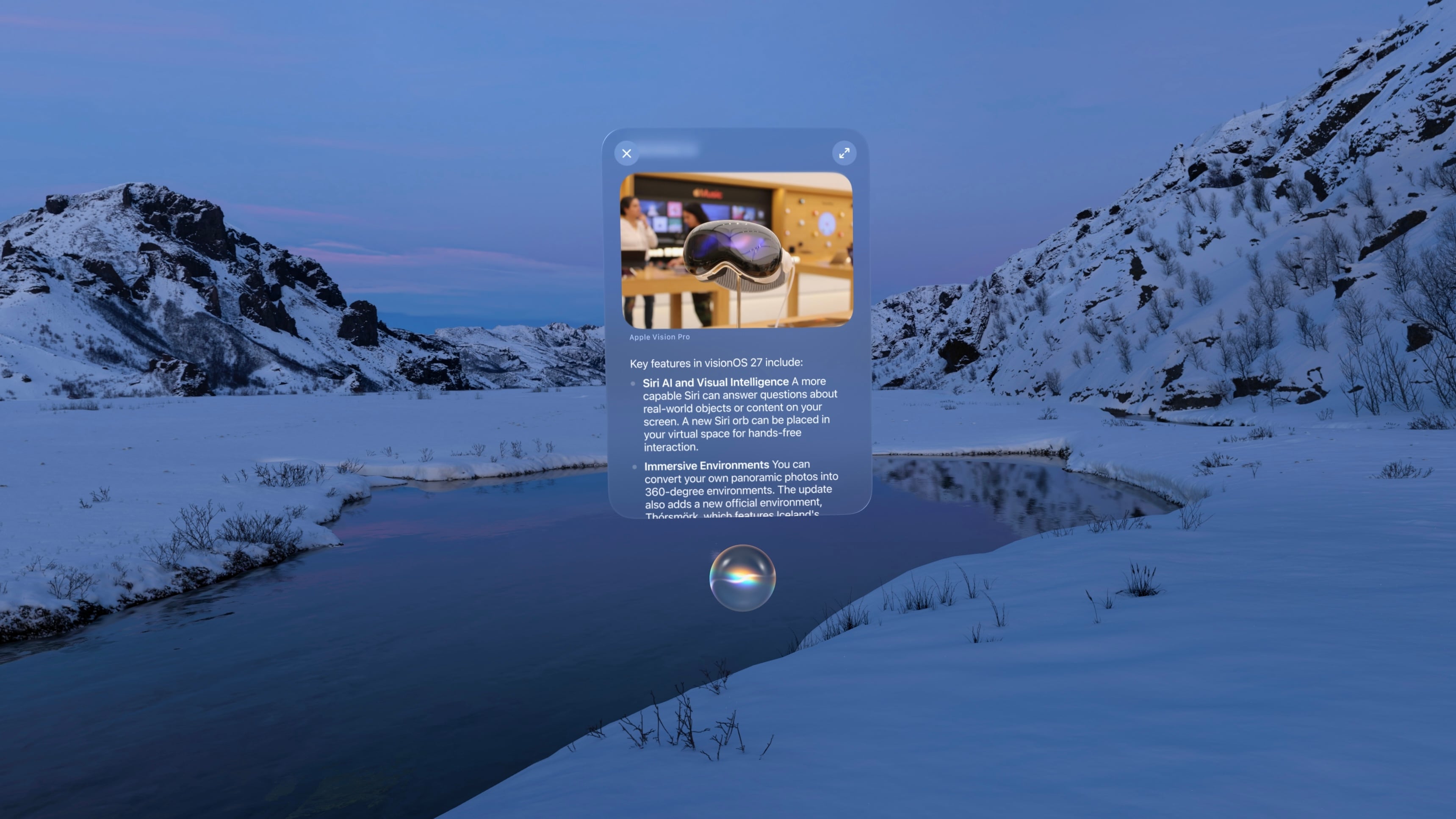
Interacting with Siri in visionOS 27 is a whole new experience. The purple, blue, and green sphere evocative of Siri’s previous era (before all of Apple’s other platforms switched to the rainbow outline UI that never came to visionOS) has been replaced with a semi-translucent glowing white orb matching the Siri aesthetic on iOS, iPadOS, and macOS. The circular “thinking” animation mimics what you see when you interact with Siri on other devices, too, making for a much more cohesive cross-device experience.
When you invoke Siri via voice, the orb appears with a window above it displaying the text of your conversation. You can grab the window and place it anywhere in your environment. To continue the conversation, you simply look at the Siri UI and start speaking again. It all feels very natural, and I appreciate the way you can converse with Siri while interacting with other windows in objects in visionOS, a task that doesn’t translate as well to Apple’s other platforms. For those on the M5 Vision Pro, Siri has a new, more natural voice with customizable speed and expressivity as well, though my M2 model isn’t capable of running the local model necessary to power these changes and the improved dictation system.
visionOS 27 also includes a gesture for activating Siri that’s a little nostalgic. If you hold your palm open and upward then look at it, you’re present with a Home button as before. But if you pinch and hold the Home button, a tiny Siri UI will appear above it, just like in the old days when iPhones had physical Home buttons. You have to hold your fingers together the whole time you’re speaking to Siri, which seems a bit strange to me, but once you’ve made your initial request, the standard Siri UI appears, and you can carry on as usual.
The new version of Siri also brings Visual Intelligence to the Vision Pro for the first time. You can ask Siri about the content of a virtual window or objects in your real-world environment. When Visual Intelligence is activated, the system displays a very cool animation of your environment being scanned, and then, Siri can use what it sees to answer your questions. I’ve used this to ask Siri about webpages, documents I’m working on, and items I see around me, and it’s very cool to have an always-available digital assistant who can see what I see. It did a great job identifying my water bottle and then pulling up the receipt from my email to let me know how old it was, which I found to be a great combination of Visual Intelligence with my personal context.
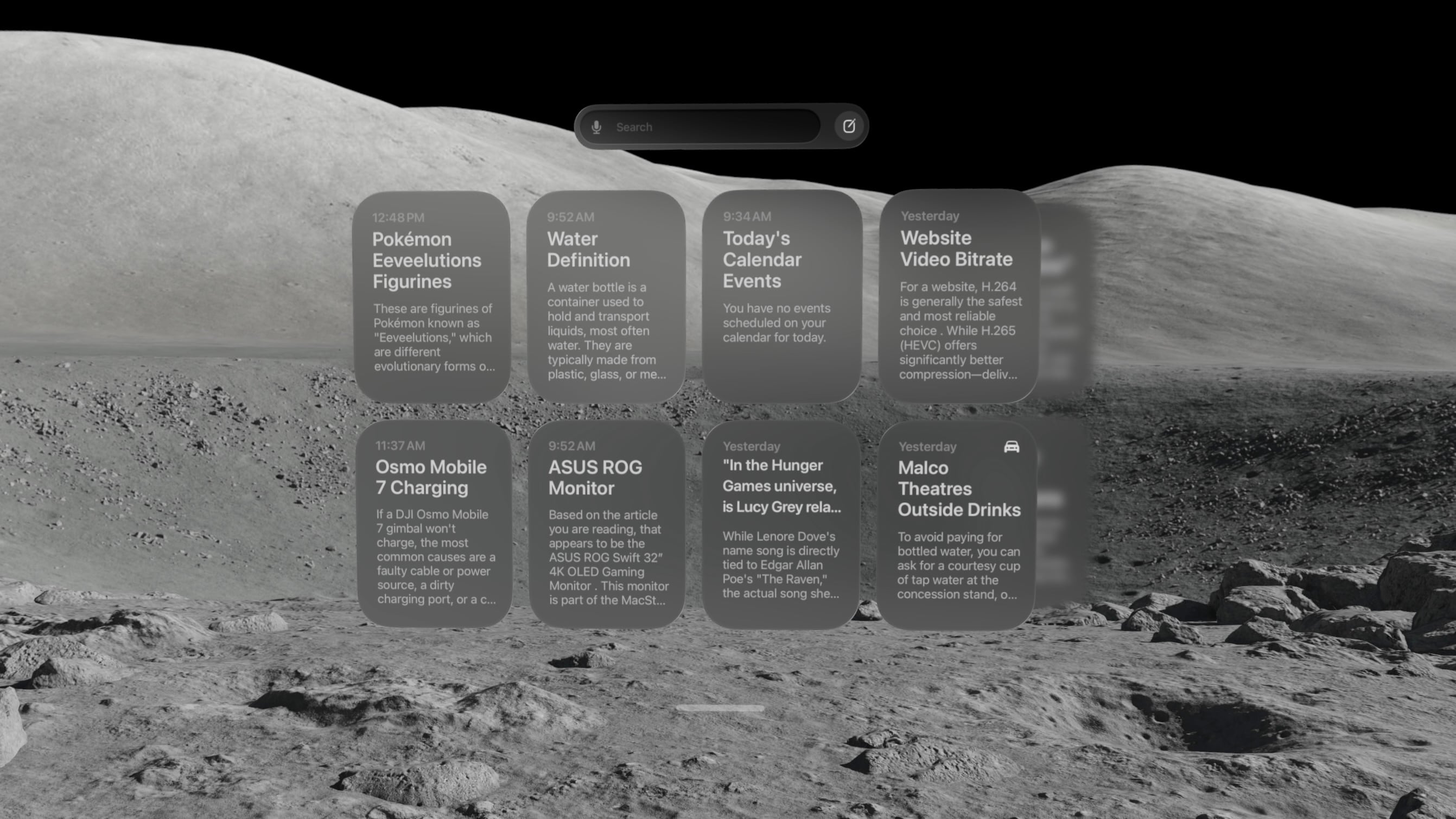
There’s also a new Siri app that contains a history of all your conversations with the assistant, including those synced from other devices. On visionOS, the Siri app is a horizontally-scrolling list of glassy cards that reminds me a lot of the Spatial Gallery app. It’s a handy way to pick back up on conversations started elsewhere, search for a previous answer, or simply interact with Siri via keyboard rather than voice.
At WWDC, Apple showed off a Siri mode where the orb persists in your environment, waiting for you to look at it and start a conversation. I have not been able to get that method to work yet. Once I start a conversation with Siri, I can keep the conversation window open and place it anywhere, but that’s not the same as having a small Siri UI sitting on my desk out of the way until I need it. I’ll keep my eyes peeled for it in future beta releases.
Siri AI is marked for release “later this year” (as opposed to the OS 27 updates listed as coming “this fall”), so there are still some rough edges to work out. Sometimes, conversations simply stop, with Siri telling me an error occurred. The Siri conversation UI will sporadically disappear, and I have to force quit the Siri app to get it to show up again. And Visual Intelligence sometimes struggles to understand what I’m trying to get it to look at, focusing on the wrong window or even the keyboard. But that’s beta life for you; it’s what I signed up for, and I’m trusting it will all be worked out before the public release.
Beta UI bugs aside, Siri AI is a huge upgrade for Apple’s digital assistant, and I’m happy to see visionOS getting the first-class treatment here. It isn’t simply ported over from iOS. It’s been carefully adapted for a spatial UI, and it makes for a powerful overall experience.
There is one other major way Siri differs on visionOS from other platforms: it hasn’t been integrated with Spotlight Search. For now, at least, the search feature on visionOS is dedicated to finding apps, app content, and web results, without even an ‘Ask Siri’ button in sight. With so many other ways to interact with Siri on the platform, it might make sense to keep it separate from search, but it’s certainly an oddity given the way the two features have been merged on every other platform. I’m still trying to figure out if I find this a helpful separation or a missed opportunity for cross-device cohesion.
Panoramas and Environments
There’s a lot more to visionOS 27 than just AI. Big changes are coming to panoramas, including the ability to act as persistent Environments. And, of course, Apple has to throw in a new Environment of its own, too.
Over the past couple of years, Apple has continually pushed the capabilities of its spatial photo conversion technology. Last year, that came in the form of spatial scenes across all of the company’s platforms, and this year, it’s coming to panoramas. In visionOS 27, you can convert panoramas into spatial scenes, adding layers of depth and perspective to the already stunning experience of viewing panoramas on the Vision Pro.
Being immersed in panoramic photos in visionOS was already breathtaking. This takes it to a whole new level. Experiencing memories in deeper ways than I ever thought possible is one of my favorite uses for the Vision Pro, and now, I can use it to revisit places I’ve been and feel like I’m standing there once again.
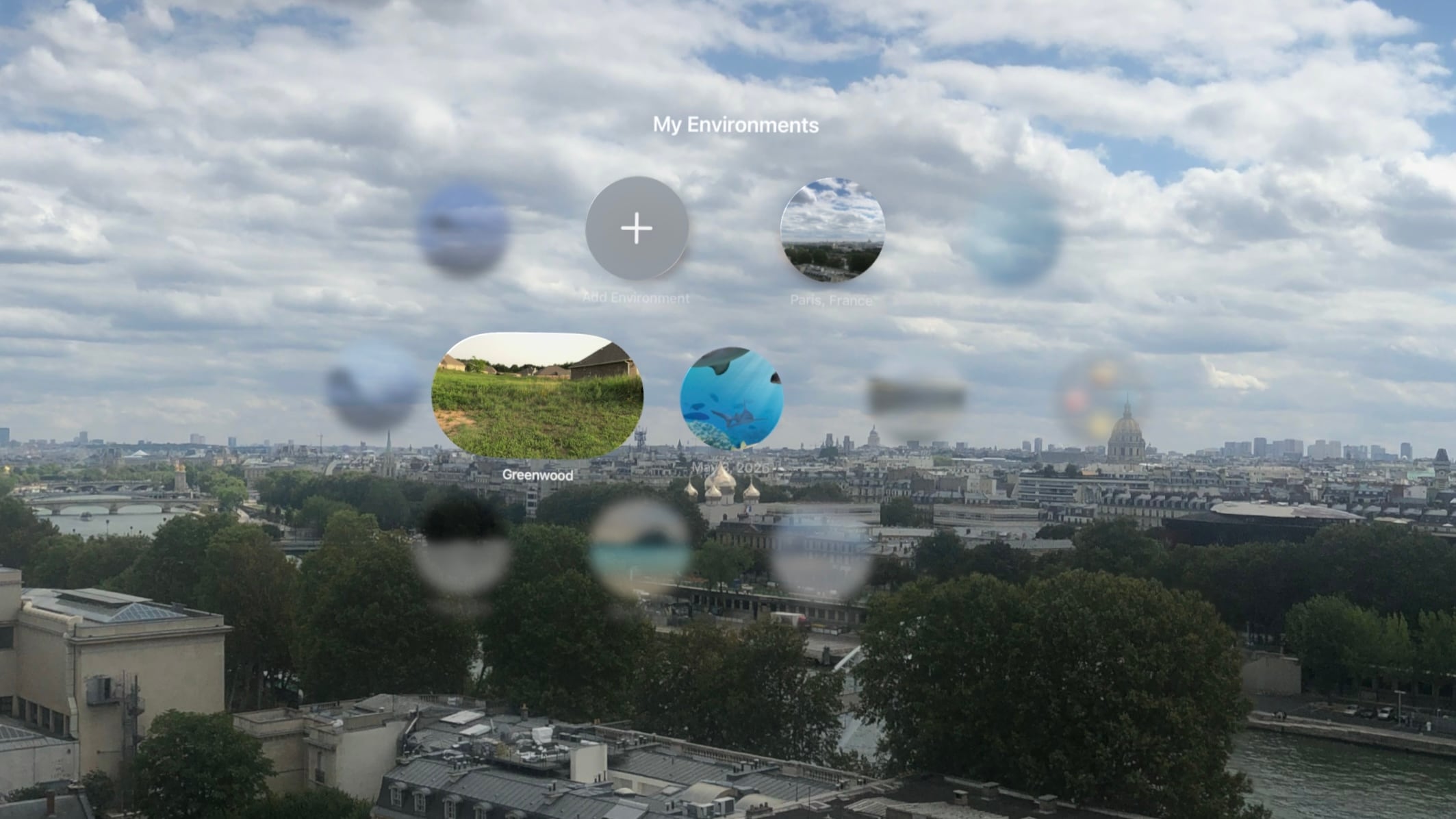
The system takes this experience one step further by allowing you to set panoramic spatial scenes as custom Environments. In the Environments view, there’s a new folder called My Environments where you can add up to 34 panoramas from your photo library and use them as immersive backgrounds for your content. You can even adjust the immersion level to make the photo wrap around you.
I love that we now have the option to use our own photos as Environments, but it does come with some tradeoffs. Panoramic photos are static, so they don’t have the subtle motion elements that make Environments feel alive. They also don’t expand as far vertically as Environments do, which means you’re likely to see your real-world surroundings if you look up or down. Still, this is the first time visionOS users have been able to set their own custom Environments using their own photos or images purchased online, so it’s a win. It’s definitely inspired me to start taking more panoramas than I did before.
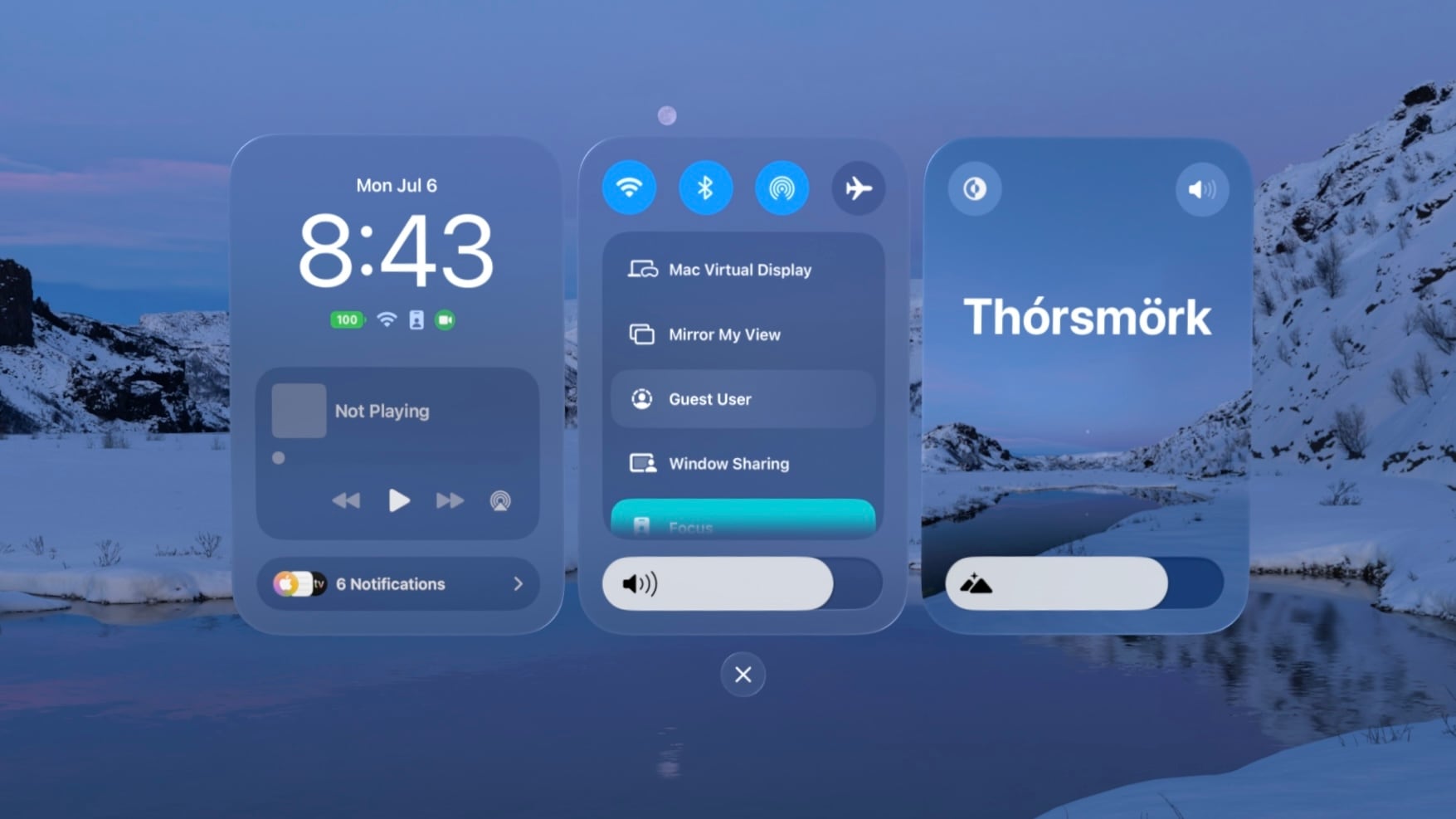
The new built-in Thórsmörk Environment is gorgeous. Apple always knows how to pick the perfect spot. Between the snow, the slow-moving river, and the aurora borealis in the sky at night, it offers a beautiful, peaceful place to relax, watch a movie, or trick your mind into cooling off on a hot summer’s day.
Safari
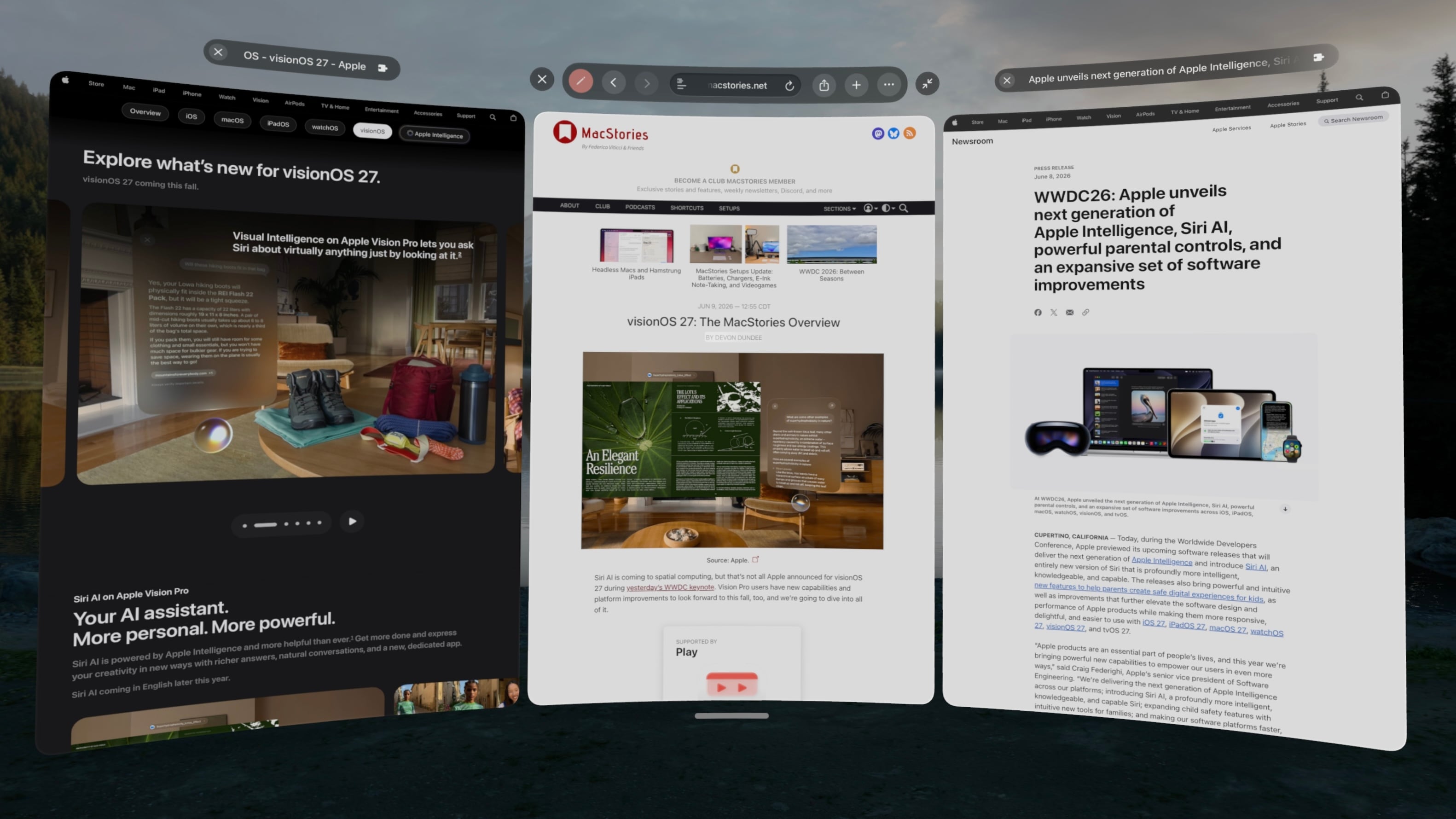
Spatial browsing is continuing to mature in visionOS 27, this time with the help of curved windows. Safari is one of the few built-in apps – Freeform and TV being the others – that are receiving special curved window modes this year, similar to what we’ve seen in the past with Mac Virtual Display. When a window is expanded beyond a comfortable width for side-to-side viewing, it automatically starts to curve, wrapping around the user’s head to make it easier to take in the window’s contents.
To be honest, I’m not sure how useful curved windows will be for browsing normal websites. While some, such as Apple’s OS Overview page are optimized to display content like image galleries at such wide aspect ratios, most sites don’t expand beyond a certain point, displaying blank space on either side of a centered column of content. Perhaps that will change with time, but for now, I don’t foresee these ultra-wide windows catching on for single-tab browsing.
Where the curved Safari window does shine, though, is in the browser’s new multi-tab view. A new button on the right side of the tab bar activates the view, which displays all open tabs side by side in a horizontally-scrolling curved window. These aren’t previews, either. Each tab can be scrolled, navigated, interacted with, and even closed as it if it were an independent browser window.
I’ve already found numerous use cases for this view in my own workflows: editing article previews, comparing product pages, and reviewing multiple research sources at once, just to name a few. Displaying multiple tabs at once in a large, ergonomic window view makes for a fantastic interaction method that I think could apply far beyond Safari webpages and sports multiviews in TV. I imagine this feature will be used far more than last year’s spatial browsing.
Apple Intelligence can sort your bookmarks and Reading List entries based on topic if you like, though the automatic tab sorting feature present on other platforms is curiously missing. Personally, I like managing my own tabs anyway, but add that feature to the long list of strange feature parity omissions on visionOS along with Focus filters, photo editing, and – as of the current beta – Describe a Shortcut.
Platform Improvements
There’s no doubt that this is a refinement year for Apple’s platforms beyond AI. The company is taking the opportunity to revisit and optimize OS features that have long been considered mature, and that’s the case even for visionOS, a relative newcomer.
The time it takes the Vision Pro to connect to Wi-Fi upon power-up has been reduced significantly. Given the device’s short battery life and tendency to go into deep sleep when not in use, this is a quality-of-life change that you’re going to feel. When I turn my M2 Vision Pro on, I can’t log in quickly enough to open Safari or the TV before it’s connected to the Internet. That definitely was not the case before visionOS 27, and I appreciate it.
I’ve long been on the record as a critic of the notification system on visionOS, but it’s taking a big leap forward this year with expanding notifications. When an app icon appears at the top of your view to alert you to a notification, you expand it with your gaze and actually see what you’re being notified about. You can even long-press a Messages notification to reply directly without the need to open the full app, which is so convenient. And with any app, just seeing notifications in full without losing the context of what I’m doing is a major improvement.
Unlike notifications, I was a fan of the redesigned Control Center in visionOS 26. Alas, Control Center has been redesigned again, now featuring a three-column layout instead of a single window. I’m still getting used to the new look, but it does make sense conceptually to split different types of controls into separate columns, so I’m hoping this will make the feature more intuitive once I’ve adapted to it. Regardless of any other efficiency wins, though, this redesign gets my approval simply because it finally brings the AirPlay menu to the top level of Control Center, saving me an extra tap every time I want to switch sound output to my AirPods.
Sharing screenshots and videos from visionOS is going to be much easier thanks to high-quality screen recordings, which can be enabled in the Settings app. Now, the Vision Pro can take unfoveated videos of its screen for up to three minutes, as well as full-quality screenshots. In the past, on-device screen recordings were fuzzy outside of the viewer’s focus, resulting in a poor representation of the visionOS experience and requiring a Developer Strap and Xcode on a Mac as a workaround. This change alone is going to make my review process much simpler, and it’ll make it easier for all Vision Pro users to show others what using the device is like.
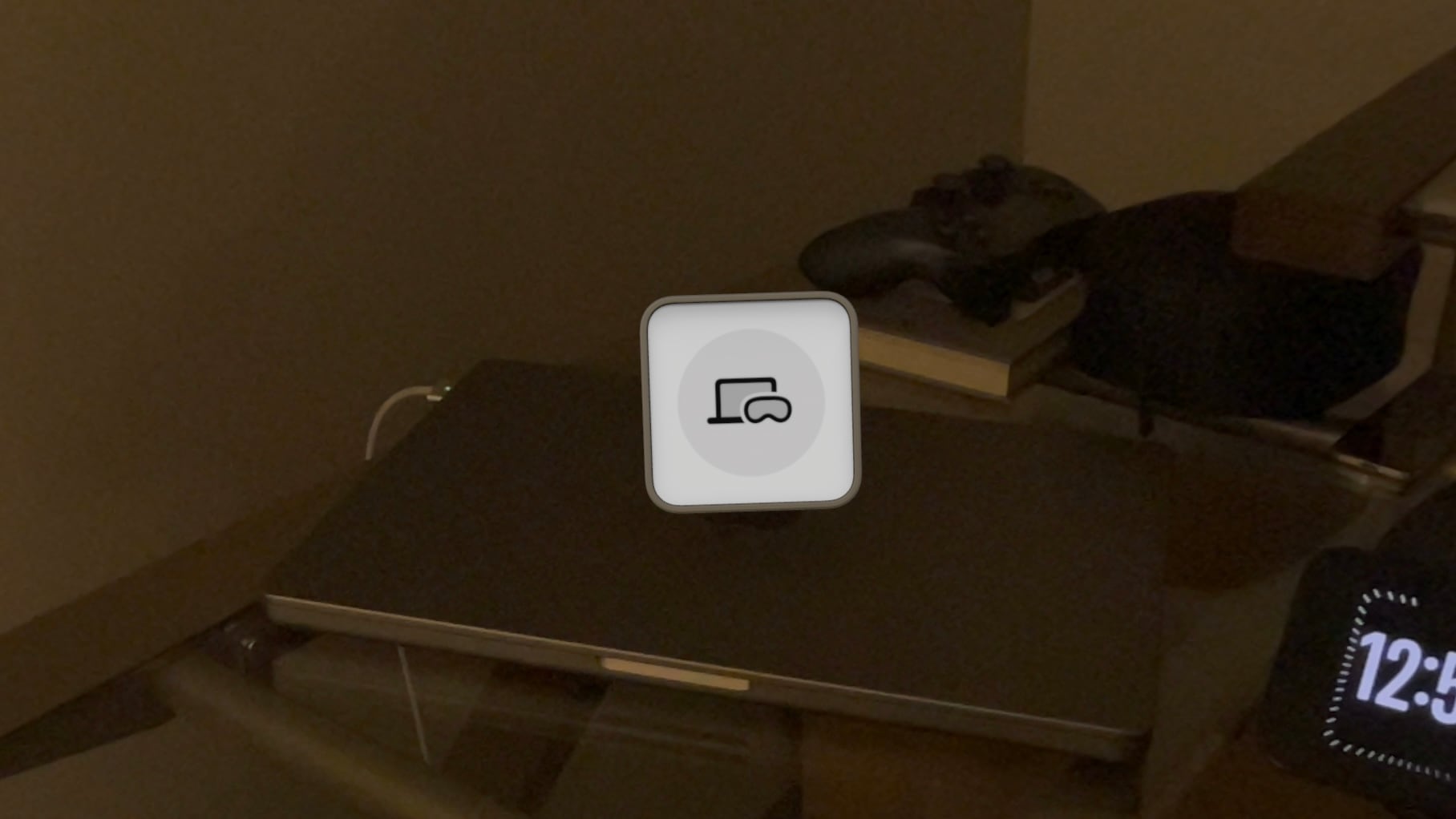
visionOS 27 now supports extra-small widgets, which are basically Lock Screen widgets brought to life in the user’s space. Like any other spatial widget, they can be placed on a wall or a horizontal surface such as a desk, and they are entirely customizable. Apple is introducing its own extra-small Mac Virtual Display widget for starting up a virtual connection with a Mac even if it’s asleep. Extra-small widgets take up much less space on a desk than even small ones, and there are already a bunch of them available from iPad apps running on the Vision Pro, so I think they’re going to be very useful.
Finally, there are some other Mac Virtual Display improvements included in visionOS 27. Virtual Display sessions can optionally persist even when you take your Vision Pro off, and macOS can stream spatial previews of 3D objects directly to visionOS with instant updates and two-way editing. I don’t have a Mac running Golden Gate yet, so I haven’t been able to try these features myself, but I plan to soon. If you work with 3D objects on your Mac and Vision Pro, I imagine this will speed up your workflow significantly.
And that’s visionOS 27 – so far, at least. There’s a still a lot more summer left: bugs to be squashed, refinements to be made, and third-party apps to be updated and introduced. My experience with the new version up to this point has been very positive, and I think it’ll make for a great update.
If you want to try out some of these features early, you can enroll in the Developer Beta anytime in the Software Update section of the Settings app. Whether you upgrade now or hold off for the public release, Apple’s got some great things in store with visionOS 27, and I look forward to continuing my testing over the summer in preparation for a full review this fall.
This week, Federico and John talk about the 10+ email apps they’ve used over the years and how recent spikes in email volume have caused them to change their approaches.
On AppStories+, Federico and John update listeners on their summertime agentic coding projects.
This week, Steam Machine ordering follow-up and Sony’s many controversial announcements.
On NPC XL, what’s going on with AYANEO and the Pocket MICRO 2? Plus, the RG Rotate gets clock faces, and Apple brings PC gaming on the Mac closer to reality.
Chris explains how he’s using Parchment, Matt gets all in your face about calendars, and everyone competes to see who can handle using Snick for the longest.
On Cozy Zone, the gang shares their development tips and setups.
This week, John heads to the mountains while Federico cooks on a beach, the origin of “the boonies,” and narrow mountain roads, plus a TV and movie pick.
AppStories, Episode 492, ‘Email Survival Guide’ Show Notes
This episode is sponsored by:
Decagon: The AI concierge for every customer. Get a personalized demo.
NPC XL is a weekly members-only version of NPC with extra content, available exclusively through our new Patreon for $5/month. Each week on NPC XL, Federico, Brendon, and John record a special segment or deep dive about a particular topic that is released alongside the “regular” NPC episodes. You can subscribe here.
Comfort Zone, Episode 108, ‘My Magic Mouse Is Pregnant’ Show Notes
For even more from the Comfort Zone crew, you can subscribe to Cozy Zone. Cozy Zone is a weekly bonus episode of Comfort Zone where Matt, Niléane, and Chris invite listeners to join them in the Cozy Zone where they’ll cover extra topics, invent wilder challenges and games, and share all their great (and not so great) takes on tech. You can subscribe to Cozy Zone for $5 per month here or $50 per year here.
MacStories Unwind, ‘Out in the Boonies’ Show Notes
MacStories launched its first podcast in 2017 with AppStories. Since then, the lineup has expanded to include a family of weekly shows that also includes MacStories Unwind, Magic Rays of Light, Comfort Zone, NPC: Next Portable Console, and First, Last, Everything that collectively, cover a broad range of the modern media world from Apple’s streaming service and videogame hardware to apps for a growing audience that appreciates our thoughtful, in-depth approach to media.
If you’re interested in advertising on our shows, you can learn more here or by contacting our Managing Editor, John Voorhees.
This week, Federico and John talk about the state of AI aggregator apps and their future prospects before checking in on their current AI app setups for the AppStories+ post-show.
Niléane invested in a fast-appreciating asset (air conditioner), CHRIS MADE AN APP, and everyone surprises everyone else with their favorite challenges.
On Cozy Zone, we tier list the biggest iPhone features over the year.
This week on MacStories Unwind, Federico and John are burning up Claude Fable 5 tokens as fast as they can, while Federico finds the time to try a brand new Switch 2 game.
AppStories, Episode 491, ‘Are AI Aggregators Worth It?’ Show Notes
This episode is sponsored by:
Mercury Weather: Forecasts, beautifully done. Download now for free.
Claude: For problems worth solving — get started with Claude today.
NPC XL is a weekly members-only version of NPC with extra content, available exclusively through our new Patreon for $5/month. Each week on NPC XL, Federico, Brendon, and John record a special segment or deep dive about a particular topic that is released alongside the “regular” NPC episodes. You can subscribe here.
Comfort Zone, Episode 107, ‘The Year of Our Lord, Zork’ Show Notes
For even more from the Comfort Zone crew, you can subscribe to Cozy Zone. Cozy Zone is a weekly bonus episode of Comfort Zone where Matt, Niléane, and Chris invite listeners to join them in the Cozy Zone where they’ll cover extra topics, invent wilder challenges and games, and share all their great (and not so great) takes on tech. You can subscribe to Cozy Zone for $5 per month here or $50 per year here.
MacStories Unwind, ‘Burning Tokens Before the Clock Runs Out’ Show Notes
Fable 5
Anthropic’s Fable 5 is only available on Claude subscription plans for one week, so Federico and John are making the most of the time by tuning up ongoing projects.
MacStories launched its first podcast in 2017 with AppStories. Since then, the lineup has expanded to include a family of weekly shows that also includes MacStories Unwind, Magic Rays of Light, Comfort Zone, NPC: Next Portable Console, and First, Last, Everything that collectively, cover a broad range of the modern media world from Apple’s streaming service and videogame hardware to apps for a growing audience that appreciates our thoughtful, in-depth approach to media.
If you’re interested in advertising on our shows, you can learn more here or by contacting our Managing Editor, John Voorhees.
This week, John and Federico are back home and reflect on all the WWDC announcements, including Siri AI, Apple Intelligence, design changes, developer tools, and more.
On AppStories+, we check in on our research setups and how they fared at WWDC.
The gang’s back together! Niléane has a new window management system, Matt wonders if Thunderbolt is too fast, and everyone recovers from letting AI take the wheel for the week.
On Cozy Zone, Niléane has a new place, and it only seemed proper to roast her new setup.
NPC XL is a weekly members-only version of NPC with extra content, available exclusively through our new Patreon for $5/month. Each week on NPC XL, Federico, Brendon, and John record a special segment or deep dive about a particular topic that is released alongside the “regular” NPC episodes. You can subscribe here.
Comfort Zone, Episode 106, ‘Matt’s Big Chonker’ Show Notes
For even more from the Comfort Zone crew, you can subscribe to Cozy Zone. Cozy Zone is a weekly bonus episode of Comfort Zone where Matt, Niléane, and Chris invite listeners to join them in the Cozy Zone where they’ll cover extra topics, invent wilder challenges and games, and share all their great (and not so great) takes on tech. You can subscribe to Cozy Zone for $5 per month here or $50 per year here.
MacStories Unwind, ‘Prime Day Deal Hunters’ Show Notes
MacStories launched its first podcast in 2017 with AppStories. Since then, the lineup has expanded to include a family of weekly shows that also includes MacStories Unwind, Magic Rays of Light, Comfort Zone, NPC: Next Portable Console, and First, Last, Everything that collectively, cover a broad range of the modern media world from Apple’s streaming service and videogame hardware to apps for a growing audience that appreciates our thoughtful, in-depth approach to media.
If you’re interested in advertising on our shows, you can learn more here or by contacting our Managing Editor, John Voorhees.
It’s another duo week as Matt is out there… destroying lives??? Despite that, Chris and Niléane talk about the DMA and cool stuff in the OS 27 betas, and Chris has some stories from WWDC.
On Cozy Zone, the gang goes through their next three apps they would install on their Macs, and it leads to some hard (and surprising) decisions.
This week, Federico learns about Philadelphia and college mascots before making a sitcom plea. Meanwhile, John’s been listening to Olivia Rodrigo’s new album and buying concert tickets.
Comfort Zone, Episode 105, ‘My Dinner with Ternus’ Show Notes
For even more from the Comfort Zone crew, you can subscribe to Cozy Zone. Cozy Zone is a weekly bonus episode of Comfort Zone where Matt, Niléane, and Chris invite listeners to join them in the Cozy Zone where they’ll cover extra topics, invent wilder challenges and games, and share all their great (and not so great) takes on tech. You can subscribe to Cozy Zone for $5 per month here or $50 per year here.
MacStories Unwind, ‘Please Help, We Need Sitcoms’ Show Notes
MacStories launched its first podcast in 2017 with AppStories. Since then, the lineup has expanded to include a family of weekly shows that also includes MacStories Unwind, Magic Rays of Light, Comfort Zone, NPC: Next Portable Console, and First, Last, Everything that collectively, cover a broad range of the modern media world from Apple’s streaming service and videogame hardware to apps for a growing audience that appreciates our thoughtful, in-depth approach to media.
If you’re interested in advertising on our shows, you can learn more here or by contacting our Managing Editor, John Voorhees.

 Login
Login