The Met Office has quietly axed its dedicated wind and storms chapter from its annual climate report – just as decades of data show UK wind speeds are falling. Funny that, says the Daily Sceptic's Environment Editor.
Apple Health data can now move between the Health app and Google Health on an iPhone. The connection lets Google Health import supported information recorded by an iPhone, Apple Watch, and compatible apps. The latest Google Health update can also send supported Fitbit information to Apple Health.
This two-way connection is useful for people who wear a Fitbit but prefer Apple’s Health app as the central place for viewing activity, sleep, steps, and other wellness information. It also reduces the need for third-party synchronization apps.
The feature requires a recent version of Google Health. Google began introducing support for sending data back to Apple Health with Google Health version 5.05. Because app updates can roll out gradually, the new sharing options may not appear until the latest version reaches your account.
Update Google Health Before Starting
The Fitbit app became Google Health in 2026. Existing Fitbit users should find that the installed app has changed its name and design after updating. Fitbit accounts must also be moved to an adult Google Account to use the redesigned service.
Google says the Apple Health connection requires iOS 16.4 or later. The iPhone must have internet access while the connection is being created.
To check the iOS version installed on your iPhone:
Settings > General > About > iOS Version
Install the latest compatible iOS update if the phone is running an older release.
To look for an available iPhone software update:
Settings > General > Software Update
Next, confirm that Google Health is current. Version 5.05 or later is required for the newer option that sends supported Google Health and Fitbit information to Apple Health.
To update Google Health from the App Store:
App Store > Profile Picture > Available Updates > Google Health > Update
If Google Health does not appear under Available Updates, search for the app manually. The App Store page may show an Update button if a newer release is available.
To find the app directly:
App Store > Search > Enter Google Health > Google Health (Fitbit)
People who previously used Fitbit should sign in with the Google Account connected to their Fitbit information. Creating a different account may produce an empty Google Health profile.
Image Credit: Google
Connect Apple Health Data to Google Health
Connecting the apps allows Google Health to read supported information from Apple Health. This can include data collected by the iPhone, Apple Watch, and other apps that already share information with Apple Health.
To start the Apple Health connection:
Google Health > Connections > Apps and Services > Apple Health > Get Started
Depending on the Google Health version and interface shown on the iPhone, Connections may appear behind the profile icon.
To find Apple Health through the alternative menu:
Google Health > Profile Icon > Partner Apps > Apple Health
Google Health will display a consent screen explaining the connection. Read the information before continuing.
To approve the initial connection:
Sync Google Health With Apple Health > Agree
The iPhone will then display Apple’s health permission screen. This screen lets you decide which information Google Health can read.
To give Google Health access to every supported category:
Apple Health Permission Screen > Turn All Categories On > Allow
You do not have to share every available category. Selecting individual permissions provides more control over sensitive health information.
To share only selected categories:
Apple Health Permission Screen > Select Each Health Category > Allow
Google Health can import supported information such as steps, distance, active energy, exercise records, routes, sleep sessions, sleep stages, heart rate, resting heart rate, heart rate variability, blood oxygen, respiratory rate, body temperature, weight, body fat percentage, water, nutrition information, and some cycle-tracking data.
Available categories depend on the devices and apps connected to Apple Health. An iPhone may provide steps and walking information, while an Apple Watch can contribute heart rate, workouts, sleep, and other measurements supported by the model.
After the permissions are approved, Google Health should confirm that the connection is complete.
To finish the connection:
Google Health Confirmation Screen > Done
New Apple Health information should begin appearing automatically in Google Health. Google has said that imported data can be used across relevant Google Health metrics, although not every external data type is used for every calculation.
To find imported health information:
Google Health > Health > Select a Metric
Google Health may display information from several connected sources together. Its value for a metric can differ slightly from the number shown by Apple Health because the apps may process available data differently.
Send Fitbit Data to Apple Health
Google Health version 5.05 adds the reverse direction that many iPhone and Fitbit users previously lacked. Supported information recorded through Fitbit can now be written into Apple Health.
Before enabling this option, make sure the Fitbit is properly connected to Google Health. Fitbit devices normally synchronize automatically throughout the day when Bluetooth is available and the wearable is near the iPhone.
To check the connected Fitbit:
Google Health > Profile Icon > Devices > Select Your Fitbit
The device page should show the wearable, its battery level, and its most recent synchronization time. Opening Google Health can also prompt a nearby Fitbit to transfer recently collected information.
Once the wearable is updating Google Health correctly, open the Apple Health connection settings.
To open the sharing controls for Apple Health:
Google Health > Profile Icon > Partner Apps > Apple Health
The interface may use Apps and Services instead of Partner Apps on some versions.
To reach the same connection through Apps and Services:
Google Health > Connections > Apps and Services > Apple Health
Follow the prompts for sharing Google Health information with Apple Health. The iPhone may display separate permissions for data that Google Health can read and data that it can write.
To allow supported Fitbit information to appear in Apple Health:
Apple Health Permission Screen > Allow Google Health to Write > Select Health Categories > Allow
Google says supported information can include exercise records, steps, sleep, vitals, and other health data. The exact selection can vary according to the Fitbit model, region, Google Health version, and information stored in the account.
Selecting every category is convenient, but it can create overlapping sources when an iPhone, Apple Watch, and Fitbit record the same type of activity. Choose only the categories you want Google Health to add.
A person who uses a Fitbit mainly for sleep, for example, can allow sleep information while leaving steps disabled. Someone who wears a Fitbit instead of an Apple Watch may prefer to enable steps, workouts, heart rate, sleep, and other supported categories.
Image Credit: AppleMagazine
Check Google Health Permissions
Apple Health keeps permission controls on the iPhone. You can change them after the first connection without deleting either app.
To review Google Health access from Apple Health:
Health > Profile Picture > Privacy > Apps > Google Health
The page shows the categories Google Health is permitted to read or update. Turn off any category you no longer want to share.
Some iOS versions provide the same controls through the Sharing tab.
To find Google Health through the Sharing tab:
Health > Sharing > Apps and Services > Google Health
Turning off a permission stops future sharing for that category. It does not necessarily remove information that has already been written to Google Health or Apple Health.
The Google Health app also provides controls for the connection.
To review Apple Health inside Google Health:
Google Health > Connections > Apps and Services > Connected > Apple Health
If Google Health displays a message that new data types are available, open the connection and approve the additional categories you want to use. Newly supported information is not automatically shared without permission.
Manage Duplicate Health Information
An iPhone, Apple Watch, and Fitbit can record similar information at the same time. Apple Health keeps each source attached to its data and uses a priority order when presenting combined measurements.
You can inspect the sources contributing to a category and choose which one Apple Health should prefer.
To review the sources used for step information:
Health > Search > Activity > Steps > Data Sources and Access
The screen shows the apps and devices that provide step records. If Google Health, an Apple Watch, and the iPhone all appear, you can adjust their priority.
To change the order of step sources:
Health > Search > Activity > Steps > Data Sources and Access > Edit > Drag Sources Into the Preferred Order > Done
Move the source you trust most toward the top. Apple Health generally gives higher priority to sources placed above others when similar records overlap.
Repeat the same process for other categories if their totals do not look right. Exercise, sleep, active energy, and distance can each have their own sources and permissions.
Image Credit: Google
Fix Missing or Delayed Data
Synchronization is not always immediate. A Fitbit first sends its information to Google Health, and Google Health then writes supported records to Apple Health. Bluetooth availability, Background App Refresh, internet access, and battery-saving behavior can affect this process.
Begin by opening Google Health with the Fitbit close to the iPhone. Wait for the device to complete its normal synchronization before checking Apple Health.
If Apple Health information is missing from Google Health, confirm that the connection remains active.
To check the connection status:
Google Health > Connections > Apps and Services > Apple Health
If Google Health displays an error or a request for new permissions, follow the message shown on the screen.
Background App Refresh can help Google Health update when the app is not open.
To allow Google Health to refresh in the background:
Settings > General > Background App Refresh > Google Health > On
Bluetooth must remain available for a Fitbit to communicate with the iPhone.
To confirm that Bluetooth is enabled:
Settings > Bluetooth > Bluetooth On
If the connection continues to fail, disconnecting and reconnecting Apple Health may restore the permission request.
To disconnect Apple Health from Google Health:
Google Health > Connections > Apps and Services > Apple Health > Disconnect > Confirm Disconnect
Disconnecting the service does not automatically remove every permission already stored by Apple Health. Review the Google Health entry in the Health app if you want to remove those permissions as well.
To remove the remaining Apple Health permissions:
Health > Profile Picture > Privacy > Apps > Google Health > Turn Off All
After reconnecting the apps, allow time for new records to appear. Previously stored information may not transfer in exactly the same way as activity recorded after the connection was enabled.
You can inspect an individual entry to confirm whether it came from Google Health, a Fitbit, an Apple Watch, or the iPhone.
To check the source and time of a synced record:
Health > Search > Select a Health Category > Show All Data > Select the Latest Entry
Apple lawsuit against OpenAI has reached its first major procedural challenge, with the ChatGPT developer asking a US federal judge to dismiss allegations that it acquired or used trade secrets taken by former Apple employees.
OpenAI submitted its 31-page dismissal motion on Wednesday in the US District Court for the Northern District of California. The filing argues that Apple has not adequately identified protectable trade secrets or alleged facts showing that OpenAI misappropriated confidential information.
Apple filed the case on July 10 against OpenAI, its io Products hardware operation, former Apple Vice President Tang Yew Tan, and former electrical engineer Chang Liu. The complaint accuses the defendants of obtaining information connected to Apple’s product development, manufacturing, components, testing, and supply chain operations.
The allegations have not been proven, and OpenAI denies possessing or seeking Apple’s trade secrets. US District Judge Edward Davila must now decide whether Apple’s complaint contains enough factual detail for the litigation to continue.
OpenAI Challenges the Apple Lawsuit
OpenAI’s motion focuses initially on how Apple described the information it claims was stolen. According to OpenAI, the complaint relies on generalized product-development categories without identifying the protected information with enough precision.
Trade secret plaintiffs face a difficult balance at the beginning of litigation. Apple must describe the protected material sufficiently to establish a plausible legal claim, but revealing the material publicly could expose the same information it is trying to protect.
Sensitive details can later be handled under seal or through a protective order. At the dismissal stage, however, Apple must still provide enough information for the court to distinguish genuine trade secrets from general engineering knowledge, employee experience, or skills acquired through years of work.
OpenAI argues that Apple has not crossed that threshold. Its motion says the complaint fails to establish ownership of a protectable trade secret and does not plausibly allege that OpenAI acquired, disclosed, or used such information.
The filing also disputes the commercial premise behind Apple’s accusations. OpenAI says it is developing products that are different from Apple’s hardware and has no need or desire to use the iPhone maker’s confidential material.
That position does not settle whether information was taken. A company can potentially misappropriate trade secrets even when its eventual product has a different design. The court’s immediate task is narrower: determining whether Apple has alleged facts that could support its claims if those facts are later proven.
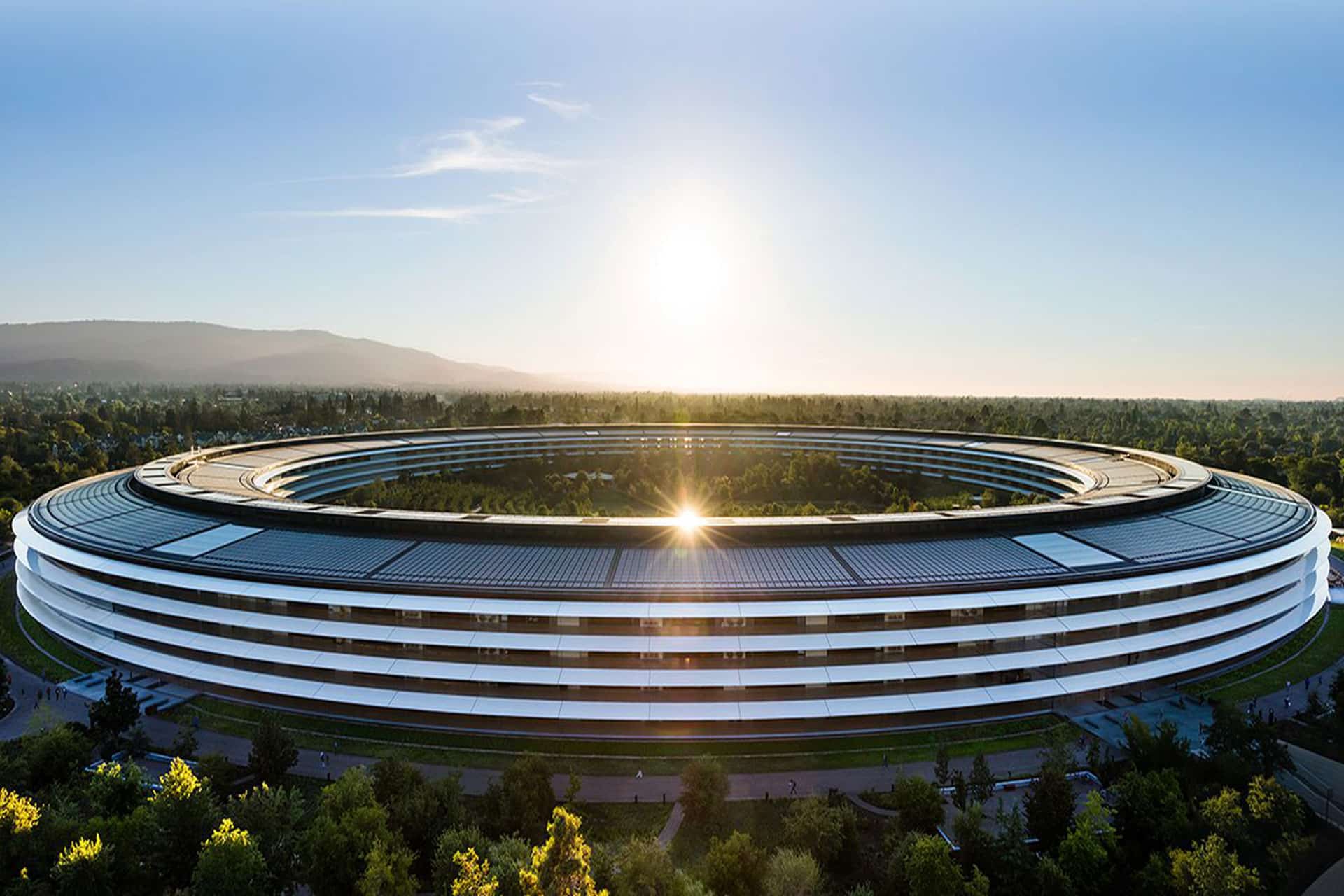
Apple Park | Image Source: Google
Disputed Access to Apple Information
Apple’s complaint centers partly on Chang Liu, who spent eight years working as a senior system electrical engineer at the company before joining OpenAI in January 2026.
Apple alleges that Liu retained an Apple-issued computer and accessed confidential technical information after leaving. It claims he exploited residual authentication access on multiple occasions to obtain internal documents while already working for OpenAI.
OpenAI presents a different explanation. It says Apple employees contacted Liu after his departure and asked him to help locate files needed for ongoing Apple work. The company published redacted messages that it says support this account.
OpenAI argues that Apple’s systems and policies allowed personal and corporate information to become intermingled through iCloud accounts. Former employees, it says, could retain access to Apple files without requesting it or realizing that access remained active.
The motion maintains that Apple cannot treat the foreseeable effects of its own access-management practices as proof that former employees intentionally stole data. Apple, in contrast, alleges that its records document repeated access to restricted information rather than an accidental discovery of lingering permissions.
These competing accounts are likely to become central if the case enters discovery. Authentication logs, downloaded files, device records, internal communications, and employment timelines could establish whether access was deliberate, what information was obtained, and whether it reached anyone working on OpenAI products.
A dismissal motion normally tests whether the complaint states a legally sufficient claim. It is not a trial, and the judge is not expected to resolve every factual disagreement using competing evidence at this point.
Tang Tan and OpenAI’s Hardware Team
Apple separately accuses Tang Tan, OpenAI’s chief hardware officer, of seeking confidential information from Apple employees during recruiting conversations.
Tan spent more than 24 years at Apple and worked on products including the iPhone, Apple Watch, AirPods, and iPod. He later helped establish io Products with former Apple design chief Jony Ive and other collaborators. OpenAI acquired the hardware company as part of its effort to create a family of devices built around artificial intelligence.
Apple alleges that Tan used confidential project names, retained internal materials, and encouraged job candidates to discuss unreleased components or bring physical parts to interviews. OpenAI rejects the claim that these interactions formed a coordinated effort to collect Apple secrets.
OpenAI says Tan repeatedly instructed employees that confidential information from previous employers could not be brought into its organization. It also offers an alternative explanation for an Apple offboarding document found in his possession, arguing that Tan retained it to help incoming employees comply with Apple’s departure procedures.
Apple’s position is that the document and recruiting communications must be examined alongside the other alleged conduct. It describes the events as part of a connected campaign rather than isolated employment or administrative issues.
The dispute comes during intense competition for engineers capable of developing consumer AI hardware. Apple alleges that more than 400 former employees have moved to OpenAI, although hiring people from a competitor does not by itself establish trade secret misappropriation.
A company must generally connect recruitment to the acquisition, disclosure, or use of protected information. OpenAI is relying heavily on that distinction, presenting Apple’s lawsuit as an attempt to respond to employee departures and its difficulties competing for AI talent.
Image Credit: Getty Images
Apple Seeks Immediate Restrictions
OpenAI’s dismissal request arrives shortly after Apple asked the court for a preliminary injunction. Apple wants restrictions imposed while the lawsuit proceeds, arguing that it could suffer harm if its confidential information is used during OpenAI’s hardware development.
The requested relief would prevent OpenAI and the individual defendants from acquiring, accessing, using, or disclosing the alleged trade secrets. Apple has also requested expedited discovery and forensic examination of relevant devices and accounts.
OpenAI says those restrictions are unnecessary because it does not possess or want Apple’s protected information. It has described Apple’s request as based on false information and has offered to cooperate in addressing specific concerns.
The two companies also disagree over their communications before the lawsuit. Apple initially said its concerns had been raised with OpenAI months earlier. OpenAI responded that Apple’s outside lawyers contacted the wrong person after confusing names and incorrectly described a conversation with OpenAI’s general counsel.
OpenAI says Apple did not present the specific accusations before filing the case and that the companies had previously discussed resolving any access issues. Apple has since provided additional information in support of its injunction request, including allegations involving other former employees.
These disputes have moved beyond ordinary court filings. OpenAI published messages and emails on its website to support its version of events, calling Apple’s lawsuit aggressive and poorly investigated. Apple has primarily presented its account through formal legal submissions.
Judge Davila could dismiss some or all of Apple’s claims, deny the motion, or allow Apple to amend its complaint with more specific allegations. Even a dismissal would not necessarily end the case if permission to revise the complaint is granted.
The next scheduled public test is an October 1 hearing covering Apple’s preliminary injunction and request for early discovery. That proceeding may determine whether OpenAI faces immediate limits on its hardware work before the underlying trade secret claims receive a full evidentiary review.
Apple Intelligence files can occupy several gigabytes of Mac storage because locally downloaded models power text generation, summaries, image creation, Siri requests, and other on-device features. Removing these files can recover valuable space when Apple Intelligence is no longer needed.
Apple lists 7GB of available device storage among the requirements for Apple Intelligence, but the amount displayed on a Mac can be higher. Additional languages, image-generation resources, updated models, and temporary assets can increase the total over time.
The files are managed by macOS and do not appear as ordinary documents that can be moved to the Trash. Apple provides a supported removal method through System Settings: turning off Apple Intelligence causes macOS to remove the downloaded on-device models.
This also disables features that depend on Apple Intelligence. Writing Tools, summaries, Image Playground, Genmoji, intelligent Shortcuts actions, and Apple Intelligence functions inside Siri may become unavailable. Regular Mac applications and the rest of macOS continue working normally.
Check Apple Intelligence Files on Your Mac
Recording the available storage before removing the files makes it easier to confirm how much space macOS recovered afterward.
To see the current storage allocation:
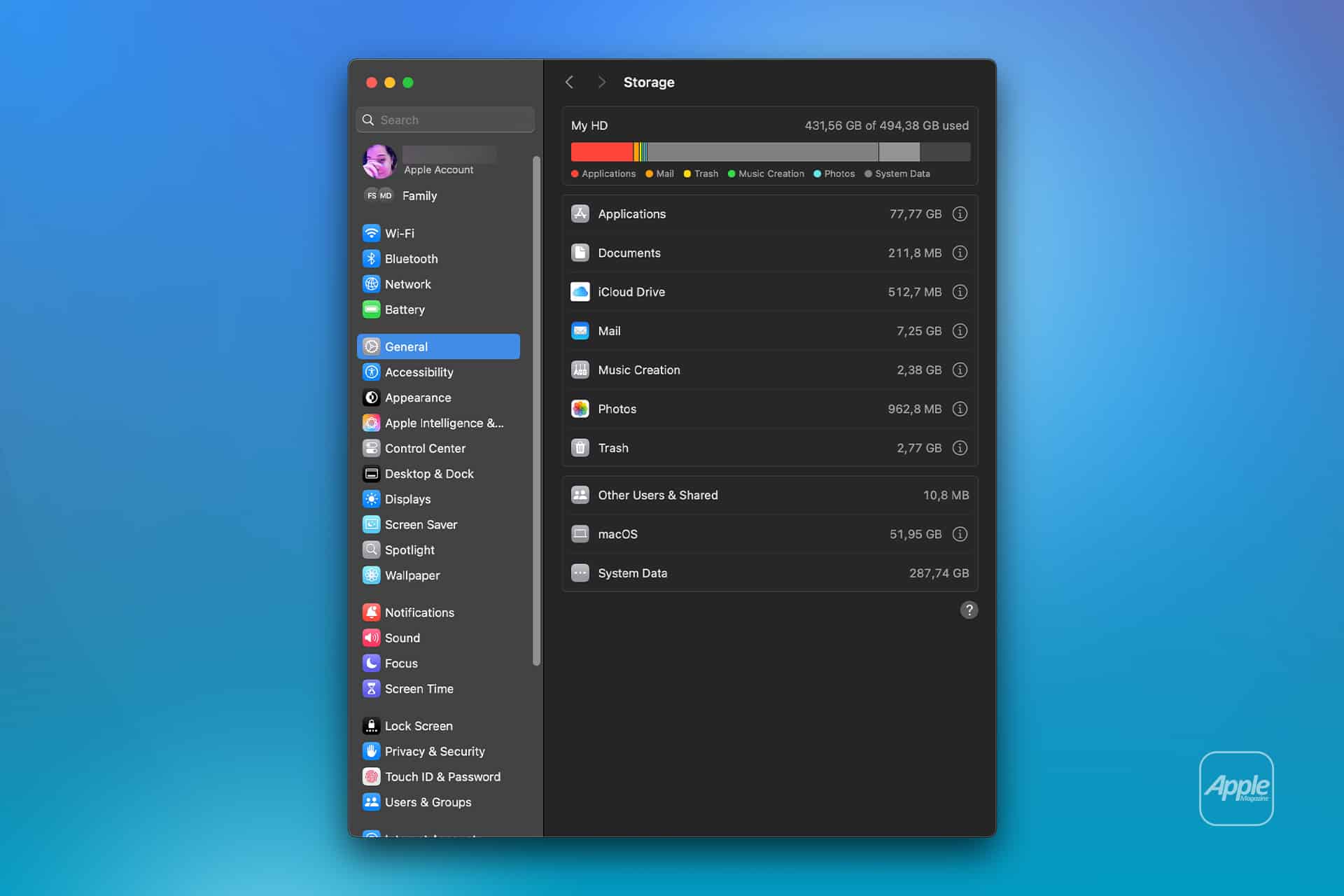
Apple menu > System Settings > General > Storage
Allow the Storage page to finish calculating its categories. The process may take a moment when the Mac contains many applications, local files, connected volumes, or several user accounts.
Apple Intelligence may appear as a separate item within the macOS storage category. Depending on the installed macOS version, some related assets may instead be counted under macOS or System Data.
Note the amount of available storage displayed near the storage graph. Comparing the total free space before and after the procedure is usually more reliable than watching one category because macOS can reclassify system-managed files while deleting them.
To inspect the complete internal storage container:
Apple menu > System Settings > General > Storage > All Volumes
This view is useful when the internal drive contains several APFS volumes sharing the same physical storage. The available capacity belongs to the shared container rather than remaining permanently assigned to one volume.
The storage used by Apple Intelligence is different from the memory, or RAM, used while features are running. Closing applications may reduce RAM consumption, but it does not delete the models stored on the internal SSD.
Image Credit: AppleMagazine
Remove Local Apple Intelligence Files
Apple Intelligence is available on compatible Macs with Apple silicon. Intel-based Macs do not support the complete Apple Intelligence system and should not contain the same downloadable model collection.
To turn off Apple Intelligence and request the removal of its on-device models:
Apple menu > System Settings > Apple Intelligence & Siri > Turn off Apple Intelligence > Turn Off Apple Intelligence
The second Turn Off Apple Intelligence command confirms the change. The exact appearance may vary between macOS versions, with the first control presented as either a switch or a button.
Apple says that turning off Apple Intelligence removes the on-device models. There is no separate model manager, Delete Models button, or supported Finder location from which users must remove the files manually.
Keep the Mac connected to power while macOS completes its background storage work. The Apple Intelligence setting changes immediately, but the Storage page may not display the recovered capacity at once.
macOS manages these models through its system asset service. The operating system must identify the associated packages, release them, and recalculate the storage categories. The process can therefore continue after the Apple Intelligence switch has already moved to the off position.
Turning off only individual features does not remove the complete model collection. Disabling notification summaries, Writing Tools, ChatGPT access, or Siri suggestions leaves Apple Intelligence itself active.
A Screen Time restriction also serves a different purpose. It can prevent access to image generation, Writing Tools, and other functions without turning off the underlying intelligence system. Use the Apple Intelligence control inside Apple Intelligence & Siri when the objective is recovering storage.
Confirm That the Space Was Recovered
After macOS has had time to process the removal, return to the Storage page.
To check the available capacity again:
Apple menu > System Settings > General > Storage
Wait for the storage graph and categories to finish updating. Compare the new amount of available space with the figure recorded before Apple Intelligence was turned off.
The Apple Intelligence entry may disappear completely, display a smaller amount, or become part of an adjusted macOS or System Data category. The increase in total available storage provides the better indication that the local models were removed.
If the figures have not changed, restart the Mac to refresh its system services and storage calculation.
To restart macOS:
Apple menu > Restart > Restart
Sign back in, allow the Mac to remain idle for a while, and open the Storage page again.
Apple menu > System Settings > General > Storage
Restarting does not delete the models by itself. Apple Intelligence must remain disabled while macOS completes the removal.
Emptying the Trash is not part of this procedure because macOS does not place Apple Intelligence models there. The Trash affects only files that a user or application has already marked for deletion.
Image Credit: Apple Inc.
What to Do When the Files Remain
First, verify that the complete Apple Intelligence system is off rather than one related feature.
To confirm its status:
Apple menu > System Settings > Apple Intelligence & Siri > Apple Intelligence
The control should display Apple Intelligence as disabled. If macOS presents another confirmation request, complete it and leave the feature off.
Storage information can take time to settle because macOS also manages caches, local snapshots, temporary update packages, and purgeable files. These categories can change while the Mac is idle, making an immediate before-and-after comparison misleading.
Installing the latest stable macOS update can correct storage reporting or asset-management problems.
To check for an available update:
Apple menu > System Settings > General > Software Update
Save current work before installing an update. The Mac may need to restart, and the installation temporarily requires additional free storage.
Beta versions of macOS require extra caution. Development releases may download experimental models, retain previous model revisions, or temporarily change the Apple Intelligence controls. A procedure confirmed for the public version of macOS may not produce the same storage behavior in a beta.
Avoid following online instructions that require starting in macOS Recovery, disabling System Integrity Protection, mounting protected volumes, and deleting folders with names referring to MobileAsset or generative models.
System Integrity Protection prevents applications and administrator accounts from modifying protected parts of macOS. Disabling it weakens that protection and creates the possibility of deleting the wrong asset, leaving macOS with an incomplete model installation, or causing the system database to disagree with the files present on the drive.
A storage utility can help identify how much space system files occupy, but it should not require disabling macOS security to remove Apple Intelligence. If the documented switch leaves a large allocation after a restart and sufficient processing time, Apple Support can investigate the asset database without exposing the Mac to an unsupported system modification.
Turning Apple Intelligence on again reverses the storage saving.
To restore its features:
Apple menu > System Settings > Apple Intelligence & Siri > Turn On Apple Intelligence
The Mac will download the required local models again. Apple recommends leaving the device connected to Wi-Fi and power while the model download completes.
SAN FRANCISCO – The National Oceanic and Atmospheric Administration will continue to evaluate data from Spire Global’s Hyperspectral Microwave Sounder (HyMS) under a $3 million contract extension announced Aug. 4. […]
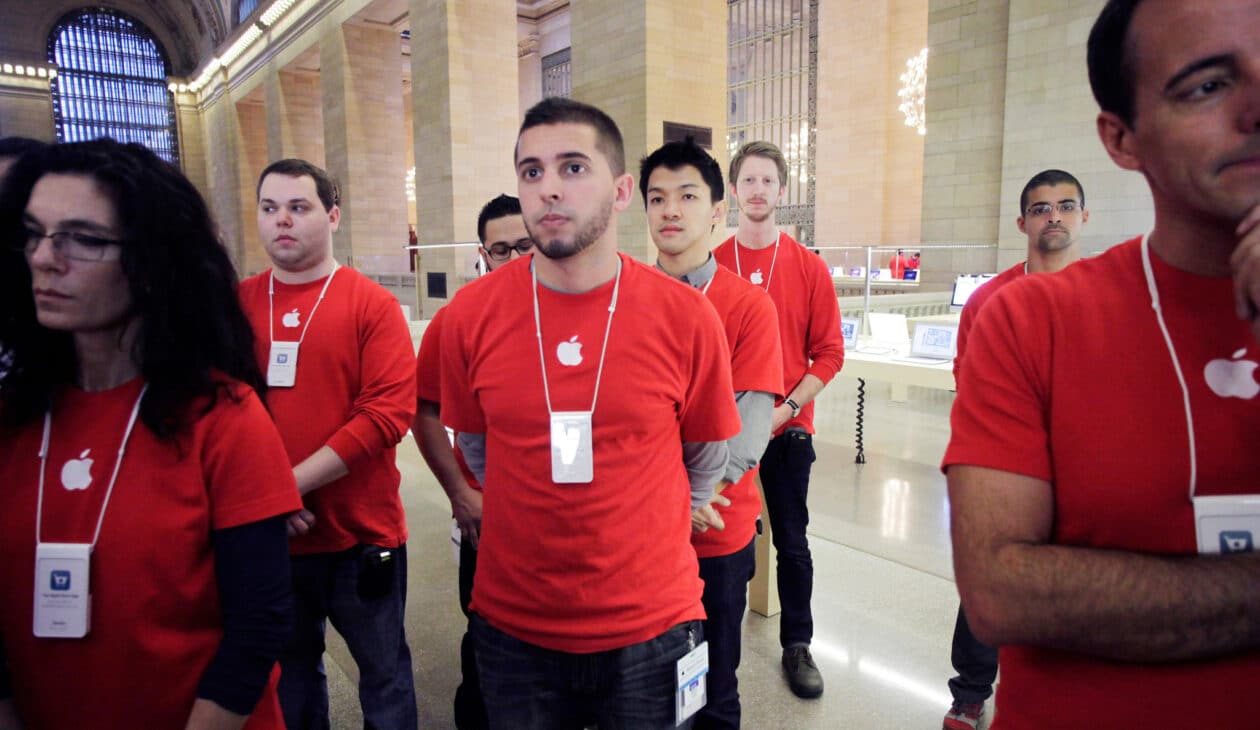
De acordo com uma reportagem da Bloomberg, a Apple dará o pontapé inicial nos preparativos para o evento especial de lançamento dos próximos iPhones com um sorteio interno entre funcionários de suas Apple Stores, com o objetivo de selecionar quais deles trabalharão presencialmente lá no Apple Park durante o grande dia.
Como trata-se de um número limitado de vagas (que certamente são bem disputadas), a empresa abriu inscrições para funcionários interessados até o dia 8 de agosto, e notificará os selecionados até o dia 17 do mesmo mês, segundo um memorando ao qual o veículo teve acesso.
Para se inscrever, os candidatos também não podem ter participado da WWDC26 e nem do evento especial de lançamento dos iPhones em setembro do ano passado — o que garante uma maior rotatividade nos funcionários selecionados para esses eventos.
Os funcionários que forem agraciados com o sorteio, segundo o memorando, atuarão em tarefas como organização de filas, check-in dos convidados e recepção aos participantes, bem como fornecerão informações e oferecerão suporte às equipes de segurança envolvidas.
O memorando também diz que o evento ocorrerá na primeira quinzena de setembro. Tradicionalmente, ele ocorre na 2ª terça ou quarta-feira do mês. Como segunda (7/9) será feriado nos Estados Unidos, é provável que o grande evento deste ano aconteça na quarta-feira (9/9).
A new prenatal roadmap could soon help clinicians place endotracheal tubes (ETTs) more precisely in the tiniest preterm newborns. In infants with birth weights under 500 g, even small positioning errors during intubation can increase the risk of life‑threatening complications, including inadequate ventilation or airway trauma. Researchers say their approach uses measurements taken before birth—capturing the baby’s anatomy while it is still developing in utero.
The study focuses on predicting the optimal ETT depth rather than relying solely on standard postnatal formulas. Using prenatal biometry, investigators model how fetal growth and structural proportions relate to the distance from the mouth to the trachea. The goal is to translate ultrasound-derived anatomical signals into a practical estimate that can guide clinicians at the bedside.
Technically, the model links prenatal measurements to the anticipated airway dimensions at delivery. This requires defining which biometric inputs best correlate with the final tube placement target, then training a predictive framework to output a recommended insertion depth for extremely low birth weight infants. By emphasizing prenatal inputs, the method aims to reduce uncertainty that can arise from day-to-day postnatal changes.
Importantly, the research targets a subgroup with particularly high vulnerability. Infants below 500 g are at increased risk because their airway structures are extremely small and intubation margins are narrow. In this context, individualized prediction could improve consistency compared with one-size-fits-all guidelines.
If validated in larger clinical settings, the prenatal model could be integrated into obstetric and neonatal workflows. After routine prenatal ultrasound assessments, clinicians would generate an ETT depth estimate ahead of delivery, supporting more confident planning for immediate respiratory care.
The findings also highlight a broader trend in perinatal medicine: using quantitative prenatal data to optimize invasive procedures. Instead of reacting after intubation placement, the strategy moves decision-making earlier—toward anticipation, personalization, and safety.
Overall, the work suggests that prenatal biometry can carry actionable information for airway management. The team frames the approach as a step toward more precise, data-driven neonatal resuscitation and ventilation strategies for the smallest patients.
The study, published in Journal of Perinatology, is available under DOI: 10.1038/s41372-026-02851-2.
Subject of Research: Prenatal biometry-based prediction of optimal ETT depth Article Title: Prenatal biometry-based prediction of optimal endotracheal tube depth in infants with a birth weight less than 500 g. Article References: Yoo, K., Kim, S.H., Park, J. et al.J Perinatol (2026). https://doi.org/10.1038/s41372-026-02851-2 Image Credits: AI Generated DOI: 10.1038/s41372-026-02851-2 Keywords:
Em seu perfil oficial no X, ele publicou uma imagem que remete ao final da segunda temporada, com a legenda “Voltar ao trabalho é voltar para casa”. O perfil do Apple TV repercutiu a publicação, com a legenda “Por favor, brinquem com moderação” — o que corrobora a tese de que se trata mesmo de um retorno oficial das gravações.
A segunda temporada de “Ruptura” chegou ao Apple TV no início do ano passado, e a expectativa é de que a terceira estreie “já” no ano que vem. Embora ainda seja um intervalo de dois anos entre uma temporada e outra, trata-se de uma espera bem menor que os três anos entre a primeira e a segunda.
O Apple TV está disponível no aplicativo Apple TV em mais de 100 países e regiões, seja em iPhones, iPads, Apple TVs, Macs, dispositivos Android, smart TVs ou online — além de também estar em aparelhos como Roku, Amazon Fire TV, Chromecast com Google TV, consoles PlayStation e Xbox. O serviço custa R$29,90 por mês, com um período de teste gratuito de 7 dias. Por tempo limitado, quem comprar e ativar um novo iPhone, iPad, Apple TV ou Mac ganha 3 meses do Apple TV. Ele também faz parte do pacote de assinaturas da empresa, o Apple One.
NOTA DE TRANSPARÊNCIA: O MacMagazine recebe uma pequena comissão sobre vendas concluídas por meio de links deste post, mas você, como consumidor, não paga nada mais pelos produtos/serviços usando os nossos links de afiliado.
Giovanni Kanter goes to at least one art museum whenever he visits a new city. That’s on top of his regular exploration of galleries in New York, where the 25-year-old ICU nurse lives and studies. He typically discovers new artists and gallery openings through word of mouth, though he has recently started curating his social media feed to serve relevant content (he’s currently in what he terms a “surrealism phase”).
He was raised on visual art; he's the son of painter Marianne Gargour and nephew of mixed-media artist Heather Hutchison and painter-printmaker Mark Thomas Kanter. His “exposure-oriented education” featured childhood visits to galleries and shows in and around Dallas, where he grew up, and in France, where he spent time with his grandparents.
But Kanter is an exception. Many other young people have a less immersive artistic education, perhaps shaped by occasional school trips or family visits to museums. If they haven’t internalized an instinct for what Kanter calls “moving through the art and absorbing it,” the museum experience is central to how they learn about and understand art.
Giovanni Kanter goes to at least one art museum whenever he visits a new city. That’s on top of his regular exploration of galleries in New York, where the 25-year-old ICU nurse lives and studies. He typically discovers new artists and gallery openings through word of mouth, though he has recently started curating his social media feed to serve relevant content (he’s currently in what he terms a “surrealism phase”).
He was raised on visual art; he's the son of painter Marianne Gargour and nephew of mixed-media artist Heather Hutchison and painter-printmaker Mark Thomas Kanter. His “exposure-oriented education” featured childhood visits to galleries and shows in and around Dallas, where he grew up, and in France, where he spent time with his grandparents.
But Kanter is an exception. Many other young people have a less immersive artistic education, perhaps shaped by occasional school trips or family visits to museums. If they haven’t internalized an instinct for what Kanter calls “moving through the art and absorbing it,” the museum experience is central to how they learn about and understand art.
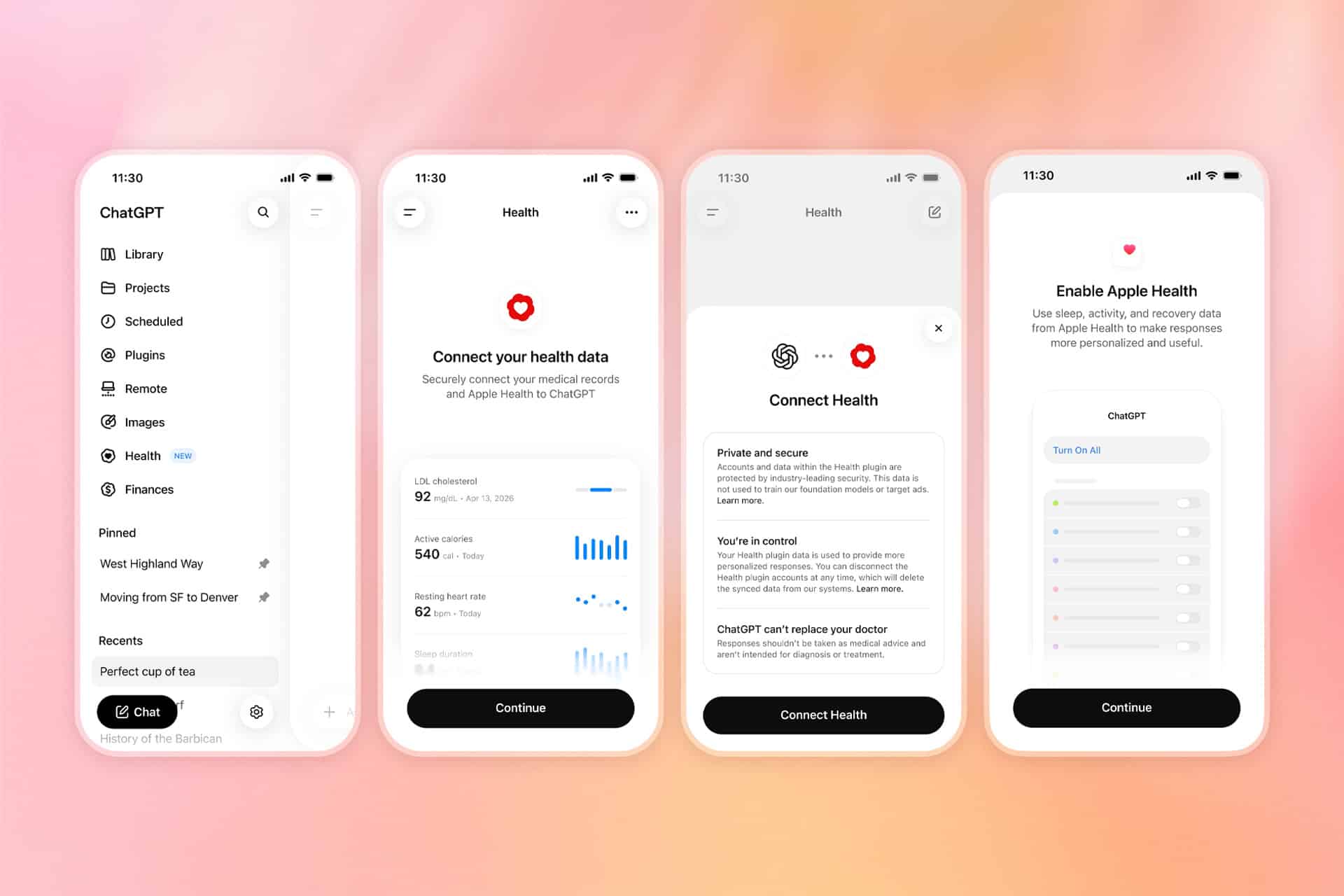
ChatGPT Health is returning with substantially wider access, giving more iPhone users the option to connect information from Apple Health directly to the AI assistant.
The expansion follows a limited test introduced in January. OpenAI is now gradually making the dedicated Health experience available to eligible ChatGPT Free, Go, Plus and Pro users in the United States who are at least 18 years old.
Despite the close Apple connection, this is not a feature created by Apple or built directly into the Health app. OpenAI operates the service through ChatGPT, while Apple Health serves as one of the sources users can voluntarily connect.
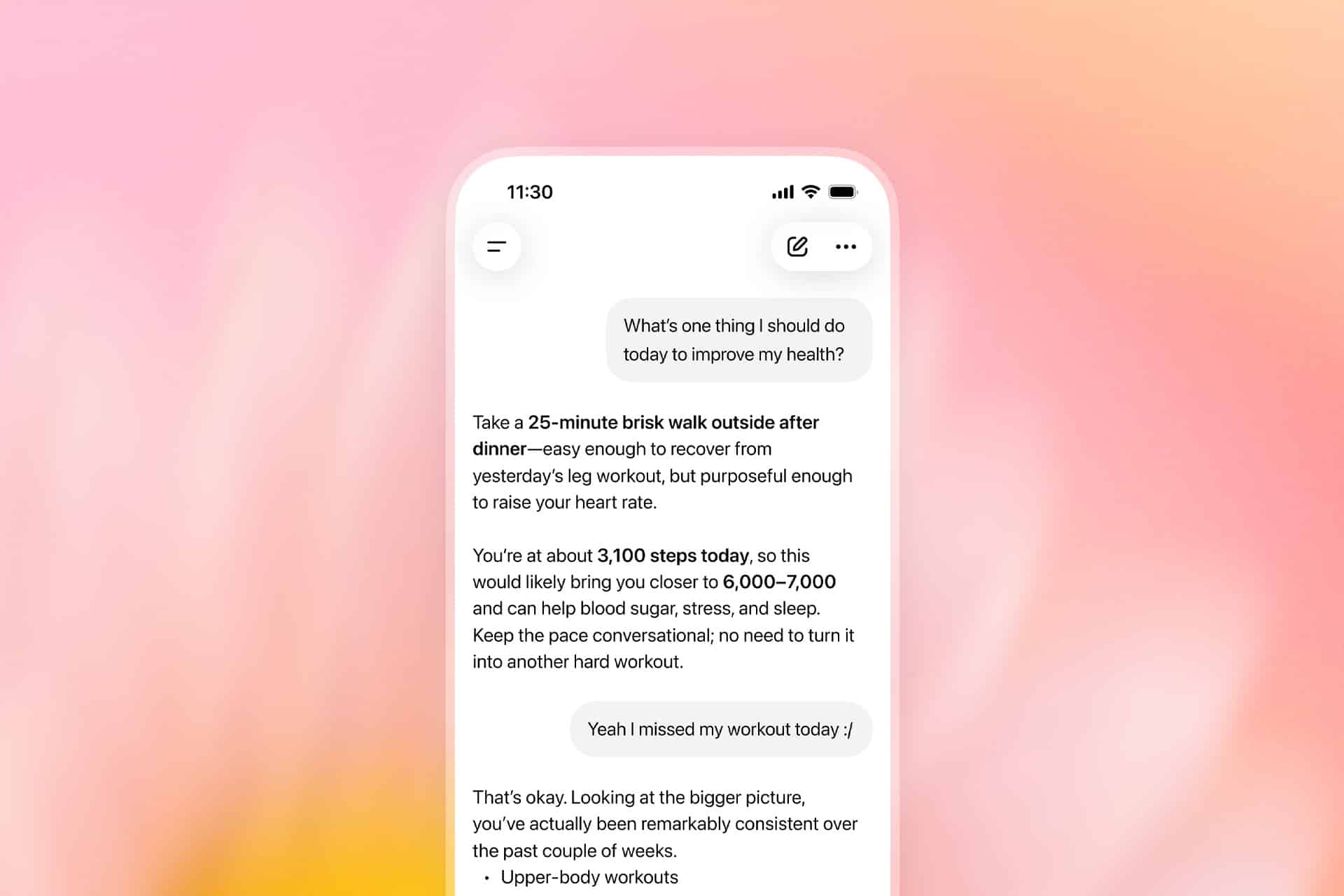
Once permission is granted, ChatGPT can examine selected health and fitness information stored on iPhone, including activity, sleep, workouts and other measurements collected by compatible apps and devices. Users can then ask questions about changes over time without manually exporting records or uploading screenshots during every conversation.
Image Credit: OpenAI
ChatGPT Health Reaches More iPhone Users
ChatGPT Health originally appeared as a limited early-access experience for a small group of testers. The expanded rollout replaces that narrow availability with support for eligible adult users across the United States, although OpenAI says access may take several weeks to reach every account.
The feature works on the ChatGPT website and iOS app, but connecting Apple Health requires an iPhone. Users also need a recent version of the ChatGPT app before the Health option appears in the sidebar or More menu.
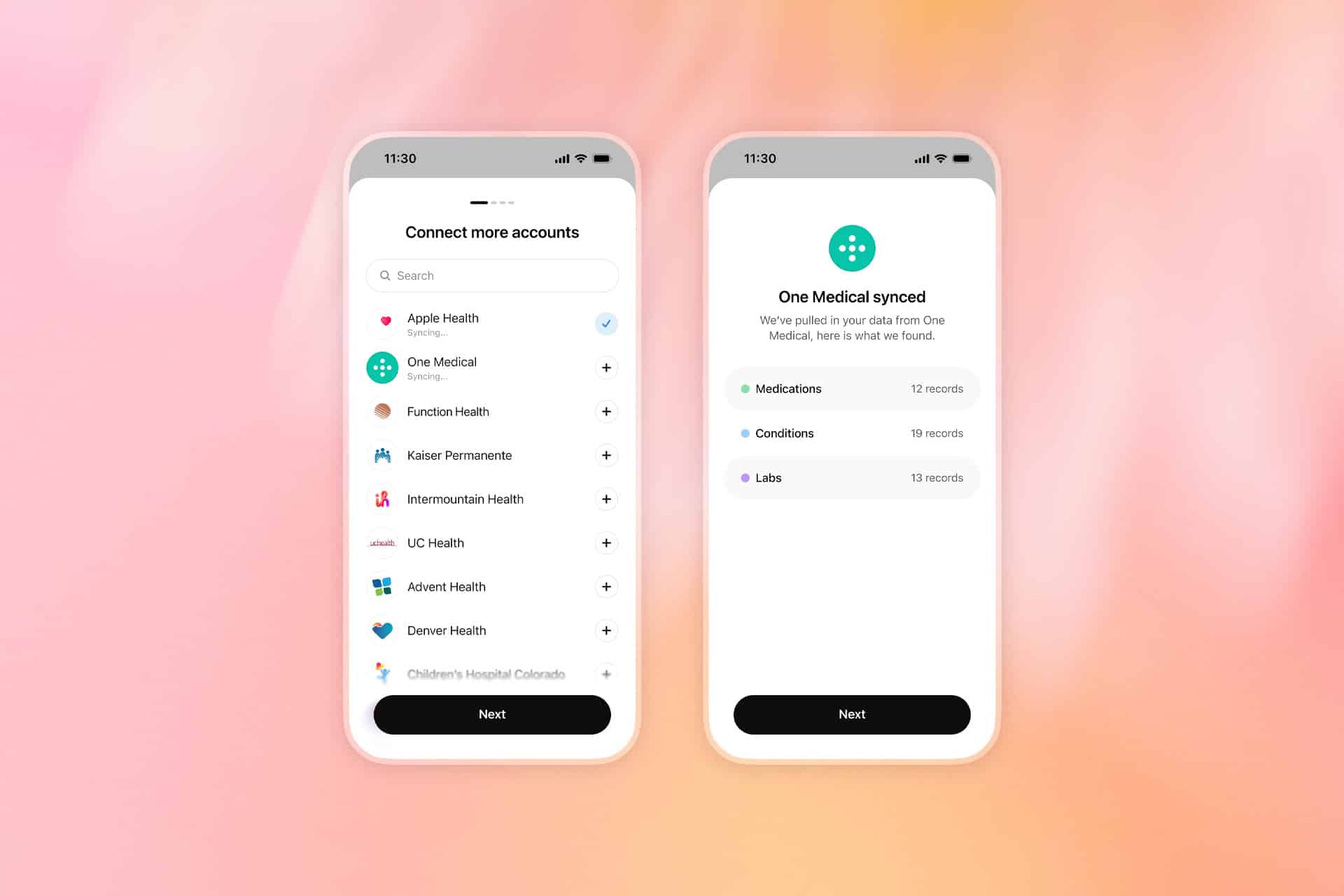
Apple Health is only one part of the system. ChatGPT can also connect to supported medical-record portals, One Medical and Function Health. Bringing those sources together allows the assistant to answer questions using a broader personal context than activity data alone.
A user could ask how sleep duration has changed across several weeks, whether workout frequency declined after a schedule change or how recent laboratory results compare with earlier tests. ChatGPT can also help organize questions before a medical appointment or summarize changes found across connected records.
Information from third-party fitness services can reach ChatGPT through Apple Health when those apps already share their data with the iPhone database. That may include measurements from platforms such as Garmin, Oura, Whoop, Strava and MyFitnessPal, depending on which categories each service makes available.
Not every proprietary score transfers. An app may calculate its own readiness, recovery or sleep score without writing that exact result into Apple Health. ChatGPT can only use the information made available through the connected source and approved by the user.
After synchronization, health information can inform responses throughout ChatGPT rather than remaining limited to conversations opened from the Health tab. The assistant normally asks for permission before using connected information, and users can also add “@Health” to a prompt when they specifically want a response based on their records.
Image Credit: OpenAI
Apple Health Data Gains a Conversational Layer
The appeal of the integration comes from turning a large collection of measurements into questions expressed in ordinary language.
Apple Health can already organize trends, highlights, medications, laboratory results and activity records. ChatGPT adds a conversational layer capable of comparing those categories or explaining them in a more personalized format.
Someone preparing for an annual physical could ask for a summary of meaningful changes since the previous appointment. A runner might request a comparison between training volume, sleep and resting heart rate. Another user could ask which information deserves discussion with a clinician after receiving new laboratory results.
That does not make ChatGPT a doctor. OpenAI says the feature is intended to support medical care rather than diagnose conditions or recommend treatment. Urgent symptoms and emergencies still require professional assistance.
The distinction is especially important because health data can appear more conclusive than it is. A change in heart rate, sleep or activity may have several explanations that cannot be determined from an iPhone record alone. Wearables can identify patterns, but they do not automatically reveal the medical cause behind them.
ChatGPT may help users notice relationships and prepare better questions. It should not be treated as the final authority on whether a symptom is harmless, whether medication should change or whether professional care is unnecessary.
The service is also read-only. ChatGPT can examine approved Apple Health information but cannot alter the original records stored on iPhone. It cannot add a diagnosis, change a medication list or write new measurements back into the Health app.
Users retain control over which Apple Health categories are shared. Someone may allow access to steps, workouts and sleep while withholding reproductive health, medications or other sensitive information.
That selective approach may be more appropriate than approving every category simply because the option is available. A useful response does not always require a complete health history.
Image Credit: OpenAI
Privacy Becomes the Central Decision
Connecting Apple Health to ChatGPT creates a different privacy relationship from using health features entirely within the Apple ecosystem.
Apple designs the Health app around on-device protections and user-controlled permissions. ChatGPT Health requires selected information to synchronize with OpenAI systems so the company can analyze it and generate personalized responses.
OpenAI says connected Apple Health data, medical records and conversations using that information are not used to train its foundation models or target advertising. The company also applies additional encryption and isolation protections to health information.
Users can disconnect Apple Health at any time. OpenAI says synchronized data from the disconnected source will be deleted from its systems within 30 days.
Previous conversations are handled separately. Information already included in ChatGPT conversation history remains until those chats are deleted, even after the Apple Health connection is removed.
Memory introduces another consideration. Conversations using Health can create memories when ChatGPT memory is enabled, although OpenAI says memories are not generated directly from synchronized health data. Temporary Chat or separate project memory can reduce how much personal context continues across future conversations.
The new Health experience should also not be confused with the existing ChatGPT integration inside Apple Intelligence. Siri and Writing Tools can use ChatGPT for certain requests without requiring the dedicated ChatGPT app or a connected account.
ChatGPT Health is a separate OpenAI service with its own account, permissions, privacy controls and health-data connections. Using ChatGPT through Siri does not automatically give OpenAI access to Apple Health.
That separation gives users a meaningful choice. They can continue keeping health information inside Apple apps, share only selected categories with ChatGPT or connect medical records for a more comprehensive view.
The expanded rollout makes one of the most personal databases on iPhone available to conversational AI. Its usefulness will depend not only on the quality of the answers, but also on whether users understand exactly which information they are sharing and where it goes after leaving the device.
SpamSieve 3.3.1 is an update of my Mac e-mail spam filter that improves the filtering accuracy and includes various optimizations, fixes, and updates for macOS 27. Some interesting engineering issues were:
I’m still supporting macOS 10.13, but the app can now build with the macOS 12 deployment target in preparation for Xcode 27. The way Swift handles calling deprecated APIs remains annoying. You need workarounds like protocols to suppress a warning in a particular region of code. Often, I am updating to a newer API, but I want to continue using the old one on earlier versions of macOS. Right now I am heavily testing on macOS 26, so I would like to only deploy the new code there. Sometimes the initial versions of APIs are buggy, and I don’t want to have to retest every feature on every version. But Swift doesn’t like me to gate the calls to macOS 26 and later if the new API was actually introduced in, say, macOS 11.
The most risky update was probably switching to the Swift API for Scanner. This is tricky because the current scan position changes from being based on UTF-16 indexes to String.Index. And in some cases my code was intentionally scanning into the middle of a combining character. I was really glad to have extensive tests here.
Recent versions of Tahoe introduced a Core Data bug that broke save recovery (when invalid Unicode can’t be written to the database and we have to fix it up first). When the error comes in, SpamSieve looks under the NSDetailedErrorsKey key, but the value of this key is "NSDetailedErrorsKey" while the actual error info is under the key "NSDetailedErrors".
Database corruption combined with a Core Data bug and two Swift behaviors were causing crashes. The root problem, I think, is that in this situation Core Data neglects to set the error pointer for -[NSManagedObjectContext countForFetchRequest:error:]. Normally, Swift would detect this and throw a generic nilError. However, this method signals errors by returning NSNotFound instead of nil. It’s annotated as swift_error(nonnull_error), which I think means that Swift doesn’t even look at the return value, only the (unset) error. So my code was receiving NSNotFound on the non-error path, treating it as a real count, and doing some math with it, which (by default in Swift) leads to a crash if there’s overflow. Now my code checks for NSNotFound and uses Int.addingReportingOverflow().
I reimplemented Core Data batch fetching because of two problems with the fetchBatchSize option. First, it logs spurious errors when fetching from multiple stores at once. Second, it leads to high memory use. It will load objects in batches, but it never releases the earlier batches. You can manually refault objects that you no longer need, but it will still hold onto the full object shells, which can add up. My implementation only holds onto IDs, and it can fetch the IDs using a different context than the objects to push more work to background threads.
I’m now using String.makeContiguousUTF8() in various places to avoid slow iteration of bridged strings.
There was a regression where some menu code could crash on macOS 10.13. -[NSMenu setItemArray:] is only available on macOS 10.14 and later, whereas the getter is always available. With old Objective-C, the two methods could be annotated with separate availabilities. The Objective-C property syntax doesn’t allow this, so there’s no way for the compiler to flag calls where the setter is missing.
The AppleScript support works much better with large data sets. The key, I think, is to never return an array to Cocoa for a scripting property/element. First, if you give it a lazy array it will sometimes try to access all the elements even if it only needs a few. And, second, AppleScript will run out of memory if the array is too large. By using indexed accessors, you can maintain laziness and only convert one object to a descriptor at a time. By caching a batch-fetching collection, you can limit the number of fetches and respond quickly when AppleScript requests individual objects.
Discover the latest enhancements to SwiftData. We’ll show you how to persist custom and third-party types using Codable, and group fetched data into sections in your SwiftUI app. We’ll also explore how to observe data store changes anywhere else using ResultsObserver and HistoryObserver, giving you the flexibility to drive powerful state objects and react precisely to model updates.
Again, there seems to be nothing new in Core Data this year, nor any communication about it. There’s still no interoperability for object IDs. The SwiftData changes seem fine but don’t really address the new framework’s deficiencies relative to Core Data. It seems like there are still basic problems with threading. I just don’t understand how Apple is deciding what to prioritize with this framework.
With SwiftUI, the bones seem questionable, but at least we can see that Apple is full steam ahead, with substantial progress to address limitations and pain points. SwiftData seemed to have better bones and is much less ambitious. Getting it right seemed like just a matter of follow through. But, for some inexplicable reason, it seems to lack the resources and/or urgency to reach its potential. And even though SwiftUI is clearly the chosen one, AppKit remains in development. Meanwhile, Core Data seems to be abandoned, even though SwiftData feels more like a side quest than a genuine attempt to supplant it.
The implicit message, for those who have build the core of their app on top of Apple’s old persistence framework, seems to be that Apple is not looking out for their needs. Core Data will surely get maintenance to the extent that Apple’s own apps need it, but there’s no evidence of a future or even a migration plan. The answer, I guess, is third-party frameworks, but that’s not an easy migration, either, since none is even as close a match as SwiftData.
Experience SwiftData in action as we add persistence to an existing app. We’ll show you how to define your data models and seamlessly integrate persistent data with SwiftUI. You’ll also learn foundational skills for managing your app’s state using this expressive, declarative API.
Join us online for a deep dive into WWDC26 with Apple engineers and designers to ask questions, get advice, and follow the discussion about the week’s biggest SwiftData announcements.
SwiftData predicates can now work directly with enum values, resulting in cleaner models and simpler query code.
[…]
In iOS 27, Apple introduced support for compound predicates through the Predicate(all:) and Predicate(any:) initializers, making it easier to build queries dynamically based on user input.
I’m not sure why that took so long.
The framework is gradually moving beyond simple demos and becoming easier to use in larger, more sophisticated projects.
[…]
iOS 27 is the first release where many of the framework’s early rough edges have started to disappear.
Compared with @Query gaining support for section fetches, and ResultsObserver enabling observation of query result changes outside views, I am more interested in @Attribute(.codable). It provides a clearer storage intent and gives developers a way to avoid falling into the black box of composition.
Of course, @Attribute(.codable) is not a silver bullet. It is more like a clearly defined escape hatch SwiftData provides for opaque Codable types: suitable for storing external types that you cannot model yourself, but still genuinely need to persist. The cost is that this content cannot participate in SwiftData’s predicate, sort, or migration awareness. Precisely for this reason, its value lies not in being “more powerful,” but in being “more explicit.”
However, SwiftData still does not provide cloud syncing for public / shared data, nor have I seen a clearer signal of performance improvements. These issues will continue to limit its adoption. For many developers, SwiftData this year feels more like it is filling key gaps rather than making a leap significant enough to fundamentally change confidence in it.
Codable types in SwiftData seem pretty lame given that SQLite absolutely does have JSON support and does support queries on it?
But the funnier thing in the MKMapItem.Identifier example is that MKMapItem.Identifier is a RawRepresentable==String, so it could actually be stored as a String in the store.
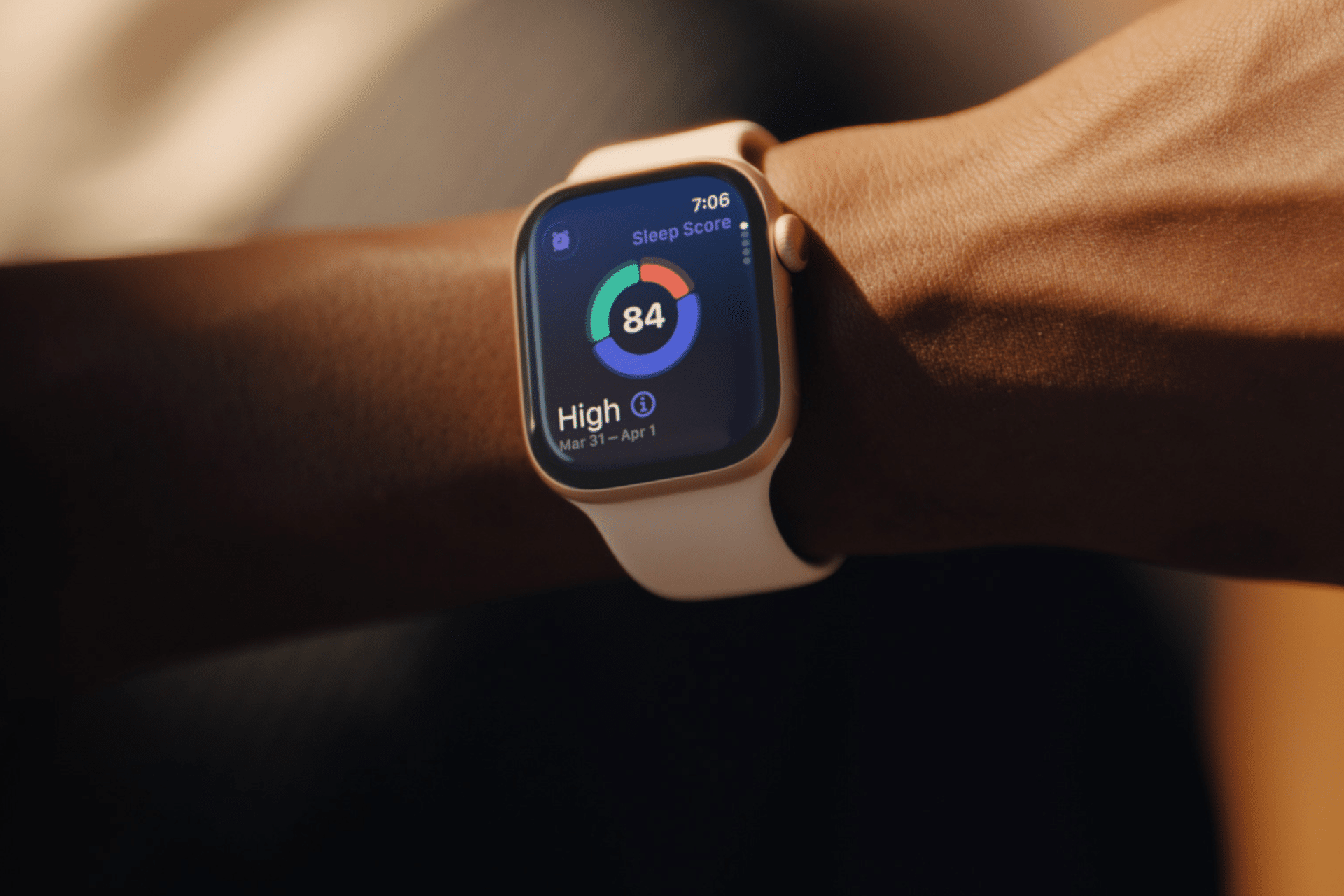
Sleep tracking on Apple Watch can make an invisible part of daily health easier to understand. Each morning, the watch may show sleep duration, stages, interruptions, overnight vitals and a score intended to summarize the night.
That information can be useful. It can also create a new habit of judging the entire day before getting out of bed.
One low score may make a person feel tired before noticing how they actually feel. A few minutes less deep sleep can become a source of concern. Going to bed can even start to feel like a test that must be passed rather than a normal biological process.
Apple Watch sleep data works better as a long-term observation tool than as a nightly verdict. The goal is not to collect perfect scores. It is to notice repeatable patterns and make small changes when those patterns match real-life problems.
What Apple Watch Measures During Sleep
Apple Watch estimates sleep using movement and signals collected while it is worn overnight. Depending on the model and available features, the Health and Sleep apps can show total sleep time, awake periods and estimates for core, deep and REM sleep.
The watch may also collect sleeping heart rate, respiratory rate, wrist temperature and other overnight metrics. The Vitals app compares several of these measurements with the user’s established typical range.
A sleep score compresses parts of the night into one number or category. Apple’s score considers factors including sleep duration, consistency and time spent awake. That makes it convenient, but convenience should not be confused with a complete medical interpretation.
The watch cannot know whether a stressful conversation kept someone awake, whether a child interrupted the night or whether the wearer woke feeling unexpectedly refreshed after fewer hours. It estimates physiological and behavioral signals. The person still supplies the context.
Sleep Tracking Apple Watch Data Works Best as a Trend
One night can be distorted by almost anything: travel, alcohol, illness, noise, a late meal, room temperature or a loose watch band. Even the position of the arm can affect sensor collection.
A weekly or monthly view is more useful because it reduces the influence of isolated nights. Patterns begin to emerge around bedtime consistency, total duration and changes in overnight vitals.
To review longer sleep trends on iPhone:
Health > Search > Sleep > select the weekly, monthly or six-month view
Look first at sleep duration and timing. These measurements are generally easier to interpret than small changes in individual sleep stages.
A person who repeatedly sleeps less on work nights may have a scheduling issue. Someone whose sleep becomes more fragmented after late caffeine may have found a useful connection. A consistently irregular bedtime may explain more than whether deep sleep moved by 12 minutes on Tuesday.
The data becomes valuable when it supports an observation that can lead to a realistic adjustment.
Image Credit: Apple Inc.
Do Not Treat Sleep Stages as Exact Measurements
Core, deep and REM sleep are presented as distinct colored sections, which can make them appear more precise than they are. Apple Watch estimates these stages from signals available at the wrist. A clinical sleep study uses additional equipment and is designed for medical evaluation.
That does not make the stage information worthless. It means small nightly differences should not be overinterpreted.
A person does not need to increase deep sleep manually or achieve a perfect proportion of REM sleep. Sleep architecture changes naturally across age, stress levels, exercise, illness and different parts of the night.
Use stage data to notice substantial or persistent changes, not to compete with yesterday’s chart. Spending 15 minutes less in one estimated stage is not automatically a health problem.
Start With How You Feel
Before opening the Sleep app, notice how the morning feels.
Was waking difficult? Is concentration normal? Is there unusual daytime sleepiness? Does the body feel recovered after exercise? Was the night interrupted for an obvious reason?
This brief self-check prevents the score from defining the experience. Someone may feel fine after a lower-rated night, while another person may feel exhausted despite receiving a favorable score.
The most useful interpretation combines both sources: subjective experience and device data. When they repeatedly agree, the pattern deserves attention. When they conflict for one night, there may be no reason to react.
Use Vitals as Context, Not a Diagnosis
The Vitals app can show whether overnight measurements such as heart rate, respiratory rate, wrist temperature and sleep duration fall within a typical range. It becomes more useful after the watch has collected enough nights to establish a personal baseline.
An outlier may reflect alcohol, medication, elevation, intense training or the beginning of an illness. It may also be an ordinary variation or imperfect reading.
Several unusual metrics appearing together may provide more context than one isolated number. Even then, Apple Watch data should not be used to diagnose a condition independently.
Persistent symptoms, breathing concerns, extreme daytime sleepiness or major changes in sleep should be discussed with a qualified healthcare professional. Bring the trend data if it helps describe what has been happening, but do not let the watch replace an evaluation.
Build a Routine Around Behavior, Not Scores
The healthiest use of sleep tracking is to connect the data with actions a person can actually control.
A consistent bedtime may improve the pattern. Charging the watch before the evening makes tracking more reliable. Reducing late caffeine, adjusting the bedroom temperature or moving an intense workout earlier may also produce noticeable changes.
To set a sleep schedule:
Health > Search > Sleep > Full Schedule & Options > Add Schedule
A schedule can provide Wind Down reminders and help keep bedtime more regular. It should remain a helpful structure rather than a rigid obligation. Life will occasionally interrupt it.
Choose one adjustment and observe it for a week or two. Changing five habits after one poor night makes it difficult to identify what helped.
Image Credit: Apple Inc.
When Sleep Tracking Creates More Stress
Some people become preoccupied with improving sleep data, repeatedly checking results or worrying that a low score guarantees a bad day. The anxiety can itself make falling asleep more difficult.
That is a sign to reduce exposure to the numbers.
Sleep tracking can be turned off temporarily, or the data can be reviewed only once per week. Another option is to avoid checking the score in the morning and examine trends at a neutral time later.
To change sleep tracking settings:
Watch app on iPhone > My Watch > Sleep
A break does not erase the knowledge already gained. A person who has learned that regular timing and less late caffeine improve sleep may no longer need a daily chart to confirm it.
The device should support rest, not supervise it.
A Better Way to Read the Morning Report
A practical morning review can remain simple. Check whether the watch recorded the full night. Notice total duration. Consider whether the bedtime was typical. Look for any major change in overnight vitals, then move on.
There is rarely a need to analyze every stage, compare several apps or search for explanations after one ordinary variation.
Sleep tracking on Apple Watch is most useful when it reveals something that was difficult to see without data: a repeated shortfall in duration, an inconsistent schedule or a pattern linked to habits and recovery.
The score can summarize one night, but it cannot grade the person who slept through it. A healthier measure is whether the information helps create calmer nights, better days and fewer reasons to think about the watch after waking.
In a groundbreaking longitudinal study encompassing nearly half a million individuals, researchers have unveiled intricate patterns and biological underpinnings that link cardiometabolic diseases (CMDs) and depression. These two prevalent and often coexisting health conditions have long posed challenges due to their complex interaction and compounded risk on mortality. Now, through a multinational, multi-omic analytic approach, this study sheds new light on how these diseases develop, interlace over time, and ultimately impact life expectancy, offering hope for earlier detection and more precise interventions.
Cardiometabolic diseases—which include chronic conditions such as cardiovascular disease, type 2 diabetes, and metabolic syndrome—are among the leading causes of death globally. Depression, meanwhile, remains a colossal mental health burden, often running parallel to various physical ailments. The coexistence, or multimorbidity, of CMDs and depression exacerbates health outcomes significantly, yet the trajectory of how one condition progresses to include the other and the biological mechanisms driving this interaction have remained elusive.
Leveraging data from the UK Biobank, the largest population-based health cohort, the study followed 467,592 participants initially free of both CMD diagnoses and depression. Over a 14.6-year period, the scientists meticulously chronicled disease transitions using advanced multistate models. These allowed them not only to identify disease onset patterns but also to map complex pathways outlining progression from health to single disease states and then to multimorbidity.
The findings revealed that within the follow-up window, more than 64,000 participants developed CMD alone, while approximately 17,500 were diagnosed with depression exclusively. Crucially, over 6,100 individuals progressed to multimorbidity, reflecting the convergence of these conditions in a significant subset of the population. Importantly, the risk of subsequently developing the alternate condition was substantially elevated for those already affected by either CMD or depression, underscoring the bidirectional relationship between physical and mental health.
Further delving into survival outcomes, the researchers observed that individuals with multimorbidity faced a 13 to 22 percent increase in mortality risk compared to those free of disease, accompanied by a marked reduction in life expectancy averaging between 3.6 to 3.8 years. Such stark contrasts reinforce the clinical urgency of understanding and managing the intersection of CMDs and depression rather than treating them in isolation.
However, a nuanced discovery emerged from the survival analysis: the mortality impact of coexisting CMD and depression appeared additive rather than synergistic. This suggests that while coexistence heightens risk, the two diseases may operate through largely independent pathways driving mortality, a revelation that could recalibrate how treatment priorities are structured.
To decipher biological signatures predictive of disease progression and multimorbidity, the study incorporated multi-omics platforms—comprehensive analyses including proteomics, metabolomics, genomics, and methylomics. These high-dimensional tools allow scientists to detect subtle molecular changes reflecting pathophysiological shifts and prognostic biomarkers far earlier than clinical symptoms emerge.
Remarkably, proteomic models stood out in their predictive prowess. When applied to the 15-year risk horizon for CMD-depression transitions, these models achieved area-under-the-curve (AUC) values ranging between 0.70 and 0.91. This performance significantly eclipsed that of traditional clinical risk models, heralding a new dawn where molecular profiling could transform risk stratification and preventive strategies.
Distinct multi-omic signatures were identified at each disease transition point—whether from health to CMD alone, health to depression alone, or the combined pathway leading to multimorbidity. These signatures could reflect unique biological processes such as inflammatory cascades, metabolic dysregulation, neuroendocrine changes, or immune system perturbations, each contributing distinctively to disease progression.
The implications of these findings are far-reaching. With multimorbidity presenting as a growing global health challenge, understanding its trajectory and molecular footprints empowers clinicians and researchers to design targeted interventions that transcend symptom management. Early identification of individuals at highest risk via omic biomarkers could enable precision medicine approaches that pre-empt illness onset or halt progression.
Furthermore, by elucidating the distinct yet interconnected biological pathways linking CMDs and depression, this research challenges the traditionally siloed view of mental and physical health. It advocates for integrated care models that address the whole person rather than fragmented disease entities, a paradigm shift essential for improving patient outcomes in real-world settings.
The study also leverages rigorous multistate modeling, a sophisticated statistical technique allowing for dynamic representation of illness progression over time. This approach captures the complexity inherent in chronic disease trajectories, encompassing not only onset but transitions between disease states and eventual mortality. Such modeling enhances the granularity of epidemiological insights far beyond conventional methods.
As large-scale biobanks increasingly incorporate multi-omic data, the ability to unravel disease biology at unprecedented depth will only grow. The present study exemplifies how marrying big data with cutting-edge analytic frameworks can unveil novel insights into multimorbidity, transforming epidemiology into a powerful tool for precision health.
This research arrives at a critical juncture where global populations face rising burdens of chronic diseases intertwined with mental health challenges. Targeted, biologically informed strategies could ease the strain on healthcare systems and improve quality of life for millions living with overlapping disease burdens.
While promising, the findings also urge cautious optimism. The translation of molecular signatures into routine clinical tools requires further validation and contextualization across diverse ancestral and environmental backgrounds. However, these initial steps firmly establish a conceptual blueprint for future studies to build upon.
Taken together, this extensive investigation pioneers a new frontier in understanding the intertwined evolution of cardiometabolic diseases and depression. By uniting longitudinal clinical data with multi-omics analyses and sophisticated modeling, it heralds a transformative approach toward unraveling multimorbidity’s mysteries and paves the way for early, targeted prevention.
The convergence of CMDs and depression, previously viewed as a devastating clinical overlap, now emerges as a tractable problem awaiting targeted intervention—fueling hope that integrated molecular insights will soon translate into lifesaving real-world applications. This revolutionary research sets the stage for a future where vulnerability to complex chronic disease is revealed well before symptoms arise, opening unprecedented avenues for personalized health preservation.
Subject of Research:
Multi-omic signatures and disease trajectories linking cardiometabolic diseases and depression
Article Title:
Multi-omic signatures and trajectories of cardiometabolic diseases and depression
Article References:
Yang, G., Jiang, X., Wang, J. et al. Multi-omic signatures and trajectories of cardiometabolic diseases and depression. Nat. Mental Health (2026). https://doi.org/10.1038/s44220-026-00678-6
In a groundbreaking advancement poised to revolutionize semiconductor analysis, a team of researchers from the Institute of Science Tokyo has pioneered a tandem neural network (TNN) architecture that dramatically accelerates the inference of vital material parameters from transistor measurements. This novel machine learning framework addresses one of the most vexing challenges in semiconductor physics—the multivalued inverse problem—achieving unprecedented speed and accuracy that eclipses traditional computational methods.
Semiconductor devices underpin nearly every aspect of modern electronics, from smartphones to sophisticated computing systems. The performance and reliability of these devices hinge on intricate material properties such as defect densities, trap states, and charge carrier mobilities. While engineers can rapidly measure transistor behavior through current-voltage characteristics, deciphering the precise material attributes driving this behavior remains an elusive inverse problem. Conventional approaches rely heavily on iterative simulations and optimization techniques, often consuming hours or even days to converge on plausible solutions.
At the heart of the difficulty lies the phenomenon of multivaluedness: distinct combinations of semiconductor material parameters can yield virtually indistinguishable transistor responses. This ambiguity complicates the task of tracing device performance back to its physical origins. The research team recognized that conventional simulation frameworks are ill-equipped to navigate this degeneracy efficiently. Their insight was to harness the power of tandem neural networks, an innovative deep learning configuration capable of simultaenously enforcing physical consistency and mathematical plausibility in parameter estimation.
The tandem neural network developed by the team couples two interconnected models operating in series. The initial inverse model proposes candidate sets of material parameters based on observed transistor behavior. This output then feeds into a forward model pre-trained to reconstruct transistor characteristics from material parameters. By integrating the forward model’s reconstructions into the training loss function of the inverse network, the system effectively teaches itself to generate solutions that not only fit the measurement data but also align with the physical laws governing transistor operation.
Training this sophisticated architecture required an extensive dataset of over 1,000 simulated transistor measurements, specifically focusing on amorphous indium-gallium-zinc oxide (a-IGZO) transistors—a material of significant interest for flexible and transparent electronics. The dataset spanned a parameter space roughly 1,000 times broader than previous studies, encompassing six key variables: defect density, electron trap states, and carrier mobility among them. Astonishingly, the TNN inferred all six parameters from a single transistor current-voltage curve in less than one millisecond, achieving near-perfect accuracy across the range.
Beyond simulations, real-world validation was paramount. The researchers fabricated a series of a-IGZO transistors under five distinct processing conditions in their laboratories. When subjected to the TNN analysis, the model reproduced the measured device characteristics with exceptional fidelity, requiring no parameter tuning or iterative refinement. This immediate, high-precision performance marks a quantum leap compared to traditional simulation-dependent approaches that demand repetitive calculations, often spanning hours or days.
Assistant Professor Keisuke Ide, one of the principal investigators, highlighted the transformative implications of this speedup: “Our tandem neural network achieves a computational acceleration exceeding six orders of magnitude relative to conventional device simulation methods. This means what once took days can now be done almost instantaneously, radically changing the landscape of semiconductor diagnostics and research.”
The implications of this advancement extend well beyond academic curiosity. In industrial manufacturing, instantaneous and ultra-accurate assessment of transistor material properties can serve as an integral part of quality control, allowing defects and performance variants to be detected and addressed on the production line in real-time. This rapid feedback loop could markedly reduce waste and improve yield in semiconductor fabrication facilities.
Moreover, the TNN framework paves the way for autonomous laboratories where artificial intelligence designs, executes, and interprets experiments with minimal human oversight. By swiftly and reliably unraveling complex material-property relationships, AI-driven research tools can accelerate innovation cycles, optimizing device designs and material formulations in ways previously unattainable due to computational bottlenecks.
Interestingly, the tandem neural network architecture is not conceptually limited to semiconductors alone. The researchers underscore its potential applicability across a broad spectrum of inverse problems characterized by multivaluedness, spanning materials science, chemistry, optics, and possibly even biological systems where multiple underlying parameter sets may produce indistinguishable observational data.
The Institute of Science Tokyo, newly established in 2024 through the merger of Tokyo Medical and Dental University and Tokyo Institute of Technology, serves as a nexus for such cutting-edge interdisciplinary research. This project exemplifies the institute’s mission to advance scientific understanding and technology in ways that create tangible value for society.
As the demands for faster, smaller, and more efficient semiconductor components intensify, novel computational tools that can disentangle the complex interplay of material parameters swiftly and accurately become indispensable. The tandem neural network approach represents a critical milestone on this journey, ushering in a new era where machine learning not only supplements but fundamentally transforms physical sciences research.
This rise of AI-powered physics inference is poised to fuel accelerated material discovery, optimized manufacturing, and ultimately, enhanced electronic devices that power tomorrow’s technological landscape. With this tandem neural network, researchers have cracked open the door to solving multivalued inverse problems at blistering speeds, a feat that was once considered beyond reach.
Subject of Research: Semiconductor material characterization using machine learning
Article Title: Tandem Neural Network Rapidly Solves Multivalued Inverse Problems: Application to Oxide-Semiconductor Characterization

 Login
Login