ⓘWe may earn a commission when you buy through our links. This helps support MacSources and keeps our content free. Thank you!
Razer’s first Hall Effect gaming keyboard combines adjustable magnetic switches, Rapid Trigger, and 8000 Hz HyperPolling with premium build quality for a fast and highly customizable gaming experience.
Over the past few years, I’ve spent a lot of time experimenting with different keyboards to find the one that works best for me when I game. I started with a classic mechanical keyboard before eventually migrating to the Razer DeathStalker V2 Pro Tenkeyless, which features Razer’s optical switches.
For a long time, I thought optical switches represented the pinnacle of gaming keyboard technology. They offered fast response times, smooth keystrokes, and a level of precision that traditional mechanical switches simply couldn’t match. Then Hall Effect keyboards began gaining traction, promising even greater customization through adjustable actuation, Rapid Trigger, and magnetic switch technology capable of tracking the exact position of every key press.
That shift has led many gamers to wonder whether Hall Effect keyboards are truly worth the hype or if they’re simply the latest trend in an increasingly competitive market. That’s what makes Razer’s entry into the Hall Effect space with the Huntsman V3 HE Magnetic Tenkeyless Keyboard so interesting.
The Huntsman has become one of Razer’s most recognizable gaming keyboard families, earning a strong following among gamers thanks to its combination of speed, premium design, and innovative switch technology. With the Huntsman V3 HE Magnetic, Razer is taking that foundation and adapting it for the next generation of gaming keyboards by introducing Hall Effect Magnetic Switches, advanced customization options, and features designed to compete with today’s top-performing gaming keyboards.
About the Razer Huntsman V3 HE Magnetic Tenkeyless
The Huntsman V3 HE Magnetic Tenkeyless is a wired gaming keyboard built around Razer’s new Hall Effect Magnetic Switches. Unlike traditional mechanical switches that register a keypress when metal contacts touch, Hall Effect switches use a magnet and sensor to continuously monitor key travel. This allows the keyboard to know exactly how far every key has been pressed at any given moment.
That precision enables several advanced features. Adjustable actuation lets users choose exactly when a key should register, from an incredibly shallow 0.1 mm all the way to 4.0 mm. Rapid Trigger resets a key as soon as it begins moving upward, making repeated inputs significantly faster than traditional fixed reset points. Razer also includes Snap Tap, Dynamic Keystroke, Snap Flex, and Dual-Keypress Priority, all designed to improve responsiveness and simplify complex inputs.
The Tenkeyless design removes the numeric keypad while keeping the function row and navigation keys intact, creating a smaller footprint that gives gamers more room for mouse movement without sacrificing everyday usability. The keyboard also features a 5052 aluminum alloy top case, textured doubleshot PBT keycaps, per-key Razer Chroma RGB lighting, pre-lubed stabilizers, and up to 8000 Hz HyperPolling for reduced input latency.
Designed for competitive gamers and enthusiasts who want maximum control over their keyboard experience, the Razer Huntsman V3 HE Magnetic Tenkeyless combines Hall Effect technology with the performance-focused features that have defined the Huntsman family.
Features & Specs
Razer Hall Effect Magnetic Switches
Uses magnetic sensors to detect key position in real time.
Enables adjustable actuation, Rapid Trigger, and advanced input customization.
Rated for up to 100 million keystrokes.
Adjustable Actuation
Customize actuation points from 0.1 mm to 4.0 mm.
Allows users to prioritize speed or reduce accidental presses.
Rapid Trigger Mode
Resets keys immediately when movement begins upward.
Designed for faster repeated inputs and improved movement control.
Razer Snap Tap
Prioritizes the latest directional input for faster counter-strafing.
Supports up to four customizable key pairs.
Advanced Input Customization
Dynamic Keystroke allows multiple actions to be assigned to a single key.
Snap Flex enables multiple actions from a single input.
Dual-Keypress Priority helps maintain consistent movement inputs.
True 8000 Hz HyperPolling
Provides faster communication between the keyboard and PC.
Rated at approximately 0.60 ms switch-to-USB latency.
On-Demand Calibration
Allows Hall Effect switches to be recalibrated through Razer Synapse.
Helps maintain consistent actuation performance over time.
Onboard Profiles
Stores up to six profiles directly on the keyboard.
Design & Build
Tenkeyless (TKL) Layout
Smaller footprint with function row and navigation keys retained.
5052 Aluminum Alloy Top Case
Provides durability and a premium design.
Textured Doubleshot PBT Keycaps
Durable keycaps with RGB shine-through legends.
Pre-Lubed Stabilizers
Improves consistency and reduces unwanted key movement.
Multi-Layered Foam Sound Dampening
Helps improve acoustics and typing feel.
Per-Key Razer Chroma RGB Lighting
Fully customizable through Razer Synapse.
Detachable USB-C Cable
Allows easier transport and cable replacement.
Specifications
Switch Type: Razer Hall Effect Magnetic Switches
Layout: Tenkeyless
Connectivity: Wired USB-C
Polling Rate: Up to 8000 Hz
Actuation Range: 0.1 mm to 4.0 mm
Actuation Force: 40 g
Total Key Travel: 4.0 mm
Switch Lifespan: 100 million keystrokes
Key Rollover: N-key rollover
Lighting: Per-key Razer Chroma RGB
Keycaps: Textured Doubleshot PBT
Top Case: 5052 Aluminum Alloy
Profiles: Six onboard profiles
Pricing & Availability
The list price for the Razer Huntsman V3 HE Magnetic Tenkeyless is $139.99 and it’s available at razer.com, Razerstores and select retailers.
User Experience
Build Quality, Design, and Long-Term Comfort
The first thing I noticed about the Huntsman V3 HE Magnetic Tenkeyless was how solid it feels. The aluminum top plate gives the keyboard a sturdy, premium feel, and I never noticed any flex while using it. It has the kind of build quality I’d expect from a keyboard in this price range.
I’ve always been a fan of tenkeyless keyboards because they offer a great balance between functionality and desk space, and that’s exactly what Razer has accomplished here. I don’t really miss having a dedicated number pad, but I do appreciate that the navigation cluster remains in its standard location. It makes the keyboard feel familiar whether I’m gaming, writing, or just browsing the web, while still giving me more room to move my mouse.
I also found the layout comfortable during longer gaming sessions. Even though it’s more compact than a full-size keyboard, it never felt cramped. Since the only thing that’s missing is the number pad, I still have access to all the keys I use on a daily basis.
The textured doubleshot PBT keycaps add to that premium feel. Compared to standard ABS keycaps, they have a firmer, slightly harder texture. It was a little different than what I was used to at first, but I quickly grew to like the feel. The larger keys, including the spacebar and shift keys, also feel very stable with very little movement or rattling.
I also like that Razer uses a detachable USB-C cable. It’s a small detail, but it gives me the flexibility to swap cables if I ever want to customize my setup or simply replace the included one.
Overall, I think the Huntsman V3 HE Magnetic easily feels like a premium $139.99 keyboard. Between the aluminum construction, quality keycaps, thoughtful layout, and excellent fit and finish, it feels well built for both gaming and everyday use.
Typing Experience and Daily Use
While the Huntsman V3 HE Magnetic Tenkeyless is clearly built with gamers in mind, I found it to be just as enjoyable for everyday typing. Coming from the low-profile Razer DeathStalker V2 Pro Tenkeyless, there was definitely a small adjustment period. The taller keycaps and deeper key travel feel very different, but the keys are comfortably spaced and every keystroke feels solid and consistent. After a day or two, I felt completely at home using it for longer typing sessions.
Compared to both traditional mechanical switches and Razer’s optical switches, the Hall Effect Magnetic Switches have a unique feel. The best way I can describe them is that they have a little more bounce to them. They still feel smooth thanks to their linear design, but the overall typing experience is noticeably different from the keyboards I’ve used in the past. Even after several hours of writing, I never noticed my hands getting tired or uncomfortable.
The keycaps and stabilizers also deserve some credit. The textured doubleshot PBT keycaps feel durable and provide a solid typing surface, while the larger stabilized keys remain smooth and consistent without any noticeable wobble.
I also really like the way this keyboard sounds. It’s quieter than many traditional mechanical keyboards, but it still produces a satisfying clicky sound with each keypress. I don’t think it would be overly distracting in most office environments, although that obviously depends on how hard someone types. One thing I did notice is a slight echo when typing quickly. The sound seems to bounce off the aluminum frame and creates a subtle reverberation that actually adds a bit of personality to the typing experience rather than becoming distracting.
Overall, I think the Huntsman V3 HE Magnetic feels every bit as premium during everyday use as it does while gaming. It strikes a nice balance between performance and comfort, making it a keyboard I was happy to use throughout the day.
To put some numbers behind my experience, I also ran a typing test using MonkeyType.com. I averaged 85 words per minute with 99% accuracy and an 81% consistency score. Typing tests are always influenced by familiarity and individual typing habits, but I was happy with those results, especially considering I was transitioning from a low-profile keyboard to a traditional-height design.
Razer Synapse and Customization
One of my favorite aspects of the Huntsman V3 HE Magnetic Tenkeyless is just how easy it is to customize through Razer Synapse. I do want to point out that I have had limited time with testing the keyboard with the latest firmware since it was just released this morning. The software is clean, well organized, and easy to navigate. Once I selected the keyboard in Synapse, I had quick access to everything from actuation settings to RGB lighting without having to dig through complicated menus.
Adjusting the actuation point couldn’t be much easier. I simply selected the key I wanted to modify and used a slider to choose the actuation distance. It made experimenting with different settings quick and painless until I found what worked best for me.
For the most part, I found myself using one of two configurations. When I was working or writing, I usually left the keyboard at its default settings. When it was time to game, I switched over to the built-in FPS Rapid Trigger profile, which felt noticeably more responsive. I also really appreciated being able to switch between onboard profiles directly from the keyboard without needing to launch Synapse every time.
Razer includes several advanced gaming features like Dynamic Keystroke, Snap Flex, and Dual-Keypress Priority. I’m still experimenting with some of them, but they definitely have potential. The feature that stood out the most to me was Snap Tap. It made directional movement feel smoother and more responsive, especially in games where quick movement changes are important.
Even though Razer Synapse is currently only available for Windows, the keyboard itself works perfectly well without the software. I connected it to my MacBook Pro and had no issues using it for gaming or everyday tasks. The only downside is that macOS users currently miss out on Synapse’s advanced customization features.
RGB customization is just as straightforward as everything else in Synapse. Changing colors, effects, and brightness only takes a few clicks, making it easy to match the keyboard to the rest of my setup.
Conclusion
After spending time with the Razer Huntsman V3 HE Magnetic Tenkeyless, I came away impressed by just how refined Razer’s first Hall Effect keyboard feels. Rather than simply following the latest trend, Razer has taken what made the Huntsman lineup successful and paired it with magnetic switch technology that offers a meaningful increase in customization and responsiveness.
If you’ve been considering making the jump to a Hall Effect keyboard, the Razer Huntsman V3 HE Magnetic Tenkeyless makes a compelling case. It combines excellent build quality, extensive customization, and top-tier gaming performance into a package that feels built to last.
ⓘWe may earn a commission when you buy through our links. This helps support MacSources and keeps our content free. Thank you!
The Razer Travel Case Folio combines premium protection, an adjustable multi-device stand, and travel-friendly portability into a sleek accessory for the Razer Joro, Apple Magic Keyboard, and other compact keyboards.
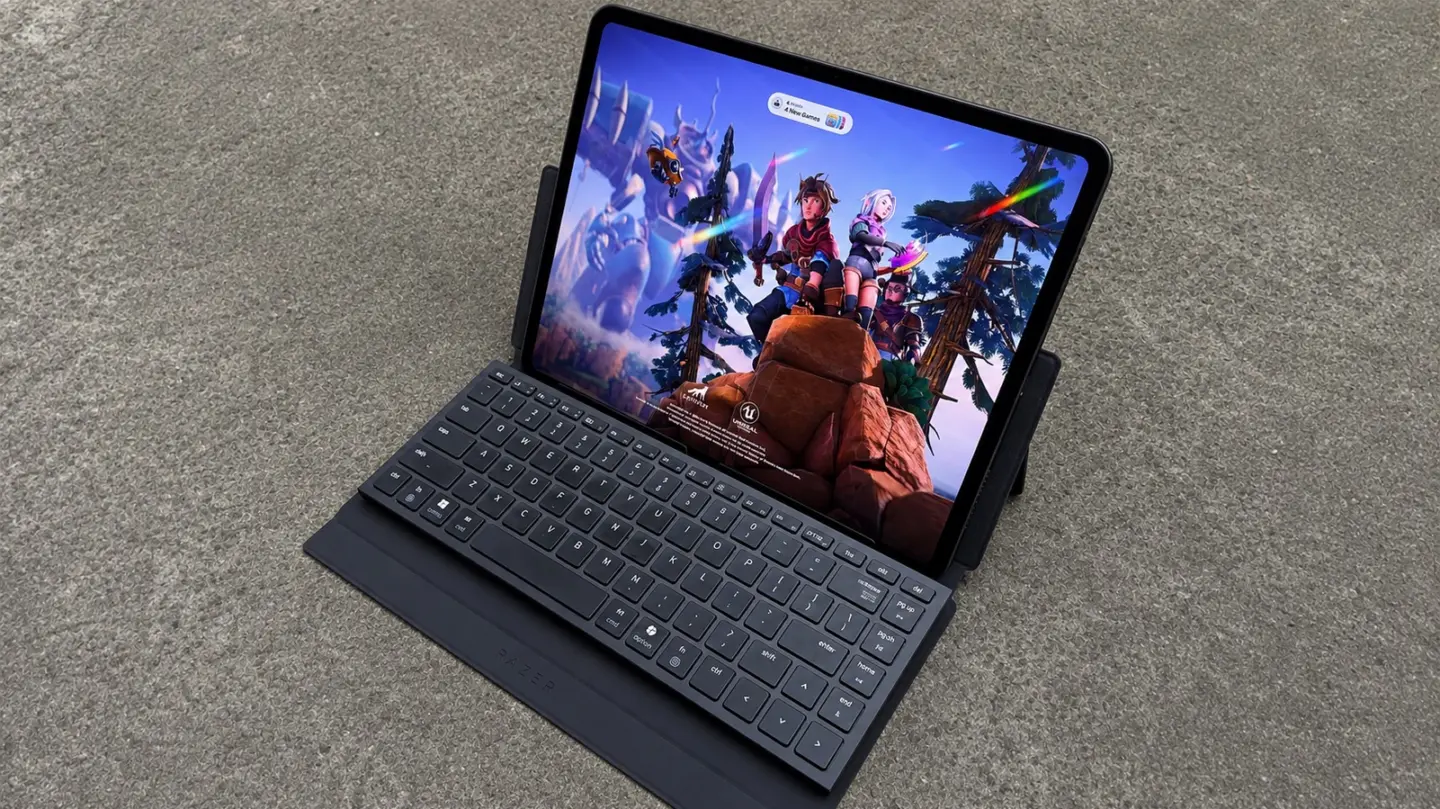
One of my favorite gaming accessories is my Razer Joro keyboard. It’s slim, responsive, and extremely lightweight. Since my main gaming device has been a tablet lately, it has worked really well as an integrated part of my gaming rig. The only downside of it is that it doesn’t come with travel case. That actually changes today with the release of the Razer Travel Case Folio for Portable Keyboards.
About the Razer Travel Case Folio for Portable Keyboards
The Razer Travel Case Folio for Portable Keyboards is designed to make working and gaming on the go more convenient without sacrificing the comfort of a full-sized typing experience. Built primarily for the Razer Joro and Apple’s Magic Keyboard, it also accommodates many other portable keyboards with similar dimensions, making it a versatile travel companion.
Constructed with a durable PU leather exterior and a soft microfiber suede interior, the folio helps protect your keyboard from everyday wear while remaining thin and lightweight enough to slip into a backpack or laptop bag. A high-strength magnetic closure keeps everything securely in place, and precision charging cutouts allow compatible keyboards to be charged without removing them from the case.
More than just a protective sleeve, the Travel Case Folio features an integrated adjustable stand that supports viewing angles from 0 to 125 degrees. It can hold tablets up to 13 inches, smartphones, and many gaming handhelds, allowing users to create a comfortable mobile workspace or gaming setup almost anywhere. Priced at $55.99, the Travel Case Folio aims to provide a practical, premium solution for professionals, students, and gamers who want to take their desktop-like typing experience wherever they go.
Features & Specs
Designed for the Razer Joro and Apple Magic Keyboard
Compatible with other portable keyboards of similar dimensions
Integrated adjustable stand for tablets, smartphones, and gaming handhelds
Adjustable viewing angles from 0° to 125°
Supports tablets up to 13 inches
Compatible with many gaming handhelds, including the Steam Deck
Primary Compatibility: Razer Joro, Apple Magic Keyboard
Additional Compatibility: Portable keyboards with similar dimensions
Closure Type: Magnetic
Available Color: Black
User Experience
The Razer Travel Case Folio makes a strong first impression. As soon as I took it out of the box, it felt like a well-made accessory rather than an afterthought. The PU leather exterior has a soft, premium feel while still feeling durable enough for everyday travel, and the microfiber suede lining provides a layer of protection that gave me confidence tossing the keyboard into a backpack. One thing I noticed immediately, however, is that the keyboard doesn’t physically attach to the case. Instead, it simply rests inside the folio as it wraps around the keyboard. Initially, I expected this to allow the keyboard to slide around, but during my testing it stayed securely in place and never shifted unexpectedly.
The overall construction strikes a nice balance between rigidity and flexibility. The front and back panels are firm enough to protect the keyboard, while the hinge area remains flexible, making it easy to fold into different positions. The magnetic closure is strong enough to keep the folio securely closed, yet it’s still easy to open with one hand. I also didn’t notice the exterior attracting fingerprints or lint, helping it maintain its clean appearance after several days of use.
Using the folio with the Razer Joro was straightforward. Because the keyboard isn’t clipped or magnetically attached, inserting and removing it takes only a few seconds. Charging cutouts are also well positioned, allowing the keyboard to remain inside the case while charging. Despite my initial concerns about the keyboard simply resting inside the folio, I never experienced any unwanted movement during normal use or while carrying it in a bag.
I go with Robyn to a lot of events, most of which I am not participating in so I am stuck at the hotel. During these times, I like to use my iPad with the Razer Joro keyboard now that I have the travel case I can confidently say my portable rig is complete.
One of the Travel Case Folio’s biggest strengths is how quickly it transforms from a protective case into a compact workstation. Opening the magnetic cover, placing a tablet into the integrated stand, and setting the keyboard in front of it takes only a few moments. I tested the stand with both my 13-inch M4 iPad Pro and my iPhone, and it provided a stable platform for both devices. There was no noticeable wobble while typing, and I never felt like either device was at risk of tipping over.
The adjustable stand worked well overall, although it wasn’t perfect. Initially, the hinge felt fairly stiff, but it loosened slightly with use. Once adjusted, it generally held its position, though I did notice the kickstand would occasionally slide a bit, requiring a minor readjustment. It’s not a major issue, but I would have liked a more secure locking mechanism to keep the viewing angle completely fixed.
Portability is where the Travel Case Folio really shines. It slides easily into a backpack or laptop bag without adding noticeable bulk or weight. More importantly, it gave me peace of mind knowing the keyboard’s keys were protected from scratches and impacts while traveling. While I wouldn’t expect it to provide significant protection from a serious drop, it offers more than enough protection against the bumps and pressure that come with daily commuting.
I also used the folio during an extended work session, and it remained comfortable throughout. The stand provided a comfortable viewing angle, and typing on the Joro felt natural whether I was working at a desk or away from my normal setup. Aside from the occasional movement of the kickstand, I didn’t encounter any significant frustrations during everyday use.
At $55.99, the Travel Case Folio is certainly more expensive than many generic keyboard sleeves. Those alternatives may offer thicker padding or additional storage, but they lack the integrated stand and custom fit designed specifically for the Razer Joro and Apple Magic Keyboard. After spending time with it, I came away feeling that the premium materials, thoughtful design, and added functionality justify the price. It’s the kind of accessory I would purchase myself because it genuinely made carrying and using the keyboard more convenient, rather than feeling like just another case to throw in my bag.
Conclusion
The Razer Travel Case Folio for Portable Keyboards fills a gap that many Razer Joro owners have likely noticed since the keyboard launched. Rather than being just a protective sleeve, it combines premium materials, a compact form factor, and an integrated adjustable stand into an accessory that makes it easier to work or game from virtually anywhere.
The Travel Case Folio costs more than a generic keyboard sleeve, but it offers considerably more functionality. If you own a Razer Joro or Apple Magic Keyboard and want a premium travel solution that protects your keyboard while doubling as a versatile stand, the Razer Travel Case Folio is an accessory that’s easy to recommend.

 Login
Login