❌

Reading view

Visual Studio Code 1.131 zeroes in on subagents

Microsoft has shipped Visual Code 1.131, an update to its code editor with improvements for monitoring subagents, dictation, and Markdown editing.

Released July 29, Visual Studio Code 1.131 can be downloaded for Windows, Linux, or Mac at code.visualstudio.com.

An enhancement to the Agents window in VS Code 1.131 allows developers to see what a running subagent is doing without opening its conversation. For each subagent, the main conversation now shows the model used by the subagent, how long the subagent has been running, and the tool the subagent is actively calling.

A preview of built-in dictation across VS Code gives developers dictation capabilities without having to install the VS Code Speech extension. The transcription service works in chat inputs, text editors, and the terminal, Microsoft said. A single speech session and microphone selection are shared across all three surfaces, which prevents overlapping recordings and keeps dictated text in the intended location, according to the company. This is an experimental feature.

VS Code 1.131 also introduces a hybrid Markdown editor in the Agents window, allow users to view Markdown files, edit them in place, and add comments that an agent can act on. By using “Reopen editor with”, developers can switch easily between the text editor and the new Markdown editor, both in the Agents window and editor windows. The hybrid Markdown editor is an experimental feature.

For accessibility, screen reader users now can read terminal output at their own pace while commands continue to produce output. Set terminal.integrated.accessibleViewPreserveCursorPosition to always preserve the cursor position in the terminal Accessible View, including when new content arrives. Existing true and false values continue to work. Terminal live updates also use a non-interrupting ARIA status announcement instead of an assertive alert. Output remains available to screen readers without repeatedly interrupting other speech.

VS Code 1.131 followed VS Code 1.130 by one week. VS Code 1.132 should arrive soon.

  •  

Visual Studio Code 1.130 dresses up Agents window

Microsoft has released Visual Studio Code 1.130, an update to the code editor that brings several improvements to the Agents window, along with enhancements to the agent host and the terminal.

VS Code 1.130 was released on July 22, one week after VS Code 1.129. Developers can access the release for Windows, Linux, or Mac from code.visualstudio.com.

With the new release, the Agents window gets updates that make it easier to review changes and manage chats. File-level diff statistics help users assess the size of each file’s changes when scanning a multi-file diff. The window also gets a more compact multi-file diff that makes it easier to review changes, Microsoft said. The Agents window is a dedicated window in VS Code that lets users run and track multiple agent sessions in parallel across their projects, without opening each workspace in a separate window.

Also with VS Code 1.130, assisted permissions for agent tool calls are available in the agent host. With assisted permissions, the LLM evaluates the risk of each tool call and decides whether the tool can run or should require the user’s approval. The setting to enable assisted permissions is chat.assistedPermissions.enabled. In another agent host improvement, quick chats running on the agent host now use compact, single-line rows in the sessions list. Regular sessions retain a second line with change statistics, status, and timestamps.

VS Code users now can open file links from Git diff output in the terminal when Git’s diff.mnemonicPrefix option is enabled. VS Code recognizes prefixes such as i/ for the index and w/ for the working tree, and removes the prefix from the link target so the correct file opens. When mnemonic prefixes are enabled, VS Code also recognizes the numeric prefixes produced by git diff --no-index.

Timestamps for chat requests and responses now are displayed when users hover over the message toolbar. You can disable this through the chat.verbose setting.

  •  

Visual Studio Code 1.129 introduces dedicated agent host

Microsoft has released Visual Studio Code 1.129, an update to its free, popular code editor that features a dedicated agent host and an editor panel in the Agents window. The updated editor also allows users to run terminal commands from chat prompts with a !prefix and offers a preview of a modern UI for the workbench.

Released July 15, VS Code 1.129 can be downloaded from code.visualstudio.com for Windows, Linux, and Mac.

Microsoft is rearchitecting how agent sessions work in VS Code around the agent host — a dedicated process that runs agent harnesses such as Claude, Copilot, and Codex, based on the Agent Host Protocol (AHP). Since a session lives in its own process, the same session can be connected to and rendered from multiple VS Code windows at once. The agent host’s Copilot agent is powered by the Copilot SDK, which means that its behavior and functionality is aligned with the Copilot CLI, the standalone GitHub Copilot app, and other Copilot products. The agent host is being rolled out to users in the editor window and the Agents window. It’s enabled through the chat.agentHost.enabled setting.

The Agents window shows conversation with an agent next to a detail area for the files and changes it produces. This release introduces a redesigned editor panel that brings the editor and the detail area together into one docked pane with a shared tab bar, so reviewing an agent’s work feels like working in the main editor instead of switching between separate panels.

Other new features and improvements in VS Code 1.129:

  • Users now can prefix chat messages with a ! to run their contents as terminal commands. This works in agent host sessions, both in the editor and in the Agents window.
  • Developers can now use Bring Your Own Key (BYOK) models in the Agents window when selecting the Copilot harness running on the agent host.
  • Developers can preview a modernized VS Code UI that updates the look and feel of the editor workbench. This is currently an experimental feature that can be enabled with the workbench.experimental.modernUI setting.

VS Code 1.129 follows Visual Studio Code 1.128, released July 13. An update, VS Code 1.129.1, fixes three bugs including remote agent hosts failing to start.

  •  

Visual Studio Code backs multi-chat Claude sessions

Visual Studio Code 1.128, the most recent edition of Microsoft’s code editor, adds support for multi-chat agent sessions using Anthropic Claude agents.

Introduced July 8, VS Code 1.28 can be downloaded for Windows, Linux, or Mac from code.visualstudio.com.

With VS Code 1.28, multi-chat agent sessions now support using Anthropic Claude agents. With multiple chats, a session can contain related chats, allowing users to compare approaches, branch from an earlier turn, and run work in parallel. Users can add chats, fork a chat from an existing turn, switch between peer chats, and send turns concurrently. Each chat keeps its own history, title, and model selection, and restores with the parent session after restart, Microsoft said.

VS Code 1.28 also makes Copilot Vision generally available. With Copilot Vision, VS Code users can attach images and PDFs by pasting them into chat, dragging and dropping them, or using the context menu. Images also may be read by the agent via a tool call, Microsoft said.

Also in VS Code 1.28:

  • Quick chats allow users to ask a question in the Agents window without opening a workspace first.
  • VS Code can contribute OS-level keyboard shortcuts that take effect even if VS Code is not in focus. Users can add systemWide to a keybinding definition in keybindings.json to make it OS-level.
  • Developers can configure a location for browser tabs to open via a new setting, workbench.browser.newTabPlacement. The setting provides three options: to open browser tabs in the active editor group, in a dedicated group to the side, or in a dedicated auxiliary window.
  • VS Code can contribute OS-level keyboard shortcuts. These shortcuts take effect even if VS Code is not in focus.
  • Administrators can configure where GitHub Copilot sends OpenTelemetry (OTel) data, allowing organizations to enforce telemetry flows to an approved collector without each developer setting OTEL_* environment variables. The managed configuration applies to both the Copilot Chat extension and the agent host process.

  •  

Using Visual Studio Code’s ‘air-gapped’ AI model mode

Microsoft has been pushing hard to make Visual Studio Code a major way to consume its AI services, mostly in the form of GitHub Copilot. GitHub Copilot’s deep integration with VS Code brings many conveniences — inline autocomplete, for instance — but it’s frustrating for those, like me, who would rather use another model provider, or even a locally hosted LLM, for those functions.

Visual Studio Code 1.122 introduced a new feature, “Use BYOK [Bring Your Own Key] without a GitHub sign-in,” that allows you to “use chat, tools, and MCP servers in air-gapped or restricted environments where GitHub sign-in isn’t possible.” More importantly, it “enables fully offline workflows with local models like Ollama.”

In other words, you can now use locally hosted LLMs for chat, tools, and Model Context Protocol servers inside Visual Studio Code. The one thing you still can’t do is use a local LLM for inline and next-edit suggestions — at least, not without additional tooling.

Choosing a model for BYOK mode

If you want to use a local LLM with VS Code’s bring-your-own-model system, the first thing you need is a way to host the model. VS Code lacks a model-hosting mechanism of its own, although it’s conceivable that a VS Code extension may offer something like that in the future. That said, hosting models is complicated enough that a dedicated app is really needed for the job.

One easy way to host models is via a product like LM Studio, a convenient GUI for standing up, serving, and managing LLMs on one’s own hardware. The model host does not have to be the same system you run VS Code on, either. It can be on a server box you control, or on a cloud instance.

The choice of model is also important. Many models are powerful but won’t run well on commodity hardware because they’re simply too big. A good rule of thumb is to choose a model that fits into existing VRAM, along with the memory needed for a sizable token context (the more, the better). Also, the model should be suited to coding and development work. Some models in this vein that fit comfortably into 8GB VRAM include:

Setting up BYOK mode in VS Code

Once you have a model up and running, you can integrate it with Visual Studio Code. If you’ve disabled VS Code’s AI features, you will need to turn them on. Make sure the setting chat.disableAIFeatures is turned off. You can find it in Settings | Chat | Miscellaneous.

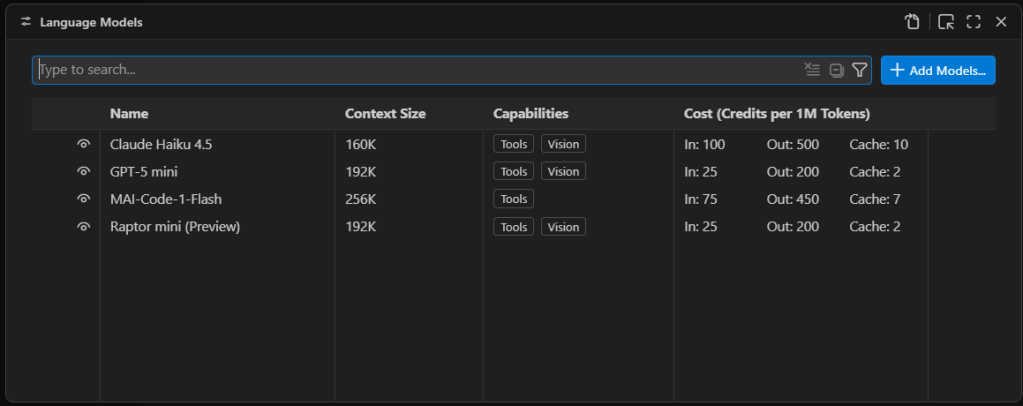
Third-party language models are managed through Visual Studio Code’s language model list. Press Ctrl-Shift-P and type Manage Language Models to open the list of existing language models.

Managing VS Code's AI language model list

Managing VS Code’s AI language model list. The models available by default are only models available as external APIs, not models that run locally.

Foundry

First you will see a list of the built-in models, which are all externally hosted. To add a new model, select Add Models at the top right and select Custom Endpoint.

You’ll then get a series of prompts:

  • Group Name: This is “Custom Endpoint” by default, but you can choose any name you want. The name is strictly for organizing the model list and doesn’t affect things like model recognition or connectivity.
  • API Key: If you’ve configured LM Studio to use an API key for serving models, provide it here. If you’re hosting the model locally and you haven’t explicitly set up API keys, you can leave this blank.
  • API Type: The options here are Chat Completions, Responses, and Messages. Most of the time you’ll want to use Responses, as it’s the most general-purpose option of the three.

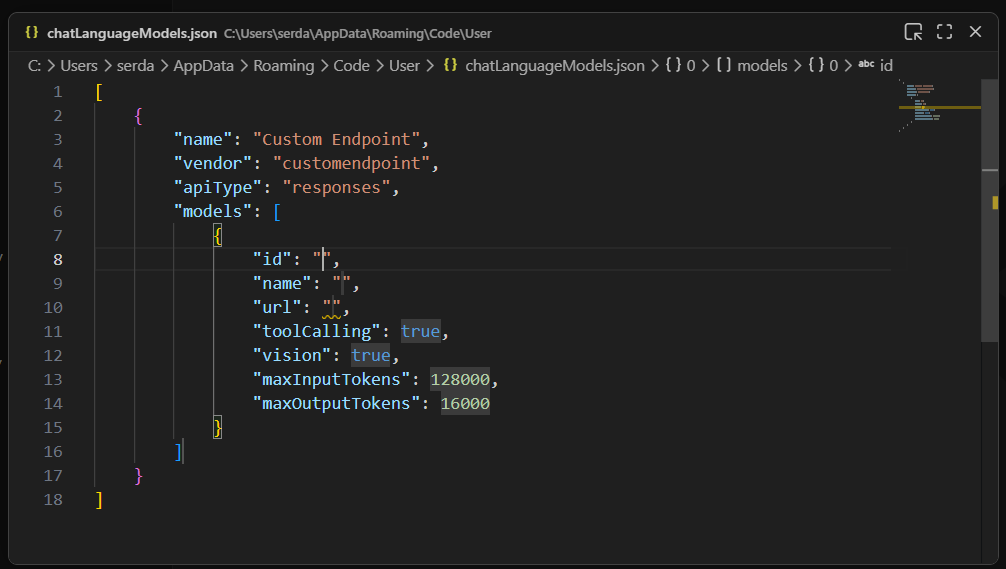
Once you finish providing those answers, you’ll be dropped into a modal editor for a JSON file that holds the details about the endpoint you’re configuring.

A newly created custom endpoint for a locally hosted model

A newly created custom endpoint for a locally hosted model. The ID, name, and URL still need to be defined for this model to be useful.

Foundry

You’ll need to provide a few more details by typing them into the labeled fields:

  • id: A text field that uniquely identifies this particular entry. The choice of ID is pretty much arbitrary; if you’re using only a single model, the ID could be the model name.
  • name: The name of the model that is used to identify it on the model server. In LM Studio, you can get this name by clicking on My Models in the main interface, then selecting the three-dot icon for the model in question and clicking Copy Default Identifier. For Qwen 2.5, for instance, name might be something like qwen2.5-coder-7b-instruct.
  • url: The URL to the server’s endpoint. On LM Studio, this defaults to something like http://127.0.0.1:1234/v1. The /v1 at the end is important because that endpoint is used for autodiscovery of models and their capabilities.

The other fields generally don’t need editing. Most models have tool calling functionality. If you know for a fact that the model you’re using doesn’t have vision support, then set vision to false.

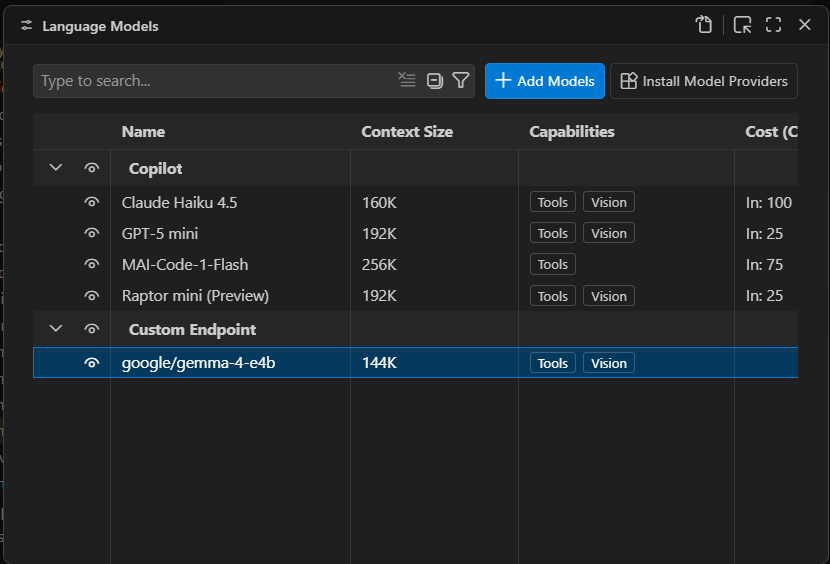
Once you have these fields filled in, you can close the modal editor to save the changes. If you reload the Manage Language Models page, you’ll now see your new endpoint:

A newly created local endpoint

A newly created local endpoint. The choice of name and group is arbitrary. “Custom Endpoint” is the default name for a newly created group of endpoints.

Foundry

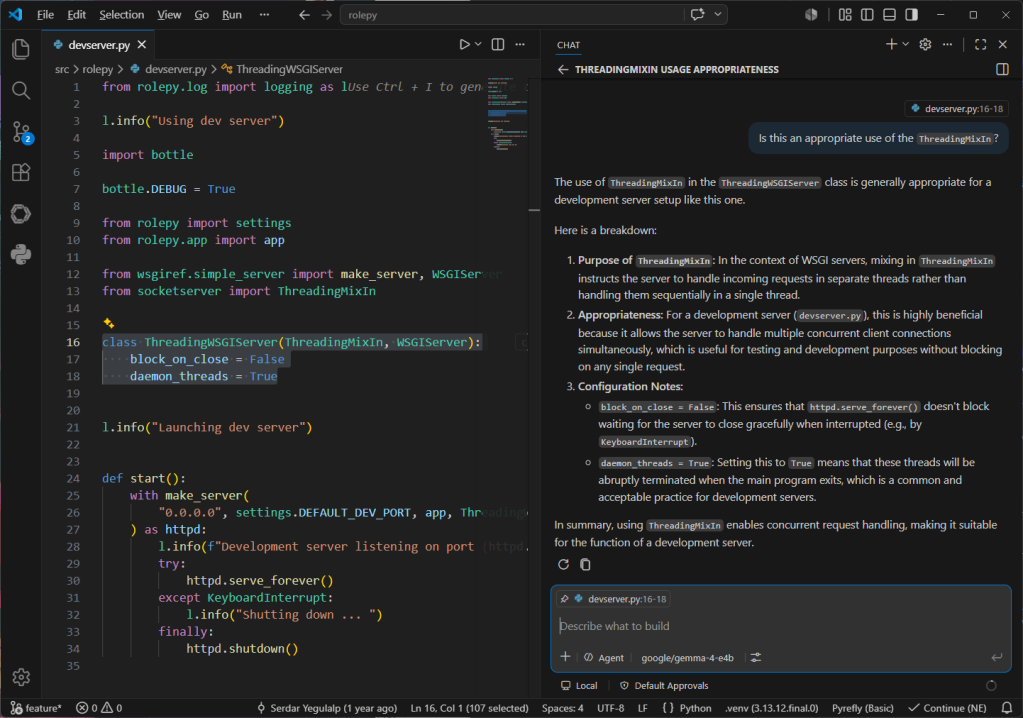
You should now be able to launch the chat window and use the defined model for conversation and utilities:

Conversing with the local model using VS Code's chat window

Conversing with the local model using VS Code’s chat window. Note the selected code block in the left pane that is being used as the context for the conversation.

Foundry

One current, and major, limitation of Visual Studio Code’s BYOK functionality is that it only works for chat and utility tasks. It doesn’t allow you to use a local model for inline suggestions or code completions. The only way to take advantage of local models for expanded functionality with VS Code is to use a third-party tool like Continue.

It isn’t clear if Microsoft will eventually lift this restriction. GitHub Copilot integration in VS Code is a large part of how Copilot as a service reaches its target audience. For the time being, you can certainly use third-party and local models for a significant part of your AI-assisted development work in VS Code, and you can close the functionality gap with additional tooling.

  •  

GitHub adds new Copilot features as usage-based billing takes effect

GitHub is expanding Copilot beyond the IDE with a new desktop application and a new collaborative work surface called canvas as part of its broader efforts to pitch the AI-assisted coding tool as the control center for agent-native software development.

The desktop application announced at Microsoft’s annual Build conference this week is designed to give developers a dedicated environment for working with AI agents throughout the software development lifecycle, rather than limiting those interactions to code-generation tasks inside an editor, the company wrote in a blog post.

The application includes a collaborative workspace called canvas where developers can brainstorm ideas, refine requirements, generate plans, and iterate on projects alongside AI, it said.

It also has new Agent Merge and code review features that enable developers to automate Copilot to combine tasks of different agents to complete a specific goal or conduct autonomous code reviews according to set standards, it said.

These new features could reduce context switching, increase engineering efficiency, and accelerate delivery cycles, said Phil Fersht, CEO of HFS Research.

Shift in pricing justified?

However, despite the new features, much of the conversation among developers in recent weeks has centered on a different topic: this week’s shift to a usage-based billing model for GitHub Copilot that it announced in April.

The changes were met with a wave of criticism on the GitHub community forum, where some users accused the company of a “bait and switch,” while others requested refunds or announced plans to cancel their subscriptions.

For analysts, though, the pricing change was, at least from GitHub’s point of view, necessary and justified.

“The pricing change is justified by where GitHub is going, not by where the product is today. Running multiple agents in parallel with sandboxes, canvas reviews, and Agent Merge looping through CI is closer to cloud compute than an IDE plugin, and you cannot price compute on a flat seat fee. So metered billing is the right call structurally,” said Advait Patel, a senior reliability engineer at Broadcom.

Fersht said developers and CIOs need to focus on Copilot’s metamorphosis from being a coding assistant into a platform for orchestrating software-development agents and workflows.

“That changes the ROI conversation significantly. CIOs should stop thinking about Copilot as a seat-license productivity tool and instead evaluate it as an AI-powered software delivery platform,” he said. “The metrics shift from ‘lines of code generated’ to broader operational outcomes such as release velocity, code quality, defect reduction and engineering efficiency.”

GitHub is not the first company offering vibe-coding tools to rethink its pricing strategy as AI agents proliferate across enterprises and evolve to take on more complex software-development tasks that are computationally more intensive.

Over the past year, platforms such as Claude Code, Replit, Cursor, and Kiro have repeatedly adjusted their pricing structures to account for mounting infrastructure costs, limited GPU availability, and the expense of serving increasingly sophisticated AI models and agents, despite furor among their users.

For CIOs, the challenge is proving ROI

That common pressure across AI coding vendors is why Amit Chandak, chief analytics officer at IT consulting firm Kanerika, thinks developers and CIOs should focus less on GitHub’s pricing mechanics and more on whether these increasingly capable tools are delivering measurable business value.

“The new features that GitHub announced can act as productivity multipliers as well as features that increase consumption without delivering proportional business value. Without productivity baselines established before adoption, enterprises risk absorbing higher costs with no clear line back to delivered value,” Chandak said.

For Fersht, developers and CIOs will need to focus on governance, monitoring and financial controls as the pricing model is changing.

“The governance challenge is very real. Autonomous agents can continuously reason, test, revise and interact with multiple systems in ways that create far less predictable consumption patterns than traditional SaaS tools,” he said.

Patel, however, advised users and decision-makers to be more skeptical, especially since the new features are currently in technical preview.

“Customers are being asked to pay variable rates now for value that has not been validated in production. Do not assume new capabilities justify higher spend,” he said. “Instead, run a 90 day pilot, measure PRs merged per dollar before and after, and let the data decide. If the ratio improves, the pricing is fair. If it does not, you are paying for promise, not delivery,” Patel added.

  •  
❌