A história acompanha um romance sucedido por um assassinato envolvendo “dois amantes jovens, adultos, mas tementes a Deus” e uma investigação que tentará desvendar o custo emocional de se viver como assassinos por 18 anos.
Essa fascinante narrativa de crimes reais, ambientada em um pano de fundo de sexo e assassinato no Panhandle da Flórida, promete se tornar um clássico instantâneo.
De acordo com a Apple, “Guilty Creatures” será produzida pelo Tomorrow Studios (parceira do ITV Studios) como fruto de um acordo com a Alma Margo e a Fortunate Jack Productions.
O Apple TV está disponível no aplicativo Apple TV em mais de 100 países e regiões, seja em iPhones, iPads, Apple TVs, Macs, dispositivos Android, smart TVs ou online — além de também estar em aparelhos como Roku, Amazon Fire TV, Chromecast com Google TV, consoles PlayStation e Xbox. O serviço custa R$29,90 por mês, com um período de teste gratuito de 7 dias. Por tempo limitado, quem comprar e ativar um novo iPhone, iPad, Apple TV ou Mac ganha 3 meses do Apple TV. Ele também faz parte do pacote de assinaturas da empresa, o Apple One.
NOTA DE TRANSPARÊNCIA: O MacMagazine recebe uma pequena comissão sobre vendas concluídas por meio de links deste post, mas você, como consumidor, não paga nada mais pelos produtos/serviços usando os nossos links de afiliado.
Übers Wochenende hat Apple die Preise für seinen Abo-Dienst Apple Music in weiteren Ländern angehoben, unter anderem in Deutschland. Das Einzelabo pro Monat steigt von 10,99 Euro auf 11,99 Euro. Das Familienabo für sechs Personen steigt auf 19,99 Euro von bisher 16,99 Euro. Auch das Studierendenabo wird etwas teurer: 6,99 Euro statt 5,99 Euro.
Den Preis für das Jahresabo für Einzelpersonen hat Apple ebenfalls angehoben: von 109 Euro auf 119 Euro pro Jahr. Allerdings ist selbst nach der Preiserhöhung ein Jahresabo ein hervorragendes Angebot. Geteilt durch zwölf Monate zahlt man auch nach der Preiserhöhung effektiv rund 9,99 Euro pro Monat für ein Apple-Music-Abonnement. Der Zugang zum klassischen Katalog über Apple Music Classical ist in der aktuellen Preiserhöhung inbegriffen.
Die Preiserhöhungen im Euroraum sind vergleichbar mit den Änderungen in den USA vor wenigen Tagen. Auch dort hat Apple die Preise für ein Individualabo von 10,99 auf 11,99 US-Dollar erhöht. Gegenüber der Presse rechtfertigt Apple diese Preissteigerungen mit gestiegenen Lizenzkosten. An dieser Stelle wäre interessant zu beobachten, ob Apple in der nahen Zukunft auch die Preise für seinen Streaming-Dienst Apple TV anhebt. Die Lizenzkosten dürften hier kaum eine Rolle spielen, denn die Inhalte auf Apple TV sind allesamt von Apple eingekauft, die Nutzungslizenzen liegen direkt in Cupertino.
Angesichts dieser Preissteigerungen wird Apple One immer attraktiver: Aktuell kostet das Paket für eine Einzelperson 19,95 Euro pro Monat und beinhaltet das Abo für iCloud+, allerdings nur für 50 GB, Apple Music, Apple TV und Apple Arcade. Allein für Apple Music, Apple TV und iCloud+ müsste man separat 22,97 Euro pro Monat ausgeben, wenn man sie einzeln abonniert: 11,99 Euro für Apple Music, 9,99 Euro für Apple TV und 0,99 Euro für iCloud+.
Just one day after its global premiere on July 15, 2026, Anya Taylor-Joy’s high-stakes limited series “Lucky” has stormed to the top of Apple TV’s streaming charts in the United States, dethroning established hits like “Silo” and claiming the platform’s overall top spot.
The seven-episode crime thriller, which dropped its first two episodes on premiere day with weekly releases to follow, has generated massive buzz thanks to Taylor-Joy’s magnetic lead performance and a stacked ensemble cast. Early viewership data from FlixPatrol confirms the explosive debut, signaling strong audience appetite for glossy, twist-filled thrillers this summer.
A High-Octane Return to the Small Screen
In Lucky, Taylor-Joy stars as Luciana “Lucky” Armstrong, a reformed con artist whose carefully rebuilt life unravels after a multimillion-dollar heist goes disastrously wrong. Forced back into the criminal underworld she escaped years earlier, she finds herself pursued by both the FBI and a ruthless mob boss (played with icy menace by Annette Bening). The series blends pulse-pounding chases, family betrayals, and moral dilemmas, all set against glamorous backdrops like Las Vegas penthouses and sun-baked desert highways.
Taylor-Joy, who also executive produces through her Ladykiller banner alongside Reese Witherspoon’s Hello Sunshine, delivers a layered, physically demanding turn that echoes the breakout intensity of “The Queen’s Gambit” while showcasing the action prowess she honed in films like Furiosa. Supporting players Timothy Olyphant (as Lucky’s complicated father), Aunjanue Ellis-Taylor (as a determined FBI agent), Drew Starkey, Clifton Collins Jr., and William Fichtner round out a cast that critics are already praising for elevating the material.
Created by Jonathan Tropper and co-showrun with Cassie Pappas, “Lucky” adapts Marissa Stapley’s bestselling 2021 novel (a Reese’s Book Club pick). The production shot in Las Vegas and Los Angeles, wrapping principal photography in 2025 before arriving with sleek marketing and an adrenalized trailer that teased its mix of glamour, deception, and survival.
Why the Instant Success?
Apple TV has seen sustained hits from Taylor-Joy before — her 2025 sci-fi thriller “The Gorge” lingered on charts for hundreds of days — but “Lucky” marks her triumphant return to limited series television. The timing couldn’t be better: summer viewing habits favor bingeable, escapist fare, and the show’s weekly episode drops build anticipation without overwhelming audiences.
Early reviews highlight Taylor-Joy’s star power and the series’ slick production values, even as some note familiar genre tropes. Its rapid climb to #1 underscores Apple’s strategy of leveraging A-list talent and book adaptations to drive subscriptions.
With new episodes dropping every Wednesday through August 19th, Lucky is poised to maintain momentum. Whether it sustains its chart dominance like Apple’s other long-runners remains to be seen, but its opening salvo has already proven one thing: audiences are feeling very lucky indeed.
MacDailyNews Note: Apple TV is available on the Apple TV app in over 100 countries and regions, on over 1 billion screens, including iPhone, iPad, Apple TV 4K, Apple Vision Pro, Mac, popular smart TVs from Samsung, LG, Sony, VIZIO, TCL and others, Roku and Amazon Fire TV devices, Chromecast with Google TV, PlayStation and Xbox gaming consoles, and at tv.apple.com, for $12.99 per month with a seven-day free trial for new subscribers. For a limited time, customers who purchase and activate a new iPhone, iPad, Apple TV 4K or Mac can enjoy three months of Apple TV for free.
Please help support MacDailyNews — and enjoy subscriber-only articles, comments, chat, and more — by subscribing to our Substack: macdailynews.substack.com. Thank you!
macOS Tahoe 26.5.2 (25F84) is now Available For All Users!
UPDATED: 06/29/26
This article will be continually updated as new information comes in.
Apple just released the 5th minor update for macOS Tahoe to the public! Let’s jump in and find out what’s new.
This update is a very small point release that shows the following notes:
The 26.5.2 Update includes the following:
“This update provides security fixes for your Mac.”
If you look at the security update page, it does not have just one or two security fixes. The Tahoe 26.5.2 update includes fixes for 38 individual CVE vulnerabilities. Normally smaller point releases will have fixes for a few bugs and a few security items but this is a lot
macOS Tahoe Patch Notes Summary
1. New Features – 0
2. Developer Documented Fixes – 0
3. Security Fixes – 11
4. Enterprise Fixes – 0
5. Safari Security (Webkit) – 17
6. Safari – 26.5.2 for macOS Sequoia and Sonoma
7. Full installer & IPSW – Both Released
8. OpenCore Legacy Patcher Users – NOT COMPATIBLE!
NOTE: I hate website ads, but this one small google ad below helps me with the cost of running Mr. Macintosh.com. Thank you
OpenCore Legacy Patcher for Unsupported Macs
OCLP 2.4.1 & macOS Tahoe 26.5.2 : DO NOT INSTALL! NOT COMPATIBLE YET. This release is in full testing and it is not recommended that you attempt to install it yet.!
The delta update will automatically change in size for exactly what your macOS version needs.
Full update & OCLP Users = NOT SUPPORTED YET
Apple Silicon Updates
Delta from macOS Tahoe 26.5.1 with size = 2.77GB
Upgrade from macOS Sequoia 15.7.7 with size =
Intel Updates
Delta Update from macOS Tahoe 26.5.1 with size = 1.13GB
6. Apple Silicon System Firmware Version
This update has a new firmware update. The version number is reported in System Information under “System Firmware Version“. Also known as mBoot.
Apple Silicon Firmware = UPDATED!
21. macOS Tahoe 26.5.2 = 18000.121.3
20. macOS Tahoe 26.5.1 = 18000.120.36
19. macOS Tahoe 26.5 = 18000.120.36
18. macOS Tahoe 26.4.1 = 18000.101.7
17. macOS Tahoe 26.4 = 18000.101.7
16. macOS Tahoe 26.3.1 = 13822.81.10
15. macOS Tahoe 26.3 = 13822.81.10
14. macOS Tahoe 26.2 = 13822.61.10
13. macOS Tahoe 26.1 = 13822.41.1
12. macOS Tahoe 26.0.1 = 13822.1.2
11. macOS Tahoe 26.0 = 13822.1.2
10. macOS Tahoe RC = 13822.1.2
9. macOS Tahoe Beta 9 = 13822.1.2
8. macOS Tahoe Beta 8 = 13822.1.2
7. macOS Tahoe Beta 7 = 13822.1.2
6. macOS Tahoe Beta 6 = 13822.1.2
5. macOS Tahoe Beta 5 = 13822.0.277.0.3
4. macOS Tahoe Beta 4 = 13822.0.233
3. macOS Tahoe Beta 3 = 13822.0.194.0.3
2. macOS Tahoe Beta 2 = 13822.0.166.0.1
1. macOS Tahoe Beta 1 = 13822.0.88.511.1
7. Apple Silicon OS loader Version (iBoot)
OS Loader Version (iBoot) also referred to as “iBoot second-stage loader”, is Apple’s stage 2 bootloader. The OS loader version will be the same as the “System Firmware Version” on the latest OS. On previous versions of macOS Monterey and Big Sur, the OS loader version will be a version behind. Example = Monterey = 7459.121.3 & Big Sur = 6723.140.2
OS Loader version = UPDATED!
21. macOS Tahoe 26.5.2 = 18000.121.3
20. macOS Tahoe 26.5.1 = 18000.120.36
19. macOS Tahoe 26.5 = 18000.120.36
18. macOS Tahoe 26.4.1 = 18000.101.7
17. macOS Tahoe 26.4 = 18000.101.7
16. macOS Tahoe 26.3.1 = 13822.81.10
15. macOS Tahoe 26.3 = 13822.81.10
14. macOS Tahoe 26.2 = 13822.61.10
13. macOS Tahoe 26.1 = 13822.41.1
12. macOS Tahoe 26.0.1 = 13822.1.2
11. macOS Tahoe 26.0 = 13822.1.2
10. macOS Tahoe RC = 13822.1.2
9. macOS Tahoe Beta 9 = 13822.1.2
8. macOS Tahoe Beta 8 = 13822.1.2
7. macOS Tahoe Beta 7 = 13822.1.2
6. macOS Tahoe Beta 6 = 13822.1.2
5. macOS Tahoe Beta 5 = 13822.0.277.0.3
4. macOS Tahoe Beta 4 = 13822.0.233
3. macOS Tahoe Beta 3 = 13822.0.194.0.3
2. macOS Tahoe Beta 2 = 13822.0.166.0.1
1. macOS Tahoe Beta 1 = 13822.0.88.511.1
8. Intel T2 BridgeOS Update
The Version of BridgeOS for your T2 Security Chip (2018-2020 Intel Macs) was updated.
BridgeOS version = NOT Updated
21. macOS Tahoe 26.5.2 = 23.16.15067.0.0
20. macOS Tahoe 26.5.1 = 23.16.15067.0.0
19. macOS Tahoe 26.5 = 23.16.15067.0.0
18. macOS Tahoe 26.4.1 = 23.16.14242.0.0
17. macOS Tahoe 26.4 = 23.16.14242.0.0
16. macOS Tahoe 26.3.1 = 23.16.13120.0.0
15. macOS Tahoe 26.3 = 23.16.13120.0.0
14. macOS Tahoe 26.2 = 23.16.12048.0.0
13. macOS Tahoe 26.1 = 23.16.11072.0.0
12. macOS Tahoe 26.0.1 = 23.16.10350.0.0
11. macOS Tahoe 26.0 = 23.16.10350.0.0
10. macOS Tahoe RC = 23.16.10350.0.0
9. macOS Tahoe Beta 9 = 23.16.10350.0.0
8. macOS Tahoe Beta 8 = 23.16.10348.5.1
7. macOS Tahoe Beta 7 = 23.16.5342.0.1
6. macOS Tahoe Beta 6 = 23.16.5342.0.1
5. macOS Tahoe Beta 5 = 23.16.5331.0.4
4. macOS Tahoe Beta 4 = 23.16.5320.0.2
3. macOS Tahoe Beta 3 = N/A
2. macOS Tahoe Beta 2 = N/A
1. macOS Tahoe Beta 1 = 23.16.5283.0.7
9. Intel T2 Firmware Update
The System Firmware Version for your Mac (2019-2020)
This update also includes the following Developer enhancements and bug fixes:
The macOS 26.5 SDK provides support to develop apps for Mac computers running Tahoe 26.5. The SDK comes bundled with Xcode 26.5, available from the Mac App Store. For information on the compatibility requirements for Xcode 26.5, see Xcode 26.5 Release Notes.
You can read pricing information for subscriptions that have a monthly with 12-month commitment billing plan configuration in App Store Connect or StoreKit Testing in Xcode through the new PricingTerms model on SubscriptionInfo.pricingTerms. (150388310)
You can specify the billing plan type to use for subscriptions that have a monthly with 12-month commitment billing plan configuration using the new billingPlanTypePurchaseOption. (150388542)
Read customer entitlement metadata for subscriptions purchased with a monthly billing plan type through the new CommitmentInfo data model on Transaction and SubscriptionRenewalInfo. (150388746)
When you import both StoreKit and SwiftUI, you can merchandise the monthly billing plan configuration for subscriptions that have a monthly with 12-month commitment billing plan using built-in styles through the new preferredSubscriptionPricingTerms(_:) API. (150389069)
Fixed: The App Version field in the ASN.1 app receipt might contain the string “null” instead of the expected version number. (171614522) (FB22114908)
Fixed: Transaction.currentEntitlements might be empty if a customer has an active subscription when the device’s system calendar is set to a non-Gregorian format. (173415174)
macOS Tahoe 26.5.1 (25F80) is now Available For All Users!
UPDATED: 06/02/26
This article will be continually updated as new information comes in.
Apple just released the 3rd minor update for macOS Tahoe to the public! Let’s jump in and find out what’s new.
This update is a very small point release that shows the following notes:
The 26.5.1 Update includes the following:
This update addresses an issue for enterprise users where Macs with an M5 chip could unexpectedly shut down when using certain content filtering network extensions.
This update appears to only fix one issue with M5 Macs. The update is available for ALL macOS Tahoe supported Macs. The update also does not have any published CVE Security fixes listed on Apple’s Security Update page.
macOS Tahoe Patch Notes Summary
1. New Features – 0
2. Developer Documented Fixes – 0
3. Security Fixes – 0
4. Enterprise Fixes – 1
5. Safari Security (Webkit) – 0
6. Safari – No update
7. Full installer & IPSW – Both Released
8. OpenCore Legacy Patcher Users – NOT COMPATIBLE!
OpenCore Legacy Patcher for Unsupported Macs
OCLP 2.4.1 & macOS Tahoe 26.5.1 : DO NOT INSTALL! NOT COMPATIBLE YET. This release is in full testing and it is not recommended that you attempt to install it yet.!
The delta update will automatically change in size for exactly what your macOS version needs.
Full update & OCLP Users = NOT SUPPORTED YET
Apple Silicon Updates
Delta from macOS Tahoe 26.5 with size = 2.14GB
Upgrade from macOS Sequoia 15.7.7 with size =
Intel Updates
Delta Update from macOS Tahoe 26.5 with size = 929MB
6. Apple Silicon System Firmware Version
This update has a new firmware update. The version number is reported in System Information under “System Firmware Version“. Also known as mBoot.
Apple Silicon Firmware = NOT Updated
20. macOS Tahoe 26.5.1 = 18000.120.36
19. macOS Tahoe 26.5 = 18000.120.36
18. macOS Tahoe 26.4.1 = 18000.101.7
17. macOS Tahoe 26.4 = 18000.101.7
16. macOS Tahoe 26.3.1 = 13822.81.10
15. macOS Tahoe 26.3 = 13822.81.10
14. macOS Tahoe 26.2 = 13822.61.10
13. macOS Tahoe 26.1 = 13822.41.1
12. macOS Tahoe 26.0.1 = 13822.1.2
11. macOS Tahoe 26.0 = 13822.1.2
10. macOS Tahoe RC = 13822.1.2
9. macOS Tahoe Beta 9 = 13822.1.2
8. macOS Tahoe Beta 8 = 13822.1.2
7. macOS Tahoe Beta 7 = 13822.1.2
6. macOS Tahoe Beta 6 = 13822.1.2
5. macOS Tahoe Beta 5 = 13822.0.277.0.3
4. macOS Tahoe Beta 4 = 13822.0.233
3. macOS Tahoe Beta 3 = 13822.0.194.0.3
2. macOS Tahoe Beta 2 = 13822.0.166.0.1
1. macOS Tahoe Beta 1 = 13822.0.88.511.1
7. Apple Silicon OS loader Version (iBoot)
OS Loader Version (iBoot) also referred to as “iBoot second-stage loader”, is Apple’s stage 2 bootloader. The OS loader version will be the same as the “System Firmware Version” on the latest OS. On previous versions of macOS Monterey and Big Sur, the OS loader version will be a version behind. Example = Monterey = 7459.121.3 & Big Sur = 6723.140.2
OS Loader version = NOT Updated
20. macOS Tahoe 26.5.1 = 18000.120.36
19. macOS Tahoe 26.5 = 18000.120.36
18. macOS Tahoe 26.4.1 = 18000.101.7
17. macOS Tahoe 26.4 = 18000.101.7
16. macOS Tahoe 26.3.1 = 13822.81.10
15. macOS Tahoe 26.3 = 13822.81.10
14. macOS Tahoe 26.2 = 13822.61.10
13. macOS Tahoe 26.1 = 13822.41.1
12. macOS Tahoe 26.0.1 = 13822.1.2
11. macOS Tahoe 26.0 = 13822.1.2
10. macOS Tahoe RC = 13822.1.2
9. macOS Tahoe Beta 9 = 13822.1.2
8. macOS Tahoe Beta 8 = 13822.1.2
7. macOS Tahoe Beta 7 = 13822.1.2
6. macOS Tahoe Beta 6 = 13822.1.2
5. macOS Tahoe Beta 5 = 13822.0.277.0.3
4. macOS Tahoe Beta 4 = 13822.0.233
3. macOS Tahoe Beta 3 = 13822.0.194.0.3
2. macOS Tahoe Beta 2 = 13822.0.166.0.1
1. macOS Tahoe Beta 1 = 13822.0.88.511.1
8. Intel T2 BridgeOS Update
The Version of BridgeOS for your T2 Security Chip (2018-2020 Intel Macs) was updated.
BridgeOS version = NOT Updated
20. macOS Tahoe 26.5.1 = 23.16.15067.0.0
19. macOS Tahoe 26.5 = 23.16.15067.0.0
18. macOS Tahoe 26.4.1 = 23.16.14242.0.0
17. macOS Tahoe 26.4 = 23.16.14242.0.0
16. macOS Tahoe 26.3.1 = 23.16.13120.0.0
15. macOS Tahoe 26.3 = 23.16.13120.0.0
14. macOS Tahoe 26.2 = 23.16.12048.0.0
13. macOS Tahoe 26.1 = 23.16.11072.0.0
12. macOS Tahoe 26.0.1 = 23.16.10350.0.0
11. macOS Tahoe 26.0 = 23.16.10350.0.0
10. macOS Tahoe RC = 23.16.10350.0.0
9. macOS Tahoe Beta 9 = 23.16.10350.0.0
8. macOS Tahoe Beta 8 = 23.16.10348.5.1
7. macOS Tahoe Beta 7 = 23.16.5342.0.1
6. macOS Tahoe Beta 6 = 23.16.5342.0.1
5. macOS Tahoe Beta 5 = 23.16.5331.0.4
4. macOS Tahoe Beta 4 = 23.16.5320.0.2
3. macOS Tahoe Beta 3 = N/A
2. macOS Tahoe Beta 2 = N/A
1. macOS Tahoe Beta 1 = 23.16.5283.0.7
9. Intel T2 Firmware Update
The System Firmware Version for your Mac (2019-2020)
This update addresses an issue for enterprise users where Macs with an M5 chip could unexpectedly shut down when using certain content filtering network extensions.
developer.apple/com/forum/thread/822390
14 macOS Tahoe Developer Release Notes
This update also includes the following Developer enhancements and bug fixes:
The macOS 26.5 SDK provides support to develop apps for Mac computers running Tahoe 26.5. The SDK comes bundled with Xcode 26.5, available from the Mac App Store. For information on the compatibility requirements for Xcode 26.5, see Xcode 26.5 Release Notes.
You can read pricing information for subscriptions that have a monthly with 12-month commitment billing plan configuration in App Store Connect or StoreKit Testing in Xcode through the new PricingTerms model on SubscriptionInfo.pricingTerms. (150388310)
You can specify the billing plan type to use for subscriptions that have a monthly with 12-month commitment billing plan configuration using the new billingPlanTypePurchaseOption. (150388542)
Read customer entitlement metadata for subscriptions purchased with a monthly billing plan type through the new CommitmentInfo data model on Transaction and SubscriptionRenewalInfo. (150388746)
When you import both StoreKit and SwiftUI, you can merchandise the monthly billing plan configuration for subscriptions that have a monthly with 12-month commitment billing plan using built-in styles through the new preferredSubscriptionPricingTerms(_:) API. (150389069)
Fixed: The App Version field in the ASN.1 app receipt might contain the string “null” instead of the expected version number. (171614522) (FB22114908)
Fixed: Transaction.currentEntitlements might be empty if a customer has an active subscription when the device’s system calendar is set to a non-Gregorian format. (173415174)
macOS Tahoe 26.5 (25F71) is now Available For All Users!
UPDATED: 05/12/26
This article will be continually updated as new information comes in.
Apple just released the 5th major update for macOS Tahoe to the public! Let’s jump in and find out what’s new.
This update is a large point release update that shows the following notes:
The 26.5 Update includes the following:
“This update includes enhancements, bug fixes and security updates for your Mac”
NOTE: Apple did not list the below two updates. Thank you to @Dhinak for grabbing the info. The MagSafe info was provided in the Apple Developer Forum.
Suggested Places in Maps displays recommendations based on what’s trending nearby and your recent searches
Power control setting in Energy for Mac mini, Mac Studio, and iMac enables you to power off or restart your Mac using assistive accessories like switches
MagSafe Power adapter color will now show green if the battery charge limit is set and the Mac is fully charged =
The light should now turn green when the device reaches the charging limit.
The light should now turn back to amber if/when power drain causes charging to resume.
developer.apple/com/forum/thread/822390
macOS Tahoe Patch Notes Summary
1. New Features – 3*
2. Developer Documented Fixes – 8
3. Security Fixes – 79
4. Enterprise Fixes – 8
5. Safari Security (Webkit) –
6. Safari – Updated – 26.5
7. Full installer & IPSW – Both Released
8. OpenCore Legacy Patcher Users – NOT COMPATIBLE!
OpenCore Legacy Patcher for Unsupported Macs
OCLP 2.4.1 & macOS Tahoe 26.5 : DO NOT INSTALL! NOT COMPATIBLE YET. This release is in full testing and it is not recommended that you attempt to install it yet.!
The delta update will automatically change in size for exactly what your macOS version needs.
Full update & OCLP Users = NOT SUPPORTED YET
Apple Silicon Updates
Delta from macOS Tahoe 26.4.1 with size = 3.78
Upgrade from macOS Sequoia 15.7.4 with size = 10.05GB
Intel Updates
Delta Update from macOS Tahoe 26.4.1 with size = 2.83GB
6. Apple Silicon System Firmware Version
This update has a new firmware update. The version number is reported in System Information under “System Firmware Version“. Also known as mBoot.
Apple Silicon Firmware = Updated!
19. macOS Tahoe 26.5 = 18000.120.36
18. macOS Tahoe 26.4.1 = 18000.101.7
17. macOS Tahoe 26.4 = 18000.101.7
16. macOS Tahoe 26.3.1 = 13822.81.10
15. macOS Tahoe 26.3 = 13822.81.10
14. macOS Tahoe 26.2 = 13822.61.10
13. macOS Tahoe 26.1 = 13822.41.1
12. macOS Tahoe 26.0.1 = 13822.1.2
11. macOS Tahoe 26.0 = 13822.1.2
10. macOS Tahoe RC = 13822.1.2
9. macOS Tahoe Beta 9 = 13822.1.2
8. macOS Tahoe Beta 8 = 13822.1.2
7. macOS Tahoe Beta 7 = 13822.1.2
6. macOS Tahoe Beta 6 = 13822.1.2
5. macOS Tahoe Beta 5 = 13822.0.277.0.3
4. macOS Tahoe Beta 4 = 13822.0.233
3. macOS Tahoe Beta 3 = 13822.0.194.0.3
2. macOS Tahoe Beta 2 = 13822.0.166.0.1
1. macOS Tahoe Beta 1 = 13822.0.88.511.1
7. Apple Silicon OS loader Version (iBoot)
OS Loader Version (iBoot) also referred to as “iBoot second-stage loader”, is Apple’s stage 2 bootloader. The OS loader version will be the same as the “System Firmware Version” on the latest OS. On previous versions of macOS Monterey and Big Sur, the OS loader version will be a version behind. Example = Monterey = 7459.121.3 & Big Sur = 6723.140.2
OS Loader version = Updated!
19. macOS Tahoe 26.5 = 18000.120.36
18. macOS Tahoe 26.4.1 = 18000.101.7
17. macOS Tahoe 26.4 = 18000.101.7
16. macOS Tahoe 26.3.1 = 13822.81.10
15. macOS Tahoe 26.3 = 13822.81.10
14. macOS Tahoe 26.2 = 13822.61.10
13. macOS Tahoe 26.1 = 13822.41.1
12. macOS Tahoe 26.0.1 = 13822.1.2
11. macOS Tahoe 26.0 = 13822.1.2
10. macOS Tahoe RC = 13822.1.2
9. macOS Tahoe Beta 9 = 13822.1.2
8. macOS Tahoe Beta 8 = 13822.1.2
7. macOS Tahoe Beta 7 = 13822.1.2
6. macOS Tahoe Beta 6 = 13822.1.2
5. macOS Tahoe Beta 5 = 13822.0.277.0.3
4. macOS Tahoe Beta 4 = 13822.0.233
3. macOS Tahoe Beta 3 = 13822.0.194.0.3
2. macOS Tahoe Beta 2 = 13822.0.166.0.1
1. macOS Tahoe Beta 1 = 13822.0.88.511.1
8. Intel T2 BridgeOS Update
The Version of BridgeOS for your T2 Security Chip (2018-2020 Intel Macs) was updated.
BridgeOS version = Updated!
19. macOS Tahoe 26.5 = 23.16.15067.0.0
18. macOS Tahoe 26.4.1 = 23.16.14242.0.0
17. macOS Tahoe 26.4 = 23.16.14242.0.0
16. macOS Tahoe 26.3.1 = 23.16.13120.0.0
15. macOS Tahoe 26.3 = 23.16.13120.0.0
14. macOS Tahoe 26.2 = 23.16.12048.0.0
13. macOS Tahoe 26.1 = 23.16.11072.0.0
12. macOS Tahoe 26.0.1 = 23.16.10350.0.0
11. macOS Tahoe 26.0 = 23.16.10350.0.0
10. macOS Tahoe RC = 23.16.10350.0.0
9. macOS Tahoe Beta 9 = 23.16.10350.0.0
8. macOS Tahoe Beta 8 = 23.16.10348.5.1
7. macOS Tahoe Beta 7 = 23.16.5342.0.1
6. macOS Tahoe Beta 6 = 23.16.5342.0.1
5. macOS Tahoe Beta 5 = 23.16.5331.0.4
4. macOS Tahoe Beta 4 = 23.16.5320.0.2
3. macOS Tahoe Beta 3 = N/A
2. macOS Tahoe Beta 2 = N/A
1. macOS Tahoe Beta 1 = 23.16.5283.0.7
9. Intel T2 Firmware Update
The System Firmware Version for your Mac (2019-2020)
Resolved an issue where some Mac computers may start up to a black screen after a software update.
Root and intermediate certificates are correctly updated when renewing enrollment in a device management service.
Resolved an issue where Mac computers restarted unexpectedly while mounting SMB shares.
Resolved an issue where MacBook Air with M5 and MacBook Pro with M5 Pro or M5 Max restarted unexpectedly when using some content filter extensions.
Resolved an issue where successful smart card logins triggered incorrect password attempts.
When autofill is disabled for Safari using device management, Autofill Passwords and Passkeys can still be enabled for other apps in System Settings.
X11 apps using XQuartz now display correctly after the app window is resized.
When the Mac is not bound to Active Directory, the SMB client now performs DNS SRV lookups for ldap.tcp.<serverName> and gc.tcp.<serverName> configured in nsmb.conf to discover domain controllers. If domain controllers are found, the client attempts to connect to each one in order. If all domain controller connections fail, the client falls back to the original server name.
Suggested Places in Maps displays recommendations based on what’s trending nearby and your recent searches
Power control setting in Energy for Mac mini, Mac Studio, and iMac enables you to power off or restart your Mac using assistive accessories like switches
MagSafe Power adapter color will now show green if the battery charge limit is set and the Mac is fully charged =
The light should now turn green when the device reaches the charging limit.
The light should now turn back to amber if/when power drain causes charging to resume.
developer.apple/com/forum/thread/822390
14 macOS Tahoe Developer Release Notes
This update also includes the following Developer enhancements and bug fixes:
The macOS 26.5 SDK provides support to develop apps for Mac computers running Tahoe 26.5. The SDK comes bundled with Xcode 26.5, available from the Mac App Store. For information on the compatibility requirements for Xcode 26.5, see Xcode 26.5 Release Notes.
You can read pricing information for subscriptions that have a monthly with 12-month commitment billing plan configuration in App Store Connect or StoreKit Testing in Xcode through the new PricingTerms model on SubscriptionInfo.pricingTerms. (150388310)
You can specify the billing plan type to use for subscriptions that have a monthly with 12-month commitment billing plan configuration using the new billingPlanTypePurchaseOption. (150388542)
Read customer entitlement metadata for subscriptions purchased with a monthly billing plan type through the new CommitmentInfo data model on Transaction and SubscriptionRenewalInfo. (150388746)
When you import both StoreKit and SwiftUI, you can merchandise the monthly billing plan configuration for subscriptions that have a monthly with 12-month commitment billing plan using built-in styles through the new preferredSubscriptionPricingTerms(_:) API. (150389069)
Fixed: The App Version field in the ASN.1 app receipt might contain the string “null” instead of the expected version number. (171614522) (FB22114908)
Fixed: Transaction.currentEntitlements might be empty if a customer has an active subscription when the device’s system calendar is set to a non-Gregorian format. (173415174)
Doze títulos não acontecem por acaso. Conheça por dentro um dos programas mais prestigiados do basquete universitário. A Dinastia: #UConnHuskies — 21 de agosto na Apple TV.
“The Dynasty: UConn Huskies” narra a ascensão do programa mais dominante na história do basquete universitário nos Estados Unidos. Com entrevistas exclusivas com a equipe campeã nacional de 2025 e participações de figuras do basquete da UConn, a série explora a busca pela excelência, as expectativas que acompanham o sucesso duradouro e as pessoas que mantiveram esse padrão ao longo das gerações.
A série reflete sobre o legado que construiu o programa e oferece um olhar raro de bastidores sobre as jogadoras que dão continuidade a essa história, por meio de conversas aprofundadas com técnicos, atletas, ex-jogadoras, rivais e jornalistas de várias gerações do basquete da UConn, incluindo KK Arnold, Auriemma, Sue Bird, Paige Bueckers, Jim Calhoun, Swin Cash, Chris Dailey, Mickie DeMoss, Jana El Alfy, Jamelle Elliott, Azzi Fudd, Jeff Goldberg, Sally Jenkins, Steve Kerr, Rebecca Lobo, Jackie MacMullan, Maya Moore, Alexa Philippou, Shea Ralph, Semeka Randall, Jennifer Rizzotti, Breanna Stewart, Sarah Strong, Diana Taurasi e Tamika Williams-Jeter.
O Apple TV está disponível no aplicativo Apple TV em mais de 100 países e regiões, seja em iPhones, iPads, Apple TVs, Macs, dispositivos Android, smart TVs ou online — além de também estar em aparelhos como Roku, Amazon Fire TV, Chromecast com Google TV, consoles PlayStation e Xbox. O serviço custa R$29,90 por mês, com um período de teste gratuito de 7 dias. Por tempo limitado, quem comprar e ativar um novo iPhone, iPad, Apple TV ou Mac ganha 3 meses do Apple TV. Ele também faz parte do pacote de assinaturas da empresa, o Apple One.
NOTA DE TRANSPARÊNCIA: O MacMagazine recebe uma pequena comissão sobre vendas concluídas por meio de links deste post, mas você, como consumidor, não paga nada mais pelos produtos/serviços usando os nossos links de afiliado.
After helping thousands of organizations to migrate from other solutions to Mosyle, we've gained a unique perspective of all the concerns companies face when evaluating the migration of their Apple Management & Security solution. Based on this extensive knowledge, we've created the most comprehensive Migration Program in the Apple’s Management & Security market, addressing the most critical technical, financial, and strategic considerations involved in this pivotal decision.
Summer has arrived with force with a massive heatwave in western Europe. But you can also tell that summer is here by a general “slowing down” of news. To compensate—and to give me a bit of a break—MacAdmins.news will switch to “Summer Camp” issues every two weeks (or fortnightly).
Next issue will be July 10. MacAdmins.news will resume the normal, weekly schedule on September 4, just in time for the big 27 platform upgrades.
Hope you get some break of the summer, too!
Sidenote: there are a few sponsor slots open for the rest of the year. Let me know if you or your org are interested!
Nice table showing the price comparisons from Stephen Hackett, 512 Pixels.
I understand that the overall component price increases kinda forced Apple into this. If anyone could afford lower profit margins, it would be Apple, but… well…
Still, the MacBook Neo price increase feels like a betrayal, as it was only introduced a few months ago and its price point was kind of its most relevant “feature.” The new price point is still competitive, since everyone else in the industry is also dealing with the shortages. Nevertheless, You would have thought Apple could have avoided this pricing see-saw.
I guess that Apple believed until just recently that they would be able to weather out the shortages and price increases, but now felt pressure to act quickly to maintain their profit margin.
Some time pressure probably stems from Apple’s standard yearly schedule. They may not want price increases to overshadow the new iPhone and iOS 27 releases with Siri AI in September. Price increases now, will make higher prices later this year “expected.”
Now the second developer beta-release of Golden Gate is available, Apple’s release notes are giving further details of features that are being deprecated or removed.
The attack exploits a fundamental flaw in how macOS XPC services establish trust boundaries by chaining CDHash kernel cache exploitation with NIB payload injection to impersonate trusted application components. Consequently, any non-root user can invoke arbitrary privileged XPC methods with zero authentication.
Not really a fundamental flaw, as macOS provides APIs to verify the app for these kinds of injections, but still important that developer actually use the verifications.
a Rust macOS implant that embeds a 3.5 KB prompt-injection payload of 38 fabricated “system” messages, built to steer an LLM-assisted triage pipeline into aborting or refusing its analysis.
With much of Europe wilting in the heat this week, it’s time to remind ourselves of the warning signs that our Macs are getting too hot. As Macs don’t sweat in the heat as we do, it’s also vital to understand what we can do to help cool them down.
The hosts discuss Jerry installing iOS 27 beta on an iPhone 15 Pro Max and watch, reporting strong stability, snappy performance, and minor reported edge-case crashes, while noting Siri AI requires newer hardware due to RAM constraints and that others find the new Siri improved.
When end users are requesting new tools that will lead them to the promised lands, how can we as IT teams ensure that the tools are actually what they say they are, and how can we measure their risk in our environments?
After helping thousands of organizations to migrate from other solutions to Mosyle, we've gained a unique perspective of all the concerns companies face when evaluating the migration of their Apple Management & Security solution. Based on this extensive knowledge, we've created the most comprehensive Migration Program in the Apple’s Management & Security market, addressing the most critical technical, financial, and strategic considerations involved in this pivotal decision. Check our website for more details!
WWDC previews Apple next major platform updates
In the Keynote, Apple, somewhat surprisingly, backtracked quite a few unpopular user interface choices. They also promised a year of general improvements, big and small. Then they introduced (again) the new Siri AI.
Overall, the keynote felt a less exuberant than keynotes past, which I consider a good thing. Apple's platforms and services have generally reached a level of maturity and sophistication that announcing new superlatives each year seemed quite unserious. I prefer Apple refining and improving existing features. Even so, there are lot of new things in the announcements that will easily take users and admins the next few months to learn and explore.
Apple also released the "What's new in managing Apple devices" session, the most important sessions for Mac Admins. If you haven't seen it yet, go on, watch it now. The rest will make more sense after you have seen it.
(Sidenote: Cyrus Daboo does a great job and I want to hear more device management news narrated by him.)
The session re-iterates that Declarative Device Management (DDM) is now the standard for Apple device management, a strong signal for device management service developers. If your solution is not yet all on board for DDM, it is high time to start looking for alternatives.
Apple announced that organizations will be able to purchase and deploy volume subscriptions for apps! DDM mechanisms to manage and deploy apps are coming from iOS to macOS. Platform SSO is getting improvements.
Not only do these improvement fix some real pain points, some of which have been around for a long time, but they also show Apple's commitment to device management and that the Enterprise team is receptive to feedback.
This year's beta phase and roll-out should be very interesting. Test early, provide lots of feedback.
This year's announcements at WWDC26 carry more operational weight than most. OS 27 offers a structural shift in how Apple devices are configured, secured and managed.
However, as now happens regularly, building a Golden Gate VM isn’t so easy in Tahoe, and is likely to fail without some magic components that we’re not provided with.
There's been some talk about building macOS 27 virtual machines on a macOS 26 host. The solutions so far include creating a macOS 26.5.1 vm and upgrading it or creating the VM image on a macOS 27 host and then moving it to a 26 host. I guess this will be sorted out in future beta releases.
Apple is trying to give the impression that it did all this extra work to meet the DMA’s requirements, and yet the EC rejected its proposals, so it’s their fault Siri AI isn’t shipping in the EU.
It will obviously take some time for vendors to implement all of the new features, but it’s exciting to see Apple “raise the floor“ of what’s possible across the platform.
Apple has carried through on this and announced publicly that legacy software update management no longer functions in all Apple 27.0 operating systems.
iOS 27 introduces a new device recovery mode. This is a Mac-like recovery feature where the iPhone is able to boot into an alternative UI that doesn’t involve loading the entirety of the main operating system.
The MacAdmins community holds a vast amount of information and resources, however, due to the sheer volume and the fact that there is so much spread around the web, it can become quite intimidating, especially for newbies.
One of the customization options called out in the release notes for Self Service+ 2.23.0 is whether or not the Self Service+ menubar icon is visible in the menubar.
Notifications for Jamf's Self Service+ application were only managed for devices enrolled after Jamf Pro 11.18, or via a custom profile. Jamf Pro 11.28.x version fixes this across your fleet
I thought the animated sequence was pretty delightful, so I captured four of my favourite frames, upscaled them, and posted them here for everyone to enjoy.
This email should have gone out last week Friday, but the service I had been using for the last 100 (exactly) issues chose to not cooperate. There had been issues with their backend for weeks, and their support has not really been responsive, so I moved services. I haven't yet been able to salvage the back issues and don't know if I will be able to import them here if I do.
I understand the "tell me when you don't get this" doesn't work. I hope you receive this and it doesn't just end up in everybody's spam folders...
Let's hope this one lasts for more than 100 issues!
Apple celebrates 50 and all we get is 26.5 betas 😉
After helping thousands of organizations to migrate from other solutions to Mosyle, we've gained a unique perspective of all the concerns companies face when evaluating the migration of their Apple Management & Security solution. Based on this extensive knowledge, we've created the most comprehensive Migration Program in the Apple’s Management & Security market, addressing the most critical technical, financial, and strategic considerations involved in this pivotal decision. Check our website for more details!
50!
This week Apple marks their 50th anniverssary. Congratulations!
Last week also saw the discontinuation of the Mac Pro. The Mac Pro can trace its lineage all the way to the Macintosh Quadra 700. In the late 90s and early 2000s the PowerMac G3 and G4 sold into print and publishing and provided the "bread and butter" business that kept Apple afloat while the PowerBook, iPod and Music business were picking up steam. With the PowerMac G5 Apple could briefly claim supercomputing power. Its iconic aluminum alloy enclosure would last for ten years, used for the Intel-transistion Developer Kit and the Mac Pro until the "paint yourself into a thermal corner" black cylindrical Mac Pro in 2013. Apple revived the tower design with lots of expansion slots in 2019 which lasted into the Apple silicon age.
Along the way, Apple has attempted to "improve" on the tower design mutliple times. The PowerMac G4 Cube had many of the same design choices that would later hamper the 2013 cylinder Mac Pro. Only with the Mac Studio, introduced in 2022 did Apple finally seem to figure out the balance of a compact desktop super computer. Apple silicon chips do not support additional graphic cards, which made the PCIe slots in the tower form factor far less useful. The remaining use cases for slot expansion can (mostly) be covered by external Thunderbolt devices. Apple hadn't bothered to update the single generation of Apple silicon Mac Pro with the M2 Ultra chip when they updated the Mac Studio with M3 Max/Ultra and later M4 Max chips. The writing has been on the wall.
There are probably some people still holding on to their 2019 Intel Mac Pros for some expansion card that is essential to their workflow who are disappointed. I don't want to invalidate their plight, but I assume Apple has run the numbers and decided they don't justify keeping the product line.
It is ironic that the news of the discontinuation of the Mac Pro hit the week of the 25th anniversary of Mac OS X, since back in 2001, you basically needed a PowerMac G4 to adequately run Mac OS X. It could run on a G3 chip, but only as the G4 chips moved into the PowerBook, and then iMac and iBook, lines did those become performant enough for the new operating system. I have written before on how much Mac OS X was a turning point in Apple's trajectory. The introduction of the iMac, PowerBook G3, iBook proved Apple could still design excellent and beautiful hardware. Mac OS X, which allowed to run productivity software like Microsoft Word, Adobe Photoshop and Final Cut, side by side with Unix tools and software, made it very useful for (web) developers, scientists and other professionals who had so far needed two separate computers. And you could do all this on a PowerBook (or later MacBook Pro) and get about three to four hours of battery life!
Nothing was perfect, obviously, but back then Apple continually confirmed its reputation as being the only tech company who would and could build good software and good hardware. With the iPod and the iTunes Music Store, they also showed that they could combine that hard-/software combination with online services. Apple struggled for while with iTools/.Mac/Mobile Me/iCloud but eventually figured that out, too. Then the iPhone dropped and... well... the rest is, as they say, history.
Not everything was perfect, of course, (see the PowerMac G4 Cube, PowerPC falling behind, the rough path of iTools/.Mac/Mobile Me) but from the acquisition of NextStep to the early/mid 2010s, Apple did have an attention to detail which often put a lot delight into the use of their products. Even when Apple zeroed in on aluminum and glass as their main materials, they rounded the edges and corners to make them feel good and friendly.
Apple used to be good at bulding software that makes simple things easy to do, and complex things possible. The iLife suite did a great job of providing the basic functionality for workflows that you used to have to get expensive professional software for, and making it accessible. With AppleScript (and scripting support in the apps), Automator, and Terminal, as well as pre-installed scripting languages, like Python, Ruby and Perl, Mac OS X/macOS provided a platform suitable for basic, as well as professional users. Since even the most professional in a field will also be a beginner in a different field, this combination works really well.
Now the user interface is hiding everything but the most basic functionality to "put the content front and center" and everything else is hidden and often needs to be revealed by inscrutable gestures. Workflow and automation tools are restricted and neglected.
When Apple introduced the iPad in 2010, Steve Jobs showing versions of Keynote, Pages and Numbers, optimized for the touch screen, proving that this was device for creation not just consumption. However, while current iPads have the same powerful chips as the MacBook Air, the creative software is still lacking. All that is available on iPad are reduced versions of the software. Shortcuts is the only automation solution. Apps can only come from the App Store.
The iPhone transformed Apple from a beleagured boutique tech company to a Tera-corp. Today, they are continually among the top companies globally. It has been an amazing success story.
The iPhone also unlocked the mobile internet, and with that came social media. While most of us enjoyed and initially embraced social media, now it should be clear that the companies are willing to poison our minds and societies for the sake of "engagement," merely to improve their profits. Despite their claim that the curated App Store is a requirement to protect users from harm, apps which allow generation of CSAM and other harmful and explicit content, remain on the App Store. Apps and social media that are used to spread hateful and dangerous speech remain, too. Tim Cook may claim he is "not a political," but tolerating the status quo supports the status quo, and is a political stance, too.
With several billions of profit and bash reserves, and their history and reputation of quality products and attention to detail, one would expect them to resist the "enshittification" prevalent to the tech industry. Despite astoundingly high profit margins, Apple still finds it necessary to sell and place ads in their App Stores and, soon, for Apple Maps. While they restrict what third party apps can track about their users, they track and use a lot of data for themselves. Their app guidelines forbid using notifications for advertising, but that is enforced only inconsistently and Apple regulary send notifications for their own promotions. They try upsell their subscriptions all over. All of this cheapens the platform.
Apple is defending their share of App Store revenues tooth and nail, against regulation efforts world wide. Scammy apps are so common, that there are regular reports, while you also see similarly regular reports of legit independent developers getting inconsistent rejections from App Store reviews, often threatening their livelihood. If Apple wants to be the curator of what software we can run on the devices we purchase from them, they must get much better at it.
For a large part of the last five decades, Apple has been on a wild roller coaster ride between amazing success and beleagured to the brink of extinction. Next year the iPhone will celebrate its twentieth anniversary. While nothing was certain about the iPhone for the first few years, all but one of the major phone manufacturers of 2007 are gone or irrelevant. Remember Blackberry? Only a handful of the major computer companies from thirty years ago remain.
Despite all my criticism, I still believe the Apple is the "least worst" choice among major tech companies. But I would very much like them to do better than that. Much better. I wish they put the attention to detail and quality that is still obvious in their hardware into the operating systems and software, as well as the services. I wish they found ways to "surprise and delight" again. I wish they remembered the strengths and purpose of each of their platforms and designed the software to use and enhance those, rather than try to make everything the same.
I wish Apple put their users at the center, not their profits. I don't know if it is possible for a company of that size to return to mindset of the scrappy underdog, but I would love to see them try just a little.
400!
This week also marks the 400th issue of this news summary. To be exact, it is the 400th email. Keeping track of those is easier. There were a handful of issues on the website only, before it was an email. The first website issue was published nearly exactly nine years ago.
Many thanks to all of you who are reading this. I am grateful that you find this interesting and worth your attention. Many thanks, also to the sponsors, who ensure that my time spent pays some of my bills, which is nice and necessary. But most of all, many thanks to all of those in the community who write posts, code, and solutions and otherwise share their experience, so that we all can learn from each other!
There are countless small, practical, mostly uncontroversial ways in which Apple could improve the App Store for developers, yet the App Store has changed relatively little in the 18 years since it was hastily cloned from the iTunes Music Store.
Good list for developers. For admins, Apple could finally provide a way to deploy and manage in-App Purchases and subscriptions for App Store apps at scale.
Apple widened its latest iOS 18 security update to cover far more iPhones and iPads, specifically to stop real‑world DarkSword attacks that can compromise a device from a single website visit.
The good news: As of Wednesday April 1, Apple is pushing out iOS 18.7.7 to all devices running iOS 18. This update, released last month for devices that were not capable of running iOS 26, is now available even for compatible devices.
In macOS 26.4, Apple added ClickFix protections. In this post, we reverse macOS to uncover exactly how these protections are implemented, and whether we can replicate the same approach in our own tools.
the IT professionals at the organizations in the above examples were not stupid, quite the contrary. We’ll be so much better off if we accept that everyone makes mistakes
Last week I encountered a macOS stealer sample (probably related to AMOS Stealer). A computer was delivered to me to analyze the impact, the source, and, in general aspects, where did this little sample come from.
Mole is a lightweight, command-line utility built specifically for macOS that gives you clear visibility and control over what’s consuming space—and what can be safely removed.
Instead of building everything from scratch, you’re working with a structured, JAMF-native workflow that lets you deploy a polished enrollment experience using just a package and a configuration profile.
It is rare that I see a dialog that has been around for a long time in macOS that I have never seen. It happened to me yesterday. And the dialog itself was confusing.
In this post, we’ll walk through how to integrate JAMF Pro with SendGrid to automatically send targeted email notifications based on Smart Group membership.
Joe and Jerry discuss Apple’s redesigned online store, noting that Mac configuration choices are now embedded in the URL, making it easier to share exact specs with clients.
A new Quordle puzzle appears at midnight each day for your time zone – which means that some people are always playing 'today's game' while others are playing 'yesterday's'. If you're looking for Saturday's puzzle instead then click here: Quordle hints and answers for Saturday, July 18 (game #1636).
Quordle was one of the original Wordle alternatives and is still going strong now more than 1,500 games later. It offers a genuine challenge, though, so read on if you need some Quordle hints today — or scroll down further for the answers.
Enjoy playing word games? You can also check out my NYT Connections today and NYT Strands today pages for hints and answers for those puzzles, while Marc's Wordle today column covers the original viral word game.
SPOILER WARNING: Information about Quordle today is below, so don't read on if you don't want to know the answers.
Quordle today (game #1637) — hint #1 — Vowels
How many different vowels are in Quordle today?
• The number of different vowels in Quordle today is 4*.
* Note that by vowel we mean the five standard vowels (A, E, I, O, U), not Y (which is sometimes counted as a vowel too).
Quordle today (game #1637) — hint #2 — repeated letters
Do any of today's Quordle answers contain repeated letters?
• The number of Quordle answers containing a repeated letter today is 1.
Quordle today (game #1637) — hint #3 — uncommon letters
Do the letters Q, Z, X or J appear in Quordle today?
• No. None of Q, Z, X or J appear among today's Quordle answers.
A new NYT Connections puzzle appears at midnight each day for your time zone – which means that some people are always playing 'today's game' while others are playing 'yesterday's'. If you're looking for Saturday's puzzle instead then click here: NYT Connections hints and answers for Saturday, July 18 (game #1133).
Good morning! Let's play Connections, the NYT's clever word game that challenges you to group answers in various categories. It can be tough, so read on if you need Connections hints.
What should you do once you've finished? Why, play some more word games of course. I've also got daily Strands hints and answers and Quordle hints and answers articles if you need help for those too, while Marc's Wordle today page covers the original viral word game.
SPOILER WARNING: Information about NYT Connections today is below, so don't read on if you don't want to know the answers.
NYT Connections today (game #1134) - today's words
(Image credit: New York Times)
Today's NYT Connections words are…
SWITCH
SWIRL
LONG
GAME
POKER
PAIR
FLUSH
STRAIGHT
RELAY
SYNC
DRAIN
FUSE
CONNECT
BREAKER
REFILL
JOIN
NYT Connections today (game #1134) - hint #1 - group hints
What are some clues for today's NYT Connections groups?
YELLOW: Elements of an electrical loop
GREEN: Stick together, technically
BLUE: What a loo does
PURPLE: Add a word that rhymes with “race”
Need more clues?
We're firmly in spoiler territory now, but read on if you want to know what the four theme answers are for today's NYT Connections puzzles…
NYT Connections today (game #1134) - hint #2 - group answers
What are the answers for today's NYT Connections groups?
YELLOW: CIRCUIT COMPONENTS
GREEN: DIGITAL COUPLING VERBS
BLUE: THINGS TOILETS DO
PURPLE: ____ FACE EXPRESSIONS
Right, the answers are below, so DO NOT SCROLL ANY FURTHER IF YOU DON'T WANT TO SEE THEM.
NYT Connections today (game #1134) - the answers
(Image credit: New York Times)
The answers to today's Connections, game #1134, are…
GREEN: DIGITAL COUPLING VERBS: CONNECT, JOIN, PAIR, SYNC
BLUE: THINGS TOILETS DO: DRAIN, FLUSH, REFILL, SWIRL
PURPLE: ____ FACE EXPRESSIONS: GAME, LONG, POKER, STRAIGHT
My rating: Hard
My score: 1 mistake
My mistake came by including FUSE instead of SYNC in the group that became DIGITAL COUPLING VERBS. Although I’d argue that FUSE could be classed as a coupling verb, I attempted this grouping before seeing the far more appropriate CIRCUIT COMPONENTS.
It didn't matter, though, because I managed to score a purple first — in large part this was due to seeing POKER and automatically singing Lady Gaga’s debut chart hit Pokerface.
From there, GAME and STRAIGHT automatically followed, as well as the punchline to the only joke I can ever remember: a depressed horse walks into a bar and the barman asks him “why the long face”?
Meanwhile, THINGS TOILETS DO eluded me.
Yesterday's NYT Connections answers (Saturday, July 18, 2026, game #1133)
YELLOW: COMMIT A BASKETBALL VIOLATION: CARRY, DOUBLE DRIBBLE, GOALTEND, TRAVEL
GREEN: BELIEF: ATTITUDE, MIND, OPINION, VIEW
BLUE: THINGS TRACKED IN VIDEO GAMES: HEALTH, LIVES, SCORE, TIME
PURPLE: WORDS AFTER "POP": CULTURE, FLY, QUIZ, TART
What is NYT Connections?
NYT Connections is one of several increasingly popular word games made by the New York Times. It challenges you to find groups of four items that share something in common, and each group has a different difficulty level: green is easy, yellow a little harder, blue often quite tough and purple usually very difficult.
On the plus side, you don't technically need to solve the final one, as you'll be able to answer that one by a process of elimination. What's more, you can make up to four mistakes, which gives you a little bit of breathing room.
It's a little more involved than something like Wordle, however, and there are plenty of opportunities for the game to trip you up with tricks. For instance, watch out for homophones and other word games that could disguise the answers.
It's playable for free via the NYT Games site on desktop or mobile.
A new NYT Strands puzzle appears at midnight each day for your time zone – which means that some people are always playing 'today's game' while others are playing 'yesterday's'. If you're looking for Saturday's puzzle instead then click here: NYT Strands hints and answers for Saturday, July 18 (game #867).
Strands is the NYT's latest word game after the likes of Wordle, Spelling Bee and Connections – and it's great fun. It can be difficult, though, so read on for my Strands hints.
Want more word-based fun? Then check out my NYT Connections today and Quordle today pages for hints and answers for those games, and Marc's Wordle today page for the original viral word game.
SPOILER WARNING: Information about NYT Strands today is below, so don't read on if you don't want to know the answers.
NYT Strands today (game #868) - hint #1 - today's theme
What is the theme of today's NYT Strands?
• Today's NYT Strands theme is… Big talk
NYT Strands today (game #868) - hint #2 - clue words
Play any of these words to unlock the in-game hints system.
SAIL
NAIL
HAIL
THEME
MOVE
COST
NYT Strands today (game #868) - hint #3 - spangram letters
How many letters are in today's spangram?
• Spangram has 11 letters
NYT Strands today (game #868) - hint #4 - spangram position
What are two sides of the board that today's spangram touches?
• First side: left, 8th row
• Last side: right, 8th row
Right, the answers are below, so DO NOT SCROLL ANY FURTHER IF YOU DON'T WANT TO SEE THEM.
NYT Strands today (game #868) - the answers
(Image credit: New York Times)
The answers to today's Strands, game #868, are…
GIANT
MAMMOTH
COLOSSUS
BEHEMOTH
LEVIATHAN
SPANGRAM: SUPERSIZEIT
My rating: Easy
My score: Perfect
The letter Z helped me get the spangram — eventually, as I got “size” first, then “supersize” before finally SUPERSIZEIT.
Even though I understood the theme immediately and had an idea of the words we were searching for, I really struggled to put them together .
Although rarely used, LEVIATHAN is an incredible word (it features in the Bible, describing a fire-breathing sea serpent).
I was thinking that it really should be the name of a horror or at least a wrestler when a Google search told me that both already exist; the 1989 horror flick made less cultural impact than Dave Batista, who used the nickname Leviathan before becoming The Animal. Every day’s a school day with Strands.
Yesterday's NYT Strands answers (Saturday, July 18, game #867)
SWEET
OATY
NUTTY
CRUNCHY
SALTY
WHOLESOME
SPANGRAM: BOWLOFGRANOLA
What is NYT Strands?
Strands is the NYT's not-so-new-any-more word game, following Wordle and Connections. It's now a fully fledged member of the NYT's games stable that has been running for a year and which can be played on the NYT Games site on desktop or mobile.
I've got a full guide to how to play NYT Strands, complete with tips for solving it, so check that out if you're struggling to beat it each day.
Agora é oficial: o Google começou a liberar no Brasil a opção de alterar o endereço do Gmail da sua Conta do Google. Veja o passo a passo completo para mudar seu e-mail de forma rápida e descobre o que fazer caso o recurso ainda não tenha aparecido na sua conta.
A TV 3.0 (DTV+) já é uma realidade em algumas cidades brasileiras, mas o acesso à nova geração da televisão aberta ainda esbarra na necessidade de comprar um conversor. Para descobrir quando a Samsung vai vender Smart TVs com suporte nativo ao novo padrão, o Canaltech conversou com a marca.
A empresa sul-coreana afirmou que adota uma postura cautelosa em relação à integração da funcionalidade nas suas TVs.
"A Samsung informa que está monitorando o desenvolvimento da nova tecnologia e comunicará ao mercado, oportunamente, sobre os próximos passos da iniciativa”, pontuou a companhia.
A expectativa dos consumidores por aparelhos com recursos da TV 3.0 integrados já de fábrica se justifica pelo fato de o novo padrão prometer levar benefícios como interatividade e qualidade superior de imagem e áudio aos lares brasileiros.
Mas, por enquanto, apenas moradores das cidades de São Paulo, Rio de Janeiro e Brasília podem usufruir dos recursos da tecnologia. E essa experiência ainda depende da aquisição de conversores externos vendidos por marcas como Intelbras e Aquário, que são comercializados por valores acima de R$ 650.
Ainda restam etapas para as TVs chegarem às lojas
Vale destacar que o cenário de espera destacado pela Samsung é seguido por outras marcas do setor, como LG e TCL, que também confirmam não haver datas oficiais para o lançamento de aparelhos que já cheguem às lojas com essa tecnologia integrada.
Essa estratégia das empresas está relacionada principalmente ao fato de que a adoção de um sistema inédito exige adaptações de hardware e software. Também é necessária a coordenação entre emissoras e fornecedores de tecnologia para integrar a infraestrutura aos receptores domésticos.
O governo federal ainda não concluiu todas as etapas que definem o funcionamento padrão da TV 3.0 no Brasil. Nesse contexto, televisores lançados neste momento poderiam ficar incompatíveis com futuras transmissões caso as especificações da tecnologia ainda sofram alterações durante o processo de padronização.
O próprio ministro das Comunicações, Frederico de Siqueira Filho, revelou que a TV 3.0 ainda passa por ajustes técnicos antes de ser expandida para outras cidades brasileiras. Segundo o chefe da pasta, essas adequações e obstáculos iniciais são normais por se tratar de uma transição que envolve uma tecnologia inovadora.
Quais os avanços trazidos pela TV 3.0?
A principal proposta da nova geração da televisão aberta brasileira é trazer recursos interativos para as transmissões tradicionais. Na prática, o telespectador vai continuar assistindo aos canais já conhecidos gratuitamente, mas com uma interface mais fluida, que se assemelha às plataformas de streaming.
Um dos destaques fica por conta da possibilidade de comprar produtos relacionados à programação ao vivo diretamente pela TV, sem a necessidade de escanear QR Code para finalizar a aquisição. Votações em reality shows ou para escolher o melhor jogador de uma partida também podem ser feitas com o controle remoto.
O público também poderá escolher diferentes câmeras para acompanhar um evento esportivo ao vivo. Em partidas de futebol ou corridas de Fórmula 1, por exemplo, será possível acompanhar a transmissão principal na tela toda e assistir à programação em uma janela menor (Picture-in-Picture).
A TV 3.0 promete ainda entregar qualidades de áudio e imagem superiores ao sinal atual, oferecendo transmissões ao vivo com suporte à resolução 4K. O público terá até mesmo acesso a alertas automáticos sobre tempestades e inundações emitidos pela Defesa Civil local.
Argentina vs England kick-off: Saturday, July 11 at 3.10pm ET / 8.10pm BST / 5.10am AEST (Sun)
The England vs Argentina game in midweek featured a few challenges that wouldn't have looked out of place on a rugby pitch, but after a feisty taster, it's now time for the main event. Both sides lost their Nations Championship 2026 opener before roaring back last weekend to set up a mouthwatering showdown in Santiago del Estero.
Such is the strength of feeling between these two nations that Steve Borthwick's men have made an effort to keep as low a profile as possible in Argentina this week. Quite how that's possible with Henry Pollock in the group deserves an explanation that may prove every bit as fascinating as the game itself.
The divisive flanker came off the bench to score a hat-trick in an 8–73 victory over an abysmal Fiji last weekend, but Borthwick still doesn't trust the 21-year-old enough to throw him in from the start. He's named an unchanged XV, which means Fin Smith and Jack van Poortvliet start in the halves, with Marcus Smith at full-back.
Justo Piccardo, Marcos Kremer and Santiago Carreras crossed the whitewash for Los Pumas and Joaquin Oviedo scored a brace in a five-try thrashing of Wales. It was the perfect response from Felipe Contepomi's men, who had previously gone down to Scotland in disappointing fashion. Carreras will be a threat with his link-up play at Estadio San Juan del Bicentenario.
Read on as we explain how to watch Argentina vs England for free in the 2026 Nations Championship.
Argentina vs England team news
Argentina team: Santiago Carreras, Bautista Delguy, Matias Moroni, Justo Piccardo, Mateo Carreras, Tomas Albornoz, Gonzalo Garcia, Joaquin Oviedo, Marcos Kremer, Santiago Grondona, Matias Alemanno, Guido Petti, Tomas Rapetti, Julian Montoya (c), Mayco Vivas
Replacements: Ignacio Ruiz, Boris Wenger, Pedro Delgado, Efrain Elias, Pablo Matera, Joaquin Moro, Simon Benitez Cruz, Lucio Cinti
England team: Marcus Smith, Tommy Freeman, Henry Slade, Seb Atkinson, Immanuel Feyi-Waboso, Fin Smith, Jack van Poortvliet, Ben Earl, Guy Pepper, Ollie Chessum, George Martin, Alex Coles, Joe Heyes, Jamie George (c), Ellis Genge
Replacements: Luke Cowan-Dickie, Emmanuel Iyogun, Asher Opoku-Fordjour, Tom Curry, Henry Pollock, Ben Spencer, Benhard Janse van Rensburg, Noah Caluori
Can you watch Argentina vs England for free?
Yes. Argentina vs England is being shown on free-to-air Rugbypass TV in the US, on ITVX in the UK, and on Virgin Media Play in Ireland.
Traveling abroad right now? You can use a VPN to watch Argentina vs England for free as if you were right at home.
Use a VPN to watch Argentina vs England live streams
A VPN is handy piece of software that can make your device appear as if it's back in your home country, so you can unlock your usual service. The best VPN right now? We recommend NordVPN – it does everything and comes with up to 75% off.
Not having a VPN is like leaving your front door wide open in a busy city – anyone can walk right in and take a peek.
TechRadar regularly reviews all the biggest and best VPN providers and NordVPN is our #1 choice.
✅ Up to 75% off today ✅ 3 extra months free ✅ Unlocks Rugbypass TV, ITVX & Virgin Media Play
Get NordVPN and stream Argentina vs England from anywhere.View Deal
How to watch Argentina vs England live streams in the US
Argentina vs England is available to live stream for FREE on Rugbypass TV in the US.
You can tune in via the Rugbypass TV website or app, and it works with Chromecast, Airplay, AppleTV and Android TV.
Outside of the US? Use a VPN while you're traveling away from home to unlock your stream.
How to watch Argentina vs England live streams in the UK
In the UK, Argentina vs England is free-to-air on ITV1, with live streaming available via ITVX.
All you need is an account, a TV license and a UK postcode (e.g.HA9 0WS). Sign up here!
If you're out of the UK but still want to tune in, explore the VPN route set out above, which will help you access your accounts from anywhere.
How to watch Argentina vs England live streams in Ireland
Argentina vs England is free-to-air on Virgin Media One in Ireland, with live streaming available via the Virgin Media Play platform.
Outside Ireland? You’ll need to download a VPN, as detailed above, to tap into your free Nations Championship stream from abroad.
How to watch Argentina vs England live streams in Australia
In Australia, Argentina vs England is exclusive to Stan Sport.
Stan Sport costs AU$20/month on top of a Stan subscription, which itself starts at AU$12/month.
Not in Australia right now? You can simply use a VPN like NordVPN to watch the action as if you were back home.
How to watch Argentina vs England live streams in New Zealand
In New Zealand, Sky Sport NZis showing the Argentina vs England game.
You can access Sky Sport through satellite TV or get a live stream, with the Sky Sport Now subscription service starting at NZ$29.99 per day or NZ$59.99 per month.
Those outside of New Zealand for any part of the Nations Championship can use NordVPN to gain access to their home streaming service.
How to watch Argentina vs England live streams in South Africa
The Argentina vs England game is being shown on Supersport in South Africa.
You'll need to get a DStv access package to watch the Nations Championship 2026, with prices starting at Rs99/month for the streaming version.
Abroad right now? Just use a VPN and tell your device that you're back home and you'll be good to go.
How to watch Argentina vs England live streams in Canada
(Image credit: Other)
In Canada, Argentina vs England is being shown on Premier Sports.
You'll need either the monthly CA$29.99 pass to watch this game. Or to catch the whole tournament, there's the CA$79.99 six-month pass or the CA$139.99/year annual subscription.
If you're out of Canada but still want to catch the action, explore the VPN route set out above, which will help you access your accounts from anywhere.
What is the Argentina vs England start time?
The scheduled Argentina vs England kick-off time on Saturday, July 18 is 4.10pm ART local time in Santiago del Estero, which is 12.10pm PT / 3.10pm ET / 8.10pm BST.
That's 5.10am AEST on Sunday, July 19 in Australia.
What is the Argentina vs England head-to-head?
Los Pumas have won five of their 30 previous encounters with England. England have won 24, and the other ended in a draw.
In Argentina, the head-to-head stands at 3-10-1.
Can I watch Argentina vs England on my mobile?
Of course, most broadcasters have streaming services that you can access through mobile apps or via your phone's browser. For example, Rugbypass TV, ITVX, Virgin Media Play and 9Now all have dedicated apps.
We test and review VPN services in the context of legal recreational uses. For example:1. Accessing a service from another country (subject to the terms and conditions of that service).2. Protecting your online security and strengthening your online privacy when abroad.We do not support or condone the illegal or malicious use of VPN services. Consuming pirated content that is paid-for is neither endorsed nor approved by Future Publishing.
Por que usamos dó, ré, mi, fá, sol, lá e si, mas quando vemos cifras aparecem as letras C, D, E, F, G, A e B? Parece um erro... mas existe uma explicação histórica muito interessante.
Neste Iberê Responde, o Iberê revela a origem das notas musicais e mostra como elas evoluíram desde a Grécia Antiga até o sistema que usamos hoje.
Além disso, você vai descobrir por que sentimos sono, por que o cabelo cai durante a quimioterapia, o que faz o chuveiro elétrico fazer aquele barulho característico, de onde vem a expressão "obra-prima", por que as bolachas têm furinhos, se colocar comida quente na geladeira realmente aumenta o consumo de energia e muitas outras curiosidades respondidas com ciência e bom humor.
Conheça os produtos da Emma Colchões e garanta seu desconto de 15% com o cupom MANUALDOMUNDO15: https://bit.ly/4bP7b8S
Conheça todos os livros do Manual do Mundo: https://amzn.to/3AAc6L8
Dó, Ré, Mi
https://pt.wikipedia.org/wiki/Ut_queant_laxis#/media/Ficheiro:UtQueantLaxis-Arezzo.svg
https://www.youtube.com/watch?v=lgSsVOdKUwY
https://musica.ufma.br/bordini/not_mus/hist.htm
Qumioterapia e queda de cabelo
https://drauziovarella.uol.com.br/cancer/queda-de-cabelo-e-quimioterapia-e-possivel-evitar/
https://www.ispon.com.br/orientacoes/toda-quimioterapia-causa-queda-do-cabelo
Quem usa robô aspirador há algum tempo já deve ter percebido um sintoma comum: o aparelho continua funcionando, mas parece recolher menos sujeira do que antes. Em muitos casos, o problema não está no motor ou na bateria, mas sim nas escovas principais cheias de cabelos, pelos e fiapos.
Além das escovas, outro ponto que merece atenção são os sensores de queda, responsáveis por evitar escadas e desníveis. Quando ficam sujos, o robô pode apresentar comportamento estranho, bater mais nos móveis ou até interromper a limpeza sem motivo aparente.
A boa notícia é que a manutenção pode ser feita em casa em poucos minutos e ajuda a recuperar boa parte do desempenho original. Saiba como:
Quando o robô aspirador perde força?
Antes de desmontar qualquer peça, observe alguns sinais típicos:
O robô deixa sujeira para trás;
A escova principal gira com dificuldade;
O aparelho faz mais barulho que o normal;
A bateria parece durar menos durante a limpeza;
O robô muda de direção sem necessidade ou evita áreas sem obstáculos.
Na maioria dessas situações, uma limpeza completa resolve o problema sem necessidade de assistência técnica.
Como desmontar e limpar as escovas principais?
O procedimento varia um pouco entre as marcas, mas a lógica é praticamente a mesma.
1. Desligue o aparelho
Vire o robô de cabeça para baixo em uma superfície limpa.
2. Retire a tampa da escova
Normalmente há duas travas ou um encaixe simples segurando a peça.
3. Puxe a escova principal
Ela costuma sair inteira, permitindo acesso às laterais onde os cabelos ficam enrolados.
4. Corte os fios acumulados
Use uma tesoura pequena ou a ferramenta que acompanha alguns modelos.
5. Limpe os mancais laterais
As extremidades da escova acumulam poeira e pelos que aumentam o atrito. Depois da limpeza, gire a escova com a mão; ela deve rodar livremente, sem resistência.
6. Escovas laterais também precisam de atenção
Aquelas pequenas escovas que varrem os cantos costumam acumular fios longos no eixo central. Basta puxar a escova para cima, remover os cabelos enrolados e encaixá-la novamente. Essa limpeza simples evita travamentos e reduz o desgaste do motor.
Como limpar os sensores de queda?
Os sensores ficam na parte inferior do robô e parecem pequenas janelas escuras. Eles detectam escadas e desníveis usando luz infravermelha. Para limpar:
Desligue o aparelho;
Use um pano de microfibra seco ou levemente umedecido;
Limpe cada sensor com movimentos suaves;
Seque imediatamente antes de ligar o robô novamente.
Evite álcool em excesso ou produtos abrasivos, pois podem danificar a superfície dos sensores. Além dos sensores inferiores, vale limpar também os sensores frontais e a torre de navegação (quando o modelo possui laser), usando apenas pano macio e seco.
Com que frequência fazer a manutenção?
Uso
Escovas
Sensores
Diário
Semanal
Semanal
3x por semana
A cada 15 dias
A cada 15 dias
Eventual
Mensal
Mensal
Vale a pena fazer em casa?
Sim. A manutenção básica do robô aspirador é simples, leva cerca de 10 minutos e pode recuperar boa parte da capacidade de limpeza sem trocar peças. Em muitos casos, aquele aparelho que parecia “fraco” volta a funcionar normalmente apenas com a remoção de cabelos das escovas e a limpeza dos sensores.
É um cuidado pequeno que ajuda a prolongar a vida útil do robô, melhora a navegação e reduz a chance de travamentos durante a limpeza da casa.
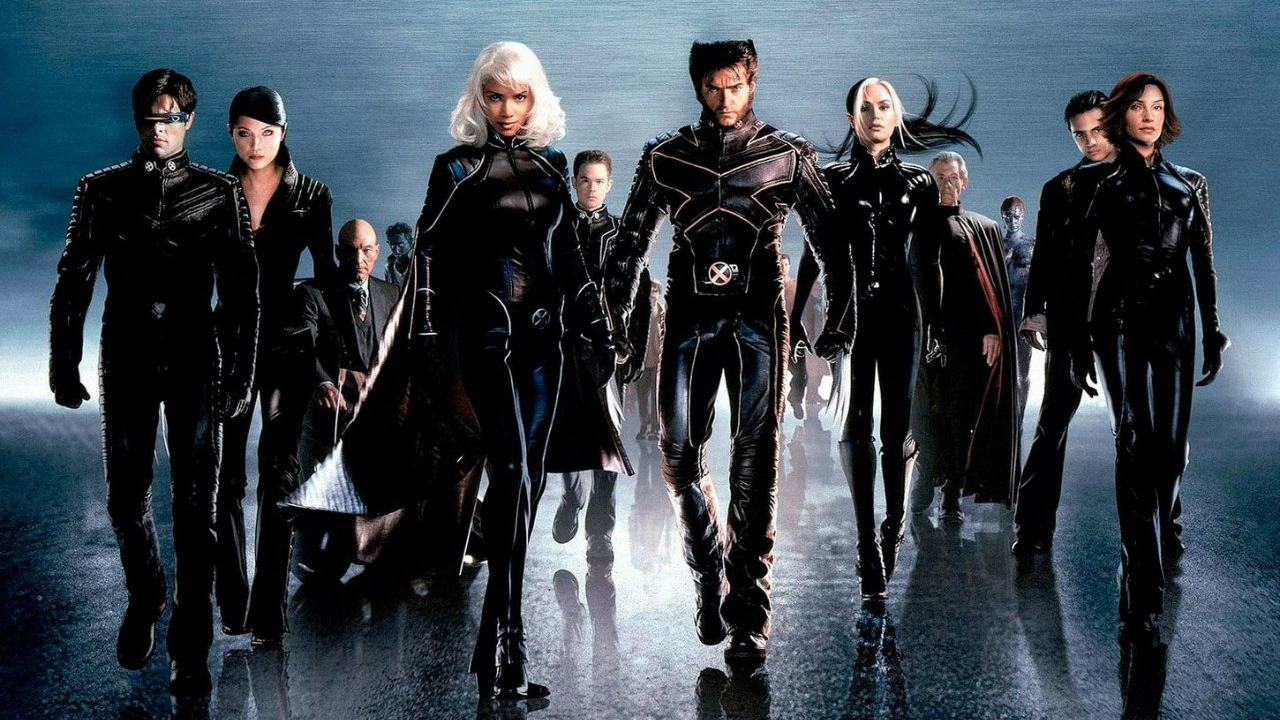
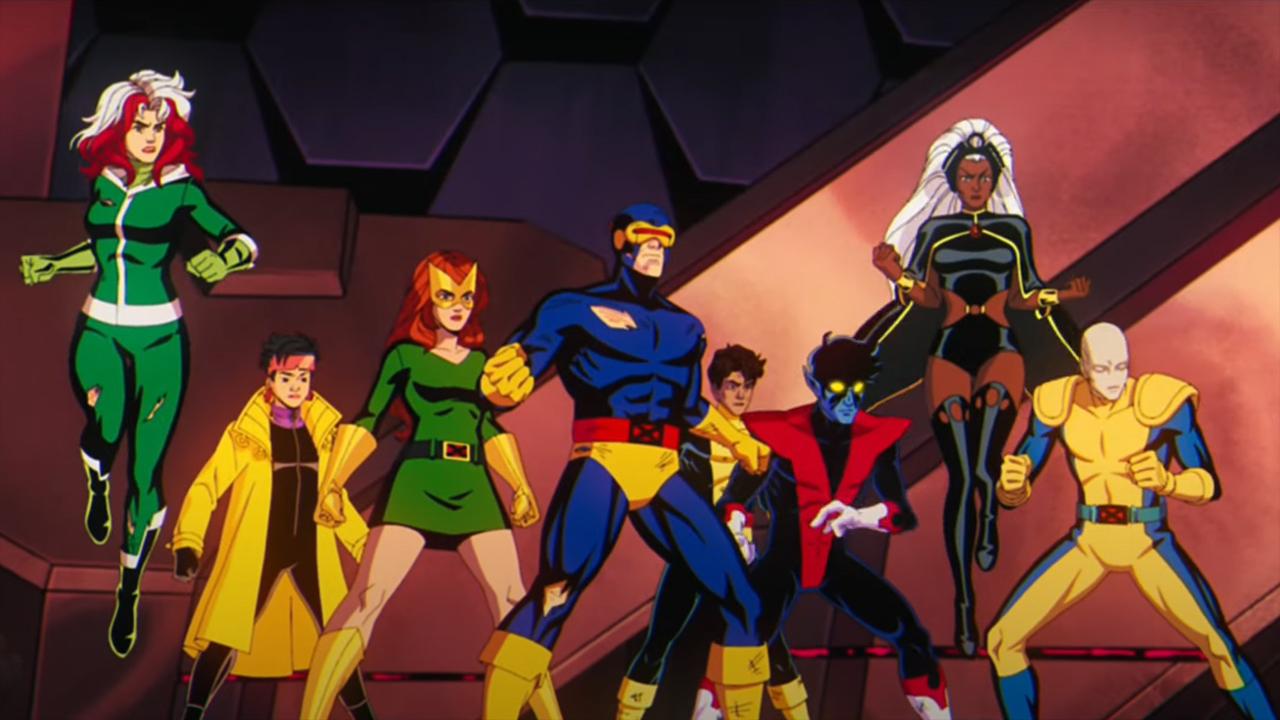
- In development at Marvel Studios - Expected to be MCU 2.0's first film - Release date yet to be announced - Could come out some time in 2028 - No trailer or wider footage available - Plenty of cast rumors circulating online - Story synopsis yet to be publicly unveiled - Nothing to report on possible sequels
The mutants are coming. Indeed, with Marvel hard at work on developing another X-Men movie — one that will officially introduce a new version of the superteam to the Marvel Cinematic Universe (MCU) — it won't be long before they return to the big screen. Well, providing you don't consider its potential 2028 launch to be a lengthy wait...
But I digress. With San Diego Comic-Con (SDCC) 2026 almost upon us, and speculation that some sort of X-Men announcement will be made at the fan expo, interest over the next live-action X-Men film couldn't be higher. Read on to discover everything we know so far about the movie that's likely to usher in version 2.0 of the MCU.
X-Men movie release date: what we know
Kevin Feige confirms that Jake Schreier's 'X-MEN' movie comes out after 'AVENGERS: SECRET WARS'"I can't wait for all of you to see 'Avengers: Doomsday', we have a movie after that called 'Avengers: Secret Wars', and after that the mutants are coming and the X-Men are coming and… pic.twitter.com/pw9u54BEEBJuly 11, 2026
Marvel is yet to confirm a release date for its X-Men movie. It's still in the early stages of development, after all, so unless a surprise announcement comes at SDCC 2026, it will be some time before we know more.
More recently, Feige hinted (see the X/Twitter post above) that the new X-Men movie will be the first film to arrive after the sixth Avengers installment. With that movie due out in December 2027, we shouldn't expect MCU's first mutant-led project until some time in 2028.
Marvel's X-Men movie trailer: is there one?
Cyclops didn't take this trailer news very well... (Image credit: Marvel Studios)
Unsurprisingly, no. In fact, assuming Marvel returns to Hall H panel at SDCC 2028, I'd be amazed if we get any official footage before then.
Once a teaser is released, I'll update this section – but you'll be waiting a long time for one!
Marvel's X-Men cast rumors
Sadie Sink (left) is believed to have been cast as a popular X-Men character in the MCU (Image credit: Netflix)
Possible spoilers follow for Marvel's X-Men movie.
Predictably, nobody has been confirmed to appear in Marvel's X-Men movie yet. However, plenty of rumors have surfaced – and continue to circulate – about who's involved, so let's take a look at some of the biggest ones.
And yet, the vast majority of actors who have been linked with roles in Marvel's mutant-led flick are what I'd consider to be household names.
One such star is Stranger Things alumnus Sadie Sink. After being cast as a mystery character in Spider-Man: Brand New Day, the long-running rumor is that Sink will play Jean Grey. If that's true — and there's now plenty of evidence to suggest it is — we'll almost certainly see her in this film.
Adam Driver is circling Marvel's X-Men movie, according to numerous insiders (Image credit: Gareth Cattermole/Getty Images)
Who else could pop up? Last May, the rumour mill was buzzing with reports about other potential X-Men cast members, including speculation that Bryan Cranston would play Charles Xavier/Professor X, Cynthia Erivo would portray Ororo Munroe/Storm, and recent retiree Daniel Day-Lewis had held talks to take on the role of Erik Lehnsherr/Magneto.
Lastly, Lee Sung Jin, one of this film's co-writers, told Collider that he's a huge fan of Remy LeBeau/Gambit. Don't be surprised, then, if we see a new iteration of the Ragin' Cajun as part of this movie's ensemble.
Marvel's X-Men movie plot rumors
Marvel's new X-Men film will be wildly different to what's come before, according to its creative team (Image credit: 20th Century Fox)
You already know what I'm going to say here, don't you? Surprise, surprise, Marvel's X-Men reboot doesn't have a story synopsis yet.
Thanks to Schreier and Jin, though, we've been given a glimpse into their creative process for the film, including the key inspiration behind the story they want to tell.
Schreier (via Collider) and Jin (via Men's Health) admitted that the literature penned by legendary scribe Chris Claremont, who's best known for working on the Uncanny X-Men comic book series for 16 years between 1975 and 1991, will be a major influence on their X-Men reboot. Jin also revealed (via The Watch podcast) that beloved Saturday morning cartoon X-Men: The Animated Series is also informing the narrative structure by way of its character-first and soap opera-esque elements.
Chatting to Deadline, Jin also explained that Feige wants him, co-writer Joanna Calo, and Schreier to " take a big swing and start anew, [and] not be beholden to any of the movies that have come before".
Expect an entirely new take — in a live-action sense, anyway — of the iconic Stan Lee and Jack Kirby-created supergroup when their next movie lands in theaters.
Where can I watch the X-Men movies?
Disney+ is home to every single live-action X-Men film and the group's two animated show (Image credit: 20th Century Fox)
You can watch every live-action X-Men movie on Disney+, aka one of the world's best streaming services. Disney's primary streamer has been home to these flicks since the House of Mouse bought 20th Century Fox in March 2019. You can even find out how to watch the X-Men movies in order with our help while you're here.
Additionally, X-Men: The Animated Series and its sequel show X-Men 97 are also available to watch on Disney+. Not a subscriber? Find out if a Disney+ free trial is available or the price of Disney+ in your area if you want to sign up.
What does the future hold for the X-Men in the MCU?
New seasons of MCU-adjacent program X-Men 97 will soon be released annually (Image credit: Marvel Television/Disney Plus)
In short: we have no idea. Marvel still has to get this movie off the ground, and as Schreier explained during an interview with Collider, it needs to be a major success if the franchise is to continue into Marvel Phase 7 and beyond.
If it succeeds, the X-Men could become one of the cornerstones of the MCU's next era. But if it doesn't? Frankly, that's a scenario that doesn't bear thinking about. The X-Men are one of the most popular superhero teams of all time, so if they can't help support Marvel's cinematic juggernaut in a post-Multiverse Saga world, who can?

 Login
Login
















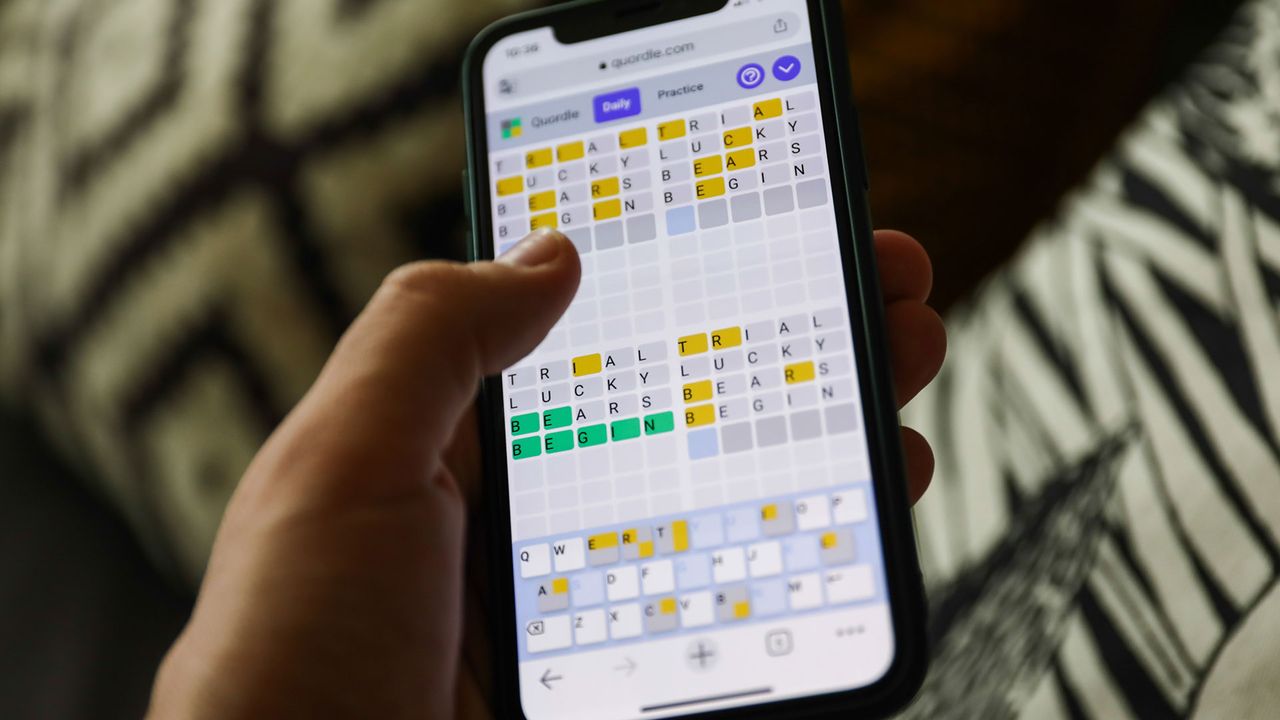
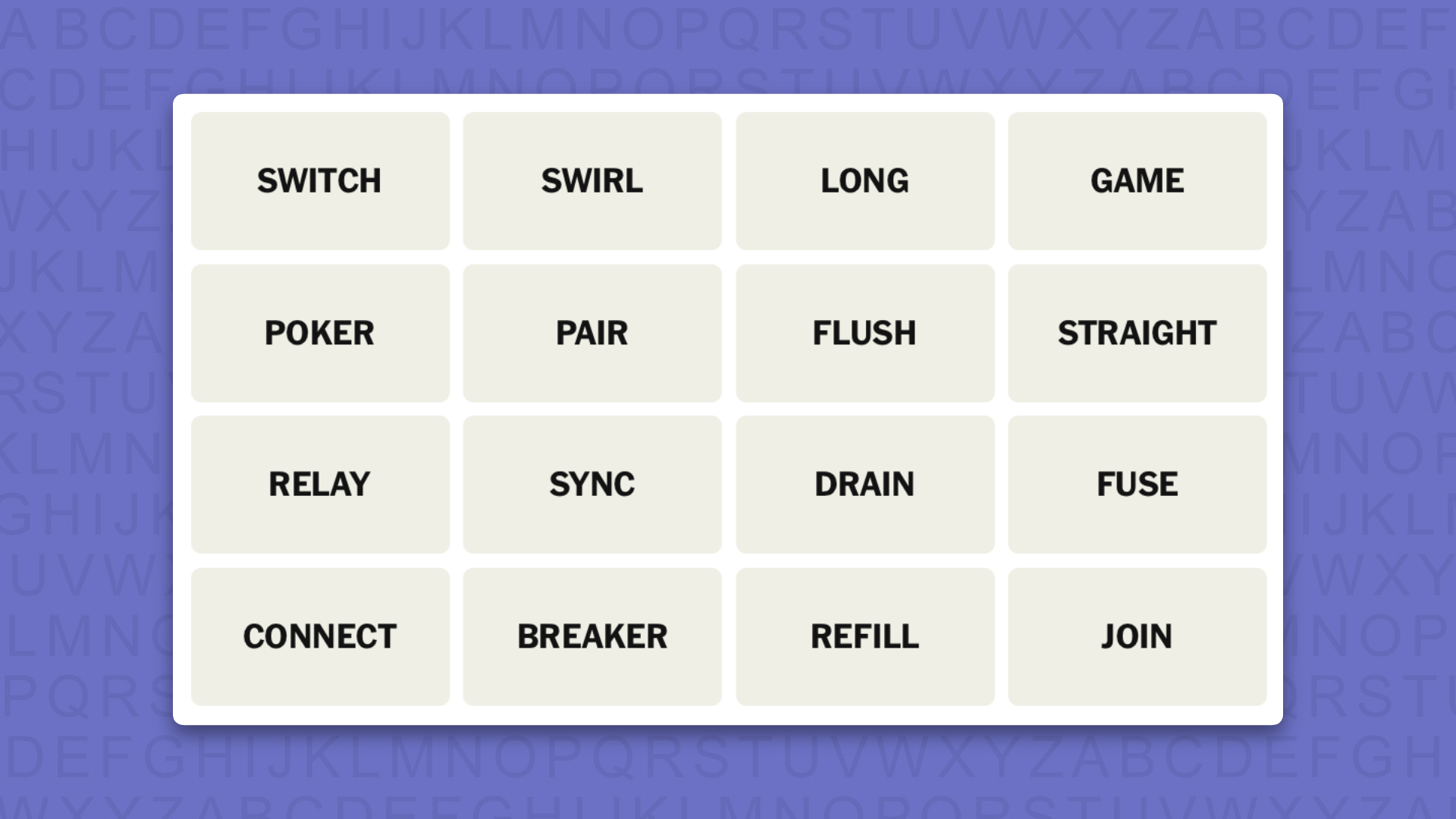
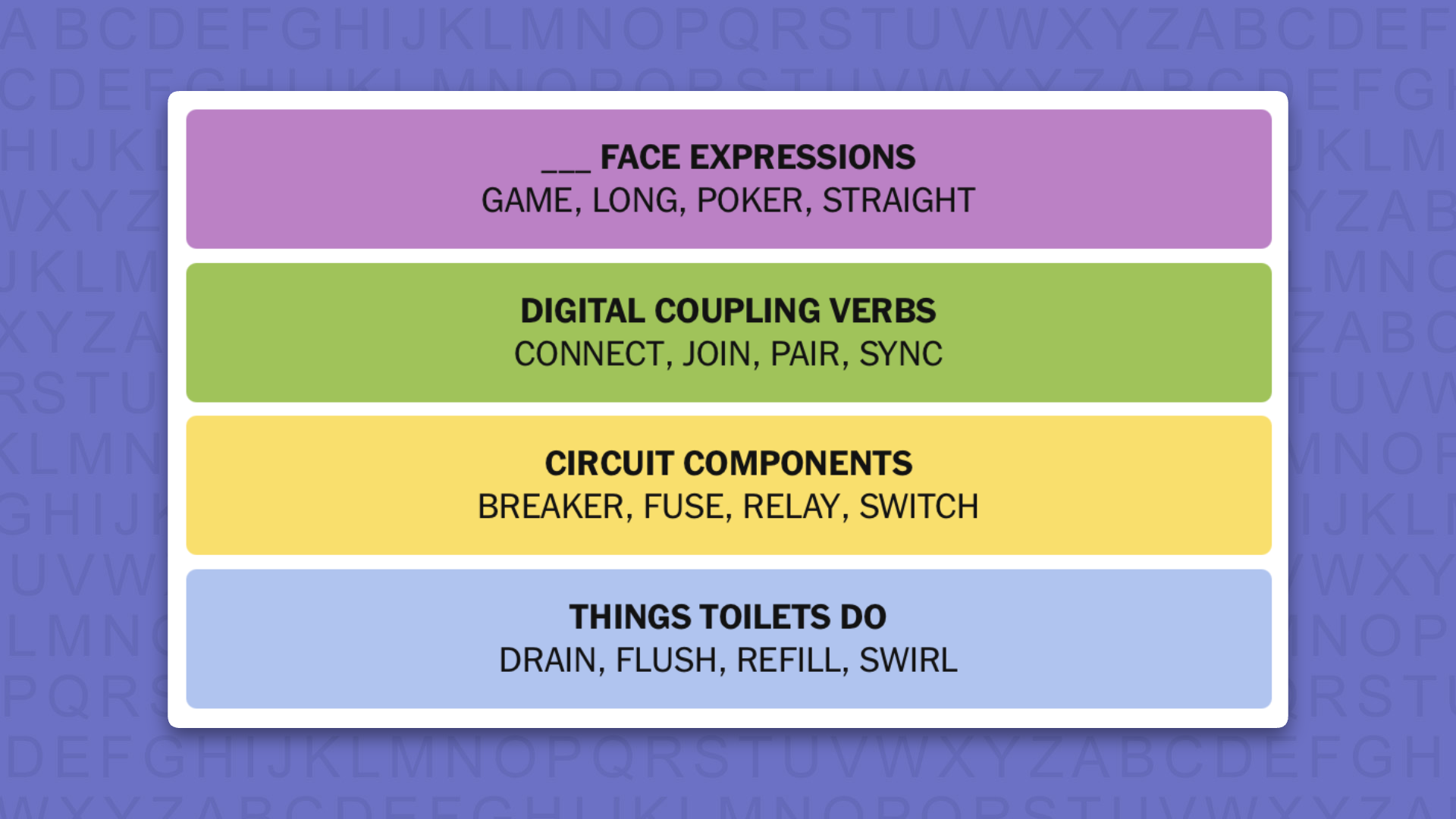


:quality(85)/a73dbc9c-a0f3-40fe-919d-d3f99b0b06dc.jpg "Editar informações da imagem")
:quality(85)/a7be5c2e-1e2f-4519-ad0b-0f359275b596.png "Editar informações da imagem")