AT&T’s new day passes let you get your iPad online for 24 hours at a time, when you need it. | Photo: David Pierce / The Verge
AT&T has introduced a new "Unlimited Day Pass" cellular data offer for iPad users who need brief connectivity instead of signing up for a long-term plan. The day pass is available for $3 in the US starting today, providing 24 hours of unlimited data, with no contracts, subscriptions, or credit checks required.
This offer is available to anyone, including non-AT&T customers, with the 24-hour data activation beginning shortly after purchase. The first day pass is free as part of an introductory deal. There are no caps on speed or data mentioned in AT&T's announcement, but the company says it may "temporarily slow data speeds if the network is …
For the past few days, I’ve been immersed in Google’s latest vision of the future — an AI-infused dashboard that taps into info from all of your Google app activity and then uses that data to cook up a series of daily “stories” designed to “connect you with what matters.”
And — believe me, I don’t say this lightly — the experience of interacting with this system has me longing more than ever for the past.
I won’t beat around the bush: Using the app really has been an eye-opening, enlightening experience for me. Just not in the way that Google had presumably wanted.
[Get level-headed knowledge in your inbox with my free Android Intelligence newsletter. Something new and useful every Friday — from my keyboard to your email.]
Google Dreambeans and the next phase of AI
In many ways, Dreambeans feels like the ultimate example of everything Google’s been gunning for — and AI in general has been building up to — over the past several years.
With your permission, the app accesses your ongoing activity data from Google Workspace (including such services as Gmail, Google Calendar, and Google Drive) along with Google Search, Google Photos, and YouTube to create an evolving profile of your life and interests. That means everything from who you email to what’s on your agenda, what you’re writing or saving files about, and what sorts of subjects you’re searching for, videos you’re watching, and activities you and your friends, family, and other associates are appearing in throughout photos (and even how you all look in those photos) gets constantly analyzed and processed and used as fodder for a personalized feed that updates a few times a day.
On the surface, it sounds a little like Google Now — the excellent and all-too-short-lived proactive intelligence feature Google added into Android for a while back around 2012.
In practice, though, lemme tell ya: It feels dramatically different. Whereas Google Now felt almost magical in its ability to anticipate what you needed before you ever asked for it — with proactive cards on things like flight statuses based on itineraries in your inbox or flight-related searches you’d performed, traffic alerts based on your typical daily routes or appointments in your agenda, and links to maps for businesses you’d been researching — Dreambeans takes those same basic concepts to a whole other level that ends up feeling creepy and invasive, both in the info it’s offering and in the way it’s presenting it.
And, more broadly, it feels indicative of the way AI is heading in general — not just with this one app or with Google but across the industry and in a style that I think most people are increasingly finding off-putting and will only find ever more intrusive in time.
Now, let’s be clear: I’m no technophobe. Far from it: I love clever tech creations and thoughtful new touches that make our lives easier. Heck, I’ve spent much of my life searching for and writing about such feats. And that’s precisely why my reaction to Dreambeans strikes me as so significant: If I’m this put off by this concept, how will average tech users — most of whom are far less tuned into tech trends and intrigued by interesting new options then I am — react?
I’ll tell you more about what I’ve heard so far in a second. First, let me show you exactly what I’ve been seeing, so you can assess this thing for yourself and see how it comes across to your spidey senses.
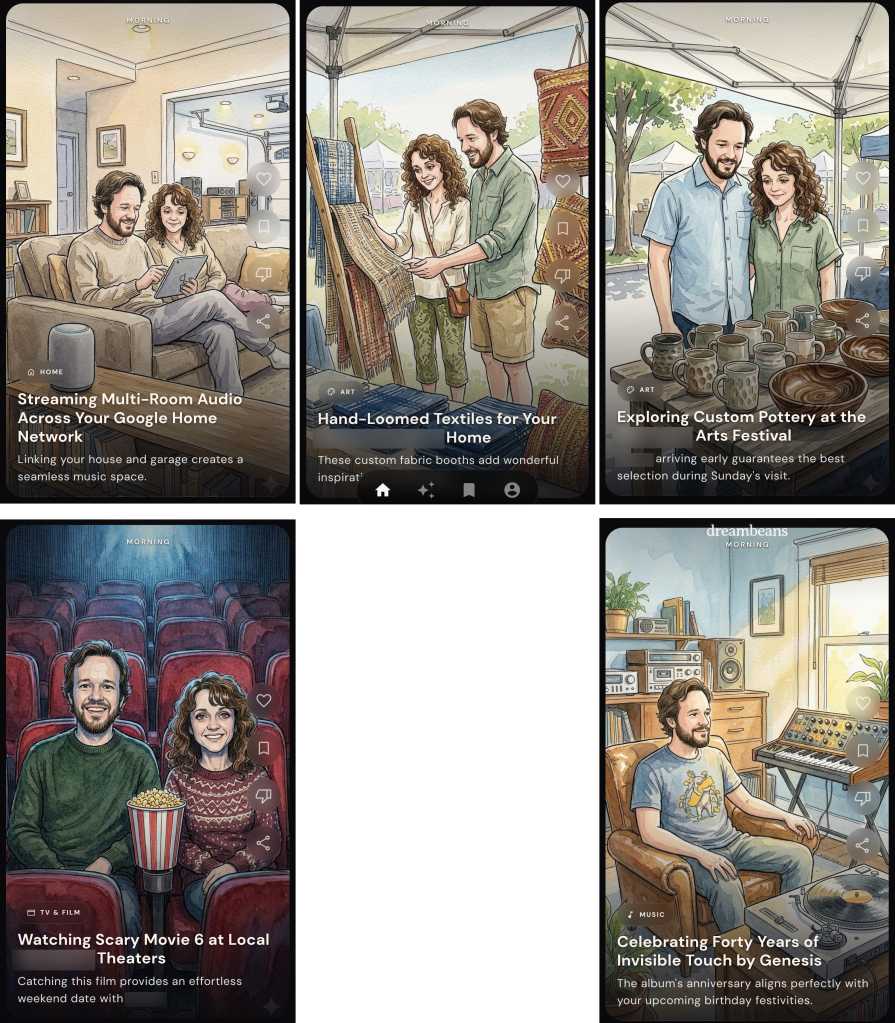
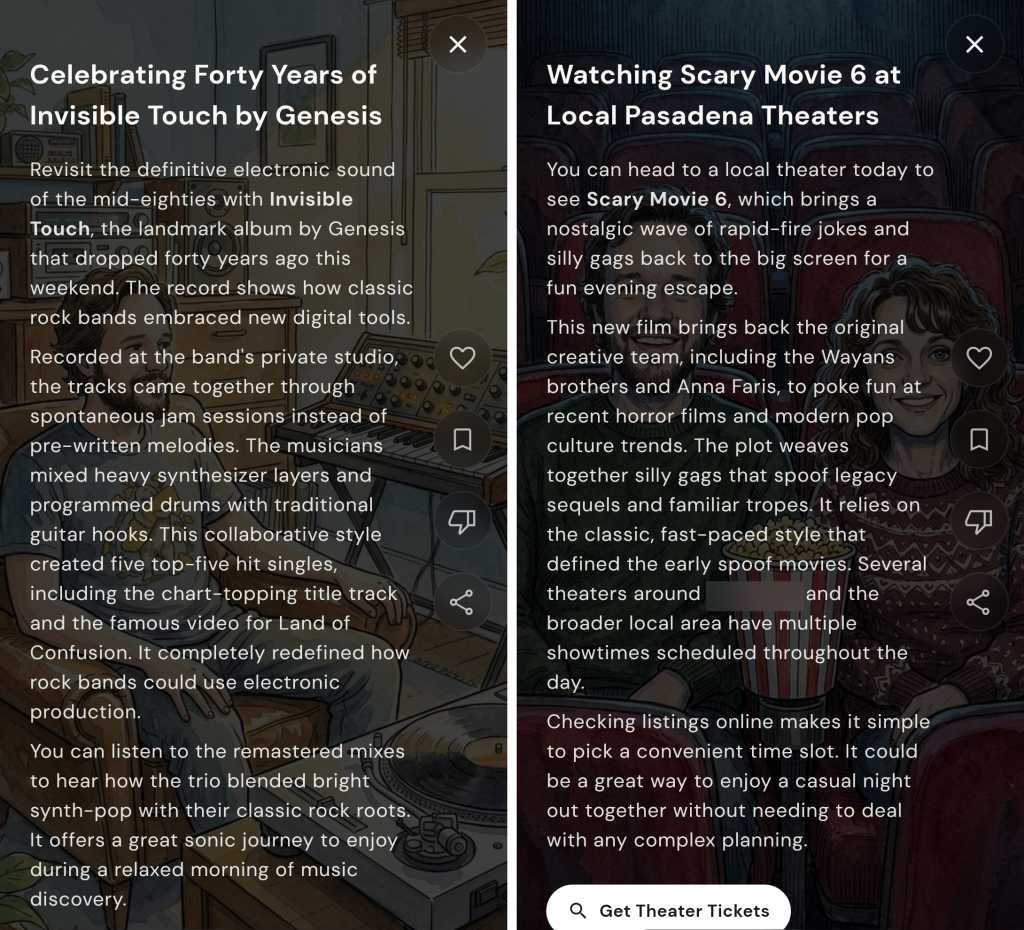
Here’s a handful of the Dreambeans “story” suggestions that appeared in the app upon its first day working for me, with a few names and personal details blurred for privacy purposes:
Some of Dreambeans’ custom “stories” throughout my first day with the app.
JR Raphael, Foundry
I’m honestly not even sure where all of these suggestions came from, but what jumped at me right away were the (occasionally flattering) caricatures of me and my wife and the general sense of invasion from all the slightly too personal stuff and too familiar integration of family members’ names and interests integrated into the material.
For the record: I had been looking into speaker stuff at some point in the not-too-distant past; I’ve never once typed, uttered, or even considered the phrase “hand-loomed textiles” until just now; we had been looking at the arts festival it mentioned; I’ve never specifically searched for or expressed any interest in Scary Movie 6; and I am not into the band Genesis — though, to be fair, I can’t dance.
I showed all this same material to my wife as well as to several other friends and family members I’d categorize more as typical tech users — not tech professionals or card-carrying geeks but just regular people who own and use a variety of devices, as we all do, and rely on ’em for both personal and professional purposes with varying levels of dread, excitement, and/or indifference. Without exception and without any prompting or personal opinions presented to sway them, every single one of ’em responded the same basic way: “Oh. That’s creepy.” And: “I do not like that.” Without fail.
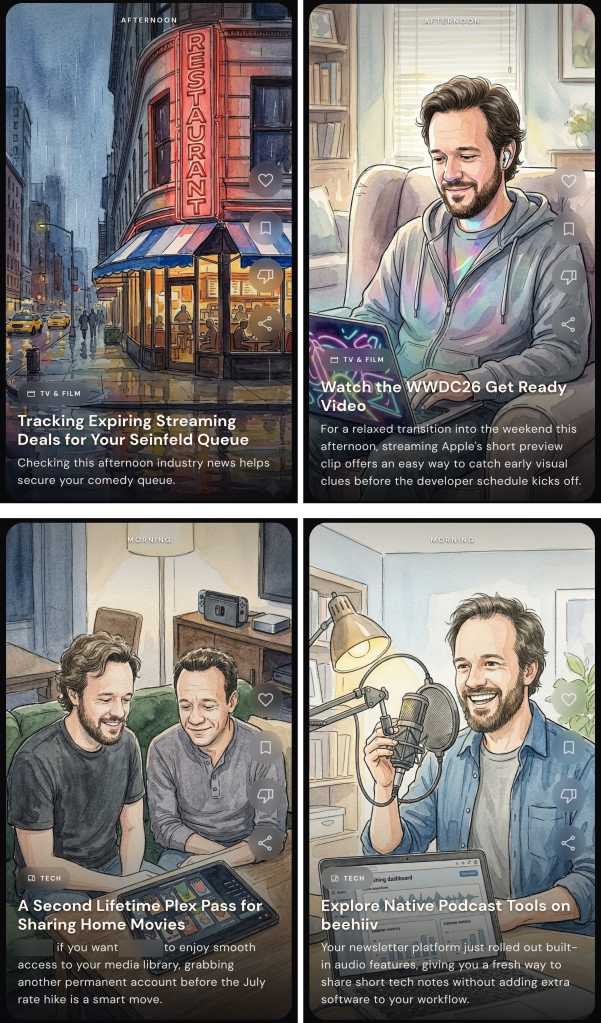
It doesn’t get much better from here, either. Most of the app’s subsequent suggestions have continued to veer just a touch too far onto the “ick” side of the spectrum, as well as occasionally being off-base in some pretty perplexing ways. For instance:
Nice AirPods, Mr. Apple fan!
JR Raphael, Foundry
For the record on this set: I do love the show Seinfeld — SERENITY NOW! more than ever — though it’s been some time since I’ve actively watched it; I somewhat famously am allergic to Apple products and avoid ’em whenever possible (notice the name of this column, anyone?); I don’t live in the same city as my brother but do find it creepy to have him pictured in ghoulish caricature form and brought randomly into a discussion about Plex (something he wouldn’t even remotely be interested in hearing from me about); and my various editorial newsletters are all powered by a service called Kit — not Beehiiv — which is mentioned in plenty of places both on my websites and throughout my emails.
Also, while my hairline may not be what it once was, I’m (ahem) not that bald yet — thankyouverymuch, Dreambeans.
Another example that I won’t show here was an item that pictured me in overalls working on installing some “coated stainless steel wire for [my] gallery canvases” — a reference to a community art gallery (with all sorts of details wrong and in some cases flat-out fabricated) connected to my mother’s recent passing. It casually mentioned her by name, too, alongside that eerie illustration of me performing a skill I definitely don’t have in my nonexistent home workshop. I don’t think I have to elaborate on how unsettling, unappreciated, and — again — invasive it felt to have that pop up in this feed.
More than anything, what I’ve been feeling while seeing all of this is a combination of (a) egad, it knows too much — especially when it casually name-drops and caricature-pics my wife, kids, and other family members — and (b) at the same time, the info it’s giving me isn’t especially helpful or insightful. It’s mostly just flat, generic, and — well, more or less exactly what you’d expect from something AI-generated.
Seeing caricatures and personal details about my kids is odd — and, at the same time, neither of my kids actually plays or has any interest whatsoever in soccer.
JR Raphael, Foundry
More than anything, in other words, it’s a combination of creepy and not particularly useful.
Some of what I’ve seen when opening Dreambeans’ personal “stories.” Yay?
JR Raphael, Foundry
And it’s the “creepy” part that really sticks with me the most.
The fine line Google forgot to avoid crossing
Maybe if the info I’m being served up here were exceptionally useful, this could be a tradeoff I’d be at least a little more likely to accept. Maybe. But in this scenario, it just feels odd and a little too invasive — which I’ve come to realize is a common theme surrounding much of what seems to be the next level of our forced-upon-us AI future.
Take Google’s Gemini Spark, for instance — the “agentic” AI assistant announced at Google I/O that’s meant to be a “proactive” helper tackling tasks on your behalf. David Pierce from The Verge got an early look at the tool in action and called it “the most impressive and terrifying AI experience” he’s had to date, also bringing that “creepy” word into the equation:
I can’t shake the deeply creepy feeling I get from the whole thing. What Spark did feels sort of magical, and very invasive. It’s weird that Spark is so casually telling me the names and ages of my children, reminding me that it knows where I live, and finding information I know for a fact I’ve never volunteered to Google. Intellectually, I know that Google knows an incredible amount about me — add up my emails, my calendar, my photos, and my search history, and you’ve pretty much got me pegged. But seeing Spark treat all that data not as something to be protected, but as something to be mined, just feels bad.
And that, I think, mirrors the exact reaction I’ve been experiencing with Dreambeans. We’ve all always known that Google knows a lot about us, but we’ve also — at least intellectually — understood how all of that data is and isn’t being used. And it’s never been rubbed in our faces just how much the company can figure out about us by putting all the various pieces together and creating an awkward sense of robotic intimacy.
I remember years ago, being in a Google press briefing where someone from the company talked about how much more their systems and services could accomplish but how they deliberately held back on going that far and overdoing the personalization — ’cause even though they had all that info and could make all those connections, they knew (at the time) that people wouldn’t respond well to seeing all their personal activity put together in such shocking ways. They knew (at the time) that most of us weren’t looking for an artificial BFF who knew too much about us. They knew (at the time) that giving us that sensation would cross the line into being creepy.
Well, this just in: That line’s officially been decimated. We’re in AI’s creepy era. And seemingly no one is worrying anymore if it’s actually something any of us want or will appreciate.
It kinda feels now like tech companies are actively rubbing in our faces how much they know about us — and even if there’s nothing truly nefarious going on with what they’re doing, it sure doesn’t feel good. It feels creepy. And at a time when trust in tech titans is shockingly low and most folks outside of the Silicon Valley bubble are feeling more and more frustrated with AI and all of the effects it’s foisting upon us, that isn’t a great look to be giving off.
Put those sensations alongside the sigh-inducing explosion of AI “content creators,” the proliferation of lifeless AI-generated “writing” (been on LinkedIn much lately?), and the troublingly blurry line between photorealistic AI-generated images and actual real-world photographs — not to mention the maddening experience of interacting with an AI bot support agent or encountering the ever-expanding array of AI-powered scams and security threats and AI-generated job cuts, just to name a few other problematic consequences this movement is imposing — and it’s hard not to question if all this purported progress is ultimately more helpful or harmful for us, as living, breathing humans in the real world.
A few months ago, at the three-year mark of Gemini’s launch, I posed the question: Did anyone actually ask for this? And, more pressingly: Is this the future we wanted? As we’re moving now into yet another era of AI innovation and seeing how it’s affecting our lives, it gets tougher every day to imagine many folks outside of the tech industry who’d answer with an emphatic yes.
And, unfortunately, you don’t need any fancy-schmancy AI chatbots to tell you that things are only gonna get more extreme — and, yes, more creepy — from here.
Find the tips and tools that’ll *actually* help you with my free Android Intelligence newsletter. No hype, no nonsense — just useful new stuff in your inbox every Friday, from one (alleged) human to another.
L’image de carcasses de voitures empilées à perte de vue dans des casses à ciel ouvert est en train de changer, grâce une filière en pleine mutation qui permettra à terme de fabriquer les véhicules selon un modèle circulaire.
AST SpaceMobile decoupled from recent launch disappointments by scheduling the orbital deployment of its next three satellites on a SpaceX Falcon 9 rocket.
The space-based mobile network company hopes to blast its BlueBird 8, 9 and 10 satellites into low Earth orbit (LEO) on 17 June. As ever, launches are dependent on various environmental and other factors, so precise timing is fluid.
AST SpaceMobile expects the latest satellites to deliver almost twice the data rates of its initial BlueBird models, which it noted recently hit 98.9Mb/s in the downlink.
Company president Scott Wisniewski said the significance of the satellites goes beyond expanding its constellation and coverage: they represent the culmination of an in-house manufacturing drive and bolster claims to having birds with the largest phase-arrayed antennas at LEO heights.
AST SpaceMobile stated the trio of satellites are already stacked using a proprietary architecture and ready to be integrated with the SpaceX rocket.
The scheduled launch is something of a firing back by AST SpaceMobile at commentators who questioned whether a recent failure of a Blue Origin New Glenn rocket during a test would impact a plan to conduct regular launches throughout 2026.
Le MWC Shanghai 2026 met une nouvelle fois en lumière les évolutions de la connectivité mobile à l’international. L’eSIM s’impose progressivement comme une solution pratique face aux cartes SIM traditionnelles. Les voyageurs y voient un intérêt immédiat : se connecter dès l’atterrissage, sans...
Voyager à l’étranger rime souvent avec une question très concrète : comment rester connecté sans voir sa facture de données s’envoler. Entre les frais élevés du roaming et l’instabilité fréquente des réseaux Wi-Fi publics, les alternatives ne sont pas toujours idéales. ETravelSim s’inscrit dans...
Two Dots assinala o seu 12.º aniversário este ano e é um clássico que vale a pena redescobrir, com quebra-cabeças para ligar pontos coloridos, bem como vários modos de jogo adicionais para explorar.
Garder le contact avec ses proches à l’étranger est devenu un réflexe du quotidien. Appels réguliers, messages instantanés, appels vidéo… la distance ne suffit plus à rompre le lien, mais encore faut-il disposer d’un forfait capable de suivre le rythme. Entre les usages qui explosent et les...
Free Mobile propose sa Série Free 140 Go à 11,99 €/mois. Un volume de données pensé pour accompagner les usages numériques les plus gourmands, sans surveiller sa consommation.
Dans les comparatifs des meilleurs forfaits mobiles, les offres sans engagement gardent un avantage évident : elles suivent les besoins du moment. Changement de téléphone, télétravail ponctuel, voyage, budget à surveiller, logement sans Wi-Fi stable… un forfait mobile doit parfois encaisser plus...
Rester connecté à l’étranger est devenu presque aussi important que réserver un billet d’avion ou un hébergement. Entre les frais d’itinérance parfois élevés et la recherche d’une solution locale à l’arrivée, l’accès à Internet peut rapidement devenir une source de contraintes. Avec son offre...
Votre ventilateur souffle de l’air chaud et ouvrir les fenêtres ne change plus grand-chose ? Il est peut-être temps de passer à la vitesse supérieure. Le climatiseur mobile Airgreen est actuellement affiché à moins de 400 euros sur Cdiscount, de quoi faire baisser la température sans faire...
AST SpaceMobile expects Blue Origin’s recent launchpad explosion will delay its direct-to-smartphone constellation by three to six months, investment bank William Blair said in an equity research note, pushing initial commercial services into the first half of 2027.
One of the best parts about using Android is the good old-fashioned geeky fun that comes with finding new ways to improve your digital environment — and improve your day-to-day efficiency.
Perhaps the most classic example of advanced Android customization, though, is a splendid little somethin’ called the home screen launcher — a fancy way of saying the system that controls how your home screen and app drawer look and work. Your phone has a built-in process that handles that by default, but here in the land o’ Googley matters, you can always replace that with something completely different and make your device adapt to the way you like to work instead of the other way around.
The real beauty of this ecosystem, though, is how much power it gives to Android developers — and subsequently to us, as Android-appreciating animals who embrace these creations! — to experiment and try out all sorts of new concepts. Sometimes, an Android launcher approach speaks to you for its practicality. Other times, it’s just a refreshingly interesting take on how you can get around your phone and get stuff done.
Today, I’ve got a perfect example to share with you. It’s a whole new approach to the Android home screen that’s both unlike anything else I’ve ever seen in this arena and delightfully familiar, in a retro-tech sense.
My friend and fellow enlightened Android phone owner, allow me to introduce you to a creative little concoction called Key Launcher.
Key Launcher has only been out and available on the Play Store for a matter of weeks now, but it’s impressively polished — and, even more important, impressively original while also having some fantastic geek-tech throwback vibes.
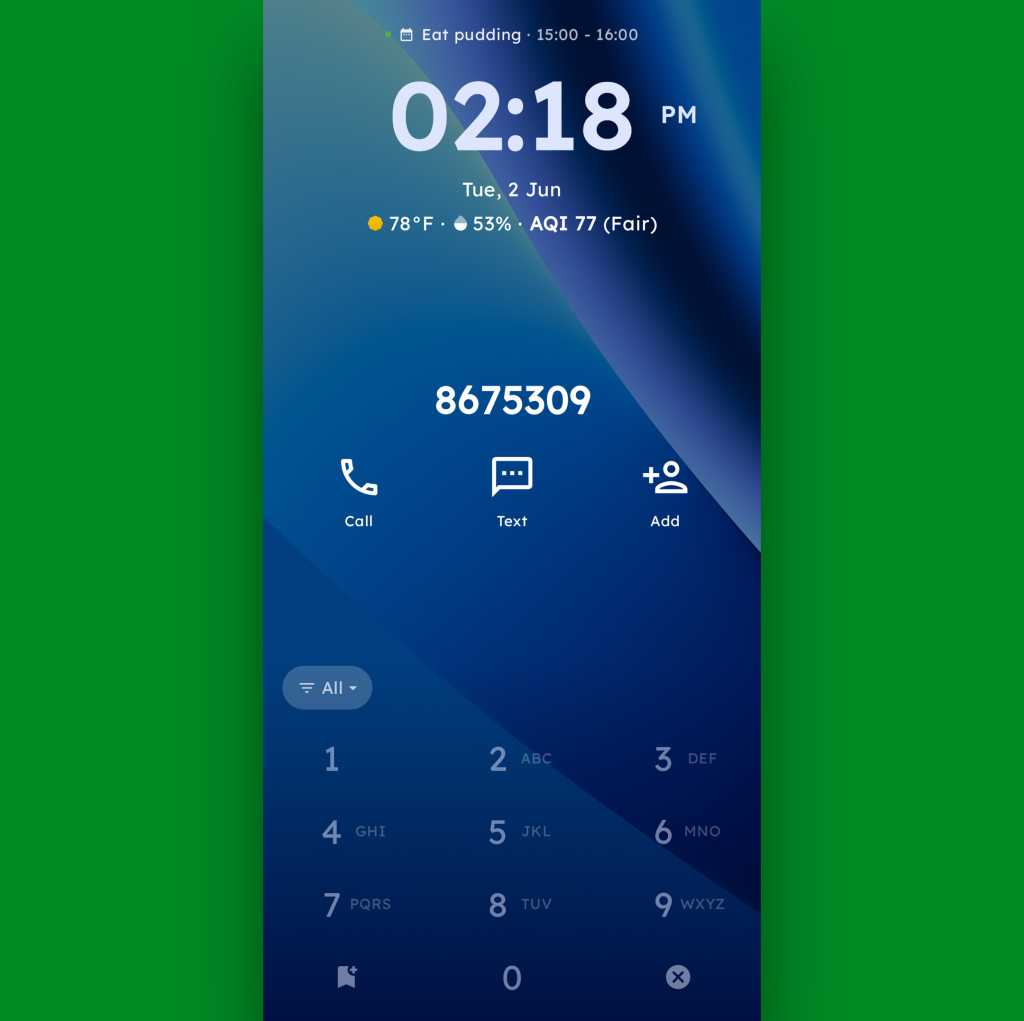
To that end, the core distinctive element of Key Launcher is the T9-style dialpad that sits front and center on the lower third of its primary panel. It is quite literally the same set of letter-packin’ numbers and characters you’d see on an old-school phone — or in the dialer of your favorite Android phone app.
width="1024" height="1022" sizes="auto, (max-width: 1024px) 100vw, 1024px">The T9 keypad is the centerpiece of the Key Launcher Android home screen experience.
JR Raphael, Foundry
And in this context, it serves some pretty interesting purposes:
In true T9 style, you can find and access any app or contact on your phone simply by tapping the letter that corresponds with its name — and if you want to narrow down the list even further, you can keep typing letters to refine the results.
You can long-press any number to create and then access a custom “super shortcut” — anything from a single specific action (opening a particular app or calling or texting a certain contact) to launching a group or category of apps or contacts, launching an on-demand pop-up widget or swipeable stack of widgets, or even launching a pre-filled search query.
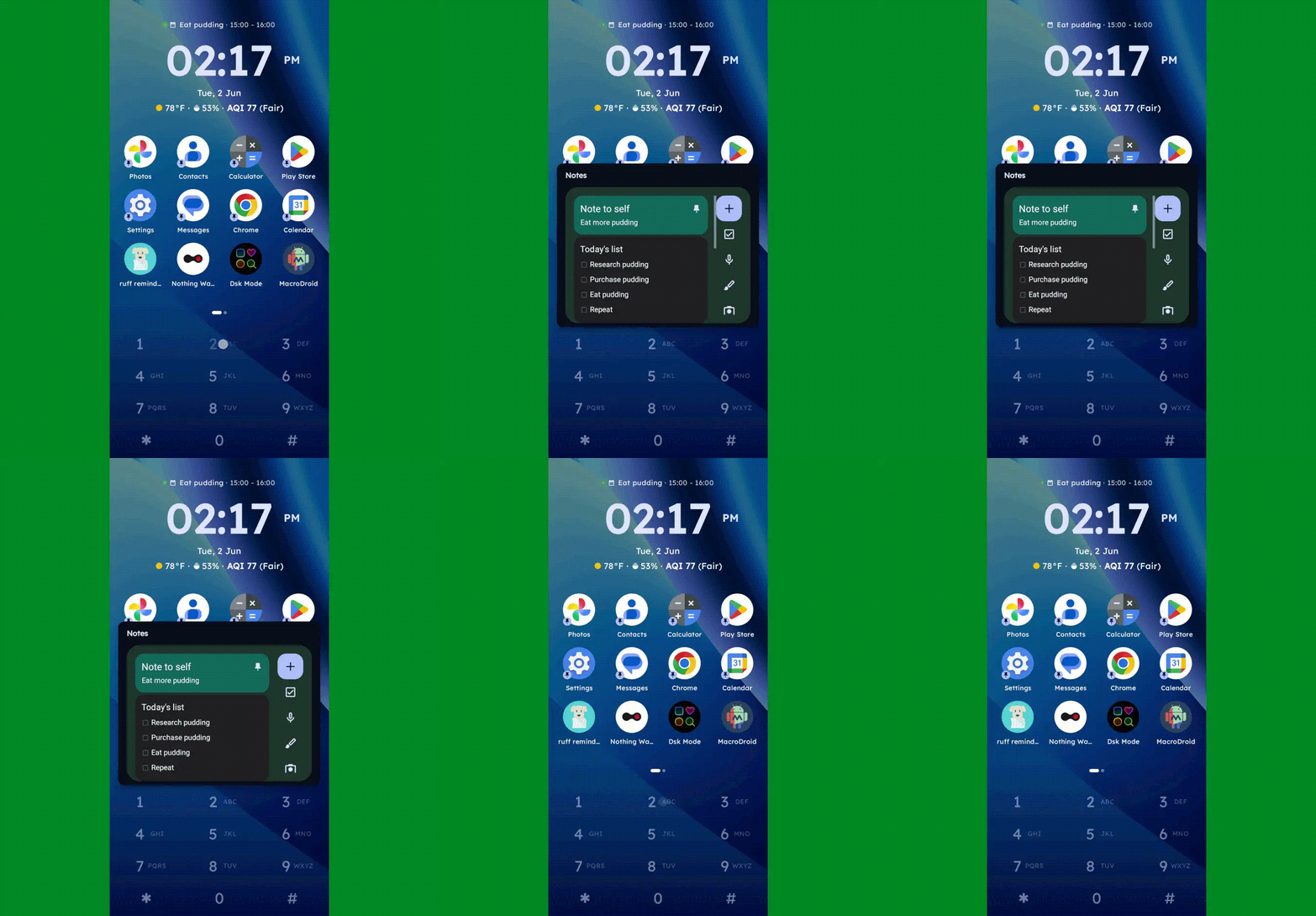
One press, and poof: Any widget you want — or series of swipeable widgets, even — is right there and ready.
JR Raphael, Foundry
If you tap the # key (known as “pound” in this context — not “hashtag” — for any non-olds among us), you can set up and then access a special “vault” area, where apps are hidden and only visible and accessible with authentication.
And, in an especially nifty touch, you can also just use the dialpad as an actual dialpad — to punch in any number you want to text or call, even if it isn’t already in your contacts.
Your phone dialer is always right in front of you with Key Launcher as your home screen.
JR Raphael, Foundry
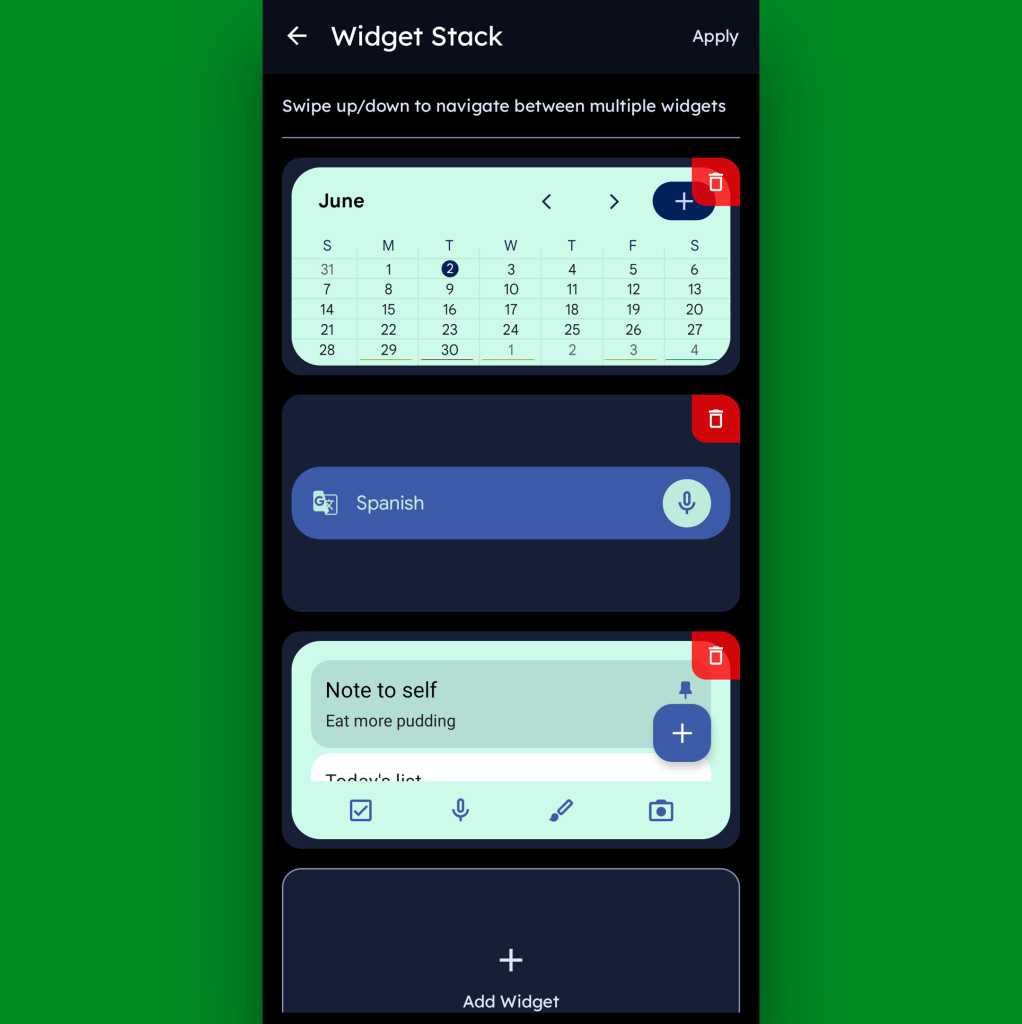
Function-packed as all of that may be, that dialpad is still just one piece of the Key Launcher puzzle. Above it sits a grid of app shortcuts that includes both your own pinned favorites and a dynamic selection of recently opened items. And above that is a handy built-in widget that shows a rotating array of upcoming calendar events from your agenda along with the local time and weather — and, in an especially neat twist, can also be customized to act as an interactive stack that lets you flip through your own set of standard Android widgets right then and there as well.
Key Launcher’s primary widget spot can be configured to hold numerous widgets in a swipeable stack.
JR Raphael, Foundry
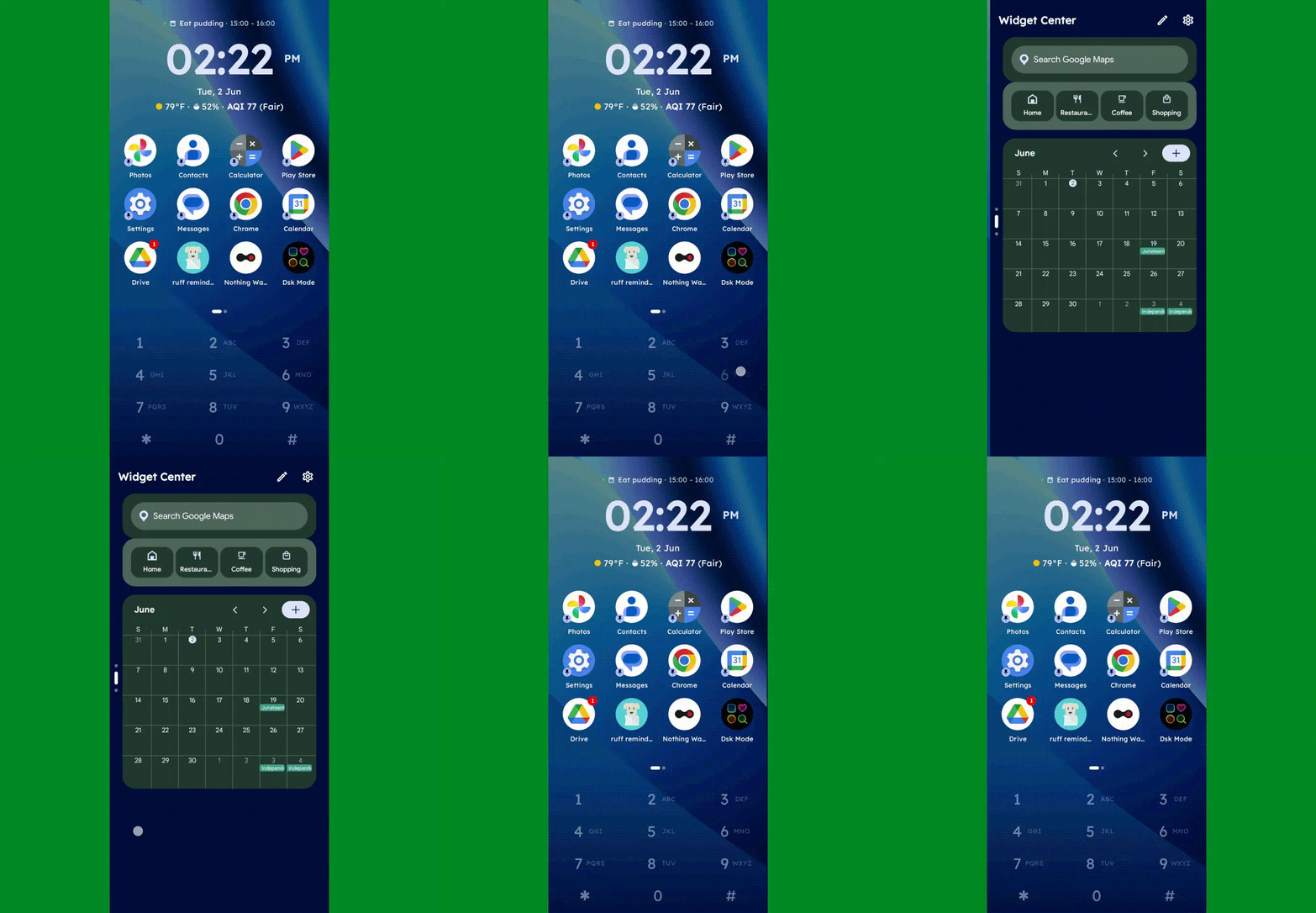
Speaking of widgets, if you swipe toward the left on Key Launcher’s dialpad, you’ll reveal the launcher’s built-in “Widget Center” panel — which is an entire screen dedicated to holding however many widgets you want, in any configuration you like, for easy ongoing access.
The Widget Center is another interesting way to access widgets within Key Launcher.
JR Raphael, Foundry
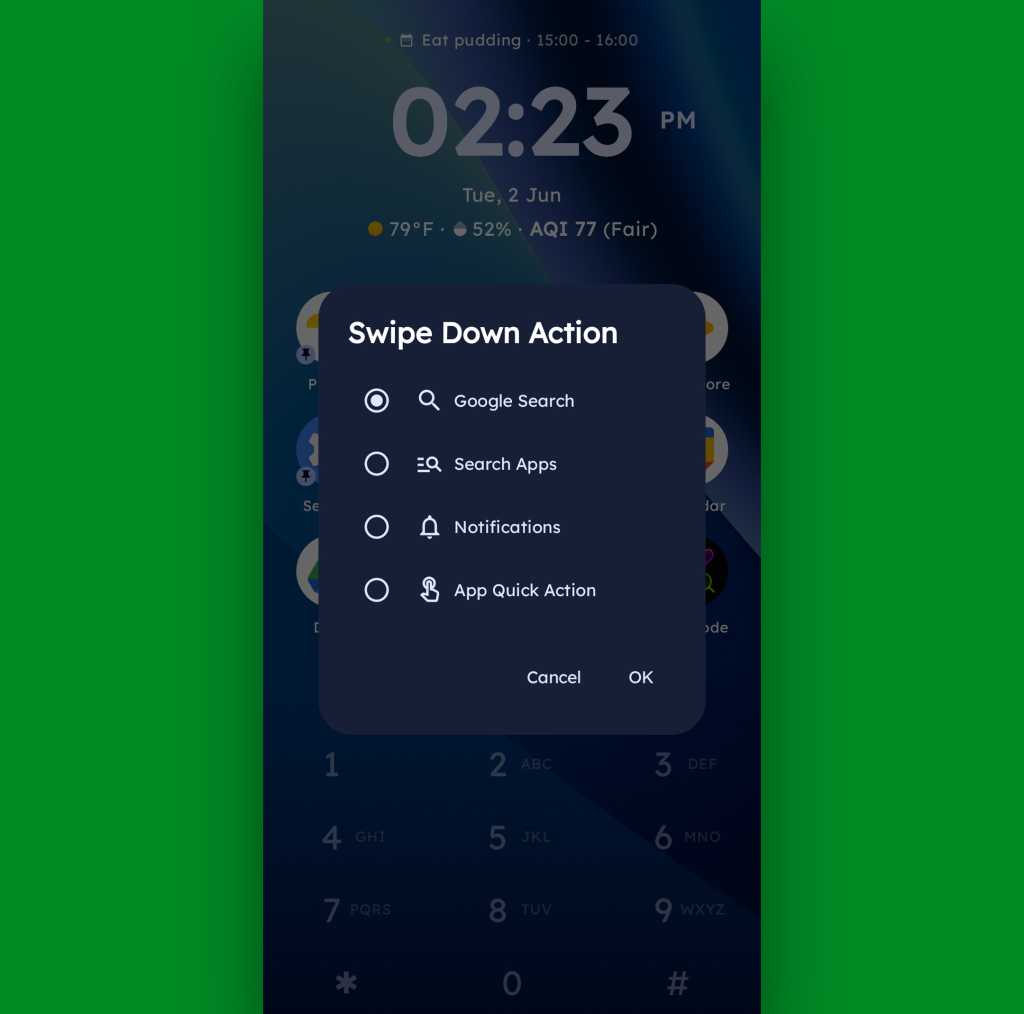
A swipe in the other direction will take you to an enlarged view of your active notifications, meanwhile, while a swipe downward can be set to launch either a quick search (of Google or whatever provider you prefer), a search of your apps, or a direct Android app shortcut within any app on your device.
Swiping down on your home screen can trigger a shortcut of your choice.
JR Raphael, Foundry
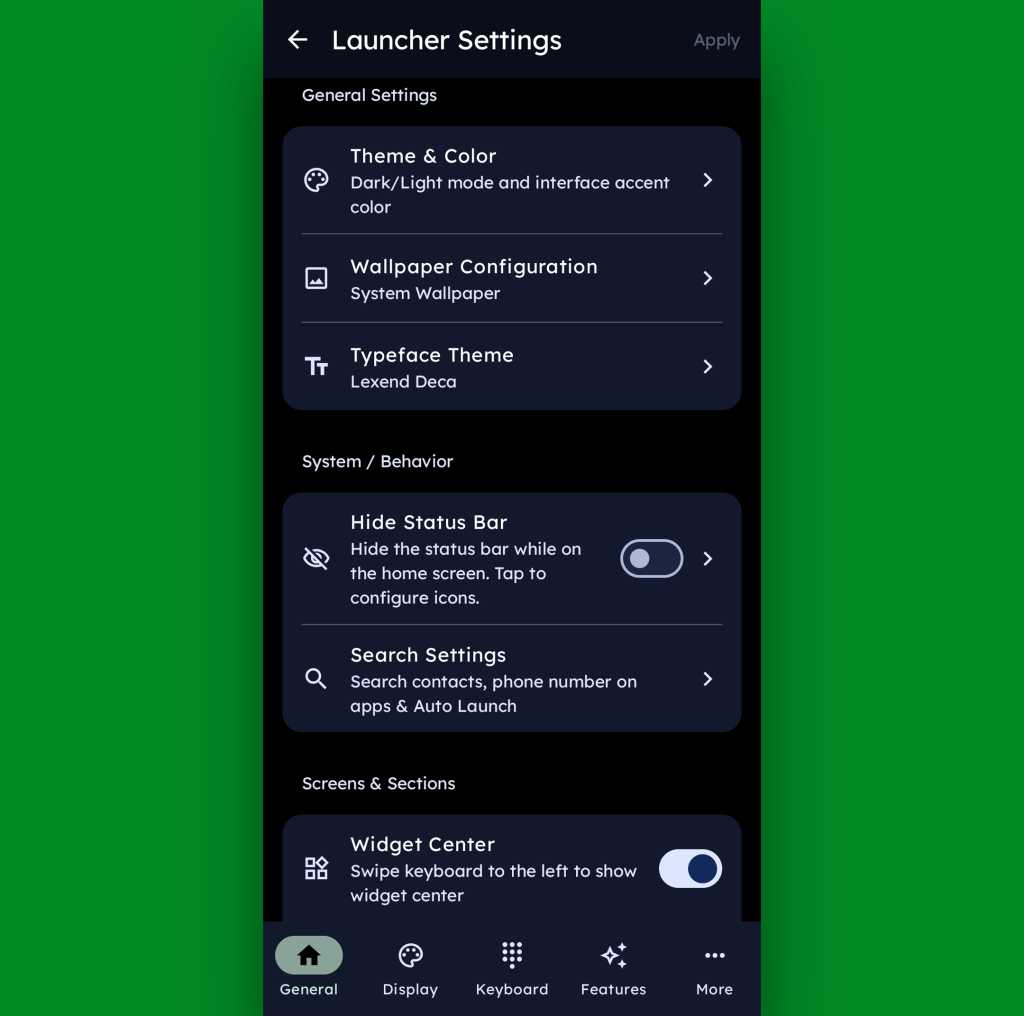
And if all of that seems like a lot of productivity-boosting possibilities, just wait ’til you get into this thing’s settings. Key Launcher is overflowing with options to customize and control practically every facet of its operation, ranging from basic visuals to the specifics of how the dialpad works and even a toggle for optimizing the interface for left- or right-handed use.
Key Launcher is no slouch when it comes to settings.
JR Raphael, Foundry
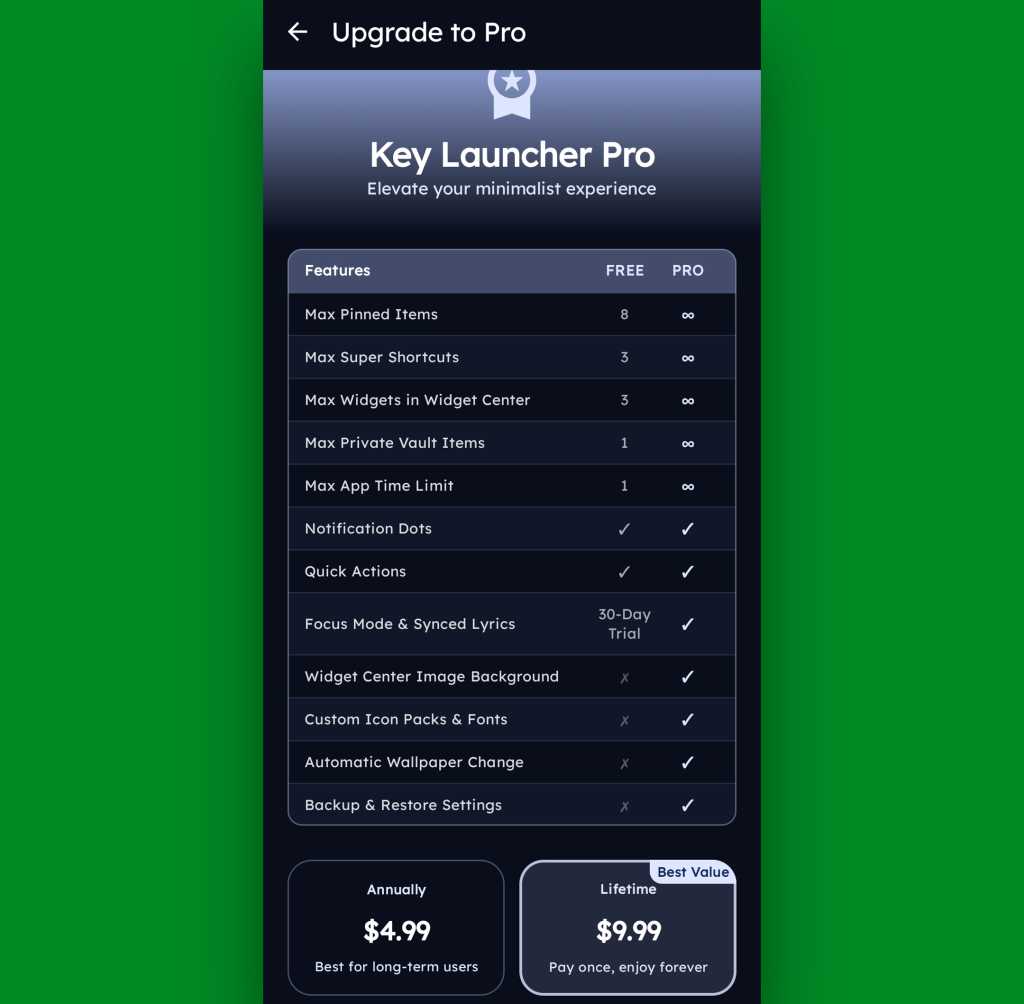
Key Launcher is free on its base level with an optional Pro upgrade that unlocks certain limitations and more advanced features. That path is available for five bucks a year or $10 as a single lifetime purchase, and you get a month-long trial the first time you install the app so you can check it out in its full form.
The Pro path adds in lots of extras, but even Key Launcher’s free version is quite pleasant and functional.
JR Raphael, Foundry
Even if you just stick to the free version, though, this thing has an awful lot to offer — and it really is unlike anything else out there, with so many clever and potentially useful touches.
It’s that kind of creativity and constant discovery that keeps Android so interesting and advantageous, even after all this time — and that’s true whether you end up sticking with Key Launcher for the long haul or just giving it a go for a few hours and appreciating the deliciously original thinking it offers.
O ranking da AnTuTu para os smartphones mais poderosos de maio tem um novo líder, o novo RedMagic 11S Pro+, com destaque ao chip Snapdragon 8 Elite Gen 5 que equipa nove dos equipamentos.
No papel de um duplo de cinema que passou despercebido durante toda a sua carreira, em Ponchorado os jogadores terão de sobreviver dentro de um filme western inacabado e enfrentar uma série de inimigos.

 Login
Login