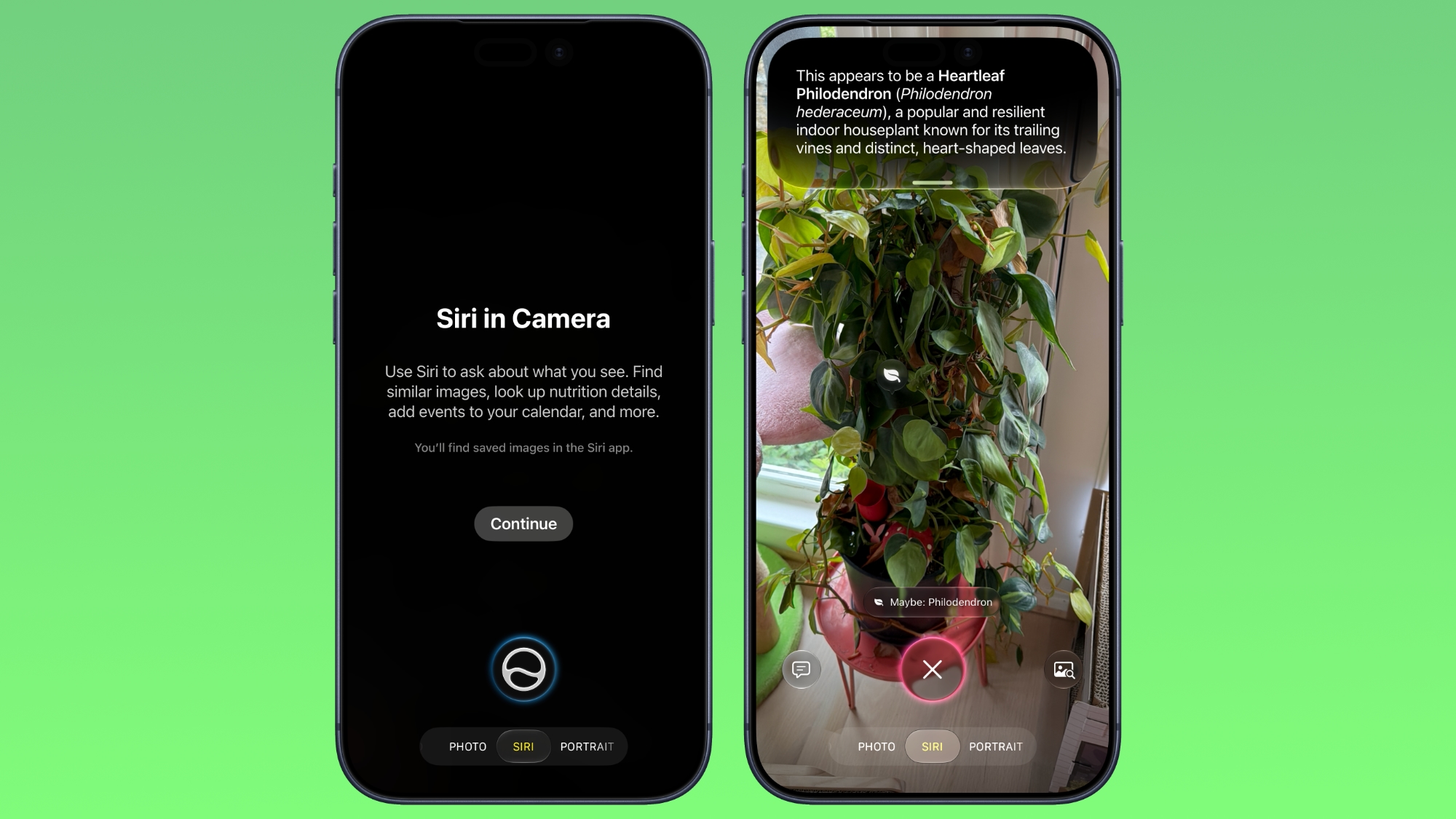
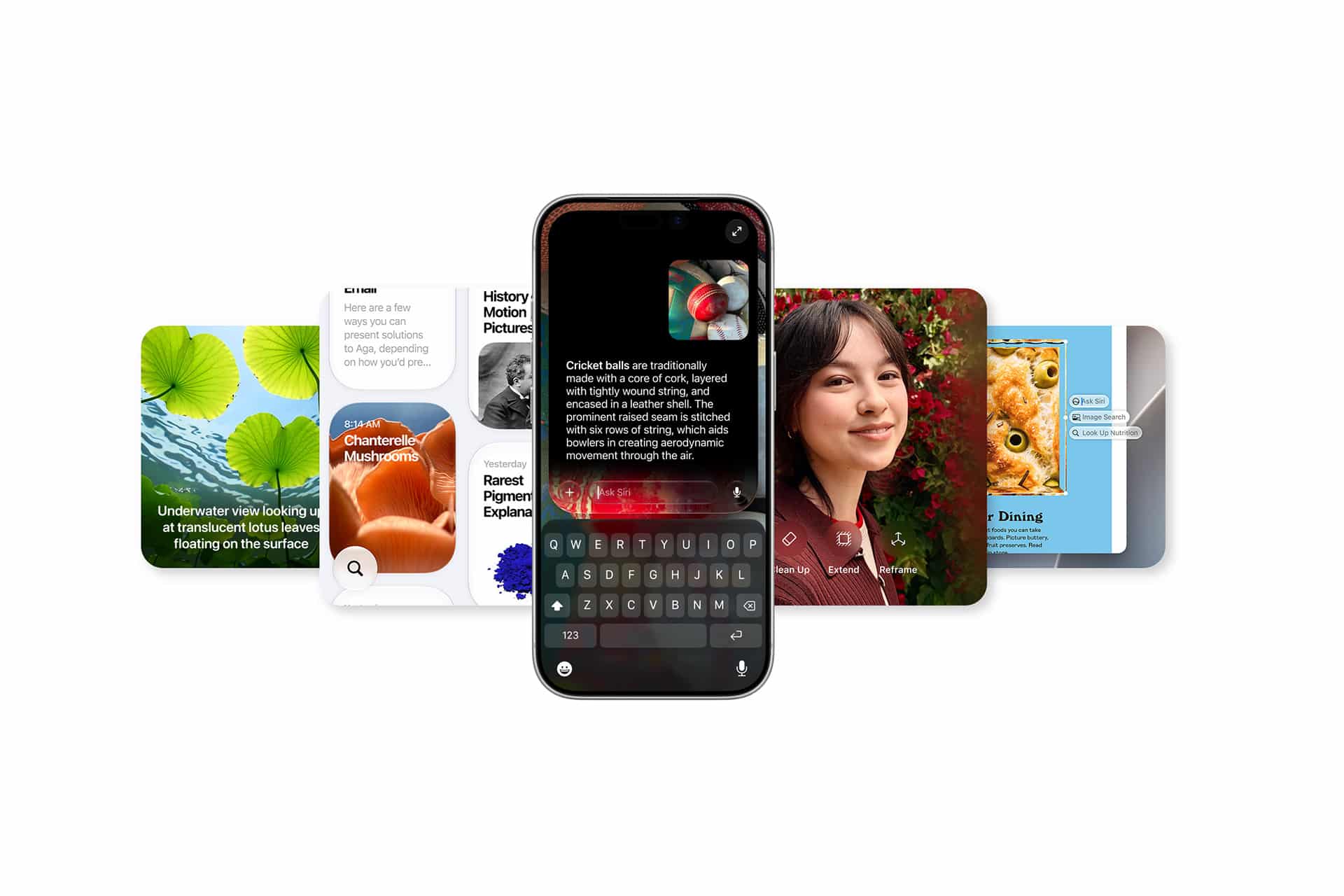
In iOS 27, available now, Apple has made some changes and additions to the iPhone's stock Camera app, including the addition of a new Siri mode.
Available in addition to the Video, Photo, and other camera modes, Siri mode can be accessed by swiping across the mode carousel at the bottom of the screen.
The new mode uses Visual Intelligence to identify objects in the frame and provide information about them. It can be used to identify plants, animals, food, and more. If it's food you want info on, for example, it can tell you what it is, and how many calories are in it.
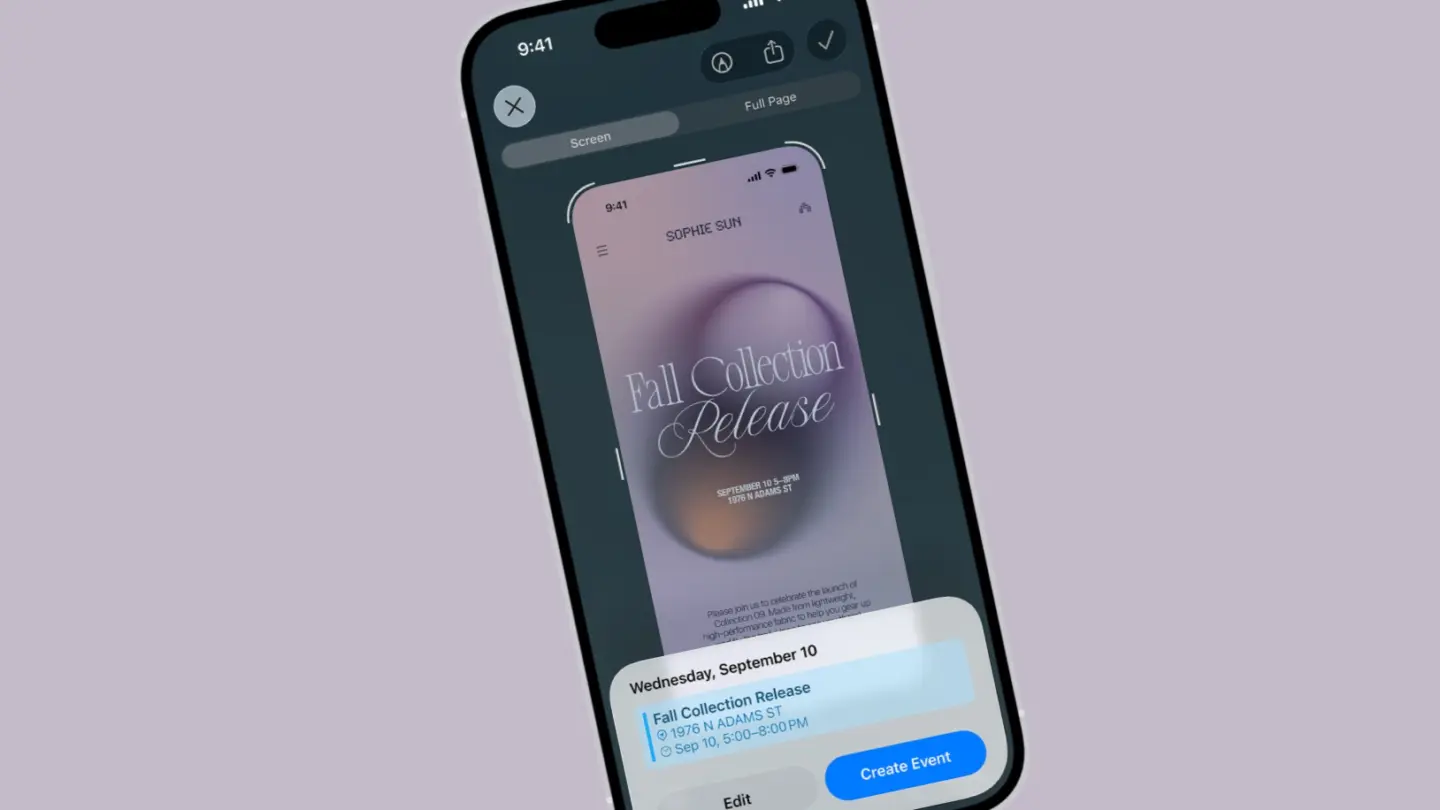
Other examples Siri mode can be used for include capturing a photo of an event flyer and adding a date to the Calendar app, text translation, splitting a bill, and more.
In Siri mode, a button on the right lets you search Google Images, and a button on the left lets you ask a specific question. So you can ask for help to cook the food in the frame, for instance.
Apple has also tweaked the way the camera interface works in other ways. Quick access tools for activating flash, Live Photo, and Night mode are now located at the top-center of the UI, while the full set of tools can be accessed from the bottom-right instead of the top-right. It's also possible to customize which controls are displayed at the top of the screen.
Apple made iOS 27 available to download on supported iPhone models on September 14, a few days ahead of the launch of new iPhone 18 Pro models on September 18.
Siri AI is beginning its public rollout as Apple transforms its familiar assistant into a substantially more conversational system built around personal context, onscreen awareness, web knowledge, and the ability to perform actions across apps.
The beta is available first in English on compatible devices running iOS 27, iPadOS 27, macOS 27, watchOS 27, and visionOS 27. French, Japanese, Korean, Portuguese, and Spanish support is scheduled for October. Availability remains more limited in some regions, with Siri AI initially unavailable on iPhone, iPad, and Apple Watch in the European Union and unavailable in China while Apple addresses regulatory requirements.
The release follows several years of gradual Apple Intelligence expansion, but Siri AI represents a more fundamental change. Instead of handling each request largely as an isolated command, the assistant can maintain conversations, find relevant personal information, understand what is displayed on a device, and combine those capabilities to complete multistep tasks.
Image Credit: Apple Inc.
Siri AI can connect personal context with app actions
The system can search across a user’s messages, email, photos, notes, and other information when responding to a request. Apple offers an example in which someone asks what a family member suggested doing during an upcoming visit. Siri can locate the relevant conversation, find a recipe previously sent by email, and then place the ingredients into a Reminders grocery list.
That combination of retrieval and action is central to the new design. Siri AI can draft an email, edit and share photos, create calendar events, manage reminders, control media, and perform other supported actions without requiring users to manually move information between applications.
Third-party apps can participate through Apple’s App Intents architecture. Existing integrations include tasks such as messaging through WhatsApp or playing an audiobook in Audible, with Apple also previewing deeper capabilities in applications including Microsoft Outlook, Notability, and Tripsy.
Onscreen awareness adds another layer. Siri can identify information currently visible on a device and act on it. Someone viewing a sports website, for example, can ask Siri to identify upcoming home games and add them to Calendar without manually copying dates.
Apple has also expanded Siri beyond voice. On iPhone, users can invoke the assistant with the side button, voice command, or by swiping down from Dynamic Island. On iPad and Mac, Siri AI is integrated into Spotlight, while systemwide context menus can send selected files, images, or text directly to the assistant.
Image Credit: Apple Inc.
Siri AI gets its own app and conversation history
Siri AI is no longer confined to a temporary interface that disappears once a request is complete.
Apple has introduced a dedicated Siri app where users can begin new conversations or revisit previous ones. Conversation history can sync privately through iCloud across iPhone, iPad, Mac, Apple Watch, and Apple Vision Pro, allowing a discussion started on one device to continue on another.
Follow-up questions can retain the context of an earlier answer, giving Siri a more conventional conversational interface for longer exchanges.
The assistant also has access to broad web knowledge for questions that cannot be answered through personal information or local device data. Apple says Siri can retrieve current information for topics ranging from sports results to travel planning and nearby businesses.
Visual Intelligence expands alongside the assistant. On iPhone, a dedicated Siri mode inside Camera can identify and respond to objects or information in front of the user. A concert poster, for example, can become the starting point for questions about performance times followed by the creation of Calendar events.
On iPad, Visual Intelligence is integrated with screenshots. Mac users can select content on their displays through a keyboard shortcut, while Vision Pro users can ask Siri about app windows or physical objects simply by looking at them.
Writing Tools are similarly integrated across the system. Siri can generate drafts, revise existing text from natural-language instructions, and provide writing suggestions. In Mail and Messages, Apple says it can take a user’s typical communication style with a particular recipient into account, including tone and punctuation patterns.
Image Credit: Apple Inc.
Siri AI runs across on-device and private cloud models
Siri AI is powered by a new generation of Apple Foundation Models developed in collaboration with Google using Gemini technology, marking a notable shift in Apple’s AI infrastructure.
The architecture divides processing between models running directly on the device and larger models operating through Private Cloud Compute. Apple says requests sent to Private Cloud Compute are processed without personal data being stored or made accessible to the company.
Core resources such as the Spotlight index and Apple’s App Toolbox can remain on-device, allowing Siri to retrieve local information and perform supported actions without sending every request to a remote server.
More capable devices can also use AFM Core Advanced, Apple’s highest-performance on-device model. It powers improvements including more expressive Siri voices and advanced systemwide dictation that automatically handles capitalization, punctuation, and formatting.
Compatibility varies by feature. Apple Intelligence supports iPhone 16 models and later, iPhone 15 Pro and Pro Max, M1 or later iPads and Macs, iPad mini with A17 Pro, Apple Vision Pro, and supported Apple Watch models when paired with a nearby Apple Intelligence-enabled iPhone.
AFM Core Advanced requires newer hardware, including iPhone Duo, the iPhone 18 Pro line, iPhone Air, iPhone 17 Pro models, qualifying M4 or later iPads with at least 12GB of unified memory, M3 or later Macs with at least 12GB, and Apple Vision Pro with M5.
Image Credit: Apple Inc.
Siri AI arrives with limits as Apple expands access
The initial Siri AI release remains explicitly labeled beta, and some of the surrounding Apple Intelligence features are scheduled for later updates.
Apple also confirms that features relying on server-side models can be subject to daily usage limits. That includes Siri AI, cloud-based photo editing, Image Playground, and AFM 3 Cloud models used through Shortcuts. Limits can vary depending on the feature, request complexity, system demand, and other factors.
Apple says expanded access to server-dependent features will eventually be available for a fee, introducing a future paid layer to parts of Apple Intelligence even as the core system remains integrated into supported devices.
Apple will also expand its intelligence capabilities on Apple Watch later in 2026. Planned Audio Intelligence features on Apple Watch Series 12 and Ultra 4 include Live Rewind, which can display text representing the previous 15 seconds of a conversation, and Siri Recap, which generates high-level summaries that can be reviewed later in the Siri app.
Those functions are designed around a hardware-isolated Secure Exclave on the S11 chip, with Apple saying raw audio is processed in isolation and immediately deleted rather than stored as recordings. Live Rewind and Siri Recap are scheduled to enter beta later in 2026, making the current Siri AI launch the beginning of a staged expansion rather than the final form of Apple’s new assistant.
Apple software updates for 2026 are now reaching supported devices, bringing iOS 27, iPadOS 27, macOS 27, watchOS 27, visionOS 27, and tvOS 27 out of preview and into everyday use. The releases place Siri AI and the next generation of Apple Intelligence at the center, but many of the changes extend well beyond generative AI.
The updates began rolling out September 14. Alongside new intelligence features, Apple has made measurable performance changes to iPhone and iPad, overhauled several parental controls, refined the Liquid Glass interface introduced across its platforms, improved search, and added smaller changes to services including iCloud Shared Albums, Maps, AirPods, and Health.
Siri AI is initially rolling out as a beta in English. Apple says French, Japanese, Korean, Portuguese, and Spanish support is scheduled for October, making some of the headline functionality a staggered release rather than something every user receives immediately after installing the new operating systems.
Apple software updates make Siri AI a cross-device feature
Siri AI is built around personal context, onscreen awareness, expanded app actions, and access to current information from the web. The assistant can draw on material stored in areas such as Messages, Mail, and Photos when responding to requests, while Visual Intelligence allows users to ask about content currently displayed on their screen.
On iPhone, Siri mode is integrated directly into the Camera app. A user can point the camera at something and ask questions or perform supported actions based on what appears in front of them.
The assistant also gains a dedicated Siri app that synchronizes conversation history privately through iCloud. A conversation started on an iPhone can therefore be continued on an iPad, Mac, Apple Watch, or Apple Vision Pro.
Write with Siri expands the assistant into text creation and editing. Users can describe the material they need drafted or ask Siri to refine existing writing without moving to a separate application.
Apple Intelligence is also adding more specialized features outside Siri. Photos receives Spatial Reframing, Extend, and an updated Clean Up tool. Image Playground can generate images in a wider selection of styles, including photorealistic output, with metadata designed to identify AI-created material and planned support for the SynthID standard.
Safari can automatically organize tabs by topic and monitor webpages for changes, such as a product returning to stock or a price dropping. Apple is also introducing tools that can create custom extensions from a description.
Image Credit: Apple Inc.
iOS 27 and iPadOS 27 put more emphasis on speed
Some of the less visible changes could be among the most frequently experienced.
Apple says apps can launch up to 30% faster on iPhone and iPad after installing the new software. Photos can load an image up to 70% faster immediately after it is taken, while AirDrop transfers can be up to 80% faster.
iPadOS 27 receives additional work around file handling and multitasking. Apple says browsing files and transferring them to an external USB drive can be as much as five times faster, accompanied by smoother window closing, switching, and dragging.
Connectivity behavior has also been adjusted. Transitions between cellular connections and Wi-Fi are designed to happen more seamlessly, while Messages no longer needs to hold subsequent texts behind a large photo or video being uploaded over a slow connection.
Search across Spotlight, Photos, and Mail has been revised on iPhone, iPad, and Mac. Mail gains a new ranking system for Top Hits, while Apple describes search across the three platforms as more stable and comprehensive.
Liquid Glass has received another round of refinements after becoming the common visual language across Apple’s software. A new Settings slider allows users to adjust the interface from an ultraclear appearance toward a more heavily tinted version, and app icons have been sharpened.
Screen Time and child safety controls get a substantial redesign
Apple has also expanded the controls available to families rather than limiting this software cycle to interface and AI work.
The setup process for child accounts now allows parents to specify which apps a child can access from the beginning, with additional apps added later if appropriate. Ask to Browse extends approval controls to Safari, letting parents require permission before a child opens a new website.
Communication Safety has been expanded beyond sexually explicit material to detect and intervene when gore or violent content appears in shared images and videos.
Screen Time presents average device usage and frequently used apps more prominently. Parents can establish daily time allowances across categories such as Entertainment, Games, and Social Media, while Schedules can change which apps remain available at different points during a weekday or weekend.
These changes are particularly notable because they work at the account and platform level rather than requiring parents to configure separate controls inside every individual app.
Image Credit: Apple Inc.
watchOS 27, visionOS 27, and tvOS 27 add targeted upgrades
The smaller platforms receive their own additions rather than simply inheriting features from iPhone and Mac.
watchOS 27 introduces a dedicated Siri app, a dynamic app grid, expanded Smart Stack suggestions, and a new single-handed tap gesture for opening widgets. Workout Buddy can now operate without the paired iPhone nearby, while Cycle Tracking in Health adds support related to perimenopause and menopause.
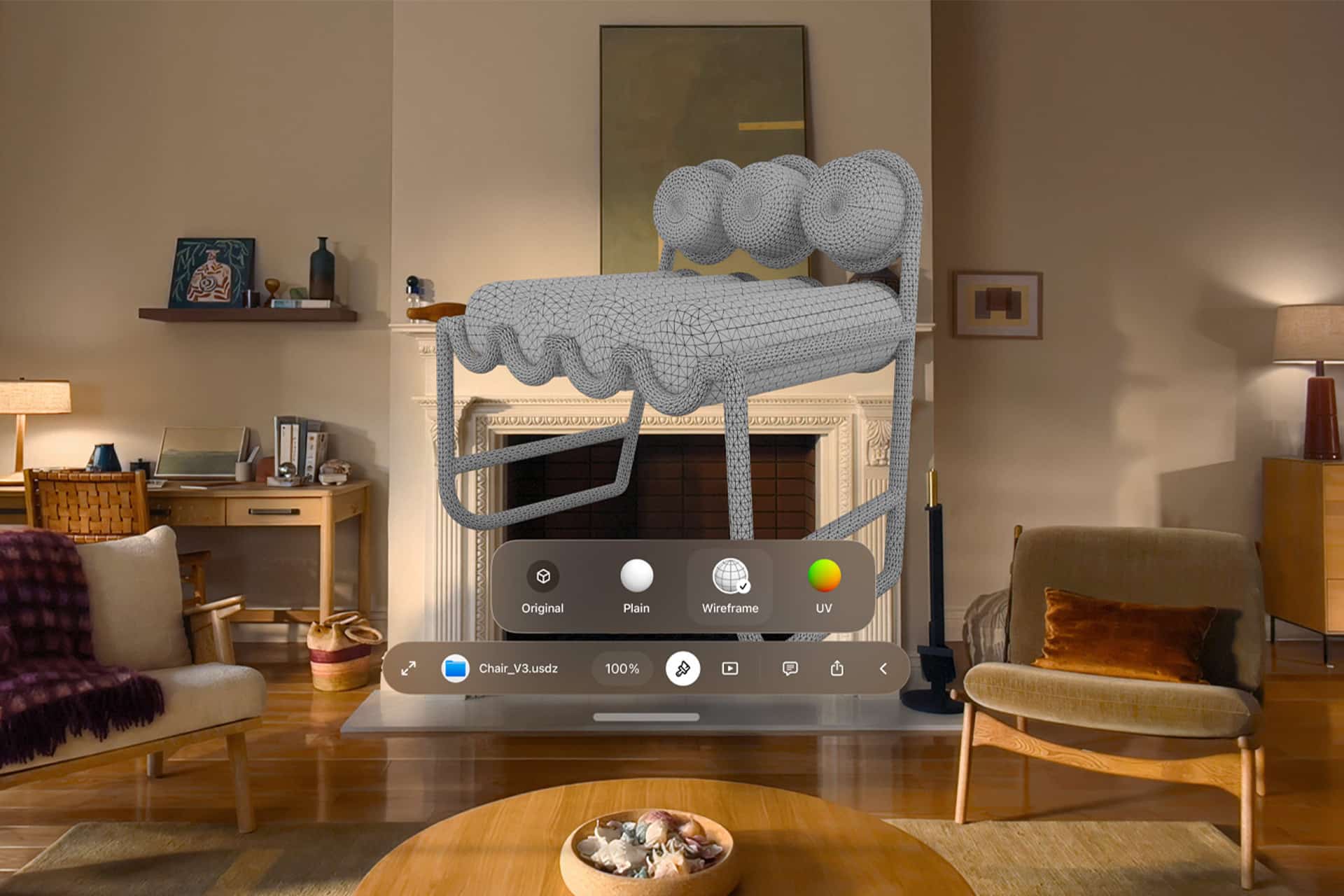
visionOS 27 brings Siri AI and Visual Intelligence into Apple Vision Pro, where the assistant can respond to objects a user is physically looking at. Panoramas can be converted into spatial scenes and used as personal Environments, while Mac users can bring compatible 3D models into their physical space to preview and edit them.
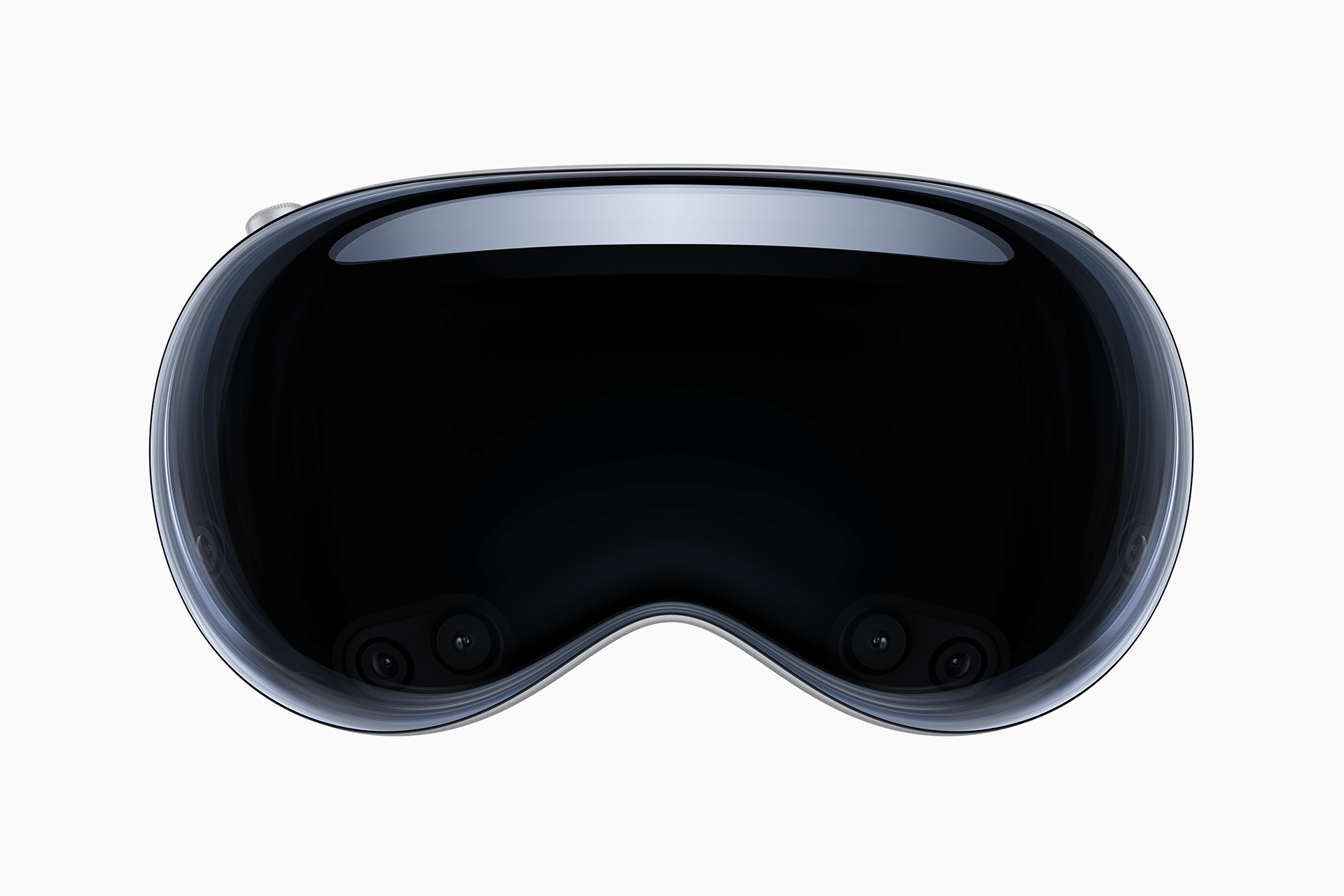
Apple says Vision Pro can now start up and connect to Wi-Fi up to three times faster. New curved windows, Control Center changes, eye-controlled notification expansion, and improvements to Dwell Control further adjust the spatial interface.
tvOS 27 takes a narrower approach. Apple Music gains high-resolution lossless audio support, Apple Podcasts has been redesigned, and additional text-size accessibility options have been introduced. Apple TV 4K owners can install the release on supported second- and third-generation models.
Other changes stretch across device categories. iCloud Shared Albums can now retain full-resolution photos and videos while making participation easier from Android and Windows devices. AirPods gain custom EQ settings, Maps expands Flyover with AI-assisted aerial detail, and Missed-message notifications and unread counts now synchronize more quickly and reliably across Apple devices.
With the September 14 releases now public, the software cycle shifts from preview demonstrations to staggered feature delivery. Siri AI language expansion begins in October, while some Apple Intelligence capabilities and individual app features will continue arriving through later updates rather than being tied exclusively to the initial 27.0 releases.
Depois de já termos publicado vários vídeos sobre as novidades do iOS 27, chegou a vez de começarmos a cobertura em vídeo do macOS Golden Gate 27 em nosso canal. E não tem jeito melhor de abrir essa série do que falando sobre a mudança mais aguardada do sistema: a Siri AI.
Neste primeiro vídeo, mostramos como funciona o novo app da Siri, os ajustes de voz disponíveis, as melhorias na busca do Spotlight, os recursos da Inteligência Visual a partir de screenshots e as ferramentas de escrita e revisão de texto integradas ao sistema.
ARK augmented reality describes a form of spatial interaction in which artificial intelligence does more than place digital objects in the physical world. It uses knowledge from foundation models to understand unfamiliar scenes, generate useful information and adapt its response to the person, task and environment.
The concept comes from a 2023 research paper titled “ArK: Augmented Reality with Knowledge Interactive Emergent Ability.” Its authors proposed a system that transfers knowledge from large foundation models into new physical and virtual environments. Instead of training an AI agent separately for every room, object or activity, ArK uses existing knowledge memory to interpret what it sees and generate appropriate 2D or 3D content.
Traditional augmented reality places information over reality. ARK augmented reality tries to understand reality before deciding what should appear.
That distinction creates a compelling direction for Apple. Vision Pro already blends digital content with physical space. Apple Intelligence adds language, image understanding and personal context. Visual Intelligence lets users look at objects, text and scenes before asking for information. Siri AI adds a conversational layer. ARKit, RealityKit and visionOS provide the spatial foundation.
Apple now has many of the components required to build a knowledge layer over the physical world.
ARK Augmented Reality Goes Beyond Digital Overlays
Most familiar augmented reality experiences are relatively fixed. A furniture app places a digital sofa in a room. A navigation app displays arrows over a street. A museum app identifies an artwork. A repair app shows where a component belongs.
These experiences can be useful, but they usually depend on predefined content and rules. The system recognizes a known object or location, then presents prepared information.
ARK augmented reality proposes something more adaptive. A knowledge-enabled system could enter an unfamiliar environment, interpret what is present and generate assistance based on a broader understanding of objects, relationships and possible actions.
A user looking at a complicated electrical panel would not only see labels. The system could identify the panel type, explain the purpose of each section, compare the arrangement with standard configurations and warn the user not to touch dangerous components.
A student examining a machine could ask how it works and receive a spatial explanation attached to its real parts. A surgeon could review anatomical information positioned around a medical model. A technician could receive repair guidance even when the exact equipment had not been included in a previous training dataset.
The display becomes less like a floating screen and more like an informed interpretation of the environment.
Image Credit: Apple Inc.
Why Apple Is Positioned to Build It
Apple’s advantage would not come from inventing every part of ARK augmented reality. It would come from combining hardware, software, artificial intelligence and personal context into one controlled ecosystem.
Vision Pro already understands rooms, surfaces, hands, eyes and objects well enough to place digital content convincingly in physical space. Its cameras and sensors continuously map the environment while visionOS manages windows, volumes and immersive experiences.
Apple Intelligence provides another layer. Foundation models can interpret language, summarize information, generate content and connect requests with app actions. Visual Intelligence can identify text, images and real-world objects. Siri AI can act as the conversational interface.
The Apple ecosystem also provides personal context that a generic AR platform may not have. Calendar knows the user’s schedule. Maps understands location. Photos contains visual history. Notes and Mail hold project information. Health contains personal trends. Home understands rooms, accessories and automations.
An Apple-built knowledge layer could combine the environment in front of the user with the information already available across trusted devices and apps.
A person preparing for a meeting could look at a conference room and see the agenda, participant names and relevant documents arranged around the table. A traveler could look across a train station and receive directions connected to the correct platform, departure time and digital ticket. A homeowner could examine a room and see live information from temperature, air-quality and energy sensors.
The physical environment becomes the interface.
Vision Pro Is the Laboratory
Vision Pro is the obvious development platform for this idea because it already offers the cameras, displays, sensors and processing required for advanced spatial understanding. Its size and price limit broad adoption, but those same characteristics allow Apple and developers to test experiences that would be harder to build first on lightweight glasses.
ARK augmented reality on Vision Pro could become especially useful in enterprise environments. Apple already promotes the headset for employee training, product design, field service, collaboration and specialized visualization.
A worker could enter an unfamiliar facility and receive contextual instructions attached to real equipment. An engineer could inspect a physical prototype while design changes, performance data and maintenance history appear around it. A new employee could learn a workflow through spatial guidance generated from company manuals and operational knowledge.
The system would not need to display every available fact. It would need to understand which information fits the current task.
That is where AI knowledge becomes more valuable than a traditional AR overlay. Too much information can be as disruptive as too little. A strong system should filter, prioritize and explain rather than cover the room with floating labels.
The iPhone Could Bring ARK to More People
Vision Pro may be the development environment, but iPhone could provide the scale. The iPhone already combines cameras, LiDAR on Pro models, location, motion sensing, Visual Intelligence and Apple Intelligence.
An iPhone-based ARK experience would be less continuous because users would need to hold up the device. It could still deliver useful knowledge interaction without requiring a headset.
A user could point the camera at a plant and receive care guidance based on its species, visible condition, local weather and placement in the room. Someone assembling furniture could receive generated guidance positioned over the actual parts. A shopper could compare products by looking at them rather than manually searching for each model.
The difference from ordinary visual search would be interaction. The user could ask follow-up questions, change the goal and let the system update the visual guidance.
Future glasses could eventually make the experience persistent. The iPhone would help Apple develop the intelligence, privacy controls and app ecosystem before lightweight eyewear becomes ready.
A World That Explains Itself
The most ambitious version of ARK augmented reality is a world in which information is attached to objects, places and situations only when requested or needed.
A city could become understandable without searching through maps, review sites and separate transit apps. Buildings could reveal history. Streets could explain temporary closures. Restaurants could surface reservations, dietary options and accessibility details. Public transport could show the correct entrance and platform.
Inside a home, Apple’s knowledge layer could explain energy use, identify maintenance problems and guide repairs. In a classroom, physical models could become interactive lessons. In healthcare, patients could receive visual instructions for approved home procedures or medication devices.
The experience would depend on context rather than menus. The user looks, asks and receives information positioned where it belongs.
This is the transition from augmented reality as decoration to augmented reality as understanding.
Privacy Will Decide Whether It Works
A knowledge layer capable of understanding the physical world also creates serious privacy questions. The system may see homes, workplaces, documents, faces, screens and private conversations. The more context it receives, the more useful it becomes. The same access can also make it invasive.
Apple’s privacy architecture could become one of its strongest advantages. On-device processing would allow some scene understanding without sending continuous camera feeds to external servers. Private Cloud Compute could handle more complex requests while preserving stricter controls than an ordinary cloud AI service.
Apple would also need visible controls over what is analyzed, remembered and shared. A user should know when the system is interpreting the environment and whether information is temporary or retained. Workplaces and public spaces would need rules for recording, identification and sensitive data.
ARK augmented reality cannot become socially acceptable if people feel that nearby devices are constantly cataloging them.
The successful version would behave less like surveillance and more like intentional assistance. The user asks for understanding. The system processes only what is needed. The knowledge disappears when the task ends unless the user chooses to save it.
Image Credit: Apple Inc.
Developers Could Build Knowledge Worlds
Apple would not need to create every knowledge experience itself. visionOS, ARKit, RealityKit and App Intents could let developers connect specialized knowledge with physical environments.
A medical company could build guidance for approved equipment. A manufacturer could create spatial maintenance systems. A university could attach interactive explanations to laboratories and museums. A retailer could create product comparisons based on inventory and customer preferences.
Apple could provide the shared intelligence layer: scene understanding, object recognition, language interaction, privacy permissions and spatial presentation. Developers would provide the trusted domain knowledge.
This division would be essential. General AI can explain many things, but professional environments require verified information. A generated answer about a historical building has different consequences from an answer about industrial machinery or medical treatment.
Apple’s platform could distinguish between general knowledge and certified domain sources, allowing users to see where information comes from before acting.
From Spatial Computing to Contextual Computing
Apple describes Vision Pro as a spatial computer because digital content can occupy physical space. ARK augmented reality suggests the next progression: contextual computing.
A spatial computer knows where digital content is placed. A contextual computer understands why the content is useful in that location, what the user is trying to accomplish and which knowledge should appear.
That would connect several Apple strategies that currently look separate. Vision Pro supplies spatial awareness. Apple Intelligence supplies reasoning and generation. Siri AI supplies conversation. Visual Intelligence supplies real-world understanding. The ecosystem supplies personal context.
Together, they could create a system that does not wait for users to open the correct app and search through the correct menu. The environment itself becomes the starting point.
Apple’s opportunity is to make that interaction restrained rather than overwhelming. The company does not need to cover reality with digital noise. It can use design, privacy and contextual intelligence to make information appear only when it improves the moment.
ARK augmented reality offers a useful description of that future. Reality remains visible. Knowledge becomes interactive. The computer begins to understand the world in front of the user instead of asking the user to translate everything into a search box.
Siri Wolfram helped define the original promise of Apple’s voice assistant. When Siri debuted on the iPhone 4S in 2011, it could answer factual and computational questions without sending users through a list of search results. Ask about a mathematical calculation, scientific quantity, historical statistic or unit conversion, and Wolfram Alpha could provide a structured answer.
That partnership gave early Siri something many modern AI assistants still struggle to guarantee: a source designed to compute answers rather than produce plausible sentences. Wolfram Alpha was not a chatbot. It was a computational knowledge engine built around curated data, symbolic mathematics and algorithms.
Siri AI enters a far more ambitious era. Apple now wants its assistant to hold natural conversations, understand personal context, interpret images, find information across apps and complete actions. Yet the old Siri Wolfram relationship remains useful for understanding what Apple gained, what was lost as assistants became more conversational and why verified computation may become even more valuable in the generative AI age.
Siri Wolfram Was Built Around Answers
The original Siri Wolfram integration reflected a straightforward idea: users wanted direct answers without manually searching, opening websites and comparing sources.
Wolfram Alpha was particularly effective for questions with a computable result. It could solve equations, compare financial data, convert measurements, retrieve astronomical information, calculate dates and present structured scientific facts. Siri provided the voice interface, while Wolfram supplied the knowledge engine behind selected responses.
A user could ask how many days remained until a date, calculate a percentage, compare populations or request information about a mathematical concept. Siri translated the spoken request and delivered the result in a format suitable for the iPhone.
The experience was narrow compared with modern generative AI, but it had a valuable discipline. Wolfram Alpha attempted to determine an answer from structured information. It did not need to improvise an explanation every time.
That made Siri Wolfram especially useful for mathematics, science, education and quick factual calculations. The assistant could sound intelligent because it was connected to a system built to compute.
Image Source: Google
What Siri Wolfram Alpha Could Do Well
Siri Wolfram Alpha worked best when the request had a definable structure. Arithmetic, percentages, conversions, equations and statistics were natural categories. The system could also retrieve information about weather history, geography, nutrition, astronomy, transportation and other data-rich subjects.
The integration helped make Siri feel different from ordinary web search. Instead of showing several links, the assistant could present one answer with supporting figures or charts.
That approach had limitations. Wolfram Alpha could only respond effectively when it understood the request and had the relevant data or computational method. It was not designed for open-ended conversation, personal writing, emotional nuance or the countless informal questions users ask assistants.
Siri also relied on several external services, with Wolfram Alpha handling only certain knowledge categories. The experience could therefore feel inconsistent. One request produced a polished computational response, while another returned a web search or a limited canned answer.
Still, the partnership demonstrated a principle Apple has never fully abandoned: the best assistant does not need to create every answer itself. It needs to route each request to the system most qualified to handle it.
Generative AI Changed the Definition of an Assistant
Modern AI assistants are expected to do far more than retrieve facts. Users want them to explain ideas, write messages, summarize documents, analyze images, brainstorm projects and remember the direction of a conversation.
Siri AI is Apple’s response to that expanded expectation. Powered by Apple Intelligence and Apple Foundation Models, the new assistant can handle open-ended requests and continue natural conversations. It can use personal context from supported apps, understand onscreen content and connect requests with app actions.
This is a dramatic expansion from the Siri Wolfram era. The old model was largely transactional: ask a question, receive an answer. Siri AI is intended to interpret intent, understand relationships between information and help complete a larger task.
A user may ask Siri AI to find a restaurant recommendation buried in Messages, locate a hotel confirmation in Mail and add the details to a travel note. That request involves personal context and several system services rather than one public factual answer.
The assistant becomes less like a talking search box and more like an operating-system layer.
Image Credit: Apple Inc.
Conversation Creates a Reliability Problem
Generative AI makes assistants more flexible, but it also introduces uncertainty. A language model can produce an elegant response even when the underlying information is incomplete or wrong. The same fluency that makes the assistant enjoyable can make an inaccurate answer sound convincing.
The old Siri Wolfram model avoided much of that risk within its strongest categories. A mathematical calculation came from a computational engine. A unit conversion followed a defined relationship. A data query could be tied to structured information.
Siri AI needs both capabilities. It needs conversational intelligence for requests that cannot be reduced to a formula, while retaining access to reliable tools for tasks that demand precision.
Apple can use specialized systems for calculations, calendars, maps, weather, app actions and personal information rather than asking one generative model to invent every result. Foundation models can understand the request, then direct the work to an appropriate source.
That structure would preserve the strongest lesson from Siri Wolfram: intelligence also means knowing when not to guess.
Personal Context Is the New Knowledge Engine
Wolfram Alpha gave Siri access to public computational knowledge. Siri AI adds a second knowledge source: the user’s own information.
Apple says Siri AI can understand personal context across messages, emails, photos, notes and other supported content. It can help retrieve a detail without requiring the user to remember which app contains it.
This changes the assistant’s value. Wolfram Alpha could explain the distance between two cities. Siri AI could find the hotel reservation, identify the arrival time and retrieve the message where a friend recommended a nearby restaurant.
That personal layer also requires stricter privacy. Apple uses on-device processing for many requests and Private Cloud Compute when more processing power is required. The company has designed the system so personal data does not become part of an ordinary cloud AI profile.
Siri Wolfram answered questions about the world. Siri AI is being designed to answer questions about the user’s place within it.
Image Credit: Apple Inc.
Apps Complete the Transition
Siri AI also moves beyond knowledge by connecting directly with apps through App Intents. Developers can expose content and actions so the assistant can help users complete tasks instead of only describing how to do them.
That could include editing a photo, retrieving a document, starting a workout, updating a task or sending information through a supported app. Onscreen awareness adds another route, allowing users to ask about content already visible without explaining every detail again.
Wolfram Alpha remains valuable because some questions require specialized computation. App Intents extend the same routing philosophy into actions. Siri does not need to contain every capability internally. It needs to understand the request and connect it with the correct tool.
This may become the defining structure of Siri AI: one conversational interface backed by models, apps, services, personal context and specialized knowledge engines.
The Old Siri Still Has a Lesson for the New One
Siri Wolfram belonged to a more limited assistant era, but its underlying approach was disciplined. The system used a specialized source for questions that demanded structured knowledge and computation.
Siri AI has a wider assignment. It must converse naturally, interpret images, understand personal information and complete actions across Apple devices. That breadth can make Siri far more useful, but only if Apple preserves dependable pathways for calculations and factual tasks.
The future assistant should not choose between Wolfram-style precision and generative flexibility. It should combine them. A conversational model can understand what the user wants. A computational engine can provide the numerical answer. Personal context can supply relevant details. App Intents can complete the task.
The old Siri Wolfram integration showed that a voice assistant could make expert knowledge accessible through one spoken request. Siri AI now aims to place conversation, personal context and action around that foundation.
The assistant has become larger, more personal and more capable. Its credibility will still depend on something the 2011 version understood well: when a question has a correct answer, intelligence should calculate before it speaks

 Login
Login