❌

Reading view

Using model routing to lower inference costs

Running frontier models for coding and other purposes can be very expensive, but also, sometimes, very effective. It’s tempting to use smaller or older models instead of frontier models because they’re cheaper, although they may not work as well. The ideal model for any given task tends to depend on the complexity of the task. Picking the most appropriate model automatically based on the request and the context is called model routing.

How model routing works

There are several ways of implementing model routing. In general, model routing depends on the pool of available models, the criteria used for selecting a model, and the objective that the router is trying to optimize. Different vendors offer different implementations of this scheme.

Databricks’ Unity Gateway has (in beta) Smart Routing for Codex or Claude Code. Smart Routing automatically selects the lowest-cost model capable of handling each task, so developers do not need to choose a model for every request.

Microsoft’s model router, a trained language model, analyzes your prompts in real time based on complexity, reasoning, task type, and other attributes. It does not store your prompts. It routes only to eligible models based on your access and deployment types, honoring data zone boundaries. You can choose balanced mode, cost mode, or quality mode.

Not Diamond Code uses a lightweight local proxy that computes the derived metadata needed for routing to evaluate the broader session, including expected downstream work and cache state, and select the model and reasoning effort that optimize expected quality and total session cost. It uses more capable models when they are likely to improve the outcome or finish in fewer steps, and more cost-efficient models when additional intelligence is unlikely to add value.

NVIDIA’s NeMo Switchyard has an array of routing algorithms that it can use. These include the LLM classifier, which uses an LLM as a judge to select a candidate LLM and maintains session affinity with that model across later turns; the stage router, which examines recent tool activity to decide how much model capability the agent needs; the escalation router, which starts each conversation with a lower-cost model and moves the session to a more capable model when it detects sustained difficulty; and the trainable prefill router, which learns from workload data to predict model success likelihood.

OpenRouter’s Auto Router analyzes your prompt and selects a model based on what the OpenRouter community, in aggregate, uses for that kind of work. The selection is constrained by your cost tier and guardrails. If the automatic primary pick fails, the router uses a fallback.

Replit’s Intelligent Model Routing matches tasks to the model they’re best suited for, aiming to balance quality, speed, and cost.

Snowflake’s Cortex AI Gateway uses dynamic model routing to select the most affordable model that can confidently complete the task at each step of agent execution. Lower-complexity and repetitive tasks can be directed to more efficient models, while workloads that require deeper reasoning can be routed to frontier models.

Also worth noting: the RouteLLM (2024) paper proposed several efficient router models that dynamically select between a stronger and a weaker LLM during inference, aiming to optimize the balance between cost and response quality. It also proposed a training framework for these routers that takes advantage of human preference data and data augmentation techniques to enhance performance.

The costs and benefits of model routing

Model routing potentially provides massive cost reductions, lower average latency, optimized quality, reduced vendor lock-in, enhanced privacy, and improved operational resilience. Strictly on a cost basis, model routing is likely to pay for itself above 100,000 daily active users. Even if you only save 20% on your LLM bill, the savings can be significant, but 50% cost reduction is common, and a 95% cost reduction is not unheard of.

Inference costs, alas, don’t tell the whole story. Some indirect costs include quality evaluation overhead, human review, and infrastructure.

There’s also a nasty failure mode that can, for example, turn your inference cost savings into customer retention and support costs that outweigh them by a factor of four to five: the Pareto trap. To understand that, we should start with Vilfredo Pareto’s 1906 observation that 80% of the land in the Kingdom of Italy was owned by 20% of the population. That was adapted in 1941 by Joseph M. Juran to apply to quality control: 80% of problems stem from 20% of the causes. The Pareto trap refers to concentrating on and over-optimizing for the top 20% to the exclusion of the remaining 80%.

Essentially, tuning your model router to handle only the top 20% of queries (in complexity) with a frontier model risks sending too many of the edge cases (the moderately complex queries) to the cheaper model that is unable to answer them correctly. That can lead to hidden failures by the cheap models which in turn cause expensive impacts on the business.

There are multiple steps you can take to avoid this trap. One is broader monitoring, enough to bring the failures to light even if they show up in a different department. Another is more conservative tuning of the model router. And third, you can use a more sophisticated routing model to predict query complexity more accurately.

Model routing optimizes the selection of appropriate models for specific tasks, balancing cost, quality, and latency. Various vendors implement model routing differently, utilizing factors like task complexity, reasoning, and cost to determine the best model. While model routing offers significant cost savings and improved performance, it also poses challenges like the Pareto trap, where over-optimization for cost can lead to hidden failures in simpler queries.

  •  

Eight reasons coding agents are better than software developers

I can’t stop anthropomorphizing my coding agent. I use both Claude Code and Cursor, and whenever I talk about these tools, I always refer to them as “he”, as in “He found and fixed a bug I never even realized existed.”

The reason for this is probably obvious. I deal with my coding agent as if he were a colleague on the other end of a chat window. He writes great code and explains everything clearly. 

And frankly, it’s gotten to the point where he is a better software developer than any human developer could possibly be.

So in the spirit of all great listicles, here are eight reasons that coding agents are better software developers than we are.

Coding agents are tireless

We all get tired. We all sleep badly. Your coding agent never does. He is always ready, always perky, and always 100% on the job. He codes just as well at 4:45 pm on a Friday as he does at 8:45 am Monday morning. He will work without stopping until he solves the problem at hand. He is available 24/7/365. And he never hangs around the break room kibitzing.

Coding agents are faster

He types faster than you. He reads code faster than you. He thinks faster than you. There probably isn’t anything he does slower than you. 

Coding agents have no ego

A coding agent can’t get his feelings hurt when you push back on what he is doing (well, not yet, anyway). He doesn’t argue with you, though maybe he should. He is always open to suggestions, and he doesn’t care who has a good idea. He will gladly rename 400 files or upgrade all your dependencies without a peep of complaint.

Coding agents know every programming language, stack, and framework

Sure, you may have spent years becoming an expert at three or four languages, and you can work fluently in a few of the best frameworks. But you’ll never be an expert in all of them. Claude Code is. And he’ll learn new languages, stacks, and frameworks faster than you will too. 

Coding agents gladly write unit tests and documentation

Sure, you may like writing unit tests. You may even grudgingly write documentation. But you probably don’t do it as thoroughly and tirelessly as your coding agent does. With one simple comment in his base instructions, he’ll do it completely without ever being asked again. I’m pretty sure neither of us can say the same.

Coding agents have huge context

Psychologists study how many ideas or pieces of information we can have in our head at one time, and generally the answer is fewer than the number of fingers we have. Your coding agent? He has multiple orders of magnitude more active storage than you. He can reason about huge chunks of code all at the same time. 

Coding agents have zero onboarding time

Claude Code can be up and running on your massive codebase on day one. He doesn’t care what language it is written in or what state it is in — he is ready to rock the moment you fire him up. None of us can say that. We take weeks or months to get up to speed on a new codebase. 

Coding agents are legion

Need a new developer? Hiring a human and getting them started takes weeks. But you can have 10 coding agents working on 10 different features for your application in about 10 minutes. 

It’s been a while since I’ve run across a developer who doesn’t say “I don’t really write code anymore.” I suppose some of you out there still write code, but at this point, refusing to use coding agents is a career-limiting move. When properly managed, coding agents simply write code faster and better than you do. Admitting that might be hard, but that doesn’t make it any less true. 

But don’t despair! Next week I’ll have eight reasons you are better than a coding agent. 

Writing code is so over. Software development is just getting started.

  •  

US bans DeepSeek across federal agencies, putting AI supply chains under scrutiny

DeepSeek has been dealt a huge blow in the US, even as it continues to innovate and keep pace with, or in some cases outperform, rival models from American labs.

The US Secretary of Homeland Security has issued an order banning all DeepSeek products and services from federal agencies. Government organizations must purge their IT systems of it within 60 days; those with “compelling justification” can make a case for exemption by written request to the Cybersecurity and Infrastructure Security Agency (CISA).

The Department of Homeland Security (DHS) cited multiple concerns about the Chinese-hosted model, including data sovereignty, lax Chinese laws, and security vulnerabilities.

Analyst Erik Avakian, technical counselor at Infotech, understands the concern. “When organizations use any type of hosted AI service, they’re potentially sending intellectual property, confidential business information, or other sensitive data into an environment where they may have very little visibility or control over what happens to it,” he said.

Government concerns

According to a document published in the US Federal Register, all technology developed by China-based Hangzhou DeepSeek Artificial Intelligence Co. will be banned from procurement by federal civilian agencies. This includes affiliated products and any third-party tools or software built using DeepSeek implementations.

Affected civilian executive branch agencies include the Departments of Treasury, State, and Justice; it does not apply, however, to private consumers, the general public, state/local governments, or Department of Defense (DoD) national security systems.

“DeepSeek’s models present multiple threat vectors,” the Order stated. To begin with, the company’s servers are located in the People’ s Republic of China (PRC), whose legal system grants “extensive authority” to government cyber and intelligence functions to access private infrastructure.

DeepSeek’s account generation process collects personally identifiable information (PII) and may also track and digitally fingerprint users, the Order asserted. Its prompt response process may result in the transfer of sensitive data to the PRC. This could give it “actionable intelligence” on US programs or individual users.

Further, the Order stated, DeepSeek models themselves may contain malware or other security vulnerabilities. DHS pointed to open-source security research published in February 2025 that uncovered many iOS mobile apps with multiple critical vulnerabilities.

Until the ban takes full effect, DHS advised agencies to mitigate risk by monitoring inbound and outbound data traffic, implementing enhanced logging and controls on data exfiltration, and detecting and flagging anomalous activity.

Agencies can submit requests for exceptions to the ban in writing, and must provide a “compelling justification,” such as its impact on mission-critical functions, or other considerations related to national interest such as national security reviews, investigations, or security agreements, as reasons why such exemption should be granted,.

Security issues are rampant

The ban comes just as DeepSeek is open-sourcing DeepInfer, its in-house interference framework. DeepInfer powers DeepSeek-V4.1-Flash with what the company said is high throughput and low latency. It features high-performance kernels, an optimized inference engine, structured outputs, and speculative decoding.

DeepSeek said its production token encoding and decoding components, which are aligned with processing logic behind the DeepSeek API, will bring the “same API behavior to community deployments.”

“Open models. Open kernels. Open inference,” DeepSeek posted to social media site X. “From private deployments to public clouds, we’ll keep working with the community to make large-scale inference more efficient.”

This isn’t its first roadblock from a cybersecurity perspective. Most notably, in January 2025, the company leaked more than one million log entries, including chat histories, API secrets, and other sensitive information, through an unsecured database.

DeepSeek reportedly addressed the exposure, but it still raised questions about the overall security practices surrounding the platform, particularly for organizations considering entrusting it with their own sensitive business information, Avakian pointed out.

That’s not to imply that every DeepSeek model is “inherently malicious,” he said, but there are still major questions around data privacy, the potential for information access under Chinese laws, the security of the broader AI ecosystem, and the susceptibility of DeepSeek’s models to jailbreaks and manipulation.

“Taken together, [these issues] raise legitimate concerns about whether organizations can adequately understand and manage the risks involved,” Avakian said.

Enterprises should seriously assess associated risk

Enterprises are increasingly exploring DeepSeek, although most publicly-documented adoption has been in China, Avakian noted. Some DeepSeek models have also been made available through platforms like Microsoft Azure and AWS.

“There’s genuine enterprise interest in the technology, as organizations look for opportunities to improve productivity, offer new capabilities, or reduce costs,” Avakian said. Useful applications include document summarization, internal research, and coding assistance.

DeepInfer also has the potential to reduce costs, but possible benefits should be weighed against associated security risks, he pointed out. The framework was just released, so organizations are going to need to validate the claimed efficiencies in their own environments rather than assuming savings will automatically translate into lower operating costs.

He encouraged organizations to start with relatively low-risk use cases, preferably using “public, synthetic, or appropriately sanitized information,” within a sandboxed environment they control themselves.

The important question to ask: ‘What is the business problem we’re trying to solve?’ From there, Avakian said, determine whether DeepSeek is the best way to solve it, validate security controls, and expand the use cases based on risk tolerance. Effective governance and risk assessment are key, he noted: understand what you’re bringing into your environment, validate its security, restrict its permissions, and make sure you can monitor what it’s doing.

“Approach this like any other software supply chain decision,” Avakian advised. “The fact that something is open source, inexpensive, or technically impressive doesn’t automatically make it appropriate for enterprise use.”

Impact on the broader AI ecosystem

The fact that the Order also addressed third-party products and services developed using DeepSeek implementations is important, Avakian said, because organizations may be using DeepSeek technologies indirectly, through vendors, software platforms, or other services, without necessarily knowing what’s operating underneath. “These are classic supply chain issues,” he observed.

It’s no longer enough to know which AI applications employees are using; enterprises must understand which models, frameworks, dependencies, and external services are embedded in products they’re purchasing and deploying, Avakian said. This means revisiting AI inventories, potentially updating procurement requirements, and expanding processes around third-party risk management, he advised.

“Ultimately, enterprises leveraging these tools need to understand not only the AI technologies they’re intentionally deploying, but also the technologies they’re inheriting through third parties,” he said.

This article originally appeared on CIO.com.

  •  

Hands-on with Antigravity 2: No IDE, just agent chat

The original Antigravity was an IDE with native integration for Google’s generative AI models. With Antigravity 2, Google offers a refashioned version of the product that it describes as a “standalone desktop command center” for agents.

Antigravity 2 is closer to projects like LM Studio than a full-blown IDE. It provides a streamlined, chat-centric interface for working with models and agents, uncluttered by a code editor, debugging tools, and other trappings of an integrated development environment. For those who want an IDE and agent orchestration together, Google still offers the Antigravity IDE (read our hands-on look). But for those who want a chat-centric desktop app experience, or who want to keep their hands-on development separate from their vibe coding, Google has elected to also offer this IDE-less version of Antigravity.

When you launch the Antigravity app and start a new task, you have a few choices about how to manage your work. If you just want to have a quick conversation and don’t need to create a whole project to go with it, you can select “No Project” and just start prompting. If you do create a project, you can either configure the details yourself — what directory to use, what to call it — or have Antigravity set a randomly generated name and empty directory for starters.

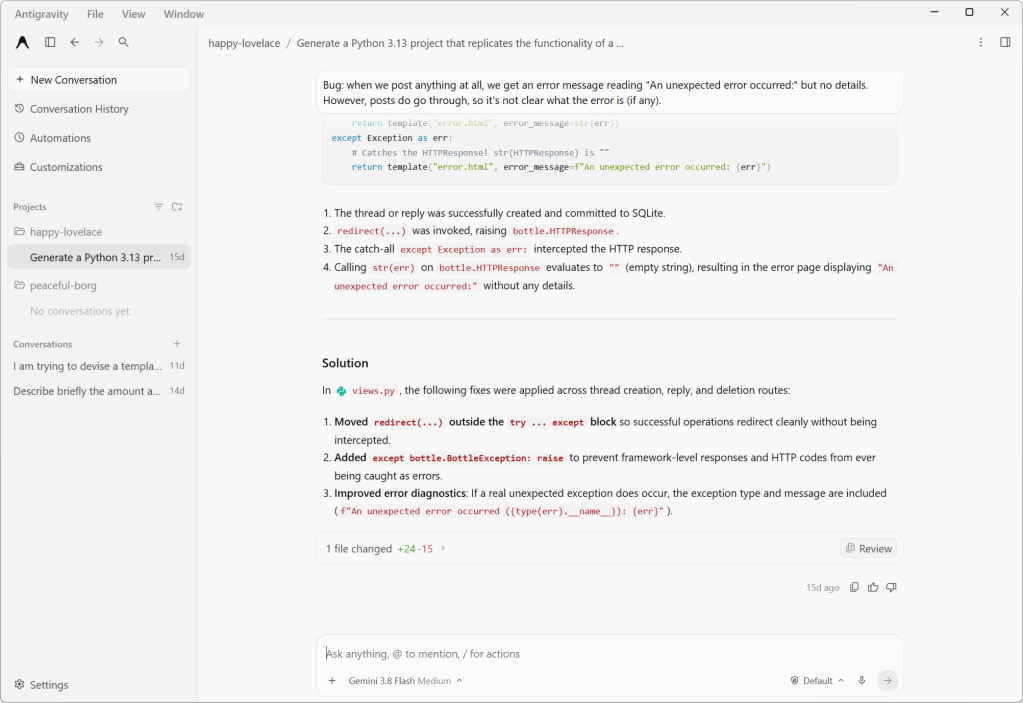
Antigravity 2.0 agent chat interface

Antigravity 2.0’s agent chat interface. This discussion revolves around a Python web project, which the agent has permission to modify.

Foundry

Projects and worktrees

Earlier versions of Antigravity had the concept of workspaces, which were confined to a single directory and lacked granular permissions or customizations. With Antigravity 2.0, workspaces are replaced by projects, which may span multiple directories (that you define explicitly) and have their own isolated settings and permissions. This new scheme better accommodates how many software projects work, especially those with shared components living in different places.

Another new option is local mode vs. worktree mode, which controls how agents interact with your project’s directories. It’s another example of how the Antigravity app lets you choose between the quick-and-dirty or slow-but-correct way of doing things. Local mode has the agent working directly on local folders or Git checkouts, for convenience and speed. The new worktree mode creates a new Git worktree for each conversation, so that the active working folder won’t be affected and work done by any subagents running in parallel won’t conflict.

Antigravity 2.0 grill-me response

An example of one of Antigravity 2.0’s responses for the “grill-me” function. The last option is always left blank for the user to fill in; here, it’s “A mix of #1 and #2”.

Foundry

Agent commands

By default agents come with several common control commands, prefixed with a slash:

  • /btw lets you interject with a quick question that makes use of the current context, but without derailing the workflow.
  • /grill-me has the agent prompt you with a few specific, focused questions about the project to better guide its responses. For instance, during a conversation about creating a templating system for a blogging engine, /grill-me produced questions like “What is the primary goal you want to achieve with your program?” and presented several different options, along with a fill-in-the-blank option.

One thing to be wary of with these command operations is API timeouts. When I was using /grill-me, the API for the service timed out and the context for the grilling vanished and couldn’t be recovered.

Antigravity 2.0 timeout

If Antigravity has an API timeout in the middle of a “grill-me” session, it tends to forget the context, including any already-asked questions. The last question shown was asked previously in a slightly different form.

Foundry

Build with Google bundles

The Antigravity app also includes bundles of agent skills and capabilities for building with various Google services and technology stacks. For instance, the modern web guidance bundle provides agent skills and guidelines for building web apps with best practices and broad browser compatibility. The Android CLI bundle gives agents tools and guidelines for building Android apps, or refreshing older Android apps or their components. Most intriguing of the bunch, if maybe also the most esoteric, is the Google DeepMind science skills collection for doing scientific research with Antigravity.

There is growing interest in speeding up agentic development through parallelism — for instance, by having multiple agents analyze different aspects of a project in parallel and report their results independently. Antigravity gives you a couple of complementary ways to do this. One is subagents, which are spawned by the main agent and work on a specific task in their own isolated workspace. Another is to run agents or subagents asynchronously as a background process, so you and the main agent can continue working without waiting for them to complete.

The biggest limitation of Antigravity, which I’m betting is by design, is that it doesn’t let you use any models besides versions of Gemini, Claude, and GPT. There is no mechanism for connecting Antigravity to a self-hosted model with an industry-standard interface. For that you will want a product like LM Studio.

  •  

ServiceNow makes it easier to build AI agents, gives them verifiable identities

ServiceNow is giving its AI Control Tower new features to make AI agents more governable — and a new name, Super Intelligence Control Tower (SICT), to please the US President. It is also updating EmployeeWorks to make building AI agents easier.

AI Passport, a new component of SICT, gives every agent, whether from ServiceNow or a third party, a verifiable identity, and provides runtime control over its activities.

As enterprises scale autonomous agents from pilots to production, they are facing new challenges, said Nenshad Bardoliwalla, SVP of AI product management at ServiceNow: “If companies can’t identify which agents are running, what they are doing, and what systems they can access, then scaling quickly becomes a risk.”

An AI Passport is a cryptographically signed credential for AI agents that is checked at runtime to verify the scope authorized by the enterprise. When an AI agent stays within its passport scope, it can operate freely, but if it tries to deviate, defined actions are enforced. These can include redirecting, restricting, or reconnecting the agent with proper context, or even triggering a kill switch. All actions are audited so agent activity can be tracked.

It is built on open specifications, so any governance product, identity provider, or enforcement point can issue and verify credentials for their own and third-party AI agents, and those credentials are verifiable at every step in multi-agent workflows.

A bouncer at every door

This is a real step forward, said Frank Dickson, principal analyst at Dickson Research. “Most agent governance today is a security camera. It records what happened so someone can review the tape later. AI Passport is a bouncer at every door.”

The controls extend beyond ServiceNow’s own agents, he said: “For third-party agents, the passport replaces the agent’s own ‘claims’ about its permissions,” he said. “Taking an agent’s word for what it is allowed to do is an Achilles’ heel of agentic AI.”

And, he said, “A passport is only as trustworthy as the office that issues it. Here, the issuing office is ServiceNow’s CMDB, its GRC policies, and its workflow approvals. If that data is stale, the passport is stale. Credit ServiceNow for building on open specifications, but an open spec matters only when others adopt it. Nvidia is the launch partner, and ServiceNow says that enforcement implementation is still being built.”

In addition to AI Passport, ServiceNow has further beefed up its governance tools with a number of other features, including shadow-AI detection to locate unapproved agents on the network; more than 400 connectors to enable AI discovery across platforms and vendors; access mapping; and continuous enterprise AI observability.

It also announced cost governance; “value intelligence” that connects consumption, cost, quality, and “realized user value” to help teams optimize their AI use; AI cost management as part of ServiceNow IT Asset Management, which integrates with the Control Tower; and policy enforcement.

AI Passport, Shadow AI detection, and AI Cost Management are expected to be available by year end.

EmployeeWorks enhancements

The third generation of ServiceNow EmployeeWorks now lets employees add automations to the autonomous AI personal assistants they build. ToolSmith is a new agentic developer environment that takes tool building “from days to minutes,” the company said.

What companies have been trying to do, said Bhavin Shah, SVP of ServiceNow’s employee experience group, “is to give developers a way to build, but in a way that’s governed, that allows them to stay within the guardrails and the controls that that are required in order to do the kinds of safe but deep and capable work that they want for their constituents inside the company.”

ToolSmith helps address that problem. It’s a vibe-coding environment with which developers can build automations for ServiceNow EmployeeWorks AI assistants by describing what they need in natural language. ServiceNow said ToolSmith was trained on over 75,000 APIs and optimized for reliability and token efficiency. Developers can test and refine its output using the same conversational interface.

ServiceNow said that ToolSmith also identifies what to build next, scanning logs “to identify opportunities to fix, improve, or invent the next best workflow.”

Non-coding employees, on the other hand, can build new Productivity Assistants to perform contextual or persona-based work including long-running tasks, the company said. There are also pre-built assistants available, beginning with several for HR service delivery.

EmployeeWorks itself includes two assistants out of the box: a research assistant that can scan internal and external sources for answers, based on the user’s role, and a calendaring assistant that, ServiceNow said, “goes beyond typical calendar booking solutions by orchestrating nuanced requests like scheduling quarterly one-on-ones with an entire team on days that minimize disruption to project work or finding the least hectic day to bring together a team for a full day workshop. “

To automate repetitive tasks, Productivity Routines run proactively in the background, repeating routine steps and providing deliverables without human intervention. Employees just have to describe what they want to automate, select the necessary tools, and deploy the routine.

“The principle is right,” Dickson said. “The people closest to the work understand the problem best.”

But, he added, “the guardrails are only as good as the decisions behind them. Productivity Routines, by ServiceNow’s description, run in the background without human intervention. That is unsupervised work, and someone should own it.”

All of these EmployeeWorks enhancements are in controlled availability now.

Bottom line

Melody Brue, analyst in residence at Moor Insights & Strategy, said the announcements are a sign that ServiceNow is extending its existing security and workflow controls into a broader role in governing agent actions across systems.

“AI Passport makes identity and authorized scope verifiable, Control Tower provides oversight and enforcement, and ToolSmith expands the tools and connectors through which agents can act within enterprise guardrails,” she said, adding that with CEO Bill McDermott’s recent positioning of ServiceNow as a security company, “This suggests an ambition to become a control point for enterprise autonomy.”

But, she said, “What matters now is how consistently ServiceNow can enforce boundaries and verify outcomes across the systems agents actually touch.”

Dickson, too, has concerns.

“ServiceNow says Control Tower tracks spending by user, department, and runtime, and ties that spend to quality and value. The brake is another matter,” he noted. “The graduated alert, throttle, and block enforcement is described in future tense, as is the AI Cost Management integration, which is expected by year end.”

However, “a meter you can watch is not a brake,” he said. “A Productivity Routine that runs every morning is a standing purchase order. Someone should sign it.”

Give every agent and every routine a named owner and a budget before it goes live, he advised, and ask ServiceNow how assists are counted for background routines and whether hard caps exist today. Turn on throttling the day it ships, and reconcile its dashboards against your own invoices.

But despite these concerns, he said, ServiceNow has the right idea. “An agent should carry its permissions, its manager, and its budget wherever it goes. But until the brakes ship, that budget is a decision a person still has to make.”

This article first appeared on CIO.

  •  

Why Aren’t AI Labs’ Apps Better?

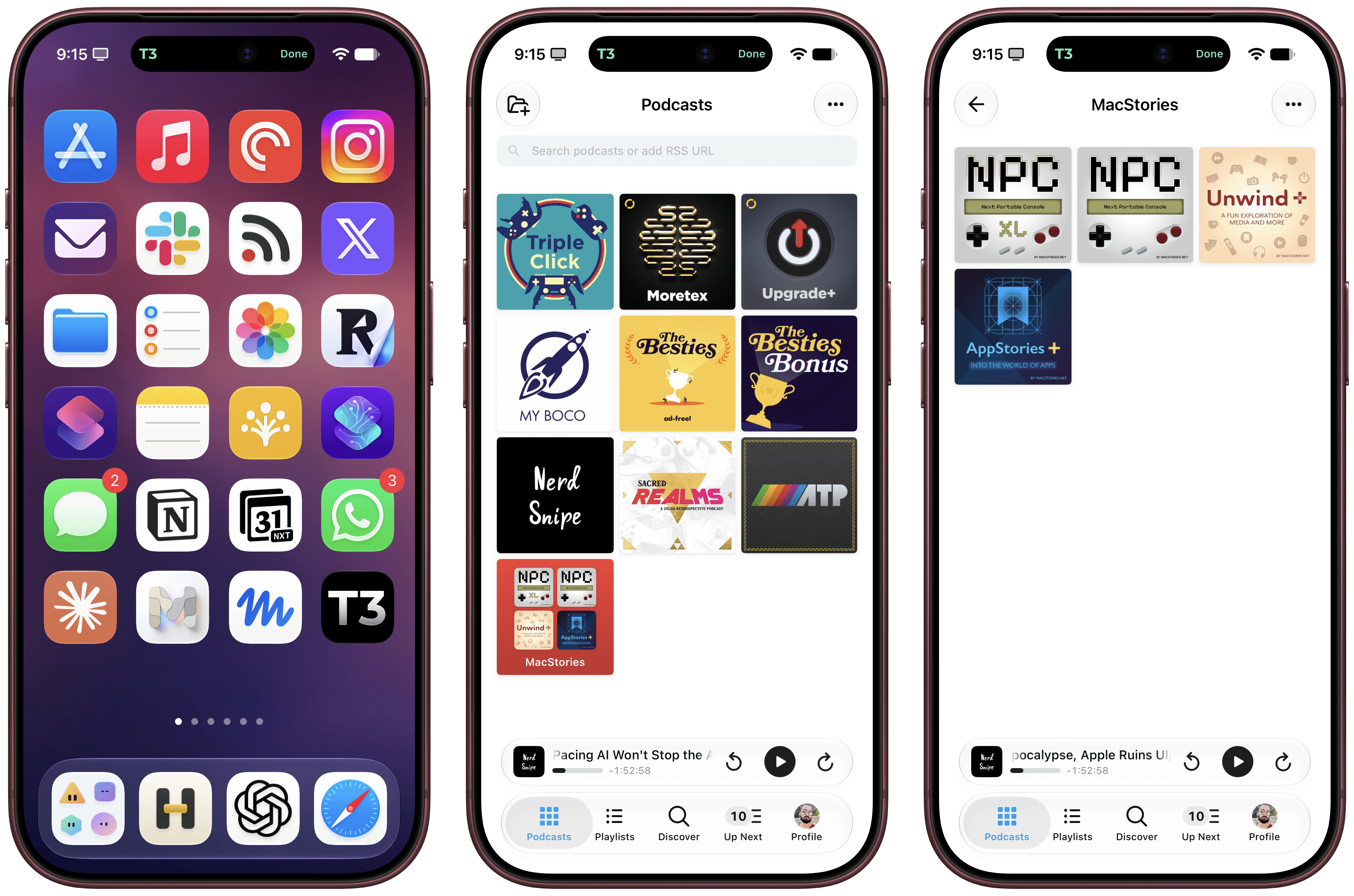
Ben Davis (co-host of one of my favorite new podcasts this year, Nerd Snipe) has a fascinating take on a question I’ve seen many in the Apple community ponder as well: if these frontier models are so good, why do most AI apps from the big labs still kind of suck?

Davis wrote about this in relation to the ChatGPT/Codex desktop app, which has turned into a bit of a kitchen-sink design phenomenon with all kinds of features crammed into a UI that has two left sidebars, multiple modalities, and all sorts of disjointed menus.

To me the most interesting thing here is the implied question of “if the Codex team has unlimited tokens on really powerful unreleased models, why is the product getting worse?”

The lazy answer is “it’s just vibe coded slop, real artisanal code wouldn’t be like this”. Anyone who still says this is a moron and you can ignore them.

“Vibe coding” is not the problem. Frankly, these models are better at writing code than pretty much anyone at this point. You tell the model to make something and it’ll make that thing quite well. And also to be clear, Jira was horrid before LLMs existed. Good and bad products have always existed, and I actually think you can make infinitely better products now when using the agents properly (see T3 Code and Grok Bot).

I’ve been reviewing apps for over 17 years. Without a doubt, the most basic “vibe-coded” app created with Opus 5.5 today is infinitely more stable and nicer than any first app from an amateur developer in 2009. So if we agree that these models can write good code now, why is it that so many apps are still bad?

As we argued in our interview with OpenAI’s own Andrew Ambrosino (the irony is not lost on me), it comes down to human discernment, taste, and other qualities that can’t be turned into “metrics” for a model…at least not yet.

Davis continues:

To put a more precise definition on it, I think this “taste” is the ability to make good decisions in places where there isn’t a programmatic verification function.

For example: “make this function really fast” isn’t a “taste” task it’s a hill climbing task (make changes => test changes => repeat until goal met) which the models excel at right now (I think that any problem which can be expressed in this shape can be solved now by Opus 5.5)

“Which of these color palettes do you prefer?” is a “taste” question. You can’t really put a verifier on it other than your own opinion AKA your own taste. It’s a simple little example, but everything from codebase structure to dashboard layout to how features in chatgpt fit together all fit under here. Their implementations are “correct”, the tests pass, I just hate the choices they made.

“The tests pass, I just hate the choices” sums up my experience with coding agents perfectly. We’re working on our first two apps for MacStories (more in the near future), and while I’m not writing the code, I have to spend so much time thinking about usability decisions, onboarding flows, iOS best practices, and “it just doesn’t feel right” issues that models haven’t been able to abstract yet. I have to wonder if, in a rush to maximize infinite token usage and build everything “because why not?”, perhaps the big labs may have ignored these other aspects of good software design. I strongly believe that there’s more to a great app experience than elegant code that passes tests.

Knowing how these things can change so quickly in this scene, I’m sure this post will be obsolete in a few months. Maybe even weeks. But at this moment in time, Davis’ article is spot-on and human decisions still make a dent in software coded by agents.

  •  

Building Fabric Apps with Microsoft’s Rayfin

Using vibe coding to scratch an itch has many of the same issues as using low-code and no-code development tools. That’s not surprising. Putting together something quickly to solve a specific problem lacks the level of discipline of software engineering, introducing inefficiencies that come from not following architectural guidelines and policies.

I recently reviewed the AI-generated code I used to quickly build a PDF archive of some HTML-formatted content. The program used common libraries in unusual ways, often combining three or more libraries when all the necessary calls were in one, with a program flow that was hard to understand in places. The result was at best unmaintainable. The only way it was acceptable was that I’d thrown it together in an hour to solve a specific problem, and once I’d built that local PDF archive I could simply throw the program away.

But what if your sloppy AI-generated code was needed by an entire department, or had become part of an essential business process? The risk is that something, somewhere, would inevitably change, and that essential business process would fail, with no practical way of fixing the code. The risk only compounds when the author has left their role and there is no one left who remembers or understands the initial prompts that produced the code.

Adding AI-powered coding tools to products and platforms is risky. But they are too useful to ignore. Like low-code tools, AI tools put coding in the hands of the people who understand the business problems and helps them automate processes on their own schedule.

What’s needed is a way to improve the harnesses used by the coding agents, taking concepts from specification-driven development and using them to build guardrails and standards into the code they produce, with the aim of building code that’s maintainable.

Introducing Rayfin Fabric Apps

Microsoft Fabric is intended to be where all your businesses operational data lives, offering a way to query and explore data at scale. It builds on a mix of big data and data warehousing concepts, using open formats for storage and data mirroring tools to bring data from existing applications into its data lakehouses, as well as supporting streamed data.

Microsoft Fabric allows you to build and deploy your own agents inside the platform to work with your data. However, in many cases, you will need a more focused approach to exploring and using defined subsets of data. The recent addition of Fabric Apps to the platform allows business analysts to deliver applications that use data in Microsoft Fabric to provide essential business insights.

Fabric Apps are built on top of Rayfin, a new TypeScript-based SDK that is designed to work with both humans, via CLI, and AI agents. A partnership with Replit allows Microsoft Fabric users to build apps using Rayfin and AI assistance in Replit and deploy them directly into Microsoft Fabric. Here Replit support is best thought of as a tool for business users, whereas developers can use tools like the GitHub Copilot CLI and Visual Studio Code, which let you mix traditional and AI-supported development processes.

The intent is to provide the tooling that business users need to create data-powered applications inside Fabric, making application development part of the process of exploring data. Rayfin apps can be connected to raw data or draw on semantic models built with tools like Power BI, using DAX for analytics rather than SQL or KQL queries.

Data app development tools for coders and non-coders

The key to this approach is the open-source Rayfin SDK, which offers a way to build out the necessary definitions for data models that can then be used by agent-based tooling. The SDK allows you to set up access to specific models, along with the necessary permissions, before users begin to build on them. Rayfin turns those models into GraphQL endpoints, with TypeScript clients sitting between them and the data stored in Microsoft Fabric — adding an extra layer of protection as the APIs are automatically type safe.

Building a Rayfin-powered Fabric App starts with using Rayfin to define a data structure with decorators that apply types to the data you want to use in your application and defining each table as a class. For example, a table of employee names and contact details would be exposed as an entity that contains an employee class, with decorators that create ID number, name, and address strings, all using structures held in the @microsoft/rayfin-core definitions. Other options allow you to begin to define access controls around the data, so that it can be used only by authenticated users with the correct group privileges.

This is the most important part of any Rayfin-based application development, as it’s here that you’re setting up the guardrails for ongoing user-led development. You’re not limited to one basic application scaffold, either, as there are a series of different templates available to help you get started, from a ready-to-use “to-do” application that illustrates the structure of a complete Rayfin application, to applications that use Microsoft Fabric’s authentication framework to control access to data.

Using Rayfin from the command line

Microsoft provides a process for getting Rayfin scaffolding in place, starting with setting up an application template, then logging in to Microsoft Fabric via Entra ID. Once you’ve completed these steps you can run Rayfin’s development loop to create a runtime and configure the Microsoft Fabric back end, before deploying the base application scaffolding. You don’t need to do this manually; Microsoft’s documentation includes a ready-to-run prompt for your coding agents.

You can now define your data entities. These are placed in a specific directory within the application scaffolding, with separate TypeScript definitions for each class. While you can put all your definitions in a single file, having separate files for each entity makes more sense, as it keeps applications maintainable. Once you’ve added the entities you plan to use, you can rebuild the scaffolding and redeploy, ready for testing.

Usefully this technique lets you separate the back end and front end, ensuring that back-end services and entity definitions run in Microsoft Fabric using its authentication and security framework, with application code running on development hardware (and eventually on separate servers or as part of a local application). This is where you will develop Rayfin functions, TypeScript applications that access and process the defined entities, with predefined typed connectors to work with data already stored in Microsoft Fabric. Rayfin functions can call any HTTPS API, allowing you to mix Microsoft Fabric data with information from any other line-of-business application or service. They’re also where you put the business logic for any Fabric application.

Structuring apps to be coded by machines and managed by humans

Building with the Rayfin SDK produces a predictable application structure with YAML configurations and TypeScript code. That code can be tested locally against a Microsoft Fabric back end. When ready to be deployed and shared, it can be uploaded to Microsoft Fabric, which hosts both the Rayfin function code and any front-end assets. Apps will require Microsoft Fabric capacity to work, and can be accessed from inside the Microsoft Fabric portal, though users can access apps via published endpoints through their browsers.

Rayfin is one of the first examples of a new generation of SDKs and development tools that support both humans and agents. The human-readable Rayfin documentation is paired with an identical set of markdown files, ready for use by any agent working on Rayfin code. Microsoft’s partnership with Replit provides a coding agent to build Rayfin applications and a rendering canvas with familiar Power BI features, providing a place for non-coding business users to experiment with Fabric Apps using AI.

The strict structure Rayfin imposes on Fabric Apps aims to bridge the gap between AI-powered coding and traditional enterprise application development. By putting all the components of an application in a rigidly-defined environment, Rayfin helps ensure that AI-generated code remains secure, compliant, human readable, and human maintainable. Business users can quickly put together Fabric Apps with Rayfin and Replit. Then, if a Fabric App proves to have utility outside a narrow group of users, it can be transferred to the enterprise’s development team for further refinement and long-term operations.

  •  

Frames CLI 1.5.0, Now with iPhone 18 Pro and (Experimental) iPhone Duo Support

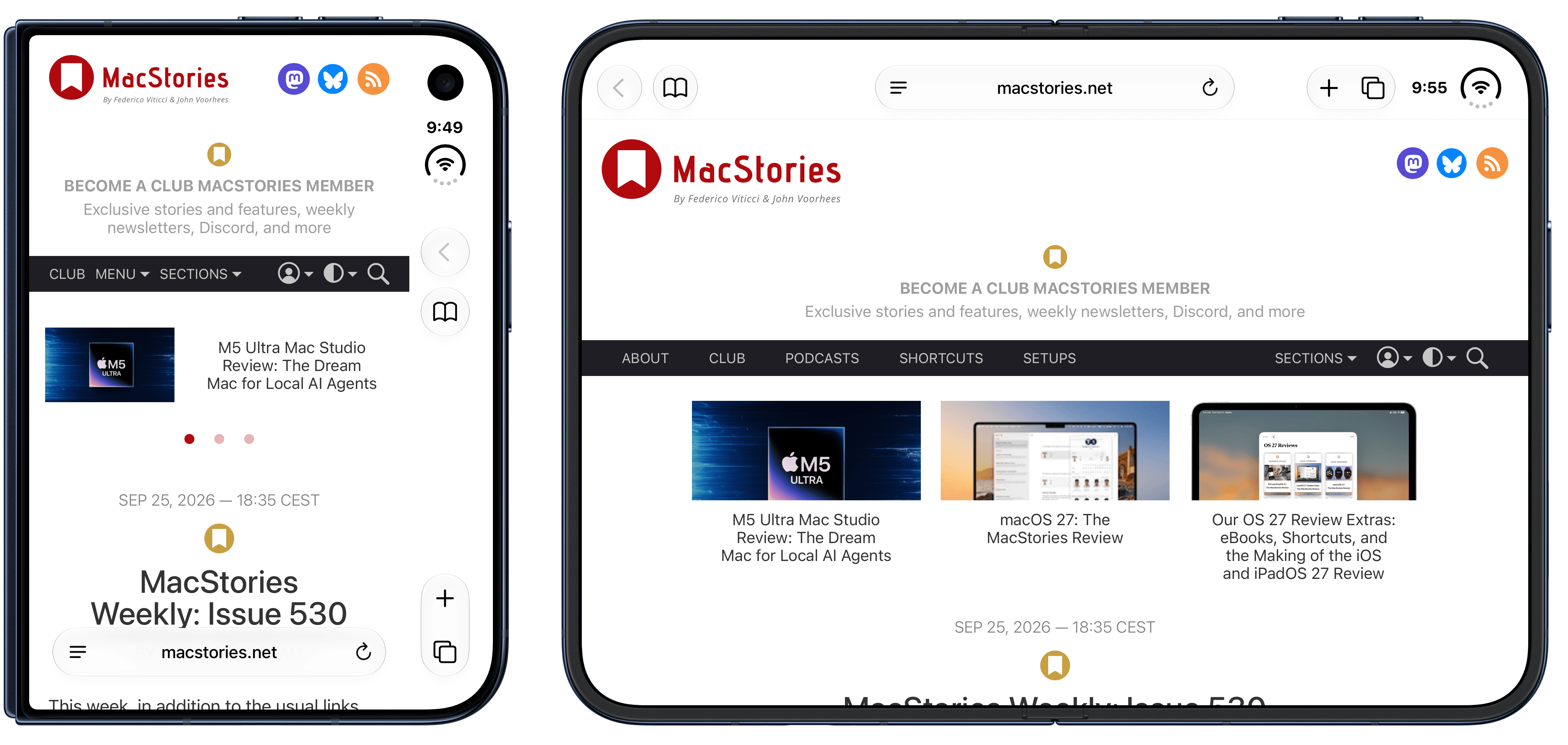
The updated Frames CLI also supports proportional scaling for iPhone Duo.

The updated Frames CLI also supports proportional scaling for iPhone Duo.

The Frames CLI – the companion command line interface to my Apple Frames shortcut I released earlier this year – received a 1.5.0 update earlier today with two notable additions: iPhone 18 Pro frames, and experimental support for iPhone Duo screenshots in all poses.

As always, my shortcut and CLI are based on Apple’s official product bezels, which is why, as of today, there is no support for Apple Watch Series 12 and Ultra 4 yet (those frames haven’t been published by Apple). iPhone 18 Pro is the new default frame family for the two Pro and Pro Max screen sizes, and the CLI supports all the new device colors this year (Burgundy, Glacier, Silver, and Black).

iPhone 18 Pro in Burgundy.

iPhone 18 Pro in Burgundy.

iPhone Duo support is experimental. I obviously don’t have an iPhone Duo yet, but thanks to Opus 5.5, I was able to grab screenshots from the Xcode 27.1 Device Hub, verify them against Apple’s official assets, and test everything in the Frames CLI. It should work! The CLI – and, thanks to its skill, your agent of choice – supports framing screenshots taken on the inner and outer display, different poses, different rotation settings, as well as screen recordings.

If you’re a developer working on iPhone Duo apps, I think the updated Frames CLI should come in handy to automate the process of framing multiple screenshots and screen recordings. As before, you can take advantage of CLI features such as proportional scaling, merge mode, and batch mode, which should help you with your upcoming App Store submissions for the iPhone Duo.

The Frames CLI is free and open source, works with any agent, and is highly customizable. I’ll release an updated version of the Apple Frames shortcut once I can get my hands on an actual iPhone Duo next month (hopefully). Fingers crossed.

  •  

New Scale Reveals How Culture Shapes What We Call Child Abuse

Where is the line between firm discipline and child abuse? For millions of families in the United States, the answer depends on where they grew up, what their parents did, and how their culture defines good parenting. A new study published in the Journal of Child and Family Studies tackles this thorny question with an ambitious goal: building a scientific instrument that can measure how people from different backgrounds judge parenting practices that are accepted in some communities but condemned in others. The Parenting Practices and Discipline Scale, or PPDS, developed by Kevin Ortiz Diaz, Maureen C. Kenny, and Helia Baez at Florida International University, is one of the first tools designed specifically to capture culturally situated discipline practices that existing measures simply ignore.

The stakes are enormous. Child abuse is recognized as a global health issue, and in the United States it occurs at what researchers describe as epidemic proportions. Federal data show 546,159 victims of child abuse and neglect in 2023 alone, and the vast majority of these cases, roughly 89 percent, are committed by one or both parents. Children from minority groups are often the most affected, with Black or African American children among the most likely to experience abuse, second only to American Indian or Alaska Native children. Yet the definitions of what constitutes abuse vary dramatically across countries and cultures, creating a legal and ethical minefield for immigrant families who may not realize that practices considered normal at home are illegal in their new country.

The problem is particularly acute for Hispanic families, who make up 19 percent of the American population and represent the largest share of recent immigrants. Hispanic culture is far from monolithic, encompassing communities from South and Central America and the Caribbean with distinct traditions, but certain common threads run through the research. The concept of familismo, a cultural orientation and sense of obligation to family, has been linked to greater parental warmth in some studies. At the same time, physical violence as a disciplinary method remains common in many Hispanic cultures, and the chances that such behaviors are carried over by families immigrating to the United States are high. The result is a potential collision between generations of cultural practice and a legal system, anchored by the Child Abuse Prevention and Treatment Act of 1974, that defines abuse in terms of serious physical or emotional harm.

What makes the new study distinctive is its grounding in intersectionality theory, a framework rooted in feminist scholarship that examines how multiple categories of identity, such as race, ethnicity, gender, and nativity, interact to shape experience. Rather than treating demographic characteristics as independent variables, the researchers designed their analyses to test whether these dimensions jointly predict how individuals classify discipline practices as culturally acceptable or abusive. The framework has practical urgency: racial and ethnic disparities exist in both the reporting and substantiation of child maltreatment, and current child protection policies can disproportionately affect women of color who use social services and face heightened surveillance and risk of reports to child protective services.

The scale itself emerged from a careful two-stage piloting process. First, four experienced mental health clinicians specializing in child abuse, with 10 to 20 years of experience each, reviewed a draft pool of 54 items describing parenting behaviors and case vignettes. Then ten first-generation Hispanic immigrants from a range of nationalities, including Puerto Rican, Cuban, Colombian, Mexican, Dominican, and Nicaraguan participants, examined the refined items and identified which behaviors they would associate with parents in their own cultures and whether they would label those behaviors abusive or acceptable. Consensus required agreement from at least 70 percent of the pilot group. Eighteen items survived, ten identified as culturally acceptable behaviors such as yelling, using the chancla, the slipper famously wielded in many Latino households, or letting a child sleep with parents, and eight identified as abusive behaviors such as spanking, leaving a child alone in a car, or forcing a child to bathe with an adult.

The main study recruited 1,477 undergraduates at a large Hispanic-Serving Institution in Miami, ultimately yielding an analytic sample of 1,089 participants after exclusions for failed attention checks, missing data, and groups too small for meaningful analysis. The final sample was 72.2 percent Hispanic, 16.3 percent non-Hispanic Black, and 11.6 percent non-Hispanic White, nearly 70 percent U.S.-born, and predominantly female at 88.8 percent. Participants rated each of the 18 behaviors on a three-point scale: not abusive, inappropriate but not abusive, or abusive. The choice of a college population was deliberate, since emerging adults are on the cusp of parenthood, attitudes at this life stage predict later parenting intentions, and parenting practices tend to be transmitted intergenerationally.

Psychometrically, the study unfolded in two parts. Study 1 established the scale’s initial properties using exploratory factor analysis with principal axis factoring and oblique rotation on a polychoric correlation matrix, an approach suited to the ordinal, non-normally distributed responses. The analysis supported a two-factor structure: Factor 1 captured discipline and psychological aggression, including spanking, yelling, the chancla, cursing, ignoring, comparing, fighting, and religion, while Factor 2 reflected neglect and physical endangerment, such as using drugs in front of a child, refusing treatment for illness, and allowing smoking. The two factors accounted for 29.5 percent of the variance and were moderately correlated. Internal consistency for the full 18-item measure was acceptable at a Cronbach’s alpha of 0.71, though the abusive subscale showed weaker reliability, a limitation the authors acknowledge candidly.

Study 2 then deployed regression models to test how demographic identities shaped perceptions, and the results were revealing. Gender and parental status emerged as the strongest and most consistent predictors: women and parents were significantly more likely to classify culturally acceptable practices as abusive. Among Hispanic participants, those not born in the United States were more likely than U.S.-born Hispanics to view behaviors like spanking as abusive, a finding that ran counter to the researchers’ hypothesis and suggests that acculturation may shift parenting beliefs toward American child protection norms. Across racial and ethnic groups, Hispanic participants were more likely than Black participants to classify culturally acceptable practices as abusive. Notably, for the more overtly harmful behaviors in Factor 2, parental status was the only significant predictor, suggesting broad agreement that neglecting a sick child or encouraging substance use transcends cultural and gendered expectations.

The effect sizes were small, with the models explaining roughly 1 to 6 percent of the variance, a reminder that unmeasured cultural and contextual factors account for most of the variation in how people judge discipline. Still, the patterns carry real implications for prevention. The authors suggest that father-focused education programs may be valuable, since men were less likely to identify physical discipline as harmful and may therefore be at greater risk of normalizing such practices. Culturally adapted interventions have already shown promise, from brief summer parent training programs benefiting Hispanic children to the multinational Triple P Positive Parenting Program, and the PPDS could help practitioners identify which disciplinary practices are perceived as acceptable within specific communities, allowing messaging to be tailored rather than uniform.

The researchers are careful to frame their findings as preliminary. The sample was heavily female and drawn from a single Miami institution in a minority-majority city, socioeconomic status was not assessed, and social desirability bias may have influenced responses to questions about parenting. The abusive subscale needs refinement, and future work should apply confirmatory factor analysis and measurement invariance testing across cultural groups. Yet the core contribution stands: a novel measure that captures culturally situated discipline practices invisible to existing tools like the Alabama Parenting Questionnaire or the Child Abuse Potential Inventory. As parenting practices pass from generation to generation and families cross borders into legal systems with different rules, understanding exactly how culture shapes perceptions of abuse may be the first step toward protecting children without criminalizing the traditions their parents brought with them.

Subject of Research: Development and validation of a scale measuring cultural perceptions of parenting and discipline practices

Article Title: Development and Validation of the Parenting Practices and Discipline Scale in an Ethnically Diverse Sample

Article References: Ortiz Diaz, K., Kenny, M. C., & Baez, H. (2026). Development and Validation of the Parenting Practices and Discipline Scale in an Ethnically Diverse Sample. Journal of Child and Family Studies. https://doi.org/10.1007/s10826-026-03370-6

Image Credits: AI Generated

DOI: 10.1007/s10826-026-03370-6

Keywords: child abuse, parenting practices, discipline, Hispanic families, intersectionality, psychometrics, scale development, cultural perceptions, child welfare, corporal punishment, acculturation, exploratory factor analysis

  •  

Siri AI arrives with personal context, app actions, and a new privacy architecture

Siri AI is beginning its public rollout as Apple transforms its familiar assistant into a substantially more conversational system built around personal context, onscreen awareness, web knowledge, and the ability to perform actions across apps.

The beta is available first in English on compatible devices running iOS 27, iPadOS 27, macOS 27, watchOS 27, and visionOS 27. French, Japanese, Korean, Portuguese, and Spanish support is scheduled for October. Availability remains more limited in some regions, with Siri AI initially unavailable on iPhone, iPad, and Apple Watch in the European Union and unavailable in China while Apple addresses regulatory requirements.

The release follows several years of gradual Apple Intelligence expansion, but Siri AI represents a more fundamental change. Instead of handling each request largely as an isolated command, the assistant can maintain conversations, find relevant personal information, understand what is displayed on a device, and combine those capabilities to complete multistep tasks.

A smartphone lock screen shows a Safari notification: “The Brian Tran Band Tour. An update was detected on this page.” Flashlight and camera icons are visible at the bottom of the screen, highlighting how personal context and privacy architecture work together to keep your notifications secure and relevant.
Image Credit: Apple Inc.

Siri AI can connect personal context with app actions

Personal context is one of the biggest differences between Siri AI and previous versions of the assistant.

The system can search across a user’s messages, email, photos, notes, and other information when responding to a request. Apple offers an example in which someone asks what a family member suggested doing during an upcoming visit. Siri can locate the relevant conversation, find a recipe previously sent by email, and then place the ingredients into a Reminders grocery list.

That combination of retrieval and action is central to the new design. Siri AI can draft an email, edit and share photos, create calendar events, manage reminders, control media, and perform other supported actions without requiring users to manually move information between applications.

Third-party apps can participate through Apple’s App Intents architecture. Existing integrations include tasks such as messaging through WhatsApp or playing an audiobook in Audible, with Apple also previewing deeper capabilities in applications including Microsoft Outlook, Notability, and Tripsy.

Onscreen awareness adds another layer. Siri can identify information currently visible on a device and act on it. Someone viewing a sports website, for example, can ask Siri to identify upcoming home games and add them to Calendar without manually copying dates.

Apple has also expanded Siri beyond voice. On iPhone, users can invoke the assistant with the side button, voice command, or by swiping down from Dynamic Island. On iPad and Mac, Siri AI is integrated into Spotlight, while systemwide context menus can send selected files, images, or text directly to the assistant.

A tablet screen displays a document titled “Intern Onboarding” with instructions on product photography for a summer intern named Marieke. Thanks to advanced privacy architecture, the onboarding materials are tailored using personal context without compromising confidentiality. The time shown is 9:41 AM, and the date is Wed Apr 1.
Image Credit: Apple Inc.

Siri AI gets its own app and conversation history

Siri AI is no longer confined to a temporary interface that disappears once a request is complete.

Apple has introduced a dedicated Siri app where users can begin new conversations or revisit previous ones. Conversation history can sync privately through iCloud across iPhone, iPad, Mac, Apple Watch, and Apple Vision Pro, allowing a discussion started on one device to continue on another.

Follow-up questions can retain the context of an earlier answer, giving Siri a more conventional conversational interface for longer exchanges.

The assistant also has access to broad web knowledge for questions that cannot be answered through personal information or local device data. Apple says Siri can retrieve current information for topics ranging from sports results to travel planning and nearby businesses.

Visual Intelligence expands alongside the assistant. On iPhone, a dedicated Siri mode inside Camera can identify and respond to objects or information in front of the user. A concert poster, for example, can become the starting point for questions about performance times followed by the creation of Calendar events.

On iPad, Visual Intelligence is integrated with screenshots. Mac users can select content on their displays through a keyboard shortcut, while Vision Pro users can ask Siri about app windows or physical objects simply by looking at them.

Writing Tools are similarly integrated across the system. Siri can generate drafts, revise existing text from natural-language instructions, and provide writing suggestions. In Mail and Messages, Apple says it can take a user’s typical communication style with a particular recipient into account, including tone and punctuation patterns.

An iPhone and Apple Watch display colorful health and fitness data, including activity rings and assessment results, on their screens. Enhanced by Siri AI to provide insights tailored to your personal context, the devices are set against a plain light background.
Image Credit: Apple Inc.

Siri AI runs across on-device and private cloud models

Siri AI is powered by a new generation of Apple Foundation Models developed in collaboration with Google using Gemini technology, marking a notable shift in Apple’s AI infrastructure.

The architecture divides processing between models running directly on the device and larger models operating through Private Cloud Compute. Apple says requests sent to Private Cloud Compute are processed without personal data being stored or made accessible to the company.

Core resources such as the Spotlight index and Apple’s App Toolbox can remain on-device, allowing Siri to retrieve local information and perform supported actions without sending every request to a remote server.

More capable devices can also use AFM Core Advanced, Apple’s highest-performance on-device model. It powers improvements including more expressive Siri voices and advanced systemwide dictation that automatically handles capitalization, punctuation, and formatting.

Compatibility varies by feature. Apple Intelligence supports iPhone 16 models and later, iPhone 15 Pro and Pro Max, M1 or later iPads and Macs, iPad mini with A17 Pro, Apple Vision Pro, and supported Apple Watch models when paired with a nearby Apple Intelligence-enabled iPhone.

AFM Core Advanced requires newer hardware, including iPhone Duo, the iPhone 18 Pro line, iPhone Air, iPhone 17 Pro models, qualifying M4 or later iPads with at least 12GB of unified memory, M3 or later Macs with at least 12GB, and Apple Vision Pro with M5.

A virtual window displays a digital article about lotus leaves in a cozy living room, featuring diagrams and text, with modern furniture and warm lighting in the background. Integrated Siri AI enhances the experience by offering personalized suggestions while maintaining robust privacy architecture.
Image Credit: Apple Inc.

Siri AI arrives with limits as Apple expands access

The initial Siri AI release remains explicitly labeled beta, and some of the surrounding Apple Intelligence features are scheduled for later updates.

Apple also confirms that features relying on server-side models can be subject to daily usage limits. That includes Siri AI, cloud-based photo editing, Image Playground, and AFM 3 Cloud models used through Shortcuts. Limits can vary depending on the feature, request complexity, system demand, and other factors.

Apple says expanded access to server-dependent features will eventually be available for a fee, introducing a future paid layer to parts of Apple Intelligence even as the core system remains integrated into supported devices.

Apple will also expand its intelligence capabilities on Apple Watch later in 2026. Planned Audio Intelligence features on Apple Watch Series 12 and Ultra 4 include Live Rewind, which can display text representing the previous 15 seconds of a conversation, and Siri Recap, which generates high-level summaries that can be reviewed later in the Siri app.

Those functions are designed around a hardware-isolated Secure Exclave on the S11 chip, with Apple saying raw audio is processed in isolation and immediately deleted rather than stored as recordings. Live Rewind and Siri Recap are scheduled to enter beta later in 2026, making the current Siri AI launch the beginning of a staged expansion rather than the final form of Apple’s new assistant.

The post Siri AI arrives with personal context, app actions, and a new privacy architecture appeared first on AppleMagazine.

  •  

Exposed Vite servers are being probed for AWS and Azure credentials

Attackers have opened a new front in their war on software developers: Vite servers, which they are probing for sensitive data including cloud credentials, infrastructure configuration and environment files.

Vite was created as a build tool for Vue, a JavaScript framework for building user interfaces and web applications, but has now become a widely used development server and build tool across the JavaScript ecosystem.

F5 Labs reported that attackers sent more than 32,000 attempts to scan exposed Vite servers on its honeypot network, grouped into 807 attacks (or sessions), during August, a sharp increase from just 1,732 attempts over the previous three months.

“Rather than target a single file, the scanning fleet systematically cycled through extensive wordlists of environment files, AWS keys, Azure tokens, and Infrastructure-as-Code state files,” F5 threat researcher, Adam Metcalfe-Pearce, wrote in a blog post on F5’s blog.

F5 noted that Vite normally binds to localhost, but developers can expose it through the “–host” option, server configuration, container port mappings or other deployment mistakes.

Scans targeted a file-access bypass

The activity targeted a recently disclosed vulnerability that allows unauthenticated attackers to bypass Vite’s file-access restriction and retrieve files from the host system. Tracked as CVE-2026-39364, the flaw allows attackers to bypass the “server.fs.deny” deny-list protection used to prevent access to sensitive files.

“When specific parameters such as ?raw, ?import&raw, or ?import&url&inline are appended to a request, the server fails to enforce deny-list filtering and serves the target file with an HTTP 200 response,” Metcalfe-Pearce wrote.

Some requests also used double-encoded path traversal, which F5 said indicated an attempt to evade security controls such as reverse proxies and web application firewalls (WAFs).

Assigned a severity rating of CVSS 8.2 ,the flaw affects Vite 7.1.0 through versions before 7.3.2 and Vite 8 versions before 8.0.5.

F5 recommended updating Vite to a patched version, rotating potentially exposed secrets, ensuring development servers do not bind to external interfaces, and auditing Docker, Kubernetes and cloud configurations so development ports are not exposed to the public internet.

The blog also shared the curated directory and credential wordlists the attackers used during these attacks.

Vite was part of a broader scanning pattern

F5 also observed attackers combining CVE-2026-39364 with older Vite file access vulnerabilities, including CVE-2025-30208, CVE-2025-31125 and CVE-2024-45811. The same scanning infrastructure also probed for a Next.js middleware bypass, indicating that the activity is not confined to a single framework.

In its blog post the company also noted that, apart from CVE-2025-31125, none of these CVEs are yet listed in CISA’s Known Exploited Vulnerabilities (KEV) catalog.

While F5 saw a sharp increase in August in attacks on recently uncovered flaws in Vite, it didn’t make the top three CVEs attacked on the company’s honeypots, all of them much older. CVE-2017-9841, an almost decade-old critical remote code execution flaw in PHPUnit, remained top of the table with 4,201 recorded attacks, followed by CVE-2018-14028, a failure to verify WordPress plugins as valid ZIP files (4,102), and CVE-2018-20062, a ThinkPHP remote code execution in NoneCms (3,482).

  •  

15,000-Year-Old Stone Tool Experiments Shed Light on Mysterious Ancient Technological Transition

Stanford University scientists say experiments on ancient Chinese stone tools, including 15,000-year-old hand axes, have solved a longstanding mystery about the critical technological transition from rudimentary hand tools to more versatile ground-edged tools, suggesting these new technologies enabled uses beyond food harvesting.

The research team behind the new analysis said the discovery of ground-edged sickles and knives in Neolithic North China, likely used for fiber production and harvesting, combined with their replica-based experiments, highlights the growing technological capabilities of the transition between Paleolithic and Neolithic peoples.

“The combined experimental and archaeological evidence from the site of Peiligang indicates that the emergence of ground-edged tools marked a significant step in technological specialization from the Late Pleistocene to the Early Holocene,” the researchers write in a paper detailing the work.

Mysterious Technological Transition Hidden in 15,000-Year-Old Stone Tools

According to lead author Ran Chen and colleagues, archaeologists widely regard ground-edged cutting tools like the modern sickle as “technological hallmarks of early agriculture in North China.” However, they note, the functional foundations of this advanced toolmaking capability “remain insuf­ficiently tested.”

The research team also noted that most analyses of the transition from the Upper Paleolithic to the Early Neolithic (ca. 15,000–8,000 BP) in ancient China have viewed tools through “the lens of food production.”

“Within this framework, cutting tools, including early flakes and blades and later ground-edged sickles and knives, are often interpreted primarily as implements for harvesting cereals through cutting stems and leaves,” they explained.

The researchers said these earlier findings made them wonder whether this “food-focused perspective” could have led researchers to miss the broader range of plant resource exploitation possibilities in some of the 15,000-year-old stone tools previously discovered, prompting their replica-based experiments.

“The development of stone tool technology in North China provides a framework for reassessing this long-term relationship between plant use and technological change,” they explained.

Experiments Reveal Ground-Edged Tools Were Multifunctional Implements

To test their hypothesis, Chen and colleagues analyzed 140 stone artifacts previously collected from the Peiligang site in Henan Province, China. This included some 15,000-year-old Upper Paleolithic flaked stone tools and several more advanced Early Neolithic flaked and ground-edged stone tools.

Rather than test irreplaceable artifacts, the study authors created realistic experimental replicas.

15000-year-old stone tools mystery
A researcher demonstrates the use of an experimental sickle replica to harvest velvet leaf (Image Credit: Ran Chen).

Testing the effectiveness of the oldest, most rudimentary stone flake designs and the more technologically advanced ground-edged tools for harvesting seed-bearing grasses, the researchers found little measurable advantage between the two designs.

However, when the researchers compared the 15,000-year-old stone flake tools against ground-edged tools made thousands of years later, they found the more technologically advanced tools were “significantly more efficient at cutting thick-stemmed weeds and fiber-yielding plants.”

“Upper Paleolithic flaked tools were multifunctional implements used for processing diverse plant and animal materials, and Early Neolithic flakes continued to serve similarly flexible roles,” the study authors explain. “In contrast, Early Neolithic ground- edged tools show marked specialization in plant- related tasks.”

More Advanced Tools Emerged Through Broader Functional Demands

When discussing the experimental results, the team noted that their findings were supported by microfiber and starch residues found on some of the ancient tools, suggesting that “ground- edged sickles and knives were used not only for plant foods but also for harvesting and processing fibrous plants.”

“These findings indicate that ground- edged cutting tools emerged through broader functional demands, including fiber production, and potentially vegetation clearance, rather than cereal harvesting alone,” they explained.

Beyond the food-harvesting uses of ground-edged tools, Chen and colleagues said their identification of non-food plant labor like fiber production as an important driver of technological evolution and specialization “reframes the emergence of ground- edged tools as part of a broader technological and economic reorganization in early Holocene East Asia.”

“These findings identify nonfood plant work as an important contributor to the adoption of ground-edged cutting tools and show that tools conventionally linked to early agriculture were shaped by broader demands than food production alone,” they explained.

Finally, the study authors suggested that their analysis of 15,000-year-old Chinese stone tools could “invite renewed attention” to ancient fiber-based economies and nonfood plant use during forager–farmer transitions and in early farming societies beyond China.

The study “Plant fiber exploitation contributed to the emergence of ground-edged cutting tools in North China” was published in Proceedings of the National Academy of Sciences. 

Christopher Plain has spent the last six years as Associate News Editor and Head Science Reporter at The Debrief. Follow and connect with him on X, learn about his novels at plainfiction.com, or email him at christopher@thedebrief.org.

  •  

The best IDE for agentic AI may not be an IDE at all

Steve Yegge is not the shy and retiring type, so when he wants recommendations on how others are managing 10 to 20 (or more) coding agents, he posts the question on X. Specifically, he’s looking for an IDE because “I use Emacs, and I wouldn’t wish it on you.”

The replies (600 and counting) offer plenty of alternatives: Herdr, cmux, Conductor, the Claude and Codex desktop apps, and an impressive assortment of homemade software. For anyone hoping the industry had settled on a sensible way to work with agents, clearly we haven’t. Hence, Yegge’s question.

The most interesting data hidden in the replies, however, isn’t which IDE or IDE stand-in developers are using. Rather, it’s what developers have added to these tools to accommodate the technology’s shortcomings. These include shortcuts to find the agent that needs a decision, ways to recover an earlier conversation, and groupings that explain how a task fits into a project. In other words, despite the incredible intelligence we now have to help us write code, developers are still struggling with the simple task of automating their remembrance of what they asked AI to do.

We seem to have made it easier to generate work without making it easier to absorb and finish work.

Everyone’s building a workspace switcher

Mark Jaquith uses Herdr with a custom interface to jump to an agent needing his attention. Kai Backman has been working on a keyboard shortcut to take him to the “next most relevant place to take action.” Jacob Voytko built a workspace switcher that groups tasks within milestones and lets him jump to the corresponding tickets and pull requests. He wanted a visual sense of where the work stood, rather than an unstructured list. Another respondent, Basil, built a manager that helps him “find the session where we did x.”

Of course, developers have always customized their tools. Emacs users alone could supply scads of evidence. But, again, it’s not really about the fact that developers are tweaking their tools, but why. So much of the tweaking is intended to help cohere the developer’s intentions with the work that’s happening in several places at once. They’re not asking for better AI: They’re asking for AI to help them express their humanity, as it were.

The work comes back

Consider a developer who asks one agent to fix a bug, another to investigate a performance problem, and a third to update a dependency. While the agents work, she can do something else, which is what makes LLM-driven development so appealing—at least, until the agents return.

None of those agents does work that is fully isolated from the rest of the system. Think about it: The bug fix changes behavior someone may depend on. OK … we can address that! But wait, now we have the performance investigation offering three options, each with different costs. Hmm. Hold on a minute while I tackle this … except the dependency update isn’t waiting. It passes its tests, but the agent has also rewritten a configuration file. Better check that!

As this simple example shows, before the developer can move forward on any decision, she first needs to recover what she asked for, what the agent discovered, and what remains uncertain. And, no, adding more agents doesn’t solve the problem. It could instead compound the problem.

The agents may have saved hours. Hurray! But a list of completed sessions doesn’t tell the developer where to begin. Nor does a green test result answer the question of whether the change belongs in the application.

This is why the number of agents running tells us so little, even if it makes us feel cool. I mean, what are those agents doing, anyway? Yegge’s commenters provide some clues. For example, Anton describes using 30 terminal tabs with one active agent per project, so as to keep their work from overlapping. Jerry Combs says he generally keeps no more than three conversations going, with agents managing their own subagents as needed. Even those three conversations are difficult enough to follow.

Both approaches can make sense. The demands depend on how independently the work can proceed and how much human judgment it requires along the way. A developer with 20 agents may have fewer decisions to make than someone with three.

Gergely Orosz recently listed several observations worth considering together: developers spending less time in IDEs, code reviews becoming theater, and people working more despite AI’s productivity promises. His observations don’t establish that agent tools cause overwork or superficial review. They do make it worth asking whether we’re shifting effort into places our productivity stories neglect. Watching an agent produce a change is satisfying, but spending the afternoon reconstructing why six changes were made is less so.

But that work, however unsatisfying, is necessary if those changes are going to be understood and maintained.

Teach the tools to wait

Some of the plumbing already exists to alleviate these issues. For example, Herdr tracks agents as working, blocked, or idle and carries those states into its tabs and workspaces; cmux offers notifications and a shortcut to the workspace with the most recent unread notification. These are useful starts, but they do highlight just how much remains to be done. After all, the most recent notification may concern the least important task, and an agent asking a question may be perfectly capable of waiting while the developer finishes something else.

The next improvement should help developers make those distinctions. A task should retain its original purpose, the relevant decisions, and the evidence supporting its result. When it needs a person, it should explain the decision required and what happens if that decision waits. A summary can help, but it must lead back to the actual changes and test results. Otherwise, we’ve made it easier to approve work without understanding it.

Again, the best tools for agentic AI will be the ones that bring the human back into the loop and provide the information necessary to make decisions.

I’d like a tool that can tell me a task is ready for review because the requested behavior has been demonstrated, while keeping a separate, less urgent question out of my way. I’d also like it to remember that I rejected an approach yesterday, so I don’t have to discover it again in today’s proposed fix. Whether that tool calls itself an IDE seems secondary. Google introduced Antigravity 2.0 as a standalone agent application without an IDE, while recommending that developers use it alongside their IDE of choice. In other words, the editor still has a job, even when it is no longer where every task begins.

In 2022, I wrote about cloud convenience and the tendency to misunderstand what developers want from their tools. They have work to do and want fewer obstacles to doing it. We should apply that same standard to agentic development across the whole task, including the effort of returning to it.

Not that we can put all the onus on AI and its tools. Teams have a part to play here. If every task is urgent, the tool has nothing useful to prioritize. If nobody defines what counts as finished, the tool can only report that an agent stopped. Agreeing on those things and limiting the work that needs simultaneous human decisions will do more than adding another status badge.

Yegge’s readers are already building pieces of this future, one shortcut and homemade workspace at a time. The vendor opportunity is to make that convenience available without requiring everyone to maintain a side project. Give developers more work they can confidently put behind them and fewer conversations they need to keep alive in their heads.

  •  

Open-source software tracks wrist bone motion in 3D and 4D CT scans

In a development that could reshape how scientists study the mechanics of human movement, a team of biomedical engineers and computer scientists has unveiled an open-source software tool capable of tracking the tiny, intricate bones of the wrist as they glide and rotate during motion. The new tool, called Hierarchical 3D Registration, or 3DH, is a module within the SlicerAutoscoperM extension of the widely used 3DSlicer computing environment. Described in a study published in BioMedical Engineering OnLine, the software was validated against previously established methods using both sequential three-dimensional computed tomography, or 3DCT, scans of living participants performing thumb tasks and dynamic four-dimensional CT, or 4DCT, images of cadaveric wrists moving through flexion and extension. The results demonstrate that the open-source approach can match the accuracy of independent, previously published methodologies while offering researchers everywhere a free and reproducible path to quantifying skeletal kinematics.

The wrist has long been one of the most challenging joints for biomechanists to study. It contains eight small carpal bones, including the scaphoid and lunate, along with the radius of the forearm and the metacarpal bones of the hand, all articulating in a tightly packed arrangement that allows the remarkable range of motion humans rely on every day. Understanding how these bones move relative to one another, a field of study known as arthrokinematics, is essential for unraveling the causes of wrist instability, osteoarthritis, ligament injuries and the long-term outcomes of surgical repairs. Yet measuring those movements in living, moving joints has historically required either invasive techniques, labor-intensive manual analysis or proprietary software that few laboratories can access or verify.

Quantitative tracking of skeletal structures in vivo, with both efficiency and high temporal resolution, matters to a wide range of questions in biomechanical research, and the authors of the new study argue that the field has been held back by a shortage of accessible, semi-automated registration tools. Image registration, the computational process of aligning one three-dimensional image volume to another, lies at the heart of motion tracking from CT data. When a bone moves between two scans, its position and orientation change, and a registration algorithm must find the transformation that best overlays the bone’s image from one time point onto the next. Done well, this yields precise measurements of rotation and translation. Done poorly or inconsistently, it introduces errors that can swamp the small movements of carpal bones, which may shift by only a few millimeters and a few degrees during normal function.

The new 3DH module addresses this problem with a hierarchical strategy for registering bones across sequences of image volumes. The researchers presented and evaluated the software using two distinct classes of data drawn from previous studies. The first consisted of sequential 3DCT datasets of human participants performing various thumb tasks, in which the radius, the first metacarpal and the trapezium were the target bones. The second consisted of dynamic 4DCT datasets capturing simulated flexion-extension motion in cadaveric wrists, providing time-resolved, three-dimensional image volumes of the scaphoid and lunate in motion. By testing the tool on both static sequential scans and true dynamic imaging, the team was able to demonstrate that 3DH is not limited to a single imaging paradigm but can serve as a unified tracking solution across modalities.

To determine whether the new open-source tool could be trusted, the investigators compared the arthrokinematics computed with 3DH against values that had been previously calculated using independent approaches for the same 3DCT and 4DCT datasets. The statistical framework for this comparison was the Bland-Altman analysis, a standard method for assessing agreement between two measurement techniques. Rather than simply correlating the two sets of results, Bland-Altman analysis quantifies the mean bias, the systematic difference between methods, and the 95 percent limits of agreement, the range within which most individual differences between the methods are expected to fall. This approach is particularly well suited to method-comparison studies because it reveals whether a new technique introduces systematic error and how widely individual measurements might deviate from those of the established gold standard.

The performance figures reported in the study are striking. For the 3DCT data, in which the radius, first metacarpal and trapezium were tracked, the mean bias for the helical angle, a single-axis description of three-dimensional rotation, was just minus 0.06 degrees, with 95 percent limits of agreement ranging between minus 1.87 degrees and 1.74 degrees. Translation measurements fared nearly as well: the mean bias was 0.12 millimeters, with limits of agreement spanning from minus 2.23 millimeters to 2.00 millimeters. In practical terms, the open-source tool reproduced the rotational and translational measurements of the earlier methods to within roughly two degrees and two millimeters at the extremes, differences small enough to preserve the biological signal in most wrist kinematics experiments.

The dynamic 4DCT results told a similar story for the carpal bones. Tracking the scaphoid and lunate through simulated flexion-extension, 3DH produced mean biases of the Euler angle rotations, which decompose three-dimensional rotation into three orthogonal components, of less than 0.77 degrees about any direction. The widest 95 percent limits of agreement ranged between minus 7.11 degrees and 8.65 degrees. For translations, mean biases were less than 0.5 millimeters in any direction, with the widest limits of agreement ranging between minus 2.36 millimeters and 1.43 millimeters. The wider limits of agreement for rotations in the dynamic data likely reflect the added challenges of time-resolved imaging, including motion blur and the smaller, more complexly shaped carpal bones, but the near-zero mean biases indicate that the tool does not systematically drift away from established values.

Crucially, all target bones were successfully tracked in both the 3DCT and 4DCT datasets, meaning the hierarchical registration algorithm converged on correct solutions in every case tested. This robustness matters because registration algorithms can occasionally fail, locking onto incorrect alignments or diverging entirely, and such failures typically demand time-consuming manual intervention. A semi-automated tool that reliably succeeds across diverse bones, motion tasks and imaging protocols removes a significant bottleneck. Manual bone tracking in CT volume sequences can take hours per bone per trial, and the labor multiplies rapidly in studies involving multiple participants, multiple bones and dozens of motion cycles. By automating this process within a validated framework, 3DH promises to accelerate the pace at which wrist biomechanics data can be collected and analyzed.

The choice to build the module inside 3DSlicer, and specifically within the SlicerAutoscoperM extension, is a deliberate strategic decision with implications well beyond the wrist. 3DSlicer is a free, open-source platform for medical image computing and visualization with a large international user base spanning research, clinical and educational communities. By embedding 3DH in this ecosystem, the developers have made the tool immediately available to any laboratory already working with 3DSlicer, complete with the platform’s established infrastructure for loading DICOM data, segmenting anatomical structures and visualizing results. The authors note that the ability to track bones from both 3DCT and 4DCT data sources, with agreement to prior methodologies, demonstrates that the 3DH approach is a capable tool that could promote collaboration and consistency of results through open-source software.

Consistency is a quietly urgent issue in biomechanics. When different laboratories use different proprietary tools with undisclosed algorithms, it becomes difficult to distinguish true biological differences between study populations from mere methodological discrepancies. Open-source registration changes that calculus: the code can be inspected, verified, extended and reused, and results from different institutions become directly comparable because they are produced by identical algorithms. This transparency also lowers the barrier to entry for research groups in settings that cannot afford commercial licenses, potentially broadening the global community capable of conducting rigorous skeletal kinematics research.

The study itself emerged from a collaboration spanning several institutions. The team included Joseph J. Crisco, Amy M. Morton and John D. Holtgrewe of the Department of Orthopedics at The Warren Alpert Medical School of Brown University and Rhode Island Hospital; Cesar Lopez, Andrew Thoreson and Kristin D. Zhao of the Assistive and Restorative Technology Laboratory and the Department of Physical Medicine and Rehabilitation at the Mayo Clinic in Rochester, Minnesota; and Jean-Christophe Fillion-Robin and Beatriz Paniagua of Kitware Inc. in Clifton Park, New York. The involvement of Kitware, a company known for its leadership in open-source scientific computing, underscores the blend of academic rigor and software engineering expertise required to produce a research tool robust enough for widespread distribution. Funding was provided by the National Institute of Arthritis and Musculoskeletal and Skin Diseases of the National Institutes of Health under award numbers AR059185, AR078924 and AR071338.

The implications of this work extend naturally to the future of musculoskeletal imaging. As newer CT technologies, including photon-counting detector systems, deliver ever-finer spatial resolution and as dynamic 4DCT becomes more widely available, the volume of image data available for kinematic analysis will grow dramatically. Tools like 3DH, which are fast, semi-automated and validated across modalities, will be essential for converting that imaging bounty into quantitative biomechanical knowledge. For patients with wrist disorders, the downstream promise is equally tangible: better measurements of how carpal bones actually move in living joints can inform more accurate diagnoses, improved surgical planning, more realistic computational models of joint loading and ultimately better-designed treatments for conditions ranging from scapholunate instability to thumb-base arthritis. With the tool now openly available in the 3DSlicer environment, researchers around the world can begin putting it to work.

Subject of Research: Open-source kinematic tracking of the small bones of the wrist in sequential 3DCT and dynamic 4DCT images using Hierarchical 3D Registration

Article Title: Kinematic tracking of the small bones of the wrist in sequential 3DCT and dynamic 4DCT volume images using open-source Hierarchical 3D Registration, a module within SlicerAutoscoperM

Article References: Crisco, J. J., Morton, A. M., Lopez, C., Thoreson, A., Zhao, K. D., Holtgrewe, J. D., Fillion-Robin, J.-C., & Paniagua, B. (2026). Kinematic tracking of the small bones of the wrist in sequential 3DCT and dynamic 4DCT volume images using open-source Hierarchical 3D Registration, a module within SlicerAutoscoperM. BioMedical Engineering OnLine. https://doi.org/10.1186/s12938-026-01601-x

Image Credits: AI Generated

DOI: 10.1186/s12938-026-01601-x

Keywords: Computed tomography, 3DCT, 4DCT, Bone tracking, 3DH, 3DSlicer, Image registration, Wrist kinematics, Arthrokinematics, Open-source software, SlicerAutoscoperM, Bland-Altman analysis

  •  

Rapid Wildfire Structure Risk Assessment Helps Fire-Adapted Communities

Wildfire scientists have unveiled a new rapid risk-assessment tool that shows substantial wildfire danger to homes and buildings in three major Arctic communities, revealing that between 14% and 26% of structures in Anchorage, Fairbanks, and Whitehorse face high or very high risk from approaching flames. The study, led by Jennifer I. Schmidt of the University of Alaska Anchorage together with Robert H. Ziel, Monika P. Calef, Anna Varvak, and Julio C. Postigo, was published in the International Journal of Disaster Risk Science. Rather than relying on complex fire-behavior simulations that demand specialist analysts and expensive software, the approach combines datasets that most local governments already possess: building footprints, zoning maps, and readily available vegetation layers. The result is an updatable, affordable portrait of which buildings face the greatest threat and where mitigation dollars can do the most good.

The urgency behind the work is hard to overstate. Wildfire costs and damages in the United States alone are now estimated at between USD 394 billion and 893 billion annually, and the 2019 to 2020 Australian fire disasters cost nearly USD 100 billion. The Arctic, often imagined as too cold and wet to burn, is not immune: since 1980, wildfires have cost Alaska between USD 2 billion and 5 billion, with projections suggesting costs could rise 68% by the end of the century. Canadian suppression expenses are expected to climb by 60 to 110% relative to the 1980 to 2009 baseline. Meanwhile, structure loss from wildfire has doubled over the past two decades in the western United States, and western Canada has suffered major structure-loss events in four of the last eight fire seasons. Nearly half the global population now lives within the wildland-urban interface, the zone where people and forests meet or intermingle, making tools that translate fire science into actionable local maps increasingly vital.

The researchers’ central premise is conceptually simple but technically consequential: for a structure to be at high risk, a flammable hazard must exist nearby, within roughly 500 meters, and the surrounding landscape must exhibit high wildfire exposure. The method begins with a flammability hazard layer at 30-meter resolution, built from a modified version of NASA’s ABoVE Landcover dataset in which generic evergreen classes were refined to reflect locally flammable species such as black spruce, white spruce, lodgepole pine, and subalpine fir, each assigned hazard ratings from 0 to 100. Critically, the team treated structures themselves as fuel. Each building contributes three fuel units to the surrounding flammability score, a value chosen after systematic testing of one through ten fuel units; three proved optimal, nudging densely built environments up a hazard category without causing wholesale reclassification. Structure density was computed at 90-meter resolution, multiplied by three, and added to the vegetation-based hazard to produce an enhanced flammability hazard layer.

Wildfire exposure, the second pillar of the assessment, captures the potential for hazard to travel. It is calculated as the average flammability hazard within a 100-meter or 500-meter radius, representing the likelihood that fire can reach and burn a given location even if the local fuels themselves are sparse. Exposure values, also ranging from 0 to 100, are classified into five tiers from very low to extreme, and concentrated pockets of flammable vegetation drive scores upward. The third ingredient is structure vulnerability, produced by multiplying the enhanced flammability hazard by a structure importance factor derived from zoning data: residential buildings and critical infrastructure such as hospitals, schools, and nursing homes receive the highest weight, followed by commercial and other structures. Where zoning was unavailable, as on military installations like Joint Base Elmendorf-Richardson in Anchorage and Fort Wainwright and Eielson Air Force Base in Fairbanks, the team collaborated with base personnel or interpreted aerial imagery to classify neighborhoods. The final risk score synthesizes hazard, exposure, and vulnerability into six categories, from extremely low to very high.

The results paint a nuanced picture of Arctic fire danger. Fairbanks showed the greatest proportion of structures in the top two risk categories at 26%, followed by Whitehorse at 22% and Anchorage at 14%. Anchorage, paradoxically, had the highest share of buildings in the top vulnerability tiers, 42%, yet the lowest risk, a consequence of its large urban footprint where dense housing raises vulnerability but fragmented, less-flammable vegetation and abundant developed ground suppress exposure. Fairbanks and Whitehorse, with structures woven into spruce- and pine-dominated boreal landscapes, showed closer alignment between vulnerability and risk. Anchorage was also the only study area where more than 1% of cells jumped two or more flammability categories when buildings were counted as fuel, at 7%, reflecting its 27% share of structure area containing seven or more buildings per cell. The analysis also confirmed the primacy of exposure: when a structure’s wildfire exposure was extreme, at least 87% of such buildings landed in the highest risk category across all three communities.

A key innovation lies in how the team redrew the wildland-urban interface itself. Traditional WUI maps distinguish urban, interface, and intermix zones; the researchers added a fourth category, the transmission zone, marking areas roughly 2.4 kilometers beyond the WUI boundary where fire could move into a community and where fuel breaks might be sited. Within the 500-meter buffer around structures, urban areas were defined by exposure values of 20 or less, interface zones by 21 to 60, and intermix by values above 60, cross-referenced with Alaska and Yukon wildfire management designations that prioritize suppression from critical down to unplanned or wilderness levels. Fairbanks claimed the largest overall WUI footprint, and the transmission zone proved the largest category in every study area, spanning 23,347 square kilometers around Anchorage, 6,180 square kilometers around Fairbanks, and 665 square kilometers around Whitehorse. Across all sites, most structures fell within interface zones, 52 to 61%, followed by intermix at 20 to 35%. Thousands of buildings sit in the high-risk interface and intermix zones where mitigation should concentrate: 15,537 structures in Anchorage, 16,212 in Fairbanks, and 3,734 in Whitehorse.

The method faced its most demanding test against a real disaster. On 17 August 2019, during southcentral Alaska’s hottest and driest summer on record, the likely human-caused McKinley wildfire was driven by high winds across 13.3 square kilometers in three days, destroying 52 residential structures, 84 outbuildings, and three commercial buildings, affecting 1,028 properties and forcing roughly 350 to 400 people to evacuate. By comparing pre-fire aerial imagery from 2017 with post-fire imagery from 2020 at 0.3-meter resolution and linking vanished buildings to the Matanuska-Susitna Borough structure database, the team identified exactly which structures burned. The verdict was statistically compelling: burned structures had significantly higher wildfire exposure than those that survived, and the proportion of burned structures with exposure values above 60 was significantly larger than among unburned ones. Structure risk scores above 60 were also significantly associated with burning. Notably, the test held even under conditions so extreme that normally resistant, low-flammability fuels were igniting.

The study’s design was shaped by sustained community engagement. Through workshops in 2019, 2021, and 2023, along with 15 to 20 meetings organized by Anchorage community councils and landowner associations and public events ranging from wildfire awareness days to Arbor Day, residents and agency staff reshaped everything from color schemes to model parameters. One consequential example: Anchorage residents and fire managers insisted that the maps reflect the spruce beetle outbreak first detected in 2016 and peaking around 2020, which killed and removed many spruce trees. The team responded with rules derived from aerial detection surveys, reclassifying white spruce cells in areas of beetle intensity of 11% or greater to mixed forest, and shifting mixed forest cells to open shrub, while a succession model updated vegetation on areas burned within the last 30 years. This iterative dialogue ensured outputs that both wildfire practitioners and the general public can interpret, a prerequisite the authors see as central to building fire-adapted communities.

The practical implications for planning are direct. Because mitigation funding is often tied to officially designated WUI areas, the ability to rapidly recalculate boundaries from updated building layers expands funding opportunities and keeps pace with community growth. The framework also points to different interventions in different zones: structures in intermix areas, surrounded by vegetation, benefit most from fuel treatments, while those in interface zones, where flammable vegetation is scarcer, are better served by home hardening measures such as fire-resistant roofs, siding, decks, screens, and unburnable buffers. Given that wildfire activity tends to occur where exposure exceeds 60, the authors recommend concentrating resources on the top two risk categories. Where national products like wildfirerisk.org rely on generalized fuel layers that can overestimate unburnable area in WUI zones and are updated too slowly for annually burning landscapes, this approach trades complexity for transparency, using local data that governments already collect. The underlying wildfire exposure toolbox is publicly available on GitHub, and the team argues that empowered residents, equipped with accurate, current, neighborhood-scale information, are crucial to reducing wildfire risk, particularly where communities may prefer action without government intervention.

Subject of Research: Rapid assessment of wildfire risk to structures and wildland-urban interface delineation in Arctic communities using local vegetation, building footprint, and zoning data.

Article Title: Fueling Fire-Adapted Communities Through a Rapid Wildfire Structure Risk Assessment

Article References: Schmidt, J. I., Ziel, R. H., Calef, M. P., Varvak, A., & Postigo, J. C. (2026). Fueling Fire-Adapted Communities Through a Rapid Wildfire Structure Risk Assessment. International Journal of Disaster Risk Science, 17(2), 351-362. https://doi.org/10.1007/s13753-026-00716-y

Image Credits: AI Generated

DOI: 10.1007/s13753-026-00716-y

Keywords: Arctic, Wildfire, Risk assessment, Wildland-urban interface, WUI, Mitigation planning, Structures, Fire-adapted communities, Wildfire exposure, Flammability hazard, Alaska, Yukon

  •  

The five important tools for controlling AI costs

We spent the last decade building entire finops departments just to decipher what the cloud bill was saying. Just when we figured out how to stop leaving idle compute instances running, generative AI introduced an infinitely more opaque, faster-moving layer of spend.

AI bill shock has spread like a slow moving hurricane across the industry. Aside from the spike in large language model (LLM) costs, the deeper architectural problem is attribution: where exactly is the money going, and exactly what value is it delivering to the business?

When API calls are wrapped in layers of automated agents and prompt templates, your application becomes a black box that consumes capital to spawn tokens. If a features engine is burning thousands of dollars a month just to have an LLM output pleasantries or process low-value data, that isn’t innovation, it’s an uncovered manhole, a gaping liability. Architectural maturity means treating tokens like any other constrained resource.

Fortunately, there are a few good levers we can pull to control AI spend. Here are the five key tools for taming the beast.

Model routing

Don’t use a nail gun if a thumbtack will suffice.

The most powerful models like the latest Claude Opus are some of the most sophisticated software systems ever built. They are capable of handling extremely complex and subtle use cases. They are also voracious beasts when it comes to compute (and therefore dollar) consumption. They are often overkill.

We naturally start with the most powerful model we have when prototyping and sketching out APIs and requirements. That’s because we are in the “get it working” mode and we don’t want to be tangling with model limitations. But for production, it is absolutely essential to dial in on what is the least powerful model we can use.

Sometimes we can address this by tuning the model choice and discovering what will work manually. But in larger enterprise architectures, we can move to a conditional routing layer. Frameworks like RouteLLM or Semantic Router can dynamically direct simple classification, basic text parsing, and user intent detection to fast and cheap utility models like GPT-4o mini or Claude 3 Haiku.

You can also use advanced AI gateways for routing and spend allocation. At the infrastructure level, wrapping this logic in a dedicated AI API gateway (such as Kong, Cloudflare AI Gateway, or Portkey) gives you the ultimate control. A mature gateway allows you to implement “cascade routing” to automatically fall back to a cheaper or open-source model if your primary LLM hits rate limits or latency spikes. More importantly, an AI API gateway centralizes your telemetry, stripping away the black box so you can enforce hard token budgets per tenant or per microservice. You are essentially building a load balancer for cognitive tasks.

Of course, AI gateways also introduce complexity and cost themselves, so these factors must be balanced into the equation. But the bottom line is, there is a right-sized model for your project. You can save a bundle by routing requests to a good-enough, Goldilocks model.

A side note: Another trend in model routing is “repatriation of compute.” That entails running models (often open-source models) on local hardware, instead of renting generative AI endpoints on the cloud.  This implies all the trade-offs and benefits of other on-prem options.

Semantic caching

In conventional web apps, caching is a solved problem. You put Redis in front of your database, map an exact query to a cached payload, and you’re done. But LLMs break traditional caching because human language is infinitely variable. “How do I reset my password?” and “I forgot my login info” are entirely different strings, but communicate identical intents.

If you rely on overly precise matching, your hit rate will be effectively zero, and you will pay the full token price for every phrasing permutation.

Enter semantic caching. It’s like regex for meaning. Instead of hashing the raw text string, you run the incoming prompt through a fast embedding model and do a similarity search against previously answered prompts. You define a confidence threshold (say, 0.92), and if it is met, you serve the cached response (bypassing the LLM and its cost entirely).

The architectural effect is twofold. First, a semantic cache hit reduces your inference cost for that query to exactly zero. Second, it drops response latency from seconds to milliseconds. You can implement this using purpose-built frameworks like GPTCache, or, if you prefer a leaner infrastructure, by using pgvector inside your existing PostgreSQL database to store and match the embeddings.

However, just like dynamic routing, semantic caching demands a rigorous architectural calculus. You are trading generation costs for embeddings and lookup costs. To check the cache, you still have to tokenize the prompt, call a cheap model (like text-embedding-3-small), and execute a vector search.

You also introduce the very real danger of semantic flattening. Tuning the similarity threshold is a delicate art. Set it too low, and your application starts serving general, recycled answers to nuanced user questions. For open-ended, creative, generative AI applications, semantic caching is practically useless. But for retrieval-augmented generation (RAG) implementations, customer support bots, and internal knowledge bases where users ask the same 20 questions a thousand different ways, it is the most effective cost-reduction lever you can pull.

Prompt caching

Whereas semantic caching stores the response to a given intent, prompt caching stores the data needed to contextualize the question. When the user enters a prompt, it is sent to the generative AI endpoint. But instead of your application having to repeatedly gather and send the massive contextual info needed to frame the prompt—from a RAG pipeline, a database, or other source—that information is already pre-loaded in the context cache. The model simply applies the new question to the cached data, slashing both your latency and your input costs.

The core idea behind prompt caching is that the AI engine itself retains the relevant contextual data for incoming prompts. Tokens cached this way get a massive discount (50% to 90%) compared to raw input tokens. But the details of how it is handled vary between providers.

For OpenAI, prompt caching is automatic, but requires attention to how your app uses the endpoints in order to leverage them. OpenAI enforces a 1,024-token minimum threshold. More importantly, it requires an exact, byte-for-byte prefix match starting from token zero. If you inject a dynamic variable (like a timestamp or a user ID) at the very top of your system instructions, you instantly invalidate the cache and pay full price for every token that follows.

Some other providers, like Anthropic Claude and Google Gemini, use explicit caching. You must deliberately engineer the cache into your architecture, either by hitting a dedicated API endpoint to upload the static document (the context data) with a defined time to live, or by injecting strict cache control breakpoints into your JSON payload. Explicit caching often requires paying a “write premium” up front, but it gives you the control to guarantee your heavy RAG data stays alive in memory for hours rather than minutes.

Prompt discipline

Just because a model can consume gargantuan amounts of tokens, doesn’t mean it should.

With models now capable of ingesting one million to two million tokens in a single prompt, there is a temptation to brute-force use cases into submission by dumping the entire PDF, the entire codebase, or the last three years of logs into the payload and let the LLM sort it out.

This is a finops blunder. You are paying for every single token you send. Furthermore, from an engineering standpoint, stuffing the context window runs into the very real “muddy middle” problem (aka “context rot”), where the model loses resolution into the middle of the content. As the payload grows, performance and accuracy suffer.

The cure is a strict RAG diet. Naive RAG implementations might pull the top 20 results from a vector database and blindly concatenate them into the prompt. Architectural maturity requires a more ruthless filtering process before those tokens ever reach the expensive LLM.

This is where reranking becomes key. Reranking takes the compiled prompt context and makes sure it is efficiently structured before it hits the LLM. Instead of sending raw search results directly to your primary model, you introduce a tiny, highly-efficient cross-encoder (like Cohere Rerank or an open-source BGE model). You cast a wide net in your cheap vector database to fetch 50 potential matches, then pass them to the reranker to score their actual relevance against the user’s specific prompt. The reranker ruthlessly trims the fat, allowing you to pass only the top three or four hyper-relevant chunks to the expensive frontier model.

You are trading a massive, expensive LLM context payload for a tiny, cheap reranking step. The architectural math here is almost always a resounding win. While a cross-encoder might add 100 milliseconds of latency to the pipeline, it routinely slashes prompt token counts by 80% or more, while simultaneously increasing the accuracy of the final generation. In the generative AI spend playbook, giving your LLM less to read is one of the highest-leverage moves you can make.

Response constraints

By default, LLMs are polite, conversational, and verbose. If you ask an API for data, it desperately wants to start with “Certainly! Here is the JSON you requested,” and end with “Please let me know if you need anything else!”

In a web interface, this is charming. In an application’s API architecture, it is a leak in the finops hull. Generation tokens (output) are almost universally priced 3x to 5x higher than prompt tokens (input). Every pleasantry is burning your most expensive commodity.

Taming LLM responses requires strict API-level enforcement. First, max_tokens must be treated as a hard circuit breaker to prevent runaway generation loops, not as a formatting tool. (Relying on max_tokens to shorten answers often just results in truncated, unparseable JSON.) Second, use stop sequences (stop_words). If your model only needs to output a SQL query, setting a stop sequence for the markdown closing tag (“`) or the word “Explanation:” forces the model to sever the connection the moment the computational work is done.

Modern APIs also offer structured outputs (or strict JSON mode), which forces the model to adhere to a rigid schema you define. By combining this with zero-tolerance system prompts (“Output ONLY valid JSON. Omit all conversational text and pleasantries. Failure to do so will break the system”) you force the LLM to behave like a traditional API endpoint rather than a chatbot.

The architectural balance here is to avoid degrading the model’s reasoning ability by strictly limiting its input. LLMs do not have internal working memory, they “think” by iterating on token output. If you force a model to solve a complex logic problem and output a single boolean true or false without giving it space to reason first, its accuracy will plummet. The finops goal isn’t really to force minimal words; it is to ensure that every expensive output token is performing actual computational work (like chain of thought reasoning).

For more on how to manage AI back ends, take a look at this article.

How to effectively consume generative AI to satisfy user needs is the first battle. The second is keeping the finances from undermining that hard work. The five keys discussed here should give you all the power you need to make sure the engineering and the cost controls are working together.

  •  
❌