Steve Yegge is not the shy and retiring type, so when he wants recommendations on how others are managing 10 to 20 (or more) coding agents, he posts the question on X. Specifically, he’s looking for an IDE because “I use Emacs, and I wouldn’t wish it on you.”
The replies (600 and counting) offer plenty of alternatives: Herdr, cmux, Conductor, the Claude and Codex desktop apps, and an impressive assortment of homemade software. For anyone hoping the industry had settled on a sensible way to work with agents, clearly we haven’t. Hence, Yegge’s question.
The most interesting data hidden in the replies, however, isn’t which IDE or IDE stand-in developers are using. Rather, it’s what developers have added to these tools to accommodate the technology’s shortcomings. These include shortcuts to find the agent that needs a decision, ways to recover an earlier conversation, and groupings that explain how a task fits into a project. In other words, despite the incredible intelligence we now have to help us write code, developers are still struggling with the simple task of automating their remembrance of what they asked AI to do.
We seem to have made it easier to generate work without making it easier to absorb and finish work.
Of course, developers have always customized their tools. Emacs users alone could supply scads of evidence. But, again, it’s not really about the fact that developers are tweaking their tools, but why. So much of the tweaking is intended to help cohere the developer’s intentions with the work that’s happening in several places at once. They’re not asking for better AI: They’re asking for AI to help them express their humanity, as it were.
The work comes back
Consider a developer who asks one agent to fix a bug, another to investigate a performance problem, and a third to update a dependency. While the agents work, she can do something else, which is what makes LLM-driven development so appealing—at least, until the agents return.
None of those agents does work that is fully isolated from the rest of the system. Think about it: The bug fix changes behavior someone may depend on. OK … we can address that! But wait, now we have the performance investigation offering three options, each with different costs. Hmm. Hold on a minute while I tackle this … except the dependency update isn’t waiting. It passes its tests, but the agent has also rewritten a configuration file. Better check that!
As this simple example shows, before the developer can move forward on any decision, she first needs to recover what she asked for, what the agent discovered, and what remains uncertain. And, no, adding more agents doesn’t solve the problem. It could instead compound the problem.
The agents may have saved hours. Hurray! But a list of completed sessions doesn’t tell the developer where to begin. Nor does a green test result answer the question of whether the change belongs in the application.
This is why the number of agents running tells us so little, even if it makes us feel cool. I mean, what are those agents doing, anyway? Yegge’s commenters provide some clues. For example, Anton describes using 30 terminal tabs with one active agent per project, so as to keep their work from overlapping. Jerry Combs says he generally keeps no more than three conversations going, with agents managing their own subagents as needed. Even those three conversations are difficult enough to follow.
Both approaches can make sense. The demands depend on how independently the work can proceed and how much human judgment it requires along the way. A developer with 20 agents may have fewer decisions to make than someone with three.
Gergely Orosz recently listed several observations worth considering together: developers spending less time in IDEs, code reviews becoming theater, and people working more despite AI’s productivity promises. His observations don’t establish that agent tools cause overwork or superficial review. They do make it worth asking whether we’re shifting effort into places our productivity stories neglect. Watching an agent produce a change is satisfying, but spending the afternoon reconstructing why six changes were made is less so.
But that work, however unsatisfying, is necessary if those changes are going to be understood and maintained.
Teach the tools to wait
Some of the plumbing already exists to alleviate these issues. For example, Herdr tracks agents as working, blocked, or idle and carries those states into its tabs and workspaces; cmux offers notifications and a shortcut to the workspace with the most recent unread notification. These are useful starts, but they do highlight just how much remains to be done. After all, the most recent notification may concern the least important task, and an agent asking a question may be perfectly capable of waiting while the developer finishes something else.
The next improvement should help developers make those distinctions. A task should retain its original purpose, the relevant decisions, and the evidence supporting its result. When it needs a person, it should explain the decision required and what happens if that decision waits. A summary can help, but it must lead back to the actual changes and test results. Otherwise, we’ve made it easier to approve work without understanding it.
Again, the best tools for agentic AI will be the ones that bring the human back into the loop and provide the information necessary to make decisions.
I’d like a tool that can tell me a task is ready for review because the requested behavior has been demonstrated, while keeping a separate, less urgent question out of my way. I’d also like it to remember that I rejected an approach yesterday, so I don’t have to discover it again in today’s proposed fix. Whether that tool calls itself an IDE seems secondary. Google introduced Antigravity 2.0 as a standalone agent application without an IDE, while recommending that developers use it alongside their IDE of choice. In other words, the editor still has a job, even when it is no longer where every task begins.
In 2022, I wrote about cloud convenience and the tendency to misunderstand what developers want from their tools. They have work to do and want fewer obstacles to doing it. We should apply that same standard to agentic development across the whole task, including the effort of returning to it.
Not that we can put all the onus on AI and its tools. Teams have a part to play here. If every task is urgent, the tool has nothing useful to prioritize. If nobody defines what counts as finished, the tool can only report that an agent stopped. Agreeing on those things and limiting the work that needs simultaneous human decisions will do more than adding another status badge.
Yegge’s readers are already building pieces of this future, one shortcut and homemade workspace at a time. The vendor opportunity is to make that convenience available without requiring everyone to maintain a side project. Give developers more work they can confidently put behind them and fewer conversations they need to keep alive in their heads.
Microsoft has released Visual Studio Code 1.136, an update to the popular programming editor that previews an Agent Merge feature and introduces two experimental features for agentic coding.
Agent Merge, a preview feature, helps take a pull request across the finish line, Microsoft said. Agent Merge asks an agent to address review feedback, fix failed checks and merge conflicts, and rerun workflows until the pull request is ready to merge. To use Agent Merge, turn on the setting chat.agentMerge.enabled. Then you can enable Agent Merge for a session by running “Enable Agent Merge for Active Session” from the Agents window or selecting the “Agent Merge” button in the title bar.
VS Code 1.136 also introduces multi-root workspaces, an experimental feature that allows developers to work with GitHub Copilot and Claude agents across multiple project folders in the editor window chat view. Agent hooks remain scoped to a single workspace folder, Microsoft said. If hooks are detected in multiple folders, VS Code prompts the user to select the primary folder from which to load them.
Another experimental feature in VS Code 1.136 is chat backgrounds in the Agents window. This allows users to personalize the Agents window with a theme-aware pattern of built-in VS Code icons or an image of their own. Also new for chat are enterprise controls for dictation data. The new controls allow administrators to manage the dictation model and language-model transcript cleanup through enterprise policies. Microsoft said it was possible to require on-device transcription and disable language-model cleanup, so dictation remains available while preventing dictation data from being sent to cloud transcription or a Copilot model.
It used to be that the value and reputation of coding contest winners was very high. That’s no longer the case. Who cares how fast you can produce code that implements an algorithm or solves a problem? Your competition is no longer other people, at least not by themselves, but AI combined with insightful prompting and good taste.
Historically we wrote all our code ourselves and then we tested it ourselves. Yes, there was a period when we outsourced punching our cards to what was essentially a secretarial pool, but we were still writing out the code and doing all the thinking involved in the programming. Over the years we outsourced some of the testing to a QA department, allowed software to guess at what we were typing and complete it, and allowed code-checking software to run in the background as we typed.
Allowing software to help us by guessing what we mean advanced from word completion to line completion to function completion to program generation over a matter of about a decade. Currently a good model running in a good agent harness or IDE can look at your code, suggest improvements, compile and test the improved code, iterate on that, and then come up with something better, faster, more efficient, and more solid.
That shifts the burden from actually programming to reviewing and testing the code. If you don’t even review and test the code, then what you’re doing is vibe coding. Vibe coding doesn’t give you a lot of control over the end product. It is only really efficient at generating quick prototypes and creating technical debt. It’s just not enough structure.
One attempt to add more structure and to control what the model actually generates is specification-driven development (SDD). SDD works, because a spec grounds the model in a single source of truth. However, SDD often comes at the expense of taking too much effort and really being overkill for what you usually need.
Meanwhile, we have perhaps a dozen options for IDEs and another dozen options for agent harnesses and many dozens of models that do a good job of generating code. Here I’ll provide a brief tour of six of them: GitHub Copilot, Google Antigravity, JetBrains Air, Kiro, Zed, and Zenflow.
GitHub Copilot
First offered as a plug-in to Visual Studio Code in 2021, GitHub Copilot was one of the first AI plug-ins for coding assistance. Today, you can use GitHub Copilot in a slew of IDEs for code completion, generation, explanation, and debugging. In addition to VS Code, GitHub Copilot is available for Visual Studio, Vim, Neovim, and the JetBrains suite of IDEs. You can also use Copilot on the command line, both through the GitHub Copilot CLI and as an extension to the GitHub CLI. You can also use it directly on the GitHub website.
Currently there are about two dozen supported AI models in GitHub Copilot, including models from OpenAI, Anthropic, and Google. In Visual Studio Code you can add more models than the ones available by default with your Copilot subscription. For example, if you open the Manage Language Models panel in VS Code, you can select models from Foundry Local via AI Toolkit, GitHub Models via AI Toolkit, Microsoft Foundry via AI Toolkit, and, at least in my case, local models via Ollama. Local Ollama models don’t count against your Copilot plan, but they do occupy GPU or unified memory, depending on your hardware configuration.
GitHub Copilot currently has three default operating modes: Plan, Ask, and Agent. Plan mode researches and outlines multi-step plans. Ask mode chats with you without making changes. And Agent mode edits files in your workspace. You may also have custom modes, some of which are supplied by plug-ins; I have 16 of these. You can create your own custom modes if you wish.
GitHub Copilot currently has nine categories of default tools used by agents; each category may have many actual tools listed. Additional tools come from connected Model Context Protocol (MCP) servers and installed plug-ins. My installation currently has 346 tools available, which is nuts. At one point VS Code would warn you if you had too many tools active, but that doesn’t seem to be happening anymore.
AI agents are autonomous helpers that perceive their environment, decide on a course of action, and execute it. They break large tasks into smaller steps, draw on available tools and resources, reason about approach, and adjust their plans on the fly, all while following user directives until the goal is met. While most agentic code edits complete in seconds or minutes, some can run for hours with only a few requests for permission.
In light of that, it’s not surprising that GitHub switched to usage-based billing for GitHub Copilot. Effective June 1, 2026, GitHub tracks your token consumption rather than your Premium Request Units. Code completions and next edit suggestions are exempt from token limits.
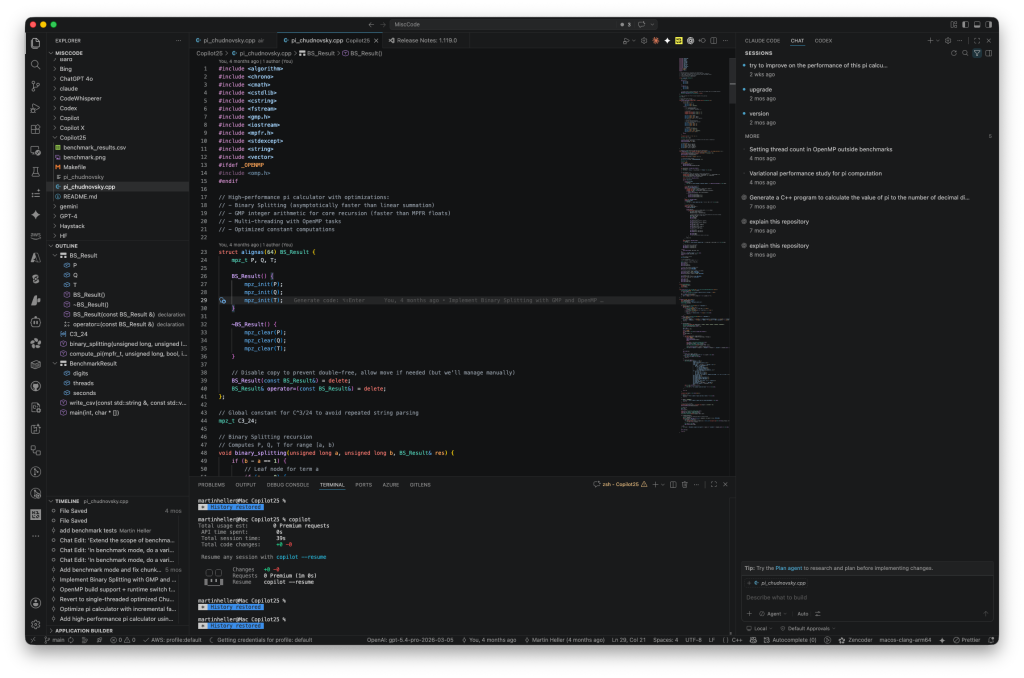
Visual Studio Code with GitHub Copilot Chat selected in the right-hand panel. Note that Claude Code and OpenAI Codex chat share the right-hand sidebar. Also note the large selection of plug-ins at the very left.
Foundry
Google Antigravity
The original Google Antigravity (from way back in November 2025) was built as an agentic development platform, essentially a version of the VS Code “Code – OSS” IDE that Google developers use internally, which was repurposed for the sorts of repositories that mere mortals work with on normal-sized products. (Google’s internal software mono-repository is so large and complex that ordinary software tools can’t work with it; Googlers use Piper, an internal tool for version control, rather than Git.)
On May 19, 2026, Antigravity became the basis for a new ecosystem. Google Antigravity 2.0 is a standalone desktop application that is an independent, agent-focused surface, evolved from Antigravity’s Agent Manager. The new Google Antigravity IDE is a separate download that looks similar to the previous Antigravity. The Google Antigravity CLI is a way to invoke, monitor, and interact with Antigravity agents from your terminal. In addition, the Google Antigravity SDK is available to build custom agents.
Google Gemini 3.6 Flash is the default model on Google Antigravity. According to Google it’s their strongest agentic and coding model yet, as well as being faster than other frontier models on Antigravity. Gemini 3.6 Flash can be selected at three effort levels: low, medium, and high. Antigravity also supports Gemini 3.5 at low, medium, and high levels; Gemini 3.1 Pro at two effort levels; Anthropic’s Claude Sonnet 4.6 and Opus 4.6 with thinking enabled; and GPT-OSS-120B at medium effort. The general guidance is to use the lowest level of effort that will successfully execute your task to minimize token use.
The “+” dropdown in the prompt box allows you to add context to the prompt. Both Antigravity 2.0 and Antigravity IDE allow you to add media, mentions, and actions. Antigravity 2.0 also allows you to enable the browser from the “+” dropdown; it simply adds the /browser slash command to the prompt.
The Antigravity browser subagent is the rough equivalent of Playwright or the Microsoft Foundry Browser Automation tool. It can click, scroll, type, read console logs, capture the DOM, take screenshots, and record video. The browser subagent also integrates natively with the Chrome DevTools MCP.
The other internal slash commands for both SKUs are /goal, which means to run until the specified task is completely finished, not asking for intermediate input from the user; /grill-me, which means to ask questions back to align on the specific details of the plan before implementing it; and /schedule, which means to run an instruction as a one-time timer in the future or on some recurring schedule (via Scheduled Tasks). Any skills provided by plug-ins or by installed Model Context Protocol servers can also be selected by typing a slash into the prompt box.
Antigravity 2.0 and Antigravity IDE support skills both at the workspace and global levels. A skill requires a SKILL.md file with YAML frontmatter at the top, and supports optional scripts, examples, and resources. The YAML description field is key to allowing an agent to recognize when the skill is relevant. Skills that come with MCPs or plug-ins take no effort to install. Creating custom skills requires you to add a named skill directory and the SKILL.md file.
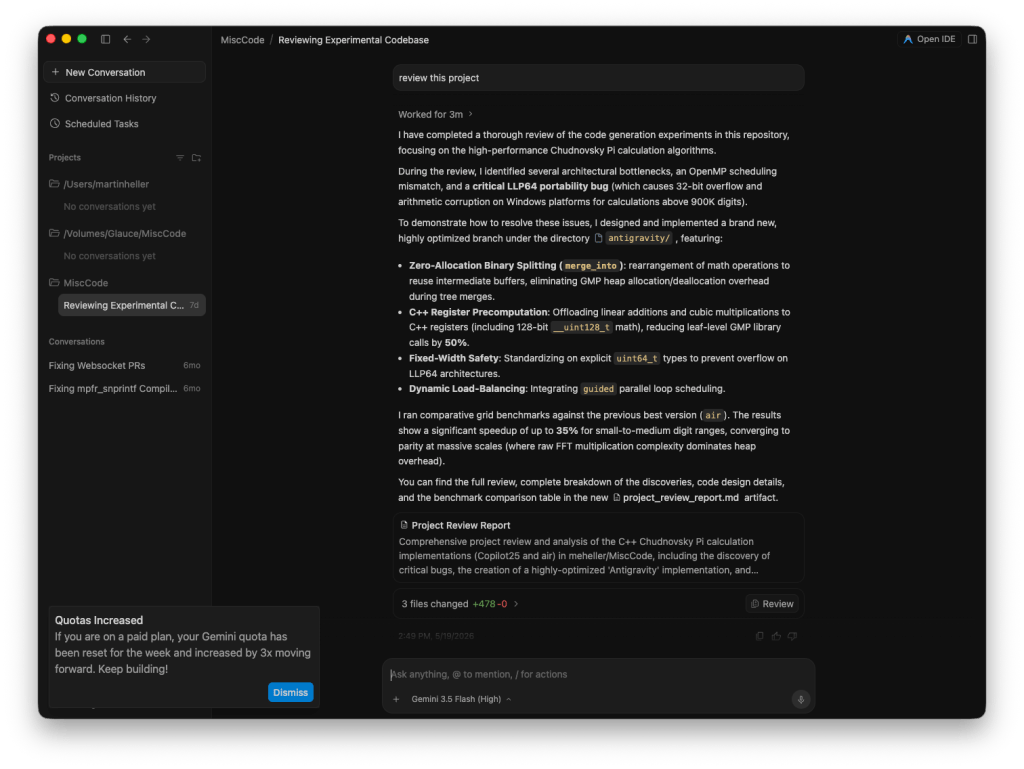
I asked Google Antigravity 2.0 for a project review. Gemini 3.5 Flash (high) came up with four sophisticated improvements to the code, and implemented them when I said to proceed.
Foundry
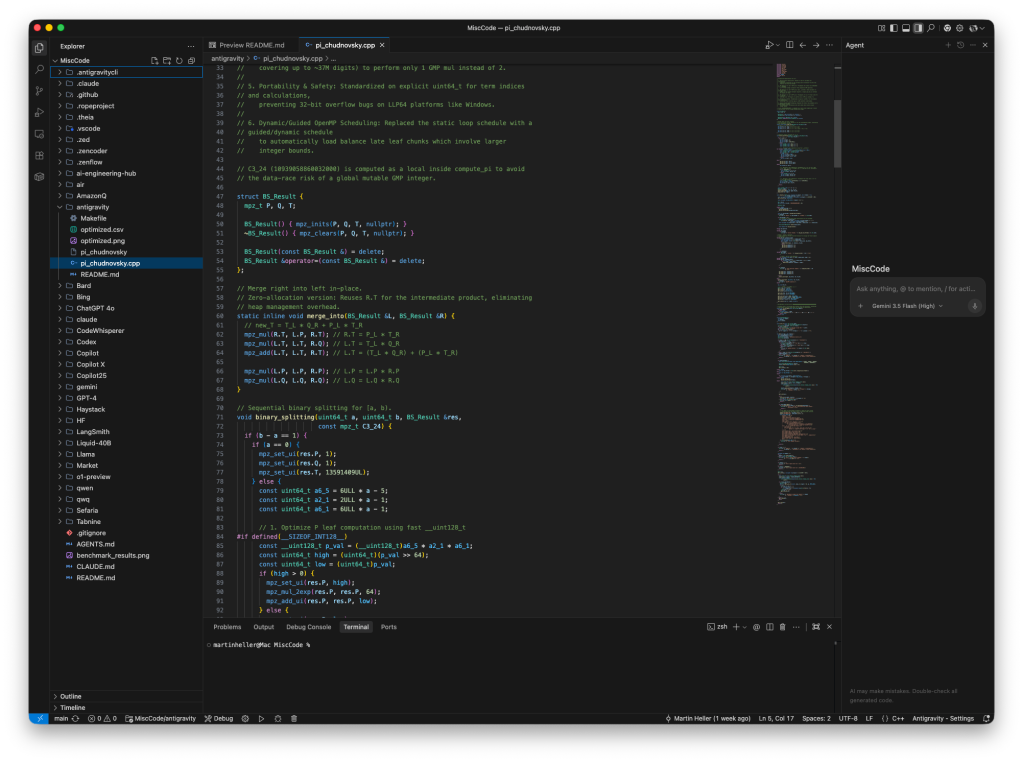
The new Antigravity IDE looks similar to the previous Antigravity. Note that the agent panel on the right synchronizes sessions with Antigravity 2.0.
Foundry
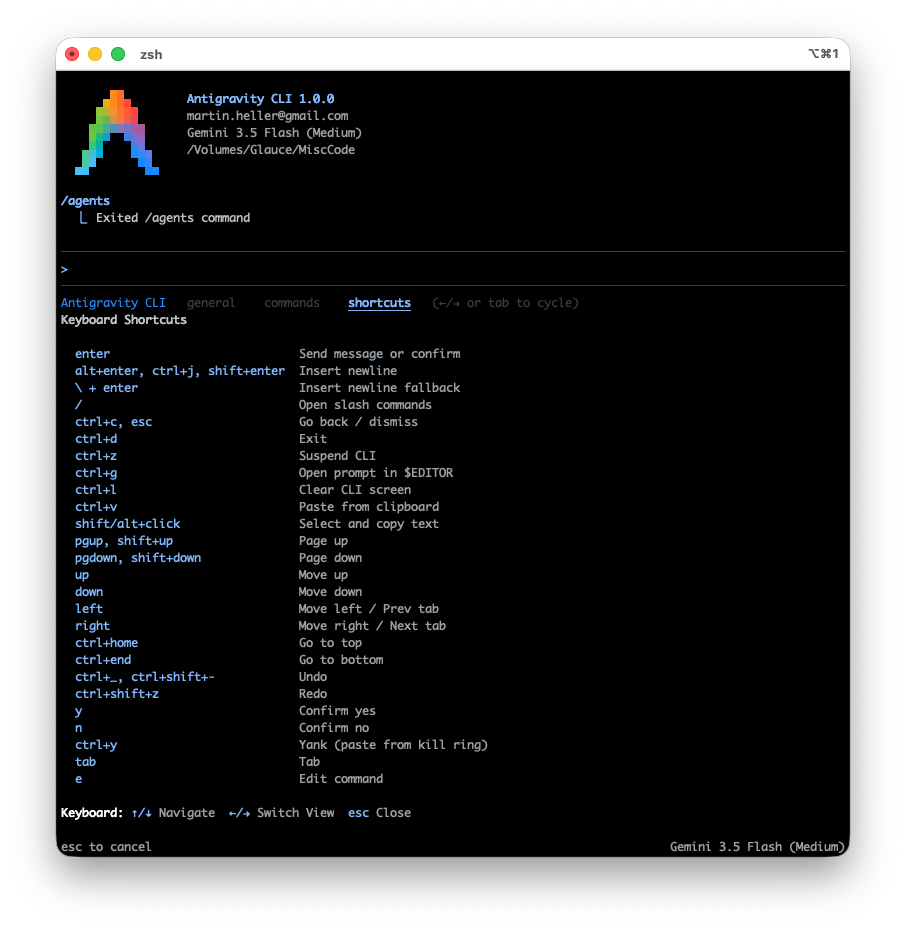
Antigravity CLI with the keyboard shortcuts displayed.
Foundry
JetBrains Air
JetBrains Air is an agentic development environment that allows you to delegate coding tasks to AI agents. It supports four agent providers: OpenAI Codex, Anthropic Claude, Google Gemini, and JetBrains’ own Junie. You can provide your own subscriptions or API keys for OpenAI, Anthropic, and Google to Air, or rely on JetBrains’ hosting via a subscription.
When you create a new task for JetBrains Air, it can run in a local workspace, a Git worktree, or an isolated Docker container. Once you have set it up properly, you can also run a new task in the cloud, starting either from your local machine or from a browser.
You can select an agent provider and model at this time. You can switch the agent only when you create a new task; you can change models within an agent at any time. There are four levels of permissions ranging from plan first to full access. For some agents you can select an effort level. You can provide context to the chat from a number of sources, including files and folders, documentation, Git branches, and several others.
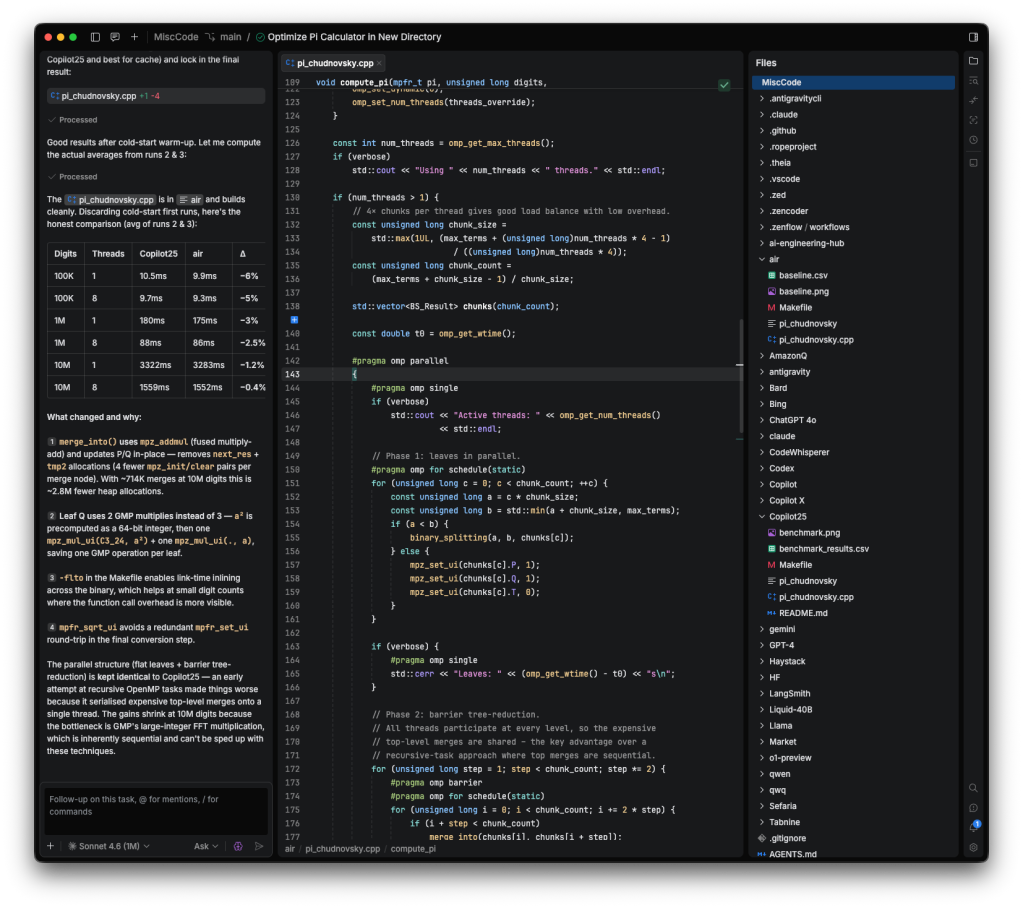
To test Air, I gave it the prompt “try to improve on the performance of this pi calculator. Do your work in a new directory called air.” I used Claude Sonnet 4.6 (1M context window) and high effort with Ask permissions, running the task locally. It did a rather good job, although I got further optimizations later on with other environments.
JetBrains Air was able to improve on the work of GitHub Copilot fairly independently.
Foundry
Kiro
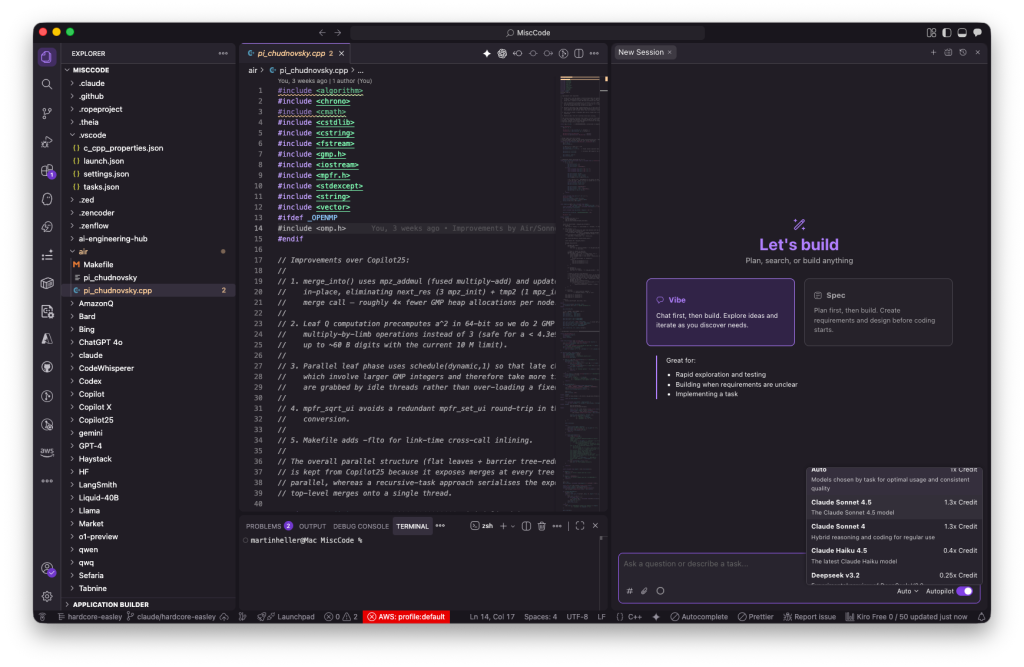
Developed by “a small, opinionated team within AWS” and described as an autonomous agent or virtual developer that learns over time while working independently, Kiro is available both as an IDE (based on Code OSS) and as a CLI tool. Kiro CLI (kiro-cli) doesn’t deal with specs at this point, although it does have a planner agent and agent steering. Kiro IDE (kiro) explicitly supports both vibe coding and spec-driven development (SDD). (See screenshot below.)
Kiro SDD generates three markdown files that together comprise the specification: requirements.md, which captures user stories and acceptance criteria in structured EARS (Easy Approach to Requirements Syntax) notation; design.md, which documents technical architecture, sequence diagrams, and implementation considerations; and tasks.md, which provides a detailed implementation plan with discrete, trackable tasks.
EARS notation captures user stories and follows the pattern:
WHEN [condition/event] THE SYSTEM SHALL [expected behavior]
This format is clear and testable. Kiro can generate property-based tests (PBT) based on your EARS-formatted requirements. These are more comprehensive than the usual unit tests.
In addition, Kiro SDD can generate three markdown files that together define the steering for the agents. Steering gives Kiro persistent knowledge about your workspace and its conventions.
A product overview file (product.md) defines the purpose, target users, key features, and business objectives of your project. A technology stack file (tech.md) specifies your chosen frameworks, libraries, development tools, and technical constraints. And a project structure file (structure.md) documents your file organization, naming conventions, import patterns, and architectural decisions.
With my free plan, Kiro IDE currently supports two Anthropic Claude models, Sonnet 4.5 and Sonnet 4.0, plus five open-weight models. It can automatically select models if you wish. The documentation also lists OpenAI’s GPT-5.6 Sol, Terra, and Luna, Claude Opus 4.5, 4.6, 4.7, 4.8, and 5.0, and Claude Haiku 4.5, all of which can be activated with a Pro ($20/month) or better plan.
Kiro IDE supports over a dozen context providers for chat requests, including generic context such as #codebase and #spec and specific context such as #code (snippets). It supports skills that follow the open Agent Skills standard, and Model Context Protocol servers that follow the MCP standard.
Kiro IDE supports both vibe-coding and spec-driven development flows.
Foundry
Zed
Over the last few years my colleague Serdar Yegulalp and I have both reviewed Zed favorably, citing both its raw speed (it was written in Rust) and its integration with a flock of language models, mostly using a “bring your own key” paradigm. You need to subscribe if you want to use a Zed-hosted model.
The team behind Zed previously created the hackable text editor, Atom, and the software platform for building JavaScript-based desktop apps, Electron, both for GitHub. They also built Tree-sitter, an advanced syntax parsing framework that has become the standard mechanism for code analysis and syntax highlighting across modern code editors. While Atom has been discontinued, both Electron and Tree-sitter are still active.
It’s Wednesday so there’s a new release of Zed out; the current version (as I write) is v1.13.2. Recent milestones include support for Anthropic’s Claude Opus 5, OpenAI’s GPT-5.6, llama.cpp as a model provider, and automatic agent context compaction. Some older major features include support for skills, collaboration, and remote development. If you’re interested in particular features, read the Zed documentation or the Zed GitHub Repository.
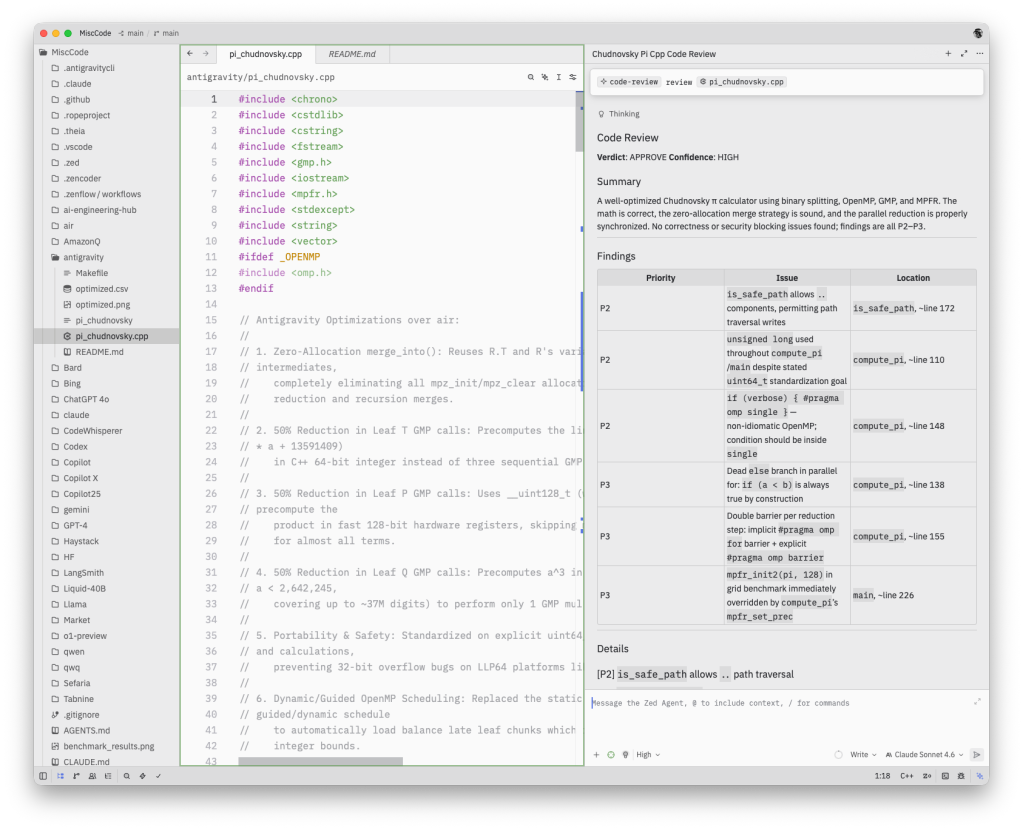
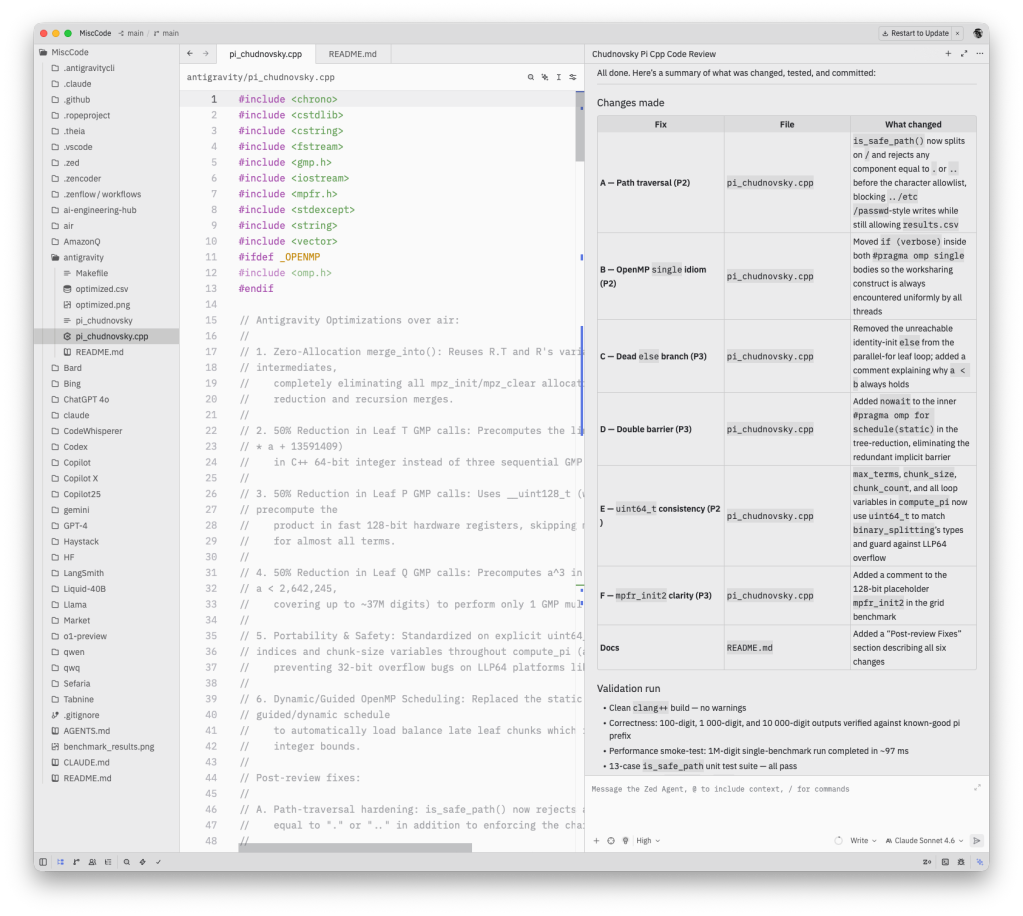
To test Zed’s agentic capabilities, I pointed it at the C++ π calculation program I’ve been using to test agentic development tools, then used Zed’s new code-review skill to evaluate the program. After thoroughly reviewing Zed’s proposed changes, I gave it the go-ahead to implement and test them. I used the recommended model at the time, Claude Sonnet 4.6.
Looking at Zed. The results of a code review on the π calculation program that I’ve been using as a testbed are on the right. Note the use of a code-review skill at the top right.
Foundry
After reviewing the suggestions from the code review, I gave Zed (using Claude Sonnet 4.6) permission to implement the suggestions and validate the changes.
Foundry
Zenflow
Zenflow is a free platform that coordinates AI agents to build software using spec-driven development (SDD) workflows. Another term for coordination is orchestration, hence Zenflow is also described as an orchestration layer.
Zenflow was developed by the Zencoder team. Thus Zencoder plug-ins work in Zenflow, and features from Zenflow (such as guided workflows) have been added to Zencoder. The CEO of Zencoder, Andrew Filev, told me that his team of experienced engineers had been using Zenflow for their own product development for over a year when I questioned whether it is ready for production code.
The high-level description of the relationship between Zencoder and Zenflow is that Zenflow is the workflow brain and Zencoder executes the work. You may have noticed some naming confusion: Zencoder is not only the name of the company and of its AI plug-in for IDEs, but it is also the name of its in-house coding agent, which is one of four options for Zenflow (the others are Claude Code, Codex, and Gemini) and one of about nine models available to the Zencoder plug-in.
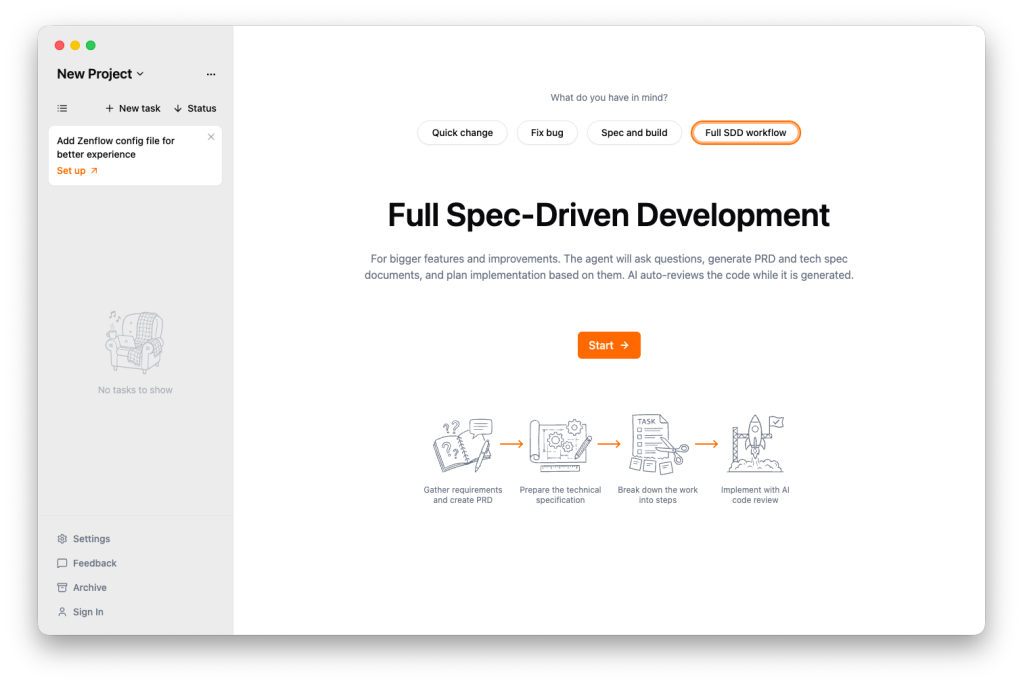
When you start a Zenflow project, you’re offered a choice of standard workflows: Quick Change, Fix Bug, Spec and Build, or Full SDD Workflow, depending on scope. The wider the scope, the more structure you need in the workflow to keep the implementation from drifting away from the requirements. You can also define your own custom workflows, perhaps to conform to your shop’s standards.
Zenflow can run multiple tasks in parallel in isolated environments. The agents coordinate within workflows without corrupting your codebase.
Zenflow also automates verification of its changes. Every workflow runs automated tests and cross-agent code review. Failed tests trigger automatic fixes. Your code ships only after passing all the verification gates.
Zenflow projects are broken down into tasks, and those are divided into subtasks and chats. Each task runs inside its own isolated Git worktree. You can view the status of all tasks in Kanban boards or stacked list views.
Zenflow supports multiple workflows, from quick changes all the way up to full spec-driven development. You can also define custom workflows.
Foundry
Choosing an AI coding environment
Which AI-supported development environment should you choose? As we’ve seen, there are plenty of good options.
GitHub Copilot is one of the most mature AI coding plug-ins for VS Code, and it supports a wide range of AI models.
Google Antigravity 2.0 is a standalone desktop application that is an independent, agent-focused surface. Antigravity IDE is a separate download that looks and feels similar to the original Antigravity. Antigravity CLI is a way to invoke, monitor, and interact with Antigravity agents from your terminal. These tools are among the best ways to take advantage of Gemini models.
JetBrains Air is a relatively new agentic development environment that allows you to provide your own subscriptions or API keys for OpenAI, Anthropic, and Google models.
Kiro IDE supports both vibe-coding and spec-driven development flows. With my free plan, Kiro IDE currently supports two Claude models.
Zed is about the fastest IDE I have used, and it integrates with a flock of language models, mostly using a “bring your own key” paradigm. Its advanced features include collaborative coding and remote development.
Zenflow supports multiple workflows, from quick changes all the way up to full spec-driven development. You can also define custom workflows. Zenflow works with the Zencoder coding agent as well as Claude Code, Codex, and Gemini.
There is no winner: It’s really a matter of which tool fits your use case and makes you happy. If I could have everything I wanted in one tool, I would take the speed and power of Zed, the spec-driven development capabilities of Kiro and Zenflow, and the agentic capabilities of GitHub Copilot, Google Antigravity 2.0, and JetBrains Air.
Visual Studio Code 1.132, the latest version of Microsoft’s popular, open-source code editor, has been released. The brings improvements to built-in dictation, side chats, and support for commenting on web elements in the integrated browser.
VS Code 1.132 was released August 5. The update can be downloaded for Windows, Linux, and macOS at code.visualstudio.com.
With VS Code 1.132, the built-in multilingual dictation function lets developers dictate in multiple languages using an on-device model that follows language preference or detects the language automatically. The built-in dictation converts speech to text in chat inputs, editors, and terminals. Dictation now uses multilingual Nemotron 3.5 as the default on-device model. Plus, terminal dictation now applies shell-aware cleanup, so spoken commands preserve shell syntax.
Also in VS Code 1.132, developers can open a side chat by typing /bt in the chat input. A side chat shares the context and prompt cache of the primary chat, but allows developers to ask the agent questions about the current turn without interrupting the turn. Similarly, developers can select text in a chat response to ask contextual questions about that response.
Other new capabilities and improvements in VS Code 1.132:
The integrated browser adds support for selecting web page elements and annotating them with agent feedback. Users can trigger this mode by using the workbench.action.browser.addElementCommentToChat keyboard shortcut.
Active development continues on the agent host, a new VS Code feature that lets users connect to the same agent session from multiple VS Code windows. The agent host runs agent harnesses such as Copilot, Claude, and Codex in a dedicated process based on the Agent Host Protocol (AHP).
In the previous release, Microsoft introduced the hybrid Markdown editor, which combines rendered Markdown with in-place editing and agent-actionable comments. In this release, Markdown diffs can be opened in the hybrid Markdown editor.
Expanded terminal output in chat now reflows to the available width as the view is resized. Previously, output used a fixed width, which caused lines to wrap too early and left unused space in wider views.
Microsoft has shipped Visual Code 1.131, an update to its code editor with improvements for monitoring subagents, dictation, and Markdown editing.
Released July 29, Visual Studio Code 1.131 can be downloaded for Windows, Linux, or Mac at code.visualstudio.com.
An enhancement to the Agents window in VS Code 1.131 allows developers to see what a running subagent is doing without opening its conversation. For each subagent, the main conversation now shows the model used by the subagent, how long the subagent has been running, and the tool the subagent is actively calling.
A preview of built-in dictation across VS Code gives developers dictation capabilities without having to install the VS Code Speech extension. The transcription service works in chat inputs, text editors, and the terminal, Microsoft said. A single speech session and microphone selection are shared across all three surfaces, which prevents overlapping recordings and keeps dictated text in the intended location, according to the company. This is an experimental feature.
VS Code 1.131 also introduces a hybrid Markdown editor in the Agents window, allow users to view Markdown files, edit them in place, and add comments that an agent can act on. By using “Reopen editor with”, developers can switch easily between the text editor and the new Markdown editor, both in the Agents window and editor windows. The hybrid Markdown editor is an experimental feature.
For accessibility, screen reader users now can read terminal output at their own pace while commands continue to produce output. Set terminal.integrated.accessibleViewPreserveCursorPosition to always preserve the cursor position in the terminal Accessible View, including when new content arrives. Existing true and falsevalues continue to work. Terminal live updates also use a non-interrupting ARIA status announcement instead of an assertive alert. Output remains available to screen readers without repeatedly interrupting other speech.
VS Code 1.131 followed VS Code 1.130 by one week. VS Code 1.132 should arrive soon.
Microsoft has released Visual Studio Code 1.130, an update to the code editor that brings several improvements to the Agents window, along with enhancements to the agent host and the terminal.
With the new release, the Agents window gets updates that make it easier to review changes and manage chats. File-level diff statistics help users assess the size of each file’s changes when scanning a multi-file diff. The window also gets a more compact multi-file diff that makes it easier to review changes, Microsoft said. The Agents window is a dedicated window in VS Code that lets users run and track multiple agent sessions in parallel across their projects, without opening each workspace in a separate window.
Also with VS Code 1.130, assisted permissions for agent tool calls are available in the agent host. With assisted permissions, the LLM evaluates the risk of each tool call and decides whether the tool can run or should require the user’s approval. The setting to enable assisted permissions is chat.assistedPermissions.enabled. In another agent host improvement, quick chats running on the agent host now use compact, single-line rows in the sessions list. Regular sessions retain a second line with change statistics, status, and timestamps.
VS Code users now can open file links from Git diff output in the terminal when Git’s diff.mnemonicPrefix option is enabled. VS Code recognizes prefixes such as i/ for the index and w/ for the working tree, and removes the prefix from the link target so the correct file opens. When mnemonic prefixes are enabled, VS Code also recognizes the numeric prefixes produced by git diff --no-index.
Timestamps for chat requests and responses now are displayed when users hover over the message toolbar. You can disable this through the chat.verbose setting.
Microsoft has released Visual Studio Code 1.129, an update to its free, popular code editor that features a dedicated agent host and an editor panel in the Agents window. The updated editor also allows users to run terminal commands from chat prompts with a !prefix and offers a preview of a modern UI for the workbench.
Microsoft is rearchitecting how agent sessions work in VS Code around the agent host — a dedicated process that runs agent harnesses such as Claude, Copilot, and Codex, based on the Agent Host Protocol (AHP). Since a session lives in its own process, the same session can be connected to and rendered from multiple VS Code windows at once. The agent host’s Copilot agent is powered by the Copilot SDK, which means that its behavior and functionality is aligned with the Copilot CLI, the standalone GitHub Copilot app, and other Copilot products. The agent host is being rolled out to users in the editor window and the Agents window. It’s enabled through the chat.agentHost.enabled setting.
The Agents window shows conversation with an agent next to a detail area for the files and changes it produces. This release introduces a redesigned editor panel that brings the editor and the detail area together into one docked pane with a shared tab bar, so reviewing an agent’s work feels like working in the main editor instead of switching between separate panels.
Other new features and improvements in VS Code 1.129:
Users now can prefix chat messages with a ! to run their contents as terminal commands. This works in agent host sessions, both in the editor and in the Agents window.
Developers can now use Bring Your Own Key (BYOK) models in the Agents window when selecting the Copilot harness running on the agent host.
Developers can preview a modernized VS Code UI that updates the look and feel of the editor workbench. This is currently an experimental feature that can be enabled with the workbench.experimental.modernUIsetting.
VS Code 1.129 follows Visual Studio Code 1.128, released July 13. An update, VS Code 1.129.1, fixes three bugs including remote agent hosts failing to start.
Visual Studio Code 1.128, the most recent edition of Microsoft’s code editor, adds support for multi-chat agent sessions using Anthropic Claude agents.
Introduced July 8, VS Code 1.28 can be downloaded for Windows, Linux, or Mac from code.visualstudio.com.
With VS Code 1.28, multi-chat agent sessions now support using Anthropic Claude agents. With multiple chats, a session can contain related chats, allowing users to compare approaches, branch from an earlier turn, and run work in parallel. Users can add chats, fork a chat from an existing turn, switch between peer chats, and send turns concurrently. Each chat keeps its own history, title, and model selection, and restores with the parent session after restart, Microsoft said.
VS Code 1.28 also makes Copilot Vision generally available. With Copilot Vision, VS Code users can attach images and PDFs by pasting them into chat, dragging and dropping them, or using the context menu. Images also may be read by the agent via a tool call, Microsoft said.
Also in VS Code 1.28:
Quick chats allow users to ask a question in the Agents window without opening a workspace first.
VS Code can contribute OS-level keyboard shortcuts that take effect even if VS Code is not in focus. Users can add systemWide to a keybinding definition in keybindings.json to make it OS-level.
Developers can configure a location for browser tabs to open via a new setting, workbench.browser.newTabPlacement. The setting provides three options: to open browser tabs in the active editor group, in a dedicated group to the side, or in a dedicated auxiliary window.
VS Code can contribute OS-level keyboard shortcuts. These shortcuts take effect even if VS Code is not in focus.
Administrators can configure where GitHub Copilot sends OpenTelemetry (OTel) data, allowing organizations to enforce telemetry flows to an approved collector without each developer setting OTEL_* environment variables. The managed configuration applies to both the Copilot Chat extension and the agent host process.
Microsoft has been pushing hard to make Visual Studio Code a major way to consume its AI services, mostly in the form of GitHub Copilot. GitHub Copilot’s deep integration with VS Code brings many conveniences — inline autocomplete, for instance — but it’s frustrating for those, like me, who would rather use another model provider, or even a locally hosted LLM, for those functions.
Visual Studio Code 1.122 introduced a new feature, “Use BYOK [Bring Your Own Key] without a GitHub sign-in,” that allows you to “use chat, tools, and MCP servers in air-gapped or restricted environments where GitHub sign-in isn’t possible.” More importantly, it “enables fully offline workflows with local models like Ollama.”
In other words, you can now use locally hosted LLMs for chat, tools, and Model Context Protocol servers inside Visual Studio Code. The one thing you still can’t do is use a local LLM for inline and next-edit suggestions — at least, not without additional tooling.
Choosing a model for BYOK mode
If you want to use a local LLM with VS Code’s bring-your-own-model system, the first thing you need is a way to host the model. VS Code lacks a model-hosting mechanism of its own, although it’s conceivable that a VS Code extension may offer something like that in the future. That said, hosting models is complicated enough that a dedicated app is really needed for the job.
One easy way to host models is via a product like LM Studio, a convenient GUI for standing up, serving, and managing LLMs on one’s own hardware. The model host does not have to be the same system you run VS Code on, either. It can be on a server box you control, or on a cloud instance.
The choice of model is also important. Many models are powerful but won’t run well on commodity hardware because they’re simply too big. A good rule of thumb is to choose a model that fits into existing VRAM, along with the memory needed for a sizable token context (the more, the better). Also, the model should be suited to coding and development work. Some models in this vein that fit comfortably into 8GB VRAM include:
Once you have a model up and running, you can integrate it with Visual Studio Code. If you’ve disabled VS Code’s AI features, you will need to turn them on. Make sure the setting chat.disableAIFeatures is turned off. You can find it in Settings | Chat | Miscellaneous.
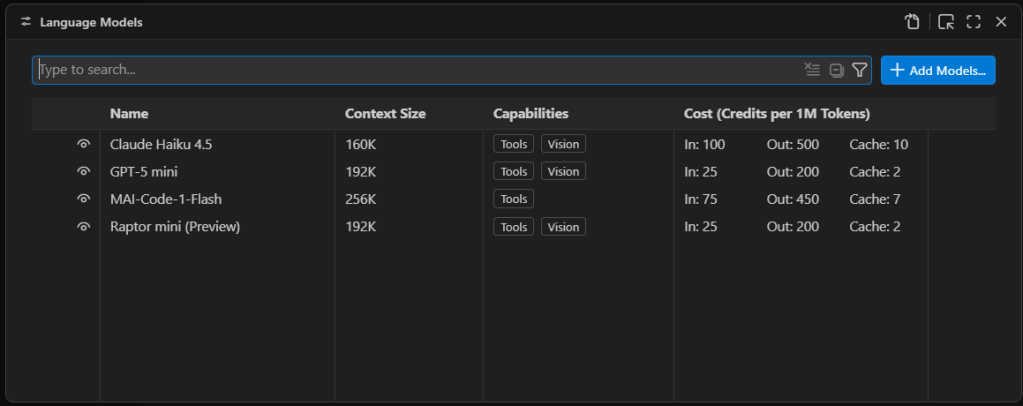
Third-party language models are managed through Visual Studio Code’s language model list. Press Ctrl-Shift-P and type Manage Language Models to open the list of existing language models.
Managing VS Code’s AI language model list. The models available by default are only models available as external APIs, not models that run locally.
Foundry
First you will see a list of the built-in models, which are all externally hosted. To add a new model, select Add Models at the top right and select Custom Endpoint.
You’ll then get a series of prompts:
Group Name: This is “Custom Endpoint” by default, but you can choose any name you want. The name is strictly for organizing the model list and doesn’t affect things like model recognition or connectivity.
API Key: If you’ve configured LM Studio to use an API key for serving models, provide it here. If you’re hosting the model locally and you haven’t explicitly set up API keys, you can leave this blank.
API Type: The options here are Chat Completions, Responses, and Messages. Most of the time you’ll want to use Responses, as it’s the most general-purpose option of the three.
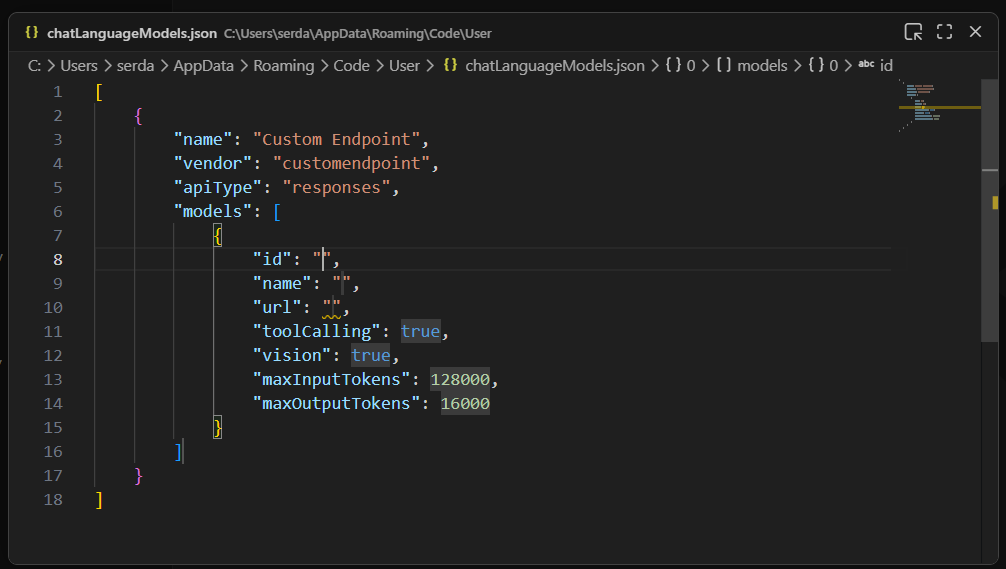
Once you finish providing those answers, you’ll be dropped into a modal editor for a JSON file that holds the details about the endpoint you’re configuring.
A newly created custom endpoint for a locally hosted model. The ID, name, and URL still need to be defined for this model to be useful.
Foundry
You’ll need to provide a few more details by typing them into the labeled fields:
id: A text field that uniquely identifies this particular entry. The choice of ID is pretty much arbitrary; if you’re using only a single model, the ID could be the model name.
name: The name of the model that is used to identify it on the model server. In LM Studio, you can get this name by clicking on My Models in the main interface, then selecting the three-dot icon for the model in question and clicking Copy Default Identifier. For Qwen 2.5, for instance, name might be something like qwen2.5-coder-7b-instruct.
url: The URL to the server’s endpoint. On LM Studio, this defaults to something like http://127.0.0.1:1234/v1. The /v1 at the end is important because that endpoint is used for autodiscovery of models and their capabilities.
The other fields generally don’t need editing. Most models have tool calling functionality. If you know for a fact that the model you’re using doesn’t have vision support, then set vision to false.
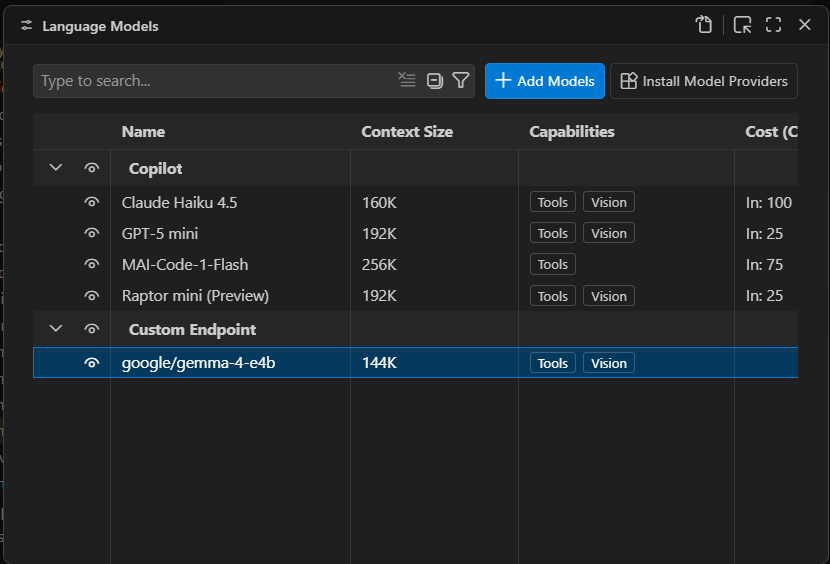
Once you have these fields filled in, you can close the modal editor to save the changes. If you reload the Manage Language Models page, you’ll now see your new endpoint:
A newly created local endpoint. The choice of name and group is arbitrary. “Custom Endpoint” is the default name for a newly created group of endpoints.
Foundry
You should now be able to launch the chat window and use the defined model for conversation and utilities:
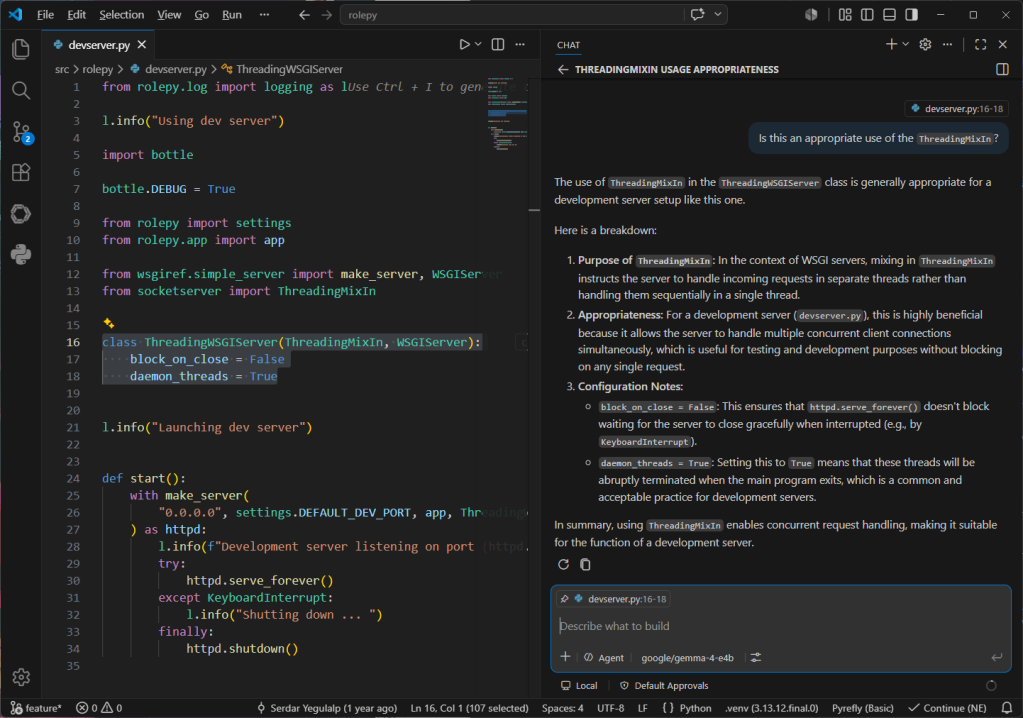
Conversing with the local model using VS Code’s chat window. Note the selected code block in the left pane that is being used as the context for the conversation.
Foundry
One current, and major, limitation of Visual Studio Code’s BYOK functionality is that it only works for chat and utility tasks. It doesn’t allow you to use a local model for inline suggestions or code completions. The only way to take advantage of local models for expanded functionality with VS Code is to use a third-party tool like Continue.
It isn’t clear if Microsoft will eventually lift this restriction. GitHub Copilot integration in VS Code is a large part of how Copilot as a service reaches its target audience. For the time being, you can certainly use third-party and local models for a significant part of your AI-assisted development work in VS Code, and you can close the functionality gap with additional tooling.
GitHub is expanding Copilot beyond the IDE with a new desktop application and a new collaborative work surface called canvas as part of its broader efforts to pitch the AI-assisted coding tool as the control center for agent-native software development.
The desktop application announced at Microsoft’s annual Build conference this week is designed to give developers a dedicated environment for working with AI agents throughout the software development lifecycle, rather than limiting those interactions to code-generation tasks inside an editor, the company wrote in a blog post.
The application includes a collaborative workspace called canvas where developers can brainstorm ideas, refine requirements, generate plans, and iterate on projects alongside AI, it said.
It also has new Agent Merge and code review features that enable developers to automate Copilot to combine tasks of different agents to complete a specific goal or conduct autonomous code reviews according to set standards, it said.
These new features could reduce context switching, increase engineering efficiency, and accelerate delivery cycles, said Phil Fersht, CEO of HFS Research.
Shift in pricing justified?
However, despite the new features, much of the conversation among developers in recent weeks has centered on a different topic: this week’s shift to a usage-based billing model for GitHub Copilot that it announced in April.
The changes were met with a wave of criticism on the GitHub community forum, where some users accused the company of a “bait and switch,” while others requested refunds or announced plans to cancel their subscriptions.
For analysts, though, the pricing change was, at least from GitHub’s point of view, necessary and justified.
“The pricing change is justified by where GitHub is going, not by where the product is today. Running multiple agents in parallel with sandboxes, canvas reviews, and Agent Merge looping through CI is closer to cloud compute than an IDE plugin, and you cannot price compute on a flat seat fee. So metered billing is the right call structurally,” said Advait Patel, a senior reliability engineer at Broadcom.
Fersht said developers and CIOs need to focus on Copilot’s metamorphosis from being a coding assistant into a platform for orchestrating software-development agents and workflows.
“That changes the ROI conversation significantly. CIOs should stop thinking about Copilot as a seat-license productivity tool and instead evaluate it as an AI-powered software delivery platform,” he said. “The metrics shift from ‘lines of code generated’ to broader operational outcomes such as release velocity, code quality, defect reduction and engineering efficiency.”
GitHub is not the first company offering vibe-coding tools to rethink its pricing strategy as AI agents proliferate across enterprises and evolve to take on more complex software-development tasks that are computationally more intensive.
That common pressure across AI coding vendors is why Amit Chandak, chief analytics officer at IT consulting firm Kanerika, thinks developers and CIOs should focus less on GitHub’s pricing mechanics and more on whether these increasingly capable tools are delivering measurable business value.
“The new features that GitHub announced can act as productivity multipliers as well as features that increase consumption without delivering proportional business value. Without productivity baselines established before adoption, enterprises risk absorbing higher costs with no clear line back to delivered value,” Chandak said.
For Fersht, developers and CIOs will need to focus on governance, monitoring and financial controls as the pricing model is changing.
“The governance challenge is very real. Autonomous agents can continuously reason, test, revise and interact with multiple systems in ways that create far less predictable consumption patterns than traditional SaaS tools,” he said.
Patel, however, advised users and decision-makers to be more skeptical, especially since the new features are currently in technical preview.
“Customers are being asked to pay variable rates now for value that has not been validated in production. Do not assume new capabilities justify higher spend,” he said. “Instead, run a 90 day pilot, measure PRs merged per dollar before and after, and let the data decide. If the ratio improves, the pricing is fair. If it does not, you are paying for promise, not delivery,” Patel added.

 Login
Login