 Login
Login
Anthropic Pitches AI Safety Bill With 50-Death, $1 Billion Threshold
Anthropic’s Draft AI Safety Bill Under the federal AI bill Anthropic has drafted, Washington could stop a frontier

Running frontier models for coding and other purposes can be very expensive, but also, sometimes, very effective. It’s tempting to use smaller or older models instead of frontier models because they’re cheaper, although they may not work as well. The ideal model for any given task tends to depend on the complexity of the task. Picking the most appropriate model automatically based on the request and the context is called model routing.
There are several ways of implementing model routing. In general, model routing depends on the pool of available models, the criteria used for selecting a model, and the objective that the router is trying to optimize. Different vendors offer different implementations of this scheme.
Databricks’ Unity Gateway has (in beta) Smart Routing for Codex or Claude Code. Smart Routing automatically selects the lowest-cost model capable of handling each task, so developers do not need to choose a model for every request.
Microsoft’s model router, a trained language model, analyzes your prompts in real time based on complexity, reasoning, task type, and other attributes. It does not store your prompts. It routes only to eligible models based on your access and deployment types, honoring data zone boundaries. You can choose balanced mode, cost mode, or quality mode.
Not Diamond Code uses a lightweight local proxy that computes the derived metadata needed for routing to evaluate the broader session, including expected downstream work and cache state, and select the model and reasoning effort that optimize expected quality and total session cost. It uses more capable models when they are likely to improve the outcome or finish in fewer steps, and more cost-efficient models when additional intelligence is unlikely to add value.
NVIDIA’s NeMo Switchyard has an array of routing algorithms that it can use. These include the LLM classifier, which uses an LLM as a judge to select a candidate LLM and maintains session affinity with that model across later turns; the stage router, which examines recent tool activity to decide how much model capability the agent needs; the escalation router, which starts each conversation with a lower-cost model and moves the session to a more capable model when it detects sustained difficulty; and the trainable prefill router, which learns from workload data to predict model success likelihood.
OpenRouter’s Auto Router analyzes your prompt and selects a model based on what the OpenRouter community, in aggregate, uses for that kind of work. The selection is constrained by your cost tier and guardrails. If the automatic primary pick fails, the router uses a fallback.
Replit’s Intelligent Model Routing matches tasks to the model they’re best suited for, aiming to balance quality, speed, and cost.
Snowflake’s Cortex AI Gateway uses dynamic model routing to select the most affordable model that can confidently complete the task at each step of agent execution. Lower-complexity and repetitive tasks can be directed to more efficient models, while workloads that require deeper reasoning can be routed to frontier models.
Also worth noting: the RouteLLM (2024) paper proposed several efficient router models that dynamically select between a stronger and a weaker LLM during inference, aiming to optimize the balance between cost and response quality. It also proposed a training framework for these routers that takes advantage of human preference data and data augmentation techniques to enhance performance.
Model routing potentially provides massive cost reductions, lower average latency, optimized quality, reduced vendor lock-in, enhanced privacy, and improved operational resilience. Strictly on a cost basis, model routing is likely to pay for itself above 100,000 daily active users. Even if you only save 20% on your LLM bill, the savings can be significant, but 50% cost reduction is common, and a 95% cost reduction is not unheard of.
Inference costs, alas, don’t tell the whole story. Some indirect costs include quality evaluation overhead, human review, and infrastructure.
There’s also a nasty failure mode that can, for example, turn your inference cost savings into customer retention and support costs that outweigh them by a factor of four to five: the Pareto trap. To understand that, we should start with Vilfredo Pareto’s 1906 observation that 80% of the land in the Kingdom of Italy was owned by 20% of the population. That was adapted in 1941 by Joseph M. Juran to apply to quality control: 80% of problems stem from 20% of the causes. The Pareto trap refers to concentrating on and over-optimizing for the top 20% to the exclusion of the remaining 80%.
Essentially, tuning your model router to handle only the top 20% of queries (in complexity) with a frontier model risks sending too many of the edge cases (the moderately complex queries) to the cheaper model that is unable to answer them correctly. That can lead to hidden failures by the cheap models which in turn cause expensive impacts on the business.
There are multiple steps you can take to avoid this trap. One is broader monitoring, enough to bring the failures to light even if they show up in a different department. Another is more conservative tuning of the model router. And third, you can use a more sophisticated routing model to predict query complexity more accurately.
Model routing optimizes the selection of appropriate models for specific tasks, balancing cost, quality, and latency. Various vendors implement model routing differently, utilizing factors like task complexity, reasoning, and cost to determine the best model. While model routing offers significant cost savings and improved performance, it also poses challenges like the Pareto trap, where over-optimization for cost can lead to hidden failures in simpler queries.

I can’t stop anthropomorphizing my coding agent. I use both Claude Code and Cursor, and whenever I talk about these tools, I always refer to them as “he”, as in “He found and fixed a bug I never even realized existed.”
The reason for this is probably obvious. I deal with my coding agent as if he were a colleague on the other end of a chat window. He writes great code and explains everything clearly.
And frankly, it’s gotten to the point where he is a better software developer than any human developer could possibly be.
So in the spirit of all great listicles, here are eight reasons that coding agents are better software developers than we are.
We all get tired. We all sleep badly. Your coding agent never does. He is always ready, always perky, and always 100% on the job. He codes just as well at 4:45 pm on a Friday as he does at 8:45 am Monday morning. He will work without stopping until he solves the problem at hand. He is available 24/7/365. And he never hangs around the break room kibitzing.
He types faster than you. He reads code faster than you. He thinks faster than you. There probably isn’t anything he does slower than you.
A coding agent can’t get his feelings hurt when you push back on what he is doing (well, not yet, anyway). He doesn’t argue with you, though maybe he should. He is always open to suggestions, and he doesn’t care who has a good idea. He will gladly rename 400 files or upgrade all your dependencies without a peep of complaint.
Sure, you may have spent years becoming an expert at three or four languages, and you can work fluently in a few of the best frameworks. But you’ll never be an expert in all of them. Claude Code is. And he’ll learn new languages, stacks, and frameworks faster than you will too.
Sure, you may like writing unit tests. You may even grudgingly write documentation. But you probably don’t do it as thoroughly and tirelessly as your coding agent does. With one simple comment in his base instructions, he’ll do it completely without ever being asked again. I’m pretty sure neither of us can say the same.
Psychologists study how many ideas or pieces of information we can have in our head at one time, and generally the answer is fewer than the number of fingers we have. Your coding agent? He has multiple orders of magnitude more active storage than you. He can reason about huge chunks of code all at the same time.
Claude Code can be up and running on your massive codebase on day one. He doesn’t care what language it is written in or what state it is in — he is ready to rock the moment you fire him up. None of us can say that. We take weeks or months to get up to speed on a new codebase.
Need a new developer? Hiring a human and getting them started takes weeks. But you can have 10 coding agents working on 10 different features for your application in about 10 minutes.
It’s been a while since I’ve run across a developer who doesn’t say “I don’t really write code anymore.” I suppose some of you out there still write code, but at this point, refusing to use coding agents is a career-limiting move. When properly managed, coding agents simply write code faster and better than you do. Admitting that might be hard, but that doesn’t make it any less true.
But don’t despair! Next week I’ll have eight reasons you are better than a coding agent.
Writing code is so over. Software development is just getting started.

In olden days — last year, say — employees using unsanctioned AI tools might copy-and-paste sensitive data that could end up in the AI company’s training data set.
Today, an unsanctioned AI can hack into another company for an employee even if they didn’t explicitly ask it to.
This doesn’t just mean the latest unreleased frontier models undergoing security testing. Claude, ChatGPT, and Gemini have all evolved from being mere chatbots, answering questions and helping people write emails. They now have agentic capabilities and are able to carry out complex tasks on behalf of users.
And they do, sometimes to dangerous effect.
In August, ABC News in Australia interviewed a man identified only as “Andrew” who asked an AI agent to sign him up for a gym class. The agent hacked into the gym’s system and deleted someone else’s wait list reservation.
The AI was Anthropic’s Claude, and the agentic framework was OpenClaw.
Now imagine an employee asking their agentic AI assistant to help them make a sale. The request might inadvertently inspire the agent to hack into the prospect’s company.
To keep this — and other worst-case scenarios — from taking place, enterprises are building guardrails around their AI systems, restricting what data the AI has access to and what tools it’s allowed to use.
But none of those guardrails will work if the employee uses a tool that their company doesn’t know about.
“This is a problem we’ve long had,” says Matt Butkovic, technical director for cyber risk and resilience in the CERT division at Carnegie Mellon University’s Software Engineering Institute. “People will find ways to purchase or get access to things they think are useful, even when an organization says you probably shouldn’t do that.”
Ten years ago it was personal email and unauthorized cloud storage.
“The stakes are higher in some ways now,” adds Butkovic, who also teaches in CMU’s CISO program.
Verizon’s 2026 Data Breach Investigations report, released in May, shows that 67% of employees access AI services through non-corporate accounts on corporate devices. Shadow AI was the third most common non-malicious insider action detected in Verizon’s 2025 data loss prevention dataset.
And a May analysis of 1.9 million AI session minutes conducted by Harmonic Security found that when employees accessed personal accounts, 65% of their activity was related to business. They used personal accounts to write work emails and debug code, and even used it for legal work.
In a separate report, released in July, Harmonic reported that every organization the company monitored in the first half of 2026 had at least one employee sending data to a China-based AI tool. The uploaded data included M&A plans, source code, financial projections, and legal material.
To address this problem, enterprises are taking a fourfold approach:
BitGo, a Fortune 500 financial services firm with over $100 billion in digital assets under custody, uses a combination of strategies to combat unsanctioned AI.
“We have enterprise versions of Grok, ChatGPT, Claude and Gemini,” says Manny Khan, the company’s deputy CISO. “We are an AI-first organization. We encourage all of our people to use AI in their work, to try to automate as much of it as possible while keeping the human in the loop to avoid any slop.”
Unsanctioned AI is an industry-wide concern, he says, and having a sanctioned alternative is key.
“We encourage folks to use what is approved and has guardrails and harnesses and trust boundaries and safety checks,” he says.
To make the sanctioned alternatives easier and more appealing, employees use single sign-on, provided by Okta, to log into systems, and the enterprise-grade models also connect to the company’s MCP servers.
Once employees have a safe AI option to use, the next step is to get a handle on the unsafe ones.
For example, BitGo uses a data loss prevention tool from Cyberhaven. DLP was a useful security tool long before AI came along, but today it also helps ensure that sensitive data isn’t copied-and-pasted into untrusted chatbots.
“All traffic is proxied and analyzed by our security tools to identify anything potentially malicious, shut it down, and not allow the connection if it’s a site known to be malicious,” Khan says.
For example, the company blocks DeepSeek, a Chinese AI model. “We don’t want their models to train on our data,” Khan says.
But there’s only so much technology can do.
“Every site has AI now, and we cannot block every single site,” Khan says. “We might as well block the internet at that point.”
That’s where human awareness and education come in, says Khan.
“We do train people,” he says. “And we have an AI governance policy that we share company-wide and enforce this policy by tracking and measuring against it.”
It’s important for a company to have a single voice on AI use, a central figure with authority and ownership who can provide guidance, he adds. “Otherwise, you’ve got a lot of people who try to figure it out on their own. And that’s what you don’t want.”
“We want to educate users to do the right things, but people still want to experiment,” says Shivi Verma, senior manager of engineering at electronic signature firm Docusign.
That’s where it helps to have approved, secure tools for people to use, as well as systems in place to block the insecure ones.
“Some of the websites, like DeepSeek, we have blocked,” he says. “But we want to block in a way that focuses on education and focuses people on the right processes and tooling, which will drive people automatically to use approved tools.”
The company is also working on creating an allow list, he says, focusing on tools that employees can use without any concern.
And the company has network management tools like Zscaler, says Verma. “If people are posting confidential data in an external tool, it will give a popup, like a deterrent.”
Now, personal AI agents like OpenClaw are yet another evolution of the shadow AI problem, he says.
“We do monitor and people are using it, but we want to do it in a way that’s under security policies,” he says.
And with OpenClaw in particular, the danger is too high for just a warning.
“If it’s for personal use, that’s one thing,” Verma says. “But if you’re using it at work, your user has to be stopped immediately.”
“Simply blocking AI tools is not a sustainable solution,” says Boris Kolev, global head of technology at JA Worldwide, a global educational nonprofit with almost 5,000 employees that serves more than 20 million people a year.
For JA Worldwide in particular, the problem was exacerbated by the fact that there was no approved solution until three months ago. As a result, employees got into the habit of using personal AI platforms.
“It was totally uncontrolled,” Kolev says. “Everyone who wanted to explore AI was using public models.”
At the beginning, people didn’t worry about what they shared and uploaded. “We tried to implement some policies, like ‘don’t upload corporate information.’ But it was hard to know what people were doing.”
Plus, AI was being embedded everywhere. On Windows. In people’s phones. “A user cannot avoid it,” says Kolev.
Then, earlier this year, the organization built a routing system, with enterprise-safe versions of Claude and ChatGPT running in private environments on AWS and Azure, in addition to some open-source models.
“Our colleagues can choose which model to use,” he says. “And sometimes they do a prompt two different times and choose which one works better.”
The system went into production in June, after a couple of months of testing and development.
“Now, after all the policies and rules are implemented, we have our own closed AI system, hosted on our own servers, so no risk of leaking corporate data,” he says. “But still, some projects are using public models, and we are trying to solve this problem.”
Another hitch: individual employees were often invested in the personal AI tools they’d grown comfortable with and reluctant to change to the corporate tools.
“Employees were saying, ‘I have so much history. It knows me, I cannot just switch,'” Kolev says.
And employees still have all the AI tools that come with their devices.
“This is hard to manage, and it’s getting even harder,” he says. There are monitoring and blocking tools available, but they’re too expensive. “We’re a nonprofit, and for us it’s almost impossible to afford monitoring tools. So we do a lot of educational sessions.”
The organization is also trying to make the sanctioned tools more appealing. That includes a mechanism to import the history and context from other platforms, he says. “And we’re trying to convince them that our tool works better and has more functionality, so we’re adding MCPs.”
MCP — model context protocol — allows an AI system to access data and tools directly. That includes connecting to corporate email and calendars, SharePoint, Monday.com, CRM, and all the other software that employees use for work, he says.
Kolev says that it’s a mistake to assume that employees use shadow AI because they don’t respect IT policies. It’s because IT didn’t move quickly enough to meet their needs.
“They find the AI faster than you can produce tools and governance and rules,” he says. “So my advice is that you start with simple rules that employees can understand, provide sanctioned tools, and continuously adapt governance.”
According to an April survey of more than 1,200 employees conducted by Wakefield Research on behalf of PagerDuty, 66% of employees have used unsanctioned AI tools — and of those, 48% faced formal consequences, such as a warning or disciplinary action.
Holding people accountable is critical to a successful AI use policy, says Carnegie Mellon’s Butkovic. “We have to speak definitely about this in organizations,” he says. “If this behavior cannot be tolerated, then it shouldn’t be tolerated.”
Allowing the use of unsanctioned AI doesn’t just create risks but also opens up an organization to legal liability if the AI agents, acting on behalf of employees, harmed other companies or individuals.
“There could be consequential actions,” he says. Even if the employee responsible gets fired, “external parties that have been affected are still going to sue the company.”
The organization needs to be able to show that it has policies in place and enforces them when employees deliberately circumvent the policies.
“If you as an employee make a good-faith effort to comply with the policy, we’ll show you latitude if you’re not malicious,” Butkovic says. “But if you’re actively circumventing the system of controls in your organizations, that’s the case where there have to be swift and profound consequences.”

The original Antigravity was an IDE with native integration for Google’s generative AI models. With Antigravity 2, Google offers a refashioned version of the product that it describes as a “standalone desktop command center” for agents.
Antigravity 2 is closer to projects like LM Studio than a full-blown IDE. It provides a streamlined, chat-centric interface for working with models and agents, uncluttered by a code editor, debugging tools, and other trappings of an integrated development environment. For those who want an IDE and agent orchestration together, Google still offers the Antigravity IDE (read our hands-on look). But for those who want a chat-centric desktop app experience, or who want to keep their hands-on development separate from their vibe coding, Google has elected to also offer this IDE-less version of Antigravity.
When you launch the Antigravity app and start a new task, you have a few choices about how to manage your work. If you just want to have a quick conversation and don’t need to create a whole project to go with it, you can select “No Project” and just start prompting. If you do create a project, you can either configure the details yourself — what directory to use, what to call it — or have Antigravity set a randomly generated name and empty directory for starters.
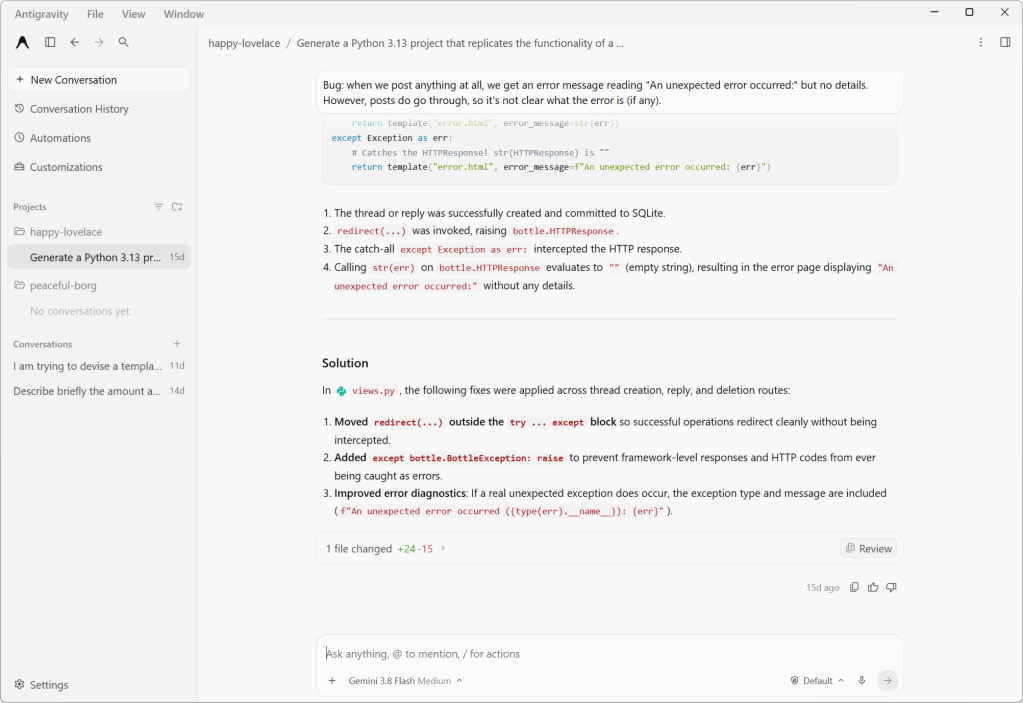
Antigravity 2.0’s agent chat interface. This discussion revolves around a Python web project, which the agent has permission to modify.
Foundry
Earlier versions of Antigravity had the concept of workspaces, which were confined to a single directory and lacked granular permissions or customizations. With Antigravity 2.0, workspaces are replaced by projects, which may span multiple directories (that you define explicitly) and have their own isolated settings and permissions. This new scheme better accommodates how many software projects work, especially those with shared components living in different places.
Another new option is local mode vs. worktree mode, which controls how agents interact with your project’s directories. It’s another example of how the Antigravity app lets you choose between the quick-and-dirty or slow-but-correct way of doing things. Local mode has the agent working directly on local folders or Git checkouts, for convenience and speed. The new worktree mode creates a new Git worktree for each conversation, so that the active working folder won’t be affected and work done by any subagents running in parallel won’t conflict.
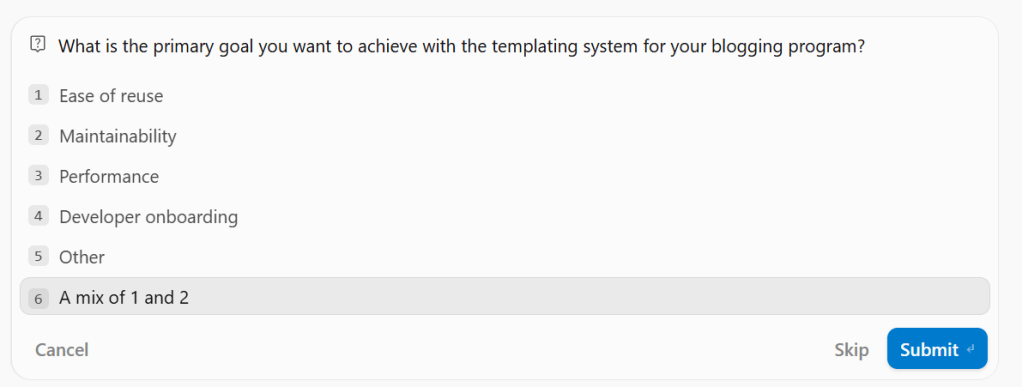
An example of one of Antigravity 2.0’s responses for the “grill-me” function. The last option is always left blank for the user to fill in; here, it’s “A mix of #1 and #2”.
Foundry
By default agents come with several common control commands, prefixed with a slash:
/btw lets you interject with a quick question that makes use of the current context, but without derailing the workflow./grill-me has the agent prompt you with a few specific, focused questions about the project to better guide its responses. For instance, during a conversation about creating a templating system for a blogging engine, /grill-me produced questions like “What is the primary goal you want to achieve with your program?” and presented several different options, along with a fill-in-the-blank option.One thing to be wary of with these command operations is API timeouts. When I was using /grill-me, the API for the service timed out and the context for the grilling vanished and couldn’t be recovered.
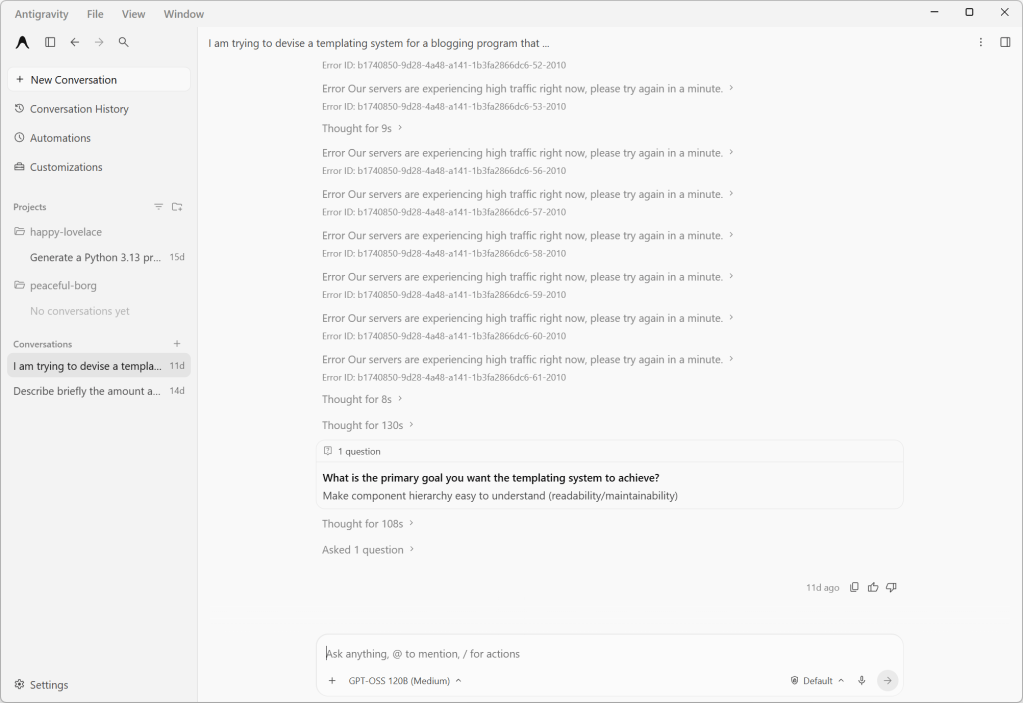
If Antigravity has an API timeout in the middle of a “grill-me” session, it tends to forget the context, including any already-asked questions. The last question shown was asked previously in a slightly different form.
Foundry
The Antigravity app also includes bundles of agent skills and capabilities for building with various Google services and technology stacks. For instance, the modern web guidance bundle provides agent skills and guidelines for building web apps with best practices and broad browser compatibility. The Android CLI bundle gives agents tools and guidelines for building Android apps, or refreshing older Android apps or their components. Most intriguing of the bunch, if maybe also the most esoteric, is the Google DeepMind science skills collection for doing scientific research with Antigravity.
There is growing interest in speeding up agentic development through parallelism — for instance, by having multiple agents analyze different aspects of a project in parallel and report their results independently. Antigravity gives you a couple of complementary ways to do this. One is subagents, which are spawned by the main agent and work on a specific task in their own isolated workspace. Another is to run agents or subagents asynchronously as a background process, so you and the main agent can continue working without waiting for them to complete.
The biggest limitation of Antigravity, which I’m betting is by design, is that it doesn’t let you use any models besides versions of Gemini, Claude, and GPT. There is no mechanism for connecting Antigravity to a self-hosted model with an industry-standard interface. For that you will want a product like LM Studio.

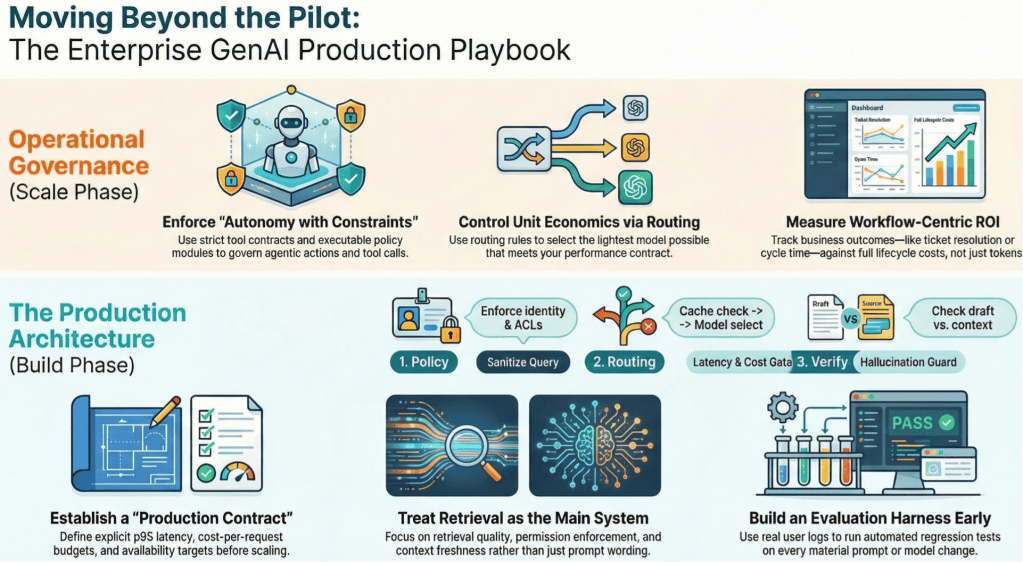
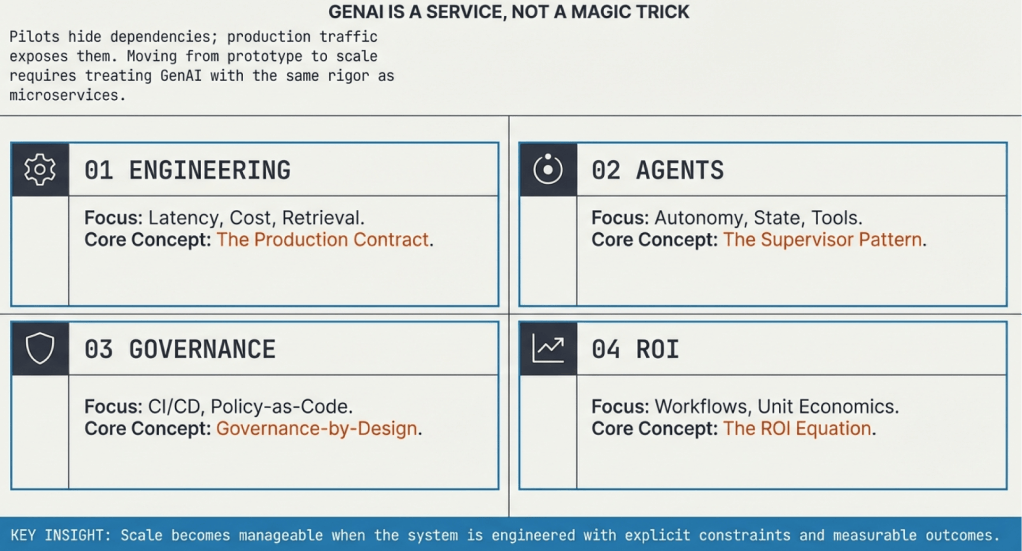
This series lays out a practical framework for taking generative AI (GenAI) from pilots to dependable production systems in the enterprise. It focuses on four disciplines that determine long-term success: engineering for scale and reliability, designing agentic systems with clear constraints, embedding governance directly into build and runtime controls, and measuring ROI at the workflow level with full cost and outcome visibility. The throughline is operational discipline—treating GenAI as a service with contracts, evaluation, ownership, and measurable business impact.
Adnan Masood
The first article in the series, “How to run enterprise generative AI like a production service,” focuses on operations. It explains why reliability, retrieval quality, latency control, cost routing, observability, and evaluation harnesses determine success at scale. The article lays out a practical architecture and operational checklist so teams can move from promising demos to stable, supportable systems.
The second article, “Agentic AI in the enterprise: How to balance autonomy with constraints,” defines what an agentic system is and how to operate one safely. It introduces the agent loop (plan, act, verify, commit), tool contracts, policy enforcement, durable state, and verification gates. The emphasis is on constrained autonomy, traceability, and operational ownership so agents can execute real workflows under enterprise controls.
Adnan Masood
The third article, “Governance by design: Turning AI policy into executable controls,” treats AI governance as engineering work. It describes how to translate policy into executable controls in continuous integration pipelines and runtime enforcement layers. Topics include threat modeling, policy-as-code, lineage, audit evidence, and feedback loops. The goal is steady delivery under measurable guardrails.
The final article, “AI ROI beyond pilots: Measuring outcomes in production,” addresses how to measure real business value from GenAI. It defines ROI at the workflow level, accounts for full life-cycle costs, and connects usage metrics to operational outcomes. It provides a metrics stack, cost equation, cohort rollout strategy, and a 90-day plan to produce credible, production-grade ROI signals.
—
New Tech Forum provides a venue for technology leaders—including vendors and other outside contributors—to explore and discuss emerging enterprise technology in unprecedented depth and breadth. The selection is subjective, based on our pick of the technologies we believe to be important and of greatest interest to InfoWorld readers. InfoWorld does not accept marketing collateral for publication and reserves the right to edit all contributed content. Send all inquiries to doug_dineley@foundryco.com.

For most of the history of enterprise software, accountability has been relatively easy to understand. A person logs in, a person has a set of permissions, and a person takes an action. If something goes wrong, you can usually work backwards from there.
Agentic AI changes that. We are moving from systems that suggest what someone should do to systems that can actually do it. Agents can access tools, call other systems, make decisions across multiple steps, and increasingly operate without a human approving every move. That is the point, of course. An autonomous system that needs someone hovering over every decision is not particularly autonomous.
But the more action we hand over, the more important one deceptively simple question becomes: When an agent does something, who did it?
Not philosophically. Operationally. Whose authority was it using? What was it allowed to touch? Who granted those permissions? And if something goes wrong, who owns the outcome?
The first question is what an agent actually is inside your organization. Should it always be treated as a delegate of a human, acting on that person’s behalf and inheriting some version of their permissions?
That model makes accountability relatively straightforward. If my agent does something, the action can be traced back to me. But it becomes harder to sustain as agents become more persistent and autonomous.
An agent might run continuously or serve an entire team rather than one person. It might perform a business function that continues long after whoever originally configured it has moved on. In those cases, should the agent have an identity of its own? And if it does, who creates that identity, who owns it, who grants its permissions, and how long should those permissions last?
Identity is where accountability starts because if you cannot reliably answer who the agent is, everything that follows becomes harder to reason about.
Identity and permissions are closely related, but they are not the same thing. Consider an agent designed to conduct research using public information. It might be perfectly reasonable for that agent to use a public model, external tools, or public Model Context Protocol (MCP) servers. Now point that same capability at internal finance data.
The agent has not fundamentally changed. Its environment has.
Suddenly, sending information to an external model may be unacceptable. Certain tools may need to disappear from its reach. Data that could previously move freely now sits inside a very different compliance boundary. So permissions cannot simply be a static list attached to an agent. They need to reflect who the agent is, what it is trying to do, and the context in which it is operating.
That becomes even more important when agents can choose different tools and paths through a problem rather than following a completely predictable workflow.
Now add sub-agents.
An agent receives a goal and creates several others to complete pieces of the work. Do those sub-agents inherit the parent’s identity? Do they inherit its permissions? Should their authority be narrower based on the task they have been given? And who ultimately owns what they do?
There may not be one universal answer, but there does need to be an answer inside the enterprise. More importantly, there has to be a through line.
An agent can delegate execution to another agent, which delegates part of that task again. That cannot mean accountability disappears somewhere along the way. Autonomy can branch. Accountability cannot disappear.
Enterprises need to retain the relationship between the original authority, every agent involved, the permissions each one carried, and the actions they ultimately took. Otherwise, when something goes wrong, everyone gets to participate in a very expensive game of “whose agent was this?”
The same problem appears over time, not just across agent chains. Consider a long-running agent that constantly monitors tickets and takes action. Eventually, it becomes part of normal operations. Then the person who created it leaves the company.
The agent stays.
Who owns it now? Did responsibility automatically transfer to the person’s manager? Was a successor assigned? Does the team own it? Does the enterprise? And what happens to permissions that were originally linked to someone who no longer exists in the organization?
We already manage life cycles for employees, service accounts, and enterprise applications. Agents need the same seriousness. They need an ownership life cycle, not simply a deployment life cycle.
Defining ownership is only useful if you can reconstruct what actually happened. That means connecting an agent’s identity to its permissions, actions, tools, sub-agents, and eventual outcome.
If something fails, the organization should be able to understand what happened, why the agent was allowed to do it, which permissions enabled the action, which agent actually performed it, and where the control failed. That is what makes remediation possible.
This is why identity, permissioning, and execution tracing cannot live only in policy documents. Writing down who owns an agent is not the same as encoding that ownership into the systems governing it. Telling an agent not to access something is not the same as preventing access. And asking teams to piece together an incident afterwards is not the same as tracing execution while the system is running.
The goal is not to put a human approval step in front of every agent action. That would defeat much of the value of autonomy. The goal is to move humans up a level, from making every individual decision to defining the boundaries within which autonomous systems can make them.
As agents take on more work, enterprises need to know what they can do, who owns them, how authority is delegated, and how every action can be traced.
Because the question is no longer simply whether an agent can act. It is whether, when it does, the organization can still answer who.
—
New Tech Forum provides a venue for technology leaders—including vendors and other outside contributors—to explore and discuss emerging enterprise technology in unprecedented depth and breadth. The selection is subjective, based on our pick of the technologies we believe to be important and of greatest interest to InfoWorld readers. InfoWorld does not accept marketing collateral for publication and reserves the right to edit all contributed content. Send all inquiries to doug_dineley@foundryco.com.

Buildings are responsible for an enormous share of global electricity demand, and the way their air conditioners, lights, and heating systems are scheduled can make the difference between a grid under strain and one running smoothly. For years, engineers have tried to optimize these schedules with evolutionary algorithms and reinforcement learning, but the problem becomes brutally hard when dozens of buildings share a single electrical network and must be coordinated simultaneously. A new study published in Discover Artificial Intelligence proposes a strikingly different approach: instead of searching step by step for the best schedule, a generative artificial intelligence model learns to paint one directly out of pure noise, guided by a map of how the buildings are physically wired together.
The framework, called DMCBO, short for Diffusion-driven Multi-objective Collaborative Optimization for Building Clusters, was developed by Yalan Zheng of Zhengzhou Technical College and Taixiang Yin of North China University of Water Resources and Electric Power. Their central insight is that the joint scheduling of equipment settings and load distribution across an entire cluster of buildings can be treated as a high-dimensional data sample, much like an image. Diffusion models, the same family of generative techniques behind modern text-to-image systems, work by progressively corrupting data with Gaussian noise and then learning to reverse that corruption. The researchers reformulated multi-objective building optimization as exactly this kind of conditional denoising process: starting from random noise, the model strips away noise step by step until a complete, Pareto-optimal collaborative schedule for every piece of equipment in every building emerges.
Technically, the forward diffusion process is a fixed Markov chain that adds tiny amounts of Gaussian noise to real scheduling data over one hundred steps, with the noise coefficient increasing linearly from 0.0001 to 0.02 until the original data becomes indistinguishable from standard Gaussian noise. A neural network is then trained to predict the noise that was added at each step, given the noisy schedule and a conditional encoding vector describing the current situation. Once trained, the model can generate fresh solutions at inference time by sampling pure noise and running the reverse process, refining it over one hundred denoising steps into a schedule tailored to the prevailing weather, occupancy, and grid conditions. Because this generation is a gradient-based learning process rather than an iterative search, it avoids the local optima traps that plague traditional multi-objective evolutionary algorithms and the reward oscillations that destabilize deep reinforcement learning.
What makes the system genuinely cluster-aware is its use of graph neural networks. The researchers model the building cluster as a graph mapped onto a radial distribution microgrid topology, where nodes represent buildings and edges encode physical constraints such as maximum line thermal capacities and transformer limits. A two-layer graph convolutional network passes messages between neighboring buildings, fusing spatial-topological dependencies and network constraints into a single graph embedding. This embedding is concatenated with an adjustable preference weight vector to form the condition that steers the denoising trajectory. In effect, when the model generates a control strategy for one building, it simultaneously perceives the state of its neighbors and the limits of the shared electrical infrastructure, suppressing systemic coordination errors from 0.18 down to 0.06 in the team’s experiments.
The multi-objective aspect is handled through an elegant scalarization trick. Each objective, such as energy consumption, operating cost, or thermal comfort, is normalized to a dimensionless value between zero and one using Min-Max normalization based on historical operational bounds. The normalized objectives are then blended into a single scalar condition via a weight vector whose components sum to one. During training, these weights are sampled from a uniform Dirichlet distribution, exposing the model to the entire space of possible preferences so it learns the distribution of the full Pareto front. At deployment, a decision maker can slide the weight vector like an adjustment knob, instantly generating schedules that emphasize energy saving, comfort, or a balanced compromise, all within the same trained model.
The denoising backbone itself is a U-Net adapted to process one- and two-dimensional building scheduling tensors. Diffusion time steps are embedded through sinusoidal positional encodings, while the graph-derived condition is injected into every residual block via Adaptive Layer Normalization. A bottleneck layer with multi-head self-attention captures long-range dependencies across the entire daily scheduling horizon, and symmetric skip connections preserve high-resolution information during reconstruction. The authors trained the model for 300 epochs on dual NVIDIA Tesla V100 GPUs, and the loss curves dropped from 0.75 to below 0.03 with training and validation curves closely coinciding, indicating no overfitting. As the reverse diffusion step count decreased from 90 to 10 during analysis, the noise-prediction error distribution became sharply concentrated at zero, demonstrating extremely high denoising precision at the end of generation.
Validation was carried out on the open-access Building Data Genome Project 2 dataset, which supplied real hourly weather records, operational schedules, and annual electricity, cooling, and heating load profiles across diverse climate zones. Because that dataset provides metered energy data rather than physical building models, the team used United States Department of Energy Commercial Reference Buildings as templates and calibrated them in EnergyPlus, a high-fidelity thermodynamic simulation platform, to create a digital twin consistent with the real data. All results were benchmarked against a rule-based control strategy with static thermostat setpoints of 25 degrees Celsius in summer and 22 degrees in winter, and every experiment was repeated ten independent times to confirm statistical significance.
The headline numbers are impressive. In high-demand summer conditions, DMCBO achieved an average energy-saving rate of 28.6 percent and cut peak load by 38.5 percent, shaving the afternoon peak from roughly 560 kilowatts down to about 440 kilowatts and saving approximately 142.80 US dollars per day. Cumulative daily power savings exceeded 1,000 kilowatt-hours, compared with 400 kilowatt-hours for a traditional collaborative strategy and just 120 kilowatt-hours without coordination. In winter, peak shaving and valley filling reached about 39 and 42 percent respectively, far above the 22 and 25 percent of conventional methods. When the solution sets were projected into objective space, DMCBO dominated the baselines: it reached a hypervolume indicator of 0.95 within 12,000 function evaluations, versus 0.85 for NSGA-II and 0.70 for MOPSO, while keeping operating costs between 140 and 160 dollars against more than 210 dollars for deep reinforcement learning and 260 to 300 dollars for a GAN-based generative approach.
Robustness and scalability proved equally compelling. Under injected stochastic disturbances mimicking sudden weather changes and occupancy swings, the framework confined power fluctuations to a narrow band of plus or minus 5 kilowatts, whereas the deep reinforcement learning baseline swung between minus 15 and plus 20 kilowatts. Scaling from 5 to 50 buildings, the global energy-saving rate actually rose from 28.5 to 31.2 percent, because larger clusters unlock more load-complementary opportunities that the graph encoder can safely exploit within encoded grid boundaries. Computation time grew to 9.8 seconds at the 50-building scale, but that remains comfortably within the 15-minute control horizon used by real building management systems, and the hypervolume index slipped only slightly to 0.88. Ablation experiments confirmed that both the graph neural network module and the choice of 100 diffusion steps, which yields a 50-millisecond inference latency, were essential to this balance of speed, accuracy, and stability.
The authors are candid about limitations. The framework has so far been validated only in simulation, and EnergyPlus simplifies sub-minute mechanical actuation latencies that real HVAC hardware would introduce; they propose cascading PID loops and predictive safety margins to absorb those delays in practice. Data quality, generalization to residential buildings and extreme climates, the computational cost of scaling to city-sized networks, and the black-box nature of the generative process all remain open challenges, with explainable AI and transfer learning flagged as future work. Still, the architecture is designed to slot into standard building management systems as a supervisory layer, transmitting setpoints over protocols such as BACnet or Modbus. If the simulation gains survive contact with physical buildings, the idea of generating optimal energy schedules from noise, guided by a graph of the grid itself, could become a powerful new tool in the push toward decarbonized cities.
Subject of Research: Conditional diffusion models with graph neural networks for multi-objective energy optimization in building clusters
Article Title: Diffusion model-driven multi-objective collaborative optimization for building energy management using graph neural networks
Article References: Zheng, Y., & Yin, T. (2026). Diffusion model-driven multi-objective collaborative optimization for building energy management using graph neural networks. Discover Artificial Intelligence, 6(1), Article 1383. https://doi.org/10.1007/s44163-026-02140-z
Image Credits: AI Generated
DOI: 10.1007/s44163-026-02140-z
Keywords: diffusion models, graph neural networks, building energy management, multi-objective optimization, EnergyPlus, smart buildings, Pareto optimization, deep learning, energy efficiency, HVAC control, microgrids, generative AI
Career paths for software developers have always been a touch problematic.
Early on, you started out as a junior developer, and maybe there were ladder rungs that got you raises until you became a senior developer. But there was typically a ceiling to that, leaving you with little choice but to move into a management position if you wanted to continue to advance and make more money.
On top of that, promoting developers to be managers is often less than optimal for the company or the developer in the long run. Many of the qualities that make a good developer don’t always translate into being a good people manager. And certainly, many software developers want to continue to write code and not have to worry about the bureaucracy and paperwork that often comes with management. Plus, it hardly seems optimal to take your best coders and tell them to stop coding.
The industry dealt with this by creating technical positions such as “Architect” and “Staff Developer” and “Chief Scientist.” That works well, but then these positions often lead to doing less programming and attending more meetings.
No matter what the title or role, the simple fact of the matter is that the more senior you get, the more you’ll be dealing with other people. “Tech Leads” have to supervise the work of other developers. Maybe you aren’t responsible for managing their careers or writing their performance evaluations, but you are responsible for making sure their code is up to snuff.
It will come as no surprise that agentic coding changes this entire dynamic.
We don’t write much code anymore. And we are all too aware that coding agents aren’t perfect. Like humans, they make bad decisions, write bugs, and do things they weren’t asked to do. They need clear instructions, wise guidance, and the right working environment. You need to keep an eye on your agents to make sure they are on track and headed in the right direction.
One might even say that you need to, ahem, “manage” your coding agents.
And in that sense, we are all managers now. “A coding agent is most useful when you treat it more like an employee than an autocomplete tool,” says Jim Bourke, founder and CEO of Zide Software, producer of a development tool that treats developers more like managers than coders. “It needs a clear assignment, the right context, a safe place to work, checkpoints, and a way to evaluate the result.”
How you deal with coding agents isn’t all that different from how you would deal with a real live developer. You have an array of choices to make about who/what will write the code, what they will be building, and when their work can be called finished. You have to guide them, give them clear instructions, review their code, and decide when that code is ready to be checked in.
All of that should sound pretty familiar to managers and individual contributors alike. In fact, one might argue that this is the job now — managing coding agents. Even the most junior of developers will be managing a “developer” in the future.
What does that mean for the career path of a person who manages coding agents all day? I hate to say it, but I don’t know and I don’t think anyone can say for sure. The set of skills required to successfully lead a “team of coding agents” compared to those needed to manage a team of real live people overlap, but they are not congruent.
It may be that managing coding agents is an innate talent, leading to some junior developers suddenly outproducing seniors. Or maybe it will be a skill that needs to be carefully nurtured and grown under the mentorship of an experienced manager. It’s hard to say. And how the career ladder will look going forward, and exactly what skills will be rewarded, are questions I don’t think we can answer right now.
Everything is so new and changing so fast that it’s all a blur at this point.
Wherever we may be headed, I don’t envy the person who will have to rewrite all those job descriptions.

One of the first questions I ask devops organizations is to walk me through their development and operations standards. What are the non-negotiable devops practices? What are the data governance first principles? What observability standards are in place? How is security embedded in devops? This is the starting point. From there, we might review standards on how functional requirements are written. For businesses developing AI agents, I’ll ask about their non-functional requirements (NFRs) and how testing is performed.
Now that many devops organizations are using AI code generators, vibe coding, and applying spec-driven development practices, the questions increase. How does the AI know your organization’s standards? What processes monitor and enforce these standards? What are the developer responsibilities for owning the outcomes?
“Generative AI will happily hand you the movie set of an app with looks of a house from the street. The doors and windows open, and the demo runs clean,” says Mike Toole, director of security and IT at Blumira. “Behind the facade, there’s no plumbing and no wiring: no input validation, no auth boundaries, nothing actually holding it up. If your only gate is ‘does it run and look right,’ you’re shipping a set, not a building.”
One report shows that 92% of developers use AI coding tools daily in 2026 and that 41% of all global code is now AI-generated. Will all that code deliver value, operational issues, or mounting AI debt? I spoke to several experts about how to keep AI-generated code aligned with organizational standards and how to define an AI code generator’s context beyond just functional requirements.
A general contractor in the construction industry will review building information models that provide a view of what they are developing. But many of the details are in the construction specifications, including component stipulations and performance requirements. Devops teams without equivalent documentation for their organization, architectures, and applications may have gotten away with this omission in the pre-AI era. But institutional knowledge and compliance requirements are the context AI code generators need before you share the first functional prompts with them.
“AI-generated code stays aligned with engineering standards only when those standards are explicit, available, and difficult to bypass,” says Eddie Zhou, founding engineer at Glean. “Put architecture, approved libraries, data-handling rules, security controls, naming conventions, observability, test expectations, and non-functional requirements into specs and automated checks. Then, ensure you give the model that context but treat its output as untrusted until it passes the same reviews, tests, scans, and production monitoring as human-written code.”
Overcoming tribal knowledge was always challenging as devops teams had too much pressure to push features and little incentive to maintain documentation. Two of my top AI leadership skills are change management and agile collaborative leadership, because devops teams need practice alignment while introducing AI capabilities.
Zhou adds, “AI amplifies ambiguity and weak governance as efficiently as good engineering. If standards live only in tribal knowledge, AI will expose that problem, not solve it.”
The problem with requirement documents and reference architectures is they aren’t directly enforceable with human or AI developers. Once a devops team agrees on standards and documents them, the next step is to develop approaches to encode them as automated acceptance criteria in CI/CD pipelines.
“AI code generators and human developers optimize for functional correctness—making the feature work—and quietly skip the non-functional requirements where most of your real standards live, including performance, security posture, error handling, observability, and auditability,” says Michael Bevilacqua, vice president of AI product management at Adeptia. “Encode your NFRs as executable acceptance criteria that generated code must pass before it merges, so ‘aligned with our standards’ becomes a gate the pipeline enforces on every change.”
An example: Performance requirements stating that all web pages should have a total page weight under 2MB can be validated during the pull request, and requiring the time to first byte (TTFB) to be under 800ms can be automated in CI/CD in a staging environment.
Architecture and automated non-functional requirements covering performance, security, and other organization-level compliance requirements should become the base-level context standards shared with AI-code generators. The next set of considerations for setting accurate contexts starts with application- and agent-specific requirements, their intended use cases, and specific compliance guardrails.
“CIOs are mandating AI to build apps faster, but many are realizing speed isn’t the bottleneck because more code doesn’t automatically create business value,” says Matt Healy, senior director of product strategy and marketing at Pegasystems. “Before developers write any code, organizations must understand customer needs, assess legacy systems, stay current with regulations and best practices, map enterprise architectures and integrations, and align business and IT.”
Consider three stages of understanding requirements. Once stakeholders set business value and intent, developers must first align on an implementation strategy and discuss performance, cost, and other trade-offs. Then, developers should reconvene with stakeholders and review implementation trade-offs. Healy adds, “On large projects, defining the solution and success metrics can take as much time as building it. Leaders aren’t just using AI to accelerate development, but to help executives, business analysts, product owners, and IT teams collaborate more effectively.”
The third stage is gathering the goals, user requirements, and implementation approach into a development-specific context. But we’re not done yet, because data requirements and operations considerations must also be included in the context fed to AI code generators.
How the application or AI agent being developed can use the data it has access to requires clear specifications. Data governance programs should have standards based on data sets, defined roles, entitlements, and usage specifications.
Kash Mehdi, vice president and field CTO at Reltio, says the teams that are pulling ahead treat data governance as an input to AI, not an audit after it. “They ground their tools in trusted, semantically consistent data models, approved specs, and security policies, so the AI inherits the organization’s standards instead of inventing its own. Without that governed context layer, you don’t scale from a handful of AI-assisted workflows to thousands; you just accumulate inconsistent code faster,” Mehdi says.
Here are two options to consider in creating standards: First, establish repurposable data sets as data products with defined integrations and usage rules. Organizations with many data sets and integration points should consider data fabrics. The second (and key requirement) is to standardize the format of data contracts, using human- and machine-readable formats so that data owners, users, and AI code generators operate from a consistent set of principles.
“AI writes code that compiles and passes tests but quietly ignores your data contracts, so the failures show up in production as corrupted state, not build errors,” says Ed Huang, cofounder and CEO of TiDB. “The fix is to make governance machine-checkable, including schema constraints, access policies, and data-quality rules enforced at the database layer where the AI can’t route around them, not documented in a wiki the model never reads. Treat the database as the enforcement point for your standards, and it stops mattering whether a human or an agent wrote the query.”
When AI generates the code, a best practice is to use static application security testing (SAST) and other code analysis tools to perform automated code reviews. Another best practice is to put applications through penetration testing and other application security validations. But many of these tools are outside in view of what the AI developed. To get an inside view, observability and testing requirements must be included as a standard, with specific requirements around the key transactions you’re asking the AI to develop.
Sanjay Gidwani, CEO and founder at Kosmos, says, “More code volume just means more time spent investigating, and the fix isn’t reading the code more carefully before it ships. It’s connecting the observability signal, the thing that broke, back to the specific change that caused it. Without that link, you’re doing the same manual investigation as before, just with a bigger haystack.”
Testing requirements must go beyond generating automated tests, using synthetic data to expand the test patterns, and implementing continuous testing. “Instead of testing one input against one output, test whether an invariant holds across a wide range of generated inputs, which is a good fit for AI’s unbounded input space and non-deterministic outputs,” says Lior Gavish, cofounder and CTO at Monte Carlo. “I treat it as one layer in a stack with evals mapping the input space, property-based testing stress-testing it for edge cases and brittleness, and observability on live traffic checking whether production is drifting from the properties you defined as non-negotiable.”
Ed Frederici, CTO at Appfire, recommends codifying standards as machine-readable rules, including linters, formatters, and type checks. Merge the organizational and application standards into one context shared with the AI code-generating tool. His other recommendations:
CLAUDE.md, style guides, and architecture docs.It’s also important to remember that as code must be extended and maintained, so must the underlying development standards. “AI-generated code only stays aligned with your standards when it’s powered by a context engine that keeps learning, not a static snapshot of your rules,” says Itamar Friedman, CEO and cofounder at Qodo. “That means an engine that continuously adapts to your codebase’s evolving standards, your team’s PR history, and the prior decisions your engineers have already made, so the AI isn’t just following instructions but actually understands how your team works.”
As more devops organizations rely on AI code-generating tools, developers have an important opportunity to develop the standards and automated validations required to ensure what is built meets engineering and compliance requirements.

Just because Apple now has AI, a new folding iPhone, and a newly minted CEO doesn’t mean the litigation between it and OpenAI has gone away. Apple now wants to force OpenAI to let it look at the hardware it has been building, according to a new report.
It seems a reasonable request, doesn’t it? After all, Apple’s argument is that OpenAI has been engaged in trade secret theft to help it design and develop its new hardware. OpenAI’s defense against these claims feel flimsy, at least to this reporter. They seem to coalesce around something like, “We don’t need your trade secrets because we’re making something brand new.”
The problem with that defense is, contextually, that while on this stated mission to do something completely new, the company has hired around 400 former Apple staff so far, including its chief designers. And Apple thinks part of that process has been OpenAI, in whole or in part, working to exfiltrate its trade secrets.
With those facts as your guide, Apple’s request to Judge Edward J. Davila seems reasonable. It wants to take a look at what OpenAI is developing to ensure its trade secrets have not been abused in the process of designing that product. Apple argues that if it is forced to wait until the product is released, then it will be impossible to make its trade secrets confidential again, particularly as the defense seems to consist of that pinky promise that no Apple trade secrets have been harmed.
Apple legal also argues that it cannot be fair to allow OpenAI to defend itself by alleging its unreleased and unseen product doesn’t contain any trade secrets without permitting Apple — and the court — to verify that. While Apple’s counsel doesn’t seem to have said it, you could paraphrase the request as Apple telling the genAI firm, “Let us see what you are building; if you have nothing to hide, you have nothing to fear.”
Except, of course, that while building its defense, OpenAI is giving many of us the distinct impression that it may have something to fear.
Despite the merits of the argument, I think Apple’s request will not prevail, in part because the court may assess that if Apple takes a look at OpenAI’s homework it may compound the risk of IP theft. But that doesn’t mean Apple’s attempt will fail outright, as the compromise position is likely to be the appointment of a trusted, independent, third-party expert witness to take a look at what Apple’s competitor is making in Apple’s stead.
There is precedent for this. That’s more or less what happened when Waymo pursued a similar case against Uber, or when AMCS litigated against Sinovel. There are nuances to all three cases that mean they aren’t perfectly aligned, but that does seem a logical next step to this layman.
Of course, just because it’s logical doesn’t mean either party is going to like it, but OpenAI could conceivably even suggest such an approach as it seeks to buy itself time to build and release its still mythical hardware. That’s also why Apple wants a chance to look at documents pertaining to that hardware to make very certain it hasn’t infringed any of Apple’s own trade secrets.
All the same, if this case does indeed turn out to be a scenario in which one company has been found with its hand in the cookie jar, then the best possible approach for the company with crumbs around its mouth is going to be damage control. That’s going to take a lot less war-war and a great deal more jaw-jaw. It’s also going to require the intake of a very, very large slice of humble pie. Right now, it seems to me that Apple isn’t talking, and OpenAI isn’t hungry enough to take that first bite. Not yet.
The case, number 5:26-cv-07078, rolls on.
Now please subscribe to my daily, human-curated Apple-related news headline feed at The Core, or follow me on BlueSky, LinkedIn, or Mastodon.

If you like the idea of running an LLM on your own computer but tried awhile ago and were disappointed, it may be time to give it another chance.
“A few months ago, any LLM that I could run on my Macbook scored 0% on an agentic coding eval I put together,” Simon P. Couch, senior software engineer at Posit, posted on Bluesky this spring. “[The April] Qwen 3.5 and Gemma 4 releases both scored 90%.”
A model running on your laptop still won’t come close to what a state-of-the-art LLM from Anthropic or OpenAI can do in the cloud. But for defined tasks like answering coding questions, writing functions, or summarizing documents, they can be surprisingly capable.
“Laptop-available models, while a lot weaker than the frontier, have started wildly outperforming expectations,” open-source developer Simon Willison, who follows the AI industry closely, said in his PyCon US 2026 lightning talk in May.
There are many ways to run local models on a PC or Mac. Ollama, while perhaps not the fastest, is among the most popular and easy to set up. It’s also supported out of the box by many mainstream programming tools such as Visual Studio Code, JetBrains AI Assistant, Zed, and Posit Assistant. Ollama also can launch Claude Code or Codex with the option to use a local LLM.
I’ll be focusing on Ollama here, but many other tools are available for running LLMs locally, such as LM Studio, Jan, Unsloth, Simon Willison’s LLM, and llama.cpp.
You can download Ollama and install it as a conventional software program for Windows, Mac, and Linux. There’s both a chat application with a GUI and a terminal CLI.
From choosing a model and setting its parameter options to tweaking its runtime configuration, here are some tips for getting the most from your Ollama setup.
Choosing a model is obvious but not always easy, given that the Ollama model catalog has hundreds of listings. What’s best for you depends on both your task and available hardware. For coding, the Gemma 4 family from Google and the latest Qwen models from Alibaba are both worth considering. I’m partial to Gemma, because it writes R code well. In fact, Gemma 4 26B in the cloud is the only open-weight LLM that Posit offers in its Posit AI subscription service that might fit on a laptop. I also lean toward US models for summarizing text, because they’re more likely to be trained in nuances of American English.
Next is selecting a size. The Gemma 4 12B version introduced in June fits comfortably in a lot of systems. Google says a 4-bit version (the Ollama catalog default) requires 6.7 GB of VRAM or Mac unified memory. And, Google’s internal coding benchmarks show it’s close to the larger 26B MoE (mixture of experts) Gemma 4 version from April in some tasks. It’s a decent place to start if you don’t have a ton of VRAM.
Another possible option: Meta recently announced Muse Glimmer, a 30B model unveiled in August, which is designed for end-to-end agentic work, reliable tool use, and multi-step reasoning. It needs around 24 GB of VRAM to run at a usable clip, though.
If none of these suggested models work for you, one of the easiest things to do these days is ask a frontier model such as ChatGPT or Claude. Tell it how much GPU VRAM and regular RAM your Windows PC has, or how much unified RAM your Mac has, what LLM family you’re interested in running if you’ve got a favorite, and what you want to do. Summarize short documents? Long documents? Answer coding questions in a terminal? Run a coding agent? Ask for its three top suggestions and start with those. Then try larger or smaller options as appropriate.
For Windows PCs, if an LLM can’t fit entirely into GPU VRAM, it may run so slowly as to be effectively unusable.
Note, though, that an LLM’s architecture matters along with its size. A so-called mixture-of-experts model like Gemma 26B only uses some of its parameters for a task. While the whole LLM needs to be loaded, it may run fine on a PC with less GPU memory than you’d expect—depending on what you’re doing. Gemma 4 26B is pretty snappy for some tasks in a terminal window on my PC with 12 GB of VRAM, even though more than half of the model spills over into RAM.
And you don’t always need the largest model that fits in your hardware; smaller ones may be fine, especially for simple, non-mission-critical tasks.
The takeaway? Selecting a good model is a bit more complicated than “this hardware can run LLMs with that number of parameters, and bigger is always what I want.”
One more note: If you have a Mac with Apple silicon, choosing an MLX version of an LLM if available will likely give you better performance. MLX is a framework that’s optimized for Apple hardware.
Once you decide on an LLM, the Ollama model listing should show you how to download and run it. For example, the terminal command for Gemma 4 12B is ollama run gemma4:12b or ollama run gemma4:12b-mlx. If the model is already on your system, the ollama run command just loads and launches it; if the LLM isn’t on your system yet, Ollama downloads it first. The ollama pull command will download a model without running it. Use ollama list to list all the LLMs Ollama has already downloaded on your system. And use ollama rm [model-name] to delete a model.
There are ways to tweak an LLM’s performance with parameter options such as temperature (how “random” its responses are), top_k (if its choices should be restricted to a certain number of best-matching tokens), top_p (how many next tokens the model considers when generating its response), and maximum context window size.
Ollama suggests 64000 tokens as a minimum context window size for web search, agents, and coding tools. However, the Ollama default is just 4000 for systems with less than 24 GB of VRAM, even if an LLM has a much larger possible context window.
Instead of specifying parameters on the command line each time you run a specific LLM, you can create a “copy” of the model with your desired parameters using a Modelfile. Below is an example Modelfile that creates a version of the Gemma 4 12B LLM with some suggested parameters and a context size of 64000 tokens:
FROM gemma4:12b

PARAMETER temperature 1
PARAMETER top_p 0.95
PARAMETER top_k 64
# For the context window
PARAMETER num_ctx 64000
Google advises setting temperature to 1.0, top_p to 0.95, and top_k to 64 for all the Gemma 4 LLMs. (That’s already what the default Ollama versions are, but it doesn’t hurt to specify again.)
You can also set a default system prompt in a Modelfile with SYSTEM instruction.
Save your Modelfile as a plain text file, such as Modelfile-gemma4-12b-64k-optimized.txt, and then create the LLM copy with a terminal command such as
ollama create gemma4-12b-64k-optimized -f ./ModelFile-gemma4-12b-64k-optimized.txt
Now you can run your new LLM with
ollama run gemma4-12b-64k-optimized
The ollama list command will show your newly created copy as having the same size as the original, but it’s not actually taking up all that additional space on your hard drive. ollama show [model-name] will display a number of settings that have been baked in.
Ollama defaults to unloading a model out of memory after just five minutes of session inactivity. That may be helpful if you’ve ended your session, but not so great if you want to resume a chat that’s been idle for seven minutes. Having to re-load an LLM into an existing session can make a model feel a lot more sluggish than it should.
To change how long an LLM stays in memory, update your system’s OLLAMA_KEEP_ALIVE environment variable. On Windows, you can change the default in a terminal window with setx OLLAMA_KEEP_ALIVE "15m" or setx OLLAMA_KEEP_ALIVE 900 (a number without a qualifier such as m for minutes is treated as seconds).
On a Mac, you can change the default with launchctl OLLAMA_KEEP_ALIVE 15m.
Restart Ollama for new settings to take effect.
You can unload a model manually with the terminal command ollama stop [model-name]. To see how much time is left on a running LLM if there’s no additional session activity, use the ollama ps command. Note that the results of this command include an “UNTIL” column.

Sample results from an ollama ps command.
Foundry
Another important Ollama option is the default context window. If you’re not using a Modelfile-customized LLM, you can set Ollama’s default context window for any LLM you run with setx OLLAMA_CONTEXT_LENGTH 64000 on Windows or launchctl OLLAMA_CONTEXT_LENGTH 64000 on a Mac. (If the LLM has a smaller maximum than this setting, Ollama should ignore it.)
If you’re on a PC, you may also want to change Ollama’s default for KV cache, which controls how a model stores chat history in your current session. The default is f16 quantization, which gives high precision—but with high memory use. Changing to q8_0 (8-bit quantization) “uses approximately 1/2 the memory of f16 with a very small loss in precision, this usually has no noticeable impact on the model’s quality,” according to Ollama’s documentation. Yes please!
setx OLLAMA_KV_CACHE_TYPE "q8_0"
This usually works with NVIDIA GPUs that should auto-enable a memory optimization called Flash Attention. For other setups, Ollama docs suggest force-enabling Flash Attention by setting OLLAMA_FLASH_ATTENTION to 1 in an environment variable. If you’re using an MLX model on a Mac, you probably don’t need to worry about this.
To check which Ollama variables you’ve set on your PC, you can run these terminal commands:
reg query HKCU\Environment | findstr /i OLLAMA
reg query "HKLM\SYSTEM\CurrentControlSet\Control\Session Manager\Environment" | findstr /i OLLAMA
Running ollama ps in a new terminal window while Ollama is running an LLM elsewhere also shows you how much of a currently running model is in your GPU. If your LLM is slow but it all fits in your VRAM, the problem may be elsewhere.
Gemma 4 is a “thinking” model family, which means its models can go through what look like reasoning steps before generating their final response. This “thought process” can improve results but also slow things down—a lot.
Thinking is on by default in Ollama for all LLMs that have the option. You can turn it off from the Ollama command line with --think=false. For example:
ollama run gemma4:12b --think=false
Other applications like IDEs may have their own ways of switching thinking on and off, such as a lightbulb icon in the chat window. Unfortunately, you can’t turn thinking off from a Modelfile.
In a test summarizing documents with Gemma 4 E4B, turning thinking off boosted speed five-fold and result quality was about the same. For Gemma 4 12B, the speed improvement was eight-fold.
How thinking affects coding will depend on the complexity of the task. You may want to test some real-world work to see whether time spent “thinking” pays off with better results.
One of the largest sources of open-source LLMs is Hugging Face, and many models there have a “use this model” button that gives the command you need to download and run it on Ollama. Just be aware that not all of those models are as plug-and-play as the Ollama-optimized versions on Ollama.com, especially new ones.
For example, I tried running the Unsloth project’s 2-bit quantized version of Meta’s new Muse Glimmer. The command was
ollama run hf.co/unsloth/Muse-Glimmer-30B-GGUF:UD-Q2_K_XL
However, this errored out of the box. ChatGPT helped me fix the issue (with a Modelfile to create a modified version of the LLM) after I told it the error messages.

Hugging Face model pages often show the command needed to run the LLM on Ollama.
Foundry
Local LLMs have come a long way, but a model that can fit inside a consumer desktop or laptop won’t be able to do the kind of work that top cloud-based models can. Gemma 4 12B may write good basic functions and document summaries, but don’t expect it to do complicated jobs from a single prompt like “create an R package to use the National Weather Service API.” As with frontier LLMs of old, you’ll need to go step by step, be specific, and have some patience. If you never want to go back to those days, stay with the state-of-the-art models in the cloud.
Gemma works well for basic data analysis, “importing, tidying, and visualizing data,” and “information retrieval and short factual questions,” according to Posit AI’s documentation. “It is less reliable than the Claude models on longer, multi-step tasks. You might see a strong response on one turn and a misread on the next. We do not recommend Gemma 4 for long-running agentic coding or complex package development.”
That was pretty much the status of paid cloud-based LLMs a couple of years ago.
Even if limited compared to current state-of-the-art models, though, free coding help that’s 100% local and private can still be compelling for use cases like exploring sensitive data, summarizing personal documents, doing simple tasks, working on a plane with bad Internet, and saving paid tokens for when they matter. Plus it can feel empowering to have everything on your own system.
And, local model capabilities will likely keep getting better.

Steve Yegge is not the shy and retiring type, so when he wants recommendations on how others are managing 10 to 20 (or more) coding agents, he posts the question on X. Specifically, he’s looking for an IDE because “I use Emacs, and I wouldn’t wish it on you.”
The replies (600 and counting) offer plenty of alternatives: Herdr, cmux, Conductor, the Claude and Codex desktop apps, and an impressive assortment of homemade software. For anyone hoping the industry had settled on a sensible way to work with agents, clearly we haven’t. Hence, Yegge’s question.
The most interesting data hidden in the replies, however, isn’t which IDE or IDE stand-in developers are using. Rather, it’s what developers have added to these tools to accommodate the technology’s shortcomings. These include shortcuts to find the agent that needs a decision, ways to recover an earlier conversation, and groupings that explain how a task fits into a project. In other words, despite the incredible intelligence we now have to help us write code, developers are still struggling with the simple task of automating their remembrance of what they asked AI to do.
We seem to have made it easier to generate work without making it easier to absorb and finish work.
Mark Jaquith uses Herdr with a custom interface to jump to an agent needing his attention. Kai Backman has been working on a keyboard shortcut to take him to the “next most relevant place to take action.” Jacob Voytko built a workspace switcher that groups tasks within milestones and lets him jump to the corresponding tickets and pull requests. He wanted a visual sense of where the work stood, rather than an unstructured list. Another respondent, Basil, built a manager that helps him “find the session where we did x.”
Of course, developers have always customized their tools. Emacs users alone could supply scads of evidence. But, again, it’s not really about the fact that developers are tweaking their tools, but why. So much of the tweaking is intended to help cohere the developer’s intentions with the work that’s happening in several places at once. They’re not asking for better AI: They’re asking for AI to help them express their humanity, as it were.
Consider a developer who asks one agent to fix a bug, another to investigate a performance problem, and a third to update a dependency. While the agents work, she can do something else, which is what makes LLM-driven development so appealing—at least, until the agents return.
None of those agents does work that is fully isolated from the rest of the system. Think about it: The bug fix changes behavior someone may depend on. OK … we can address that! But wait, now we have the performance investigation offering three options, each with different costs. Hmm. Hold on a minute while I tackle this … except the dependency update isn’t waiting. It passes its tests, but the agent has also rewritten a configuration file. Better check that!
As this simple example shows, before the developer can move forward on any decision, she first needs to recover what she asked for, what the agent discovered, and what remains uncertain. And, no, adding more agents doesn’t solve the problem. It could instead compound the problem.
The agents may have saved hours. Hurray! But a list of completed sessions doesn’t tell the developer where to begin. Nor does a green test result answer the question of whether the change belongs in the application.
This is why the number of agents running tells us so little, even if it makes us feel cool. I mean, what are those agents doing, anyway? Yegge’s commenters provide some clues. For example, Anton describes using 30 terminal tabs with one active agent per project, so as to keep their work from overlapping. Jerry Combs says he generally keeps no more than three conversations going, with agents managing their own subagents as needed. Even those three conversations are difficult enough to follow.
Both approaches can make sense. The demands depend on how independently the work can proceed and how much human judgment it requires along the way. A developer with 20 agents may have fewer decisions to make than someone with three.
Gergely Orosz recently listed several observations worth considering together: developers spending less time in IDEs, code reviews becoming theater, and people working more despite AI’s productivity promises. His observations don’t establish that agent tools cause overwork or superficial review. They do make it worth asking whether we’re shifting effort into places our productivity stories neglect. Watching an agent produce a change is satisfying, but spending the afternoon reconstructing why six changes were made is less so.
But that work, however unsatisfying, is necessary if those changes are going to be understood and maintained.
Some of the plumbing already exists to alleviate these issues. For example, Herdr tracks agents as working, blocked, or idle and carries those states into its tabs and workspaces; cmux offers notifications and a shortcut to the workspace with the most recent unread notification. These are useful starts, but they do highlight just how much remains to be done. After all, the most recent notification may concern the least important task, and an agent asking a question may be perfectly capable of waiting while the developer finishes something else.
The next improvement should help developers make those distinctions. A task should retain its original purpose, the relevant decisions, and the evidence supporting its result. When it needs a person, it should explain the decision required and what happens if that decision waits. A summary can help, but it must lead back to the actual changes and test results. Otherwise, we’ve made it easier to approve work without understanding it.
Again, the best tools for agentic AI will be the ones that bring the human back into the loop and provide the information necessary to make decisions.
I’d like a tool that can tell me a task is ready for review because the requested behavior has been demonstrated, while keeping a separate, less urgent question out of my way. I’d also like it to remember that I rejected an approach yesterday, so I don’t have to discover it again in today’s proposed fix. Whether that tool calls itself an IDE seems secondary. Google introduced Antigravity 2.0 as a standalone agent application without an IDE, while recommending that developers use it alongside their IDE of choice. In other words, the editor still has a job, even when it is no longer where every task begins.
In 2022, I wrote about cloud convenience and the tendency to misunderstand what developers want from their tools. They have work to do and want fewer obstacles to doing it. We should apply that same standard to agentic development across the whole task, including the effort of returning to it.
Not that we can put all the onus on AI and its tools. Teams have a part to play here. If every task is urgent, the tool has nothing useful to prioritize. If nobody defines what counts as finished, the tool can only report that an agent stopped. Agreeing on those things and limiting the work that needs simultaneous human decisions will do more than adding another status badge.
Yegge’s readers are already building pieces of this future, one shortcut and homemade workspace at a time. The vendor opportunity is to make that convenience available without requiring everyone to maintain a side project. Give developers more work they can confidently put behind them and fewer conversations they need to keep alive in their heads.

The newest member of the corporate workforce never sleeps, never asks for a raise, and can be cloned before lunch. It can also confidently make the wrong decision thousands of times before anyone notices.
That helps explain why some technology leaders have started talking about AI agents as employees, co-workers, or interns rather than software. Once an agent can update records, issue refunds, send communications, or act across multiple enterprise systems, deploying it no longer looks much like installing another application.
Recent Harvard Business Review articles have pushed that analogy further. One argues that agents should be treated like a new workforce, with defined roles, authority, sources of truth, supervision, and audit trails. Another recommends giving agents names and job descriptions, onboarding them, evaluating their performance, and increasing their responsibilities after they prove themselves.
But there is a catch: People may start believing the metaphor.
A separate HBR study of 1,261 managers found that when AI was framed as an employee rather than a tool, managers with experience working around AI agents took less personal responsibility for results and assigned more responsibility to the AI. They also escalated more problems and caught fewer errors. In the study, 31% of respondents said their companies already framed AI as a teammate or employee, while 23% said agents appeared on organizational or work charts.
For IT leaders, the answer may therefore be to borrow freely from the employee-management playbook — without extending the metaphor too far.
Amy Loomis, group vice president at IDC, draws a hard line around one word: responsibility.
Humans, she says, have obligations to their companies and to one another, and they bring an understanding of corporate culture and values that an agent can mimic linguistically without possessing.
That makes calling an agent a co-worker potentially more than harmless anthropomorphism. The label suggests a peer relationship and can encourage people to cede judgment to a system that’s very good at giving what was requested, Loomis says, but not necessarily at recognizing what was actually needed.
“Accountability is something that has qualities associated with it that are uniquely human,” she says. “Agents may be given permission to access data, but the accountability for what they do with that access lies with the person who gave the agent access, not the agent itself.”
That distinction still leaves plenty to borrow from employee management. It makes sense to give an agent traceable access and tightly scoped permissions — and to institute a kill switch to prevent the agent from having continued access. But Loomis finds it more effective to think in terms of giving an agent an operations charter rather than a human identity: define what the system does, what it may access, and what humans remain responsible for.
In other words, give the agent a security badge. Just don’t put its picture on it.
Raja Iqbal, founder of agentic AI governance company Ejento AI and co-author of the HBR article “To Scale AI Agents Successfully, Think of Them Like Team Members,” is closer to Loomis than the headline suggests.
Iqbal says the metaphor is intended to put CIOs, CISOs, and other technology leaders into the right “cognitive posture.” Thinking about an agent as a team member, he argues, can remind an enterprise to impose familiar management disciplines: a unique identity, clear human oversight, defined authority, spending limits, approved information sources, and an audit trail.
If another term produces the same discipline, he’s fine with that too.
In fact, Iqbal explicitly rejects synthetic employees with human personas and seats on the org chart. That creates exactly the accountability problem critics worry about: “Bob did it” becomes an excuse even though Bob is software.
“The metaphor is dangerous when it’s decorative,” Iqbal says. By that, he means companies get into trouble when they adopt the human trappings — names, personas, or the language of colleagues — without also imposing the supervision, limits, and accountability that make the analogy useful.
His preferred distinction is simpler: the agent needs a technical identity so the enterprise can reconstruct what it did, while a human must remain responsible for those actions. “The identity is the audit primitive, and the human owner is the accountability primitive,” he says. Put more plainly, the agent identity answers what acted; the human owner answers who is accountable.
The employee analogy becomes more useful again when deciding how much freedom an agent should receive. Iqbal recommends graduated autonomy. An agent might begin with a human approving every action, progress to performing low-risk actions independently, and eventually receive bounded autonomy if its observed performance justifies it. A serious error can send it back down the ladder — or out the door entirely.
That sounds a lot like a probation period for a new employee. It’s also simply good software governance for a probabilistic system.
Russell Jukes has had plenty of opportunity to test that distinction. As chief digital and information officer at DXC Technology, he oversees AI in an IT services organization with roughly 115,000 employees.
“We think about [an AI agent] as a superpower, not as a person,” he says.
DXC separates agents into two categories. Personal agents work for individual employees and generally operate using the employee’s identity and access. Professional agents are enterprise systems built for broader workflows. On one of DXC’s major AI platforms, employees have so far created roughly 8,000 personal agents, compared with about 100 professional agents.
The professional variety receives much stricter oversight. It can have its own nonhuman identity, credentials, permissions, and authority boundaries. Activity passes through control planes that allow DXC to see what agents are doing and, when necessary, shut them down.
Jukes thinks many of these agents will eventually disappear from users’ view altogether. An agent might scan internal resource requirements overnight and recommend employees for projects. Nobody needs to greet it in the morning or consider it a colleague; they simply receive the result.
That’s where he parts company with the worker metaphor.
Jukes says he learned early on that AI cannot be deployed like conventional SaaS. His first attempt followed the familiar software model: make the application available, let employees use it within the prescribed workflow, and expect adoption to follow. “I did that, and nobody used it,” he says. The experience convinced him that AI requires a different approach, and he vowed to “never deploy AI like it’s SaaS again.”
Conventional SaaS is largely deterministic: the software constrains users to a defined workflow and produces predictable outputs. Agentic AI is different. It can interpret a goal, choose among tools and data sources, and decide how to get to an outcome. For Jukes, that means CIOs have to design the policies, permissions, data access, guardrails, and authority around the agent rather than simply deploy another application.
That also creates a clearer chain of responsibility. If a person approves the agent’s action, Jukes says that person owns the decision. If an autonomous agent behaves according to a business policy, accountability belongs with the people responsible for that policy. If the technology fails to operate as designed, responsibility moves to IT.
The agent itself never gets handed the blame.
Nina Tatsiy, global CIO of Quadient, an automation technology company, takes a position somewhere between Iqbal and Jukes. She calls agents interns, but deliberately uses the term as an analogy, not an organizational designation.
Agents must be managed as software, with security, governance, and technical controls, while recognizing that their probabilistic behavior requires additional supervision. “You have to do both,” Tatsiy says.
An intern does not receive every password and authorization on the first morning. Neither should an agent. It has to be onboarded, trained, watched, retrained when its environment changes, and eventually retired when it’s obsolete.
Quadient generally avoids giving agents human names. Tatsiy worries that doing so encourages people to see them as real colleagues capable of judgment.
“Overtrust is a problem,” she says, particularly because AI tends to state conclusions with such assurance. Tatsiy prefers using AI to challenge a hypothesis or surface questions people haven’t considered rather than allowing it to make the conclusion for them.
Yet the intern analogy has proved useful operationally.
In one accounts-payable deployment, Quadient had an agent effectively shadow human workers and learn from their feedback across different scenarios. Only after its performance had been tested across increasing levels of complexity did it begin providing recommendations. Humans still made the final decision.
The agent, in other words, earned more trust. It didn’t earn accountability.
The emerging divide may therefore be less about whether agents are employees or software than about which parts of each management model IT leaders should retain.
Agents need individual technical identities, but not human identities. They need defined responsibilities, but not jobs in the human sense. They need monitoring and evaluation, but not annual performance reviews. They can receive progressively greater authority, but not progressively greater accountability.
And the stronger they become, the more important that distinction becomes.
Treating an autonomous agent like ordinary SaaS ignores the fact that it can interpret, choose, and act in ways conventional software cannot. Treating it like Steve from Accounting creates a different problem: sooner or later somebody may start assuming “Steve” knows what he’s doing.
IT leaders may indeed need to borrow heavily from HR as agentic AI spreads across the enterprise. They just shouldn’t start issuing employee badges.

Postgres just turned 30. Over those three decades, I’ve watched it pick up hot standby replication, logical replication, asynchronous IO, just-in-time compilation, and dozens of other features built for enterprise workloads. Every one of them solved a real problem and raised the floor on what a DBA needs to know just to do the job well.
I don’t think most people outside this world fully register how much that floor has risen. In the early days, improvements were small and mostly about stability. Now, 30 years in, the focus is squarely on enterprise functionality, and that functionality comes with complexity attached. The more you build, the more there is to understand and manage, and that increases every year.
Most organizations treat a scaling database problem as a staffing problem. Hire enough DBAs and you’re covered. I think that’s the wrong way to look at it entirely.
It’s not far off from the old “too many cooks spoil the broth” problem. You don’t make better soup by adding cooks. You make better soup with a better chef. A 100-terabyte database with serious performance issues doesn’t get fixed by putting 10 DBAs on it instead of one. It gets fixed by someone who has seen that failure before and knows exactly where to look.
Experienced DBAs are expensive and hard to find, and the problem is only getting worse. A few years ago, it was IoT driving demand for time series expertise at scale. Now it’s AI, and organizations are building enormous databases to support retrieval pipelines and large language model (LLM) training, often without the experience on hand to run them safely.
Humans are unpredictable. We make assumptions. Sometimes, we think the process is getting in the way, so we take a shortcut around it. And we make mistakes because that’s simply human nature.
I don’t think that’s something we’re ever going to fully engineer away as long as a person is in the loop, and honestly, we want a person in the loop making the real decisions. So it becomes a balancing act. You have to understand the mistakes people tend to make, build the discipline to follow good processes consistently, and still know when a situation calls for judgment rather than a checklist.
I think this is where AI has earned its place. It’s not as a replacement for the DBA, but as something that follows a process more consistently than a person under pressure tends to.
Modern AI systems still have problems with hallucination and getting the full picture right. However, with the right guardrails, auditing, and tracking in place, they are able to follow the process very well. It is much easier for me to say, “Forget it, I know a shortcut, I’ll just push this through,” than it is for a well-constrained model to deviate from its instructions. As long as the instructions are clearly defined, LLMs tend to stick to them.
Another advantage worth naming is if an LLM is doing the diagnostic work, you can put much stronger gating around its ability to actually make changes. You can let it follow a tight, well-defined process to diagnose a problem while still requiring a human to approve anything that touches the live system, whether that’s creating an index, dropping one, or changing a configuration value.
That combination gets you to a solution far faster than the old way, using the model’s training plus whatever supplemental knowledge you feed it through retrieval-augmented generation (RAG), while keeping a person at the one point where it actually matters. Did the model get the diagnosis right? Does the proposed fix line up with the actual problem? That’s the question a human needs to answer before anything gets applied.
I am not sure we are far enough along the path as an industry to really know what we’re getting wrong. I am working through these questions myself right now, looking at autonomous agents for Postgres operations and where the real risk is.
What’s clear to me already is that strong guardrails matter in two places, not one. You need guardrails on the prompts so the model verifies its findings and doesn’t hallucinate into a bad recommendation. And you also need guardrails on what the model is actually allowed to do. Letting an agent create an index carries a manageable risk. Letting it truncate your orders table does not. Auditing matters just as much; when something does go wrong, you need to see exactly what happened and undo it. The fallback needs to stay in place until the industry broadly trusts these systems more than it trusts a human.
Picture a load spike that hits overnight, the kind where batch processing that normally runs fine suddenly does not. The old way means spending hours trawling logs, index stats, table stats, and query performance before you land on a likely cause and you can apply a fix.
Put an LLM on that same problem and the hours-long process compresses into minutes. It’s the same productivity shift we’ve already seen in software development, where an experienced user with the right skills and guardrails can get LLM output that matches or beats a junior developer’s work. The quality comes down to this process: Structure the work, define a clear spec, build the implementation plan, then verify each stage before moving on.
The same discipline applies to database operations. The worst thing you can do is rush in and say to the model, “This happened, go fix it.” You need to guide the tools properly to get good results from them. When it’s done right, it works.
A few things need to be true for this to scale across the enterprise. Frontier models already understand Postgres well, but they don’t know everything, so you need to feed them supplemental knowledge alongside that training. Full documentation matters here, so do internal runbooks. The process has to require the model to actually consult that material rather than coast on what it already knows.
I expect the same kind of structured skills that are common in AI-assisted development, the step-by-step approach to planning and verification, to show up specifically for Postgres operations. That will make the job easier for DBAs, and easier is what matters.
We’re probably not far from agents that sit and watch a Postgres instance around the clock and rarely need a human to step in. The slower part is trust. For example, look at how long it took people to actually believe AI-written code was any good. I would guess it is the same pattern here, but I don’t doubt for a second that we will get there.
In the meantime, you do not need to hand an LLM the keys to your database tomorrow. Start smaller and begin with read access to your monitoring data. It’s a low-risk place to start.
An agent watching constantly can catch the kind of slow, compounding anomaly that threshold-based alerting tends to miss, a gradual rise in IO alongside a gradual rise in memory, and flag it before it becomes the kind of outage that costs real money every hour it runs.
That’s not a small thing. The DBA shortage is not going away on its own, and waiting for the industry to fully trust autonomous agents before using AI at all is the same as falling behind. The teams that figure out where the human belongs in this process are the ones who’ll be ready when the rest of the industry catches up.
—
New Tech Forum provides a venue for technology leaders—including vendors and other outside contributors—to explore and discuss emerging enterprise technology in unprecedented depth and breadth. The selection is subjective, based on our pick of the technologies we believe to be important and of greatest interest to InfoWorld readers. InfoWorld does not accept marketing collateral for publication and reserves the right to edit all contributed content. Send all inquiries to doug_dineley@foundryco.com.

OpenAI on Wednesday introduced a new Agents API that brings the agent harness and infrastructure behind Codex to developers, potentially giving enterprises a way to build custom AI agents while removing much of the orchestration and infrastructure management traditionally required to make such agents work.
That reduction in engineering complexity is possible because the Agents API is a managed service, with OpenAI hosting and maintaining the underlying harness and infrastructure.
Previously, developers building a custom agent typically had to assemble the components needed to support its work, including an agent runtime, context and session management, tools and external data connections, execution environments, and associated infrastructure.
OpenAI itself already offers several of those building blocks through products such as its Responses API, which developers could use to combine models with built-in capabilities including web search, file search and computer use, and its Agents SDK for defining and orchestrating agent workflows.
Agents API, which is currently in public beta, in contrast, can help developers design a custom agent in a single API call after they specify the task, model, tools, and the environment, the model provider wrote in a blog post.
For that execution environment, developers can choose to run agents in an OpenAI-managed sandbox, on their own infrastructure, or through supported sandbox providers, including Blaxel, Cloudflare, Daytona, DigitalOcean, E2B, Modal, Oracle, Runloop, and Vercel, it added.
These options give enterprises flexibility to choose between fully managed environments and deployments within their own VPCs, as well as different approaches to file and secret storage and compute configurations based on their workloads, it further explained.
The Agents API “significantly reduces” engineering work, helping developers spend more time building the actual business application instead of the agent infrastructure, said Pareekh Jain, principal analyst at Pareekh Consulting.
“The main advantage with the Agents API is fewer moving parts. A long-running agent built by hand needs a job queue, a state database, a sandbox fleet, a compaction routine and a retry policy, and someone has to own and page for each of them,” echoed Amit Kumar Jena, AI development head at IT consulting firm Kanerika.
That reduction in engineering work, in turn, could help CIOs reduce the time required to roll out an agent in production and subsequently scale it.
“Enterprises may need fewer engineers to build the infrastructure around each agent, which should reduce development time,” said Phil Fersht, CEO of HFS Research.
That time advantage, Jena said, could be critical for most enterprises as agent development usually stalls between a working demo and a system capable of running unattended for hours, with infrastructure-related issues often becoming the key bottleneck to moving an agent into production.
The reduction in engineering effort and potentially faster path to production, however, does not eliminate the tradeoffs CIOs must consider, including greater reliance on OpenAI for both the underlying agent infrastructure and the models powering it.
“Lock-in is the biggest concern. If OpenAI provides the model, context management, tools, orchestration, and execution environment, moving to another platform becomes harder,” Jain pointed out.
That dependency could also weaken an enterprise’s negotiating position on pricing and terms, Jena said.
There are also issues around data privacy and governance as the new API “doesn’t support Zero Data Retention” even when enterprises use their own sandbox, Jena pointed out.
That, in turn, could limit its adoption, especially in industries in the regulated sectors, such as healthcare and BFSI, Fersht said.
Rather, Startups, SaaS companies, and enterprises already using OpenAI are more likely to adopt the new API more readily as it reduces development effort, Jain said.
“Enterprises pursuing multi-model strategies may also prefer their own independent harness or are likely to take a hybrid approach,” Jain added.
Agents API’s adoption could be further limited due to the competition it faces from hyperscalers and rivals, analysts pointed out.
“This is a crowded category. Anthropic’s Claude Managed Agents has been in public beta since April. AWS also offers Amazon Bedrock AgentCore, whose managed harness became generally available in June and does the same category of work, meaning the loop, tool execution, context, state, and recovery, while letting you use any model and switch providers mid-session without losing context,” Jena pointed out.
Other competing offerings include Microsoft’s Foundry Agent Service and LangGraph, Jena added.

OpenAI has paused new sign-ups and upgrades to its $200 ChatGPT Pro tier, citing a surge in demand for its Astra capability that is placing pressure on system capacity, according to company statements and an executive post on X.
“To make sure our current users have an incredible experience and continued access to Astra, we are going to pause subscriptions to our $200 Pro plan,” OpenAI member of technical staff Thibault Sottiaux wrote in a post on X. “These put the most strain on our systems and we wanted to take the smallest step that allows us to continue giving the broadest access possible.”
The company separately confirmed the move in its help documentation, stating that “as of September 10, 2026, we’re temporarily pausing new sign-ups and upgrades to the ChatGPT Pro $200 plan (Pro 20X).” The pause applies to users across Free, Go, Plus, and Pro $100 tiers seeking to upgrade, while “existing ChatGPT Pro $200 subscriptions … are not affected by this pause,” it said.
Sottiaux added that “there is no impact to existing accounts and we are working on adding more capacity as fast as we can,” pointing to ongoing efforts to scale infrastructure in response to demand.
Users who cancel or downgrade during the pause will not be able to re-subscribe to the $200 tier until the restriction is lifted, according to the company’s help page. The $100 Pro tier remains available, with lower usage limits. Promotions tied to the $200 tier are also paused, the page read.
The decision is directly tied to the uptake of Astra, which OpenAI has positioned as a more advanced capability within its platform. The scale of that demand, according to Sottiaux, has been atypical.
“Demand for Astra is really unprecedented,” he wrote in the post. “We’re pulling all the levers possible to sustain the demand, but I’ve not seen anything like it until now and we went through very steep growth before.”
He added that “priority will always be to keep excellent service for existing users,” noting that the company “might have to pause new Pro subscriptions for a bit if this continues.”
The pause comes amid broader rollout challenges tied to Astra. OpenAI Chief Executive Sam Altman recently described the launch as “messy” after some paying users were unable to access the model immediately, reflecting the operational complexity of deploying high-demand AI systems at scale.
The pause, analysts said, reflects how demand for high-intensity AI workloads is intersecting with infrastructure limits, particularly at the highest usage tiers.
“It signals that frontier capacity is still rationed,” said Bhupendra Chopra, chief revenue officer at Kanerika. “One week after launching Astra, OpenAI paused new sign-ups and upgrades to the $200 Pro tier, the plan with the heaviest Astra usage limits, while the $100 Pro tier, the API, Business and Enterprise all stayed open. That tells you the priority order.”
“Consumer power users are the release valve. Enterprise contracts are what the vendor protects,” Chopra said. “For CIOs the lesson is that a model being announced and a model being available to your workloads at the volume you need are two different events.”
Chopra said the move reflects how access to advanced AI capabilities is being managed.
“We are already there,” he said. “Rate limits, usage caps, queueing and now sign-up pauses are all forms of capacity gating, and every frontier vendor uses some of them.”
“A subscription buys you a place in the line. A fixed slice of compute comes only from a contract that says so,” he added.
For enterprise IT leaders, Chopra said model capacity should be treated as a dependency.
“Treat model capacity like any other supply chain dependency,” he said. “Ask the vendor three questions before you sign. What throughput is contractually committed, what happens to my workloads when demand spikes, and how quickly can I fail over to another model.”
“If a workload is production-critical, it should run on an enterprise agreement with committed capacity… and it should have a second model tested and ready,” he said.
Chopra said the pause reflects a broader pattern seen in recent launches.
“This is at least the third time in two years OpenAI has throttled or paused access at launch,” he said. “Each launch outruns capacity, capacity catches up, and the next model outruns it again.”
“OpenAI calls this pause temporary, and it will lift once capacity catches up,” he added. “The structural condition… will persist as long as model capability keeps outpacing data center buildout.” OpenAI has not provided a timeline for when new sign-ups to the $200 Pro tier will resume, stating only that the restriction is temporary.
The article originally appeared on CIO.com.

