❌

Reading view

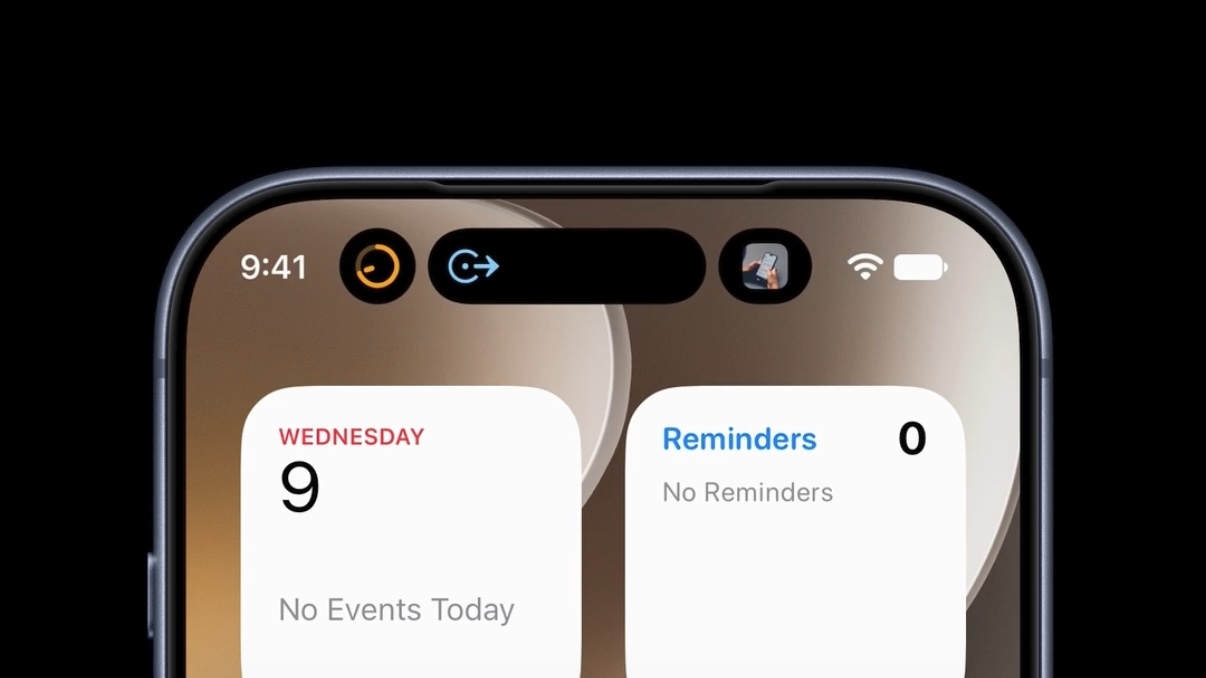
iPhone Duo status icon combines Wi-Fi, cellular, and battery information

The iPhone Duo status icon introduces a new approach to information that has occupied the top edge of the iPhone display for nearly two decades. Instead of treating Wi-Fi, cellular signal, battery status, and other indicators as a conventional horizontal row, Apple has created a flexible circular system that sits in the corner of the foldable iPhone’s display.

Apple officially describes the feature as a “circular, flexible system” within the status bar rather than one fixed icon containing every piece of information at all times. The distinction is useful: the area can adapt according to context while consolidating status information into a smaller visual region.

It is part of a much larger rethink of iOS 27 specifically for iPhone Duo. The foldable device changes the proportions available to software, particularly when its 7.6-inch inner display is open, forcing Apple to reconsider interface elements that have traditionally stretched horizontally across an iPhone screen.

The status system is one of the smallest changes visually, but it illustrates how extensively Apple has adapted iOS around the new hardware.

Black icons on a light gray background: an iPhone Duo status icon for cellular signal strength, a Wi-Fi symbol, and a battery icon with low charge—each reflecting the clean design language of the iOS 27 status icon set.
Image Credit: Apple Inc.

iPhone Duo status icon replaces the traditional horizontal approach

Conventional iPhones distribute system information across the upper portion of the display. Cellular strength, network type, Wi-Fi connectivity, and battery status typically occupy space around the camera hardware and Dynamic Island.

iPhone Duo approaches that area differently.

Apple says its circular status system nestles into the corner of the screen and presents relevant information including Wi-Fi, cellular strength, battery status, and more. Rather than requiring a long horizontal strip, those indicators can occupy a compact area that works with the device’s unusual screen geometry.

The change is closely connected to the way iPhone Duo handles controls throughout iOS 27.

Apple has moved several interface elements to the side of the display. App navigation, toolbars, the Home Screen Dock, and some Lock Screen controls can use vertical space instead of occupying the familiar horizontal regions found on other iPhones.

The status system therefore becomes part of a vertical interface column rather than an isolated redesign.

This arrangement lets content use more of the display’s height while keeping frequently referenced system information visible. It also creates a consistent location for status details as users change how they hold or fold the device.

A flexible status system suits a foldable iPhone

A foldable phone presents an interface problem that a traditional slab-shaped iPhone does not have.

iPhone Duo can operate through its 5.4-inch outer display or its substantially larger 7.6-inch inner screen. The device can be opened completely, partially folded, rotated, or positioned like a small book.

A static status bar designed around one screen size and orientation would be less effective across those configurations.

Apple instead built iOS 27 so that interface elements can move as the physical device changes. Content reacts to folding, controls relocate, and layouts adjust around the hinge and available screen area.

Apple’s developer guidance provides additional detail about this philosophy. On iPhone Duo, navigation and toolbar controls share vertical space with system elements such as the status bar and Live Activities. When available room becomes limited, application controls can collapse into an overflow menu.

That makes the circular status area part of an adaptive system rather than a cosmetic flourish.

Developers do not need to manually reproduce the status treatment inside their apps. Apple’s standard interface frameworks handle much of the adaptation, especially when applications use native navigation, toolbar, and tab-bar components.

A smartphone lock screen displays the time 9:41 and the date Wed Apr 1, with a background of mountains under a starry night sky and an iPhone Duo status icon next to the Wi-Fi symbol in the corner, reminiscent of iOS 27.
Image Credit: Apple Inc.

Dynamic Island also moves to the side

The status area is not the only familiar piece of iPhone interface that changes position on iPhone Duo.

Apple has redesigned Dynamic Island so that it can sit vertically along the side of both the outer and inner displays. It can expand from that position to present alerts and Live Activities.

The relationship between Dynamic Island and the new circular status system is particularly interesting because Apple now has two dynamic interface areas operating along the same side of the screen.

One communicates persistent device information such as network and battery status. The other handles temporary activity, alerts, and live information.

Apple’s developer documentation refers to this section as shared vertical space. Application controls may also occupy it, meaning iOS has to continuously decide how much room is available and which elements deserve priority.

That is a major departure from the long-standing assumption that the upper corners of an iPhone screen simply contain a predictable row of small status symbols.

On Duo, those regions have become active parts of the interface layout.

Wi-Fi, cellular, and battery remain immediately recognizable

Consolidating status information creates a design challenge: efficiency cannot come at the expense of readability.

Users have spent years learning the meanings of Apple’s individual status symbols. Cellular bars indicate signal strength, the Wi-Fi symbol communicates wireless connectivity, and the battery icon provides an immediate indication of remaining power.

Apple has not discarded those familiar concepts.

Instead, the circular system changes how and where information is presented. The familiar status categories remain present while the container around them becomes more adaptable.

This is particularly useful on a device with two displays. Users should not need to relearn the meaning of basic connectivity information when moving from the outer screen to the inner display.

The same reasoning applies when iPhone Duo changes orientation. Apple can reorganize the status area without changing the fundamental visual vocabulary behind Wi-Fi, cellular, or battery information.

A hand holds a tablet displaying a video of two people talking in a field of purple flowers, with a transcript of their conversation visible on the right side of the screen and an iPhone Duo status icon appearing discreetly at the corner, reflecting the latest iOS 27 design.
Image Credit: Apple Inc.

iPhone Duo pushes the status bar beyond a fixed strip

The new design suggests a different direction for one of the oldest pieces of smartphone interface.

Status bars traditionally behave like reserved strips of screen space. Applications work around them, and their icons occupy predictable positions regardless of what is happening elsewhere.

iPhone Duo turns that space into something more fluid.

The circular system can coexist with a vertical Dynamic Island, changing application controls, Live Activities, and layouts that respond to the physical position of the foldable display. It becomes another component that iOS can arrange rather than a fixed row placed permanently along an edge.

There is no indication that Apple plans to bring the same circular status treatment unchanged to conventional iPhones. Its current implementation is specifically tied to iPhone Duo and the interface requirements created by the foldable hardware.

Still, the design provides a glimpse at how Apple can rethink even deeply established iPhone conventions when the shape of the device changes. When iPhone Duo reaches customers on October 23, the small circular area in the corner will be one of the most immediately visible examples: cellular strength, Wi-Fi, battery information, and other system details occupying a shared adaptive space instead of stretching across the display.

The post iPhone Duo status icon combines Wi-Fi, cellular, and battery information appeared first on AppleMagazine.

  •  

iPhone 18 Pro adds variable aperture, A20 Pro, and longer battery life

iPhone 18 Pro arrives with Apple concentrating its biggest changes in three areas: camera control, sustained performance, and battery life. The new Pro models retain familiar 6.3-inch and 6.9-inch display sizes, but introduce a variable-aperture main camera, the 2-nanometer A20 Pro chip, redesigned thermal hardware, and a smaller Dynamic Island.

The lineup consists of iPhone 18 Pro and iPhone 18 Pro Max, starting at $1,199 and $1,299 in the U.S., respectively. Both begin with 256GB of storage and are available in black, silver, glacier, and a new burgundy finish. Preorders opened September 12, with retail availability beginning September 18 in more than 65 countries and regions.

Rather than treating the Pro models as a cosmetic update, Apple has focused on changes that become more noticeable during demanding use, particularly photography, video work, gaming, AI processing, and long sessions away from a charger.

iPhone 18 Pro brings variable aperture to the main camera

The centerpiece is a new 48MP Fusion Main camera with a physical variable aperture, a first for the iPhone.

Six laser-cut aperture blades can adjust the amount of light reaching the sensor while also changing depth of field. The camera supports four aperture settings: ƒ/1.48, ƒ/1.8, ƒ/2.8, and ƒ/4.0.

At the wider end, the camera can gather more light in darker scenes. A narrower aperture can keep more people or background detail in focus, giving photographers another tool beyond computational depth effects and Portrait mode.

Apple also gives users direct access to those settings through new Pro controls in the Camera app. Aperture, shutter speed, and white balance can be adjusted manually, while a histogram provides a more conventional way to monitor exposure.

The feature is paired with a new main-camera sensor and updated computational imaging pipeline. Apple says the combination improves low-light performance and detail, while Photographic Styles gain texture and grain controls for additional control over an image’s appearance.

Video receives several additions as well. Cinematic effects can now be applied after recording to footage captured at up to 60 frames per second, while Time-lapse can record in 4K with Dolby Vision HDR. Audio Mix has also been updated with improved voice processing and the ability to isolate music.

For photographers who want more evidence of how an image originated, Apple is introducing Apple Reference Image. In Reference mode, the main camera signs sensor data, which Private Cloud Compute uses to create an unalterable reference version that can be compared with an edited image in Photos. Apple is also preparing support for the SynthID standard as another way of identifying AI-generated or altered content.

Close-up of a camera lens with visible aperture blades, surrounded by a maroon-colored body—reminiscent of the sophisticated design seen on the iPhone 18 Pro Max. Subtle reflections are visible on the lens surface.
Image Credit: Apple Inc.

iPhone 18 Pro uses A20 Pro and a redesigned vapor chamber

A20 Pro is built using a 2-nanometer manufacturing process and contains a six-core CPU, seven-core GPU, and dual 16-core Neural Engine.

Apple says memory bandwidth is 50% higher than on A19 Pro, while GPU performance can be up to 40% faster. The Neural Engine provides 32 cores in total, doubling the AI processing capability of the previous Pro chip.

The silicon change is closely tied to a redesigned cooling system. Apple has rearranged the chip package so that the silicon die sits beside the memory rather than beneath it in the thermal path, allowing A20 Pro to connect more directly to a next-generation vapor chamber.

That vapor chamber has three times the surface area of the previous generation and uses new materials to move heat away from the processor more effectively. Apple claims the design can deliver up to a 40% gain in sustained performance compared with iPhone 17 Pro.

That distinction is more relevant than peak benchmark numbers for workloads such as extended gaming sessions, video editing, computational photography, and local AI models, where heat can force a phone to reduce performance over time.

Connectivity has also moved further toward Apple-designed silicon. The N1 wireless chip supports Wi-Fi 7, Bluetooth 6, and Thread, while the new C2 modem succeeds C1X. Apple says C2 uses 15% less energy while offering faster uploads and adds mmWave support in the U.S.

A metallic chip with the Apple logo and text “A20 PRO” in bold, centered on a dark background with a subtle multicolored glow around the edges—designed to power the next-generation iPhone 18 Pro and iPhone 18 Pro Max.
Image Credit: Apple Inc.

iPhone 18 Pro Max reaches 45 hours of video playback

Battery improvements are another major part of the new hardware.

Apple rates eSIM-only versions of iPhone 18 Pro for up to 36 hours of video playback, while iPhone 18 Pro Max reaches as much as 45 hours. Apple says Pro Max receives the largest battery-life increase ever delivered in an iPhone.

Some of that gain comes from using the space previously occupied by a physical SIM tray. In markets receiving eSIM-only models, including the U.S., Canada, Japan, Mexico, Saudi Arabia, and the UAE, the larger internal battery provides an additional two hours of rated video playback.

Charging has accelerated as well. iPhone 18 Pro can reach 50% charge in approximately 15 minutes using a supported wired setup, while wireless charging reaches 50% in around 30 minutes. Apple says five minutes of wired charging on iPhone 18 Pro Max can provide roughly seven hours of video playback.

Both devices use aluminum unibody construction with Ceramic Shield 2 on the front and Ceramic Shield on the back. Storage options run from 256GB through 2TB.

The iPhone 18 Pro weighs 211 grams, while iPhone 18 Pro Max weighs 249 grams. Display sizes remain 6.3 inches and 6.9 inches, respectively.

Four iPhones—featuring the iPhone 18 Pro and iPhone 18 Pro Max—in black, white, blue, and deep red colors are displayed upright in a row against a black background, showing their backs and triple camera arrays.
Image Credit: Apple Inc.

iOS 27 brings Siri AI and new Apple Intelligence tools

The hardware launches alongside iOS 27, which places Apple Intelligence and the new Siri AI more prominently across the system.

Siri AI can use personal context from information stored across apps, respond to onscreen content, perform actions in supported apps, and handle more open-ended questions. A new Siri mode in Camera lets users ask questions and take action based on objects or information visible through the viewfinder.

Photo tools include Spatial Reframing, Extend, and an upgraded Clean Up feature, while Safari can monitor selected webpages for changes such as a product restock or price adjustment.

The Dynamic Island has also been physically reduced and redesigned. It can display up to three Live Activities simultaneously while continuing to support Face ID.

Apple released iOS 27 on September 14, while Siri AI is rolling out initially as a beta in English, with additional language support planned. iPhone 18 Pro and iPhone 18 Pro Max reach stores September 18, giving Apple a Pro lineup whose most substantial additions are less about a new exterior shape and more about physical camera control, heat management, and how long the hardware can sustain demanding workloads.

The post iPhone 18 Pro adds variable aperture, A20 Pro, and longer battery life appeared first on AppleMagazine.

  •  

iPhone 18 Pro Gets A20 Pro and Variable Aperture Camera

Apple’s iPhone 18 Pro and Pro Max pair the faster A20 Pro chip with a variable-aperture Fusion Main camera, a smaller, more capable Dynamic Island, longer battery life, and higher prices, while otherwise changing surprisingly little from last year.

macOS Hidden Treasures: Copy and Paste

  •  

Leaked Video Shows iPhone 18 Pro's 3-in-1 Dynamic Island in Action

A leaker has activated Apple's upcoming three-item Dynamic Island mode inside the iOS 27 simulator, offering the first video demonstration of the new iPhone 18 Pro feature.


The leaker, known as pdfu, posted a video showing the ‌Dynamic Island‌ toggling between three simultaneous Live Activities, matching what Bloomberg's Mark Gurman described in his report earlier today. "The new ‌Dynamic Island‌ with 3 items is already supported in ‌iOS 27‌," pdfu wrote.

Great reporting from @markgurman. The new Dynamic Island with 3 items is already supported in iOS 27. Here's what it looks like.

The code requires a sensor region less than 100 layout points wide, or below 16.57 mm for this new mode. iPhone 17 Pro was 20.76 mm. https://t.co/jZshu4rFXx pic.twitter.com/mL46rcEirh

— pdfu (@itspdfu) September 9, 2026


According to pdfu, the underlying code requires a sensor region less than 100 layout points wide to enable the new mode, or below 16.57mm. Layout points are Apple's device-independent unit for describing on-screen dimensions, and they scale differently depending on a display's resolution. By comparison, pdfu notes that the sensor region on the current iPhone 17 Pro measures 20.76mm, meaning Apple would need to shrink the hardware by roughly 20% to unlock the new software behavior.

The ‌iPhone 18 Pro‌ and ‌iPhone 18 Pro‌ Max have been rumored to feature a smaller ‌Dynamic Island‌ for months, but reports about support for a third, additional ‌Dynamic Island‌ Live Activity is new. Since the iPhone 14 Pro launched in 2022, the ‌Dynamic Island‌ has only supported two Live Activities, so adding a third seems like a worthwhile way to demonstrate the utility of shrinking the region.
Related Roundup: iPhone 18 Pro

This article, "Leaked Video Shows iPhone 18 Pro's 3-in-1 Dynamic Island in Action" first appeared on MacRumors.com

Discuss this article in our forums

  •  

iOS 27 adds iPhone Handoff, letting two iPhones share one phone number

iOS 27 adds iPhone Handoff, letting two iPhones share one phone number

Apple is preparing a practical multi-device feature for iOS 27 that lets users keep a single phone number while moving between two iPhones. The capability, called iPhone Handoff, was first spotted in detail by MacRumors after appearing only as a brief line on a WWDC 2026 feature slide.

The idea is straightforward. One iPhone is set as the main device and keeps the user’s primary eSIM. The second phone is designated a companion and receives a companion eSIM tied to the same number and carrier account. The number then follows whichever iPhone is unlocked and in active use, rather than ringing on both devices at once. A Dynamic Island notification can appear when the number transfers. Cellular settings stay on the main iPhone, while location sharing updates to the device currently using the number.

Setup lives in Settings under Cellular. Both phones need iOS 27, and the feature depends on carrier support. Early reports point to T-Mobile in the United States and Deutsche Telekom in Germany as possible first partners, though availability will vary by network. The approach builds on how an iPhone already shares a number with a cellular Apple Watch, using eSIM provisioning instead of cloning a line or swapping physical SIMs.

MacDailyNews Take: The use case is niche, but useful for people who keep a smaller iPhone and a larger one, a personal device and a work device, or a future foldable alongside a standard iPhone. iOS 27 is expected later this month, so more official details and carrier confirmations should arrive soon.


‎
Please help support MacDailyNews — and enjoy subscriber-only articles, comments, chat, and more — by subscribing to our Substack: macdailynews.substack.com. Thank you!

Support MacDailyNews at no extra cost to you by using this link to shop at Amazon.

The post iOS 27 adds iPhone Handoff, letting two iPhones share one phone number appeared first on MacDailyNews.

  •  
❌