Canicules, incendies et océans en surchauffe. Derrière ces crises en apparence distinctes, les scientifiques voient un même signal : une Terre dont les mécanismes de protection subissent une pression sans précédent.
When someone uploads a photo to the people-search tool ClarityCheck, the website has a clear message: “Your reverse image search is private and secure.” New research, though, shows that the website left more than 9 million image files, including photographs of people’s faces, publicly exposed. And a second misconfiguration publicly exposed people’s email addresses and phone numbers.
Overall, according to findings from independent security researcher Jeremiah Fowler, the exposed ClarityCheck database contained roughly 450 GB of images, including what appeared to be profile images, screenshots, and other photographs of adults, teenagers, and children. All of the images were stored in an unsecured Amazon S3 bucket, with files in folders named “faces” and “profiles,” which could be accessed by anyone online through a URL included in the company’s publicly available website code.
ClarityCheck is one of a number of so-called people-finder tools that have appeared online in recent years. These websites broadly claim to be able to search the web, public records, and other databases to identify individuals. ClarityCheck’s website says it can run searches on phone numbers, email addresses, vehicle identification numbers, and names. Its photo-search page says it can help “identify anyone in a photo” and find social media profiles “in seconds.”
Se você busca um software que possa verificar problemas de rede, então veja só os recursos do NetCheck, um utilitário gratuito que analisa a conexão real do seu Mac com a internet — não apenas o status do Wi-Fi.
O NetCheck permanece discretamente na sua barra de menus como um único ponto, o qual fica verde quando você tem internet e cinza quando não tem.
Diferente do indicador de Wi-Fi do macOS, o qual pode mostrar todas as barras enquanto o roteador está sem conexão com a internet, o NetCheck confirma o acesso real à internet com uma sonda de rede leve, notificando-o imediatamente quando você perde o acesso — bem como quando ele retorna.
O painel principal do app também exibe dados importantes em um relance, como a qualidade da conexão e seu tempo de resposta (dividido em DNS e rota), cuja atualização acontece automaticamente (a cada 5, 15 ou 30 segundos, a cada minuto, a cada 2 ou a cada 5 minutos).
Outros recursos do app incluem a identificação do provedor, exibindo seu provedor atual ou o nome da rede Wi-Fi diretamente no painel (atualizado automaticamente a cada conexão). Ele também pode ser ativado diretamente no login, monitorando sua conexão desde o momento em que você faz login no Mac.
O NetCheck está totalmente localizado em 34 idiomas, incluindo o português do Brasil. Disponível gratuitamente na Mac App Store, ele conta com uma versão Pro por compra única de R$60 (sem assinatura), a qual adiciona histórico de conexão com pontuação de confiabilidade, teste de velocidade embutido e alertas de queda no iPhone.
Apple Intelligence files can occupy several gigabytes of Mac storage because locally downloaded models power text generation, summaries, image creation, Siri requests, and other on-device features. Removing these files can recover valuable space when Apple Intelligence is no longer needed.
Apple lists 7GB of available device storage among the requirements for Apple Intelligence, but the amount displayed on a Mac can be higher. Additional languages, image-generation resources, updated models, and temporary assets can increase the total over time.
The files are managed by macOS and do not appear as ordinary documents that can be moved to the Trash. Apple provides a supported removal method through System Settings: turning off Apple Intelligence causes macOS to remove the downloaded on-device models.
This also disables features that depend on Apple Intelligence. Writing Tools, summaries, Image Playground, Genmoji, intelligent Shortcuts actions, and Apple Intelligence functions inside Siri may become unavailable. Regular Mac applications and the rest of macOS continue working normally.
Check Apple Intelligence Files on Your Mac
Recording the available storage before removing the files makes it easier to confirm how much space macOS recovered afterward.
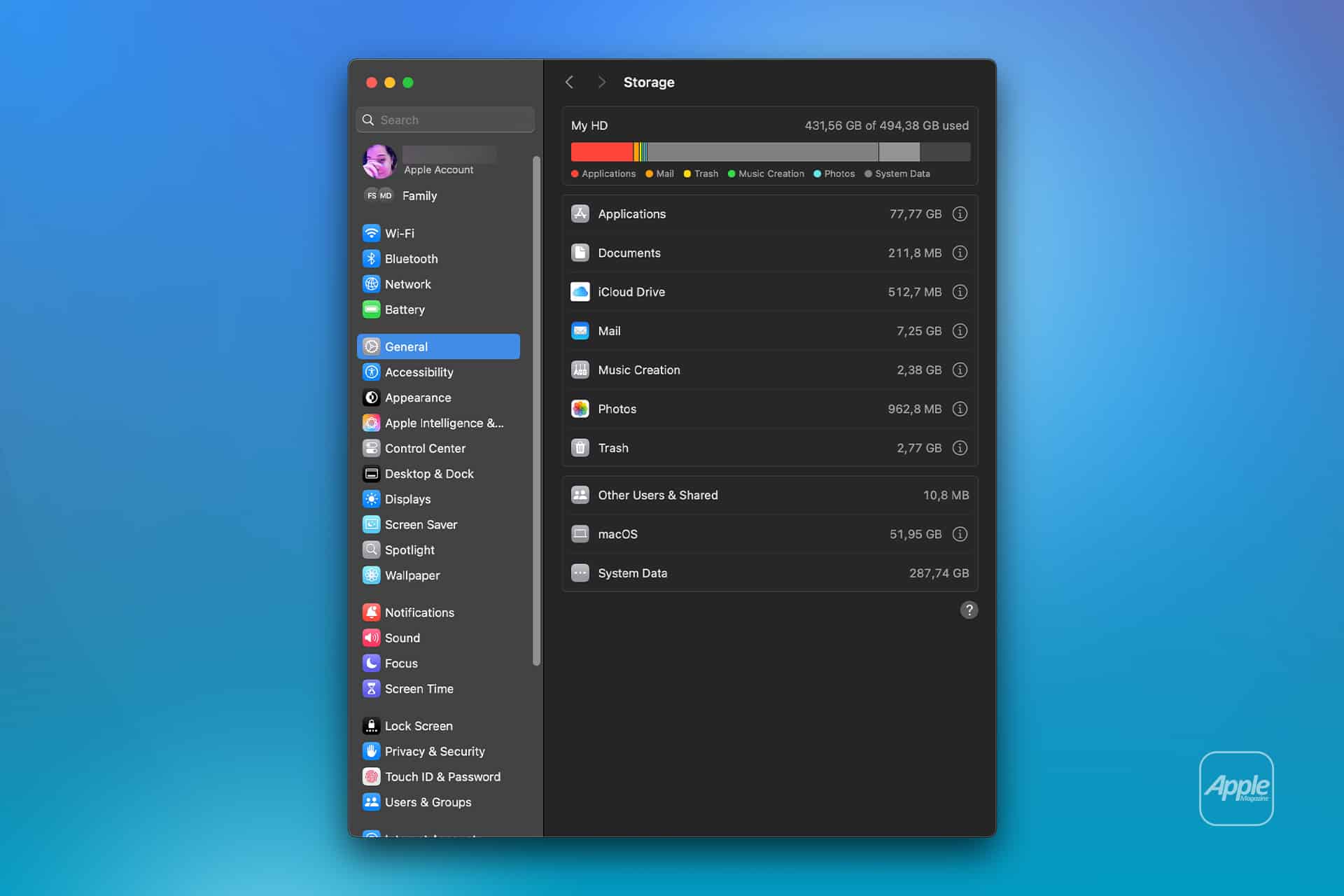
To see the current storage allocation:
Apple menu > System Settings > General > Storage
Allow the Storage page to finish calculating its categories. The process may take a moment when the Mac contains many applications, local files, connected volumes, or several user accounts.
Apple Intelligence may appear as a separate item within the macOS storage category. Depending on the installed macOS version, some related assets may instead be counted under macOS or System Data.
Note the amount of available storage displayed near the storage graph. Comparing the total free space before and after the procedure is usually more reliable than watching one category because macOS can reclassify system-managed files while deleting them.
To inspect the complete internal storage container:
Apple menu > System Settings > General > Storage > All Volumes
This view is useful when the internal drive contains several APFS volumes sharing the same physical storage. The available capacity belongs to the shared container rather than remaining permanently assigned to one volume.
The storage used by Apple Intelligence is different from the memory, or RAM, used while features are running. Closing applications may reduce RAM consumption, but it does not delete the models stored on the internal SSD.
Image Credit: AppleMagazine
Remove Local Apple Intelligence Files
Apple Intelligence is available on compatible Macs with Apple silicon. Intel-based Macs do not support the complete Apple Intelligence system and should not contain the same downloadable model collection.
To turn off Apple Intelligence and request the removal of its on-device models:
Apple menu > System Settings > Apple Intelligence & Siri > Turn off Apple Intelligence > Turn Off Apple Intelligence
The second Turn Off Apple Intelligence command confirms the change. The exact appearance may vary between macOS versions, with the first control presented as either a switch or a button.
Apple says that turning off Apple Intelligence removes the on-device models. There is no separate model manager, Delete Models button, or supported Finder location from which users must remove the files manually.
Keep the Mac connected to power while macOS completes its background storage work. The Apple Intelligence setting changes immediately, but the Storage page may not display the recovered capacity at once.
macOS manages these models through its system asset service. The operating system must identify the associated packages, release them, and recalculate the storage categories. The process can therefore continue after the Apple Intelligence switch has already moved to the off position.
Turning off only individual features does not remove the complete model collection. Disabling notification summaries, Writing Tools, ChatGPT access, or Siri suggestions leaves Apple Intelligence itself active.
A Screen Time restriction also serves a different purpose. It can prevent access to image generation, Writing Tools, and other functions without turning off the underlying intelligence system. Use the Apple Intelligence control inside Apple Intelligence & Siri when the objective is recovering storage.
Confirm That the Space Was Recovered
After macOS has had time to process the removal, return to the Storage page.
To check the available capacity again:
Apple menu > System Settings > General > Storage
Wait for the storage graph and categories to finish updating. Compare the new amount of available space with the figure recorded before Apple Intelligence was turned off.
The Apple Intelligence entry may disappear completely, display a smaller amount, or become part of an adjusted macOS or System Data category. The increase in total available storage provides the better indication that the local models were removed.
If the figures have not changed, restart the Mac to refresh its system services and storage calculation.
To restart macOS:
Apple menu > Restart > Restart
Sign back in, allow the Mac to remain idle for a while, and open the Storage page again.
Apple menu > System Settings > General > Storage
Restarting does not delete the models by itself. Apple Intelligence must remain disabled while macOS completes the removal.
Emptying the Trash is not part of this procedure because macOS does not place Apple Intelligence models there. The Trash affects only files that a user or application has already marked for deletion.
Image Credit: Apple Inc.
What to Do When the Files Remain
First, verify that the complete Apple Intelligence system is off rather than one related feature.
To confirm its status:
Apple menu > System Settings > Apple Intelligence & Siri > Apple Intelligence
The control should display Apple Intelligence as disabled. If macOS presents another confirmation request, complete it and leave the feature off.
Storage information can take time to settle because macOS also manages caches, local snapshots, temporary update packages, and purgeable files. These categories can change while the Mac is idle, making an immediate before-and-after comparison misleading.
Installing the latest stable macOS update can correct storage reporting or asset-management problems.
To check for an available update:
Apple menu > System Settings > General > Software Update
Save current work before installing an update. The Mac may need to restart, and the installation temporarily requires additional free storage.
Beta versions of macOS require extra caution. Development releases may download experimental models, retain previous model revisions, or temporarily change the Apple Intelligence controls. A procedure confirmed for the public version of macOS may not produce the same storage behavior in a beta.
Avoid following online instructions that require starting in macOS Recovery, disabling System Integrity Protection, mounting protected volumes, and deleting folders with names referring to MobileAsset or generative models.
System Integrity Protection prevents applications and administrator accounts from modifying protected parts of macOS. Disabling it weakens that protection and creates the possibility of deleting the wrong asset, leaving macOS with an incomplete model installation, or causing the system database to disagree with the files present on the drive.
A storage utility can help identify how much space system files occupy, but it should not require disabling macOS security to remove Apple Intelligence. If the documented switch leaves a large allocation after a restart and sufficient processing time, Apple Support can investigate the asset database without exposing the Mac to an unsupported system modification.
Turning Apple Intelligence on again reverses the storage saving.
To restore its features:
Apple menu > System Settings > Apple Intelligence & Siri > Turn On Apple Intelligence
The Mac will download the required local models again. Apple recommends leaving the device connected to Wi-Fi and power while the model download completes.
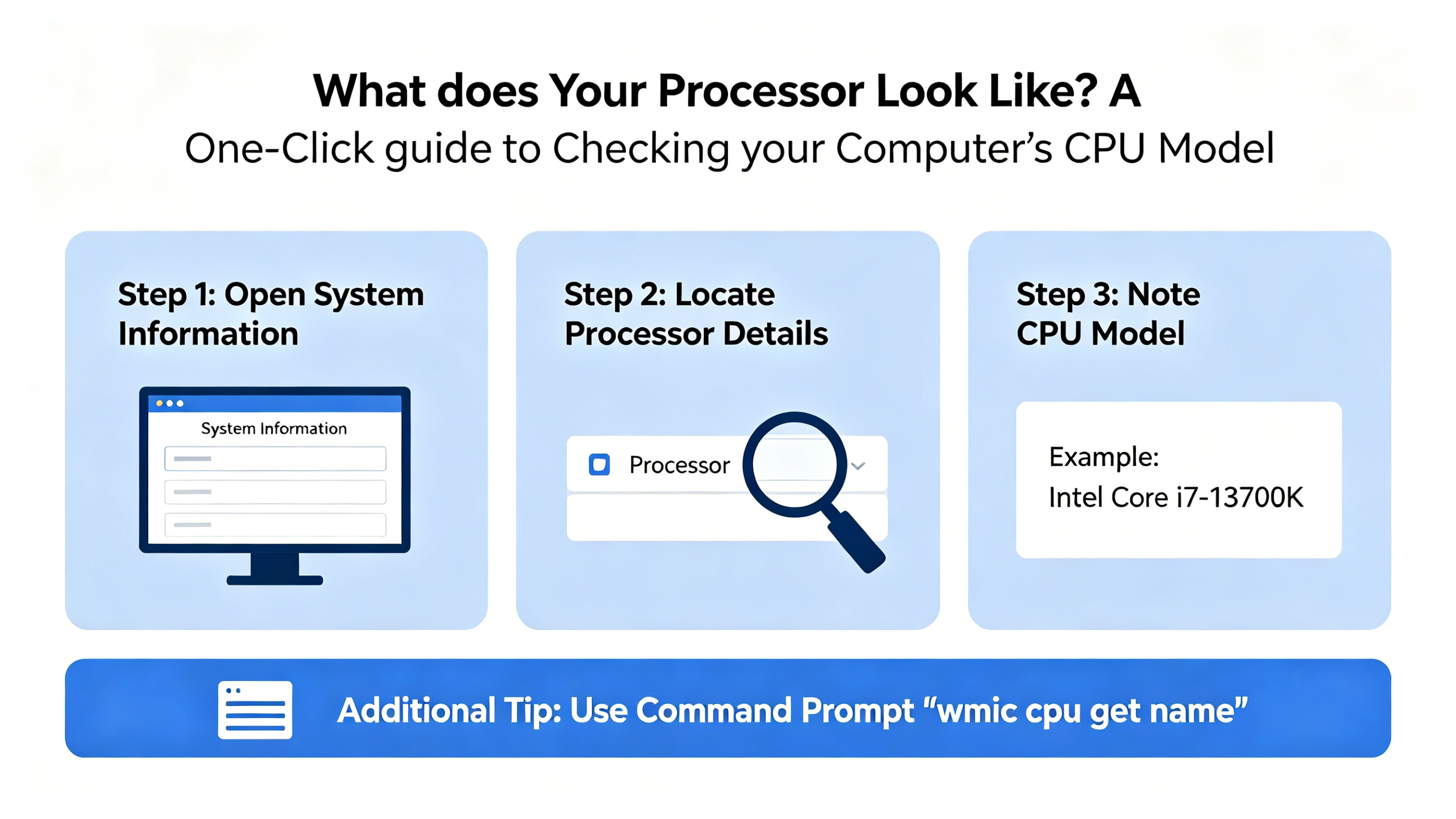
Your computer’s processor, or CPU, is the brain of your machine. Knowing your CPU model can help you understand your computer’s performance capabilities, troubleshoot issues, or decide whether it’s time for an upgrade. The good news? Finding out which CPU you have is quick and easy. Here’s a simple one-click guide to checking your computer’s processor.
Why Knowing Your CPU Matters
Your CPU affects everything from running applications to gaming performance. Different CPUs have different speeds, core counts, and architectures. By knowing your processor model, you can:
Check if your computer meets software requirements
Optimize system performance
Compare it with newer CPUs for potential upgrades
Understand your computer’s multitasking and gaming capabilities
Method 1: Using System Information (Windows)
Press Windows + R to open the Run dialog.
Type msinfo32 and press Enter.
In the System Information window, look for Processor. You’ll see the exact CPU model and speed listed.
This method works on all versions of Windows and provides detailed system specs in addition to your CPU.
Method 2: Using Task Manager (Windows 10/11)
Right-click on the Taskbar and select Task Manager.
Go to the Performance tab.
Click CPU on the left. You’ll see your CPU’s name, cores, threads, and current speed.
This method is quick, visual, and useful if you want to monitor CPU usage in real time.
Method 3: On Mac Computers
Click the Apple menu in the top-left corner.
Select About This Mac.
In the Overview tab, you’ll see your Mac’s processor listed, along with memory and macOS version.
Method 4: Using Terminal (Advanced Users)
Windows: Open Command Prompt and type wmic cpu get name
Mac: Open Terminal and type sysctl -n machdep.cpu.brand_string
Linux: Open Terminal and type lscpu
These commands display your CPU model quickly and are useful for scripting or remote troubleshooting.
Conclusion
Checking your CPU model doesn’t have to be complicated. Whether you prefer a graphical interface or command-line approach, these one-click or one-command methods give you all the information you need. Knowing your processor is the first step to optimizing performance, installing compatible software, and planning future upgrades.
Since WIRED reported on Meta’s NameTag face recognition system, company executives have made confusing and conflicting remarks about its very existence.
HOPE not hate CEO Nick Lowles has written an article smearing Rupert Lowe's Rape Gang Inquiry Report as a "racist polemic". C.J. Strachan fact-checks Lowles's article and finds victims being ignored yet again.
The generative features in iOS 27’s new Photos app will add fake pixels to some of your shots, but Apple’s Jon McCormack says the company isn’t using AI “for the sake of AI.”

 Login
Login









.jpg)
