❌

Reading view

Podcast Rewind: Open Minis, the RG SP Announcement, Too Much Wi-Fi, and the MessagePad with D. Griffin Jones
Enjoy the latest episodes from MacStories’ family of podcasts:

AppStories

This week, John and Federico discuss the changing face of the AI-fueled App Store and questionable changes made to TestFlight before going into the nerdiest details of Open Minis, an iOS app that brings desktop-class agents onto the iPhone and iPad.

Then on AppStories+, Federico and John explore Cmux, a Mac terminal app with an iPhone and iPad beta that makes it easier than ever to sync coding projects across devices.

NPC: Next Portable Console

This week, the refreshingly complete announcement by Anbernic of the RG SP, Ticci buys a handheld, and people are tired of months-long hardware reveals.

Then on NPC XL, Cocoon 3.0 and Syncthing!

Comfort Zone

We have a guest! D. Griffin Jones is here to show the gang technology they could only dream of: the MessagePad. After that, we look at the brand new Pastebot 3 and the surprisingly useful Clop, and we close it out by trying to sell Niléane on a 3D printer.

This week’s Cozy Zone is all about the games we’ve been enjoying lately.

MacStories Unwind

This week, John realizes that too much Wi-Fi is never enough, Federico wonders what he’s going to do with a Linux PC, and John recommends Apple TV’s Lucky.


AppStories, Episode 495, ‘Open Minis Turns iOS into an Agent Playground’ Show Notes

This episode is sponsored by:

  • Inoreader – Build Your Own Newsfeed and Cut Through the Noise
  • Claude – For problems worth solving — get started with Claude today.
  • Scribe – AI-powered workflow documentation. Get your first month free.

App Store Chaos

TestFlight Woes

Open Minis

AppStories+ Post-Show

Subscribe to AppStories+

Visit AppStories.net to learn more about the extended, high bitrate audio version of AppStories that is delivered early each week and subscribe.


NPC, Episode 90, ‘The Stickless Clamshell Everyone Wanted’ Show Notes

The Latest Portable Gaming News

Subscribe to NPC XL

NPC XL is a weekly members-only version of NPC with extra content, available exclusively through our new Patreon for $5/month. Each week on NPC XL, Federico, Brendon, and John record a special segment or deep dive about a particular topic that is released alongside the “regular” NPC episodes. You can subscribe here.


Comfort Zone, Episode 111, ‘I’m the Guest, I Have No Consequences’ Show Notes

Things Discussed

Cozy Zone

For even more from the Comfort Zone crew, you can subscribe to Cozy Zone. Cozy Zone is a weekly bonus episode of Comfort Zone where Matt, Niléane, and Chris invite listeners to join them in the Cozy Zone where they’ll cover extra topics, invent wilder challenges and games, and share all their great (and not so great) takes on tech. You can subscribe to Cozy Zone for $5 per month here or $50 per year here.


MacStories Unwind, ‘Flooding the Wi-Fi Zone’ Show Notes

Networking Projects

Picks

  • John’s Pick: Lucky on Apple TV

Unwind Deal

MacStories Unwind+

We deliver MacStories Unwind+ to Club MacStories subscribers ad-free with high bitrate audio every week. To learn more about the benefits of a Club MacStories subscription, visit our Plans page.


MacStories launched its first podcast in 2017 with AppStories. Since then, the lineup has expanded to include a family of weekly shows that also includes MacStories Unwind, Magic Rays of Light, Comfort Zone, NPC: Next Portable Console, and First, Last, Everything that collectively, cover a broad range of the modern media world from Apple’s streaming service and videogame hardware to apps for a growing audience that appreciates our thoughtful, in-depth approach to media.

If you’re interested in advertising on our shows, you can learn more here or by contacting our Managing Editor, John Voorhees.


  •  

Shazam Releases Exclusive Ariana Grande Messages Sticker Pack

Long-time readers may recall that I used to regularly cover Messages sticker packs. As sticker popularity “settled,” I retired from that beat, but I thought I should come back for today’s news that Ariana Grande is the first ever music artist to release an Messages sticker pack.

The stickers are being released in collaboration with Shazam, Apple’s music recognition app, to mark the release of Grande’s new album petal. The implementation is interesting. According to Apple:

Fans can access the sticker pack by using the Shazam app to identify any Ariana Grande song and tapping the special message that appears on the song result or by adding the collection to their emoji keyboard directly in the Messages app. Once downloaded, the stickers can be used in Messages, FaceTime, or any app where emoji keyboard is available.

That in-app link takes you to the Messages corner of the App Store where they’re featured as a Shazam Special Event. You can also access the sticker pack from Shazam’s App Store listing.

I love seeing Shazam try new things to celebrate artists and their music, and stickers are a fun way to share your excitement about a new release.

Fun Fact: My Messages sticker situation has never quite recovered from downloading hundreds of sticker packs back in the day. Some features just aren’t meant to be loved so much.

Also, I am so back.

  •  

Apple Reports Q3 2026 Earnings

Source: Apple.

Source: Apple.

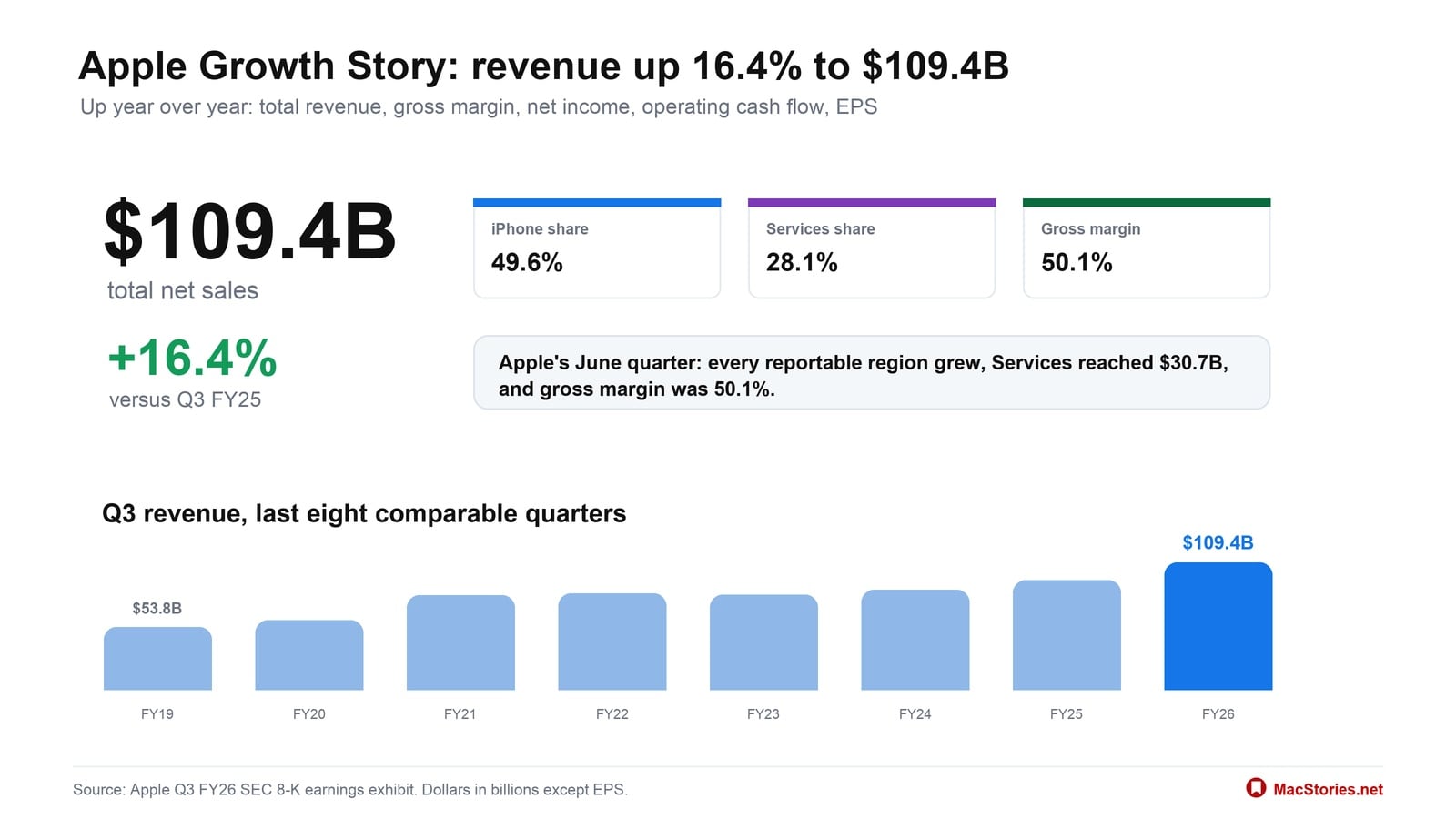
Today, Apple reported its 2026 Q3 earnings, posting quarterly revenue of $109.4 billion. Here are the highlights:

  • Revenue was $109.4B, up 16.4% from Q3 FY25.
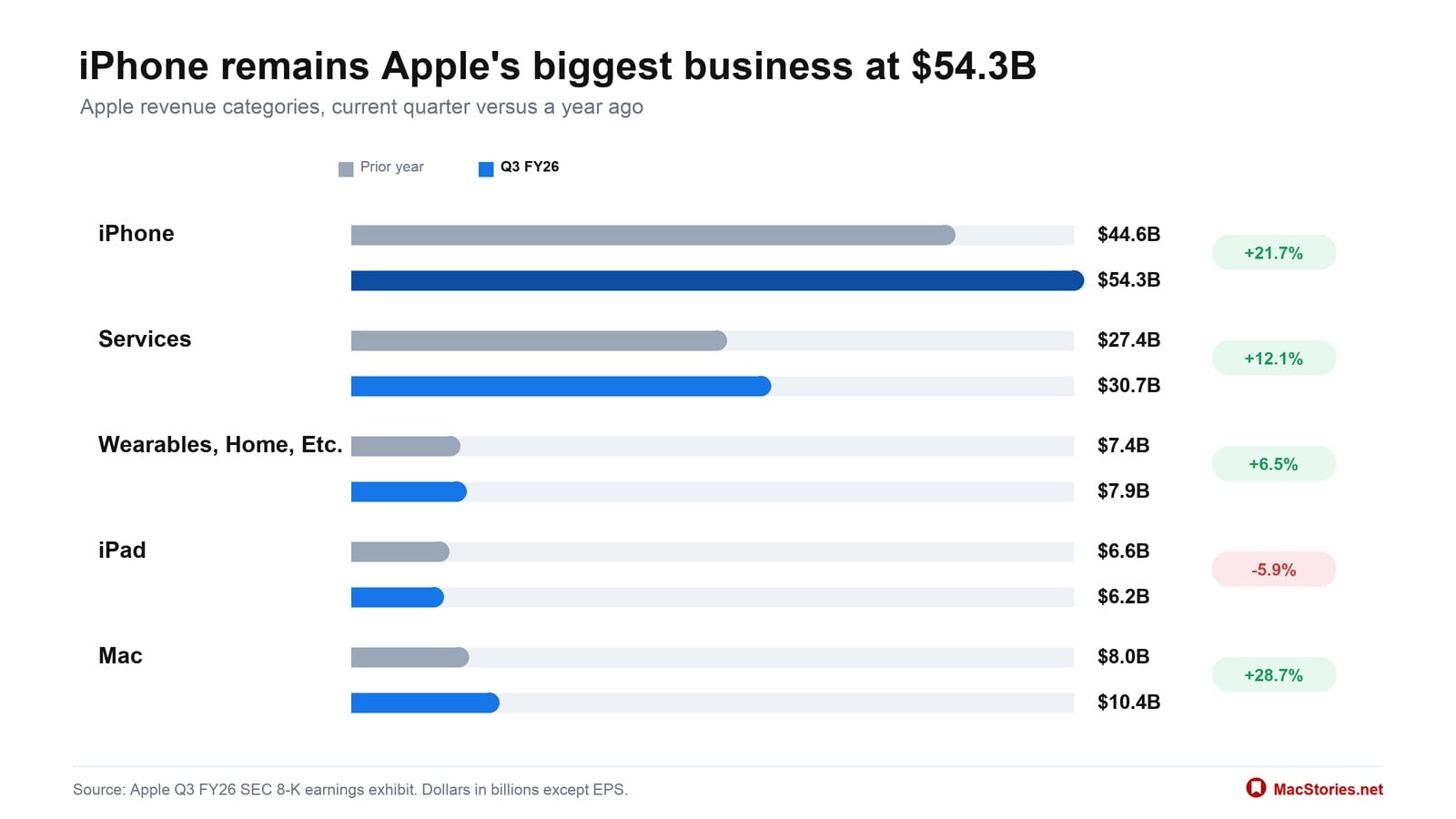
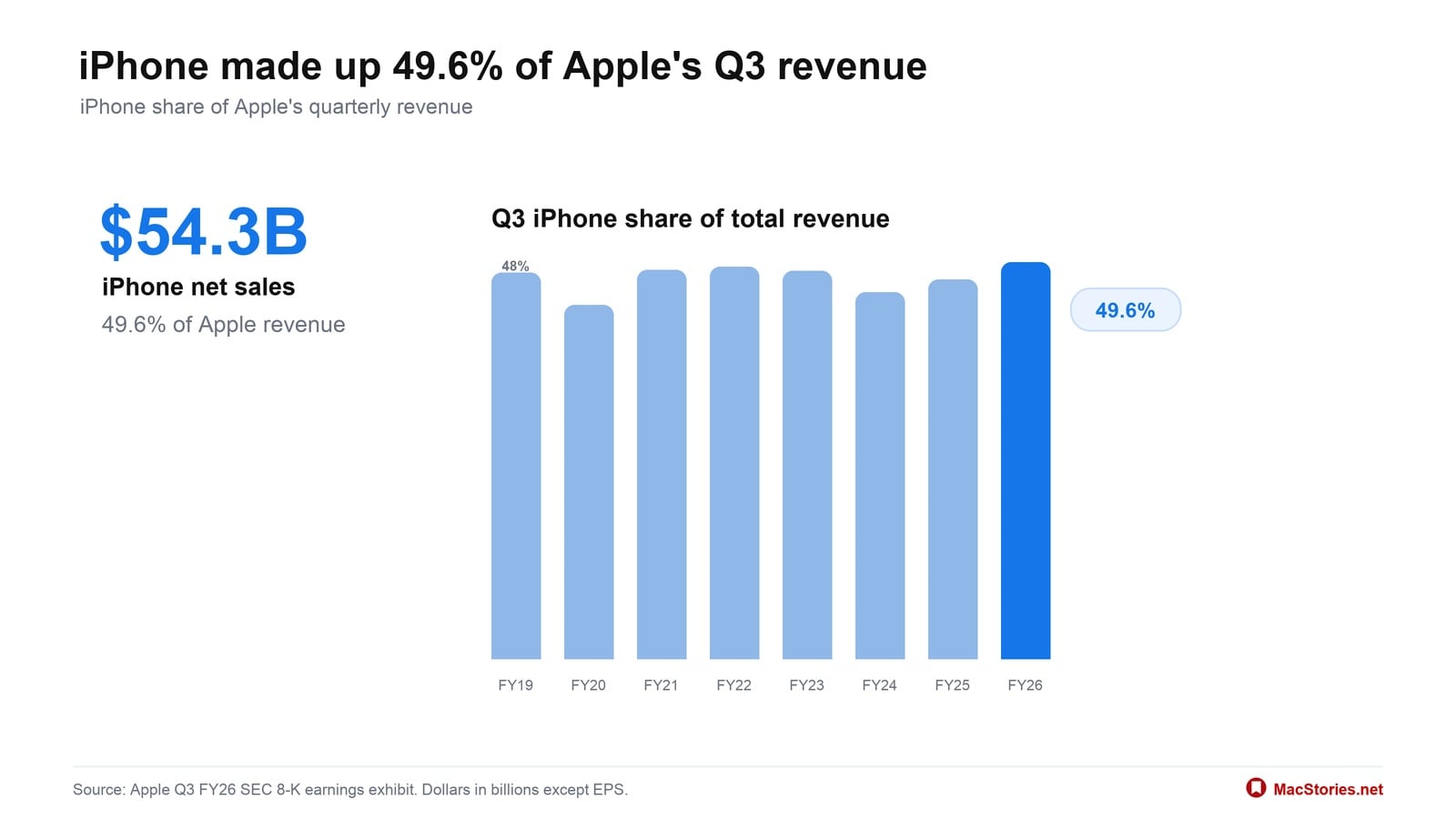
  • iPhone revenue was $54.3B, up 21.7%, and represented 49.6% of Apple’s total revenue.
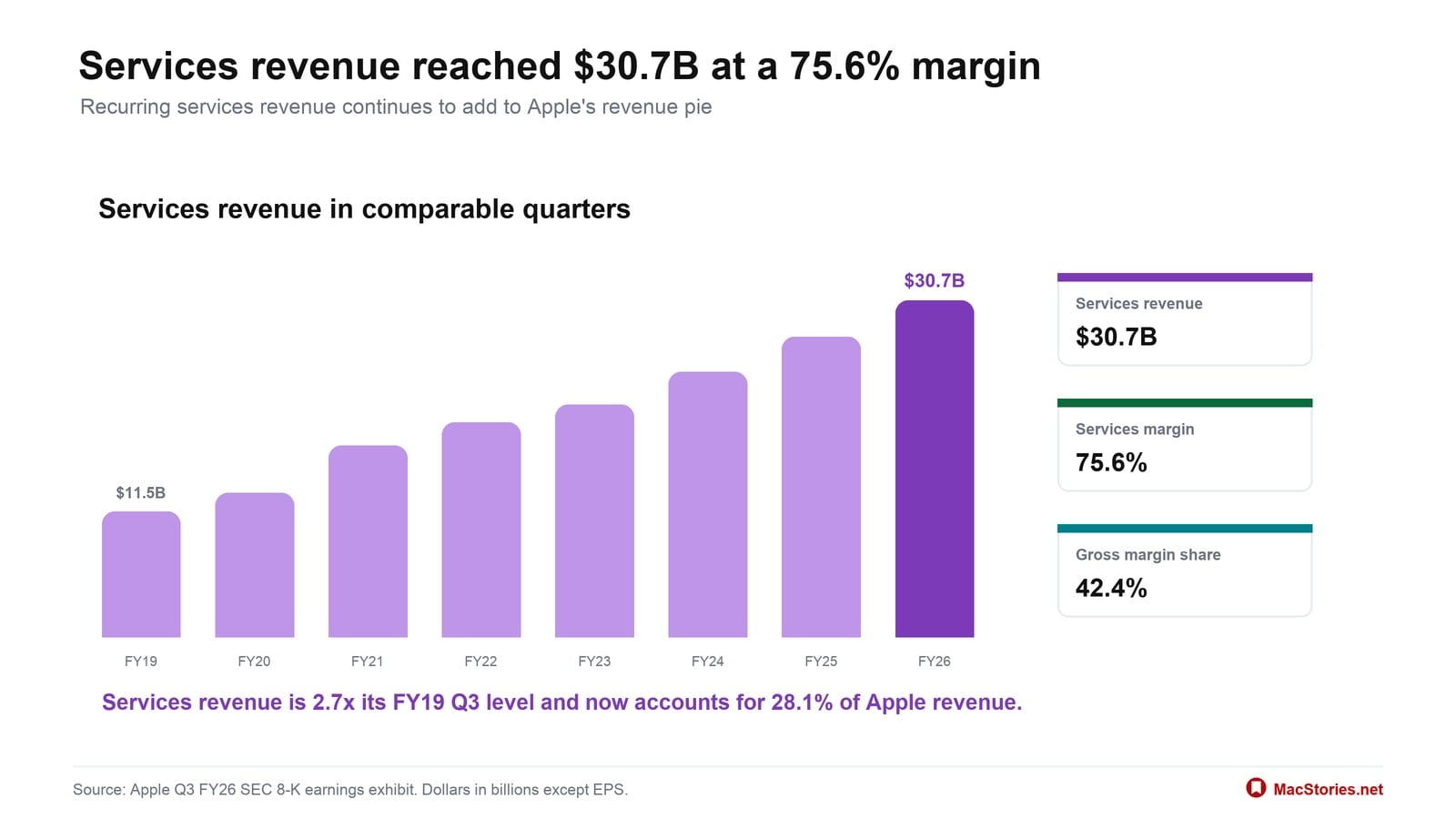
  • Services revenue was $30.7B, up 12.1%, and represented 28.1% of Apple’s total revenue.
  • Gross margin was $54.8B, up 25.3%, with an overall gross margin rate of 50.1%.
  • Net income was $29.8B, up 27.1%.
  • Operating cash flow was $34.4B, up 23.3%.
  • Diluted EPS was $2.02, up 28.7%.

Apple CEO Tim Cook had this to say about the results:

Today, Apple is proud to report our strongest June quarter ever, with double-digit revenue growth across iPhone, Mac and Services, and in every geographic segment. At WWDC26, we were thrilled to introduce the all-new Siri AI, alongside all of Apple’s latest software innovations and important new child safety features.

For additional context, here’s how the results break down:

In Apple’s latest quarter: every region grew, Services reached $30.7B, and gross margin was 50.1%.

iPhone remained Apple’s largest business at $54.3B, and four of five categories grew year over year. Together, iPhone and Services accounted for 77.7% of Apple’s $109.4B in net sales.

iPhone revenue reached $54.3B, or 49.6% of Apple’s total revenue, keeping it the company’s largest consumer business.

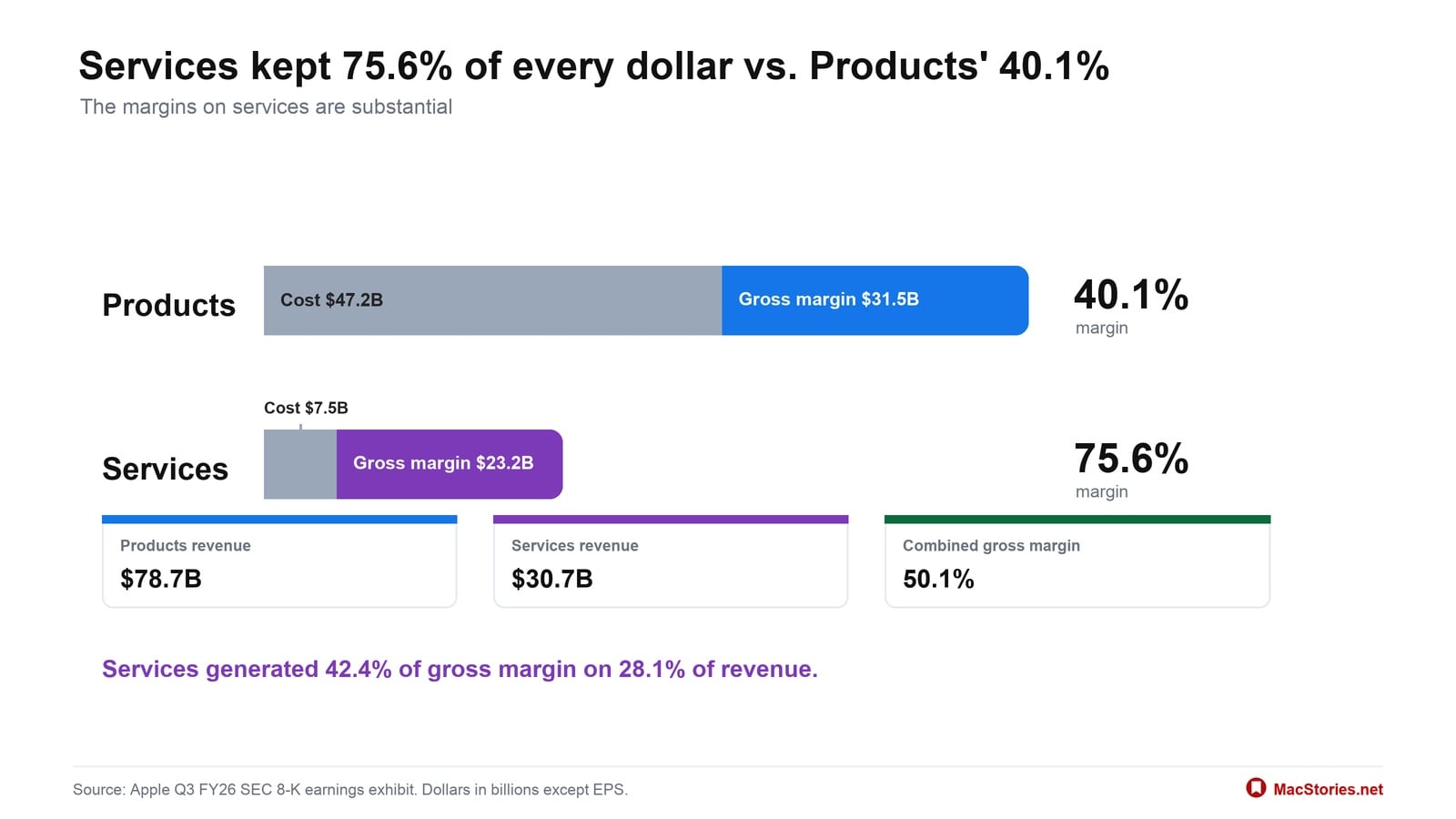
Services reached $30.7B at a 75.6% gross margin, accounting for 28.1% of revenue but 42.4% of gross margin.

Products carried most of the revenue at $78.7B, but Services kept 75.6% of every dollar against Products’ 40.1%.

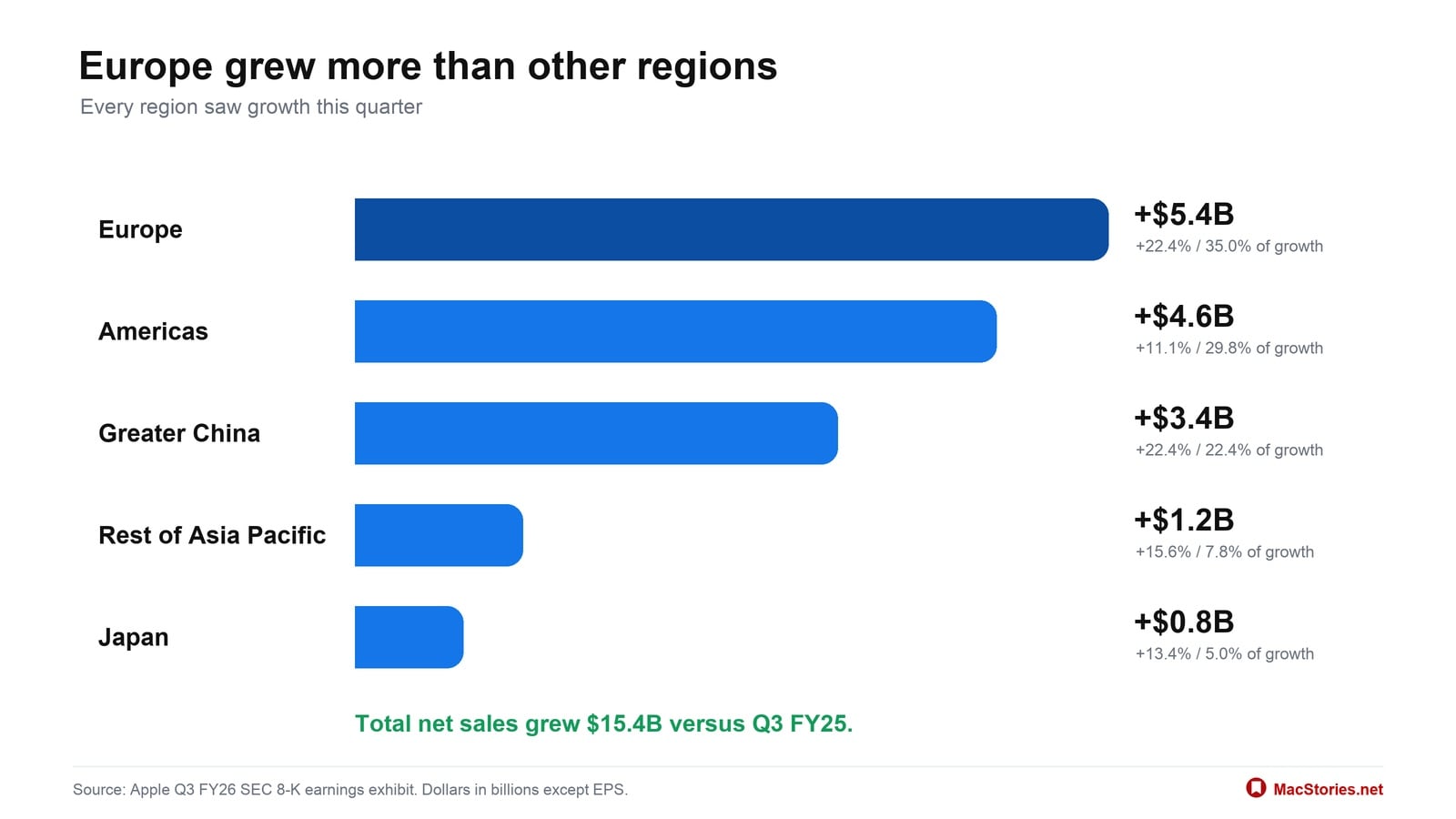
Every reported region grew, and Europe contributed the most new revenue at $5.4B, or 35.0% of Apple’s $15.4B in growth.

Going into today’s earnings call, expectations were high among analysts, who anticipated revenue of $108–109 billion and diluted earnings per share of $1.89. Apple’s results landed at the high end of the expected revenue range and exceeded expectations for earnings per share.

  •  

Indie App Sales Event Begins Today with Over 200 Apps

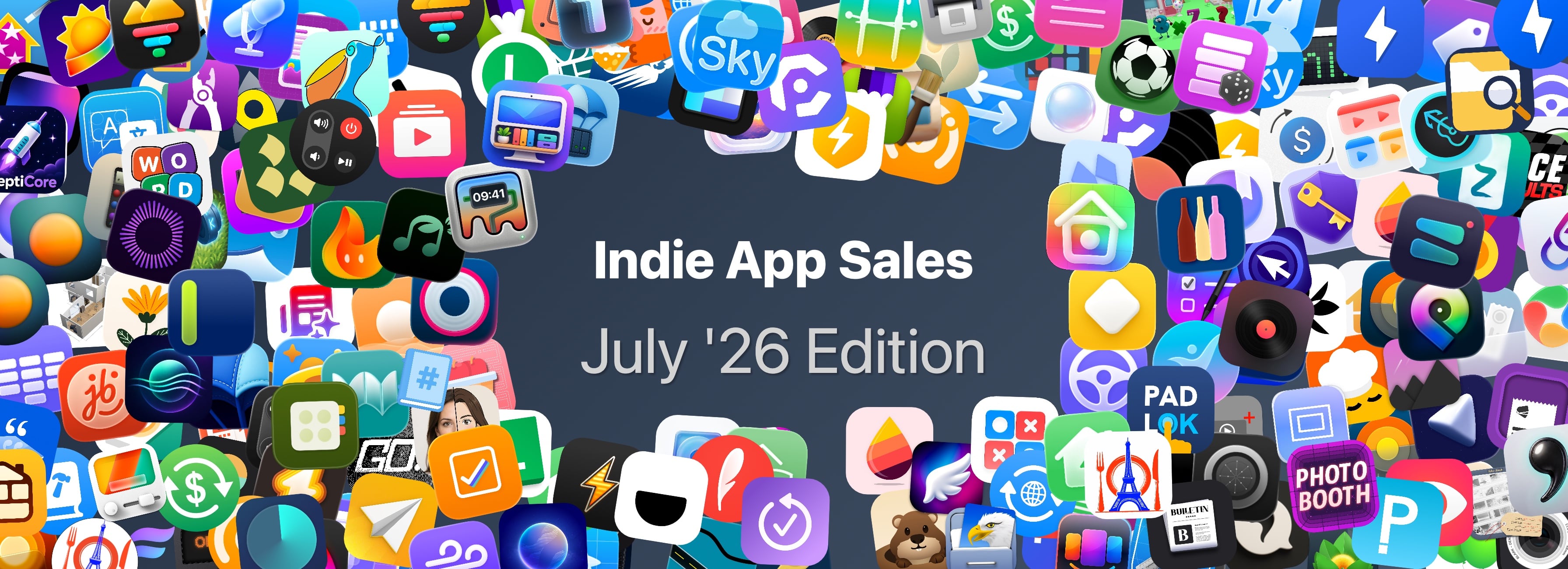
Matt Corey, the maker of Bills to Budget and Signals, has organized indie developers for a big sale that runs from July 28 - 30. The sale includes over 200 apps that will be offered at a discount through Thursday. The list is too long to publish here, but it includes many apps we’ve covered here on MacStories and on Club MacStories in the past, including:

There are a lot of great deals, with many apps discounted 50% or more. What’s listed above is a small fraction of the participating apps, so be sure to visit Indie App Salesand support these great indie apps.

  •  

Apple Upgrade Trades Ownership for Lower Monthly Payments

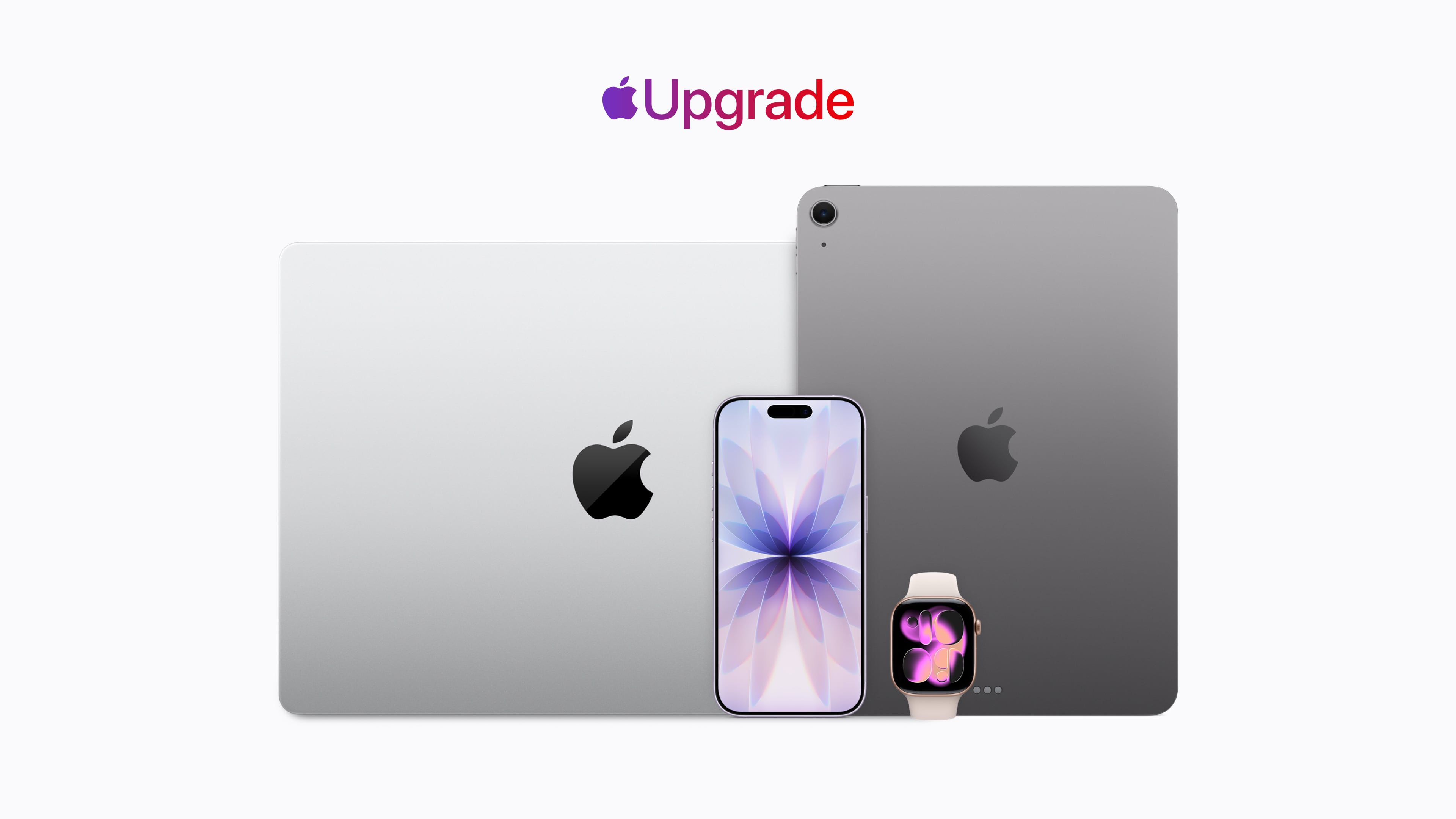
Apple has revealed its new hardware leasing program called Apple Upgrade, which is being offered in collaboration with Klarna. This is Apple’s pitch:

Introducing Apple Upgrade, a new way to always have the Apple products you love. Lease a new iPhone, iPad, Mac, or Apple Watch with pocket-friendly payments and terms that work for you. Then easily upgrade to something new at the end of your lease, and return your current device. It’s that simple.

That pitch comes with a footnote that includes other details worth considering:

  • The program is U.S. only (excluding U.S. territories).
  • You need to be a U.S. resident who is at least 18 years old, or whatever the legal age is where you live.
  • There are eligibility and credit approval requirements and you must have a credit or debit card and an Apple ID.
  • When a device is returned, it must be in good condition or damage fees will be assessed.
  • Upgrades require a new lease subject to whatever eligibility and credit requirements apply at that time.
  • For iPhones, you have to have a carrier and can’t use a prepaid plan.
  • The program isn’t available for refurbished devices or through the Apple Employee Purchase Plan, corporate Employee Purchase Plans, Apple at Work, Government, Education, or Veterans and Military Purchase Programs.

Okay, so maybe it’s not “that simple” after all.

The program is available for the iPhone, iPad, Mac, and Apple Watch product lines. For the iPhone, monthly payments start at $17.99 for an iPhone 17e and start at $34.99 for an iPhone 17 Pro Max, for leasing periods of either 12 months or 24 months.

For iPads, the starting prices range from $12.99/month to $24.99/month, Macs range from starting prices of $24.99/month to $48.99/month, and the Apple Watch ranges from starting prices of $11.99/month to $47.03/month. But again, these are just starting prices. You can configure a fully loaded 16-inch MacBook Pro that is just under $230/month, and it won’t include AppleCare.

As a point of comparison, under the current program that is being discontinued, I pay $69.50/month for an iPhone 17 Pro Max, but I have a 512GB model, so my lease price for the same phone would be $40.83/month, significantly lower, but keep in mind that doesn’t include AppleCare+, which would add $13.99/month or $139/year for that iPhone. On a monthly basis, that puts a new iPhone 17 Pro Max with 512GB of storage and AppleCare+ at just under $55/month. Still a superior deal, but not nearly as good as the landing page might initially lead you to believe.

At the end of your lease you’ll have six months to decide to return the leased device, during which you’ll continue to make monthly payments, or pay a fee equal to the difference between the original purchase price and your lease payments to buy it outright. Your other option is to enter into a lease for a new device. If you return your leased device in poor condition, Klarna will charge you a damage fee. You can also terminate your lease early if you pay the remaining lease payments in full plus any taxes and fees.

If you lease accessories for your device, those don’t have to be returned. Why? Presumably because they have no value to Apple or Klarna.

Of course, if you have a device to trade in, that monthly figure could be significantly reduced. If I had the iPhone 16 Pro Max I had last year to trade in and leased a 17 Pro Max for 12 months, my monthly payments would be under $1. However, keep in mind that once you’re on the leasing train, you no longer own your iPhone, so future upgrades won’t reduce your payments the next time you swap your device for a new model. If you don’t own it, the value isn’t yours to trade in.

If you’re on the existing iPhone Upgrade Program like me, it’s being discontinued, but Apple has a transition offer for you. The old program spread payments over 24 months with the option to turn in an iPhone for a new one after 12 months. That’s not changing. If you’re paid in full on your first 12 months of an iPhone, you can sign up for the new program, get a new iPhone, and return your old iPhone to Apple, which will close your old account but won’t reduce your lease payments. You’re not obligated to join the new leasing program, though. You can also trade in your old iPhone, ending your finance contract, and buy a new full price iPhone.


As you may have figured out by now, I’m not a fan of this program, though I expect it will be successful.

Apple products, like all consumer electronics, are getting more expensive every day. The monthly payments on a leased device look very attractive compared to the pay-up-front price. For years, car leases have induced people into monthly payments that can become a burden when their financial situation changes. Now the same will be true of iPhones, iPads, Macs, and Apple Watches.

Maybe as a practical matter this program isn’t that different from the old financing program, but at least there, you owned your device at the end and could just keep using it indefinitely. With the new program, that’s not an option. When your lease is over, you’re empty-handed and faced with leasing again, buying out the lease, or buying at full price with no trade-in, which is objectively worse.

Ultimately, Apple isn’t responsible for customers’ bad financial decisions, but this program feels like Apple is putting its customers in harm’s way.

  •  

Pastebot 3 Doubles Down on Mac Clipboard Automation and Introduces Two New Business Models

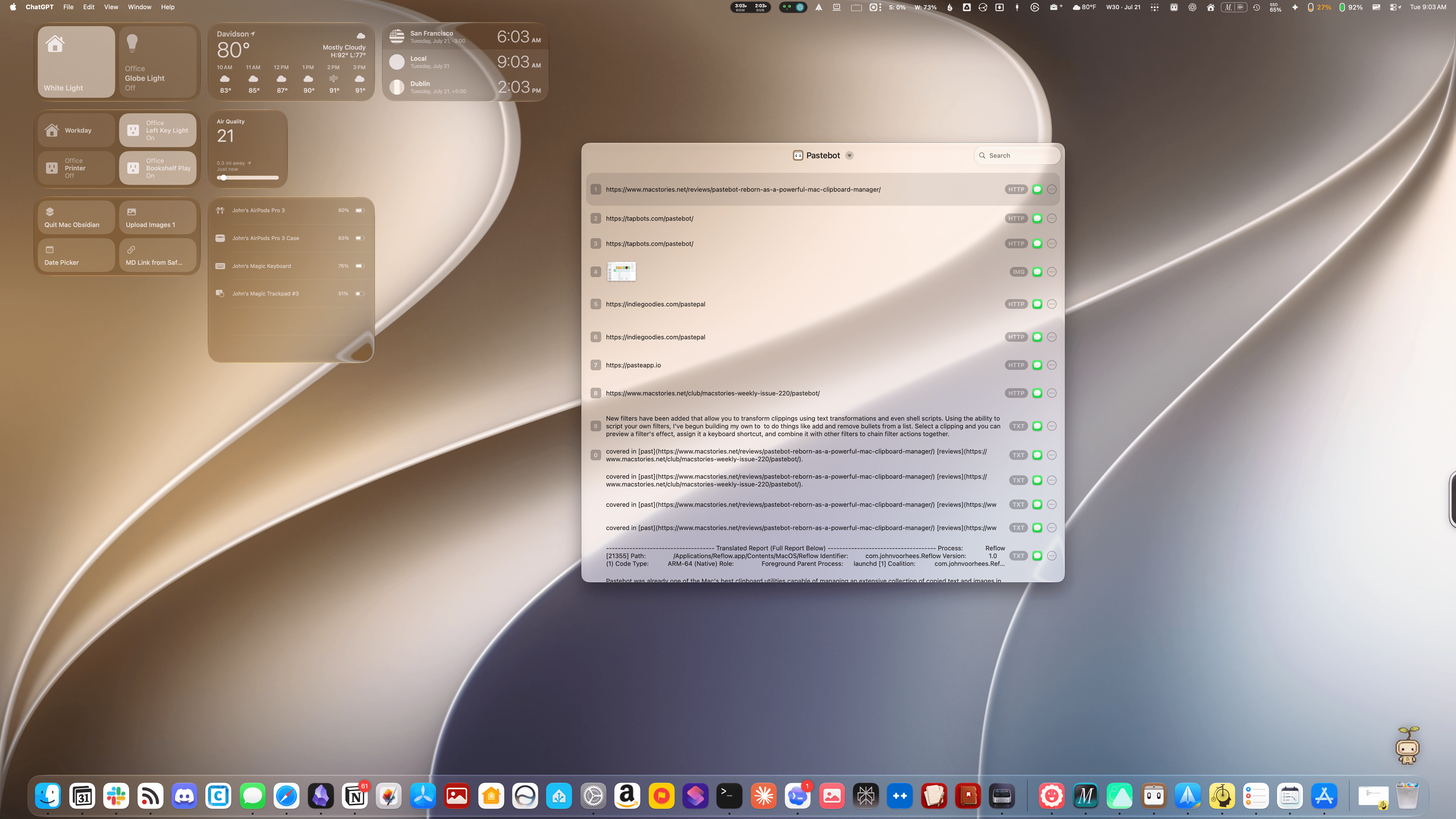
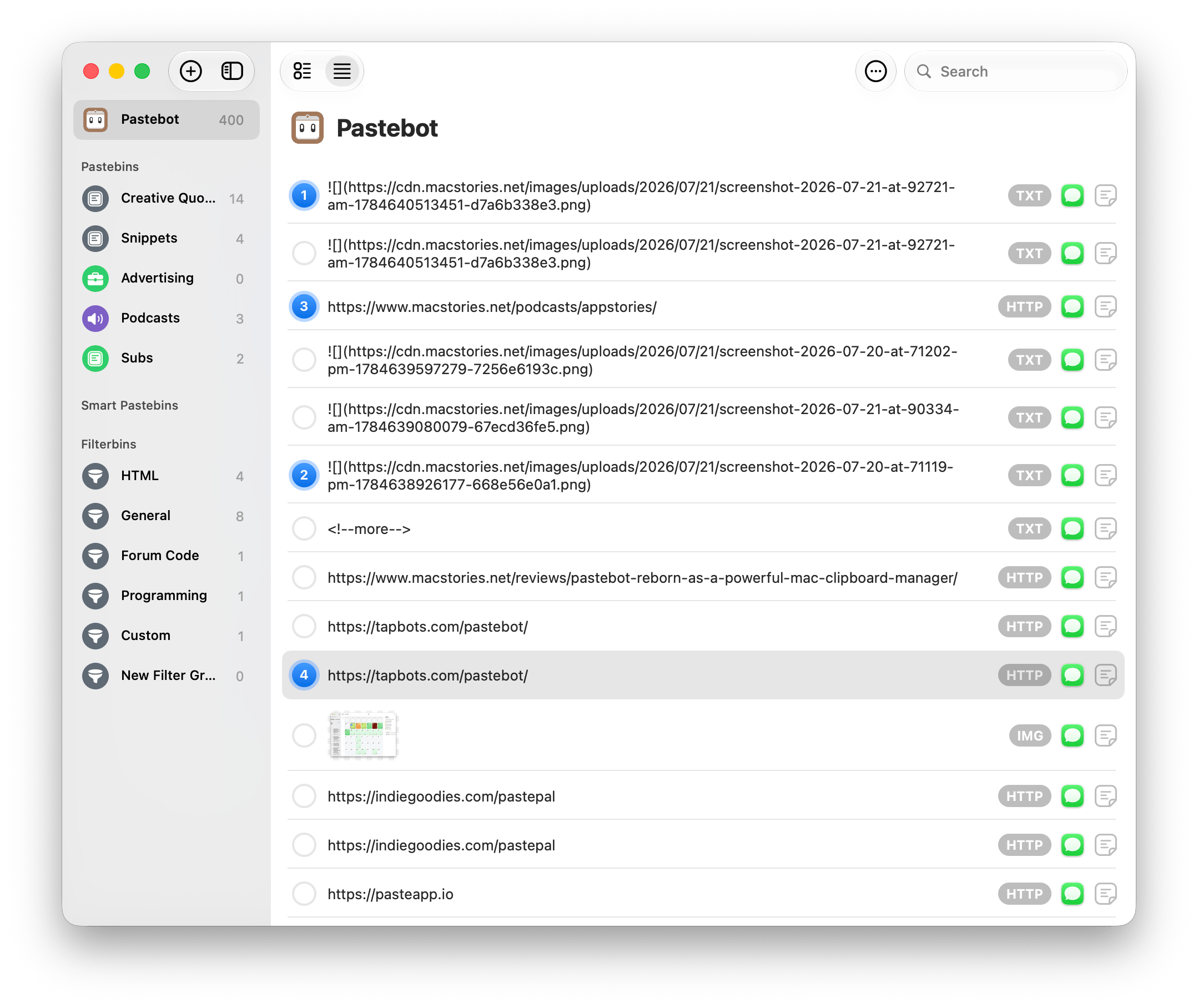
Pastebot's Quick Menu.

Pastebot’s Quick Menu.

Tapbots has released Pastebot 3, a ground-up rewrite of the Mac clipboard manager that includes several powerful automation and customization options, along with two new pricing models.

Pastebot was already one of the Mac’s best clipboard utilities, capable of managing an extensive collection of copied text and images in multiple formats, PDFs, URLs, files, and HTML, along with metadata. The app can handle up to 1,500 clippings and features fast search, extensive customizable keyboard shortcuts, list and detail views of clipboard items, and iCloud sync between multiple Macs.

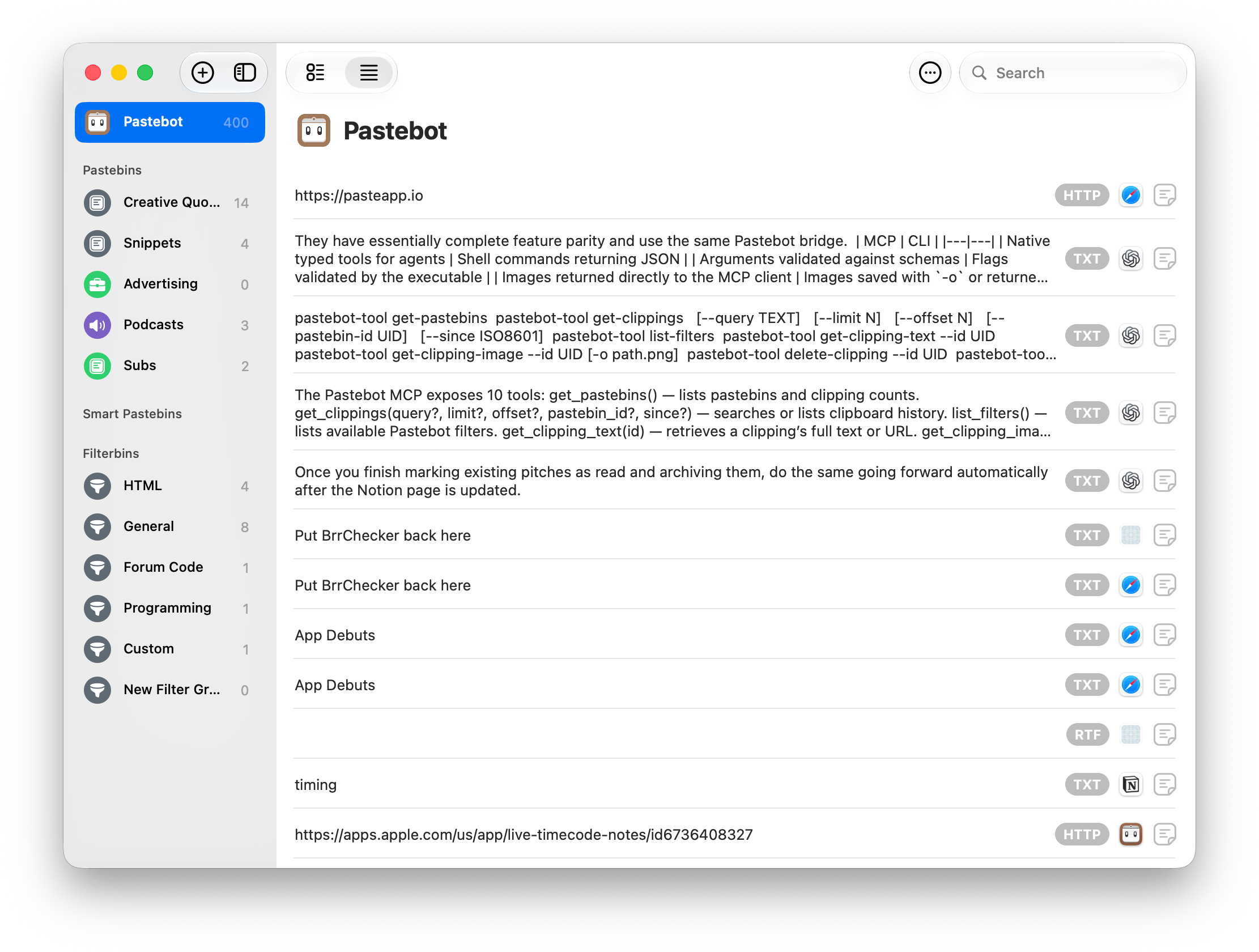
Pastebot 3's main menu.

Pastebot 3’s main menu.

What sets Pastebot 3 apart is its addition of deep automation tools. Not only does the update add MCP support, making it an excellent tool to use with Claude or ChatGPT/Codex, but it includes a brand new CLI that you or an agent can use from Terminal or incorporate into scripts you build. Commands include:

  • List available Pastebins
  • Browse and search clipboard history
  • Filter results by Pastebin or date
  • Retrieve the full text of a clipping
  • Retrieve images from clippings
  • List available Pastebot filters
  • Apply filters to clippings or supplied text
  • Place an existing clipping on the clipboard
  • Create new text or image clippings
  • Paste clipboard contents into the frontmost app
  • Delete individual clippings
  • Clear the main clipboard history
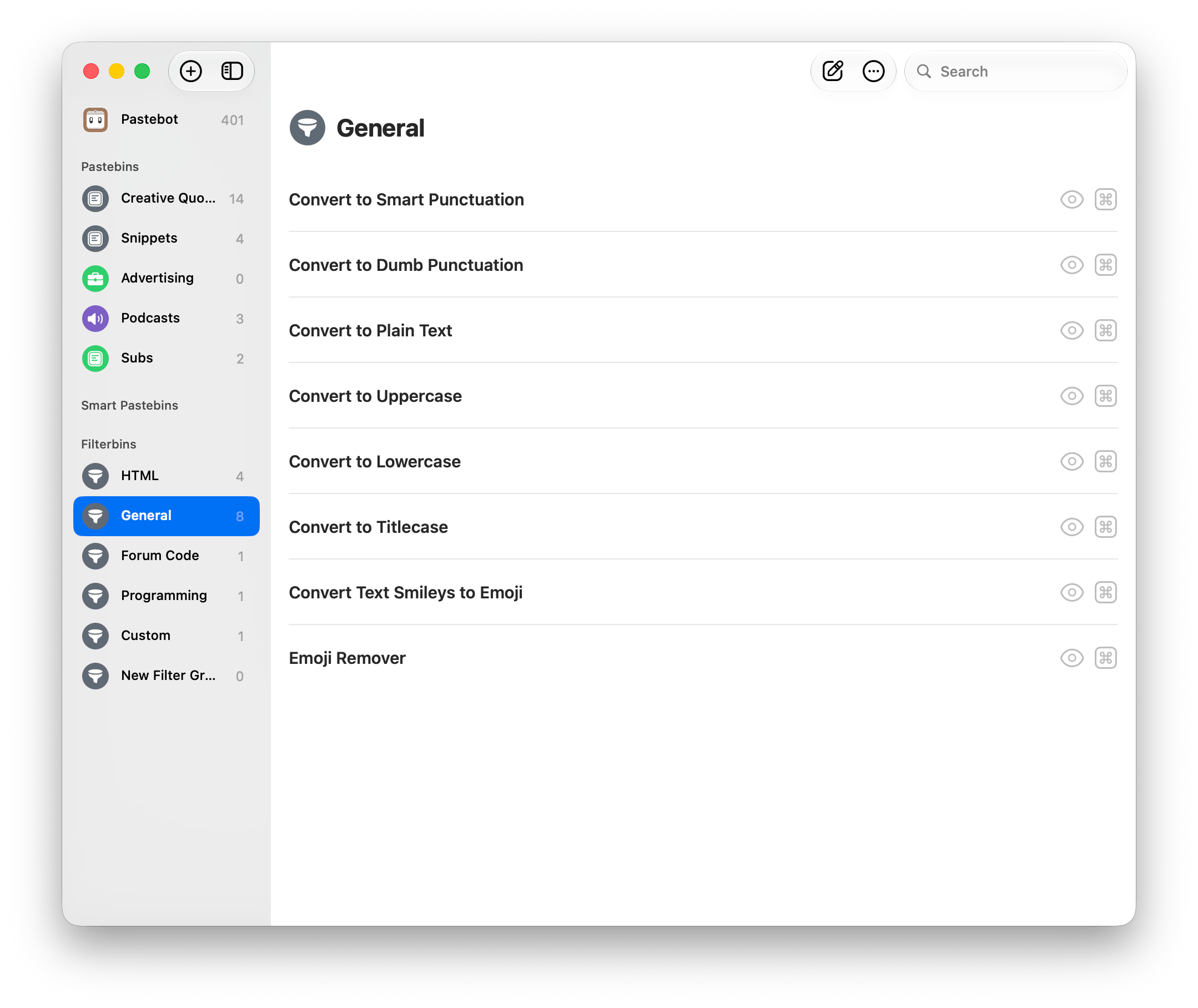
Filters.

Filters.

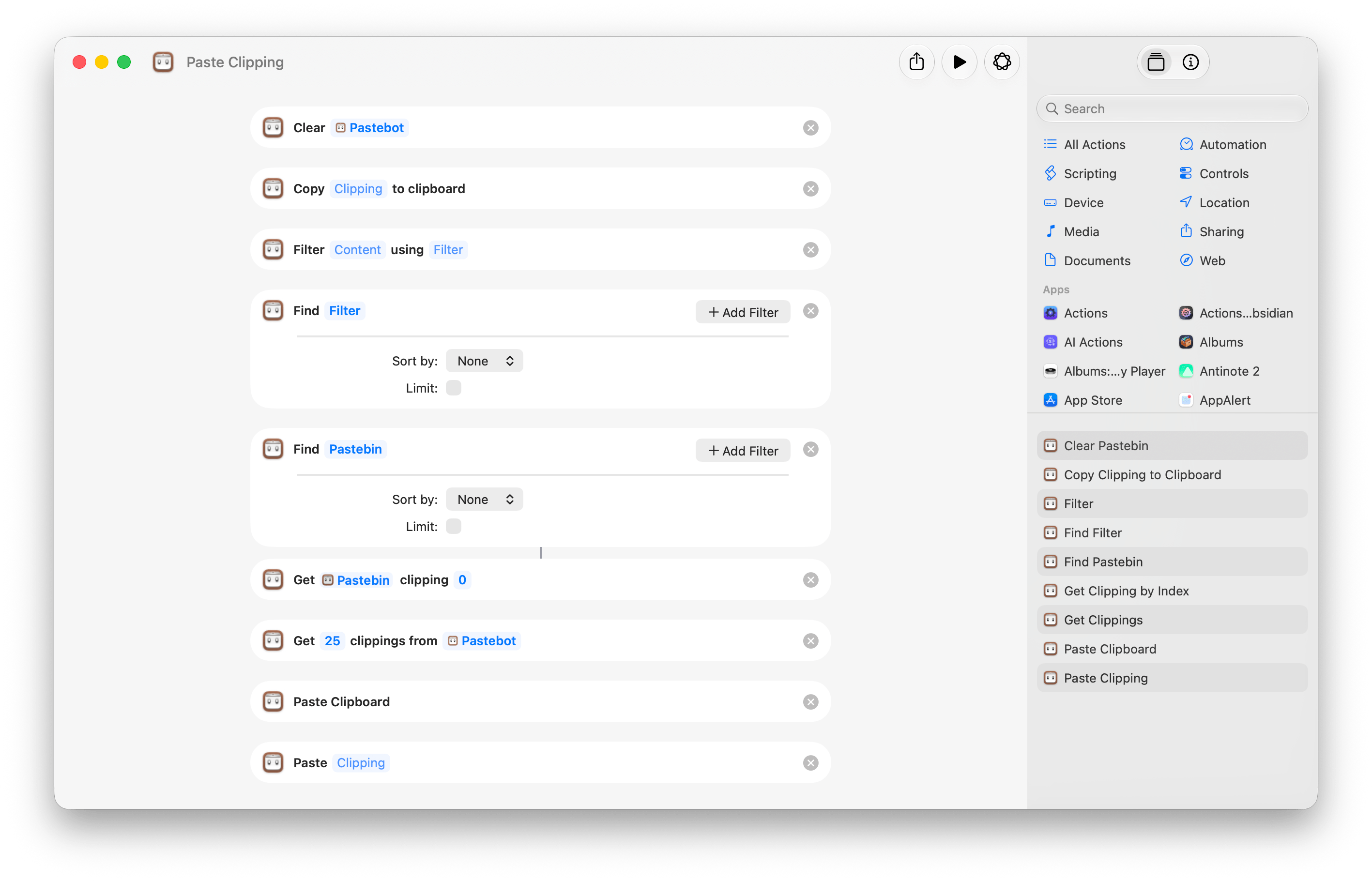
If you’re looking to automate with Shortcuts instead, Tapbots has you covered there, too, with nine actions that feature a variety of parameters and filter options:

  • Clear Pastebin
  • Copy Clipping to Clipboard
  • Filter
  • Find Filter
  • Find Pastebin
  • Get Clipping by Index
  • Get Clippings
  • Paste Clipboard
  • Paste Clipping
Pastebot’s Shortcuts actions.

Pastebot’s Shortcuts actions.

New filters have been added that allow you to transform clippings using text transformations and even shell scripts. Using the ability to script custom filters, I’ve begun adding a few of my own to Pastebot for things like adding and removing bullets from multiple lines of text. For any filter, just select a clipping, and you can preview how it will affect the clipping. You can even assign keyboard shortcuts to filters and combine them with other filters to chain actions together.

Picking items for a Stack.

Picking items for a Stack.

Another powerful productivity booster available in Pastebot is called Stacks. This feature used to be called Sequential Paste, but Stacks are much easier to visualize. From Pastebot’s main UI, you can select multiple items at once and right-click to add them to a Stack, or you can pick them one at a time in any order you’d like. As you select items, they’re numbered in the order you’ll paste them into a document using a keyboard shortcut. It’s an excellent feature for filling out forms or copying data from one spreadsheet to another.

Pastebot’s design has been modernized, too, while remaining recognizable to long-time users. Along with a new icon, Pastebot 3 features new toolbars and a more customizable sidebar that lets you rearrange items inside each section and collapse sections for a more streamlined look.

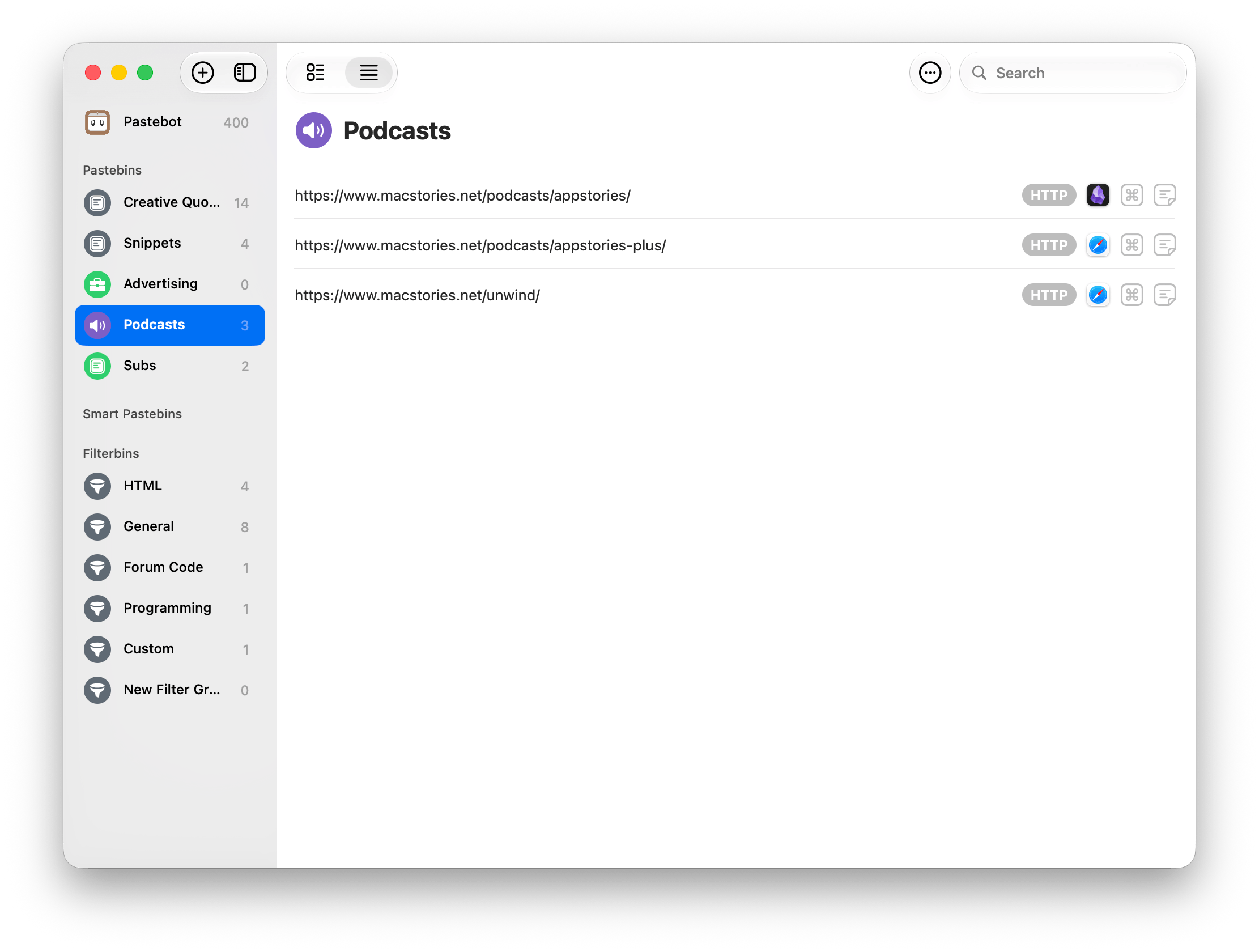
A Pastebin with a couple of URLs I use often.

A Pastebin with a couple of URLs I use often.

Pastebins, user-defined collections of saved clippings that won’t roll off the end of your clipboard once it fills up, are joined by customizable Smart Pastebins that remind me of Smart Lists in Reminders. Smart Pastebins can be created by combining any or all of up to nine criteria, providing a lot of flexibility. I haven’t used Smart Pastebins extensively yet, but they’re already making it easier for me to find copied URLs simply by setting up a Smart Pastebin that looks for “http” at the beginning of a clipping. Smart Pastebins can even match text using regex, which is great for creating lists of Markdown-formatted URLs and image links.

The bottom line is that whether you simply want to retrieve recently copied items and paste them somewhere or you’re a power user who wants to automate the way you work with lots of clippings all day long, Pastebot 3 has you covered. About the only shortcoming of the app, and it’s a big one, is the lack of an iPhone and iPad version. Pastebot got its start on the iPhone before moving to a Mac-only version a decade ago. I hope Pastebot returns to the iOS and iPadOS someday because a lot of users want that, me included. An iOS version of the app couldn’t do as much as it does on the Mac, but there are plenty of benefits to syncing your clipboard history to an iPhone or iPad, as apps like Paste and PastePal have shown.


Copy and paste is as timeless as any task on a computer. If you fill out forms and spreadsheets, maintain a collection of prompts for your AI agents, or just grab a lot of links, images, and other scraps from the web and other sources, having a clipboard manager like Pastebot 3 at your fingertips is essential – so essential, in fact, that when the beta ran out on me just before the app’s release date, my Mac immediately felt broken, which is about the highest recommendation I can give a Mac utility.

Currently, Pastebot is available directly from Tapbots for $39, which includes one year of updates, after which you can purchase an additional one year of updates at any time for $19.

Pastebot 3 is also available on the Mac App Store as a subscription with a 14-day free trial, after which it will cost $2.99/month or $24.99/year.

  •  

Lock Launcher Introduces “No Redirect” Launchers, XL Widgets for iOS 27

My Home Screen setup with Liquid Glass widgets powered by Lock Launcher.

My Home Screen setup with Liquid Glass widgets powered by Lock Launcher.

I don’t think I ever mentioned it on MacStories (although I probably did at some point on AppStories or Unwind), but my favorite “launcher” app for iOS is a utility called Lock Launcher, which I’ve been using on and off for the last couple of years. Lock Launcher started as an app for adding URL schemes to the Lock Screen a few years back, and it gradually evolved into a comprehensive “widget studio” app to design launcher widgets of all kinds for the Home Screen, Lock Screen, Dynamic Island, Live Activities, and more.

Anyway, I’m covering the app on the site today because it was updated with two features that I didn’t think were possible or allowed on the App Store, and I want to highlight them for our readers. I’m not really sure how the developers were able to add these features to the app; you may want to download it from the App Store quickly, just in case.

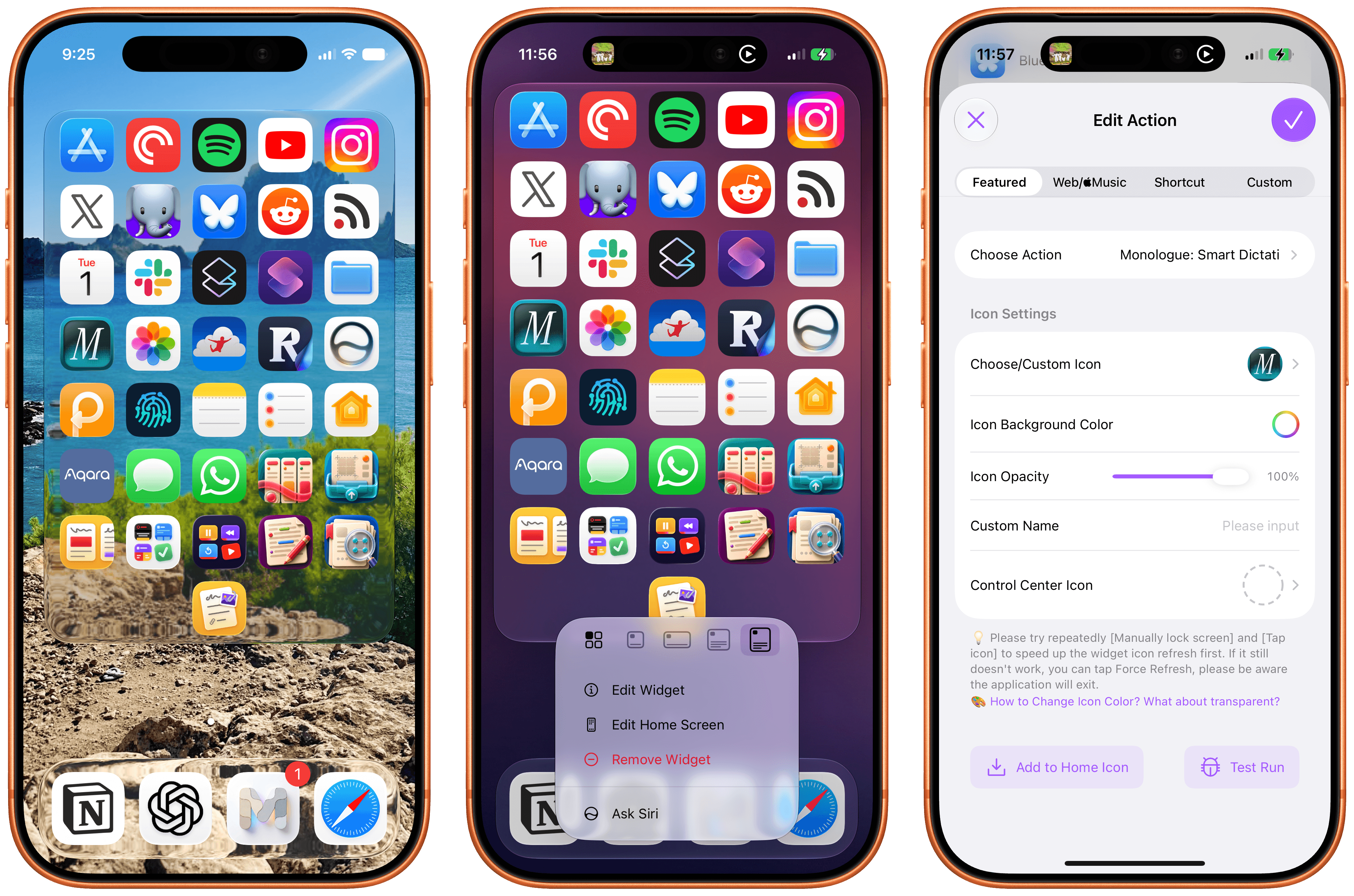
For starters, Lock Launcher now lets you create launcher shortcuts that open apps directly and immediately, rather than redirecting you to the Lock Launcher app first.

For years now, launcher apps on the iPhone have had to employ this workaround: you’d tap on a shortcut that opened, say, Ivory, but you would see the launcher app flash onscreen briefly before redirecting you to the actual destination app you selected. Somehow, Lock Launcher is now circumventing this limitation with a ‘Direct Open’ mode that I haven’t seen in other launcher apps for iOS. That sequence of widget, host app, and destination app was, ultimately, the reason why I always stopped using third-party launcher apps, and I love that it’s been removed by Lock Launcher.

Launching apps without redirects via Lock Launcher.

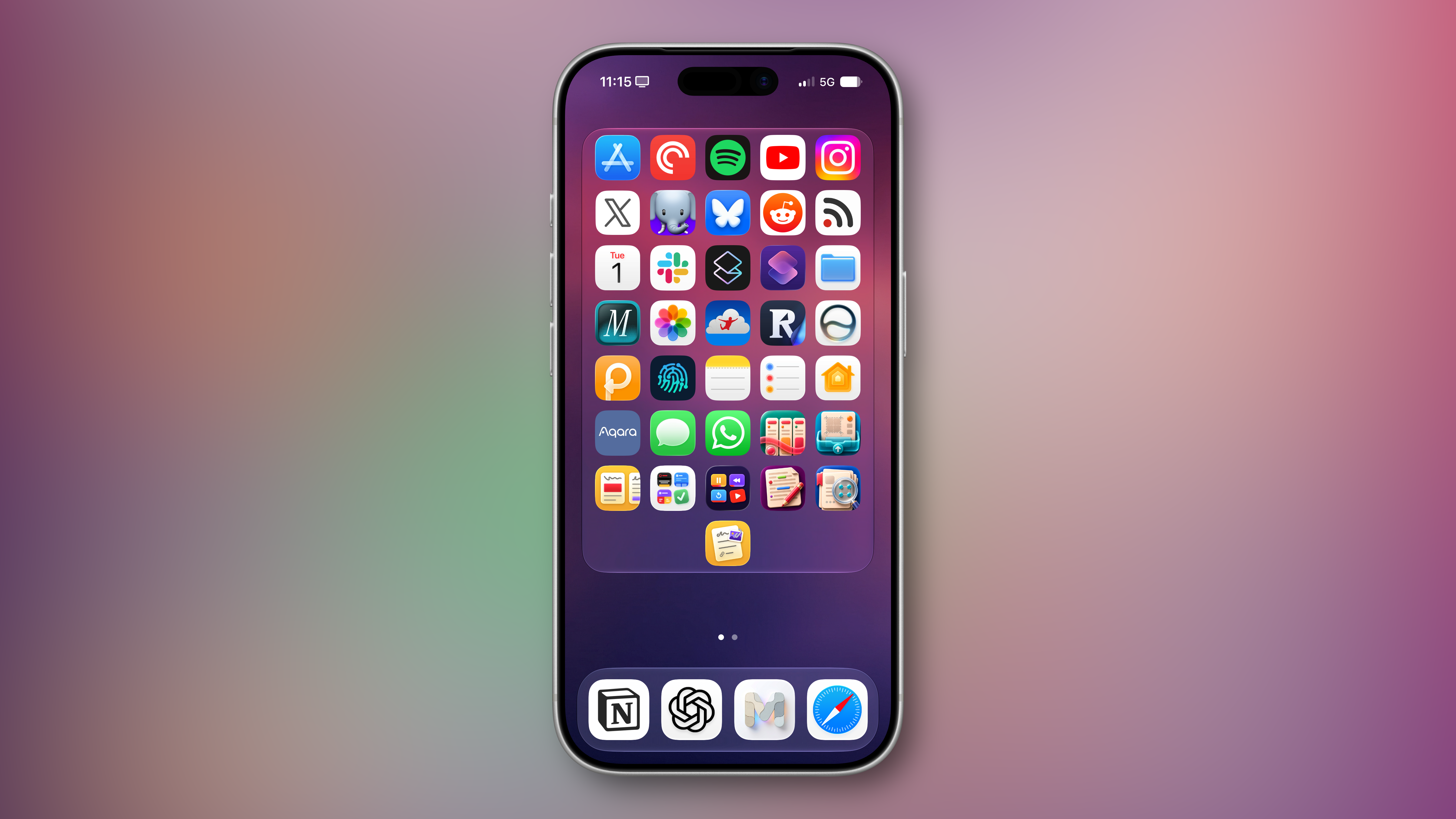
At long last, I’ve been able to create a dense Home Screen with 40 icons (36 in the widget plus 4 in the dock), and they all launch directly when tapped.

My new Home Screen powered by Lock Launcher.

My new Home Screen powered by Lock Launcher.

The screenshot above brings me to the second feature added in the version of Lock Launcher currently available on the App Store: XL widgets on iPhone in iOS 27.

Now, as far as I know, if an app wants to adopt an API exclusive to a future version of iOS, it typically needs to be built against that version’s SDK using the corresponding Xcode beta. However, the App Store isn’t currently accepting apps built with the iOS 27 SDK. And yet, the Lock Launcher developers must have figured out a way to support the new systemExtraLargePortrait widget size and make it work on devices running iOS 27 even though the app was built with the iOS 26 SDK. My best guess: they’re using a workaround that involves visionOS 26 APIs, since the Vision Pro received support for that family of widgets last year. (I’d love to know more about this.)

These two features, combined with the ability to apply the Liquid Glass material to widgets for beautiful refractions of the system wallpaper, make Lock Launcher the most powerful and customizable launcher utility on iOS to date. I hope writing about it doesn’t get the developers in trouble.

Lock Launcher is available for free on the App Store, with advanced features available through an optional Pro in-app purchase.

  •  

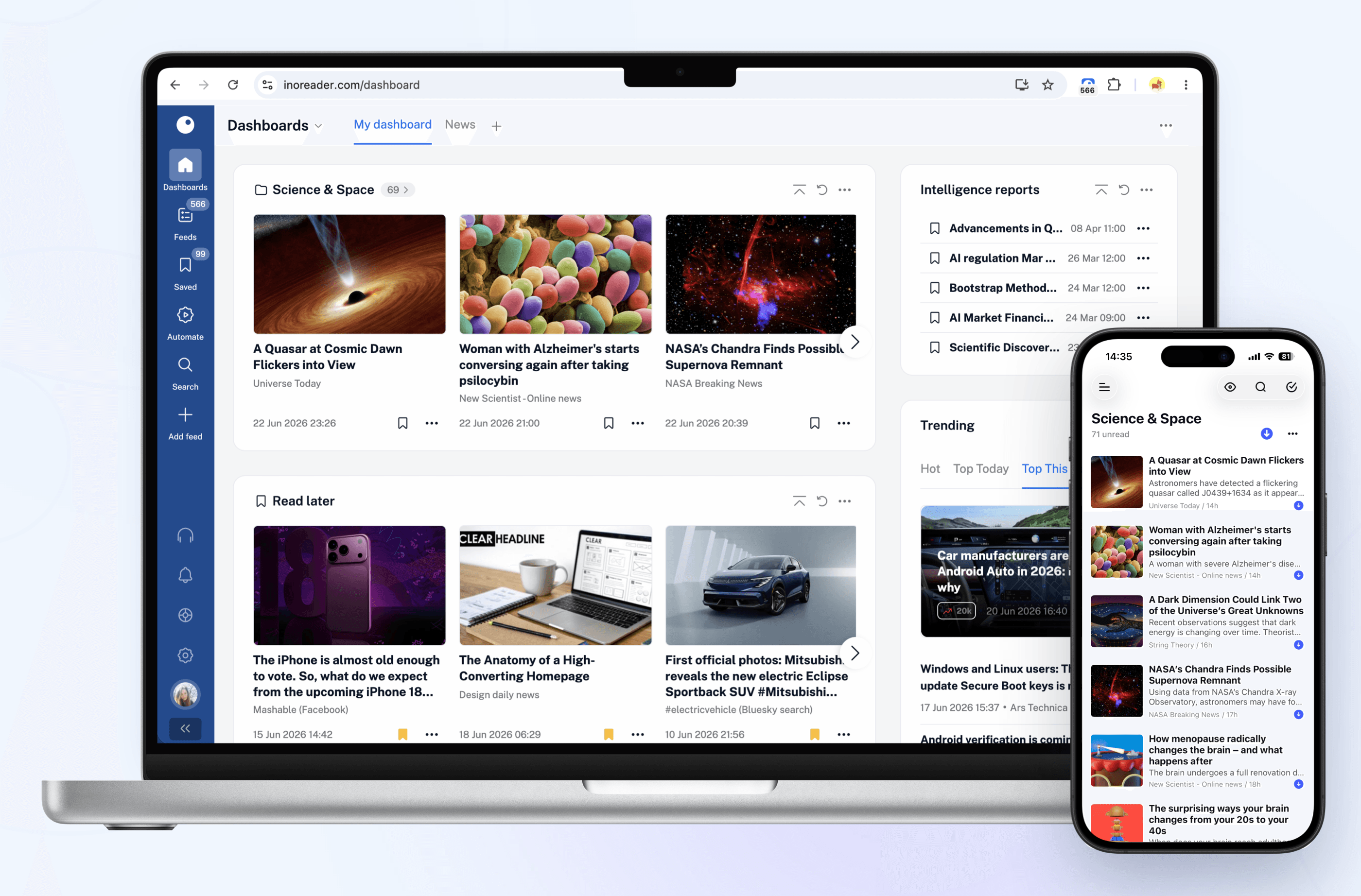
Inoreader: Build Your Own Newsfeed and Cut Through the Noise [Sponsor]

Staying up to date has never felt more overwhelming.

Between websites, newsletters, podcasts, social media feeds, and specialized publications, valuable information is scattered across countless apps and platforms. The challenge is no longer finding content – it’s keeping up with it without wasting time or missing what matters.

That’s where Inoreader comes in.

Inoreader helps you build your own personalized newsfeed by bringing together the sources you care about in one place. Instead of jumping between websites, inboxes, and apps throughout the day, you can keep up with everything from a single interface designed to help you stay informed while cutting through the noise.

Unlike algorithm-driven feeds, Inoreader puts you in control. Follow the websites and creators you trust and receive their updates directly. No engagement-driven recommendations and endless scrolling, just the content you’ve chosen to follow.

For those who need more than a traditional feed reader, Inoreader offers powerful monitoring tools. Create custom feeds to track keywords, brands, companies, competitors, products, or industry trends across the web and receive updates automatically whenever something new appears.

As your reading list grows, Inoreader helps you organize and revisit important information. Save articles for later, highlight key passages, add notes, and build a searchable archive of knowledge and insights that remains accessible long after you’ve finished reading.

To help you process larger volumes of content, Inoreader’s Intelligence features can summarize articles, extract key insights, and help you make sense of information faster. Whether you’re following daily news, researching a topic, or monitoring developments in your industry, Inoreader helps you stay informed without getting overwhelmed.

Advanced filtering and automation tools can further streamline your workflow by automatically organizing incoming content, surfacing what matters most, and reducing distractions – saving you time while ensuring important updates never slip through the cracks.

Inoreader is available on the web, iPhone, iPad, and Android devices, with offline reading support on mobile, so your newsfeed is always available when you need it.

You can get started with Inoreader for free, or explore everything the Pro plan has to offer with a 14-day free trial and no credit card required. New Pro subscribers can also get 30% off their first year.

Learn more and get started at inoreader.com.

Our thanks to Inoreader for sponsoring MacStories this week.

  •  
❌