❌

Reading view

Apple’s OS 27 Updates Will Be Released on Monday, 14 September

9to5 Mac has the iOS 27 release notes too. I haven’t spent much time using Golden Gate, but I’ve been using iOS 27 full-time ever since WWDC. It’s in excellent shape for a .0 release.

Now I need to think about how long I want to still hang onto MacOS 15 Sequoia on my main Mac. I’ll probably skip 27.0 and wait for 27.1, but maybe I’ll bite the bullet and upgrade when a 27.0.1 update comes out.

  •  

★ The iPhone Air and iPhone 17 Pro

Last year, an unplanned personal hiatus coincided with the time when I should have been reviewing the then-new iPhones 17 and iPhone Air. In my brief note explaining my absence, I wrote:

I look forward to getting back to writing very soon. I can feel it: I will be back soon. I’m itching to go. I mean, jiminy, it’s new iPhones week. But it’ll be a few more days before I get those reviews out.

354 days is arguably more than a few, but given that I missed the window for reviewing them when they were new, I thought it might be interesting to consider the iPhone 17 Pro and iPhone Air on the cusp of their being obsoleted by the next generation of iPhones.

The iPhone Air

The iPhone Air is the nicest phone Apple has ever made, and probably the nicest device Apple has ever made, period. It’s just so goddamn nice. Over the years, Apple has gone back and forth with its treatment of the metal side rails on iPhone hardware: some years polished like jewelry, other years, matte like a tool. The iPhone Air is polished, and the effect is luxe. (And it stands in contrast to the matte iPhones 17 Pro.)

The whole point of the device is that it is absurdly thin. A year later, it still feels remarkably thin and light in hand — and, even better, thin and light in pocket. It is delightful to hold and carry. The screen is terrific. The buttons are perfect: they stick out just enough and have just the right clickiness.

The big concern most people have regarding the Air is battery life. I used my Air review unit extensively and battery life was never once a problem. Yes, battery life is shorter than with other iPhone models, but it’s more than long enough. When you know you might need to top it off, you just do it here and there throughout the day. I not only never once ran out of battery by the end of the day with the Air, I never once came all that close. It’s fine.1 I mean, if you’re the sort of person who struggles to get through the day battery-life-wise with a regular (thicker) iPhone, the iPhone Air obviously isn’t for you. But that’s really obvious.

My biggest concern going into it was the camera system. The iPhone Air has only a single rear-facing camera, with non-interpolated 1× and 2× zoom factors.2 In practice, yes, sometimes while carrying the Air I regretted not having either the ultra wide 0.5× lens or telephoto lens, both of which I’m accustomed to having at my disposal. But ultimately I didn’t miss either of those lenses enough that I regretted having the Air in my pocket that day. And conversely, there’s something mentally freeing about having just one lens. There’s no question which lens you should use. Zoom with your feet.

And the one lens the iPhone Air has is excellent. It’s not quite as good as the main 1×/2× lens on the Pro models, but it’s much closer to the Pro models in image quality than it is to the single-lens iPhone 17e. (But even the 17e is a damn good camera for a phone.) One thing you miss by not having a 0.5× ultra wide lens is a true macro mode. But because it uses a slightly smaller sensor, the camera on the iPhone Air has a closer minimum focus distance than the iPhone 17 Pro’s main camera (15 cm vs. 20 cm — those 5 cm often make a big difference). I like the iPhone Air camera so much that it didn’t factor all that much into my decision whether to buy one to use as my personal iPhone for the last year. It’s that good.

But I did not buy one to use as my personal iPhone for the last year. I bought an iPhone 17 Pro. The reason is size.

The iPhone 17 Pro comes in two sizes: regular and Max. I find the Max sizes too big — unpleasant to hold, unpleasant to pocket. The iPhone Air comes in only one size — a sort of one-size-fits-all midway point between the regular iPhone models and Max models.

                    WIDTH    HEIGHT   THICKNESS   WEIGHT
iPhone 17 Pro Max    78mm     163mm     8.75mm     233g
       iPhone Air    75mm     156mm     5.64mm     165g
    iPhone 17 Pro    72mm     150mm     8.75mm     206g

Width- and height-wise, the Air is pretty much halfway between the Pro and Pro Max. For me, in practice, the factor that really matters is width — and I find the Air too wide. Just holding the phones as objects to admire, the dramatic thinness and lighter weight make the iPhone Air the nicest, by far. But holding them to actually use, I find the Air feels too wide. Specifically, too wide to use with one hand, gripping it with my palm and fingers and swiping and tapping with my thumb. If I had my druthers, the regular-sized iPhones would be slightly smaller, footprint-wise. The regular iPhone 17 Pro is pretty much as wide as can be for me to use it one-handed. The Air is too wide for that — it’s a two-handed device for me. And that was the dealbreaker.3 I use my iPhone one-handed frequently, often while walking around the city carrying a bag or beverage in my other hand.

If the iPhone Air came in two sizes, regular and Max, corresponding to the widths and heights of the two Pro sizes, I would have bought the regular-sized Air model and, I’m convinced, been delighted with it for the past year. But the iPhone Air only comes in one size, and that size is too wide for my taste, and in practical use, that factor overrides everything I love about the Air.

If you use your iPhone two-handed almost exclusively — perhaps because you find even the regular-sized models too wide to use one-handed — there’s a good chance you’d be happier with the Air than whatever model you’re currently carrying. It’s so goddamn nice.

The iPhone 17 Pro

The iPhone 17 Pro is the best phone Apple has ever made, and perhaps the best device Apple has ever made, period.

After two years of titanium side rails and full-glass backs (the 15/16 Pro generations), the 17 Pro went back to aluminum, and the metal is now more of an entire frame for the device than just a side rail. There remains a matte glass panel on the back, but only for the bottom three-quarters or so, underneath the camera plateau. (Inductive MagSafe/Qi charging doesn’t work through metal.) The camera plateau is now aluminum, and, most noticeably, extends across the full width of the device, even though the three camera lenses (0.5×, 1×/2×, 4×/8×) remain in a triangle arrangement in the corner.

This new full-width plateau is a winning design. I think it looks good, but more importantly, feels great. It looks more balanced and feels more balanced too. It still wobbles when placed on a table, but it wobbles less. The camera capabilities, to me, are the defining aspect of the Pro models. It thus feels correct for them to be so physically prominent on the devices.

The iPhone 17 Pro was offered in three colors: cosmic orange, deep blue, and silver. All three colors are excellent, and each of them tempted me to some extent. I’m not sure why silver didn’t get an adjective — it’s a very nice colorway. But cosmic orange is the eyecatcher. For years, Apple has been releasing non-pro iPhones in fun colors, and Pro iPhones only in no-fun (or at best low-fun) colors. It really seemed like a mystery why Apple never released an iPhone Pro model in a vibrant fun color. Now that they finally did it, it seems like even more of a mystery why it took them so long — anecdotally, cosmic orange has been an incredibly popular choice. I see orange iPhone 17 Pros in use every day, often in clear cases to show off the color.

My personal rule has been to always buy black, or the nearest to black offered. Deep blue isn’t all that near to black, but it was the nearest, so that’s what I bought. I wouldn’t call it fun but I liked it when I bought it and I’m not tired of it now, nearly a year later. It’s a serious blue. After 10+ months of near-daily use, the anodization is beginning to wear away at the top corner of my iPhone’s camera plateau, where there’s a bit of a sharp corner. I find this to be a charming patina, not a flaw, and looking at that wear increases my affection for this little guy.
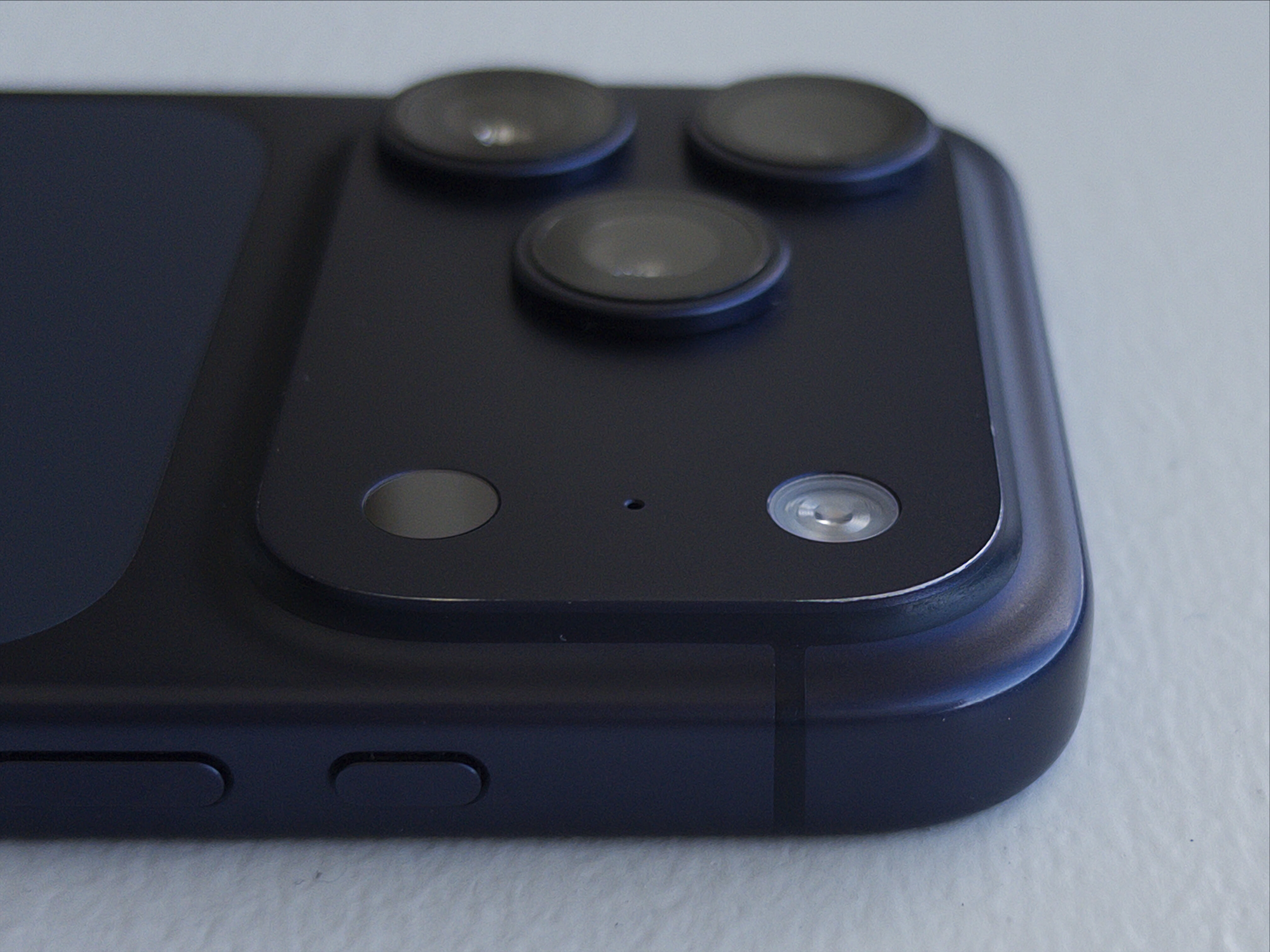
My deep blue iPhone 17 Pro, showing the worn anodization at the corner of the camera plateau.

(Photo taken with the iPhone Air, using Halide Mark III.)

I’ve shot (and kept) 5,365 photos and 97 videos with the iPhone 17 Pro. (Perhaps I should shoot more videos.) The iPhone camera has long been the best camera in the sense of “The best camera is the one you have with you.” With each successive year, they come closer and closer to being the best camera I’ve ever owned, period. It’s really quite remarkable how good a camera it is.

Battery life has been excellent. I charge to 100 percent every night while I sleep, and never worry about it during the day. Very seldom is the battery under 25 percent by the end of the day. According to the statistics in Settings → Battery → Battery Health, maximum battery capacity remains at 96 percent after 230 cycles. That seems pretty good.

Durability has been terrific as well. I mentioned a month ago that Apple’s “Ceramic Shield 2” process seems to be the real deal. Even under close inspection, there’s seemingly not a single micro abrasion on the front glass. I used a Nomad leather back during the very coldest weeks of the East Coast winter, but otherwise have never used a case. Despite near-daily use for 10-ish months, it’s in near-mint condition. I’ve also found that the phone, naked, is about as grippy as one could hope in most weather conditions, the frigid cold being the one exception.

Dust and fuzz accumulates in the USB-C port — just like every phone with a USB port. I clean it out every few months. Some sort of crud also accumulates in the very thin, easily overlooked slit for the speaker at the top of the display. That requires something like a pin or needle to clean. I don’t know what that crud is and I don’t want to know. I also don’t know what Apple could do about this crud accumulation, but I need to reach deep to find anything at all to complain about regarding this iPhone. I look forward to a future hermetically sealed iPhone which has no crevices in which to accumulate crud.

One year later and it feels like both the iPhone 17 Pro and iPhone Air could be announced tomorrow, not a year ago, and would seem fresh and exciting.


  1. Apple also created a battery pack exclusively for the Air: the $100 iPhone Air MagSafe Battery. Like Apple’s late great Lightning MagSafe Battery Pack, the Air MagSafe Battery is a much better product than any third-party battery pack I’ve ever tried, and I’ve tried an embarrassing number of them. It sticks better magnetically, and there’s software integration with iOS that shows the battery pack’s remaining power when you first connect it, and in the Battery widget. iOS also seems smarter about when to draw power from it, making it last longer. It’s a no-brainer recommendation for anyone who buys an iPhone Air. You won’t need it most days, but on the days when you need it, it’s perfect.

    My only gripe about the iPhone Air MagSafe Battery remains the same from the day it was announced last year: it has “Air” in the name because it’s designed exclusively for the iPhone Air. Apple’s old Lightning MagSafe Battery Pack was designed to fit any iPhone. (In fact, it debuted in 2020 alongside the iPhone 12 Mini, an iPhone that actually needed help getting through the day on a single charge.) The old Lightning battery pack remains so good that I continue to use mine (I own two) instead of the numerous third-party ones I’ve blown money on in the intervening years. The old Lightning ones don’t pack much of a punch, juice-wise — particularly because they’re now several years old — but no matter how much I use my iPhone, it’s always enough to extend me through the day. (The key is not to start using it until your iPhone drops under 30 percent — it takes less energy to recharge a mostly depleted battery.) I continue using them because they stick to the back of the iPhone so strongly, and, once attached, are so comfortable. It’s the last Lightning device I actively use, but unless Apple comes out with a proper USB-C replacement that works on iPhones other than the Air, I don’t foresee retiring mine until they’re completely shot. ↩︎

  2. The front-facing camera on the iPhone Air is the new (for 2025) Center Stage camera. It’s exactly the same front-facing camera as the iPhone 17 Pro and non-pro models, and uses a square sensor with a wider field of view. ↩︎︎

  3. This, of course, makes me wonder about the one-handed usability of the passport-sized foldable iPhone that Apple is expected to unveil tomorrow. ↩︎︎

  •  

★ SuperDuper 4

I have mentioned and recommended Shirt Pocket’s Mac backup app SuperDuper quite a few times over the years, and for good reason: it performs very important functions very well. Version 4, which shipped just over a month ago, is an extraordinary update to an extraordinary app.

Visually, the interface is all new. That took some getting used to, but not much. It didn’t take long for me to see how the new UI is better in every way. The style of presentation is new and modern, but the core idea remains the same: the interface of SuperDuper is self-explanatory. It explains what, exactly, is going to happen. It remains a marvel of clarity, especially when you consider the complexity of what it does.

Functionally, SuperDuper 4 is also much improved. SuperDuper has never been slow, but now some copy operations are over 2× faster. Scheduling options are more powerful. You don’t need to worry about the details to use SuperDuper, but the details are there for your inspection.

Shirt Pocket’s Dave Nanian designed it, implemented it, and thoroughly documented it. I don’t know how that’s possible. SuperDuper feels like impossibly good software. Read his post announcing version 4 to start, then catch up on the rest of the blog to get a feeling for how much work he’s put into SuperDuper 4. Just extraordinary.

In the 22 years since SuperDuper first shipped, Shirt Pocket has never charged for updates and never raised the price. (This too seems impossible, at least for a company that remains in business.) Version 4 costs $44 — an astonishing value — and discounts are available for anyone who bought version 3 after July 2020. Sans license, free of charge, SuperDuper 4 still allows you to make bootable backups.

I recommend SuperDuper 4 wholeheartedly.

See also: Dan Moren at Six Colors and Michael Tsai.

  •  

[Sponsor] Glyphs 4

Glyphs 4 is here: a Mac-native app for creating fonts, lettering, icons, and pictograms. Draw with flexible strokes and efficiently reuse shapes across huge glyph sets, explore variable vector designs with complex higher-order interpolation. Build and manage massive font families and icon sets with ease, export all modern font formats, SVG, PNG and PDF. Hundreds of refinements and native Tahoe support make designing, testing and shipping your vectors smoother than ever. Glyphs 4: Create. Love the process.

Discover Glyphs 4, and use code FIREBALL to save $30 if you purchase in the next month.

  •  

Trackables 1.5

Trackables:

There are plenty of health tracking apps. Surprisingly, nearly all of them are bloated, subscription-gated, or blatantly harvesting our data; often all three. We wanted something simpler, less annoying and more fun, that’s where it started.

Trackables turns the data your Apple Watch already collects — activity, sleep, steps, heart rate — into a clear, friendly, transparent interface.

Totally free of charge, totally private, made by a small team of ex-Apple folks. (They might add a paid tier in the future, but core functionality will remain free.) I’ve been using Trackables for months and it’s just a better dashboard to the stats I care about than the Health app itself.

(One interesting detail: HealthKit only makes raw data available to apps. Apple Health’s “sleep score” isn’t part of that data — only the raw input, like how many hours you slept, and how much time was spent in each sleep stage. So Trackables computes its own sleep score. When I bother to compare, Trackable’s score is almost always similar to Apple’s, but seldom exactly the same. But I personally find that Trackable’s sleep score corresponds better to how I feel I slept. Which, admittedly, is usually pretty good.)

  •  

McKinley 1.0

Crackerjack new Mac app for creating and editing custom SF Symbols, from developer Amy Worrall:

McKinley is an all-in-one studio for drawing and annotating SF Symbols. It bundles vector tools with knowledge of the SF Symbols structure, so you can edit one set of objects across multiple weights, sizes and colours. Import SVG or start from scratch, live preview your work using Apple’s own renderer, and export directly to Xcode, so you never need touch the SF Symbols app again!

McKinley is Mac-assed out the wazoo:

  • Rich AppleScript support, including a library of practically useful example scripts.
  • Quick Look previews and thumbnails for documents.
  • A well-written comprehensive user manual. (Me, a few months ago: “There exist good products with bad or no documentation, but there are very few poor products with great documentation.”)

I mean just look at McKinley. It’s both beautiful and quite obviously a serious professional tool. McKinley is a $60 one-time purchase, and there’s a 15 percent launch discount this week only (taking the price to just $51). What a remarkable 1.0.

See also: Michael Tsai; Worrall on Mastodon.

  •  

Matt Birchler’s Folding iPhone Predictions

Matt Birchler:

So, yeah, I do think that, especially this year, unit sales will far lag behind the 18 Pro models, the normal iPhone 18, and probably the Air 2 and 18e. I think they will lag next year as well for similar reasons. I don’t know if this will ever become the most popular iPhone, but I do not think it will fail, and I think it will sell more units every year for its first few years on the market (especially if they can get the price down over that time as well).

My evidence for this is the increasing market share folding phones have in the Android world, as well as my personal experience using something very similar to what Apple is about to announce and having my own aha moment, where it really clicked with me.

Birchler has been using a Samsung Galaxy Fold8 — the new one that preemptively copied the folding iPhone’s aspect ratio — for the last month or so. So I’m intrigued by his firsthand experience with the same general form factor. But I have no idea what he’s talking about regarding “the increasing market share folding phones have in the Android world”. For 2025, Counterpoint and TrendForce both pegged foldable phones at 1.6% of the global market. Just today Counterpoint released a report that says “Foldables still account for only about 2% of the overall smartphone market, leaving plenty of room for the category to grow.”

Anecdotally I find it hard to believe the 2 percent number. It’s my nature to take notice of the phones people use, and there’s no way that 1 in 50 people I see have foldable phones. I don’t even think it’s 1 in 100. On a recent vacation, I didn’t see a single foldable at the airport nor at the resort hotel where we stayed. Obviously my own anecdata could be all wet, but I think “2 percent” is generous — and presumably, if it’s accurate, it’s almost entirely from outside the U.S. It’s like saying “touchscreen phones” had “increasing market share” before the iPhone. Going from 0.1% to 0.2% is a doubling of share, but the share is still tiny.

Regarding the name, Birchler spitballs a decent suggestion:

Finally, there’s the name. Everyone seems to think it’s going to be the iPhone Ultra, and I guess if I were putting money down, that’s what I’d bet on as well.

But I just don’t like it. I don’t like it because it’s not “ultra” in many ways, and I don’t like it because what do you call the bigger version of it in a year or two? The Ultra Max? Maybe you do…

I personally think it should be called the iPhone Folio. I think there’s a 99% chance I’m wrong, but hey, won’t it be amazing if I’m right?

The problem with “Folio” is that it’s too descriptive only of the form factor. Not the feeling it’s supposed to convey. I’m betting on “Ultra”, but I’m still rooting for “Duo”, which has some history and sounds like a nice companion adjective to “Neo”.

  •  

★ And It’s True That I Stole Your Lighter, and It’s Also True That I Lost the Map

Last week both Google and Apple updated their maps to accommodate Trump changing the United States Geological Survey’s recognized name for Lake Ontario to “Lake America”. Just as with Trump’s fiat renaming of the Gulf of Mexico back in the first days of his 2.0 administration, Google and Apple are showing the same names to the same people, by region. Here are the names you now see for Lake Ontario, based on what region your device is set to:

  • United States: “Lake America”
  • Canada: “Lake Ontario”
  • Everywhere else in the world: “Lake Ontario (Lake America)”

This is exactly the same as their joint solution to the Gulf of Mexico renaming — the U.S. sees “Gulf of America”, Mexico sees “Gulf of Mexico”, and the rest of the world sees “Gulf of Mexico (Gulf of America)”.

Here is the solution I strongly believe Google and Apple should follow:

  • United States: “Lake America (Lake Ontario)” and “Gulf of America (Gulf of Mexico)”
  • Everywhere else in the world: “Lake Ontario” and “Gulf of Mexico”

There is no reason to show these new Trump-dictated names anywhere outside the U.S., even putting them in parentheses. There is no reason to show only the actual traditional names exclusively for users in Canada (for Lake Ontario) and Mexico (for the Gulf). Treating Canada and Mexico as special cases only makes sense if they’re part of some sort of dispute over the names. They’re not. The names of these two bodies of water are not contentious. There is no long-simmering debate about them, like there is with Denali/Mount McKinley in Alaska. The one and only country on the planet with a crackpot kook-ridden government that claims these bodies of water have new names is the United States; the only country that should see the new names is the United States.1

So, I disagree with how Google and Apple have chosen to handle these re-namings. But it is correct that users in the United States do see the new names.

Here’s Andy Ihnatko, at his eponymous website:

We all have every right to be upset. Google’s receiving plenty of flak over this move (as is Apple; Apple Maps now shows “Lake America,” reportedly after being pressured directly by Trump). I dislike Google’s and Apple’s choices, but I can’t personally fault them.

That said, Trump’s move is clearly meant to antagonize Canada during a volatile period in our relations. He’s throwing gasoline on a tariff fight that’s already creating uncertainty and suffering among vulnerable businesses and consumers on both sides of what was once an impeccably peaceful border. Google and Apple didn’t need to move so damned quickly. I wish they’d deferred the name change long enough for things to cool down a little. Doing so would have avoided creating the perception of handing one side a swift, validating victory.

I doubt a cooling-off period would help. Wounds don’t feel better when they’re reopened after healing. It’s best to get it over with. Applying the change to Google and Apple Maps while the GNIS database ink is still wet at least serves to remind who made this change and why. And whose change it rightfully is to make.

This is a bitter pill for some to swallow. What a lot of people want is for Google and Apple to just ignore the U.S. government’s official new names. E.g., to pick just one high-profile pundit, here’s Kara Swisher regarding Google (“quislings”) and Apple (“craven”, “pathetic”). But I suspect, quite strongly, that the people who profess to be the most angry at Apple and Google for going along with this change are the same people who would argue most strongly that Goliath tech companies and mega-billionaires wield too much anti-democratic power and influence.

It’s not coherent to argue that Google and Apple should decide which names to put on their maps only when you want them to ignore the names from the official government database. Neither Google nor Apple are going to sell their maps apps, but it’s not outlandish to think that in some alternative universe, one or more of the leading maps app might be owned by, say, Elon Musk or Larry Ellison. Would the people who want Apple and Google to ignore the official names from the GNIS support the same stance if the two leading maps apps were owned by SpaceX and Oracle instead? Obviously they would not.

What we want is a system where geographic names are determined democratically, by voting. And that is the system we in fact have. Trump won. The Department of the Interior has the power to change these names. If you’re angry that their official names in the United States are now Lake America and Gulf of America, stay angry that Trump won the 2024 election. Stay angry that our president continues to debase his office and embarrass our nation. Directing your anger at Google and Apple for reflecting that change is shooting the messengers.

But this is why I find it embarrassing that both Google and Apple are foisting these absurd names on the rest of the world, even if only between parentheses. These names are nonsense, and they are Americans’ nonsense to deal with.

China is another country with ridiculous geographic dogma. China demands that Taiwan, which is an independent free nation, be falsely labelled as a province of China. Apple Maps reflects that policy — within China. It doesn’t label Taiwan as “(Province of China)” on maps outside China. Bullshit inside parentheses is still bullshit. Less seriously but more preposterously, the Chinese government also insists that the obscure Diaoyu Islands, subject of a long-running territorial dispute with Japan, be drawn larger than they actually are on maps. Apple Maps dutifully renders those inflated false island sizes to users in China. It doesn’t show them to users anywhere else in the world — not even as dotted outlines. Chinese users see Chinese government dogmatic nonsense; no one else does.

So too it should be for U.S. government dogmatic nonsense. Spreading the nonsense to the rest of the world only makes it more embarrassing.

Neither Google nor Apple claim to be cartographic editorial authorities. I do not think we should want them to be. Other non-governmental institutions do claim to be independent authorities. The Associated Press has stuck to their guns even in the face of losing its White House press pool seat over their refusal to adopt the “Gulf of America” name. And then there’s Wikipedia, whose reputation, integrity, popularity, and independence haunt the right wing. From Politico, last week:

Other platforms will soon follow, a senior administration official told Politico on Tuesday. “We got Lake America changed on Google Maps, and many other maps are changing in a couple days. And Wikipedia is going to change as well,” said the official, who was granted anonymity to speak frankly.

As of Wednesday, Wikipedia was still using the original names of both the Gulf of Mexico and Lake Ontario, while noting that Trump had signed orders to rename them.

Regarding this, Molly White noted:

A Wikipedia editor put it well: “You almost want to pat them on the head and say ‘Yes, of course it will’ in the same way you’d tell a small child that Santa Claus will be delivering their presents.”


  1. And, I feel strongly, the traditional names should remain visible, in parentheses, even for users in the U.S. for a period of, say, five years. What is someone who doesn’t follow current events — god bless them — to think if they go looking for Lake Ontario on Google Maps or Apple Maps and don’t see it? ↩︎

  •  

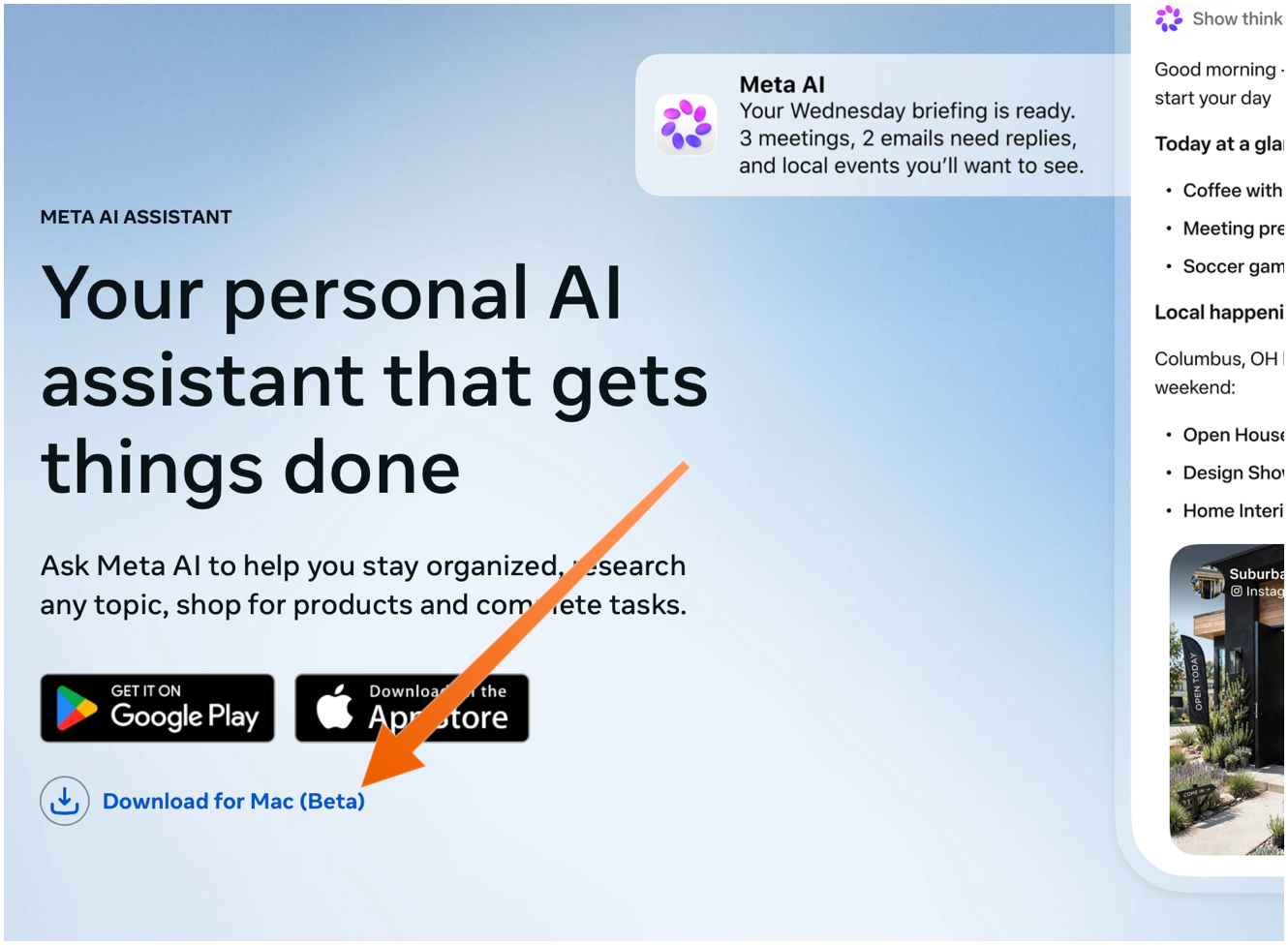
Meta AI Has a Native Mac App Now, and It Seems Decent

Zac Hall, writing for 9to5Mac on August 19:

The new Meta AI desktop app is version 1.0 beta at launch and weighs just 16MB once installed. Based on initial inspection, it runs natively on Apple silicon Macs with macOS 15 or later, using an AppKit and SwiftUI shell with WebKit for richer chat content. In other words, this is not an Electron app or a repackaged iPad release.

It includes Mac-specific hooks, making the desktop experience more robust than the Meta AI mobile app. Quick Invoke uses Option-Space to place a compact Meta AI composer over whatever you are doing. A separate dictation feature lets you hold a shortcut, speak, and have the resulting words typed into any app, from Mail and documents to code editors.

Meta AI can also attach another Mac window to a conversation. With Screen Recording and Accessibility permission, the app reads the window’s visible text and captures a screenshot for the next question. This is context gathering rather than computer control for now.

Passes the Settings window sniff test too — it actually has a Settings window. Meta, institutionally, seems more keen on native Mac apps than they are native Windows apps.

Update: The Mac app is not available in the App Store. You need to download it directly from Meta’s web page, using the “Download for Mac (Beta)” link. The ChatGPT and Claude Mac apps aren’t in the Mac App Store either — they do too many things outside the App Store’s mandatory sandbox (and probably use APIs require that special entitlements in the App Store too).

  •  

WorkOS: How to Give an Agent a Task Instead of a Token

My thanks to WorkOS for once again sponsoring Daring Fireball. Give an agent an access token and it spreads: into the context window, into tool call logs, into notes it keeps between steps. Each copy works from anywhere, long after the fact.

Relay keeps the credential at WorkOS. Your agent names the user, WorkOS attaches that token, refreshes it, and releases it only to allowlisted hosts. A hijacked agent session is a live process you can kill.

Learn how it works at WorkOS’s blog.

  •  

Matt Haughey: ‘The Car Industry A/B Tested Selling a Car With and Without CarPlay and the Results Are Not Shocking’

Matt Haughey:

One case in point is the Honda Prologue EV. It’s a partnership between Honda and Chevrolet, where the Prologue is basically a Chevy Blazer EV with Honda badges, slight visual differences in the sheetmetal and interior, but all the underpinnings are straight up Chevy. Even though the keys say Honda on a Prologue, it’s a General Motors key design with a Honda logo over it.

But one big difference the Prologue has from the Blazer it is based on is this: it includes Apple CarPlay and Android Auto integration. [...]

For the years these cars were sold together, the Honda outsold the Blazer by 43%, 73%, and 166% in each time period. Today in 2026, people are buying a Honda Prologue over one and a half times more often than the Chevy Blazer EV the Prologue is based on.

It’s not a perfect test. It’s reasonable to argue that Honda has a better brand and reputation than Chevrolet, and is just plain better at selling cars. But the trendline over the last three years is pretty stark.

  •  

Trump Administration Launches Rip-Off Video Games at Arcade.gov

A handful of Temu-style knockoffs of games like Flappy Bird, Snake (that’s the one where you round up border-crossing migrants), and, most notably, Tetris (the one where you “build a wall” to keep border-crossing migrants out) — the copyright to which is held by the notoriously litigious The Tetris Company, which tweeted:

At Tetris we believe in the power of connection and bringing people together, not dividing them. To our fans everywhere: we love you, we see you, and we’re grateful to have you in our community.

P.S. The Tetris Company was not involved in the creation of ‘Build the Wall’.

P.P.S. We take copyright infringement very seriously.

Whatever you think of these games, just like with the rebranding of Lake Ontario, Trump Arcade shows American voters that this administration is focused on their problems and concerns.

  •  

Gurman on Schiller’s Departure and Ternus’s Goals for the App Store

Mark Gurman, in his weekend Power On column at Bloomberg (gift link):

The Schiller exit is a bit more notable. Unlike Maestri, he still had a real job: The veteran executive ran the App Store and Apple Events. The App Store portion alone is no joke. It generates an estimated $30 billion a year and can be very challenging to manage. Apple’s app marketplace is loved by many consumers, but often criticized by developers and subjected to increasingly onerous regulations. It was a busy, all-encompassing gig and nowhere near a semiretirement. Apple Events, meanwhile, is how the company communicates its new product launches to customers. It’s also nothing close to fun and games.

Now, Schiller is 66 and clearly wanted to have some semblance of retirement. He can focus on philanthropy and spend more time with family. But there’s a bit more to the story, I’m told. Ternus and services chief Eddy Cue want to make even more money from the App Store and figure out ways to raise margins and squeeze additional recurring revenue from the platform. Schiller, on the other hand, seems to believe that such moves will only further irk developers and governments. While there was no internal blowup or anything like that, it’s something he wanted no part of.

I sure hope that’s not true, because that would be awful — making a bad situation worse — and pretty much the exact opposite of what Apple ought to do.

From the archive: Schiller, in a 2011 email to Cue and Steve Jobs:

Just as one thought, once we are making over $1B a year in profit from the App Store, is that enough to then think about a model where we ratchet down from 70/30 to 75/25 or even 80/20 if we can maintain a $1B a year run rate? I know that is controversial, I just tee it up as another way to look at the size of the business, what we want to achieve, and how we stay competitive. Again, just food for thought.

  •  

Litterbox: Safari Extension for Viewing X Tweets

In the wake of Nitter/XCancel’s demise, here’s a delightful new Safari extension from Zhenyi Tan (of And a Dinosaur fame):

But sometimes people still post X content. Maybe you want to see Gruber roast Google Design. Maybe you want to see posts by Federico Viticci who recently returned to X. So I made Litterbox, a Safari extension that opens x.com links in a popup. The idea is you open it, take a look, gag a little, then close the lid. [...]

Litterbox doesn’t send your cookies when you open those popups, because of course. It uses the same API X uses for its website embeds. I don’t think they’ll kill the website embed feature. But if they do, it will be very funny.

I love it. I’ve got it installed even though I don’t avoid visiting X.com. It’s just faster and nicer to view tweets in Litterbox’s popup. And if I do want to proceed to X.com, there’s a link at the bottom of the popup. Perfect.

  •  

Gloria Steinem’s Final Essay

Gloria Steinem, in a posthumous essay for The New Yorker:

For me, saying that I am a feminist has always meant that I believe in the social, economic, and political equality of all males and females of all races and groups. I know this sounds too simple to need a word, but equality is still the exception, not the rule.

Maybe we should call it egalitarianism, or even humanism. The problem with humanism is that it is often interpreted as being anti-religion, so I don’t think it’s inclusive enough. Regardless of what we call it, it just means treating each of us as uniquely human. The experiences of race and gender and class are very real and important, but they are also constructed and changeable. Our humanity is consistent and sacred.

Still, for some, it remains a mystery why women need a movement to distinguish our efforts toward equality. For me, it seems quite obvious.

  •  

‘Bob and Van’

Marco Arment:

And I can’t help but feel that maybe we were better off before we knew everyone’s hot takes on everything.

The town coffee shop was just a coffee shop. We weren’t publicly shamed for going there because one of the owners was an ass. It was just a place to hang out with our friends.

  •  
❌