I hope you’ll indulge me this week as I take a break from my usual rantings about agentic coding and meander down memory lane.
I learned to code BASIC in the mid-1970s at my progressive junior high school. In math class. We took Fridays to learn about line numbers, loops, statements, and the amazing GOSUB, which was as close as we got to a function call. It strikes me that it was pretty early in the whole tech world to be teaching seventh graders to program, and I feel lucky.
Coding faded into the background for me through high school, but soon afterward the arrival of Windows 3.0 and modems made writing software fun again. You could even earn a little profit. CompuServe, AOL, and bulletin board systems (BBS) created a market for shareware.
I bought a copy of Turbo Pascal for Windows 1.0 from Borland and a copy of Mastering Turbo Pascal 6 by the great Tom Swan, and I learned the Pascal syntax. I remember being delighted to discover that Swan had also written a book specifically for Turbo Pascal for Windows, and I devoured that too.
In search of SYSBACK
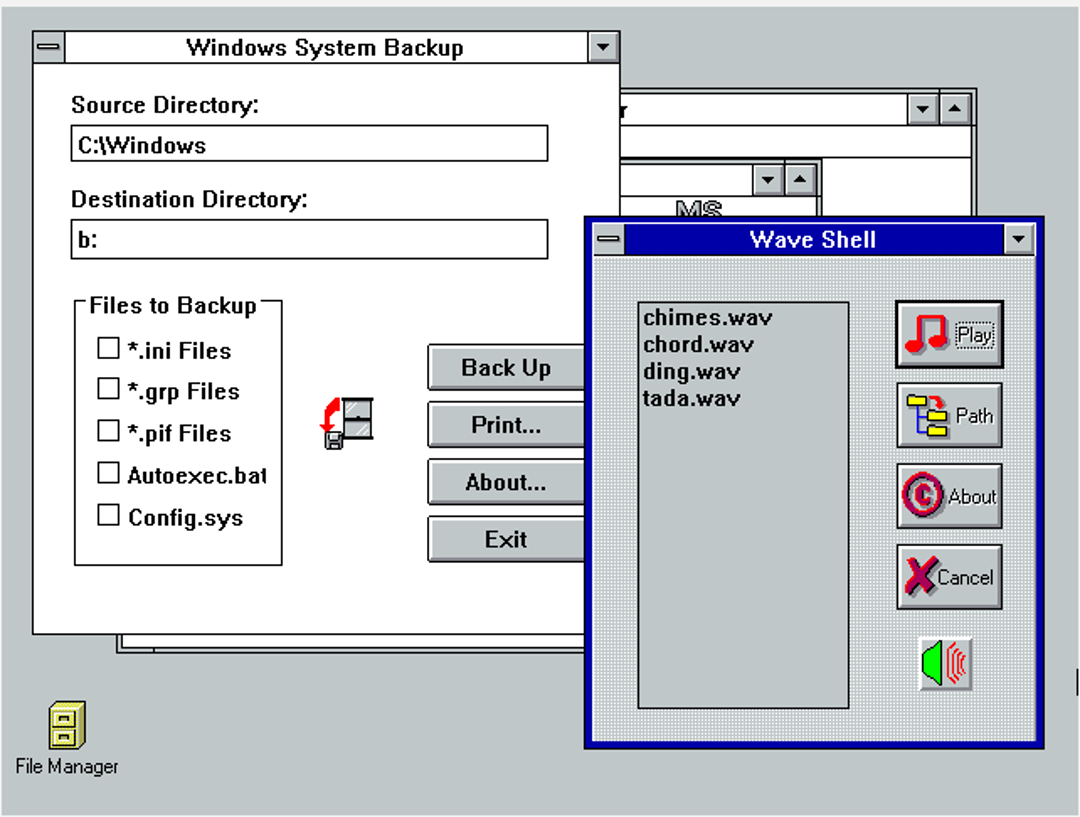
I soon came up with an idea for a shareware project — System Backup. Any of you who can remember back to the DOS and Windows 3.x days will remember that there were four files — AUTOEXEC.BAT, CONFIG.SYS, WIN.INI, and SYSTEM.INI — that were crucial to one’s setup. You’ll also remember that it wasn’t uncommon to twiddle with these files to eke out an extra measure of performance from the system. Backing those files up was critical to the tweaking, so I wrote SYSBACK.EXE to do the job quickly and easily.
Windows 3.1 introduced the amazing feature of *.wav files — sound through your tinny PC speaker! That led me to write WAVSHELL.EXE, which listed all your sound files and made them easy to play.
I guess I didn’t have much faith in the value of my shareware because I released it into the wild of the pre-internet shareware market for a measly $2. People soon started sending me checks in the mail — my address was in the About Box, with a plea to pay for the software. Soon I added a licensing scheme and a “nag screen” that would go away if the user entered a valid license key. I actually made a bit of money.
Eventually both programs became unnecessary as Windows grew more functional, and I abandoned things. I’m sure all that code is on a hard drive in a landfill somewhere.
But that doesn’t mean that SYSBACK and WAVSHELL don’t live on!
Last week, on a whim, I went searching to see if I could find any remnants of my glory days. Although it took a while, I was delighted to discover that both programs had clung to life in the dark crevices of the internet.
I found WAVSHELL.ZIP and SYSBACK.ZIP and downloaded them. Sure enough, there were the files — the 16-bit Windows executables, along with the accompanying READMEs formatted for Windows Write, the simple word processor that came with Windows 3.1.
Return to Windows 3.1
So, what to do? Naturally I fired up Claude and asked how to get all this running. It suggested I give Oracle VirtualBox a try. At first I tried an open-source DOS version, but soon ran into conflict with memory managers and Windows. Tweaking CONFIG.SYS like the old days didn’t seem to make a difference.
This led to downloading a set of *.img files of MS-DOS 6.22. I mounted the first disk in the A: drive of the virtual machine. (For you youngsters, the A: drive was a floppy disk — maybe you remember those?) I had to do a virtual version of the old disk shuffle for the three floppies, and then do the same to install Windows. Everything installed and ran like clockwork, and soon enough, Windows 3.1 was up and running.
Then, of course, I had to figure out how to get the files from my modern system to this ancient OS. This led me to WinImage, a shareware program (!) that builds floppy disk images for you. I built an image, copied the files onto the “disk,” and mounted it in the A: drive in the VirtualBox machine. I copied the files to the virtual hard drive, and behold!
Foundry
There they are, in all their glory. I have to say, it was quite a thrill. And they actually work!
Anyway, it was fun to remember all those halcyon days of CompuServe, 2400 BAUD modems, and getting checks from strangers in the mail. It seems strange to me that 35 years from now, some software developer will be writing a column about the deep dark past when people used to actually write code, argue about what programming languages were best, and, who knows, even had to type things out by hand.
OpenAI is building an AI-powered smart speaker nobody wants. That is, if you believe the Bloomberg report from Mark Gurman and you've read his description of said rumored device.
According to the report:
"OpenAI believes the product’s defining feature will be its personality and ability to connect on a humanlike level with users. The speaker incorporates mechanical elements that can move on their own, creating a sense that it is alive and not just an object responding to commands. The machine also will draw on personal information such as emails to better understand its owner."
The news sources, it appears, come from an insider who decided to spill all the juicy details mere hours after Apple dropped a blockbuster trade-secrets lawsuit on OpenAI's head. OpenAI claims it's done nothing of the sort, and recent reports say that Apple's claim that the AI giant has not even responded to Apple's earliest concerns was based on it potentially incorrectly identifying the former Apple employees who left to join OpenAI (allegedly with Apple trade secrets in tow).
Apple's concerns here are twofold: First, these former employees had access to many of Apple's secretive product development details and may even have asked recruits to share fresh details when they approached them to interview for jobs at OpenAI. The other concern is that Apple is already far behind in the AI race, and if Apple's plans for Siri, AI, and a potential robotic desktop home assistant were also leaked, it could harm its ability to catch up in multiple market sectors.
This latest news, which may or may not be accurate, should put Apple's fears to rest.
OpenAI is apparently not building something that could ably compete with any of Apple's key hardware or future hardware initiatives.
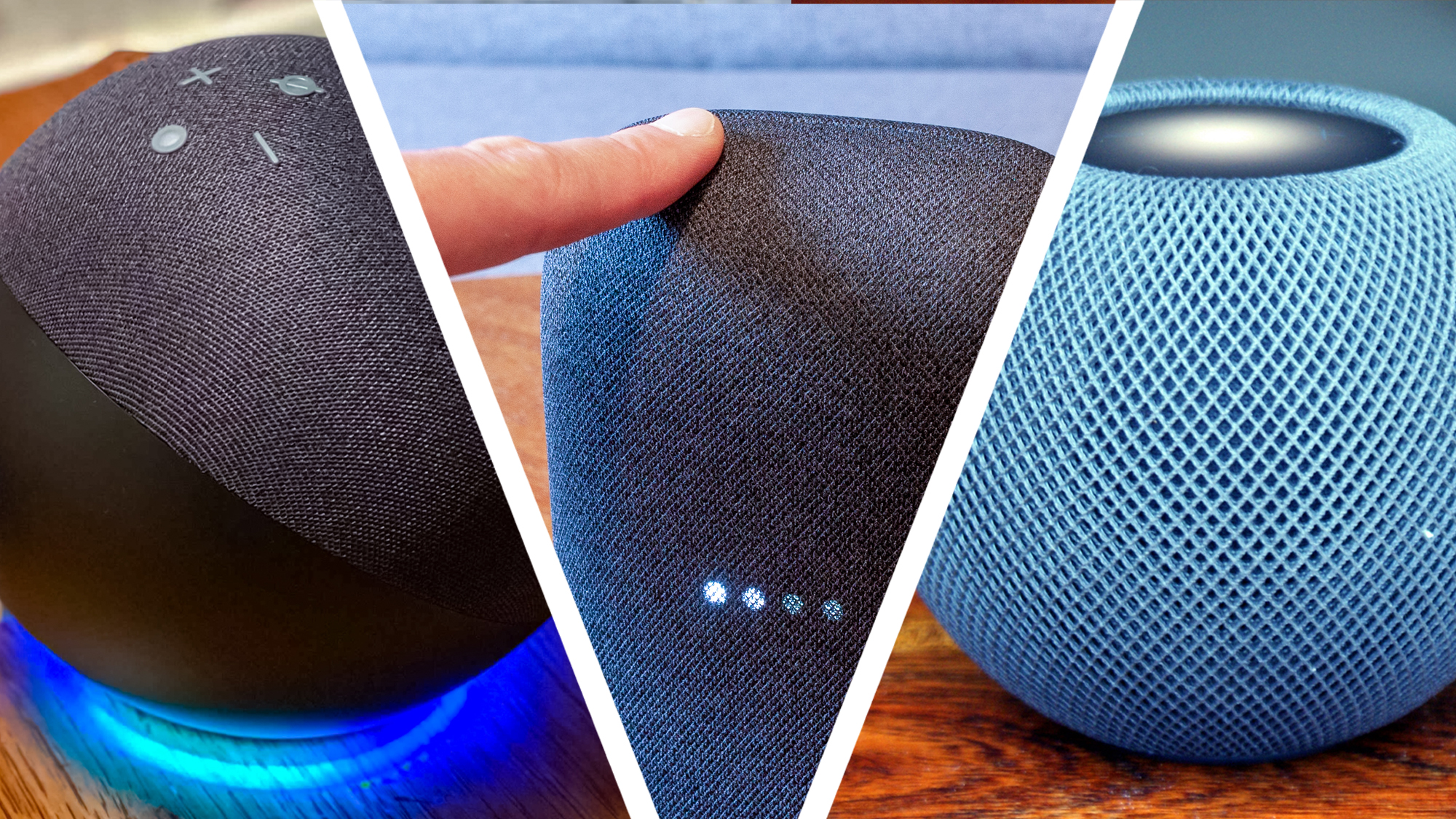
First of all, there's the smart-speaker-ness of the whole rumored OpenAI concept. There are already too many smart speakers on the market, many of them with their own smart assistants. Amazon, for instance, is smack in the middle of trying to convince millions of customers that not only do they need Echo devices throughout the home, but they need the AI-powered Alexa+ to guide them through their smart home experiences and, to some extent, their lives.
Apple has its own HomePod, Siri-infused speakers, which may get considerably more powerful with the Gemini foundation model-backed version arriving this Fall.
Put another way, smart speakers are a known quantity in the home consumer electronics space, and I think what most tech companies are realizing is that people like and use them, but mostly in limited ways: they want music, occasional answers to simple questions, and voice control of their smart home devices. That's it.
Why does my speaker think it's alive?
(Image credit: Future)
OpenAI appears to be prepared to offer something different: a personality-filled speaker that can watch you, move to engage, seem alive, and generally make you feel uncomfortable.
Obviously, that would not be the objective, but it could be the result. Who needs a speaker that quietly watches you as you walk from your kitchen to the den, waiting and hoping for you to say, "hey ChatGPT, what's up with the Strait of Hormuz today?"
In my home, we have a Psync smart security webcam with one oddball feature: it has a motorized body that can turn almost 360 degrees on its base and lift its thin, rectangular face and camera to keep track of people and alert me to intruders. However, most of the time, it's just watching us move around the house, and I can tell you that my family hates it. Sometimes I come home and find its face forced down so it can't pop up and track anything.
Now, imagine a larger and far smarter OpenAI AI smart speaker in your home, watching, waiting, chiming in when you don't want it to, and generally making people feel uncomfortable.
This will not be the breakout hardware hit OpenAI is hoping for.
Look, I was under the impression that OpenAI (really Jony Ive and Sam Altman) were working on an AI wearable. I didn't love that idea either, but it was a lot less creepy than this.
So, Apple, chill out. OpenAI's plans are no threat to you, even if they do allegedly have a bunch of insidery Apple information.
Microsoft has been pushing hard to make Visual Studio Code a major way to consume its AI services, mostly in the form of GitHub Copilot. GitHub Copilot’s deep integration with VS Code brings many conveniences — inline autocomplete, for instance — but it’s frustrating for those, like me, who would rather use another model provider, or even a locally hosted LLM, for those functions.
Visual Studio Code 1.122 introduced a new feature, “Use BYOK [Bring Your Own Key] without a GitHub sign-in,” that allows you to “use chat, tools, and MCP servers in air-gapped or restricted environments where GitHub sign-in isn’t possible.” More importantly, it “enables fully offline workflows with local models like Ollama.”
In other words, you can now use locally hosted LLMs for chat, tools, and Model Context Protocol servers inside Visual Studio Code. The one thing you still can’t do is use a local LLM for inline and next-edit suggestions — at least, not without additional tooling.
Choosing a model for BYOK mode
If you want to use a local LLM with VS Code’s bring-your-own-model system, the first thing you need is a way to host the model. VS Code lacks a model-hosting mechanism of its own, although it’s conceivable that a VS Code extension may offer something like that in the future. That said, hosting models is complicated enough that a dedicated app is really needed for the job.
One easy way to host models is via a product like LM Studio, a convenient GUI for standing up, serving, and managing LLMs on one’s own hardware. The model host does not have to be the same system you run VS Code on, either. It can be on a server box you control, or on a cloud instance.
The choice of model is also important. Many models are powerful but won’t run well on commodity hardware because they’re simply too big. A good rule of thumb is to choose a model that fits into existing VRAM, along with the memory needed for a sizable token context (the more, the better). Also, the model should be suited to coding and development work. Some models in this vein that fit comfortably into 8GB VRAM include:
Once you have a model up and running, you can integrate it with Visual Studio Code. If you’ve disabled VS Code’s AI features, you will need to turn them on. Make sure the setting chat.disableAIFeatures is turned off. You can find it in Settings | Chat | Miscellaneous.
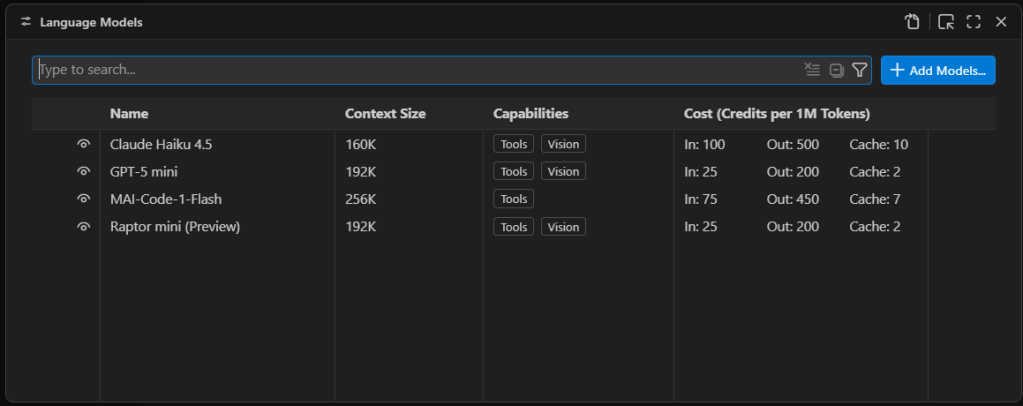
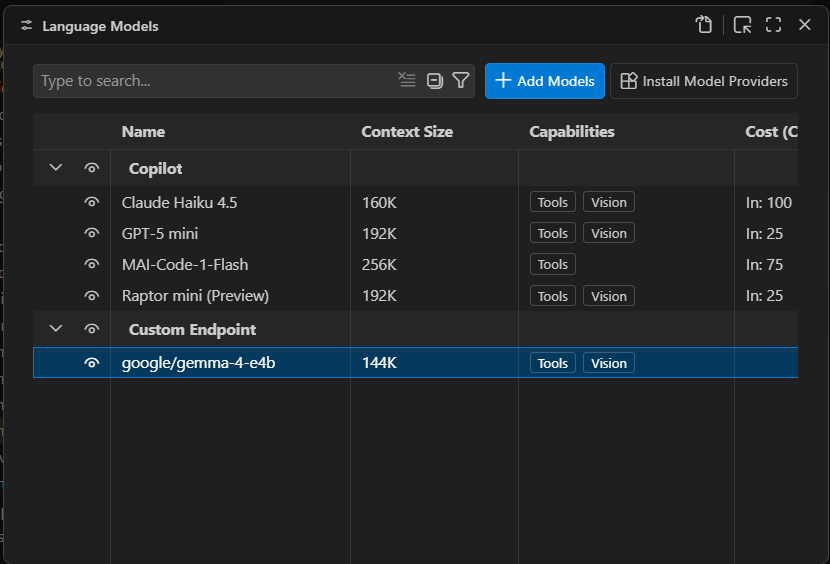
Third-party language models are managed through Visual Studio Code’s language model list. Press Ctrl-Shift-P and type Manage Language Models to open the list of existing language models.
Managing VS Code’s AI language model list. The models available by default are only models available as external APIs, not models that run locally.
Foundry
First you will see a list of the built-in models, which are all externally hosted. To add a new model, select Add Models at the top right and select Custom Endpoint.
You’ll then get a series of prompts:
Group Name: This is “Custom Endpoint” by default, but you can choose any name you want. The name is strictly for organizing the model list and doesn’t affect things like model recognition or connectivity.
API Key: If you’ve configured LM Studio to use an API key for serving models, provide it here. If you’re hosting the model locally and you haven’t explicitly set up API keys, you can leave this blank.
API Type: The options here are Chat Completions, Responses, and Messages. Most of the time you’ll want to use Responses, as it’s the most general-purpose option of the three.
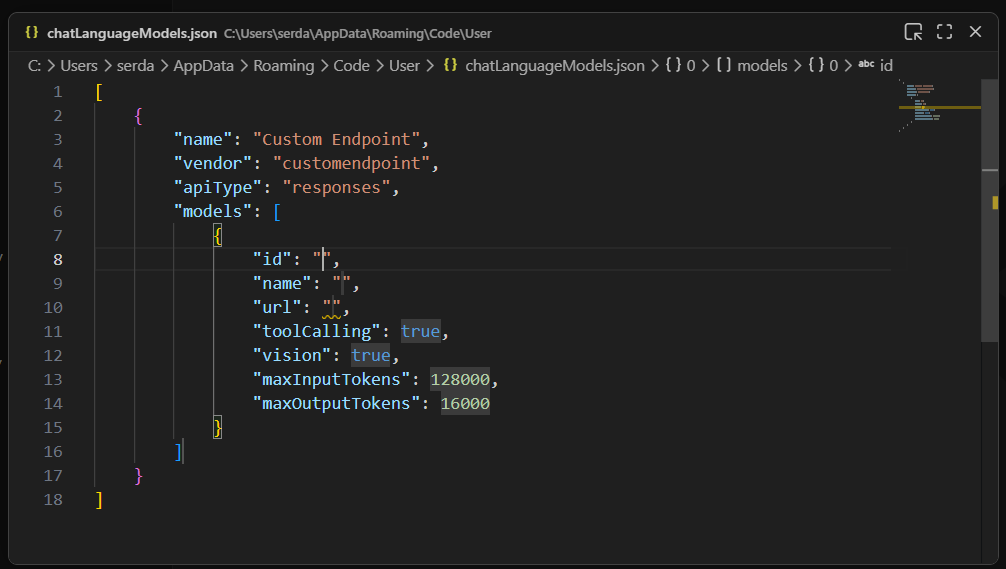
Once you finish providing those answers, you’ll be dropped into a modal editor for a JSON file that holds the details about the endpoint you’re configuring.
A newly created custom endpoint for a locally hosted model. The ID, name, and URL still need to be defined for this model to be useful.
Foundry
You’ll need to provide a few more details by typing them into the labeled fields:
id: A text field that uniquely identifies this particular entry. The choice of ID is pretty much arbitrary; if you’re using only a single model, the ID could be the model name.
name: The name of the model that is used to identify it on the model server. In LM Studio, you can get this name by clicking on My Models in the main interface, then selecting the three-dot icon for the model in question and clicking Copy Default Identifier. For Qwen 2.5, for instance, name might be something like qwen2.5-coder-7b-instruct.
url: The URL to the server’s endpoint. On LM Studio, this defaults to something like http://127.0.0.1:1234/v1. The /v1 at the end is important because that endpoint is used for autodiscovery of models and their capabilities.
The other fields generally don’t need editing. Most models have tool calling functionality. If you know for a fact that the model you’re using doesn’t have vision support, then set vision to false.
Once you have these fields filled in, you can close the modal editor to save the changes. If you reload the Manage Language Models page, you’ll now see your new endpoint:
A newly created local endpoint. The choice of name and group is arbitrary. “Custom Endpoint” is the default name for a newly created group of endpoints.
Foundry
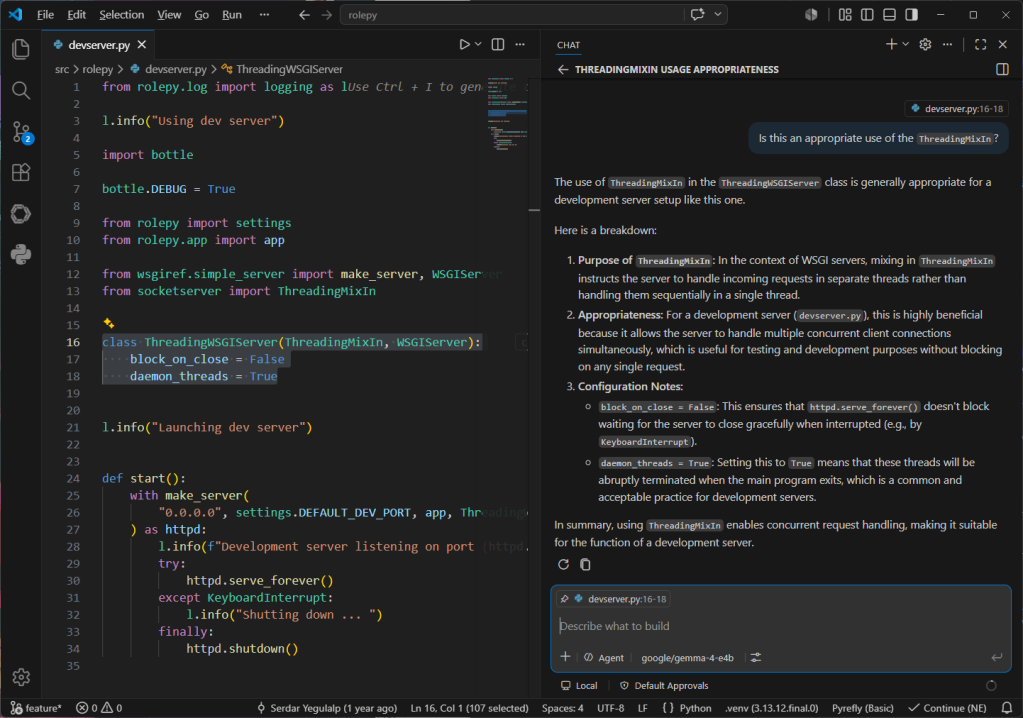
You should now be able to launch the chat window and use the defined model for conversation and utilities:
Conversing with the local model using VS Code’s chat window. Note the selected code block in the left pane that is being used as the context for the conversation.
Foundry
One current, and major, limitation of Visual Studio Code’s BYOK functionality is that it only works for chat and utility tasks. It doesn’t allow you to use a local model for inline suggestions or code completions. The only way to take advantage of local models for expanded functionality with VS Code is to use a third-party tool like Continue.
It isn’t clear if Microsoft will eventually lift this restriction. GitHub Copilot integration in VS Code is a large part of how Copilot as a service reaches its target audience. For the time being, you can certainly use third-party and local models for a significant part of your AI-assisted development work in VS Code, and you can close the functionality gap with additional tooling.
Most generative AI tools know less about R than languages like JavaScript and Python, thanks to how much training data is available for each. However, with a little extra setup, you can give a large language model (LLM) the knowledge it needs to improve its R skills.
Here are 10 ways to help generative AI write R code like a pro.
Use a coding agent
AI coding agents have more power, flexibility, and coding-focused tools than general-purpose chatbots.
Anthropic’s Claude Code and OpenAI’s Codex agents have versions that run in a terminal, IDE extensions, desktop and mobile apps, and other integrations.
R users may also be interested in Posit’s Posit Assistant, which is designed for data analysis in both R and Python. It needs less setup for R than general-purpose coding agents, and it has more built-in knowledge about data science, R package development, and Shiny apps. Plus, it can read objects in your R and Python environments by default, which can be useful in some situations (although perhaps not if you’re working with sensitive data). There are versions of Posit Assistant for RStudio, the Positron IDE, and the terminal. Setup info is here.
Note: Posit Assistant is not the same as the older Positron Assistant that was demo’d at last year’s posit::conf(). The older assistant will eventually be superceded by Posit Assistant. Posit Assistant comes pre-installed with RStudio but not pre-activated, so you don’t need to use it unless you want to.
Google’s original entry in this space, Gemini CLI, is being retired in favor of a new “Antigravity CLI” starting June 18.
There are other IDE platforms with built-in agents, including Cursor and Windsurf, and terminal + subscription coding agents such as Warp, which was open-sourced in April. However, I won’t be covering those here.
You may be limited at work by what your employer allows you to use, but you can still experiment on your own with public data — and then lobby for a new agent if a different one better meets your needs. Whatever you choose, though, moving to one of these from a web-based chatbot should produce better code.
“The shift from chatbot to agent is the most important change in how people use AI since ChatGPT launched,” says Ethan Mollick, co-director of the Wharton School’s Generative AI Labs at the University of Pennsylvania.
Set up CLAUDE.md, AGENTS.md, or GEMINI.md knowledge files
All the major coding agents look for knowledge files to load each time you start a session, and you can easily edit those files. The files can include things like your proficiency in various languages and how you like to document projects. For example, I tell my LLMs that I’d like a README.md in every project with info on how to use the project and technical info on how the project was coded.
Most coding tools let you have both an overarching main file that’s loaded into every session, and an additional file per project.
If you’re adding Claude or Codex to an existing code base, the /init slash command will create one of those .md project files after scanning and analyzing the code. You can also ask an LLM to interview you to create or add to one of those files.
Claude Code looks for a user-level main CLAUDE.md file at ~/.claude/CLAUDE.md and then a project-level file at ./CLAUDE.md or ./.claude/CLAUDE.md. The /memory slash command shows where those files are located. Codex uses AGENTS.md files. Antigravity docs say it looks for a main GEMINI.md file plus GEMINI.md and/or AGENTS.md files in your working directory.
Positron Assistant is set up to read AGENT.md, AGENTS.md, POSITRON.md, CLAUDE.md, GEMINI.md, and LLMS.txt in a workspace root directory, according to the docs. See the Positron docs for more on custom instructions.
Use agent skills
Agent skills can turn an LLM with questionable R knowledge into an expert that understand how you want it to write code. You can develop your own skills, work with your LLM to create skills, or download skills written by others. Claude even has a skill to help you build skills. This is one of the best ways to stop having to repeat the same instructions over and over. Instead, the LLM will “remember” what’s in your skills files by loading them when they’re needed.
What’s the difference between the knowledge .md files mentioned above and a skill? I like to think of CLAUDE.md or AGENTS.md files as important background info that’s always available, while skills are more specific instructions that are useful at certain times. Or, as Claude Opus 4.7 put it: “Skills are for triggered workflows (‘when user asks X, do Y’). A standing rule that applies to every project isn’t trigger-based; it’s a directive I should always follow.” Standing rules should go in CLAUDE.md.
“Create a skill when you keep pasting the same instructions, checklist, or multi-step procedure into chat, or when a section of CLAUDE.md has grown into a procedure rather than a fact,” according to Anthropic’s Claude Code docs. “Unlike CLAUDE.md content, a skill’s body loads only when it’s used, so long reference material costs almost nothing until you need it.” Only skill descriptions are loaded at the start of each session, so the LLM knows what skills are available.
Anthropic originally created skills for Claude in October 2025 and then published the concept as an open standard a couple of months later. Most coding agents now use them.
Anthropic has an easy-to-folllow guide to creating custom skills here if you want to try your hand at building your own.
Posit Assistant comes with several R-related skills built in and allows users to add more. You’ll find them here.
If you’re not using Posit Assistant, you can add Posit-developed skills to another coding agent. Posit published a GitHub repository with skills for creating R packages, Shiny apps, and Quarto documents; for creating and resolving GitHub pull requests; for open-source R and Python package releases; for code reviews (R, Python, JavaScript/TypeScript, SQL); and for creating architectural documentation for a codebase. Browse them all here.
Read and edit the skills you download
Skills are just a folder with one or more markdown text files that have a structured YAML header. That folder can include optional resources and scripts, too. Skill instruction files are easy to read and edit, so you can make sure they do what you want. Tweak them as desired.
For example, Claude helped me write my own customized R skill. Claude leans toward tidyverse packages, but there are other packages I like a lot, too, such data.table. I made sure the R skill knows my package preferences, and under what circumstances I prefer each.
If one of your preferred procedures changes, remember to update the associated skills. Or, ask an LLM to update it for you. Keeping skills up to date will make your coding agent more useful.
Keep your CLAUDE.md or AGENTS.md files updated, too. Maybe you started off with a CLAUDE.md file that said you’re an experienced Python programmer who is just learning R. Three months from now, you might want to update your R skill level. Or, perhaps you told an AGENTS.md file that you like thoroughly documented code, but now you’d prefer a lighter touch. You may want to have your coding agent go over those files with you from time to time and ask you about the main points and whether they need updating.
Use the btw R package and its MCP server
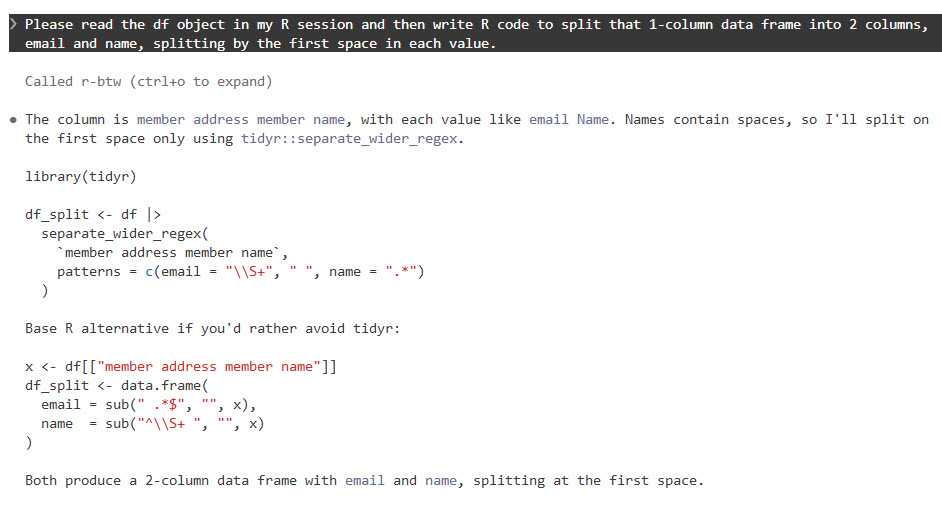
It’s frustrating when an LLM writes code based on an ancient R package version in its training data, or when it doesn’t know about a relatively recent package at all. btw solves this problem by letting your coding agent access info about all the R packages installed on your system. That means it can write code based on your specific R environment. Plus, btw lets an LLM access variables in your current R environment via a Model Context Protocol (MCP) server.
MCP servers are a standardized way for LLMs to access external data — in this case, your running R session (external doesn’t have to mean cloud). Like skills, MCP was created by Anthropic as an open standard and has since been adopted by most major AI platforms. The btw R package includes an MCP server, which you can install for Claude Code by running the following code in a terminal window (not R console).
claude mcp add -s "user" r-btw -- Rscript -e "btw::btw_mcp_server()"
btw comes with a lot of tools. It’s not a great idea to overload your LLM with tools it may never use. If you just want to register btw tools for accessing your R session and looking up package documentation, you can run a command like this instead:
To connect Claude Code to your open R session, you also need to run btw::btw_mcp_session()in every new R session. (I sometimes forget this part until I’m puzzled why Claude can’t read my R variables or even see what packages I have installed.)
You can see a demo of btw in this Posit video that compares Claude Code and Posit Assistant.
The btw R package lets Claude Code and other agents read objects in your R session.
Foundry
You don’t need to do this setup for Posit Assistant, since tools for accessing your R session and variables are built in.
Use plan mode for your projects
I cannot stress this enough. Just as humans benefit from having a plan before starting to implement a project, LLMs benefit from working through a plan before beginning to generate code. Plus, it can be useful at times to “brainstorm” with an LLM about structures and features, ask it for alternatives, or even have another LLM review a plan before implementing it.
Anthropic advises starting with plan mode. “Letting Claude jump straight to coding can produce code that solves the wrong problem. Use plan mode to separate exploration from execution,” they wrote in a best practices doc.
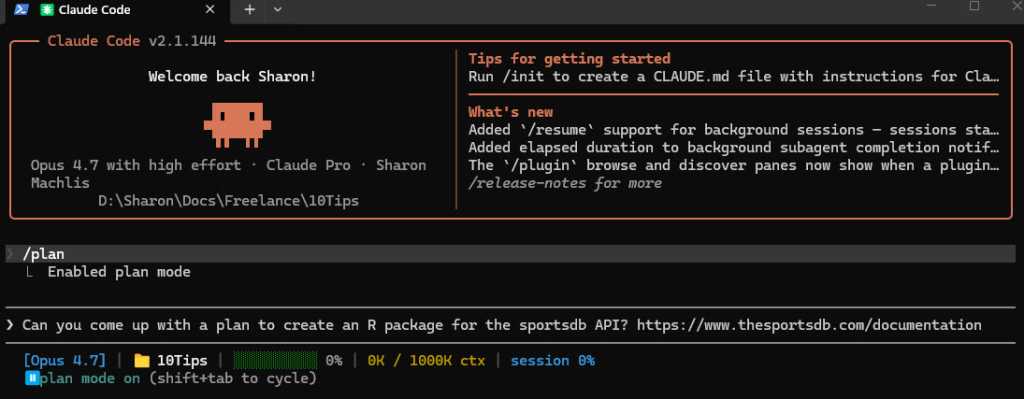
Claude, Codex, Gemini, and Posit Assistant all have a plan mode in their CLI versions that can be activated with the /plan slash command.
Foundry
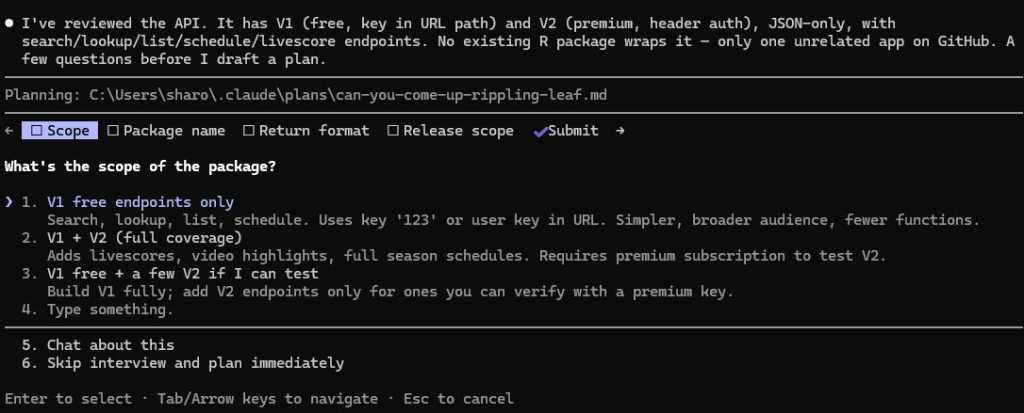
When in plan mode activated with /plan, Claude will often ask questions before coming up with its plan.
Foundry
Make sure your coding agent learns from its mistakes
This is one of the best tips I read first from Joe Amditis, associate director of operations at the Center for Cooperative Media at Montclair State University: If your coding agent makes a mistake and you work together to fix it, make sure to save that memory so it doesn’t make the same error again.
Your agent may have an auto memory system that’s supposed to do some of this (I’ve used Claude Code’s), but you can instruct any coding agent to keep a separate lessons learned file for each project, too, or ask it what’s the best way to ensure it doesn’t make the same error again. This isn’t a guarantee, any more than you can be assured an LLM will follow all the rules in a CLAUDE.md or AGENTS.md file or all the steps in a skill. But it has definitely cut down on my agents making the same errors over and over.
Have your agent write tests and do code reviews
Tests and code reviews done by a coding agent aren’t a substitute for a human checking that software works. Review an LLM’s results yourself any time a task is important! However, agent-generated tests are still a good way to head off some problems and cut down the time you spend as your LLM’s debugging partner. If you don’t know where to start to help your agent know how to test and review code, see Posit’s testing-r-packages and critical-code-reviewer skills. Your agent may also have built-in code review skills, such as Claude Code’s /code-review slash command.
Code review skills are available from many sources. For example, Sentry has a code review skill in its repository. Aimed specifically at its project’s needs, it can be a useful sample for similar skills. And superpowers is a popular set of general-purpose programming skills that’s billed as “a complete software development methodology for your coding agents, built on top of a set of composable skills and some initial instructions that make sure your agent uses them.” I don’t use superpowers, but a lot of other people clearly do given its more than 227,000 GitHub stars and 20,000 forks.
Another tip: Several experts suggest using a different LLM — maybe even from a different provider — to conduct a code review, since each model has its own strengths and weaknesses.
Don’t forget general prompting good habits
Whatever programming language you’re using, being clear will improve your outputs. Keep your requests targeted, and don’t expect the LLM to read your mind.
“Codex handles complex work better when you break it into smaller, focused steps,” OpenAI says in its developer docs. “Smaller tasks are easier for Codex to test and for you to review. If you’re not sure how to split a task up, ask Codex to propose a plan.”
“Take time to make your prompts as relevant as possible, just as you would when helping a new teammate scope a task,” Google advises in its Five Best Practices for Using AI Coding Assistants. “Consider what details you need to share for a person to succeed, and provide all those details to your AI tool.”
And, don’t load up your context window to the LLM’s published limit. Performance often degrades as you get close to the maximum token limit.
Take advantage of open LLMs, particularly if you have budget and token limits
Open-weight models — especially ones small enough to run on a desktop computer — may never rival frontier LLMs like Claude, GPT, or Gemini. But for a lot of R coding, they don’t need to.
To see how well an LLM can write R code, it should have the same kind of harness that Claude Code, Codex, or Posit Assistant gives larger LLMs. “The harness is the product,” argues Mallory Mejias at Sidecar, an AI education company. “The model is the engine inside it — important, but increasingly interchangeable.” I wouldn’t go that far, since I still find the LLM to be a critical piece of this equation, and models differ. But the same LLM will perform differently depending on the tools and context it has.
Posit recently added Google’s open-source Gemma 4 26B to Assistant’s existing options of larger, closed-source LLMs. “Up until this point, models of this size — small enough to run comfortably on high-end consumer laptops — were on our radar but not yet capable enough to drive an agent harness like Posit Assistant,” Posit senior software engineer Simon Couch wrote on the Posit blog. “This has changed in the last few months with releases like Gemma 4.” However, to use it in Posit Assistant in RStudio, you still need to run it through a Posit AI subscription, not locally. It uses 1/10 the budget that the same session with Claude Sonnet would consume.
Several projects can use Claude Code to run local LLMs. Ollama, open-source software for running LLMs locally, does this with the terminal command ollama launch claude --model , such as:
ollama launch claude --model gemma4:26b
The makers of Unsloth, an open-source framework for running and training models, say running local LLMs inside Claude Code can be very slow due to a cache invalidation issue. They say this can be fixed by adding "CLAUDE_CODE_ATTRIBUTION_HEADER" : "0" to ~/.claude/settings.json under “env”.
Unsloth can also use Claude Code to run local models, but it’s somewhat more involved to install and set up than Ollama. See this Unsloth tutorial.
Open-source coding agent Open Code runs LLMs from OpenAI, Anthropic, Google, Kimi, Alibaba’s Qwen, and others. I haven’t warmed up to it yet compared with commercially backed CLI tools I’ve tried, but it has 174,000 GitHub stars so clearly a lot of fans.
AI consultant Thomas Wiegold, who switched from Claude to Open Code, said “OpenCode covers everything I need for my daily workflow. It’s fast, the provider flexibility is genuinely useful rather than theoretical, and the TUI is better for extended sessions…. That said, I’m not going to pretend it’s all smooth sailing.” He noted some stability issues and a remote code execution vulnerability earlier this year.
Large language models remain imperfect and unpredictable tools, but they’re improving rapidly — as are the harnesses around them. Even frontier LLMs in commercial coding agents can ignore instructions at times and otherwise behave in unpleasantly surprising ways. However, you’ll vastly improve your chances of generating quality code if you use coding agents, take time to set them up with quality instructions, and remember good prompting techniques. Good luck!
—
Coding agent info
Claude Code – Anthropic’s coding agent is available in the terminal and as an IDE extension, a desktop app, mobile apps, Slack app, and a cloud version that can work directly in your repos on GitHub. Arguably the first breakthrough coding agent, it now includes an elegant remote-control option where you can start a session on your desktop and then continue it on a phone or tablet. While designed for Claude LLMs, you can use it to run local LLMs via tools like Ollama or Unsloth Studio. When using Claude models, it tends to offer less usage than other vendors’ options. Anthropic has posted the terminal version’s code on GitHub, with usage governed by Anthropic’s commercial terms of service. You can use Claude Code via API pay per use or as part of a Claude subscription.
Codex – OpenAI’s answer to Claude Code is available via terminal, app, IDE extension, or cloud, with integrations for GitHub, Slack, and Linear. The CLI tool is open source under an Apache license, available on GitHub, and works via API pay per use or as part of a ChatGPT subscription.
Posit Assistant – The Posit (formerly RStudio) coding agent is designed for data work in R and Python, although Posit senior software engineer Simon Couch told me it would do fine for programming work for other uses and in other languages. It is available for the RStudio IDE (via a Posit AI subscription in RStudio), Positron IDE, and as a stand-alone CLI terminal app, although the CLI tool currently doesn’t feel as full-featured as the IDE integrations (that may change). As of this writing, you can also use API keys from Anthropic, OpenAI, and Snowflake Cortex and a GitHub Copilot account in Positron. Posit Assistant is being updated quite frequenty, Couch told me. If you tested it a month or two ago, it has more capabilities now.
Antigravity CLI – Google’s terminal-based tool will be replacing the Gemini CLI for unpaid and Google One users this month. There’s also an Antigravity IDE, SDK, and platform for orchestrating multiple agents. One advantage of Antigravity: Google offers a free plan with access to Gemini 3.5 Flash, Gemini 3.1 Pro, Gemini 3 Flash, Claude Sonnet 4.6, Claude Opus 4.6, and gpt-oss-120b, and what it describes as “generous” but undefined weekly rate limits based on “the degree we have capacity.”
I was blessed with a terrific high school English teacher. Ms. Jewel was funny, kind, interesting, and tough on us. I can still spell “ecstasy” on the first try because of her. One of the more memorable lessons she taught was a “Hemingway and Fitzgerald” module.
I loved the short stories of both, but Hemingway’s work always stuck out for me. It’s cliché to say that Hemingway was terse, but we only say it because it is true. He could pack more into a page than most writers. He didn’t waste a syllable.
Software developers are soon going to have to take a lesson from Hemingway.
It’s not hard to be concise in code. You have to be, by design. The compiler won’t put up with any throat-clearing and jibber-jabber. You can’t meander. You have to use a very strict set of words and symbols, and you have to use them in a defined way.
Let me explain. Claude Code, Codex, Copilot, and the rest all love to be “spoken” to in Markdown. We used to define our code with unit tests and specifications written for humans. Now, it’s all about the spec. And the spec needs to be both complete and concise.
It needs to be complete in the sense that if you leave something out or forget to define something, the agent will very likely fill in the gaps for you. Forget a feature or requirement, and the agent will go off confidently and almost certainly in the wrong direction.
At the same time, you need to be concise. Because if you are too effusive, you may give the agent ideas that you don’t want it to have. If you write like Fitzgerald — lush and expansive — the agent will be off and running in a direction you can’t be sure about.
Our compilers will stop cold if we aren’t precise and concise. Our agents? They will proceed with confidence, diligently producing a result that looks great but isn’t what we want.
So we need to learn to write like Hemingway and pack as much meaning into as few words as possible. Or, as Paul Graham said:
Foundry
Let’s be clear
For years, we’ve been writing semi-vague Jira tickets and expecting our fellow humans to fill in the gaps and “get the gist” of what we were trying to do. We don’t have that luxury anymore. Developers who aren’t able to move on from “Jira-speak” to “Agent-speak” are going to struggle. If we don’t follow Graham’s advice in writing those specs, who knows what we’ll get.
Maybe someday agents will know the ins and outs of our business well enough to “know what we mean,” but they can’t today. The time we used to spend coding now needs to be spent perfecting our new craft of writing precise specifications for our agents to execute.
Every listicle ever written on “How to be a Great Developer” says you need to be a great communicator — but that was communication with other humans.
Ms. Jewel always taught us that our writing is only as clear as our thinking. Our compilers forced us to write clearly. Our coding agents won’t do that. I’m sure there are many developers out there now who wish they had listened more closely to their high school English teacher.
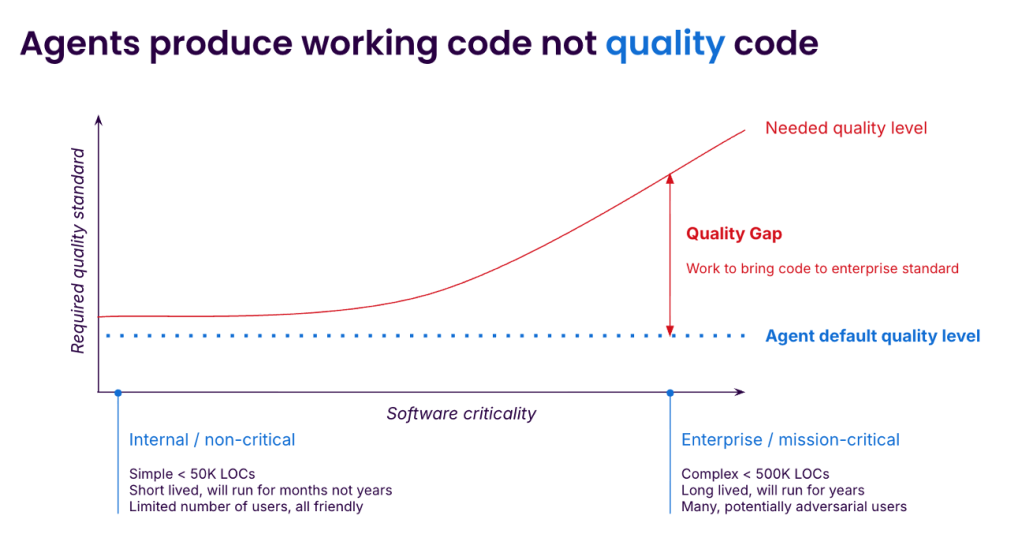
Developers are caught between the joy — or pressure — of using agents to ship 10x faster today and the dread of how they will maintain that code tomorrow. The gap between “vibe” code and code that can be deployed to millions of users is vast and easy to underestimate. Closing the gap requires care, expertise, and effort, with the payoff coming later. Agents are able to complete increasingly complex programming tasks but without the quality we need. What’s missing, and how can we fill the gap?
Sonar
Why agent-generated code degrades: the bloat problem
Enterprise code has to clear three bars: it must be maintainable, reliable, and secure. Out-of-the-box AI agents can miss all three. Let’s focus on the biggest and most visible maintainability issue, which is bloat: redundant validation, defensive checks that cannot fire, near-duplicate functions, dead code that nothing removes. A None check on a parameter typed as dict. A try/except around a call that never throws. Two functions, identical except for the negation in their return statement.
Bloat varies dramatically by model. Sonar’s LLM Leaderboard runs every frontier model through 4,400+ Java tasks and analyses the code generated. To complete the benchmark, GPT-5.4 High generated 1,159,000 lines of code at an 81.05% pass rate, while Claude Opus 4.7 Thinking generated only 336,000 lines of code to return a better than 82.52% pass rate. Different models generate dramatically different code to achieve similar outcomes.
Bloat is not just messy. Carnegie Mellon researchers studied 807 open-source projects that had adopted Cursor, matched against 1,380 controls, measured by SonarQube. A short-term velocity gain disappeared by month three, while static analysis warnings rose 30% and code complexity rose 41% — both persistent. The harder it became to change the codebase and the more bugs it contained, the more the velocity was dragged down. Any experienced developer will know how this goes: quality problems compound until the code feels impossible to change and the only option is the dreaded rewrite.
Three forces produce bloat once a model is in use:
Agents do not feel the maintenance burden. Armin Ronacher, the creator of Flask, made the point on the Pragmatic Engineer podcast in late April. Humans feel the cost of bad code over time, and as Ronacher put it, “if the pain gets too big, you as a human are incentivized to fix the cause of your pain” — so we refactor. Agents do not. They obliviously extend bad structure indefinitely. A senior engineer’s job is to say no to unnecessary abstraction. The agent has no equivalent reflex.
Training rewards apparent completeness. Pretraining corpora are full of explanatory material — Stack Overflow answers, tutorials, README snippets — deliberately self-contained and verbose. Post-training compounds the effect: human raters prefer outputs that look thorough, so models learn that “comprehensive” reads as better. When uncertain which edge case matters, the safe move is to handle all of them. Each guard is locally defensible. The aggregate is bloat.
Iterative generation has no deletion pressure. Agents add but rarely delete. Removing dead code does not make any test go green, so superseded functions accumulate alongside their replacements. SlopCodeBench, a March 2026 benchmark across 11 coding models, found rising structural complexity in 80% of trajectories and rising verbosity in 89.8%. Agents continue to patch bad code, treating every task as if it’s their last.
AC/DC: the loop that compensates
What closes the gap is a loop around each iteration of agent work. The agent does what it is good at — generating code — and our job is to wrap that with three steps the agent cannot reliably do on its own. At Sonar we call this the Agent Centric Development Cycle, or AC/DC: guide, verify, solve.
Guide
Many teams overcorrect on context. They paste the style guide, three years of architectural decisions, and the entire onboarding doc into the agent’s instructions and expect output to improve. ETH Zurich researchers tested this and found the opposite: large context files often reduced task success against no context at all, and added 20% or more to inference cost.
Keep agent-facing context short — under 200 lines is a useful heuristic — and restrict it to fundamentals that can’t easily be inferred from the code: naming conventions, architectural invariants, what has been tried and failed. However, this will only get you so far, so make sure to provide specific context for each task. If you have architectural expectations, don’t expect the agent to guess them. Software architecture tools can be used to provide additional context in the guide phase.
Task shape matters too. Break the work into steps and agree on a plan; ask the agent to provide three solutions and evaluate the impact on quality of each. There is no perfect software architecture, and you understand the trade-offs in your codebase best, so think critically about the changes before they happen. Without this, the agent will confidently pick an option, seemingly at random, and the further it goes the harder it is to “unpick.” If you want to test this, ask three instances of your preferred agent to complete a task that involves some polymorphism and watch each one confidently suggest a different solution.
Verify
The most expensive verification mistake is doing it last. Reviewing 200-line pull requests (PRs) after the agent is done is the dynamic behind the Faros/DORA figures Addy Osmani highlighted: 98% more PRs merged in high-adoption teams, review times up 91%. Verification inside the loop is different. Unit test runs, static analysis, and security scanners produce output the agent can act on. This is where AI-native tooling belongs: purpose-built for the agent to invoke, not just for humans to consult through a UI.
Human reviewers cannot keep up. When agents merge twice as many PRs per week and each one takes nearly twice as long to review, doubling the review staff still leaves you behind. Automated verification is the only response that scales. Fast feedback has always been a fundamental tenet of good software engineering. Feeding it directly back to the agent protects the developer from simple mistakes and leaves them headroom to work on the harder ones.
Solve
If verification happens within the agentic loop, the agent can fix any issues whilst the code is being generated without expensive remediation steps. Static analysis tools can guide the agent on how to resolve the issue quickly. Some cases need human judgment — a None check at a system boundary may document a real precondition. But most of the work is mechanical. Automate the obvious fixes and let engineers spend their attention on the cases that are not.
The investment that compounds
Better models will keep arriving. They may not change the mechanism of bloat or the dynamics of compounding decay. The loop is what does — bounded tasks, sharp context, in-loop verification, and a deliberate “solve” step to clear bloat before it accumulates.
The same logic governs how autonomy should expand. Reduce human interventions only when the agent’s guide, verify, and solve cycle is making them redundant. Our biases can sting us here: an agent’s ability to write code can lead us to agree with it more than we should. Don’t trust blindly; wait for the evidence.
The teams that will be shipping enterprise-quality code with AI agents in 18 months are not the ones running the “best model.” They are the ones treating workflow as the engineering investment, with the seriousness once given to build systems and CI. The model is the tool, the workflow is the discipline. That is where the durable advantage compounds.
—
New Tech Forum provides a venue for technology leaders—including vendors and other outside contributors—to explore and discuss emerging enterprise technology in unprecedented depth and breadth. The selection is subjective, based on our pick of the technologies we believe to be important and of greatest interest to InfoWorld readers. InfoWorld does not accept marketing collateral for publication and reserves the right to edit all contributed content. Send all inquiries to doug_dineley@foundryco.com.
Apollo astronauts trying to rest on the way to the Moon kept noticing the same thing in the dark. With the cabin lights down and their eyes adjusted, they saw brief flashes and streaks of light, dots and lines that no one else could see and that were not there in any ordinary sense. The cause, worked out over the missions that followed, was cosmic rays from deep space passing through the visual system. The broad cause is now well supported, even if the exact biophysics of how a passing particle turns into a flash of light is still not fully pinned down.
The flashes are an example of a phosphene, a sensation of light produced by something other than light entering the eye.
In this case, the something was radiation.
What the astronauts saw
The reports began on Apollo 11. After a period of dark adaptation, with eyes open or closed, crew members saw flashes they described as pinpoints, thin streaks, or small clouds of light. They were almost always colourless. They came at a rate of roughly one-half to two a minute, often enough to be a distraction when someone was trying to sleep.
This was not confined to one crew or one flight. Flashes were reported across the Apollo missions, and later by astronauts on Skylab, on Mir, and on the International Space Station. The phenomenon even had a kind of forecast. As early as 1952, the biophysicist Cornelius Tobias had suggested that people exposed to cosmic radiation in space might see exactly this sort of thing, and the team that investigated the Apollo reports traced them back to that idea.
How they tied it to cosmic rays
Suspecting a cause and demonstrating it are different tasks. To test whether the flashes really were caused by particles passing through the head, the Apollo 16 and 17 crews carried a device called the Apollo Light Flash Moving Emulsion Detector, worn on the head during the coast to and from the Moon. It used stacked photographic emulsion to record the tracks of charged particles, so that the path of a particle could be matched against the moment an astronaut reported a flash.
The numbers were small but telling. The detector was worn for about an hour on each of the last two Apollo missions. On Apollo 17, seventeen flashes were reported during the session, and two of them were matched to heavy cosmic-ray nuclei passing through an eye. Combined with the geometry of the eye and statistical modelling, that was enough for the investigators to attribute the flashes to cosmic rays. Ground experiments pointed the same way: when volunteers had their dark-adapted eyes exposed to beams of heavy ions, they saw comparable flashes.
What is still uncertain
The confirmed part is that cosmic rays cause the flashes. The unconfirmed part is the step in between, the biophysics of how a single fast particle produces a perceived point of light. Several mechanisms have been proposed, and more than one may contribute.
The leading idea is that the particle ionises tissue directly in the retina, stimulating the light-sensing cells or the neurons behind them as it passes through. This fits the ground experiments, where heavy ions produced flashes at intensities too low for any light to have been generated. A second idea is Cherenkov radiation: a particle moving through the clear jelly of the eye faster than light moves through that medium emits a faint glow, real photons generated inside the eye itself. The trouble is that Cherenkov light should look bluish and diffuse, and most astronauts described sharp white dots and streaks, which do not match. A third possibility is that some flashes come from particles striking the optic nerve or the visual centres of the brain, bypassing the eye altogether.
Decades on, reviews of the phenomenon still describe the specific mechanism as undefined, and note that the effects on the different parts of the visual system have not been fully separated.
The cause is well established; the wiring is not.
Why it still matters
On Earth’s surface, we are mostly shielded from this by the atmosphere and the magnetic field. In low Earth orbit the shielding is reduced but not gone, which is why astronauts on stations such as Mir and the ISS have also reported the effect. The Apollo crews saw the flashes more strongly still because they left that protection behind, travelling beyond the magnetosphere. The flashes were, in effect, the radiation environment of deep space made briefly visible inside a human head.
That is why they are treated as more than a curiosity. They are a perceptible sign that high-energy particles are passing through the body, the brain included, and the same radiation is a serious concern for long missions beyond Earth. On the International Space Station, experiments have used the visual system as a way to study how cosmic radiation affects the central nervous system. For a crew bound for Mars, who would spend months outside the magnetosphere, the dose to the brain over that time is one of the open problems of the trip.
What to watch
The people who travel back to lunar distance under Artemis and later missions will almost certainly see the flashes again. They will also carry better instruments and a sharper reason to use them. Pinning down how the flashes are produced would be a small result. Understanding what months of that radiation does to the brain behind the eye is the one that matters.

 Login
Login