Google has added the Pixel 9, Pixel 9 Pro, and Pixel 9 Pro XL to its Certified Refurbished program in the US.
Prices start at $499 for the Pixel 9, while the Pixel 9 Pro and Pro XL cost $649 and $699, respectively.
Every refurbished Pixel goes through Google's quality checks, uses genuine replacement parts, and includes a one-year warranty.
Google is also offering six months of Google AI Plus with 2TB of storage alongside every Certified Refurbished Pixel 9 purchase.
Google has started selling certified refurbished Pixel 9 phones in the U.S., with prices starting at just $499.
For those unfamiliar, Google has a pretty interesting Certified Refurbished program in the US, where the company sells pre-owned Pixel smartphones that have been professionally inspected, tested, and restored to meet its quality standards, all at a lower price than when they originally launched. And now, the Pixel 9 series has joined the program.
As spotted by 9to5Google, Google has listed several Pixel 9 models on its Certified Refurbished page, including the base Pixel 9, Pixel 9 Pro, and Pixel 9 Pro XL. The regular Pixel 9 starts at $499, while the Pixel 9 Pro and Pixel 9 Pro XL are available for $649 and $699, respectively.
(Image credit: Google Store)
Currently, the base Pixel 9 appears to be out of stock, although some configurations of the Pixel 9 Pro and Pixel 9 Pro XL are still available to purchase. And to make the deal a little more enticing, Google is also offering buyers a free six-month Google AI Plus subscription, which includes 2TB of cloud storage that can be shared across Google services.
This makes the refurbished Pixel 9 series a pretty decent deal, especially considering these aren't just regular second-hand smartphones.
Google says every Certified Refurbished Pixel goes through a multi-point inspection and rigorous quality checks covering things like the battery, display, housing, and cameras. If any repairs or replacements are needed, Google uses genuine parts to restore the device to its quality standards.
The refurbished phones also come with a one-year limited warranty, similar to what you'd get when purchasing a brand-new Pixel phone.
So, compared to the regular Pixel 9, which originally launched for $799, you're saving around $300 by going with Google's certified refurbished model. The Pro models also offer some pretty substantial savings over their original launch prices.
Of course, these are still pre-owned devices, but with Google's official refurbishment process, genuine replacement parts, and a one-year warranty, they could be worth considering if you've been looking to pick up a Pixel without spending flagship money.
Google's Rambler uses AI to clean up voice typing, removing filler words, correcting grammar, and formatting text.
Developer Akshay Kadam has released PixelBoard, a modified Gboard APK that enables Rambler on other Android phones.
Users can reportedly access Rambler by installing PixelBoard and setting it as their default keyboard instead of Gboard.
If you've ever wanted to try the Pixel 11's Rambler feature on your Android phone, you can now do so, although there's a catch.
The Google Pixel 11 series launched earlier this year with several new AI features, including Magic Cue, Magic Capture, and Rambler. For those unfamiliar, Rambler is Google's new AI-powered voice typing feature that offers a much more advanced experience than the regular voice typing we've had on Android phones for years.
Similar to AI voice typing tools that have been available on desktops for a while, Rambler automatically cleans up your speech, fixes grammar and formatting, and removes filler words like "um" and "uh" to give you properly formatted text. It can also understand corrections while you're speaking, add emojis, and even rewrite your text in different tones, such as formal or casual.
Unlike traditional voice typing, though, Rambler doesn't show a live transcription of everything you're saying. Instead, once you've finished speaking and tapped the Done button, it processes your speech and returns a cleaned-up, properly formatted version of what you said.
The feature has been exclusive to the Pixel 11 series so far, but a developer has now found a way to bring it to other Android devices.
(Image credit: Future)
Developer Akshay Kadam has shared a modified version of Google's Gboard app, called PixelBoard, on GitHub. The developer has patched the Gboard APK to enable Rambler on Android phones that don't officially support the feature.
According to the developer, you can install the modified APK on your Android device and switch your default keyboard from Gboard to PixelBoard to access Rambler without needing a Pixel 11.
That said, PixelBoard isn't an official Google app, and installing modified APK files always carries security and privacy risks. There's also no guarantee that Rambler will continue working through this method. Since the feature is officially exclusive to the Pixel 11 series, Google could block the workaround through a future Gboard or server-side update.
But if you're curious about Rambler, the developer's GitHub project offers an unofficial way to try the feature without buying a Pixel 11. Just keep in mind that you're installing a modified keyboard at your own risk.
A rumor claims the Pixel 12 series' model numbers appeared in an important database listing well ahead of its expected launch window in 2027.
An interesting screen resolution upgrade could boost clarity and detail.
The earliest rumor we covered came back in 2025 when the Pixel 12's codenames were discovered.
You've just ordered a Pixel 11 series phone. Congrats! But before it's even in your hands, here come the rumors about the next-gen Pixel 12 series, including its supposed model numbers and a potential upgrade. Away we go!
A post by OVR Plus highlights several "Google brand" devices in the GSMA database that reportedly represent the Pixel 12 series (via 9to5Google). The publication claims the database features model numbers GC0QU, GWU59, G7U1Y, and G4D5D. These supposedly align with the Pixel 12, 12 Pro, 12 Pro XL, and 12 Pro Fold, respectively. The post states that Google has not only begun development for the Pixel 12, but it's doing so with Android 18.
This probably isn't too surprising. It feels pretty typical that Google would make a move like this, especially considering how much more quickly the company has been developing major Android OS upgrades these days.
Rumors continue, with speculation about a display upgrade. OVR Plus alleges that Google wants to increase the screen resolution for its Pixel 12 series. The Pixel 12 Pro Fold is reportedly increasing from 2076×2152 to 2296×2404. Elsewhere, it's been alleged that the Pixel 12 Pro XL could jump to 1344×2952. The Pixel 12 and 12 Pro would also see slight increases in resolution. As OVR Plus notes, an upgraded resolution would vastly improve the phone's image quality.
In short, it's a visual upgrade, meaning tomorrow's Pixel owners could see sharper, clearer, and more vibrant photos, videos, and more on their phones. These rumors are very early, despite how exciting some of this is. It's worth taking this with a grain of salt, as anything could change between now and August (potentially) when the next series debuts.
Earliest rumors were a year ago...
(Image credit: Nicholas Sutrich / Android Central)
This may feel like a curveball, but this Pixel 12 rumor is the second we've seen. The first dates back to 2025 ... and yes, you read that correctly. In June 2025, a rumor about the Pixel 12 series codenames appeared. Of course, the Pixel 12 isn't expected to debut until 2027, but in 2025, the rumors couldn't wait. The following codenames were alleged: Galago, Sasquatch, Silverback, and Capuchin. These were reportedly for the Pixel 12, 12 Pro, 12 Pro XL, and 12 Pro Fold.
So, since last year, we've expected the Pixel 12 series to remain similar to what we've received over the past few generations. Four models, and one of them is a foldable. What's new is the supposed screen resolution changes. Rumors are still incredibly light, as the series is months and months away (or years, if you saw that in 2025).
Android Central's Take
Rumors are funny sometimes. For me, I'm waiting for a reason to switch to Google Pixel. It's not that I'm actively looking for a reason, though. I like the design of the phones, and Google genuinely has pretty neat features for its phones. Many are Pixel-exclusive, of course, as I've covered several in Pixel Drops. Guess we'll see, huh?
One of the truly new features onboard the Google Pixel 11 series is HiLight — a collection of eight multicolor LEDs on the back of the Pixel 11 Pro, Pixel 11 Pro XL, and Pixel 11 Pro Fold. It's quite limited at launch, however. HiLight serves two main purposes out of the box: It glows one of five colors when a favorite contact calls, and it glows when the Gemini voice assistant is active.
In other words, HiLight doesn't do a lot. Even if you like the idea of using HiLight to know when your contacts are calling, you can set it up for just five people before the colors get confusing. Luckily, there's a free and open-source app called HiLight Studio that aims to give you more control over the lights.
It takes a bit of work to set up, but after that's done, HiLight Studio delivers what your Pixel 11 Pro, Pixel 11 Pro XL, or Pixel 11 Pro Fold should've been able to do out of the box. Here's the step-by-step guide to getting started with HiLight Studio.
What HiLight Studio does, and how to download it
(Image credit: Brady Snyder / Android Central)
Put simply, HiLight Studio gives you full control over the eight individual LEDs that make up the HiLight module on the back of your phone. It can do solid colors and animated patterns, and it's customizable. You can control it from the app or a Quick Settings tile.
HiLight Studio is the brainchild of Dhananjay Bhosale on GitHub, and you can sideload it from there. Crucially, the app is now on the Google Play Store for open testing. So you can download it for free from a trusted source with no sign-up required.
I thought HiLight Studio setup would be tricky — it wasn't
(Image credit: Brady Snyder / Android Central)
HiLight Studio isn't an app you can simply download and start using, because it requires privileged access to the Android lights service, according to the app's developer. You can achieve this by rooting your phone, using Android Debug Bridge (ADB), or Shizuku — an app that allows other apps to access privileged APIs without the risks of rooting your Android device. Even as an Android expert, the process sounded intimidating, but it wasn't.
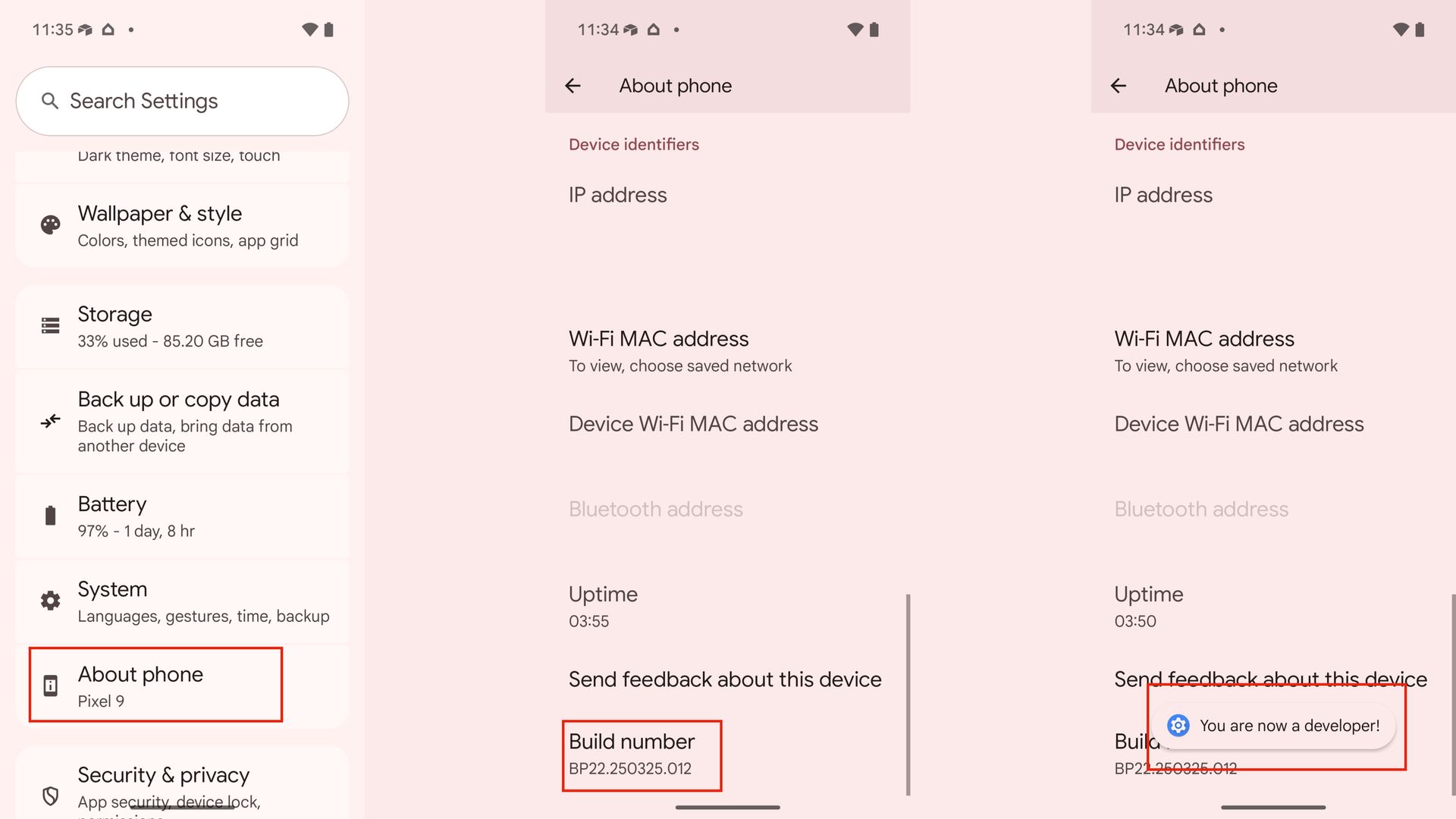
1. Open the Settings app on your Pixel 11 Pro, Pixel 11 Pro XL, or Pixel 11 Pro Fold.
2. Scroll down to the About phone section, and tap it.
3. Find the Build number and tap it seven times to enable developer options. You will need to enter your device passcode to confirm the change.
(Image credit: Future)
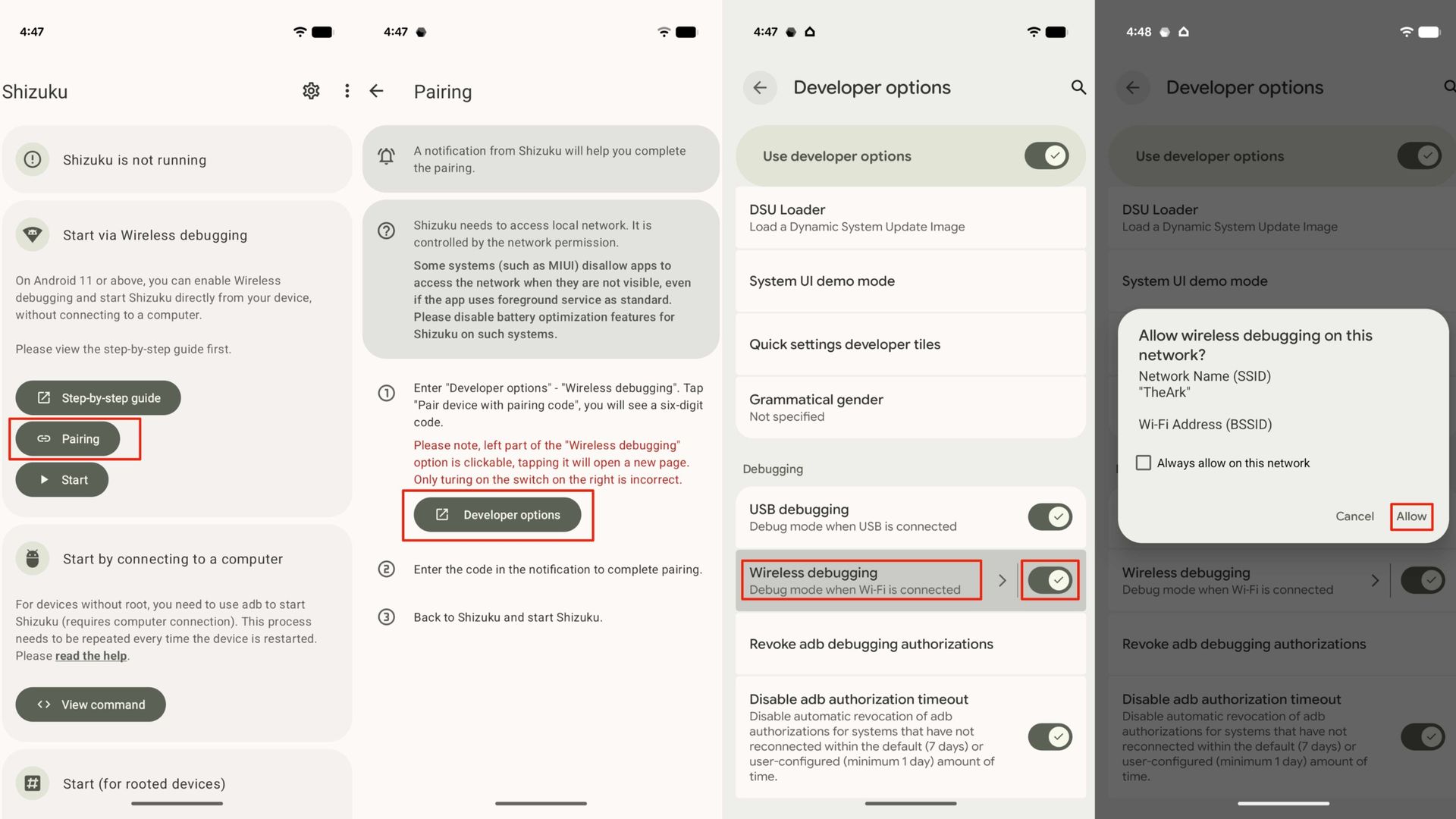
After you've enabled developer options, you can use wireless debugging to start Shizuku. Here's how to do it:
1. Open Shizuku and tap the Pairing button.
2. Open the Settings app and navigate to System -> Developer options. Alternatively, you can tap the Developer options shortcut in Shizuku.
3. Flip on the Wireless debugging toggle in Shizuku, and tap the Wireless debugging menu.
(Image credit: Future)
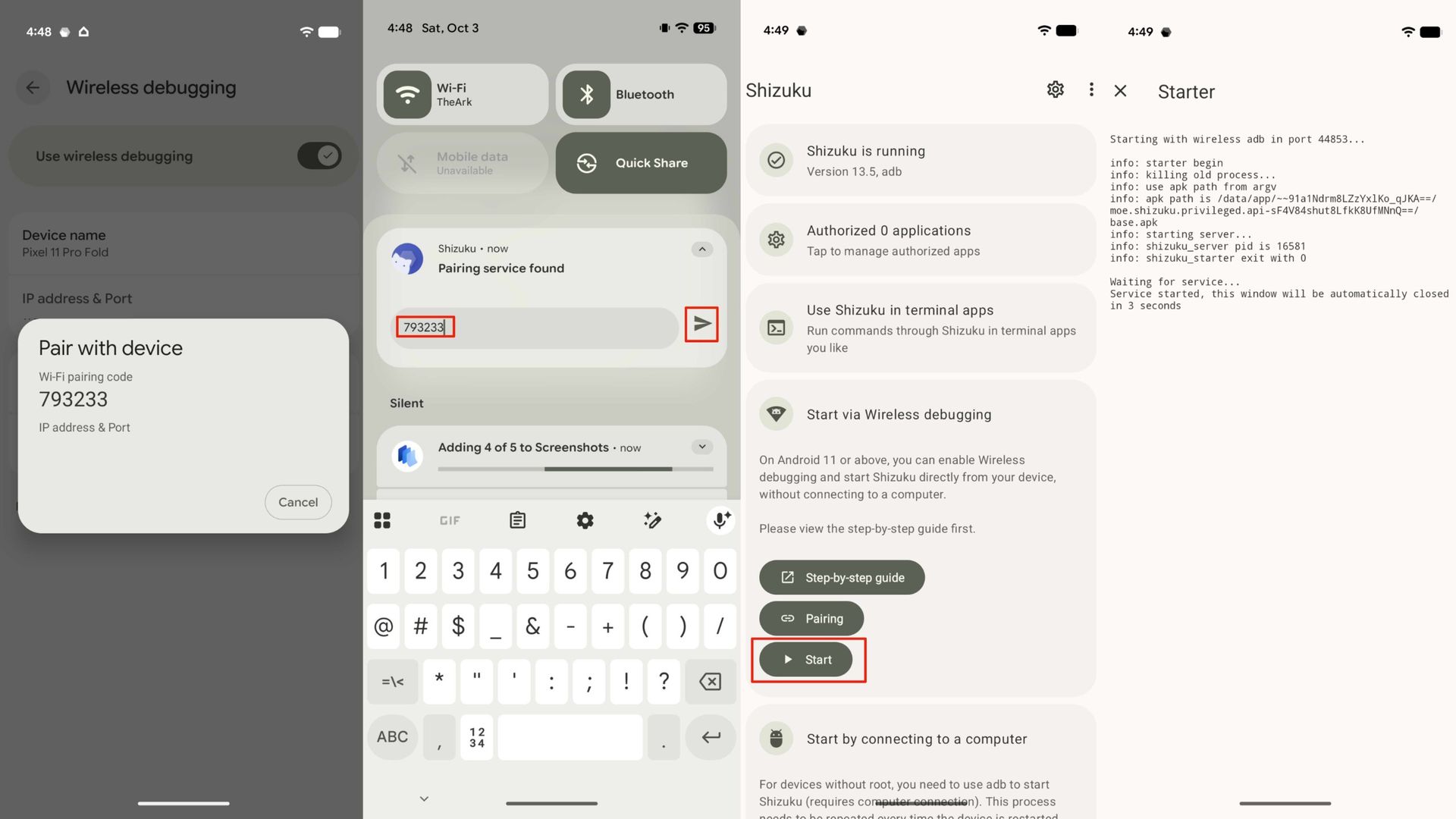
4. Press Pair device with pairing code. Hit Allow to confirm your choice to allow wireless debugging on your network.
5. A pairing code will appear. When the notification from Shizuku appears, enter the pairing code in the notification and press Send.
6. Now, Shizuku is paired. Press Start in the Shizuku app to finish setup.
(Image credit: Future)
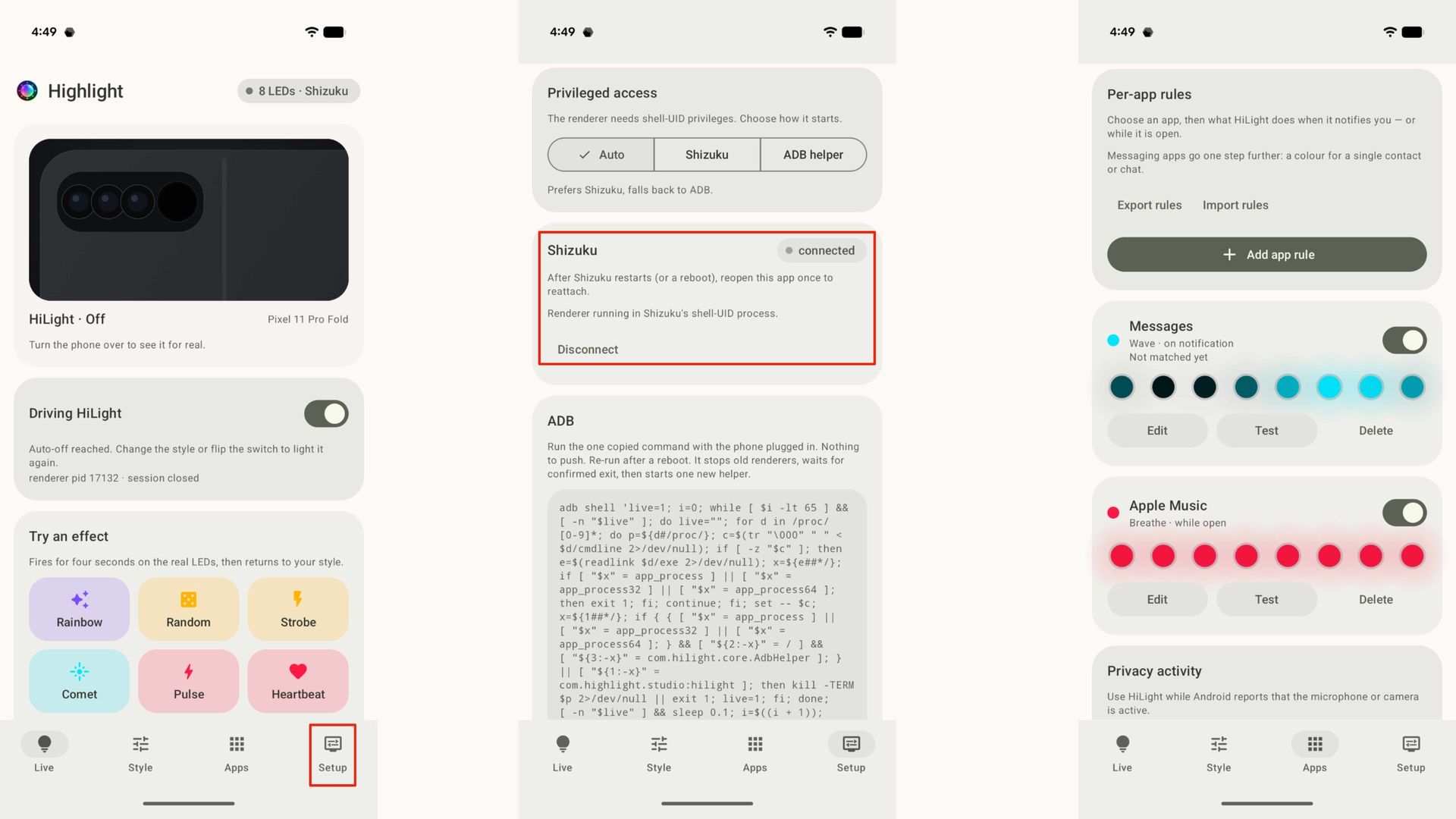
To put the finishing touches on setup, you need to link HiLight Studio to Shizuku. Don't worry, this one is quick and easy:
1. Open the HiLight Studio app.
2. Switch to the Setup page.
3. Look for Shizuku and tap Request access. Finally, approve the request.
(Image credit: Future)
That's it — you've now granted HiLight Studio access to the Android lights service. Now, you can enjoy the fun part, which is customizing the lights on the back of your phone. While there are a lot of steps in this process, they're pretty painless, and I didn't run into a single issue during setup.
You'll need to restart the HiLight Studio render and Shizuku every time your device reboots. Unless you reboot your Pixel often, this shouldn't be too much of an inconvenience.
HiLight is finally as customizable as it was meant to be
(Image credit: Brady Snyder / Android Central)
After setup, opening HiLight presents you with a Live screen that shows you what the HiLight Studio renderer is doing right now. You can test out a lighting effect on this screen. This allows you to get a feel for the nine LED effects supported by the app: Rainbow, Random, Strobe, Comet, Pulse, Heartbeat, Breathe, Wave, and Radar. As you demo each effect, it'll run for four seconds before returning to your default.
Near the bottom of this page, you'll see the App rules you have enabled. If this is your first time trying out HiLight Studio, you won't see anything here. Instead, you'll need to tap the Apps tab. This is where the real magic begins — you can set up exactly what HiLight does for a particular app. Here are a few examples of what HiLight Studio can do:
Show a color or animation when an app receives a notification.
Show a color or animation when an app receives a notification from a specific contact.
Show a color or animation while an app is opened.
Show a color or animation while Android reports the microphone or camera is active.
There's a ton of room for customization here, and these app rules only scratch the surface of what HiLight Studio can do. In the Setup page, you can specify how long HiLight Studio can keep the LEDs active before they automatically shut off. These lights aren't designed to be active for long periods of time, which is why these limits are in place.
You can override the auto-off defaults and allow up to five minutes of continued use. However, hardware protection is a built-in feature that lowers the brightness after 10 seconds of continuous use. Additionally, the eight-LED array will turn off if it has been lit for more than half of the last 10 minutes.
Why you should try HiLight Studio on your Pixel 11
(Image credit: Brady Snyder / Android Central)
When you unbox your Pixel 11 Pro, Pixel 11 Pro XL, or Pixel 11 Pro Fold and try HiLight for the first time, you'll immediately realize it has tons of potential. Unfortunately, Google hasn't realized that potential in HiLight's current implementation. The two use cases officially supported by the Pixel 11 series won't meaningfully change how you use your phone.
HiLight Studio will, which is why it's worth giving the app a shot on your new Pixel phone. Hopefully, Google adds similar functionality to HiLight natively in the future.
Google
Pixel 11 Pro Fold
Glowing Google foldable
The Google Pixel 11 Pro Fold is a standout foldable in its own right, with rare IP68 durability and magnetic Qi2 support. But it also gets the HiLight feature, and you can fully harness it with the free HiLight Studio app.

 Login
Login