❌

Normal view

Google Photos could soon be built much deeper into Samsung Gallery

What you need to know

  • Samsung's OneDrive Gallery integration is ending soon, but Google Photos appears ready to take its place.
  • A new Gallery Cloud Sync service has appeared on the Galaxy Store with support for backing up to Google Photos.
  • Samsung hasn't announced the Google Photos integration yet, but it could start rolling out within weeks.

Samsung has started laying the groundwork for what appears to be the replacement for its outgoing OneDrive integration, and unsurprisingly, it's Google Photos.

Earlier this year, Samsung announced that users would no longer be able to use OneDrive to back up photos and videos directly through the Samsung Gallery app. Until now, Galaxy users have been able to automatically sync their Gallery photos and videos with OneDrive without needing to use another app or service.

However, that partnership is coming to an end later this month. And now, Samsung appears to be preparing its replacement with none other than Google Photos.

X user Sandeep Adap has spotted a new Samsung service called "Gallery Cloud Sync" on the Galaxy Store, which appears to be designed to take over from the existing Gallery OneDrive Sync integration. The app listing says Gallery Cloud Sync will safely back up your memories, including photos and videos, to "Google Cloud" so you can access them across your devices.

The mention of Google Cloud might sound slightly confusing, but it appears Samsung is actually referring to Google Photos here.

Upcoming Google Photos integration in the Samsung Gallery app

(Image credit: X / That Josh Guy)

User That Josh Guy on X was able to preview the upcoming functionality, which isn't live just yet, and found that Samsung Gallery will offer an option to sync directly with Google. The Gallery settings will reportedly show your available Google storage, let you choose which albums to sync, and offer controls to sync over Wi-Fi or while roaming.

This could be a big change if you currently rely on OneDrive for Samsung Gallery backups, since you'll likely need to switch to Google Photos. That said, the overall experience should remain pretty similar, with the sync controls still built directly into the Gallery app.

The OneDrive sync option has already started disappearing from Samsung Gallery for some users and is expected to be discontinued completely later this month. Thankfully, Samsung's upcoming Google Photos integration looks like it could be an even more natural replacement.

Samsung hasn't officially announced Galaxy Cloud Sync or started rolling out the Google Photos integration just yet. But with OneDrive support ending soon, we expect the new option to become available sometime later this month or in early October.

Certified Re-Newed: refurbished Galaxy S26 series arrives to try and help you save

What you need to know

  • Samsung introduces the Galaxy S26 series to its Certified Re-Newed program.
  • The S26 Ultra starts at $1,099 (a ~$200 price drop), while the S26 and S26 Plus start at $759 and $929.
  • The company highlights that buyers can grab Samsung Care Plus protection with Loss and Theft during checkout for unlimited battery repairs and free screen replacements.

If you're looking to save some money, Samsung announced that its latest Galaxy S26 series is now available in its Certified Re-Newed program.

Today (Sept. 14), Samsung announced that its Certified Re-Newed program has welcomed the Galaxy S26, S26 Plus, and S26 Ultra. You can view this program as Samsung's refurbished phone line. As always, the company says its "Certified Re-Newed devices offer a like-new phone experience." It has taken in Galaxy S26 devices and equipped them with new (genuine) parts and a "brand-new battery."

A Certified Re-Newed Galaxy S26 Ultra starts at $1,099. This is roughly a $200 price drop from the standard, new flagship starting price (256GB). When it comes to the S26 and S26 Plus, the program shifts these prices to $759 and $929, respectively.

Samsung says you can only purchase these devices from the Certified Re-Newed program at its main store. The post states consumers can trade in their current phone for a Certified Re-Newed phone and receive "up to $720" in credit. You should check the specifics of this during purchase.

What's more, Samsung says if you are purchasing a Certified Re-Newed Galaxy S26 device, you can add Samsung Care Plus (with Loss and Theft) protection. This protection plan features unlimited battery repairs and free screen replacements.

Refurbished Galaxy S26

Samsung's Certified Re-Newed (refurbished phone) program welcomes the Galaxy S26 series are slightly lower prices.

(Image credit: Samsung)

We're a couple of months early, but Samsung brought the Galaxy S25 series into the Re-Newed program last November. The price drops were fairly similar to what we're seeing this year for the S26 series. Costs dropped anywhere from $150 to $260. The model and configuration (RAM/storage) made the difference here. The "cheapest" option last year was the Galaxy S25 with 256GB of storage for $709.

Joining the Galaxy S25 was the Galaxy Z Fold 6, as well as the Galaxy S25 Edge and the Flip 6.

At the time of writing this post (around 3:15 pm ET), the devices are not listed on Samsung's storefront. That should change. If you're interested, check back later today or perhaps later this week. You shouldn't fret about the refurbished tag; you'll still receive all of Samsung's newest features. Now Nudge and Now Brief were highlighted, and if you're getting the Galaxy S26 Ultra, you'll find the Privacy Display.

Internally, the Galaxy S26 series features Qualcomm's Snapdragon 8 Elite Gen 5 chipset.

TriFold sequel? 'Galaxy Z TriFold 2' rumors surge, and another device could join it

What you need to know

  • Rumors claim we might have a Galaxy Z TriFold 2 in 2027, as Samsung is supposedly moving ahead with development.
  • The TriFold 2 could feature a "more durable," thinner, and lighter design with a price tag similar to the original model ($2,800).
  • It's worth remembering the struggles Samsung encountered with the first TriFold (component prices/prices in general) and that it was a "limited release."
  • The TriFold lasted for three months before Samsung pulled the plug.

It's been almost a year since Samsung debuted its Galaxy Z TriFold. Rumors say there's a sequel on the way next year.

Over the weekend, tipster Lanzuk on Naver stated Samsung is already working on a Galaxy Z TriFold 2 (via 9to5Google). One thing the tipster mentions is the phone's price. Samsung could face issues; however, they claim this supposed TriFold 2 could be priced "similarly" to the originalβ€”around $2,899. When it comes to upgrades, Samsung is supposedly looking at three areas.

This alleged TriFold 2 could debut as a thinner, lighter, and "more durable" phone. Looking at what Samsung did with the Galaxy Z Fold 7 (and 8), reducing the thickness of that phone, this rumor strikes a chord. What's more, the idea of a "more durable" TriFold likely concerns its hinge/display for longevity.

Right now, these rumors suggest Samsung is sticking to its "original schedule" of releasing this "TriFold 2" in 2027. Additionally, rumors say Samsung might reveal a "slideable" phone, too. If it's what we presume it is, Samsung has shown off concepts of this type of phone several times over the past few years.

How the TriFold did

Samsung Galaxy Z TriFold hands-on testing at Dubai Mall on Android Central

(Image credit: Harish Jonnalagadda / Android Central)
Android Central's Take

The TriFold was an interesting device. Could you image the price tag of a sequel? If the original was around $2,800, what would part two be? Over $3,000? How many people are willing to throw down $3,000 on a folding phone? That's gaming PC money. That's money put toward something far more important. This is going to be interesting.

It's interesting to hear this rumor. We all remember Huawei's Mate XT surprise. It beat Samsung to the world of tri-fold phones. It's even more interesting since Samsung effectively stopped selling the Galaxy Z TriFold after three months...

Maybe this wasn't so surprising. Samsung always positioned the Galaxy Z TriFold as a "limited release." These rumors about a TriFold sequel mention something Samsung struggled with before: components. Developing the Galaxy Z TriFold was already incredibly strenuous due to high manufacturing and rising component costs. If Samsung is considering a TriFold 2, in the current climate, that might be difficult (on our wallets).

Nevertheless, it remains to be seen how Samsung would treat a TriFold 2. Another limited release might seem strange, but we'll have to see. The Galaxy Z TriFold debuted with a huge, tablet-like 10-inch internal display and a 6.5-inch cover.

More expensive Galaxy S26 phones might be on the way, but not for everyone

What you need to know

  • Overseas rumors claim Samsung's Galaxy S26 series could see a ~$100/149,000 KRW price increase.
  • Samsung is reportedly grappling with various issues impacting the phone market (RAM/memory).
  • This increase has been rumored for Korean consumers; however, Samsung's official statement says nothing is set in stone yet as rumors say this could all happen in October.

Prices are soaring all over the place, whether it's phones or gaming consoles. A recent rumor from overseas says Samsung's latest flagship phones might be next on the list.

A report by Hans Economy (Korean) claims Samsung is mulling over a potential price increase for the Galaxy S26 series (via SamMobile). According to the publication's sources, Samsung is now facing "difficulties" with "maintaining its existing pricing structure." The post alludes to the current stress placed on the phone industry: RAM and memory prices. With that in mind, Samsung is supposedly increasing its Galaxy S26 series prices by ~$100 (USD)/~149,000 KRW.

If this happens, it would push the Galaxy S26 to a ~$999 starting price, and the Galaxy S26 Ultra to ~$1,400. The post claims a mobile carrier started informing consumers about an impending price hike for the Galaxy S26 series. Here's the thing: nothing is confirmed. In fact, Samsung provided an official comment to Hans Economy about these rumors.

The company states that while it has been "internally reviewing" the idea of "adjusting" prices, "nothing has been finalized as of now" (machine-translated).

There's more to consider with these rumors. On one hand, it was suggested that Samsung could hike S26 prices in October for Korean consumers if its internal review finds success. However, it's unclear how widespread this hike could beβ€”meaning it's not clear if the U.S. would see it, too.

Prices are soaring

Samsung Galaxy S26, S26 Plus, and S26 Ultra

(Image credit: Derrek Lee / Android Central)

Let's not kid ourselves, Samsung (technically) already raised prices for the Galaxy S26. It was around the time the series debuted earlier this year. Compared to the S25 and S25 Plus, the S26 and S26 Plus cost roughly $100 more. The S26 Ultra's price remains the same compared to its past-gen counterpart. However, despite the price hikes to the first two models, Samsung's phones still performed well.

Specifically, the Galaxy S26 Ultra performed the best. According to early analytics, the Galaxy S26 Ultra achieved 71% of sales in the first three weeks. This year's Ultra has a lot going on, like the Privacy Display, so that might've helped.

And since we're talking about Samsung price hikes, it's hard not to bring up the horrendous streak it went on in the U.S. in April. Someone needs to save our wallets, because Samsung's Galaxy tablets were hit hardest. The Galaxy Tab S11 Ultra (1TB) jumped by $280 earlier this year to $1,899.

Android Central's Take

Price hikes are becoming quite the unsettling "norm." Looking at devices in a smart way has never mattered more. We might love to chase after "what's new," but when it starts hitting your wallet, you'll reconsider. Not everyone's in that sort of position where they can chase after every new phone or what-have-you. To be honest, it is that majority that gives companies pause. If they drop out, that's when they're in trouble.

Don't expect a major telephoto overhaul for the Galaxy S27 Ultra just yet

What you need to know

  • A reliable tipster says the rumored 50MP 4x telephoto with a large 1/1.9-inch sensor may not make it to the Galaxy S27 Ultra.
  • The upcoming phone is said to retain a 5x periscope with a smaller 1/2.52-inch sensor.
  • Samsung may ditch the dedicated 3x telephoto camera entirely, leaving the 5x periscope as its sole zoom hardware.

Samsung’s Galaxy S27 Ultra is reportedly getting a major zoom rethink after recent rumors suggested a 50MP 4x telephoto with a much larger 1/1.9-inch sensor. The supposed plan was to swap out the familiar 3x and 5x cameras for a single, larger sensor that could handle more of the zoom range.

Now that upgrade seems a lot less certain. Ice Universe claims on X that the Galaxy S27 Ultra will instead feature a 5x periscope camera with a 1/2.52-inch sensor, which would be pretty much the same sensor size as the one used by recent Ultra models. The competing 4x rumor was described as false, suggesting Samsung could remove the 3x camera while leaving the 5x unit as its only dedicated telephoto.

Don't believe that source, which has a long history of spreading false information.The Galaxy S27 Ultra will, of course, continue to use a 1/2.52-inch sensor for its 5x periscope telephoto camera.The recent claim that Samsung will "drop the 5x telephoto and switch to a…September 14, 2026

Samsung has a practical reason for going the safer route. The 5x module is already compatible with the company’s existing camera strategy, but a switch to a new 4x system would mean spending more on sensor development, optics, tuning, and production. If the difference isn’t dramatic enough, it may make more financial sense to stick with proven hardware.

Plus, native 5x optical reach means you'll still get sharp long-range detail at 10x and above with high-resolution sensor cropping, something a 4x lens can have a hard time with when pushed to high magnification.

But that doesn’t mean the 4x idea was for nothing. A 1/1.9-inch sensor would be much larger than the 1/2.52-inch 5x component, possibly allowing for cleaner zoom shots, enhanced low-light performance, improved dynamic range, and stronger portraits.

For now, the safer bet is one 5x telephoto with the 200MP main camera for lower zoom levels. Samsung has time to change course before launch, and with multiple S27 Ultra prototypes reportedly under evaluation, the final camera setup may not be set in stone yet.

The real test for Samsung will be whether its image processing can compensate for not having a bigger sensor if it sticks with the old 5x hardware. Otherwise, axing the 3x camera could be viewed as Samsung simply cutting the spec sheet.

I changed one setting on the Galaxy Z Fold 8 Ultra and got better battery life

There's a lot to like in the Galaxy Z Fold 8 Ultra, and although Samsung didn't make too many changes this year, the bigger 5,000mAh silicon battery means the foldable lasts considerably longer than its predecessor.

Thankfully, there's an easy way to boost the battery life even more. Samsung offers performance profiles within One UI, and I switched over to the Light mode, netting me a decent uptick in battery life. So let's take a look at what the mode has to offer, and why you should consider using it.

Standard vs. Light profiles: Is there a difference?

By default, all Samsung phones run the Standard profile out of the box, but there's a Light mode that's designed to prioritize battery life and thermal efficiency. These performance profiles are located in the Device care section, and you can easily switch between the two as needed.

Unlike Energy Saver mode, the Light profile doesn't actually make a difference in regular daily use. You still get 120Hz refresh and similar levels of fluidity when navigating the UI or browsing. What is does instead is reduce the clock frequencies of the processor, so it isn't using as much power all the time. This is absolutely fine on a high-end foldable, as Qualcomm's latest-gen silicon has plenty of power to spare.

As I said, I didn't see any difference after switching to the Light profile, and the device continued to be lag-free even while multitasking. Notably, the profile is only active in regular use; if you launch a game, it uses Game Booster (which is another thing entirely), so you don't need to limit the hardware if you play games regularly.

There's a clear benefit to using the Light profile. I got close to an additional hour of usage (not SOT) over the course of a day, and it meant I didn't need to plug in the phone until the end of the day. It particularly makes a difference with outdoor use, as the profile does a good job balancing thermals.

How to enable the Light profile

One UI 9 settings

(Image credit: Harish Jonnalagadda / Android Central)

Switching between the Standard and Light modes is as easy as it gets. This is how to do it:

  1. Go to Settings.
  2. Navigate to Device care.
  3. Select Performance profile.
  4. Choose Light.

That's all there is to it. The best part about this is that the feature is available on all Samsung devices, so if you're using an older Galaxy phone and need it to last a little longer, you should give it a try.

Who needs the iPhone 18 Pro when you can score $1,100 off the Samsung Galaxy S26 Ultra at T-Mobile?

TL;DR: Forget the iPhone 18 Pro, you can score $1,100 off the Galaxy S26 Ultra when you add a line with an eligible unlimited plan at T-Mobile deal.

Apple unveiled the iPhone 18 Pro earlier this week, and for folks who are tempted to try it out: I get it. Even as a representative of Android Central, I have to admit that the 18 Pro is going to give the Samsung Galaxy S26 Ultra a run for its money when we start ranking the best smartphones of 2026.

The iPhone 18 Pro utilizes a new A20 Pro chip that might match the performance of the Galaxy S26 Ultra's Snapdragon 8 Elite Gen 5 processor (time will tell), plus the Apple device boasts a larger battery and the ability to shoot video with Dolby Vision support. On the other hand, the Samsung Galaxy S26 Ultra is considerably lighter than the iPhone, and you get unique features like Privacy ID and an embedded S Pen stylus.

It's a close race, and it's one of those debates that will probably be raging for many months to come. While the tech sites sort it out, there's probably only one factor that really matters to you: whether or not you can get a good deal.

Preorder offers for the iPhone 18 Pro don't go on sale until September 12th, but if you're interested in the Galaxy S26 Ultra, you can save a whopping $1,100 right now by adding a line with the Experience More or Experience Beyond plans at T-Mobile. That drops the price of the premium flagship down to just $5.56 per month for 36 months, no trade-in required!

Samsung Galaxy S26 Ultra 256GB: $1,299.99 $5.56 per month with eligible line at T-Mobile

Purchase the Samsung Galaxy S26 Ultra with a new line on the Experience More or Experience Beyond plan and T-Mobile will give you $1,100 in promo credits over 36 months. That knocks the price of the premium flagship down to just $5.56 per month, no trade-in required.View Deal

Both of the unlimited plans included in the T-Mobile promotion give you unlimited talk, text, and premium data on the carrier's vast 5G network, a high-speed mobile hotspot, and a ton of international benefits. Going with the more-expensive Experience Beyond plan also gets you free Hulu and Netflix streaming, plus access to the same deals that are usually exclusive to new customers.

The Experience More and Experience Beyond plans start at $90 and $100 per month for a single line, respectively, but you can drop that price down considerably by adding multiple lines and using AutoPay. Adding four lines of the Experience More plan, for instance, will drop the price down to $42.50 per month for each line ($170 total).

The fact is, both the Galaxy S26 Ultra and the iPhone 18 Pro are excellent smartphones with prohibitively expensive price tags. Regardless of the device you choose, you're going to want a good deal, and this Galaxy S26 promo from T-Mobile is one of the best on the web today.

Multitasking is the Galaxy Z Fold 8's superpower. Here's how to unleash its full potential

11 September 2026 at 13:05

Whether you've just joined the foldable revolution or you've been a long-time foldable phone user, you're probably already aware of how amazing it is to have a mini tablet that folds and fits easily in your pocket. That feels more true than ever since the Galaxy Z Fold 8 came along.

But did you know that your Galaxy Z Fold 8 isn't just a massive canvas for one big app? Samsung makes it easy to run more than one app on your screen at once, and a handful of nifty new multitasking features on the Galaxy Z Fold 8 line further enhance what was already one of the best multitasking experiences in the business.

Whether you want to juggle two apps more efficiently, use a 3-way split screen, or run even more apps at once, the Galaxy Z Fold 8 is a great way to get things done without a laptop or another larger device.

The taskbar is the key

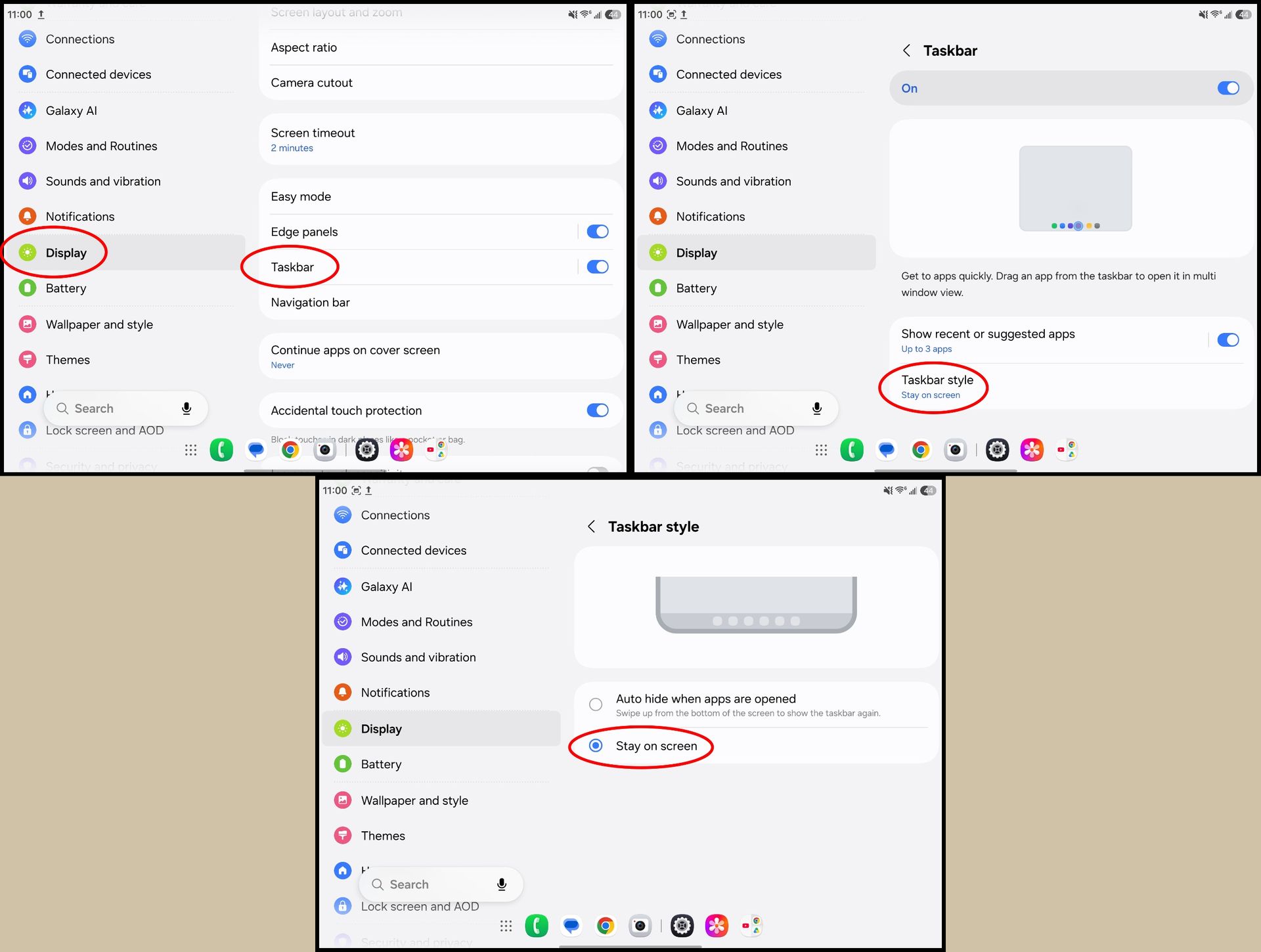
When you open your Galaxy Z Fold 8, you've probably seen that little floating taskbar appear at the bottom of the screen. By default, this taskbar isn't meant to stick around for long, but one setting changes that.

By pinning the taskbar, you can effortlessly open multiple apps at once, or quickly juggle between apps faster than you can by constantly going back to the home screen. Here's how to supercharge the taskbar:

1. Unfold the phone to use the larger inner display.

2. Open the Settings app.

3. Scroll down and tap Display.

4. Scroll down and tap Taskbar.

5. Tap Taskbar style.

6. Select Stay on screen.

Making the taskbar on a Samsung Galaxy Z Fold 8 stay visible at all times

(Image credit: Android Central)

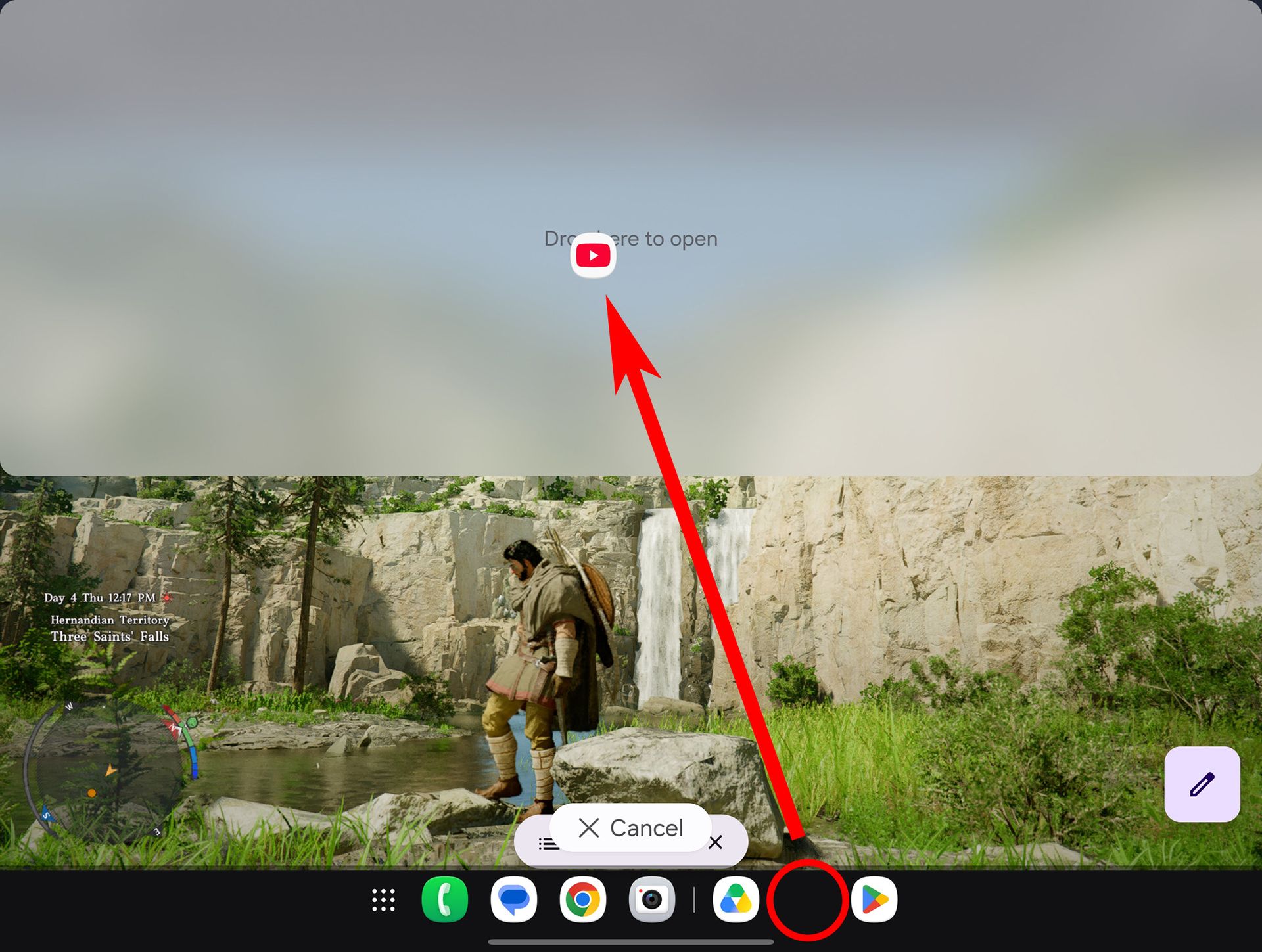
Now, the taskbar will always be visible on the inner display. You can tap any app icon to open that app, but the real magic happens when you press and hold an icon, then drag it around the screen. This lets you easily launch multiple apps at a time and split them any way you want.

Splitting the action

3-way multitasking on a Samsung Galaxy Z Fold 8

(Image credit: Nicholas Sutrich / Android Central)

Samsung launched two new multitasking features with the Galaxy Z Fold 8, including 3-way split screen and a new way to juggle between layouts. To get started, choose three apps you want to run side by side. For this example, I'm using YouTube, Chrome, and Google Docs.

1. Unfold the phone to use the larger inner display.

2. Open any app of your choosing. I started with Chrome.

3. Press and hold another app's icon, then drag it to any side of the screen. You'll see indicators to snap the app to a specific area on the screen.

Using the taskbar to run 2 apps in split screen on a Samsung Galaxy Z Fold 8

(Image credit: Android Central)

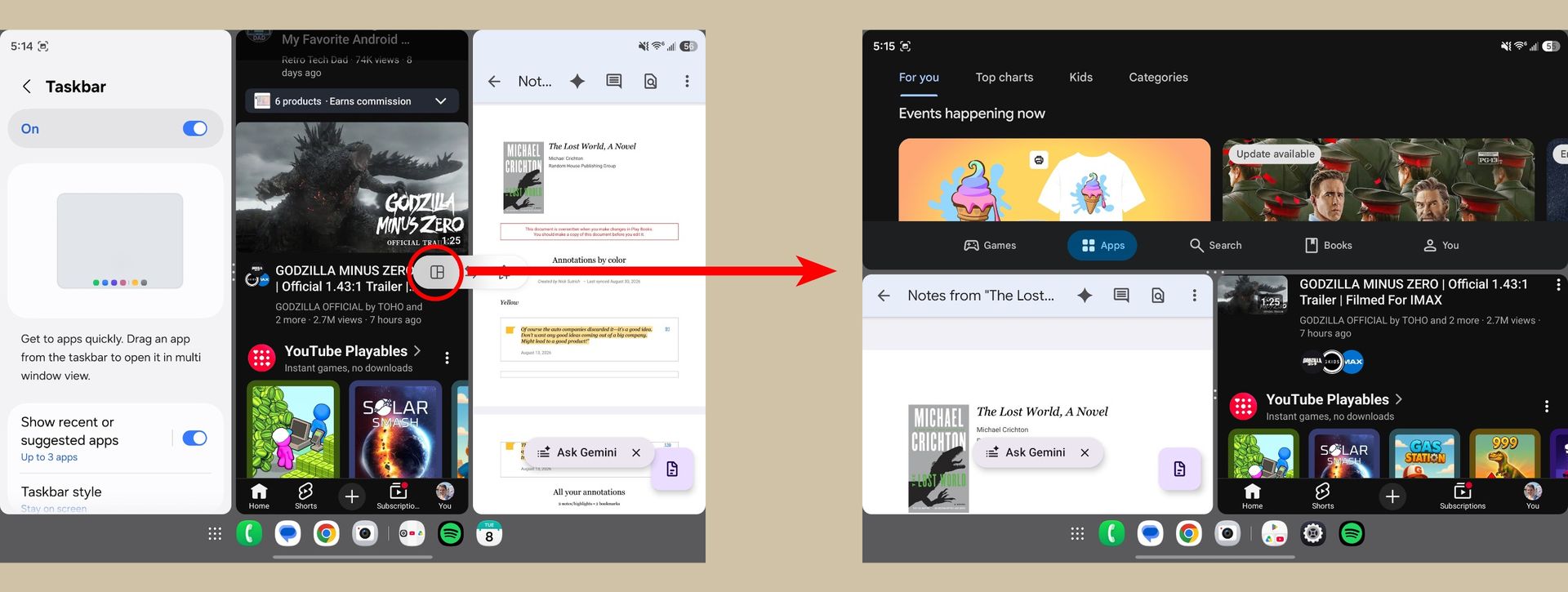
4. Choose another app from the taskbar. If you don't see the app you want, tap the app drawer button on the left side and choose it from there.

5. Drag this new app to a third section of the screen. Your Galaxy Z Fold 8 will show indicators for where you can drop the app.

Selecting different three-way app split screen layouts on a Samsung Galaxy Z Fold 8

(Image credit: Android Central)

Now that you have three apps running at once, you can play around with the layout. Most commonly, this means three apps run side by side, but Samsung offers many layout options. Personally, I think three apps side-by-side makes them a bit too small to be useful, and that's where we'll start.

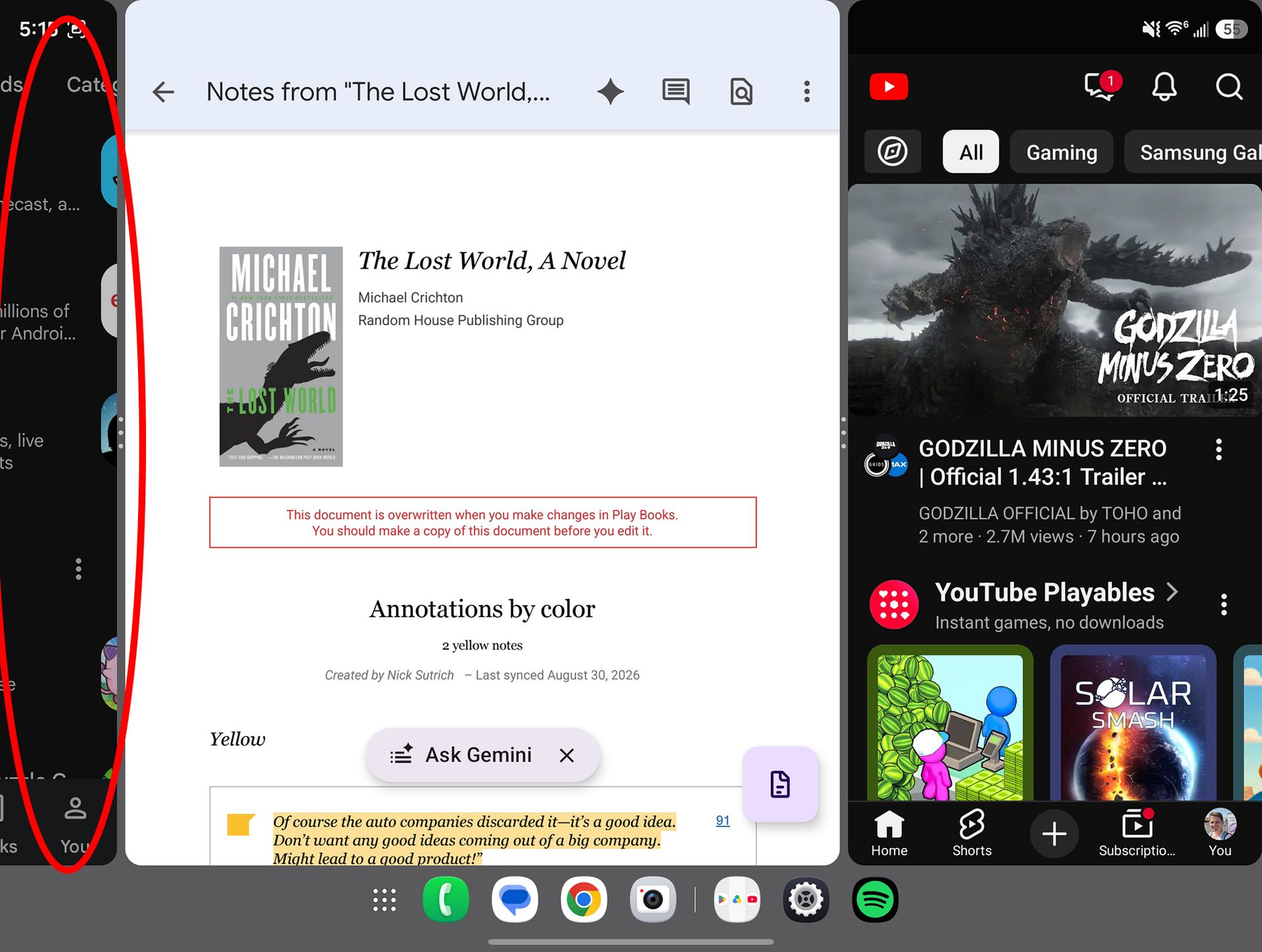
To enlarge an app, grab any separation bar by the "handle" β€” the part with the dots β€” and drag it outward. When running three apps at once, this will enlarge one app while leaving the others at the default size.

Multitasking with three big apps on a Samsung Galaxy Z Fold 8

(Image credit: Android Central)

Here's the coolest part about this setup: when you've got multiple larger apps running at once, the others will hang "off to the side." That lets you run nearly full-screen apps and quickly switch between them by just tapping the app that's off to the side.

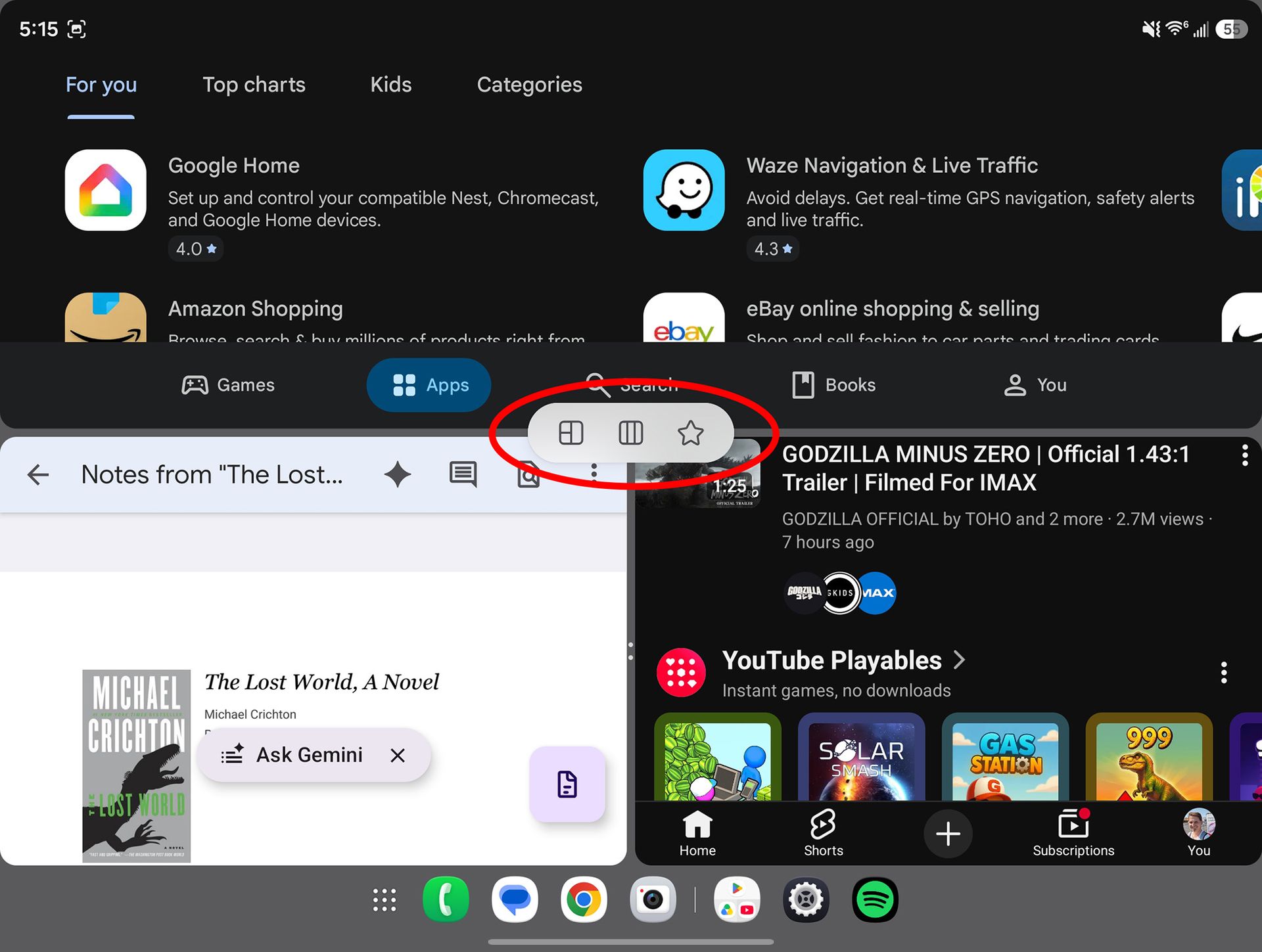
But if you want all the apps on one screen and don't want them all vertical, tap any of the "handles" β€” remember, that's the part of the separator line with the dots β€” then tap the grid icon that appears. Your apps will now be separated into one half-sized app alongside two quarter-sized apps.

Selecting new layouts in three-app multitasking on a Samsung Galaxy Z Fold 8

(Image credit: Android Central)

Tapping the handle also brings up additional options. You can easily swap apps between frames by tapping the handle between those two apps, then tapping the "swap" arrow icon. Additionally, you can tap the other grid icon to swap the location of the grid. That lets you move quarter-sized apps from the left to the side half of the screen, and vice versa.

You can even hover an app by dragging the app icon to the center of the screen, letting you run four or more apps at once, similar to a desktop OS. Which layout is your favorite? Let us know in the comments!

❌