❌

Normal view

Made by Google 2026 Launch Live: Pixel 11, Pixel 11 Pro Fold, Pixel Watch 5, Gemini, and all the news

Google is back this year with its Made by Google event, and we’re expecting a lot of Pixel news. Of course, Google is set to launch the Pixel 11 series, which will likely include several different smartphones as well as a new foldable. In addition, Google is expected to launch the Pixel Watch 5, and there could be some additional devices in the mix.

We hope you’re as excited to learn about Google’s latest smartphones as we are! Last year’s launch was filled with celebrities and internet personalities, and this year looks to be no different, with Stephen Curry, Shubman Gill, Ayami Nakajo, and more, with Trevor Noah hosting.

Over the next few days, we’ll be going over what you can expect and covering the event live as it happens so you don’t have to miss a thing! Scroll down for all the details!

When and what time is Made by Google?

The event is Wednesday, August 12, and it starts at 3 p.m. PT / 6 p.m. EDT.

How to watch the Made by Google event?

Google will stream the event on its official Made by Google YouTube Channel. You can also watch it live at the Google Store website. Click the Notify Me button below so you don’t miss a thing!

Google has been low-key hyping up its Pixel 11 series for some time, although we just didn’t know it. Earlier this year, the company gave us a glimpse of new features arriving with Android 17, and while the update is already out, there are still some features that haven’t arrived yet, and likely more that Google hasn’t even teased. What are you looking forward to the most?

The Android 17 logo on a Google Pixel 10 Pro XL

(Image credit: Nicholas Sutrich / Android Central)

One feature I can’t wait to get my hands on is Pause Point. It’s supposed to remind you to take a break from distracting apps with things like timers, breathing exercises, and even suggestions for less-distracting apps to use. Because we all need a reminder to take a break from social media, right? It’s actually a pretty thoughtful feature, one I never expected from Google.

Pixelsnap case on a Pixel 10 Pro

(Image credit: Google)

Another feature I hope to see on the Pixel 11 Pro Fold is the Gamepad. It basically turns your foldable into a mini game console of sorts with a dedicated control pad on the bottom half of the screen, which should enhance the gaming experience. Google also says it will include native controller remapping for those of you who use external controllers, which is a great way to appeal to mobile gamers.

Android 17 is shaping up to be a more social-media-focused update, and on the other side of Pause Point, the company launched Screen Reactions, which makes it incredibly easy to record yourself over another video. It’s an incredibly useful feature and very easy to use. It makes me wonder what other social features the Pixel 11 will introduce.

Google was already in the midst of doing some heavy brand reworking with Gemini, and Android 17 only furthers those actions. Google says that Android is no longer an "operating system" but, rather, an "intelligence system." This sounds like marketing nonsense, and I'm some of it certainly is, but the idea is that Android is moving beyond a traditional point-and-click (or tap) UI and, instead, becoming a system that does exactly what you ask of it.

Case in point, the newer Gemini Automation features which will navigate entire apps and websites for you with a single command. I used it to order food and tea from two different restaurants and all I had to do was hit confirm. While I'd argue that having Gemini order food for me is silly and completely unnecessary, seeing Gemini have the ability to navigate complex UIs without error is impressive, and there will no doubt be more sensible reasons to use this feature in the near future.

For me, the most interesting part of Gemini Intelligence and automation is when Gemini is used to interact with apps that aren't usually deemed "compatible." Let's say you're particularly find of an obscure note app that wouldn't normally have tie-ins with services like Gemini. No problem, because Gemini Intelligence is supposed to be able to work with it, regardless.

Say you took a photo of a banner or poster for an upcoming event and want to make a shopping list based on what you'll need for it. Gemini can help navigate the content in the photo and fill out a note in your favorite app without you manually typing it in. That's just one of many features we're expecting to see expanded on the new Pixel 11 series, too!

One of the other Gemini highlights from The Android Show 2026 was the new Create A Widget feature, which turns Gemini into a professional coder so you can make custom home screen widgets. Nothing started this trend a few months ago and did a spectacular job with the implementation, and I expect to see Google take the concept even further on the Pixel 11.

The concept is pretty simple. Say you want a specific widget that doesn't seem to exist in the Play Store. Just ask Gemini to create a widget for you, and it'll begin the coding process, complete with the ability to revise and modify things as the widget is being built.

The back of the jade Google Pixel 10 Pro

(Image credit: Nicholas Sutrich / Android Central)

Since we're looking back at The Android Show from earlier this year, it's worth remembering that it was actually the first time Google quietly gave us a look at what is now rumored to be called Pixel Glow, or HiLight.

During the Googlebook teaser, you could spot a glowing light bar across the top of the laptop lid. Since then, we've seen the same design language appear on the new Google Home Speaker, and according to recent leaks, it's also expected to make its way to the Pixel 11 series.

Speaking of Googlebook, Google has been unusually quiet about it ever since The Android Show. That makes me wonder whether the upcoming Made by Google event could finally give us a proper look at Google's next-generation premium laptops. What do you think? Do you expect Googlebook to make an appearance next week? Let me know in the comments.

Speaking of the Pixel launch event, as a Pixel 10 Pro owner, I'm honestly not that excited about the Pixel 11 series itself. Based on everything we've seen so far, there don't seem to be many major hardware upgrades this year. What I'm actually looking forward to is Android 17 and the new features launching alongside the Pixel 11.One feature I'm especially excited about is the new 3D emojis. Google first showed them off during The Android Show, but we still haven't seen them arrive on Pixel phones. They're still not quite on the same level as Apple's emoji design, in my opinion, but they're definitely a big improvement over what Android has today.

Another Android 17 feature I'm really looking forward to is Rambler. I've talked about it before, but it's essentially Google's new AI-powered voice typing system. Instead of speaking carefully and trying not to make mistakes, you can just talk naturally. Rambler automatically ignores your "ums" and "ahs," understands corrections as you speak, and turns everything into properly formatted text. It's very similar to what we've recently seen with Gemini on macOS, but this time it's coming to Android smartphones. That's one of the Android 17 features I'm probably most excited to try.

While we wait for Made by Google, why not have a little to snack on? The Android Show this year talked up the company’s security improvements. One of the major highlights was Location Access. I know, I thought the same thing. Google made this more transparent so we can manage how an app accesses our location, and when it happened. We don’t always want to put ourselves out there like that, so I like that Google worked this into Android.

Another Android upgrade Google gave usβ€”in line with its recent behaviorβ€”involved scam protections. At the Android Show 2026, Google talked about protections for your banking apps by introducing β€œverified financial calls.” We work hard for our money. The last thing we want is for it to get swiped. If Google deems that call to be a fraud, it will tell you to hang up now.

Since we’re now, officially, in the second half of 2026, we should start seeing Google’s upgraded Live Threat Detection. This will deliver β€œwarnings about suspicious behavior that could be potentially harmful.” Take, for example, an app trying to force a text message to another number you don’t know. The idea is to ward off malicious trickery, and there’s a chance we’ll see this talked about with the Pixel 11’s launch.

Be honest: Android Auto has been lacking, right? If you’re asking me, I’d say β€œkind of.” Google has continued to improve Android Auto over the years. Gemini’s involvement has helped, too. At the Android Show, Android Auto was shown with a vastly improved, β€œimmersive” Google Maps experience with an edge-to-edge display, and a robust 3D view. Android Auto will tell you what you should keep an eye out for, like traffic lights and lanes. It’s no longer generic. It’s actually helpful.

One of the main reasons why Google pushed the Android release ahead last year is to ensure its latest devices get the latest build of the OS out of the box. With Google releasing phones in August and subsequently rolling out a new Android version in the month of October didn't really make much sense, so it's good to see Android builds coming out earlier. The stable Android 17 version was released on June 16, and Google's eligible devices have made the switch already.

Samsung also joined the Android 17 bandwagon with its foldables, and the Galaxy Z Fold 8 models come with One UI 9.0 and the latest version of Android out of the box. Of course, Samsung's vision of Android looks very different to what Google has on the Pixels, and that's one of the best things about Android; you can choose what kind of interface you want on your phone. On that note, other brands are starting to roll out the stable Android 17 update to their phones, with Xiaomi getting us underway.

What I like the most in Android 17 is the Bubbles multitasking mode. The ability to use floating windows allows much greater flexibility, and it makes a lot of sense on a foldable like the Pixel 10 Pro Fold. There's better fluidity in general with the interface, and this was a phoe problem in the past.

Returning to highlights of The Android Show, the Googlebook teaser got everyone excited about how Google will deliver the Chromebook successor. What stands out this time is that the Googlebook is aimed as a high-end device, with Google noting that it puts Gemini front and center. We'll also get a mix of regular x86-based models and Arm devices, and I'm interested in the latter β€” there's much better battery life with Arm notebooks in general, and I can't wait to see how Google utilizes this with the Googlebook.

Googlebook's main highlight

(Image credit: Google)

What's notable with the Googlebook is that it could showcase what Android and ChromeOS can do together. Google is going about this the right way, with major hardware vendors slated to release Googlebooks later in the year. The software will ultimately prove to be the defining factor, and I think there's definitely potential to see how Google brings Android and ChromeOS together into a unified ecosystem.

Working of Magic Pointer in Googlebook

(Image credit: Google)

The defining feature of the Googlebook is the Magic Pointer, where you can easily get contextual information from Gemini just by wiggling your cursor at whatever you're browsing. This is what Google says when it's talking about Gemini Intelligence being integral to the Googlebook, and I'm very excited to see how it holds up in daily use.

Chromebooks have dominated classrooms over the last decade, and it is a bold bet by Google to switch things up with the Googlebook. The high-end hardware combined with tight-knit integration with Gemini is interesting, but Google is going up against a well-established Windows ecosystem and MacBooks. I guess we’ll have to wait and see where the initial batch of Googlebooks slot in; that will give us a good idea as to what Google is planning to get out of its latest product category.

I’ve (Derrek Lee) been using the base Pixel 10 for about a year, and it’s quite a step-up from the Pixel 9. The cameras are phenomenal, and I love the Qi2 support since it doesn’t force me to put a case on this already thick phone.

I’m curious how the Pixel 11 will upgrade the base Pixel experience, perhaps with more base storage and faster charging?

It would also be nice if Google made the Pixel 11 a bit thinner, perhaps by giving it a denser silicon-carbon battery… but I won’t get my hopes up.

Pixel 10d

(Image credit: Derrek Lee / Android Central)

I’m also excited to see what’s coming with the Pixel Watch 5. Based on Google’s teaser, it won’t look much different from the Pixel Watch 4, which has been one of my favorite smartwatches in the past year. However, early rumors suggest there also won’t be a change in chipset, while more recent rumors suggest it’ll feature an β€œAccelerated” version of the Snapdragon W5 Gen 2. It’s a bummer that it may not feature the premium β€œSnapdragon Wear Elite” found in the new Galaxy Watch 9 and Ultra 2, but last year’s chip was no slouch, and it’s likely this is to help keep costs down while providing more AI capabilities.

Speaking of keeping costs down, it looks like even Google won’t be able to avoid the inevitable price increase with the Pixel Watch 5. One rumor points to Google increasing the base price by $50, bringing it to a starting price of $399 for the 41mm variant. Would you pay that much for a smartwatch?

One change I’m hoping to see with the Pixel Watch 5 is an upgrade to the fitness tracking. Garmin is my go-to for fitness because it can set detailed workout routines and track reps and sets. As someone who frequents the gym and lifts weights, this is incredibly useful to me, and the reason why I switch out my Pixel Watch for the Garmin Venu 4 when I work out. If the Pixel Watch 5 can get this right, I can probably just stick to one smartwatch going forward. That said, I won’t get my hopes up.

While Derrek might be disappointed in the rumor that the Pixel Watch 5 isn't going to use the new Snapdragon Wear Elite chipset, I'm actually quite happy to hear this news. I've (Nick Sutrich) been using the Galaxy Watch Ultra 2 for the past two weeks, which uses that new Snapdragon Wear Elite chipset, and the battery life is comparatively awful compared to any other recent Snapdragon Wear chip I've gotten my hands on.

The W5 series, by comparison, seems to have a much better performance efficiency balance than Qualcomm's newest supercharged chip. Considering all the Pixel Watch models powered by Snapdragon still feel snappy to this day, I'd much rather stick with this more efficient chipset line than something that's unnecessarily more powerful.

And before I move on from the Pixel Watch 5 rumors, I'm also quite stoked about the rumored changes to fitness tracking. One of the reasons I've stopped using Wear OS entirely is because fitness tracking on the platform is extremely lacking when compared to brands like Amazfit, Garmin, and Coros. Seeing as how I only use smartwatches for fitness tracking these days, this is a key feature for me.

I'm probably echoing Derrek's sentiments too much from earlier, but the point is that I know Wear OS can do so much better than it currently does, especially with the powerful chipsets inside and the excellent software Google has been building over the past few years since the big Wear OS reboot.

On to the Pixel 11 series, I'm tentatively looking forward to the new displays Google will inevitably use in these phones, but not for the same reason as many other people. We're not expecting any revolutionary changes here, likely just another bump in brightness for all four rumored models, but I am hoping that Google enhances its "sensitive eyes" feature that launched with the Pixel 10.

If you're not aware, the Pixel 10's display accessibility feature doubled the PWM dimming rate, but those numbers weren't high enough to fix these painful displays for people sensitive to flicker. Instead, Google will need to increase that rate by at least 10x (something most smartphone companies have done at this point), or disable PWM dimming entirely (as Motorola and Honor offer), to make its OLED displays comfortable for this group of folks. Here's hoping!

Remember the glowing light bar Google teased on Googlebook earlier this year? Well, it now looks like it's officially coming to the Pixel 11 series, and it may be called HiLight. According to the leaks, it'll light up when you're interacting with Gemini and will even change colors dynamically, making it feel like a modern version of the old Android notification LED. I just hope Google lets us customize it. Imagine assigning different colors to different contacts, so you'd know who's calling or messaging even when your Pixel is face down.

It also looks like Pixel Glow, or HiLight, won't be available across the entire Pixel 11 lineup. According to the latest leaks, the feature will be exclusive to the Pro models. In fact, Google is reportedly redesigning the camera housing on the Pixel 11 Pro Fold to make room for the new LED. It'll be interesting to see whether this becomes a long-term Pixel design language, much like the camera bar did a few years ago.

One leak I wasn't expecting is that the standard Pixel 11 might lose its telephoto camera. Google only added a telephoto lens to the base Pixel last year with the Pixel 10, but now there are reports suggesting it's going away again, possibly to help keep costs under control. Instead, the Pixel 11 is said to ship with just a 48MP main camera and a 13MP ultrawide. If that's true, it'll actually be a downgrade from the Pixel 10.

Speaking of cameras, one upgrade I'm actually looking forward to is the touted 120x Pro Zoom on the Pixel 11 Pro. Google already does a great job with computational photography, and while the phone still uses a relatively modest telephoto camera, AI does a lot of the heavy lifting. It'll be interesting to see whether Google can make 120x zoom genuinely useful, or whether it's just another big number for the spec sheet.

Another feature we've been hearing about for months now is finally expected to arrive with the Pixel 11 series: Night Sight Video. Google is reportedly bringing Ultra Low Light Video to the lineup, allowing users to record much brighter videos in extremely dark conditions. If it ends up being anything like what Night Sight did for phone photography all those years ago, this could easily become one of the biggest camera upgrades on the Pixel 11.

Thinborne makes some pretty nice phone cases and, in typical fashion, it showcased a set of Pixel 11 cases way earlier than you’d usually expect. We had no clue where to turn with these, but one thing was significant: the cases had a wider camera bar cutout. You remember all those β€œPixel Glow” talks, right? Things might not play out how we think.

If there’s one thing I’ve always wanted more of is Google’s in-house chip, the Tensor. I don’t mean that in the greatest of ways. What I mean is it’s lacking. Google hasn’t had the best track record with Tensor. Some Tensor G6 rumors (Pixel 11’s chip) said Google would chase a 2nm process. This would, in theory, improve its performance. How much? We’re not sure. You also can’t leave out Google’s AI; however, user health could take a few steps forward with this chip, too.

While some Tensor G6 leaks for the Pixel 11 seemed positive, others brought us back down to Earth. What was weird (and incredibly important to me) is what was said about the chip’s GPU. Some claim the Tensor G6 could feature a β€œvery old” GPU. The Pixel series hasn’t been the β€œgreatest” for games. They do good, yes, of course. But rumors say the Pixel 11 might not perform any better than the Pixel 10 in this department (and I’m sad).

On a more techie side, leaks say the Tensor G6 could bring MediaTek’s modem into the fold, not Samsung’s. Reports mentioned MediaTek’s M90 modem, specifically, which could offer 12Gbps speeds, dual-active 5G, and more. It’s not a lightweight modem by any means, and that might help the Pixel 11 stand taller. It would give consumers a crisp, smooth experience with their mobile data.

Another interesting tidbit around the Tensor G6 is that it may be built on a 2nm node. This could give Google an advantage when it comes to efficiency, as a node shift from the existing 3nm to 2nm will ensure the same cores don't consume as much power to do the same tasks. With Qualcomm and MediaTek still on 3nm and not likely to switch to designs based on 2nm until next year, this is an area where Google could lead things on Android.

The main thing I want to see in the Tensor G6 is better gaming potential. The Pixel 10 Pro XL did a better job at this last year, but the Tensor G5-based phone still had a tendency to overheat in sustained gaming sessions, and Google needs to address that with the Pixel 11 models. While Google says that it prioritizes the AI side of things and tailors hardware to suit its Gemini models, there's no getting around the fact that these are high-end phones, and they need to measure up in all areas.

That said, I am keen on seeing how the Tensor G6 holds up against its Qualcomm and MediaTek rivals. Google needs to show this year that it can deliver a platform that's at the same level. Thermal management is going to be a key area of focus as brands increasingly rely on local AI models, and this will be interesting to test on the Tensor G6 and its 2nm node.

Another thing to keep an eye on is battery life. Chinese manufacturers have made considerable strides in this regard in the last two years β€” mostly by adding huge silicon-carbon batteries β€” and it will be interesting to see how Google delivers better battery life this generation. We haven't gotten much in the way of information around this, but the few leaks point to Google going with a smaller battery in the Pixel 11 Pro XL. That sounds counterintuitive, but we will need to wait and see what Google does.

Talking about batteries, we'll have to see if Google also switches to silicon-carbon tech. Samsung started using the tech in its latest foldables; that's the main reason why the Galaxy Z Fold 8 Ultra has a bigger battery while being thinner and lighter than its predecessor. The Pixel 11 Pro Fold could do with a thinner and lighter design, but will Google use silicon-carbon batteries or something else? We'll know tomorrow.

While a lighter design would be good, I want to see a lighter battery on the Pixel 11 Pro Fold. My Pixel 10 Pro Fold doesn't quite manage to last an entire day, and this isn't generally a problem on any other foldable I use. The Find N6, on the other hand, lasts well over a day consistently. I'm optimistic that Google will figure out a way to boost battery life with the 11 Pro Fold, but I'm going to wait until I actually get my hands on the foldable before I make up my mind.

Did you know that someone apparently found a Pixel Watch 5 at the bottom of the ocean as far back as May? Someone posted photos of the device online, saying their friend found it while scuba diving in St. Martin. It’s kind of funny to think that a Google employee lost their Pixel Watch 5 prototype while on vacation, and it reminds us of how someone found the original Pixel Watch at a restaurant, sharing photos of the device exclusively with Android Central ahead of Google’s official announcement.

Do you use LTE on your smartwatch? I did, but I found it pretty useless. I ask because while the Bluetooth 41mm Pixel Watch 5 is expected to start at a whopping $399, the base LTE variant is expected to receive a bigger price increase to… wait for it… $499! That’s approaching Garmin Venu 4 territory, so Google had better make a pretty compelling case for the Pixel Watch 5.

A photo of the Google Pixel Watch 4 on a wrist outdoors, showing music playback controls for a Pandora playlist.

(Image credit: Michael Hicks / Android Central)

In addition to the Pixel Watch 5, we’re also hearing rumors of a Pixel Tag. This is expected to be a Bluetooth tracker, similar to the Apple AirTag, although seemingly with a very different design. I’m not sure how I feel about it, and honestly think it looks kind of ugly from the leaked image. I feel it would’ve been better to copy Motorola and adopt a similar shape to the AirTag so its accessories could be reused, but Google’s gotta make money somehow, I guess.

There's very little chance that we'll see a major design change to the Pixel 11 Pro Fold this year, but I can certainly dream of a wide version of the phone. This could be similar to what Samsung did with its Galaxy Z Fold 8 series this year, where or launched an Ultra model with the more standard tall book-style foldable design, in addition to a new smaller, wider non-Ultra model. Based on preorders, this was the right move to make.

I was frustrated with Google when the company abandoned the original Pixel Fold's shorter, wider design language and, instead, opted for a more generic design. While I don't see that changing this year, it would be the perfect answer to the missing smaller Google flip-style foldable.

The Samsung Galaxy Z Fold 8 changed my mind, and after testing it for two weeks, I'm convinced it's the foldable phone most people should buy

The Galaxy Z Fold 8 surprised me. As someone who has not been a big fan of book-style foldables and generally prefers flip phones, the Galaxy Z Fold 8 seems to flip everything on its head. In fact, given its small stature, it sits somewhere in the Goldilocks zone between both types of foldables.

I think this is why I like the Galaxy Z Fold 8 so much. I was ready to dismiss the new design when I saw leaks of the phone, but as soon as I put it in my hand, something clicked, and in my two weeks of testing, the phone has been a joy to use. Between the pocketability, the performance, and the price, the Galaxy Z Fold 8 might be the ideal foldable phone for most buyers, although you'll have to deal with a few compromises.

Specifications

Category

Samsung Galaxy Z Fold 8

Operating System

One UI 9 (Android 17), seven years of OS upgrades

Display

Inner: 7.6-inch LTPO AMOLED, 1-120Hz, crease-less, 1,848x2448 pixels

Outer: 5.5-inch LTPO AMOLED, 120Hz, 1248x1972 pixels, Corning Gorilla Glass Ceramic 3

Processor

Snapdragon 8 Elite Gen 5 for Galaxy

RAM

12GB/16GB

Storage

256GB, 512GB, 1TB

Rear Cameras

50MP main; 50MP ultra-wide

Front Camera

10MP (internal), 10MP (external)

Battery

4,800mAh

Charging

45W wired, 20W wireless

IP Rating

IP48

Weight

201g

Dimensions

Folded: 123.9 x 81.9 x 9.7 mm

Unfolded: 123.9 x 161.4 x 4.5 mm

Colors

Lavender, Graphite, Cream, Pistachio

It's a little strange that Samsung popularized the current foldable design, only to shift to a form factor that few others have tried and abandoned. That said, Samsung's iteration seems to take the design a bit further by incorporating a shorter chassis and wider displays.

The result is a phone that feels admittedly very different from what we're used to, especially following the advent of taller smartphone displays. But holding the phone sort of puts the whole thing into perspective; it's thin and light, and nearly the entire phone fits in the palm of my hand. That's important for reachability, something that taller smartphones seem to have forgotten is still important.

It's literally the size of my passport, and it fits in my pocket better than any other smartphone I've used in recent years, including flip phones like the Motorola Razr Ultra.

The Galaxy Z Fold 8 with a passport
Derrek Lee / Android Central
The Galaxy Z Fold 8 in a pocket
Derrek Lee / Android Central
Galaxy Z Fold 8 external display
Derrek Lee / Android Central
Galaxy Z Fold 8 external display outside
Derrek Lee / Android Central

Part of my original concern was how apps would scale to this odd 16:10 aspect ratio on the external display, and my concerns were mostly unfounded, although not completely.

Vertical videos are still watchable on the external display, and while the minimum black bars on the sides may annoy some, I don't mind them. I actually like that the app’s UI elements are pushed away from the video. Watching longer-form videos like movies, TV shows, and YouTube also feels pretty natural on the external display.

An Instagram Reel on the Galaxy Z Fold 8 external display
Derrek Lee / Android Central
Instagram on the Galaxy Z Fold 8 external display
Derrek Lee / Android Central
Spider-Man trailer on the Galaxy Z Fold 8 external display
Derrek Lee / Android Central

The downside of having such a short, wide external display is that app content is a bit condensed, and there are times when I find myself scrolling more than I normally would because of the lack of vertical real estate.

This can be addressed somewhat when you open the Galaxy Z Fold 8 to reveal the surprisingly seamless and tablet-like display.

Galaxy Z Fold 8 home screen

(Image credit: Derrek Lee / Android Central)

The wider aspect ratio reminds me of how I felt when I first saw the Galaxy Z TriFold: this is exactly how a foldable phone should feel, like a phone when closed and a tablet when open. It also helps that the new Titanium Flex display makes for a barely noticeable crease. If Apple's been waiting to get rid of the crease for its eventual foldable, now is definitely the time.

Videos are also a joy to watch on the larger display, and there are fewer black bars on the top and bottom, at least compared to the Ultra.

Galaxy Z Fold 8 internal folding display outside
Derrek Lee / Android Central
The Ninth Jedi on the Galaxy Z Fold 8
Derrek Lee / Android Central
An Instagram Reel playing horizontally on the Galaxy Z Fold 8 internal folding display
Derrek Lee / Android Central
An Instagram Reel playing vertically on the Galaxy Z Fold 8 internal folding display
Derrek Lee / Android Central

The Galaxy Z Fold 8 also acts like a tablet when it's open. That means apps like Gmail, YouTube Music, and Chrome open in tablet mode, and you can pull up a taskbar of apps at the bottom from just about any screen.

Oddly enough, there's no support for the Flex Mode panel, which is on both the Fold 8 Ultra and Flip 8. That's because the hinge can't really be freely adjusted to stay at different angles, especially beyond 90 degrees. It's a bit of a missed opportunity for viewing content.

But the wider display means better multitasking. One thing I love about the Galaxy Z Fold 8 is that you can use three apps side by side, instead of having one app take up a full side and two apps split in half on the other. And of course you can drag and drop content between apps and resize them to your liking.

Three apps open side-by-side on the Galaxy Z Fold 8
Derrek Lee / Android Central
A YouTube video on a folded Galaxy Z Fold 8
Derrek Lee / Android Central
Galaxy Z Fold 8 taskbar
Derrek Lee / Android Central

Another benefit the Galaxy Z Fold 8 has over the more square Ultra is that the wider display gives you more options for app layouts. Sure, I can use apps like Instagram or read ebooks in a horizontal orientation, but I can turn the phone and use the app vertically so that certain content fits the screen better.

The Silmarillion on the Galaxy Z Fold 8
Derrek Lee / Android Central
The Silmarillion on the Galaxy Z Fold 8
Derrek Lee / Android Central
Galaxy Z Fold 8 on the corner of a planter
Derrek Lee / Android Central

Of course, not all apps will scale very well on either display. That mostly goes for games, and while some like Honkai: Star Rail look just fine on either panel, PokΓ©mon Go doesn't look very good on the inner display. Scaling is very awkward for this game and for a lot of other vertically oriented games as well, and you're like I'm going to have to fiddle around with the scaling options to find a fit that works for you.

Honkai: Star Rail on the Galaxy Z Fold 8
Derrek Lee / Android Central
PokΓ©mon Go on the Galaxy Z Fold 8 internal screen
Derrek Lee / Android Central
PokΓ©mon Go on the Galaxy Z Fold 8 internal screen
Derrek Lee / Android Central

The Snapdragon 8 Elite Gen 5 for Galaxy and base 12GB of RAM help the Fold 8 perform just as well as you'd expect, with no hiccups. That said, I notice that the phone gets pretty warm, mostly when gaming, and I imagine it's due to the phone's small stature.

The small chassis also means there's not much room for a huge battery. The 4,800mAh battery should get you through most of the day, although now that Samsung is using silicone carbon batteries, I feel that the company could have squeezed in its larger-capacity unit. After all, the smaller Razr Ultra 2026 squeezed in a 5,000mAh battery with much faster charging.

The Galaxy Z Fold 8 frame

(Image credit: Derrek Lee / Android Central)

There are plenty of AI features scattered throughout One UI 9, although admittedly they're the least interesting thing about the Galaxy Z Fold 8. If you can stand using Samsung Keyboard, which is still pretty bad, you'll get access to many of Samsung's Galaxy AI features like writing tools, translation, and Gemini Intelligence.

When I receive a message, for instance, the AI will suggest responses based on the conversation, and even gave me prompts in German when a friend of mine texted β€œDanke," which I found pretty fun. It also suggests certain actions, like opening my calendar when my friend asked if I was back in town after a long trip, or sending my location when another friend asked how my trip was going.

And of course, with Gemini intelligence, you can have it perform actions on your behalf, and it supports even more apps than before.

Gemini Intelligence on the Galaxy Z Fold 8
Derrek Lee / Android Central
Gemini Intelligence on the Galaxy Z Fold 8
Derrek Lee / Android Central
Galaxy Z Fold 8 Samsung Keyboard AI suggestions
Derrek Lee / Android Central
Galaxy Z Fold 8 keyboard AI suggestion
Derrek Lee / Android Central

One of the highlight features on the Galaxy Z Fold 8 is My FanCam, which can pinpoint a person in a video and focus on them, allowing you to crop out the rest of the video so that it's social media-ready. It's actually quite ingenious, and the result is often better than I expect.

The phone does a good job keeping up with the subject, wherever they happen to be in the video, although the camera movements can be a bit wobbly when tracking subjects. Still, it saves me a ton of time having to edit the videos manually.

My FanCam on the Galaxy Z Fold 8
Derrek Lee / Android Central
My FanCam on the Galaxy Z Fold 8
Derrek Lee / Android Central
My FanCam on the Galaxy Z Fold 8
Derrek Lee / Android Central

As for the cameras, the dual 50MP sensors on the back can capture decent images, and you can see my Galaxy Z Fold 8 camera review/comparison for more on that. There is no telephoto sensor, which is also likely due to the phone's limited space. On the plus side, Samsung included new video capture features the creators will love, such as the ability to capture LOG video or add LUTs to give your videos a dramatic look.

This is one of the things I loved about using LG smartphones like the V30, so I'm glad to see it here.

Should you buy the Galaxy Z Fold 8?

Galaxy Z Fold 8 next to the Galaxy Z Flip 8

(Image credit: Derrek Lee / Android Central)

Th writing has been on the wall for some time that the era of modern flip phones may be coming to an end. Samsung hasn't said anything about it, but reports have pointed to the rising popularity of book-style foldables, so much so that even Motorola has joined the party.

If there's one phone that I can see killing the flip phone and taking foldables truly mainstream, it's the Galaxy Z Fold 8. It may not have all the Ultra features of its sibling, but it brings much of that added utility of a larger foldable to a smaller, more pocketable, and much more affordable form factor. And it's a damn joy to use.

I took 1,000 photos with the Galaxy Z Fold 8 and Fold 8 Ultra and compared them to my two favorite foldable phones. The results may surprise you

Samsung makes some of the best camera phones in the ever-shrinking North American market. With the Galaxy Z Fold 8 and Z Fold 8 Ultra hitting the market, I decided to take their cameras for a spin, taking 1,000 photos between both phones to get a good idea of how they perform.

Beyond just testing the cameras of Samsung's newest foldables, I also took the time to compare the camera performance to two of my favorite foldables: the Motorola Razr Ultra 2026 and Razr Fold. Motorola has come a long way, and the Fold has proven that the company knows how to make a good camera.

How I tested them

The Galaxy Z Fold 8 and Fold 8 Ultra Gallery apps

(Image credit: Derrek Lee / Android Central)

I've been testing the Galaxy Z Fold 8 and Fold 8 Ultra since their launch on July 22. I captured photos in various scenarios and environments, using both devices alongside the Razr Ultra 2026 and Razr Fold.

I didn't fiddle with any settings or tap a subject in the viewfinder to adjust the exposure; all of these were just point-and-shoot.

Hands-on with the Samsung Galaxy Z Fold 8

(Image credit: Derrek Lee / Android Central)

Juggling four phones isn't easy, and it isn't the most scientific method, but I tried to keep things as fair as possible. I made sure to capture photos with the same or similar composition across devices. Still, there may be some slight differences between photos.

Also, for the sake of my sanity (and your time), I'm not uploading all 1,000 photos I captured with the Galaxy Z Fold 8 series. However, I have selected a number of images that I think best represent the capabilities of the Galaxy Z Fold 8 series in different situations.

Note: Click the expand button in the corner for a better view of the images.

Samsung Galaxy Z Fold 8 and Galaxy Z Fold 8 Ultra

The Galaxy Z Fold 8 and Fold 8 Ultra camera sensors

(Image credit: Derrek Lee / Android Central)

Between the Galaxy Z Fold 8 and Fold 8 Ultra, the hardware differences are quite massive. The former sticks to two 50MP cameras, while the latter has a massive 200MP primary sensor and a third telephoto camera. The result is noticeably more detail in the Fold 8 Ultra's images, while the Fold 8 tends to lean a bit softer.

That goes for color as well; images from the Fold 8 Ultra tend to be punchier, while the Fold 8 tends to appear a bit muted. I find I prefer the Ultra's images, although it can go a bit overboard with saturation, especially when it comes to the color red.

This is the complete opposite for the ultrawide sensor, which is punchier on the Fold 8, and I tend to prefer these images over the Fold 8 Ultra's ultrawide.

Both phones do relatively okay when it comes to selfies and portrait images, although I still feel like they lack proper tuning for skin tones like mine.

Galaxy Z Fold 8 camera sample
Galaxy Z Fold 8Derrek Lee / Android Central
Galaxy Z Fold 8 Ultra camera samples
Galaxy Z Fold 8 UltraDerrek Lee / Android Central
Galaxy Z Fold 8 camera sample
Galaxy Z Fold 8Derrek Lee / Android Central
Galaxy Z Fold 8 Ultra camera samples
Galaxy Z Fold 8 UltraDerrek Lee / Android Central
Galaxy Z Fold 8 camera sample
Galaxy Z Fold 8Derrek Lee / Android Central
Galaxy Z Fold 8 Ultra camera samples
Galaxy Z Fold 8 UltraDerrek Lee / Android Central
Galaxy Z Fold 8 camera sample
Galaxy Z Fold 8Derrek Lee / Android Central
Galaxy Z Fold 8 Ultra camera samples
Galaxy Z Fold 8 UltraDerrek Lee / Android Central
Galaxy Z Fold 8 camera sample
Galaxy Z Fold 8Derrek Lee / Android Central
Galaxy Z Fold 8 Ultra camera samples
Galaxy Z Fold 8 UltraDerrek Lee / Android Central
Galaxy Z Fold 8 camera sample
Galaxy Z Fold 8Derrek Lee / Android Central
Galaxy Z Fold 8 Ultra camera samples
Galaxy Z Fold 8 UltraDerrek Lee / Android Central
Galaxy Z Fold 8 camera sample
Galaxy Z Fold 8Derrek Lee / Android Central
Galaxy Z Fold 8 Ultra camera samples
Galaxy Z Fold 8 UltraDerrek Lee / Android Central
Galaxy Z Fold 8 camera sample
Galaxy Z Fold 8Derrek Lee / Android Central
Galaxy Z Fold 8 Ultra camera samples
Galaxy Z Fold 8 UltraDerrek Lee / Android Central
Galaxy Z Fold 8 camera sample
Galaxy Z Fold 8Derrek Lee / Android Central
Galaxy Z Fold 8 Ultra camera samples
Galaxy Z Fold 8 UltraDerrek Lee / Android Central
Galaxy Z Fold 8 camera sample
Galaxy Z Fold 8Derrek Lee / Android Central
Galaxy Z Fold 8 Ultra camera samples
Galaxy Z Fold 8 UltraDerrek Lee / Android Central
Galaxy Z Fold 8 camera sample
Galaxy Z Fold 8Derrek Lee / Android Central
Galaxy Z Fold 8 Ultra camera samples
Galaxy Z Fold 8 UltraDerrek Lee / Android Central
Galaxy Z Fold 8 camera sample
Galaxy Z Fold 8Derrek Lee / Android Central
Galaxy Z Fold 8 Ultra camera samples
Galaxy Z Fold 8 UltraDerrek Lee / Android Central
Galaxy Z Fold 8 camera sample
Galaxy Z Fold 8Derrek Lee / Android Central
Galaxy Z Fold 8 Ultra camera samples
Galaxy Z Fold 8 UltraDerrek Lee / Android Central
Galaxy Z Fold 8 camera sample
Galaxy Z Fold 8Derrek Lee / Android Central
Galaxy Z Fold 8 Ultra camera samples
Galaxy Z Fold 8 UltraDerrek Lee / Android Central
Galaxy Z Fold 8 camera sample
Galaxy Z Fold 8Derrek Lee / Android Central
Galaxy Z Fold 8 Ultra camera samples
Galaxy Z Fold 8 UltraDerrek Lee / Android Central
Galaxy Z Fold 8 camera sample
Galaxy Z Fold 8Derrek Lee / Android Central
Galaxy Z Fold 8 Ultra camera samples
Galaxy Z Fold 8 UltraDerrek Lee / Android Central
Galaxy Z Fold 8 camera sample
Galaxy Z Fold 8Derrek Lee / Android Central
Galaxy Z Fold 8 Ultra camera samples
Galaxy Z Fold 8 UltraDerrek Lee / Android Central
Galaxy Z Fold 8 camera sample
Galaxy Z Fold 8Derrek Lee / Android Central
Galaxy Z Fold 8 Ultra camera samples
Galaxy Z Fold 8 UltraDerrek Lee / Android Central
Galaxy Z Fold 8 camera sample
Galaxy Z Fold 8Derrek Lee / Android Central
Galaxy Z Fold 8 Ultra camera samples
Galaxy Z Fold 8 UltraDerrek Lee / Android Central
Galaxy Z Fold 8 camera sample
Galaxy Z Fold 8Derrek Lee / Android Central
Galaxy Z Fold 8 Ultra camera samples
Galaxy Z Fold 8 UltraDerrek Lee / Android Central
Galaxy Z Fold 8 camera sample
Galaxy Z Fold 8Derrek Lee / Android Central
Galaxy Z Fold 8 Ultra camera samples
Galaxy Z Fold 8 UltraDerrek Lee / Android Central
Galaxy Z Fold 8 camera sample
Galaxy Z Fold 8Derrek Lee / Android Central
Galaxy Z Fold 8 Ultra camera samples
Galaxy Z Fold 8 UltraDerrek Lee / Android Central
Galaxy Z Fold 8 camera sample
Derrek Lee / Android Central
Galaxy Z Fold 8 Ultra camera sample
Derrek Lee / Android Central
Galaxy Z Fold 8 camera sample
Galaxy Z Fold 8Derrek Lee / Android Central
Galaxy Z Fold 8 Ultra camera samples
Galaxy Z Fold 8 UltraDerrek Lee / Android Central
Galaxy Z Fold 8 camera sample
Galaxy Z Fold 8Derrek Lee / Android Central
Galaxy Z Fold 8 Ultra camera samples
Galaxy Z Fold 8 UltraDerrek Lee / Android Central

The Ultra clearly has the upper hand with zoom. The Fold 8 can take 2x shots at optical quality, but anything beyond that and you'll see the quality drop. In most cases, images for the Ultra appear much cleaner, while the Fold 8 can sometimes struggle to produce the necessary detail.

Sometimes the Fold 8 gets it right, and while the AI is clearly putting in some work to make up for the lack of a telephoto camera, things like text can appear sharper on the Fold 8 compared to the more natural processing from the Ultra's optical sensor. Still, the Fold 8 isn't as consistent with zoom shots, and your best bet is to stick with 2x.

Galaxy Z Fold 8 camera sample
Galaxy Z Fold 8 (3x)Derrek Lee / Android Central
Galaxy Z Fold 8 Ultra camera samples
Galaxy Z Fold 8 Ultra (3x)Derrek Lee / Android Central
Galaxy Z Fold 8 camera sample
Galaxy Z Fold 8 (10x)Derrek Lee / Android Central
Galaxy Z Fold 8 Ultra camera samples
Galaxy Z Fold 8 Ultra (10x)Derrek Lee / Android Central
Galaxy Z Fold 8 camera sample
Galaxy Z Fold 8 (3x)Derrek Lee / Android Central
Galaxy Z Fold 8 Ultra camera samples
Galaxy Z Fold 8 Ultra (3x)Derrek Lee / Android Central
Galaxy Z Fold 8 camera sample
Galaxy Z Fold 8 (3x)Derrek Lee / Android Central
Galaxy Z Fold 8 Ultra camera samples
Galaxy Z Fold 8 Ultra (3x)Derrek Lee / Android Central
Galaxy Z Fold 8 camera sample
Galaxy Z Fold 8 (10x)Derrek Lee / Android Central
Galaxy Z Fold 8 Ultra camera samples
Galaxy Z Fold 8 Ultra (10x)Derrek Lee / Android Central
Galaxy Z Fold 8 camera sample
Galaxy Z Fold 8 (3x)Derrek Lee / Android Central
Galaxy Z Fold 8 Ultra camera samples
Galaxy Z Fold 8 Ultra (3x)Derrek Lee / Android Central
Galaxy Z Fold 8 camera sample
Galaxy Z Fold 8 (2x)Derrek Lee / Android Central
Galaxy Z Fold 8 Ultra camera samples
Galaxy Z Fold 8 Ultra (2x)Derrek Lee / Android Central
Galaxy Z Fold 8 camera sample
Galaxy Z Fold 8 (3x)Derrek Lee / Android Central
Galaxy Z Fold 8 Ultra camera samples
Galaxy Z Fold 8 Ultra (3x)Derrek Lee / Android Central
Galaxy Z Fold 8 camera sample
Derrek Lee / Android Central
Galaxy Z Fold 8 Ultra camera samples
Derrek Lee / Android Central
Galaxy Z Fold 8 camera sample
Derrek Lee / Android Central
Galaxy Z Fold 8 Ultra camera samples
Derrek Lee / Android Central
Galaxy Z Fold 8 camera sample
Derrek Lee / Android Central
Galaxy Z Fold 8 Ultra camera samples
Derrek Lee / Android Central
Galaxy Z Fold 8 camera sample
Derrek Lee / Android Central
Galaxy Z Fold 8 Ultra camera samples
Derrek Lee / Android Central

Both phones do a decent job with challenging lighting, but I wouldn't say either excels. Photos are often a tad noisy, though this is more of an issue with the base Fold 8 than the Fold 8 Ultra, which often delivers cleaner, more detailed shots.

Galaxy Z Fold 8 camera sample
Galaxy Z Fold 8Derrek Lee / Android Central
Galaxy Z Fold 8 Ultra camera samples
Galaxy Z Fold 8 UltraDerrek Lee / Android Central
Galaxy Z Fold 8 camera sample
Galaxy Z Fold 8Derrek Lee / Android Central
Galaxy Z Fold 8 Ultra camera samples
Galaxy Z Fold 8 UltraDerrek Lee / Android Central
Galaxy Z Fold 8 camera sample
Galaxy Z Fold 8Derrek Lee / Android Central
Galaxy Z Fold 8 Ultra camera samples
Galaxy Z Fold 8 UltraDerrek Lee / Android Central
Galaxy Z Fold 8 camera sample
Galaxy Z Fold 8Derrek Lee / Android Central
Galaxy Z Fold 8 Ultra camera samples
Galaxy Z Fold 8 UltraDerrek Lee / Android Central
Galaxy Z Fold 8 camera sample
Galaxy Z Fold 8Derrek Lee / Android Central
Galaxy Z Fold 8 Ultra camera samples
Galaxy Z Fold 8 UltraDerrek Lee / Android Central
Galaxy Z Fold 8 camera sample
Galaxy Z Fold 8Derrek Lee / Android Central
Galaxy Z Fold 8 Ultra camera samples
Galaxy Z Fold 8 UltraDerrek Lee / Android Central
Galaxy Z Fold 8 camera sample
Galaxy Z Fold 8Derrek Lee / Android Central
Galaxy Z Fold 8 Ultra camera samples
Galaxy Z Fold 8 UltraDerrek Lee / Android Central
Galaxy Z Fold 8 camera sample
Galaxy Z Fold 8Derrek Lee / Android Central
Galaxy Z Fold 8 Ultra camera samples
Galaxy Z Fold 8 UltraDerrek Lee / Android Central
Galaxy Z Fold 8 camera sample
Galaxy Z Fold 8Derrek Lee / Android Central
Galaxy Z Fold 8 Ultra camera samples
Galaxy Z Fold 8 UltraDerrek Lee / Android Central

Overall, both phones have their strengths, and Samsung seems to have improved how its phones capture movement. I really like the ultrawide shots on the Fold 8, but the Fold 8 Ultra unsurprisingly comes out on top, with the 200MP primary camera bringing more vibrancy and detail to images, while the telephoto camera keeps zoom shots relatively clean.

Samsung Galaxy Z Fold 8 and Motorola Razr Ultra 2026

The Galaxy Z Fold 8 and Razr Ultra 2026

(Image credit: Derrek Lee / Android Central)

Both the Galaxy Fold 8 and Razr Ultra 2026 have dual 50MP cameras for wide and ultrawide shots. However, both phones handle color and lighting a bit differently. Regarding color reproduction, the Razr Ultra 2026 does a better job of staying true to the scene, while elements (like the sky) can be a bit more dramatic due to the added contrast and detail. The Fold 8 again feels a bit more muted in many scenes, but still does a decent job.

The Razr Ultra 2026 also handles trickier lighting situations a bit better, brightening subjects without adding a ton of noise in the process. However, the caveat is that while it does better with things like neon signs, my unit doesn't seem to like bright street lamps very much, as they can flare up and ruin a scene.

I also tend to prefer selfies on the Galaxy Z Fold 8's external front-facing camera, as the Razr Ultra tends to do some weird overprocessing. However, I find the Razr is better at portrait mode photos.

Galaxy Z Fold 8 camera samples
Galaxy Z Fold 8Derrek Lee / Android Central
Razr Ultra 2026 camera samples
Razr Ultra 2026Derrek Lee / Android Central
Galaxy Z Fold 8 camera samples
Galaxy Z Fold 8Derrek Lee / Android Central
Razr Ultra 2026 camera samples
Razr Ultra 2026Derrek Lee / Android Central
Galaxy Z Fold 8 camera samples
Galaxy Z Fold 8Derrek Lee / Android Central
Razr Ultra 2026 camera samples
Razr Ultra 2026Derrek Lee / Android Central
Galaxy Z Fold 8 camera samples
Galaxy Z Fold 8Derrek Lee / Android Central
Razr Ultra 2026 camera samples
Razr Ultra 2026Derrek Lee / Android Central
Galaxy Z Fold 8 camera samples
Galaxy Z Fold 8Derrek Lee / Android Central
Razr Ultra 2026 camera samples
Razr Ultra 2026Derrek Lee / Android Central
Galaxy Z Fold 8 camera samples
Galaxy Z Fold 8Derrek Lee / Android Central
Razr Ultra 2026 camera samples
Razr Ultra 2026Derrek Lee / Android Central
Galaxy Z Fold 8 camera samples
Galaxy Z Fold 8Derrek Lee / Android Central
Razr Ultra 2026 camera samples
Razr Ultra 2026Derrek Lee / Android Central
Galaxy Z Fold 8 camera samples
Galaxy Z Fold 8Derrek Lee / Android Central
Razr Ultra 2026 camera samples
Razr Ultra 2026Derrek Lee / Android Central
Galaxy Z Fold 8 camera samples
Galaxy Z Fold 8Derrek Lee / Android Central
Razr Ultra 2026 camera samples
Razr Ultra 2026Derrek Lee / Android Central
Galaxy Z Fold 8 camera samples
Galaxy Z Fold 8Derrek Lee / Android Central
Razr Ultra 2026 camera samples
Razr Ultra 2026Derrek Lee / Android Central
Galaxy Z Fold 8 camera samples
Galaxy Z Fold 8Derrek Lee / Android Central
Razr Ultra 2026 camera samples
Razr Ultra 2026Derrek Lee / Android Central
Galaxy Z Fold 8 camera samples
Galaxy Z Fold 8Derrek Lee / Android Central
Razr Ultra 2026 camera samples
Razr Ultra 2026Derrek Lee / Android Central
Galaxy Z Fold 8 camera samples
Galaxy Z Fold 8Derrek Lee / Android Central
Razr Ultra 2026 camera samples
Razr Ultra 2026Derrek Lee / Android Central
Galaxy Z Fold 8 camera samples
Galaxy Z Fold 8Derrek Lee / Android Central
Razr Ultra 2026 camera samples
Razr Ultra 2026Derrek Lee / Android Central
Galaxy Z Fold 8 camera samples
Galaxy Z Fold 8Derrek Lee / Android Central
Razr Ultra 2026 camera samples
Razr Ultra 2026Derrek Lee / Android Central
Galaxy Z Fold 8 camera samples
Galaxy Z Fold 8Derrek Lee / Android Central
Razr Ultra 2026 camera samples
Razr Ultra 2026Derrek Lee / Android Central
Galaxy Z Fold 8 camera samples
Galaxy Z Fold 8Derrek Lee / Android Central
Razr Ultra 2026 camera samples
Razr Ultra 2026Derrek Lee / Android Central
Galaxy Z Fold 8 camera samples
Galaxy Z Fold 8Derrek Lee / Android Central
Razr Ultra 2026 camera samples
Razr Ultra 2026Derrek Lee / Android Central
Galaxy Z Fold 8 camera samples
Galaxy Z Fold 8Derrek Lee / Android Central
Razr Ultra 2026 camera samples
Razr Ultra 2026Derrek Lee / Android Central
Galaxy Z Fold 8 camera samples
Galaxy Z Fold 8Derrek Lee / Android Central
Razr Ultra 2026 camera samples
Razr Ultra 2026Derrek Lee / Android Central
Galaxy Z Fold 8 camera samples
Galaxy Z Fold 8Derrek Lee / Android Central
Razr Ultra 2026 camera samples
Razr Ultra 2026Derrek Lee / Android Central
Galaxy Z Fold 8 camera samples
Galaxy Z Fold 8Derrek Lee / Android Central
Razr Ultra 2026 camera samples
Razr Ultra 2026Derrek Lee / Android Central
Galaxy Z Fold 8 camera samples
Galaxy Z Fold 8Derrek Lee / Android Central
Razr Ultra 2026 camera samples
Razr Ultra 2026Derrek Lee / Android Central
Galaxy Z Fold 8 camera samples
Galaxy Z Fold 8Derrek Lee / Android Central
Razr Ultra 2026 camera samples
Razr Ultra 2026Derrek Lee / Android Central
Galaxy Z Fold 8 camera samples
Galaxy Z Fold 8Derrek Lee / Android Central
Razr Ultra 2026 camera samples
Razr Ultra 2026Derrek Lee / Android Central
Galaxy Z Fold 8 camera samples
Galaxy Z Fold 8Derrek Lee / Android Central
Razr Ultra 2026 camera samples
Razr Ultra 2026Derrek Lee / Android Central
Galaxy Z Fold 8 camera samples
Galaxy Z Fold 8Derrek Lee / Android Central
Razr Ultra 2026 camera samples
Razr Ultra 2026Derrek Lee / Android Central
Galaxy Z Fold 8 camera samples
Galaxy Z Fold 8Derrek Lee / Android Central
Razr Ultra 2026 camera samples
Razr Ultra 2026Derrek Lee / Android Central
Galaxy Z Fold 8 camera samples
Galaxy Z Fold 8Derrek Lee / Android Central
Razr Ultra 2026 camera samples
Razr Ultra 2026Derrek Lee / Android Central
Galaxy Z Fold 8 camera samples
Galaxy Z Fold 8Derrek Lee / Android Central
Razr Ultra 2026 camera samples
Razr Ultra 2026Derrek Lee / Android Central

When it comes to zoom, neither phone excels here, and they tend to trade blows in detail, lighting, and color. Sometimes, I prefer the Galaxy Z Fold 8, and other times the Razr comes out on top. Either way, I don't think there's a winner here, as neither is particularly good beyond 2x zoom.

Galaxy Z Fold 8 camera samples
Galaxy Z Fold 8 (2x)Derrek Lee / Android Central
Razr Ultra 2026 camera samples
Derrek Lee / Android Central
Galaxy Z Fold 8 camera samples
Galaxy Z Fold 8 (2x)Derrek Lee / Android Central
Razr Ultra 2026 camera samples
Derrek Lee / Android Central
Galaxy Z Fold 8 camera samples
Galaxy Z Fold 8 (2x)Derrek Lee / Android Central
Razr Ultra 2026 camera samples
Derrek Lee / Android Central
Galaxy Z Fold 8 camera samples
Galaxy Z Fold 8 (2x)Derrek Lee / Android Central
Razr Ultra 2026 camera samples
Razr Ultra 2026 (2x)Derrek Lee / Android Central
Galaxy Z Fold 8 camera samples
Galaxy Z Fold 8 (2x)Derrek Lee / Android Central
Razr Ultra 2026 camera samples
Razr Ultra 2026 (2x)Derrek Lee / Android Central
Galaxy Z Fold 8 camera samples
Galaxy Z Fold 8 (2x)Derrek Lee / Android Central
Razr Ultra 2026 camera samples
Razr Ultra 2026 (2x)Derrek Lee / Android Central
Galaxy Z Fold 8 camera samples
Galaxy Z Fold 8 (2x)Derrek Lee / Android Central
Razr Ultra 2026 camera samples
Razr Ultra 2026 (2x)Derrek Lee / Android Central
Galaxy Z Fold 8 camera samples
Galaxy Z Fold 8 (10x)Derrek Lee / Android Central
Razr Ultra 2026 camera samples
Razr Ultra 2026 (10x)Derrek Lee / Android Central
Galaxy Z Fold 8 camera samples
Galaxy Z Fold 8 (3x)Derrek Lee / Android Central
Razr Ultra 2026 camera samples
Razr Ultra 2026 (3x)Derrek Lee / Android Central

Overall, I think the Razr Ultra 2026 has the upper hand when it comes to just the point-and-shoot camera experience. That's not to say the Galaxy Z Fold 8 is bad, but there's a general lack of pop in its images. I think the camera could use some additional tuning, perhaps with future updates (which Samsung is good about).

Samsung Galaxy Z Fold 8 Ultra and Motorola Razr Fold

The Galaxy Z Fold 8 Ultra and Motorola Razr Fold

(Image credit: Derrek Lee / Android Central)

The Fold 8 Ultra's 200MP camera should theoretically come out on top compared to the Razr Fold's 50MP sensor, right? Well, surprisingly, Motorola holds its own. Both phones bring plenty of detail to their images, and while photos from the Galaxy Z Fold 8 Ultra can appear more vibrant, such as when taking photos of the sky or of water, the Razr Fold handles low-light situations better.

As you can see from the photo of the door or the floating planets, the Razr Fold's camera brings more light into a scene while keeping noise levels low. The alleyway also shows how the Razr Fold handles tricky lighting better, as you can see much more clearly into the distance than in the Fold 8 Ultra's photo. And I don't even know what happened with the Carnegie Library; the Fold 8's color is way off.

That said, the Fold 8 handles moving objects better than Motorola's, as the Razr Fold's post-processing can often result in a missed moment or a blurry subject. The Fold 8 Ultra also handles selfies better with its external front camera.

Galaxy Z Fold 8 Ultra camera samples
Galaxy Z Fold 8 UltraDerrek Lee / Android Central
Razr Fold camera samples
Razr FoldDerrek Lee / Android Central
Galaxy Z Fold 8 Ultra camera samples
Galaxy Z Fold 8 UltraDerrek Lee / Android Central
Razr Fold camera samples
Razr FoldDerrek Lee / Android Central
Galaxy Z Fold 8 Ultra camera samples
Galaxy Z Fold 8 UltraDerrek Lee / Android Central
Razr Fold camera samples
Razr FoldDerrek Lee / Android Central
Galaxy Z Fold 8 Ultra camera samples
Galaxy Z Fold 8 UltraDerrek Lee / Android Central
Razr Fold camera samples
Razr FoldDerrek Lee / Android Central
Galaxy Z Fold 8 Ultra camera samples
Galaxy Z Fold 8 UltraDerrek Lee / Android Central
Razr Fold camera samples
Razr FoldDerrek Lee / Android Central
Galaxy Z Fold 8 Ultra camera samples
Galaxy Z Fold 8 UltraDerrek Lee / Android Central
Razr Fold camera samples
Razr FoldDerrek Lee / Android Central
Galaxy Z Fold 8 Ultra camera samples
Galaxy Z Fold 8 UltraDerrek Lee / Android Central
Razr Fold camera samples
Razr FoldDerrek Lee / Android Central
Galaxy Z Fold 8 Ultra camera samples
Galaxy Z Fold 8 UltraDerrek Lee / Android Central
Razr Fold camera samples
Razr FoldDerrek Lee / Android Central
Galaxy Z Fold 8 Ultra camera samples
Galaxy Z Fold 8 UltraDerrek Lee / Android Central
Razr Fold camera samples
Razr FoldDerrek Lee / Android Central
Galaxy Z Fold 8 Ultra camera samples
Galaxy Z Fold 8 UltraDerrek Lee / Android Central
Razr Fold camera samples
Razr FoldDerrek Lee / Android Central
Galaxy Z Fold 8 Ultra camera samples
Galaxy Z Fold 8 UltraDerrek Lee / Android Central
Razr Fold camera samples
Razr FoldDerrek Lee / Android Central
Galaxy Z Fold 8 Ultra camera samples
Galaxy Z Fold 8 UltraDerrek Lee / Android Central
Razr Fold camera samples
Razr FoldDerrek Lee / Android Central
Galaxy Z Fold 8 Ultra camera samples
Galaxy Z Fold 8 UltraDerrek Lee / Android Central
Razr Fold camera samples
Razr FoldDerrek Lee / Android Central
Galaxy Z Fold 8 Ultra camera samples
Galaxy Z Fold 8 UltraDerrek Lee / Android Central
Razr Fold camera samples
Razr FoldDerrek Lee / Android Central
Galaxy Z Fold 8 Ultra camera samples
Galaxy Z Fold 8 UltraDerrek Lee / Android Central
Razr Fold camera samples
Razr FoldDerrek Lee / Android Central
Galaxy Z Fold 8 Ultra camera samples
Galaxy Z Fold 8 UltraDerrek Lee / Android Central
Razr Fold camera samples
Razr FoldDerrek Lee / Android Central
Galaxy Z Fold 8 Ultra camera samples
Galaxy Z Fold 8 UltraDerrek Lee / Android Central
Razr Fold camera samples
Razr FoldDerrek Lee / Android Central

But what I was really curious about was how both phones handle zoom. This was a big highlight of my Motorola Razr Fold camera review, so I wanted to see if the Galaxy Z Fold 8 Ultra was up to the challenge. Shockingly, that doesn't seem to be the case.

At 3x zoom, both phones are neck-and-neck, and unless you need to go any further than this, you should be fine with images from either phone. If you go beyond this point, however, Motorola's AI kicks in and handles a lot of the work, and it does a bang-up job doing it in most cases. Lines are cleaner, text is more legible, and you can see clearer figures of people from off at a distance of even 30x zoom.

That 30x zoom happens to be the limit of the Fold 8 Ultra's zoom capabilities, but perhaps Samsung should have limited it even further, because images at this level are not very usable. You can probably get away with decent 10x zoom photos, but more often than not, the Razr Fold will produce the better photo, regardless of the lighting (although there are some exceptions).

Galaxy Z Fold 8 Ultra camera samples
Galaxy Z Fold 8 Ultra (3x)Derrek Lee / Android Central
Razr Fold camera samples
Razr Fold (3x)Derrek Lee / Android Central
Galaxy Z Fold 8 Ultra camera samples
Galaxy Z Fold 8 Ultra (3x)Derrek Lee / Android Central
Razr Fold camera samples
Razr Fold (3x)Derrek Lee / Android Central
Galaxy Z Fold 8 Ultra camera samples
Galaxy Z Fold 8 Ultra (3x)Derrek Lee / Android Central
Razr Fold camera samples
Razr Fold (3x)Derrek Lee / Android Central
Galaxy Z Fold 8 Ultra camera samples
Galaxy Z Fold 8 Ultra (10x)Derrek Lee / Android Central
Razr Fold camera samples
Razr Fold (10x)Derrek Lee / Android Central
Galaxy Z Fold 8 Ultra camera samples
Galaxy Z Fold 8 Ultra (3x)Derrek Lee / Android Central
Razr Fold camera samples
Razr Fold (3x)Derrek Lee / Android Central
Galaxy Z Fold 8 Ultra camera samples
Galaxy Z Fold 8 Ultra (3x)Derrek Lee / Android Central
Razr Fold camera samples
Razr Fold (3x)Razr Fold (3x)Derrek Lee / Android Central
Galaxy Z Fold 8 Ultra camera samples
Galaxy Z Fold 8 Ultra (10x)Derrek Lee / Android Central
Razr Fold camera samples
Razr Fold (10x)Derrek Lee / Android Central
Galaxy Z Fold 8 Ultra camera samples
Galaxy Z Fold 8 Ultra (3x)Derrek Lee / Android Central
Razr Fold camera samples
Razr Fold (3x)Derrek Lee / Android Central
Galaxy Z Fold 8 Ultra camera samples
Galaxy Z Fold 8 Ultra (30x)Derrek Lee / Android Central
Razr Fold camera samples
Razr Fold (30x)Derrek Lee / Android Central
Galaxy Z Fold 8 Ultra camera samples
Galaxy Z Fold 8 Ultra (3x)Derrek Lee / Android Central
Razr Fold camera samples
Razr Fold (3x)Derrek Lee / Android Central
Galaxy Z Fold 8 Ultra camera samples
Galaxy Z Fold 8 Ultra (3x)Derrek Lee / Android Central
Razr Fold camera samples
Razr Fold (3x)Derrek Lee / Android Central
Galaxy Z Fold 8 Ultra camera samples
Galaxy Z Fold 8 Ultra (10x)Derrek Lee / Android Central
Razr Fold camera samples
Razr Fold (10x)Derrek Lee / Android Central
Galaxy Z Fold 8 Ultra camera samples
Galaxy Z Fold 8 Ultra (3x)Derrek Lee / Android Central
Razr Fold camera samples
Razr Fold (3x)Derrek Lee / Android Central
Galaxy Z Fold 8 Ultra camera samples
Galaxy Z Fold 8 Ultra (3x)Derrek Lee / Android Central
Razr Fold camera samples
Razr Fold (3x)Derrek Lee / Android Central
Galaxy Z Fold 8 Ultra camera samples
Galaxy Z Fold 8 Ultra (3x)Derrek Lee / Android Central
Razr Fold camera samples
Razr Fold (3x)Derrek Lee / Android Central
Galaxy Z Fold 8 Ultra camera samples
Galaxy Z Fold 8 Ultra (3x)Derrek Lee / Android Central
Razr Fold camera samples
Razr Fold (3x)Derrek Lee / Android Central
Galaxy Z Fold 8 Ultra camera samples
Galaxy Z Fold 8 Ultra (3x)Derrek Lee / Android Central
Razr Fold camera samples
Razr Fold (3x)Derrek Lee / Android Central
Galaxy Z Fold 8 Ultra camera samples
Galaxy Z Fold 8 Ultra (3x)Derrek Lee / Android Central
Razr Fold camera samples
Razr Fold (3x)Derrek Lee / Android Central
Galaxy Z Fold 8 Ultra camera samples
Galaxy Z Fold 8 Ultra (10x)Derrek Lee / Android Central
Razr Fold camera samples
Razr Fold (10x)Derrek Lee / Android Central
Galaxy Z Fold 8 Ultra camera samples
Galaxy Z Fold 8 Ultra (30x)Derrek Lee / Android Central
Razr Fold camera samples
Razr Fold (30x)Derrek Lee / Android Central
Galaxy Z Fold 8 Ultra camera samples
Galaxy Z Fold 8 Ultra (10x)Derrek Lee / Android Central
Razr Fold camera samples
Razr Fold (10x)Derrek Lee / Android Central
Galaxy Z Fold 8 Ultra camera samples
Galaxy Z Fold 8 Ultra (3x)Derrek Lee / Android Central
Razr Fold camera samples
Razr Fold (3x)Derrek Lee / Android Central
Galaxy Z Fold 8 Ultra camera samples
Galaxy Z Fold 8 Ultra (3x)Derrek Lee / Android Central
Razr Fold camera samples
Razr Fold (3x)Derrek Lee / Android Central
Galaxy Z Fold 8 Ultra camera samples
Galaxy Z Fold 8 Ultra (3x)Derrek Lee / Android Central
Razr Fold camera samples
Razr Fold (3x)Derrek Lee / Android Central
Galaxy Z Fold 8 Ultra camera samples
Galaxy Z Fold 8 Ultra (3x)Derrek Lee / Android Central
Razr Fold camera samples
Razr Fold (3x)Derrek Lee / Android Central
Galaxy Z Fold 8 Ultra camera samples
Galaxy Z Fold 8 Ultra (10x)Derrek Lee / Android Central
Razr Fold camera samples
Razr Fold (10x)Derrek Lee / Android Central
Galaxy Z Fold 8 Ultra camera samples
Galaxy Z Fold 8 Ultra (3x)Derrek Lee / Android Central
Razr Fold camera samples
Razr Fold (3x)Derrek Lee / Android Central
Galaxy Z Fold 8 Ultra camera samples
Galaxy Z Fold 8 Ultra (30x)Derrek Lee / Android Central
Razr Fold camera samples
Razr Fold (30x)Derrek Lee / Android Central

Verdict

Samsung doesn't make bad cameras, but it doesn't make the best cameras either. The Galaxy Z Fold 8 and Z Fold 8 Ultra hold their own, and I don't think anyone would be particularly disappointed with either phone's camera.

The Galaxy Z Fold 8 is clearly not as good as its Ultra sibling, and it even falls behind Motorola's Razr Ultra 2026 in some areas. However, unless you're trying to zoom in really close or take photos in the dark, I think it's more than adequate.

The Galaxy Z Fold 8 Ultra is the better of Samsung's latest foldables, and produces great images with vibrant colors and plenty of detail. However, its zoom capabilities leave a lot to be desired, especially compared to the Razr Fold, and I'm hoping Samsung can address this in future updates.

I can't get the Pixel's Now Playing feature on my Android phone, but one of my long-time favorite apps gets the job done

There's a lot to like about Google Pixel phones, but Now Playing is perhaps one of the best features on these devices. Unfortunately, it doesn't seem like Google is interested in extending this functionality to other Android phones any time soon. On the plus side, you probably have an app installed on your phone that can perform a similar function to Now Playing: Shazam.

Shazam has been around for as long as I can remember, and it's my go-to app when I need to identify a song that I like. Normally, using Shazam requires you to open the app and tap a button to start the song recognition process, but you may not know that it also has an Auto Shazam feature that functions similarly to Now Playing, and it's available on just about any Android phone.

What is Now Playing

Now playing on the Pixel lock screen

(Image credit: Namerah Saud Fatmi / Android Central)

If you own a Pixel smartphone, you're likely familiar with Now Playing. It's a built-in song recognition software that works in the background on your Pixel. Whenever there's music playing nearby, the Pixel microphones will pick it up and identify it without you needing to do anything.

The feature has been available for years, but it's so subtle that it goes mostly unnoticed. However, if you glance at your lock screen while music is playing nearby, you may notice a song title pop up, which means Now Playing is working its magic.

The best part is that it works on-device, so you don't have to worry about Now Playing sucking up your battery life or data. And when you need to figure out what that song was that was playing at the bar, you can easily access your library to find the list of songs your Pixel has identified.

Now Playing history on the Pixel 10 Pro XL

(Image credit: Harish Jonnalagadda / Android Central)

Auto Shazam works similarly, in that it runs in the background to identify songs for you. However, since it's a third-party app, it's not as seamless as on a Pixel. It will show you songs playing, but it will clog up your notification panel a bit unless you do a little tweaking.

It's also not an on-device solution, so it will utilize quite a bit of battery power and data. However, you can easily toggle the feature on and off, which is helpful for moments when you don't need it sucking up battery and for times when you find yourself somewhere playing good music you might be interested in but don't want to have to manually identify each song.

How to enable Auto Shazam

Shazam song list

(Image credit: Android Central)

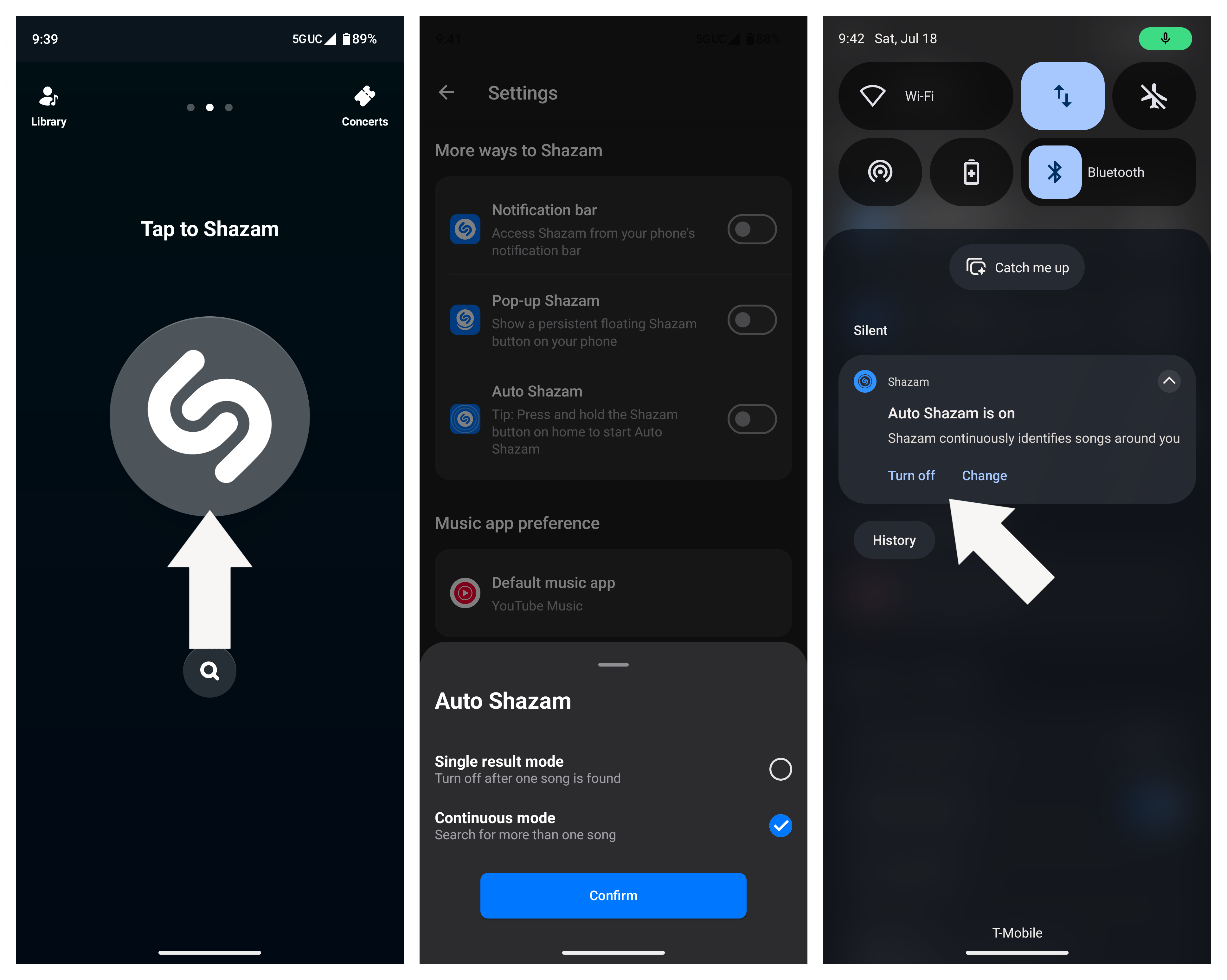
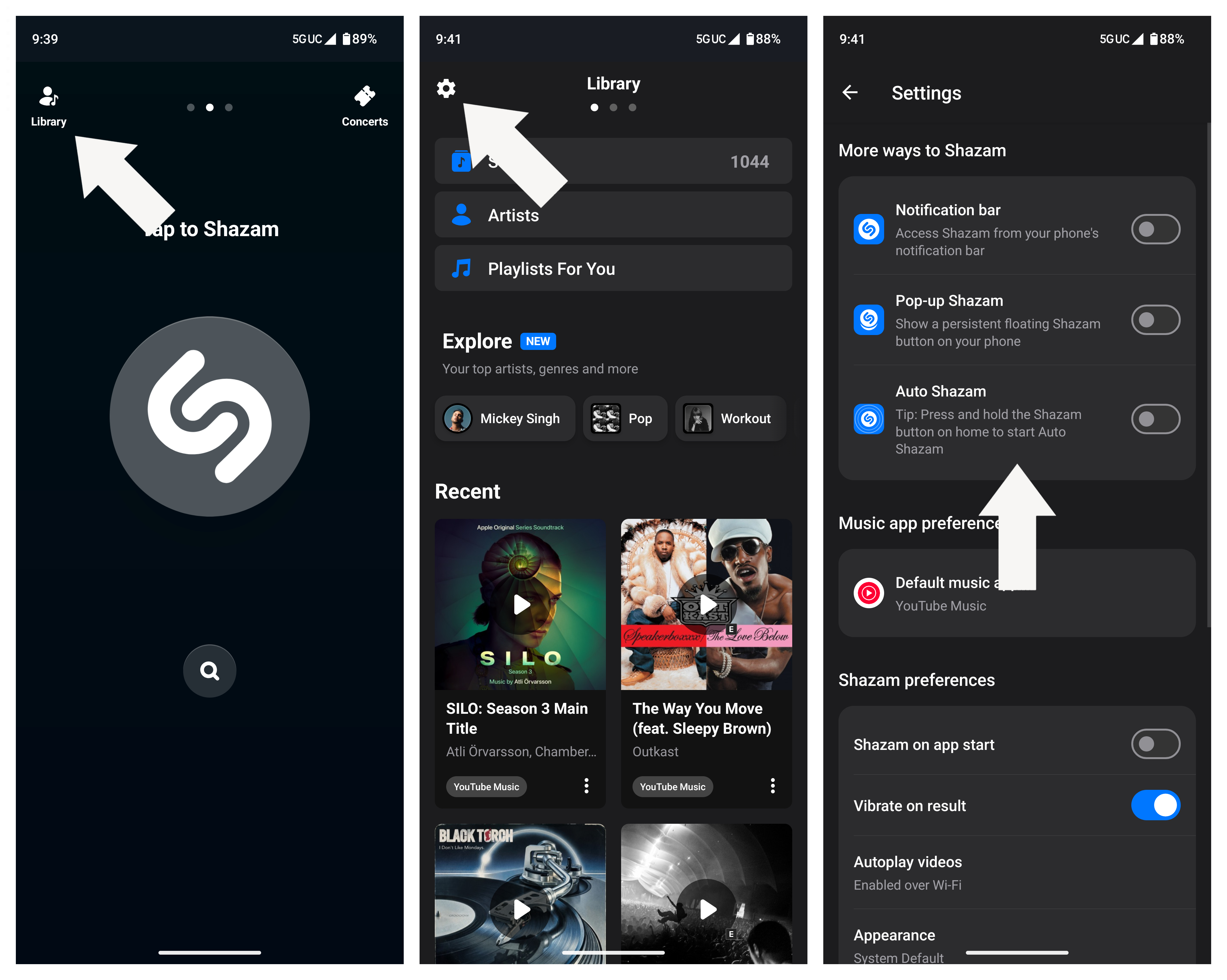
1. Open Shazam and tap Library.

2. Tap the Settings icon in the top-left corner.

3. Tap the Auto Shazam toggle.

Turning on Auto Shazam

(Image credit: Android Central)

Note: Alternatively, you can press and hold the Shazam button on the home screen to enable Auto Shazam.

4. A pop-up menu will appear asking if you want to end Auto Shazam after one song or if you want to leave it on continuously.

5. From your notification panel, you can see a persistent notification informing you that Auto Shazam is on. Tap Turn off if you no longer want to use it, or Change if you want to manage any settings.

Turning on Auto Shazam

(Image credit: Android Central)

Finally, you can also add an Auto Shazam tile to your Quick Settings menu, which lets you quickly toggle the feature on and off.

Other ways to easily trigger Shazam

Shazam Quick Settings tile

(Image credit: Android Central)

Still, if Auto Shazam isn't for you, or if you just want to quickly identify one song, Shazam makes it easy to do so without digging for the app. One of the main ways I use it is by adding the Shazam tile to the Quick Settings menu. Unlike the Auto Shazam tile, this one lets you identify just one song, and once you tap it, it runs in the background without opening the app.

In fact, it's probably one of my favorite ways to identify songs whenever I hear something interesting, especially because it's one of the few third-party tiles that works on the Motorola Razr's cover screen Quick Settings. That means I don't even have to open the phone for it to work.

Turning on Auto Shazam
Android Central
Turning on Auto Shazam
Android Central

The other option is to add a Shazam pop-up to your screen. This adds a floating Shazam button that you can move around and tap whenever you need it. To add this, go to the Shazam settings and enable Pop-up Shazam. You may need to grant the app permission to draw over other apps; once you do, the floating button will appear on your screen.

We need more Now Playing on more phones

Auto Shazam

(Image credit: Android Central)

I sorely wish Google would bring Now Playing to the Pixel, or at least that other Android OEMs would implement their own versions of the feature. What makes it superior to Shazam's offering is that it works on-device and in the background, so you don't really need to do anything or worry about it constantly burning through your battery.

Newer chips like the Snapdragon 8 Elite Gen 5 have gotten quite good at on-device tasks such as this; it's kind of crazy that Google is seemingly the only company doing it (that I know of).

Still, Shazam is a great alternative if you don't own a Pixel smartphone, and it's one of those apps I always download first whenever I set up a new phone, becoming a staple for me when building up my music library.

Which Galaxy Z 8 phone should you buy? Here's what I think after using all three

Samsung recently unveiled three new foldable phones, and for the first time, that includes two book-style foldable models. This year, we have the Galaxy Z Fold 8, Galaxy Z Fold 8 Ultra, and Galaxy Z Flip 8, all of which Samsung says target different types of consumers. However, what does that mean, and which Galaxy Z 8 model is right for you?

It's never an easy answer, but I've used all three Galaxy Z 8 phones, and I feel like I have a pretty good idea of who these devices are for. And with the Galaxy Z 8 phones going on sale on August 7, this should hopefully help you get a better idea of which device you should buy.

In the meantime, check out the latest Galaxy Z Fold 8 promotions and Flip 8 deals to see how you can spend less on these incredible phones.

Samsung GAlaxy Z 8 series: Spec comparison

Specifications

Category

Samsung Galaxy Z Flip 8

Samsung Galaxy Z Fold 8

Samsung Galaxy Z Fold 8 Ultra

Operating System

One UI 9 (Android 17), seven years of OS upgrades

One UI 9 (Android 17), seven years of OS upgrades

One UI 9 (Android 17), seven years of OS upgrades

Display

Inner: 6.9-inch LTPO AMOLED, 1-120Hz, 1080x2520

Outer: 4.1-inch AMOLED, 60-120Hz, 948x1048, pixels, Corning Gorilla Glass Victus 2

Inner: 7.6-inch LTPO AMOLED, Titanium Flex, 1-120Hz, 1,848x2448

Outer: 5.5-inch LTPO AMOLED, 120Hz, 1248x1972, Corning Gorilla Glass Ceramic 3

Inner: 8-inch LTPO AMOLED, Titanium Flex, 1-120Hz, 2,504x2,256 pixels

Outer: 6.5-inch LTPO AMOLED, 120Hz, 1080x2520 pixels, Corning Gorilla Glass Ceramic 3

Processor

Snapdragon 8 Elite Gen 5 for Galaxy, Exynos 2600

Snapdragon 8 Elite Gen 5 for Galaxy

Snapdragon 8 Elite Gen 5 for Galaxy

RAM

12GB

12GB/16GB

12GB/16GB

Storage

256GB, 512GB

256GB, 512GB, 1TB

256GB, 512GB, 1TB

Rear Cameras

50MP Wide, Ζ’1.8, OIS, 85˚

12MP Ultrawide, Ζ’2.2, 123˚

50MP Wide, Ζ’1.8, OIS, 85˚

50MP Ultrawide, Ζ’1.9, 120˚

200MP Wide, Ζ’1.7, OIS, 85˚

50MP Ultrawide, Ζ’1.9, 120˚

10MP Telephoto, 3x zoom, Ζ’2.4, 36˚

Front Camera

10MP Wide, 85˚

Internal: 10MP Wide, 100˚

External: 10MP Wide, 85˚

Internal: 10MP Wide, 100˚

External: 10MP Wide, 85˚

Battery

4,300mAh

4,800mAh

5,000mAh

Charging

25W wired, 15W wireless

45W wired, 20W wireless

45W wired, 20W wireless

IP Rating

IP48

IP48

IP48

Weight

180g

201g

215g

Dimensions

Folded: 85.7 x 75.4 x 13.1mm

Unfolded: 166.9 x 75.4 x 6.1mm

Folded: 123.9 x 81.9 x 9.7mm

Unfolded: 123.9 x 161.4 x 4.5mm

Folded: 158.4 x 72.8 x 8.9mm

Unfolded: 158.4 x 143.2 x 4.1mm

Colors

Pink, Graphite, Cream, Mint

Lavender, Graphite, Cream, Pistachio

Violet Shadow, Graphite, Cream

Samsung Galaxy Z Fold 8: Short and sweet

Galaxy Z Fold 8 home screen on external display

(Image credit: Derrek Lee / Android Central)

The Galaxy Z Fold 8 is Samsung's newest fold factor, taking what we love about the Galaxy Z Fold series and shrinking it. The result is something in between the Galaxy Z Fold and Z Flip: a more pocketable, book-style foldable. When folded, it's roughly the size of a passport, and when open, it provides a wider, more tablet-like view than its larger Ultra sibling.

This makes the Galaxy Z Fold 8 a great tablet for things like reading articles and other content, as you can easily flip it vertically for less scrolling. And in addition to e-books and other similar content, this makes the inner display better suited for vertical games like PokΓ©mon Go.

It also makes content like videos look less awkward, as you have fewer black bars on the top and bottom of the screen when the phone is unfolded, at least compared to the Galaxy Z Fold 8 Ultra. And videos seem to fit perfectly on the external display.

Reading material on the Galaxy Z Fold 8 inner screen

(Image credit: Derrek Lee / Android Central)

The Galaxy Z Fold 8 is easily one of the most accessible foldables. It's for anyone who wants the utility of a book-style foldable in a lighter, more comfortable form factor that feels more natural to use. It also helps that at $1,900, the phone is cheaper than the Z Fold 8 Ultra, while still sporting the same Snapdragon 8 Elite Gen 5 chip, a crease-less folding display, and a great pair of cameras.

Samsung Galaxy Z Fold 8 Ultra: Productivity powerhouse

Looking at the reduced display crease on the Samsung Galaxy Z Fold 8 Ultra

(Image credit: Derrek Lee / Android Central)

Even though I've been using the Z Fold 8 for most things, I realized that I subconsciously defaulted to the Galaxy Z Fold 8 Ultra when it came time to get work done. That's indicative of how Samsung is positioning the Ultra; it's for anyone who wants to get work done using the absolute best that Samsung has to offer in a foldable in a larger form factor.

The 8-inch display makes it an ideal canvas for multitasking, and while there is no S Pen support, the Ultra makes up for it with its stronger battery life and thinner profile. Then there's the 200MP camera, which gets you much more detail in every shot, while the 3x telephoto sensor can get you closer to your subject without sacrificing quality.

New Galaxy AI and Gemini Task Automation features on the Samsung Galaxy Z Fold 8 Ultra

(Image credit: Derrek Lee / Android Central)

And of course, you can do everything the Z Fold 8 can do, just on a larger screen. That means reading, watching videos, scrolling through apps, drafting papers, and more. And who doesn't like showing off their photos and videos on a large tablet-like display that you can fold in half when you just need a phone?

Of course, the Ultra comes with an ultra price tag, starting at an eye-watering $2,100. But if you need a phone that can keep up with your busy lifestyle, this is likely the one for you.

Samsung Galaxy Z Flip 8: Fashionable and nostalgic

Hands-on with the Samsung Galaxy Z Flip 8's cover screen

(Image credit: Derrek Lee / Android Central)

For years, flip phones have leaned on nostalgia to attract sales, but it's a bit more than that. The Galaxy Z Flip 8 continues to build on Samsung's expertise by introducing an even thinner model than last year's, making it not only extremely pocketable, but also a very good-looking phone.

The Galaxy Z Flip 8 is for anyone who doesn't need the extra screen real estate of a larger book-style foldable, but still wants the utility of a foldable. With the Galaxy Z Flip 8, you can use apps on the cover screen instead of the main screen, which can potentially save battery and makes using apps less conspicuous than on a larger display.

There are also other benefits, such as Camcorder mode, which makes recording videos really easy and smooth. Taking selfies is also a better experience on the Flip 8, as you can just use the main 50MP camera and larger 4.1-inch cover screen to take high-quality selfies.

Hands-on with the Samsung Galaxy Z Flip 8's camera

(Image credit: Derrek Lee / Android Central)

Perhaps one of the biggest selling points, aside from its stylish and pocketable design, is the price tag. The Galaxy Z Flip 8 is the cheapest of Samsung's Galaxy Z 8 phones, costing "just" $1,200, while still offering a powerful chipset, the latest AI features, and seven years of software updates.

❌