❌

Normal view

Bazzite has been an excellent OS for my second gaming PC, but I can't replace Windows 11 with it on my main rig β€” here's why

2 August 2026 at 16:00

Valve's SteamOS has often presented the perfect excuse to be whisked away from Microsoft's troublesome Windows 11. The Linux operating system's better gaming performance has often been proven, utilizing RAM well without the bloatware often found with Windows 11.

SteamOS provides a console-like user interface (UI), making navigation and game launches far easier than Windows 11, despite the recent Xbox mode. With those benefits in mind, I've been contemplating a full switch to SteamOS, ditching Windows for good, and the best way to do that would be via Bazzite.

Bazzite (not affiliated with Valve) is effectively a SteamOS clone, specifically designed for "Linux newcomers and enthusiasts alike", but most importantly, comes with out-of-the-box compatibility with Nvidia and Intel GPUs, and a smooth experience for handhelds.

Using my second streaming PC, I put Bazzite to the test over a few months. Without a doubt, it's easily the best option for any gamer looking for a console-like couch gaming setup.

With tools like Decky Loader, customization is easy, with plugins to change SteamOS game mode themes, navigation sound effects, or even the startup and shutdown videos. However, despite all of the benefits of using the operating system, I still can't step away from Windows 11 on my main system, and there are multiple reasons why.

Multitasking drawbacks

Bazzite/SteamOS's user interface on Asus ROG Ally

(Image credit: Universal Blue / Bazzite)

As a frequent multitasker using applications like Discord to stream games to friends, Bazzite (more specifically SteamOS) isn't an ideal option. Using Discord to stream games on the same rig works just fine in desktop mode; however, it's not the same story for its game mode, which is arguably the entire purpose of using Bazzite.

Streaming on Discord in game mode severely drops frame rates in games, with constant stutters in many I tested, and there are a few instances where attempting to stream an application will result in a black screen. I tried to use the NZXT Signal 4K30 capture card and stream my second PC's Bazzite activity on Discord via my main PC, but it's not that simple.

Sure, HDMI passthrough on the capture card is possible, but I didn't want to be limited to 4K 60 frames per second on either my TV (which is capable of 144Hz) or my gaming monitor (capable of 240Hz). Frankly, capture cards with higher passthrough capabilities don't come cheap.

Discord's end-to-end encryption on all platforms

(Image credit: Discord)

Duplicating or projecting the display, as you would on Windows 11, would be the easy solution. However, Gamescope, the compositor responsible for displaying games on screen with Bazzite, cannot duplicate outputs.

Still trying to avoid the NZXT capture card's 4K 60Hz passthrough limitation, I opted for an HDMI splitter with one input and two output ports. Unfortunately, the moment the capture card is connected, the output on either my TV or monitor has the refresh rate slashed to 60Hz and VRR disabled.

That occurs to ensure that the Extended Display Identification Data (EDID) of both is matched, according to what the capture card is capable of in passthrough.

Ports on NZXT Signal 4K30

(Image credit: Future / Isaiah Williams)

None of these issues are present on Windows, as you can use OBS to project the main display onto the capture card without ever having to rely on an HDMI splitter or a better capture card.

This isn't an attack on SteamOS or Bazzite in particular; after all, game mode is quite literally designed for gaming, so multitasking isn't a priority for Valve or specifically Bazzite developers in this case.

However, it's worth noting that streaming on the gaming OS is more trouble than it's worth, and that's without even mentioning the potential audio bugs or OS glitches. That's only one part of why it's worth sticking with Windows, though.

Compatibility issues

GIF of Corsair PC case

(Image credit: Future / Isaiah Williams)

I wish these issues stopped there, but not quite. Firstly, a large majority of popular multiplayer games such as Battlefield 6, Call of Duty (most of the modern entries), Destiny 2, and EA Sports FC 26 will not work on Linux due to their anti-cheat systems.

This is an issue that lies directly with publishers and developers for those games that refuse to adapt their anti-cheat systems to work on SteamOS. It also doesn't seem as though this will change any time soon; the Steam Machine was arguably one way to effectively force the hand of publishers to consider anti-cheat compatibility on Linux, but it's not exactly a popular PC due to its high price.

It's also worth noting that Game Pass is inaccessible natively on Bazzite, and requires either cloud gaming or third-party launchers, and you'll be lucky if you can get the latter to function.

The solution to accessing those anti-cheat games is a dual-boot with Windows 11 and Bazzite. However, that isn't completely ditching Windows 11 as I've planned to, and a dual-boot can end up messy thanks to Windows' forced updates.

Steam Machine and SteamOS logo

(Image credit: Valve)

Perhaps the most frustrating aspect is that Nvidia GPUs don't play nice with game mode on Bazzite, often resulting in glitchy functionality, or just completely black screens. I tested this by swapping out the AMD Radeon RX 9060 XT 16GB GPU in my second PC with my spare Nvidia GeForce RTX 3080 Ti and found that game mode was just frustrating to use.

So if I wanted to use Bazzite on my main rig equipped with an Nvidia GeForce RTX 4080 Super, its DX12 (a graphics API) gaming performance would be worse than Windows. Overall, the entire purpose of switching over to Linux was for better gaming performance and easy console-like UI navigation would be non-existent.

I'm sure all of these pain points will be addressed at some point, whether via Bazzite or Valve's official SteamOS builds. For now, though, I'll stick with Windows 11 on my main rig β€” even though I desperately want to be done with it.

Did you know TechRadar now has membership?

Various tech product cutouts next to the words 'Insider TechRadar Learn More'

(Image credit: Future)

Become a TechRadar Insider by simply clicking 'Join Now' at the top of this page. Have a question? Please email membership@techradar.com

Microsoft vows to make Windows 11 fly on 8GB RAM amid memory shortage β€” optimizations to reduce OS memory footprint have begun

Microsoft said that it’s planning to optimize Windows 11 for systems with 8GB of RAM and above as part of its promise to improve Windows 11 in March 2026. The company said in its latest update that the optimization is part of expanding its focus on operating system upgrades, which include a faster out-of-the-box experience, easier parental controls, and improved voice interactions.

While the official minimum specifications for Windows 11 sit at just 4GB of RAM, most PC builders advise getting at least 16GB if you want to have a smooth experience. In fact, Microsoft has previously recommended 32GB of RAM for Windows 11 for gamers, especially if they want a system that can handle games in the near future. Unfortunately, the RAMpocalypse has forced both users and manufacturers to stick with slower DDR4 memory and lower capacities. Some experts predict that the entry-level PC will disappear by 2028, and we’ve even seen some manufacturers, including Apple, reintroduce 8GB laptops just to hit a specific price point.

The resurgence of 8GB systems will likely deliver a bad experience for users who stick with Windows 11, which is the likely reason why Microsoft is pushing for the optimization of its operating system. If Windows 11 performs poorly on these systems, it could draw users towards macOS or Linux alternatives as they blame the operating system for underperforming on limited hardware. In fact, we’ve already seen this happen before β€” after Microsoft ended support for Windows 10, MacBooks saw an uptick in sales as users migrated towards macOS instead of going for Windows 11. SteamOS is also encouraging some gamers to ditch Windows, and Valve is working on a general release for the OS, which many say contains less bloat and is a bit snappier than what Microsoft offers.

The RAM shortage crisis, alongside increasing competition, is forcing Microsoft to do better with Windows 11. Hopefully, these optimizations arrive sooner and don’t introduce new bugs, allowing both new and existing users to get more out of their systems.

The Windows blog post also gave an update on what improvements the company has made to Windows 11 so far. This includes a better Windows Search experience, more Taskbar and Start customizations, a more responsive and reliable File Explorer, among others. Many of these changes are still in preview, though, so unless you’re part of the Windows Insider Program, you’ll have to wait a few more weeks to months before you can start enjoying these changes.

Windows NT 4.0 brought the Win95 UI to servers 30 years ago today β€” milestone unifying modern Windows OS hit RTM in the Pentium era

31 July 2026 at 10:00

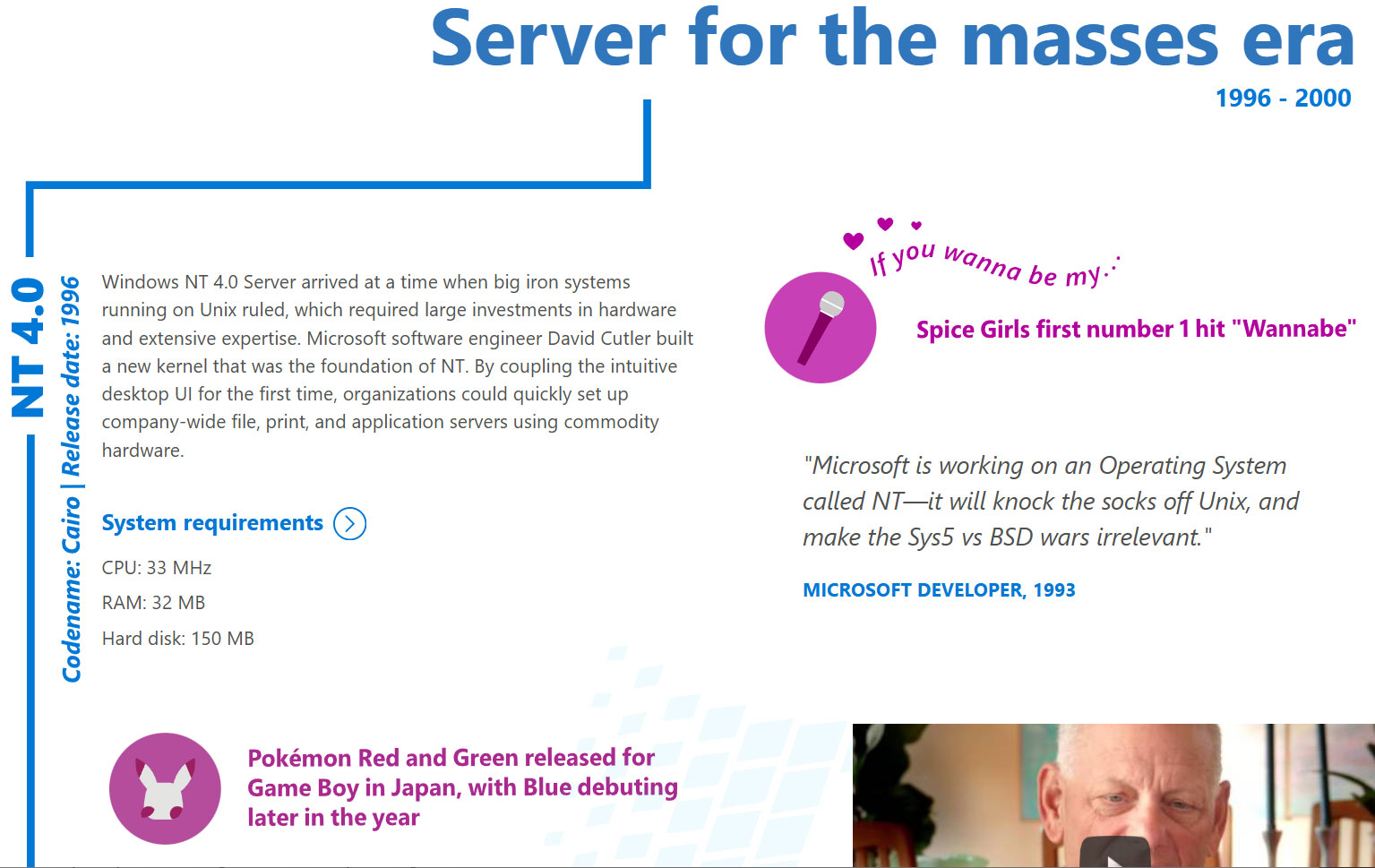
Microsoft released Windows NT 4.0 to manufacturing partners on July 31, 1996. Codename Cairo marked an important milestone in the history of Microsoft’s original server OS and would far outlive Microsoft’s original plans as enthusiasts and administrators clung to it, as older readers will be aware. Headlining features of NT 4.0, which made it a winner, include the melding of the intuitive new Windows 95 UI into the fully 32-bit enterprise OS. It was also notable for being the last version of NT to support Alpha, MIPS, or PowerPC CPU architectures.

Historical Windows NT timeline:

  • Windows NT Server 3.1 – in 1993, the first version of Windows NT also introduced NTFS
  • Windows NT Server 3.5 – in 1994, this update provided integrated support for Winsock and TCP/IP
  • Windows NT Server 3.51 - client/server support added in 1995
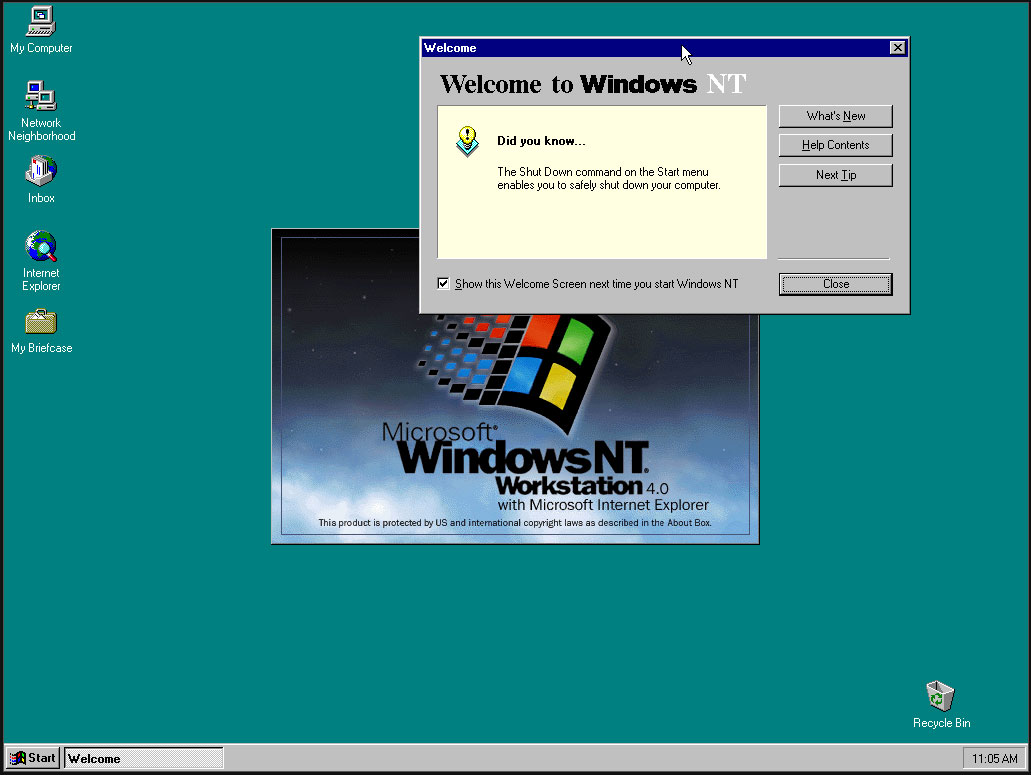
  • Windows NT 4.0 – in 1996, NT got the Windows 95 UI and the familiar My Computer, My Documents, and so on
  • Windows 2000 Server – the 5th NT release started a new naming scheme, introduced Active Directory, plus NTFS 3.0 with file system encryption
  • Followed by the more modern Server releases…

Windows NT 4.0

(Image credit: Microsoft)

After the initial Windows NT 4.0 release, Microsoft followed up with a version for embedded systems and its Terminal Server edition.

The Windows NT line was critical to Microsoft as it led the charge against dominant Unix server software ecosystems. Its first public release was in 1993, with version 3.1, but NT 4.0 coupled the underlying data server and personal workstation tooling with Win95 UI elements such as the Start Menu, Taskbar, Task Manager, and so on. It would also support new components like the cryptography API, DCOM, TAPI 2.0, and some DirectX (v2) features.

Despite all the new technology under the hood and the frills of the latest UI, Microsoft’s Windows NT 4.0 launched with remarkably low minimum requirements. Would-be users were recommended to install it on a PC with a CPU that ran at 33 MHz or better, had 32MB of RAM, SVGA graphics, and a hard disk with 256 MB capacity. This was in the Pentium / Pentium Pro era. NT 4.0 would become β€œthe server for the masses,” boasted Microsoft on the OS’s 20th anniversary.

Another reason that NT 4.0 was so important is that it formed the foundation for the Windows XP release (2001), leaving the DOS-based 95, 98/SE, and Me versions of the consumer OS behind as archaic hybrids. In the half-decade between the release of NT 4.0 and XP, Microsoft had a lot of work to do, such as implementing Plug and Play, building out gaming tech, adding WDM drivers, and so on. Thankfully, PCs also grew in muscle, specs, and multimedia capabilities to make the larger and more demanding XP a big hit.

Windows XP landed with a core marketing line that it was β€œBuilt on NT technology,” which felt uncomfortable to read if you were from the camp that believed β€˜NT’ was short for β€˜New Technology.’

Windows NT 4.0 screenshots

(Image credit: Tom's Hardware)

It is pretty easy to find an old Cairo release online for retro machine tinkering. Those interested in a more casual poke around in NT 4.0 out of interest, curiosity, or nostalgia will find there are some online installs you can play with via a web browser.

❌