❌

Normal view

Microsoft vows to make Windows 11 fly on 8GB RAM amid memory shortage — optimizations to reduce OS memory footprint have begun

Microsoft said that it’s planning to optimize Windows 11 for systems with 8GB of RAM and above as part of its promise to improve Windows 11 in March 2026. The company said in its latest update that the optimization is part of expanding its focus on operating system upgrades, which include a faster out-of-the-box experience, easier parental controls, and improved voice interactions.

While the official minimum specifications for Windows 11 sit at just 4GB of RAM, most PC builders advise getting at least 16GB if you want to have a smooth experience. In fact, Microsoft has previously recommended 32GB of RAM for Windows 11 for gamers, especially if they want a system that can handle games in the near future. Unfortunately, the RAMpocalypse has forced both users and manufacturers to stick with slower DDR4 memory and lower capacities. Some experts predict that the entry-level PC will disappear by 2028, and we’ve even seen some manufacturers, including Apple, reintroduce 8GB laptops just to hit a specific price point.

The resurgence of 8GB systems will likely deliver a bad experience for users who stick with Windows 11, which is the likely reason why Microsoft is pushing for the optimization of its operating system. If Windows 11 performs poorly on these systems, it could draw users towards macOS or Linux alternatives as they blame the operating system for underperforming on limited hardware. In fact, we’ve already seen this happen before — after Microsoft ended support for Windows 10, MacBooks saw an uptick in sales as users migrated towards macOS instead of going for Windows 11. SteamOS is also encouraging some gamers to ditch Windows, and Valve is working on a general release for the OS, which many say contains less bloat and is a bit snappier than what Microsoft offers.

The RAM shortage crisis, alongside increasing competition, is forcing Microsoft to do better with Windows 11. Hopefully, these optimizations arrive sooner and don’t introduce new bugs, allowing both new and existing users to get more out of their systems.

The Windows blog post also gave an update on what improvements the company has made to Windows 11 so far. This includes a better Windows Search experience, more Taskbar and Start customizations, a more responsive and reliable File Explorer, among others. Many of these changes are still in preview, though, so unless you’re part of the Windows Insider Program, you’ll have to wait a few more weeks to months before you can start enjoying these changes.

Valve funding port of Linux RADV Radeon Vulkan driver to Windows — cross-platform effort already runs 'Counter-Strike 2'

The Steam Machine helped grow the popularity of Linux gaming, including installations of Bazzite and other gaming-oriented Linux distributions. Valve seemingly doesn't want to stop its open-source development efforts anytime soon, and is now working on a port of the Mesa Radeon Vulkan driver (RADV) to Windows; It's already running Counter-Strike 2, according to developers at Collabora.

As cross-platform development is rather tricky, Valve opted to get a port of RADV to Windows going by way of sponsoring contractors at Collabora. In its blog post, Collabora explained the several hoops it had to jump through to accomplish this task.

With Windows 10 and WDDM 2.0, Microsoft improved the split between graphics drivers' userspace code (the vast majority of the driver itself) and the kernel-level portion that actually talks to the graphics card. This presented the opportunity to hook RADV to the AMD kernel card driver. That's easier said than done, however, as communication between those parts often carries non-standardized data that RADV needs to understand. And to understand the "conversation," it needs to be recorded and analyzed.

An earlier 2024 effort by Faith Ekstrand yielded a basic-but-valuable utility for logging WDDM 2.0 calls and reverse-engineering them to produce a basic RADV implementation. Out of both debugging necessity and as a development tool, Collabora built and expanded upon Ekstrand's work, improving the logger to the point where it can now fully analyze any Vulkan application that runs with AMD's official driver and dump all the data passing to the kernel.

After a lot of work getting to grips with how the AMD driver interacts with the kernel driver, including but not limited to reverse-engineering obscure data structures, the team made progress, and Windows RADV is now able to run some games, including Counter-Strike 2.

Despite the ongoing effort, Collabora explains that since user- and kernel-space driver are a matched pair, changes to those aren't guaranteed to be backwards-compatible, meaning that even a fully functional RADV could break at any point. For that reason, Collobora is requesting that AMD, Microsoft, or both provide a documented interface to the kernel driver or an intermediary compatibility layer.

AMD graphics driver development on Linux has coalesced around the Mesa Vulkan stack, with both company and community devs contributing to the RADV project. Over in the Windows world, the only option is AMD's proprietary driver, which can cause a lot of headaches when developing cross-platform games and applications.

AMD's Vulkan driver for Windows has developed a reputation for instability. Meanwhile, Linux RADV is generally praised for its stability and performance, sometimes running faster than the AMD Windows driver, especially on older cards. With a rapid development schedule, it also generally sees fixes and speed upticks often.

If at some point using RADV on Windows becomes viable, you'd be getting an arguably more stable, mature driver with active development. Games' graphical issues could become far easier to debug and patch thanks to the open nature of RADV, and studios developing with Linux in mind can target the one platform instead of two with different behaviors. Any developer or company can contribute to the project, too.

Furthermore, this lets Valve improve Windows compatibility layers, and any optimizations can be carried over to both operating systems. All told, this is likely one of the several moving parts to improve Linux — thus the Steam Deck, Steam Machine, and upcoming hardware — as a viable gaming platform. Even a future notion of gamers installing RADV on Windows to get a performance or stability boost isn't too far-fetched.

Additionally, RADV on Windows would also help keep discontinued cards usable, and given pricing right now, that certainly would be a good thing.

Windows NT 4.0 brought the Win95 UI to servers 30 years ago today — milestone unifying modern Windows OS hit RTM in the Pentium era

31 July 2026 at 10:00

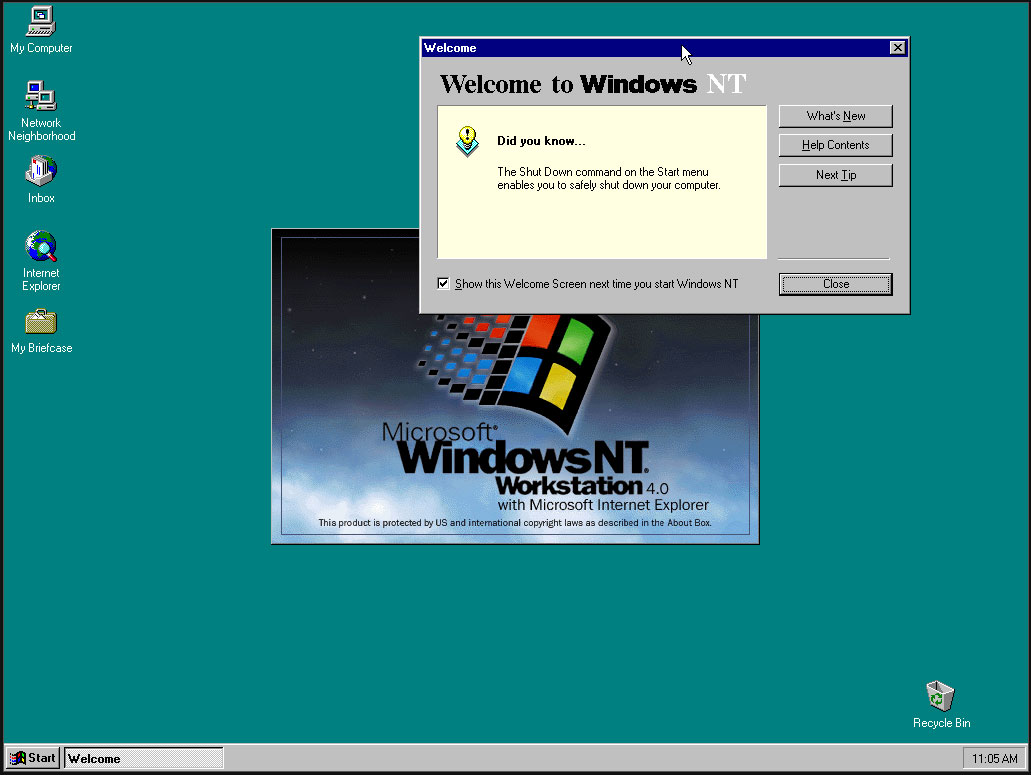
Microsoft released Windows NT 4.0 to manufacturing partners on July 31, 1996. Codename Cairo marked an important milestone in the history of Microsoft’s original server OS and would far outlive Microsoft’s original plans as enthusiasts and administrators clung to it, as older readers will be aware. Headlining features of NT 4.0, which made it a winner, include the melding of the intuitive new Windows 95 UI into the fully 32-bit enterprise OS. It was also notable for being the last version of NT to support Alpha, MIPS, or PowerPC CPU architectures.

Historical Windows NT timeline:

  • Windows NT Server 3.1 – in 1993, the first version of Windows NT also introduced NTFS
  • Windows NT Server 3.5 – in 1994, this update provided integrated support for Winsock and TCP/IP
  • Windows NT Server 3.51 - client/server support added in 1995
  • Windows NT 4.0 – in 1996, NT got the Windows 95 UI and the familiar My Computer, My Documents, and so on
  • Windows 2000 Server – the 5th NT release started a new naming scheme, introduced Active Directory, plus NTFS 3.0 with file system encryption
  • Followed by the more modern Server releases…

Windows NT 4.0

(Image credit: Microsoft)

After the initial Windows NT 4.0 release, Microsoft followed up with a version for embedded systems and its Terminal Server edition.

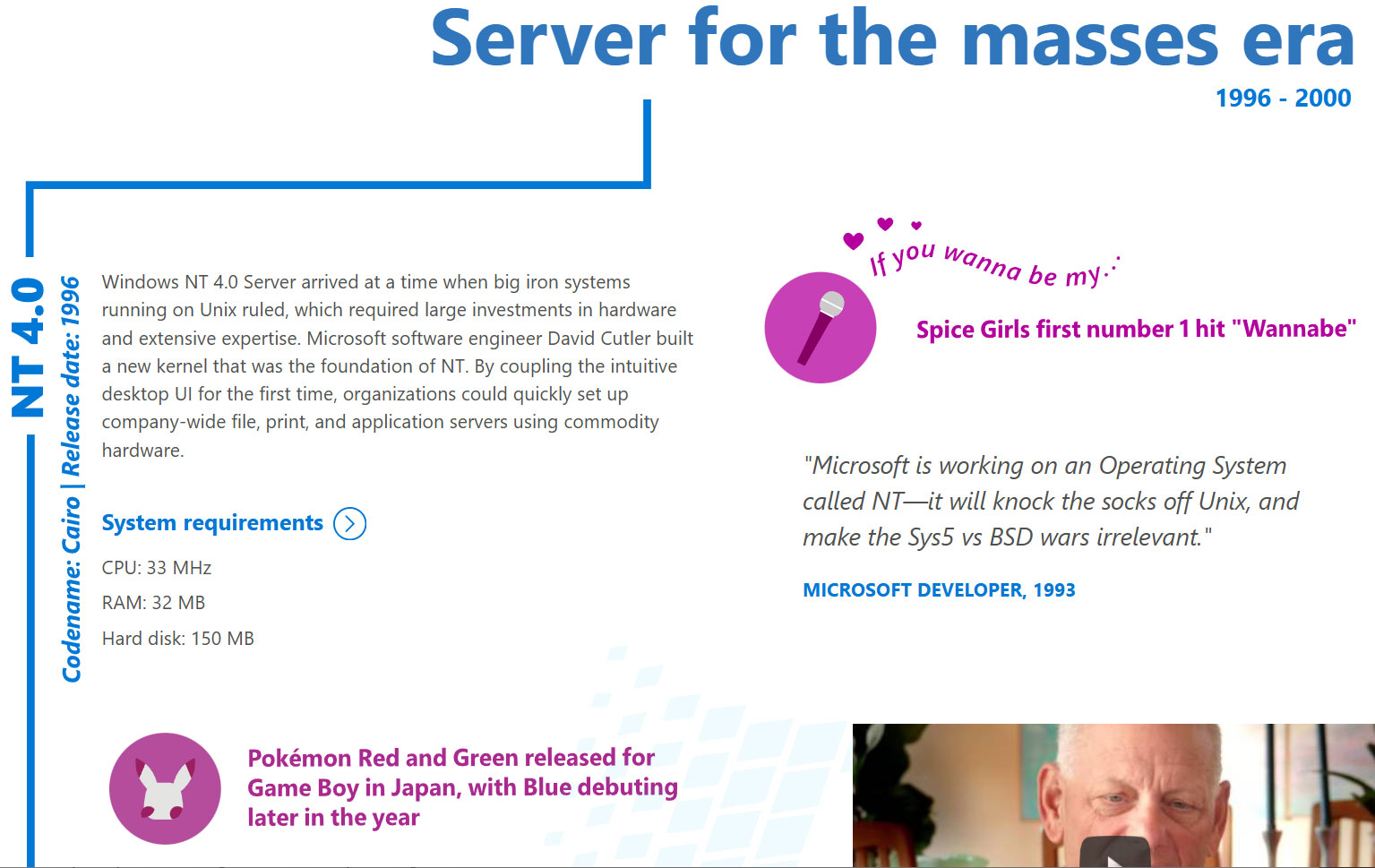
The Windows NT line was critical to Microsoft as it led the charge against dominant Unix server software ecosystems. Its first public release was in 1993, with version 3.1, but NT 4.0 coupled the underlying data server and personal workstation tooling with Win95 UI elements such as the Start Menu, Taskbar, Task Manager, and so on. It would also support new components like the cryptography API, DCOM, TAPI 2.0, and some DirectX (v2) features.

Despite all the new technology under the hood and the frills of the latest UI, Microsoft’s Windows NT 4.0 launched with remarkably low minimum requirements. Would-be users were recommended to install it on a PC with a CPU that ran at 33 MHz or better, had 32MB of RAM, SVGA graphics, and a hard disk with 256 MB capacity. This was in the Pentium / Pentium Pro era. NT 4.0 would become “the server for the masses,” boasted Microsoft on the OS’s 20th anniversary.

Another reason that NT 4.0 was so important is that it formed the foundation for the Windows XP release (2001), leaving the DOS-based 95, 98/SE, and Me versions of the consumer OS behind as archaic hybrids. In the half-decade between the release of NT 4.0 and XP, Microsoft had a lot of work to do, such as implementing Plug and Play, building out gaming tech, adding WDM drivers, and so on. Thankfully, PCs also grew in muscle, specs, and multimedia capabilities to make the larger and more demanding XP a big hit.

Windows XP landed with a core marketing line that it was “Built on NT technology,” which felt uncomfortable to read if you were from the camp that believed ‘NT’ was short for ‘New Technology.’

Windows NT 4.0 screenshots

(Image credit: Tom's Hardware)

It is pretty easy to find an old Cairo release online for retro machine tinkering. Those interested in a more casual poke around in NT 4.0 out of interest, curiosity, or nostalgia will find there are some online installs you can play with via a web browser.

Apple preps for a wearable AI revolution

29 July 2026 at 18:29

This fall, with watchOS 27, Apple Watch will finally get access to Siri AI with a software update that turns your wrist into the most widely-used wearable AI platform on Earth.

That’s not hyperbole. Siri AI on Apple Watch is arguably the most important feature to this year’s watchOS update. Though it didn’t get much attention at WWDC, the update also offers a preview into how Apple will wrap AI into its future smart glasses.

What to expect

One important caveat is to observe that Siri AI on Apple Watch still requires your Apple Intelligence-enabled iPhone to do the heavy lifting. The interaction is easy: tap the Digital Crown and Apple’s new glowing icon appears on screen (you’ll also find this in the App viewer). The experience looks identical across every Apple device — iPhone, iPad, Mac, Apple Watch, and Vision Pro — making the assistant feel like one consistent product rather than a different experience per device.

The Siri app lets you access all your past Siri conversations (unless you turn that feature off) and pick up an old conversation right where you left off. Conversation history syncs privately through iCloud, so you can start an exchange on your iPhone and continue it later from your wrist. You can also pin a conversation you expect to revisit.

You can also use Siri on the Apple Watch to ask questions, launch apps, or even get more complex responses, such as step counts on a specific day. It can also answer difficult and specific queries with detailed answers and can summon real-time information from the web.

Personal context is the real story

That’s key, of course, as it means the smartwatch on your wrist can help you access specific details from all your contextual information; it can get details from messages, emails, and notes, for instance. Or you might use it to find a number and call it, access your door code, or look up customer information for business — all without touching your phone.

One of Apple’s own examples demonstrates this well: Saying, “Show me photos from when I went to Spain,” results in precisely that. You can also ask follow-up questions and keep the conversational going naturally, rather than being confined to single, isolated commands.

Beyond personal data, the watch can also act in apps — get directions home, send an email, play a playlist, or even more specifically, “Play the song that Brandon sent me.”

Context runs deep. A new Call Context tool can proactively surface relevant information from across your apps when phoning a business or help locate a confirmation code from Mail while calling an airline. This arguably challenges a real pain point when speaking with providers and is a good illustration of Apple’s broader AI strategy: to use on-device intelligence to remove everyday friction without asking you to track down the information yourself.

Where we are, where it’s going

It’s frustrating that you still can’t use the Watch to remotely run applications on your Mac, iPhone, or iPad. What you can do is trigger Shortcuts that run on your iPhone: enable this first on your phone by selecting the Shortcut you want and switching on “Show on Apple Watch.” Once that’s done, you can run the Shortcut from your wrist, even by voice.

That’s useful now, but as more complex apps add Shortcuts support and App Intents become more widely adopted by developers, it should be easy to trigger genuinely complex, multi-stage tasks on your iPhone from your wrist.

It’s worth noting: early hands-on testing of the watchOS 27 beta has found Siri AI genuinely impressive on personal-context queries, but still buggy in places. This is very much a first-generation feature — promising, but not yet fully reliable.

Watch the developers

Developers are already beginning to experiment with the potential for wearable AI. One of the best current examples is Granola, which just launched a Watch app built specifically to take notes during in-person meetings away from a laptop. The idea is that you tap your wrist, the screen turns green and makes a sound to alert your companion(s) that it is recording and then you carry on as normal. Once the meeting stops, switch the app off and you’ll get polished notes with meeting summaries and action items provided to you.

The only reservation I have with Granola is the lack of documentation on privacy and data retention on the developer site. Tools like these will almost certainly become more private, more secure, and more prevalent once Apple’s on-device dictation APIs extend fully to watchOS.

That last thing is perhaps the most important as wearable AI emerges: the decisions Apple makes around watchOS and SiriAI will be foundational to its future wearable AI glasses products.

You can follow me on social media! Join me on BlueSky,  LinkedIn, Mastodon and subscribe to The Core.

❌