Samsung's OneDrive Gallery integration is ending soon, but Google Photos appears ready to take its place.
A new Gallery Cloud Sync service has appeared on the Galaxy Store with support for backing up to Google Photos.
Samsung hasn't announced the Google Photos integration yet, but it could start rolling out within weeks.
Samsung has started laying the groundwork for what appears to be the replacement for its outgoing OneDrive integration, and unsurprisingly, it's Google Photos.
Earlier this year, Samsung announced that users would no longer be able to use OneDrive to back up photos and videos directly through the Samsung Gallery app. Until now, Galaxy users have been able to automatically sync their Gallery photos and videos with OneDrive without needing to use another app or service.
However, that partnership is coming to an end later this month. And now, Samsung appears to be preparing its replacement with none other than Google Photos.
X user Sandeep Adap has spotted a new Samsung service called "Gallery Cloud Sync" on the Galaxy Store, which appears to be designed to take over from the existing Gallery OneDrive Sync integration. The app listing says Gallery Cloud Sync will safely back up your memories, including photos and videos, to "Google Cloud" so you can access them across your devices.
The mention of Google Cloud might sound slightly confusing, but it appears Samsung is actually referring to Google Photos here.
(Image credit: X / That Josh Guy)
User That Josh Guy on X was able to preview the upcoming functionality, which isn't live just yet, and found that Samsung Gallery will offer an option to sync directly with Google. The Gallery settings will reportedly show your available Google storage, let you choose which albums to sync, and offer controls to sync over Wi-Fi or while roaming.
This could be a big change if you currently rely on OneDrive for Samsung Gallery backups, since you'll likely need to switch to Google Photos. That said, the overall experience should remain pretty similar, with the sync controls still built directly into the Gallery app.
The OneDrive sync option has already started disappearing from Samsung Gallery for some users and is expected to be discontinued completely later this month. Thankfully, Samsung's upcoming Google Photos integration looks like it could be an even more natural replacement.
Samsung hasn't officially announced Galaxy Cloud Sync or started rolling out the Google Photos integration just yet. But with OneDrive support ending soon, we expect the new option to become available sometime later this month or in early October.
Samsung introduces the Galaxy S26 series to its Certified Re-Newed program.
The S26 Ultra starts at $1,099 (a ~$200 price drop), while the S26 and S26 Plus start at $759 and $929.
The company highlights that buyers can grab Samsung Care Plus protection with Loss and Theft during checkout for unlimited battery repairs and free screen replacements.
If you're looking to save some money, Samsung announced that its latest Galaxy S26 series is now available in its Certified Re-Newed program.
Today (Sept. 14), Samsungannounced that its Certified Re-Newed program has welcomed the Galaxy S26, S26 Plus, and S26 Ultra. You can view this program as Samsung's refurbished phone line. As always, the company says its "Certified Re-Newed devices offer a like-new phone experience." It has taken in Galaxy S26 devices and equipped them with new (genuine) parts and a "brand-new battery."
A Certified Re-Newed Galaxy S26 Ultra starts at $1,099. This is roughly a $200 price drop from the standard, new flagship starting price (256GB). When it comes to the S26 and S26 Plus, the program shifts these prices to $759 and $929, respectively.
What's more, Samsung says if you are purchasing a Certified Re-Newed Galaxy S26 device, you can add Samsung Care Plus (with Loss and Theft) protection. This protection plan features unlimited battery repairs and free screen replacements.
We're a couple of months early, but Samsung brought the Galaxy S25 series into the Re-Newed program last November. The price drops were fairly similar to what we're seeing this year for the S26 series. Costs dropped anywhere from $150 to $260. The model and configuration (RAM/storage) made the difference here. The "cheapest" option last year was the Galaxy S25 with 256GB of storage for $709.
Joining the Galaxy S25 was the Galaxy Z Fold 6, as well as the Galaxy S25 Edge and the Flip 6.
At the time of writing this post (around 3:15 pm ET), the devices are not listed on Samsung's storefront. That should change. If you're interested, check back later today or perhaps later this week. You shouldn't fret about the refurbished tag; you'll still receive all of Samsung's newest features. Now Nudge and Now Brief were highlighted, and if you're getting the Galaxy S26 Ultra, you'll find the Privacy Display.
Rumors claim we might have a Galaxy Z TriFold 2 in 2027, as Samsung is supposedly moving ahead with development.
The TriFold 2 could feature a "more durable," thinner, and lighter design with a price tag similar to the original model ($2,800).
It's worth remembering the struggles Samsung encountered with the first TriFold (component prices/prices in general) and that it was a "limited release."
The TriFold lasted for three months before Samsung pulled the plug.
It's been almost a year since Samsung debuted its Galaxy Z TriFold. Rumors say there's a sequel on the way next year.
Over the weekend, tipster Lanzuk on Naver stated Samsung is already working on a Galaxy Z TriFold 2 (via 9to5Google). One thing the tipster mentions is the phone's price. Samsung could face issues; however, they claim this supposed TriFold 2 could be priced "similarly" to the original—around $2,899. When it comes to upgrades, Samsung is supposedly looking at three areas.
This alleged TriFold 2 could debut as a thinner, lighter, and "more durable" phone. Looking at what Samsung did with the Galaxy Z Fold 7 (and 8), reducing the thickness of that phone, this rumor strikes a chord. What's more, the idea of a "more durable" TriFold likely concerns its hinge/display for longevity.
Right now, these rumors suggest Samsung is sticking to its "original schedule" of releasing this "TriFold 2" in 2027. Additionally, rumors say Samsung might reveal a "slideable" phone, too. If it's what we presume it is, Samsung has shown off concepts of this type of phone several times over the past few years.
The TriFold was an interesting device. Could you image the price tag of a sequel? If the original was around $2,800, what would part two be? Over $3,000? How many people are willing to throw down $3,000 on a folding phone? That's gaming PC money. That's money put toward something far more important. This is going to be interesting.
Maybe this wasn't so surprising. Samsung always positioned the Galaxy Z TriFold as a "limited release." These rumors about a TriFold sequel mention something Samsung struggled with before: components. Developing the Galaxy Z TriFold was already incredibly strenuous due to high manufacturing and rising component costs. If Samsung is considering a TriFold 2, in the current climate, that might be difficult (on our wallets).
Nevertheless, it remains to be seen how Samsung would treat a TriFold 2. Another limited release might seem strange, but we'll have to see. The Galaxy Z TriFold debuted with a huge, tablet-like 10-inch internal display and a 6.5-inch cover.
Overseas rumors claim Samsung's Galaxy S26 series could see a ~$100/149,000 KRW price increase.
Samsung is reportedly grappling with various issues impacting the phone market (RAM/memory).
This increase has been rumored for Korean consumers; however, Samsung's official statement says nothing is set in stone yet as rumors say this could all happen in October.
Prices are soaring all over the place, whether it's phones or gaming consoles. A recent rumor from overseas says Samsung's latest flagship phones might be next on the list.
A report by Hans Economy (Korean) claims Samsung is mulling over a potential price increase for the Galaxy S26 series (via SamMobile). According to the publication's sources, Samsung is now facing "difficulties" with "maintaining its existing pricing structure." The post alludes to the current stress placed on the phone industry: RAM and memory prices. With that in mind, Samsung is supposedly increasing its Galaxy S26 series prices by ~$100 (USD)/~149,000 KRW.
If this happens, it would push the Galaxy S26 to a ~$999 starting price, and the Galaxy S26 Ultra to ~$1,400. The post claims a mobile carrier started informing consumers about an impending price hike for the Galaxy S26 series. Here's the thing: nothing is confirmed. In fact, Samsung provided an official comment to Hans Economy about these rumors.
The company states that while it has been "internally reviewing" the idea of "adjusting" prices, "nothing has been finalized as of now" (machine-translated).
There's more to consider with these rumors. On one hand, it was suggested that Samsung could hike S26 prices in October for Korean consumers if its internal review finds success. However, it's unclear how widespread this hike could be—meaning it's not clear if the U.S. would see it, too.
Prices are soaring
(Image credit: Derrek Lee / Android Central)
Let's not kid ourselves, Samsung (technically) already raised prices for the Galaxy S26. It was around the time the series debuted earlier this year. Compared to the S25 and S25 Plus, the S26 and S26 Plus cost roughly $100 more. The S26 Ultra's price remains the same compared to its past-gen counterpart. However, despite the price hikes to the first two models, Samsung's phones still performed well.
Specifically, the Galaxy S26 Ultra performed the best. According to early analytics, the Galaxy S26 Ultra achieved 71% of sales in the first three weeks. This year's Ultra has a lot going on, like the Privacy Display, so that might've helped.
And since we're talking about Samsung price hikes, it's hard not to bring up the horrendous streak it went on in the U.S. in April. Someone needs to save our wallets, because Samsung's Galaxy tablets were hit hardest. The Galaxy Tab S11 Ultra (1TB) jumped by $280 earlier this year to $1,899.
Android Central's Take
Price hikes are becoming quite the unsettling "norm." Looking at devices in a smart way has never mattered more. We might love to chase after "what's new," but when it starts hitting your wallet, you'll reconsider. Not everyone's in that sort of position where they can chase after every new phone or what-have-you. To be honest, it is that majority that gives companies pause. If they drop out, that's when they're in trouble.
A reliable tipster says the rumored 50MP 4x telephoto with a large 1/1.9-inch sensor may not make it to the Galaxy S27 Ultra.
The upcoming phone is said to retain a 5x periscope with a smaller 1/2.52-inch sensor.
Samsung may ditch the dedicated 3x telephoto camera entirely, leaving the 5x periscope as its sole zoom hardware.
Samsung’s Galaxy S27 Ultra is reportedly getting a major zoom rethink after recent rumors suggested a 50MP 4x telephoto with a much larger 1/1.9-inch sensor. The supposed plan was to swap out the familiar 3x and 5x cameras for a single, larger sensor that could handle more of the zoom range.
Now that upgrade seems a lot less certain. Ice Universe claims on X that the Galaxy S27 Ultra will instead feature a 5x periscope camera with a 1/2.52-inch sensor, which would be pretty much the same sensor size as the one used by recent Ultra models. The competing 4x rumor was described as false, suggesting Samsung could remove the 3x camera while leaving the 5x unit as its only dedicated telephoto.
Don't believe that source, which has a long history of spreading false information.The Galaxy S27 Ultra will, of course, continue to use a 1/2.52-inch sensor for its 5x periscope telephoto camera.The recent claim that Samsung will "drop the 5x telephoto and switch to a…September 14, 2026
Samsung has a practical reason for going the safer route. The 5x module is already compatible with the company’s existing camera strategy, but a switch to a new 4x system would mean spending more on sensor development, optics, tuning, and production. If the difference isn’t dramatic enough, it may make more financial sense to stick with proven hardware.
Plus, native 5x optical reach means you'll still get sharp long-range detail at 10x and above with high-resolution sensor cropping, something a 4x lens can have a hard time with when pushed to high magnification.
But that doesn’t mean the 4x idea was for nothing. A 1/1.9-inch sensor would be much larger than the 1/2.52-inch 5x component, possibly allowing for cleaner zoom shots, enhanced low-light performance, improved dynamic range, and stronger portraits.
For now, the safer bet is one 5x telephoto with the 200MP main camera for lower zoom levels. Samsung has time to change course before launch, and with multiple S27 Ultra prototypes reportedly under evaluation, the final camera setup may not be set in stone yet.
The real test for Samsung will be whether its image processing can compensate for not having a bigger sensor if it sticks with the old 5x hardware. Otherwise, axing the 3x camera could be viewed as Samsung simply cutting the spec sheet.
There's a lot to like in the Galaxy Z Fold 8 Ultra, and although Samsung didn't make too many changes this year, the bigger 5,000mAh silicon battery means the foldable lasts considerably longer than its predecessor.
Thankfully, there's an easy way to boost the battery life even more. Samsung offers performance profiles within One UI, and I switched over to the Light mode, netting me a decent uptick in battery life. So let's take a look at what the mode has to offer, and why you should consider using it.
Standard vs. Light profiles: Is there a difference?
By default, all Samsung phones run the Standard profile out of the box, but there's a Light mode that's designed to prioritize battery life and thermal efficiency. These performance profiles are located in the Device care section, and you can easily switch between the two as needed.
Unlike Energy Saver mode, the Light profile doesn't actually make a difference in regular daily use. You still get 120Hz refresh and similar levels of fluidity when navigating the UI or browsing. What is does instead is reduce the clock frequencies of the processor, so it isn't using as much power all the time. This is absolutely fine on a high-end foldable, as Qualcomm's latest-gen silicon has plenty of power to spare.
As I said, I didn't see any difference after switching to the Light profile, and the device continued to be lag-free even while multitasking. Notably, the profile is only active in regular use; if you launch a game, it uses Game Booster (which is another thing entirely), so you don't need to limit the hardware if you play games regularly.
There's a clear benefit to using the Light profile. I got close to an additional hour of usage (not SOT) over the course of a day, and it meant I didn't need to plug in the phone until the end of the day. It particularly makes a difference with outdoor use, as the profile does a good job balancing thermals.
Switching between the Standard and Light modes is as easy as it gets. This is how to do it:
Go to Settings.
Navigate to Device care.
Select Performance profile.
Choose Light.
That's all there is to it. The best part about this is that the feature is available on all Samsung devices, so if you're using an older Galaxy phone and need it to last a little longer, you should give it a try.
TL;DR: Forget the iPhone 18 Pro, you can score $1,100 off the Galaxy S26 Ultra when you add a line with an eligible unlimited plan at T-Mobile deal.
Apple unveiled the iPhone 18 Pro earlier this week, and for folks who are tempted to try it out: I get it. Even as a representative of Android Central, I have to admit that the 18 Pro is going to give the Samsung Galaxy S26 Ultra a run for its money when we start ranking the best smartphones of 2026.
The iPhone 18 Pro utilizes a new A20 Pro chip that might match the performance of the Galaxy S26 Ultra's Snapdragon 8 Elite Gen 5 processor (time will tell), plus the Apple device boasts a larger battery and the ability to shoot video with Dolby Vision support. On the other hand, the Samsung Galaxy S26 Ultra is considerably lighter than the iPhone, and you get unique features like Privacy ID and an embedded S Pen stylus.
It's a close race, and it's one of those debates that will probably be raging for many months to come. While the tech sites sort it out, there's probably only one factor that really matters to you: whether or not you can get a good deal.
Purchase the Samsung Galaxy S26 Ultra with a new line on the Experience More or Experience Beyond plan and T-Mobile will give you $1,100 in promo credits over 36 months. That knocks the price of the premium flagship down to just $5.56 per month, no trade-in required.View Deal
Both of the unlimited plans included in the T-Mobile promotion give you unlimited talk, text, and premium data on the carrier's vast 5G network, a high-speed mobile hotspot, and a ton of international benefits. Going with the more-expensive Experience Beyond plan also gets you free Hulu and Netflix streaming, plus access to the same deals that are usually exclusive to new customers.
The Experience More and Experience Beyond plans start at $90 and $100 per month for a single line, respectively, but you can drop that price down considerably by adding multiple lines and using AutoPay. Adding four lines of the Experience More plan, for instance, will drop the price down to $42.50 per month for each line ($170 total).
The fact is, both the Galaxy S26 Ultra and the iPhone 18 Pro are excellent smartphones with prohibitively expensive price tags. Regardless of the device you choose, you're going to want a good deal, and this Galaxy S26 promo from T-Mobile is one of the best on the web today.
Whether you've just joined the foldable revolution or you've been a long-time foldable phone user, you're probably already aware of how amazing it is to have a mini tablet that folds and fits easily in your pocket. That feels more true than ever since the Galaxy Z Fold 8 came along.
But did you know that your Galaxy Z Fold 8 isn't just a massive canvas for one big app? Samsung makes it easy to run more than one app on your screen at once, and a handful of nifty new multitasking features on the Galaxy Z Fold 8 line further enhance what was already one of the best multitasking experiences in the business.
Whether you want to juggle two apps more efficiently, use a 3-way split screen, or run even more apps at once, the Galaxy Z Fold 8 is a great way to get things done without a laptop or another larger device.
The taskbar is the key
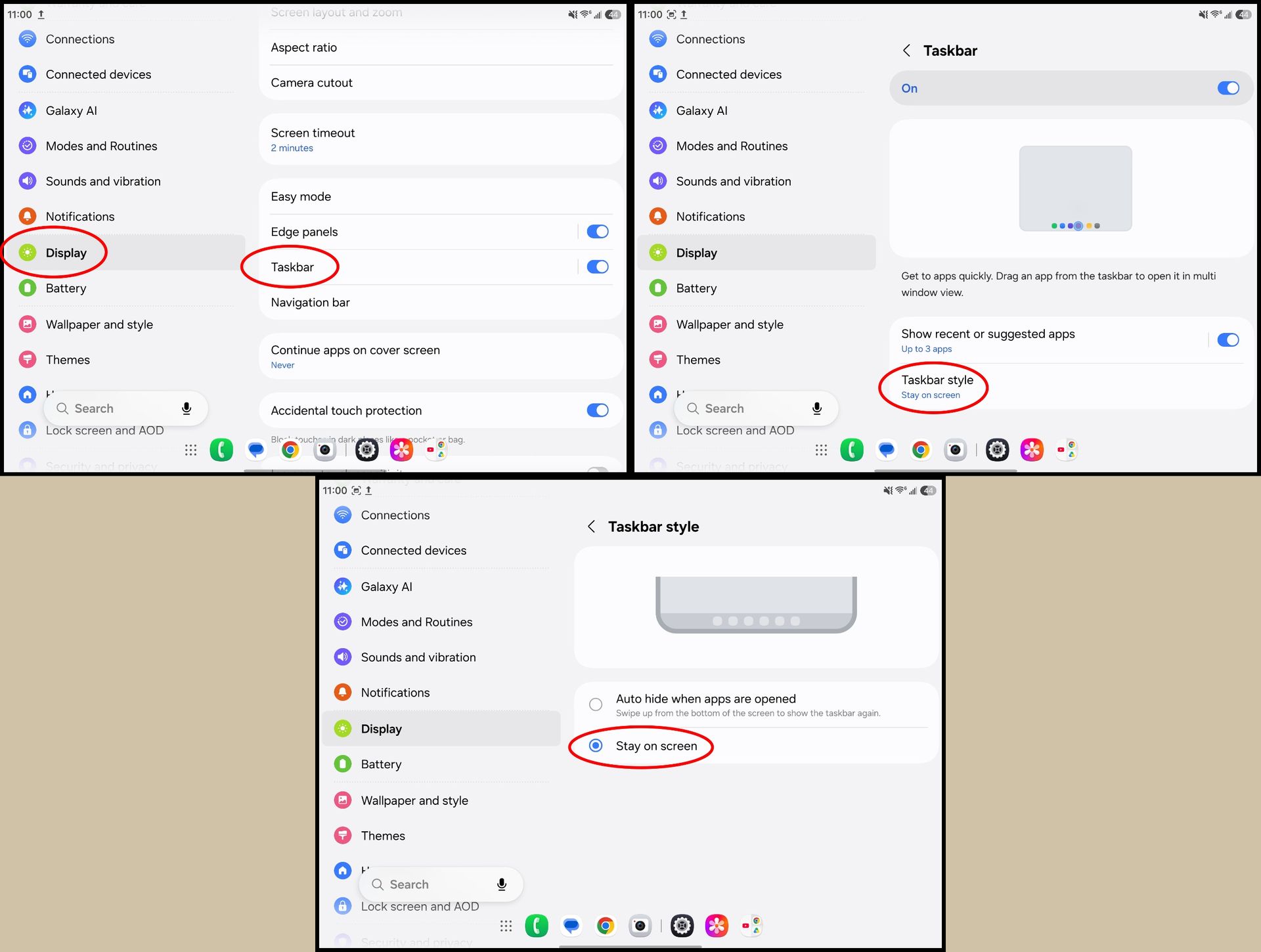
When you open your Galaxy Z Fold 8, you've probably seen that little floating taskbar appear at the bottom of the screen. By default, this taskbar isn't meant to stick around for long, but one setting changes that.
By pinning the taskbar, you can effortlessly open multiple apps at once, or quickly juggle between apps faster than you can by constantly going back to the home screen. Here's how to supercharge the taskbar:
1.Unfold the phone to use the larger inner display.
2. Open the Settings app.
3. Scroll down and tap Display.
4. Scroll down and tap Taskbar.
5. Tap Taskbar style.
6. Select Stay on screen.
(Image credit: Android Central)
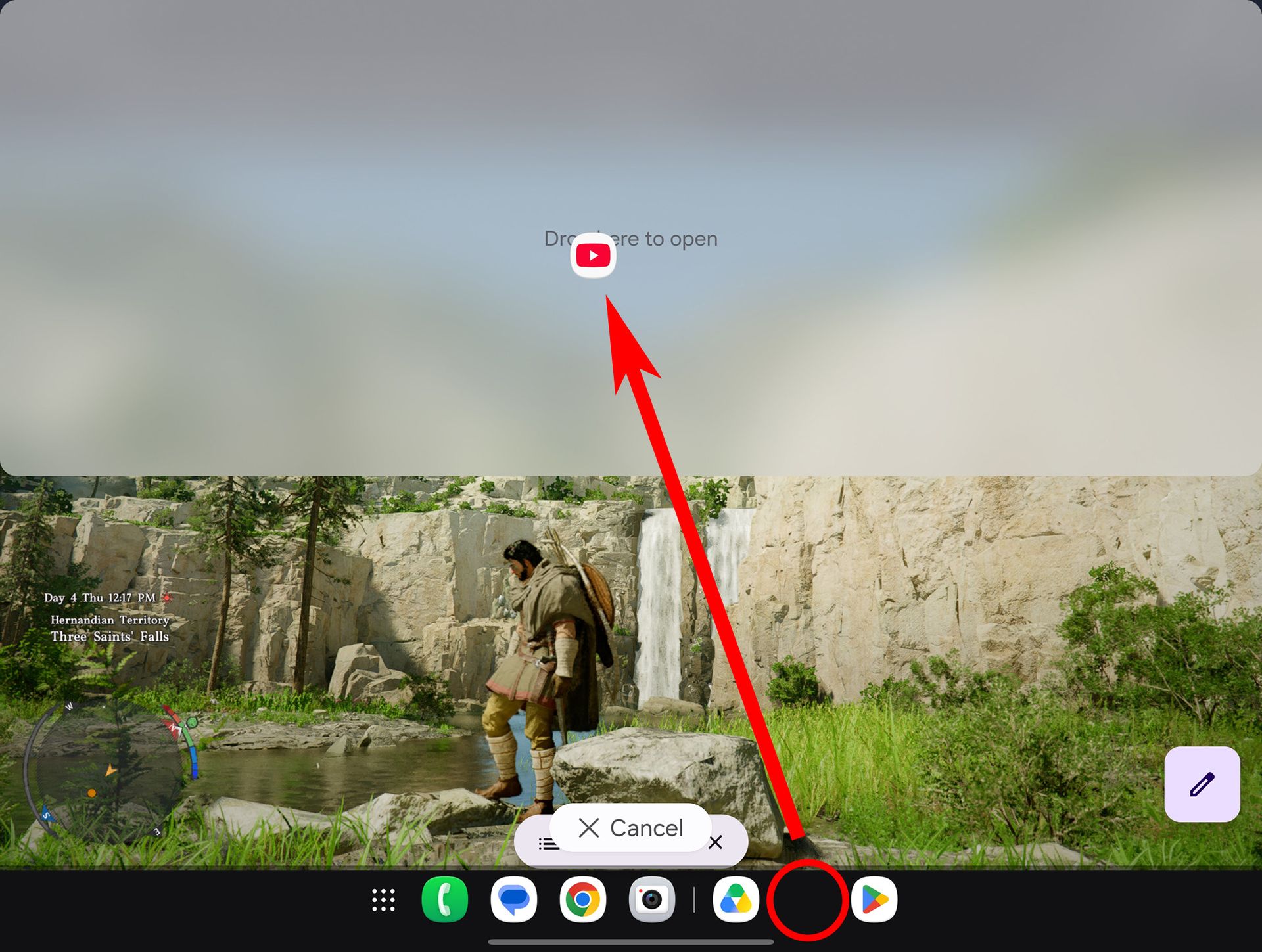
Now, the taskbar will always be visible on the inner display. You can tap any app icon to open that app, but the real magic happens when you press and hold an icon, then drag it around the screen. This lets you easily launch multiple apps at a time and split them any way you want.
Splitting the action
(Image credit: Nicholas Sutrich / Android Central)
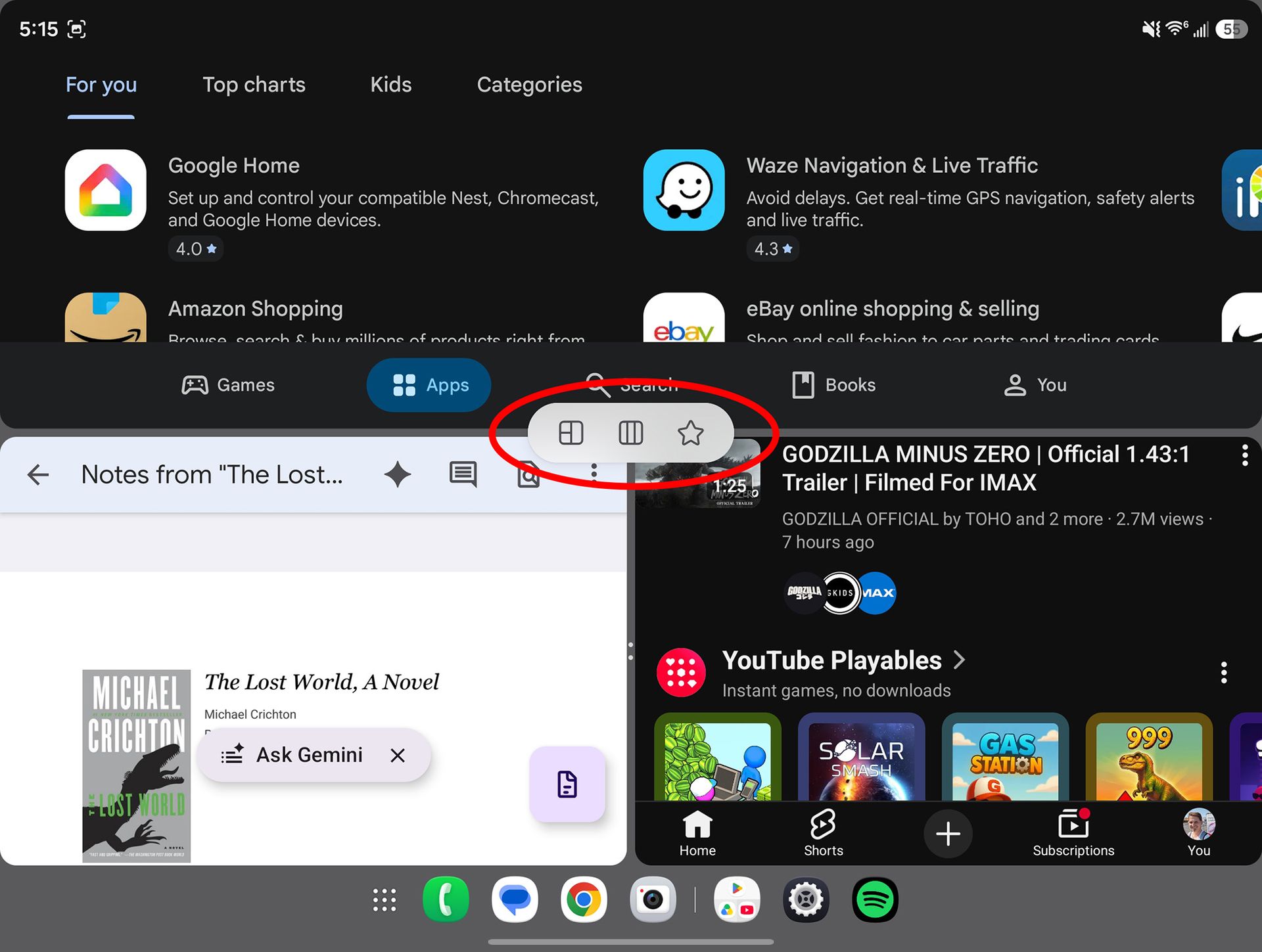
Samsung launched two new multitasking features with the Galaxy Z Fold 8, including 3-way split screen and a new way to juggle between layouts. To get started, choose three apps you want to run side by side. For this example, I'm using YouTube, Chrome, and Google Docs.
1.Unfold the phone to use the larger inner display.
2.Open any app of your choosing. I started with Chrome.
3.Press and hold another app's icon, then drag it to any side of the screen. You'll see indicators to snap the app to a specific area on the screen.
(Image credit: Android Central)
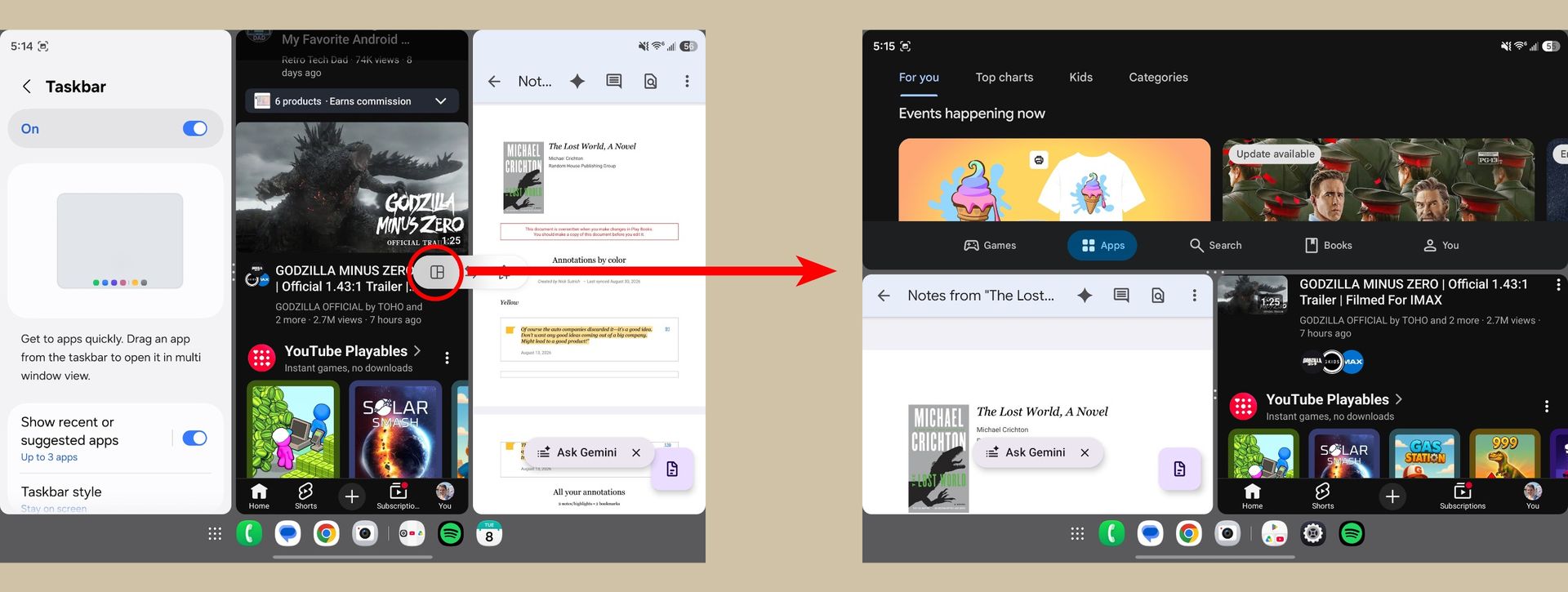
4. Choose another app from the taskbar. If you don't see the app you want, tap the app drawer button on the left side and choose it from there.
5. Drag this new app to a third section of the screen. Your Galaxy Z Fold 8 will show indicators for where you can drop the app.
(Image credit: Android Central)
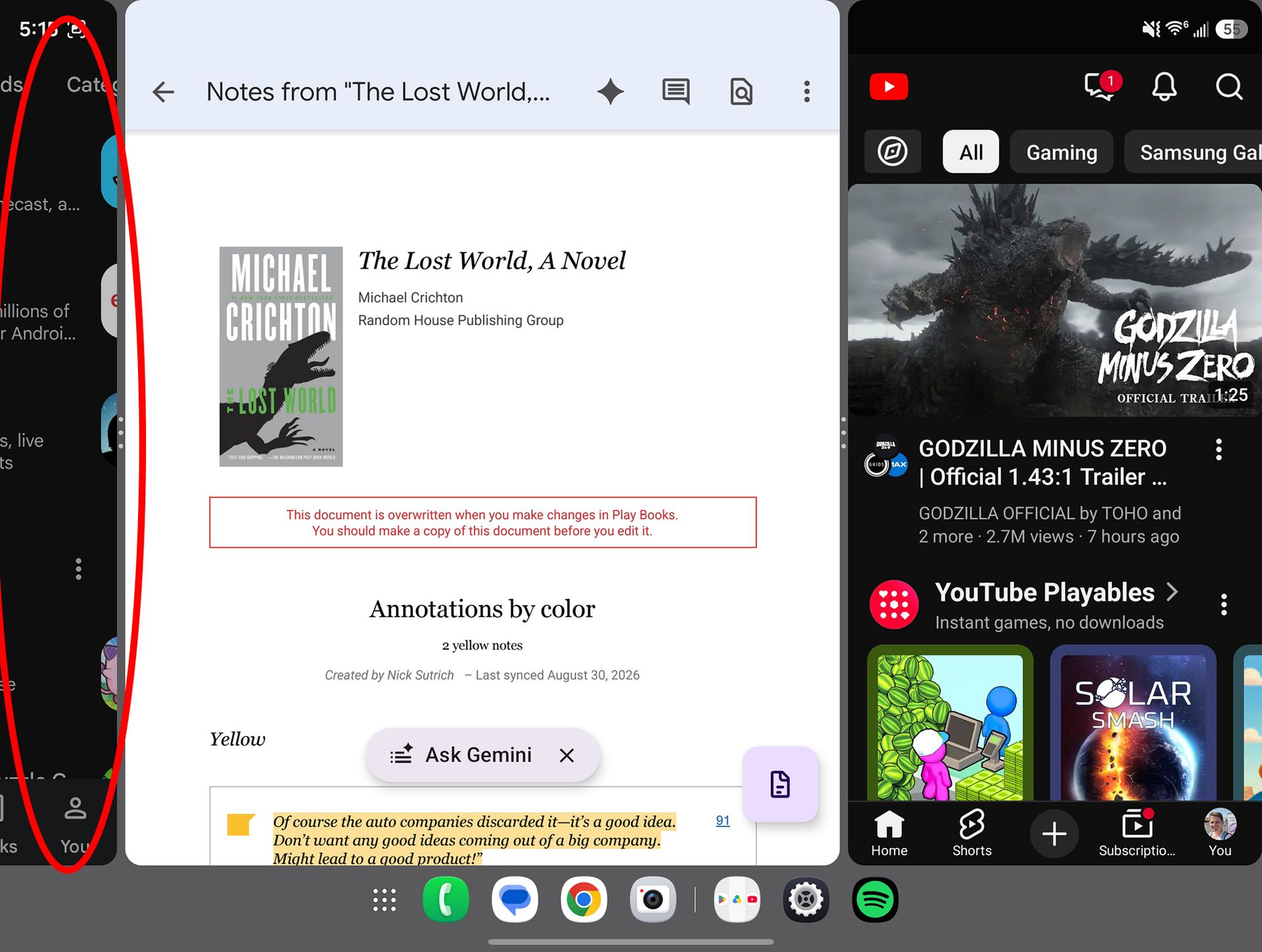
Now that you have three apps running at once, you can play around with the layout. Most commonly, this means three apps run side by side, but Samsung offers many layout options. Personally, I think three apps side-by-side makes them a bit too small to be useful, and that's where we'll start.
To enlarge an app, grab any separation bar by the "handle" — the part with the dots — and drag it outward. When running three apps at once, this will enlarge one app while leaving the others at the default size.
(Image credit: Android Central)
Here's the coolest part about this setup: when you've got multiple larger apps running at once, the others will hang "off to the side." That lets you run nearly full-screen apps and quickly switch between them by just tapping the app that's off to the side.
But if you want all the apps on one screen and don't want them all vertical, tap any of the "handles" — remember, that's the part of the separator line with the dots — then tap the grid icon that appears. Your apps will now be separated into one half-sized app alongside two quarter-sized apps.
(Image credit: Android Central)
Tapping the handle also brings up additional options. You can easily swap apps between frames by tapping the handle between those two apps, then tapping the "swap" arrow icon. Additionally, you can tap the other grid icon to swap the location of the grid. That lets you move quarter-sized apps from the left to the side half of the screen, and vice versa.
You can even hover an app by dragging the app icon to the center of the screen, letting you run four or more apps at once, similar to a desktop OS. Which layout is your favorite? Let us know in the comments!
It's official: Apple's first ever iPhone foldable has been unveiled, but why wait for that October release date when you can still get the Galaxy Z Fold 8 for FREE with T-Mobile's latest deal? Process a trade-in and add a line with the Experience Beyond plan and T-Mo will give you the passport-style Samsung Galaxy Z Fold 8 for free, weeks before the iPhone Duo even goes on sale.
Don't have anything to trade in? Skip that part of the process and you can still score $1,100 off the Galaxy Z Fold 8 when you add a line with the Experience More or Experience Beyond plans on T-Mobile's website.
Sure, T-Mobile's Experience plans aren't exactly cheap, but when I'm looking at grabbing a $1,900 smartphone, I'll take just about any deal I can get. It doesn't hurt that they are also two of the best unlimited plans in the business. If you're interested in one of the most innovative phones of 2026 and you were planning to update your wireless service anyway, this deal is worth grabbing ASAP.
Forget the iPhone Duo: grab a FREE Galaxy Z Fold 8 with trade at T-Mobile
Trade in an old or broken phone and add a line with the Experience Beyond plan and T-Mobile will give you up to $1,900 off the new Samsung Galaxy Z Fold 8, enough to make the innovative foldable phone completely free!
Don't have anything to trade in? Skip that part of the process altogether and you'll still enjoy $1,100 off the phone with any Experience plan, or you can save $900 by adding a line with "most plans" on T-Mobile's site. View Deal
Samsung just unveiled the Galaxy Z Fold 8 (alongside the Z Fold 8 Ultra and Z Flip 8) during a Galaxy Unpacked event a few months back, and the phones are already turning heads. For starters, it's hard to describe the Z Fold 8 as a true successor to last year's Galaxy Z Fold 7, as Samsung has given the phone a shorter and wider, "passport-style" design.
This new look makes the phone easy to pocket and use with one hand while folded, while unfolding the device gives you an experience akin to an Android tablet. And as usual, the foldable phone's two AMOLED display are absolutely stunning and smooth as butter.
Under the hood, you still get the powerful Z Fold experience that we've all come to know and love, with a Snapdragon 8 Elite Gen 5 chipset, 12GB of RAM, and all of the latest AI-boosted software tricks. The phone does clock in at $1,899, however, so deals like the T-Mobile promotion above are essential.
Samsung has officially ended software support for the Galaxy Z Fold 3 and Galaxy Z Flip 3 after five years.
Both foldables received four years of OS upgrades and five years of security updates, as Samsung originally promised.
Samsung has removed both phones from its security update page, meaning they won't receive regular security patches anymore.
Samsung's foldable phones that launched in the summer of 2021 have officially reached the end of their software support cycle.
Most Samsung flagship smartphones today, including the Galaxy S26 Ultra and even 2024's Galaxy S24 Ultra, come with seven years of software support. But Samsung hasn't always offered updates for this long. Older flagships came with shorter support promises, and now the Galaxy Z Fold 3 and Galaxy Z Flip 3 have officially reached the end of theirs.
As spotted by Android Authority, the Galaxy Z Fold 3 and Galaxy Z Flip 3 have received their final software updates. At launch, Samsung promised four years of OS upgrades and five years of security updates for both foldables, and the company has now fulfilled that promise. Samsung has also removed both devices from its security updates page.
This means Samsung won't be releasing any further regular software or security updates for these devices. The oldest foldables officially supported by the company are now the Galaxy Z Fold 4 and Galaxy Z Flip 4. Even those devices have moved to a quarterly update schedule, unlike newer Samsung phones that continue to receive monthly updates.
(Image credit: Andrew Myrick / Android Central)
So, if you're still using a Galaxy Z Fold 3 or Galaxy Z Flip 3, your phone won't receive any new regular security patches from Samsung going forward. That means any new security vulnerabilities discovered from here on may remain unpatched on these devices.
If you're still holding onto one of these foldables, this might finally be the time to start thinking about an upgrade. Samsung recently introduced a completely new form factor with the Galaxy Z Fold 8, while its latest foldables also come with a much longer software support promise.
If you've managed to keep your Fold 3 or Flip 3 running for five years, one of Samsung's newer foldables should last you considerably longer.
Samsung highlights achievements by its Galaxy Z8 series in 2026, stating the Fold 8 and Fold 8 Ultra sales are topping the Fold 7 by 30% with "high demand."
While the Flip 8's sales are far lower, Samsung states the clamshell is succeeding as an entry into foldables, and it's also successfully getting users to switch to the Korean OEM.
The company also highlights hardware changes in the series, such as the Fold 8's light 201g weight, the bigger 5,600mAh battery in the Fold 8 Ultra, and more.
Samsung is highlighting the achievements of the Galaxy Z8 series, as it notes higher sales and the "highest share of buyers" for one phone.
Today (Sept 8), Samsung published its official insights into the Galaxy Z8 series following the trio's launch this summer. Among its shopper analytics, Samsung states consumers have enjoyed the Galaxy Z Fold 8's "thin and light design for greater portability." Alternatively, consumers preferred the Fold 8 Ultra for its larger display. It seems the most common feedback Samsung received was that the Fold 8 Ultra's display reduced the need to carry a tablet.
As a result, Samsung observed "high demand" during the strong pre-order period for these foldables.
Together, the post states the Fold 8 and Fold 8 Ultra are outpacing the Fold 7's sales by 30%. Additionally, these book-style foldables account for 80% of all (current) foldable sales this year.
(Image credit: Derrek Lee / Android Central)
The Galaxy Z Flip 8 has seemed to fall by the wayside this year, but Samsung has excelled in other areas. According to its data, the Flip 8 has reportedly succeeded in getting consumers to switch from other brands. Samsung states 30% of Flip 8 buyers come from competing brands. What's more, "most of those buyers are first-time foldable owners."
Samsung goes down an interesting route. It states that the Flip 8 (or the Flip series in general) serves as a springboard for consumers new to foldables. With that in mind, there are reportedly "more than three times" the number of Z Flip users trading in for a Fold 8 or Fold 8 Ultra in 2026. These numbers are up compared to the Flip 7.
Samsung has observed positivity and growth for its foldables this year. Alongside its sales overview, it also detailed key engineering facts about the devices. The Galaxy Z Fold 8, for example, is just as thin as the Fold 7 (8.9mm); however, it's lighter at 201g. Flex Titanium is a technology Samsung uses for the Fold 8 and Fold 8 Ultra. The post states this tech utilizes Titanium Alloy Film, which is "one-third the width of a human hair."
The materials and structure used reportedly maintain foldable performance despite its thinness. What's more, the Fold 8 Ultra features a 5,000mAh battery (up from 4,400mAh last year) with greater heat-dissipation capabilities. Samsung says it increased this by 7% over the Fold 7.
Samsung's 2026 foldables
(Image credit: Derrek Lee / Android Central)
Android Central's Take
I'm glad to finally see something about the Flip 8. Don't get me wrong, I almost traded in my phone for the Fold 8. But the Flip series was previously its most popular. Now, the script's flipped. Newer users are opting for the Flip to get into foldables before switching to the others. What's more, Samsung says the Flip is succeeding in getting users to switch to its brand of foldables. It makes me wonder just how satisfied Samsung is with its performance and trends.
This isn't the first time we've heard about Samsung's foldable sales performance. Rumors started late in July, after Unpacked, that the Galaxy Z Fold 8 sales had skyrocketed. We were only in the pre-order phase, but that reportedly didn't stop websites overseas from crashing in the rush of consumers. Sites were crashing within 30 minutes after the product became available for pre-order. Additionally, reports said that shipping dates were delayed, as companies needed more inventory to meet demand.
We're now seeing the whole picture from Samsung. Sales have clearly turned positive for the company. While the Flip 8 has totalled far less than the Fold 8/Fold 8 Ultra, it's found success in another area that Samsung might feel satisfied with.
Reports have appeared online, as users state the corner's of their Fold 8's display bends or "indents" when pressed.
This most commonly occurs with the top right corner; however, there are others who haven't experienced this.
Samsung provided an official statement, stating this is intentional to help avoid damage if thin, fine particles become stuck on the screen.
Galaxy Z Fold 8 consumers have noticed something strange with the device's screen, and it's caused a stir. Samsung has explained the situation, stating the reality is much better than it seems.
Tipster Lanzuk on Naver highlighted users experiencing the Galaxy Z Fold 8's screen bend or "indentation" (via SamMobile). Their post states that one side of the phone's display can be pressed "more severely than the other." They add that this most commonly happens in the upper right corner of the foldable. Lanzuk offered video evidence, showing the Fold 8's unfolded display nightmarishly bending when pressed.
The way it dips into the phone has startled consumers, forcing them to believe something is wrong. It's stirred quality control conversations online. The video highlights other corners without this indentation. Lanzuk says reports vary: some users experience at least one corner bending in when pressed, while others don't.
Samsung might have something to say about this, as a report by Business Post cites an official statement (via 9to5Google). According to Samsung, everything is normal. It adds, "We designed it so the display indents slightly to provide a cushioning effect and prevent damage." The sort of damage Samsung is looking to help users avoid involves very fine or thin particles, such as sand. It explained that if something were to get stuck on the display and it's then folded, it could cause damage.
The small bend or dip helps avoid damage, so you can remove the substance without worry.
Where the Fold 8 could go
(Image credit: Naver)
It might help settle the rapidly beating hearts of consumers who've noticed their screen bend. It's not something pleasant to see, and the reactions are understandable.
Elsewhere, the Galaxy Z Fold 8 has remained quite popular for Samsung since its launch. It's become so popular that rumors suggest the company could restart its "luxury foldable strategy" with the Fold 8. A "special edition" Galaxy Z Fold 8 could be on the horizon for the second half of 2026, with Thom Browne as a purported top contender. This would return the previous partnership that occurred with the Fold 5.
Samsung paired the device with a matching smartwatch, exclusive accessories, and a custom finish. While Thom Browne is a "top contender," Samsung could also look to Maison Margiela, which it previously worked with.
Android Central's Take
The tipster from Naver mentioned that many of these Fold 8 reports got started as September got rolling. Consumers from South Korea, as well as other international countries (like the U.S.) have reported similar findings. It's good that Samsung has been rather timely with a response. I'd freak out, too, if I pressed by screen and I saw it bend. I'd think something was wrong with it. Hopefully, this is the response people were looking for to settle their worries.
TL;DR: the Samsung Galaxy S26 Ultra just scored a rare 27% discount during Amazon's Labor Day sale, but the deal expires in less than 24 hours!
It's no secret that the Samsung Galaxy S26 Ultra is one of the best phones ever built, but its steep price tag has been a major barrier for a lot of Android fans. Fortunately, Amazon's Labor Day sale is live and slashing 27% off the unlocked flagship, dropping the price to a much more reasonable $953.
The only catch is that the deal ends at midnight tonight, so you better act fast if you're interested. We probably won't see another discount like this until the fall sales begin in earnest next month.
The Samsung Galaxy S26 Ultra is an absolute beast of performance, with a huge AMOLED display, powerful Snapdragon chip, and some lightning fast charging capabilities.
Grab the premium device unlocked from Amazon and you'll score a straight 27% off your purchase. The retailer's Labor Day sale ends at midnight tonight, however, so don't wait too long to make your move. View Deal
The Samsung Galaxy S26 Ultra is pure luxury inside and out, with a stunning 6.9-inch AMOLED display (with built-in stylus), IP68 ingress protection with an aluminum and Gorilla Glass build, and a slimmer, more lightweight design than its predecessor.
Under the hood, the phone is equipped with the excellent Qualcomm Snapdragon 8 Elite Gen 5 processor, plus you get 12GB of RAM, a seven-year software promise, and all of the latest AI-boosted software features from Galaxy AI. The S26 Ultra also has the innovative Privacy Display feature that prevents people from seeing your screen unless they're looking at it straight on.
Indeed, even with this discount, $953 is a lot for a phone. But if you've had your eye on the Samsung Galaxy S26 Ultra for a while and you prefer the simplicity of an unlocked device, this deal is tough to beat. Just don't wait too long: once this offer is gone, it's going to be at least a month before the Galaxy S26 Ultra gets another discount this good.
You can even claim an additional gift card worth up to $600 if you trade in an old or broken device on the retailer's website. Not too shabby for an Android phone that was literally just announced last week! No Prime membership is required to receive the gift card, but be aware that Amazon's deal ends on September 20th — so you don't have very long to claim your free cash.
The Samsung Galaxy S26 FE has arrived. Buy the midrange smartphone unlocked from Amazon and you'll get a free $200 gift card with your purchase, no trade-in required and no strings attached. Starting at $699, this device comes equipped with a ton of flagship-level specs and One UI 9 (Android 17) straight out of the box. View Deal
Don't let its unassuming design fool you: the Galaxy S26 FE is one of the best 'Fan Edition' smartphones that Samsung has produced in years. Starting at $699.99 for the 128GB version, the device comes equipped with a lovely 6.7-inch AMOLED display constructed from durable Gorilla Glass Victus+, while under the hood you get a powerful Exynos chipset and a 4,900mAh battery that should easily last a full day on a single charge.
Looking at the camera tech, the Galaxy S26 FE boasts a 50MP main lens, plus you get all of the brand's latest AI-boosted software features, such as Nightography and My FanCam. The midrange smartphone also comes with Android 17 straight out of the box, making the Galaxy S26 FE the first Samsung phone to launch with One UI 9. You even get seven years of OS and security updates guaranteed, which is extremely unusual for phones in this price range.
So what's the catch?
Well, the problem with Samsung's FE series always comes down to timing and price. The midrange phones generally launch months after the release of the company's S-series lineup, which means the flagship devices are often getting discounted by the time the new FE arrives. For example, you can currently buy an unlocked Samsung Galaxy S26 256GB for $721 at Amazon, which is only $21 more expensive than the S26 FE. Although, of course, you won't get the $200 gift card.
If you want a great smartphone with Android 17 out of the box AND $200 of Amazon spending money, this Galaxy S26 FE promotion is an awesome deal. If, on the other hand, you're simply looking for the best Android phone deal imaginable, it might be worth waiting a few weeks to see what the fall sale season has in store for us.
The Samsung Galaxy Z Fold 8 Ultra has only been out since August 7th, but you can already score some impressive discounts if you know where to look. The best part is that these are straight discounts, which means you don't need to worry about meeting any kind of eligibility requirements to receive the savings.
No confusing contracts, no trade-in process: just good old-fashioned discounts on a powerful Android phone. Considering that the Galaxy Z Fold 8 Ultra starts at a steep $2,099.99, these straightforward Labor Day deals are a very welcome sight.
Surprisingly, Samsung itself might have the best Galaxy Z Fold 8 Ultra deal of the bunch, slashing $350 off the phone when you skip the trade-in process. You'll also be eligible for an exclusive color variant and several additional discounts when you bundle the unlocked phone with a Samsung watch or earbuds.
If you do have something to trade in, Samsung is offering up to $800 off the Galaxy Z Fold 8 Ultra, although you'll have to waive the aforementioned $350 discount. View Deal
Buy the Samsung Galaxy Z Fold 8 Ultra unlocked from Amazon and you'll get a straight $300 knocked off the purchase price. No trade-in is required, although you stand to earn an additional $900 credit (in the form of an Amazon gift card) when you send the retailer an old or broken device. View Deal
As part of its sitewide Labor Day sale, Best Buy is also slashing $300 off the Galaxy Z Fold 8 Ultra, knocking the price of the premium foldable down to $1,799.99. No trade-in required and no strings attached!View Deal
Starting at $2,099.99, the Samsung Galaxy Z Fold 8 Ultra is both a follow-up to last year's great Galaxy Z Fold 7 and a major upgrade upon it. This impressive foldable phone takes its predecessor's thin and lightweight build and adds a huge 5,000mAh battery, the latest Qualcomm chip, and all of the latest AI-boosted software features from Galaxy AI.
As promised, the center crease is less visible than ever before, plus the Galaxy Z Fold 8 Ultra comes with all of the powerful specs you'd expect from a 2026 Samsung foldable, including great cameras, two gorgeous AMOLED displays, and seven years of guaranteed OS and security upgrades.
Indeed, the biggest problem that I have with the Galaxy Z Fold 8 Ultra is probably its price. Spending over $2,000 on a smartphone simply isn't realistic for many folks, which is why deals like the offer above are so essential. A $350 price reduction may seem like a drop in the bucket for such an expensive phone, but if you want a straightforward offer without any confusing fine print, these discounts are going to be pretty tough to beat (until Black Friday, at least).
(Image credit: Nicholas Sutrich / Android Central)
In Hardwired, AC Senior Editor Harish Jonnalagadda delves into all things hardware, including phones, audio products, storage servers, and networking gear.
Samsung didn't change too many things with the Galaxy Z Fold 8 Ultra, but a key area of differentiation is silicon-carbon battery tech. This is one of the reasons how Samsung managed to slot in a bigger 5,000mAh battery in the foldable while retaining a similar svelte design as the Z Fold 7. In fact, all of Samsung's latest foldables use silicon batteries, but it's the Z Fold 8 and Fold 8 Ultra where the difference is immediately noticeable. I asked Samsung a list of questions around its implementation of silicon-carbon tech, and it is interesting to see how the brand is going about integrating the tech into its latest foldables.
As a refresher, a silicon battery has a small mixture of a silicon-carbon material in the anode, leading to an increased energy density. The amount of silicon content in the anode varies by brand, and Samsung didn't share how much it is using in its foldables. To give you some context, most brands use around a mixture of 10% silicon by weight in the anode, with some — like Xiaomi's Redmi Note 17 Pro Max that has a 9,210mAh battery — going with a slightly higher 16% silicon ratio to provide greater energy density.
Why don't brands just use an anode that's entirely made out of silicon-carbon? That's because while silicon has much better energy density — ten times as much as graphite — it undergoes expansion and contraction during charging, something you don't want in a phone battery. As there is a greater risk of long-term stability or battery swelling with extended use, it is mixed with carbon to deliver a mechanically stable structure while offering better electrical conductivity.
Brands are being (justifiably) cautious of the tech, and a Samsung spokesperson said the brand "reengineering the battery system" to facilitate the use of silicon-carbon in the anode, and to ensure that the higher-density batteries it is using this year are just as safe to use as traditional lithium-ion batteries:
"On the anode side, a thin carbon coating helps manage the reactivity of silicon-carbon particles, helping mitigate sudden volume changes during charge and discharge and supporting long-term stability," said Samsung. "On the cathode side, coating and doping help maintain surface stability and structural integrity, even under higher voltage conditions."
Another thing to consider is long-term durability, and Samsung says it added "additives" to the electrolyte to "help form a protective layer on the silicon surface, reducing silicon reactivity and supporting long-term cell stability."
Samsung also made tweaks to the separator — a polymer sheet that sits between the cathode and anode — which has a "high-porosity structure" to "improve ion movement while maintaining strength and thermal stability."
What's interesting is that Samsung is using different battery architectures for its foldables. The Galaxy Z Fold 8 and Fold 8 Ultra use a "dual-path charging architecture that distributes power more efficiently across the battery system, enabling faster, more stable and reliable charging while improving heat management." This system enables 45W charging on both devices, but with the Flip 8, Samsung "separately optimized for the unique spatial and thermal requirements" of the compact foldable, so it has a battery size and charging tech that's unchanged to last year.
With Samsung just getting started with silicon-carbon batteries, it's understandable that it is playing it safe. While foldables like the Razr Fold, Vivo X Fold 5, and the Find N6 come with 6,000mAh silicon batteries, the Z Fold 8 Ultra has a much more modest 5,000mAh unit. It is still considerable progress from last year, and I'm glad to see Samsung leveraging this tech — I can't wait to see how it evolves with the Galaxy S27 next year.
Samsung
Galaxy Z Fold 8
The unique size of the Galaxy Z Fold 8 makes it exciting in its own right, and it is a delightful foldable.
Samsung smartphones are known for their excellent camera performance, but the camera shutter sound can sometimes be inconvenient, especially when taking photos in quiet environments such as libraries, meetings, museums, or during personal moments.
Depending on your Samsung phone model, region, and software version, the method for disabling the camera sound may vary. This guide explains the common ways to turn off or reduce the camera shutter sound on Samsung Galaxy devices.
Why Does a Samsung Phone Make a Camera Shutter Sound?
The camera shutter sound is designed to provide an audible confirmation that a photo has been captured.
However, in some countries and regions, smartphone manufacturers are required by law to keep the shutter sound enabled to protect privacy and prevent unauthorized photography.
Because of these regional regulations:
Some Samsung phones allow the shutter sound to be disabled
Some models only allow it to be muted through system sound settings
Some versions permanently keep the shutter sound enabled
If you cannot find the option, it may be restricted by your device’s region settings.
Method 1: Disable Camera Shutter Sound Through Camera Settings
On many Samsung Galaxy phones, you can turn off the shutter sound directly from the Camera app.
Follow these steps:
Step 1: Open the Camera App
Launch the built-in Camera application on your Samsung phone.
Step 2: Enter Camera Settings
Tap the gear icon (Settings) in the top-left or top-right corner.
Step 3: Find Shutter Sound Option
Look for:
Shutter sound
or
Camera sounds
Step 4: Turn It Off
Toggle the option off.
After disabling it, taking photos will no longer produce the camera shutter sound.
Note: This option is not available on every Samsung model.
Method 2: Turn Off Camera Sound by Using Silent Mode
If your Samsung phone does not provide a shutter sound option, you can try muting system sounds.
Steps:
Swipe down from the top of the screen to open the Quick Settings panel.
Tap the Sound icon.
Change the phone mode to:
Silent
Vibrate
Open the Camera app and take a photo.
On many Galaxy devices, the shutter sound follows the system volume settings.
Method 3: Lower System Volume Settings
Another simple method is reducing the system sound volume.
Steps:
Open:
Settings → Sounds and vibration
Select:
Volume
Reduce:
System volume
to the lowest level.
Then test the camera again.
Depending on your Samsung model, the shutter sound may disappear.
Method 4: Use Samsung Modes and Routines
Samsung’s Modes and Routines feature allows automatic sound control.
You can create a routine that switches your phone to silent mode when entering specific locations or situations.
For example:
Library
Office
Meeting room
Setup Steps:
Open:
Settings → Modes and Routines
Tap:
Routines
Create a new routine.
Set a condition:
Location
Time
App opened
Add an action:
Sound mode → Silent
This can automatically disable camera sounds when needed.
Method 5: Use Third-Party Camera Apps
If the Samsung Camera app does not allow shutter sound control, some third-party camera applications may offer additional options.
Examples include:
Open Camera
Other professional camera apps
These apps may provide settings such as:
Disable camera sound
Custom shutter options
Manual controls
However, availability depends on your phone model and Android version.
Method 6: Change the Phone Region (Advanced Option)
Some Samsung phones sold in regions where shutter sounds are mandatory cannot disable the sound.
Advanced users sometimes change the device region or firmware version to another market where disabling the shutter sound is allowed.
However, this method is not recommended for most users because it may:
Affect warranty service
Cause software issues
Require firmware flashing knowledge
Always check your local laws before changing regional settings.
How to Turn Off Camera Sound on Popular Samsung Galaxy Models
Samsung Galaxy S Series
For Galaxy S models:
Open Camera
Tap Settings
Disable Shutter sound if available
If the option is missing:
Use Silent mode
Lower system volume
Samsung Galaxy Z Fold and Z Flip Series
Foldable Galaxy phones usually follow the same camera settings:
Camera → Settings → Shutter sound
If unavailable:
Enable Silent mode before taking photos
Samsung Galaxy A Series
Budget and mid-range Galaxy A phones may have different software versions.
Try:
Camera settings
Sound settings
Silent mode
Why Can’t I Disable the Camera Sound on My Samsung Phone?
If the shutter sound cannot be turned off, possible reasons include:
1. Regional Restrictions
Some countries require phones to make a camera sound.
2. Carrier Firmware
Carrier-specific software may remove the option.
3. Android Version Differences
New One UI versions may change camera settings locations.
4. Device Model Limitations
Not all Samsung Galaxy models support shutter sound control.
Frequently Asked Questions
Can I completely remove the Samsung camera shutter sound?
It depends on your phone model and region. Some devices allow it through Camera settings, while others only allow muting through sound modes.
Does silent mode always disable the camera sound?
Not always. Some Samsung phones still keep the shutter sound active due to regional restrictions.
Can I turn off the screenshot sound too?
Screenshot sounds are controlled separately and may also depend on your region settings.
Will disabling camera sound affect photo quality?
No. Turning off the shutter sound only changes audio feedback and does not affect camera performance or image quality.
Final Thoughts
Turning off the camera shutter sound on a Samsung phone is usually simple if your device supports the option. Start by checking:
Camera App → Settings → Shutter Sound
If that option is unavailable, try:
Silent mode
Reducing system volume
Using Samsung Modes and Routines
Trying a compatible third-party camera app
Keep in mind that some Samsung phones sold in certain regions are required to keep the shutter sound enabled, so the available options may depend on your device model and location.
The Galaxy Z Fold 8 surprised me. As someone who has not been a big fan of book-style foldables and generally prefers flip phones, the Galaxy Z Fold 8 seems to flip everything on its head. In fact, given its small stature, it sits somewhere in the Goldilocks zone between both types of foldables.
I think this is why I like the Galaxy Z Fold 8 so much. I was ready to dismiss the new design when I saw leaks of the phone, but as soon as I put it in my hand, something clicked, and in my two weeks of testing, the phone has been a joy to use. Between the pocketability, the performance, and the price, the Galaxy Z Fold 8 might be the ideal foldable phone for most buyers, although you'll have to deal with a few compromises.
It's a little strange that Samsung popularized the current foldable design, only to shift to a form factor that few others have tried and abandoned. That said, Samsung's iteration seems to take the design a bit further by incorporating a shorter chassis and wider displays.
The result is a phone that feels admittedly very different from what we're used to, especially following the advent of taller smartphone displays. But holding the phone sort of puts the whole thing into perspective; it's thin and light, and nearly the entire phone fits in the palm of my hand. That's important for reachability, something that taller smartphones seem to have forgotten is still important.
It's literally the size of my passport, and it fits in my pocket better than any other smartphone I've used in recent years, including flip phones like the Motorola Razr Ultra.
Derrek Lee / Android CentralDerrek Lee / Android CentralDerrek Lee / Android CentralDerrek Lee / Android Central
Part of my original concern was how apps would scale to this odd 16:10 aspect ratio on the external display, and my concerns were mostly unfounded, although not completely.
Vertical videos are still watchable on the external display, and while the minimum black bars on the sides may annoy some, I don't mind them. I actually like that the app’s UI elements are pushed away from the video. Watching longer-form videos like movies, TV shows, and YouTube also feels pretty natural on the external display.
Derrek Lee / Android CentralDerrek Lee / Android CentralDerrek Lee / Android Central
The downside of having such a short, wide external display is that app content is a bit condensed, and there are times when I find myself scrolling more than I normally would because of the lack of vertical real estate.
This can be addressed somewhat when you open the Galaxy Z Fold 8 to reveal the surprisingly seamless and tablet-like display.
(Image credit: Derrek Lee / Android Central)
The wider aspect ratio reminds me of how I felt when I first saw the Galaxy Z TriFold: this is exactly how a foldable phone should feel, like a phone when closed and a tablet when open. It also helps that the new Titanium Flex display makes for a barely noticeable crease. If Apple's been waiting to get rid of the crease for its eventual foldable, now is definitely the time.
Videos are also a joy to watch on the larger display, and there are fewer black bars on the top and bottom, at least compared to the Ultra.
Derrek Lee / Android CentralDerrek Lee / Android CentralDerrek Lee / Android CentralDerrek Lee / Android Central
The Galaxy Z Fold 8 also acts like a tablet when it's open. That means apps like Gmail, YouTube Music, and Chrome open in tablet mode, and you can pull up a taskbar of apps at the bottom from just about any screen.
Oddly enough, there's no support for the Flex Mode panel, which is on both the Fold 8 Ultra and Flip 8. That's because the hinge can't really be freely adjusted to stay at different angles, especially beyond 90 degrees. It's a bit of a missed opportunity for viewing content.
But the wider display means better multitasking. One thing I love about the Galaxy Z Fold 8 is that you can use three apps side by side, instead of having one app take up a full side and two apps split in half on the other. And of course you can drag and drop content between apps and resize them to your liking.
Derrek Lee / Android CentralDerrek Lee / Android CentralDerrek Lee / Android Central
Another benefit the Galaxy Z Fold 8 has over the more square Ultra is that the wider display gives you more options for app layouts. Sure, I can use apps like Instagram or read ebooks in a horizontal orientation, but I can turn the phone and use the app vertically so that certain content fits the screen better.
Derrek Lee / Android CentralDerrek Lee / Android CentralDerrek Lee / Android Central
Of course, not all apps will scale very well on either display. That mostly goes for games, and while some like Honkai: Star Rail look just fine on either panel, Pokémon Go doesn't look very good on the inner display. Scaling is very awkward for this game and for a lot of other vertically oriented games as well, and you're like I'm going to have to fiddle around with the scaling options to find a fit that works for you.
Derrek Lee / Android CentralDerrek Lee / Android CentralDerrek Lee / Android Central
The Snapdragon 8 Elite Gen 5 for Galaxy and base 12GB of RAM help the Fold 8 perform just as well as you'd expect, with no hiccups. That said, I notice that the phone gets pretty warm, mostly when gaming, and I imagine it's due to the phone's small stature.
The small chassis also means there's not much room for a huge battery. The 4,800mAh battery should get you through most of the day, although now that Samsung is using silicone carbon batteries, I feel that the company could have squeezed in its larger-capacity unit. After all, the smaller Razr Ultra 2026 squeezed in a 5,000mAh battery with much faster charging.
(Image credit: Derrek Lee / Android Central)
There are plenty of AI features scattered throughout One UI 9, although admittedly they're the least interesting thing about the Galaxy Z Fold 8. If you can stand using Samsung Keyboard, which is still pretty bad, you'll get access to many of Samsung's Galaxy AI features like writing tools, translation, and Gemini Intelligence.
When I receive a message, for instance, the AI will suggest responses based on the conversation, and even gave me prompts in German when a friend of mine texted “Danke," which I found pretty fun. It also suggests certain actions, like opening my calendar when my friend asked if I was back in town after a long trip, or sending my location when another friend asked how my trip was going.
And of course, with Gemini intelligence, you can have it perform actions on your behalf, and it supports even more apps than before.
Derrek Lee / Android CentralDerrek Lee / Android CentralDerrek Lee / Android CentralDerrek Lee / Android Central
One of the highlight features on the Galaxy Z Fold 8 is My FanCam, which can pinpoint a person in a video and focus on them, allowing you to crop out the rest of the video so that it's social media-ready. It's actually quite ingenious, and the result is often better than I expect.
The phone does a good job keeping up with the subject, wherever they happen to be in the video, although the camera movements can be a bit wobbly when tracking subjects. Still, it saves me a ton of time having to edit the videos manually.
Derrek Lee / Android CentralDerrek Lee / Android CentralDerrek Lee / Android Central
As for the cameras, the dual 50MP sensors on the back can capture decent images, and you can see my Galaxy Z Fold 8 camera review/comparison for more on that. There is no telephoto sensor, which is also likely due to the phone's limited space. On the plus side, Samsung included new video capture features the creators will love, such as the ability to capture LOG video or add LUTs to give your videos a dramatic look.
This is one of the things I loved about using LG smartphones like the V30, so I'm glad to see it here.
Should you buy the Galaxy Z Fold 8?
(Image credit: Derrek Lee / Android Central)
Th writing has been on the wall for some time that the era of modern flip phones may be coming to an end. Samsung hasn't said anything about it, but reports have pointed to the rising popularity of book-style foldables, so much so that even Motorola has joined the party.
If there's one phone that I can see killing the flip phone and taking foldables truly mainstream, it's the Galaxy Z Fold 8. It may not have all the Ultra features of its sibling, but it brings much of that added utility of a larger foldable to a smaller, more pocketable, and much more affordable form factor. And it's a damn joy to use.
Samsung makes some of the best camera phones in the ever-shrinking North American market. With the Galaxy Z Fold 8 and Z Fold 8 Ultra hitting the market, I decided to take their cameras for a spin, taking 1,000 photos between both phones to get a good idea of how they perform.
Beyond just testing the cameras of Samsung's newest foldables, I also took the time to compare the camera performance to two of my favorite foldables: the Motorola Razr Ultra 2026 and Razr Fold. Motorola has come a long way, and the Fold has proven that the company knows how to make a good camera.
How I tested them
(Image credit: Derrek Lee / Android Central)
I've been testing the Galaxy Z Fold 8 and Fold 8 Ultra since their launch on July 22. I captured photos in various scenarios and environments, using both devices alongside the Razr Ultra 2026 and Razr Fold.
I didn't fiddle with any settings or tap a subject in the viewfinder to adjust the exposure; all of these were just point-and-shoot.
(Image credit: Derrek Lee / Android Central)
Juggling four phones isn't easy, and it isn't the most scientific method, but I tried to keep things as fair as possible. I made sure to capture photos with the same or similar composition across devices. Still, there may be some slight differences between photos.
Also, for the sake of my sanity (and your time), I'm not uploading all 1,000 photos I captured with the Galaxy Z Fold 8 series. However, I have selected a number of images that I think best represent the capabilities of the Galaxy Z Fold 8 series in different situations.
Note: Click the expand button in the corner for a better view of the images.
Samsung Galaxy Z Fold 8 and Galaxy Z Fold 8 Ultra
(Image credit: Derrek Lee / Android Central)
Between the Galaxy Z Fold 8 and Fold 8 Ultra, the hardware differences are quite massive. The former sticks to two 50MP cameras, while the latter has a massive 200MP primary sensor and a third telephoto camera. The result is noticeably more detail in the Fold 8 Ultra's images, while the Fold 8 tends to lean a bit softer.
That goes for color as well; images from the Fold 8 Ultra tend to be punchier, while the Fold 8 tends to appear a bit muted. I find I prefer the Ultra's images, although it can go a bit overboard with saturation, especially when it comes to the color red.
This is the complete opposite for the ultrawide sensor, which is punchier on the Fold 8, and I tend to prefer these images over the Fold 8 Ultra's ultrawide.
Both phones do relatively okay when it comes to selfies and portrait images, although I still feel like they lack proper tuning for skin tones like mine.
Galaxy Z Fold 8Derrek Lee / Android CentralGalaxy Z Fold 8 UltraDerrek Lee / Android CentralGalaxy Z Fold 8Derrek Lee / Android CentralGalaxy Z Fold 8 UltraDerrek Lee / Android CentralGalaxy Z Fold 8Derrek Lee / Android CentralGalaxy Z Fold 8 UltraDerrek Lee / Android CentralGalaxy Z Fold 8Derrek Lee / Android CentralGalaxy Z Fold 8 UltraDerrek Lee / Android CentralGalaxy Z Fold 8Derrek Lee / Android CentralGalaxy Z Fold 8 UltraDerrek Lee / Android CentralGalaxy Z Fold 8Derrek Lee / Android CentralGalaxy Z Fold 8 UltraDerrek Lee / Android CentralGalaxy Z Fold 8Derrek Lee / Android CentralGalaxy Z Fold 8 UltraDerrek Lee / Android CentralGalaxy Z Fold 8Derrek Lee / Android CentralGalaxy Z Fold 8 UltraDerrek Lee / Android CentralGalaxy Z Fold 8Derrek Lee / Android CentralGalaxy Z Fold 8 UltraDerrek Lee / Android CentralGalaxy Z Fold 8Derrek Lee / Android CentralGalaxy Z Fold 8 UltraDerrek Lee / Android CentralGalaxy Z Fold 8Derrek Lee / Android CentralGalaxy Z Fold 8 UltraDerrek Lee / Android CentralGalaxy Z Fold 8Derrek Lee / Android CentralGalaxy Z Fold 8 UltraDerrek Lee / Android CentralGalaxy Z Fold 8Derrek Lee / Android CentralGalaxy Z Fold 8 UltraDerrek Lee / Android CentralGalaxy Z Fold 8Derrek Lee / Android CentralGalaxy Z Fold 8 UltraDerrek Lee / Android CentralGalaxy Z Fold 8Derrek Lee / Android CentralGalaxy Z Fold 8 UltraDerrek Lee / Android CentralGalaxy Z Fold 8Derrek Lee / Android CentralGalaxy Z Fold 8 UltraDerrek Lee / Android CentralGalaxy Z Fold 8Derrek Lee / Android CentralGalaxy Z Fold 8 UltraDerrek Lee / Android CentralGalaxy Z Fold 8Derrek Lee / Android CentralGalaxy Z Fold 8 UltraDerrek Lee / Android CentralGalaxy Z Fold 8Derrek Lee / Android CentralGalaxy Z Fold 8 UltraDerrek Lee / Android CentralGalaxy Z Fold 8Derrek Lee / Android CentralGalaxy Z Fold 8 UltraDerrek Lee / Android CentralGalaxy Z Fold 8Derrek Lee / Android CentralGalaxy Z Fold 8 UltraDerrek Lee / Android CentralGalaxy Z Fold 8Derrek Lee / Android CentralGalaxy Z Fold 8 UltraDerrek Lee / Android CentralDerrek Lee / Android CentralDerrek Lee / Android CentralGalaxy Z Fold 8Derrek Lee / Android CentralGalaxy Z Fold 8 UltraDerrek Lee / Android CentralGalaxy Z Fold 8Derrek Lee / Android CentralGalaxy Z Fold 8 UltraDerrek Lee / Android Central
The Ultra clearly has the upper hand with zoom. The Fold 8 can take 2x shots at optical quality, but anything beyond that and you'll see the quality drop. In most cases, images for the Ultra appear much cleaner, while the Fold 8 can sometimes struggle to produce the necessary detail.
Sometimes the Fold 8 gets it right, and while the AI is clearly putting in some work to make up for the lack of a telephoto camera, things like text can appear sharper on the Fold 8 compared to the more natural processing from the Ultra's optical sensor. Still, the Fold 8 isn't as consistent with zoom shots, and your best bet is to stick with 2x.
Galaxy Z Fold 8 (3x)Derrek Lee / Android CentralGalaxy Z Fold 8 Ultra (3x)Derrek Lee / Android CentralGalaxy Z Fold 8 (10x)Derrek Lee / Android CentralGalaxy Z Fold 8 Ultra (10x)Derrek Lee / Android CentralGalaxy Z Fold 8 (3x)Derrek Lee / Android CentralGalaxy Z Fold 8 Ultra (3x)Derrek Lee / Android CentralGalaxy Z Fold 8 (3x)Derrek Lee / Android CentralGalaxy Z Fold 8 Ultra (3x)Derrek Lee / Android CentralGalaxy Z Fold 8 (10x)Derrek Lee / Android CentralGalaxy Z Fold 8 Ultra (10x)Derrek Lee / Android CentralGalaxy Z Fold 8 (3x)Derrek Lee / Android CentralGalaxy Z Fold 8 Ultra (3x)Derrek Lee / Android CentralGalaxy Z Fold 8 (2x)Derrek Lee / Android CentralGalaxy Z Fold 8 Ultra (2x)Derrek Lee / Android CentralGalaxy Z Fold 8 (3x)Derrek Lee / Android CentralGalaxy Z Fold 8 Ultra (3x)Derrek Lee / Android CentralDerrek Lee / Android CentralDerrek Lee / Android CentralDerrek Lee / Android CentralDerrek Lee / Android CentralDerrek Lee / Android CentralDerrek Lee / Android CentralDerrek Lee / Android CentralDerrek Lee / Android Central
Both phones do a decent job with challenging lighting, but I wouldn't say either excels. Photos are often a tad noisy, though this is more of an issue with the base Fold 8 than the Fold 8 Ultra, which often delivers cleaner, more detailed shots.
Galaxy Z Fold 8Derrek Lee / Android CentralGalaxy Z Fold 8 UltraDerrek Lee / Android CentralGalaxy Z Fold 8Derrek Lee / Android CentralGalaxy Z Fold 8 UltraDerrek Lee / Android CentralGalaxy Z Fold 8Derrek Lee / Android CentralGalaxy Z Fold 8 UltraDerrek Lee / Android CentralGalaxy Z Fold 8Derrek Lee / Android CentralGalaxy Z Fold 8 UltraDerrek Lee / Android CentralGalaxy Z Fold 8Derrek Lee / Android CentralGalaxy Z Fold 8 UltraDerrek Lee / Android CentralGalaxy Z Fold 8Derrek Lee / Android CentralGalaxy Z Fold 8 UltraDerrek Lee / Android CentralGalaxy Z Fold 8Derrek Lee / Android CentralGalaxy Z Fold 8 UltraDerrek Lee / Android CentralGalaxy Z Fold 8Derrek Lee / Android CentralGalaxy Z Fold 8 UltraDerrek Lee / Android CentralGalaxy Z Fold 8Derrek Lee / Android CentralGalaxy Z Fold 8 UltraDerrek Lee / Android Central
Overall, both phones have their strengths, and Samsung seems to have improved how its phones capture movement. I really like the ultrawide shots on the Fold 8, but the Fold 8 Ultra unsurprisingly comes out on top, with the 200MP primary camera bringing more vibrancy and detail to images, while the telephoto camera keeps zoom shots relatively clean.
Samsung Galaxy Z Fold 8 and Motorola Razr Ultra 2026
(Image credit: Derrek Lee / Android Central)
Both the Galaxy Fold 8 and Razr Ultra 2026 have dual 50MP cameras for wide and ultrawide shots. However, both phones handle color and lighting a bit differently. Regarding color reproduction, the Razr Ultra 2026 does a better job of staying true to the scene, while elements (like the sky) can be a bit more dramatic due to the added contrast and detail. The Fold 8 again feels a bit more muted in many scenes, but still does a decent job.
The Razr Ultra 2026 also handles trickier lighting situations a bit better, brightening subjects without adding a ton of noise in the process. However, the caveat is that while it does better with things like neon signs, my unit doesn't seem to like bright street lamps very much, as they can flare up and ruin a scene.
I also tend to prefer selfies on the Galaxy Z Fold 8's external front-facing camera, as the Razr Ultra tends to do some weird overprocessing. However, I find the Razr is better at portrait mode photos.
Galaxy Z Fold 8Derrek Lee / Android CentralRazr Ultra 2026Derrek Lee / Android CentralGalaxy Z Fold 8Derrek Lee / Android CentralRazr Ultra 2026Derrek Lee / Android CentralGalaxy Z Fold 8Derrek Lee / Android CentralRazr Ultra 2026Derrek Lee / Android CentralGalaxy Z Fold 8Derrek Lee / Android CentralRazr Ultra 2026Derrek Lee / Android CentralGalaxy Z Fold 8Derrek Lee / Android CentralRazr Ultra 2026Derrek Lee / Android CentralGalaxy Z Fold 8Derrek Lee / Android CentralRazr Ultra 2026Derrek Lee / Android CentralGalaxy Z Fold 8Derrek Lee / Android CentralRazr Ultra 2026Derrek Lee / Android CentralGalaxy Z Fold 8Derrek Lee / Android CentralRazr Ultra 2026Derrek Lee / Android CentralGalaxy Z Fold 8Derrek Lee / Android CentralRazr Ultra 2026Derrek Lee / Android CentralGalaxy Z Fold 8Derrek Lee / Android CentralRazr Ultra 2026Derrek Lee / Android CentralGalaxy Z Fold 8Derrek Lee / Android CentralRazr Ultra 2026Derrek Lee / Android CentralGalaxy Z Fold 8Derrek Lee / Android CentralRazr Ultra 2026Derrek Lee / Android CentralGalaxy Z Fold 8Derrek Lee / Android CentralRazr Ultra 2026Derrek Lee / Android CentralGalaxy Z Fold 8Derrek Lee / Android CentralRazr Ultra 2026Derrek Lee / Android CentralGalaxy Z Fold 8Derrek Lee / Android CentralRazr Ultra 2026Derrek Lee / Android CentralGalaxy Z Fold 8Derrek Lee / Android CentralRazr Ultra 2026Derrek Lee / Android CentralGalaxy Z Fold 8Derrek Lee / Android CentralRazr Ultra 2026Derrek Lee / Android CentralGalaxy Z Fold 8Derrek Lee / Android CentralRazr Ultra 2026Derrek Lee / Android CentralGalaxy Z Fold 8Derrek Lee / Android CentralRazr Ultra 2026Derrek Lee / Android CentralGalaxy Z Fold 8Derrek Lee / Android CentralRazr Ultra 2026Derrek Lee / Android CentralGalaxy Z Fold 8Derrek Lee / Android CentralRazr Ultra 2026Derrek Lee / Android CentralGalaxy Z Fold 8Derrek Lee / Android CentralRazr Ultra 2026Derrek Lee / Android CentralGalaxy Z Fold 8Derrek Lee / Android CentralRazr Ultra 2026Derrek Lee / Android CentralGalaxy Z Fold 8Derrek Lee / Android CentralRazr Ultra 2026Derrek Lee / Android CentralGalaxy Z Fold 8Derrek Lee / Android CentralRazr Ultra 2026Derrek Lee / Android CentralGalaxy Z Fold 8Derrek Lee / Android CentralRazr Ultra 2026Derrek Lee / Android CentralGalaxy Z Fold 8Derrek Lee / Android CentralRazr Ultra 2026Derrek Lee / Android CentralGalaxy Z Fold 8Derrek Lee / Android CentralRazr Ultra 2026Derrek Lee / Android CentralGalaxy Z Fold 8Derrek Lee / Android CentralRazr Ultra 2026Derrek Lee / Android CentralGalaxy Z Fold 8Derrek Lee / Android CentralRazr Ultra 2026Derrek Lee / Android Central
When it comes to zoom, neither phone excels here, and they tend to trade blows in detail, lighting, and color. Sometimes, I prefer the Galaxy Z Fold 8, and other times the Razr comes out on top. Either way, I don't think there's a winner here, as neither is particularly good beyond 2x zoom.
Galaxy Z Fold 8 (2x)Derrek Lee / Android CentralDerrek Lee / Android CentralGalaxy Z Fold 8 (2x)Derrek Lee / Android CentralDerrek Lee / Android CentralGalaxy Z Fold 8 (2x)Derrek Lee / Android CentralDerrek Lee / Android CentralGalaxy Z Fold 8 (2x)Derrek Lee / Android CentralRazr Ultra 2026 (2x)Derrek Lee / Android CentralGalaxy Z Fold 8 (2x)Derrek Lee / Android CentralRazr Ultra 2026 (2x)Derrek Lee / Android CentralGalaxy Z Fold 8 (2x)Derrek Lee / Android CentralRazr Ultra 2026 (2x)Derrek Lee / Android CentralGalaxy Z Fold 8 (2x)Derrek Lee / Android CentralRazr Ultra 2026 (2x)Derrek Lee / Android CentralGalaxy Z Fold 8 (10x)Derrek Lee / Android CentralRazr Ultra 2026 (10x)Derrek Lee / Android CentralGalaxy Z Fold 8 (3x)Derrek Lee / Android CentralRazr Ultra 2026 (3x)Derrek Lee / Android Central
Overall, I think the Razr Ultra 2026 has the upper hand when it comes to just the point-and-shoot camera experience. That's not to say the Galaxy Z Fold 8 is bad, but there's a general lack of pop in its images. I think the camera could use some additional tuning, perhaps with future updates (which Samsung is good about).
Samsung Galaxy Z Fold 8 Ultra and Motorola Razr Fold
(Image credit: Derrek Lee / Android Central)
The Fold 8 Ultra's 200MP camera should theoretically come out on top compared to the Razr Fold's 50MP sensor, right? Well, surprisingly, Motorola holds its own. Both phones bring plenty of detail to their images, and while photos from the Galaxy Z Fold 8 Ultra can appear more vibrant, such as when taking photos of the sky or of water, the Razr Fold handles low-light situations better.
As you can see from the photo of the door or the floating planets, the Razr Fold's camera brings more light into a scene while keeping noise levels low. The alleyway also shows how the Razr Fold handles tricky lighting better, as you can see much more clearly into the distance than in the Fold 8 Ultra's photo. And I don't even know what happened with the Carnegie Library; the Fold 8's color is way off.
That said, the Fold 8 handles moving objects better than Motorola's, as the Razr Fold's post-processing can often result in a missed moment or a blurry subject. The Fold 8 Ultra also handles selfies better with its external front camera.
Galaxy Z Fold 8 UltraDerrek Lee / Android CentralRazr FoldDerrek Lee / Android CentralGalaxy Z Fold 8 UltraDerrek Lee / Android CentralRazr FoldDerrek Lee / Android CentralGalaxy Z Fold 8 UltraDerrek Lee / Android CentralRazr FoldDerrek Lee / Android CentralGalaxy Z Fold 8 UltraDerrek Lee / Android CentralRazr FoldDerrek Lee / Android CentralGalaxy Z Fold 8 UltraDerrek Lee / Android CentralRazr FoldDerrek Lee / Android CentralGalaxy Z Fold 8 UltraDerrek Lee / Android CentralRazr FoldDerrek Lee / Android CentralGalaxy Z Fold 8 UltraDerrek Lee / Android CentralRazr FoldDerrek Lee / Android CentralGalaxy Z Fold 8 UltraDerrek Lee / Android CentralRazr FoldDerrek Lee / Android CentralGalaxy Z Fold 8 UltraDerrek Lee / Android CentralRazr FoldDerrek Lee / Android CentralGalaxy Z Fold 8 UltraDerrek Lee / Android CentralRazr FoldDerrek Lee / Android CentralGalaxy Z Fold 8 UltraDerrek Lee / Android CentralRazr FoldDerrek Lee / Android CentralGalaxy Z Fold 8 UltraDerrek Lee / Android CentralRazr FoldDerrek Lee / Android CentralGalaxy Z Fold 8 UltraDerrek Lee / Android CentralRazr FoldDerrek Lee / Android CentralGalaxy Z Fold 8 UltraDerrek Lee / Android CentralRazr FoldDerrek Lee / Android CentralGalaxy Z Fold 8 UltraDerrek Lee / Android CentralRazr FoldDerrek Lee / Android CentralGalaxy Z Fold 8 UltraDerrek Lee / Android CentralRazr FoldDerrek Lee / Android CentralGalaxy Z Fold 8 UltraDerrek Lee / Android CentralRazr FoldDerrek Lee / Android Central
But what I was really curious about was how both phones handle zoom. This was a big highlight of my Motorola Razr Fold camera review, so I wanted to see if the Galaxy Z Fold 8 Ultra was up to the challenge. Shockingly, that doesn't seem to be the case.
At 3x zoom, both phones are neck-and-neck, and unless you need to go any further than this, you should be fine with images from either phone. If you go beyond this point, however, Motorola's AI kicks in and handles a lot of the work, and it does a bang-up job doing it in most cases. Lines are cleaner, text is more legible, and you can see clearer figures of people from off at a distance of even 30x zoom.
That 30x zoom happens to be the limit of the Fold 8 Ultra's zoom capabilities, but perhaps Samsung should have limited it even further, because images at this level are not very usable. You can probably get away with decent 10x zoom photos, but more often than not, the Razr Fold will produce the better photo, regardless of the lighting (although there are some exceptions).
Galaxy Z Fold 8 Ultra (3x)Derrek Lee / Android CentralRazr Fold (3x)Derrek Lee / Android CentralGalaxy Z Fold 8 Ultra (3x)Derrek Lee / Android CentralRazr Fold (3x)Derrek Lee / Android CentralGalaxy Z Fold 8 Ultra (3x)Derrek Lee / Android CentralRazr Fold (3x)Derrek Lee / Android CentralGalaxy Z Fold 8 Ultra (10x)Derrek Lee / Android CentralRazr Fold (10x)Derrek Lee / Android CentralGalaxy Z Fold 8 Ultra (3x)Derrek Lee / Android CentralRazr Fold (3x)Derrek Lee / Android CentralGalaxy Z Fold 8 Ultra (3x)Derrek Lee / Android CentralRazr Fold (3x)Razr Fold (3x)Derrek Lee / Android CentralGalaxy Z Fold 8 Ultra (10x)Derrek Lee / Android CentralRazr Fold (10x)Derrek Lee / Android CentralGalaxy Z Fold 8 Ultra (3x)Derrek Lee / Android CentralRazr Fold (3x)Derrek Lee / Android CentralGalaxy Z Fold 8 Ultra (30x)Derrek Lee / Android CentralRazr Fold (30x)Derrek Lee / Android CentralGalaxy Z Fold 8 Ultra (3x)Derrek Lee / Android CentralRazr Fold (3x)Derrek Lee / Android CentralGalaxy Z Fold 8 Ultra (3x)Derrek Lee / Android CentralRazr Fold (3x)Derrek Lee / Android CentralGalaxy Z Fold 8 Ultra (10x)Derrek Lee / Android CentralRazr Fold (10x)Derrek Lee / Android CentralGalaxy Z Fold 8 Ultra (3x)Derrek Lee / Android CentralRazr Fold (3x)Derrek Lee / Android CentralGalaxy Z Fold 8 Ultra (3x)Derrek Lee / Android CentralRazr Fold (3x)Derrek Lee / Android CentralGalaxy Z Fold 8 Ultra (3x)Derrek Lee / Android CentralRazr Fold (3x)Derrek Lee / Android CentralGalaxy Z Fold 8 Ultra (3x)Derrek Lee / Android CentralRazr Fold (3x)Derrek Lee / Android CentralGalaxy Z Fold 8 Ultra (3x)Derrek Lee / Android CentralRazr Fold (3x)Derrek Lee / Android CentralGalaxy Z Fold 8 Ultra (3x)Derrek Lee / Android CentralRazr Fold (3x)Derrek Lee / Android CentralGalaxy Z Fold 8 Ultra (10x)Derrek Lee / Android CentralRazr Fold (10x)Derrek Lee / Android CentralGalaxy Z Fold 8 Ultra (30x)Derrek Lee / Android CentralRazr Fold (30x)Derrek Lee / Android CentralGalaxy Z Fold 8 Ultra (10x)Derrek Lee / Android CentralRazr Fold (10x)Derrek Lee / Android CentralGalaxy Z Fold 8 Ultra (3x)Derrek Lee / Android CentralRazr Fold (3x)Derrek Lee / Android CentralGalaxy Z Fold 8 Ultra (3x)Derrek Lee / Android CentralRazr Fold (3x)Derrek Lee / Android CentralGalaxy Z Fold 8 Ultra (3x)Derrek Lee / Android CentralRazr Fold (3x)Derrek Lee / Android CentralGalaxy Z Fold 8 Ultra (3x)Derrek Lee / Android CentralRazr Fold (3x)Derrek Lee / Android CentralGalaxy Z Fold 8 Ultra (10x)Derrek Lee / Android CentralRazr Fold (10x)Derrek Lee / Android CentralGalaxy Z Fold 8 Ultra (3x)Derrek Lee / Android CentralRazr Fold (3x)Derrek Lee / Android CentralGalaxy Z Fold 8 Ultra (30x)Derrek Lee / Android CentralRazr Fold (30x)Derrek Lee / Android Central
Verdict
Samsung doesn't make bad cameras, but it doesn't make the best cameras either. The Galaxy Z Fold 8 and Z Fold 8 Ultra hold their own, and I don't think anyone would be particularly disappointed with either phone's camera.
The Galaxy Z Fold 8 is clearly not as good as its Ultra sibling, and it even falls behind Motorola's Razr Ultra 2026 in some areas. However, unless you're trying to zoom in really close or take photos in the dark, I think it's more than adequate.
The Galaxy Z Fold 8 Ultra is the better of Samsung's latest foldables, and produces great images with vibrant colors and plenty of detail. However, its zoom capabilities leave a lot to be desired, especially compared to the Razr Fold, and I'm hoping Samsung can address this in future updates.
It's official: the Samsung Galaxy Z Flip 8 has landed, and it doesn't disappoint. One problem, however, is that the innovative foldable now boasts a starting price of $1,199.99 for the 256GB configuration, which is $100 more expensive than its predecessor.
Fortunately, I'm already hard at work tracking down the best Galaxy Z Flip 8 deals so you don't have to go searching. The offers aren't quite as good as the promotions we saw during the preorder period, but you can still score some impressive savings if you know where to look. Keep reading for my recommendations on buying the brand new flip phone, and don't forget to check back later to see what's new: I'll keep adding new offers to this list as I find them.
Add a line with the Experience More or Experience Beyond plan and T-Mobile will give you the new Samsung Galaxy Z Flip 8 for just 100 bucks when you trade in an eligible device.View Deal
Trade in an old or broken device and Samsung will give you up to $400 off your Z Flip 8 preorder. Alternatively, you could skip the trade-in process altogether and secure yourself a $100 discount. View Deal
Just like Amazon, Best Buy will give you a free $200 gift card when you order the unlocked Galaxy Z Flip 8 on its site. There's also some trade-in credit up for grabs if you'd rather go that route. View Deal
Sign up for Xfinity Mobile with the Mobile Plus plan and you'll be eligible for up to $1,000 off the new Galaxy Z Flip 8. Even without the trade-in, the affordable carrier will hook you up with a $600 discount. View Deal
FAQ
(Image credit: Derek Lee / Android Central)
How much does the Samsung Galaxy Z Flip 8 cost?
The Samsung Galaxy Z Flip 8 will start at $1,199.99 / €1,299.00 / £1,149.00 for the 256GB configuration of the phone. That's $100 more expensive than last year's Galaxy Z Flip 7, which was already more expensive than its predecessor. This price increase is even further proof that no one is exempt from the ongoing RAM crisis, which is why finding good deals is so important nowadays.
I already own the Galaxy Z Flip 7. Is it worth upgrading?
The Galaxy Z Flip 8 and last year's Galaxy Z Flip 7 share a lot of similarities on the design and hardware side, especially at first glance. Both flip phones come with 12GB of RAM and a 4,300mAh battery, and they feature virtually identical camera systems and displays, although the Z Flip 8 does clock in at 8 grams lighter than its predecessor. The Z Flip 8 also uses the Snapdragon 8 Elite Gen 5 processor, which is a bit more powerful than the last generation's Exynos chip.
Do these minor upgrades justify the $100 price increase? It's a tough call, but if you're already happy with your Galaxy Z Flip 7, I see no reason to rush to the store to grab the new phone. On the other hand, if you're a flip phone fanatic, the Z Flip 8 offers one of the best experiences around.

 Login
Login