❌

Normal view

Model Context Protocol is going stateless to make scaling simpler

24 July 2026 at 16:28

Model Context Protocol (MCP), the emerging standard for connecting AI models to external tools and enterprise data, is undergoing its biggest architectural overhaul yet.

The latest release candidate, scheduled for release on July 28, removes protocol-level sessions in favor of a stateless architecture, a change which industry experts say is intended to make MCP easier to deploy across standard cloud infrastructure as enterprises move AI pilots into production.

“The session-based model made sense when MCP servers were local processes on a developer’s laptop. In production, it became an operational tax,” said Muskan Bandta, cloud associate at ZopDev.

“When your infrastructure team asks whether MCP services can scale like other cloud applications, the answer used to be ‘not quite.’ With the move to a stateless architecture, the answer is now yes,” Bandta added.

Earlier versions of the protocol maintained information about every client connection, meaning servers had to keep track of each session throughout an interaction. While that approach worked well for local development, it complicated deployments across multiple servers because requests often had to be routed back to the same machine, limiting scalability and making MCP a less natural fit for modern cloud architectures.

“Under the new stateless design, every request contains the information needed for any available server to process it independently. Applications that need to maintain context across multiple requests can still do so, but developers must now manage that state explicitly rather than relying on the protocol itself,” she said.

This transition to a stateless design goes beyond simplifying infrastructure by fundamentally changing how AI applications manage and share context across tools, according to Amit Jena, AI development manager at IT consulting firm Kanerika.

Instead of keeping application state hidden inside protocol sessions, the new design makes it explicit, allowing AI models to access, reason over, and pass that information between tools, giving developers greater control over how context is preserved and shared across tools, Jena said.

It should also make AI workflows more portable, resilient, and easier to orchestrate across distributed environments, he said.

MCP’s new features

Other changes to MCP include the addition of a Multi Round-Trip Requests (MRTR) mechanism that changes how AI agents request additional information they need to complete a task.

Instead of relying on a persistent connection between the client and server throughout the interaction, the new mechanism lets the server request additional input through a standard request-response exchange before continuing the task, Jena said.

Routable transport headers, another addition, enable API gateways and other networking infrastructure to identify and route MCP requests without inspecting their contents.

They reduce processing overhead, lower latency, and let enterprise teams enforce routing, rate-limiting and security policies more efficiently using existing API management infrastructure, Jena said.

MCP is also getting an updated authorization framework built around OAuth 2.1 and OpenID Connect; interactive MCP Apps; and deterministic caching of tool and resource listings to improve LLM prompt-cache hit rates, potentially saving on token costs.

Rebuilding the trust boundary

The MCP release steering committee also decided to deprecate some legacy features, including Roots, Sampling, Logging, the older HTTP+SSE transport and Dynamic Client Registration, although these will continue to work in this version and any other released over the next year.

The deprecation of Sampling is likely to have the biggest impact because it changes who is responsible for interacting with foundation models, said Jena.

“Sampling let MCP servers invoke the LLM through the client, which meant the server had a callback path into the model without owning that connection. Deprecating it means rebuilding that trust boundary,” Jena said. “Your server now calls the model provider directly. That changes your network architecture, your auth model, and depending on how you’ve built cost attribution, your billing flow.”

The year-long transition period will be enough for teams to audit their sampling dependencies now, said Jena: “The risk is that teams who haven’t implemented sampling themselves won’t know if a third-party MCP server they’re depending on uses it.”

Updated MCP SDKs

To accompany the protocol update, there are updated MCP SDKs for Python, Typescript, Go, and C#. These support both the old and new protocol versions, so new clients can continue communicating with older servers, while updated servers will also support older clients, reducing the risk of immediate disruptions.

That backward compatibility should make the transition largely incremental, except for enterprises that built custom infrastructure around MCP’s earlier session-based architecture, Bandta said.

Identifying and auditing those session dependencies may not be easy, Jena warned.

“Session management complexity tends to be hidden across multiple layers — the gateway config, the deployment scripts, the monitoring dashboards. The code change is small; finding everywhere the assumption lives is what takes time,” he said.


Top AIs invent same fake PyPl and npm package names

24 July 2026 at 11:36

Enterprise software developers continue to be in danger of falling victim to slopsquatting, where AI coding tools hallucinate the existence of nonexistent libraries and hackers create malicious packages in response.

The top AI coding tools are remarkably consistent in their hallucinations: Researcher Aleksandr Churilov found the same 127 fake package names generated by five different LLMs.

Slopsquatting is a relatively new form of malware attack that involves the creation of malicious packages in response to the hallucinations of AI coding tools, causing the malicious packages to be incorporated into legitimate applications.

Churilov set out his findings in a research paper, The Range Shrinks, the Threat Remains: Re-evaluating LLM Package Hallucinations on the 2026 Frontier-Model Cohort, which is yet to be peer-reviewed. He found 127 hallucinated package names were shared across Claude Sonnet 4.6, Claude Haiku 4.5, GPT-5.4-mini, Gemini 2.5 Pro, and DeepSeek V3.2.

 As of April this year, 53 of those names — 41 on the PyPI software repository and 12 on npm —are still available for registration.

According to the study, there are two reasons for this amount of conformity in the output of the models. First, models may learn the same incorrect package references from shared public training material, such as tutorials and documentation.

Second, they may independently extrapolate plausible names from ecosystem conventions. In this way, they could produce names that look correct, even if they don’t actually exist.

While Churilov’s research will worry CISOs and security-conscious developers, there is some relief. The research has not yet found any evidence that any of the remaining 53 names have been registered maliciously, nor used in an attack.

Visual Studio Code 1.130 dresses up Agents window

24 July 2026 at 02:11

Microsoft has released Visual Studio Code 1.130, an update to the code editor that brings several improvements to the Agents window, along with enhancements to the agent host and the terminal.

VS Code 1.130 was released on July 22, one week after VS Code 1.129. Developers can access the release for Windows, Linux, or Mac from code.visualstudio.com.

With the new release, the Agents window gets updates that make it easier to review changes and manage chats. File-level diff statistics help users assess the size of each file’s changes when scanning a multi-file diff. The window also gets a more compact multi-file diff that makes it easier to review changes, Microsoft said. The Agents window is a dedicated window in VS Code that lets users run and track multiple agent sessions in parallel across their projects, without opening each workspace in a separate window.

Also with VS Code 1.130, assisted permissions for agent tool calls are available in the agent host. With assisted permissions, the LLM evaluates the risk of each tool call and decides whether the tool can run or should require the user’s approval. The setting to enable assisted permissions is chat.assistedPermissions.enabled. In another agent host improvement, quick chats running on the agent host now use compact, single-line rows in the sessions list. Regular sessions retain a second line with change statistics, status, and timestamps.

VS Code users now can open file links from Git diff output in the terminal when Git’s diff.mnemonicPrefix option is enabled. VS Code recognizes prefixes such as i/ for the index and w/ for the working tree, and removes the prefix from the link target so the correct file opens. When mnemonic prefixes are enabled, VS Code also recognizes the numeric prefixes produced by git diff --no-index.

Timestamps for chat requests and responses now are displayed when users hover over the message toolbar. You can disable this through the chat.verbose setting.

WSL container: A quiet revolution for Windows development

23 July 2026 at 10:00

Running containers on Windows has never been as easy as it should be. While there are versions of Docker Desktop and Podman that work with both the Windows Subsystem for Linux (WSL) and Hyper-V, I’ve found both overly complex and unstable. Where they have worked, it’s turned out that Hyper-V has been the best option, using a Linux virtual machine to host my containers. That all adds up to overhead, layers of virtual infrastructure that get in the way of work and that need to be rebuilt every time I restart my PC.

Part of the problem is WSL. It’s a good tool, but WSL2’s file-system integration is slow, and you’re left having to work with code using Visual Studio Code’s remote integration, which means putting a VS Code Server in every container you’re building and testing. If you’re working with Kubernetes, that’s even more complexity that needs to be managed, dragging you away from code.

I ended up running most of my container testing and development from a separate machine, a Linux server running containerd. But though it worked (and had all the resources of workstation-class device), it wasn’t portable, and for some reason I’ve yet to uncover, Ubuntu’s remote desktop access doesn’t work for me.

So, it was good to see Microsoft make several announcements around WSL at Build 2026 as part of a push to make Windows a developer platform again. The first, an improved WSL3, is still some way away, but the second, WSL-native container support, shipped at the end of June. It is already seeing community-driven development of Docker Desktop-like tooling to help monitor and manage your containers.

Delivering a WSL-based container platform fits in with the other developer-focused Windows announcements at Build. Making Windows behave more like Linux is Microsoft responding to developer needs, given that more than 50% of servers on Azure run a Linux distribution. Linux is the basis of cloud-native infrastructure, so developers need to be able to build on it wherever they are.

Getting started with WSL container

WSL container provides a new CLI that works in parallel to the familiar WSL, with commands to support the entire container life cycle, from creation to shut down. All you need to do to get started is upgrade your WSL installation to the current pre-release build (at the time of writing this was 2.9.3). Simply open an administrator PowerShell terminal and enter wsl --update --pre-release.

This downloads and installs the latest WSL release. Once you’ve closed and re-opened your terminal (to ensure that you’ve updated its context) you can check that WSLC has installed by entering wslc, which should list the available commands. The new CLI is aliased to WSL container, if you prefer to keep your container work separate from WSL (and avoid typos that might accidentally affect your WSL installations).

Under the hood Microsoft is using WSL container to trial new integration points for Linux in Windows. One key change is the use of a new file system that significantly speeds up access to Windows from inside a container. Another improvement gives WSL container a new networking mode that relays networking connections directly through the Windows network stack, ensuring it has access to the same resources and security as Windows.

Calling Linux containers from Windows applications

Things get more interesting when you start to use the WSL container API from inside your Windows code. Here you can include calls to Linux containers inside your desktop applications, taking advantage of existing services, building and deploying containers from inside your CI/CD pipeline. Using the new file system and networking stack helps reduce the friction that comes with crossing the boundaries between the two platforms.

The WSL container API is available as a NuGet package, with support for C, C#, and C++. It allows your code to start and stop containers, and interact directly with them, sending command-line calls and reading back responses. Where things get interesting is being able to launch a containerized service from your code, exposing its REST or gRPC APIs on a local network port. Microsoft has provided sample code to show you what’s possible at this early stage.

Microsoft is doing something revolutionary here. It’s taking the cloud-native, service-driven model and bringing it into Windows and using it to bridge decades of divergent development. You no longer have to rewrite a service that works on Linux to run in Windows; all you need to do is containerize the service and launch it from the WSL container API. When you’re done, the API will tidy up after you, shutting down the container and reclaiming the memory it used.

It’s important to remember that this is only the first public preview of a rapidly developing platform. There are many opportunities here to, say, build on the syscall translation layer developed for WSL1 to produce a native Windows-to-Linux application integration stack that removes the overhead of using web-based service calls. It will be interesting to see what develops, but this first release is very interesting indeed.

Manage Linux containers from Windows

If you want a Docker Desktop-like experience for building and testing containers on Windows developer hardware, you may not have long to wait. WSL container’s underlying API is already being used to build tools that manage and monitor containers for you. One such tool is the WSL Container Desktop, under development on GitHub. While there aren’t any release builds yet, it’s easy enough to compile and get running by cloning the source repository and building using the .NET CLI. You do need to have the Windows App SDK installed, and some features require access to the Azure CLI.

WSL Container Desktop is built in C#, with a WinUI front end. It’s currently only verified for use on x64, though I was able to compile and run it on an Arm64 PC and use it to test and run containers. Once running, it gives you a well-designed front end for your WSL-hosted containers, showing what’s running and what resources they are using. You can link WSL Container Desktop to container registries, like Docker’s and Azure’s, so you can quickly pull base containers and then use the WSL container environment to add your own code and customizations.

Your main interaction point is the WSL Container Desktop dashboard, which shows what containers are running and their current resource usage. Elements are displayed in cards, taking a cue from Windows’ own user interface and especially from its Settings app. From the dashboard, you can drill down into the available containers, with quick start, stop, and reload options, as well as an extended memory that includes the ability to open a web browser to the appropriate port. I tested this with a container that included an entire KDE webtop, giving me a Linux distro running in a container in my browser.

Other options include a details view that displays current logs and provides tools for inspecting the state of a container. This is the type of tool that comes in useful when debugging and testing container applications, as it can provide insights that the WSL container CLI doesn’t offer. Another option helps you clean up after you’ve downloaded an image and don’t need it anymore, with analytics that show the largest images and images you haven’t used for some time. On top of its tooling for working with WSL containers, WSL Container Desktop provides a basic settings tool that helps you configure its look and feel, as well as how it integrates with Windows.

Run Kubernetes inside Windows for cloud-native development

One of the more useful features of WSL Container Desktop is the ability to quickly stand up a K3s Kubernetes instance in WSL that can be used to host WSL containers, providing a local environment to build and test cloud-native applications wherever you might be. The K3s tooling offers a similar experience to the Kubernetes project’s own Headlamp UI, making it easy to go between your development environment and a production Kubernetes cluster.

It’s fair to describe WSL container as one of those Windows features you didn’t think you needed, but now it’s here you can’t live without it. WSL container simplifies building a container development tool chain in Windows, and at the same time allows you to think about a new generation of hybrid applications that take advantage of decades of development in both Windows and Linux.

The result is something that was unimaginable a few years ago: dropping a Linux container into the middle of a Windows application and treating it as another local service. As the WSL container platform evolves, you should expect to see more ways of bringing Linux and Windows together, using containers to deliver a hybrid platform that gives us the best of both worlds at long last.

Cisco’s new AI model tells code reviewers where to look for vulnerabilities

22 July 2026 at 17:43

Cisco has revealed a family of open-weight AI models called Antares that, it said, can help security teams isolate potentially vulnerable parts of a software repository before deeper investigation begins.

Rather than detecting a specific CVE or generating a patch, these models search a codebase using only a Common Weakness Enumeration (CWE) description and return the files most likely to contain that class of vulnerability.

“Its purpose is to reduce a large codebase to a focused set of files that a security professional or a downstream security workflow should investigate,” Cisco’s AI researcher Supriti Vijay said via email. “The goal is not to replace a security engineer’s judgement or send them on a wild-goose chase, but to reduce fatigue and workload by helping them triage an issue earlier and focus their investigation on the most relevant parts of the codebase.”

The Antares family consists of models with 350 million, 1 billion, and 3 billion parameters trained specifically for repository-scale vulnerability localization.

The company said its largest model approaches the performance of GPT-5.5 on its internal vulnerability localization (Vloc) benchmark while remaining small enough for low-cost local deployment.

A search assistant, not a vulnerability detector

Cisco is careful to define what Antares is, and what it is not.

“Antares outputs a ranked list of source files likely to contain a relevant vulnerability, along with the terminal exploration trace that led to that result,” Cisco Foundation AI Chief Scientist Amin Karbasi wrote in a blog post, adding that the models are not meant to replace the broader application security toolchain: Human analysts or downstream security tools will still be needed to confirm exploitability, identify vulnerable lines of code, assess severity and generate fixes.

Antares differs from conventional static analysis platforms such as Semgrep or CodeQL, which primarily rely on predefined rules or queries. Cisco instead describes Antares as an evidence-driven exploration agent that adapts its search as it traverses the repository.

Cisco’s argument is that large repositories often contain thousands of files, making manual reviews exhaustive and unrealistic. By reducing the search space to a manageable shortlist, the company hopes to reduce investigation fatigue without replacing human judgement.

Claims of specialization over scale

Cisco is also making a statement about how cybersecurity models should evolve.

Instead of pursuing larger foundational models, Cisco argued that specialized, task-trained models can outperform much larger open-weight alternatives for vulnerability localization. In its evaluation Antares-3B, the largest model intended for single-GPU deployments, produced results comparable to GPT-5.5 while outperforming several substantially larger open models by Google, OpenAI and Meta.

The family also includes Antares-350M for resource-constrained environments and Antares-1B for laptops and workstations, which Cisco has made available as open-weight models on Hugging Face.

The command line interface (CLI) on the models supports targeted CWE investigations, repository-wide scans, SARIF output and local inference, which Cisco said enables organizations to keep proprietary code inside their own trust boundary.

However, because Antares identifies candidate files rather than confirmed vulnerabilities, organizations will still need to understand how often such repository-wide searches should be run, how much they improve existing triage workflows, and whether the reduction in investigation effort ultimately translates into measurable security or cost benefits.

Running Simulators Inside Claude Code for Mac

22 July 2026 at 15:41
Claude Code has a new simulator button.

Claude Code has a new simulator button.

Claude Code’s Mac desktop app has added Apple simulator support, and although it’s billed as “iOS Simulator Support,” it actually works with any iOS, iPadOS, visionOS, or watchOS simulator you have installed.

The process of setting up a simulator is simple. A new button with an iPhone icon appears when you open an existing project. Click it and a new iPhone simulator pane opens to the right by default. However, clicking on the name of the simulator reveals a list of every available simulator. You can also run multiple simulators at once, but that immediately made my aging M1 Max Mac Studio start to chug a little.

With access to your running app, Claude Code is more effective at debugging UI bugs.

With access to your running app, Claude Code is more effective at debugging UI bugs.

Once you have the simulators that you want open, simply ask Claude Code to run and test your app, and it gets to work, building the app, installing it in the simulator, opening it, and poking around. I loaded up a simple word game I’ve been playing with, and after a few minutes, Claude Code found a UI bug while controlling the simulator. I asked it to fix the issue, which it did, then tested and committed. My testing has been limited, but so far it looks like a simple, effective loop.

It’s also worth noting that Claude Code is running the simulator directly inside the Claude app. This is not computer use, meaning windows aren’t going to be opening and getting in your way as you work on something else. All in all, the addition of the simulator, like the inclusion of an in-app sandboxed browser a couple of weeks ago, is a great update to Claude Code.

Agentic coding is everywhere

22 July 2026 at 10:00

I use a very cool and relatively new web framework called Astro. The keen insight that the Astro team had was that most websites are made up of static content, so they made it really easy to add content to a website. To add a blog post to my personal website, all I have to do is create a Markdown file with some front matter, deploy it, and the blog post automatically appears. If I need to reach deeper for more dynamic functionality, I can easily do that with TypeScript, React, or almost any other framework. It’s really cool.

And these days, I really don’t write any code. Claude Code does most (all?) of the work. Since Astro is an open-source project and has excellent documentation, Claude knows all about how Astro works. It has no trouble at all managing my site and making the improvements I ask for.  

And that got me thinking, how does Astro get built? Is the Astro team building with agentic coding? Astro itself has many dependencies, including big projects like Vite and Node. And of course, Vite and Node have dependencies, too. Are those dependencies being developed by hand, or are those development teams also using AI agents to code?

My curiosity got the best of me, and I asked Claude to dig deeper. It turns out that the Astro repository has an AGENTS.md file, and some of the commits even have commit message trailers indicating that they were at least co-authored by Claude and GitHub Copilot. Further down, there is a .agents/skills directory with skills covering development, merging, triage, and more. I poked around for a look, and someone has done a great job building agentic support.

Now my interest is really piqued, and further investigation reveals quite a bit of interesting stuff. About a year ago, documentation started appearing about how to build Astro sites with coding agents.  Around that same time, the docs team released an MCP server that gives developers coding agents deeper, easier access to the Astro documentation.  

And there are small steps in the Astro codebase that indicate it is “agentic ready.” For instance, the command-line development server can tell when it is being started by an agent, and the application itself can tell if it is being driven by an agent. Small things, but steps in the direction of embracing Astro developers who use coding agents. 

Okay, that was a fun spelunking trip. But so what?

The “so what” is that code is going to be commoditized. As an Astro developer I am using AI agents pretty much all of the time. The Astro development team is starting to use AI agents more and more. The folks building the Astro dependencies are using AI agents. Shoot, the people building Claude Code and the agents themselves are “eating their own dogfood” and using their own tools to build the next frontier model. Before we know it, it will be turtles all the way down. 

No one says “who generated that electricity?” or “who wove the fabric in that shirt?” any more. And it won’t be long before no one says “Who wrote the code for that app?” because it won’t matter. Just as we don’t look at the assembly code written by our compilers, we’ll stop looking at the “regular” code written by our agents. I’m not even sure anyone is writing assembly code anymore. Soon we’ll be saying that about TypeScript, Python, and C++.

Visual Studio Code 1.129 introduces dedicated agent host

22 July 2026 at 00:13

Microsoft has released Visual Studio Code 1.129, an update to its free, popular code editor that features a dedicated agent host and an editor panel in the Agents window. The updated editor also allows users to run terminal commands from chat prompts with a !prefix and offers a preview of a modern UI for the workbench.

Released July 15, VS Code 1.129 can be downloaded from code.visualstudio.com for Windows, Linux, and Mac.

Microsoft is rearchitecting how agent sessions work in VS Code around the agent host — a dedicated process that runs agent harnesses such as Claude, Copilot, and Codex, based on the Agent Host Protocol (AHP). Since a session lives in its own process, the same session can be connected to and rendered from multiple VS Code windows at once. The agent host’s Copilot agent is powered by the Copilot SDK, which means that its behavior and functionality is aligned with the Copilot CLI, the standalone GitHub Copilot app, and other Copilot products. The agent host is being rolled out to users in the editor window and the Agents window. It’s enabled through the chat.agentHost.enabled setting.

The Agents window shows conversation with an agent next to a detail area for the files and changes it produces. This release introduces a redesigned editor panel that brings the editor and the detail area together into one docked pane with a shared tab bar, so reviewing an agent’s work feels like working in the main editor instead of switching between separate panels.

Other new features and improvements in VS Code 1.129:

  • Users now can prefix chat messages with a ! to run their contents as terminal commands. This works in agent host sessions, both in the editor and in the Agents window.
  • Developers can now use Bring Your Own Key (BYOK) models in the Agents window when selecting the Copilot harness running on the agent host.
  • Developers can preview a modernized VS Code UI that updates the look and feel of the editor workbench. This is currently an experimental feature that can be enabled with the workbench.experimental.modernUI setting.

VS Code 1.129 follows Visual Studio Code 1.128, released July 13. An update, VS Code 1.129.1, fixes three bugs including remote agent hosts failing to start.

NASA, GE Aerospace Work Enables Hybrid-Electric Flight Demonstration

20 July 2026 at 19:54

4 min read

Preparations for Next Moonwalk Simulations Underway (and Underwater)

Modified Saab 340, a hybrid-electric aircraft in flight.
A modified Saab 340B aircraft in flight powered in part by a hybrid electric system built by GE Aerospace, along with NASA, BETA Technologies, and Boeing.
GE Aerospace

An aircraft powered by a megawatt-class hybrid-electric engine developed in collaboration with NASA and built by GE Aerospace, demonstrated flight of an innovation that can inform new generations of fuel-saving aircraft power systems.

Mounted to a Saab 340B aircraft, the engine flew at Farnborough International Air Show in the United Kingdom. It was the public debut of a system that has in recent months made historic test flights, becoming the first hybrid electric-powered aircraft to fly above 30,000 feet.

“This achievement reflects what NASA does best in aeronautics: we explore bold possibilities, validate them through rigorous research and testing, and work with industry to turn breakthrough ideas into technologies that bring real value for the American people,” said Laurie Grindle, director of the Aeronautics Division within the agency’s Research and Technology Mission Directorate at NASA Headquarters in Washington.

The testing leveraged work done through NASA’s former Electrified Powertrain Flight Demonstration project and the agency’s ongoing Subsonic Vehicle Technologies and Tools project – years of collaborative research that included key testing at NASA test facilities. 

The engine integrates electric motors, a gas turbine, and energy storage capabilities. It was designed to demonstrate the capacity to power an aircraft around the size of a regional-class jet, reducing fuel burn and costs without sacrificing performance. The unit’s technology and designs are expected to be used to help develop future hybrid systems that could lower airline operating costs. 

The demonstration flight came after years of rapid development for the technology. For NASA, it also validates work that stretches back to a time when hybrid aviation propulsion seemed almost beyond the horizon of possibility.

This achievement reflects what NASA does best in aeronautics: we explore bold possibilities, validate them through rigorous research and testing, and work with industry to turn breakthrough ideas into technologies that bring real value for the American people.

LAURIE A. GRINDLE

LAURIE A. GRINDLE

Director of the Aeronautics Division within the agency's Research and Technology Mission Directorate

“This is the culmination of more than 15 years of work, and we did that because it’s going to have an impact for aircraft that will help reduce energy use and help U.S. companies and the public,” said Ralph Jansen, aerospace engineer at NASA’s Glenn Research Center in Cleveland. “It’s about having a vision that no one believes can happen and then doing the work to define and execute the research and development needed to make it happen.”  

This accomplishment was possible because of the collaborative effort of hundreds of people working on Electrified Powertrain Flight Demonstration and Subsonic Vehicle Technologies and Tools projects across NASA centers, in conjunction with GE Aerospace and its partner companies.

Hybird-Electric Evolves

In recent years, aviation has seen a boom in small aircraft and drones powered by electrical systems drawing from batteries. But large passenger and cargo planes require complex engines capable of supplying massive amounts of power. So more than a decade ago when NASA began contemplating hybrid systems, just the possibility of using electric motors to supplement some energy was a daunting engineering challenge. 

NASA spent about seven years performing preliminary research, working with small businesses and other partners to consider technological obstacles and the potential commercial viability of hybrid systems. During that time, the agency addressed several barriers to implementation including the power, thermal, and battery technology, and the integration of the power system, engine, and aircraft.

Through the agency’s Electrified Powertrain Flight Demonstration award, GE Aerospace and NASA worked with researchers to develop lighter and more efficient power systems and shrink key components – sometimes dramatically. 

NASA and GE Aerospace also leveraged agency facilities and resources to further their research. In 2022, GE Aerospace tested an integrated version of its propulsion system at NASA’s Electric Aircraft Testbed at the agency’s Neil A. Armstrong Test Facility in Sandusky, Ohio. Testing allowed the system to operate in conditions simulating 45,000 feet in altitude, the range in which commercial single-aisle aircraft fly. 

The team added components, including electric motors, power converters, propellers, and a GE Aerospace commercial engine, followed by more ground tests and eventual flight tests. For the researchers who’d spent years on the concept, seeing the engine powering an aircraft in flight was a major step in a long journey.

“I’ve got to say, I was pretty touched seeing it fly. It was just awesome,” Jansen said.  “It’s just like a regular plane, which is probably the best thing of all.”

NASA’s current support for this research is through the Aeronautics Division of its Research and Technology Mission Directorate.

NASA Pushes New Wing Design to Find Structural Limits

18 July 2026 at 00:08
3 Min Read

NASA Pushes New Wing Design to Find Structural Limits

A wide view of a test structure in a laboratory shows a full test assembly secured inside a steel rig. Hydraulic lines, sensors, and support equipment surround the structure, with additional lab equipment visible in the background.
The 15-foot Structural Wing Experiment Evaluating Truss-bracing test article is fully installed in the Flight Loads Laboratory at NASA’s Armstrong Flight Research Center in Edwards, California, on Wednesday, May 20, 2026. The model is part of NASA’s research to develop technologies for future ultra-efficient aircraft.
Credits: NASA/Carla Escamilla

NASA researchers recently put a new wing design, appearing long and thin with a lightweight structural design, through a series of grueling tests to find its structural limits. What they found left them encouraged about the wing’s potential, even when they pushed it past its intended limits.

The 15-foot Structural Wing Experiment Evaluating Truss-bracing (SWEET-15) test article is part of NASA’s research to develop future ultra-efficient aircraft. The design incorporates a long wing supported by an aerodynamic strut, based on NASA’s earlier Transonic Truss‑Braced Wing concept.

The research team is working to understand whether SWEET-15’s design and its new lightweight structural designs could help commercial airliners save fuel. But first, they need to understand how it behaves under the kinds of force wings experience in flight.

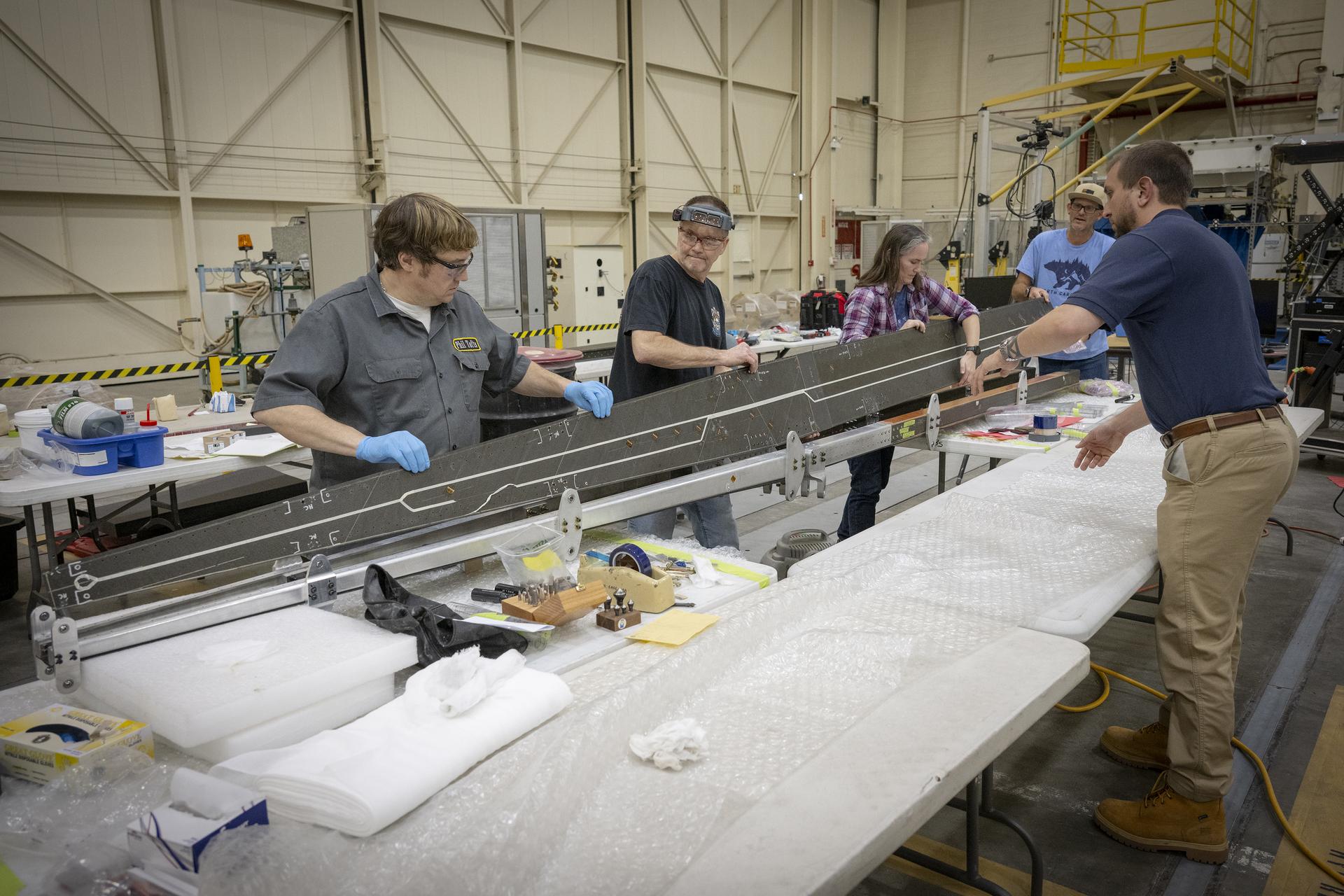
A group of people work together in a large workshop, handling and inspecting a long metallic structure laid across padded tables. Tools, materials, and protective equipment are spread across the workspace.
Lab technicians Phil Tofts, Chris McLain, and Jeff Howell and NASA engineers Erin Anderson and Richard Larson prepare the 15-foot Structural Wing Experiment Evaluating Truss-bracing model in the Flight Loads Laboratory at NASA’s Armstrong Flight Research Center in Edwards, California, on Thursday, Dec. 11, 2025. The model is part of NASA’s research to develop technologies for future ultra-efficient aircraft. 
NASA/Christopher LC Clark

The SWEET-15 design originated with combining five different advanced composite manufacturing and assembly technologies that enabled the novel structural design. The 15-foot-long test article was then designed and fabricated at NASA’s Langley Research Center in Hampton, Virginia, before traveling to NASA’s Armstrong Flight Research Center in Edwards, California, for testing.

Over several months, NASA engineers intentionally bent the test wing in the Flight Loads Laboratory at NASA Armstrong. Numerous strain and load sensors, including fiber-optic strain sensors, were placed throughout the structure to track how the wing responded as forces increased.

The data from the sensors confirmed the predictions made by NASA’s computer models. According to initial findings, the wing withstood the anticipated in-flight forces without issue. The results provided the team with confidence in the new manufacturing approaches and methods for connecting wing parts used in SWEET-15, which could support future efficient aircraft designs. The manufacturing approach, developed at NASA Langley used the Integrated Structural Assembly of Advanced Composites robot, aims to produce lighter and stronger composite structures for aerospace vehicles.

A long beam is suspended in a laboratory while personnel observe and guide its placement. Overhead support equipment, cables, and lab infrastructure surround the test area.
Lab technicians Jeff Howell, left and Chris Mount install the 15-foot Structural Wing Experiment Evaluating Truss-bracing model in the Flight Loads Lab at NASA’s Armstrong Flight Research Center in Edwards, California, Wednesday, February 11, 2026. The model is part of NASA’s research to develop technologies for future ultra-efficient aircraft.
NASA/Christopher LC Clark

The test concluded with a deliberate test-to-failure, where engineers increased loads beyond the wing’s design limits to determine how and where it would fail. The structure ultimately failed at roughly 127% of its design limit load, with visible damage appearing near the back edge of the wing and in the upper wing cover. This element of testing provided valuable insight into how the joints connecting the wing to its main strut and a secondary one, called a jury strut, behave under forces beyond the expected flight envelope.

This marks the first time a representative composite truss-braced wing configuration has undergone this type of structural evaluation.  It was made possible only through NASA collaboration across centers and projects, with researchers utilizing agency resources such as the Fiber Optic Sensing System developed to gather data on both aircraft and spacecraft.

A man wearing ear protection works closely with multiple hydraulic and instrumentation units connected to a large beam mounted on a test structure. Numerous cables, hoses, and measurement devices extend from the setup.
NASA research engineer Walter Hargis regulates the 15-foot Structural Wing Experiment Evaluating Truss-bracing model in the Flight Loads Laboratory at NASA’s Armstrong Flight Research Center in Edwards, California, on Tuesday, March 31, 2026. The model is part of NASA’s research to develop technologies for future ultra-efficient aircraft. 
NASA/Ryan Kline

To prepare for the testing, engineers at NASA Langley designed, analyzed, and manufactured the wing and completed safety preparations and lab setup.

Researchers will now analyze the data collected during testing to inform future airframe designs and support NASA’s ongoing efforts to develop more efficient aviation technologies.

The work is being conducted through NASA’s Subsonic Flight Demonstrator project in the agency’s Research Technology Mission Directorate. The successful testing of multiple innovative components marks a milestone in NASA’s aeronautics research.

To learn more, visit:

https://www.nasa.gov/aeronautics/

Nova interface contextual da Siri AI é descoberta no macOS 27; veja como ativá-la

20 July 2026 at 16:35

A Apple está testando uma nova interface na beta do macOS Golden Gate 27 que exibe uma série de atalhos da Siri AI sempre que o usuário seleciona texto em um app qualquer.

Descoberta pelo usuário identificado como “pdfu” em uma comunidade do Reddit, a novidade está claramente inacabada, o que explica o fato de ela vir desativada por padrão nas versões mais recentes do sistema operacional.

Como é possível notar abaixo, a interface assume a forma de um popover que aparece no canto superior esquerdo da seleção feita pelo usuário. Além disso, os atalhos são contextuais, o que significa que ações diferentes poderão ser sugeridas dependendo do conteúdo em destaque.

Caso o usuário esteja trabalhando em um texto, o recurso exibirá atalhos relacionados às Ferramentas de Escrita (Writing Tools), só para citar um exemplo. Ainda de acordo com as informações, o recurso também pode sugerir ações como enviar um email, adicionar um número aos contatos, exibir um endereço no app Mapas (Maps) ou rastrear um voo.

Para testar a novidade, é necessário estar rodando a terceira beta para desenvolvedores ou a primeira beta pública do macOS 27. Feito isso, basta abrir o Terminal, rodar o comando a seguir e reiniciar o Mac:

sudo mkdir -p /Library/Preferences/FeatureFlags/Domain && sudo defaults write /Library/Preferences/FeatureFlags/Domain/WritingTools LightweightUI_macOS -dict Enabled -bool true

Para desativar a novidade (o que talvez se prove necessário, já que, como dito, ela ainda está inacabada e apresenta inconsistências), basta abrir o Terminal novamente, rodar o comando a seguir e reiniciar o Mac:

sudo defaults write /Library/Preferences/FeatureFlags/Domain/WritingTools LightweightUI_macOS -dict Enabled -bool false

Como essa nova interface já está disponível (mesmo que escondida) nas betas do macOS 27, é bem possível que ela dê as caras em uma futura versão de teste do sistema — provavelmente em um estado bem mais polido.

via iThinkDifferent

OpenAI’s new hardware is a $230, 13-switch keyboard for Codex

17 July 2026 at 18:05

OpenAI is selling its first hardware — without any help from Jony Ive. It describes the Codex Micro as a “command center for agentic work” but it’s really a 13-switch wireless keyboard customized to help developers keep tabs on what their Codex agents are doing. It costs $230.

The keyboard has 13 mechanical switches (one keycap covers two of them by default), a rotary encoder, joystick, and RGB backlighting around the whole keypad and individual keys. It comes with 32 customizable icon keycaps.

OpenAI claims that the Codex Micro is a serious business tool: The command keys enable Codex users accept changes, reject outputs, push-to-talk, start new chats, and trigger custom actions. The rotary encoder can be used to dial up the “brainpower” allocated to tasks — or in more conventional terms, how many tokens to allocate to reasoning on a task. And the RGB lighting can provide feedback on how various tasks are progressing. And the RGB lighting under the “agent” keys can provide feedback on how various tasks are progressing.

The Codex Micro’s manufacturer, Work Louder, already has a similar device on the market, the Creator Micro, which offers similar functionality, but without the colorful keys. It costs $56 less than the Codex Micro, however.

The Codex Micro will fit in snugly with OpenAI’s other merchandise, where using Codex is as much about a fashion statement as a technological choice.

AI OK in Linux development, says Torvalds

17 July 2026 at 15:07

Linus Torvalds has a complicated relationship with AI, seeing both its good and bad points. But his latest remarks on the usefulness of AI may have raised a few eyebrows in open-source circles.

Just a few weeks after the Linux founder complained that a “continued flood” of AI-generated vulnerability reports had made the Linux kernel security mailing list “almost entirely unmanageable”, he has come to see the advantages of the technology.

“Linux is not one of those anti-AI projects,” Torvalds wrote in an email response to Linux Kernel senior engineer Roman Gushchin, archived at Kernel.org.

“It can also be a somewhat painful tool, both for maintainer workloads and just from a ‘it keeps finding embarrassing bugs’ standpoint,” he said of the use of AI in security scanning. “The solution is to make sure those LLM tools help maintainers instead of just causing them pain.”

Developers should be free to choose whether they use AI, he said. “We’re not forcing anybody to use it, but I will very loudly ignore people who try to argue against other people from using it.”

Torvalds’ measured support for AI does not come completely out of the blue: Around the same time that he was complaining about AI distorting security maintenance, he also spoke about its usefulness, claiming that it could improve programmer productivity by a factor of 10.

Finishing with Fable 5

7 July 2026 at 15:25

When Fable 5 returned last week, I knew exactly what to throw at it. In February, I started a project out of frustration that likewise ended in frustration, so I put it on the shelf and waited. Five months later, Fable 5 was released, and I knew it was time to finish Editor, a single-view diffing tool for writers rather than developers.

At MacStories, we all write in Markdown, and we’ve used GitHub to share and sync changes among team members since 2015. GitHub is primarily a developer tool, but it’s a fast, reliable way to share our Markdown-formatted article files, too.

We use GitHub the most for the Club MacStories newsletters. Every week, Federico, Devon, Jonathan, and I work on sections for MacStories Weekly and save them to a GitHub repo. That allows any of us to sync the sections locally for reading, editing, and assembling the issue.

The trouble is that as great as Markdown text editors are to write and GitHub is for versioning and syncing, there isn’t a good way to view the changes someone has made to a document. I know because I’ve been looking for a solution for a long time. Some Markdown apps like iA Writer and Bear support versioning or backups, but I’ve yet to find a text editor that can visualize changes made by someone else based on a document’s Git history.

Of course, developers have many ways to track changes to code, including GitHub Desktop, Kaleidoscope, and Git Tower. Code is just text, so those apps can be used by writers, too. However, the process of writing and editing prose is fundamentally different from code. I’ve tried the apps above and others, and it’s just too hard to track changes in the formats development tools use.

This is what it's like trying to track changes in GitHub Desktop.

This is what it’s like trying to track changes in GitHub Desktop.

We wouldn’t have stuck with GitHub as long as we have if it didn’t work, but that hasn’t made the friction of reviewing changes any less frustrating, especially on Fridays when we send MacStories Weekly. That’s when I had the idea for Editor. I was trying to parse some changes Devon had made to one of my stories with GitHub Desktop, and the friction finally got to me.

One obvious problem was the side-by-side document view many code diffing tools use. I wanted more detail than most diffing tools offer, but in a single, readable view, so I could skim through changes quickly.

Most agent-assisted projects benefit from some up-front research and planning. I knew what I wanted would sink or swim on the design, not the app’s underlying Markdown viewer, so I spent time researching systems for visualizing document edits.

That’s when I came across Upwelling, a multi-author project from Ink & Switch that describes itself as “an independent research lab exploring the future of tools for thought.” In their research paper, the authors described my exact problem:

Unfortunately, version control tools like Git, which are designed for software development, do not suit the needs of writers. Git cannot compare or merge files from WYSIWYG editors such as Microsoft Word… and graphical user interfaces for Git are cluttered with complex concepts such as commit hashes and visualizations of non-linear branching and merging histories.

Ink & Switch’s solution, a prototype collaborative text editor, wasn’t what I wanted to build, but the research behind it was full of interesting ideas that helped me settle on several principles for what would become Editor:

  • Document changes needed to be visible in a single view that carefully balanced highlighting changes with readability;
  • A writer should be able to instantly switch from the marked-up version of their document to the clean original and edited final version;
  • Changes needed to be categorized by filterable types like punctuation, word choice, capitalization, insertions, and deletions to reduce clutter in heavily edited documents;
  • Change types would be color coded using a side rail system inspired by maps of London’s tube system;
  • Navigating among individual edits needed to be done by simple j/k keyboard input; and
  • Global document navigation should employ a mini-map of a document’s edit regions (a feature borrowed from developer IDEs like Xcode) to make it easy to jump from one area of a document to another.
Working with Claude and artifacts to prototype Editor.

Working with Claude and artifacts to prototype Editor.

With those choices made, I got busy in Claude Code and came up with a proof of concept quickly, but sadly, these were the days of Claude Opus 4.6, which wasn’t nearly as good at design as today’s models. What I wanted was possible, but what I had was a mess.

The prototype is recognizable as Editor, but far less readable than the finished version.

The prototype is recognizable as Editor, but far less readable than the finished version.

As it turns out, designing track changes that are accurate but readable is hard. For example, does changing “day” to “date” replace one word with the other or substitute one character (the “y”) for two others (“te”)? Despite putting clear parameters around what Editor should look like, I could tell Claude was stuck, so I called it quits and moved on.

However, I’d wanted something like Editor for far too long to simply give up. So I saved what I had to a GitHub repo and figured I’d take another run at it later.

Editor makes it easy to see small changes like punctuation with filters.

Editor makes it easy to see small changes like punctuation with filters.

Later turned out to be last week when Claude Fable 5 was re-released after a U.S. government shutdown of the model. Anthropic made the model available to its subscribers, with some restrictions, through July 7, which I made good use of.

A lot has changed in the six months since I put Editor on ice. Notably, Claude Opus 4.8 and Claude Design were released, and Claude became better at using a browser, all of which fit nicely with Editor’s relatively complex design.

Dark mode does a particularly nice job of highlighting changes.

Dark mode does a particularly nice job of highlighting changes.

Between Opus 4.8 and Claude Design, I expect I could have finished Editor without Fable 5, but with it, the only thing that slowed me down was my five-hour token limit. I repeatedly hit the limit in under an hour as Fable managed a swarm of subagents. What could have taken a few hours last Friday night spanned an evening and the next morning. The token gating slowed me down, but at the same time, I expect that using Opus 4.8 and Claude Design would have taken the entire weekend.

But it isn’t just speed that makes Fable 5 impressive; it’s the fact that it got Editor’s complex UI right the first time. Fable took a carefully planned but very broken prototype and turned it into a polished product that the whole MacStories team can use.

Editor is built to run on the internal tools foundation Federico created.

Editor is built to run on the internal tools foundation Federico created.

However, there’s a big difference between a web app running on my Mac mini server for personal use and something that can be shared. Fortunately, Editor also benefited from the internal tool foundation Federico has built over the past several months.

He originally built it to house Feedboard, his kanban-style RSS feed reader; Images, an update to our tool for uploading images to the MacStories CDN; and iOS Review Search, a semantic search tool for his iOS and iPadOS reviews. It’s a login-protected internal page built on web app hosting platform Vercel. I later contributed a tool that summarizes Apple Newsroom posts and simplifies uploading their promotional images to our server.

Federico managed Editor's deployment, in part, from Cursor for iPhone.

Federico managed Editor’s deployment, in part, from Cursor for iPhone.

With a couple of those tools in hand as context for Fable, I asked Claude to get Editor ready for our internal tools page and passed it off to Federico with a separate set of specs and instructions he could point Claude at for deployment and the creation of a landing page. That introduced bugs that required some troubleshooting, which Federico handled in part using Cursor and it new iPhone app, but by that afternoon, Editor was ready for production. The entire process from old, broken prototype to production web app took less than 24 hours, and for a lot of that time we were either asleep or away from home.


Navigating by individual edit.

Navigating by individual edit.

When you use agentic tools like Claude every day, it’s easy to forget how far they come so quickly. All you see are the flaws that still serve as roadblocks. What was different about using Fable 5 was that there were no roadblocks. It simply took a project that Opus 4.6 struggled with in February and made short work of it. It was a remarkable thing to see. And now, we have a tool that I’ve wanted since we started using GitHub for our writing in 2015.

Tomorrow, Fable will move to usage credits that are just too expensive for my tastes, given how fast the model burns tokens. Hopefully, it will trickle back into Anthropic’s subscription tiers in the future. Until then, though, I’ll continue knocking out prototypes, and if they’re too much for Opus, I’ll shelve them until a better model comes along. They always do.

Snazzy Labs Puts the Mac’s Upcoming Game Porting Toolkit 4 Through Its Paces

1 July 2026 at 20:37

Over at Snazzy Labs, Quinn Nelson has a great in-depth look at the changes coming to Apple’s Game Porting Toolkit with macOS 27 this fall. Paired with Metal 4, it’s a real leap over what’s possible today, and Nelson showcases the difference well.

Thanks to the upcoming update, Nelson was able to use CrossOver, a Windows-to-Mac compatibility layer that allows PC games to be played on a Mac, to spotlight some impressive numbers on games ranging from Red Dead Redemption to the recently released 007 First Light.

Not all games Nelson tried showed the same leap in performance, but that’s true on compatibility layers like Proton on the Steam Deck, too. What’s remarkable is that it’s all done in software and as Nelson points out, the advent of coding agents like Codex and Claude may help bring more PC games to Mac using the Game Porting Toolkit by reducing the porting costs.

Nelson also makes a pitch for an Apple gaming device. I agree with him that more than ever, the pieces, right down to a hardware-focused incoming CEO, are all there for such a device, and I remain optimistic. However, I’ve made the case for such a device for years now to no avail. Still, whether or not Apple builds gaming hardware itself, watch the full video above. It’s a fantastic view of how far the Mac has come as a potential gaming platform since the advent of Apple silicon.

Thinking Machines Lab offers enterprises a US alternative in open-weight AI

16 July 2026 at 12:03

Thinking Machines Lab, the San Francisco startup founded by former OpenAI CTO Mira Murati, has released Inkling, its first general-purpose AI model. The launch adds another US-developed entrant to an open-weight market where Chinese developers produce several leading coding and reasoning models.

Inkling uses a mixture-of-experts architecture with 975 billion total parameters, of which 41 billion are active during processing. It supports a context window of up to 1 million tokens and was pretrained on 45 trillion tokens spanning text, images, audio, and video. Thinking Machines said it also trained the model for coding, tool use, and multimodal tasks.

The release follows the October 2025 launch of Tinker, Thinking Machines’ first product and an API-based platform for customizing AI models. Developers can fine-tune Inkling through the platform.

In a June 2026 assessment, AI model routing platform OpenRouter highlighted DeepSeek V4 Flash, GLM 5.2, MiniMax M3, and Nvidia Nemotron 3 Ultra as four notable open-weight models. Nemotron was the only US-developed model in the group.

Performance and developer access

Thinking Machines Lab’s benchmark table shows mixed results. Inkling scored 77.6% on SWE-Bench Verified, behind DeepSeek V4 Pro and GLM 5.2 but ahead of Nvidia Nemotron 3 Ultra. It also recorded 74.1% on MCP Atlas, 77.1% on BrowseComp with context management, and 79.8% on IFBench.

Thinking Machines said Inkling’s result used a bash-only harness, while the comparison figures were reported by the competing models’ developers.

The model includes a reasoning-effort setting that developers can adjust from 0.2 to 0.99. Thinking Machines said the setting allows users to balance performance against the number of generated tokens. In the company’s testing, Inkling matched Nemotron 3 Ultra’s Terminal Bench 2.1 score while generating about one-third as many tokens.

Developers can fine-tune Inkling through Tinker using context lengths of 64,000 or 256,000 tokens and test it through the Inkling Playground. The model is available through APIs from Together AI, Fireworks, Modal, Databricks, and Baseten. It is also supported by inference software, including SGLang, vLLM, TokenSpeed, llama.cpp, and Hugging Face Transformers.

Inkling’s full weights are available on Hugging Face as the original checkpoint and as a quantized NVFP4 checkpoint. Thinking Machines also previewed Inkling-Small, which has 276 billion total parameters and 12 billion active parameters. The company said it would release the smaller model’s full weights after completing testing.

Enterprise impact

Inkling’s differentiation lies in its open weights, multimodal capabilities, controllable reasoning, and integration with Tinker, rather than benchmark leadership, according to Biswajeet Mahapatra, principal analyst at Forrester.

“Enterprises are most likely to benefit in workloads where domain adaptation matters more than generic model performance, including knowledge-intensive copilots, multimodal customer service, document understanding, operational workflow automation, and agentic tasks that require organization-specific data, policies, and processes,” Mahapatra said.  

Inkling’s US origin could also influence adoption among Western enterprises, according to Pareekh Jain, CEO of Pareekh Consulting. He said many Western organizations face regulatory or procurement barriers when considering Chinese-developed AI models.

“Inkling gives those organizations a US-developed open-weight option that they can deploy on their own infrastructure,” Jain said.

However, the benefits will need to be weighed against the cost of deploying the full model.

Running Inkling on private infrastructure requires a GPU cluster with at least 2 TB of aggregated VRAM for the BF16 checkpoint, according to the model card. Thinking Machines lists configurations of eight Nvidia B300 GPUs or 16 H200 GPUs. A quantized NVFP4 checkpoint lowers the requirement to at least 600 GB and can run on four B300 GPUs or eight H200 GPUs.

“Because Inkling is a massive model with 975 billion total parameters, running the full model still requires significant GPU infrastructure, making closed-model APIs more economical for many organizations,” Jain said.

Jain said Inkling-Small may be a more feasible option for many enterprises because it could reduce infrastructure costs and latency while retaining useful performance across key workloads.

Safety and governance

Thinking Machines said it trained Inkling for calibration, instruction following, and resistance to censorship. The company said the model showed “strong patterns of censorship non-compliance” when evaluated by Cognition on its Propaganda and Censorship Eval.

Inkling scored 98.6% on StrongREJECT, which Thinking Machines described as a test of whether models refuse unambiguous harmful requests.

The model’s safety behavior should be retested after an enterprise customizes it, according to Jain. “Model fine-tuning can weaken safety filters, so companies should retest safety after customizing the model rather than assuming it stays safe,” Jain said.

He added that self-hosted and modified versions could diverge from Thinking Machines’ official model over time without receiving automatic updates.

“CIOs need to ensure every AI agent action is logged, auditable, and governed by human approval for high-risk tasks,” Jain said.

Codex Multi-Agent V2 update raises developer concerns over agent transparency

15 July 2026 at 13:20

OpenAI’s recent update to its Codex CLI has introduced a new protocol that appears to shift more orchestration decisions from user-defined configuration to the runtime, prompting developers to request greater visibility into the instructions exchanged between AI agents.

In a detailed GitHub merged request, users stated that the Multi-Agent V2 protocol-infused architecture of the CLI no longer exposes the instructions passed between parent and sub-agents, making it difficult to inspect how work is delegated across the system.

“Multi-agent v2 currently routes agent instructions through normal tool arguments and inter-agent context. That means the parent model can emit plaintext task text, Codex can persist it in history/rollouts, and the recipient can receive it as ordinary assistant-message JSON,” the request read.

“This changes the v2 path so agent instructions stay encrypted between model calls: Responses encrypts the message argument returned by the model, Codex forwards only that ciphertext, and Responses decrypts it internally for the recipient model,” it added.

Other users, commenting on the thread, also said that the lack of visibility into agent instructions can be attributed to the recently introduced Multi-Agent V2 protocol, with one user stating that reverting to the previous version of the CLI restored visibility, but only as a temporary workaround.

Separately, Ignat Remizov, CTO at payment service Zolvat, filed a GitHub feature request to offer what can be described as a permanent fix after stating that OpenAI may have introduced the change in efforts to harden security.

“A possible shape is to keep the encrypted message field for model delivery, but add a separate non-encrypted audit field for the readable task text. The audit field should be persisted in rollout/history/trace metadata so users and maintainers can inspect what was delegated without needing to decrypt model-delivery ciphertext,” Zolvat wrote.

Enterprise governance concerns are likely to emerge

While an OpenAI contributor said the protocol remains under development and declined further changes to the request, analysts warned that the issue would create debugging, governance, and operational challenges for development teams and their enterprises if the issue persists or becomes a long-term characteristic of multi-agent systems.

“Hidden agent instructions reduce observability in multi-agent systems. Developers can no longer see whether failures stemmed from incorrect task delegation, poor orchestration, or model reasoning, making debugging, prompt optimization, and root-cause analysis significantly harder. Agent instruction traces are becoming as essential as application logs in modern software,” said Pareekh Jain, principal analyst at Pareekh Consulting.

For CIOs, Jain pointed out, opaque agent interactions create governance challenges.

“Without visibility into how agents delegated and executed tasks, it becomes harder to audit decisions, investigate incidents, demonstrate compliance, and build trust in AI systems. Enterprises will increasingly expect secure but auditable agent communication rather than completely hidden orchestration,” Jain said.

“Any big enterprise, especially in regulated industries such as banks and hospitals, needs to be able to prove what their AI systems did and why, especially if something goes wrong. If a sub-agent does something bad, like touching private data, the company needs to show here’s exactly what it was told to do. If that record doesn’t exist, it is a serious problem for trust and legal accountability, not just an annoyance,” Jain added.

Further, the analyst pointed out that issues around the visibility of agent operations could even slow production deployments of mission-critical AI.

“Enterprises, just like we are seeing with developers on GitHub, are likely to demand stronger observability, audit trails, and governance before trusting autonomous multi-agent systems. It is nearly as important as model performance,” Jain added.

An email sent to OpenAI enquiring about planned changes to the protocol went unanswered.

Ship apps faster with GitHub, Vercel, and Firestore

15 July 2026 at 10:00

These days, application developers can take their pick from a vast menu of architectural solutions. We can choose from the well-understood to the experimental, and from blended solutions in between. Several powerful middle-ground technologies that emerged during the cloud revolution have really come of age. Here we’ll take a look at putting together three of the most impressive: GitHub, Vercel, and Firestore.

Each of these is an important tool in its own right that can be used to attack specific problems. In combination, they not only meet the needs of several important application scenarios, but they have a superpower—the ability to dramatically shorten the distance between development and deployment.

There is nothing quite as gratifying as putting your hands on just the right mix of tools for a given need.

A ‘no-ops’ stack built for speed

If your primary goal is sheer development velocity, you would be hard-pressed to top this architecture. This “no-ops” stack collapses the distance between your local IDE and a globally distributed production environment. You are essentially trading the overhead of managing VMs and load balancers for the sheer speed of committing code and watching it deploy automatically.

While each component is highly flexible, adopting them requires a specific, event-driven mindset. There are a few finicky bits to manage, mostly around routing environment variables securely and designing around stateless back-end functions. But the constraints are obvious and well-documented.

Before we look more closely, let’s quickly identify the kinds of apps that are a perfect fit here, along with those that are workable and those that really merit a different approach.

  • The sweet spot (deploy and go): AI-mediated applications, asynchronous game back ends, and real-time collaborative B2B dashboards. This architecture perfectly absorbs the unpredictable latency of LLM APIs and instantly syncs state across multiple clients without requiring you to build custom WebSocket infrastructure.
  • The middle ground (workable, with trade-offs): Headless e-commerce, moderate IoT telemetry, and apps requiring scheduled batch processing. You will encounter friction if your catalog relies on deeply relational SQL constraints, or if your background reporting jobs take longer than a few minutes and hit serverless execution limits.
  • The danger zone (look elsewhere): High-frequency trading, fast-paced action multiplayer games, heavy data ETL pipelines, and core financial ledgers. Serverless architectures cannot natively hold open the persistent WebSockets required for twitch-reflex data, and heavy compute tasks will abruptly time out.

We should mention that these categories are not mutually exclusive. Many enterprise applications, such as a full-scale e-commerce platform, straddle these lines. You might use Vercel and Firestore to build a lightning-fast, reactive storefront that handles ephemeral user state like shopping carts, while simultaneously “stitching in” a managed SQL database like Supabase or PlanetScale. This hybrid approach allows you to maintain the relational integrity required for back-office inventory and financial ledgers and pair it with the front-end velocity this stack provides.

GitHub: the bedrock

I don’t need to introduce you to GitHub. It is a central element of the development landscape. I still remember CVS and SVN with a certain nostalgia, but the enhancements of Git speak for themselves. When combined with the orchestration powers of GitHub, it is no wonder that virtually the whole industry has adopted this type of platform.

Git plus GitHub gives you an enormous amount of power already, in terms of how you can organize and automate your projects. But there is a next-level experience in combining GitHub and Vercel. For JavaScript-based projects, you can take simple GitHub pushes and turn them into instantly deployed clients and serverless functions. It is one of the cleanest and least fiddly ways to move from raw code on your local machine to a globally deployed, full-stack architecture.

Vercel: the nexus

Vercel is more than just a deployment host. It is a control plane that ties this high-velocity, no-ops architecture together. Alongside GitHub and Firestore, Vercel’s deeper strength is its ability to act as an orchestration layer between your reactive front end and external stateful services.

Vercel has a great amount of facility in fine-tuning what branches go to what environment and helpful features like instant rollback. You can just log into Vercel’s dashboard for your project and see the history of deployments and any errors and logs. It’s a simple menu choice to roll back to a historical version or compare one version against another.

When you “stitch in” third-party services (such as a managed SQL database like Supabase or a payment processor like Stripe), Vercel’s serverless functions become the lightweight interface, and Vercel’s the adapters handle the communication. You offload the integration logic (the service layer) to Vercel’s global Edge Network, keeping your UI and back end clean, responsive, and decoupled. 

In short, Vercel allows you to get the speed of the “no-ops” development life cycle without sacrificing the complex transactional integrity required for some applications like enterprise inventory systems.

Firestore: the datastore

Firestore is an extremely lightweight, NoSQL, cloud datastore. It has a great deal of add-on power, but its core value proposition is that it accepts virtually any data you stuff into it and it provides event-driven subscriptions to data changes.

These two capabilities together make Firestore about as straightforward a solution to a managed back end as you can imagine. You subscribe to collections or even fields and then you simply stick “unstructured” data (read: JSON with variable fields) in and the client waits for the changes it is interested in.

This is so streamlined that one can just point the browser (or native mobile app) directly at Firestore and listen for events. Which immediately raises the question of identity, for auth and for data visibility, but hold on—Firestore’s third superpower is that it has an authentication module that actually works. What I mean is, it is actually pretty simple and yet confidently secures your app.

Sometimes auth solutions seem either too simple (and yet opaque) or too mired in the nitty gritty. Firestore auth will let you do some basic configuration and start using a reasonable auth almost immediately. 

Not to belabor the point, but having a realistic and attainable auth solution elevates your stack to a production grade—one that can handle many real-world applications. Firestore auth plays nicely with other important APIs, like Stripe. Typically, auth is a major feature that feels like off-roading in a Honda Civic, but Firestore’s approach to auth, added to this particular stack, feels like a normal speed bump. It’s just another component you plug in, rather than a tentacled alien you weave into the your code.

The limits of the velocity stack

This architecture combines components that are optimized for flexibility. That same character also introduces distinct limitations. Understanding these is essential before committing production workloads.

The serverless life cycle

Serverless functions are spun up to handle requests. They close out soon afterward and lose any state. For that reason, they cannot natively hold open persistent WebSockets. If your system requires continuous, sub-millisecond, bidirectional streams—like a real-time multiplayer action game or a high-frequency trading dashboard—pure serverless will fight you all the way. You are forced to introduce a third-party managed WebSocket service to route messages back to your stateless endpoints via HTTP webhooks.

The execution time ceiling

Vercel (like all serverless platforms) enforces strict timeouts on operations. While enterprise tiers might grant you up to 15 minutes, standard functions often time out after 10 to 60 seconds. Long-running tasks like video transcoding, database scripts, or orchestrating multi-step AI agent workflows, which might take 20 minutes to resolve, will run up against these limits. Heavy-lifting tasks must be offloaded to a dedicated, long-running service like Google Cloud Run, or broken into smaller, asynchronous chunks via message queues.

The cold start reality

While the industry has made massive strides in minimizing initialization times—particularly with lightweight edge networks—traditional Node.js-based serverless functions still experience cold starts. If a function has not been invoked recently, or if traffic spikes require a new instance to spin up concurrently, the first request will take a noticeable latency hit as the container provisions and the code loads.

API instead of RAM

In a traditional server environment, you can store transient data in global RAM, allowing subsequent requests to access shared context instantly. In the serverless model, every request might hit a fresh container. Therefore, all shared context must be externalized. Although Firestore serves brilliantly as the state manager, relying on a database for high-frequency, sub-millisecond, ephemeral caching introduces network latency and per-operation costs. That said, using a shared RAM state on a server is non-trivial also, unless you are using a single app server and VM (because high-availability or fail-over requirements will lessen the RAM win on a traditional server).

Tuning for velocity and control

Every architectural decision is a trade-off. There are no cost-free choices. By adopting the GitHub, Vercel, and Firestore stack, you are explicitly maximizing feature velocity over fine-grained control.

You lose the ability to tweak the underlying operating system, hold open persistent sockets, or run hour-long back-end scripts. In exchange, you gain an architecture that scales from zero to global distribution instantly, requires virtually no devops maintenance, and perfectly absorbs the asynchronous, event-driven realities of modern application development.

For the right application—whether it is a fast-moving prototype or an enterprise AI copilot—this stack doesn’t just save time; it fundamentally changes how quickly a small team (or a single person) can impact the market. You stop worrying about build chains, load balancers, and server patches, and you focus on the central mission: shipping features.

What 80% AI-written test pipelines actually cost

15 July 2026 at 10:00

The first time I heard someone say their AI now wrote 80% of their tests, I asked the obvious question. Eighty percent of what?

After 20 years building and leading test automation for consumer-scale platforms, my honest answer turned out to be eighty percent of the typing, not eighty percent of the engineering. The remaining twenty was where the work still lived. Budgeting for two percent of leftover effort was the mistake. When the real number was closer to thirty, that gap was the difference between a pipeline that shipped and one that quietly built up a queue of half-trusted features nobody could rely on.

This piece is about that gap. As an independent research project on LLM-augmented testing methodology, I built a six-stage agentic pipeline that takes a design in Figma and produces running tests in WebDriverIO, connected end to end over the Model Context Protocol. It works. It has been useful. And the parts that broke surprised me, because they were not the parts the hype cycle tells you to worry about.

How I wired a six-stage pipeline over one protocol

The pipeline runs six stages in sequence, each owned by a different agent, with every handoff crossing MCP.

Six-stage agentic test pipeline: design capture → requirements writer → ticket opener → code generator → test-case writer → automation generator. Each stage carries an MCP handoff and a provenance stamp.

The end-to-end trace links a pull request back to a Jira ticket, a requirements section and a Figma frame. Each artifact is stamped with the agent that produced it, the model it used and the inputs it was given.

MCP is the boring middle that makes any of this work. The cliché is that MCP is “USB-C for AI”: one open protocol, any tool. Like most analogies, it is about eighty percent right. The part that matters is the eighty: I do not have to write a custom adapter for every system the agent talks to. One MCP server per tool and every agent talks to all of them the same way.

Typed handoffs between agents are my own architecture, layered on top of MCP rather than provided by it. Each agent writes a typed artifact the next agent reads. Each handoff is logged with provenance. When something went wrong six stages in, I could replay the chain. Without that discipline, a multi-agent pipeline is a debugger’s worst day. You know the test plan is wrong. You cannot tell whether the mistake came from the Figma read, the requirements interpretation or the ticket scaffolding. With it, I could point at exactly which stage went sideways and which inputs it was looking at when it did. The pattern lives in a public MIT-licensed reference implementation for any reader who wants to run it.

The sixteen-minute number is the marketing number. I ran the full chain end to end in about sixteen minutes on a synthetic net-new screen, Figma in, automation suite out. That repeated across my runs; it is not a demo trick. But sixteen minutes is the part of the story most fun to tell and least useful to learn from. It is what gets quoted in the all-hands. The hours that come after, when a human reviews each handoff, are where the work actually lives.

What actually broke in production-style runs

The failures that stalled my pipeline were rarely the ones I expected.

I expected hallucinated APIs. I got them: the agent confidently called endpoint names that sounded right but did not exist. I expected sparse-spec-in, sparse-spec-out, where a Figma frame with no annotations produced a requirements doc with vague acceptance criteria, every time. I expected locator drift, the common UI-automation failure mode where a renamed component silently breaks an entire test suite. There is solid outside writing on non-determinism in tests covering this whole family of failure modes, and the agent inherited every one.

What I did not expect, and what kept the pipeline down longer than any of the above, was the plumbing.

The model backend timed out under load. It lost credentials silently and started returning empty strings, which the agent then read as confidence. A duplicate consumer on a shared long-poll API endpoint produced an HTTP 409 conflict that broke delivery without throwing anything visible. One unguarded exception inside one agent aborted a whole shared scheduler run and took the other agents in the registry down with it. The single worst incident cost me three hours to find. An environment variable had silently rotated overnight; every agent in the fleet was returning structurally valid but semantically empty requirements docs; the downstream stages were dutifully generating tests against nothing.

None of those are model bugs. They are infrastructure. The agent literature, which is what I went looking through when I started this work, mostly does not talk about them.

The fix was not better prompts. It was circuit-breaker-style review checkpoints between stages and what I now call the four-guard discipline: four small guards I consider non-negotiable on any unattended agentic pipeline. The bulkhead pattern from microservices is the most consequential. An unhandled exception inside one agent can no longer abort the shared run; the offending agent fails fast with a structured error and the others keep going. Paired with that, a pure-data fallback ensures a model timeout produces a deterministic output explicitly marked as degraded mode, rather than an empty string the next stage will misread as confidence. A single-owner lease sits on every shared external endpoint, the cure for the duplicate-consumer incident that ate one of my Sunday afternoons. The cheapest guard was the last to arrive: a one-line synthetic canary every agent has to produce a known correct response to before any real work begins, so a credentials rotation or silent backend failure trips an alert before downstream stages have generated artifacts against garbage.

None of these guards is novel. They are textbook stability patterns at a new boundary: the seam between the LLM agent and the rest of the system, which most of the existing agent literature still treats as a solved problem.

The 20% you don’t see, and when not to do this

Here is the part the demo videos leave out. Even when the pipeline works, the human time per stage does not go to zero.

Human review time per ticket across five pipeline stages: code review 60-180 min, automation review and flaky-fix loop 30-90 min, ticket architecture and sequencing 30-60 min, test data and environment 15-30 min, requirements review 20-30 min. Net: the human still spends 20-30% of the original effort, almost all of it reviewing rather than creating.

Net of all that, the human still spends twenty to thirty percent of the original effort, almost all of it reviewing rather than creating. The pipeline saves seventy to eighty percent, not ninety-eight. The trap is budgeting for the two percent you do not save.

When does this kind of pipeline make sense? In my experience, when the Figma is richly annotated and acceptance criteria are clear up front; when there is review capacity to absorb the work the pipeline shifts onto humans; when the stack is well represented in the training data; and when the feature is net-new rather than a deep edit of legacy code. When does it not? When the design lives on a whiteboard. When the integration touches old code with hidden contracts. When the path is regulated or safety-critical. When there is no senior reviewer who can hold the line. When the work is exploratory and writing the spec is the actual point of the exercise.

Teams I have seen succeed with agentic pipelines budget for the rework explicitly, staff the review queue and treat the saved hours as capacity for harder problems rather than headcount they can release. Teams I have seen struggle did the opposite: declared victory at the demo and quietly accumulated a backlog of half-trusted features the next quarter had to clean up.

The right unit of measurement is not how much the pipeline generates. It is how much of what it generates a human still has to touch before you would ship it. Call it the 80/20 rework rule: measure the rework, not the generation. The teams that get the rework number right are the ones whose AI investments compound. The teams that stop counting at the headline percentage are the ones that own the cleanup six months later.

This article is published as part of the Foundry Expert Contributor Network.
Want to join?

Port wants to bring vibe coding to the enterprise

14 July 2026 at 22:20

Port has rolled out Port AI Builder, a vibe coding platform designed for software development and platform engineering teams.

Announced July 14, Port AI Builder lets teams create and run agentic workflows in natural language, with built-in human-in-the-loop review and approval. The platform lets organizations apply AI agents across the SDLC (software development life cycle), drawing on domain skills spanning site reliability engineering, devops, architecture, security, AI governance, data modeling, and UX, while maintaining governance and visibility, the company said. Port AI Builder is available through free and paid subscriptions.

Port AI Builder works on top of Port’s Agentic SDLC Platform, which provides the context lake, workflow orchestration, agent management, and governance that enterprises need to operationalize AI SDLC, according to the company. The new AI Builder lets teams build production-grade workflows in minutes, for use cases such as autonomous resolution, AI cost management, and engineering performance tracking, without losing control, Port said.

❌