Google has added the Pixel 9, Pixel 9 Pro, and Pixel 9 Pro XL to its Certified Refurbished program in the US.
Prices start at $499 for the Pixel 9, while the Pixel 9 Pro and Pro XL cost $649 and $699, respectively.
Every refurbished Pixel goes through Google's quality checks, uses genuine replacement parts, and includes a one-year warranty.
Google is also offering six months of Google AI Plus with 2TB of storage alongside every Certified Refurbished Pixel 9 purchase.
Google has started selling certified refurbished Pixel 9 phones in the U.S., with prices starting at just $499.
For those unfamiliar, Google has a pretty interesting Certified Refurbished program in the US, where the company sells pre-owned Pixel smartphones that have been professionally inspected, tested, and restored to meet its quality standards, all at a lower price than when they originally launched. And now, the Pixel 9 series has joined the program.
As spotted by 9to5Google, Google has listed several Pixel 9 models on its Certified Refurbished page, including the base Pixel 9, Pixel 9 Pro, and Pixel 9 Pro XL. The regular Pixel 9 starts at $499, while the Pixel 9 Pro and Pixel 9 Pro XL are available for $649 and $699, respectively.
(Image credit: Google Store)
Currently, the base Pixel 9 appears to be out of stock, although some configurations of the Pixel 9 Pro and Pixel 9 Pro XL are still available to purchase. And to make the deal a little more enticing, Google is also offering buyers a free six-month Google AI Plus subscription, which includes 2TB of cloud storage that can be shared across Google services.
This makes the refurbished Pixel 9 series a pretty decent deal, especially considering these aren't just regular second-hand smartphones.
Google says every Certified Refurbished Pixel goes through a multi-point inspection and rigorous quality checks covering things like the battery, display, housing, and cameras. If any repairs or replacements are needed, Google uses genuine parts to restore the device to its quality standards.
The refurbished phones also come with a one-year limited warranty, similar to what you'd get when purchasing a brand-new Pixel phone.
So, compared to the regular Pixel 9, which originally launched for $799, you're saving around $300 by going with Google's certified refurbished model. The Pro models also offer some pretty substantial savings over their original launch prices.
Of course, these are still pre-owned devices, but with Google's official refurbishment process, genuine replacement parts, and a one-year warranty, they could be worth considering if you've been looking to pick up a Pixel without spending flagship money.
Google's Rambler uses AI to clean up voice typing, removing filler words, correcting grammar, and formatting text.
Developer Akshay Kadam has released PixelBoard, a modified Gboard APK that enables Rambler on other Android phones.
Users can reportedly access Rambler by installing PixelBoard and setting it as their default keyboard instead of Gboard.
If you've ever wanted to try the Pixel 11's Rambler feature on your Android phone, you can now do so, although there's a catch.
The Google Pixel 11 series launched earlier this year with several new AI features, including Magic Cue, Magic Capture, and Rambler. For those unfamiliar, Rambler is Google's new AI-powered voice typing feature that offers a much more advanced experience than the regular voice typing we've had on Android phones for years.
Similar to AI voice typing tools that have been available on desktops for a while, Rambler automatically cleans up your speech, fixes grammar and formatting, and removes filler words like "um" and "uh" to give you properly formatted text. It can also understand corrections while you're speaking, add emojis, and even rewrite your text in different tones, such as formal or casual.
Unlike traditional voice typing, though, Rambler doesn't show a live transcription of everything you're saying. Instead, once you've finished speaking and tapped the Done button, it processes your speech and returns a cleaned-up, properly formatted version of what you said.
The feature has been exclusive to the Pixel 11 series so far, but a developer has now found a way to bring it to other Android devices.
(Image credit: Future)
Developer Akshay Kadam has shared a modified version of Google's Gboard app, called PixelBoard, on GitHub. The developer has patched the Gboard APK to enable Rambler on Android phones that don't officially support the feature.
According to the developer, you can install the modified APK on your Android device and switch your default keyboard from Gboard to PixelBoard to access Rambler without needing a Pixel 11.
That said, PixelBoard isn't an official Google app, and installing modified APK files always carries security and privacy risks. There's also no guarantee that Rambler will continue working through this method. Since the feature is officially exclusive to the Pixel 11 series, Google could block the workaround through a future Gboard or server-side update.
But if you're curious about Rambler, the developer's GitHub project offers an unofficial way to try the feature without buying a Pixel 11. Just keep in mind that you're installing a modified keyboard at your own risk.
A rumor claims the Pixel 12 series' model numbers appeared in an important database listing well ahead of its expected launch window in 2027.
An interesting screen resolution upgrade could boost clarity and detail.
The earliest rumor we covered came back in 2025 when the Pixel 12's codenames were discovered.
You've just ordered a Pixel 11 series phone. Congrats! But before it's even in your hands, here come the rumors about the next-gen Pixel 12 series, including its supposed model numbers and a potential upgrade. Away we go!
A post by OVR Plus highlights several "Google brand" devices in the GSMA database that reportedly represent the Pixel 12 series (via 9to5Google). The publication claims the database features model numbers GC0QU, GWU59, G7U1Y, and G4D5D. These supposedly align with the Pixel 12, 12 Pro, 12 Pro XL, and 12 Pro Fold, respectively. The post states that Google has not only begun development for the Pixel 12, but it's doing so with Android 18.
This probably isn't too surprising. It feels pretty typical that Google would make a move like this, especially considering how much more quickly the company has been developing major Android OS upgrades these days.
Rumors continue, with speculation about a display upgrade. OVR Plus alleges that Google wants to increase the screen resolution for its Pixel 12 series. The Pixel 12 Pro Fold is reportedly increasing from 2076×2152 to 2296×2404. Elsewhere, it's been alleged that the Pixel 12 Pro XL could jump to 1344×2952. The Pixel 12 and 12 Pro would also see slight increases in resolution. As OVR Plus notes, an upgraded resolution would vastly improve the phone's image quality.
In short, it's a visual upgrade, meaning tomorrow's Pixel owners could see sharper, clearer, and more vibrant photos, videos, and more on their phones. These rumors are very early, despite how exciting some of this is. It's worth taking this with a grain of salt, as anything could change between now and August (potentially) when the next series debuts.
Earliest rumors were a year ago...
(Image credit: Nicholas Sutrich / Android Central)
This may feel like a curveball, but this Pixel 12 rumor is the second we've seen. The first dates back to 2025 ... and yes, you read that correctly. In June 2025, a rumor about the Pixel 12 series codenames appeared. Of course, the Pixel 12 isn't expected to debut until 2027, but in 2025, the rumors couldn't wait. The following codenames were alleged: Galago, Sasquatch, Silverback, and Capuchin. These were reportedly for the Pixel 12, 12 Pro, 12 Pro XL, and 12 Pro Fold.
So, since last year, we've expected the Pixel 12 series to remain similar to what we've received over the past few generations. Four models, and one of them is a foldable. What's new is the supposed screen resolution changes. Rumors are still incredibly light, as the series is months and months away (or years, if you saw that in 2025).
Android Central's Take
Rumors are funny sometimes. For me, I'm waiting for a reason to switch to Google Pixel. It's not that I'm actively looking for a reason, though. I like the design of the phones, and Google genuinely has pretty neat features for its phones. Many are Pixel-exclusive, of course, as I've covered several in Pixel Drops. Guess we'll see, huh?
One of the truly new features onboard the Google Pixel 11 series is HiLight — a collection of eight multicolor LEDs on the back of the Pixel 11 Pro, Pixel 11 Pro XL, and Pixel 11 Pro Fold. It's quite limited at launch, however. HiLight serves two main purposes out of the box: It glows one of five colors when a favorite contact calls, and it glows when the Gemini voice assistant is active.
In other words, HiLight doesn't do a lot. Even if you like the idea of using HiLight to know when your contacts are calling, you can set it up for just five people before the colors get confusing. Luckily, there's a free and open-source app called HiLight Studio that aims to give you more control over the lights.
It takes a bit of work to set up, but after that's done, HiLight Studio delivers what your Pixel 11 Pro, Pixel 11 Pro XL, or Pixel 11 Pro Fold should've been able to do out of the box. Here's the step-by-step guide to getting started with HiLight Studio.
What HiLight Studio does, and how to download it
(Image credit: Brady Snyder / Android Central)
Put simply, HiLight Studio gives you full control over the eight individual LEDs that make up the HiLight module on the back of your phone. It can do solid colors and animated patterns, and it's customizable. You can control it from the app or a Quick Settings tile.
HiLight Studio is the brainchild of Dhananjay Bhosale on GitHub, and you can sideload it from there. Crucially, the app is now on the Google Play Store for open testing. So you can download it for free from a trusted source with no sign-up required.
I thought HiLight Studio setup would be tricky — it wasn't
(Image credit: Brady Snyder / Android Central)
HiLight Studio isn't an app you can simply download and start using, because it requires privileged access to the Android lights service, according to the app's developer. You can achieve this by rooting your phone, using Android Debug Bridge (ADB), or Shizuku — an app that allows other apps to access privileged APIs without the risks of rooting your Android device. Even as an Android expert, the process sounded intimidating, but it wasn't.
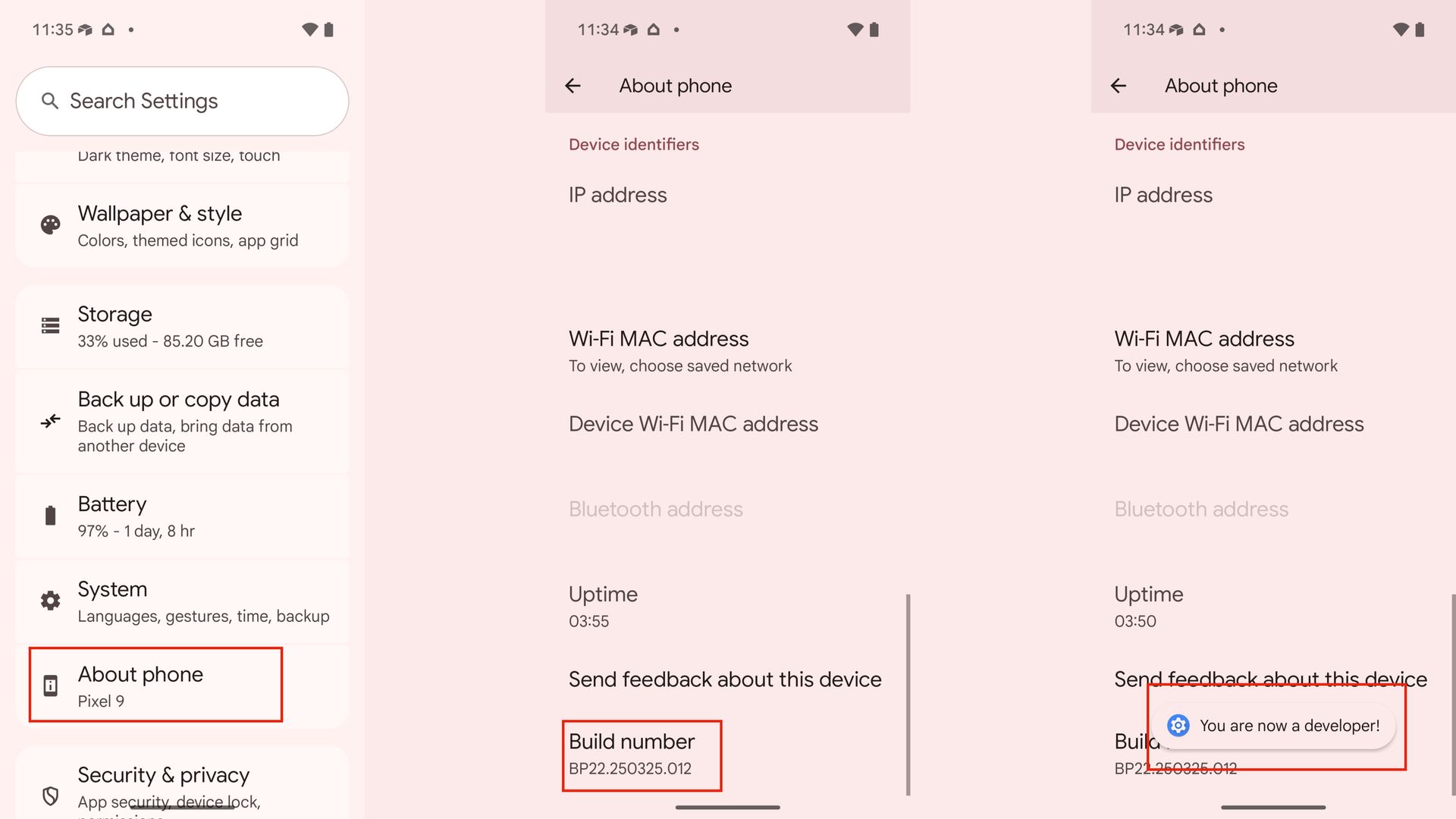
1. Open the Settings app on your Pixel 11 Pro, Pixel 11 Pro XL, or Pixel 11 Pro Fold.
2. Scroll down to the About phone section, and tap it.
3. Find the Build number and tap it seven times to enable developer options. You will need to enter your device passcode to confirm the change.
(Image credit: Future)
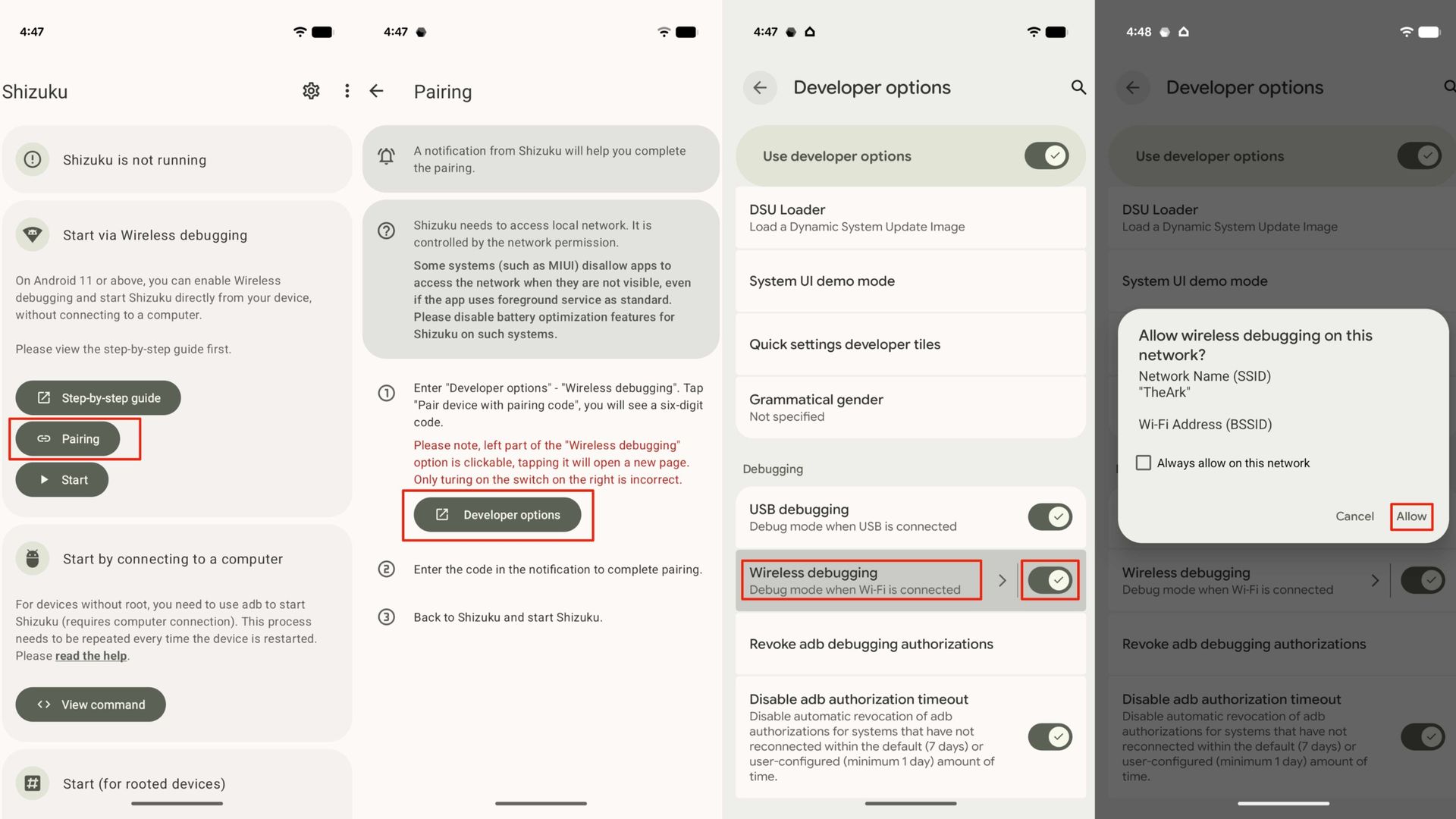
After you've enabled developer options, you can use wireless debugging to start Shizuku. Here's how to do it:
1. Open Shizuku and tap the Pairing button.
2. Open the Settings app and navigate to System -> Developer options. Alternatively, you can tap the Developer options shortcut in Shizuku.
3. Flip on the Wireless debugging toggle in Shizuku, and tap the Wireless debugging menu.
(Image credit: Future)
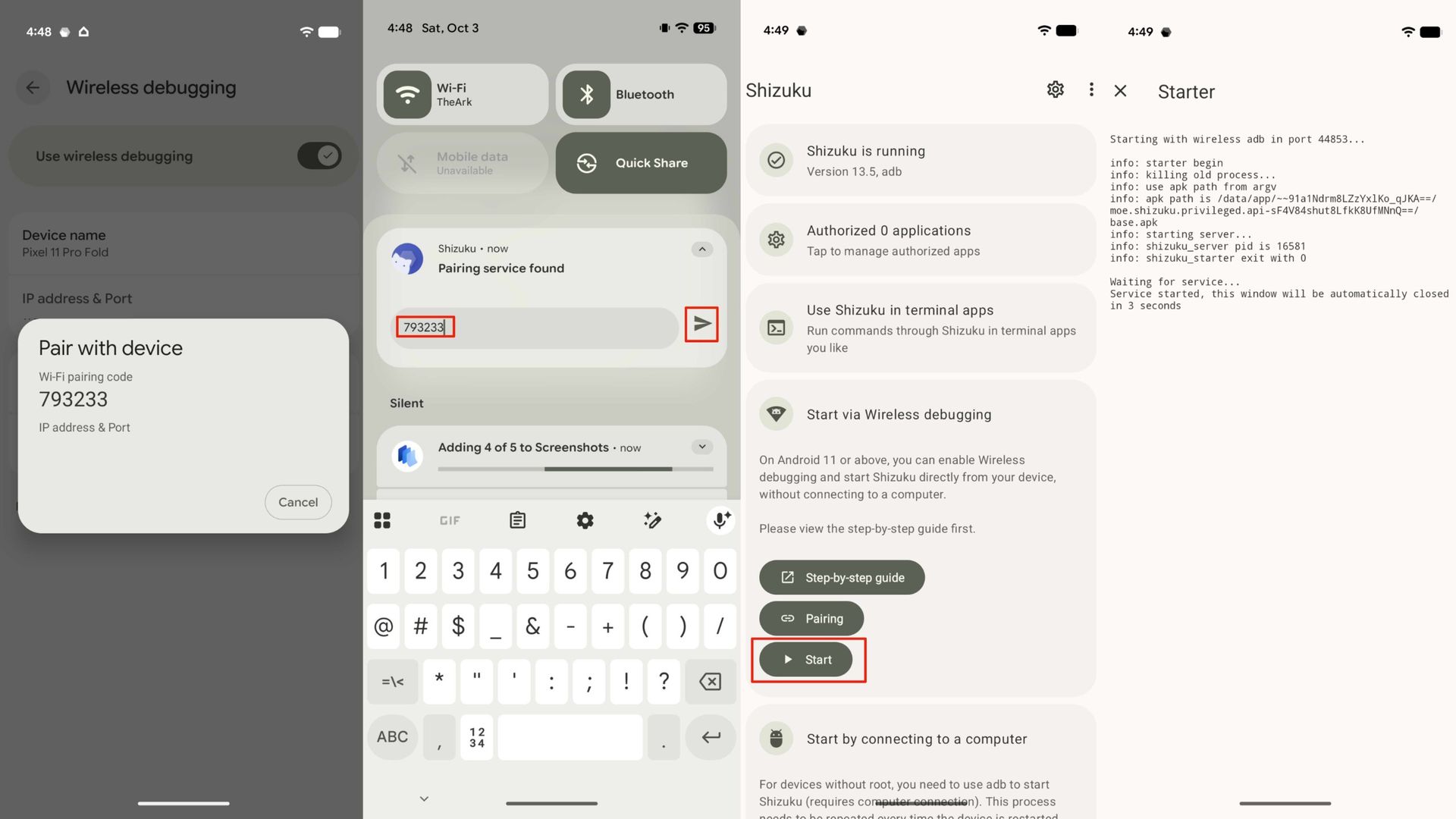
4. Press Pair device with pairing code. Hit Allow to confirm your choice to allow wireless debugging on your network.
5. A pairing code will appear. When the notification from Shizuku appears, enter the pairing code in the notification and press Send.
6. Now, Shizuku is paired. Press Start in the Shizuku app to finish setup.
(Image credit: Future)
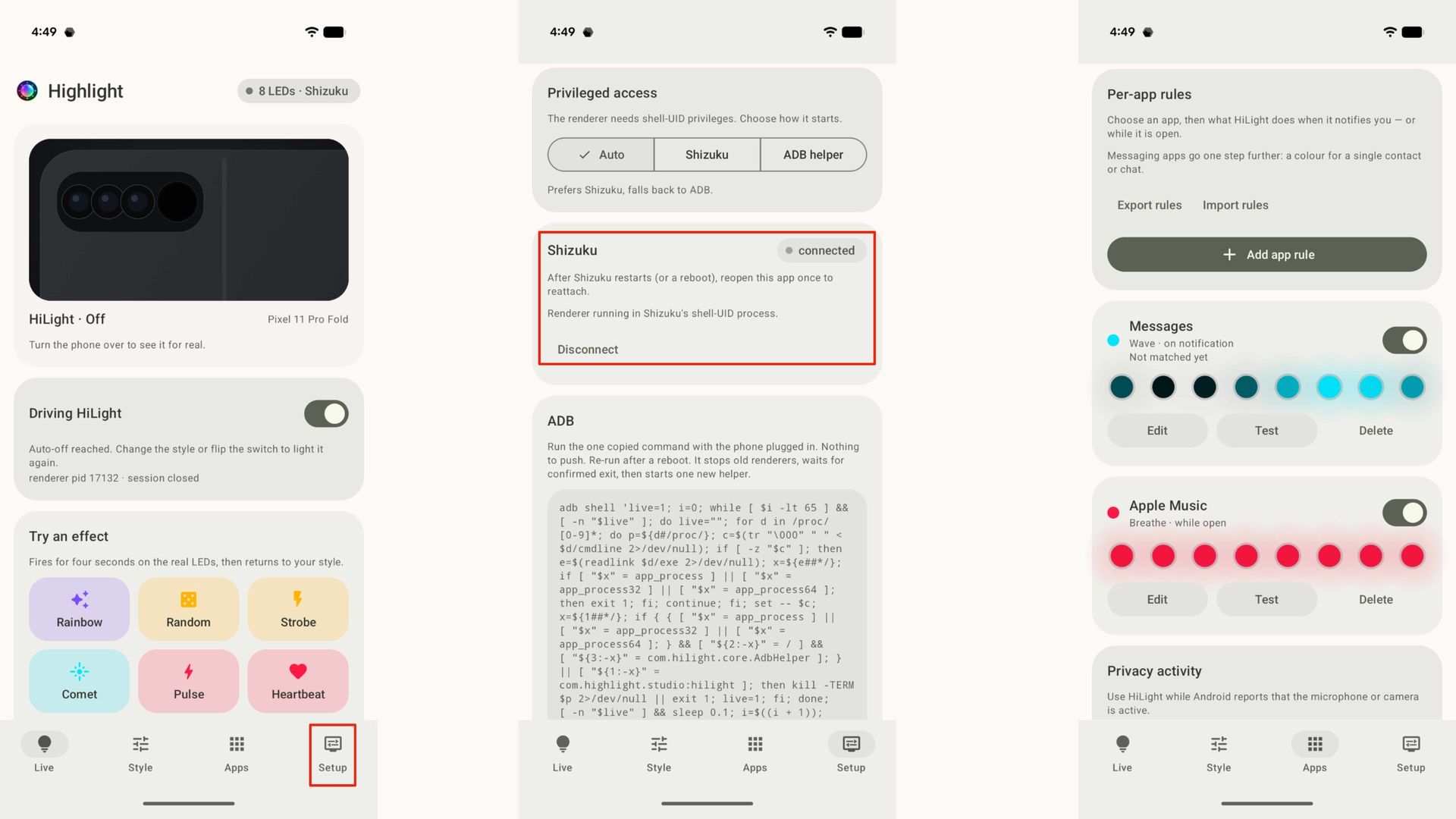
To put the finishing touches on setup, you need to link HiLight Studio to Shizuku. Don't worry, this one is quick and easy:
1. Open the HiLight Studio app.
2. Switch to the Setup page.
3. Look for Shizuku and tap Request access. Finally, approve the request.
(Image credit: Future)
That's it — you've now granted HiLight Studio access to the Android lights service. Now, you can enjoy the fun part, which is customizing the lights on the back of your phone. While there are a lot of steps in this process, they're pretty painless, and I didn't run into a single issue during setup.
You'll need to restart the HiLight Studio render and Shizuku every time your device reboots. Unless you reboot your Pixel often, this shouldn't be too much of an inconvenience.
HiLight is finally as customizable as it was meant to be
(Image credit: Brady Snyder / Android Central)
After setup, opening HiLight presents you with a Live screen that shows you what the HiLight Studio renderer is doing right now. You can test out a lighting effect on this screen. This allows you to get a feel for the nine LED effects supported by the app: Rainbow, Random, Strobe, Comet, Pulse, Heartbeat, Breathe, Wave, and Radar. As you demo each effect, it'll run for four seconds before returning to your default.
Near the bottom of this page, you'll see the App rules you have enabled. If this is your first time trying out HiLight Studio, you won't see anything here. Instead, you'll need to tap the Apps tab. This is where the real magic begins — you can set up exactly what HiLight does for a particular app. Here are a few examples of what HiLight Studio can do:
Show a color or animation when an app receives a notification.
Show a color or animation when an app receives a notification from a specific contact.
Show a color or animation while an app is opened.
Show a color or animation while Android reports the microphone or camera is active.
There's a ton of room for customization here, and these app rules only scratch the surface of what HiLight Studio can do. In the Setup page, you can specify how long HiLight Studio can keep the LEDs active before they automatically shut off. These lights aren't designed to be active for long periods of time, which is why these limits are in place.
You can override the auto-off defaults and allow up to five minutes of continued use. However, hardware protection is a built-in feature that lowers the brightness after 10 seconds of continuous use. Additionally, the eight-LED array will turn off if it has been lit for more than half of the last 10 minutes.
Why you should try HiLight Studio on your Pixel 11
(Image credit: Brady Snyder / Android Central)
When you unbox your Pixel 11 Pro, Pixel 11 Pro XL, or Pixel 11 Pro Fold and try HiLight for the first time, you'll immediately realize it has tons of potential. Unfortunately, Google hasn't realized that potential in HiLight's current implementation. The two use cases officially supported by the Pixel 11 series won't meaningfully change how you use your phone.
HiLight Studio will, which is why it's worth giving the app a shot on your new Pixel phone. Hopefully, Google adds similar functionality to HiLight natively in the future.
Google
Pixel 11 Pro Fold
Glowing Google foldable
The Google Pixel 11 Pro Fold is a standout foldable in its own right, with rare IP68 durability and magnetic Qi2 support. But it also gets the HiLight feature, and you can fully harness it with the free HiLight Studio app.
Google's September Pixel Drop is live, hitting Pixel phones, tablets, and watches with home screen upgrades, fraud protections, and new watch gestures.
Pixel VIPs gets a proper home-screen upgrade: one-tap calls and texts, notification badges for unread or urgent messages, and a floating nav bar to swipe between contacts.
Scam Detection now covers more languages and regions for chat notifications, and Gboard flags suspicious messages as you type.
Google today rolled out its September Pixel Drop, which includes a new batch of updates for Pixel phones, tablets, and smartwatches. The latest release brings updated home screen tools, improved fraud protections, new smartwatch gestures, and a spellbinding audio partnership to tie it all together.
Google has been working on its VIP contact concept for some time, but this update makes it really useful. The tech giant is giving the feature a new home-screen experience, letting you call or text your favorite contacts with a single tap. New notification badges indicate unread messages or urgent messages, and a floating navigation bar lets you swipe between VIP profiles without having to dig through menus.
The update works on Pixel 6 and newer phones worldwide, provided the required Contacts and Pixel VIPs app versions are installed.
GoogleGoogleGoogle
Scam Detection is also expanding to more languages and regions for chat notifications, and Gboard can now flag suspicious messages from supported chat apps directly as you type. Availability varies by country and language, so this isn’t a universal rollout just yet.
Pixel Watch gets a smaller but useful upgrade. Raise to Talk gets enhancements on Pixel Watch 4 and newer. On Pixel Watch 3 and newer, you can launch and scroll through the notification tray with a one-handed pinch gesture.
GoogleGoogleGoogle
There’s also a much less serious addition: Harry Potter Audiobook Packs can change a Pixel’s wallpaper, icons, and sounds, and eligible users will receive a two-month Audible trial. The packs are good through December 31.
The fall sale season is quickly approaching, but you don't need to wait for Black Friday to score some exceptional smartphone deals. Case in point: for a limited time, Amazon is slashing 15% off the Google Pixel 10a, which was already my favorite cheap Android phone on the market.
The deal drops the price of the unlocked Pixel 10a down to just $424, no trade-in required. That said, if you do have an old or broken device lying around, Amazon is offering up to $420 (in the form of a gift card) when you process a trade. What's the point of Black Friday when the Google Pixel deals are already this good?
The Google Pixel 10a is easily the best Android phone under $500 right now, with an elegant design, flagship-level camera tech, and some of the best battery life you'll ever find in this price range. Grab the phone unlocked at Amazon today and you'll get a straight $75 knocked off your purchase, no strings attached. View Deal
Typically priced around $499 for the 128GB configuration, the Google Pixel 10a is a midrange phone that punches well above its weight class. Straight out of the box, the Pixel 10a boasts a stunning 6.3-inch 120Hz pOLED display with IP68 durability and 3,000 nits of brightness, while under the hood you get Android 16, 8GB of RAM, and a 5,100mAh battery that's actually larger than what's found inside the base model Pixel 10.
At 183 grams, the Pixel 10a is also lighter than its flagship counterpart, while both phones share many of the same camera tech and software features. The Google Pixel 10a even comes with seven years of OS and security upgrades, which is a rarity for devices in this price category.
(Image credit: Brady Snyder / Android Central)
Of course, no phone is perfect. The Pixel 10a surprised us all by utilizing the last-gen Google Tensor G4 chipset instead of the newer G5, plus you don't get Qi2 charging support or as many AI features as you would with a flagship Pixel. It's also worth mentioning that, with Black Friday just around the corner, we might see some Pixel deals that drop the price of the Pixel 10a even further in the coming weeks.
With all of that being said, if you just want a great phone at a great price today, the Google Pixel 10a might be the midrange masterpiece that you're searching for. The phone is already worth a look at full price, but this Amazon discount is simply the cherry on top.
The Pixel 11 isn't notably different to its predecessor, and it doesn't even get new cameras — unlike the Pro models. That's annoying to say the least, but to its credit, Google added a decent number of software and camera features.
The one I like the most is Magic Capture; it makes taking photos of fast-moving subjects effortless, and it isn't gated to the Pro models — the standard Pixel 11 gets it too.
What is Magic Capture on the Pixel 11?
Magic Capture is a dedicated camera mode on the Pixel 11. It starts taking a video when you hit the shutter button, and then uses on-device AI models to analyze the frames and find the best still photo. That image is then turned into a high-resolution HDR photo.
Basically, the feature is designed to make it easy to take photos of fast-moving objects. If you have kids that are constantly on the move, the mode ensures you get images that aren't blurry. It genuinely makes a big difference, and having used it extensively on my Pixel 11 Pro XL, I'm glad that the feature is just as usable on the standard Pixel 11 as well.
You get a set of images when using Magic Capture, and the video that's shot is also available if you need it. The video itself isn't shot in 4K, so you don't quite get the best definition if that's what you're after — the goal with the mode is to deliver HDR photos of the best moments in the video. All of it is done on-device, and it doesn't take much time either.
How to use Magic Capture on the Pixel 11
(Image credit: Derrek Lee / Android Central)
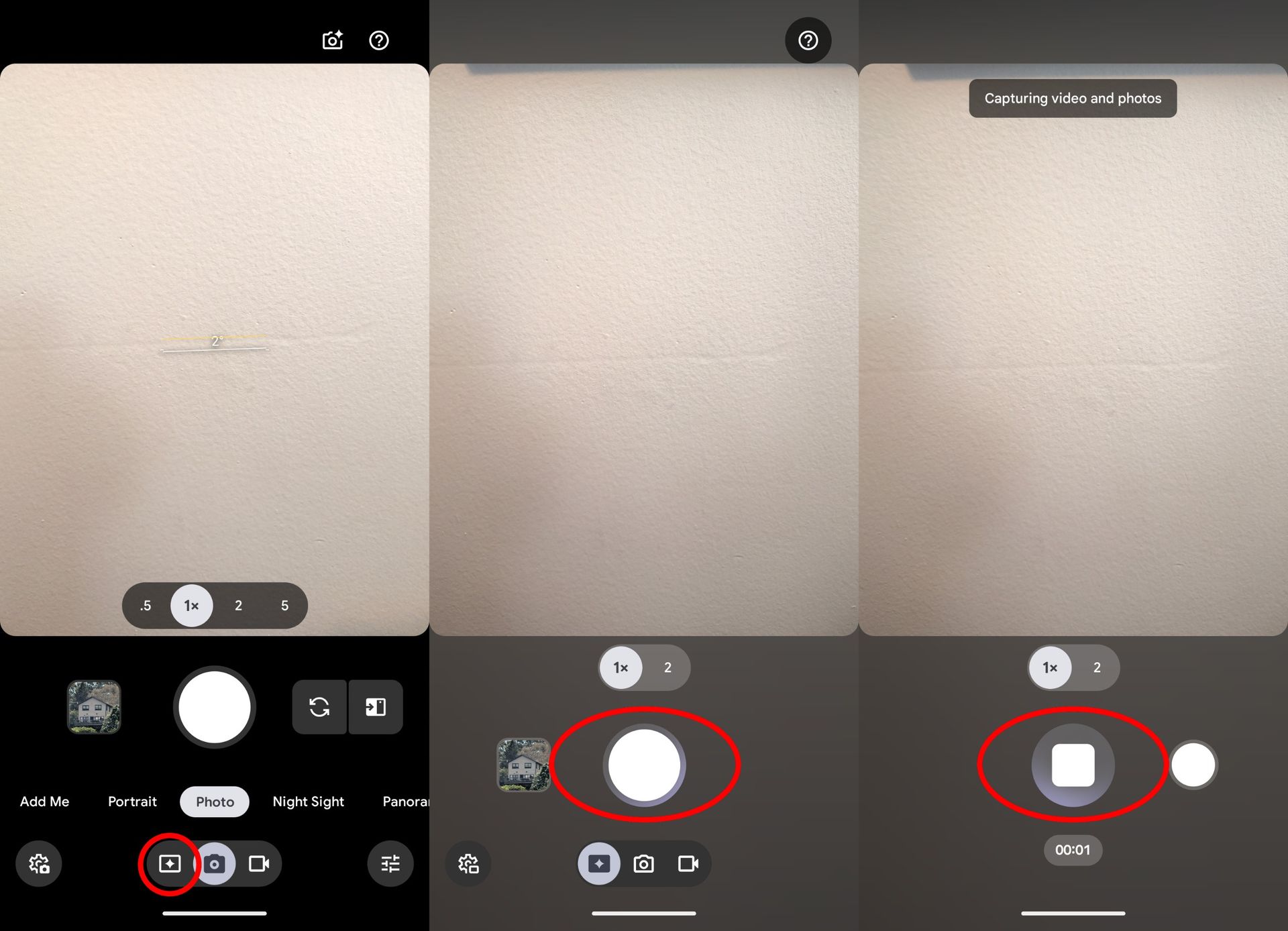
Google needlessly made the viewfinder controls convoluted to use, and instead of having a Video mode like every other brand, it clubbed it into a toggle in the Photo mode. Magic Capture adds to that, with the mode available as another toggle within the Photo mode. This is how to access it:
Launch the Camera on your Pixel 11.
Choose Photo.
In the bottom row, choose the left-most toggle to enable Magic Capture.
I prefer the cameras on the Pixel 11 Pro XL (obviously), but it's good to see the Pixel 11 getting all the new software features. Also, while the camera modules haven't changed this year on the Pixel 11, the phone takes better photos thanks to tweaks to Google's camera algorithms. Then there are features like Camera Looks that go a long way in changing the look and feel of the photos.
If I had to pick just one reason to recommend Google's Pixel 11 series of phones, it would be for Magic Capture. This Pixel 11-exclusive Gemini feature uses AI smarts to automatically capture photos while you're recording a video with your smartphone.
It ensures the best moments are delivered in picture-perfect HDR+ detail, so you can stay in the moment instead of trying to strike the right pose. Better yet, it retains the video you captured, so you get a top-notch video recording and effortless photos from every moment.
We've seen similar auto-capture features from companies like Honor, but Google's implementation goes further than any of them have, and it does it all in an impressively simple way, too. If you've got a Pixel 11 series phone, here's what you need to know about Magic Capture (and why you need to use it immediately).
What is Magic Capture and how does it work?
(Image credit: Nicholas Sutrich / Android Central)
Magic Capture is a new main camera mode on the Google Pixel 11 series. Google puts it alongside the main photo and video modes, which makes sense since it combines both. Once you start a Magic Capture recording, you can just focus on capturing the moment instead of worrying about getting the right photo.
After you hit stop, the Pixel 11's special version of Gemini will analyze the video locally, so it won't go to the cloud for processing. Gemini mainly captures photos based on expressions, movement, and composition. This means that if someone smiles during a Magic Capture session, for example, you can expect Gemini to create a photo of that moment.
If you tap the thumbnail in the viewfinder, you can watch this happen in real-time. Here's a video example from our hands-on time with the Pixel 11 Pro back in early August 2026.
Gemini will pick out several moments from the video and save them as a photo, but this isn't just a simple frame export of the video. During the Magic Capture session, the Pixel 11 captures several additional frames of data that are used to create a full HDR+ quality photo, which is a substantial step-up in quality versus a simple frame export.
Plus, since Gemini can take multiple video frames and combine them into one excellent photo, moving subjects (like kids and pets) come out crystal clear. I've been calling Pixels the best phones for parents for years, and this levels up that expectation in ways even I didn't foresee.
I've constantly been blown away by using Magic Capture over the past month on my Pixel 11 Pro Fold because of its ability to save those moments I absolutely would have missed if I were just taking regular photos. It's the kind of AI-powered technology that I've been dreaming about, and it's dead simple to use, at that!
What are the downsides of Magic Capture?
(Image credit: Android Central)
While Magic Capture is truly amazing, it does have a few downsides. Namely, you won't get full-resolution video or photos from the captures. That doesn't mean they look bad, but it's worth noting that you'll lose a little quality when you use the feature. Here's how the numbers run:
Google Pixel 11 camera maximum resolution
Photo mode
Video mode
Magic Capture
Video capture
N/A
4K (3840 x 2160) resolution, 60 FPS
1080p+ (1440 x 1080) resolution, 30 FPS
Photo capture
4000 x 3000 resolution
N/A
3820 x 2865 resolution
As you can see, the photos are nearly full quality, but the resolution will vary. By default, Magic Capture automatically crops and rotates captured images to make them look better. This results in a slightly lower-resolution photo, but only because it's cropped and/or rotated. If you wish, you can disable this option in Magic Capture settings to get the full-resolution frame.
Magic Capture only records in 1080p+ quality at 30FPS, so if you're used to 4K60 video, you'll be disappointed with the results. The aspect ratio is also a little funky for a video — it's much closer to 4:3 than 16:9 — but it's not the end of the world. Just expect that videos won't take up the whole screen on your phone or a TV, and you'll be fine.
How to use Magic Capture on a Pixel 11
While some camera modes require you to select a main mode and then swipe over to a sub-mode, Magic Capture is one tap away at all times. Here's how to use it:
1. Open the Camera app on your Pixel 11.
2. Tap the Magic Capture button at the bottom of the viewfinder. It's the button to the left of the camera icon at the very bottom of the camera viewfinder.
3. Tap the white shutter button to start a Magic Capture session.
4. Film anything you'd like to capture, and Gemini will automatically identify moments to turn into photos.
5. Tap the red stop button when you're done filming.
(Image credit: Android Central)
And that's all there is to it! Tap the photo thumbnail in the viewfinder or open your Google Photos app to view the results of the Magic Capture session. Since Magic Capture relies on a local Gemini agent to process the photos, it may take a few seconds to begin generating photos from each session.
The simplicity and overall quality are why Magic Capture is so amazing to me, and it's exactly why Pixel 11 owners should start integrating Magic Capture into their daily routines. Happy capturing!
Le Google Pixel 10a mise sur une durée de vie logicielle particulièrement longue, des fonctions photo assistées par l’IA et une autonomie annoncée à plus de 30 heures. Un smartphone pensé pour rester pertinent pendant des années qui s'affiche en ce moment à -29 % sur Amazon.
Le Google Pixel 9a profite de la rentrée et des French Days pour alléger son prix chez Cdiscount : le smartphone 5G de 256 Go tombe à 404 € avec le code COCORICO15. Une bonne occasion de passer au Pixel sans faire surchauffer la carte bancaire.
I've always enjoyed using Pixels, and that hasn't changed in 2026. I switched over to the Pixel 11 Pro XL from the Find X9 Ultra, and while Google doesn't have the best cameras or battery life, the 11 Pro XL is meaningfully different to its predecessor — something I realized after two weeks of use.
I have all major phone releases of 2026 on hand, but it's the Pixel 11 Pro XL that houses my SIM card. I obviously like Google's vision of Android, but the 11 Pro XL excels in a lot of other areas, so I'm outlining five reasons why the phone is now my daily driver.
I'm not a big fan of AI in general, and Google's insistence of shoving AI-assisted features into every nook and cranny of its software is a bit tedious. That said, Proactive Intelligence does a good job providing contextual information, and Rambler in particular has made me use voice dictation again — I like just how easy it is to take notes. There's no doubting that the Pixel 11 Pro XL has the best on-device AI suite of any phone.
Even if you don't plan on using any of these AI features, there's a lot to like with the software. The interface is clean and modern, and you get extensive customizability when it comes to styling it to your tastes. I get that not everyone's a fan of the Material you aesthetic, but I like the vibrancy of the UI, and it's great to see Google constantly roll out new features.
It's annoying that Google's Tensor efforts have focused so heavily on the NPU that it ignores baseline performance, but the Tensor G6 is better than previous models. It still isn't quite as fast as the latest-gen Qualcomm and MediaTek rivals, but it is better in day-to-day multitasking, and there is a noticeable difference in the overall fluidity. The G6 still struggles with visually-demanding games, but in all other scenarios, it is a pretty reliable platform.
The 6.8-inch OLED panel, on the other hand, is one of the best around. It has great colors and gets brighter than most phones I used in 2026, and it held up astonishingly well in India's punishing heat. The 11 Pro XL doesn't have high PWM dimming — unlike Chinese phones — so if you're sensitive to it, you should get the Find X9 Pro or Vivo X300 Pro.
While earlier Pixels had the best cameras, that hasn't been the case for a while now. Thankfully, the Pixel 11 Pro XL makes amends in this area, and the new sensors combined with camera tuning tweaks deliver much better photos and videos.
Image quality in general is better than last year, and while the 11 Pro XL may not be as good as the Find X9 Pro or Vivo X300 Pro, it stands above the S26 Ultra and iPhone 17 Pro. I like Camera Looks a lot as it gives me plenty of flexibility in tailoring my photos.
Magic Capture in particular is a standout addition; it does a great job producing clean photos of fast-moving subjects, and I used it extensively in the last two weeks. While it isn't new, Add Me is a feature that gets a lot of usage.
I only started using Qi 2 in earnest last year, and a lot of that had to do with the Pixel 10 Pro XL. I don't use cases in general, so to have Qi 2 magnets integrated into a phone body made using the tech all the more easy, and it's great to see Google continue this in the Pixel 11 Pro XL.
While 25W charging isn't a lot — particularly when there are phones that charge at 80W — the convenience is hard to counter. There are so many sleek Qi 2 power banks these days that I always have one on hand to use with the 11 Pro XL when I'm outdoors.
The battery life in general is good enough that I don't need to charge the phone before the end of the day, but if I'm shooting outdoors and need to top up the battery, this comes in handy. Also, it's just easier to plonk the 11 Pro XL on a Qi 2 charger on my desk (like the Nomos 245W) than plugging in a cable.
I like Google's hardware design, and the Pixel 11 Pro XL looks clean and elegant. The new camera bar is modern, and it doesn't jut out too much from the body. Best of all, there's no wobble when using the 11 Pro XL on a table (take note, Samsung).
But in classic Google fashion, the brand doesn't have all colors in all storage sizes (outside the U.S., at least), so I got the 512GB variant in Obsidian. I much prefer the look of the Canyon model, and if you're considering getting the 11 Pro XL, that is the color to buy.
The phone has similar dimensions to its predecessor, but it is a little lighter, and the tweaks to the design make it easier to hold and use. Day-to-day durability is excellent; the phone took six tumbles — two onto a tiled surface — and came away unscathed.
I didn't use the Pixel 10 Pro XL as much as previous Pixels, and that's because other brands made bigger strides this year. Chinese brands have much better cameras — the Find X9 Pro, X9 Ultra, Vivo X300 Pro, and X300 Ultra are on another level — but the software wasn't anywhere as good to use as a Pixel. That isn't the case in 2026; ColorOS and OriginOS have gotten a visual makeover, and they combine a modern UI with extensive customizability and fluidity; they no longer feel like second-best software.
That's one of the reasons the Find X9 Pro and X9 Ultra became my most-used devices of 2026. Having said that, the Pixel 11 Pro XL is still better when it comes to the software, and I like that the cameras are no longer the limiting factor. I'm not saying that the phone is without issues; the battery doesn't last two days, and you don't get anywhere as much power as Chinese phones that use Qualcomm and MediaTek silicon. In spite of all that, the Pixel 11 Pro XL is a great choice if you value clean software and cameras that are fun to use.
Google
Pixel 11 Pro XL
The Pixel 11 Pro XL is meaningfully different to its predecessors, and the combination of clean software and great cameras and better battery life make it a good all-rounder.
I've seen a lot of Google Pixel 11 deals since the phones were first unveiled last month, but once again, Mint Mobile has surprised me with one of the best offers yet. For a limited time, the T-Mobile-owned carrier is slashing $425 off the powerful Google Pixel 11 Pro XL, and all you need to do is bundle the device with one year of wireless.
Yes, that seems like a major eligibility requirement, but considering that all of Mint Mobile's annual plans have been discounted to just $180 (or $15 per month), it's actually extremely cost-effective.
Let me put it this way. Bundle the phone with one year of the carrier's popular unlimited plan, and it'll only cost you $1,054 ($88 per month using affirm). That's a whopping $200 cheaper than the Pixel 11 Pro XL's current price at Amazon, and it comes with a full 12 months of one of our favorite unlimited plans around. It's not for everyone, but if you want a deal that gets you a powerful Android phone and a great new wireless plan, this Mint Mobile promotion is one of the most impressive offers on the web today.
If you're sick of all of the trade-in promotions and confusing carrier deals, look no further than Mint Mobile. Bundle your purchase of the powerful Google Pixel 11 Pro XL with one year of the Unlimited plan and you'll get $425 off the phone AND 50% off the wireless.
One of the best Android phones of 2026 and a full 12 months of unlimited T-Mobile-powered wireless for only $88 per month? Sign me up. View Deal
✅ Recommended if: you want a powerful Android phone and some great no-frills wireless for cheap; you hate paying your phone bill and wouldn't mind purchasing a year of coverage in advance.
❌ Skip this deal if: you don't want to commit to a full year of one wireless plan in advance; you want a phone plan with premium perks; you prefer the simplicity of buying phones unlocked; you're looking for a trade-in opportunity.
If you don't need all of the fancy extras and premium perks offered by Big Three carriers, Mint Mobile's Unlimited plan is a fantastic choice. You get unlimited talk, text, and data on T-Mobile's vast 5G network, plus a free mobile hotspot and free calls to Mexico, Canada, and the UK. That's it. Just simple and effective wireless that won't break the bank.
The premium Pixel 11 Pro XL, however, is anything but simple. This is Google's answer to Samsung's Galaxy S26 Ultra, boasting a gorgeous 6.8-inch AMOLED display, a powerful Tensor G6 chipset, and 12GB of RAM straight out of the box. You also get some upgraded camera tech, faster charging speeds, and the new HiLight LED notification feature around the camera bar.
The Pixel 11 Pro XL may not be a dramatic upgrade from its predecessor, but it's still one of the best phones that Google has ever produced. Here is a great way to get the 2026 flagship at a solid discount (plus a year of great wireless coverage to boot).
The Pixel 11 is a good choice if you need a phone that's designed to last. The metal mid-frame is durable, the panes of glass get Corning's best Gorilla Glass protection, the OLED panel is brighter than other phones in this category, and you get great cameras. The software is the clear star of the show; you get a clean interface with high customizability, and all the AI features you need. Oh, and it will get seven years of Android OS updates.
Motorola
Edge 2026
Doesn't have an edge
The Edge 2026 has great durability, good-sized battery, and a vibrant AMOLED panel, but it misses out in other areas. It comes with just 128GB of storage, the plastic design isn't as premium as the Pixel 11, and it will just get two Android OS updates — and that's just not good enough on a $600 phone in 2026.
Google's phones have a distinct visual identity, and I like that the Pixel 11 doesn't deviate too much from its predecessor. Google did a good job with the color choices this year; I got the Hibiscus model, and it's just fun to hold and use.
The Edge 2026 has an immediately-recognizable design as well, but it doesn't quite feel as good to hold. A lot of that is down to the plastic chassis, but the upside is that you have IP68 and IP69K dust and water resistance as well as MIL-STD-810H durability. Google provides IP68 as standard, but Motorola has the edge in this area. Another factor to consider is the weight, and the Edge 2026 is 36g lighter than the Pixel 11.
Google Pixel 11 vs. Motorola Edge 2026: Hardware and cameras
The Pixel 11 is nearly identical to its predecessor, but the Tensor G6 platform gets a lot right, and it is noticeably faster in daily use. It still isn't good at gaming, but you'll only notice this while playing visually-demanding games. Otherwise, it is reliable.
Motorola went with MediaTek's Dimensity 7450 in the Edge 2026, and it is clearly showing its age. It has ancient Cortex A78 and A55 cores, and they're not anywhere as efficient as the newer Arm cores that you get in most other phones in this category. The result is that even though the Edge 2026 has a slightly bigger 5,000mAh battery, the Pixel 11 lasts longer in regular use.
(Image credit: Nicholas Sutrich / Android Central)
While Motorola has the edge with 68W charging, Google's decision to put Qi 2 magnets in the Pixel 11 gives it a clear advantage in my book. It's just easy to be able to charge the device using any Qi 2 charger without needing an additional case.
Also, it's annoying that the Edge 2026 has just 128GB of storage, and there's no 256GB model either — Motorola just sells one model in the U.S. The Pixel 11 comes with 256GB of storage as standard, and there is a 512GB model if you need additional storage.
Category
Google Pixel 11
Motorola Edge 2026
Operating System
Android 17, seven years of software updates
Android 16, two years of software updates
Display
6.3-inch 120Hz OLED, 2424 x 1080, Corning Gorilla Glass Victus 2, HDR10+, 3000 nits max
6.3-inch 120Hz AMOLED, 2640 x 1260, Corning Gorilla Glass 7i, HDR10+, 5200 nits max
Chipset
Google Tensor G6, 3nm TSMC
Mediatek Dimensity 7450, 4nm
RAM
12GB/16GB
8GB
Storage
256GB/512GB/1TB UFS 4.0
128GB
Rear cameras
Main: 48MP f/1.7, OIS
Tele: 10.8MP f/3.1, OIS, 5x zoom
Wide: 13MP f/2.2 wide-angle
Main: 50MP f/1.8, OIS
Tele: 10MP f/2.0, OIS, 3x zoom
Wide: 48MP f/2.0 wide-angle
Front camera
10.5MP, f/2.2
50MP
Battery
4985mAh
5000mAh
Charging
30W wired, PPS
25W Qi 2.2 Pixelsnap wireless
68W wired
15W wireless
Connectivity
Wi-Fi 6e, Bluetooth 6, NFC, Dual-band GPS, 5G mmWave (NA only), 5G Sub-6 (global), LTE
Wi-Fi 6e, Bluetooth 5.4, NFC, GPS, 5G Sub-6, LTE
Ingress protection
IP68 dust and water resistance
IP68/IP69K dust and water resistance
Dimensions
152.8 x 72 x 8.6mm
152.3 x 72 x 7.2mm
Weight
197g
160g
Colors
Hibiscus, Frost, Pistachio, Obsidian
Pantone: Martini Olive
The Edge 2026 has a trio of cameras, and the dedicated tele lens is good in its own right. That said, I prefer the cameras on the Pixel 11; while the physical sensors are unchanged, Google made plenty of tweaks to the tuning, and features like Camera Looks give you a greater customizability over how your photos look. There's also the fact that the Pixel 11 takes better photos with its trio of cameras, and it holds up a lot better in low-light situations.
The Pixel 11 debuted with Android 17, and it comes with a clean interface with a lot of unique features you don't get on other phones. While I don't use most of the AI-assisted features that Google has to offer, things like Rambler in Gboard make a big difference.
The Edge 2026, meanwhile, launched with Android 16, and with Motorola only providing two Android OS updates, it will only go up to Android 18. By contrast, the Pixel 11 will get the Android 14 update (if Google continues its numbering scheme) seven years down the line.
Motorola's software is clean and uncluttered, but it's clear that the brand needs to do more to stand out. One thing that needs to change is software updates; it just isn't enough for a $600 phone to get two Android OS updates in 2026.
Google Pixel 11 vs. Motorola Edge 2026: Which should you buy?
The Pixel 11 is priced at $899 in the U.S., which is $300 more than the Motorola Edge 2026. While that is costlier, you are getting better features in just about every area: the Pixel 11 is faster, has higher memory and storage, lasts longer, takes much better photos, and gets five additional years of software updates, which is a huge deal.
Also, Google is known to heavily discount phones a few months after launch, so if you like the look of the Pixel 11, just wait a bit until the holiday sales start (it isn't a long wait), and you won't need to pay quite as much to get your hands on the phone.
If you're on a budget and need a mid-ranger, I'd suggest looking at the Pixel 10a instead of the Edge 2026. You don't get a tele lens, but outside of that, it is a better choice than the Edge 2026, and it costs less.
Google
Pixel 11
The Pixel 11 may not be too different to last year, but it continues to be the best device in this category. If you want a budget-focused choice, get the Pixel 10a instead.
Motorola
Edge 2026
The Edge 2026 is a decent device, but Motorola's decision to shortchange buyers when it comes to the software and storage means it is not as good as the Pixel 11.
The Pixel 11 is two generations ahead of the Pixel 9, sporting a better processor, a triple-camera setup, a larger battery, and faster charging. Google upgraded the AI experience to bring cool features like Magic Capture, Rambler, and more, and the base storage finally starts at 256GB. But the $100 price increase and lack of the HiLight notification LED cast a shadow of doubt.
Pros
Android 17 with 7 years of updates
Higher base storage
Tensor G6 is more efficient
Pixelsnap support opens up compatibility with an insurmountable number of accessories
Improved triple camera setup with better zoom
Bigger battery with faster charging speeds
Cons
Costs $100 more and misses out on HiLight
Cameras not too different from Pixel 10
Display isn't an LTPO OLED (60-120Hz)
Wi-Fi 6E
Google
Pixel 9
Still going strong
The Pixel 9 might not be the best Android phone out there, but it is still one of the best AI phones you can buy for a very agreeable price. It has a fantastic dual camera setup, plenty of AI features that have stayed up to date thanks to regular Pixel Drops, and is guaranteed to get updates until Android 21.
Pros
Half the price of the Pixel 11
Also promises 7 years of updates
Shares many of the Pixel 11's best features like Pixelsnap, IP68 water and dust-proofing, and many overlapping AI features
Dual cameras do a fantastic job
Wi-Fi 7
Cons
The Tensor G4 chipset is quite old
Lower base storage
Slow battery and charging specs
Display isn't as bright as Pixel 11
Lacks magnetic Qi2, or Pixelsnap as Google calls it
The Pixel 11 brings several upgrades over the Pixel 9, but in a strange turn of events, it also brings quite a few downgrades. One thing is for sure, though: the latest Google Tensor G6 chipset is the clear winner in terms of performance and raw power.
Most importantly, if you were to step into the store to buy both phones right now, the Pixel 9 would only cost you about $549, whereas the Pixel 11 starts at $899. The price gap is significant, leading us to question which phone is better. Two generations later, and it's still unclear to Pixel 9 owners whether the Pixel 11 is worth upgrading to. I'm here to unearth the answer to this question.
Looks-wise, the Google Pixel 11 and Pixel 9 are very similar, but the former's brighter colorways and all-glass camera bar stand out distinctly. Apart from that, both Google Pixel phones are the same size, each with a 6.3-inch HDR10+ OLED display. Neither Pixel has an LTPO panel, so the variable refresh rate can't drop below 60Hz.
Disappointingly, the Pixel 11 misses out on HiLight, a standout feature of the Pixel 11 Pro and Pro XL. It also comes with Wi-Fi 6E instead of Wi-Fi 7, which is found on the Pixel 9. Google did upgrade to Bluetooth 6 on the Pixel 11, thankfully, so the Pixel 9's Bluetooth 5.3 is quite outdated by comparison.
Battery and charging are significantly better on the Pixel 11, jumping from the Pixel 9's 4,700mAh cell, 27W wired charging, and 15W wireless charging speeds to a 4,985mAh battery, 30W wired charging, and 25W wireless charging. Pixelsnap (or magnetic Qi2) is one of the best features of the Pixel 11, something the Pixel 9 lacks entirely.
Performance is a vital consideration, and the Google Pixel 11's Tensor G6 chipset crushes the Pixel 9's much older, slower Tensor G4 chip. The G6 offers 20% better power efficiency, 25% faster browsing, and 15% faster app loading compared to the Tensor G5.
Let's also not forget that all this will cost you a lot more: the Pixel 11 starts at $899 for 12GB/256GB, whereas the Pixel 9 retails for about $440 for the 12GB/128GB variant and $545 for the 12GB/256GB option.
Google Pixel 11 vs. Pixel 9: Software and AI
(Image credit: Nicholas Sutrich / Android Central)
It is well known that, eventually, software and AI features from new Pixel phones trickle down to older models. However, this also depends on whether the phone's chipset supports those features.
Given the wide gap in raw power between the Tensor G4 and Tensor G6 chips, many of the Pixel 11's best features may not be available on the Pixel 9. Gemini's features rely on the G6's advanced architecture, so features like Rambler voice-to-text, Magic Capture, Sign Language-to-text translation, and automation via Gemini Intelligence are likely to remain exclusive to the Pixel 11. Some might come to the Pixel 10 eventually, but it is highly unlikely that the Pixel 9 will also get those features.
Both Pixels run Android 17 and are guaranteed seven years of OS and security updates. The Pixel 9 started out with Android 14, so naturally, it has fewer updates to go compared to the Pixel 11.
Google Pixel 11 vs. Pixel 9: Cameras
(Image credit: Shruti Shekar / Android Central)
The Pixel 11 has a triple-camera setup, with all-new lenses compared to the Pixel 9's dual-camera setup. Pixel 11 users enjoy a 48MP primary camera, a 13MP ultra-wide camera, and a 5x telephoto sensor, with up to 30x zoom. New camera features on the device include Magic Capture, Camera Looks, Camera Coach, and Creator Suite.
Next to that, the Pixel 9's 50MP wide and 48MP ultra-wide cameras and glaring lack of any telephoto lens look pointedly plain. Although a few Pixel 10 camera features, like Camera Coach, made their way to the Pixel 9, they are a far cry from the photography and videography tools and capabilities of the Pixel 11.
Google Pixel 11 vs. Pixel 9: So should you upgrade?
(Image credit: Sanuj Bhatia / Android Central)
The Pixel 11 offers Pixelsnap, vastly improved performance, better cameras, more base storage, better AI features, superior battery and charging specs, and solid triple cameras.
The Pixel 9, on the other hand, still has many years of software updates, and it performs well enough, with solid photography and ingress protection. It is slow by comparison and has poorer battery life and charging performance.
Whether you are a Google Pixel 9 owner or considering saving money by buying an older phone, the Pixel 11 is clearly a much better deal overall. You'll get Android 17 and the same seven-year update promise. The extra money you spend will get you a vastly more efficient processor, newer hardware, and more base storage.
If you are intent on staying in the $500 range, I suggest waiting for the Pixel 10 Pro to go on sale instead of purchasing the Pixel 9.
As far as simplicity is concerned, this is one of the best Pixel 11 Pro XL deals on the web, totally crushing the latest offers from Verizon and AT&T. Even if you don't want to sign up for T-Mobile's Experience Beyond plan (which is admittedly pretty pricey), the carrier is guaranteeing a $900 discount with all of its mainline unlimited plans, while the Experience More plan will still land you $1,100 off your smartphone purchase.
The Google Pixel 11 Pro XL has only been out for a couple of weeks, but you can already grab the super-sized flagship for FREE by adding a line with the Experience Beyond plan at T-Mobile.
The carrier is offering similarly compelling discounts when you sign up for other unlimited plans and/or process a trade-in, so you can choose the exact T-Mobile experience that works for you. View Deal
Destined to rank among the best Android phones released in 2026, the Google Pixel 11 Pro XL takes the excellent foundation of its predecessor and adds a new camera system, a thinner and lighter build, and the upgraded Tensor G6 chipset. The 2026 phone also boasts a brighter display with faster charging speeds, plus you get to enjoy the new HiLight LED array. This light feature is attached to the camera bar and will glow different colors when you receive a notification or activate the phone's AI assistant.
The Google Pixel 11 Pro XL also comes equipped with all of the features you'd expect from a Pixel phone in 2026, including versatile cameras, a ton of handy software features, and seven years of guaranteed OS and security updates.
(Image credit: Nicholas Sutrich / Android Central)
Naturally, no T-Mobile deal is complete without some fine print attached, and this Pixel 11 Pro XL offer is no exception. Like I mentioned above, you'll have to sign up for the Experience Beyond plan to receive the savings, and this plan generally starts around $100 per month for a single line. Fortunately, you can drop that price down considerably by using AutoPay and adding multiple lines.
The Experience Beyond plan also comes with a bunch of enticing perks to make up for its steep price tag. You get unlimited talk, text, and premium data on T-Mobile's legendary mobile network, plus an unlimited hotspot, international coverage in over 215 countries worldwide, and free subscriptions to both Netflix and Hulu. You even get a five-year price guarantee and access to all the same great upgrade deals as new customers.
This deal isn't for everyone, but if you've been looking for a new phone plan anyway, now's your chance to score some premium T-Mobile coverage AND a powerful Android phone all at once.
That discount drops the Pixel 11 Pro XL down to only $5 per month for 36 months, no trade-in required! Of course, Unlimited Ultimate is also Verizon's most expensive data plan, so is this deal actually worth the price of entry? Let's break down all of the pros and cons to find out if this Verizon deal is right for you.
Buy the Pixel 11 Pro XL for 5 bucks per month during Verizon's Labor Day sale
The Pixel 11 Pro XL is the most powerful (and expensive) phone in Google's flagship lineup, and now you can grab the device for only $5 per month for 36 months when you add a line with the Unlimited Ultimate plan at Verizon. That's $1,119.99 in total savings, no trade-in required!View Deal
✅ Recommended if: you want to upgrade to one of the best unlimited plans in the business, regardless of cost; you're looking for a good way to get a powerful Pixel phone and an outstanding wireless plan in one fell swoop.
❌ Skip this deal if: you want to save money on your phone bill; you prefer the simplicity of buying unlocked phones; you're looking for a trade-in opportunity.
For starters, it's important to note that Verizon's Unlimited Ultimate plan generally starts around $105/month for a single line, although you can reduce that price significantly by adding multiple lines and taking advantage of promotional pricing. Add four lines with AutoPay and paper-free billing, for instance, and you can enjoy the benefits of the Unlimited Ultimate plan for as little as $57.60/month for each line.
If you can afford it, the Unlimited Ultimate plan does offer a lot of great features that make up for the steep price tag. You get unlimited talk, text, and 5G Ultra Wideband data, in addition to an unlimited mobile hotspot, 4K video streaming, and a ton of international benefits when you travel.
What about the phone?
(Image credit: Nicholas Sutrich / Android Central)
Lightweight and thinner than ever, the Pixel 11 Pro XL is one of the best phones that Google has ever created, with a powerful Tensor G6 chipset, 12GB of RAM as standard, and a gorgeous 6.8-inch AMOLED display. You also get some upgraded camera tech, seven years of guaranteed software support, and a larger battery than previous generations, making the Pixel 11 Pro XL an absolute beast of Android performance.
Furthermore — and this is mostly a cosmetic upgrade — the Pixel 11 Pro XL features the new HiLight LED light array that borders the phone's camera bar. This little light indicator silently glows when you get a notification or use the phone's AI features, plus it can be customized to match your style.
Sure, it wasn't the massive upgrade that we were hoping for when comparing the phone to last year's model, but if you can get a good deal, the Pixel 11 Pro XL is a no-brainer for any Android enthusiast in 2026.
My take on Verizon's Labor Day deal
In conclusion, I'd really only take advantage of this deal if you can afford the wireless. This Verizon promotion makes the most sense if you've already been eyeing the Unlimited Ultimate plan and want to snag a great phone at the same time. And indeed, Unlimited Ultimate is awesome if you can afford it.
For everyone else, you'd be better off looking for a straight discount or trade-in opportunity. Some carriers (like T-Mobile) will offer some major savings if you add a line and send in an old or broken phone when purchasing the Google Pixel 11 Pro XL. Otherwise, you'll need to wait until Black Friday season kicks off if you want a good discount on the latest Pixel phones.
Usually, when a new smartphone model is about to come out, our advice is simple: wait. Either you end up liking the new one or get a sweet discount on the old one. Thanks to the AI boom, that isn't a cardinal rule anymore. Older models aren't seeing the drastic price decreases we're used to, and new models are more likely to launch with higher prices than ever before. So, if you're in the market for a new Pixel phone, should you wait or buy now?
Google is set to launch the Pixel 11 this week, but there's a case for buying your next Pixel phone right now. We've seen recent discounts on every mainline Pixel 10 phone, and there's one attractive Pixel model with a price that could make you forget about the Pixel 11 series entirely. That said, if you don't want to miss out on your chance to score the latest and greatest Pixel, the Pixel 11 might be worth the wait. As you can see, there's a lot to consider, so let's break down the cases for buying a Pixel now or waiting for the Pixel 11.
The case for buying a Google Pixel 10 now
(Image credit: Nandika Ravi/Android Central)
If you like the Pixel 10 series as-is and want to avoid a potential price hike, there's certainly a reason to buy one of Google's phones now. Since the Pixel 11 series is expected to shed the 128GB model and make the 256GB configuration the default, some phones will cost more. According to pricing leaks, the Pixel 11 will start at $899, the Pixel 11 Pro will cost $1,099, and the Pixel 11 Pro XL will cost $1,299. That's quite the jump — $100 more for every non-foldable phone.
This puts the Pixel 11 Pro XL in the same tier as the Samsung Galaxy S26 Ultra, which costs $1,299 as well. Of course, we'll have to see what the Pixel 11 Pro XL holds, but that might give prospective buyers pause. Samsung flagships typically offer better performance with fast Snapdragon chips that trounce Google's Tensor chips in benchmarks. If you have $1,299 to spend, the Samsung Galaxy S26 Ultra is often the default pick, and Google will have to prove the Pixel 11 Pro XL belongs in that conversation.
(Image credit: Nicholas Sutrich / Android Central)
Those that aren't eager to spend $100 more for the Pixel 11 series might be better off buying a Pixel 10 phone now. The Pixel 10 Pro and Pixel 10 Pro XL are both slightly discounted on Amazon currently, but the deal looks better when you consider the impending possibility of a Pixel 11 price hike. The Pixel 10 isn't seeing major discounts at the moment. I see the case for buying a Pixel 10 now, but it would sting knowing we just saw major Pixel 10 deals during Prime Day.
The Pixel 10 series' price history makes me less inclined to buy the three mainline models now. The budget Pixel 10a is a different story, though. It's discounted to just $424 at the Google Store right now. This is the best bang-for-your-buck Android phone on the market, and it's a breath of fresh air at a time when flagship prices keep rising. If you think the Pixel 10a's budget hardware would meet your needs, I think it's worth buying now instead of waiting for the Pixel 11.
The case for waiting for the Google Pixel 11
(Image credit: Derrek Lee / Android Central)
We're always looking toward the next best thing, and the Pixel 11 appears to be just that. Leaks and rumors paint an early picture of what the Google Pixel 11 might look like, and how it would improve on the Pixel 10 series. It's a good bet that the Pixel 11 will be powered by the Tensor G6 chipset, which could be built on a 2nm process to improve processing power and efficiency. The design looks similar to the Pixel 10, according to renders, but we're on the lookout for potential display, battery, and camera upgrades.
(Image credit: Android Headlines)
The question you should ask yourself is: what does the Pixel 11 series have to upgrade to make it worth the rumored $100 price hike? If your wishlist includes super-fast charging or Snapdragon-like performance, you might be underwhelmed. In that case, you may be better off buying a Pixel 10 or Galaxy S26 series phone instead. But if you have more modest aspirations, like better optimizations and slightly improved hardware, the Pixel 11 could be worth the wait.
One neat Pixel 11 rumor is that the phone could sport a glow light on the back, possibly called Pixel Glow or Pixel HiLight. It'd be a novelty similar to that of Nothing's Glyph Interface. For those tired of iPhones, Pixels, and Galaxys all looking mostly the same, a quirk like this could make the Pixel 11 worth waiting for.
Specs and rumors aside, you should wait for the Pixel 11 if you want to take advantage of carrier promotions, trade-in deals, or pre-order deals. There are pros and cons to carrier promos and trade-ins — you enter a restrictive carrier contract and/or give up your old device in exchange for massive savings on a new one. Not everyone should enter into a carrier contract to get the Pixel 11.
However, if you're willing to make that decision, you will likely get the Pixel 11 for cheaper than a Pixel 10 currently costs at full price.
How I'd spend my money
(Image credit: Derrek Lee / Android Central)
If I were in the market for a new phone, I'd take a long look at whether the Google Pixel 10a could meet my needs. I tested that phone for weeks this year, and it offers long battery life, decent performance, and solid hardware for a fraction of the price of new flagships. You can get one brand-new from Google for about a third of what the flagship Pixel 11 Pro XL will likely cost. To me, it's a no-brainer if you can live with the device's few compromises.
If you're more interested in the mainline Pixel 10 or Pixel 11 models, waiting is probably your best strategy. The Pixel 10, Pixel 10 Pro, and Pixel 10 Pro XL all saw major and enticing discounts over the summer, but the current deals are uninspiring by comparison. Instead of taking a small discount and getting a last-gen device, it's worth waiting for the Pixel 11.
There is a chance the Pixel 10 goes on sale again, especially as we approach Black Friday season. Or, you could be impressed by what Google has to offer and snag a Pixel 11 when it's available.
Made by Google 2026 is almost here — this is where the Pixel 11 will be officially revealed. Stay tuned for our coverage leading up to, throughout, and following the event, which begins Wednesday, Aug. 12 at 3 p.m. PT / 6 p.m. EDT.
Google
Pixel 10
The current contender
The Google Pixel 10 is soon to be replaced by the Pixel 11, but it'll remain an Android fixture for years to come. It is covered by Android OS upgrades for six more years, and still has decent hardware. However, some will prefer to wait and see what the Pixel 11 holds.
Hands-on images show the matte black model and "Dune" retail box for the Pixel 11 Pro XL.
The images were apparently sourced from carrier demo units arriving in the US ahead of the August 12 launch.
A larger LED module on the camera bar dubbed "HiLight" could act as an RGB notification light, even when the phone is face down.
Google usually tries to keep its flagship hardware under wraps until launch day, but carrier store inventory has spoiled the surprise yet again. Just days before the official Made by Google event, hands-on images of the Pixel 11 Pro XL have emerged online, giving us a look at the real-world design of Google’s upcoming flagship phone.
Images posted by @PixelNewsHub on X reveal what are claimed to be carrier demo units on their way to US stores. The images give us a crisp look at an all-matte black model, as well as retail packaging for a fresh colorway rumored to be either “Dune” or “Canyon.”
@PixelNewsHub / X@PixelNewsHub / X
The design is very similar to last year’s, but upon closer inspection, there are some hardware updates. The lenses on the camera bar look to protrude a lot more this time around. Then there’s the larger LED module, which Google apparently calls "HiLight."
Previous leaks hint that the HiLight LED is an RGB notification light that sits on the camera bar and keeps lighting up even when your phone is face down. Gemini is also supposed to give visual alerts for certain contacts or pulse when you message it.
Of course, no Pixel launch would be complete without a little bit of drama. Reports from Turkey say that black market copies of the boxed Pixel 11 Pro XL are already available for $1,700, a bit above the rumored starting price of $1,299.
That said, it appears that Google is sticking with the familiar Pixel silhouette, and that’s not necessarily a bad thing. But with the Tensor G6 chipset, a rumored $899 base model price (and no more 128GB option), and this mysterious HiLight feature, the Pixel 11 series has some questions to answer. We will know all for sure on August 12.
Google is back this year with its Made by Google event, and we’re expecting a lot of Pixel news. Of course, Google is set to launch the Pixel 11 series, which will likely include several different smartphones as well as a new foldable. In addition, Google is expected to launch the Pixel Watch 5, and there could be some additional devices in the mix.
We hope you’re as excited to learn about Google’s latest smartphones as we are! Last year’s launch was filled with celebrities and internet personalities, and this year looks to be no different, with Stephen Curry, Shubman Gill, Ayami Nakajo, and more, with Trevor Noah hosting.
Over the next few days, we’ll be going over what you can expect and covering the event live as it happens so you don’t have to miss a thing! Scroll down for all the details!
When and what time is Made by Google?
The event is Wednesday, August 12, and it starts at 3 p.m. PT / 6 p.m. EDT.
How to watch the Made by Google event?
Google will stream the event on its official Made by Google YouTube Channel. You can also watch it live at the Google Store website. Click the Notify Me button below so you don’t miss a thing!
Google has been low-key hyping up its Pixel 11 series for some time, although we just didn’t know it. Earlier this year, the company gave us a glimpse of new features arriving with Android 17, and while the update is already out, there are still some features that haven’t arrived yet, and likely more that Google hasn’t even teased. What are you looking forward to the most?
(Image credit: Nicholas Sutrich / Android Central)
One feature I can’t wait to get my hands on is Pause Point. It’s supposed to remind you to take a break from distracting apps with things like timers, breathing exercises, and even suggestions for less-distracting apps to use. Because we all need a reminder to take a break from social media, right? It’s actually a pretty thoughtful feature, one I never expected from Google.
(Image credit: Google)
Another feature I hope to see on the Pixel 11 Pro Fold is the Gamepad. It basically turns your foldable into a mini game console of sorts with a dedicated control pad on the bottom half of the screen, which should enhance the gaming experience. Google also says it will include native controller remapping for those of you who use external controllers, which is a great way to appeal to mobile gamers.
Android 17 is shaping up to be a more social-media-focused update, and on the other side of Pause Point, the company launched Screen Reactions, which makes it incredibly easy to record yourself over another video. It’s an incredibly useful feature and very easy to use. It makes me wonder what other social features the Pixel 11 will introduce.
Google was already in the midst of doing some heavy brand reworking with Gemini, and Android 17 only furthers those actions. Google says that Android is no longer an "operating system" but, rather, an "intelligence system." This sounds like marketing nonsense, and I'm some of it certainly is, but the idea is that Android is moving beyond a traditional point-and-click (or tap) UI and, instead, becoming a system that does exactly what you ask of it.
Case in point, the newer Gemini Automation features which will navigate entire apps and websites for you with a single command. I used it to order food and tea from two different restaurants and all I had to do was hit confirm. While I'd argue that having Gemini order food for me is silly and completely unnecessary, seeing Gemini have the ability to navigate complex UIs without error is impressive, and there will no doubt be more sensible reasons to use this feature in the near future.
For me, the most interesting part of Gemini Intelligence and automation is when Gemini is used to interact with apps that aren't usually deemed "compatible." Let's say you're particularly find of an obscure note app that wouldn't normally have tie-ins with services like Gemini. No problem, because Gemini Intelligence is supposed to be able to work with it, regardless.
Say you took a photo of a banner or poster for an upcoming event and want to make a shopping list based on what you'll need for it. Gemini can help navigate the content in the photo and fill out a note in your favorite app without you manually typing it in. That's just one of many features we're expecting to see expanded on the new Pixel 11 series, too!
One of the other Gemini highlights from The Android Show 2026 was the new Create A Widget feature, which turns Gemini into a professional coder so you can make custom home screen widgets. Nothing started this trend a few months ago and did a spectacular job with the implementation, and I expect to see Google take the concept even further on the Pixel 11.
The concept is pretty simple. Say you want a specific widget that doesn't seem to exist in the Play Store. Just ask Gemini to create a widget for you, and it'll begin the coding process, complete with the ability to revise and modify things as the widget is being built.
(Image credit: Nicholas Sutrich / Android Central)
Since we're looking back at The Android Show from earlier this year, it's worth remembering that it was actually the first time Google quietly gave us a look at what is now rumored to be called Pixel Glow, or HiLight.
During the Googlebook teaser, you could spot a glowing light bar across the top of the laptop lid. Since then, we've seen the same design language appear on the new Google Home Speaker, and according to recent leaks, it's also expected to make its way to the Pixel 11 series.
Speaking of Googlebook, Google has been unusually quiet about it ever since The Android Show. That makes me wonder whether the upcoming Made by Google event could finally give us a proper look at Google's next-generation premium laptops. What do you think? Do you expect Googlebook to make an appearance next week? Let me know in the comments.
Speaking of the Pixel launch event, as a Pixel 10 Pro owner, I'm honestly not that excited about the Pixel 11 series itself. Based on everything we've seen so far, there don't seem to be many major hardware upgrades this year. What I'm actually looking forward to is Android 17 and the new features launching alongside the Pixel 11.One feature I'm especially excited about is the new 3D emojis. Google first showed them off during The Android Show, but we still haven't seen them arrive on Pixel phones. They're still not quite on the same level as Apple's emoji design, in my opinion, but they're definitely a big improvement over what Android has today.
Another Android 17 feature I'm really looking forward to is Rambler. I've talked about it before, but it's essentially Google's new AI-powered voice typing system. Instead of speaking carefully and trying not to make mistakes, you can just talk naturally. Rambler automatically ignores your "ums" and "ahs," understands corrections as you speak, and turns everything into properly formatted text. It's very similar to what we've recently seen with Gemini on macOS, but this time it's coming to Android smartphones. That's one of the Android 17 features I'm probably most excited to try.
While we wait for Made by Google, why not have a little to snack on? The Android Show this year talked up the company’s security improvements. One of the major highlights was Location Access. I know, I thought the same thing. Google made this more transparent so we can manage how an app accesses our location, and when it happened. We don’t always want to put ourselves out there like that, so I like that Google worked this into Android.
Another Android upgrade Google gave us—in line with its recent behavior—involved scam protections. At the Android Show 2026, Google talked about protections for your banking apps by introducing “verified financial calls.” We work hard for our money. The last thing we want is for it to get swiped. If Google deems that call to be a fraud, it will tell you to hang up now.
Since we’re now, officially, in the second half of 2026, we should start seeing Google’s upgraded Live Threat Detection. This will deliver “warnings about suspicious behavior that could be potentially harmful.” Take, for example, an app trying to force a text message to another number you don’t know. The idea is to ward off malicious trickery, and there’s a chance we’ll see this talked about with the Pixel 11’s launch.
Be honest: Android Auto has been lacking, right? If you’re asking me, I’d say “kind of.” Google has continued to improve Android Auto over the years. Gemini’s involvement has helped, too. At the Android Show, Android Auto was shown with a vastly improved, “immersive” Google Maps experience with an edge-to-edge display, and a robust 3D view. Android Auto will tell you what you should keep an eye out for, like traffic lights and lanes. It’s no longer generic. It’s actually helpful.
One of the main reasons why Google pushed the Android release ahead last year is to ensure its latest devices get the latest build of the OS out of the box. With Google releasing phones in August and subsequently rolling out a new Android version in the month of October didn't really make much sense, so it's good to see Android builds coming out earlier. The stable Android 17 version was released on June 16, and Google's eligible devices have made the switch already.
Samsung also joined the Android 17 bandwagon with its foldables, and the Galaxy Z Fold 8 models come with One UI 9.0 and the latest version of Android out of the box. Of course, Samsung's vision of Android looks very different to what Google has on the Pixels, and that's one of the best things about Android; you can choose what kind of interface you want on your phone. On that note, other brands are starting to roll out the stable Android 17 update to their phones, with Xiaomi getting us underway.
What I like the most in Android 17 is the Bubbles multitasking mode. The ability to use floating windows allows much greater flexibility, and it makes a lot of sense on a foldable like the Pixel 10 Pro Fold. There's better fluidity in general with the interface, and this was a phoe problem in the past.
Returning to highlights of The Android Show, the Googlebook teaser got everyone excited about how Google will deliver the Chromebook successor. What stands out this time is that the Googlebook is aimed as a high-end device, with Google noting that it puts Gemini front and center. We'll also get a mix of regular x86-based models and Arm devices, and I'm interested in the latter — there's much better battery life with Arm notebooks in general, and I can't wait to see how Google utilizes this with the Googlebook.
(Image credit: Google)
What's notable with the Googlebook is that it could showcase what Android and ChromeOS can do together. Google is going about this the right way, with major hardware vendors slated to release Googlebooks later in the year. The software will ultimately prove to be the defining factor, and I think there's definitely potential to see how Google brings Android and ChromeOS together into a unified ecosystem.
(Image credit: Google)
The defining feature of the Googlebook is the Magic Pointer, where you can easily get contextual information from Gemini just by wiggling your cursor at whatever you're browsing. This is what Google says when it's talking about Gemini Intelligence being integral to the Googlebook, and I'm very excited to see how it holds up in daily use.
Chromebooks have dominated classrooms over the last decade, and it is a bold bet by Google to switch things up with the Googlebook. The high-end hardware combined with tight-knit integration with Gemini is interesting, but Google is going up against a well-established Windows ecosystem and MacBooks. I guess we’ll have to wait and see where the initial batch of Googlebooks slot in; that will give us a good idea as to what Google is planning to get out of its latest product category.
I’ve (Derrek Lee) been using the base Pixel 10 for about a year, and it’s quite a step-up from the Pixel 9. The cameras are phenomenal, and I love the Qi2 support since it doesn’t force me to put a case on this already thick phone.
I’m curious how the Pixel 11 will upgrade the base Pixel experience, perhaps with more base storage and faster charging?
It would also be nice if Google made the Pixel 11 a bit thinner, perhaps by giving it a denser silicon-carbon battery… but I won’t get my hopes up.
(Image credit: Derrek Lee / Android Central)
I’m also excited to see what’s coming with the Pixel Watch 5. Based on Google’s teaser, it won’t look much different from the Pixel Watch 4, which has been one of my favorite smartwatches in the past year. However, early rumors suggest there also won’t be a change in chipset, while more recent rumors suggest it’ll feature an “Accelerated” version of the Snapdragon W5 Gen 2. It’s a bummer that it may not feature the premium “Snapdragon Wear Elite” found in the new Galaxy Watch 9 and Ultra 2, but last year’s chip was no slouch, and it’s likely this is to help keep costs down while providing more AI capabilities.
Speaking of keeping costs down, it looks like even Google won’t be able to avoid the inevitable price increase with the Pixel Watch 5. One rumor points to Google increasing the base price by $50, bringing it to a starting price of $399 for the 41mm variant. Would you pay that much for a smartwatch?
One change I’m hoping to see with the Pixel Watch 5 is an upgrade to the fitness tracking. Garmin is my go-to for fitness because it can set detailed workout routines and track reps and sets. As someone who frequents the gym and lifts weights, this is incredibly useful to me, and the reason why I switch out my Pixel Watch for the Garmin Venu 4 when I work out. If the Pixel Watch 5 can get this right, I can probably just stick to one smartwatch going forward. That said, I won’t get my hopes up.
While Derrek might be disappointed in the rumor that the Pixel Watch 5 isn't going to use the new Snapdragon Wear Elite chipset, I'm actually quite happy to hear this news. I've (Nick Sutrich) been using the Galaxy Watch Ultra 2 for the past two weeks, which uses that new Snapdragon Wear Elite chipset, and the battery life is comparatively awful compared to any other recent Snapdragon Wear chip I've gotten my hands on.
The W5 series, by comparison, seems to have a much better performance efficiency balance than Qualcomm's newest supercharged chip. Considering all the Pixel Watch models powered by Snapdragon still feel snappy to this day, I'd much rather stick with this more efficient chipset line than something that's unnecessarily more powerful.
And before I move on from the Pixel Watch 5 rumors, I'm also quite stoked about the rumored changes to fitness tracking. One of the reasons I've stopped using Wear OS entirely is because fitness tracking on the platform is extremely lacking when compared to brands like Amazfit, Garmin, and Coros. Seeing as how I only use smartwatches for fitness tracking these days, this is a key feature for me.
I'm probably echoing Derrek's sentiments too much from earlier, but the point is that I know Wear OS can do so much better than it currently does, especially with the powerful chipsets inside and the excellent software Google has been building over the past few years since the big Wear OS reboot.
On to the Pixel 11 series, I'm tentatively looking forward to the new displays Google will inevitably use in these phones, but not for the same reason as many other people. We're not expecting any revolutionary changes here, likely just another bump in brightness for all four rumored models, but I am hoping that Google enhances its "sensitive eyes" feature that launched with the Pixel 10.
If you're not aware, the Pixel 10's display accessibility feature doubled the PWM dimming rate, but those numbers weren't high enough to fix these painful displays for people sensitive to flicker. Instead, Google will need to increase that rate by at least 10x (something most smartphone companies have done at this point), or disable PWM dimming entirely (as Motorola and Honor offer), to make its OLED displays comfortable for this group of folks. Here's hoping!
Remember the glowing light bar Google teased on Googlebook earlier this year? Well, it now looks like it's officially coming to the Pixel 11 series, and it may be called HiLight. According to the leaks, it'll light up when you're interacting with Gemini and will even change colors dynamically, making it feel like a modern version of the old Android notification LED. I just hope Google lets us customize it. Imagine assigning different colors to different contacts, so you'd know who's calling or messaging even when your Pixel is face down.
It also looks like Pixel Glow, or HiLight, won't be available across the entire Pixel 11 lineup. According to the latest leaks, the feature will be exclusive to the Pro models. In fact, Google is reportedly redesigning the camera housing on the Pixel 11 Pro Fold to make room for the new LED. It'll be interesting to see whether this becomes a long-term Pixel design language, much like the camera bar did a few years ago.
One leak I wasn't expecting is that the standard Pixel 11 might lose its telephoto camera. Google only added a telephoto lens to the base Pixel last year with the Pixel 10, but now there are reports suggesting it's going away again, possibly to help keep costs under control. Instead, the Pixel 11 is said to ship with just a 48MP main camera and a 13MP ultrawide. If that's true, it'll actually be a downgrade from the Pixel 10.
Speaking of cameras, one upgrade I'm actually looking forward to is the touted 120x Pro Zoom on the Pixel 11 Pro. Google already does a great job with computational photography, and while the phone still uses a relatively modest telephoto camera, AI does a lot of the heavy lifting. It'll be interesting to see whether Google can make 120x zoom genuinely useful, or whether it's just another big number for the spec sheet.
Another feature we've been hearing about for months now is finally expected to arrive with the Pixel 11 series: Night Sight Video. Google is reportedly bringing Ultra Low Light Video to the lineup, allowing users to record much brighter videos in extremely dark conditions. If it ends up being anything like what Night Sight did for phone photography all those years ago, this could easily become one of the biggest camera upgrades on the Pixel 11.
Thinborne makes some pretty nice phone cases and, in typical fashion, it showcased a set of Pixel 11 casesway earlier than you’d usually expect. We had no clue where to turn with these, but one thing was significant: the cases had a wider camera bar cutout. You remember all those “Pixel Glow” talks, right? Things might not play out how we think.
If there’s one thing I’ve always wanted more of is Google’s in-house chip, the Tensor. I don’t mean that in the greatest of ways. What I mean is it’s lacking. Google hasn’t had the best track record with Tensor. Some Tensor G6 rumors (Pixel 11’s chip) said Google would chase a 2nm process. This would, in theory, improve its performance. How much? We’re not sure. You also can’t leave out Google’s AI; however, user health could take a few steps forward with this chip, too.
While some Tensor G6 leaks for the Pixel 11 seemed positive, others brought us back down to Earth. What was weird (and incredibly important to me) is what was said about the chip’s GPU. Some claim the Tensor G6 could feature a “very old” GPU. The Pixel series hasn’t been the “greatest” for games. They do good, yes, of course. But rumors say the Pixel 11 might not perform any better than the Pixel 10 in this department (and I’m sad).
On a more techie side, leaks say the Tensor G6 could bring MediaTek’s modem into the fold, not Samsung’s. Reports mentioned MediaTek’s M90 modem, specifically, which could offer 12Gbps speeds, dual-active 5G, and more. It’s not a lightweight modem by any means, and that might help the Pixel 11 stand taller. It would give consumers a crisp, smooth experience with their mobile data.
Another interesting tidbit around the Tensor G6 is that it may be built on a 2nm node. This could give Google an advantage when it comes to efficiency, as a node shift from the existing 3nm to 2nm will ensure the same cores don't consume as much power to do the same tasks. With Qualcomm and MediaTek still on 3nm and not likely to switch to designs based on 2nm until next year, this is an area where Google could lead things on Android.
The main thing I want to see in the Tensor G6 is better gaming potential. The Pixel 10 Pro XL did a better job at this last year, but the Tensor G5-based phone still had a tendency to overheat in sustained gaming sessions, and Google needs to address that with the Pixel 11 models. While Google says that it prioritizes the AI side of things and tailors hardware to suit its Gemini models, there's no getting around the fact that these are high-end phones, and they need to measure up in all areas.
That said, I am keen on seeing how the Tensor G6 holds up against its Qualcomm and MediaTek rivals. Google needs to show this year that it can deliver a platform that's at the same level. Thermal management is going to be a key area of focus as brands increasingly rely on local AI models, and this will be interesting to test on the Tensor G6 and its 2nm node.
Another thing to keep an eye on is battery life. Chinese manufacturers have made considerable strides in this regard in the last two years — mostly by adding huge silicon-carbon batteries — and it will be interesting to see how Google delivers better battery life this generation. We haven't gotten much in the way of information around this, but the few leaks point to Google going with a smaller battery in the Pixel 11 Pro XL. That sounds counterintuitive, but we will need to wait and see what Google does.
Talking about batteries, we'll have to see if Google also switches to silicon-carbon tech. Samsung started using the tech in its latest foldables; that's the main reason why the Galaxy Z Fold 8 Ultra has a bigger battery while being thinner and lighter than its predecessor. The Pixel 11 Pro Fold could do with a thinner and lighter design, but will Google use silicon-carbon batteries or something else? We'll know tomorrow.
While a lighter design would be good, I want to see a lighter battery on the Pixel 11 Pro Fold. My Pixel 10 Pro Fold doesn't quite manage to last an entire day, and this isn't generally a problem on any other foldable I use. The Find N6, on the other hand, lasts well over a day consistently. I'm optimistic that Google will figure out a way to boost battery life with the 11 Pro Fold, but I'm going to wait until I actually get my hands on the foldable before I make up my mind.
Did you know that someone apparently found a Pixel Watch 5 at the bottom of the ocean as far back as May? Someone posted photos of the device online, saying their friend found it while scuba diving in St. Martin. It’s kind of funny to think that a Google employee lost their Pixel Watch 5 prototype while on vacation, and it reminds us of how someone found the original Pixel Watch at a restaurant, sharing photos of the device exclusively with Android Central ahead of Google’s official announcement.
Do you use LTE on your smartwatch? I did, but I found it pretty useless. I ask because while the Bluetooth 41mm Pixel Watch 5 is expected to start at a whopping $399, the base LTE variant is expected to receive a bigger price increase to… wait for it… $499! That’s approaching Garmin Venu 4 territory, so Google had better make a pretty compelling case for the Pixel Watch 5.
(Image credit: Michael Hicks / Android Central)
In addition to the Pixel Watch 5, we’re also hearing rumors of a Pixel Tag. This is expected to be a Bluetooth tracker, similar to the Apple AirTag, although seemingly with a very different design. I’m not sure how I feel about it, and honestly think it looks kind of ugly from the leaked image. I feel it would’ve been better to copy Motorola and adopt a similar shape to the AirTag so its accessories could be reused, but Google’s gotta make money somehow, I guess.
There's very little chance that we'll see a major design change to the Pixel 11 Pro Fold this year, but I can certainly dream of a wide version of the phone. This could be similar to what Samsung did with its Galaxy Z Fold 8 series this year, where or launched an Ultra model with the more standard tall book-style foldable design, in addition to a new smaller, wider non-Ultra model. Based on preorders, this was the right move to make.
I was frustrated with Google when the company abandoned the original Pixel Fold's shorter, wider design language and, instead, opted for a more generic design. While I don't see that changing this year, it would be the perfect answer to the missing smaller Google flip-style foldable.

 Login
Login