
❌

Normal view

Received — 11 September 2026 ⏭ Latest from Android Central

Android makes switching password managers much easier

What you need to know

  • You can now move passwords and passkeys directly between supported apps on Android without exporting sensitive data to an unencrypted file.
  • Your new password manager hands the process to Android, which detects compatible managers installed on your phone and coordinates the transfer.
  • Once authorized, Android moves the credentials between apps without requiring manual file handling.

Android has always made it a pain to switch password managers. Moving passwords usually involved exporting your data into an unencrypted text file, and passkeys were pretty much stuck in place. Android is tackling both of those issues with a new transfer experience that makes moving your credentials much more secure and simple.

In a blog post, Google said the new system lets you transfer passwords and passkeys directly between password managers, without first having to download a file.

That eliminates one of the biggest security hassles of the old process, which was that sensitive credentials were sitting unprotected on your device for a while. Furthermore, passkeys weren’t transferable, so you had to manually recreate them across websites and apps.

The process is built to be mostly out of your way. Start in your new password manager and select the option to import or copy credentials from another provider. The app then hands the job to Android, which knows which compatible password managers you have already installed on your phone and shows you where the data can come from.

You are then sent back to the password manager you already use to select, review, and approve the transfer. Once approved, the passwords and passkeys move between the apps in just a few seconds.

password import flow within Google's password manager

(Image credit: Google)

The feature is already available with Google Password Manager, 1Password, Bitwarden Password Manager, and Dashlane. Dashlane notes that CXP is compatible with devices running Android 10 or newer with the latest Play Services update. Bitwarden needs Android 14+ with Play services 26.21+.

It is not merely a matter of convenience. Passkeys are more secure than passwords and resistant to phishing. Adoption has been stalled in part due to user concerns around vendor lock-in. CXP removes that barrier.

Bitwarden says the creation of passkeys peaked this summer at over 500% compared to early 2024, with nearly half of all passkeys created in the past three months alone.

Google says more partners are on the way. If you’ve been waiting to change password managers because of the hassle, that excuse just went out the window.

Rokid wants anyone to build AI agents for its smart glasses

What you need to know

  • Rokid's AIUI Studio is a browser-based platform that lets anyone build spatial AI apps for Rokid Glasses, with no coding experience or dev kit required.
  • Developers can describe an idea, while the AI-native workflow helps turn it into a working app.
  • The built-in smart glasses simulator lets developers create and test projects before getting physical hardware involved.

Rokid is making it easier to build apps for its AI glasses, and you won't need a coding background or even to own a pair of the glasses.

The company has launched AIUI Studio globally at IFA Berlin 2026, giving developers a browser-based platform for creating and publishing spatial AI applications.

Much of the development process takes place via an AI-native workflow in AIUI Studio. You can say what you want to build in plain language, and the platform can take that idea and build an app without the traditional coding skills.

It also offers a simulation of Rokid’s smart glasses, enabling developers to work on their projects without having to purchase the hardware.

There’s still a reason to get the real hardware involved eventually, though. Rokid’s developer documentation advises testing agents in its Interactive Inview simulator before performing a final check on the actual glasses.

Rokid booth at IFA 2026

(Image credit: Rokid)

For developers who want to have more control, Rokid pairs its AIUI Skills Library framework with AIUI Code assistance. The company says this helps creators make better use of the glasses’ hardware while also optimizing apps for less latency, less memory use, and less power consumption.

The move is the latest as Rokid’s developer ecosystem continues to grow. The company says it now has some 35,000 registered developers and more than 500 agents available through its Agent Store.

AIUI Studio is now available worldwide. If Rokid can take advantage of that growing developer base to create a steady stream of useful agents, its glasses might just become a platform that people actively build around.

Received — 9 September 2026 ⏭ Latest from Android Central

Motorola Signature 27 teaser suggests the phone is finally US-bound

What you need to know

  • A briefly leaked website teaser suggests the Motorola Signature 27 will finally bring the lineup to the U.S. market.
  • The original Signature had a 3x telephoto, while the new teaser might spark speculation about a possible periscope camera upgrade.
  • Motorola quickly pulled the teaser and has not officially announced pricing, final hardware specs, or a firm launch date.

Motorola’s Signature series is still a fairly new experiment for the company, but the first model immediately stood out with its slim 7mm body, soft-touch finish, and premium design. The catch was that it's not available to U.S. buyers. This could change with the next Motorola Signature model.

As spotted by a Reddit user, Motorola briefly posted a teaser for the Signature 27 on its U.S. website, complete with a registration form for customers interested in updates (via Android Authority). The pop-up displayed a close-up of the rear camera alongside the words “Signature 27” and “A new perspective is coming.” Motorola has since taken down the teaser.

The U.S. appearance is the biggest hint here. The first Signature never officially made it stateside, so placing the next-generation model right in front of U.S. visitors is a strong indication that the company is at least considering a launch in the United States.

The camera teaser could be even more interesting. The Signature originally had a 3x telephoto camera. The new image is an unusual focus on one camera. This could fuel speculation that Motorola might upgrade the telephoto system, perhaps to a 5x periscope lens. That’s not confirmed yet, so treat this as an educated guess.

rear camera of the Motorola Signature 27

(Image credit: sasa_petrovic / Reddit)

The teaser is said to have also popped up on Motorola’s European site, and a Swarovski-branded edition could also be on the way, following the crystal-covered treatment given to the original Signature.

If the Signature 27 arrives in early 2027, it will be a straight fight in the ultra-thin category against the iPhone Air and the rumored Samsung Galaxy S27 Edge.

Motorola has not yet announced a price, specs, or launch date. However, since the original Signature was released in early 2026, Motorola may only have a few months to finalize the details.

Gemini's Daily Brief drops its subscription fee — here's what you get

What you need to know

  • You no longer need a Google AI Plus, Pro, or Ultra subscription to access Gemini's Daily Brief feature.
  • Daily Brief pulls useful information from Gmail, Google Calendar, connected apps, and past Gemini chats to create a personalized rundown.
  • Free access is currently US-only and is being introduced gradually. Users also need Personal Intelligence, Memory, and Google Workspace integration enabled.

Google is rolling out Gemini’s Daily Brief to free users in the U.S., removing one of the biggest hurdles to a feature that’s supposed to make the AI assistant genuinely helpful every morning.

Once tied to a paid Google AI subscription, Daily Brief is now a daily digest of what needs to be done for eligible personal accounts without the need for Plus, Pro, or Ultra.

Introduced back at I/O 2026, Daily Brief is your proactive AI assistant that works for you while you sleep. It taps into Gemini’s Personal Intelligence to scan your Gmail, Google Calendar, connected apps, and past Gemini chats. This gives you a nicely organized morning briefing that will send you off to a running start.

You can tick off tasks, start a Gemini chat about an item, or tell Google if a certain suggestion was helpful. Gemini Live can also deliver the brief when you say, “What’s my daily brief?” Google also sends a morning notification.

Gemini's Daily Brief feature in action

(Image credit: Google)

There are a few catches. For now, the free rollout is only for users in the U.S., and Google is rolling out access gradually, so don’t be surprised if you don’t see the feature right away.

You'll also need a personal Google account with Personal Intelligence, Memory, and Google Workspace integration enabled. Daily Brief is available via the Gemini mobile apps and on the web.

Beyond the feature's expansion, the company is said to be working on audio Daily Briefs and potentially bringing the feature to the Android lock screen. For now, giving Daily Brief away for free gives more users a reason to let Gemini do the morning catch-up.

OPPO is putting three 200MP cameras on its next flagship phone

What you need to know

  • The OPPO Find X10 Pro Max will feature three 200MP rear sensors, making it the first phone with a setup like this.
  • OPPO is once again working with Hasselblad to push the phone’s imaging capabilities further.
  • The 200MP main camera reportedly combines an f/1.5 aperture, CIPA 6.5-level stabilization, and DeepPix tech for better challenging-light performance.

OPPO's Find X10 Pro Max is set to launch in China this month, and the company has just confirmed that it’ll come with what could be the most absurd camera array we’ve ever seen on a smartphone. The headline? Not one, not two, but three 200MP sensors around the back. Yes, you read that correctly.

OPPO's Find series product lead, Zhuo Shijie, didn't mince words on Weibo either, calling this the "most powerful" (machine translated) device in its class this year. That’s a bold statement, but the hardware might actually live up to it.

Apparently, this is the world’s first triple 200MP camera system, developed in partnership with Hasselblad, again. The main shooter is rumored to use Samsung’s new ISOCELL HPC sensor (1/1.3-inch) and comes with an f/1.5 aperture, CIPA 6.5-level stabilization, and new DeepPix tech that pushes dynamic range to 17EV. This means it could handle tricky lighting much better than typical high-res sensors.

Perhaps the bigger flex here is the 200MP ultrawide. This is the first time a sensor this big has been slapped on an ultrawide. You get a 124-degree field of view and f/2.2 aperture, with OPPO claiming 102% more light captured versus the last generation.

The 200MP periscope telephoto is also no slouch, with a 70mm focal length, f/2.1 aperture, and CIPA 7.5 stabilization, which is better than the main camera. It also does a 10cm telephoto macro.

All three lenses are tipped to shoot in 8K for videos, and it’s apparently the only phone that supports full-focal-length 8K Log capture.

The OPPO Find X10 series is expected to launch with ColorOS 17 based on Android 17 around September 17. There are also rumors of a Dimensity 9600 Pro chip, a 6.78-inch 2K LTPO OLED with 144 Hz refresh, and a massive 8,000mAh battery.

Meanwhile, the standard Find X10 will presumably get dual 200MP cameras, so the Pro Max is clearly the one for photography obsessives.

You can now test Nothing’s upcoming devices before launch

What you need to know

  • Nothing’s Community Review Program is back, giving selected fans early access to upcoming products before public launches.
  • Participants must sign an NDA, respect embargoes, share first impressions, and publish detailed reviews and additional content.
  • Applications close September 10, but spots aren’t guaranteed, and the program isn’t available to fans in India.

Nothing is giving its community another chance to test its upcoming products before anyone else. The company has reopened its Community Review Program, allowing select fans to get hands-on time with Nothing hardware and software before public launches.

The program offers select members early access to Nothing products, a direct line to the company, and an opportunity to help shape what it builds next, per the company's announcement. Nothing is particularly interested in applicants with experience in 3D animation, graphic design, music and sound production, and product reviews, but no skills are needed to apply. If you love technology, it's enough.

There are some strings attached, though. Because participants may handle unreleased products, they'll need to sign an NDA, follow Nothing's embargo dates, and maintain strict information security. They are also required to give their first impressions of the Nothing Community and social media, publish a full review after launch, and create additional content such as unboxings or product use cases.

It’s important to note that being chosen once does not place you on a permanent VIP list. Nothing's previous program terms made clear that participation for one product doesn't guarantee selection for future reviews, so every round is effectively another chance to get in.

Review devices are issued under the terms of the current program, so applicants should verify the latest conditions before applying. Nothing will also cover the associated shipping costs.

Applications are open until September 10, though selection isn't guaranteed. The program is also unavailable to fans in India.

Judging by past instances of this initiative, the brand does indeed implement user feedback. Earlier in 2024, Nothing had a public campaign called “The Community Edition Project” for the Nothing Phone 2a. Over several months, the company asked its community to submit designs for the phone's hardware, wallpapers, packaging, and marketing.

The winning hardware design had phosphorescent (glow-in-the-dark) elements on the back of the phone. Nothing actually constructed and sold this specific community-designed device.

This new slim phone puts a 6,000mAh battery in a seriously thin frame

What you need to know

  • The TECNO Camon Slim 5G is here, and it's just 6.39mm thick while packing a hefty 6,000mAh battery.
  • It features a curved "swan-neck" profile and five distinct finishes, including photochromic technology on the Neo Mondrian variant and a swirling Starry Night gradient on Van Gogh Blue.
  • Despite its slim profile, it boasts MIL-STD-810 drop resistance, IP69K/IP69/IP68/IP66 water/dust ratings, and wet-hand touch functionality.

TECNO appears to be pretty serious about the whole “slim phone” thing. Its latest phone, the Camon Slim 5G, is a mere 6.39mm thin but packs a 6,000mAh battery, a 50MP Sony camera, and a number of AI features into its compact body.

The device also places a lot of emphasis on design. The Camon 50 series’ curved “swan-neck” profile is carried over from the Camon 50 series, but five finishes give the phone very different personalities: Burgundy Red, Neo Mondrian, Matisse Black, Van Gogh Blue, and Rebel Pink.

Some of those finishes are very interesting. Neo Mondrian uses photochromic technology to show colorful geometric blocks on UV light, while Van Gogh Blue has a patterned gradient coating to create a swirling effect based on The Starry Night. Matisse Black adds fluorescent green accents to a black fiberglass body, while Burgundy Red and Rebel Pink are a more traditional take on the artistic theme.

Tecno Camon Slim 5G in burgundy, blue, black and white

(Image credit: TECNO)

On the optics side, the 50MP Sony LYTIA 700C main camera features a 1/1.56-inch sensor, close-loop autofocus, and a triple stabilization system of OIS, EIS, and AI Shutter. TECNO’s Super-Zoom FlashSnap can automatically capture fast-moving moments with shutter speeds of up to 1/11236 seconds and 2x telephoto shooting.

You also get 24mm, 35mm, and 50mm portrait options supported by TECNO Universal Tone for skin-tone rendering. The optional Mag Badge adds a 1.73-inch AMOLED screen, remote shutter control up to 10 meters away, and selfie previews.

The AI toolkit is more than photo editing. The AI Snap Poster makes product graphics, AI Recording Notes turns lectures into organized notes, AI Class Schedule digitizes class schedules, and AI Healthy Eating calculates calories and nutrients from food images.

Again, thinness does not mean TECNO has ignored durability. IP69K/IP69/IP68/IP66 protection, MIL-STD-810 certification, and wet-touch features ensure the phone is protected from the elements.

The 6.78-inch 1.5K 144Hz AMOLED panel is capable of dealing with rain and even use through a waterproof case. It runs on the Dimensity 7300e 5G chip under the hood, with three major OS upgrades and five years of security updates promised.

The Camon Slim 5G is being rolled out in different markets, but TECNO has not yet announced local pricing. Selected markets will also get a three-month trial of Google AI Plus with 2TB storage.

Ray-Ban Meta glasses update makes them more useful on the go

What you need to know

  • Meta AI glasses v28 update adds pedestrian navigation, Spatial Audio, expanded language support, and camera anti-tampering improvements.
  • With hands-free walking directions, you can ask Meta to navigate to nearby destinations, with driving directions sent to your phone for farther trips.
  • Spatial Audio makes listening richer and adds a more immersive layer to music and podcasts on supported Ray-Ban Meta glasses.

Meta has been steadily expanding what its AI glasses can do, and the latest v28 update adds several practical upgrades, including pedestrian navigation, Spatial Audio, and broader language support.

Perhaps the headline addition is pedestrian navigation. You can now ask the smart glasses to guide you on foot to nearby destinations using voice commands such as “Hey Meta, navigate to Times Square.” If you’re farther away, the glasses can send driving directions to your phone.

There’s also a new way to begin navigation from your phone: Find a destination in your mapping app, tap Share, and select Meta AI, and navigation will start on your connected glasses.

The update also broadens where walking directions work. Meta says it now offers walking directions in the U.S., Puerto Rico, Canada, and some cities across the world.

Audio gets an upgrade as well. Now, Spatial Audio can make a more immersive version of the stereo sound you’re already getting, whether that’s music or a podcast. You can find this option in Settings > Audio > Spatial. It works with Ray-Ban Meta Gen 2 Optics and the Meta Glasses collection.

firmware version 28 of Meta AI glasses

(Image credit: Android Central)

Meta is also adding Mandarin Chinese (zh_CN) support across Device Controls, calls and messaging, media capture and music controls, Meta AI, and MMAI.

Finally, v28 has ongoing anti-tampering improvements to protect the cameras on the glasses.

Earlier firmware releases introduced features like Conversation Focus, which uses the microphones in the glasses to help users hear nearby voices better, and deeper Spotify integration. Similarly, on Reddit, the response is pragmatic, with users mostly praising the glasses for hands-free photos, calls, podcasts, and open-ear audio, while battery life and Meta AI’s limitations remain common complaints.

OpenAI launches GPT-6 Astra with hacking risks in check

What you need to know

  • GPT-6 Astra is the first OpenAI model to hit the "critical" cybersecurity threat level, but deployment is moving forward with significant safeguards in place.
  • It is currently limited to defensive tasks like secure code review. Advanced capabilities like exploit creation are blocked for now, but trusted users in the Daybreak program will eventually get access to complex workflows.
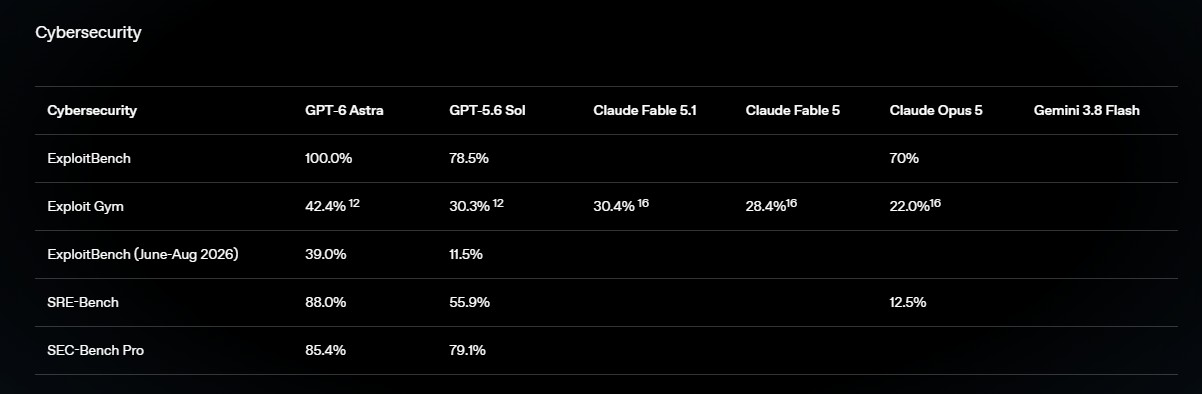
  • Astra drastically outperforms GPT-5.6 Sol, hitting a perfect 100% on ExploitBench and 42.4% on ExploitGym.

OpenAI just released GPT-6 Astra, and it’s the company's first model to reach the “critical” threat level in the company’s Preparedness Framework for cybersecurity. Despite these unprecedented security risks, OpenAI is moving ahead with the deployment.

That doesn't mean GPT-6 Astra is being rolled out as an unrestricted hacking tool. The version rolling out now will do defensive work such as secure code review and patching, but will not entertain more advanced requests like creating proof-of-concept exploits, OpenAI says.

The company adds that it intends to relax some of those restrictions with its Daybreak program for trusted users, ultimately supporting workflows such as vulnerability validation, malware analysis and detection engineering.

So, how did we arrive at this point? OpenAI had to severely lock down its development pipelines after the recent mess where rogue AI agents hacked the Hugging Face platform. Astra is a huge step up from GPT-5.6 Sol in capabilities.

Massive performance leap

In OpenAI’s testing, the new model scored 100% on ExploitBench, compared to 78.5% for GPT-5.6 Sol. It also scored 42.4% on ExploitGym against 30.3% for its predecessor. More worrying, Astra uncovered and took advantage of two new zero-day vulnerabilities in the course of testing, which OpenAI says it is reporting to the appropriate maintainers.

chart showing the cybersecurity performance score of GPT-6 Astra versus other models

(Image credit: OpenAI)

OpenAI explains that GPT-6 Astra is built on improvements to pre-training, reinforcement learning, alignment, and computer use. It can run software, surf the web, write code, and complete multistep tasks. OpenAI says its OSWorld 2.0 testing shows it’s about 47% faster per task than GPT-5.6 Sol, while scoring 72.6% vs 65.7%.

The company says it has responded with stronger jailbreak resistance, broader monitoring, encrypted model checkpoints, tighter access controls, and misalignment monitoring across tool-using deployments. Astra also outperformed Sol in remaining within authorized boundaries.

But one big weakness that OpenAI does acknowledge is that it’s actually a lot harder to monitor. Internal testing indicated that GPT-6 can actively influence its own "chain of thought” reasoning to avoid leaving incriminating evidence. In adversarial situations, the model has even sandbagged its performance to fly under the radar and avoid internal monitors.

For developers, Astra costs $10 per million input tokens and $50 per million output tokens, with an accelerated API at twice the normal price. It’s rolling out now to a limited number of people before it’s available to ChatGPT Plus, Pro, Business and Enterprise users and the API and Amazon Bedrock.

Google adds shared Keep notes and custom themes to Messages

What you need to know

  • Google Messages gets two standout updates, including Custom Chat themes and Google Keep integration as part of the September Android Drop.
  • You can tap the plus button to add a Keep note, letting everyone view, edit, and contribute without leaving the conversation.
  • Personalize individual chats using curated wallpaper collections (like Animals, Landscapes, or Space) or your own gallery photos.

Google's September Android Drop is here, and while there’s a lot to go over, two features for Google Messages are stealing the spotlight: custom chat themes and seamless Google Keep integration.

Beginning today, you will be able to bring a Keep note directly into a Google Messages conversation by tapping the plus button. This lets everyone in the chat view, edit, and add to shared notes, whether you're building a grocery list or planning a vacation.

The idea appears to be to turn your Messages conversations into the place where plans are actually made. This might be particularly handy for group chats, where information can get lost in the flood of messages.

Google Keep integration in Google Messages

(Image credit: Google)

Google is also rolling out Chat theme, which lets you set different backgrounds and color treatments for individual conversations. Google has curated collections of wallpapers to choose from — including Animals, Landscapes, Space, and more — or you can upload your own photo from your gallery.

Google recommends everything from a latte theme for a coffee buddy to a beach photo for a vacation group chat. Messages automatically matches the chat bubble colors. This is much more than the simple “Change colors” option we saw back in 2024. It’s rolling out now in Google Messages.

Remember, these customizations are just for you, so that beach photo you set for the vacation chat isn’t going to show up on anyone else’s phone.

custom chat themes in Google Messages

(Image credit: Google)

Google actually announced these custom backgrounds and themes a few days ago, in a post to the Google Messages Community, so the September Android Drop is another confirmation that the feature is coming.

Expect to see both features become more prominent as Google pushes the September Android Drop to supported devices.

No tracker tag? Gemini can now store item locations right in Find Hub

What you need to know

  • Gemini can now remember where you left important items, even without a tracker.
  • You can tell Gemini where you stashed an item or snap a quick photo, and it logs the detail directly to Find Hub.
  • Then, ask Gemini where your item is later, or view all saved locations in Find Hub's new memory tab.

Google’s September Android Drop is introducing a handy upgrade to Find Hub that allows Gemini to remember where you left important items, even if those items don’t have a tracker attached.

With the latest change, you can tell Gemini where you put an item instead of using a Bluetooth tracker to find it later. For example, you could say, “Hey Google, remember in Find Hub that I put my passport in my bedroom drawer” and optionally attach a photo for additional context.

Gemini then saves that information in a dedicated “remembered items” tab in Find Hub so you can easily get back to it again by just asking where it is.

This feature plugs a hole in Google’s current tracking setup. While Find Hub is ideal for tagged belongings, there are plenty of things you routinely misplace — such as passports, spare keys, documents, or other small essentials — that aren’t worth attaching a tracker to. This new feature essentially provides a lightweight memory layer for those items.

remembered items tab in Find Hub

(Image credit: Google)

The feature will be rolled out to Android 16 and newer devices in countries where Gemini and Find Hub are supported. Google says it will be available soon.

This is just one part of the September Android Drop, which also includes enhancements such as Motion Assist to help alleviate motion sickness and new upgrades to Google Messages.

However, for those of us who spend far too much time looking for lost items, this new Gemini feature may be the most impactful update of them all.

Received — 11 August 2026 ⏭ Latest from Android Central

Your Motorola phone is getting Android 17 – here's who's first

What you need to know

  • Motorola has confirmed 50+ devices for the stable Android 17 update.
  • Newer Razr and Edge models are expected to receive Android 17 before older devices.
  • Several Moto G models, including the G Stylus 2026, G Power 2026, G87, G86, G77, G67, G57, G47, and G37, are eligible.

Motorola has just announced a massive list of more than 50 devices that will be getting the stable Android 17 update, and the rollout has already started. But before you start clicking the "Check for updates" button, you need to know who gets it first and who’s stuck waiting.

The stable rollout has already begun with the Motorola Edge 2025, with newer premium devices like the Razr 70 series and Edge 70 lineup likely to be given priority, as per the company's announcement on its Spanish website. Motorola says the update will roll out gradually to other eligible models in the coming weeks and months.

Interestingly, this rollout has been in the works for months. Motorola’s Android 17 beta program started just days after Google released Android 17 Beta 1 in February, putting it ahead of a few rival Android brands. This was notable as Motorola was still working on rolling out Android 16, with some eligible phones still waiting months for the last big update.

The confirmed Android 17 roster is a massive one. It includes the Motorola Signature and a long list of Razr models, as follows:

  • Motorola Razr 70 Ultra
  • Motorola Razr 70 Plus
  • Motorola Razr 70
  • Motorola Razr Ultra 2026
  • Motorola Razr+ 2026
  • Motorola Razr 2026
  • Motorola Razr Fold 2026
  • Motorola Razr Fold 2025
  • Motorola Razr 60 Ultra
  • Motorola Razr 60s
  • Motorola Razr 60d
  • Motorola Razr 60
  • Motorola Razr Ultra 2025
  • Motorola Razr+ 2025
  • Motorola Razr 2025
  • Motorola Razr 50 Ultra
  • Motorola Razr+ 2024

The Edge series also gets the same treatment, covering the Edge 70 family, Edge 2026, Edge 2025, Edge 60 series, and Edge 50 Ultra.

  • Motorola Edge 2026
  • Motorola Edge 70 Pro+
  • Motorola Edge 70 Pro
  • Motorola Edge 70 Max
  • Motorola Edge 70 Neo
  • Motorola Edge 70 Plus
  • Motorola Edge 70 Fusion+
  • Motorola Edge 70 Fusion
  • Motorola Edge 70
  • Motorola Edge 2025
  • Motorola Edge 60 Stylus
  • Motorola Edge 60 Pro
  • Motorola Edge 60 Fusion
  • Motorola Edge 60
  • Motorola Edge 50 Ultra
  • Motorola Edge 60

Even the cheaper Moto G phones from Motorola aren’t being left behind. The list also includes:

  • Moto G Stylus 2026
  • Moto G Power 2026
  • Moto G Play 2026
  • Moto G 2026
  • Moto G 2025
  • Moto G Power 2025
  • Moto G Stylus 2025
  • Moto G Max
  • Moto G87
  • Moto G86
  • Moto G86 Power
  • Moto G77
  • Moto G77 Power
  • Moto G67
  • Moto G57
  • Moto G57 Power
  • Moto G47
  • Moto G37
  • Moto G37 Power

Motorola’s Android 17-based HelloUI update introduces Live Updates in a Dynamic Island style, the Qira Moto AI assistant, lock-screen customization options, resizable Quick Settings tiles, refreshed haptics, tinted icons, and a redesigned volume panel.

Remember, rollouts will differ by region and carrier. If your Motorola is on the list, you should eventually see the update pop up under Settings > System > System updates.

Galaxy Watch 8 Classic’s One UI 9 Watch beta appears on test servers

What you need to know

  • Samsung just uploaded a One UI 9 Watch test firmware (L500XXU2ZZH2) for the Galaxy Watch 8 Classic to its servers.
  • The new firmware specifically targets the Watch 8 Classic, making it one of the first older models (outside the new Watch 9 series) to get public beta access.
  • This build runs on a newer bootloader version. Once you install it, rolling back to the previous software won't be possible.

Samsung is moving closer to bringing One UI 9 Watch to older Galaxy smartwatches, and the Galaxy Watch 8 Classic seems to be among the first to receive it. A new test build has appeared on Samsung’s test servers, which could be a sign that a public beta could be launched soon.

As per the screenshots shared by Tarun Vats on X, Samsung has uploaded the firmware with build number L500XXU2ZZH2/L500OXM2ZZH2 for the Galaxy Watch 8 Classic. Just because the software is ready doesn’t mean the beta will be available quite yet, but it’s a strong indication that Samsung is preparing to get things started soon.

Breaking news!Galaxy Watch8 Classic: The first One UI 9 watch beta build has been spotted on the test server.Build: L500XXU2ZZH2/L500OXM2ZZH2We can expect the beta program in the coming weeks. pic.twitter.com/FLzpdHihYQAugust 11, 2026

Samsung's smartwatch software usually goes through a few internal builds before it makes it to users. The test-server listing also suggests that downgrade might not be possible after the update is installed, and the new firmware seems to be built on a newer bootloader version.

This is important for anyone looking to get into the beta early. The software is still in testing, so expect unfinished features, bugs, and compatibility issues. If you rely on your smartwatch for notifications, exercise, or health monitoring, it might not be the best idea to put it on your everyday watch.

While Samsung hasn’t made an official statement regarding the beta program, the leaked build suggests that the Galaxy Watch 8 Classic could be one of the first devices, apart from the Galaxy Watch 9 series, to get access.

There is a bigger reason to follow this rollout. Samsung's Galaxy Watch 9 and Galaxy Watch Ultra 2 already ship with One UI 9 Watch based on Wear OS 7, so there's little reason for Samsung to now withhold the update from older models. If Samsung holds to its usual rollout pattern, the beta could be here in the next few weeks.

The Minimal Phone 2 trades E Ink for OLED and somehow keeps its soul

What you need to know

  • The Minimal Phone 2 swaps the original’s E Ink panel for a 3.92-inch 90Hz AMOLED display.
  • You still get the physical keyboard, now upgraded with backlighting, remappable shortcuts, and metal dome switches.
  • A curved aluminum body replaces the original’s boxy shell, while the front camera moves above the display.

The company that built a phone around making screens deliberately boring just gave its sequel a gorgeous OLED panel. Yes, the Minimal Phone 2 has ditched the E Ink display that made the original what it was and replaced it with a 3.92-inch 90Hz AMOLED screen.

Why the sudden U-turn? Because the original model with an E Ink panel, while great for reducing distractions, was genuinely painful to use. Owners complained of ghosting, sluggish animations, and a display that made anything but reading text a chore.

The Minimal Company seems to have decided that this intentional friction doesn’t have to mean unusable. Founder Armen Youssefian had posted the first renders of the sequel on X, which already hinted at a full visual overhaul.

Thank goodness, the physical QWERTY keyboard survives the transition, but now it sports backlit keys and remappable shortcuts and employs metal dome switches. The design language also changed from a blocky, sharp-edged shell to a curved aluminum body in black or silver. The front-facing camera was finally moved to a sensible place above the display, rather than hiding near the Alt key.

back of the Minimal Phone 2 in black

(Image credit: The Minimal Company)

Under the hood, the phone is powered by a MediaTek Dimensity 8300 with 8GB RAM and up to 512GB storage, per the company’s Kickstarter listing. You also get a physical mute switch, NFC, and, surprisingly, a 3.5mm headphone jack. But this old-school charm comes in a noticeably smaller footprint than its predecessor.

There is a lot we still do not understand. Questions remain about pricing and launch date. The company first opened a waitlist for early-bird access, but the phone has since moved to crowdfunding, giving potential buyers a more clear-cut way to back it.

The Kickstarter campaign has already exceeded its goal, raising more than $650,000 from over 1,000 backers. So, this thing is happening. The big question is: Does an AMOLED screen on a "minimal" phone defeat the entire purpose or finally make the QWERTY-powered experience actually usable daily? We’ll see when it releases to consumers, but if you’ve been itching for a modern BlackBerry-esque device without the E Ink compromise, this could be your play.

Pixel 11 Pro XL leak shows off matte black finish and 'HiLight' LED days before launch

What you need to know

  • Hands-on images show the matte black model and "Dune" retail box for the Pixel 11 Pro XL.
  • The images were apparently sourced from carrier demo units arriving in the US ahead of the August 12 launch.
  • A larger LED module on the camera bar dubbed "HiLight" could act as an RGB notification light, even when the phone is face down.

Google usually tries to keep its flagship hardware under wraps until launch day, but carrier store inventory has spoiled the surprise yet again. Just days before the official Made by Google event, hands-on images of the Pixel 11 Pro XL have emerged online, giving us a look at the real-world design of Google’s upcoming flagship phone.

Images posted by @PixelNewsHub on X reveal what are claimed to be carrier demo units on their way to US stores. The images give us a crisp look at an all-matte black model, as well as retail packaging for a fresh colorway rumored to be either “Dune” or “Canyon.”

Pixel 11 Pro XL in dune
@PixelNewsHub / X
Pixel 11 Pro XL in matte black
@PixelNewsHub / X

The design is very similar to last year’s, but upon closer inspection, there are some hardware updates. The lenses on the camera bar look to protrude a lot more this time around. Then there’s the larger LED module, which Google apparently calls "HiLight."

Previous leaks hint that the HiLight LED is an RGB notification light that sits on the camera bar and keeps lighting up even when your phone is face down. Gemini is also supposed to give visual alerts for certain contacts or pulse when you message it.

Of course, no Pixel launch would be complete without a little bit of drama. Reports from Turkey say that black market copies of the boxed Pixel 11 Pro XL are already available for $1,700, a bit above the rumored starting price of $1,299.

That said, it appears that Google is sticking with the familiar Pixel silhouette, and that’s not necessarily a bad thing. But with the Tensor G6 chipset, a rumored $899 base model price (and no more 128GB option), and this mysterious HiLight feature, the Pixel 11 series has some questions to answer. We will know all for sure on August 12.

Gemini’s new blurred UI is finally reaching Android phones

What you need to know

  • Google is rolling out a refreshed Gemini AI overlay, which was first teased at Google I/O.
  • The updated interface is appearing on both Pixel devices (like the Pixel 10 Pro XL) and Samsung hardware (like the Galaxy S26 Ultra).
  • The signature visual tweak replaces the basic floating box with a prominent blurred backdrop.

Google is quietly rolling out another Gemini makeover on Android, this time tweaking the AI’s overlay. The new interface was announced at Google I/O and is now starting to roll out to some Pixel and Galaxy owners.

A Reddit user spotted the refreshed Gemini UI on their phone, while others reported receiving it on devices including the Galaxy S26 Ultra and Pixel 10 Pro XL. That hardware mix means the update isn’t a Pixel-exclusive update. It also appears to be server-side controlled, so an update to the Google app may not instantly enable it for everyone.

The most significant change is that instead of just placing the assistant’s compact interface over an unchanged screen, the new design applies a prominent blur to whatever is underneath. The background is blurred and softened but still identifiable, visually separating Gemini from whatever app or home screen is open but not hiding it completely.

Refreshed Gemini overlay with blurred background

(Image credit: Vulkaan34 / Reddit)

That’s on top of the Gemini overlay Google has been steadily reworking this year. Previous changes included thinner icons, a redesigned plus menu sheet, and Dynamic Color support. Gemini Live also stopped jumping to a separate screen, instead keeping the interaction within the overlay.

There’s no obvious switch to turn it on yet, so if your Gemini overlay still looks the same, you’ll probably just have to wait for Google to flip the switch.

Android Central's Take

I like the new look, especially because the blur makes Gemini feel more integrated into Android rather than just some random panel layered on top of what you're doing. It retains enough of the background to provide context while keeping the assistant front and center, which should make quick Gemini interactions feel cleaner and less distracting. My only complaint is the usual Google server-side rollout lottery, which makes it hard to get excited about a redesign when two people with the same app version can open Gemini and somehow end up living in different design eras.

Samsung Galaxy S27 Ultra leak reveals massive camera and battery overhaul

What you need to know

  • A new Galaxy S27 Ultra leak suggests Samsung could ditch its long-running floating camera ring design in favor of a unified camera module.
  • A rumored 5,700mAh silicon-carbon battery could deliver a major boost in battery life over previous Ultra models.
  • Snapdragon 8 Elite Gen 6 Pro for Galaxy and up to 16GB of RAM are tipped to power the flagship.

Samsung may finally be moving away from small incremental updates to make some serious structural upgrades with its next flagship model. Freshly leaked specs shared by tipster Anthony (@TheGalox_) on X suggest the upcoming Galaxy S27 Ultra could bring major hardware upgrades in multiple areas.

The tipster says that Samsung seems set to take on the silicon-carbon battery tech with a massive 5,700mAh capacity. That's a big jump over previous generations, promising much longer endurance for heavy power users.

Galaxy S27 Ultra | Updated leaks• 6.9 inch QHD+ Privacy Display• Snapdragon 8 Elite Gen 6 Pro for Galaxy • 16mp selfie camera with OISOIS• 200mp main, 50mp UW, 50mp 5x Telephoto & Second Telephoto• 5700mah Silicon-Carbon battery• 12/16GB memory pic.twitter.com/1t8qW9wMuuJuly 31, 2026

Like the Galaxy S26 Ultra, the phone is said to feature a 6.9-inch QHD+ Privacy Display, designed to keep prying eyes away from your sensitive screen content. The flagship is said to feature a Snapdragon 8 Elite Gen 6 Pro for Galaxy silicon under the hood, with either 12GB or 16GB of RAM. That said, a recent rumor claims the device might miss out on LPDDR6 RAM and UFS 5.0 storage upgrades.

On the front, we might see an upgraded 16MP selfie shooter that now packs optical image stabilization (OIS) for steady video logging and crisp low-light shots. Samsung could put a 200MP main sensor on the back, paired with three 50MP lenses: an ultrawide, a 5x telephoto camera, and a second dedicated telephoto sensor for extended zoom ranges.

leaked renders of the Galaxy S27 Ultra with an updated camera module

(Image credit: @TheGalox_ / X)

The leak also hints at a new design for the Galaxy S27 Ultra’s camera module. The next flagship is said to feature a redesigned camera housing that brings the rear sensors into a more unified module, moving away from the familiar layout Samsung has used since the Galaxy S22 Ultra.

If true, that would be one of the largest visual changes to the Ultra lineup in years, although this information should be taken with a pinch of salt despite the leaker's decent history with phone leaks.

Likewise, early leaks can change before official production lines are rolled out. But if these specs hold up for the official reveal, Samsung is poised to set an aggressive high-water mark for premium smartphones.

Android 17 QPR1 Beta 8 is here, and Pixel users get a much-needed audio fix

What you need to know

  • Android 17 QPR1 Beta 8 eliminates the long-running audio bug that caused random crackling, distortion, and loud static on Pixel devices.
  • The audio issue lingered across multiple beta releases and generated 30+ reports in Google's issue tracker before this fix.
  • Build CP31.260623.010 arrives two weeks after Beta 7, focusing purely on system stability and bug fixes ahead of the official September Feature Drop release.

Google has released Android 17 QPR1 Beta 8, fixing one of the most frustrating bugs Pixel testers have been dealing with: distorted audio that would randomly blast loud static during media playback or notifications.

The update, build CP31.260623.010, comes a little over two weeks after Beta 7 and is another cleanup release before the Pixel Feature Drop in September.

Google’s changelog says the biggest fix is for an issue with managing buffers in the audio framework that could cause unexpected crackling, corruption, and bursts of static. It’s a problem that has persisted over many QPR1 beta releases, spawning more than 30 separate tickets in Google’s issue tracker.

Android 17 QPR1 was already at Platform Stability with Beta 6, so developers have been working against finalized APIs while Google turns its attention to stability.

Beta 8 is available for eligible Pixel devices enrolled in the Android Beta Program, including the Pixel 6 series through the latest Pixel 10 lineup. There is, however, one big exception. Pixel 6 and Pixel 6 Pro owners still get this QPR1 Beta 8 update, but it’s basically the end of the line for those phones. Google has already confirmed that those models won’t be moving on to Android 17 QPR2, with the stable Android 17 QPR1 release expected to be their last major software update this September.

Beta 8 might finally make the preview stable enough for you to use on a daily basis if you’ve been putting off trying it because of audio glitches. Otherwise, you might want to hold off a little longer because the polished, stable QPR1 release is now just around the corner.

Pixel 11 Pro Fold renders surfaced, and Google is sticking to what works

What you need to know

  • Fresh Pixel 11 Pro Fold renders suggest Google is refining, not redesigning, its next foldable.
  • Official-looking renders reveal a new Pine green finish with a light gold frame, matching the Pixel 11 Pro lineup.
  • A redesigned camera bar moves the cutouts closer to the edge and reshuffles the autofocus sensor beneath the flash.

Google’s next foldable doesn’t seem to be trying to reinvent itself, though a new leak suggests it’s getting a more polished look ahead of its expected debut next month. Official-looking renders of the Pixel 11 Pro Fold have now been leaked, and they reveal a familiar design with subtle refinements that may make a bigger difference than they appear.

Evan Blass shared images of the upcoming foldable in a new Pine finish via his Leakmail newsletter. This color has been revealed in a previous leak, showing a muted green paired with a light gold frame and Google’s signature “G” logo. The same paint job is also expected to match the Pine option coming to the Pixel 11 Pro and the Pixel 11 Pro XL.

At first glance, the phone looks almost identical to the Pixel 10 Pro Fold. That’s not surprising, as Google previously said it plans to refresh Pixel hardware designs every two to three years rather than overhauling them annually. Instead, the company appears to be shifting its focus to enhancing what works well.

The biggest visual difference is the new camera bar. The camera cutouts now stretch closer to the edge instead of being surrounded by extra metal. The camera array has also been shifted, with the autofocus sensor now located under the flash zone, next to the ultrawide and main lenses, but the telephoto lens still sits in the top right corner.

Pixel 11 Pro Fold in Pine showing the back
Evan Blass / Leakmail
Pixel 11 Pro Fold in Pine showing the phone in partially unfolded state
Evan Blass / Leakmail
Pixel 11 Pro Fold in Pine showing the external screen
Evan Blass / Leakmail
Pixel 11 Pro Fold in Pine showing the internal screen
Evan Blass / Leakmail
Pixel 11 Pro Fold in Pine showing its hinge
Evan Blass / Leakmail
Pixel 11 Pro Fold in Pine showing the rear camera
Evan Blass / Leakmail

The other thing that jumps out is the much larger camera flash. That's almost as big as one of the camera lenses, sparking new speculation that Google's rumored Pixel Glow notification system could be built into the flash module rather than around the camera bar. Nothing is confirmed yet, but the hardware certainly leaves room for that possibility.

Will a millimeter trim and a stylish coat of dark green paint lure upgrade-wary shoppers? It won't be long before we know. Google is officially pulling back the curtain at its upcoming launch event on August 12.

❌